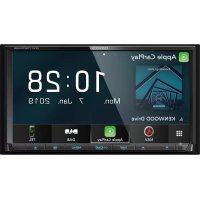
DNX7190DABS - GPS Navigation System KENWOOD - Free user manual and instructions
Find the device manual for free DNX7190DABS KENWOOD in PDF.


| Product Type | GPS navigation system with multimedia radio |
| Brand | Kenwood |
| Model | DNX7190DABS |
| Installation dimensions (W × H × D) | 178 × 100 × 160 mm |
| Weight | 2.4 kg |
| Screen size | 6.95 inches (156.6 × 81.6 mm), active matrix TFT screen |
| Screen resolution | 800 × 480 pixels |
| Power supply | 12 V DC (car battery) |
| Main functions | GPS navigation, DAB+, Bluetooth, Apple CarPlay (wired), Android Auto (USB), Spotify, USB/SD, iPod/iPhone, FM/AM radio, HDMI, rear view camera, wireless mirroring (depending on model) |
| Supported audio formats | MP3, WMA, AAC, WAV, FLAC, Vorbis; up to 192 kHz/24 bit (USB/SD) |
| Supported video formats | MPEG-1/2, H.264, MPEG-4, WMV, MKV; up to 1920×1080 |
| Audio output | 4 × 50 W max; 4 V pre-out |
| Connectivity | Bluetooth 5.0, Wi-Fi (depending on model), USB (2 ports), HDMI, AV input, camera, GPS antenna |
| Care and cleaning | Wipe with a soft, dry cloth; for stains, use a cloth slightly dampened with a mild cleaner, then wipe dry. Do not use solvents or alcohol. |
| Security | Configurable security code (4 to 8 digits) for theft protection. Do not look at the screen while driving. |
| Operating temperature | Avoid extreme temperatures; the device may not operate properly in excessive heat or cold. |
| Warranty and repairability | Consult an authorized Kenwood dealer for repairs. Spare parts are available from after-sales service. |
| General information | Manual available in PDF at kenwood.com/cs/ce/; 116 pages. Manufactured by JVC KENWOOD Corporation. |
Frequently Asked Questions - DNX7190DABS KENWOOD
User questions about DNX7190DABS KENWOOD
0 question about this device. Answer the ones you know or ask your own.
Ask a new question about this device
Download the instructions for your GPS Navigation System in PDF format for free! Find your manual DNX7190DABS - KENWOOD and take your electronic device back in hand. On this page are published all the documents necessary for the use of your device. DNX7190DABS by KENWOOD.
USER MANUAL DNX7190DABS KENWOOD
DNX9190DABS DNX7190DABS DNX5190DABS DNR4190DABS DNX419DABS DNR3190BTS
SYSTÈME DE NAVIGATION GPS
MODE D'EMPLOI
JVCKENWOOD Corporation
Digital Audio Broadcasting
DOLBY AUDIO™

DVD
VIDEO



Bluetooth®
WiFi
CERTIFIED
Table des matières
[Locale]
REMARQUE
natural_image
Pure diagram of a device panel with no text, numbers, or symbols visibleDNR4190DABS / DNX419DABS / DNR3190BTS
DNX7190DABS
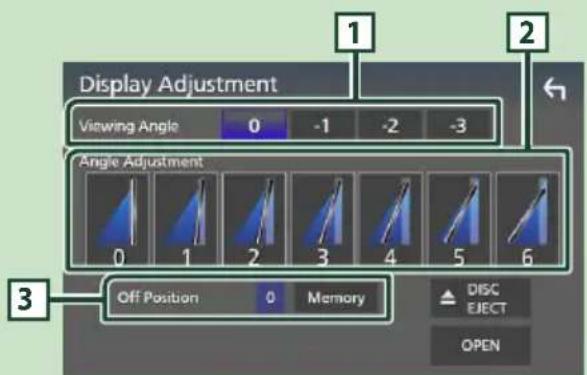
1 Angle de vue
natural_image
Simple line drawing of a hand cursor clicking a button (no text or symbols)●Toucher longuement
natural_image
Simple line drawing of a door with a control panel and directional arrows (no text or symbols)
DNX5190DABS / DNX419DABS
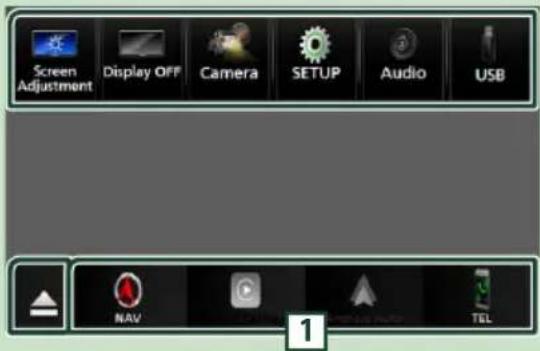
REMARQUE
1
REMARQUE
1
② Touchez [Traffic Conditions].
À propos du trafic
[NAV Interrupt Speaker]
KENWOOD Traffic Powered By INRIX

[Photo Frame is .....]
natural_image
Technical line drawing of a CD or DVD disc assembly with an arrow indicating motion (no text or symbols present)DNX5190DABS / DNX419DABS
natural_image
Technical line drawing of a mechanical component with internal cavity and mounting bracket (no text or symbols)DNX5190DABS / DNX419DABS
natural_image
Scenic coastal landscape with green vegetation and distant hills, framed by numbered boxes (6, 7, 8) against a blue sky.La lecture commence.
natural_image
Coastal landscape with green foliage and ocean horizon, no visible text or symbolsnatural_image
Composite image showing a highway with vehicles and city skyline under blue sky, featuring inset images of high-speed rail infrastructure and a bridge (no text or symbols)REMARQUE
natural_image
Coastal landscape with green foliage and ocean background, no visible text or symbols■ [Menu Language] / [Subtitle Language] / [Audio Language]
■[Dynamic Range Control]
[Menu Language], [Subtitle Language],
[Audio Language].
1
natural_image
Line drawing of a USB connector with a cable, showing a port and cable outlet (no text or symbols)natural_image
Line drawing of a mechanical device with a lever and base plate (no text or symbols)natural_image
Pure mechanical assembly diagram showing a bracket with a pin inserted (no text or symbols)REMARQUE
REMARQUE
REMARQUE

REMARQUE
■[Announcement Select]
[Select All]
■ HFP [Hands Free1]/ [Hands Free2]/ [No Connection.]
[TEL (HFP) 1], [TEL (HFP) 2]
[√ All]
La lecture commence.
REMARQUE
REMARQUE
DNR4190DABS / DNX419DABS / DNR3190BTS
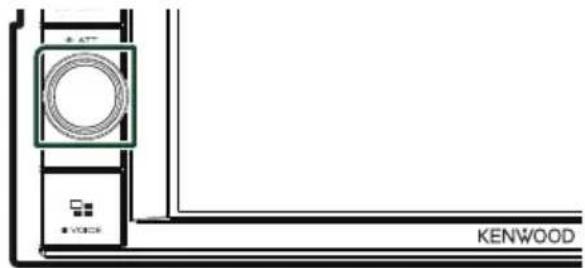
Tournez la molette.
natural_image
Pure electrical circuit lines without any symbols■[Add number from phonebook]
[√ All]
[Bluetooth HF/Audio]

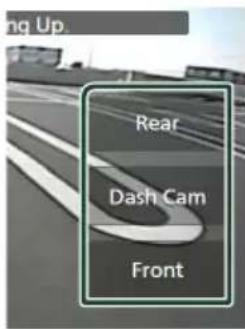
REMARQUE
[Rear Camera Interruption]
[Rear Camera for Car interface]
[Parking Guidelines]
[Front Camera Interruption] *
2 [Front]
3 [Dashboard Camera]
4 [Right]
5 [Left]
6 [None]
3 Touchez [Enter].
2 [Front]
3 [Dashboard Camera] (Sauf DNR3190BTS)
4 [Right]
5 [Left]
6 [None]
3 Touchez [Enter].
REMARQUE
natural_image
Coastal landscape with green foliage and ocean background, no visible text or symbols3 Touchez [TV Ctrl].
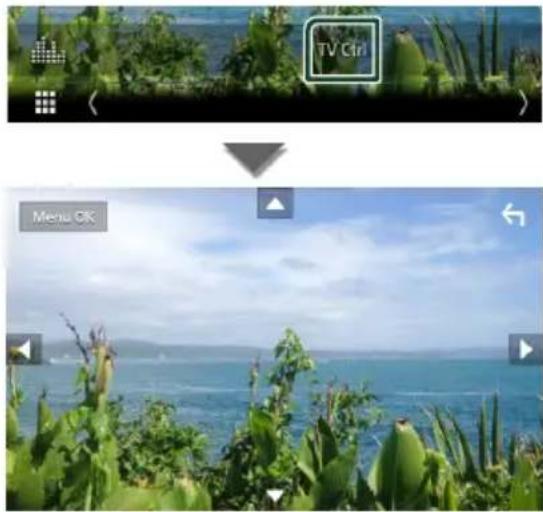
natural_image
Scenic coastal view with green foliage and ocean, no visible text or symbols2 Touchez [Screen Adjustment].
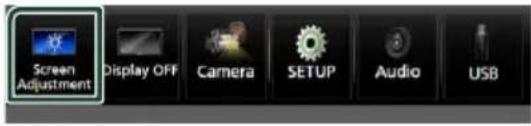
■ [Backlight] / [Contrast] / [Black] / [Brightness] / [Colour] / [Tint]

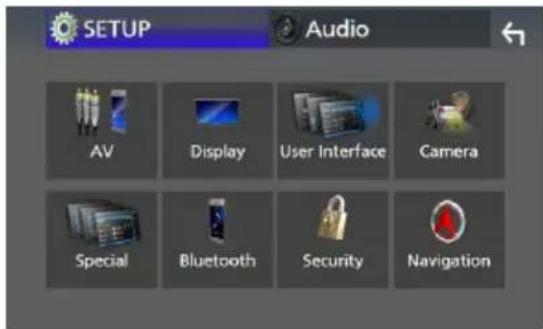
[Steering Remote Controller]
[Beep Volume] (DNX9190DABS)
[Beep for Parking distance control] (DNX9190DABS / DNX7190DABS / DNX5190DABS) \*1
[Parking Distance Display] (DNX9190DABS / DNX7190DABS / DNX5190DABS) \*1
[Parking Distance Position] (DNX9190DABS / DNX7190DABS / DNX5190DABS) \*1
■ [Touch Panel Adjust] (Sauf DNX9190DABS)
REMARQUE
[Wallpaper Customize]
[User]
3 Touchez [Enter].
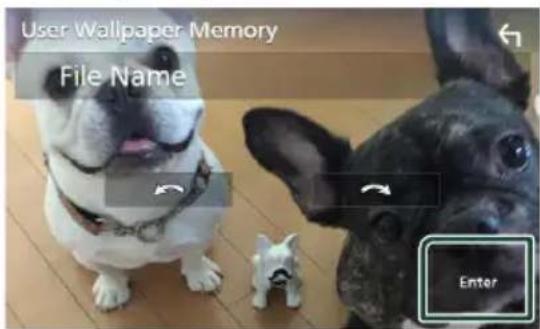
■[Speech Quality Adjust]
■ [iPod Bluetooth Connection]
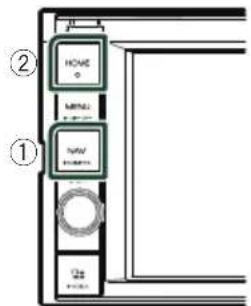
[Speaker]
REMARQUE
[HPF FREQ]
[Phase Inversion] ^4
[FREQ] (passe Haut)
[Fader / Balance]
REMARQUE
Contrôle de l'audio
Décalage du volume
5 Touchez [Dual Zone].
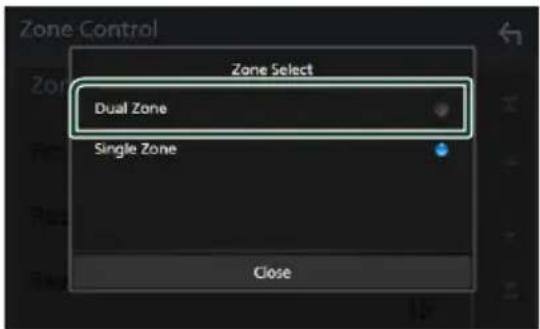
[Zone Select]
[Front Source], [Rear Source]
[Bass Boost]
3 Touchez [Position/DTA].
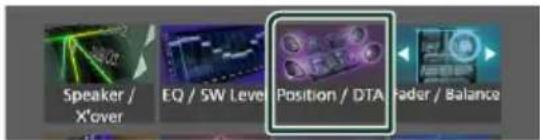
- Configurer la position d'écoute (p.88)
- Configurer le focus avant (p.88)
![KENWOOD DNX7190DABS - [Bass Boost] - 2](/content/2026/03/451470/images/34f05f50457dfb8db8a04dfb7c6fed153492291f38c50c15025a5446e7603165.jpg)
Position d'écoute
■[Sound Image LR (Front)]
■[Sound Image LR (Rear)]
[Audio SETUP Memory]
[Audio SETUP Recall]
natural_image
Diagram of a handheld device with battery casing and internal components, showing no text or symbolsnatural_image
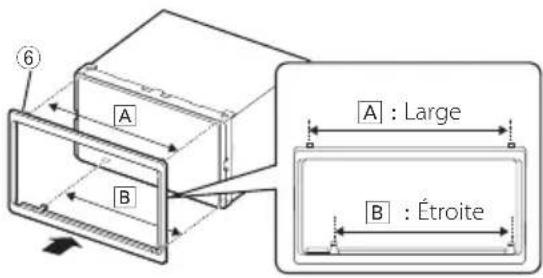
Diagram showing a box being placed into a rectangular frame, with an arrow indicating the motion (no text or symbols present)DNX5190DABS / DNR4190DABS / DNX419DABS / DNR3190BTS
![KENWOOD DNX7190DABS - [Audio SETUP Recall] - 2](/content/2026/03/451470/images/a6bbc2eaa9dbe2d1de87887f5d4b15d00b1d243173f271e591a0363b4ea8fc7b.jpg)
Antenne GPS
REMARQUE
natural_image
Diagram showing light rays interacting with a rectangular device, with an arrow indicating direction (no text or symbols present)natural_image
Technical line drawing of a mechanical component with labeled parts (no text or symbols present)natural_image
Illustration of hands using a tool to adjust or install a rectangular object, with arrows indicating motion (no text or symbols present)REMARQUE
natural_image
Line drawing of a hand holding a rectangular object with a handle, no text or symbols presentnatural_image
Technical illustration of a mechanical connector with a cylindrical shaft and threaded end (no text or symbols)There is an error in the speaker wiring. Please check the connections./
Navigation Error. Please turn on power again later.
The speed sensor must be connected to use Apple CarPlay wirelessly. Please verify the proper connections or plug in by USB to use Apple CarPlay.
The GPS antenna must be connected to use Apple CarPlay wirelessly. Please verify the proper connections or plug in by USB to use Apple CarPlay.
The speed sensor and the GPS antenna must be connected to use Apple CarPlay wirelessly. Please verify the proper connections or plug in by USB to use Apple CarPlay.
6-3/16 × 3-3/16 pouces
DNX5190DABS
: 6,75 pouces de large (diagonale)
: 151,8 mm (L) × 79,68 mm (H)
5-31/32 × 3-1/8 pouces
DNR4190DABS / DNX419DABS / DNR3190BTS
: 6,2 pouces de large (diagonale)
: 137,5 mm (L) × 77,2 mm (H)
Système d'affichage
DNX9190DABS: Panneau LCD AAS
Sauf DNX9190DABS : Panneau LCD TN
Système de lecture
: 16 bits/20 bits/24 bits
■Section interface USB
Norme USB
:FAT16, FAT32, exFAT, NTFS
LW: 153 - 279 kHz (9 kHz)
MW:531-1611 kHz (9 kHz)
DNX5190DABS / DNX419DABS
: 2,1 kg
DNR4190DABS / DNR3190BTS
: 1,7 kg
REMARQUE
• DVD is a trademark of DVD Format/Logo Licensing Corporation registered in the U.S., Japan and other countries.
- This item incorporates copy protection technology that is protected by U.S. patents and other intellectual property rights of Rovi Corporation. Reverse engineering and disassembly are prohibited.
- Microsoft and Windows Media are either registered trademarks or trademarks of Microsoft Corporation in the United States and/or other countries.
- This software is based in part on the work of the independent JPEG Group.
• The "AAC" logo is a trademark of Dolby Laboratories. - Use of the Made for Apple badge means that an accessory has been designed to connect specifically to the Apple product(s) identified in the badge, and has been certified by the developer to meet Apple performance standards. Apple is not responsible for the operation of this device or its compliance with safety and regulatory standards. Please note that the use of this accessory with an Apple product may affect wireless performance.
• Apple, iPhone, iPod, iPod touch, and Lightning are trademarks of Apple Inc., registered in the U.S. and other countries.
• Apple, Siri, Apple CarPlay and Apple CarPlay logo are trademarks of Apple Inc., registered in the U.S. and other countries.
• INRIX is a registered trademark of INRIX, Inc. - SPOTIFY and the Spotify logo are among the registered trademarks of Spotify AB.
- Android, Android Auto, Google Play and other marks are trademarks of Google LLC.
- SDXC and microSDXC Logos are trademarks of SD-3C LLC.
- Wi-Fi ^ is a registered trademark of Wi-Fi Alliance ^ .
- The Wi-Fi CERTIFIED™ Logo is a certification mark of Wi-Fi Alliance®.
- The terms HDMI and HDMI High-Definition Multimedia Interface, and the HDMI logo are trademarks or registered trademarks of HDMI Licensing LLC in the United States and other countries.
- This product includes FontAvenue® fonts licenced by NEC Corporation.FontAvenue is a registered trademark of NEC Corporation.
FontAvenue
- This product includes "Ubiquitous QuickBoot TM" technology developed by Ubiquitous Corp. Ubiquitous QuickBoot TM is a trademark of Ubiquitous Corp. Copyright© 2017 Ubiquitous Corp. All rights reserved.

- THIS PRODUCT IS LICENSED UNDER THE AVC PATENT PORTFOLIO LICENSE FOR THE PERSONAL USE OF A CONSUMER OR OTHER USES IN WHICH IT DOES NOT RECEIVE REMUNERATION TO (j)ENCODE VIDEO IN COMPLIANCE WITH THE AVC STANDARD ("AVC VIDEO") AND/OR (jj)DECODE AVC VIDEO THAT WAS ENCODED BY A CONSUMER ENGAGED IN A PERSONAL ACTIVITY AND/OR WAS OBTAINED FROM A VIDEO PROVIDER LICENSED TO PROVIDE AVC VIDEO. NO LICENSE IS GRANTED OR SHALL BE IMPLIED FOR ANY OTHER USE. ADDITIONAL INFORMATION MAY BE OBTAINED FROM MPEG LA, L.L.C. SEE HTTP://WWW.MPEGLA.COM
- THIS PRODUCT IS LICENSED UNDER THE MPEG-4 VISUAL PATENT PORTFOLIO LICENSE FOR THE PERSONAL AND NON-COMMERCIAL USE OF A CONSUMER FOR (j) ENCODING VIDEO IN COMPLIANCE WITH THE MPEG-4 VISUAL STANDARD ("MPEG-4 VIDEO") AND/OR (jj) DECODING MPEG-4 VIDEO THAT WAS ENCODED BY A CONSUMER ENGAGED IN A PERSONAL AND NON-COMMERCIAL ACTIVITY AND/OR WAS OBTAINED FROM A VIDEO PROVIDER LICENSED BY MPEG LA TO PROVIDE MPEG-4 VIDEO. NO LICENSE IS GRANTED OR SHALL BE IMPLIED FOR ANY OTHER USE. ADDITIONAL INFORMATION INCLUDING THAT RELATING TO PROMOTIONAL, INTERNAL AND COMMERCIAL USES AND LICENSING MAY BE OBTAINED FROM MPEG LA, LLC. SEE HTTP://WWW.MPEGLA.COM.
- THIS PRODUCT IS LICENSED UNDER THE VC-1 PATENT PORTFOLIO LICENSE FOR THE PERSONAL AND NON-COMMERCIAL USE OF A CONSUMER TO (i) ENCODE VIDEO IN COMPLIANCE WITH THE VC-1 STANDARD ("VC-1 VIDEO") AND/OR (ii) DECODE VC-1 VIDEO THAT WAS ENCODED BY A CONSUMER ENGAGED IN A PERSONAL AND NON-COMMERCIAL ACTIVITY AND/OR WAS OBTAINED FROM A VIDEO PROVIDER LICENSED TO PROVIDE VC-1 VIDEO. NO LICENSE IS GRANTED OR SHALL BE IMPLIED FOR ANY OTHER USE. ADDITIONAL INFORMATION MAY BE OBTAINED FROM MPEG LA, L.L.C. SEE HTTP://WWW.MPEGLA.COM
- libFLAC Copyright (C) 2000-2009 Josh Coalson Copyright (C) 2011-2013 Xiph.Org Foundation Redistribution and use in source and binary forms, with or without modification, are permitted provided that the following conditions are met:
Annexes
– Redistributions of source code must retain the above copyright notice, this list of conditions and the following disclaimer.
– Redistributions in binary form must reproduce the above copyright notice, this list of conditions and the following disclaimer in the documentation and/or other materials provided with the distribution.
– Neither the name of the Xiph.org Foundation nor the names of its contributors may be used to endorse or promote products derived from this software without specific prior written permission.
THIS SOFTWARE IS PROVIDED BY THE COPYRIGHT HOLDERS AND CONTRIBUTORS ``AS IS'' AND ANY EXPRESS OR IMPLIED WARRANTIES, INCLUDING, BUT NOT LIMITED TO, THE IMPLIED WARRANTIES OF MERCHANTABILITY AND FITNESS FOR A PARTICULAR PURPOSE ARE DISCLAIMED. IN NO EVENT SHALL THE FOUNDATION OR CONTRIBUTORS BE LIABLE FOR ANY DIRECT, INDIRECT, INCIDENTAL, SPECIAL, EXEMPLARY, OR CONSEQUENTIAL DAMAGES (INCLUDING, BUT NOT LIMITED TO, PROCUREMENT OF SUBSTITUTE GOODS OR SERVICES; LOSS OF USE, DATA, OR PROFITS; OR BUSINESS INTERRUPTION) HOWEVER CAUSED AND ON ANY THEORY OF LIABILITY, WHETHER IN CONTRACT, STRICT LIABILITY, OR TORT (INCLUDING NEGLIGENCE OR OTHERWISE) ARISING IN ANY WAY OUT OF THE USE OF THIS SOFTWARE, EVEN IF ADVISED OF THE POSSIBILITY OF SUCH DAMAGE.
- libvorbis
Copyright (c) 2002-2008 Xiph.org Foundation Redistribution and use in source and binary forms, with or without modification, are permitted provided that the following conditions are met:
– Redistributions of source code must retain the above copyright notice, this list of conditions and the following disclaimer.
– Redistributions in binary form must reproduce the above copyright notice, this list of conditions and the following disclaimer in the documentation and/or other materials provided with the distribution.
- Neither the name of the Xiph.org Foundation nor the names of its contributors may be used to endorse or promote products derived from this software without specific prior written permission.
THIS SOFTWARE IS PROVIDED BY THE COPYRIGHT HOLDERS AND CONTRIBUTORS ``AS IS'' AND ANY EXPRESS OR IMPLIED WARRANTIES, INCLUDING, BUT NOT LIMITED TO, THE IMPLIED WARRANTIES OF MERCHANTABILITY AND FITNESS FOR A PARTICULAR PURPOSE ARE DISCLAIMED. IN NO EVENT SHALL THE FOUNDATION OR CONTRIBUTORS BE LIABLE FOR ANY DIRECT, INDIRECT, INCIDENTAL, SPECIAL, EXEMPLARY, OR CONSEQUENTIAL DAMAGES (INCLUDING, BUT NOT LIMITED TO, PROCUREMENT OF SUBSTITUTE GOODS OR SERVICES; LOSS OF USE, DATA, OR PROFITS; OR BUSINESS INTERRUPTION) HOWEVER CAUSED AND ON ANY THEORY OF LIABILITY,
WHETHER IN CONTRACT, STRICT LIABILITY, OR TORT (INCLUDING NEGLIGENCE OR OTHERWISE) ARISING IN ANY WAY OUT OF THE USE OF THIS SOFTWARE, EVEN IF ADVISED OF THE POSSIBILITY OF SUCH DAMAGE.
- libogg
Copyright (c) 2002, Xiph.org Foundation Redistribution and use in source and binary forms, with or without modification, are permitted provided that the following conditions are met:
– Redistributions of source code must retain the above copyright notice, this list of conditions and the following disclaimer.
– Redistributions in binary form must reproduce the above copyright notice, this list of conditions and the following disclaimer in the documentation and/or other materials provided with the distribution.
- Neither the name of the Xiph.org Foundation nor the names of its contributors may be used to endorse or promote products derived from this software without specific prior written permission.
THIS SOFTWARE IS PROVIDED BY THE COPYRIGHT HOLDERS AND CONTRIBUTORS ``AS IS'' AND ANY EXPRESS OR IMPLIED WARRANTIES, INCLUDING, BUT NOT LIMITED TO, THE IMPLIED WARRANTIES OF MERCHANTABILITY AND FITNESS FOR A PARTICULAR PURPOSE ARE DISCLAIMED. IN NO EVENT SHALL THE FOUNDATION OR CONTRIBUTORS BE LIABLE FOR ANY DIRECT, INDIRECT, INCIDENTAL, SPECIAL, EXEMPLARY, OR CONSEQUENTIAL DAMAGES (INCLUDING, BUT NOT LIMITED TO, PROCUREMENT OF SUBSTITUTE GOODS OR SERVICES; LOSS OF USE, DATA, OR PROFITS; OR BUSINESS INTERRUPTION) HOWEVER CAUSED AND ON ANY THEORY OF LIABILITY, WHETHER IN CONTRACT, STRICT LIABILITY, OR TORT (INCLUDING NEGLIGENCE OR OTHERWISE) ARISING IN ANY WAY OUT OF THE USE OF THIS SOFTWARE, EVEN IF ADVISED OF THE POSSIBILITY OF SUCH DAMAGE.
CLASS 1 LASER PRODUCT
Hereby, JVC KENWOOD declares that the radio equipment DNX9190DABS/ DNX7190DABS/ DNX5190DABS/ DNR4190DABS/ DNX419DABS/ DNR3190BTS is in compliance with Directive 2014/53/EU. The full text of the EU declaration of conformity is available at the following internet address:
Français


- DNX9190DABS DNX7190DABS DNX5190DABS DNR4190DABS DNX419DABS DNR3190BTS
- Table des matières
- [Locale]
- REMARQUE
- DNR4190DABS / DNX419DABS / DNR3190BTS
- Angle de vue
- ●Toucher longuement
- À propos du trafic
- [NAV Interrupt Speaker]
- KENWOOD Traffic Powered By INRIX
- DNX5190DABS / DNX419DABS
- ■[Dynamic Range Control]
- ■[Announcement Select]
- [Select All]
- [TEL (HFP) 1], [TEL (HFP) 2]
- ■[Add number from phonebook]
- [√ All]
- [Bluetooth HF/Audio]
- Touchez [Enter].
- [Steering Remote Controller]
- [Beep Volume] (DNX9190DABS)
- [Beep for Parking distance control] (DNX9190DABS / DNX7190DABS / DNX5190DABS) \*1
- [Parking Distance Display] (DNX9190DABS / DNX7190DABS / DNX5190DABS) \*1
- [Parking Distance Position] (DNX9190DABS / DNX7190DABS / DNX5190DABS) \*1
- ■ [Touch Panel Adjust] (Sauf DNX9190DABS)
- [Wallpaper Customize]
- [User]
- [Speaker]
- [HPF FREQ]
- [Phase Inversion] 4
- [FREQ] (passe Haut)
- [Fader / Balance]
- Contrôle de l'audio
- Décalage du volume
- [Zone Select]
- [Bass Boost]
- Position d'écoute
- ■[Sound Image LR (Front)]
- ■[Sound Image LR (Rear)]
- [Audio SETUP Memory]
- [Audio SETUP Recall]
- Antenne GPS
- There is an error in the speaker wiring. Please check the connections./
- Navigation Error. Please turn on power again later.
- The speed sensor must be connected to use Apple CarPlay wirelessly. Please verify the proper connections or plug in by USB to use Apple CarPlay.
- The GPS antenna must be connected to use Apple CarPlay wirelessly. Please verify the proper connections or plug in by USB to use Apple CarPlay.
- The speed sensor and the GPS antenna must be connected to use Apple CarPlay wirelessly. Please verify the proper connections or plug in by USB to use Apple CarPlay.
- Système d'affichage
- Système de lecture
- ■Section interface USB
- Norme USB
- FontAvenue
- Annexes
- - libvorbis
- - libogg
- CLASS 1 LASER PRODUCT
- Français
Brand : KENWOOD
Model : DNX7190DABS
Category : GPS Navigation System