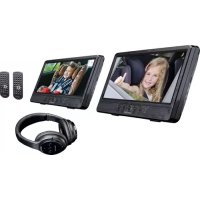
DVP1047 - Portable DVD Player LENCO - Free user manual and instructions
Find the device manual for free DVP1047 LENCO in PDF.



| Product Type | Portable DVD Player |
| Brand / Model | Lenco DVP1047 |
| Power Supply | AC adapter 100-240 V AC, 50/60 Hz; Lithium battery 7.4 V 1200 mAh |
| Battery Life (DVD playback) | Approximately 2 hours |
| Supported Disc Formats | DVD, VCD, CD, CD-R/RW, DVD±R/RW |
| Connectivity | Headphone output (3.5 mm), AV output (RCA), AV input, USB port, SD card slot, DC output 9-12 V |
| Bluetooth | Yes (Bluetooth headphones included) |
| Built-in Speakers | 2 x 1 W |
| Maintenance and Cleaning | Wipe with a soft, dry cloth. Do not use chemical or abrasive products. |
| Safety | Do not open the device (laser radiation). Avoid exposure to water or humidity. Use only the supplied adapter. |
| Included Accessories | AC adapter, remote control, AV cable, car mount kit, Bluetooth headphones (x2) |
| Warranty | Compliant with European legislation. Contact the retailer for any repairs. |
Frequently Asked Questions - DVP1047 LENCO
User questions about DVP1047 LENCO
0 question about this device. Answer the ones you know or ask your own.
Ask a new question about this device
Download the instructions for your Portable DVD Player in PDF format for free! Find your manual DVP1047 - LENCO and take your electronic device back in hand. On this page are published all the documents necessary for the use of your device. DVP1047 by LENCO.
USER MANUAL DVP1047 LENCO
Important Safety Instructions
Warning: To reduce the risk of electric shock, do not remove the cover or back. There are no user-serviceable partsinside. Refer servicing to qualified personnel.
Warning: To prevent fire or electric shock hazard, do not expose the unit to rain or moisture.
Do not expose the Adaptor and portable DVD to water (dripping or splashing) and no objects filled with liquids, such as vases, should be placed on the unit.
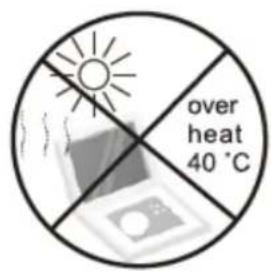
Keep the portable DVD away from direct sunlight and heat source such as radiators or stoves.
Do not block the ventilation openings. Slots and openings on the unit are provided for ventilation. The openings should never be blocked by placing your portable DVD on a cushion, sofa or other similar surface.
Do not place the portable DVD on unstable cart, stand, tripod, bracket or table. The unit may fall, resulting in impossible damage or injury.
Never place heavy or sharp objects on the LCD panel or frame.
Only use the AC adapter included with portable DVD. Using any other adapter will void your warranty.
The plug of AC adaptor is used as the disconnect device, the disconnect device shall remain readily operable.
Unplug the power from the outlet when the unit is not in use.
Attention should be drawn to the environmental aspects of battery disposal.
CAUTION: Danger of explosion if battery is incorrectly replaced. Replace only with the same or equivalent type.
WARNING: The battery (battery or batteries or battery pack) shall not be exposed to excessive heat such as sunshine, fire or the like.
WARNING: Excessive sound pressure from earphones or headphones can cause hearing loss.
WARNING: Only use attachments/accessories specified provided by the manufacturer, the portable DVD is supplied by AC adapter, the AC adapter is used as disconnect device, the disconnect device shall remain readily operable.
Caution: Danger of explosion if battery is incorrectly replaced, replaced only with the same or equivalent type(Lithium battery)

This marking indicates that this product should not be disposed with other household wastes throughout the EU. To prevent possible harm to the environment or human health from uncontrolled waste disposal,recycle it responsibly to promote the sustainable reuse of material resources. To return your used device,please use the return and collection systems or contact the retailer where the product was purchased.
They can take this product for environmental safe recycling.

At maximum volume, continued listening of device the ear of user.
Safety Precautions
WARNING
RISK OF ELECTRIC SHOCK
DO NOT OPEN
Warning: This digital video disc player employs a laser system.
Use of controls, adjustments, or the performance of procedures other than those specified herein may result in inhalazardous radiation exposure.
Warning: To prevent direct exposure to laser beam,do not open the enclosure.Visible laser radiation when open.
Warning: Never stare directly into the laser beam.
Caution: Do not install this product in a confined space such as a book case or similar unit.
Warning: when the unit using by child, parents must make sure to let the child understand all contents in Instructionbook how battery using to guarantee using battery correctly all the time.
Warning: when find battery overheat, swell or dour, please stop using battery and contact service centre for gettingreplacement.
Warning: do not charging battery on the place of insufficient ventilation such as: mattress, sofa, cushion, soft mat....
Warning: we will not take any responsibility if user incorrectly use battery, not following our warning instruction label on the battery case.
Warning:The USB memory stick should be plugged in the unit directly. USB extension cable should not be used to avoid failing of data transferring and interference caused.
WARNING: When using the headphone: Prolonged exposure to loud sounds may lead to temporary or permanenthearing loss.
When participating in the traffic listening to a personal player can make the listener less aware of potential dangers such as approaching cars.
Power supply adaptor(For EU only).
Manufacturer:Mass Power Electronics Limited.
Model number:PEA-090100VE
Power supply adaptor (For UK only).
Manufacturer: Mass Power Electronics Limited.
Model number:PEA-090100VG
Use only the power supply listed in the user instructions.
Notes on Copyrights:
It is forbidden by law to copy, broadcast, show,broadcast via cable, play in public, or rent copyrighted material without permission.
This product features the copy protection function developed by Macrovision. Copy protection signals are recorded onsome discs.
When recording and playing the pictures of these discs picture noise will appear. This product incorporates copyright protection technology that is protected by method claims of certain U.S. Patents and other intellectual property rights owned by Macrovision Corporation and other rights owners. Use of this copyright protection technology must be authorized by Macrovision Corporation, and is intended for home and other limited viewing uses only unless otherwise authorized by Macrovision Corporation. Reverse engineering or disassembly is prohibited.


Mounting the DVD in a Car
Use the supplied mounting kit to install the DVD players on the back of the vehicle's headrests.
- Align the angled support's bolt to the screwhole on the back of the DVD unit. Turn the bolt clockwise and secure the support.
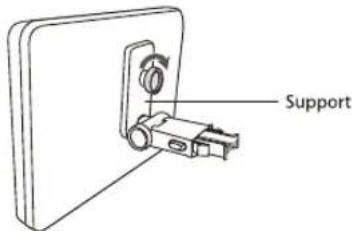
- Lift the headrest off its leg supports. Align the horizontal support with the headrest leg slots andensure the horizontal support rests securely on thetop of the car seat. Reattach the headrest.
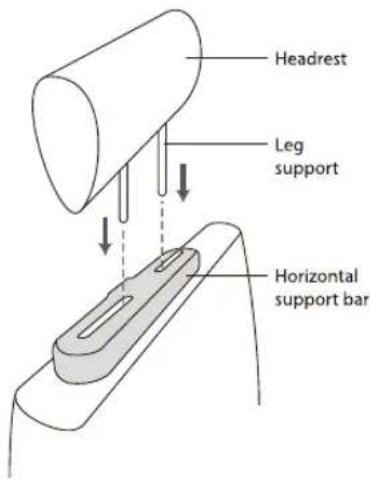
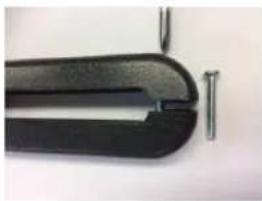
Remark: If the legs of the headrest are too thick for the opening of the horizontal support bar of the bracket, please unscrew the 4 screws of the support bar of the bracket to adjust the opening. In case the screws are too short, use the longer screws (provided in the giftbox).
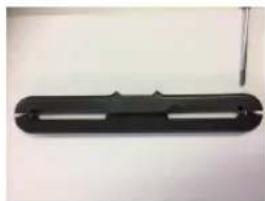
- Grip the DVD firmly with both hands and slot the angled support firmly into the support bar. It willclick. Ensure the entire unit is secure.
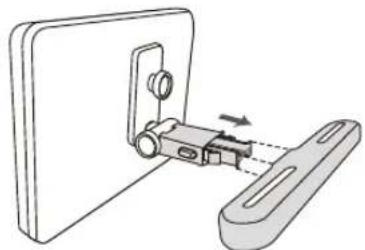
- Adjust the angle of the DVD unit, then secure by tightening the bolt on the right.
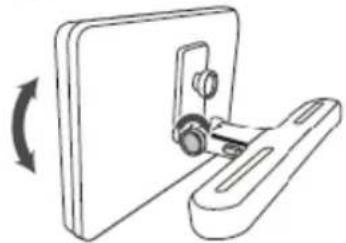
- To remove the DVD from the horizontal supportbar, support the DVD unit with one hand. With theother hand, firmly squeeze the release buttonseither side of the angled support and pull.
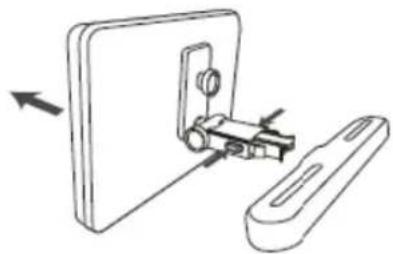

This unit should never be used by the vehicle's driver or left unsecured in the vehicle whiledriving.
- If this unit is being used in your vehicle, be sure that it is secured or held safely, and does not obstruct any safety device, including air bags or seat belts.
All passengers should wear seat belts when using this unit in a moving vehicle.
If in doubt, please contact your vehicle manufacturer for further advice.
Identification of Controls
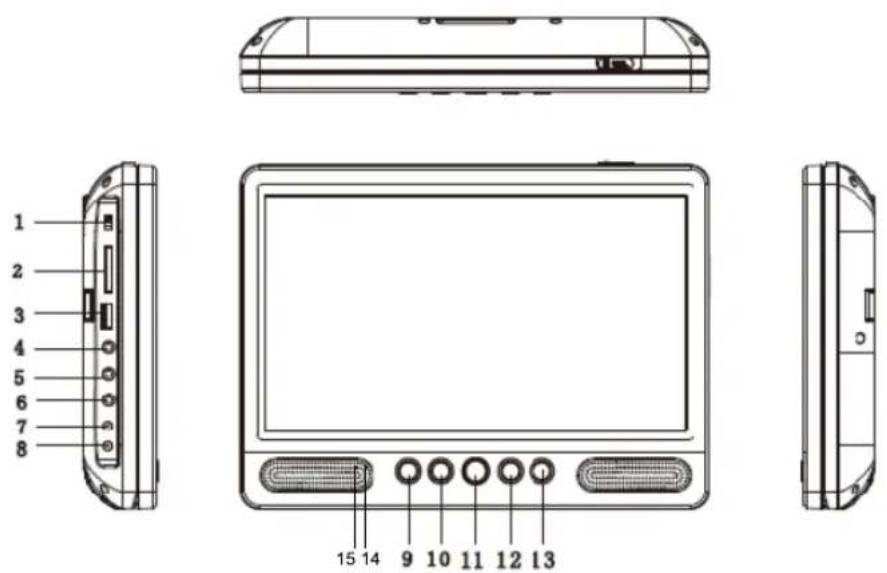
- POWER ON/OFF
- CARD SLOT
- USB
- HEADPHONE OUT JACKS
- AVOUT
- AVIN
- DC OUT
- DCIN 9-12V
-
UP/Prev/VOL
-
DOWN/Next/VOL+
- SOURCE
- (PLAY/PAUSE)
- STOP
- Battery Charging Indicator
Illuminates green flashing when the battery is charging.
Illuminates green when the battery is fully charged.
15. Power Indicator
Illuminates red when the unit is switched on.
Insert the battery
- Open the battery door
- Insert battery. Check the polarity before inserting the battery
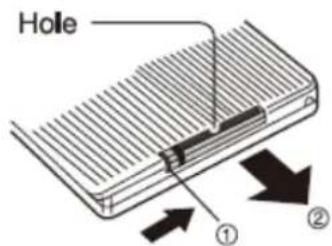
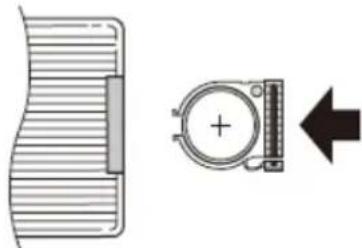
When using the remote control for the first time, do not forget to remove the plastic card.
NOTES:Remove battery during storage or when you are not using the DVD player for a long time.
WARNING
Do not ingest the battery, Chemical Burn Hazard (The remote control supplied with) This product contains a coin/button cell battery. If the coin/button cell battery is swallowed, it can cause severe internal burns in just 2 hours and can lead to death. Keep new and used batteries away from children. If the battery compartment does not close securely, stop using the product and keep it away from children. If you think batteries might have been swallowed or placed inside any part of the body, seek immediate medical attention.
To prevent possible hearing damage, do not listen at high volume levels for long periods.
Remote control unit
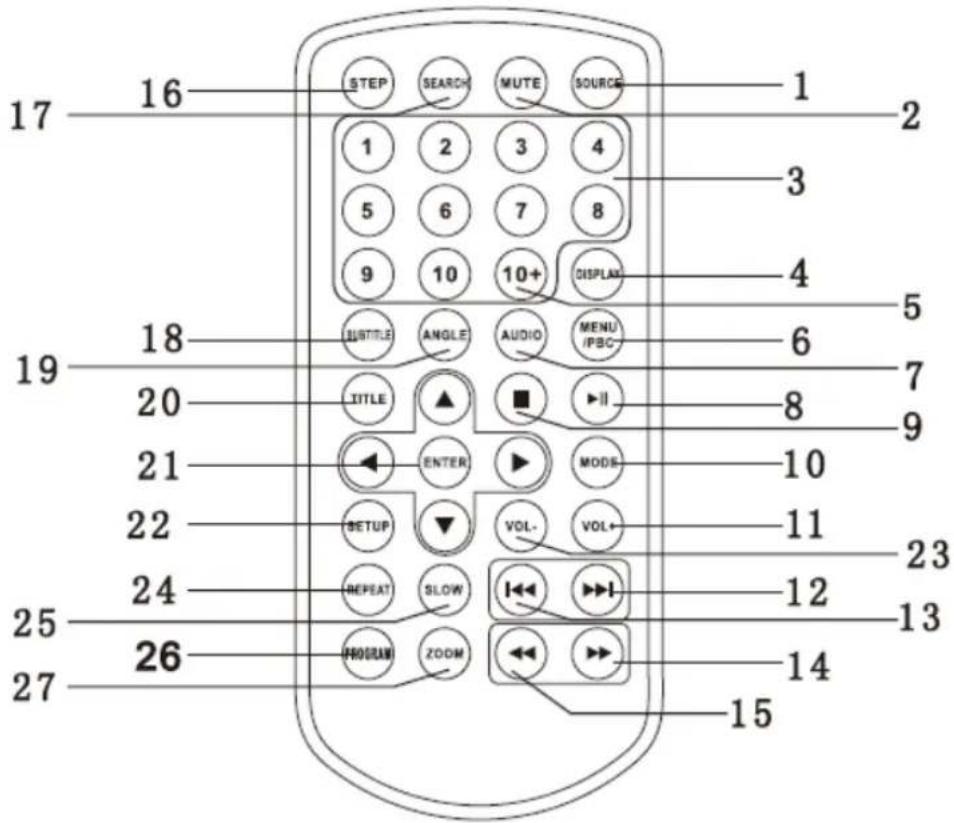
1. SOURCE
DVD/ CARD/USB/AV IN.
2. MUTE
Disable Audio output.
3. 0-9 NUMBER BUTTON
Selects numbered items in a menu.
4. DISPLAY
To display the playtime and status information.
5. 10+ BUTTON
In order to select a track 10 or greater, first press 10+ , For example;select track 12, first press 10+ , and then pressnumber 2 button.
6. MENU/PBC
Return to DVD root menu(DVD).
PBC on/off switch (VCD).
7.AUDIO
DVD:Press AUDIO repeatedly during playback to hear a different audio language or audio track, if available. CD/VCD:Press AUDIO repeatedly during playback to hear a different audio channel (Left,Right,Mix,Stereo).
8. PLAY/PAUSE
Press PLAY/PAUSE once to pause playback, pressing PLAY/PAUSE second time will resume the playback.
9. STOP
When this button is pressed once, the unit records the stopped point, from where playback will resume if PLAY (▶II) is pressed after wards. But if STOP button is pressed again instead of PLAY (▶II) button, there will be no resume function.
10. MODE
Set LCD parameter(adjust brightness, contrast, and saturation).
11. VOL+
Adjust volume
12. Forward Skip
Go to next chapter/track.
13. Reverse Skip
Go to previous chapter/track to the beginning.
14.▶BUTTON
Press▶ BUTTON allow skipping ahead at 5-level speed(X2->X4->X8->X16->X32->PLAY), press PLAY button return tonormal playback.
15. BUTTON
Press BUTTON allow skipping back at 5-level speed(X2->X4->X8->X16->X32 PLAY), press PLAY button return tonormal playback.
16. STEP
Step the motion in DVD mode.
17.SEARCH
Goto time point, title or chapter you want in DVD Mode.
18. SUBTITLE
Press SUBTITLE repeatedly during playback to view a different subtitle languages.
19. ANGLE
DVD:Press ANGLE will change the view angle, on DVDs that support this feature.
20. TITLE
Return to DVD title menu.
21. ENTER
Confirms menu selection.
22. SETUP
Accesses or removes setup menu.
23. VOL-
24. REPEAT
Press REPEAT during playback to select a desired repeat mode.
DVD: you can play select repeat chapter/title/off.
CD/VCD: you can select repeat single/all/off.
MP3: you can select Single/Repeat One/Repeat Folder/Folder/Shuffle/Random
25. SLOW
Press Slow button repeatedly to enter slow playback, and cycle between different speeds. The speeds are 1/2, 1/4, 1/8, 1/16 and normal.
26.PROGRAM
DVD/VCD:The program function enables you to store your favourite tracks from the disc. Press PROGRAM button, then PROGRAM MENU will appear on screen, now you can use the number key to direct input the titles, chapters or tracksnumber and select PLAY option. TO resume normal playback, press PROGRAMand select clear program option on the program menu,press PROGRAM again to exit program menu.
27.ZOOM
DVD/VCD: Use ZOOM to enlarge or shrink the video image.
- Press ZOOM during playback or still playback to activate the Zoom function. The square frame appears briefly in the right bottom of the picture.
- Each press of the ZOOM button changes the TV screen in the following sequence: 2X size->3X size->4X size->1/2 size->1/3 size->1/4 size->normal size
JPEG: Use ZOOM to enlarge or shrink the picture.
- Press 'ZOOM'.
- Used "▶" to enlarge, or "←" to shorten the picture.
Use the button to move through the zoomed picture.
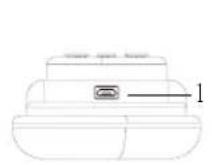
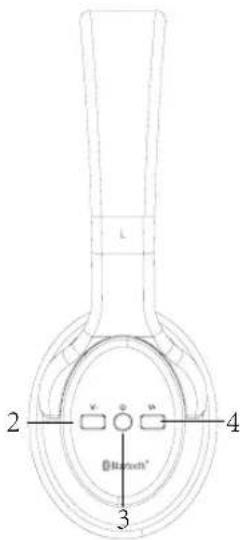
- Micro USB
- Vol-
- Power ON/OFF
- Vol+
- Headphone in jack

Connect the DVD Player with the included Bluetooth Headphone
Please follow the below steps to connect your DVD player with the Bluetooth headphone:
The headphones are marked A and B and are already paired with the corresponding DVD unit, out of the box: Headphone A is already paired with DVD unit A and Headphone B is already paired with DVD unit B.
In case you cannot connect out of the box or it you used the headphones on another Bluetooth device and want to reconnect it to the DVD player again, please follow the instructions below.
- Press and hold the Power button of Bluetooth headset and release it when you hear the "power on" message from the headset. The headphones power led will flash red/blue.
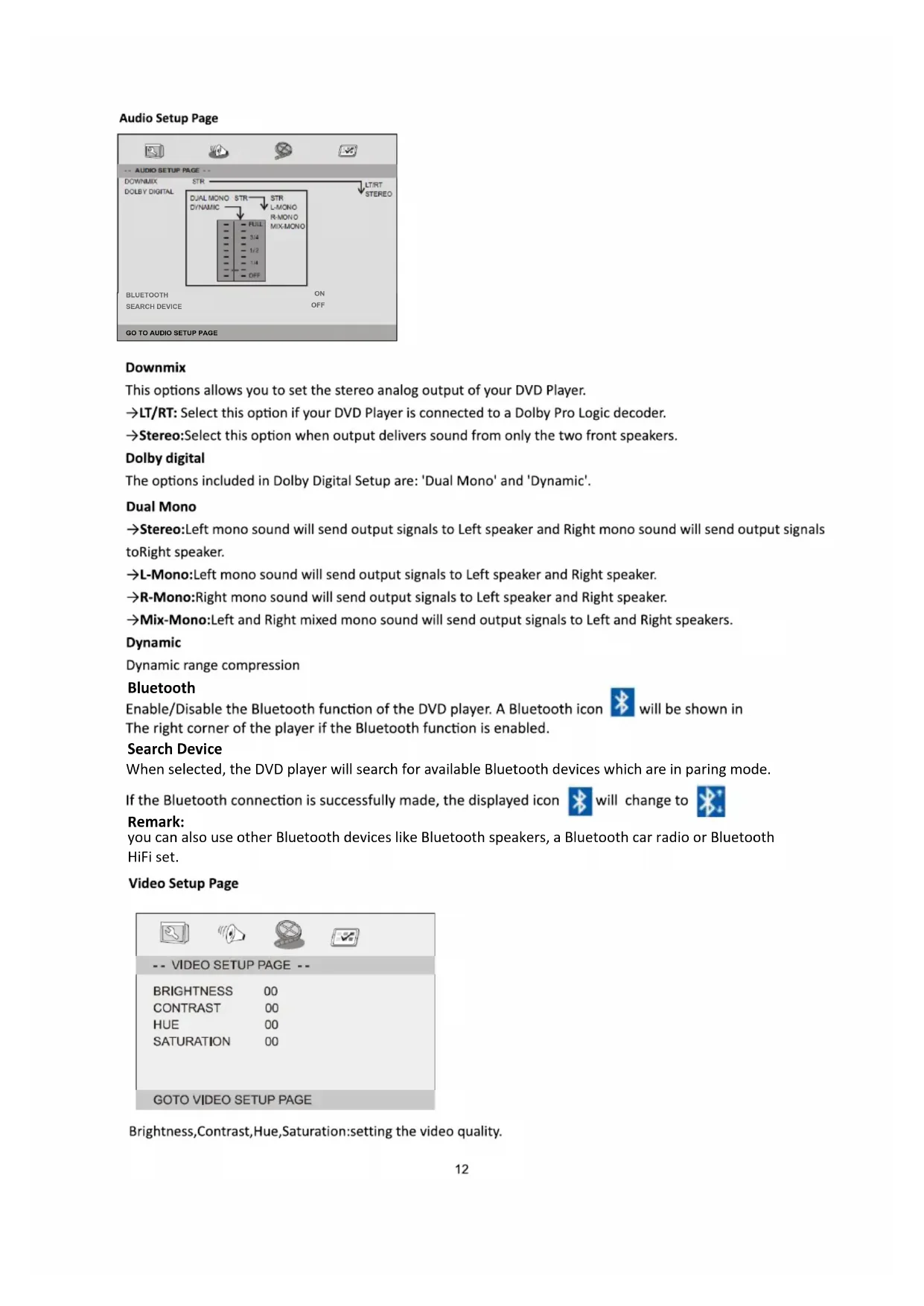
- Press the SETUP button on the remote control and navigate to the AUDIO SETUP PAGE, Go to the BLUETOOTH option and switch it to ON. A Blu etooth icon will be displayed on the right corner of the screen.
- Now go to the SEARCH DEVICE option, choose SEARCH and then press the ENTER button on the remote control to initiate the Bluetooth device search. The player now will show "Searching...".
- When "Searching..." is disappeared from the screen, the Bluetooth icon is changed to you'll hear a short beep from the headphone and the headphone's power led will stop flashing red/blue.
The DVD player is now connected with the Bluetooth headphone.
Atbenti
- To avoid that the DVD player can't find your Bluetooth headphone, please disable the Bluetooth function on other devices within a 10 meter range of the DVD player before connecting.
- When you hear small beeps coming from the headphone, it indicates that the battery has low power and must be charged.
- if you find the maxophone level is too low, please increase the volume level on the DVD player itself.
Charging the headphone battery
To charge the battery of the headphone, use the micro USB cable. Connect the small connector the the headphone and the USB connector to an USB charger (not included) or a PC but you can also use the USB port of the DVD player (ONLY if the DVD player is powered by the supplied AC adaptor or Car adaptor).
Remark: if the battery of the headphone is empty, you can use the supplied 3.5mm jack cable to connect the headphone to the headphone connector of the DVD player. The battery of the headphone will not be used then.
SETUP Menu Setting
General Setup Page
Press SETUP button to get the setup menu. Use direction buttons to select the preferred item. After finishingsettings, pressSETUP again to normal display.
The following menu items can be changed:
General Setup Page
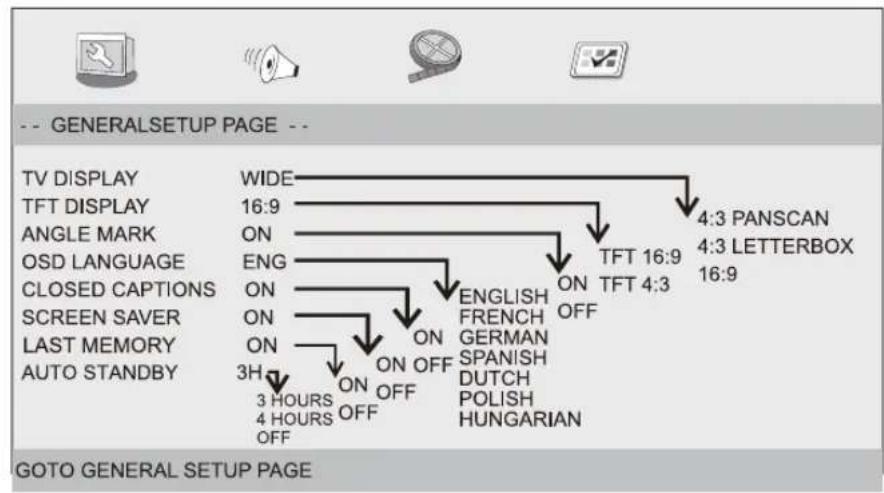
TV DISPLAY: selects the aspect ratio of the playback picture.
4:3 PANSCAN: both sides of the picture will be trimmed or formatted to fit your TV screen.
4:3 LETTERBOX: In this case, a wide picture with black bands on the upper and lower portions of the TV screen will be displayed.
16:9: wide screen display.
TFT DISPLAY: Selects the TFT display to 16:9 or 4:3.
Angle Mark
Displays current angle setting information on the right hand corner of the TFT screen if available on the disc.
OSD Language
You can select your own preferred language settings.
Closed Captions
Closed captions are data that are hidden in the video signal of some discs. Before you select this function, please ensure that the disc contains closed captions information and your TV set also has this function.
Screen Saver
This function is used to turn the screen saver On or Off.
Last Memory
If this function is switched to ON, the DVD will resume play on the last known position, when the unit was stopped, powered down orDVD was reinserted.
Auto Standby
This function is used to select auto standby settings after 3 or 4 hours.
3 HOURS: the unit will turn to standby modeafter 3 hours if there is no interaction from user within this period of time.
4 HOURS: the unit will turn to standby mode after 4 hours if there is no interaction from user within this period of time.
OFF: the auto standby function is disabled, and unit will stay in "on" mode even if no interaction from user.
Audio Setup Page
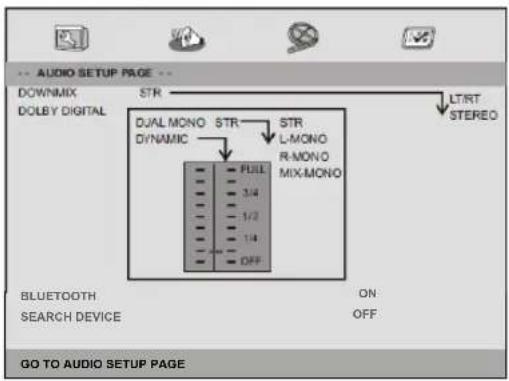
Downmix
This options allows you to set the stereo analog output of your DVD Player.
LT / RT : Select this option if your DVD Player is connected to a Dolby Pro Logic decoder.
Stereo:Select this option when output delivers sound from only the two front speakers.
Dolby digital
The options included in Dolby Digital Setup are: 'Dual Mono' and 'Dynamic'.
Dual Mono
Stereo: Left mono sound will send output signals to Left speaker and Right mono sound will send output signals toRight speaker.
L-Mono:Left mono sound will send output signals to Left speaker and Right speaker.
R-Mono:Right mono sound will send output signals to Left speaker and Right speaker.
Mix-Mono:Left and Right mixed mono sound will send output signals to Left and Right speakers.
Dynamic
Dynamic range compression
Bluetooth
Enable/Disable the Bluetooth function of the DVD player. A Bluetooth icon will be shown in The right corner of the player if the Bluetooth function is enabled.
Search Device
When selected, the DVD player will search for available Bluetooth devices which are in paring mode.
If the Bluetooth connection is successfully made, the displayed icon

will change to

Remark:
you can also use other Bluetooth devices like Bluetooth speakers, a Bluetooth car radio or Bluetooth HiFi set.
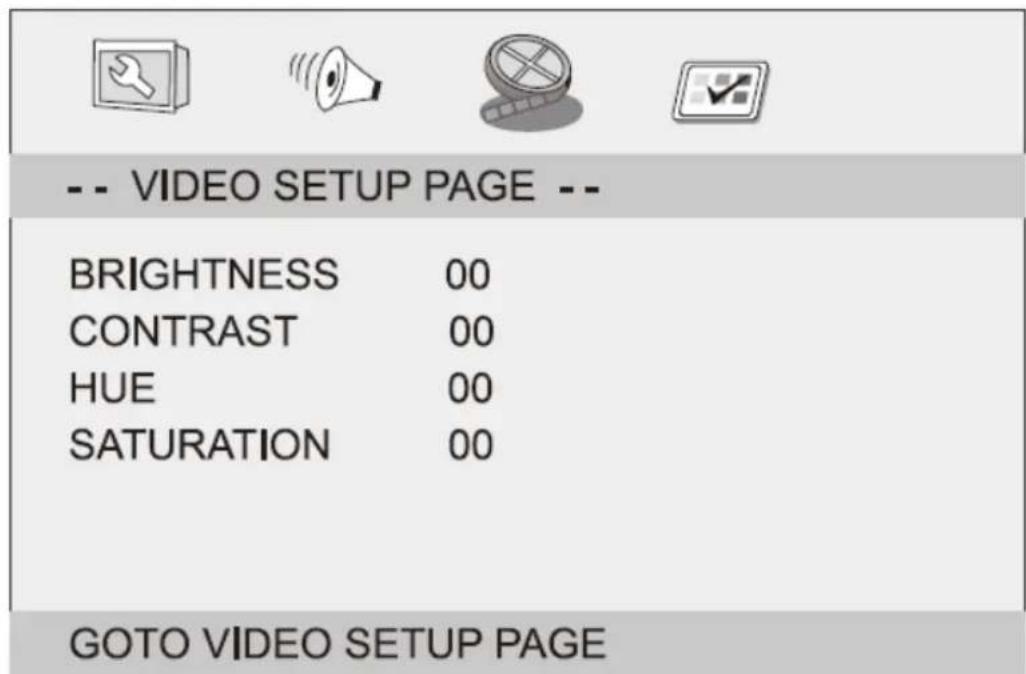
Video Setup Page
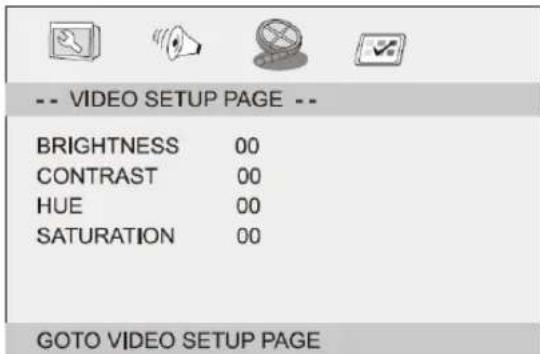
Brightness,Contrast,Hue,Saturation:setting the video quality.
Preference Page
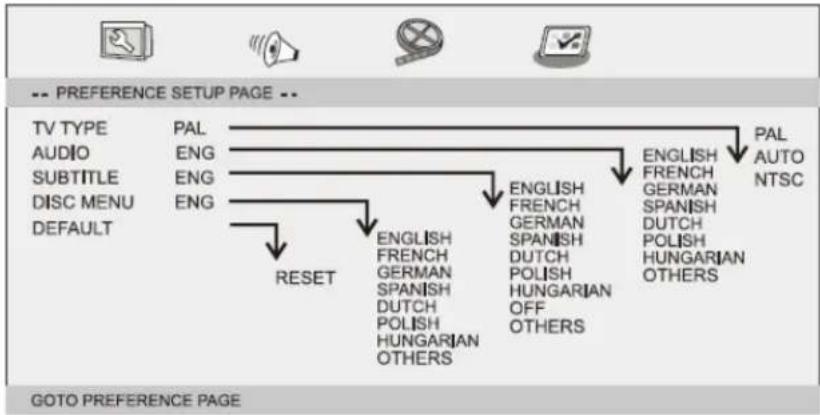
TV Type
Selecting the colour system that corresponds to your TV when AV outputs.
This DVD Player is compatible with both NTSC and PAL.
PAL- Select this if the connected TV is PAL system.It will change the video signal of a NTSC disc and output in PALformat.
NTSC-Select this if the connected TV is NTSC system.It will change the video signal of a PAL disc and output in NTSCformat.
Auto:Chang the video signal output automatic according to the playing disk format.
Audio:Selects a language for audio (if available).
Subtitle:Selects a language for subtitle (if available).
Disc Menu:Selects a language for disc menu (if available).
Default:Back to the factory setting.
| Watching a DVD on DVD Player A and B |
| You can watch the same DVD on DVD player A and B at the same time. |
| DVD player B left side DC+AV Cable (included) To AV IN & DC IN sockets DVD player A left side DVD Disc in Player A DC in To 12V car connector |
| 1. Connect DVD player A and B by using the included DC+AV Cable. Plug the AV Cable into AV OUT socket on the DVD player in which the DVD is inserted player A; plug the other end of the AV Cable into AV IN socket of the other DVD player B. |
| 2. Turn on DVD player A and B. |
| 3. On the "slave" DVD player B you must select the source AV. |
| 4. Operate the controls of the DVD player in which the DVD is inserted player A . |
| Connecting to a TV |
| If your TV has Audio/Video inputs, you can connect the DVD player to your TV using a standard AV cable. |
Parameters and specifications
Electronical parameters
| Item | Standard requirement | |
| Power requirements | : AC 100-240 V, 50/60 Hz | |
| Power consumption | : <18W (<9W per unit) | |
| Operating humidity | : 5 % to 90 % | |
| Output | VIDEO OUT | : 1 Vp-p(75Ω) |
| AUDIO OUT | : 1.0 Vrms (1 KHz, 0 dB) | |
| Audio | : Speaker: 2x1W, Headphones output | |
System
| Laser | : Semiconductor laser, wavelength 650 nm |
| Signal system | : NTSC/PAL |
| Frequency response | : 20Hz to 20 kHz(1dB) |
| Signal-to-noise ratio | : More than 80 dB (ANALOG OUT connectors only) |
| Dynamic range | : More than 80 dB (DVD/CD) |
Note: Design and specifications are subject to change prior notice.
Battery Parameters
| DVDplayer | BTHeadphone |
| Battery:Lithium7.4V1200mAh | Battery:Lithium3.7V250mAh |
| Playtime:~2hoursinDVDmodeon | Playtime:~3.5-4.5hours |
| Chargerie:~3-4h | Chargerie:~1.5h |
Battery Specifications:
Output: 7.4V 1200 mAh
Storage and work circumstances:
- Storage circumstances
Temperature
Humidity
6 months
-20°C ~ +45°C
65± 20%
1week
-20°C ~ +65°C
65± 20%
- Work circumstances
Temperature
Humidity
Standard charge
0^ +45^
65± 20%
Standard discharge
-20°C ~ +65°C
65± 20%
Guarantee
Lenco offers service and warranty in accordance with the European law, which means that in case of repairs (both during and after the warranty period) you should contact your local dealer.
Important note: It is not possible to send products that need repairs to Lenco directly.
Important note: If this unit is opened or accessed by a non-official service center in any way, the warranty expires.
This device is not suitable for professional use. In case of professional use, all warranty obligations of themanufacturer will be voided.
Disclaimer
Updates to Firmware and/or hardware components are made regularly. Therefore some of the instruction, specifications and pictures in this documentation may differ slightly from your particular situation. All items described in this guide for illustration purposes only and may not apply to particular situations. No legal right or entitlements maybe obtained from the description made in this manual.

Disposal of the Old Device
This symbol indicates that the relevant electrical product or battery should not be disposed of as general household waste in Europe. To ensure the correct waste treatment of the product and battery, please dispose them in accordance to any applicable local laws of requirement for disposal of electrical equipment or batteries. In so doing, you will help to conserve natural resources and improve standards of environmental protection in treatment and disposal of electrical waste (Waste Electrical and Electronic Equipment Directive).

CE Marking
Products with the CE marking comply with the EMC Directive (2014/30/EU) and the Low VoltageDirective (2014/35/EU) issued by the Commission of the European Community.
Hereby, Lenco Benelux BV; Thermiekstraat 1a, 6361 HB Nuth, The Netherlands, declares that this product is incompliance with the essential requirements.
The declaration of conformity may be consulted via techdoc@lenco.com
Service
For more information and helpdesk support, please visit www.lenco.com
Lenco Benelux BV; Thermiekstraat 1a, 6361 HB, The Netherlands.
OPEN HET APPARAAT NIET
OSD Language (OSD Taal)
U kunt uw eigene gewenste taalinstellen gen selecteren.
Closed Captions (Ondertitels)
Fabricant: Mass Power Electronics Limited.
Fabricant : Mass Power Electronics Limited.
Page Configuration video
MP3: Puede selectionar Individual/Repetir una/Repetir carpeta/Capeta/Cambiar/Aleatorio
25.SLOW
Dual Mono (Mono dual)

- Important Safety Instructions
- Safety Precautions
- RISK OF ELECTRIC SHOCK
- DO NOT OPEN
- Notes on Copyrights:
- Mounting the DVD in a Car
- Identification of Controls
- Insert the battery
- WARNING
- Remote control unit
- SOURCE
- MUTE
- 0-9 NUMBER BUTTON
- DISPLAY
- 10+ BUTTON
- MENU/PBC
- 7.AUDIO
- PLAY/PAUSE
- STOP
- MODE
- VOL+
- Forward Skip
- Reverse Skip
- 14.▶BUTTON
- BUTTON
- STEP
- 17.SEARCH
- SUBTITLE
- ANGLE
- TITLE
- ENTER
- SETUP
- VOL-
- REPEAT
- SLOW
- 26.PROGRAM
- 27.ZOOM
- Connect the DVD Player with the included Bluetooth Headphone
- Atbenti
- Charging the headphone battery
- SETUP Menu Setting
- General Setup Page
- Angle Mark
- OSD Language
- Closed Captions
- Screen Saver
- Last Memory
- Auto Standby
- Audio Setup Page
- Downmix
- Dolby digital
- Dual Mono
- Dynamic
- Bluetooth
- Search Device
- Remark:
- Video Setup Page
- Preference Page
- TV Type
- Parameters and specifications
- Electronical parameters
- System
- Battery Parameters
- Guarantee
- Disclaimer
- Disposal of the Old Device
- CE Marking
- Service
- OSD Language (OSD Taal)
- Closed Captions (Ondertitels)
- Page Configuration video
- Dual Mono (Mono dual)
Brand : LENCO
Model : DVP1047
Category : Portable DVD Player