KDX561DBT - Car stereo JVC - Free user manual and instructions
Find the device manual for free KDX561DBT JVC in PDF.



| Product Type | Digital Media Receiver Car Radio |
| Brand | JVC |
| Model | KDX561DBT |
| Dimensions (W x H x D) | 182 mm x 53 mm x 162 mm (standard DIN estimate) |
| Weight | Approx. 0.8 kg |
| Power Supply | 12 V DC (car battery) |
| Max. Output Power | 4 × 50 W (max.) |
| Speaker Impedance | 4 - 8 Ω |
| FM Tuner | FM with RDS, 15 presets |
| AM Tuner | AM (MW/LW depending on region) |
| DAB+ Reception | Yes (KD-X561DBT only) |
| Connectivity | Bluetooth (hands-free and audio), USB, AUX front |
| Supported Audio Formats | MP3, WMA, AAC, WAV, FLAC, OGG |
| Supported Video Formats | MPEG1, MPEG2, MPEG4, H.264, MKV |
| Image Formats | JPEG, BMP, PNG |
| Graphic Equalizer | Presets (Flat, Rock, Jazz, etc.) + customizable |
| Rear View Camera Input | Yes (yellow RCA jack) |
| Steering Wheel Remote Control | Compatible (wired) |
| Display | Black background monochrome screen |
| Detachable Faceplate | Yes |
| Maintenance and Cleaning | Clean the faceplate with a soft dry cloth; clean the connector with a cotton swab |
| Safety | Do not obstruct air vents; professional installation recommended; respect speaker polarity |
| Spare Parts and Repairability | 15 A fuse (in harness); contact your JVC dealer for parts |
| General Information | Manufacturer: JVC KENWOOD Corporation; Made in Japan; Software update via USB |
Frequently Asked Questions - KDX561DBT JVC
User questions about KDX561DBT JVC
0 question about this device. Answer the ones you know or ask your own.
Ask a new question about this device
Download the instructions for your Car stereo in PDF format for free! Find your manual KDX561DBT - JVC and take your electronic device back in hand. On this page are published all the documents necessary for the use of your device. KDX561DBT by JVC.
USER MANUAL KDX561DBT JVC

Contents
Before use 2
How to read this manual....2
Precautions 2
Getting Started....3
Initial settings....3
Clock settings....3
Basics 4
Common operations 4
How to attach/detach the faceplate....4
Select a source....4
USB/iPod 5
Preparation....5
Playback operations....5
Tuner/DAB....6
Tuner basic operations....6
DAB basic operation....6
Tuner function settings 6
DAB function settings....7
External Components....7
Rear view camera....7
Bluetooth® smartphone....8
Register your smartphone to the unit 8
Receive a call....8
Make a phone call....8
Playing Bluetooth Audio Device....8
Setup....9
Settings....9
Sound settings....9
Installation....10
Before installation....10
Installing the unit....11
About this Unit....14
Maintenance....14
Note for specifications....14
Copyrights....14
Before use
Precautions
WARNING
■ To prevent injury or fire, take the following precautions:
• To prevent a short circuit, never put or leave any metallic objects (such as coins or metal tools) inside the unit.
- Do not watch or fix your eyes on the unit's display when you are driving for any extended period.
- If you experience problems during installation, consult your JVC dealer.
☐ Precautions on using this unit
- When you purchase optional accessories, check with your JVC dealer to make sure that they work with your model and in your area.
- The Radio Data System or Radio Broadcast Data System feature won't work where the service is not supported by any broadcasting station.
Protecting the monitor
- To protect the monitor from damage, do not operate the monitor using a ballpoint pen or similar tool with the sharp tip.
How to reset your unit
If the unit or the connected unit fails to operate properly, reset the unit.
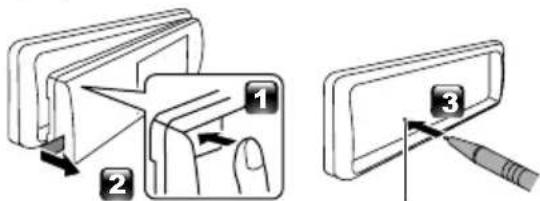
text_image
Diagram illustrating three-step folding or dissection process with labeled steps 1, 2, and 3Reset button
How to read this manual
- The panels shown in this guide are examples used to provide clear explanations of the operations. For this reason, they may be different from the actual panels.
- In operation procedures, bracket shape indicates the item you should control.
[ ]: indicates the selected items or menu.
<>: indicates the name of panel buttons. - Display language: English is used for the purpose of explanation. You can select a display language from the [Language] menu. See Language (P.9).
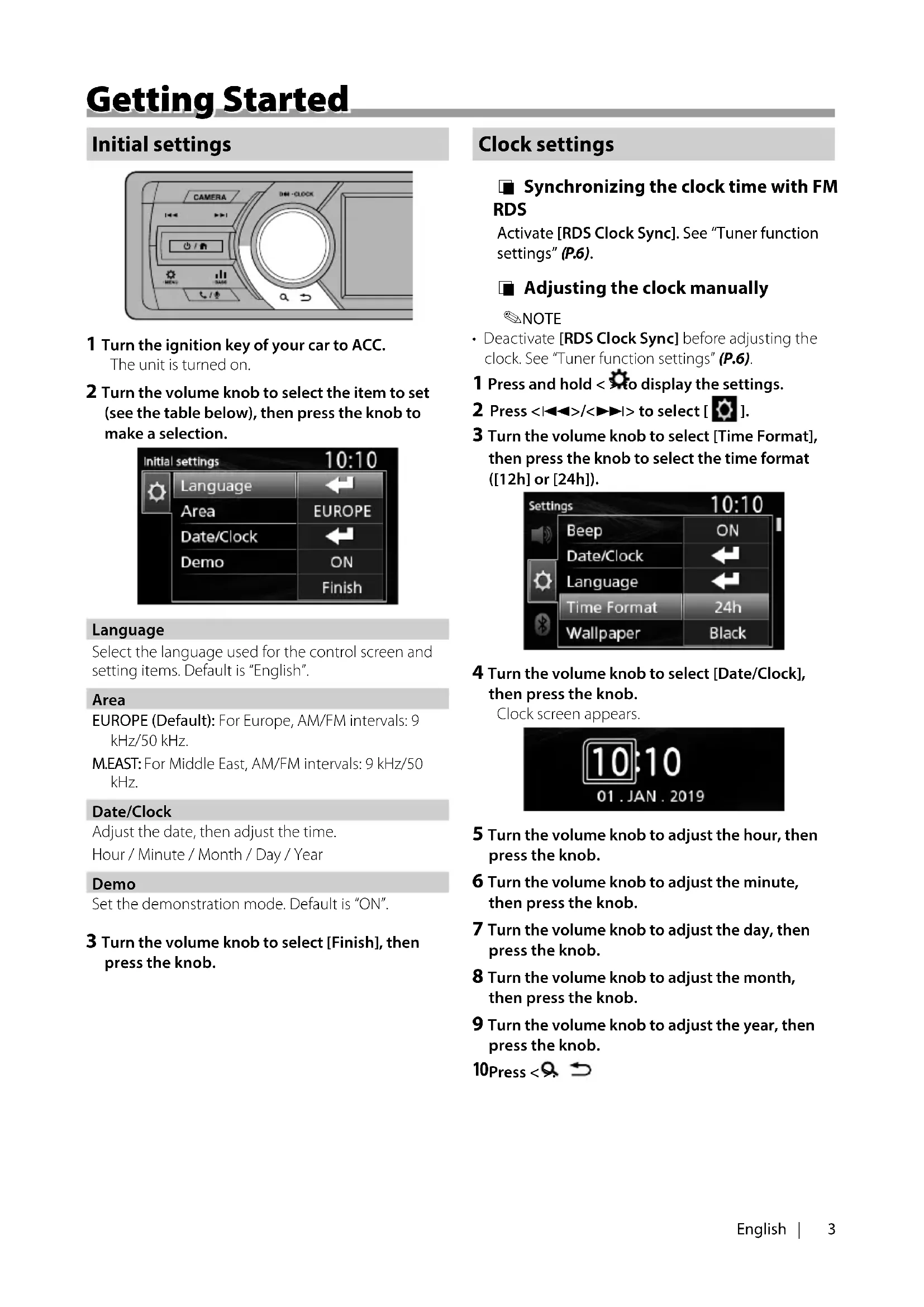
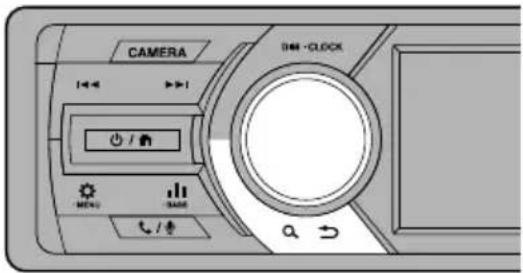
Initial settings
text_image
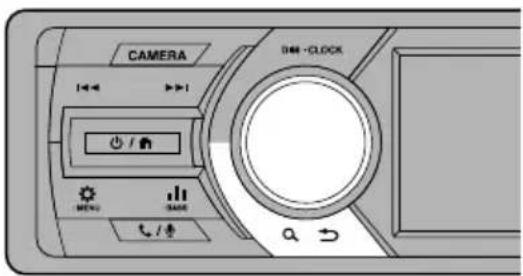
CAMERA +/- +/- +/- +/- +/- +/- +/- +/- +/- +/- +/- +/- +/- +/- +/- +/- +/- +/- +/- +/- +/- +/- +/- +/- +/- +/- +/- +/- +/- +/- +/- +/- +/- +/- +/- +/- +/- +/- +/- +/- +/- +/- +/- +/- +/- +/- +/- +/- +/- +/- +/- -CLOCK1 Turn the ignition key of your car to ACC. The unit is turned on.
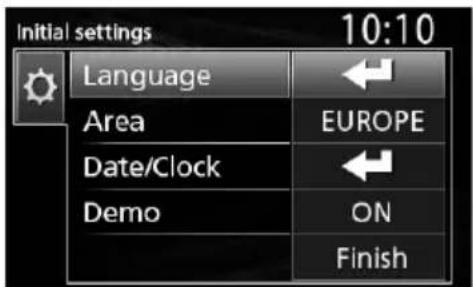
2 Turn the volume knob to select the item to set (see the table below), then press the knob to make a selection.
text_image
Initial settings 10:10 Language Area EUROPE Date/Clock Demo ON FinishLanguage
Select the language used for the control screen and setting items. Default is "English".
Area
EUROPE (Default): For Europe, AM/FM intervals: 9 kHz/50 kHz.
M.EAST: For Middle East, AM/FM intervals: 9 kHz/50 kHz.
Date/Clock
Adjust the date, then adjust the time.
Hour / Minute / Month / Day / Year
Demo
Set the demonstration mode. Default is "ON".
3 Turn the volume knob to select [Finish], then press the knob.
Clock settings
■ Synchronizing the clock time with FM RDS
Activate [RDS Clock Sync]. See "Tuner function settings" (P.6).
Adjusting the clock manually
NOTE
- Deactivate [RDS Clock Sync] before adjusting the clock. See "Tuner function settings" (P.6).
1 Press and hold < > to display the settings.
2 Press <|◀◀>/<▶▶|> to select [ ◎].
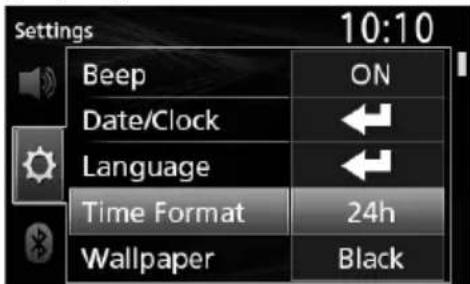
3 Turn the volume knob to select [Time Format], then press the knob to select the time format ([12h] or [24h]).
text_image
Settings 10:10 Beep ON Date/Clock ← Language ← Time Format 24h Wallpaper Black4 Turn the volume knob to select [Date/Clock], then press the knob.
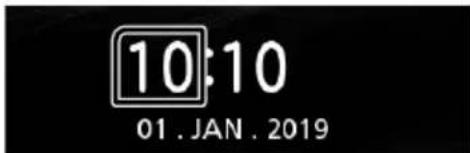
Clock screen appears.
text_image
10:10 01. JAN. 20195 Turn the volume knob to adjust the hour, then press the knob.
6 Turn the volume knob to adjust the minute, then press the knob.
7 Turn the volume knob to adjust the day, then press the knob.
8 Turn the volume knob to adjust the month, then press the knob.
9 Turn the volume knob to adjust the year, then press the knob.
10Press < 9
text_image
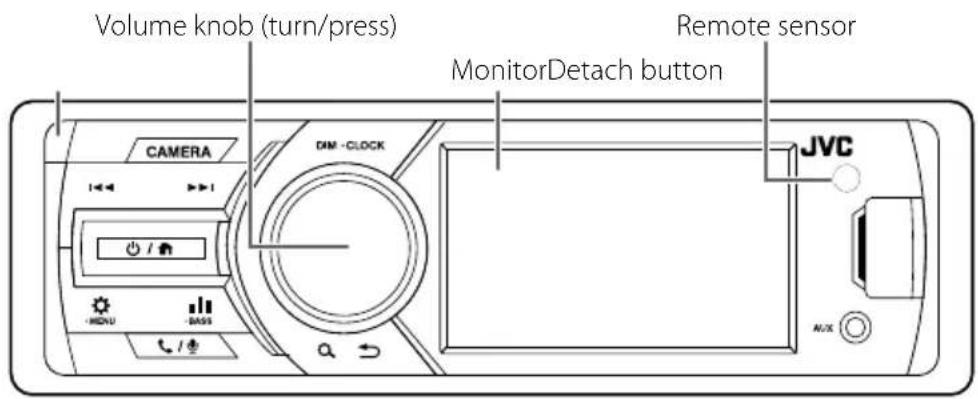
Volume knob (turn/press) Remote sensor MonitorDetach button CAMERA DIM -CLOCK JVC AUXCommon operations
Turning on the power
1 Press < 🔊 / 🔒
Turning off the power
1 Press and hold < ♡ / ♠
Adjusting the volume
1 Turn the volume knob.
Mutes the sound
1 Press and hold the volume knob.
appears when the mute function is active.
• To restore the sound, press and hold again, or adjust the volume.
□ Display the clock
1 Press and hold the
Select dimmer mode
1 Press the
Dimmer 1, Dimmer 2, Dimmer 3
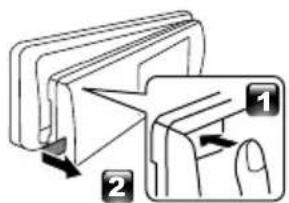
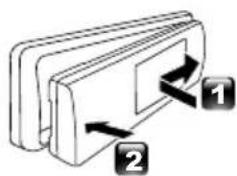
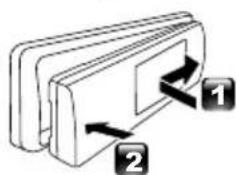
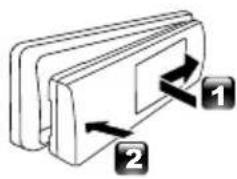
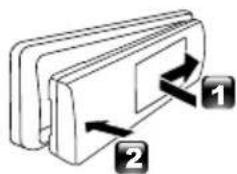
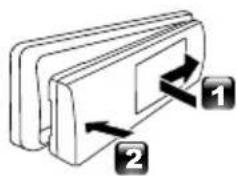
How to attach/detach the faceplate
text_image
Diagram illustrating a folding or folding process with labeled steps 1 and 2, showing directional arrows.AttachDetach
natural_image
Diagram of a mechanical component with two labeled parts (1 and 2), showing directional arrows indicating movement or force (no text or symbols beyond labels)Select a source
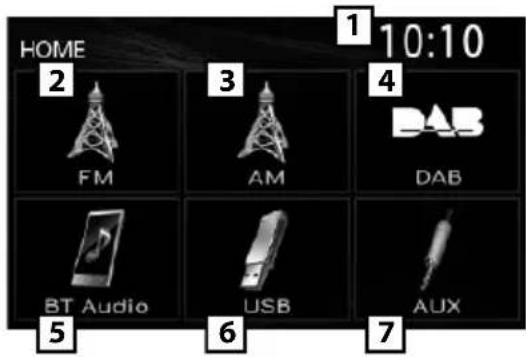
1 Press < to display the HOME screen. HOME screen appears.
2 Turn the volume knob to select the source, then press the knob.
text_image
HOME 2 FM 3 AM 4 DAB BT Audio USB AUX 5 6 7 1 10:101 Clock display
2 Switches to the FM tuner broadcast. (P.6)
3 Switches to the AM tuner broadcast. (P.6)
4 Switches to the DAB broadcast. (P.6) (KD-X561DBT only)
5 Plays a Bluetooth audio player. (P.8)
6 [USB]
Plays files on a USB device. (P.5)
Plays an iPod/iPhone. (P.5)
- When iPod/iPhone is connected.
7 Switches to an external component connected to the AUX input terminal.
Preparation
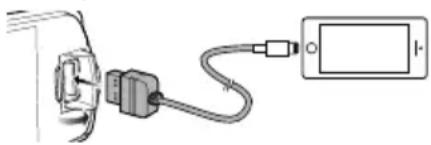
Connecting a USB device/iPod/iPhone
1 Open the front port cover.
2 Connect the USB device with the USB cable (sold separately).
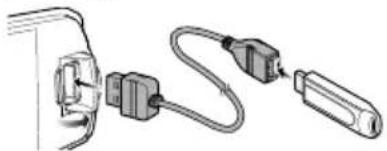
natural_image
Diagram of cable connections between two connectors (no text or symbols)Connect the iPod/iPhone using the KS-U62 (optional accessory).
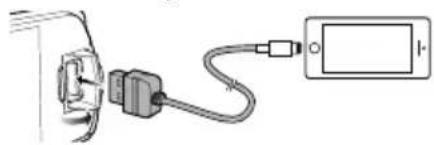
natural_image
Simple line drawing of a plug connected to a device via cable (no text or symbols)The unit reads the device and playback starts.
• USB maximum power supply current :
$$ D C 5 V = 1 A $$
To disconnect the USB device/iPod/iPhone
1 Press < 0 to display the HOME screen.
2 Turn the volume knob to select other than [USB] and [iPod], then press the knob.
3 Detach the USB device/iPod/iPhone.
Usable USB device
This unit can play MP3/ WMA/ AAC/ WAV/ FLAC/ OGG/ MPEG1/ MPEG2/ MPEG4/ H.264/ MKV/ JPEG/ BMP/ PNG files stored in a USB mass storage class device.
Connectable iPod/iPhone
The following models can be connected to this unit.
Made for
- iPhone X
- iPhone SE
- iPhone 5s
- iPhone 8 Plus
- iPhone 6s Plus
- iPod touch (6th
- iPhone 8
- iPhone 6s generation)
- iPhone 7 Plus
- iPhone 6 Plus
- iPhone 7
- iPhone 6
Playback operations
To Do this
Play/pause Press the volume knob.
| Select a file | Pressrepeatedly. |
| Fast-backward/ Fast-forward | Press and hold. • Video files: Each time you press the button, the search speed changes. |
■ Selecting a track/content in a list (Searches file)
1 Press < > to display the LIST screen.
2 Press <|◀◀>/<▶▶|> to select whether you search by audio files [ ] or picture files [ .USB only)
3 Turn the volume knob to select the desired folder/category, then press the knob.
4 Turn the volume knob to select the desired item, then press the knob.
Playback starts.
Tuner basic operations
1 Press < > to display the HOME screen.
2 Turn the volume knob to select [FM] or [AM], then press the knob.
3 Press <|◀◀>/<▶▶|> to search for a station automatically.
"Auto Seek" appears.
(or)
Press and hold <|◀◀|>/<▶▶|> repeatedly to search for a station manually.
"Manual Seek" appears.
NOTE
- To store stations, perform [Manual Store] or [Auto Store].
Select a stored station
You can preset 15 stations for FM and 15 stations for AM.
1 Press < 9 to display the LIST screen.
2 Turn the volume knob to select a preset number, then press the knob.
NOTE
- To exit, press <a
DAB basic operation (KD-X561DBT)
1 Press < 2 to display the HOME screen.
2 Turn the volume knob to select [DAB], then press the knob.
3 Press <|◀◀>/<▶▶|> to search for an ensemble automatically.
"Auto Seek" appears.
(or)
Press and hold <||> / <> repeatedly to search for an ensemble manually.
"Manual Seek" appears.
4 Press and hold <|◀◀|>/<▶▶|> select a service (either primary or secondary) to listen to.
NOTE
• To store service, perform [Favorite].
Select a service
1 Press < 9 to display the LIST screen.
2 Turn the volume knob to select a service, then press the knob.
Select a stored service
You can store up to 15 services
1 Press <> to display the LIST screen.
2 Press <|◀◀>/<▶▶|> to select [★].
3 Turn the volume knob to select a service, then press the knob.
NOTE
Tuner function settings
1 Press < ⚙ to display the function menu.
2 Turn the volume knob to select the item to set (see the table below), then press the knob to make a selection.
3 Press < Q
| Manual Store | Stores a station manually.While listening to a station you want to store, turn the volume knob to select a preset number, then press the knob. |
| Auto Store | Automatically searches and stores the 15 stations with the strongest signals for the selected band."Auto Store" appears. |
| Local Seek | Tunes in only to the stations with sufficient signal strength."ON", "OFF" (Default) |
| Area EUROPE (Default): For Europe, AM/FM intervals: 9 kHz/50 kHz.M.EAST: For Middle East, AM/FM intervals: 9 kHz/50 kHz. | |
| Mono *1 | Determines whether to receive stereo broadcasts in the stereo mode or monaural mode."ON", "OFF" (Default) |
| RDS *1 | FM Radio Data System features"ON" (Default), "OFF" |
| PTY *1*2 | Searches for a program by program type. |
| AF *1*2 | When station reception is poor, automatically switches to the station that is broadcasting the same program over the same Radio Data System network."ON" (Default), "OFF" |
| TA *1*2 | Switches to the traffic information automatically when the traffic bulletin starts. (TI indicator lights up.) "ON", "OFF" (Default) |
| RDS Clock Sync *1*2 | Synchronizing the Radio Data System station time data and this unit's clock."ON" (Default), "OFF" |
*1 FM only
*2 Available when [RDS] is set to [ON].
DAB function settings (KD-X561DBT)
1 Press < > to display the function menu.
2 Turn the volume knob to select the item to set (see the table below), then press the knob to make a selection.
3 Press < > to exit.
Scan Station Updates the DAB Service List.
| Favorite Stores a service. | |
| While listening to a service you want to store, turn the volume knob to select a preset number, then press the knob. | |
| Reset | Select [Reset] and then select [Yes] to set the DAB settings to the initial default settings. |
| TI Switches to the traffic information automatically when the traffic bulletin starts. "ON", "OFF" (Default) | |
Setup
| Priority If the same service is provided by Radio Data System when reception of the service being provided by Digital Radio becomes poor, automatically switches to Radio Data System. "ON", "OFF" (Default) | |
| Related Service | When you select ON, the unit switches to a related service (if exists) when a DAB service network is not available. "ON", "OFF" (Default) |
| Antenna Power | Sets power supply to the Digital Radio antenna. Set to "ON" when the Digital Radio antenna in use is equipped with a booster. Default is "ON". |
PTY Search Searches for a program by program type.
Zoom DLS Display the Dynamic Label Segment screen.
SERVICE Displays the Service List screen.
External Components
Rear view camera
To use a rear view camera, the REVERSE lead connection is required. For connecting a rear view camera. (P.13)
■ Displaying the picture from the rear view camera
The rear view screen is displayed when you shift the gear to the reverse (R) position.
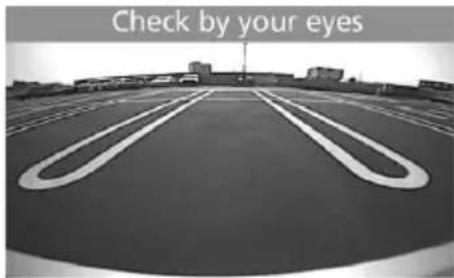
text_image
Check by your eyes■ To display the picture from the rear view camera manually
1 Press
Bluetooth® smartphone
Register your smartphone to the unit
You can use your Bluetooth smartphone when paired to this unit.
- You can pair the device and the unit using SSP (Secure Simple Pairing) which only requires confirmation.
• One device can be connected at a time. - When you register a new Bluetooth device, disconnect the Bluetooth device currently connected and then register the new device.
1 Turn on the Bluetooth function on your smartphone/cell-phone.
2 Search the unit ("KD-X56*") from your smartphone/cell-phone.
If a PIN code is required, enter the PIN code ("0000").
■ Disconnecting the device
- Turn off the Bluetooth function from your smartphone/cell-phone.
• Turn off the ignition switch.
■ About smartphone compatible with Phone book Access Profile (PBAP)
If your smartphone supports PBAP, you can display the following items when the smartphone is connected.
- Phone book
• Dialed calls, received calls, and missed calls
Receive a call
| To Do this | |
| Answer a call | Press < / ☐>. |
Operations during a call
| To Do this | |
| End a call | Press </\//. |
| Adjust the phone volume | Turn the volume knob. |
| Switching between hands-free mode and phone mode | Press <Q ↻>. Each time you press the button, "Transfer!" appears and talking method is switched between hands-free mode and phone mode. |
Make a phone call
1 Press < to enter Bluetooth mode.
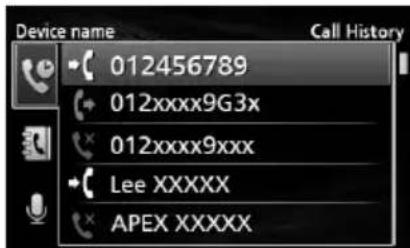
text_image
Device name 012456789 012xxxxx9G3x 012xxxxx9xxx Lee XXXXX APEX XXXXX2 Press <|◀◀>/<▶▶> to select a method to make a call ([ from the calls history/[]: from the phone book).
3 Turn the volume knob to select the target, then press the knob to make a call.
Playing Bluetooth Audio Device
1 Press < to display the HOME screen.
2 Turn the volume knob to select [BT Audio], then press the knob.
To Do this
Play/pause Press the volume knob.
| Select a file | Press I/ repeatedly. |
| Fast-backward/ Fast-forward | Press and hold I/ . |
NOTE
• Operations and display indications may differ according to their availability on the connected device.
Selecting a content in a list
1 Press <Q → to display the LIST screen.
2 Turn the volume knob to select an item, then press the knob.
• To return to the previous layer, press
Settings
1 Press and hold < > to display the settings.
2 Press <|◀◀>/<▶▶|> to select the category.
3 Turn the volume knob to select an item (see the following table), then press the knob.
4 Repeat step 3 until the desired item is selected/activated or follow the instructions stated on the selected item.
5 Press < Q
Audio Settings
| Fader R12 — F12 (00): Adjusts the front and rear speaker output balance. |
| Balance L12 — R12 (00): Adjusts the left and right speaker output balance. |
General Settings
| Beep ON/OFF: Activates or deactivates the keypress tone. Default is "ON". | |
| Date/Clock | Adjusts the date and clock. (P.3) |
| Language | Selects the text language used for on-screen information. |
| Time | 12h/24h: Selects time format. Default |
| Format | is "24h". |
| Wallpaper | Black/Blue: Selects the wallpaper image. |
| Demo | Set the demonstration mode. Default is "ON". |
| Initialize | Select [Initialize] and then select [Yes] to set all the settings to the initial default settings. |
Bluetooth Settings
| Sync Phonebook | ON/OFF: Activates or deactivates the synchronization of the phonebook in the connected smartphone with the unit. |
| BT Information | Displays the information about the connected Bluetooth device (device name, phone name, and mac address). |
Sound settings
1 Press <▶ to display the sound setting.
2 Turn the volume knob to select an item (see the following table), then press the knob.
3 Repeat step 2 until the desired item is selected/activated or follow the instructions stated on the selected item.
4 Press < Q
| Graphic Equalizer | Selects a preset equalizer suitable to the music genre.Flat / DRVN / Hard Rock / Hip Hop / Jazz / Pop/ R & B / User / ClassicalSelect [User] to use the settings made1) Press the volume knob to select the frequency.2) Turn the volume knob to adjust the level.3) Press. |
| Loudness | Sets the amounts of boost of low and high tones."ON", "OFF" (Default) |
| X'over | You can set the crossover frequency of speakers.1) Press/to select the speaker.2) Press the volume knob to select the item.3) Turn the volume knob to adjust the value.4) Press. |
| Delay Adjust the sound delay time so that the sounds from different speakers arrive at the listener sitting on the selected seat at the same time.1) Press/to select the speaker.2) Turn the volume knob to adjust the value.3) Press. | |
Before installation
Before installation of this unit, please note the following precautions.
▲WARNINGS
- If you connect the ignition wire (red) and the battery wire (yellow) to the car chassis (ground), you may cause a short circuit, that in turn may start a fire. Always connect those wires to the power source running through the fuse box.
- Do not cut out the fuse from the ignition wire (red) and the battery wire (yellow). The power supply must be connected to the wires via the fuse.
▲CAUTION
• Install this unit in the console of your vehicle. Do not touch the metal part of this unit during and shortly after the use of the unit. Metal part such as the heat sink and enclosure become hot.
NOTE
- Mounting and wiring this product requires skills and experience. For best safety, leave the mounting and wiring work to professionals.
- Make sure to ground the unit to a negative 12V DC power supply.
- Do not install the unit in a spot exposed to direct sunlight or excessive heat or humidity. Also avoid places with too much dust or the possibility of water splashing.
- Do not use your own screws. Use only the screws provided. If you use the wrong screws, you could damage the unit.
- If your car's ignition does not have an ACC position, connect the ignition wires to a power source that can be turned on and off with the ignition key. If you connect the ignition wire to a power source with a constant voltage supply, such as with battery wires, the battery may be drained.
- If the console has a lid, make sure to install the unit so that the front panel will not hit the lid when closing and opening.
- If the fuse blows, first make sure the wires aren't touching to cause a short circuit, then replace the old fuse with one with the same rating.
- Insulate unconnected wires with vinyl tape or other similar material. To prevent a short circuit, do not remove the caps on the ends of the unconnected wires or the terminals.
- Secure the wires with cable clamps and wrap vinyl tape around the wires that comes into contact with metal parts to protect the wires and to prevent short circuit.
- Connect the speaker wires correctly to the terminals to which they correspond. The unit may be damaged or fail to work if you share the wires or ground them to any metal part in the car.
- When only two speakers are being connected to the system, connect the connectors either to both the front output terminals or to both the rear output terminals (do not mix front and rear). For example, if you connect the connector of the left speaker to a front output terminal, do not connect the connector to a rear output terminal.
• After the unit is installed, check whether the brake lamps, blinkers, wipers, etc. on the car are working properly. - Mount the unit so that the mounting angle is 30^ or less.
- Do not press hard on the panel surface when installing the unit to the vehicle. Otherwise scars, damage, or failure may result.
- Reception may drop if there are metal objects near the Bluetooth antenna.

text_image
Diagram of a refrigerator control panel with labeled buttons and indicator lightsBluetooth antenna unit

Supplied accessories for installation
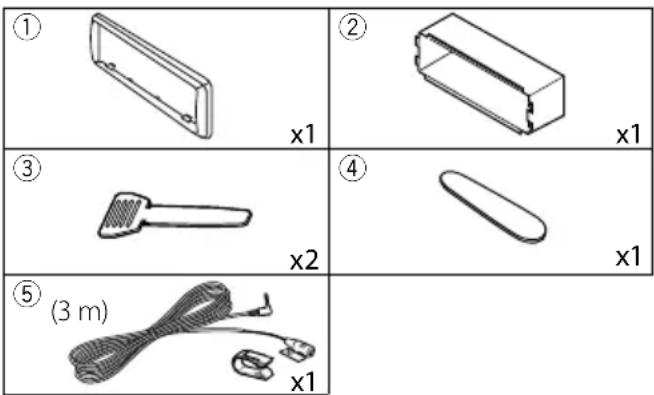
text_image
① x1 ② x1 ③ x2 ④ x1 ⑤ (3 m) x1Installation
Installation procedure
1) To prevent a short circuit, remove the key from the ignition and disconnect the terminal of the battery.
2) Make the proper input and output wire connections for each unit.
3) Connect the wire on the wiring harness.
4) Take Connector B on the wiring harness and connect it to the speaker connector in your vehicle.
5) Take Connector A on the wiring harness and connect it to the external power connector on your vehicle.
6) Connect the wiring harness connector to the unit.
7) Install the unit in your car.
8) Reconnect the terminal of the battery.
9) Press the reset button.
Installing the unit
Non-Japanese cars
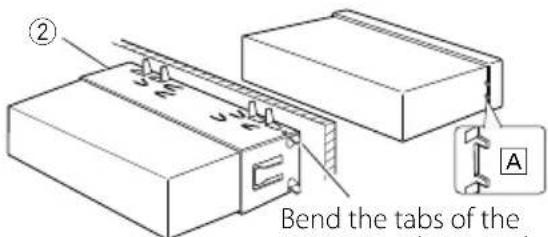
text_image
② Bend the tabs of the ABend the tabs of the mounting sleeve with a screwdriver or similar utensil and attach it in place.
NOTE
- Make sure that the unit is installed securely in place. If the unit is unstable, it may malfunction (eg, the sound may skip).
- If the panel opening of your vehicle is too small to fit the unit (A), trim (the upper and lower sides and right and left sides of) panel opening.
Trim plate
1) Attach accessory ① to the unit.
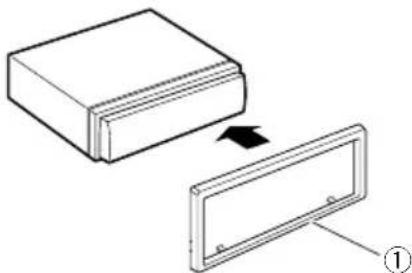
natural_image
Diagram showing a rectangular block being transferred into a rectangular panel, with an arrow indicating the process (no text or symbols present)Microphone unit
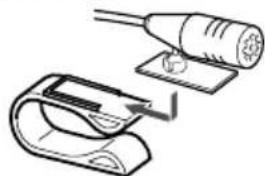
1) Check the installation position of the microphone (accessory ⑤).
2) Clean the installation surface.
3) Remove the separator of the microphone (accessory ⑤), and stick the microphone to the place shown below.
4) Wire the microphone cable up to the unit with it secured at several positions using tape or other desired method.
5) Adjust the direction of the microphone (accessory ⑤) to the driver.
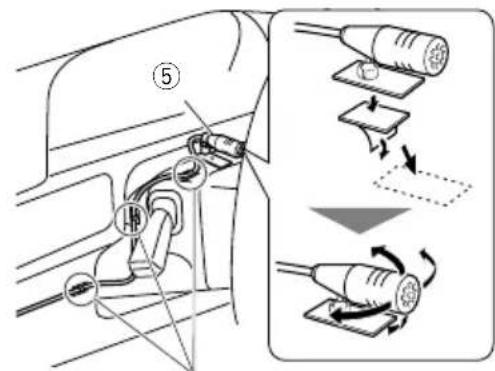
text_image
Diagram showing car plug installation steps with labeled components and directional arrows indicating movementFix a cable with a commercial item of tape.
NOTE
- Use the clips if necessary.
natural_image
Diagram showing a plug being inserted into a clip, with no visible text or symbolsRemoving the trim plate
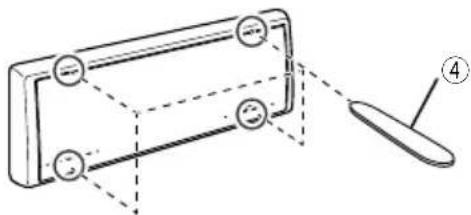
1) Use the extraction key (accessory ④) to lever out the four tabs (two on the top part, two on the bottom part).
natural_image
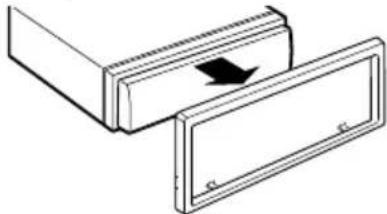
Technical line drawing of a mechanical component with labeled parts (no text or symbols)2) Pull the trim plate forward.
natural_image
Diagram of two rectangular compartments with a directional arrow indicating movement or force (no text or symbols)Removing the unit
1) Remove the trim plate by referring to step 1 in "Removing the trim plate".
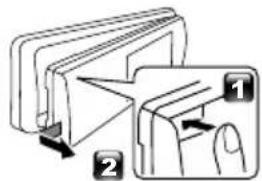
2) Detach the faceplate.
text_image
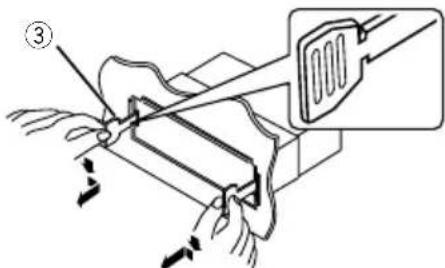
Diagram illustrating a folding or folding process with labeled steps 1 and 2, showing directional arrows.3) Insert the two extraction key (accessory ③) deeply into the slots on each side, as shown.
text_image
Diagram showing a mechanical device with labeled parts and directional arrows, including a magnified inset of the component.4) Lower the removal tool toward the bottom, and pull out the unit halfway while pressing towards the inside.
NOTE
- Be careful to avoid injury from the catch pins on the extraction key.
5) Pull the unit all the way out with your hands, being careful not to drop it.
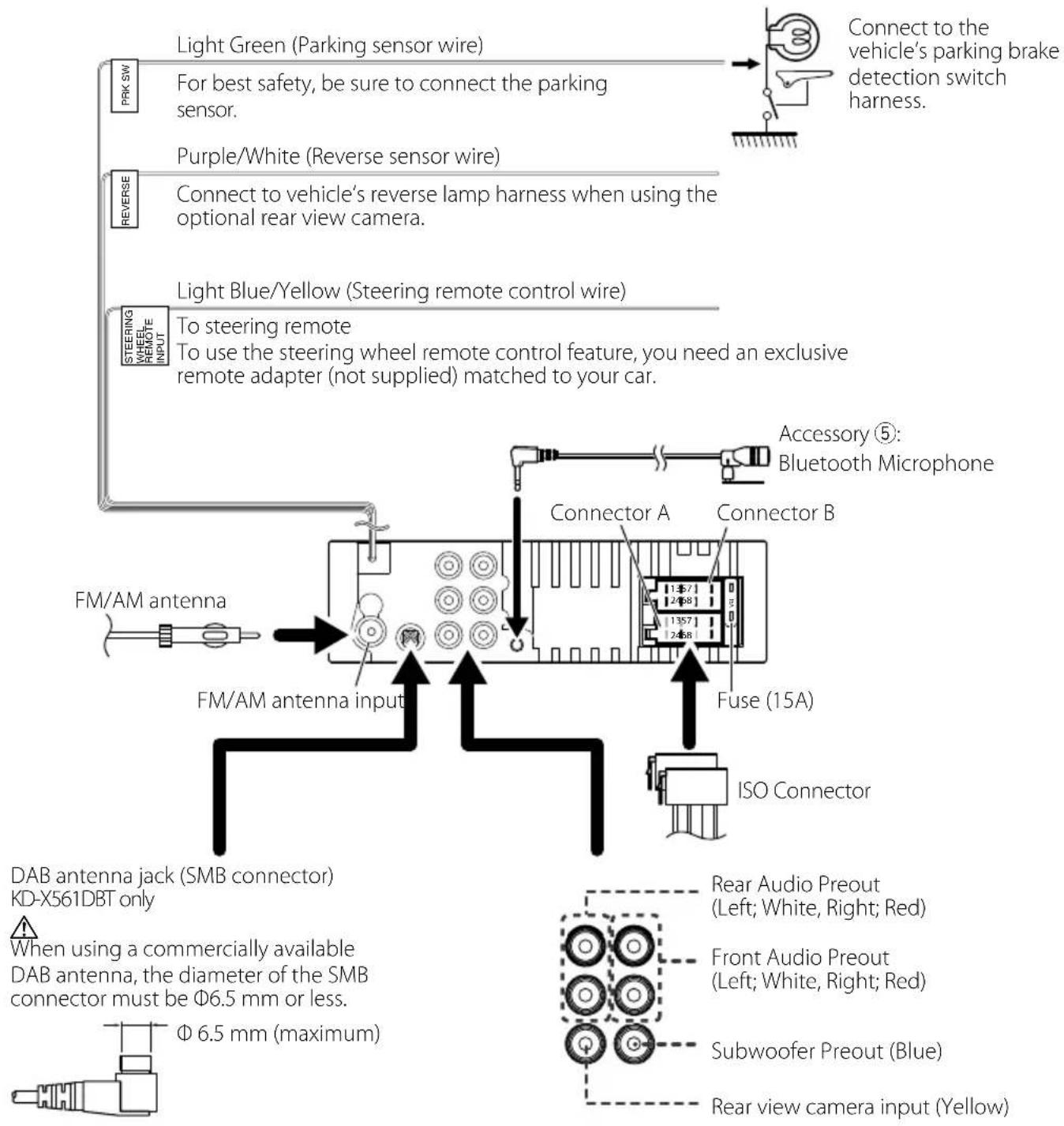
Wiring harness connector function guide
| Pin Color and function | ||
| A-4 Yellow Battery | ||
| A-5 Blue/White [1] | Power Control | |
| A-7 Red Ignition (ACC) | ||
| A-8 Black Earth (Ground) Connection | ||
| B-1/ B-2 | Purple (+) / Purple/Black (-) | Rear Right |
| B-3/ B-4 | Gray (+) / Gray/Black (-) | Front Right |
| B-5/ B-6 | White (+) / White/Black (-) | Front Left |
| B-7/ B-8 | Green (+) / Green/Black (-) | Rear Left |
• Speaker Impedance: 4-8 Ω
[1] Max. 150mA, 12V
CAUTION
Before you connect the commercially available ISO connectors to the unit, check the following condition:
• Make sure that the pin assignment of the connector matches with the JVC unit.
• Take extra notice of the power wire.
• In case battery wire and ignition wire are not corresponding then change them accordingly.
- In case the car does not have an ignition wire, use a commercially available interface.
Connecting wires to terminals
text_image
Light Green (Parking sensor wire) For best safety, be sure to connect the parking sensor. PRK SW Purple/White (Reverse sensor wire) REVERSE Connect to vehicle's reverse lamp harness when using the optional rear view camera. Light Blue/Yellow (Steering remote control wire) STEERING WHEEL-REMOTE INPUT To steering remote To use the steering wheel remote control feature, you need an exclusive remote adapter (not supplied) matched to your car. Accessory ⑤: Bluetooth Microphone Connector A Connector B FM/AM antenna FM/AM antenna input Fuse (15A) ISO Connector DAB antenna jack (SMB connector) KD-X561DBT only When using a commercially available DAB antenna, the diameter of the SMB connector must be Φ6.5 mm or less. Φ6.5 mm (maximum) Rear Audio Preout (Left; White, Right; Red) Front Audio Preout (Left; White, Right; Red) Subwoofer Preout (Blue) Rear view camera input (Yellow)Maintenance
Cleaning the Unit
If the front panel of this unit is stained, wipe it with a dry soft cloth such as a silicon cloth. If the front panel is stained badly, wipe the stain off with a cloth moistened with neutral cleaner, then wipe it again with a clean soft dry cloth.
CAUTION
- Applying spray cleaner directly to the unit may affect its mechanical parts. Wiping the front panel with a hard cloth or using a volatile liquid such as thinner or alcohol may scratch the surface or erase screened print.
Cleaning the connector
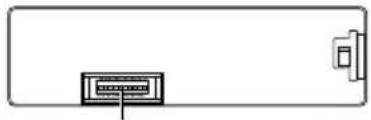
Detach the faceplate and clean the connector gently with a cotton swab. Be careful not to damage the connector.
natural_image
Simple line drawing of a rectangular frame with a small rectangular object on the right side (no text or symbols)Connector (on the reverse side of the faceplate)
Note for specifications
Bluetooth section
Frequency
:2.402-2.480 GHz
Output Power
: +8 dBm (AVE), Power Class1
General
Speaker Impedance
:4-8Ω
Operating Voltage
: 12 V DC car battery
Copyrights
- The Bluetooth word mark and logos are registered trademarks owned by the Bluetooth SIG, Inc. and any use of such marks by JVC KENWOOD Corporation is under license. Other trademarks and trade names are those of their respective owners.
- Use of the Made for Apple badge means that an accessory has been designed to connect specifically to the Apple product(s) identified in the badge, and has been certified by the developer to meet Apple performance standards. Apple is not responsible for the operation of this device or its compliance with safety and regulatory standards. Please note that the use of this accessory with an Apple product may
affect wireless performance.
• Apple, iPhone, iPod, iPod touch, and Lightning are trademarks of Apple Inc., registered in the U.S. and other countries.
- Microsoft and Windows Media are either registered trademarks or trademarks of Microsoft Corporation in the United States and/or other countries.
- THIS PRODUCT IS LICENSED UNDER THE MPEG-4 VISUAL PATENT PORTFOLIO LICENSE FOR THE PERSONAL AND NON-COMMERCIAL USE OF A CONSUMER FOR (j) ENCODING VIDEO IN COMPLIANCE WITH THE MPEG-4 VISUAL STANDARD ("MPEG-4 VIDEO") AND/OR (jj) DECODING MPEG-4 VIDEO THAT WAS ENCODED BY A CONSUMER ENGAGED IN A PERSONAL AND NON-COMMERCIAL ACTIVITY AND/OR WAS OBTAINED FROM A VIDEO PROVIDER LICENSED BY MPEG LA TO PROVIDE MPEG-4 VIDEO. NO LICENSE IS GRANTED OR SHALL BE IMPLIED FOR ANY OTHER USE. ADDITIONAL INFORMATION INCLUDING THAT RELATING TO PROMOTIONAL, INTERNAL AND COMMERCIAL USES AND LICENSING MAY BE OBTAINED FROM MPEG LA, LLC. SEE HTTP://WWW.MPEGLA.COM.
- THIS PRODUCT IS LICENSED UNDER THE AVC PATENT PORTFOLIO LICENSE FOR THE PERSONAL USE OF A CONSUMER OR OTHER USES IN WHICH IT DOES NOT RECEIVE REMUNERATION TO (j)ENCODE VIDEO IN COMPLIANCE WITH THE AVC STANDARD ("AVC VIDEO") AND/OR (jj)DECODE AVC VIDEO THAT WAS ENCODED BY A CONSUMER ENGAGED IN A PERSONAL ACTIVITY AND/OR WAS OBTAINED FROM A VIDEO PROVIDER LICENSED TO PROVIDE AVC VIDEO. NO LICENSE IS GRANTED OR SHALL BE IMPLIED FOR ANY OTHER USE. ADDITIONAL INFORMATION MAY BE OBTAINED FROM MPEG LA, L.L.C. SEE HTTP://WWW.MPEGLA.COM
- libFLAC
Copyright (C) 2000-2009 Josh Coalson
Copyright (C) 2011-2013 Xiph.Org Foundation
- Redistribution and use in source and binary forms, with or without modification, are permitted provided that the following conditions are met:
- Redistributions of source code must retain the above copyright notice, this list of conditions and the following disclaimer.
- Redistributions in binary form must reproduce the above copyright notice, this list of conditions and the following disclaimer in the documentation and/or other materials provided with the distribution.
Neither the name of the Xiph.org Foundation nor the names of its contributors may be used to endorse or promote products derived from this software without specific prior written permission. THIS SOFTWARE IS PROVIDED BY THE COPYRIGHT
HOLDERS AND CONTRIBUTORS ``AS IS'' AND ANY EXPRESS OR IMPLIED WARRANTIES, INCLUDING, BUT NOT LIMITED TO, THE IMPLIED WARRANTIES OF MERCHANTABILITY AND FITNESS FOR A PARTICULAR PURPOSE ARE DISCLAIMED. IN NO EVENT SHALL THE FOUNDATION OR CONTRIBUTORS BE LIABLE FOR ANY DIRECT, INDIRECT, INCIDENTAL, SPECIAL, EXEMPLARY, OR CONSEQUENTIAL DAMAGES (INCLUDING, BUT NOT LIMITED TO, PROCUREMENT OF SUBSTITUTE GOODS OR SERVICES; LOSS OF USE, DATA, OR PROFITS; OR BUSINESS INTERRUPTION) HOWEVER CAUSED AND ON ANY THEORY OF LIABILITY, WHETHER IN CONTRACT, STRICT LIABILITY, OR TORT (INCLUDING NEGLIGENCE OR OTHERWISE) ARISING IN ANY WAY OUT OF THE USE OF THIS SOFTWARE, EVEN IF ADVISED OF THE POSSIBILITY OF SUCH DAMAGE.
- libogg
Copyright (c) 2002, Xiph.org Foundation Redistribution and use in source and binary forms, with or without modification, are permitted provided that the following conditions are met:
- Redistributions of source code must retain the above copyright notice, this list of conditions and the following disclaimer.
- Redistributions in binary form must reproduce the above copyright notice, this list of conditions and the following disclaimer in the documentation and/or other materials provided with the distribution.
- Neither the name of the Xiph.org Foundation nor the names of its contributors may be used to endorse or promote products derived from this software without specific prior written permission.
THIS SOFTWARE IS PROVIDED BY THE COPYRIGHT HOLDERS AND CONTRIBUTORS ``AS IS'' AND ANY EXPRESS OR IMPLIED WARRANTIES, INCLUDING, BUT NOT LIMITED TO, THE IMPLIED WARRANTIES OF MERCHANTABILITY AND FITNESS FOR A PARTICULAR PURPOSE ARE DISCLAIMED. IN NO EVENT SHALL THE FOUNDATION OR CONTRIBUTORS BE LIABLE FOR ANY DIRECT, INDIRECT, INCIDENTAL, SPECIAL, EXEMPLARY, OR CONSEQUENTIAL DAMAGES (INCLUDING, BUT NOT LIMITED TO, PROCUREMENT OF SUBSTITUTE GOODS OR SERVICES; LOSS OF USE, DATA, OR PROFITS; OR BUSINESS INTERRUPTION) HOWEVER CAUSED AND ON ANY THEORY OF LIABILITY, WHETHER IN CONTRACT, STRICT LIABILITY, OR TORT (INCLUDING NEGLIGENCE OR OTHERWISE) ARISING IN ANY WAY OUT OF THE USE OF THIS SOFTWARE, EVEN IF ADVISED OF THE POSSIBILITY OF SUCH DAMAGE.
Information on Disposal of Old Electrical and Electronic Equipment and Batteries (applicable for EU countries that have adopted separate waste collection systems)
Products and batteries with the symbol (crossed-out wheeled bin) cannot be disposed as household waste.
Old electrical and electronic equipment and batteries should be recycled at a facility capable of handling these items and their waste byproducts.
Contact your local authority for details in locating a recycle facility nearest to you.
Proper recycling and waste disposal will help conserve resources whilst preventing detrimental effects on our health and the environment.
Notice: The sign "Pb" below the symbol for batteries indicates that this battery contains lead.

chemical
Chemical symbol for Pb (potassium boric acid) showing two identical molecular structures with crossed and uncrossed bondsFor Israel
הכלה
text_image
Diagram illustrating three-step folding or dissection process with labeled steps 1, 2, and 3text_image
Initial settings 10:10 Language Area EUROPE Date/Clock Demo ON FinishLanguage
text_image
Settings 10:10 Beep ON Date/Clock ← Language ← Time Format 24h Wallpaper Blacknatural_image
Diagram of a cable connector with two connectors and connecting wires (no text or symbols)natural_image
Simple line drawing of a plug connected to a device via cable (no text or symbols)La lecture commence.
text_image
Diagram of a refrigerator control panel with labeled buttons and indicator lightsAntenne Bluetooth
natural_image
Diagram showing a rectangular block being transferred into a rectangular panel, with an arrow indicating the process (no text or symbols present)Microphone
text_image
Diagram illustrating cable installation steps with labeled components and directional arrows indicating motionnatural_image
Diagram showing a cable being inserted into a device with a magnified view (no text or symbols)natural_image
Technical line drawing of a mechanical component with labeled part (4), no text or symbols presentnatural_image
Diagram of two rectangular compartments with a directional arrow indicating movement or force (no text or symbols)text_image
Diagram illustrating a folding or folding process with labeled steps 1 and 2, showing directional arrows.text_image
Technical diagram showing a mechanical assembly with labeled parts and directional arrows, including a magnified inset of a component.natural_image
Pure diagram of six circular components arranged in a grid within a dashed rectangular boundary (no text or symbols)natural_image
Simple line drawing of a rectangular container with a vertical line and a separate vertical component on the right (no text or symbols)the operation of this device or its compliance with safety and regulatory standards. Please note that the use of this accessory with an Apple product may affect wireless performance.
- Apple, iPhone, iPod, iPod touch, and Lightning are trademarks of Apple Inc., registered in the U.S. and other countries.
- Microsoft and Windows Media are either registered trademarks or trademarks of Microsoft Corporation in the United States and/or other countries.
- THIS PRODUCT IS LICENSED UNDER THE MPEG-4 VISUAL PATENT PORTFOLIO LICENSE FOR THE PERSONAL AND NON-COMMERCIAL USE OF A CONSUMER FOR (j) ENCODING VIDEO IN COMPLIANCE WITH THE MPEG-4 VISUAL STANDARD ("MPEG-4 VIDEO") AND/OR (jj) DECODING MPEG-4 VIDEO THAT WAS ENCODED BY A CONSUMER ENGAGED IN A PERSONAL AND NON-COMMERCIAL ACTIVITY AND/OR WAS OBTAINED FROM A VIDEO PROVIDER LICENSED BY MPEG LA TO PROVIDE MPEG-4 VIDEO. NO LICENSE IS GRANTED OR SHALL BE IMPLIED FOR ANY OTHER USE. ADDITIONAL INFORMATION INCLUDING THAT RELATING TO PROMOTIONAL, INTERNAL AND COMMERCIAL USES AND LICENSING MAY BE OBTAINED FROM MPEG LA, LLC. SEE HTTP://WWW.MPEGLA.COM.
- THIS PRODUCT IS LICENSED UNDER THE AVC PATENT PORTFOLIO LICENSE FOR THE PERSONAL USE OF A CONSUMER OR OTHER USES IN WHICH IT DOES NOT RECEIVE REMUNERATION TO (j)ENCODE VIDEO IN COMPLIANCE WITH THE AVC STANDARD ("AVC VIDEO") AND/OR (jj)DECODE AVC VIDEO THAT WAS ENCODED BY A CONSUMER ENGAGED IN A PERSONAL ACTIVITY AND/OR WAS OBTAINED FROM A VIDEO PROVIDER LICENSED TO PROVIDE AVC VIDEO. NO LICENSE IS GRANTED OR SHALL BE IMPLIED FOR ANY OTHER USE. ADDITIONAL INFORMATION MAY BE OBTAINED FROM MPEG LA, L.L.C. SEE HTTP://WWW.MPEGLA.COM
- libFLAC
Copyright (C) 2000-2009 Josh Coalson
Copyright (C) 2011-2013 Xiph.Org Foundation
- Redistribution and use in source and binary forms, with or without modification, are permitted provided that the following conditions are met:
- Redistributions of source code must retain the above copyright notice, this list of conditions and the following disclaimer.
- Redistributions in binary form must reproduce the above copyright notice, this list of conditions and the following disclaimer in the documentation and/or other materials provided with the distribution.
Neither the name of the Xiph.org Foundation nor the names of its contributors may be used to
endorse or promote products derived from this software without specific prior written permission. THIS SOFTWARE IS PROVIDED BY THE COPYRIGHT HOLDERS AND CONTRIBUTORS ``AS IS'' AND ANY EXPRESS OR IMPLIED WARRANTIES, INCLUDING, BUT NOT LIMITED TO, THE IMPLIED WARRANTIES OF MERCHANTABILITY AND FITNESS FOR A PARTICULAR PURPOSE ARE DISCLAIMED. IN NO EVENT SHALL THE FOUNDATION OR CONTRIBUTORS BE LIABLE FOR ANY DIRECT, INDIRECT, INCIDENTAL, SPECIAL, EXEMPLARY, OR CONSEQUENTIAL DAMAGES (INCLUDING, BUT NOT LIMITED TO, PROCUREMENT OF SUBSTITUTE GOODS OR SERVICES; LOSS OF USE, DATA, OR PROFITS; OR BUSINESS INTERRUPTION) HOWEVER CAUSED AND ON ANY THEORY OF LIABILITY, WHETHER IN CONTRACT, STRICT LIABILITY, OR TORT (INCLUDING NEGLIGENCE OR OTHERWISE) ARISING IN ANY WAY OUT OF THE USE OF THIS SOFTWARE, EVEN IF ADVISED OF THE POSSIBILITY OF SUCH DAMAGE.
- libogg
Copyright (c) 2002, Xiph.org Foundation Redistribution and use in source and binary forms, with or without modification, are permitted provided that the following conditions are met:
- Redistributions of source code must retain the above copyright notice, this list of conditions and the following disclaimer.
- Redistributions in binary form must reproduce the above copyright notice, this list of conditions and the following disclaimer in the documentation and/or other materials provided with the distribution.
- Neither the name of the Xiph.org Foundation nor the names of its contributors may be used to endorse or promote products derived from this software without specific prior written permission. THIS SOFTWARE IS PROVIDED BY THE COPYRIGHT HOLDERS AND CONTRIBUTORS ``AS IS'' AND ANY EXPRESS OR IMPLIED WARRANTIES, INCLUDING, BUT NOT LIMITED TO, THE IMPLIED WARRANTIES OF MERCHANTABILITY AND FITNESS FOR A PARTICULAR PURPOSE ARE DISCLAIMED. IN NO EVENT SHALL THE FOUNDATION OR CONTRIBUTORS BE LIABLE OR ANY DIRECT, INDIRECT, INCIDENTAL, SPECIAL, EXEMPLARY, OR CONSEQUENTIAL DAMAGES INCLUDING, BUT NOT LIMITED TO, PROCUREMENT OF SUBSTITUTE GOODS OR SERVICES; LOSS OF USE, DATA, OR PROFITS; OR BUSINESS INTERRUPTION) HOWEVER CAUSED AND ON ANY THEORY OF LIABILITY, WHETHER IN CONTRACT, STRICT LIABILITY, OR TORT (INCLUDING NEGLIGENCE OR OTHERWISE) ARISING IN ANY WAY OUT OF THE USE OF THIS SOFTWARE, EVEN IF ADVISED OF THE POSSIBILITY OF SUCH DAMAGE.
text_image
Diagram illustrating a folding or folding process with labeled steps 1 and 2, showing directional arrows.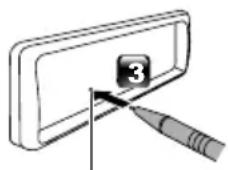
natural_image
Simple line drawing of a tool interacting with a numbered component (no text or symbols)Reset-Taste
Grundeinstellungen
text_image
CAMERA 144 - CLOCK + / + MENU START + / +text_image
Initial settings 10:10 Language Area EUROPE Date/Clock Demo ON FinishLanguage
text_image
Settings 10:10 Beep ON Date/Clock Language Time Format 24h Wallpaper Blacktext_image
Diagram illustrating a hand press operation with labeled steps 1 and 2, showing directional arrows indicating movement.AnbringenAbnehmen
natural_image
Diagram of a mechanical component with two labeled parts (1 and 2), showing directional arrows indicating movement or force (no text or symbols beyond labels)natural_image
Diagram showing three connected cable or connector components (no text or symbols visible)natural_image
Simple line drawing of a plug connected to a cable and a device (no text or symbols)text_image
Check by your eyestext_image
Diagram of a refrigerator control panel with labeled buttons and indicator lightsBluetooth-Antenne
natural_image
Diagram showing a rectangular block being transferred into a rectangular panel, with an arrow indicating the process (no text or symbols present)Mikrofoneinheit
text_image
Diagram illustrating car electrical plug connections with labeled parts and directional arrows indicating circuit changes.natural_image
Diagram showing a cable being inserted into a device with a magnified view (no text or symbols)natural_image
Technical line drawing of a mechanical component with dashed lines indicating hidden edges (no text or symbols)natural_image
Diagram of two rectangular compartments with a directional arrow indicating movement or force (no text or symbols)Ausbau des Geräts
text_image
Diagram illustrating a folding or folding process with labeled steps 1 and 2, showing directional arrows.text_image
Diagram showing a mechanical assembly with labeled parts and directional arrows, including a magnified inset of a component.natural_image
Simple line drawing of a rectangular container with a vertical line and a separate wall-mounted unit (no text or symbols)to the Apple product(s) identified in the badge, and has been certified by the developer to meet Apple performance standards. Apple is not responsible for the operation of this device or its compliance with safety and regulatory standards. Please note that the use of this accessory with an Apple product may affect wireless performance.
- Apple, iPhone, iPod, iPod touch, and Lightning are trademarks of Apple Inc., registered in the U.S. and other countries.
- Microsoft and Windows Media are either registered trademarks or trademarks of Microsoft Corporation in the United States and/or other countries.
- THIS PRODUCT IS LICENSED UNDER THE MPEG-4 VISUAL PATENT PORTFOLIO LICENSE FOR THE PERSONAL AND NON-COMMERCIAL USE OF A CONSUMER FOR (j) ENCODING VIDEO IN COMPLIANCE WITH THE MPEG-4 VISUAL STANDARD ("MPEG-4 VIDEO") AND/OR (jj) DECODING MPEG-4 VIDEO THAT WAS ENCODED BY A CONSUMER ENGAGED IN A PERSONAL AND NON-COMMERCIAL ACTIVITY AND/OR WAS OBTAINED FROM A VIDEO PROVIDER LICENSED BY MPEG LA TO PROVIDE MPEG-4 VIDEO. NO LICENSE IS GRANTED OR SHALL BE IMPLIED FOR ANY OTHER USE. ADDITIONAL INFORMATION INCLUDING THAT RELATING TO PROMOTIONAL, INTERNAL AND COMMERCIAL USES AND LICENSING MAY BE OBTAINED FROM MPEG LA, LLC. SEE HTTP://WWW.MPEGLA.COM.
- THIS PRODUCT IS LICENSED UNDER THE AVC PATENT PORTFOLIO LICENSE FOR THE PERSONAL USE OF A CONSUMER OR OTHER USES IN WHICH IT DOES NOT RECEIVE REMUNERATION TO (j)ENCODE VIDEO IN COMPLIANCE WITH THE AVC STANDARD ("AVC VIDEO") AND/OR (jj)DECODE AVC VIDEO THAT WAS ENCODED BY A CONSUMER ENGAGED IN A PERSONAL ACTIVITY AND/OR WAS OBTAINED FROM A VIDEO PROVIDER LICENSED TO PROVIDE AVC VIDEO. NO LICENSE IS GRANTED OR SHALL BE IMPLIED FOR ANY OTHER USE. ADDITIONAL INFORMATION MAY BE OBTAINED FROM MPEG LA, L.L.C. SEE HTTP://WWW.MPEGLA.COM
- libFLAC
Copyright (C) 2000-2009 Josh Coalson Copyright (C) 2011-2013 Xiph.Org Foundation
- Redistribution and use in source and binary forms, with or without modification, are permitted provided that the following conditions are met:
- Redistributions of source code must retain the above copyright notice, this list of conditions and the following disclaimer.
- Redistributions in binary form must reproduce the above copyright notice, this list of conditions and the following disclaimer in the documentation and/or other materials provided with the distribution.
Neither the name of the Xiph.org Foundation nor the names of its contributors may be used to endorse or promote products derived from this software without specific prior written permission. THIS SOFTWARE IS PROVIDED BY THE COPYRIGHT HOLDERS AND CONTRIBUTORS ``AS IS'' AND ANY EXPRESS OR IMPLIED WARRANTIES, INCLUDING, BUT NOT LIMITED TO, THE IMPLIED WARRANTIES OF MERCHANTABILITY AND FITNESS FOR A PARTICULAR PURPOSE ARE DISCLAIMED. IN NO EVENT SHALL THE FOUNDATION OR CONTRIBUTORS BE LIABLE FOR ANY DIRECT, INDIRECT, INCIDENTAL, SPECIAL, EXEMPLARY, OR CONSEQUENTIAL DAMAGES (INCLUDING, BUT NOT LIMITED TO, PROCUREMENT OF SUBSTITUTE GOODS OR SERVICES; LOSS OF USE, DATA, OR PROFITS; OR BUSINESS INTERRUPTION) HOWEVER CAUSED AND ON ANY THEORY OF LIABILITY, WHETHER IN CONTRACT, STRICT LIABILITY, OR TORT (INCLUDING NEGLIGENCE OR OTHERWISE) ARISING IN ANY WAY OUT OF THE USE OF THIS SOFTWARE, EVEN IF ADVISED OF THE POSSIBILITY OF SUCH DAMAGE.
- libogg
Copyright (c) 2002, Xiph.org Foundation Redistribution and use in source and binary forms, with or without modification, are permitted provided that the following conditions are met:
- Redistributions of source code must retain the above copyright notice, this list of conditions and the following disclaimer. - Redistributions in binary form must reproduce the above copyright notice, this list of conditions and the following disclaimer in the documentation and/or other materials provided with the distribution.
- Neither the name of the Xiph.org Foundation nor the names of its contributors may be used to endorse or promote products derived from this software without specific prior written permission. THIS SOFTWARE IS PROVIDED BY THE COPYRIGHT HOLDERS AND CONTRIBUTORS ``AS IS'' AND ANY EXPRESS OR IMPLIED WARRANTIES, INCLUDING, BUT NOT LIMITED TO, THE IMPLIED WARRANTIES OF MERCHANTABILITY AND FITNESS FOR A PARTICULAR PURPOSE ARE DISCLAIMED. IN NO EVENT SHALL THE FOUNDATION OR CONTRIBUTORS BE LIABLE FOR ANY DIRECT, INDIRECT, INCIDENTAL, SPECIAL, EXEMPLARY, OR CONSEQUENTIAL DAMAGES (INCLUDING, BUT NOT LIMITED TO, PROCUREMENT OF SUBSTITUTE GOODS OR SERVICES; LOSS OF USE, DATA, OR PROFITS; OR BUSINESS INTERRUPTION) HOWEVER CAUSED AND ON ANY THEORY OF LIABILITY, WHETHER IN CONTRACT, STRICT LIABILITY, OR TORT (INCLUDING NEGLIGENCE OR OTHERWISE) ARISING IN ANY WAY OUT OF THE USE OF THIS
SOFTWARE, EVEN IF ADVISED OF THE POSSIBILITY OF SUCH DAMAGE.
text_image
Diagram illustrating three-step folding or dissection process of a device, labeled 1, 2, and 3.Resetknop
text_image
Initial settings 10:10 Language Area EUROPE Date/Clock Demo ON FinishLanguage
Activeer [RDS Clock Sync] (RDS
text_image
Settings 10:10 Beep ON Date/Clock ← Language ← Time Format 24h Wallpaper Blacktext_image
Diagram illustrating a hand press application with labeled steps 1 and 2, showing directional arrows indicating movement.BevestigenLosmaken
natural_image
Diagram of a mechanical component with two labeled parts (1 and 2), showing directional arrows indicating movement or force (no text or symbols beyond labels)Selecteer een bron
natural_image
Diagram showing cable connections between two devices (no text or symbols)natural_image
Simple line drawing of a plug connected to a device via cable (no text or symbols)text_image
Check by your eyesnatural_image
Diagram of a washing machine control panel with buttons and dials (no text or symbols)Bluetooth-antenne
natural_image
Diagram showing a rectangular block being transferred into a rectangular panel, with an arrow indicating the process (no text or symbols present)De microfoon
text_image
Diagram illustrating car power plug installation steps with labeled components and directional arrowsnatural_image
Diagram showing a cable being inserted into a device with a magnified view (no text or symbols)natural_image
Technical line drawing of a mechanical component with dashed lines indicating hidden edges (no text or symbols)natural_image
Diagram showing two rectangular compartments with a directional arrow indicating movement or force (no text or symbols)text_image
Diagram illustrating a folding or folding process with labeled steps 1 and 2, showing directional arrows.text_image
Diagram showing a mechanical assembly with labeled parts and directional arrows, including a magnified inset of a component.natural_image
Simple line drawing of a rectangular container with a vertical line and a separate vertical component on the right (no text or symbols)performance standards. Apple is not responsible for the operation of this device or its compliance with safety and regulatory standards. Please note that the use of this accessory with an Apple product may affect wireless performance.
- Apple, iPhone, iPod, iPod touch, and Lightning are trademarks of Apple Inc., registered in the U.S. and other countries.
- Microsoft and Windows Media are either registered trademarks or trademarks of Microsoft Corporation in the United States and/or other countries.
- THIS PRODUCT IS LICENSED UNDER THE MPEG-4 VISUAL PATENT PORTFOLIO LICENSE FOR THE PERSONAL AND NON-COMMERCIAL USE OF A CONSUMER FOR (j) ENCODING VIDEO IN COMPLIANCE WITH THE MPEG-4 VISUAL STANDARD ("MPEG-4 VIDEO") AND/OR (jj) DECODING MPEG-4 VIDEO THAT WAS ENCODED BY A CONSUMER ENGAGED IN A PERSONAL AND NON-COMMERCIAL ACTIVITY AND/OR WAS OBTAINED FROM A VIDEO PROVIDER LICENSED BY MPEG LA TO PROVIDE MPEG-4 VIDEO. NO LICENSE IS GRANTED OR SHALL BE IMPLIED FOR ANY OTHER USE. ADDITIONAL INFORMATION INCLUDING THAT RELATING TO PROMOTIONAL, INTERNAL AND COMMERCIAL USES AND LICENSING MAY BE OBTAINED FROM MPEG LA, LLC. SEE HTTP://WWW.MPEGLA.COM.
- THIS PRODUCT IS LICENSED UNDER THE AVC PATENT PORTFOLIO LICENSE FOR THE PERSONAL USE OF A CONSUMER OR OTHER USES IN WHICH IT DOES NOT RECEIVE REMUNERATION TO (j)ENCODE VIDEO IN COMPLIANCE WITH THE AVC STANDARD ("AVC VIDEO") AND/OR (jj)DECODE AVC VIDEO THAT WAS ENCODED BY A CONSUMER ENGAGED IN A PERSONAL ACTIVITY AND/OR WAS OBTAINED FROM A VIDEO PROVIDER LICENSED TO PROVIDE AVC VIDEO. NO LICENSE IS GRANTED OR SHALL BE IMPLIED FOR ANY OTHER USE. ADDITIONAL INFORMATION MAY BE OBTAINED FROM MPEG LA, L.L.C. SEE HTTP://WWW.MPEGLA.COM
- libFLAC
Copyright (C) 2000-2009 Josh Coalson
Copyright (C) 2011-2013 Xiph.Org Foundation
- Redistribution and use in source and binary forms, with or without modification, are permitted provided that the following conditions are met:
- Redistributions of source code must retain the above copyright notice, this list of conditions and the following disclaimer.
- Redistributions in binary form must reproduce the above copyright notice, this list of conditions and the following disclaimer in the documentation and/or other materials provided with the distribution.
Neither the name of the Xiph.org Foundation
nor the names of its contributors may be used to endorse or promote products derived from this software without specific prior written permission. THIS SOFTWARE IS PROVIDED BY THE COPYRIGHT HOLDERS AND CONTRIBUTORS ``AS IS'' AND ANY EXPRESS OR IMPLIED WARRANTIES, INCLUDING, BUT NOT LIMITED TO, THE IMPLIED WARRANTIES OF MERCHANTABILITY AND FITNESS FOR A PARTICULAR PURPOSE ARE DISCLAIMED. IN NO EVENT SHALL THE FOUNDATION OR CONTRIBUTORS BE LIABLE FOR ANY DIRECT, INDIRECT, INCIDENTAL, SPECIAL, EXEMPLARY, OR CONSEQUENTIAL DAMAGES (INCLUDING, BUT NOT LIMITED TO, PROCUREMENT OF SUBSTITUTE GOODS OR SERVICES; LOSS OF USE, DATA, OR PROFITS; OR BUSINESS INTERRUPTION) HOWEVER CAUSED AND ON ANY THEORY OF LIABILITY, WHETHER IN CONTRACT, STRICT LIABILITY, OR TORT (INCLUDING NEGLIGENCE OR OTHERWISE) ARISING IN ANY WAY OUT OF THE USE OF THIS SOFTWARE, EVEN IF ADVISED OF THE POSSIBILITY OF SUCH DAMAGE.
- libogg
Copyright (c) 2002, Xiph.org Foundation Redistribution and use in source and binary forms, with or without modification, are permitted provided that the following conditions are met:
- Redistributions of source code must retain the above copyright notice, this list of conditions and the following disclaimer.
- Redistributions in binary form must reproduce the above copyright notice, this list of conditions and the following disclaimer in the documentation and/or other materials provided with the distribution.
- Neither the name of the Xiph.org Foundation nor the names of its contributors may be used to endorse or promote products derived from this software without specific prior written permission.
THIS SOFTWARE IS PROVIDED BY THE COPYRIGHT HOLDERS AND CONTRIBUTORS ``AS IS'' AND ANY EXPRESS OR IMPLIED WARRANTIES, INCLUDING, BUT NOT LIMITED TO, THE IMPLIED WARRANTIES OF MERCHANTABILITY AND FITNESS FOR A PARTICULAR PURPOSE ARE DISCLAIMED. IN NO EVENT SHALL THE FOUNDATION OR CONTRIBUTORS BE LIABLE FOR ANY DIRECT, INDIRECT, INCIDENTAL, SPECIAL, EXEMPLARY, OR CONSEQUENTIAL DAMAGES (INCLUDING, BUT NOT LIMITED TO, PROCUREMENT OF SUBSTITUTE GOODS OR SERVICES; LOSS OF USE, DATA, OR PROFITS; OR BUSINESS INTERRUPTION) HOWEVER CAUSED AND ON ANY THEORY OF LIABILITY, WHETHER IN CONTRACT, STRICT LIABILITY, OR TORT (INCLUDING NEGLIGENCE OR OTHERWISE) ARISING IN ANY WAY OUT OF THE USE OF THIS SOFTWARE, EVEN IF ADVISED OF THE POSSIBILITY OF SUCH DAMAGE.
text_image
Diagram illustrating three-step folding or dissection process with labeled parts 1, 2, and 3text_image
Initial settings 10:10 Language Area EUROPE Date/Clock Demo ON FinishLanguage
text_image
Settings 10:10 Beep ON Date/Clock ← Language ← Time Format 24h Wallpaper Blacktext_image
Diagram illustrating a hand gesture with numbered instructions for folding or inserting a card into a folder.MontareStaccare
text_image
Diagram showing two labeled components (1 and 2) with directional arrows indicating movement or flow.natural_image
Diagram showing cable connections between two devices (no text or symbols)natural_image
Simple line drawing of a plug connected to a device via cable (no text or symbols)iPod/iPhone collegabili
text_image
Diagram of a car air conditioner control panel with indicator lights and function buttonsnatural_image
Diagram showing a rectangular block being transferred into a rectangular panel, with an arrow indicating the process (no text or symbols present)Microfono
text_image
Diagram illustrating cable installation steps with labeled components and directional arrows indicating motionnatural_image
Diagram showing a connector being inserted into a device, with no visible text or symbolsnatural_image
Technical line drawing of a mechanical component with two circular holes and a handle, shown with dashed lines indicating hidden edges (no text or symbols)natural_image
Diagram of two rectangular compartments with a directional arrow indicating movement or force (no text or symbols)text_image
Diagram illustrating a folding or folding process with labeled steps 1 and 2, showing directional arrows.text_image
Technical diagram showing a mechanical assembly with labeled parts and directional arrows indicating motion or forcenatural_image
Simple line drawing of a rectangular container with a vertical line and a separate vertical component on the right (no text or symbols)safety and regulatory standards. Please note that the use of this accessory with an Apple product may affect wireless performance.
- Apple, iPhone, iPod, iPod touch, and Lightning are trademarks of Apple Inc., registered in the U.S. and other countries.
- Microsoft and Windows Media are either registered trademarks or trademarks of Microsoft Corporation in the United States and/or other countries.
- THIS PRODUCT IS LICENSED UNDER THE MPEG-4 VISUAL PATENT PORTFOLIO LICENSE FOR THE PERSONAL AND NON-COMMERCIAL USE OF A CONSUMER FOR (j) ENCODING VIDEO IN COMPLIANCE WITH THE MPEG-4 VISUAL STANDARD ("MPEG-4 VIDEO") AND/OR (jj) DECODING MPEG-4 VIDEO THAT WAS ENCODED BY A CONSUMER ENGAGED IN A PERSONAL AND NON-COMMERCIAL ACTIVITY AND/OR WAS OBTAINED FROM A VIDEO PROVIDER LICENSED BY MPEG LA TO PROVIDE MPEG-4 VIDEO. NO LICENSE IS GRANTED OR SHALL BE IMPLIED FOR ANY OTHER USE. ADDITIONAL INFORMATION INCLUDING THAT RELATING TO PROMOTIONAL, INTERNAL AND COMMERCIAL USES AND LICENSING MAY BE OBTAINED FROM MPEG LA, LLC. SEE HTTP://WWW.MPEGLA.COM.
- THIS PRODUCT IS LICENSED UNDER THE AVC PATENT PORTFOLIO LICENSE FOR THE PERSONAL USE OF A CONSUMER OR OTHER USES IN WHICH IT DOES NOT RECEIVE REMUNERATION TO (j)ENCODE VIDEO IN COMPLIANCE WITH THE AVC STANDARD ("AVC VIDEO") AND/OR (jj)DECODE AVC VIDEO THAT WAS ENCODED BY A CONSUMER ENGAGED IN A PERSONAL ACTIVITY AND/OR WAS OBTAINED FROM A VIDEO PROVIDER LICENSED TO PROVIDE AVC VIDEO. NO LICENSE IS GRANTED OR SHALL BE IMPLIED FOR ANY OTHER USE. ADDITIONAL INFORMATION MAY BE OBTAINED FROM MPEG LA, L.L.C. SEE HTTP://WWW.MPEGLA.COM
- libFLAC
Copyright (C) 2000-2009 Josh Coalson
Copyright (C) 2011-2013 Xiph.Org Foundation
- Redistribution and use in source and binary forms, with or without modification, are permitted provided that the following conditions are met:
- Redistributions of source code must retain the above copyright notice, this list of conditions and the following disclaimer.
- Redistributions in binary form must reproduce the above copyright notice, this list of conditions and the following disclaimer in the documentation and/or other materials provided with the distribution.
Neither the name of the Xiph.org Foundation nor the names of its contributors may be used to endorse or promote products derived from this
software without specific prior written permission. THIS SOFTWARE IS PROVIDED BY THE COPYRIGHT HOLDERS AND CONTRIBUTORS ``AS IS'' AND ANY EXPRESS OR IMPLIED WARRANTIES, INCLUDING, BUT NOT LIMITED TO, THE IMPLIED WARRANTIES OF MERCHANTABILITY AND FITNESS FOR A PARTICULAR PURPOSE ARE DISCLAIMED. IN NO EVENT SHALL THE FOUNDATION OR CONTRIBUTORS BE LIABLE FOR ANY DIRECT, INDIRECT, INCIDENTAL, SPECIAL, EXEMPLARY, OR CONSEQUENTIAL DAMAGES (INCLUDING, BUT NOT LIMITED TO, PROCUREMENT OF SUBSTITUTE GOODS OR SERVICES; LOSS OF USE, DATA, OR PROFITS; OR BUSINESS INTERRUPTION) HOWEVER CAUSED AND ON ANY THEORY OF LIABILITY, WHETHER IN CONTRACT, STRICT LIABILITY, OR TORT (INCLUDING NEGLIGENCE OR OTHERWISE) ARISING IN ANY WAY OUT OF THE USE OF THIS SOFTWARE, EVEN IF ADVISED OF THE POSSIBILITY OF SUCH DAMAGE.
- libogg
Copyright (c) 2002, Xiph.org Foundation Redistribution and use in source and binary forms, with or without modification, are permitted provided that the following conditions are met:
- Redistributions of source code must retain the above copyright notice, this list of conditions and the following disclaimer.
- Redistributions in binary form must reproduce the above copyright notice, this list of conditions and the following disclaimer in the documentation and/or other materials provided with the distribution.
- Neither the name of the Xiph.org Foundation nor the names of its contributors may be used to endorse or promote products derived from this software without specific prior written permission.
THIS SOFTWARE IS PROVIDED BY THE COPYRIGHT HOLDERS AND CONTRIBUTORS ``AS IS'' AND ANY EXPRESS OR IMPLIED WARRANTIES, INCLUDING, BUT NOT LIMITED TO, THE IMPLIED WARRANTIES OF MERCHANTABILITY AND FITNESS FOR A PARTICULAR PURPOSE ARE DISCLAIMED. IN NO EVENT SHALL THE FOUNDATION OR CONTRIBUTORS BE LIABLE FOR ANY DIRECT, INDIRECT, INCIDENTAL, SPECIAL, EXEMPLARY, OR CONSEQUENTIAL DAMAGES (INCLUDING, BUT NOT LIMITED TO, PROCUREMENT OF SUBSTITUTE GOODS OR SERVICES; LOSS OF USE, DATA, OR PROFITS; OR BUSINESS INTERRUPTION) HOWEVER CAUSED AND ON ANY THEORY OF LIABILITY, WHETHER IN CONTRACT, STRICT LIABILITY, OR TORT (INCLUDING NEGLIGENCE OR OTHERWISE) ARISING IN ANY WAY OUT OF THE USE OF THIS SOFTWARE, EVEN IF ADVISED OF THE POSSIBILITY OF SUCH DAMAGE.
text_image
Diagram illustrating a folding or folding process with labeled steps 1 and 2, showing directional arrows.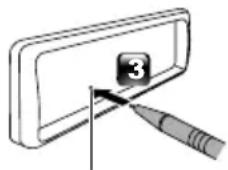
natural_image
Simple line drawing of a tool interacting with a numbered component (no text or symbols)Botón Restablecer
text_image
Initial settings 10:10 Language Area EUROPE Date/Clock Demo ON FinishLanguage
text_image
Settings 10:10 Beep ON Date/Clock ← Language ← Time Format 24h Wallpaper Blacktext_image
Diagram illustrating a hand press application with labeled steps 1 and 2, showing directional arrows indicating movement.AcoplarDesacoplar
text_image
Diagram showing two labeled components with directional arrows, likely illustrating a process or movement in a container-like structure.natural_image
Diagram of a cable connector with two connectors and connecting wires (no text or symbols)natural_image
Simple line drawing of a plug connected to a device via cable (no text or symbols)text_image
Check by your eyestext_image
Diagram of a washing machine control panel with labeled buttons and indicator lightstext_image
Technical diagram showing two mechanical components with labeled parts and a separate section view labeled A.natural_image
Diagram showing a rectangular block being transferred into a rectangular panel, with an arrow indicating the process (no text or symbols present)Unidad de micrófono
text_image
Diagram showing car plug installation steps with numbered components and directional arrows indicating movementnatural_image
Diagram showing a plug inserted into a device with a magnified view of the plug (no text or symbols present)Retirada del marco
natural_image
Technical line drawing of a mechanical component with dashed lines indicating hidden edges (no text or symbols)natural_image
Diagram of two rectangular compartments with a directional arrow indicating movement or force (no text or symbols)text_image
Diagram illustrating a folding or folding process with labeled steps 1 and 2, showing directional arrows.text_image
Diagram showing a mechanical assembly with labeled parts and directional arrows, including a magnified inset of a component.natural_image
Simple line drawing of a rectangular container with a vertical line and a separate vertical component on the right (no text or symbols)performance standards. Apple is not responsible for the operation of this device or its compliance with safety and regulatory standards. Please note that the use of this accessory with an Apple product may affect wireless performance.
- Apple, iPhone, iPod, iPod touch, and Lightning are trademarks of Apple Inc., registered in the U.S. and other countries.
- Microsoft and Windows Media are either registered trademarks or trademarks of Microsoft Corporation in the United States and/or other countries.
- THIS PRODUCT IS LICENSED UNDER THE MPEG-4 VISUAL PATENT PORTFOLIO LICENSE FOR THE PERSONAL AND NON-COMMERCIAL USE OF A CONSUMER FOR (j) ENCODING VIDEO IN COMPLIANCE WITH THE MPEG-4 VISUAL STANDARD ("MPEG-4 VIDEO") AND/OR (jj) DECODING MPEG-4 VIDEO THAT WAS ENCODED BY A CONSUMER ENGAGED IN A PERSONAL AND NON-COMMERCIAL ACTIVITY AND/OR WAS OBTAINED FROM A VIDEO PROVIDER LICENSED BY MPEG LA TO PROVIDE MPEG-4 VIDEO. NO LICENSE IS GRANTED OR SHALL BE IMPLIED FOR ANY OTHER USE. ADDITIONAL INFORMATION INCLUDING THAT RELATING TO PROMOTIONAL, INTERNAL AND COMMERCIAL USES AND LICENSING MAY BE OBTAINED FROM MPEG LA, LLC. SEE HTTP://WWW.MPEGLA.COM.
- THIS PRODUCT IS LICENSED UNDER THE AVC PATENT PORTFOLIO LICENSE FOR THE PERSONAL USE OF A CONSUMER OR OTHER USES IN WHICH IT DOES NOT RECEIVE REMUNERATION TO (j)ENCODE VIDEO IN COMPLIANCE WITH THE AVC STANDARD ("AVC VIDEO") AND/OR (jj)DECODE AVC VIDEO THAT WAS ENCODED BY A CONSUMER ENGAGED IN A PERSONAL ACTIVITY AND/OR WAS OBTAINED FROM A VIDEO PROVIDER LICENSED TO PROVIDE AVC VIDEO. NO LICENSE IS GRANTED OR SHALL BE IMPLIED FOR ANY OTHER USE. ADDITIONAL INFORMATION MAY BE OBTAINED FROM MPEG LA, L.L.C. SEE HTTP://WWW.MPEGLA.COM
- libFLAC
Copyright (C) 2000-2009 Josh Coalson
Copyright (C) 2011-2013 Xiph.Org Foundation
- Redistribution and use in source and binary forms, with or without modification, are permitted provided that the following conditions are met:
- Redistributions of source code must retain the above copyright notice, this list of conditions and the following disclaimer.
- Redistributions in binary form must reproduce the above copyright notice, this list of conditions and the following disclaimer in the documentation and/or other materials provided with the distribution.
Neither the name of the Xiph.org Foundation
nor the names of its contributors may be used to endorse or promote products derived from this software without specific prior written permission. THIS SOFTWARE IS PROVIDED BY THE COPYRIGHT HOLDERS AND CONTRIBUTORS ``AS IS'' AND ANY EXPRESS OR IMPLIED WARRANTIES, INCLUDING, BUT NOT LIMITED TO, THE IMPLIED WARRANTIES OF MERCHANTABILITY AND FITNESS FOR A PARTICULAR PURPOSE ARE DISCLAIMED. IN NO EVENT SHALL THE FOUNDATION OR CONTRIBUTORS BE LIABLE FOR ANY DIRECT, INDIRECT, INCIDENTAL, SPECIAL, EXEMPLARY, OR CONSEQUENTIAL DAMAGES (INCLUDING, BUT NOT LIMITED TO, PROCUREMENT OF SUBSTITUTE GOODS OR SERVICES; LOSS OF USE, DATA, OR PROFITS; OR BUSINESS INTERRUPTION) HOWEVER CAUSED AND ON ANY THEORY OF LIABILITY, WHETHER IN CONTRACT, STRICT LIABILITY, OR TORT (INCLUDING NEGLIGENCE OR OTHERWISE) ARISING IN ANY WAY OUT OF THE USE OF THIS SOFTWARE, EVEN IF ADVISED OF THE POSSIBILITY OF SUCH DAMAGE.
- libogg
Copyright (c) 2002, Xiph.org Foundation Redistribution and use in source and binary forms, with or without modification, are permitted provided that the following conditions are met:
- Redistributions of source code must retain the above copyright notice, this list of conditions and the following disclaimer.
- Redistributions in binary form must reproduce the above copyright notice, this list of conditions and the following disclaimer in the documentation and/or other materials provided with the distribution.
- Neither the name of the Xiph.org Foundation nor the names of its contributors may be used to endorse or promote products derived from this software without specific prior written permission.
THIS SOFTWARE IS PROVIDED BY THE COPYRIGHT HOLDERS AND CONTRIBUTORS ``AS IS'' AND ANY EXPRESS OR IMPLIED WARRANTIES, INCLUDING, BUT NOT LIMITED TO, THE IMPLIED WARRANTIES OF MERCHANTABILITY AND FITNESS FOR A PARTICULAR PURPOSE ARE DISCLAIMED. IN NO EVENT SHALL THE FOUNDATION OR CONTRIBUTORS BE LIABLE FOR ANY DIRECT, INDIRECT, INCIDENTAL, SPECIAL, EXEMPLARY, OR CONSEQUENTIAL DAMAGES (INCLUDING, BUT NOT LIMITED TO, PROCUREMENT OF SUBSTITUTE GOODS OR SERVICES; LOSS OF USE, DATA, OR PROFITS; OR BUSINESS INTERRUPTION) HOWEVER CAUSED AND ON ANY THEORY OF LIABILITY, WHETHER IN CONTRACT, STRICT LIABILITY, OR TORT (INCLUDING NEGLIGENCE OR OTHERWISE) ARISING IN ANY WAY OUT OF THE USE OF THIS SOFTWARE, EVEN IF ADVISED OF THE POSSIBILITY OF SUCH DAMAGE.
text_image
Diagram illustrating three-step folding or dissection process of a device, labeled 1, 2, and 3.Botão de reposição
text_image
Initial settings 10:10 Language Area EUROPE Date/Clock Demo ON FinishLanguage
text_image
Settings 10:10 Beep ON Date/Clock ← Language ← Time Format 24h Wallpaper Blacknatural_image
Diagram showing cable connections between two devices (no text or symbols)Ligue o iPod/iPhone usando o KS-U62 (acessório opcional).
natural_image
Simple line drawing of a cable being inserted into a plug, connected to a device (no text or symbols visible)text_image
Check by your eyestext_image
Diagram of a washing machine control panel with indicator lights and function buttonsnatural_image
Diagram showing a rectangular block being transferred into a rectangular panel, with an arrow indicating the process (no text or symbols present)text_image
Diagram illustrating car air intake and exhaust system with labeled components and directional arrows indicating flow or movement.natural_image
Diagram showing a plug being inserted into a socket, with no visible text or symbolsRetirar a moldura
natural_image
Technical line drawing of a mechanical component with dashed lines indicating hidden edges (no text or symbols)natural_image
Diagram of two rectangular compartments with a directional arrow indicating movement or force (no text or symbols)Retirar a unidade
text_image
Diagram illustrating a folding or folding process with labeled steps 1 and 2, showing directional arrows and a finger pointing to the fold.text_image
Diagram illustrating a mechanical or electrical component with labeled parts and directional arrows, including a magnified inset showing a device.natural_image
Simple line drawing of a device with a rectangular panel and a vertical door (no text or symbols)Conector (no verso do painel frontal)
- A marca da palavra e os logótipos Bluetooth são marcas comerciais registadas propriedade da Bluetooth SIG, Inc. e qualquer utilização de tais marcas pela JVC KENWOOD Corporation está licenciada. Outras marcas registadas e nomes de marcas são dos respetivos proprietários.
- Use of the Made for Apple badge means that an accessory has been designed to connect specifically to the Apple product(s) identified in the badge, and has been certified by the developer to meet Apple performance standards. Apple is not responsible for the operation of this device or its compliance with
safety and regulatory standards. Please note that the use of this accessory with an Apple product may affect wireless performance.
- Apple, iPhone, iPod, iPod touch, and Lightning are trademarks of Apple Inc., registered in the U.S. and other countries.
- Microsoft and Windows Media are either registered trademarks or trademarks of Microsoft Corporation in the United States and/or other countries.
- THIS PRODUCT IS LICENSED UNDER THE MPEG-4 VISUAL PATENT PORTFOLIO LICENSE FOR THE PERSONAL AND NON-COMMERCIAL USE OF A CONSUMER FOR (j) ENCODING VIDEO IN COMPLIANCE WITH THE MPEG-4 VISUAL STANDARD ("MPEG-4 VIDEO") AND/OR (jj) DECODING MPEG-4 VIDEO THAT WAS ENCODED BY A CONSUMER ENGAGED IN A PERSONAL AND NON-COMMERCIAL ACTIVITY AND/OR WAS OBTAINED FROM A VIDEO PROVIDER LICENSED BY MPEG LA TO PROVIDE MPEG-4 VIDEO. NO LICENSE IS GRANTED OR SHALL BE IMPLIED FOR ANY OTHER USE. ADDITIONAL INFORMATION INCLUDING THAT RELATING TO PROMOTIONAL, INTERNAL AND COMMERCIAL USES AND LICENSING MAY BE OBTAINED FROM MPEG LA, LLC. SEE HTTP://WWW.MPEGLA.COM.
- THIS PRODUCT IS LICENSED UNDER THE AVC PATENT PORTFOLIO LICENSE FOR THE PERSONAL USE OF A CONSUMER OR OTHER USES IN WHICH IT DOES NOT RECEIVE REMUNERATION TO (j)ENCODE VIDEO IN COMPLIANCE WITH THE AVC STANDARD ("AVC VIDEO") AND/OR (jj)DECODE AVC VIDEO THAT WAS ENCODED BY A CONSUMER ENGAGED IN A PERSONAL ACTIVITY AND/OR WAS OBTAINED FROM A VIDEO PROVIDER LICENSED TO PROVIDE AVC VIDEO. NO LICENSE IS GRANTED OR SHALL BE IMPLIED FOR ANY OTHER USE. ADDITIONAL INFORMATION MAY BE OBTAINED FROM MPEG LA, L.L.C. SEE HTTP://WWW.MPEGLA.COM
- libFLAC
Copyright (C) 2000-2009 Josh Coalson
Copyright (C) 2011-2013 Xiph.Org Foundation
- Redistribution and use in source and binary forms, with or without modification, are permitted provided that the following conditions are met:
- Redistributions of source code must retain the above copyright notice, this list of conditions and the following disclaimer.
- Redistributions in binary form must reproduce the above copyright notice, this list of conditions and the following disclaimer in the documentation and/or other materials provided with the distribution.
Neither the name of the Xiph.org Foundation nor the names of its contributors may be used to endorse or promote products derived from this
software without specific prior written permission. THIS SOFTWARE IS PROVIDED BY THE COPYRIGHT HOLDERS AND CONTRIBUTORS ``AS IS'' AND ANY EXPRESS OR IMPLIED WARRANTIES, INCLUDING, BUT NOT LIMITED TO, THE IMPLIED WARRANTIES OF MERCHANTABILITY AND FITNESS FOR A PARTICULAR PURPOSE ARE DISCLAIMED. IN NO EVENT SHALL THE FOUNDATION OR CONTRIBUTORS BE LIABLE FOR ANY DIRECT, INDIRECT, INCIDENTAL, SPECIAL, EXEMPLARY, OR CONSEQUENTIAL DAMAGES (INCLUDING, BUT NOT LIMITED TO, PROCUREMENT OF SUBSTITUTE GOODS OR SERVICES; LOSS OF USE, DATA, OR PROFITS; OR BUSINESS INTERRUPTION) HOWEVER CAUSED AND ON ANY THEORY OF LIABILITY, WHETHER IN CONTRACT, STRICT LIABILITY, OR TORT (INCLUDING NEGLIGENCE OR OTHERWISE) ARISING IN ANY WAY OUT OF THE USE OF THIS SOFTWARE, EVEN IF ADVISED OF THE POSSIBILITY OF SUCH DAMAGE.
- libogg
Copyright (c) 2002, Xiph.org Foundation Redistribution and use in source and binary forms, with or without modification, are permitted provided that the following conditions are met:
- Redistributions of source code must retain the above copyright notice, this list of conditions and the following disclaimer.
- Redistributions in binary form must reproduce the above copyright notice, this list of conditions and the following disclaimer in the documentation and/or other materials provided with the distribution.
- Neither the name of the Xiph.org Foundation nor the names of its contributors may be used to endorse or promote products derived from this software without specific prior written permission.
THIS SOFTWARE IS PROVIDED BY THE COPYRIGHT HOLDERS AND CONTRIBUTORS ``AS IS'' AND ANY EXPRESS OR IMPLIED WARRANTIES, INCLUDING, BUT NOT LIMITED TO, THE IMPLIED WARRANTIES OF MERCHANTABILITY AND FITNESS FOR A PARTICULAR PURPOSE ARE DISCLAIMED. IN NO EVENT SHALL THE FOUNDATION OR CONTRIBUTORS BE LIABLE FOR ANY DIRECT, INDIRECT, INCIDENTAL, SPECIAL, EXEMPLARY, OR CONSEQUENTIAL DAMAGES (INCLUDING, BUT NOT LIMITED TO, PROCUREMENT OF SUBSTITUTE GOODS OR SERVICES; LOSS OF USE, DATA, OR PROFITS; OR BUSINESS INTERRUPTION) HOWEVER CAUSED AND ON ANY THEORY OF LIABILITY, WHETHER IN CONTRACT, STRICT LIABILITY, OR TORT (INCLUDING NEGLIGENCE OR OTHERWISE) ARISING IN ANY WAY OUT OF THE USE OF THIS SOFTWARE, EVEN IF ADVISED OF THE POSSIBILITY OF SUCH DAMAGE.
text_image
Diagram illustrating a finger pressing a button on a device, labeled with step numbers 1 and 2.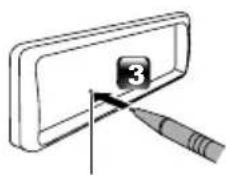
text_image
Diagram showing a tool interacting with a numbered component labeled '3'Кнопка сброса
text_image
Initial settings 10:10 Language Area EUROPE Date/Clock Demo ON FinishLanguage
text_image
Settings 10:10 Beep ON Date/Clock ← Language ← Time Format 24h Wallpaper Blacktext_image
Diagram illustrating a folding or folding process with labeled steps 1 and 2, showing directional arrows.text_image
Diagram showing two labeled components (1 and 2) with directional arrows indicating movement or flow.Выберите источник
natural_image
Diagram showing cable connections between two devices (no text or symbols)natural_image
Simple line drawing of a plug connected to a device via cable (no text or symbols)text_image
Check by your eyesnatural_image
Diagram of a car air conditioner unit with control panel and indicator lights (no text or symbols)natural_image
Diagram showing a rectangular block being inserted into a rectangular panel, with an arrow indicating the insertion direction (no text or symbols present)Блок микрофона
text_image
Diagram illustrating cable installation steps with labeled components and directional arrows indicating motionnatural_image
Diagram showing a cable being inserted into a device with a magnified view (no text or symbols)natural_image
Technical line drawing of a mechanical component with dashed lines indicating hidden edges (no text or symbols)natural_image
Diagram of two rectangular compartments with a directional arrow indicating movement or force (no text or symbols)Удаление устройства
text_image
Diagram illustrating a folding or folding process with labeled steps 1 and 2, showing directional arrows.text_image
Diagram illustrating a mechanical or electrical component with labeled parts and directional arrows, including a magnified inset showing a device.natural_image
Simple line drawing of a rectangular container with a vertical line and a separate vertical component on the right (no text or symbols)has been certified by the developer to meet Apple performance standards. Apple is not responsible for the operation of this device or its compliance with safety and regulatory standards. Please note that the use of this accessory with an Apple product may affect wireless performance.
- Apple, iPhone, iPod, iPod touch, and Lightning are trademarks of Apple Inc., registered in the U.S. and other countries.
- Microsoft and Windows Media are either registered trademarks or trademarks of Microsoft Corporation in the United States and/or other countries.
- THIS PRODUCT IS LICENSED UNDER THE MPEG-4 VISUAL PATENT PORTFOLIO LICENSE FOR THE PERSONAL AND NON-COMMERCIAL USE OF A CONSUMER FOR (j) ENCODING VIDEO IN COMPLIANCE WITH THE MPEG-4 VISUAL STANDARD ("MPEG-4 VIDEO") AND/OR (jj) DECODING MPEG-4 VIDEO THAT WAS ENCODED BY A CONSUMER ENGAGED IN A PERSONAL AND NON-COMMERCIAL ACTIVITY AND/OR WAS OBTAINED FROM A VIDEO PROVIDER LICENSED BY MPEG LA TO PROVIDE MPEG-4 VIDEO. NO LICENSE IS GRANTED OR SHALL BE IMPLIED FOR ANY OTHER USE. ADDITIONAL INFORMATION INCLUDING THAT RELATING TO PROMOTIONAL, INTERNAL AND COMMERCIAL USES AND LICENSING MAY BE OBTAINED FROM MPEG LA, LLC. SEE HTTP://WWW.MPEGLA.COM.
- THIS PRODUCT IS LICENSED UNDER THE AVC PATENT PORTFOLIO LICENSE FOR THE PERSONAL USE OF A CONSUMER OR OTHER USES IN WHICH IT DOES NOT RECEIVE REMUNERATION TO (j)ENCODE VIDEO IN COMPLIANCE WITH THE AVC STANDARD ("AVC VIDEO") AND/OR (jj)DECODE AVC VIDEO THAT WAS ENCODED BY A CONSUMER ENGAGED IN A PERSONAL ACTIVITY AND/OR WAS OBTAINED FROM A VIDEO PROVIDER LICENSED TO PROVIDE AVC VIDEO. NO LICENSE IS GRANTED OR SHALL BE IMPLIED FOR ANY OTHER USE. ADDITIONAL INFORMATION MAY BE OBTAINED FROM MPEG LA, L.L.C. SEE HTTP://WWW.MPEGLA.COM
- libFLAC
Copyright (C) 2000-2009 Josh Coalson
Copyright (C) 2011-2013 Xiph.Org Foundation
- Redistribution and use in source and binary forms, with or without modification, are permitted provided that the following conditions are met:
- Redistributions of source code must retain the above copyright notice, this list of conditions and the following disclaimer.
- Redistributions in binary form must reproduce the above copyright notice, this list of conditions and the following disclaimer in the documentation and/or other materials provided with the distribution.
Neither the name of the Xiph.org Foundation
nor the names of its contributors may be used to endorse or promote products derived from this software without specific prior written permission. THIS SOFTWARE IS PROVIDED BY THE COPYRIGHT HOLDERS AND CONTRIBUTORS ``AS IS'' AND ANY EXPRESS OR IMPLIED WARRANTIES, INCLUDING, BUT NOT LIMITED TO, THE IMPLIED WARRANTIES OF MERCHANTABILITY AND FITNESS FOR A PARTICULAR PURPOSE ARE DISCLAIMED. IN NO EVENT SHALL THE FOUNDATION OR CONTRIBUTORS BE LIABLE FOR ANY DIRECT, INDIRECT, INCIDENTAL, SPECIAL, EXEMPLARY, OR CONSEQUENTIAL DAMAGES (INCLUDING, BUT NOT LIMITED TO, PROCUREMENT OF SUBSTITUTE GOODS OR SERVICES; LOSS OF USE, DATA, OR PROFITS; OR BUSINESS INTERRUPTION) HOWEVER CAUSED AND ON ANY THEORY OF LIABILITY, WHETHER IN CONTRACT, STRICT LIABILITY, OR TORT (INCLUDING NEGLIGENCE OR OTHERWISE) ARISING IN ANY WAY OUT OF THE USE OF THIS SOFTWARE, EVEN IF ADVISED OF THE POSSIBILITY OF SUCH DAMAGE.
- libogg
Copyright (c) 2002, Xiph.org Foundation Redistribution and use in source and binary forms, with or without modification, are permitted provided that the following conditions are met:
- Redistributions of source code must retain the above copyright notice, this list of conditions and the following disclaimer.
- Redistributions in binary form must reproduce the above copyright notice, this list of conditions and the following disclaimer in the documentation and/or other materials provided with the distribution.
- Neither the name of the Xiph.org Foundation nor the names of its contributors may be used to endorse or promote products derived from this software without specific prior written permission.
THIS SOFTWARE IS PROVIDED BY THE COPYRIGHT HOLDERS AND CONTRIBUTORS ``AS IS'' AND ANY EXPRESS OR IMPLIED WARRANTIES, INCLUDING, BUT NOT LIMITED TO, THE IMPLIED WARRANTIES OF MERCHANTABILITY AND FITNESS FOR A PARTICULAR PURPOSE ARE DISCLAIMED. IN NO EVENT SHALL THE FOUNDATION OR CONTRIBUTORS BE LIABLE FOR ANY DIRECT, INDIRECT, INCIDENTAL, SPECIAL, EXEMPLARY, OR CONSEQUENTIAL DAMAGES (INCLUDING, BUT NOT LIMITED TO, PROCUREMENT OF SUBSTITUTE GOODS OR SERVICES; LOSS OF USE, DATA, OR PROFITS; OR BUSINESS INTERRUPTION) HOWEVER CAUSED AND ON ANY THEORY OF LIABILITY, WHETHER IN CONTRACT, STRICT LIABILITY, OR TORT (INCLUDING NEGLIGENCE OR OTHERWISE) ARISING IN ANY WAY OUT OF THE USE OF THIS SOFTWARE, EVEN IF ADVISED OF THE POSSIBILITY OF SUCH DAMAGE.
For Europe sales area
Declaration of Conformity with regard to the RE Directive 2014/53/EU
Declaration of Conformity with regard to the RoHS Directive 2011/65/EU
Manufacturer:
JVC KENWOOD Corporation
3-12, Moriyacho, Kanagawa-ku, Yokohama-shi, Kanagawa 221-0022, JAPAN
EU Representative:
JVCKENWOOD Europe B.V.
Amsterdamseweg 37, 1422 AC UITHOORN, THE
NETHERLANDS
Hereby, JVC KENWOOD declares that the radio equipment KD-X561DBT/KD-X560BT is in compliance with Directive 2014/53/EU. The full text of the EU declaration of conformity is available at the following internet address: