
EHXR10 - Face cleansing PANASONIC - Free user manual and instructions
Find the device manual for free EHXR10 PANASONIC in PDF.
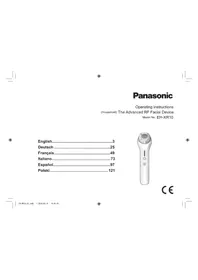


| Brand | Panasonic |
| Model | EH-XR10 |
| Type | Radiofrequency (RF) and Ultrasonic Facial Care Device |
| Power Supply | AC adapter RE6-37 (100-240 V automatic) |
| Charging Time | Approximately 2 hours |
| Battery Life | Approximately 3 uses (up to 12 min per use) |
| Modes | RF/Ultrasound (10 min) and RF (2 min) |
| Application Areas | Cheeks, jawline, mouth; forehead in RF mode only |
| Recommended Usage Frequency | Up to 3 times per week, with at least one day interval |
| RF Heat Levels | Low, Medium, High |
| Built-in Sensors | Contact sensor and over-care prevention sensor |
| Included Accessories | Conductive gel EH-4R02 |
| Battery | Built-in rechargeable lithium-ion, non-user replaceable |
| Charging Temperature | 15 °C to 35 °C |
| Cleaning and Maintenance | Wipe with a dry cloth, do not wash with water |
| Safety | Do not use on injured skin, after surgery, or on at-risk individuals (cardiac, diabetic, etc.) |
| Spare Parts | Conductive gel EH-4R02 sold separately |
| Repairability | Contact an authorized Panasonic service center |
| Dimensions | Not communicated |
| Weight | Not communicated |
Frequently Asked Questions - EHXR10 PANASONIC
User questions about EHXR10 PANASONIC
0 question about this device. Answer the ones you know or ask your own.
Ask a new question about this device
Download the instructions for your Face cleansing in PDF format for free! Find your manual EHXR10 - PANASONIC and take your electronic device back in hand. On this page are published all the documents necessary for the use of your device. EHXR10 by PANASONIC.
USER MANUAL EHXR10 PANASONIC
Operating Instructions
(Household) The Advanced RF Facial Device
Model No. EH-XR10
English. 3
Deutsch 25
Francais 49
Italiano 73
Espanol. 97
Polski 121
C E

Panasonic
Operating Instructions
(Household) The Advanced RF Facial Device
Model No. EH-XR10
Contents
Safety precautions 6 After use 18
Before use 11 Frequently asked questions 19
Parts identification 12 Separately sold Gel 20
Modes and their applications 12 Troubleshooting 21
Preparation 13 Battery life 23
How to use 14 Removing the built-in rechargeable
How to move the head in each battery 25
mode 17 Specifications 23
Thank you for purchasing this Panasonic product.
Before operating this unit, please read these instructions completely and save them for future use.

Warning
- This appliance can be used by children aged from 8 years and above and persons with reduced physical, sensory or mental capabilities or lack of experience and knowledge if they have been given supervision or instruction concerning use of the appliance in a safe way and understand the hazards involved. Children shall not play with the appliance. Cleaning and user maintenance shall not be made by children without supervision.
- The supply cord cannot be replaced. If the cord is damaged, the AC adaptor should be scrapped.
- Do not use anything other than the supplied AC adaptor for any purpose.
Also, do not use any other product with the supplied AC adaptor. (See page 12.)
- The following symbol indicates that a specific detachable power supply unit is required for connecting the electrical appliance to the supply mains. The type reference of power supply unit is marked near the symbol.

- The appliance has a heated surface. Persons insensitive to heat must be careful when using the appliance.


Safety precautions
To reduce the risk of injury, loss of life, electric shock, fire, and damage to property, always observe the following safety precautions.
Explanation of symbols
The following symbols are used to classify and describe the level of hazard, injury, and property damage caused when the denotation is disregarded and improper use is performed.

DANGER
Denotes a potential hazard that will result in serious injury or death.

WARNING
Denotes a potential hazard that could result in serious injury or death.

CAUTION
Denotes a hazard that could result in minor injury or property damage.
The following symbols are used to classify and describe the type of instructions to be observed.

This symbol is used to alert users to a specific operating procedure that must not be performed.

This symbol is used to alert users to a specific operating procedure that must be followed in order to operate the unit safely.
DANGER
Preventing accidents
Never use this appliance near electronic medical devices or home electrical therapy devices such as the following:
- Pacemakers and other electronic medical devices implanted in the body; heart-lung machines and other life-supporting electronic medical devices.
- Wearable electronic medical devices, such as electrocardiographs and intravenous drip equipment.
- Doing so may cause incorrect operation of electronic medical devices and home electrical therapy devices, resulting in accidents or causing patients to feel unwell.

WARNING
To prevent skin or health problems
The following persons should not use this appliance:
Individuals with heart disease; individuals with a nervous disorder in their face; individuals with diabetes.
- Individuals with hemorrhagic disease, hemophilia, or other blood disorder.
Individuals with high blood pressure; individuals undergoing treatment on their teeth; individuals with a detached retina, or who once had a detached retina.

- Individuals with severe nearsightedness (-6D or higher).
- Individuals with metal, silicon, or plastic implants in their face due to bone fracture or plastic surgery, etc.; babies, toddlers, or other children in the growth stage, or other individuals who cannot indicate intent.
- Individuals with head or eye aftereffect condition due to a traffic accident, etc.
- Individuals who have had eye surgery (Individuals who have had LASIK surgery should consult with their doctor prior to use). Doing so may cause accidents, illness, or blindness.
The following persons should not use this appliance:

- Persons with allergies
Persons with sensitive skin - Persons with skin diseases or atopic dermatitis
- Doing so may cause problems with the skin or body.
The following persons should not use this appliance:
- Menstruating or pregnant women, or within one month of childbirth.
- Doing so may cause skin trouble due to hormonal imbalance.

The following persons should not use this appliance:
Individuals without sense of heat - Doing so may cause burn.
Do not use this appliance in the following body areas or in the following cases.
- When you do not feel well
- After drinking alcohol or taking medicine, or when you are very tired
Areas with skin damage, eczema, or swelling - When there are abnormalities on the skin such as dermatitis or extreme sunburns - Body parts where epilation or shaving was performed on the same day - Where cosmetic surgery has been performed
Forehead (usable on forehead in RF mode only), lips, eyes, eyelids, ears, and neck - Doing so may cause problems with the skin or body, or blindness.


WARNING
The following individuals must consult a doctor prior to use:
- Individuals with serious disease: Individuals with acute disease, individuals with febrile disease, individuals with infectious disease, individuals with malignant tumors.
- Individuals who, within the last 2 weeks, have undergone beauty treatment or some treatment by a clinic requiring a recovery period or have had treatment that caused severe redness in the skin. If you feel pain or abnormality on your skin or other part of your body, immediately stop using this product.
- Failure to do so may cause accidents or skin/physical trouble.

Do not use in proximity of flammable materials (such as alcohol, benzine, thinner, spray, nail polish remover). - Doing so may cause fire or burn.

This product has a built-in rechargeable battery. Do not throw into fire or apply heat.
Do not charge, use, or leave in high temperatures.
- Doing so may cause overheating, ignition, or explosion.

Do not store within the reach of children. Do not let them use it.
- Otherwise, small parts may be accidentally swallowed, thus causing accidents or injuries.
Do not modify or repair.

- Doing so may cause fire, electric shock, or injury.
Contact Panasonic authorized service centre for repair (battery change etc.).

Never disassemble except when disposing of the product.
- Doing so may cause fire, electric shock, or injury.
In case of an abnormality or malfunction
Immediately stop using and remove the adaptor if there is an abnormality or malfunction. Failure to do so may cause fire, electric shock, or injury.

- The main unit, adaptor or cord is deformed or abnormally hot. The main unit, adaptor or cord smells of burning.
- There is an abnormal sound during the use of the main unit, adaptor or cord.
- Immediately request inspection or repair at an authorized service centre.
Power supply

Do not connect or disconnect the adaptor to a household outlet with a wet hand. Doing so may cause electric shock or injury.

WARNING
Do not immerse the main body and AC adaptor in water or wash it with water.

Do not use or store the appliance in a bathroom or location with high humidity. Also, do not place in a location where water may spill (such as top of a vanity).
- Doing so may cause electric shock or fire.
Never use the appliance if the AC adaptor is damaged or if the power plug fits loosely in a household outlet.

Do not damage or modify, or forcefully bend, pull, or twist the cord or the power plug. Also, do not place anything heavy on or pinch the cord or the power plug.
- Doing so may cause electric shock or fire due to a short circuit.

Do not use in a way exceeding the rating of the household outlet or the wiring.
- Exceeding the rating by connecting too many plugs to one household outlet may cause fire due to overheating.

Always ensure the appliance is operated on an electric power source matched to the rated
voltage indicated on the AC adaptor. Fully insert the adaptor or appliance plug.
- Failure to do so may cause fire or electric shock.

Always unplug the adaptor from a household outlet when cleaning.
- Failure to do so may cause electric shock or injury.
Regularly clean the power plug and the appliance plug to prevent dust from accumulating.

- Failure to do so may cause fire due to insulation failure caused by humidity.
Disconnect the adaptor and wipe with a dry cloth.

CAUTION
Power supply

Do not allow metal objects or trash to adhere to the power plug or the appliance plug.
- Doing so may cause electric shock or fire due to a short circuit.

Do not wrap the cord around the adaptor when storing.
- Doing so may cause the wire in the cord to break with the load, and may cause fire due to a short circuit.

Disconnect the adaptor or the appliance plug by holding onto the adaptor or the appliance plug instead of the cord.
- Disconnecting by holding onto the cord may cause electric shock or injury.

Disconnect the adaptor from the household outlet when not charging.
- Failure to do so may cause electric shock or fire due to electrical leakage resulting from insulation deterioration.

CAUTION
Note the following precautions
Do not allow the ultrasonic probe or RF poles to make contact with metals. - Doing so may cause burn. Do not drop or hit against other objects. - Doing so may cause injury. Do not use continuously for an extended period on the same area. - Doing so may cause injury to the skin, infection, inflammation, bleeding, pigmentation or other trouble, or worsening of such symptoms. Before using, check that the ultrasonic probe is free from cracks, chips, deformities, and other damage. - Failure to do so may cause injury to the skin. Excluding the arm used for a patch test, use only for care of the cheeks, face line, and forehead (in RF mode only). - Failure to do so may cause skin damage, inflammation, etc.
Handling of the removed battery when disposing

DANGER
The rechargeable battery is exclusively for use with this appliance. Do not use the battery with other products. Do not charge the battery after it has been removed from the product. Do not throw into fire or apply heat. Do not hit, disassemble, modify, or puncture with a nail.

- Do not let the positive and negative terminals of the battery get in contact with each other through metallic objects.
- Do not carry or store the battery together with metallic jewellery such as necklaces and hairpins.
- Do not use or leave the battery where it will be exposed to high temperatures, such as under direct sunlight or near other sources of heat.
- Never peel off the tube.
- Doing so may cause overheating, ignition, or explosion.

WARNING

After removing the rechargeable battery, do not keep it within reach of children and infants.
- The battery will harm the body if accidentally swallowed. If this happens, consult a physician immediately.


WARNING

If the battery fluid leaks out and comes in contact with the eyes, do not rub the eyes, and thoroughly rinse with clean water, such as tap water.
- Failure to do so may cause eye injury. Consult a physician immediately.

CAUTION

If the battery fluid leaks out and comes in contact with the skin or clothes, rinse off with clean water, such as tap water.
- Failure to do so may cause inflammation.
Before use
Usage frequency
- Use this appliance up to 12 minutes total for all modes (RF/Ultrasonic mode and RF mode) once during a day. Use up to 3 times per week and wait at least 1 day between each use. Overusing the appliance will actually hurt your skin.
Skin precautions
- Before use, perform a skin allergy test using the conductive gel or some skin care product in place of the gel. (See page 13.)
- This quick test checks for any potential skin issues before you begin using the appliance normally.
- Please use this appliance with bare skin (after removing make-up and washing your face).
- Please check the condition of your skin while using this appliance. When having abnormal sensation on skin, stop using the appliance immediately and consult a physician. Skin issues can be attributable to stress, body condition, visceral disease, skin care products, and other factors. Seek professional medical attention if you have any skin issues.
RF warmth level
- The ultrasonic probe increases in temperature as the RF warmth level is increased. Select the desired RF warmth level according to your skin conditions and personal preferences. When using the appliance for the first time or if any skin discomfort occurs, you are advised to adjust the RF warmth level to "LOW".
Sensors
- This appliance is equipped with a sensor to detect that the ultrasonic probe is making proper contact with the skin. Over-care prevention sensor: Notifies the user when the ultrasonic probe has made contact with the skin for too long. Fitted contact sensor: Notifies the user when the ultrasonic probe is not in contact with the skin. (See page 16.)
Accessories
- Before using the appliance, be sure to remove any jewellery such as earrings on your face or around your neck.
Parts identification
A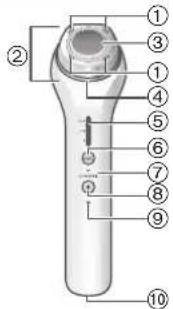
B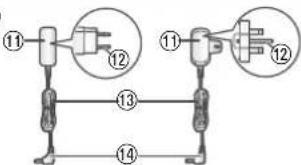
C
D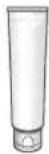
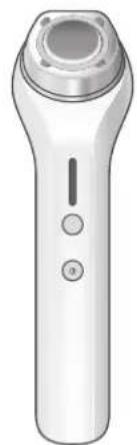
A Main body
① RF Pole
② Head
③ Ultrasonic probe with warm sensation (Ultrasonic probe)
- Provides ultrasonic energy and warmth.
④Frame
⑤ RF & temperature indicator (Blue)
RF & temperature select switch
- Works together with the RF level to adjust the warmth from the ultrasonic probe.
⑦ Mode indicator (Blue)
⑧ POWER/SELECT switch
Charging indication/notification lamp (Red)
⑩ Appliance socket
AC adaptor (RE6-37) (The shape of the AC adaptor differs depending on the area.)
Adaptor
⑫ Power plug
13 Cord
⑭ Appliance plug
⑮ Stand
Accessory
Conductive gel (EH-4R02) (See page 20.)
Modes and their applications
Select the mode appropriate to the desired application.
Mode
Ultrasonic RF
Area of application
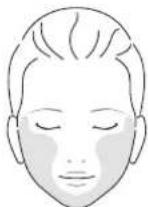
Face line, cheeks, and mouth
- Do not use on the forehead.
Function
RF × Ultrasonic energy × Vibration
Usage time
10 min. 2 min.
Forehead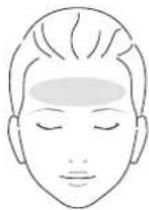
RF

Preparation
Skin (Allergy) test procedure
Make sure to check compatibility of this appliance with your skin as this product is normally used together with conductive gel. Skin care products you normally use can also be used in place of the gel. This check must be performed to ensure you experience no skin issues as a result of use.
- Testing is required for each of your skin care products.
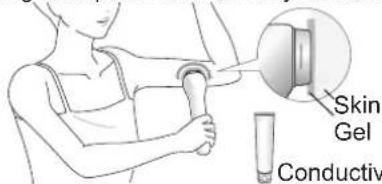
Clean the test area (inner arm) with soap and water, and dry it with a towel. 2 Apply the conductive gel or skin care product. Apply a light amount just enough to cover the head. 3 Turn on the power and make contact with your skin.
- Turn on the power and select the RF/Ultrasonic mode. (See page 14.)
- Once the appliance has completed the preheating process, press the ultrasonic probe onto your skin and slowly move the appliance in a circle for approximately 10 seconds. (See page 15.)
The head vibrates.
- Remove the appliance from the skin and then press onto your skin and move the appliance for another 10 seconds.
- Once you have finished this procedure, allow the gel or skin care product to naturally dry.
Wait 48 hours without using the appliance.
- Do not allow the affected area to become wet and do not scrub this area.
If any skin issues occur within 48 hours Do not continue to use the conductive gel or skin care product.
Charging
Insert the appliance plug into the appliance socket. 2 Mount the main body in the stand.
3 Insert the adaptor into a household outlet.
- Check that the charging indication/notification lamp is glowing.
- Charging is completed after approximately 2 hours.
- The charging indication/notification lamp turns off.
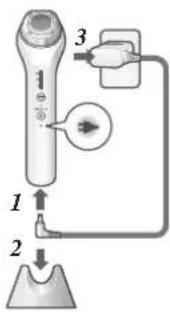

After charging is completed, unplug the adaptor from the household outlet and unplug the appliance plug from the main body. (for safety and to reduce energy usage)
- Charging the battery for more than 2 hours will not affect battery performance.
If you remove and reinsert the appliance plug while charging, the charging indication/notification lamp glows and turns off after approximately 5 seconds.
- Once the battery runs low, the charging indication/notification lamp will flash once per second. Once the battery is nearly depleted completely, an audible alarm will be triggered. Charge the appliance immediately.
- Once fully charged, the appliance can be used approximately 3 times. (in RF/Ultrasonic mode and RF mode)
However, the usage time may be reduced depending on the usage environment.
Notes
- When charging the appliance for the first time or when it has not been in use for more than 6 months, the charging time may change or the charging indication/notification lamp may not glow for a few minutes. It will eventually glow if kept connected.
- Recommended ambient temperature for charging is 15°C - 35°C. It may take longer to charge or the battery may fail to charge properly in extremely high or low temperatures. (See page 22.)
14
- If there is noise from the radio or other sources while using or charging the appliance, move to a different location to use the appliance.
How to use
Use the appliance on clean skin after thoroughly removing makeup and washing your face. - A tone will be triggered after the POWER/SELECT switch is pressed or the sensor operates. - Warming may fail when the ambient temperature is below 15°C.

Press the switch and select a mode.
Each press switches to the next mode. The selected mode flashes in blue. - Select the mode appropriate to the desired application. (See page 12.)
RF/Ultrasonic
The appliance starts in RF/Ultrasonic mode each time the power is turned on. The appliance will not turn on when the AC adaptor is connected. Make sure to use the appliance with the frame attached.

2 Press the switch and select an RF warmth level to start the preheating process.
Each press switches to the next level. (The selected mode flashes in blue.) - The ultrasonic probe increases in temperature as the RF warmth level is increased.
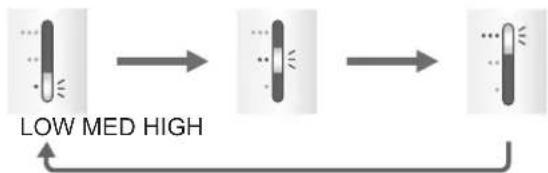
Memory function
The previously selected RF warmth level is stored in memory so that the appliance can be used with the same setting. This memory function will reset when the appliance has not been used for a long period of time or when the battery has run out.
3 Apply the conductive gel while the appliance is preheating.
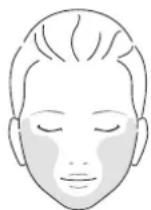
We recommend using a conductive gel that helps transmit RF and ultrasonic energy. 1. Apply a macadamia nut size (approximately 3 g) of gel into your hand. 2. Spread the gel around the areas of your face that you want to treat with this appliance as illustrated by the areas in the figure. - Spread conductive gel gently on your face. Do not rub gel into skin.
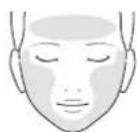
Daily skin care products can also be used
- Use the conductive gel or skin care products to help transmit the RF and ultrasonic energy to the skin.
- Use skin care products that will provide a slippery surface for the appliance. Skin care products with large amounts of oil can obstruct the transmission of RF and ultrasonic energy.

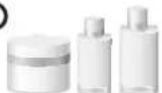

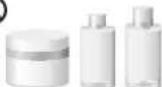
Gel, serum, and milky lotion Cream, toner, lotion, and oil - If friction begins to develop during use, add some more skin care product to prevent any negative effects on the skin due to friction.
4 Preheating process completes (takes approximately 1 minute).
The preheating process will finish approximately 1 minute after turning on the power. A tone will be triggered, and indicators change from flashing to glowing states to indicate that the appliance is ready.
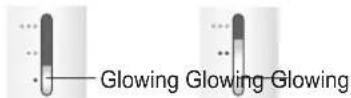
LOW MED HIGH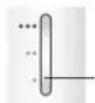

No
- The appliance can be used on the skin even while indicators are flashing. The lamps will begin glowing once contact is made with the skin. An alert tone will be triggered 15 seconds after the appliance is not in contact with the skin. Then, the power will automatically turn off after approximately 1 minute.
Changing the level after the preheating process completes
The level changes with each pressing of the

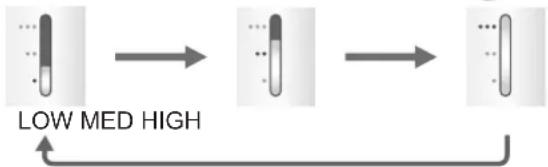
- Select an appropriate level while paying attention to the condition of skin.

Once the preheating process completes, press the appliance onto your skin and begin moving it around. (See page 17.)
The power will be automatically turned off after each mode is completed. - Press the POWER/SELECT switch to change the mode or turn off the power midway through.
How to apply the head properly
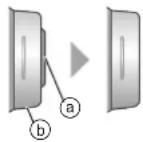
- Apply the appliance to the skin as both ultrasonic probe (a) and frame (b) are making complete contact.
- Press the appliance tightly to the skin as both ultrasonic probe and frame are contacting the skin in parallel. The head vibrates except in RF mode.
- RF and Ultrasonic are only effective when the head is vibrating.
Note
- Head vibration produces sound, which is just normal operation.
Situations of an alert sound triggering followed by vibration stopping
Remove and press the ultrasonic probe on your skin again if either of the following notifications occur.
Over-care prevention sensor
The ultrasonic probe has been in contact with your face for approximately 15 seconds.
Fitted contact sensor
The ultrasonic probe has not made contact with the skin for approximately 15 seconds.
An alert will trigger and the power will turn off after approximately 1 minute if the appliance continues in either of these states.
How to move the head in each mode
RF/Ultrasonic mode - Approximately 10 minutes
(5 seconds per each movement shown by arrow in the figure)
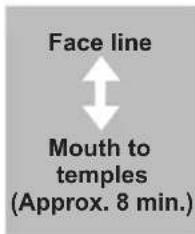
Move the appliance as your cheeks are gently lifted upward. (Repeat directions 1 through 2.)
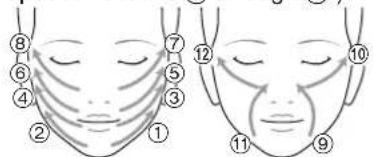
(A tone will be triggered 2 minutes before automatic power off.)
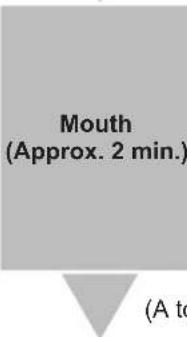
Move the appliance upward around your face lines as your mouth is gently lifted upward. (Repeat direction 13 through 18.)
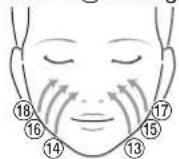
Automatic power off
RF mode - Approximately 2 minutes
(5 seconds per each movement shown by arrow in the figure)
Move from the centre of forehead as indicated by 1 and 2 in the figure towards temples.
- Press the upper edge of the head above the eyebrows as indicated by ③, ④, ⑤, and ⑥ in the figure. Gently move the appliance upward. (Repeat directions ① through ⑥.)
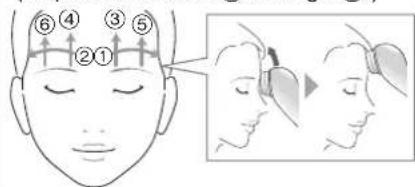
(A tone will be triggered.)
Automatic power off
Note
- Gel might turn white and harden during use. That is not a problem.
- If friction begins to develop during use, add some more conductive gel to prevent any negative effects on the skin due to friction.
After use
Cleanse the gel from the face.
After cleansing off gel from the face, use your daily skin care products to condition your skin. If you used a daily skin care product instead of the conductive gel, you do not need to cleanse it off.
After using the appliance, make sure to clean the main body and frame. - Check if the power is turned off.
Pinch the frame to remove. If gel is making it difficult to remove the frame, wipe off excess gel and then remove the frame.
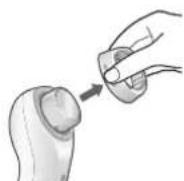
2 Clean the head. Use a tissue or similar to wipe off gel or skin care product.
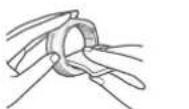
- Use a tissue, cotton swab, or similar to remove any gel or skin care product that has gotten into gaps.
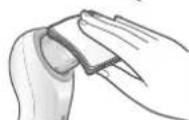
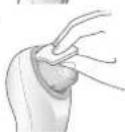
3 Attach the frame.
Align the four notches (b) with the tabs (c) on the head and then press the frame onto the head until it clicks into place. Orient the frame so that the flat side (a) faces up.
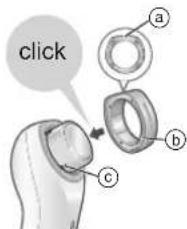
4 Store the main body in the stand.
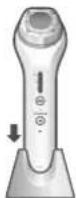
Notes
- The main body cannot be washed with water.
- If you are concerned that the main body is dirty, use a cloth soaked with soapy water to wipe the dirt. Wring out the cloth before wiping.
- Do not use alcohol, nail polish remover, or detergent (ex. liquid hand soap), etc. to clean the appliance. Doing so may cause failure, cracking or discoloration of parts.
- Make sure to remove all excess gel or skin care product. Failure to do so can cause hardening when this excess material dries.
Checking ultrasonic energy is transmitted in RF/Ultrasonic mode
Transmission of ultrasonic energy cycles on and off for approximately 1 second for each phase, but this will not be felt by the skin. Use the following procedure to check transmission of ultrasonic energy.
- Place a few drops of water on the ultrasonic probe (a).
- Orient the ultrasonic probe so that it is level.
- We recommend that you use water to check, as it is more difficult if using gel.
- Do not allow any other parts besides the ultrasonic probe to come into contact with water.
- Turn on the power and select the RF/Ultrasonic mode.
- Use your finger to lightly press on the ultrasonic probe (a) until the ultrasonic probe is approximately the same height as the frame (b).
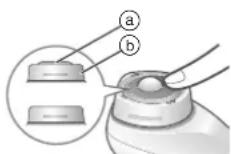
- Confirm the transmission.
- The water droplets will vibrate if the appliance is operating properly. (The vibration cycle lasts for approximately 1 second.)
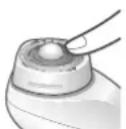
Frequently asked questions
Question Answer
What is RF and ultrasonic energy?
Can I use this appliance on my hands and other areas of the body?
Can I use the appliance more frequently than once a day?
Why do I need to apply gel or skin care product?
RF is an acronym for radio frequency. This is a type of high-frequency energy. Ultrasonic energy includes sound frequencies over 20000 Hz that cannot be heard by the human ear. This product has been designed specifically for use on the face. Use this product only for beautifying the face. Use this appliance up to 12 minutes total of all modes (RF/Ultrasonic mode and RF mode) once during a day. Use up to 3 times per week and wait at least one day between each use. Overusing the appliance will actually hurt your skin. This material helps transmit the RF and ultrasonic energy to the skin. Any air between the ultrasonic probe and the skin causes the RF and ultrasonic not to be transmitted.
Question Answer
Can I use some other type of gel or milky lotion?
What type of skin care products should I use after using this appliance?
Is it OK to charge the battery after every use?
What should I do if the gel causes staining or I develop skin issues?
What should I do if I feel tooth pain?
While we recommend that you use the conductive gel, serum, milky lotion, and gel can also be used. (See page 15.)
Apply the skin care products you normally use on a daily basis after using this appliance.
The battery in this appliance is a lithium-ion battery, and so charging it after every use will not affect battery service life.
Do not use the appliance until the skin condition clears. (We recommend that you seek professional medical attention.)
You may have sensitive skin. Skin issues can also occur due to your physical condition, stress, body condition, and visceral disease.
Use of this appliance may cause discomfort if you have any cavities.
Do not use the appliance until you have had any cavities treated.
(We recommend that you seek professional medical attention.)
Separately sold Gel
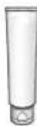
Conductive Gel (EH-4R02)

Troubleshooting
| Problem Possible cause Action | |
| The power does not turn on even after the POWER/SELECT switch is pressed. | The appliance has not been charged. |
| The AC adaptor is connected. | |
| The appliance can only be used for a few minutes after charging. | The battery has reached the end of its life. (approximately 3 years) (See page 23.) |
| The RF & temperature indicator, mode indicator, and charging indication/notification lamp (→) flashes once per second, and then the appliance stops operating. | The protection function in the main body has operated, and the appliance has stopped abnormally. |
| The RF & temperature indicator turns off during use. | The power will be automatically turned off after each mode is completed. |
| After the preheating process completes, the power automatically turns off if no contact with the skin has been made for approximately 1 minute. | |
| A sensor has operated. | |
| There is no power remaining in the battery. | |
| The charging indication/ notification lamp (→) does not turn on or goes out while the appliance is charging. | This lamp turns off after charging is completed. (See page 13.) |
| Make sure that the adaptor or appliance plug are inserted completely into place. | |
| The charging indication/ notification lamp (→) flashes twice per second while the appliance is charging. | This is an indication of abnormal charging. Make sure that you are charging the appliance in the recommended ambient temperature between 15 °C and 35 °C. |
| The appliance is hot. | The appliance will be warm during use and charging. This is not indicative of any failure. |
| The appliance does not vibrate in RF mode. | The appliance does not vibrate in RF mode, but this is not a malfunction. |
If the problems still cannot be solved, contact the store where you purchased the unit or a service centre authorized by Panasonic for repair.
Battery life
Approximately 3 years.
If the operating time is significantly shorter even after a full charge, the battery has reached the end of its life.
(The battery life may change due to usage and storage conditions.)
The battery in this appliance is not intended to be replaced by consumers. Have the battery replaced by an authorized service centre.
Removing the built-in rechargeable battery
Remove the built-in rechargeable battery before disposing of the appliance.
Please make sure that the battery is disposed of at an officially designated location if there is one.
This figure must only be used when disposing of the appliance, and must not be used to repair it. If you dismantle the appliance yourself, it may cause malfunction.
- Remove the appliance from the AC adaptor.
- Press the POWER/SELECT switch to turn on the power and then keep the power on until the battery is completely discharged.
- Perform steps ① to ④ and lift the battery, and then remove it.
- Take care not to short circuit the positive and negative terminals of the removed battery, and insulate the terminals by applying tape to them.
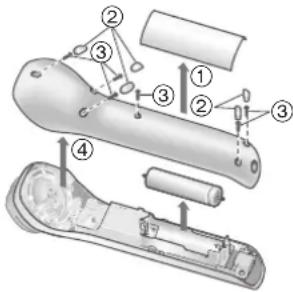
For environmental protection and recycling of materials This appliance contains a Li-ion battery.
Please make sure that the battery is disposed of at an officially assigned location, if there is one in your country.
Specifications
| Power source | See the name plate on the AC adaptor. (Automatic voltage conversion) |
| Charging time Aprox. 2 hours | |
| Acoustic noise | Below 30 dB (distance 20 cm) |
This product is intended for household use only.
Disposal of Old Equipment and Batteries Only for European Union and countries with recycling systems
These symbols on the products, packaging, and/or accompanying documents mean that used electrical and electronic products and batteries must not be mixed with general household waste.
For proper treatment, recovery and recycling of old products and batteries, please take them to applicable collection points in accordance with your national legislation. By disposing of them correctly, you will help to save valuable resources and prevent any potential negative effects on human health and the environment.
For more information about collection and recycling, please contact your local authority. Penalties may be applicable for incorrect disposal of this waste, in accordance with national legislation.
Note for the battery symbol (bottom symbol)
This symbol might be used in combination with a chemical symbol. In this case it complies with the requirement set by the Directive for the chemical involved.
Panasonic
Operating Instructions
(Household) The Advanced RF Facial Device
Model No. EH-XR10
English
Contents
RF mode - Approximately 2 minutes
Radiofrequency (RF)/ Ultrasonic
Radiofrequency (RF)

Preparation
Mouth (Approx. 2 min.)
Conductive gel (EH-4R02)
(See page 116.)
Mouth (Approx. 2 minutes).
Conductive gel (EH-4R02)
Spanish
116
- PANASONIC
- CONTENTS
- WARNING
- SAFETY PRECAUTIONS
- EXPLANATION OF SYMBOLS
- DANGER
- CAUTION
- PREVENTING ACCIDENTS
- TO PREVENT SKIN OR HEALTH PROBLEMS
- THE FOLLOWING PERSONS SHOULD NOT USE THIS APPLIANCE
- DO NOT USE THIS APPLIANCE IN THE FOLLOWING BODY AREAS OR IN THE FOLLOWING CASES
- DO NOT MODIFY OR REPAIR
- IN CASE OF AN ABNORMALITY OR MALFUNCTION
- POWER SUPPLY
- BEFORE USE
- USAGE FREQUENCY
- SKIN PRECAUTIONS
- RF WARMTH LEVEL
- SENSORS
- ACCESSORIES
- PARTS IDENTIFICATION
- A MAIN BODY
- ⑮ STAND
- ACCESSORY
- MODES AND THEIR APPLICATIONS
- PREPARATION
- SKIN (ALLERGY) TEST PROCEDURE
- CHARGING
- AFTER CHARGING IS COMPLETED, UNPLUG THE ADAPTOR FROM THE HOUSEHOLD OUTLET AND UNPLUG THE APPLIANCE PLUG FROM THE MAIN BODY. (FOR SAFETY AND TO REDUCE ENERGY USAGE)
- NOTES
- HOW TO USE
- PRESS THE SWITCH AND SELECT A MODE
- PRESS THE SWITCH AND SELECT AN RF WARMTH LEVEL TO START THE PREHEATING PROCESS
- MEMORY FUNCTION
- APPLY THE CONDUCTIVE GEL WHILE THE APPLIANCE IS PREHEATING
- DAILY SKIN CARE PRODUCTS CAN ALSO BE USED
- PREHEATING PROCESS COMPLETES (TAKES APPROXIMATELY 1 MINUTE)
- NO
- CHANGING THE LEVEL AFTER THE PREHEATING PROCESS COMPLETES
- ONCE THE PREHEATING PROCESS COMPLETES, PRESS THE APPLIANCE ONTO YOUR SKIN AND BEGIN MOVING IT AROUND. (SEE PAGE 17.)
- HOW TO APPLY THE HEAD PROPERLY
- NOTE
- SITUATIONS OF AN ALERT SOUND TRIGGERING FOLLOWED BY VIBRATION STOPPING
- OVER-CARE PREVENTION SENSOR
- FITTED CONTACT SENSOR
- HOW TO MOVE THE HEAD IN EACH MODE
- RF/ULTRASONIC MODE - APPROXIMATELY 10 MINUTES
- RF MODE - APPROXIMATELY 2 MINUTES
- AUTOMATIC POWER OFF
- AFTER USE
- CLEANSE THE GEL FROM THE FACE
- ATTACH THE FRAME
- CHECKING ULTRASONIC ENERGY IS TRANSMITTED IN RF/ULTRASONIC MODE
- FREQUENTLY ASKED QUESTIONS
- QUESTION ANSWER
- SEPARATELY SOLD GEL
- TROUBLESHOOTING
- BATTERY LIFE
- REMOVING THE BUILT-IN RECHARGEABLE BATTERY
- REMOVE THE BUILT-IN RECHARGEABLE BATTERY BEFORE DISPOSING OF THE APPLIANCE
- DISPOSAL OF OLD EQUIPMENT AND BATTERIES ONLY FOR EUROPEAN UNION AND COUNTRIES WITH RECYCLING SYSTEMS
- NOTE FOR THE BATTERY SYMBOL (BOTTOM SYMBOL)
- OPERATING INSTRUCTIONS
- (HOUSEHOLD) THE ADVANCED RF FACIAL DEVICE
- RADIOFREQUENCY (RF)/ ULTRASONIC
Brand : PANASONIC
Model : EHXR10
Category : Face cleansing