Entry Sensor - Motion detector eufy - Free user manual and instructions
Find the device manual for free Entry Sensor eufy in PDF.


User questions about Entry Sensor eufy
0 question about this device. Answer the ones you know or ask your own.
Ask a new question about this device
Download the instructions for your Motion detector in PDF format for free! Find your manual Entry Sensor - eufy and take your electronic device back in hand. On this page are published all the documents necessary for the use of your device. Entry Sensor by eufy.
USER MANUAL Entry Sensor eufy
Anker Innovations Limited. All rights reservedeufy and the eufy logo are
trademarks of Anker Innovations Limited, registered in the United States and other
countries. All other trademarks are the property of their respective owners. 51005002526 V01
| English | |
| Deutsch | |
| Espanol | |
| François | |
| Italiano | |
| Portugues | 24 |
| Nederlands | 28 |
| الترجمة | 32 |
TABLE OF CONTENTS
| What's Included | 01 03 | Status Led |
| Battery Placement | 01 03 | FAQ |
| Adding Entry Sensor to Your System | 02 04 | Notice |
| Mounting the Sensor | 02 |
WHAT'S INCLUDED
For Entry Sensor Installation
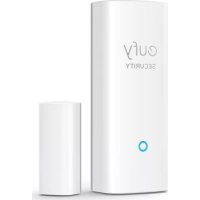
Entry Sensor (T8900)

Sensor Magnet

CR123A Battery

Mounting Screws
Note: Entry Sensor is only compatible with the eufy Security Homebase or Homebase E.
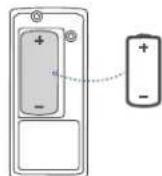
BATTERY PLACEMENT
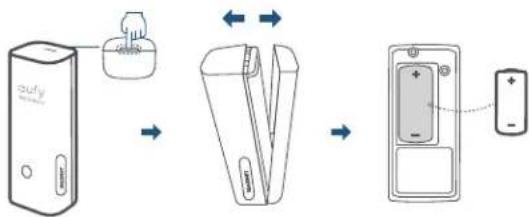
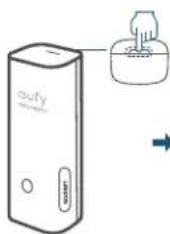
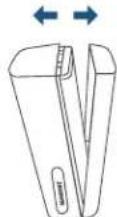
Remove the battery compartment lid on the Entry Sensor and insert the provided CR123A battery. Replace the lid.
01 ENGLISH ENGLISH
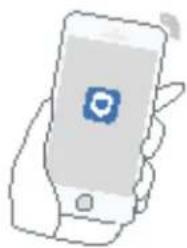
ADDING ENTRY SENSOR TO YOUR SYSTEM
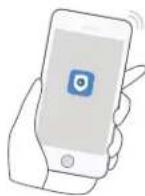
On eufy Security app follow the on-screen instructions to add your eufy Security devices. Choose Add Device, then select Entry Sensor to add it to your system.
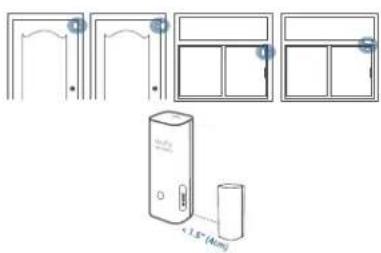
MOUNTING THE SENSOR
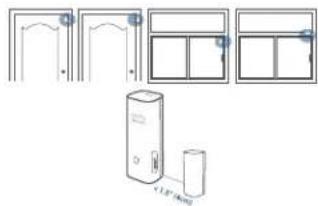
Place the sensor on the edge of a door or window. Use the adhesive strips (On the back of the sensor) or mounting screws provided to mount the sensor.
Make sure the gap between Entry Sensor and the sensor magnet is less than 1.6 in (4 cm) when the door or window is closed.
- The bottom of the sensor magnet should align with the bottom of Entry Sensor.
STATUS LED
Sensor LED indicator Entry Sensor status

Flashing blue Adding to HomeBase

Flashing blue (Once) Sensor detects an open/close activity

Flashing red (Once)
Sensor battery is low or disconnects from HomeBase
FAQ
I. What battery does the Entry Sensor use?
Entry Sensor uses a CR123A battery with 3V output.
2 How long does the battery last?
One CR123A battery usually lasts up to 2 years, but depends on the usage.
Please visit our official website to download the user manual: www.eufylife.com
NOTICE
This product complies with the radio interference requirements of the European Community.
Declaration of Conformity
Hereby, Anker Innovations Limited declares that this device is in compliance with the essential requirements and other relevant provisions of Directive 2014/53/EU. For the declaration of conformity, visit the Web site https://www.eufylife.com/.
Do not use the Device in the environment at too high or too low temperature, never expose the Device under strong sunshine or too wet environment.
The suitable temperature for the product and accessories is 0^ - 40^ RF exposure information: The Maximum Permissible Exposure (MPE) level has been calculated based on a distance of d = 20cm between the device and the human body. To maintain compliance with RF exposure requirement, use product that maintain a 20cm distance between the device and human body. CAUTION RISK OF EXPLOSION IF BATTERY IS REPLACED BY AN INCORRECT TYPE. DISPOSE OF USED BATTERIES ACCORDING TO THE INSTRUCTIONS
SUB-1G Frequency range: 866~866.8MHz 868.2~869MHz
Sub-IG Max Output Power: 8.865dBm(ERIP for 868.2~869MHz); 11.746dBm (ERIP for 866~866.8MHz)
Anker Technology (UK) Ltd | Suite B, Fairgate House, 205 Kings Road, Tyseley, Birmingham, B1 2AA, United Kingdom

This product is designed and manufactured with high quality materials and components, which can be recycled and reused.

This symbol means the product must not be discarded as household waste, and should be delivered to an appropriate collection facility for recycling. Proper disposal and recycling helps protect natural resources, human health and the environment. For more information on disposal and recycling of this product, contact your local municipality, disposal service, or the shop where you bought this product.
FCC Statement
This device complies with Part 15 of the FCC Rules. Operation is subject to the following two conditions: (1) this device may not cause harmful interference, and (2) this device must accept any interference received, including interference that may cause undesired operation.
Note: This equipment has been tested and found to comply with the limits for a Class B digital device, pursuant to Part 15 of the FCC Rules. These limits are designed to provide reasonable protection against harmful interference in a residential installation.
This equipment generates uses and can radiate radio frequency energy and, if not installed and used in accordance with the instructions, may cause harmful interference to radio communications. However, there is no guarantee that interference will not occur in a particular installation. If this equipment does cause harmful interference to radio or television reception, which can be determined by turning the equipment off and on, the user is encouraged to try to correct the interference by one or more of the following measures:
(1) Reorient or relocate the receiving antenna. (2) Increase the separation between the equipment and receiver. (3) Connect the equipment into an outlet on a circuit different from that to which the receiver is connected. (4) Consult the dealer or an experienced radio/TV technician for help.
FCC Radio Frequency Exposure Statement
The device has been evaluated to meet general RF exposure requirements. The device can be used in fixed / mobile exposure condition. The min separation distance is 20cm
The following importer is the responsible party
Company Name: POWER MOBILE LIFE, LLC
Address: 400 108th Ave NE Ste 400, Bellevue, WA 98004-5541
Telephone: 1-800-988-7973
This device complies with Industry Canada licence-exempt RSS standard(s).
Operation is subject to the following two conditions:
(1) this device may not cause interference, and
(2) this device must accept any interference, including interference that may cause undesired operation of the device."
This Class B digital apparatus complies with Canadian ICES-003.
When using the product, maintain a distance of 20cm from the body to ensure compliance with RF exposure requirements.
Entry Sensor (T8900)

Sensor Magnet

CR123A Battery

Mounting Screws
eufyCam Entry Sensor :Nota
a
CR123A yj jEntry Sensor j
cuii
32
Entry Sensor
Eufy y Euy Security y Security
jieiuiy jiee
Entry jaiyaiyaiyai yaiyaiyaiyaiyaiyaiyaiyaiyaiyaiyaiyaiyaiyaiyaiyaiyaiyaiyaiyaiyaiyaiyaiyaiyaiyaiyaiyaiyaiyaiyaiyaiyaiyaiyaiyaiyaiyaiyaiyaiyaiyaiyaiyaiyaiyaiyaiyaiyaiyaiyai
33 34
LED
rosneSyrtnE 1
HomeBase
321/ 15401 jieyjie jie (saj) jia jai
jaiiai jiuuiyiyuyu
HomeBase 10.5.3.54

FAQ
Entry Sensor
3 CR123A Entry Sensor
2
Pssnnn nne annnns
www.eufylife.com: piaiunl jdu jjuiy jiy juy iuai y uai
2
CUSTOMER SERVICE
12-month limited warranty
+1 (800) 988 7973 Mon-Fri 9AM-5PM (PT)
+44 (0) 1604 936 200 Mon-Fri 6AM-11AM (GMT)
+49 (0) 69 9579 7960 Mon-Fri 6:00-11:00

Customer Support: support@eufylife.com

@EufyOfficial

@EufyOfficial

eufyofficial