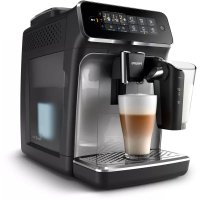
USER MANUAL LatteGo 3200 series EP3246 PHILIPS
800 series 1200 series 2200 series 3200 series
EN USER MANUAL
DA BRUGERVEJLEDNING
Adjusting machine settings 9
Removing and inserting the brew group 11
Cleaning and maintenance 12
AquaClean water filter 14
Setting the water hardness 16
Descaling procedure (30 min.) 16
Ordering accessories 17
Troubleshooting 17
Technical specifications 23
Machine overview (Fig. A)
A1 Control panel A10 Data label with type number
| A2 Cup holder A11 Water tank |
| A3 Pre-ground coffee compartment A12 Hot water spout |
| A4 Lid of bean hopper A13 Coffee grounds container |
| A5 Adjustable coffee spout | A14 Front panel of coffee grounds container |
| A6 Grind setting knob | A15 Drip tray cover |
| A7 Coffee bean hopper | A16 Drip tray |
| A8 Brew group | A17 'Drip tray full' indicator |
| A9 Service door |
| Accessories |
| A18 Classic milk frother (specific types only) | A19 LatteGo (milk container) (specific types only) |
Control panel (Fig. B)
Refer to figure B for an overview of all buttons and icons. Below you find the description.
Note: Some of the buttons/icons are for specific types only.
B1 On/off button, B7 Warning icons, B2 Drink icons*, B8 Start light, B3 Aroma strength/pre-ground coffee icon, B9 Start/stop button, B4 Drink quantity icon, B10 Calc / Clean icon, B5 Milk quantity icon (specific types only), B11 AquaClean icon, B6 Coffee temperature icon (specific types only)
- Drink icons: espresso, espresso lungo, coffee, americano, cappuccino, latte macchiato, hot water, steam (specific types only)
Introduction
Congratulations on your purchase of a Philips fully automatic coffee machine! To fully benefit from the support that we offer, please register your product at www.home.id.
Read the separate safety booklet carefully before you use the machine for the first time and save it for future reference.
Before first use, rinse with hot water all removable accessories destined to come into contact with water or milk. To help you get started and to get the best out of your machine, we offer support in multiple ways. In the box you can find:
1. The quick start guide with picture-based usage instructions and information on cleaning and maintenance. 2. The separate safety booklet with instructions on how to use the machine in a safe way. 3. For online support (this extended user manual, frequently asked questions, videos, etc.), scan the QR code on the cover of this booklet to download the HomeID app, or visit www.home.id/support.
There are multiple versions of this espresso machine, which all have different features. Each version has its own type number. You can find the type number on the data label on the inside of the service door (see fig A9). This machine has been tested with coffee. Although it has been carefully cleaned, there may be some coffee residues left. We guarantee, however, that the machine is absolutely new.
The machine automatically adjusts the amount of ground coffee that is used to make the best-tasting coffee. You should brew 5 coffees initially to allow the machine to complete its self-adjustment.
Make sure you rinse the LatteGo (milk container) or the classic milk frother before first use.
Before first use
1. Setting up the machine
After you have switched on the machine, some water may be dispensed from the hot water spout or coffee spout. This is normal.

2. Activating the AquaClean water filter (5 min.)
The AquaClean water filter is not included in all models: you can purchase it at your local retailer or on www.home-appliances.philips/parts-accessories. Availability varies per country.
For more information, see the chapter 'AquaClean water filter'.
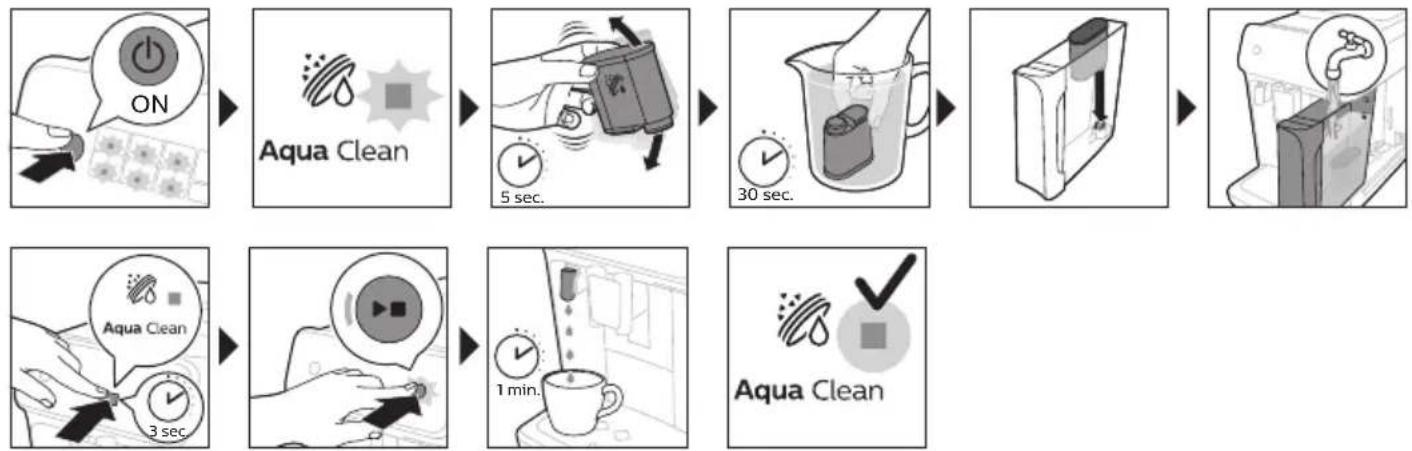
3. Setting the water hardness
See the chapter 'Setting the water hardness' for step-by-step instructions. The default water hardness setting is 4: hard water.

4. Assembling LatteGo (specific types only)
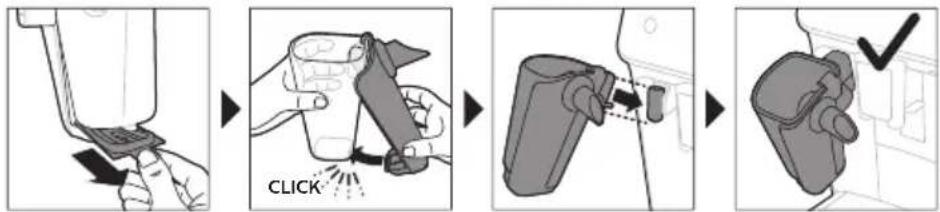
5. Assembling the classic milk frother (specific types only)
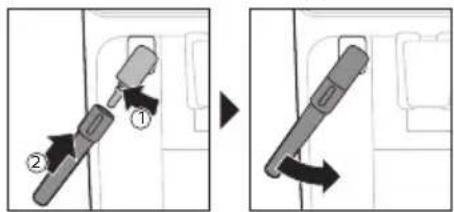
Brewing drinks
General steps
1. Fill the water tank with tap water and fill the bean hopper with beans. 2. Press the on/off button to switch on the machine.
- The machine starts heating up and performs the automatic rinsing cycle. During heating up, the lights in the drinks icons light up and go out slowly one by one.
- When all lights in the drink icons light up continuously, the machine is ready for use.
3. Place a cup under the coffee dispensing spout. Slide the coffee dispensing spout up or down to adjust its height to the size of the cup or glass you are using (Fig. 1).
Personalizing drinks
This machine allows you to adjust the settings of a drink to your own preference. After selecting a drink you can:
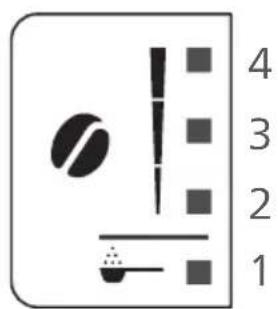
1 Adjust the aroma strength by tapping the aroma strength icon (Fig. 2). There are 3 strengths, the lowest is the mildest and the highest is the strongest. 2 Adjust the drink quantity by tapping the drink quantity (Fig. 3) and/or the milk quantity icon (specific types only). There are 3 quantities: low, medium and high.
i You can also adjust the coffee temperature to your own preference (see 'Adjusting the coffee temperature').
Brewing coffee with beans
1 To brew a coffee, tap the drink icon of your choice.
The aroma strength and quantity lights go on and show the previously selected setting. - You can now adjust the drink to your preferred taste (see 'Personalizing drinks').
2 Press the start/stop button.
The light in the drink icon flashes while the drink is being dispensed.
1 Specific types only: An americano is made of espresso and water. When you brew an americano, the machine first dispenses an espresso and then water.
3 To stop dispensing coffee before the machine is finished, press the start/stop button again.
To brew 2 coffees at the same time, tap the drink icon twice. The 2x light lights up.
Brewing milk-based drinks with LatteGo (milk container)
LatteGo consists of a milk container, a frame and a storage lid. To avoid leakage, make sure the frame and the milk container are properly assembled before you fill the milk container.
1 To assemble LatteGo, first insert the top of the milk container under the hook at the top of the frame (Fig. 4). Then press home the bottom part of the milk container. You hear a click when it locks into place (Fig. 5).
Note: Make sure that the milk container and the frame are clean before you connect them.
2 Slightly tilt LatteGo and put it on the hot water spout (Fig. 6). Then press it home until it locks into place (Fig. 7). 3 Fill LatteGo with milk up to the level indicated on the milk container for the drink you are brewing (Fig. 8). Do not fill the milk container beyond the maximum indication.
If you have personalized the milk quantity, you may need to fill the milk container with more or less milk than indicated for this drink on LatteGo.
Always use milk coming directly from the fridge for optimal results.
4 Place a cup on the drip tray. 5 Tap the milk-based drink icon of your choice.
- You can now adjust the drink to your own preference (see 'Personalizing drinks').
6 Press the start/stop button.
- The light in the drink icon flashes while the drink is being dispensed. When you brew a cappuccino or latte macchiato, the machine first dispenses milk and then coffee.
- To stop dispensing milk before the machine has dispensed the preset amount, press the start/stop button.
7 To stop dispensing the complete drink (milk and coffee) before the machine is finished, press and hold the start/stop button.
Frothing milk with classic milk frother
Always use milk coming directly from the fridge for the best foam quality.
1 Tilt the black silicone handle on the machine to the left and slide the milk frother onto it (Fig. 9). 2 Fill a milk jug with approx. 100 ml milk for cappuccino and approx. 150 ml milk for latte macchiato. 3 Insert the milk frother approx. 1 cm into the milk. 4 Tap the steam icon (Fig. 10).
The light in the steam icon goes on and the start light starts pulsing.
5 Press the start/stop button to froth the milk (Fig. 11). The machine starts heating up, steam is forced into the milk and the milk is frothed. 6 When the milk foam in the milk jug has reached the required volume, press the start/stop button again to stop frothing milk.
i Never froth milk longer than 90 seconds. The frothing automatically stops after 90 seconds. i You do not have to move the milk jug during milk frothing to get the best milk froth quality.
Brewing coffee with pre-ground coffee
You can choose to use pre-ground coffee instead of beans, for example if you prefer a different coffee variety or decaffeinated coffee.
1 Press the on/off button to switch on the machine and wait until it is ready for use. 2 Open the lid of the pre-ground coffee compartment and pour 3 tea spoons of coffee powder (about 8 g) into it (Fig. 12). Then close the lid. 3 Place a cup under the coffee dispensing spout.
4 Select a single drink.
5 Press the aroma strength icon for 3 seconds (Fig. 13).
- The pre-ground coffee light goes on and the start light starts pulsing.
6 Press the start/stop button.
7 To stop dispensing coffee before the machine is finished, press the start/stop button again.
i With pre-ground coffee you can only brew one coffee at a time.
i Pre-ground coffee is not a setting that is saved as a previous selected strength setting. Each time you want to use pre-ground coffee, you need to press the aroma strength icon for 3 seconds. i When you select pre-ground coffee, you cannot select a different aroma strength.
Dispensing hot water
1 If attached, remove LatteGo or the milk frother. 2 Tap the hot water icon (Fig. 14).
The drink quantity lights go on and show the previous selected drink setting for hot water.
3 Adjust the hot water quantity to your preference by tapping the drink quantity icon (Fig. 3). 4 Press the start/stop button. The light in the hot water icon flashes and hot water is dispensed from the hot water spout (Fig. 15). 5 To stop dispensing hot water before the machine is finished, press the start/stop button again.
Adjusting machine settings
Adjusting the stand-by time
1 Press the on/off button to switch off the machine. 2 When the machine is switched off: press and hold the Calc / Clean icon (Fig. 16) until the Calc / Clean light and the Aroma strength lights go on (Fig. 17). 3 Tap the Aroma strength icon to select the required stand-by time: 15, 30, 60 or 180 minutes. Respectively 1, 2, 3 or 4 lights of the Aroma strength icon light up. 4 When you have finished setting the stand-by time, press the start/stop button. The machine switches off. 5 Press the on/off button to switch on the machine again.
Programming the highest default setting of your drinks
The machine has 3 default settings for each drink: low, medium, high. You can only adjust the quantity of the highest setting. The new quantity can be stored as soon as the start light starts to pulse.
Before you start programming the quantity of a milk drink, assemble LatteGo and pour milk in it. 1 To adjust the highest quantity setting, press and hold the icon of the drink you want to adjust for 3 seconds. - The upper light of the drinks quantity icon and the upper light of the milk quantity icon (specific types only) starts to pulse and the start/stop button starts to pulse, indicating that you are in programming mode. 2 Press the start/stop button. The machine starts to brew the selected beverage.
- The start light lights up continuously at first. When the machine is ready to store the adjusted volume, the start/stop light starts to pulse.
3 Press the start/stop button again when the cup contains the desired quantity of coffee or milk. - In case of cappuccino or latte macchiato, first the milk will be dispensed. Press the start/stop button when the cup contains the desired milk quantity. The machine automatically starts dispensing the coffee. Press the start/stop button again when the cup contains the desired quantity.
After you have programmed the new highest default quantity for a drink, the machine will dispense this new amount each time you select the highest quantity of this drink.
i You can only adjust the highest default quantity level. i If you want to go back to the default quantity settings, see 'Restoring factory settings'.
Adjusting the coffee temperature
Machines without temperature icon
1 Press the on/off button to switch off the machine. 2 When the machine is switched off: press and hold the coffee quantity icon until the lights in this icon go on (Fig. 18). 3 Tap the quantity icon to select the required temperature: normal, high or max.
- Respectively 1, 2 or 3 lights are on.
4 When you have finished setting the coffee temperature, press the start/stop button. 5 Press the on/off button to switch on the machine again.
i If you do not switch off the machine yourself, it will switch off automatically after some time.
Machines with temperature icon (EP3221 only)
1 Tap the coffee temperature icon repeatedly to select the desired temperature.
Restoring factory settings
The machine offers you the possibility to restore the drinks default settings at any moment.
i You can only restore the default settings when the machine is switched off.
1 Press the on/off button to switch the machine off. 2 Press and hold the espresso icon for 3 seconds.
- The middle lights in the drink setting icons light up. The start/stop light starts to pulse, indicating that the settings are ready to be restored.
3 Press the start/stop button to confirm you want to restore the settings. 4 Press the on/off button to switch on the machine again.
Adjusting grinder settings
You can change the coffee strength with the grind setting knob inside the bean container. The lower the grind setting, the finer the coffee beans are ground and the stronger the coffee. There are 12 different grind settings you can choose from.
The machine has been set up to get the best taste out of your coffee beans. Therefore we advise you not to adjust the grind setting until you have brewed 100-150 cups (approx. 1 month of use).
i You can only adjust the grind settings when the machine is grinding coffee beans. You need to brew 2 to 3 drinks before you can taste the full difference. Do not turn the grind setting knob more than one notch at a time to prevent damage to the grinder.
1 Place a cup under the coffee dispensing spout. 2 Open the lid of the coffee bean hopper. 3 Tap the espresso icon and then press the start/stop button. 4 When the grinder starts grinding, press down the grind setting knob and turn it to the left or right. (Fig. 19)
Deactivate the beeps of the control panel
1 Press the on/off button to switch off the machine. 2 When the machine is switched off, tap and hold the coffee icon (espresso lungo icon for EP3221) until the light in the icon goes on. The start light starts flashing. 3 Tap the coffee icon again to deactivate the beeps of the control panel. The light in the coffee icon goes out. 4 Press the start/stop button to confirm your choice. 5 Press the on/off button to switch on the machine again. The beeps of the control panel have now been deactivated.
Note: If the light in the coffee icon does not go on after tapping and holding the icon, this means that the beeps of the control panel already have been deactivated. To activate them again, tap the icon again and confirm by pressing the start/stop button.
The beeps in the on/off button and in the start/stop button cannot be deactivated.
Removing and inserting the brew group
Go to www.home.id/support for detailed video instructions on how to remove, insert and clean the brew group.
Removing the brew group from the machine
1 Switch off the machine. 2 Remove the water tank and open the service door (Fig. 20). 3 Press the PUSH handle (Fig. 21) and pull at the grip of the brew group to remove it from the machine (Fig. 22).
Reinserting the brew group
Before you slide the brew group back into the machine, make sure it is in the correct position.
1 Check if the brew group is in the correct position. The arrow on the yellow cylinder on the side of the brew group has to be aligned with the black arrow and N (Fig. 23). - If they are not aligned, push down the lever until it is in contact with the base of the brew group (Fig. 24). 2 Slide the brew group back into the machine along the guiding rails on the sides (Fig. 25) until it locks into position with a click (Fig. 26). Do not press the PUSH button. 3 Close the service door and place back the water tank.
Cleaning and maintenance
Regular cleaning and maintenance keeps your machine in top condition and ensures good-tasting coffee for a long time with a steady coffee flow.
Consult the table below for a detailed description on when and how to clean all detachable parts of the machine. You can find more detailed information and video instructions in the HomeID app and on www.home.id/support. See figure D for an overview of which parts can be cleaned in the dishwasher.
Detachable parts
When to clean How to clean
| Brew group Weekly Remove the brew group from the machine (see 'Removing and inserting the brew group'). Rinse it under the tap (see 'Cleaning the brew group under the tap'). |
| Monthly Clean the brew group with the Philips coffee oil remover tablet (see 'Cleaning the brew group with the coffee oil remover tablets'). |
| Classic milk frother After every use First dispense hot water with the milk frother attached to the machine for thorough cleaning. Then remove the milk frother from the machine and disassemble it. Clean all parts under the tap or in the dishwasher. |
| Pre-ground coffee compartment | Check the pre-ground coffee compartment weekly to see if it is clogged. | Unplug the machine and remove the brew group. Open the lid of the pre-ground coffee compartment and insert the spoon handle into it. Move the handle up and down until the clogged ground coffee falls down (Fig. 27). Go to www.home.id/support for detailed video instructions. |
| Coffee grounds container | Empty the coffee grounds container when prompted by the machine. Clean it weekly. | Remove the coffee grounds container while the machine is switched on. Rinse it under the tap with some washing-up liquid or clean it in the dishwasher. The front panel of the coffee grounds container is not dishwasher-safe. |
| Drip tray Empty the drip tray daily or as soon as the red 'drip tray full' indicator pops up through the drip tray (Fig. 28). Clean the drip tray weekly. | Remove the drip tray (Fig. 29) and rinse it under the tap with some washing-up liquid. You can also clean the drip tray in the dishwasher. The front panel of the coffee grounds container (fig. A13) is not dishwasher-safe. |
| LatteGo After every use Rinse LatteGo under the tap or clean it in the dishwasher. |
| Lubrication of the brew group | Every 2 months Consult the lubrication table and lubricate the brew group with the Philips grease (see 'Lubricating the brew group'). |
| Water tank Weekly Rinse the water tank under the tap. |
Cleaning the brew group
Regular cleaning of the brew group prevents coffee residues from clogging up the internal circuits. Visit www.home.id/support for support videos on how to remove, insert and clean the brew group.
Cleaning the brew group under the tap
1 Remove the brew group (see 'Removing and inserting the brew group'). 2 Rinse the brew group thoroughly with water. Carefully clean the upper filter (Fig. 30) of the brew group. 3 Let the brew group air-dry before you place it back. Do not dry the brew group with a cloth to prevent fibers from collecting inside the brew group.
Cleaning the brew group with the coffee oil remover tablets
Only use Philips coffee oil remover tablets.
1 Put a cup under the coffee spout. Fill the water tank with fresh water. 2 Put a coffee oil remover tablet in the pre-ground coffee compartment. 3 Tap the coffee icon and then press the aroma strength icon for 3 seconds to select the pre-ground coffee function (Fig. 2). 4 Do not add pre-ground coffee. Press the start/stop button to start the brewing cycle. When half a cup of water has been brewed, unplug the machine. 5 Let the coffee oil remover solution act for at least 15 minutes. 6 Insert the mains plug back into a wall socket and switch on the machine to complete the brewing cycle. Empty the cup. 7 Remove the water tank and open the service door. Remove the brew group (see 'Removing the brew group from the machine') and rinse it thoroughly under the tap. 8 Reinsert the brew group and water tank and place a cup under the coffee spout. 9 Tap the coffee icon and then press the aroma strength icon for 3 seconds to select the pre-ground coffee function (Fig. 2). Do not add pre-ground coffee. Press the start/stop button to start the brewing cycle. Repeat this twice. Empty the cup.
Lubricating the brew group
Lubricate the brew group every 2 months, to ensure that the moving parts continue to move smoothly.
1 Apply a thin layer of grease on the piston (grey part) of the brew group (Fig. 31). 2 Apply a thin layer of grease around the shaft (yellow part) in the bottom of the brew group (Fig. 32). 3 Apply a thin layer of grease to the rails on both sides (Fig. 33).
Cleaning LatteGo (milk container)
Cleaning LatteGo after every use
1 Remove LatteGo from the machine (Fig. 34). 2 Pour out any remaining milk. 3 Press the release button and remove the milk container from the frame of LatteGo (Fig. 35). 4 Clean all parts in the dishwasher or under the tap with lukewarm water and some washing-up liquid.
Cleaning the classic milk frother
Cleaning the classic milk frother after every use
Clean the milk frother each time you use it for hygiene reasons and to avoid the build-up of milk residues.
1 Place a cup under the milk frother.
2 Tap the steam icon and then press the start/stop button to start dispensing steam and to remove any milk that may be left inside the milk frother. 3 To stop dispensing steam after a few seconds, press the start/stop button again. 4 Clean the milk frother with a damp cloth.
Daily cleaning of the classic milk frother
1 Let the milk frother cool down completely. 2 Tilt the milk frother to the left (Fig. 36) and remove both the metal part and the silicone part (Fig. 37). 3 Disassemble the two parts (Fig. 38) and rinse them with fresh water or clean them in the dishwasher. Make sure that the small hole on the metal tube (Fig. 39) is completely clean and not clogged by milk residues. 4 Reassemble the two milk frother parts and reattach the milk frother to the machine.
AquaClean water filter
Your machine is AquaClean enabled. You can place the AquaClean water filter in the water tank to preserve the taste of your coffee. It also diminishes the need for descaling by reducing limescale build-up in your machine. AquaClean water filter is not by-packed in all models: you can purchase it at your local retailer* or on www.home-appliances.philips/parts-accessories.
i *Availability varies per country.
AquaClean icon and light
Your machine is equipped with an AquaClean water filter light (Fig. 40) to indicate the status of the filter. Use the table below to see what actions are required when the light is on or when it is flashing.
| Aquac Clean | When you use the machine for the first time, the AquaClean light starts flashing orange. This indicates that you can start using the AquaClean water filter. If you do not activate an AquaClean water filter, the light will switch off automatically after a while. |
| Aquac Clean | Once you have installed the filter and activated it with the AquaClean icon, the AquaClean light turns blue to confirm that the AquaClean water filter is active. |
| Aquac Clean | When the filter is exhausted, the AquaClean light starts flashing orange again to remind you to replace the filter with a new one. |
| Aquac Clean | When the orange AquaClean light is off, you can still activate an AquaClean filter, you will need to descale the machine first. |
Activating the AquaClean water filter (5 min.)
The machine does not automatically detect that a filter has been placed in the water tank. Therefore you need to activate each new AquaClean water filter that you install with the AquaClean icon.
When the orange AquaClean light is off, you can still activate an AquaClean water filter, but you will need to descale the machine first.
i Your machine has to be completely limescale-free before you start to use the AquaClean water filter.
Before activating the AquaClean water filter, it has to be prepared by soaking it in water as described below. If you don't do this, air might be drawn into the machine instead of water, which makes a lot of noise and prevents the machine from being able to brew coffee.
1 Make sure that the machine is switched on. 2 Shake the filter for about 5 seconds (Fig. 41). 3 Immerse the filter upside down in a jug with cold water and shake/press it (Fig. 42). 4 The filter is now prepared for use and can be inserted into the water tank. 5 Insert the filter vertically onto the filter connection in the water tank. Press it down to the lowest possible point (Fig. 43). 6 Fill the water tank with fresh water and place it back into the machine. 7 If attached, remove the LatteGo. 8 Place a bowl under the hot water spout/milk frother. 9 Press the AquaClean icon for 3 seconds (Fig. 44). The start light starts to pulse. 10 Press the start/stop button to start the activation process. 11 Hot water will be dispensed from the hot water spout/milk frother (3 min.). 12 When the activation process is finished, the blue AquaClean light goes on to confirm that the AquaClean water filter has been activated correctly.
Replacing the AquaClean water filter (5 min.)
After 95 liters of water have flowed through the filter, the filter will cease to work. The AquaClean light turns orange and starts to flash to remind you to replace the filter. As long as it flashes, you can replace the filter without having to descale the machine first. If you do not replace the AquaClean water filter, the orange light will go out eventually. In that case you can still replace the filter but you first need to descale the machine.
When the orange AquaClean light flashes:
1 Take out the old AquaClean water filter. 2 Install a new filter and activate it as described in chapter 'Activating the AquaClean water filter (5 min)'.
i Replace the AquaClean water filter at least every 3 months, even if the machine does not yet indicate that replacement is required.
Deactivating the AquaClean reminder
If you do not want to use Philips AquaClean water filters anymore, you can always deactivate the AquaClean reminders (AquaClean light flashing orange):
1 Press the on/off button to switch off the machine. 2 When the machine is switched off, press and hold the AquaClean icon until the light in this icon goes on. The start light starts flashing. 3 Tap the AquaClean icon again to deactivate the reminders. The light in the AquaClean icon goes off. 4 Press the start/stop button to confirm your choice. 5 Press the on/off button to switch on the machine again. The AquaClean reminders are now deactivated.
Note: The activation of a new AquaClean filter will automatically re-activate the AquaClean reminders.
Setting the water hardness
We advise you to adjust the water hardness to the water hardness in your region for optimal performance and a longer lifetime of the machine. This also prevents you from having to descale the machine too often. The default water hardness setting is 4: hard water.
Set the machine to the correct water hardness:
1 Press the on/off button to switch off the machine. 2 When the machine is switched off, tap and hold the aroma strength icon until all lights in the icon go on (Fig. 2). 3 Tap the aroma strength icon 1, 2, 3 or 4 times. The number of lights that are on should be the same as the number of the water hardness table. 4 When you have set the correct water hardness, press the start/stop button.
Note: Since you only set the water hardness once, the aroma strength function is used to select the water hardness. This does not affect the aroma strength of the drinks you make afterwards.
Descaling procedure (30 min.)
To clean and descale the machine, we recommend using Philips maintenance products if available in your country. Under no circumstances should you use a descaler based on sulfuric acid, hydrochloric acid, sulfamic acid, or acetic acid (vinegar), as this may damage the water circuit in your machine and not dissolve the limescale properly. Failure to descale the appliance will also void your warranty. You can buy Philips descaling solution in the online shop at https://www.home-appliances.philips/parts-accessories.
When the Calc / Clean light starts to flash slowly, you need to descale the machine.
1 Make sure that the machine is switched on. 2 If attached, remove LatteGo or milk frother. 3 Remove the drip tray and the coffee grounds container, empty them, and put them back into place. 4 Remove the water tank and empty it. Then remove the AquaClean water filter. 5 Pour the whole bottle of Philips descaler into the water tank and then fill it with water up to the Calc / Clean indication (Fig. 45). Then place it back into the machine. 6 Place a large container (1.5 l) under the coffee dispensing spout and the water spout. 7 Press the Calc / Clean icon for 3 seconds and then press the start/stop button. 8 The first phase of the descaling procedure starts. The descaling procedure lasts approx. 30 minutes and consists of a descaling cycle and a rinsing cycle. During the descaling cycle, the Calc / Clean light flashes to show that the descaling phase is in progress. 9 Let the machine dispense the descaling solution until the display reminds you that the water tank is empty. 10 Empty the water tank, rinse it, and then refill it with fresh water up to the Calc / Clean indication.
11 Empty the container and place it back under the coffee dispensing spout and the water spout. Press the start/stop button again. 12 The second phase of the descending cycle, the rinsing phase, starts and lasts 3 minutes. During this phase the lights on the control panel go on and off to show that the rinsing phase is in progress. 13 Wait until the machine stops dispensing water. The descending procedure is finished when the machine stops dispensing water. 14 The machine will now heat up again. When the lights in the drink icons light up continuously, the machine is ready for use again. 15 Install and activate a new AquaClean water filter in the water tank (see 'Activating the AquaClean water filter (5 min.)').
- When the descending procedure is finished, the AquaClean light flashes for a while to remind you to install a new AquaClean water filter.
Tip: Using the AquaClean filter reduces the need for descaling!
What to do if the descending procedure is interrupted
You can exit the descending procedure by pressing the on/off button on the control panel. If the descending procedure is interrupted before it is completely finished, do the following:
1 Empty and rinse the water tank thoroughly. 2 Fill the water tank with fresh water up to the Calc / Clean level indication and switch the machine back on. The machine will heat up and perform an automatic rinsing cycle. 3 Before brewing any drinks, perform a manual rinsing cycle. To perform a manual rinsing cycle, first dispense half a water tank of hot water by repeatedly tapping the hot water icon (Fig. 14) and then brew 2 cups of pre-ground coffee without adding ground coffee.
If the descending procedure was not completed, the machine will require another descending procedure as soon as possible.
Ordering accessories
To clean and descale the machine, we advise you to use the Philips maintenance products such as descending solution, AquaClean water filter and coffee oil remover tablets if available in your country. These products can be purchased from your local retailer, from the authorized service centers or online at https://www.home-appliances.philips/parts-accessories. To find a full list of spare parts online, enter the model number of your machine. You can find the model number on the inside of the service door.
i Brita-filters are not compatible with this machine.
Troubleshooting
This chapter summarizes the most common problems you could encounter with the machine. Support videos and a complete list of frequently asked questions are available on www.home.id/support. If you are unable to solve the problem, contact the Consumer Care Center in your country. For contact details, see the warranty leaflet.
Warning icons
| Warning icon | Solution |
| A | The 'water tank empty' light is on
- The water tank is almost empty. Fill the water tank with fresh water to the maximum level indication.
- The water tank is not in place. Place back the water tank. |
| C | The 'empty coffee grounds container' light is on
- The coffee grounds container is full. Remove and empty the coffee grounds container while the machine is switched on. Wait at least 5 seconds before you reinsert the container. |
| A | The alarm light is on
- The coffee grounds container and/or the drip tray is not in place or not placed correctly. Place back the coffee grounds container and/or the drip tray and make sure they are in the correct position.
- The service door is open. Remove the water tank and make sure the service door is closed. |
| A | The alarm light is flashing
- The brew group is not in place or not placed correctly. Remove the brew group and make sure it is locked into place. See chapter 'Removing and inserting the brew group' for step-by-step instructions.
- The brew group is blocked. Remove the brew group and rinse it with water under the tap. Then lubricate the brew group and place it back into the machine. See chapter 'Cleaning and maintenance' for step-by-step instructions. |
| A | The alarm light is on and the start light flashes.
Some air is trapped inside the machine. To release the air from the machine, fill the water tank with water, place a cup under the classic milk frother and press the flashing start/stop button.
Be careful: small jets of hot water will be dispensed from the classic milk frother to release the air. |
| Aqua Clean | Aquaclean light is flashing: place or replace the AquaClean water filter and activate it. See chapter 'Aquaclean water filter' for step-by-step instructions. |
| Calc / clean | Descaling light is flashing slowly: Descale the machine (see 'Descaling procedure (30 min.)'). |
| The lights in the drink icons light up and go out one by one.
The machine is heating up and/or trying to release the air that was drawn into the machine. Wait until all drink lights light up continuously. |
| The lights of all warning icons are flashing.
Reset the machine by unplugging it and plugging it back in. Before switching the machine back on, follow these steps:
- Remove the AquaClean water filter from the water tank.
- Place back the water tank. Push it into the machine as far as possible to make sure it is in the right position.
- Open the lid of the pre-ground coffee compartment and check if this is clogged with coffee powder. To clean it, insert a spoon handle into the pre-ground coffee compartment and move the handle up and down until the clogged ground coffee falls down (Fig. 27). Remove the brew group and remove all ground coffee that has fallen down. Place back the clean brew group.
- Switch the machine back on.
If the problem is solved the AquaClean filter was not prepared well. Prepare the AquaClean filter before placing it back by following steps 1 and 2 in chapter 'Activating the AquaClean water filter (5 min)…
If the lights continue to flash, the machine could be overheated. Switch the machine off, wait 30 minutes and switch it on again. If the lights are still flashing, contact the Consumer Care Center in your country. For contact details, see the international warranty leaflet. |
Troubleshooting table
This chapter summarizes the most common problems you could encounter with the machine. Support videos and a complete list of frequently asked questions are available on www.home.id/support. If you are unable to solve the problem, contact the Consumer Care Center in your country. For contact details, see the warranty leaflet.
Problem Cause Solution
| The drip tray fills up quickly. | This is normal. The machine uses water to rinse the internal circuit and brew group. Some water flows through the internal system directly into the drip tray. | Empty the drip tray daily or as soon as the red 'drip tray full' indicator pops up through the drip tray cover. Tip: place a cup under the dispensing spout to collect rinsing water that comes out of it. |
| The 'empty coffee grounds container' light remains on. | You emptied the coffee grounds container while the machine was switched off. | Always empty the coffee grounds container while the machine is switched on. Remove the coffee grounds container, wait at least 5 sec. and then insert it again. |
| The machine prompts to empty the coffee grounds container even though the container is not full. | The machine did not reset the counter the last time you emptied the coffee grounds container. | Always wait approx. 5 seconds when you place back the coffee grounds container. In this way the coffee grounds counter will be reset to zero. |
Problem Cause Solution
| | Always empty the coffee grounds container while the machine is switched on. If you empty the coffee grounds container when the machine is switched off, the coffee grounds counter won't reset. |
| The coffee grounds container is too full and the 'empty coffee grounds container' light did not go on. | You removed the drip tray without emptying the grounds container. | When you remove the drip tray, also empty the coffee grounds container even if it contains only a few coffee pucks. In this way the coffee grounds counter will be reset to zero, re-starting to correctly count the coffee pucks. |
| I cannot remove the brew group. | The brew group is not in the correct position. | Reset the machine in the following way: close the service door and place back the water tank. Switch the machine off and back on again. Try again to remove the brew group. See chapter 'Removing and inserting the brew group' for step by step instructions. |
| I cannot insert the brew group. | The brew group is not in the correct position. | Reset the machine in the following way: close the service door and place back the water tank. Leave the brew group out. Switch the machine off and unplug it. Wait for 30 sec. and then plug the machine back in and switch it on. Then put the brew group in the correct position and reinsert it into the machine. See chapter 'Removing and inserting the brew group' for step by step instructions. |
| The coffee is watery. The brew group is dirty or needs to be lubricated. | Remove the brew group (see 'Removing the brew group from the machine'), rinse it under the tap and leave it to dry. Then lubricate the moving parts (see 'Lubricating the brew group'). |
| The machine is performing its self-adjustment procedure. This procedure is started automatically when you use the machine for the first time, when you change to another type of coffee beans or after a long period of non-use. | Brew 5 cups of coffee initially to allow the machine to complete its self-adjustment procedure. |
| The grinder is set to a too coarse setting. | Set the grinder to a finer (lower) setting. Brew 2 to 3 drinks to taste the full difference. |
| The coffee is not hot enough. | The temperature is set too low. Set the temperature to the maximum (see 'Adjusting the coffee temperature'). |
Problem Cause Solution
| A cold cup reduces the temperature of the drink. | Preheat the cups by rinsing them with hot water. |
| Adding milk reduces the temperature of the drink. | | Regardless of whether you add hot or cold milk, adding milk always reduces the temperature of the coffee. Preheat the cups by rinsing them with hot water. |
| Coffee does not come out or coffee comes out slowly. | The AquaClean water filter was not prepared properly for installation. | Remove the AquaClean water filter and try to brew a coffee again. If this works, make sure that you have prepared the AquaClean water filter properly before you place it back. See chapter 'AquaClean water filter' for step-by-step instructions. |
| | After a long period of non-use, you need to prepare the AquaClean water filter for use again and then place it back. See step 1 - 3 of chapter 'Activating the AquaClean water filter'. |
| The AquaClean water filter is clogged. | Replace the AquaClean water filter every 3 months. A filter that is older than 3 months can become clogged. |
| The grinder is set to a too fine setting. | Set the grinder to a coarser (higher) setting. Note that this will impact the coffee taste. |
| The brew group is dirty. Remove the brew group and rinse it under the tap (see 'Cleaning the brew group under the tap'). |
| The coffee dispensing spout is dirty. | | Clean the coffee dispensing spout and its holes with a pipe cleaner or needle. |
| The pre-ground coffee compartment is clogged | Switch off the machine and remove the brew group. Open the lid of the pre-ground coffee compartment and insert the spoon handle into it. Move the handle up and down until the clogged ground coffee falls down (Fig. 27). |
| The machine circuit is blocked by limescale. | Descale the machine. Always descale the machine when the descaling light starts to flash. |
| The machine grinds the coffee beans, but coffee does not come out. | The pre-ground coffee compartment is clogged. | Switch off the machine and remove the brew group. Open the lid of the pre-ground coffee compartment and insert the spoon handle into it. Move the handle up and down until the clogged ground coffee falls down (Fig. 27). |
Problem Cause Solution
| The milk does not froth. Machines with LatteGo: LatteGo is incorrectly assembled. | Make sure that the milk container is properly assembled to the frame of LatteGo ('click'). |
| Machines with LatteGo: the milk container and/or frame of LatteGo are dirty. | Disassemble LatteGo and rinse both parts under the tap or clean them in the dishwasher (see 'Cleaning LatteGo after every use'). |
| Machines with classic milk frother: the milk frother is dirty. | Thoroughly clean the milk frother (see 'Cleaning the classic milk frother'). |
| The type of milk used is not suitable for frothing. | Different types of milk result in different amounts of froth and different froth qualities. We have tested the following milk types which proved to deliver a good milk froth result: semi-skimmed or full-fat cow's milk and lactose-free milk. |
| Milk is leaking from the bottom of the LatteGo milk container. | The frame and the milk container are not assembled properly. | First insert the top of the milk container under the hook at the top of the frame. Then press the bottom part of the container. You hear a click when it locks into place. |
| The machine seems to be leaking. | The machine uses water to rinse the internal circuit and brew group. This water flows through the internal system directly into the drip tray. This is normal. | Empty the drip tray every day or as soon as the 'drip tray full' indicator pops up through the drip tray cover. Tip: Place a cup under the dispensing spout to collect rinsing water and reduce the amount of water in the drip tray. |
| The drip tray is too full and has overflowed which makes it look like the machine is leaking. | Empty the drip tray every day or as soon as the 'drip tray full' indicator pops up through the drip tray cover. |
| The water tank is not fully inserted and air is drawn into the machine. | Make sure the water tank is in the correct position: remove it and insert it again pushing it as far as possible. |
| The brew group is dirty/clogged. Rinse the brew group. |
| The machine is not placed on a horizontal surface. | Place the machine on a horizontal surface so that the drip tray does not overflow and the 'drip tray full' indicator works properly. |
| The water tank is not fully inserted and air is drawn into the machine. | Make sure the water tank is in the correct position: remove it and insert it again pushing it as far as possible. |
Problem Cause Solution
| I cannot activate the AquaClean water filter and the machine asks for descending. | The filter has not been installed or replaced in time after the AquaClean water filter light started to flash. This means your machine is not completely limescale free. | Descale your machine first and then install the AquaClean water filter. |
| The new water filter does not fit. | You are trying to install another filter than the AquaClean water filter. | Only the AquaClean water filter fits into the machine. |
| The rubber ring on the AquaClean water filter is not in place. | Place back the rubber ring on the AquaClean water filter. |
| The machine is making a loud noise. | It is normal that your machine makes noise during use. | If the machine starts to make a different kind of noise, clean the brew group and lubricate it (see 'Lubricating the brew group'). |
| The AquaClean water filter was not prepared properly and air is now drawn into the machine. | Remove the AquaClean water filter from the water tank and properly prepare it for use before you place it back. See chapter 'AquaClean water filter' for step-by-step instructions. |
| The water tank is not fully inserted and air is drawn into the machine. | Make sure the water tank is in the correct position: remove it and insert it again pushing it as far as possible. |
Technical specifications
The manufacturer reserves the right to improve the technical specifications of the product. All the preset quantities are approximate.
Description Value
| Size (w x h x d) 246 x 372 x 433 mm |
| Weight 7 - 7.5 kg |
| Power cord length 800-1200 mm |
| Water tank 1.8 litres, removable |
| Coffee bean hopper capacity 275 g |
| Coffee grounds container capacity 12 pucks |
| LatteGo (milk container) capacity 250 ml |
| Adjustable spout height 85-145 mm |
| Nominal voltage - Power rating - Power supply See data label on inside of service door (fig. A9) |
Contents
Overview of the appliance (fig. A) 24
Control panel (fig. B) 24
Introduction 25
www.home.id/support.
https://www.home-appliances.philips/parts-accessories.
Aquaclean water filter
Your machine is ready for AquaClean. The AquaClean water filter can be placed in the water tank to preserve the coffee taste. It also reduces the need for descaling by reducing limescale buildup in the machine. The AquaClean water filter is not included in all models: You can purchase it from your local dealer* or at www.home-appliances.philips/parts-accessories.
Personalize drinks
Order accessories
https://www.home-appliances.philips/parts-accessories.
When the 'Calc / Clean' light starts flashing slowly, you need to clean the machine from scale.
AquaClean water filter
The AquaClean water filter and the classic descaling method
For the best coffee quality, use only fresh water.
Machines without the thermostat icon
1 Press the On/Off button to turn on the machine. 2 When the machine is off: press and hold the coffee strength icon until the lights flash on this icon. 3 Press the strength icon to select the desired temperature: normal, high, or maximum.
4 When you have set the coffee temperature, press the On/Off button. 5 Press the On/Off button to turn on the machine.
If you do not turn off the machine yourself, it will turn off automatically after a certain time.
A1 Control panel label with type number
B2 Button for notes* B8 Light indicator for water
B3 Button for coffee strength/pre-ground coffee
B9 Start/stop button
B4 Button for coffee quantity B10 Button for milk frothing
B5 Button for milk quantity (only for specific models)
B11 AquaClean button
B6 Button for coffee temperature (only for specific models)
* Buttons for coffee types: espresso, double espresso, coffee, americano, cappuccino, latte macchiato, hot water, flat white (only for specific models)
Introduction
Congratulations on your purchase of a Philips fully automatic coffee machine! To get the most out of the support we offer, register your product at www.home.id.
Before using the machine for the first time, please read the separate safety booklet with safety instructions and keep it for future reference.
Before first use, rinse the parts that come into contact with water or milk with hot water. To ensure you use the coffee machine correctly and get the best results, we recommend the following steps. Package contents:
1 Quick start guide with instructions for use, illustrations, cleaning and maintenance information. 2 Separate safety booklet with instructions on how to use the machine safely. 3 For full support (extended user manual, FAQ, videos, etc.), scan the QR code on the cover of this booklet to open the HomeID app, or visit www.home.id/support. There are many versions of this espresso machine, each with different features. Each version has its own type number. You can find the type number on the rating plate on the inside of the service door (see fig. A9). The machine is tested with coffee. Although it has been carefully cleaned, there may be some coffee residue. We guarantee that the machine is completely new.
The machine automatically adjusts the amount of ground coffee used to make the best-tasting coffee. Initially, you should make 5 coffees to allow the machine to self-adjust.
Remove the LatteGo (milk frother) and the classic milk frothing attachment before first use.
Using pre-ground coffee
You can use pre-ground coffee instead of coffee beans, for example, if you have already ground coffee or decaffeinated coffee.
1 Press the On/Off button to switch on the machine and wait until it is ready for use. 2 Open the lid of the pre-ground coffee compartment and pour in one level scoop of ground coffee (approx. 8 g) (Fig. 12). Then close the lid. 3 Place a cup under the coffee spout. 4 Select the drink. 5 Press the aroma strength button for 3 seconds (Fig. 13).
- The pre-ground coffee indicator light lights up, and the start indicator light starts to flash.
6 Press the Start/Stop button. 7 To stop dispensing coffee, press the Start/Stop button again while the machine is still on.
With pre-ground coffee, you can prepare just one coffee at a time. The pre-ground coffee setting is not stored as a previously selected strength setting. Every time you want to use pre-ground coffee, you must press the aroma strength button for 3 seconds. 1 When you select pre-ground coffee, you cannot select another aroma strength.
Dispensing hot water
1 If installed, remove the LatteGo and the milk frothing attachment. 2 Touch the hot water button (Fig. 14).
- The drink quantity indicator lights turn on and show the last selected hot water setting.
3 Set the quantity of hot water according to your preference by touching the button (Fig. 3) for the drink quantity.
4 Press the Start/Stop button. - The indicator light in the hot water button lights up and hot water flows from the spout (Fig. 15). 5 To stop dispensing hot water, press the Start/Stop button again while the machine is still on.
Adjusting the machine settings
Adjusting the ready time
1 Press the On/Off button to switch off the machine. 2 While the machine is off: press and hold the Calc / Clean button (Fig. 16) until the "Calc / Clean" and "Aroma strength" lights flash (Fig. 17). 3 Touch the aroma strength button to select the desired ready time: 15, 30, 60 or 180 minutes. The corresponding 1, 2, 3 or 4 lights on the aroma strength button light up. 4 When you have finished setting the ready time, press the Start/Stop button. The machine switches off. 5 Press the On/Off button to switch the machine on again.
Adjusting the coffee strength settings for your drinks
The machine has 3 strength settings for each drink: mild, medium, strong. You can only adjust the amount of the coffee strength. The new amount can be saved. The indicator light for start will begin to flash.
Before you start setting the amount of the drink with milk, place a cup and pour milk into it. 1 To adjust the high strength setting for the amount, press and hold the button for the drink you want to adjust, for each section.
- The top indicator light of the button for the amount of the drink, as well as the top indicator light of the button for the amount of milk (only for certain models) will begin to flash. The start/stop button will begin to flash, to show that you are in programming mode.
2 Press the start/stop button. The machine will begin to prepare the selected drink. - The indicator light for start will flash continuously. When the machine is ready to save the set amount, the indicator light for start/stop will begin to flash. Press the start/stop button again, when the cup contains the desired amount of coffee or milk. - If you are preparing a cappuccino or a macchiato, milk will be poured first. Press the start/stop button when the cup contains the desired amount of milk. The machine will automatically start pouring the coffee. Press the start/stop button again, when the cup contains the desired amount. After you have programmed the new amount for the strength setting for a given drink, the machine will pour the set new amount every time you select the high strength setting for that drink. You can only adjust the high level for the amount of the strength setting.
If you want to return to the settings with the amounts of the strength settings, see "Restoring the standard factory settings".
Removing the brewing unit from the machine
1 Turn off the machine. 2 Remove the water tank and open the service door (Fig. 20). 3 Press the lever (Fig. 21) with the label PUSH (press), and pull the handle of the brewing unit to remove it from the machine (Fig. 22).
Replacing the brewing unit
Before you insert the brewing unit back into the machine, make sure it is in the correct position.
1 Check that the brewing unit is in the correct position. The arrow on the top of the brewing unit must be aligned with the arrow on the side (Fig. 23). If they are not aligned, press it until it comes into contact with the base of the brewing unit (Fig. 24). 2 Insert the brewing unit back into the machine along the guides (Fig. 25), until it is fixed in place with a click (Fig. 26). Do not press the PUSH button (press). 3 Close the service door and put the water tank back.
Set the machine to the correct water hardness:
1 Press the button to switch on/off the machine. 2 When the machine is switched off, press and hold the button for the power supply until the indicator light on the button turns on (Fig. 2). 3 Press the power button 1, 2, 3 or 4 times. The number of lights should correspond to the water hardness table. 4 When you have set the correct water hardness, press the start/stop button.
4 Servings >21 dH
3 Servings >14 dH
2 Servings >7 dH
1 Press and hold the button for the maximum volume setting, then press and hold the button for the required volume for 3 seconds.
The upper indicator for the volume of water and the upper indicator for the volume of milk (only for certain models) will start blinking. During blinking, each press of the start/stop button indicates that you are in programming mode.
2 Press the start/stop button. The machine starts preparing the selected drink.
- First, the start indicator lights up continuously. When the machine is ready to save the set volume, the start/stop indicator will blink.
3 Press the start/stop button once when the cup contains the desired volume of coffee or milk.
The machine starts dispensing milk from the start. Press the start/stop button when the cup contains the desired volume of milk. The machine automatically starts dispensing coffee. Press the start/stop button again when the cup contains the desired volume.
To program a new maximum standard volume of water, the machine will dispense the new volume 7 times, if you select the maximum volume of that water.
You can also set the maximum level of the standard volume. To restore the standard volume settings, see "Restoring factory settings".
Setting the coffee temperature
Coffee machine without temperature indicator
1 Press the "ON/OFF" button to turn off the coffee machine. 2 When the coffee machine is off, press and hold the coffee volume button until it lights up (Fig. 18). 3 Press the volume button to select the desired temperature: low, medium or high.
- Press button 1, 2 or 3 to switch on accordingly.
4 Set the required temperature using the temperature button. 5 Press the "ON/OFF" button to switch the coffee machine back on.
If you want to switch off the coffee machine yourself, it will turn off automatically after a certain time.
Machines with temperature setting (only EP3221)
1 Press the temperature button several times to select the desired temperature.
Restoring factory settings
The coffee machine can restore standard settings at any time.
Standard settings can only be restored when the coffee machine is switched off.
1 Press the "ON/OFF" button to switch off the coffee machine. 2 Press and hold the espresso button for 3 seconds.
- The indicator lights on the setting buttons light up. The start/stop indicator flashes, indicating readiness for restoration. 3 Press the start/stop button to confirm the restoration of settings. 4 Press the "ON/OFF" button to switch the coffee machine back on.
www.home.id/support. For parts that can be cleaned in the dishwasher, see fig. D.
Changing parts and cleaning
Cleaning method
Brewing unit: Remove the brewing unit from the coffee machine (see
Clean the milk system
Cleaning the LatteGo
1 Clean the LatteGo with a damp cloth (fig. 34). 2 Pour out the milk that remains. 3 Press the release button and remove the milk container from the LatteGo body (fig. 35). 4 Clean all parts in the dishwasher or by hand with warm water and a mild detergent.
Cleaning the milk frother
Clean the milk frother after each use
Clean the milk frother after each use for hygienic reasons and to prevent the accumulation of milk residues.
1 Place a cup under the milk frother. 2 Use the steam function: press the start/stop button to start the steam, let the milk frother run, and then stop it. 3 Wait a few seconds, then press the start/stop button again. 4 Clean the milk frother with a damp cloth.
Deep cleaning the milk frother
1 Let the milk frother cool down completely. 2 Turn the milk frother counterclockwise (fig. 36) and remove the metal and silicone parts (fig. 37). 3 Disassemble the parts (fig. 38) and rinse them under clean water or wash them in the dishwasher. Make sure the hole in the metal tube (fig. 39) is completely clean and not blocked by milk residues. 4 Reassemble the milk frother parts and attach the milk frother back to the machine.
AquaClean water filter
Your machine is designed to work with the AquaClean water filter. The AquaClean water filter can be installed in the water reservoir to preserve the taste of your coffee. It also reduces the need to descale, slowing down the process of scale formation. The AquaClean water filter is not included in all models: it can be purchased at your local retailer* or on the website www.home-appliances.philips/parts-accessories.
*Availability depends on the country.
AquaClean indicator and symbol
The machine is equipped with an indicator (fig. 40) for the AquaClean water filter to show the filter's status. For the necessary actions in situations when the indicator lights up or blinks, see the table below.
Replacing the AquaClean water filter (5 min.)
After 95 liters of water have passed through the filter, it stops working properly. The AquaClean indicator turns orange and starts blinking, reminding you to replace the filter. While it blinks, you can replace the filter without having to descale the machine first. If you do not replace the AquaClean water filter, the orange indicator will eventually go out. You can still replace the filter, but you will first need to descale the machine.
The AquaClean indicator flashes.
1 Remove the old AquaClean water filter. 2 Install a new filter and activate it as described in the section "Activating the AquaClean water filter (5 min.)". Replace the AquaClean water filter every month, even if the coffee machine does not indicate the need for such a replacement.
1 Press the "ON/OFF" button to switch on the coffee machine.
2 When the coffee machine is switched on, press and hold the AquaClean symbol until the indicator lights up. The start indicator flashes. 3 Press the AquaClean symbol once more to deactivate the reminder. The AquaClean symbol indicator goes out. 4 To confirm the selection, press the start/stop button. 5 Press the "ON/OFF" button to switch off the coffee machine. The reminder for replacing the AquaClean filter has been deactivated.
Ordering accessories
To descale the coffee machine, use only the special Philips descaling agent, the AquaClean water filter, and Philips descaling tablets (if available in your country). They can be purchased in local stores, at authorized service centers, or on the website https://www.home-appliances.philips/parts-accessories. To get a complete list of original accessories, enter the model number of your coffee machine. The model number can be found on the inside of the service door.
The machine does not hold the filter.
Troubleshooting
In this section, the main problems that may occur when using the coffee machine are described. Videos and a complete list of frequently asked questions are available at www.home.id/support. If you cannot solve the problem, contact the customer service center in your country. Contact information can be found in the warranty document.
Warning symbols
Troubleshooting table
In this section, the main problems that may occur when using the coffee machine are described. Videos and a complete list of frequently asked questions are available at www.home.id/support. If you cannot solve the problem, contact the customer service center in your country. Contact information can be found in the warranty document.
Problem Cause Solution
(1) (2)
2
(97n n1070n nnnnn nn) 777n n1070n nn nn
D'19 Dv n97 nu'7n
1.
2.17
n7wn nn nnnn nn nn nn nn
10790X77NNN7NIN,177N X 10790X77NNN7NIN
3.
17772x 7n7wn 7007y 7ny97n, nnt-n97n2 07n7i
(7n) LatteGo ny 7n o? n iX?
| . LatteGo-у н у н у н у н у н у н у н у н у н у н у н у н у н у н у н у н у н у 尼 у н у н у н у н у н у н у н у н у н у н у н у н у н у н у н у н у | 1 |
| . LatteGo-у н у н у н у н у н у н у н у н у н у н у н у н у н у н у н у 尼 у ̅ | 2 |
| . (NIN7WU WY WY WY WY WY WY WY WY WY WY WY WY WY WY WY WY WY WY WY WY WY WY WY WY WY WY WY WY WY WY WY WY WY WY WY WY WY WY WY WY WY WY WY WY WY WY WY WY WY WY WYT | 3 |
| DTI7 WY WY WY WY WY WY WY WY WY WY WY WY WY WY WY WY WY WY WY WY WY WY WY WY WY WY WY WY WY WY WY WY WY WY WY WY WY WY WY WY WY WY WY WY WY WY WY WY WY WTY | 4 |
| NTI7 WY WY WY WY WY WY WY WY WY WY WY WY WY WY WY WY WY WY WY WY WY WY WY WY WY WY WY WY WY WY WY WY WY WY WY WY WY WY WY WY WY WY WY WY WY WY WY WY WYT | 5 |
| NTI7 WY WY WY WY WY WY WY WY WY WY WY WY WY WY WY WY WY WY WY WY WY WY WY WY WY WY WY WY WY WY WY WY WY WY WY WY WY WY WY WY WY WY WY WY WY WY WYT | 6 |
| NTI7 WY WY WY WY WY WY WY WY WY WY WY WY WY WY WY WY WY WY WY WY WY WY WY WY WY WY WY WY WY WY WY WY WY WY WY WY WY WY WY WY WY WY WY WY WY WY WTY | 7 |
10x77 17n qy7n dy 17n qy7n
| 1.(9) | 2.(10) |
| 3.27n | 4.(10) |
| .1197 77nn 77nn 77nn 77nn 77nn - | 5.(11) |
| .17nn 17nn 17nn 17nn 17nn - | 6.(12) |
| .90 nn 90 nn 90 nn 90 nn 90 nn 90 nn 90 nn 90 nn 90 nn 90 nn 90 nn 90 nn 90 nn 90 nn 90 nn 90 nn 90 nn 90 nn 90 nn 90 nn 90 nn 90 nn 90 nn 90 nn 90 nn 90 nn |
| 灭菌时间/min | 10 | 20 | 30 | 40 | 50 |
| 温度/℃ | 40 | 40 | 40 | 40 | 40 |
| .уг 706 n917 77 017 n7 77 n7 yuyn lINO n97 Dv |
| lINO n97 wunw7 wunw7 yuyn lINO n97 |
| .ун w 3 wun7 wunw7 wunw7 yuyn lINO n97 |
- n.d.
JINININICalc / Clean JININW (16 W) 10D Calc / Clean wJINN W7:
(17)
7u nn 4 IN 3,2,1. n17 IN 60,30,15: u nn nn nn nn nn nn nn nn nn nn nn nn nn nn nn nn nn nn nn nn nn nn nn nn nn nn nn nn nn nn nn nn nn nn nn nn nn nn nn nn nn nn nn nn nn nn nn nn nn nn nn nn nn nn nn nn nn nn nn nn nn nn nn nn nn nn nn nn nn nn nn nn nn nn nn nn nn nn nn nn nn nn nn nn nn nn nn nn nn nn nn nn nn nn nn nn nn nn nn nn
. nonn nn 77 nn nn 700
- 5.
nixpwn nn nnnnnnnnnnnnn
n nn nnnnnnnnnnnnnnnnnnnnnnnnnnnnnnnnnnnnnnnnnnnnnnnnnnnnnnnnnnnnnnn
1.
2.
3.17n
1
n97n nio90 no nn
nui7n0 700 x77 nni
- 2.(18-) 3.DIN
.77777312,1
4.17 5.
1
no7nn nTn' w noon nn
n77nn n77 nn 7777777777777777777
n nn nnnnnn
- 2.(20 - 3
UTND NO'NN NIN'NOJN
A
ynn Dn nn n nn nn nn nn nn nn nn nn nn nn nn nn nn nn nn nn nn nn nn nn nn nn nn nn nn nn nn nn nn nn nn nn nn nn nn nn nn nn nn nn nn nn nn nn nn nn nn nn nn nn nn nn nn nn nn nn nn nn nn nn nn nn nn nn nn nn nn nn nn nn nn nn nn nn nn nn nn nn nn nn nn nn nn nn nn nn nn nn nn nn nn nn nn nn nn nn nn nn nn nn nn. 1 . (23) N-1 INUN
.24nNn nTnOIOynnNnuNTnNnqint,NNn
| הכלהה וְרִשׁן (בִרִשׁן)
הכלהה וְרִשׁן (בִרִשׁן)
...
(בִרִשׁן)
...
(בִרִשׁן)
...
(בִרִשׁן)
...
(בִרִשׁן)
...
(בִרִשׁן)
...
(בִרִשׁן)
...
(בִרִשׁ∼
...
(בִרִשׁ∼
...
(בִרִשׁ∼
...
(בִרִשׁ∼
...
(בִרִשׁ∼
...
(בִרִשׁ∼
...
(בִרִשׁ∼
...
(בִרִשׁ∼
...
(בִרִשׁ∼
...
(בִרִשׁ∼
...
(בִרִשׁ∼
...
(בִרִשׁ∼
...
(בִרִשׁ∼
...
(בִרִשׁ∼
...
(בִרִשׁ∼
...
()b
...
(בִרִשׁ∼
...
(בִרִשׁ∼
...
(בִרִשׁ∼
...
(בִרִשׁ∼
...
(בִרִשׁ∼
...
(בִרִשׁ∼
...
(בִרִשׁ∼
......
(בִרִשׁ∼
......
(בִרִשׁ∼
......
(בִרִשׁ∼
......
(בִרִשׁ∼
......
(בִרִשׁ∼
......
(בִרִשׁ∼
......
(בִרִשׁ∼
......
()b
......
(בִרִשׁ∼
......
(בִרִשׁ∼
......
(בִרִשׁ∼
......
(בִרִשׁ∼
......
(בִרִשׁ∼
......
(בִרִשׁ∼
......
(בִרִשׁ∼
.....
(בִרִשׁ∼
......
(בִרִשׁ∼
......
(בִרִשׁ∼
......
(בִרִשׁ∼
......
(בִרִשׁ∼
......
(בִרִשׁ∼
......
(בִרִשׁ∼
......
(b)
......
(בִרִשׁ∼
......
(בִרִשׁ∼
......
(בִרִשׁ∼
......
(בִרִשׁ∼
......
(בִרִשׁ∼
......
(בִרִשׁ∼
......
(בִרִשׁ∼
...... |
| הכלהה הכלהה הכלהה הכלהה הכלהה הכ萘cr. הכ萘cr. הכ萘cr. הכ萘cr. הכ萘cr. הכ萘cr. הכ萘cr. הכ萘cr. הכ萘cr. הכ萘cr. הכ萘cr. הכ萘cr. הכ萘cr. הכ萘cr. הכ萘cr. . . . . . . . . . . . . . . . . . . . . . . . . . . . . . . . . . . . . . . . . . . . . . . . . . .
.
.
.
.
.
.
.
.
.
.
.
.
.
.
.
.
.
.
.
.
.
.
.
.
.
.
.
.
.
.
.
.
.
.
.
.
.
.
.
.
.
.
.
.
.
.
.
.
.
.
?
.
.
.
.
.
.
.
.
.
.
.
.
.
.
.
.
.
.
.
.
.
.
.
.
.
.
.
.
.
.
.
.
.
.
.
.
.
.
.
.
.
.
.
.
.
.
.
.
.
.
.
.
.
.
.
.
.
.
.
.
.
.
.
.
.
.
.
.
.
.
.
.
.
.
.
.
.
.
.
.
.
.
.
.
.
.
.
.
.
.
.
.
.
.
.
.
.
.
.
、
.
.
.
.
.
.
.
.
.
.
.
.
.
.
.
.
.
.
.
.
.
.
.
.
.
.
.
.
.
.
.
.
.
.
.
.
.
.
.
.
.
.
.
.
.
.
.
.
.
⁄.
⁄.
⁄.
⁄.
⁄.
⁄.
⁄.
⁄.
⁄.
⁄.
⁄.
⁄.
⁄.
⁄.
⁄.
⁄.
⁄.
⁄.
⁄.
⁄.
⁄.
⁄.
⁄.
⁄.
⁄.
⁄.
⁄.
⁄.
⁄.
⁄.
⁄.
⁄.
⁄.
⁄.
⁄.
⁄.
⁄.
⁄.
⁄.
⁄.
⁄.
⁄.
⁄.
⁄.
⁄.
⁄.
⁄.
⁄.
⁄.
⁄.
\/.
⁄
⁄
⁄
⁄
⁄
⁄
⁄
⁄
⁄
⁄
⁄
⁄
⁄
⁄
⁄
⁄
⁄
⁄
⁄
⁄
⁄
⁄
⁄
⁄
⁄
⁄
⁄
⁄
⁄
⁄
⁄
⁄
⁄
⁄
⁄
⁄
⁄
⁄
⁄
⁄
⁄
⁄
⁄
⁄
⁄
⁄
⁄
⁄
⁄
⁄
⁄ |
AquaClean
1. Aqua 2.1
AquaClean 7u
AquaClean 70
Philips Aquaclean 7w
- 27
.7
- n.v.d
Calc / Clean |D'0 7 TV D'IN INX 7N |D'NN7I D'IN 7N Philips 7U NNN 7N 7N 7N .nD'7 nN INX 7N |D'NN7. (45 N)
1.7y
2.11X
3.017r
4.Aqu
5
6.DD 7. 8nnoi
nnon 7nnn n nn n n n n n n n n n n n n n n n n n n n n n n n n n n n n n n n n n n n n n n n n n n n n n n n n.
9.77 10.Calc
17n 7777777777777777777777777777777
11 12
13.[] 14.11U
15
. 日 ^ 日 (J175)AquaClean Dn |Dn 7yon'Nx IN) AquaClean 7u UTN Dn |Dn 7yon|7n Utn Dn |Dn |7yn7 yon7 n Dn |Dn 7yonnAquaClean n,nnn nn n .AquaClean 7u
I 1
709" n nn nn nn nn nn nn
197 7y n nn 7n Dn .n nn n nn /n nn |nn 7y nn n 7y nn nn nn nn nn nn nn nn nn nn nn nn nn nn nn nn nn nn nn nn nn nn nn nn nn nn nn nn nn nn nn nn nn nn nn nn nn nn nn nn nn nn nn nn nn nn nn nn nn nn nn nn nn nn nn nn nn nn nn nn nn nn nn nn nn nn nn nn nn nn nn nn nn nn nn nn nn nn nn nn nn nn nn nn nn nn nn nn nn nn nn nn nn nn nn nn nn
1.DD
ynnn nn n. nnnn nn 7ynn Calc / Clean nnnn Tyn Dn nn nn .
2
Dn nn nn nnn, nnnn nn nn nn nn nn nn nn nn nn nn nn nn nn nn nn nn nn nn nn nn nn nn nn nn nn nn nn nn nn nn nn nn nn nn nn nn nn nn nn nn nn nn nn nn nn nn nn nn nn nn nn nn nn nn nn nn nn nn nn nn nn nn nn nn nn nn nn nn nn nn nn nn nn nn nn nn nn nn nn nn nn nn nn nn nn nn nn nn nn nn nn nn nn nn nn nn nn nn nn nn
3
1
D
non, nnnn7 noon 10, Philips 7u nnnnn nn nn nn 77n, nnnn nn nn nn nn nn nn nn nn nn nn nn nn nn nn nn nn nn nn nn nn nn nn nn nn nn nn nn nn nn nn nn nn nn nn nn nn nn nn nn nn nn nn nn nn nn nn nn nn nn nn nn nn nn nn nn nn nn nn nn nn nn nn nn nn nn nn nn nn nn nn nn nn nn nn nn nn nn nn nn nn nn nn nn nn nn nn nn nn nn nn nn nn nn nn
-https://www.home.jnu.edu/jnu/1900/77n, jnu/177n 77n 77n 77n 77n 77n 77n 77n 77n
1
For more information, visit www.home.id/support


79 7n 7y9nAquaClean 7u Dn np nn nnnn AquaClean n
7777777777 'AquaClean 77 D' D'
30) nnnn nn nnnn nn nnnnnnnnnnnnnnnnnnnnnnnnnnnnnnnnnnnnnnnnnnnnnnnnnnnnnnnnnnnnnnnnnnnnnnnnnnnnnnnnnnnnnnnnnnn
.(NT7T



Aqua Clean

Calc/clean

| . . . . . . . . . . . . . . . . . . . . . . . . . . . . . . . . . . . . . . . . . . . . . . . . . . . . . . . . . . . . . . . . . . . . . . . . . . . . . . . . . . . . . . . . . . . . . . . . . . . . . .
.
.
.
.
.
.
.
.
.
.
.
.
.
.
.
.
.
.
.
.
.
.
.
.
.
.
.
.
.
.
.
.
.
.
.
.
.
.
.
.
.
.
.
.
.
.
.
.
.
.
.
.
.
.
.
.
.
.
.
.
.
.
.
.
.
.
.
.
.
.
.
.
.
.
.
.
.
.
.
.
.
.
.
.
.
.
.
.
.
.
.
.
.
.
.
.
.
.
.
.
-
.
.
.
.
.
.
.
.
.
.
.
.
.
.
.
.
.
.
.
.
.
.
.
.
.
.
.
.
.
.
.
.
.
.
.
.
.
.
.
.
.
.
.
.
.
.
.
.
.
.
.
.
.
.
.
.
.
.
.
.
.
.
.
.
.
.
.
.
.
.
.
.
.
.
.
.
.
.
.
.
.
.
.
.
.
.
.
.
.
.
.
.
.
.
.
.
.
.
.
?
.
.
.
.
.
.
.
.
.
.
.
.
.
.
.
.
.
.
.
.
.
.
.
.
.
.
.
.
.
.
.
.
.
.
.
.
.
.
.
.
.
.
.
.
.
.
.
.
.
.
.
.
.
.
.
.
.
.
.
.
.
.
.
.
.
.
.
.
.
.
.
.
.
.
.
.
.
.
.
.
.
.
.
.
.
.
.
.
.
.
.
.
.
.
.
.
.
.
.
-.
-.
- - -
- - -
- - -
- - -
- - -
- - -
- - -
- - -
- - -
- - -
- - -
- - -
- - -
- - -
- - -
- - -
- - -
- - -
- - -
- - -
- - -
- - -
- - -
- - -
- - -
- - -
- - -
- - -
- - -
- - -
- - -
- - -
- - -
- - -
-
- - -
- - -
- - -
- - -
- - -
- - -
- - -
- - -
- - -
- - -
- - -
- - -
- - -
- - -
- - -
- - -
- - -
- - -
- - -
- - -
- - -
- - -
- - -
- - -
- - -
- - -
- - -
- - -
- - -
- - -
- - -
- - -
- - -
.
- - -
- - -
- - -
- - -
- - -
- - -
- - -
- - -
- - -
- - -
- - -
- - -
- - -
- - -
- - -
- - -
- - -
- - -
- - -
- - -
- - -
- - -
- - -
- - -
- - -
- - -
- - -
- - -
- - -
- - -
- - -
- - -
- - #
- - #
- - #
- - #
- - #
- - #
- - #
- - #
- - #
- - #
- - #
- - #
- - #
- - #
- - #
- - #
- - #
- - #
- - #
- - #
- - #
- - #
- - #
- - #
- - #
- - #
- - #
- - #
- - #
- - #
- - #
- - #
- - #
- - #
-
- - #
- - #
- - #
- - #
- - #
- - #
- - #
- - #
- - #
- - #
- - #
- - #
- - #
- - #
- - #
- - #
- - #
- - #
- - #
- - #
- - #
- - #
- - #
- - #
- - #
- - #
- - #
- - #
- - #
- - #
- - #
- - #
- - #
.
- - #
- - #
- - #
- - #
- - #
- - #
- - #
- - #
- - #
- - #
- - #
- - #
- - #
- - #
- - #
- - #
- - #
- - #
- - #
- - #
- - #
- - #
- - #
- - #
- - #
- - #
- - #
- - #
- - #
- - #
- - #
- - #
- - #
(1) 5
(2) 7
(3) 8
(4) 9
(5) 10
(6) 11
(7) 12
(8) 13
(9) 14
(10) 15
(11) 16
(12) 17
(13) 18
(15) 19
(16) 20
(17) 21
(18) 22
(19) 23
(20) 24
(21) 25
(26) 26
(27) 27
(28) 28
(29) 29
(30) 30
(31) 31
(32) 32
(33) 33
(34) 34
(35) 35
(36) 36
(37) 37
(38) 38
(39) 39
(40) 40
(41) 41
(42) 42
(43) 43
(44) 44
(45) 45
(46) 46
(47) 47
(48) 48
(49) 49
(50) 50
(51) 51
(52) 52
(53) 53
(54) 54
(55) 55
(56) 56
(57) 57
(58) 58
(59) 59
(60) 60
(61) 61
(62) 62
(63) 63
(64) 64
(65) 65
(66) 66
(67) 67
(68) 68
(69) 69
(70) 70
(71) 71
(72) 72
(73) 73
(74) 74
(75) 75
(76) 76
(77) 77
(78) 78
(79) 79
(80) 80
(81) 81
(82) 82
(83) 83
(84) 84
(85) 85
(86) 86
(87) 87
(88) 88
(89) 89
(90) 90
(91) 91
(92) 92
(93) 93
(94) 94
(95) 95
(96) 96
(97) 97
(98) 98
(99) 99
(100) 100
(101) 101
(102) 102
(103) 103
(104) 104
(105) 105
(106) 106
(107) 107
(108) 108
(109) 109
(110) 110
(111) 111
(112) 112
(113) 113
(114) 114
(115) 115
(116) 116
(117) 117
(118) 118
(119) 119
(120) 120
(121) 121
(122) 122
(123) 123
(124) 124
(125) 125
(126) 126
(127) 127
(128) 128
(129) 129
(130) 130
(131) 131
(132) 132
(133) 133
(134) 134
(135) 135
(136) 136
(137) 137
(138) 138
(139) 139
(140) 140
(141) 141
(142) 142
(143) 143
(144) 144
(145) 145
(146) 146
(147) 147
(148) 148
(149) 149
(150) 150
(151) 151
(152) 152
(153) 153
(154) 154
(155) 155
(156) 156
(157) 157
(158) 158
(159) 159
(160) 160
(161) 161
(162) 162
(163) 163
(164) 164
(165) 165
(166) 166
(167) 167
(168) 168
(169) 169
(170) 170
(171) 171
(172) 172
(173) 173
(174) 174
(175) 175
(176) 176
(177) 177
(178) 178
(179) 179
(180) 180
(181) 181
(182) 182
(183) 183
(184) 184
(185) 185
(186) 186
(187) 187
(188) 188
(189) 189
(190) 190
(191) 191
(192) 192
(193) 193
(194) 194
(195) 195
(196) 196
(197) 197
(198) 198
(199) 199
(200) 200
(201) 201
(202) 202
(203) 203
(204) 204
(205) 205
(206) 206
(207) 207
(208) 208
(209) 209
(210) 210
(211) 211
(212) 212
(213) 213
(214) 214
(215) 215
(216) 216
(217) 217
(218) 218
(219) 219
(220) 220
(221) 221
(222) 222
(223) 223
(224) 224
(225) 225
(226) 226
(227) 227
(228) 228
(229) 229
(230) 230
(231) 231
(232) 232
(233) 233
(234) 234
(235) 235
(236) 236
(237) 237
(238) 238
(239) 239
(240) 240
(241) 241
(242) 242
(243) 243
(244) 244
(245) 245
(246) 246
(247) 247
(248) 248
(249) 249
(250) 250
(251) 251
(252) 252
(253) 253
(254) 254
(255) 255
(256) 256
(257) 257
(258) 258
(259) 259
(260) 260
(261) 261
(262) 262
(263) 263
(264) 264
(265) 265
(266) 266
(267) 267
(268) 268
(269) 269
(270) 270
(271) 271
(272) 272
(273) 273
(274) 274
(275) 275
(276) 276
(277) 277
(278) 278
(279) 279
(280) 280
(281) 281
(282) 282
(283) 283
(284) 284
(285) 285
(286) 286
(287) 287
(288) 288
(289) 289
(290) 290
(291) 291
(292) 292
(293) 293
(294) 294
(295) 295
(296) 296
(297) 297
(298) 298
(299) 299
(300) 300
(301) 301
(302) 302
(303) 303
(304) 304
(305) 305
(306) 306
(307) 307
(308) 308
(309) 309
(310) 310
(311) 311
(312) 312
(313) 313
(314) 314
(315) 315
(316) 316
(317) 317
(318) 318
(319) 319
(320) 320
(321) 321
(322) 322
(323) 323
(324) 324
(325) 325
(326) 326
(327) 327
(328) 328
(329) 329
(330) 330
(331) 331
(332) 332
(333) 333
(334) 334
(335) 335
(336) 336
(337) 337
(338) 338
(339) 339
(340) 340
(341) 341
(342) 342
(343) 343
(344) 344
(345) 345
(346) 346
(347) 347
(348) 348
(349) 349
(350) 350
(351) 351
(352) 352
(353) 353
(354) 354
(355) 355
(356) 356
(357) 357
(358) 358
(359) 359
(360) 360
(361) 361
(362) 362
(363) 363
(364) 364
(365) 365
(366) 366
(367) 367
(368) 368
(369) 369
(370) 370
(371) 371
(372) 372
(373) 373
(374) 374
(375) 375
(376) 376
(377) 377
(378) 378
(379) 379
(380) 380
(381) 381
(382) 382
(383) 383
(384) 384
(385) 385
(386) 386
(387) 387
(388) 388
(389) 389
(390) 390
(391) 391
(392) 392
(393) 393
(394) 394
(395) 395
(396) 396
(397) 397
(398) 398
(399) 399
(400) 400
(401) 401
(402) 402
(403) 403
(404) 404
(405) 405
(406) 406
(407) 407
(408) 408
(409) 409
(410) 410
(411) 411
(412) 412
(413) 413
(414) 414
(415) 415
(416) 416
(417) 417
(418) 418
(419) 419
(420) 420
(421) 421
(422) 422
(423) 423
(424) 424
(425) 425
(426) 426
(427) 427
(428) 428
(429) 429
(430) 430
(431) 431
(432) 432
(433) 433
(434) 434
(435) 435
(436) 436
(437) 437
(438) 438
(439) 439
(440) 440
(441) 441
(442) 442
(443) 443
(444) 444
(445) 445
(446) 446
(447) 447
(448) 448
(449) 449
(450) 450
(451) 451
(452) 452
(453) 453
(454) 454
(455) 455
(456) 456
(457) 457
(458) 458
(459) 459
(460) 460
(461) 461
(462) 462
(463) 463
(464) 464
(465) 465
(466) 466
(467) 467
(468) 468
(469) 469
(470) 470
(471) 471
(472) 472
(473) 473
(474) 474
(475) 475
(476) 476
(477) 477
(478) 478
(479) 479
(480) 480
(481) 481
(482) 482
(483) 483
(484) 484
(485) 485
(486) 486
(487) 487
(488) 488
(489) 489
(490) 490
(491) 491
(492) 492
(493) 493
(494) 494
(495) 495
(496) 496
(497) 497
(498) 498
(499) 499
(500) 500
(501) 501
(502) 502
(503) 503
(504) 504
(505) 505
(506) 506
(507) 507
(508) 508
(509) 509
(510) 510
(511) 511
(512) 512
(513) 513
(514) 514
(515) 515
(516) 516
(517) 517
(518) 518
(519) 519
(520) 520
(521) 521
(522) 522
(523) 523
(524) 524
(525) 525
(526) 526
(527) 527
(528) 528
(529) 529
(530) 530
(531) 531
(532) 532
(533) 533
(534) 534
(535) 535
(536) 536
(537) 537
(538) 538
(539) 539
(540) 540
(541) 541
(542) 542
(543) 543
(544) 544
(545) 545
(546) 546
(547) 547
(548) 548
(549) 549
(550) 550
(551) 551
(552) 552
(553) 553
(554) 554
(555) 555
(556) 556
(557) 557
(558) 558
(559) 559
(560) 560
(561) 561
(562) 562
(563) 563
(564) 564
(565) 565
(566) 566
(567) 567
(568) 568
(569) 569
(570) 570
(571) 571
(572) 572
(573) 573
(574) 574
(575) 575
(576) 576
(577) 577
(578) 578
(579) 579
(580) 580
(581) 581
(582) 582
(583) 583
(584) 584
(585) 585
(586) 586
(587) 587
(588) 588
(589) 589
(590) 590
(591) 591
(592) 592
(593) 593
(594) 594
(595) 595
(596) 596
(597) 597
(598) 598
(599) 599
(600) 600
(601) 601
(602) 602
(603) 603
(604) 604
(605) 605
(606) 606
(607) 607
(608) 608
(609) 609
(610) 610
(611) 611
(612) 612
(613) 613
(614) 614
(615) 615
(616) 616
(617) 617
(618) 618
(619) 619
(620) 620
(621) 621
(622) 622
(623) 623
(624) 624
(625) 625
(626) 626
(627) 627
(628) 628
(629) 629
(630) 630
(631) 631
(632) 632
(633) 633
(634) 634
(635) 635
(636) 636
(637) 637
(638) 638
(639) 639
(640) 640
(641) 641
(642) 642
(643) 643
(644) 644
(645) 645
(646) 646
(647) 647
(648) 648
(649) 649
(650) 650
(651) 651
(652) 652
(653) 653
(654) 654
(655) 655
(656) 656
(657) 657
(658) 658
(659) 659
(660) 660
(661) 661
(662) 662
(663) 663
(664) 664
(665) 665
(666) 666
(667) 667
(668) 668
(669) 669
(670) 670
(671) 671
(672) 672
(673) 673
(674) 674
(675) 675
(676) 676
(677) 677
(678) 678
(679) 679
(680) 680
(681) 681
(682) 682
(683) 683
(684) 684
(685) 685
(686) 686
(687) 687
(688) 688
(689) 689
(690) 690
(691) 691
(692) 692
(693) 693
(694) 694
(695) 695
(696) 696
(697) 697
(698) 698
(699) 699
(700) 700
(701) 701
(702) 702
(703) 703
(704) 704
(705) 705
(706) 706
(707) 707
(708) 708
(709) 709
(710) 710
(711) 711
(712) 712
(713) 713
(714) 714
(715) 715
(716) 716
(717) 717
(718) 718
(719) 719
(720) 720
(721) 721
(722) 722
(723) 723
(724) 724
(725) 725
(726) 726
(727) 727
(728) 728
(729) 729
(730) 730
(731) 731
(732) 732
(733) 733
(734) 734
(735) 735
(736) 736
(737) 737
(738) 738
(739) 739
(740) 740
(741) 741
(742) 742
(743) 743
(744) 744
(745) 745
(746) 746
(747) 747
(748) 748
(749) 749
(750) 750
(751) 751
(752) 752
(753) 753
(754) 754
(755) 755
(756) 756
(757) 757
(758) 758
(759) 759
(760) 760
(761) 761
(762) 762
(763) 763
(764) 764
(765) 765
(766) 766
(767) 767
(768) 768
(769) 769
(770) 770
(771) 771
(772) 772
(773) 773
(774) 774
(775) 775
(776) 776
(777) 777
(778) 778
(779) 779
(780) 780
(781) 781
(782) 782
(783) 783
(784) 784
(785) 785
(786) 786
(787) 787
(788) 788
(789) 789
(790) 790
(791) 791
(792) 792
(793) 793
(794) 794
(795) 795
(796) 796
(797) 797
(798) 798
(799) 799
(800)
(801)
(802)
(803)
(804)
(805)
(806)
(807)
(808)
(809)
(810)
(811)
(812)
(813)
(814)
(815)
(816)
(817)
(818)
(819)
(820)
(821)
(822)
(823)
(824)
(825)
(826)
(827)
(828)
(829)
(830)
(831)
(832)
(833)
(834)
(835)
(836)
(837)
(838)
(839)
(840)
(841)
(842)
(843)
(844)
(845)
(846)
(847)
(848)
(849)
(850)
(851)
(852)
(853)
(854)
(855)
(856)
(857)
(858)
(859)
(860)
(861)
(862)
(863)
(864)
(865)
(866)
(867)
(868)
(869)
(870)
(871)
(872)
(873)
(874)
(875)
(876)
(877)
(878)
(879)
(880)
(881)
(882)
(883)
(884)
(885)
(886)
(887)
(888)
(889)
(890)
(891)
(892)
(893)
(894)
(895)
(896)
(897)
(898)
(899)
(900)
(901)
(902)
(903)
(904)
(905)
(906)
(907)
(908)
(909)
(910)
(911)
(912)
(913)
(914)
(915)
(916)
(917)
(918)
(919)
(920)
(921)
(922)
(923)
(924)
(925)
(926)
(927)
(928)
(929)
(930)
(931)
(932)
(933)
(934)
(935)
(936)
(937)
(938)
(939)
(940)
(941)
(942)
(943)
(944)
(945)
(946)
(947)
(948)
(949)
(950)
(951)
(952)
(953)
(954)
(955)
(956)
(957)
(958)
(959)
(960)
(961)
(962)
(963)
(964)
(965)
(966)
(967)
(968)
(969)
(970)
(971)
(972)
(973)
(974)
(975)
(976)
(977)
(978)
(979)
(980)
(981)
(982)
(983)
(984)
(985)
(986)
(987)
(988)
(989)
(990)
(991)
(992)
(993)
(994)
(995)
(996)
(997)
(998)
(999)
(1000) |
| JINN WEN IN DIAI YUAN JIYI
JINN WEN IN DIAI YUAN JIYI
JINN WEN IN DIAI YUAN JIYI
JINN WEN IN DIAI YUAN JIYI
JINN WEN IN DIAI YUAN JIYI
JINN WEN IN DIAI YUAN JIYI
JINN WEN IN DIAI YUAN JIYYI | JINN WEN IN DIAI YUAN JIYYI
JINN WEN IN DIAI YUAN JIYYI
JINN WEN IN DIAI YUAN JIYYI
JINN WEN IN DIAI YUAN JIYYI
JINN WEN IN DIAI YUAN JIYYI
JINN WEN IN DIAI YUAN JIYYI
JINN WEN IN DIAI YUAN JIyyI | JINN WEN IN DIAI YUAN JIYYI |
| JINN WEN IN DIAI YUAN JIYYI
JINN WEN IN DIAI YUAN JIYYI
JINN WEN IN DIAI YUAN JIYYI
JINN WEN IN DIAI YUAN JIYYI | JINN WEN IN DIAI YUAN JIYYI
JINN WEN IN DIAI YUAN JIYYI
JINN WEN IN DIAI YUAN JIYYI
JINN WEN IN DIAI YUAN JIYYI | JINN WEN IN DIAI YUAN JIYYI |
| JINN WEN IN DIAI YUAN JIYYI
JINN WEN IN DIAI YUAN JIYYI
JINN WEN IN DIAI YUAN JIYYI
JINN WEN IN DIAI YUAN JIYYI | JINN WEN IN DIAI Y UAN JIYYI
JINN WEN IN DIAI YUAN JIYYI
JINN WEN IN DIAI YUAN JIYYI
JINN WEN IN DIAI YUAN JIYYI | JINN WEN IN DIAI YUAN JIYYI |
| JINN WEN IN DIAI YUAN JIYYI
JINN WEN IN MING JIYYI
JINN WEN IN DIAI YUAN JIYYI
JINN WEN IN DIAI YUAN JIYYI | JINN WEN IN DIAI YUAN JIYYI
JINN WEN IN DIAI YUAN JIYYI
JINN WEN IN DIAI YUAN JIYYI
JINN WEN IN DIAI.YUAN JIYYI | JINN WEN IN DIAI YUAN JIYYI |
| JINN WEN IN DIAI YUAN JIYYI
JINN WEN IN DIAI YUAN JIYYI
JINN WEN IN DIAI YUAN JIYYI
JINN WEN IN DIAI YUAN JIYYI | JINN WENIN DIAI YUAN JIYYI
JINN WEN IN DIAI YUAN JIYYI
JINN WEN IN DIAI YUAN JIYYI
JINN WEN IN DIAI YUAN JIYYI | JINN WEN IN DIAI YUAN JIYYI |
| JINN WEN IN DIAI YUAN JIYYI
JYNN WEN IN DIAI YUAN JIYYI
JINN WEN IN DIAI YUAN JIYYI
JINN WEN IN DIAI YUAN JIYYI | JINN WEN IN DIAI YUAN JIYYI
JINN WEN IN DIAI YUAN JIYYI
JINN WEN IN DIAI YUAN JIYYI | JINN WEN IN DIAI YUAN JIYYI |
| JINN WEN IN DIAI YUAN JIYYI
JINN WEN IN DIAI YUANJII
JINN WEN IN DIAI YUAN JIYYI | JINN WEN IN DIAI YUAN JIYYI
JINN WEN IN DIAI YUAN JIYYI
JINN WEN IN DIAI YUAN JIYYI | JINN WEN IN DIAI YUAN JIYYI |
| JINN WEN IN DIAI YUUYI
JINN WEN IN DIAI YUUYI
JINN WEN IN DIAI YUUYI | JINN WEN IN DIAI YUUYI
JINN WEN IN DIAI YUUYI
JINN WEN IN DIAI YUUYI | JINN WEN IN DIAI YUUYI |
| JINN WEN IN DIAI YUUYI
JINN WEN IN DIAI YUUYI | JINN WEN IN DIAI YUUYI
JINN WEN IN DIAI YUUYI | JINN WEN IN DIAI YUUYI |
| JINN WEN IN DIAI YUUYI
JINN WEN IN DIAI YUUYI | JINN WEN IN DIAI YUUYI
JINN WEN IN DIAI YUUYI
JINN WEN IN DIAI YUUYI | JINN WEN IN DIAI YUUYI |
| JINN WEN IN DIAI YUUYI | JINN WEN IN DIAI YUUYI | JINN WEN IN DIAI YUUYI |
| JINN WEN IN DIAI YUUYI | JINN WEN IN DIAI YUUYI | JINN WEN IN DIAI YUUYI |
| ה"ה 800-1200 כרל
בִר
בִר
בִר
בִר
בִר
בִר
בִר
בִר
בִר
בִר
בִר
בִר
בִר
בִר
בִר
בִר
בִר
בִר
בִר
בִר
בִה
בִה
בִה
בִה
בִה
בִה
בִה
בִה
בִה
בִה
בִה
בִה
בִה
בִה
בִה
בִה
בִה
בִה
בִה
בִה
בִ-
(A9)
(1)
(2)
(3)
(4)
(5)
(6)
(7)
(8)
(9)
(10)
(11)
(12)
(13)
(14)
(15)
(16)
(17)
(18)
(19)
(20)
(21)
(22)
(23)
(24)
(25)
(26)
(27)
(28)
(29)
(30)
(31)
(32)
(33)
(34)
(35)
(36)
(37)
(38)
(39)
(40)
(41)
(42)
(43)
(44)
(45)
(46)
(47)
(48)
(49)
(50)
(51)
(52)
(53)
(54)
(55)
(56)
(57)
(58)
(59)
(60)
(61)
(62)
(63)
(64)
(65)
(66)
(67)
(68)
(69)
(70)
(71)
(72)
(73)
(74)
(75)
(76)
(77)
(78)
(79)
(80)
(81)
(82)
(83)
(84)
(85)
(86)
(87)
(88)
(89)
(90)
(91)
(92)
(93)
(94)
(95)
(96)
(97)
(98)
(99)
(100)
(101)
(102)
(103)
(104)
(105)
(106)
(107)
(108)
(109)
(110)
(111)
(112)
(113)
(114)
(115)
(116)
(117)
(118)
(119)
(120)
(121)
(122)
(123)
(124)
(125)
(126)
(127)
(128)
(129)
(130)
(131)
(132)
(133)
(134)
(135)
(136)
(137)
(138)
(139)
(140)
(141)
(142)
(143)
(144)
(145)
(146)
(147)
(148)
(149)
(150)
(151)
(152)
(153)
(154)
(155)
(156)
(157)
(158)
(159)
(160)
(161)
(162)
(163)
(164)
(165)
(166)
(167)
(168)
(169)
(170)
(171)
(172)
(173)
(174)
(175)
(176)
(177)
(178)
(179)
(180)
(181)
(182)
(183)
(184)
(185)
(186)
(187)
(188)
(189)
(190)
(191)
(192)
(193)
(194)
(195)
(196)
(197)
(198)
(199)
(200)
(201)
(202)
(203)
(204)
(205)
(206)
(207)
(208)
(209)
(210)
(211)
(212)
(213)
(214)
(215)
(216)
(217)
(218)
(219)
(220)
(221)
(222)
(223)
(224)
(225)
(226)
(227)
(228)
(229)
(230)
(231)
(232)
(233)
(234)
(235)
(236)
(237)
(238)
(239)
(240)
(241)
(242)
(243)
(244)
(245)
(246)
(247)
(248)
(249)
(250)
(251)
(252)
(253)
(254)
(255)
(256)
(257)
(258)
(259)
(260)
(261)
(262)
(263)
(264)
(265)
(266)
(267)
(268)
(269)
(270)
(271)
(272)
(273)
(274)
(275)
(276)
(277)
(278)
(279)
(280)
(281)
(282)
(283)
(284)
(285)
(286)
(287)
(288)
(289)
(290)
(291)
(292)
(293)
(294)
(295)
(296)
(297)
(298)
(299)
(300)
(301)
(302)
(303)
(304)
(305)
(306)
(307)
(308)
(309)
(310)
(311)
(312)
(313)
(314)
(315)
(316)
(317)
(318)
(319)
(320)
(321)
(322)
(323)
(324)
(325)
(326)
(327)
(328)
(329)
(330)
(331)
(332)
(333)
(334)
(335)
(336)
(337)
(338)
(339)
(340)
(341)
(342)
(343)
(344)
(345)
(346)
(347)
(348)
(349)
(350)
(351)
(352)
(353)
(354)
(355)
(356)
(357)
(358)
(359)
(360)
(361)
(362)
(363)
(364)
(365)
(366)
(367)
(368)
(369)
(370)
(371)
(372)
(373)
(374)
(375)
(376)
(377)
(378)
(379)
(380)
(381)
(382)
(383)
(384)
(385)
(386)
(387)
(388)
(389)
(390)
(391)
(392)
(393)
(394)
(395)
(396)
(397)
(398)
(399)
(400)
(401)
(402)
(403)
(404)
(405)
(406)
(407)
(408)
(409)
(410)
(411)
(412)
(413)
(414)
(415)
(416)
(417)
(418)
(419)
(420)
(421)
(422)
(423)
(424)
(425)
(426)
(427)
(428)
(429)
(430)
(431)
(432)
(433)
(434)
(435)
(436)
(437)
(438)
(439)
(440)
(441)
(442)
(443)
(444)
(445)
(446)
(447)
(448)
(449)
(450)
(451)
(452)
(453)
(454)
(455)
(456)
(457)
(458)
(459)
(460)
(461)
(462)
(463)
(464)
(465)
(466)
(467)
(468)
(469)
(470)
(471)
(472)
(473)
(474)
(475)
(476)
(477)
(478)
(479)
(480)
(481)
(482)
(483)
(484)
(485)
(486)
(487)
(488)
(489)
(490)
(491)
(492)
(493)
(494)
(495)
(496)
(497)
(498)
(499)
(500)
(501)
(502)
(503)
(504)
(505)
(506)
(507)
(508)
(509)
(510)
(511)
(512)
(513)
(514)
(515)
(516)
(517)
(518)
(519)
(520)
(521)
(522)
(523)
(524)
(525)
(526)
(527)
(528)
(529)
(530)
(531)
(532)
(533)
(534)
(535)
(536)
(537)
(538)
(539)
(540)
(541)
(542)
(543)
(544)
(545)
(546)
(547)
(548)
(549)
(550)
(551)
(552)
(553)
(554)
(555)
(556)
(557)
(558)
(559)
(560)
(561)
(562)
(563)
(564)
(565)
(566)
(567)
(568)
(569)
(570)
(571)
(572)
(573)
(574)
(575)
(576)
(577)
(578)
(579)
(580)
(581)
(582)
(583)
(584)
(585)
(586)
(587)
(588)
(589)
(590)
(591)
(592)
(593)
(594)
(595)
(596)
(597)
(598)
(599)
(600)
(601)
(602)
(603)
(604)
(605)
(606)
(607)
(608)
(609)
(610)
(611)
(612)
(613)
(614)
(615)
(616)
(617)
(618)
(619)
(620)
(621)
(622)
(623)
(624)
(625)
(626)
(627)
(628)
(629)
(630)
(631)
(632)
(633)
(634)
(635)
(636)
(637)
(638)
(639)
(640)
(641)
(642)
(643)
(644)
(645)
(646)
(647)
(648)
(649)
(650)
(651)
(652)
(653)
(654)
(655)
(656)
(657)
(658)
(659)
(660)
(661)
(662)
(663)
(664)
(665)
(666)
(667)
(668)
(669)
(670)
(671)
(672)
(673)
(674)
(675)
(676)
(677)
(678)
(679)
(680)
(681)
(682)
(683)
(684)
(685)
(686)
(687)
(688)
(689)
(690)
(691)
(692)
(693)
(694)
(695)
(696)
(697)
(698)
(699)
(700)
(701)
(702)
(703)
(704)
(705)
(706)
(707)
(708)
(709)
(710)
(711)
(712)
(713)
(714)
(715)
(716)
(717)
(718)
(719)
(720)
(721)
(722)
(723)
(724)
(725)
(726)
(727)
(728)
(729)
(730)
(731)
(732)
(733)
(734)
(735)
(736)
(737)
(738)
(739)
(740)
(741)
(742)
(743)
(744)
(745)
(746)
(747)
(748)
(749)
(750)
(751)
(752)
(753)
(754)
(755)
(756)
(757)
(758)
(759)
(760)
(761)
(762)
(763)
(764)
(765)
(766)
(767)
(768)
(769)
(770)
(771)
(772)
(773)
(774)
(775)
(776)
(777)
(778)
(779)
(780)
(781)
(782)
(783)
(784)
(785)
(786)
(787)
(788)
(789)
(790)
(791)
(792)
(793)
(794)
(795)
(796)
(797)
(798)
(799)
(800)
(801)
(802)
(803)
(804)
(805)
(806)
(807)
(808)
(809)
(810)
(811)
(812)
(813)
(814)
(815)
(816)
(817)
(818)
(819)
(820)
(821)
(822)
(823)
(824)
(825)
(826)
(827)
(828)
(829)
(830)
(831)
(832)
(833)
(834)
(835)
(836)
(837)
(838)
(839)
(840)
(841)
(842)
(843)
(844)
(845)
(846)
(847)
(848)
(849)
(850)
(851)
(852)
(853)
(854)
(855)
(856)
(857)
(858)
(859)
(860)
(861)
(862)
(863)
(864)
(865)
(866)
(867)
(868)
(869)
(870)
(871)
(872)
(873)
(874)
(875)
(876)
(877)
(878)
(879)
(880)
(881)
(882)
(883)
(884)
(885)
(886)
(887)
(888)
(889)
(890)
(891)
(892)
(893)
(894)
(895)
(896)
(897)
(898)
(899)
(900)
(901)
(902)
(903)
(904)
(905)
(906)
(907)
(908)
(909)
(910)
(911)
(912)
(913)
(914)
(915)
(916)
(917)
(918)
(919)
(920)
(921)
(922)
(923)
(924)
(925)
(926)
(927)
(928)
(929)
(930)
(931)
(932)
(933)
(934)
(935)
(936)
(937)
(938)
(939)
(940)
(941)
(942)
(943)
(944)
(945)
(946)
(947)
(948)
(949)
(950)
(951)
(952)
(953)
(954)
(955)
(956)
(957)
(958)
(959)
(960)
(961)
(962)
(963)
(964)
(965)
(966)
(967)
(968)
(969)
(970)
(971)
(972)
(973)
(974)
(975)
(976)
(977)
(978)
(979)
(980)
(981)
(982)
(983)
(984)
(985)
(986)
(987)
(988)
(989)
(990) |
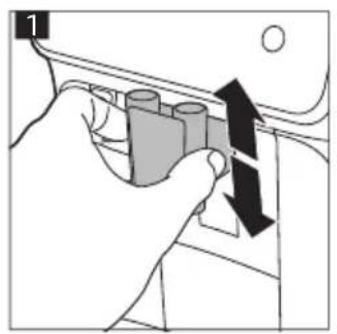
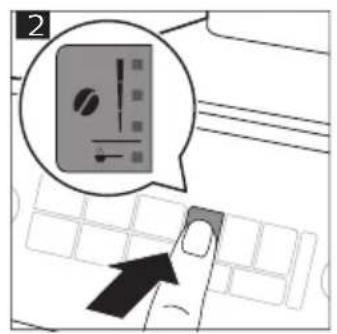
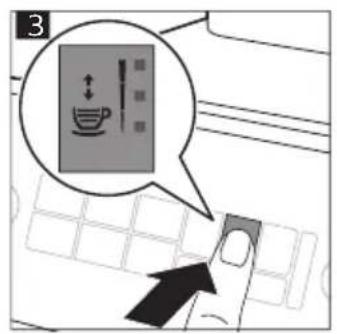
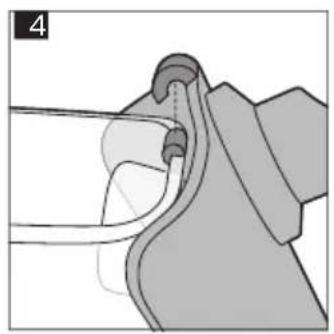
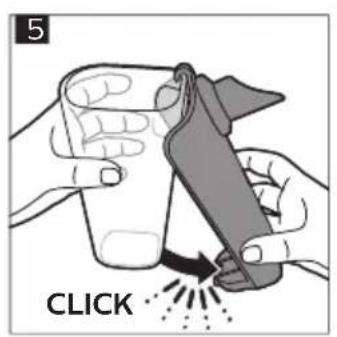
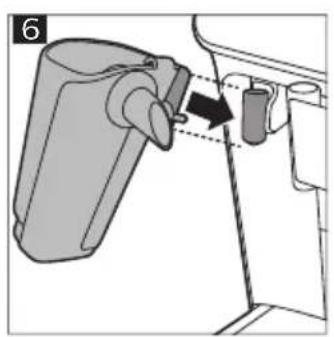
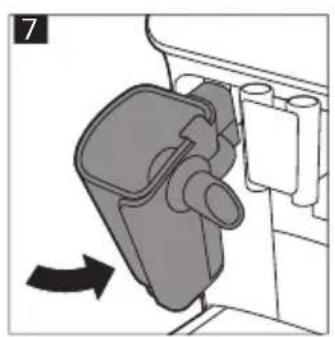
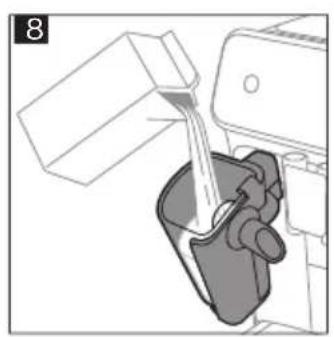
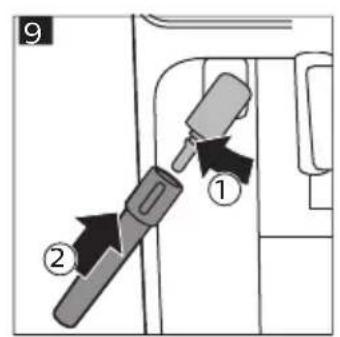
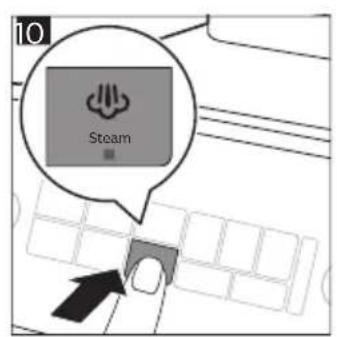
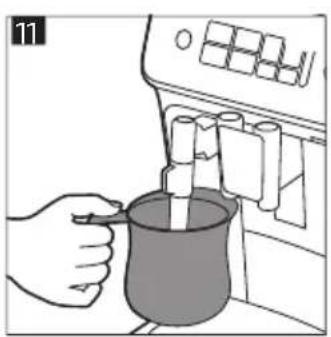
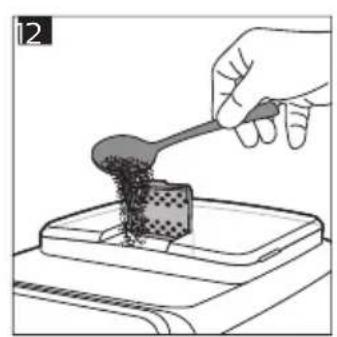
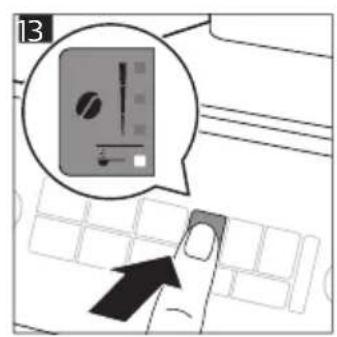
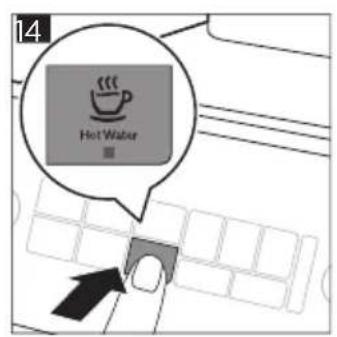
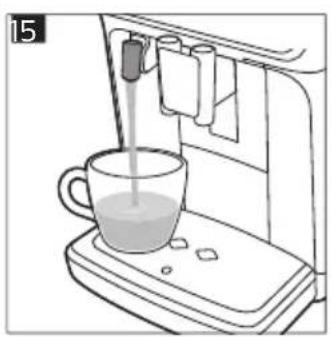
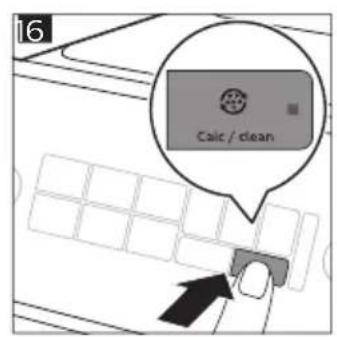
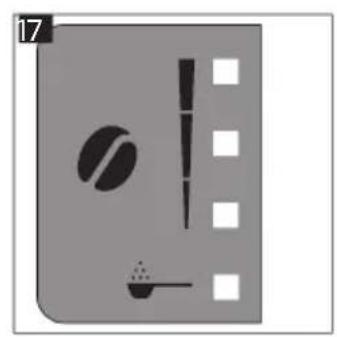
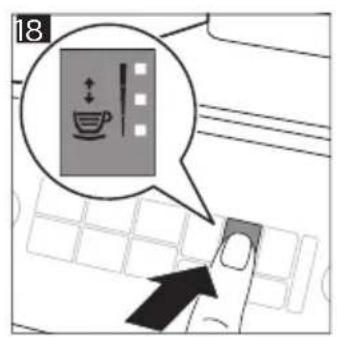
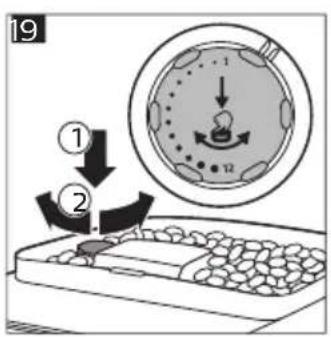
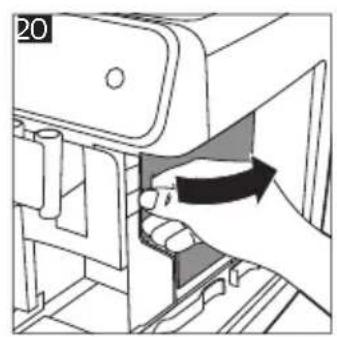
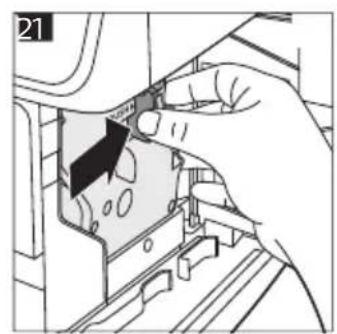
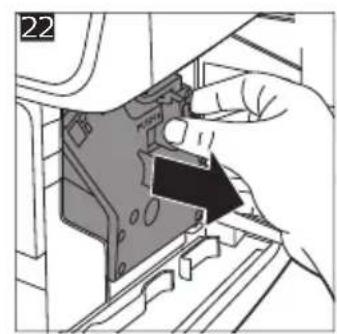
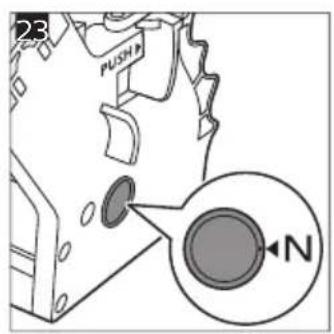
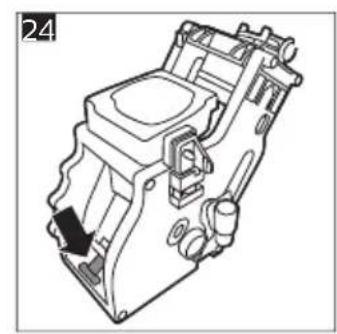
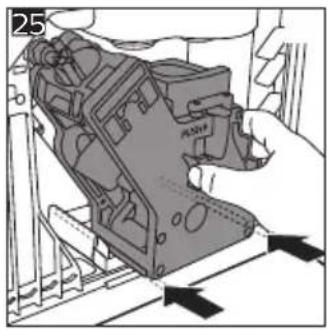
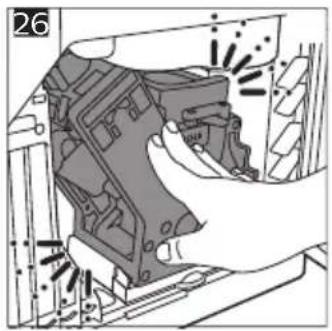
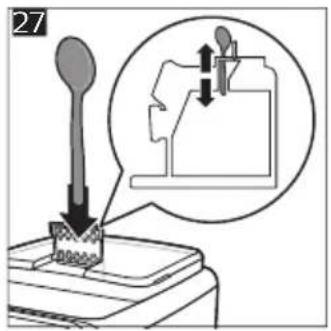
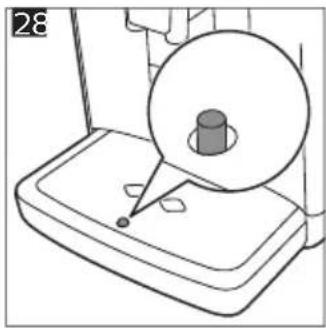
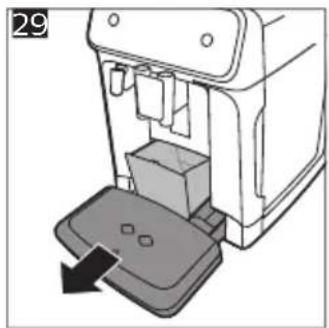
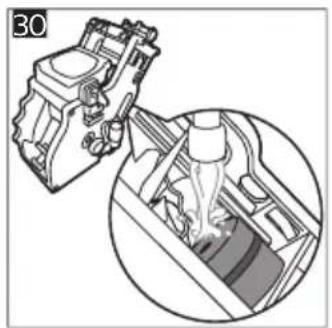
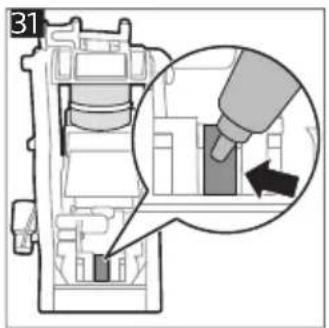
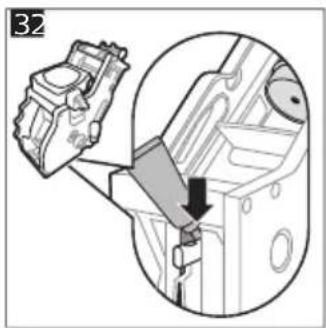
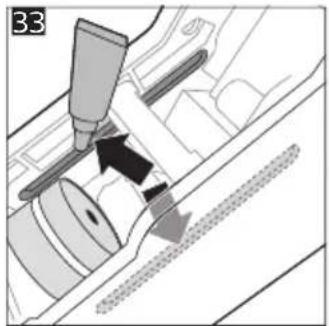
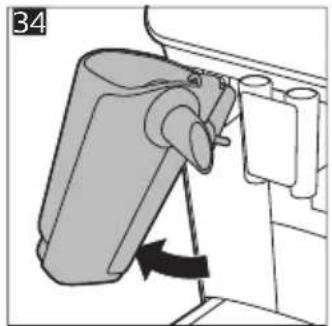
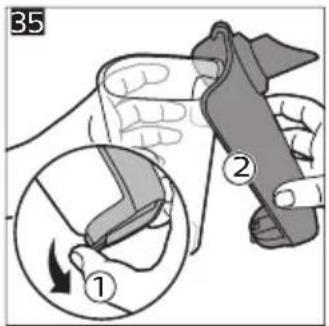
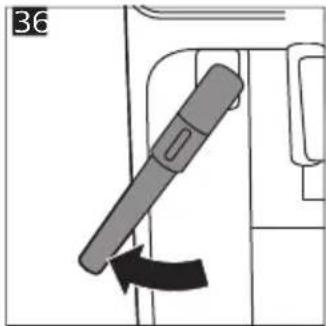
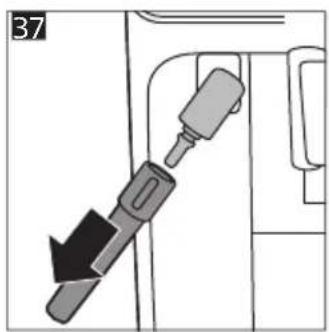
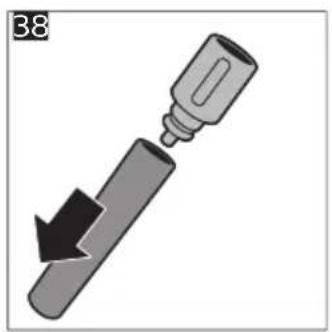
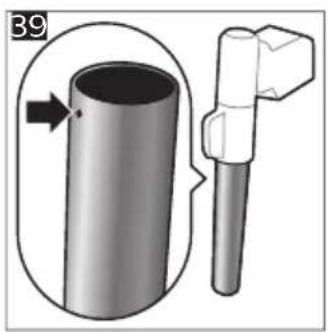
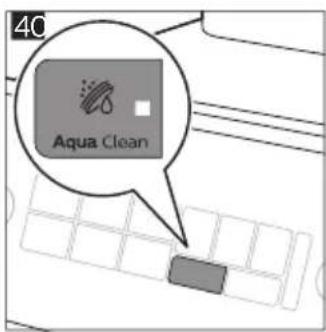
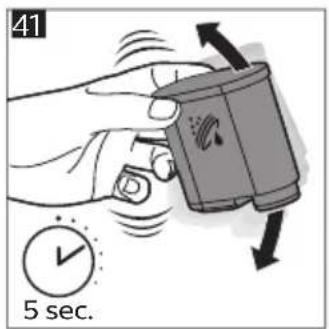
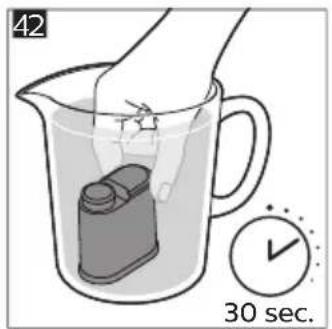
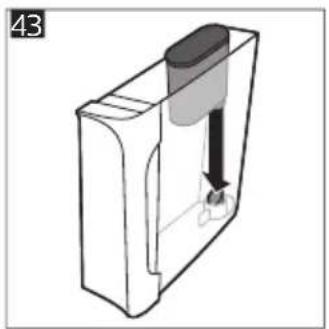
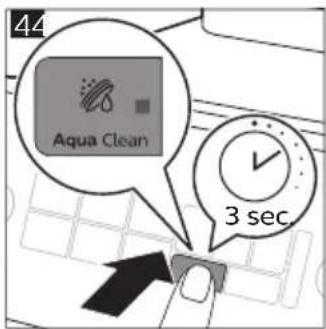
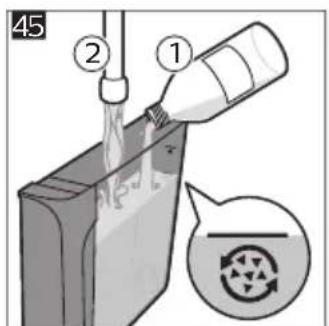
2025 © Versuni Holding B.V.
PHILIPS and the Philips Shield
Emblem are registered trademarks of Koninklijke Philips N.V. and are used under license.
This product has been manufactured by and is sold under the responsibility of Versuni Holding B.V., and Versuni Holding B.V. is the warrantor in relation to this product.

642001030415 (8/2025) rev.00

www.home.id