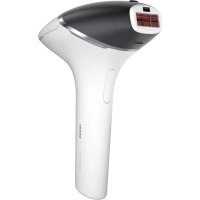
Lumea Prestige BG9041 - Epilator PHILIPS - Free user manual and instructions
Find the device manual for free Lumea Prestige BG9041 PHILIPS in PDF.



| Product Type | Intense Pulsed Light (IPL) Hair Removal Device |
| Brand | Philips |
| Model | Lumea Prestige BG9041 |
| Power Supply | Rechargeable lithium-ion battery 2x3.6V 1000mAh + power adapter 100-240V, 50-60Hz, 65W |
| Technology | Intense Pulsed Light (IPL), wavelengths 560-1400nm |
| Intensity Levels | 5 adjustable levels |
| Light Energy | 2.4 to 6.5 J/cm² (optical exposure) |
| Pulse Duration | < 2.5 ms |
| Flash Interval | 0.9-2s (mains) / 1.6-3.5s (battery) |
| Use Zones (men) | Body below the neck (chest, back, legs, arms, abdomen, pubic area), except face, neck, genitals and scrotum |
| Skin Tone Sensor | Yes, integrated in each accessory, automatic shutdown if skin too dark |
| Treatment Modes | Stamp-flash (single flash) and glide-flash (continuous) |
| Included Accessories | Body accessory, cleaning cloth |
| Charging | Approximately 1h40 for full charge |
| Battery Life | At least 130 flashes at intensity 5 |
| Safety | Integrated UV filter, contact safety system, overheat protection |
| Maintenance and Cleaning | Clean filter glass and accessories with a damp cloth after use, let dry |
| Operating Conditions | Temperature: 5°C to 35°C, relative humidity 15-90% |
| Warranty | International Philips warranty |
| Recycling | Product and battery recyclable, do not dispose of with household waste |
Frequently Asked Questions - Lumea Prestige BG9041 PHILIPS
User questions about Lumea Prestige BG9041 PHILIPS
0 question about this device. Answer the ones you know or ask your own.
Ask a new question about this device
Download the instructions for your Epilator in PDF format for free! Find your manual Lumea Prestige BG9041 - PHILIPS and take your electronic device back in hand. On this page are published all the documents necessary for the use of your device. Lumea Prestige BG9041 by PHILIPS.
USER MANUAL Lumea Prestige BG9041 PHILIPS
General conditions 8
Medications/History 8
Pathologies/Disorders 9
Skin condition 10
Location/areas general 10
Location/areas men 10
Location/areas women 11
Important 11
Danger 11
Warning 11
To prevent damage 13
Caution 13
Electromagnetic fields (EMF) 14
How IPL works 15
Suitable body hair colors 15
Recommended treatment schedule 16
Initial phase 16
Touch-up phase 16
Treatment time per area 17
What to expect 17
After initial treatment phase 17
During touch-up treatment phase 18
Using your Lumea for men before and after tanning 18
Tanning with natural or artificial sunlight 18
Tanning with creams 18
Before you use your Lumea for men 18
Pretreating your skin 18
Skin test 19
Using your Lumea for men 19
Smartskin sensor 19
Body Attachment 19
Selecting the right light intensity 20
Handling the device 21
Two treatment modes: Stamp & Flash and Slide & Flash 22
After use 23
Common skin reactions 23
Rare side effects 23
Aftercare 24
Charging 24
Cleaning & storage 25
Warranty and support 25
Recycling 26
Technical specifications 26
Welcome
Welcome to the beauty world of Lumea! You are only a few weeks away from silky-smooth skin.
Philips Lumea uses Intense Pulsed Light (IPL) technology, known as one of the most effective methods to continuously prevent hair regrowth. In close collaboration with skin experts we adapted this light-based technology, originally used in professional beauty salons, for easy and effective use in the comfort of your home. Philips Lumea is gentle and offers convenient and effective treatment at a light intensity that you find comfortable. Unwanted hairs are finally a thing of the past, look and feel amazing every day.
To fully benefit from the support that Philips offers, register your product at www.philips.com/welcome. For further information, please go to www.philips.com/lumea to find our experts' advice, tutorial videos and FAQs and make the most of your Lumea.

Note: Keep these instructions with your product at all times.
Device overview
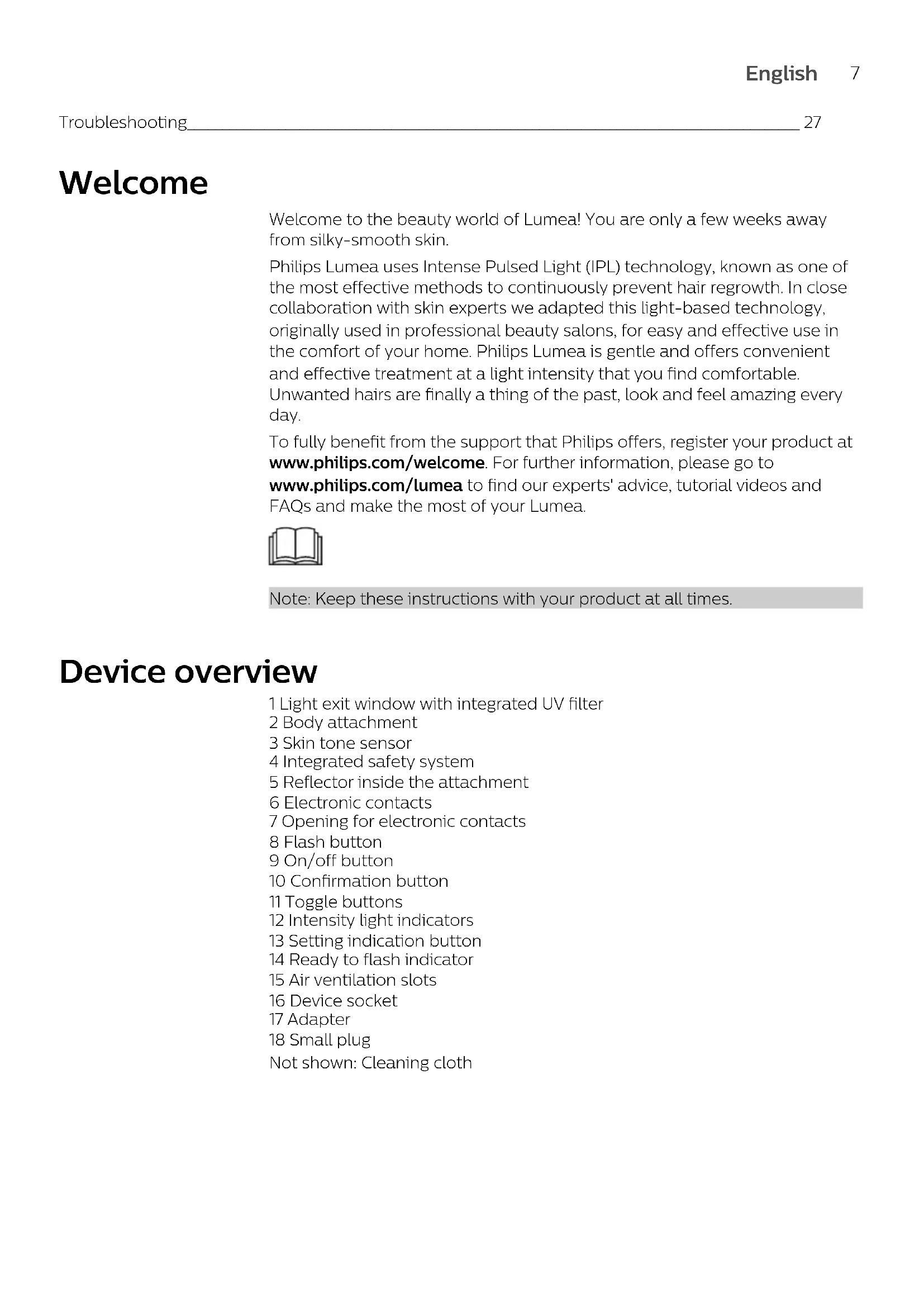
1 Light exit window with integrated UV filter
2 Body attachment
3 Skin tone sensor
4 Integrated safety system
5 Reflector inside the attachment
6 Electronic contacts
7 Opening for electronic contacts
8 Flash button
9 On/off button
10 Confirmation button
11 Toggle buttons
12 Intensity light indicators
13 Setting indication button
14 Ready to flash indicator
15 Air ventilation slots
16 Device socket
17 Adapter
18 Small plug
Not shown: Cleaning cloth
Contraindications
General conditions
- Never use the device if you have brownish black or darker skin tone (you rarely to never sunburn, very dark tanning). In this case you run a high risk of developing skin reactions, such as hyperpigmentation and hypopigmentation, strong redness or burns.
Note: To check if your skin type allows usage of the device, consult the skin tone table with number 2 on the foldout page.

- Never use the device if you are pregnant or breastfeeding as the device was not tested on pregnant or breastfeeding women.
- Never use the device if you have any active implants such as a pacemaker, neurostimulator, insulin pump etc.
Medications/History
Never use the device if you take any of the medications listed below:
- If your skin is currently being treated with or has recently been treated in the past week with Alpha-Hydroxy Acids (AHAs), Beta-Hydroxy Acids (BHAs), topical isotretinoin and azelaic acid.
- If you have taken any form of isotretinoin Accutane or Roaccutane in the last six months. This treatment can make skin more susceptible to tears, wounds and irritations.
- If you are taking photosensitizing agents or medications, check the package insert of your medicine and never use the device if it is stated that it can cause photo-allergic reactions, photo-toxic reactions or if you have to avoid sun when taking this medicine.
- If you take anticoagulation medications, including heavy use of aspirin, in a manner which does not allow for a minimum 1-week washout period prior to each treatment.
Never use the device:
- If you have received radiation therapy or chemotherapy within the past 3 months.
- If you are on painkillers which reduce the skin's sensitivity to heat.
- If you take immunosuppressive medications.
- If you have had surgery in the areas to be treated in the last 3 weeks.
Pathologies/Disorders
Never use the device:
- If you have diabetes or other systemic or metabolic diseases.
- If you have congestive heart disease.
- If you have a disease related to photosensitivity, such as polymorphic light eruption (PMLE), solar urticaria, porphyria etc.
- If you have a history of collagen disorder, including a history of keloid scar formation or a history of poor wound healing.
- If you have epilepsy with flashlight sensitivity.
- If your skin is sensitive to light and easily develops a rash or an allergic reaction.
- If you have a skin disease such as active skin cancer, you have a history of skin cancer or any other localized cancer in the areas to be treated.
- If you have a history of vascular disorder, such as the presence of varicose veins or vascular ectasia in the areas to be treated.
- If you have any bleeding disorder.
- If you have a history of immunosuppressive disease (including HIV infection or AIDS).
Skin condition
Never use the device:
- If you have infections, eczema, burns, inflammation of hair follicles, open lacerations, abrasions, herpes simplex (cold sores), wounds or lesions and haematomas in the areas to be treated.
- On irritated (red or cut), sunburned, recently tanned or faketanned skin.
- On the following areas without consulting your doctor first: moles, freckles, large veins, darker pigmented areas, scars and skin anomalies. This can result in a burn and a change in skin color, which makes it potentially harder to identify skin-related diseases.
- On following areas: warts, tattoos or permanent make-up.
Location/areas general
Never use the device on the following areas:
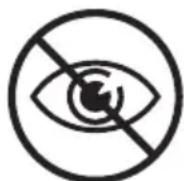
- Around the eyes and on or near the eyebrows.
- On areas where you use long-lasting deodorants. This can result in skin reactions.
- Over or near anything artificial like silicone implants, subcutaneous injection ports (for instance an insulin dispenser) or piercings.
- On lips, nipples, the inside of the nostrils, ears and anus.
Location/areas men
Never use the device on the following areas:
- Do not use the device on the face and neck including all beard-growing areas.
- Do not use the device on the genital area or scrotum. Men can use the device in the pubic area.
Location/areas women
Never use the device on the following areas:
- areolas, labia minora, vagina.
Note: This list is not exhaustive. If you are not sure whether you can use the device, we advise you to consult your doctor.
Important
Danger
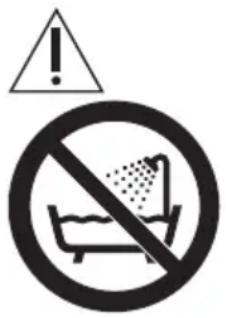
- Keep the device and the adapter dry.
- If the device is broken, do not touch any inner part to avoid electric shock.
- Water and electricity are a dangerous combination. Do not use this appliance in wet surroundings (e.g. near a filled bath, a running shower or a filled swimming pool).
Warning
- This appliance is not intended for use by persons (including children) with reduced physical, sensory or mental capabilities, or lack of experience and knowledge, unless they have been given supervision or instruction concerning use of the appliance by a person responsible for their safety
- Children should be supervised to ensure that they do not play with the device.
-
The device is not intended for children under the age of 18 years. Teenagers aged below 18 years can use the device with the consent and/or assistance of their parents or the persons who have parental authority over them. Adults of 18 years and older can use the device freely.
-
Always check the device before you use it. Do not use the device or adapter if it is damaged.
- The external flexible cable or cord of this transformer cannot be replaced; if the cord is damaged, the transformer shall be scrapped.
- Do not use the device if the UV filter of the light exit window and/or attachment is broken.
- Do not use any pencil or pen to mark the areas to be treated. This may cause burns on your skin.
- If you have a dark-colored skin, be careful with treating a darker area immediately after a lighter area. The skin tone sensor may not immediately block the treatment on the darker body area.
- Hair removal by intense pulsed light sources can cause increased hair growth in some individuals. Based upon currently available data, the highest risk groups for this response are females of Mediterranean, Middle Eastern and South Asian heritage treated on the face and neck.
- Adapter, light exit window and the filter of the attachment(s) can become very hot after usage. Do not touch the adapter, inner part of the light exit window and the filter or the inner part of the attachment(s) without having these cool down.
D□C
- This device has a detachable power adapter. Only use the adapter provided with this device. The reference number (AD2069x20020HF) can be found on your device. The 'x' in this number refers to the plug type for your country.
- For hygienic reasons, the device should only be used by one person.
Note: If you notice a skin tone change from last treatment (e.g. due to tanning), we recommend you to perform a skin test and to wait 30 minutes before your next treatment.
To prevent damage
- Make sure that nothing obstructs the airflow through the ventilation slots of the device.
- Never subject the device to heavy shocks and do not shake or drop it.
- If you take the device from a very cold environment to a very warm environment or vice versa, wait approximately 3 hours before you use it.
- Store the device in a dust free and dry place.
- Do not expose the device to temperatures lower than 5^ C or higher than 35^ C during use.
- To prevent damage, do not expose the device to direct sunlight or UV light for prolonged periods of time (exceeding several hours).
Caution
- This device is only intended for removing unwanted body hair from areas below the cheekbones. Do not use it for any other purpose. Doing so may expose you to a hazardous situation. Do not use the device on the face and neck including all beard-growing areas. Men can use the device in the pubic area (excluding the genital area and scrotum).
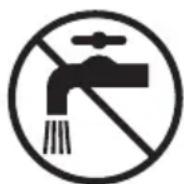
- This device is not washable. Never immerse the device in water and do not rinse it under the tap.
- For hygienic reasons, the device should only be used by one person.
-
Use the device only at settings suitable for your skin type. Use at higher settings than those recommended can increase the risk of skin reactions and side effects.
-
Never use compressed air, scouring pads, abrasive cleaning agents or aggressive liquids such as petrol or acetone to clean the device.
- The scattered light produced by the device is harmless to your eyes. Do not look at the flash while using the device. It is not necessary to wear goggles during use. Use the device in a well-lit room so that the light is less glaring to your eyes.
- Always return the device to a service center authorized by Philips for examination or repair. Repair by unqualified people could cause an extremely hazardous situation for the user.
- Never leave the device unattended when it is switched on. Always switch off the device after use.
- Do not use the device if any of the conditions mentioned in chapter 'Who should not use Lumea? Contraindication' apply to you.
- Tanning with natural or artificial sunlight might influence the sensitivity and color of your skin. Perform a skin test to determine the appropriate light intensity setting.
- Before you use Lumea, you should clean your skin and make sure it is hair-free, entirely dry and free from oily substances.
- Do not treat the same skin area more than once during a session. This does not improve the effectiveness of the treatment, but increases the risk of skin reactions.
- Lumea should never be painful. If you experience discomfort, reduce the light intensity setting.
Electromagnetic fields (EMF)
This Philips device complies with all applicable standards and regulations regarding exposure to electromagnetic fields.
How IPL works
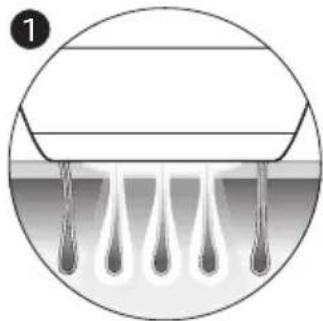
With Intense Pulsed Light technology, gentle pulses of light are applied to the skin and absorbed by the hair root. The lighter the skin and the darker the hair, the better the pulses of light are absorbed.
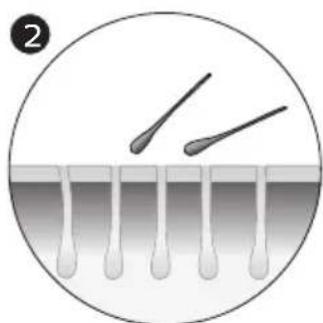
The pulses of light stimulate the hair follicle to go into a resting phase. As a consequence, the hair sheds naturally and hair regrowth is prevented.
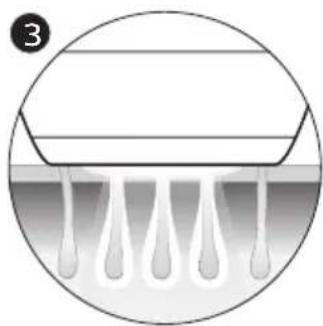
The cycle of hair growth consists of different phases. IPL technology is only effective when the hair is in its growing phase. Not all hairs are in the growing phase at the same time. This is why we recommend you to follow the initial treatment phase (4-5 treatments, every treatment 2 weeks apart) and then the follow-up treatment phase (touch-ups every 4-8 weeks) to make sure all hairs are effectively treated in the growing phase.
Tip: To assure long lasting hair removal, touch-ups every 4 weeks are recommended.
Note: Treatment with Lumea is not effective if you have light blond, grey, red or white hairs as light hairs do not absorb enough light. Below you can see the hair colors for which Lumea is suitable and effective.
Suitable body hair colors
Note: To check if your body hair color allows usage of the device, consult the hair color table with number 3 on the foldout page.

Recommended treatment schedule
Initial phase
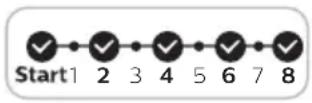
For the first 4 to 5 treatments, we advise you to use Lumea for men once every two weeks to ensure that all hairs are treated.
Note: Replacing one of the IPL treatments with another hair removal method (waxing, epilating, etc.) will not help to reach the desired hair reduction.
Note: If you want to remove hairs in between the Lumea treatments, you can use your normal hair removal method.
Touch-up phase
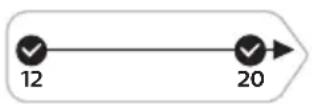
After the initial treatment phase (4-5 treatments), we recommend touch-up every 4-8 weeks, when you see hairs growing back. This to maintain results and enjoy smooth skin for months. The time between treatments may vary based on your individual hair regrowth and also across different body areas.
Tip: You can write the treatment schedule in your agenda to remind yourself of the treatments so you will not forget.
Note: Using the device more often does not enhance the effectiveness.
Treatment time per area

What to expect
After initial treatment phase
- After the first treatment, it can take 1 to 2 weeks for the hairs to fall out. In the first weeks following the initial treatments, you still see some hairs growing. These are likely to be hairs that were not in their growing phase during the first treatments.
-
After 2-3 treatments, you should see a noticeable reduction in hair growth. However, to effectively treat all hairs, it is important to keep on treating according to the recommended treatment schedule.
-
After 4-5 treatments, you should see a significant reduction of hair growth in the areas that you treated with Lumea. A reduction of hair density should be visible as well.
During touch-up treatment phase
- Keep on treating with frequent touch-ups (every 4-8 weeks) to maintain the result.
Using your Lumea for men before and after tanning
Tanning with natural or artificial sunlight
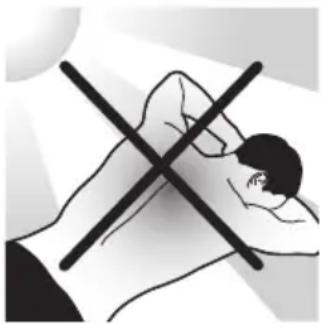
Intentionally exposing your skin to natural or artificial sunlight with the aim of developing a tan influences the sensitivity and color of your skin. Therefore the following is important:
- After each treatment, wait at least 48 hours before tanning. Even after 48 hours, make sure that the treated skin does not show any redness from the treatment anymore.
In case of exposing your skin to the sun (without tanning intentionally) in the 48 hours after treatment, use a sunblock SPF 50+ on the treated areas. After this period, you can use a sunblock SPF 30+ for two weeks.
After tanning, wait at least 2 weeks before you use Lumea. - After recent tanning, perform a skin test to determine the appropriate light intensity setting. For instructions see chapter 'Skin test'.
- Do not use Lumea on sunburned body areas.
- The back and chest are often tanned. Take special care to select the appropriate intensity for treating the tanned skin to prevent skin reactions
Note: Occasional and indirect sun exposure does not qualify as tanning.
Tanning with creams
If you have used an artificial tanning lotion, wait until the artificial tan has disappeared completely before you use the device.
Before you use your Lumea for men
Pretreating your skin
Before you use Lumea, you should pretreat your skin by removing hairs on the surface of your skin. This allows the light to be absorbed by the hair parts below the skin surface to ensure effective treatment. You can either shave, epilate or wax. Do not use depilatory creams, as chemicals may cause skin reactions.
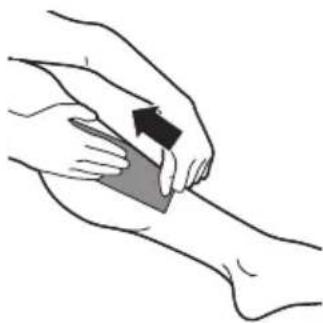
If you choose to wax, please wait 24 hours before using Lumea to let your skin rest. We recommend that you take a shower before the treatment to ensure that all possible residue of wax has been removed from your skin.
1 Pretreat the areas you intend to treat with Lumea.
2 Clean your skin and make sure it is hair-free, entirely dry and free from oily substances.
Note: if shaving causes skin irritation, we advise you not to use the device until skin irritation is resolved.
Skin test
When you use Lumea for the first time or after tanning, perform a skin test on each area to be treated. The skin test is necessary to check your skin's reaction to the treatment and to determine the correct light intensity setting for each body area.
Note: do not try the device on difficult or sensitive areas (ankle and bony area).
1 Turn on the device. Make sure you select setting 1.
2 Place the device at a 90^ angle on the skin so that the integrated safety system is in contact with your skin.
The integrated safety system prevents unintentional flashing without skin contact.
3 Press the flash button to release a flash.
4 Slide the device over the skin to the next area to be treated.
5 Increase the setting by one level, apply a flash and slide the device to the next area. Repeat this for all levels, as long as each level still feels comfortable. See the table in: 'Selecting the right light intensity'.
6 After the skin test, wait 24 hours and check your skin for any reaction. If your skin shows reactions, choose the highest setting that did not result in any skin reaction for subsequent use.
Using your Lumea for men
Smartskin sensor
Each attachment of the Lumea for men has integrated skin tone sensor which measures the skin tone at the beginning of each session and occasionally during the session. If it detects a skin tone that is too dark for treatment with Lumea, the 'ready to flash' light starts blinking orange and the device automatically disables to prevent you from developing skin reactions. This means that it does not flash when you press the flash button.
Body Attachment
The body attachment has a curved-in design to cover effectively and treat areas below the neckline. Especially large areas such as chest, back, legs, arms and stomach.
Selecting the right light intensity
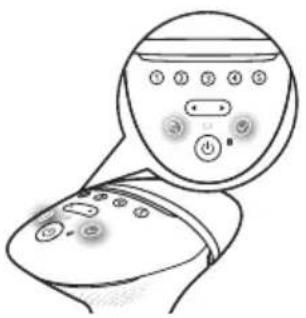
Lumea provides 5 different light intensities. You will always be able to change to a light intensity setting you find comfortable.
1 Press the on/off button to turn on the device. The device starts to operate at light intensity setting 1.
Note: To adjust the light intensity setting manually without using the setting indication feature, use the toggle buttons until you have reached the required setting. The corresponding intensity light level lights up white.
2 Press the setting indication button () and put the device to your skin.
3 After the device scanned your skin, the light intensity indicators blink white. This shows which intensities are most comfortable based on your skin tone.
4 Press the confirmation button () to confirm that you want to use the indicated setting to start using the device.
Philips Lumea will automatically use the highest suggested intensity, indicated by a continuous lighting led indicator.
Lumea gives you the freedom to select the light intensity that you find most comfortable. If you want to set the light intensity setting manually, please consult the table below. This table shows settings that for the majority of users provides a comfortable, but still effective setting.
5 Using Lumea should never be painful. If you experience discomfort, reduce the light intensity setting. You can do this by using the toggle buttons.
Note: The device automatically disables when your skin tone is too dark. The 'ready to flash' light will blink orange to indicate if the skin tone is too dark for IPL treatment with Lumea.
6 After moving to another body area or after recent tanning, perform a skin test to determine the right light intensity setting. To re-activate the setting indication feature, press the setting indication button.
Note: Since body areas might differ in skin color, you need to select the right setting for each body area separately.
Skin tone
Light intensity setting
White: you always sunburn, never tan. 4/5
Beige: you easily sunburn, tan minimally. 4/5
Light brown: you sunburn easily, tan slowly to light brown. 4/5
Mid brown: you rarely sunburn, tan easily. 3/4
Dark brown: you rarely sunburn, tan very easily. 1/2/3
Brownish black or darker: you rarely or never sunburn, very dark tanning.
You cannot use the device.
Note: To check if your skin type allows usage of the device, consult the skin tone table with number 2 on the foldout page.

Note: Your skin may react differently on different days/occasions for a number of reasons.
Handling the device
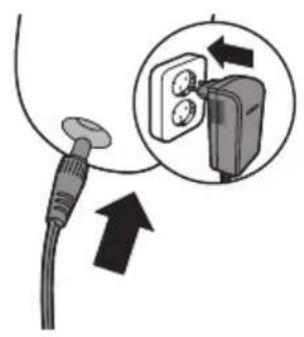
1 Before use, clean the attachment and the light exit window.
2 Put the small plug in the device and put the adapter in the wall socket.
Note: If the device is not fully charged when you start a treatment, the battery will run out during a full body treatment. We advise you to always fully charge the device before you start a treatment or to use it corded.
If you use the device to treat your shoulders, chest, back and legs you may have to recharge the device during the treatment. This is normal.
Tip: If you want to treat your back and your shoulders, you require the help of your partner or a friend to guarantee complete coverage and best results.
3 Switch on the device and select the right light intensity for your skin tone. For selecting the right skin tone, you can make use of the setting indication feature (see 'Selecting the right light intensity').
4 Place the device at a 90^ angle on the skin so that the integrated safety system is in contact with your skin. The integrated safety system prevents unintentional flashing without skin contact.
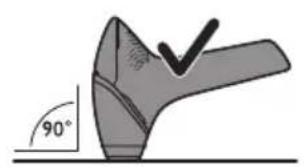
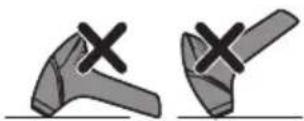
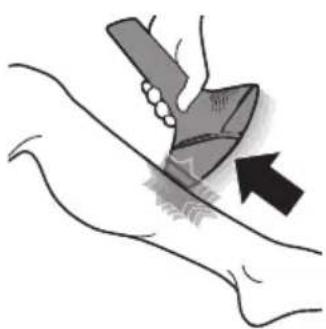
5 Press the device firmly onto your skin to ensure proper skin contact. The 'ready to flash light' on the back of the device lights up white to indicate that you can proceed with the treatment.
Note: When the 'ready to flash' light starts blinking orange, your skin is not suitable for treatment. In this case, the device automatically disables. You can try to use the device on other areas with a lighter skin tone.
Note: If the 'ready to flash' light does not light up white, the device is not completely in contact with your skin.
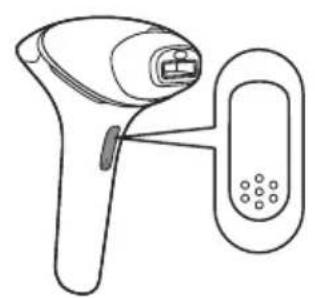
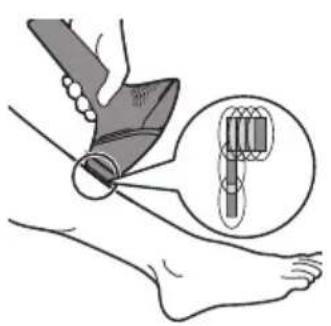
6 Press the flash button to release a flash. The devices make a soft popping sound. You should feel a warm sensation because of the flash.
Note: The scattered light produced by the device is harmless to your eyes. Do not look at the flash while using the device. It is not necessary to wear goggles during use. Use the device in a well-lit room so that the light is less glaring to your eyes.
7 Place the device on the next area to be treated. After each flash, it takes up to 3.5 seconds until the device is ready to flash again. You can release a flash when the 'ready to flash' light lights up white.
8 To make sure that you have treated all areas, release the flashes close to each other. Effective light only comes out of the light exit window. Part of the device that is in contact with your skin is slightly larger therefore there should be some overlap. However, make sure you flash the same area only once.
Note: Flashing the same area twice does not improve the effectiveness of the treatment, but increases the risk of skin reactions.
Note: Do not use any pencil or pen to mark the areas to be treated, as this may cause side effects to your skin.
9 When you have finished the treatment, press and hold the on/off button to switch off the device. Remove the adapter from the wall socket if you used the device corded.
Note: If you did not use the device for a long period of time, it is important to perform a skin test again.
Two treatment modes: Stamp & Flash and Slide & Flash
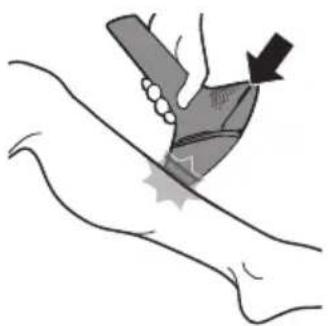
- Your Philips Lumea has two treatment modes for more convenient use on different body areas:
- The Stamp & Flash mode is ideal to treat small or curvy areas like knees and underarms. Simply press and release the flash button to release a single flash.
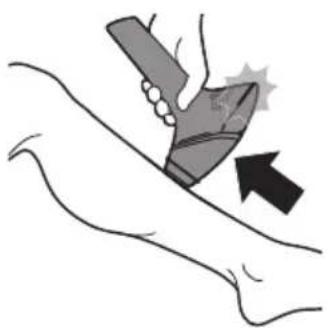
- The Slide & Flash mode offers convenient use on larger areas like chest and back. Keep the flash button pressed while you slide the device over your skin to release several flashes in a row.
Note: The device needs up to 2 seconds (when used with cord, or up to 3.5 seconds when used without cord) in between two flashes, so make sure you flash on every area you wish to treat. Sliding too fast over the skin will cause missed spots.
After use
Common skin reactions
Your skin may show slight redness and/or may prickle, tingle or feel warm. This reaction is absolutely harmless and disappears quickly. Dry skin and itching may occur due to shaving or a combination of shaving and light treatment. You can cool the area with an ice pack or a wet face cloth. If dryness persists, you can apply a non-scented moisturizer on the treated area.
Rare side effects
-
Burns, excessive redness (e.g. around hair follicles) and swelling: these reactions occur rarely. They are the result of using a light intensity that is too high for your skin tone. If these reactions do not disappear within 3 days, we advise you to consult a doctor. Wait with the next treatment until the skin has healed completely and make sure you use a lower light intensity.
-
Skin discoloration: this occurs very rarely. Skin discoloration manifests itself as either a darker patch (hyperpigmentation) or a lighter patch (hypopigmentation) than the surrounding area. This is the result of using a light intensity that is too high for your skin tone. If the discoloration does not disappear within 2 weeks, we advise you to consult a doctor. Do not treat discolored areas until the discoloration has disappeared and your skin has regained its normal skin tone.
-
Skin infection is very rare but is a possible risk following a (micro)wound, a skin burn, skin irritation etc.
-
Epidermal heating (a sharply defined brownish area which often occurs with darker skin tones and is not accompanied with skin dryness): This reaction occurs very rarely. In case this reaction does not disappear within 1 week, we advise you to consult a doctor. Wait with the next treatment until the skin has healed completely and make sure you use a lower light intensity.
-
Blistering (looks like small bubbles on the surface of the skin): this occurs very rarely. In case this reaction does not disappear within 1 month or when the skin gets infected, we advise you to consult a doctor. Wait with the next treatment until the skin has healed completely and make sure you use a lower light intensity.
- Scarring: often the secondary effect of a burn, which can take longer than a month to heal.
- Folliculitis (swelling around hair follicles combined with pustule formation): this reaction occurs very rarely and is the result of bacteria penetrating the damaged skin. In case this reaction occurs, we advise you to consult a doctor as folliculitis may need antibiotic ointment.
- Pain: this can occur during or after treatment if you have used the device on skin that is not hair-free, if you use the device at a light intensity that is too high for your skin tone, if you flash the same area more than once and if you use the device on open wounds, inflammations, infections, tattoos, burns, etc.
Aftercare
After use, you can safely apply lotions, creams, deodorant, moisturizer or cosmetics to the treated areas. If you experience skin irritation or skin redness after treatment, wait until it disappears before you apply any product to your skin. If you experience skin irritation after you apply a product to your skin, wash it off with water.
Note: When following all instructions you may still get skin reactions. In this case stop using the device and contact the consumer care center in your country.
Charging
Fully charge the batteries before you use the device for the first time and when the batteries are empty. Fully charging the batteries takes up to 1 hour and 40 minutes. Charge the device when the charging light lights up orange during use to indicate that the battery is low and will run out soon. Fully charged batteries provide at least 130 flashes at light intensity 5.
Charging the device:
1 Switch off the device.
2 Insert the small plug into the device and put the adapter in the wall socket.
- The charging light flashes white to indicate that the appliance is charging.
- When the batteries are fully charged, the charging light lights up white continuously.
Notes: The adapter and the device feel warm during charging. This is normal.
Note: This device is equipped with battery-overheat protection and does not charge if the room temperature exceeds 40^ .
- Never cover the appliance and device during charging.
3 After charging, remove the adapter from the wall socket and pull the small plug out of the device.
Note: The battery functionality is not enough for a full body treatment. We recommend you to use the device attached to the wall socket while treating large body areas such as shoulders, chest, back and legs.
Tip: Charge the device after each use to save battery life.
Cleaning & storage
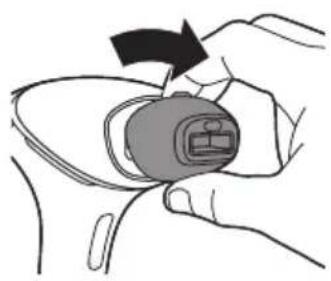
1 After use, switch off the device, unplug it and let it cool down.
Note: Light exit window and the attachment can become very hot after usage.
2 Remove the attachment.
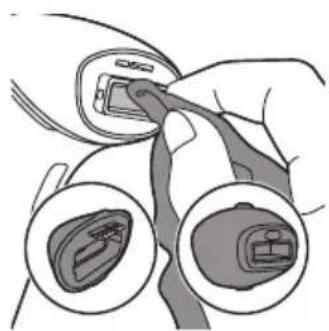
3 Moisten the soft cloth supplied with the device with a few drops of water and use it to clean the following parts:
the light exit window on the device
- the outside surface of the attachment
- the reflector inside the attachment
the skin tone sensor window
4 Let all parts air dry thoroughly.
5 Store the device in a dust-free place at a temperature between -25^ to +70^ and a humidity range between 15-90%.
Warranty and support
If you need information or support, please visit www.philips.com/support or read the international warranty leaflet.
Recycling
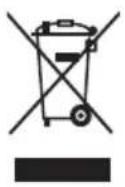
- This symbol means that this product shall not be disposed of with normal household waste (2012/19/EU).
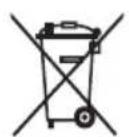
- This symbol means that this product contains a built-in rechargeable battery which shall not be disposed of with normal household waste (2006/66/EC). Please take your product to an official collection point or a Philips service center to have a professional remove the rechargeable battery.
- Follow your country's rules for the separate collection of electrical and electronic products and rechargeable batteries. Correct disposal helps prevent negative consequences for the environment and human health.
Philips Lumea products contain recyclable materials and should not be put into the municipal waste stream. Refer to the Philips Lumea support website for recycling options. Do not dispose of in fire.
Technical specifications
BG9041
| Rated voltage 100 V - 240 V |
| Rated frequency 50 Hz - 60 Hz |
| Rated input 65 W |
| Protection against electric shock Class II ☐ |
| Protections rating IP 30 (EN 60529) |
| Operating conditions Temperature: 5 °C to 35 °C |
| Relative humidity 15 % to 90 % (non condensing) |
| Storage conditions temperature -25 °C to +70 °C |
| Storage conditions humidity Less than 90 % (non condensing) |
| Maximum variation of the light <20 % output over the treatment area |
| Operating pressure 700 hPa-1060 hPa |
| Duration of the pulsetrain Single pulse |
| Emitted wavelengths 560 to 1400 nm |
Lithium-ion battery 2 x 3.6 Volt 1000 mAh
| Optical exposure 2.4-6.5 J/cm2 | |
| Maximum optical energy 4.8 - 23 J | |
| Optical homogeneity Max. +/- 30 % deviation from average optical exposure in treatment area | |
| Repetition time | 0.9 s - 2 s (cored), 1.6 s - 3.5 s (cordless) |
| Pulse duration <2.5 ms | |
| Flash interval Between 1-3.5 s depending on battery/mains connected use | |
| Pulse sequence Single pulse | |
Troubleshooting
| Problem | Possible cause Solution | |
| The device/adapter becomes warm during use. | It is normal for the device and adapter to become warm (but not too hot to touch) during use. | Use the device in a slightly cooler environment and/ or let it cool down before continuing use. |
| The fan is not working. Check if the attachment is well connected. Clean the connectors on the attachment if needed. In case the attachment is well connected and it is possible to produce flashes with the device, contact the Consumer Care Center in your country, your Philips dealer or a Philips service center. | ||
| The cooling airflow of the fan is blocked by hands or a towel. | Make sure the cooling airflow of the fan is unblocked. | |
| When I place the device on the skin, it does not release a flash. The 'ready to flash' light blinks orange. | Your skin tone in the area to be treated is too dark. | Treat other body areas with lighter skin tones with Lumea. |
| The ready to flash light blinks orange and all 5 intensity lights blink as well. | The device needs to be reset. To reset the device take the plug out of the socket, wait for 30 minutes to let the device cool down. The device should function normally again. In case it doesn't work again, contact the Consumer Care Center in your country. | |
| The ready to flash light does not light up white. | The device is not completely in contact with your skin. | Place the device at a 90 degree angle on the skin so that the integrated safety system in in contact with your skin. |
Problem Possible cause Solution
| The device produces a strange smell. | The light exit window or the skin tone sensor is dirty. | Clean the light exit window and the skin tone sensor carefully. |
| You have not removed the hairs on the area to be treated properly. These hairs may get burned and can cause the smell. | Pretreat your skin before you use Lumea. | |
| The device doesn't flash, the fan is not switched on and all 5 intensity lights blink. | The attachment is not attached properly. | Make sure you attach the attachment completely. If necessary clean the electronic contacts on the attachment. |
| The skin feels more sensitive than usual during treatment. I experience discomfort when I use the device. | The light intensity setting you use is too high. | Check if you have selected the right light intensity setting. If necessary, select a lower setting. |
| You did not remove the hairs on the areas to be treated. | Pretreat your skin before you use Lumea. | |
| The UV filter of the light exit window is broken. | If the UV filter is broken, do not use the device anymore. Contact the Consumer Care Center in your country, your Philips dealer or a Philips service center. | |
| You treated an area for which the device is not intended. | Never use the device on the following areas: inner labia, anus, nipples, areolas, lips, moles, freckles, tattoos, piercings. inside the nostrils and ears, around the eyes and near the eyebrows. Do not use the device on the face and neck including all beard-growing areas. Men can use the device in the pubic area (excluding the genital area and scrotum). | |
| The skin reaction after treatment lasts longer than usual. | You have used a light intensity setting which is too high for you. | Select a lower intensity next time. See chapter 'Using your Philips Lumea', section 'Selecting the right light intensity'. |
| The flash is very bright to my eyes. Do I need to wear goggles? | No, Philips Lumea does not hurt your eyes. | The scattered light produced by the device is harmless to your eyes. Do not look at the flash while using the device. It is not necessary to wear goggles during use. Use the device in a well-lit room so that the light is less glaring to your eyes. Be sure to make good skin contact to avoid scattered light. |
Problem Possible cause Solution
| The results of the treatment are not satisfactory. | You have used a light intensity setting which is too low for you. | Select a higher setting next time. |
| You did not flash an area adjacent to an area you treated before. | You have to release the flashes close to each other and there should be some overlap between the flashes. | |
| The device is not effective on your body hair color. | If you have light blond, grey, red or white hair, the treatment is not effective. | |
| You do not use the device as often as recommended. | To remove all hairs successfully, we advise you to follow the recommended treatment schedule. You can reduce the time between treatments, but do not treat more often than once every two weeks. | |
| You respond more slowly to IPL treatment. | Continue using the device for at least 6 months, as hair regrowth can still decrease over the course of this period. | |
| I experience discomfort when I use the appliance. | You treated an area for which the appliance is not intended | Only use the appliance on the underarms, pubic area (excluding the genital area), shoulders, chest, back and legs. |
| There is no glass filter in my attachment. | This is normal. No action required. There is no filter in the body attachment or in the underarm attachment. Only the sensitive areas attachment has a specialized filter. | |
Inhalt
Willkommen! 31
Produktüberblick 31
Gegenanzeigen 32

- Welcome
- Device overview
- Contraindications
- General conditions
- Medications/History
- Pathologies/Disorders
- Skin condition
- Location/areas general
- Location/areas men
- Location/areas women
- Important
- Danger
- Warning
- D□C
- To prevent damage
- Caution
- Electromagnetic fields (EMF)
- How IPL works
- Suitable body hair colors
- Recommended treatment schedule
- Initial phase
- Touch-up phase
- Treatment time per area
- What to expect
- After initial treatment phase
- During touch-up treatment phase
- Using your Lumea for men before and after tanning
- Tanning with natural or artificial sunlight
- Tanning with creams
- Before you use your Lumea for men
- Pretreating your skin
- Skin test
- Using your Lumea for men
- Smartskin sensor
- Body Attachment
- Selecting the right light intensity
- Skin tone
- Light intensity setting
- Handling the device
- Two treatment modes: Stamp & Flash and Slide & Flash
- After use
- Common skin reactions
- Rare side effects
- Aftercare
- Charging
- Cleaning & storage
- Warranty and support
- Recycling
- Technical specifications
- Troubleshooting
- Inhalt
Brand : PHILIPS
Model : Lumea Prestige BG9041
Category : Epilator