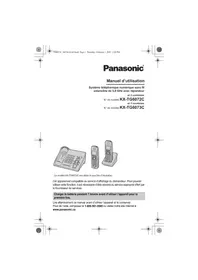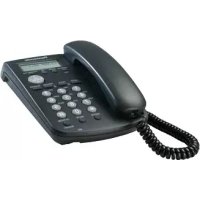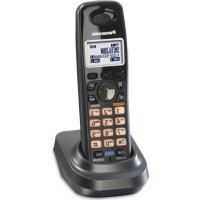
KXTGA939 - Cordless phone PANASONIC - Free user manual and instructions
Find the device manual for free KXTGA939 PANASONIC in PDF.


User questions about KXTGA939 PANASONIC
0 question about this device. Answer the ones you know or ask your own.
Ask a new question about this device
Download the instructions for your Cordless phone in PDF format for free! Find your manual KXTGA939 - PANASONIC and take your electronic device back in hand. On this page are published all the documents necessary for the use of your device. KXTGA939 by PANASONIC.
USER MANUAL KXTGA939 PANASONIC
TGA939C(e).fm Page 1 Wednesday, August 27, 2008 9:39 AM

Panasonic®
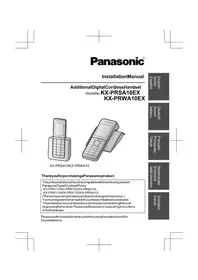
Installation Manual
Additional Digital Cordless Handset
Model No. KX-TGA939C
2LINE
DECT 6.0
Thank you for purchasing a Panasonic digital cordless phone.
This unit is an additional handset compatible with the following
Panasonic Digital Cordless Phone: KX-TG9391
You must register this handset with your base unit before it can be used. This installation manual describes only the steps needed to register and begin using the handset. Please read the base unit's operating instructions for further details.
Charge the batteries for about 7 hours before initial use.
Please read this installation manual before using the unit and save it for future reference.
For assistance, please call 1-800-
561-5505 or visit us at
www.panasonic.ca

PNQX1458ZA DM0908SHO

TGA939C(e).fm Page 2 Wednesday, August 27, 2008 9:39 AM
Supplied accessories
| Accessory item/Part number Quantity | |
| Charger 1 | |
| AC adaptor for charger*1/PQLV209 or PQLV219 1 | |
| Rechargeable batteries*2 | 2 |
| Handset cover*3 | 1 |
| Belt clip 1 |
1 Both of the AC adaptors are compatible with the charger.
2 Please read the base unit's operating instructions for replacement battery information.
*3 The handset cover comes attached to the handset.
Note:
- Please read the base unit's operating instructions for additional/ replacement accessories.
Connection
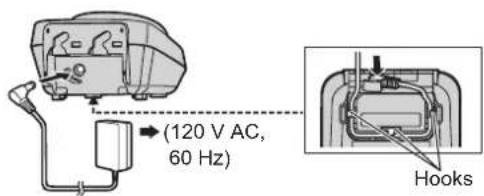
Note:
- Use only the supplied Panasonic AC adaptor PQLV209 or PQLV219.
The AC adaptor must remain connected at all times. (It is normal for the adaptor to feel warm during use.)

TGA939C(e).fm Page 3 Wednesday, August 27, 2008 9:39 AM
Battery installation and battery charge
Important:
-
Use the supplied rechargeable batteries (Part No. HHR-55AAABU).
-
When installing the batteries:
-Wipe the battery ends ( ,) with a dry cloth.
- Avoid touching the battery ends ( ,) or the unit contacts.
-
Confirm correct polarities ( ,)
-
When replacing the batteries:
-
USE ONLY rechargeable Ni-MH batteries AAA (R03) size.
- Do NOT use Alkaline/Manganese/Ni-Cd batteries.
- We recommend using the Panasonic rechargeable batteries noted in the base unit's operating instructions for replacement battery information.
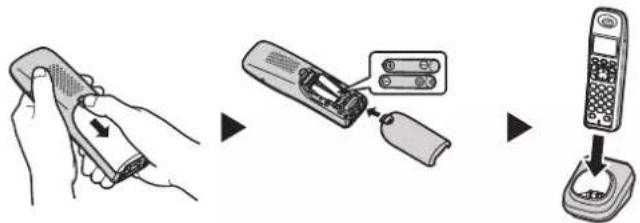
1 Press the notch on the handset cover firmly, and slide it in the direction of the arrow.
2 Insert the batteries negative () end first. Close the handset cover.
3 Place the handset on the charger for about 7 hours before initial use.
Note:
If the batteries are fully charged, but the operating time seems to be shorter, clean the battery ends ( ,) and the charge contacts with a dry cloth.
TGA939C(e).fm Page 4 Wednesday, August 27, 2008 9:39 AM
Attention:

A nickel metal hydride battery that is recyclable powers the product you have purchased. Please call 1-800-8-BATTERY (1-800-822-8837) for information on how to recycle this battery.
Registering a handset to the base unit
1 Handset:
Lift the handset and press [OFF].
2 Base unit:
Press and hold [LOCATOR] for about 5 seconds until the registration tone sounds.
- If all registered handsets start ringing, press the same button to stop. Then repeat this step.
3 Handset:
Place the handset on the charger.
- Continue the operation even when the handset display shows "Registering".
4 With the handset still on the charger, wait until a long beep sounds and stops flashing.
Note:
If an error tone sounds, or if is still flashing, register the handset according to the base unit's operating instructions.
Display language
1 [MENU] [1][1][0]
2 [ ] / [ ] : Select the desired setting.
3 Press the middle soft key to save. [OFF]
4



TGA939C(e).fm Page 6 Wednesday, August 27, 2008 9:39 AM
For your safety
To prevent severe injury and loss of life/property, read this section carefully before using the product to ensure proper and safe operation of your product.
WARNING
Power connection
- Completely insert the AC adaptor/power plug into the power outlet. Failure to do so may cause electric shock and/or excessive heat resulting in a fire.
Regularly remove any dust, etc. from the AC adaptor/power plug by pulling it from the power outlet, then wiping with a dry cloth. Accumulated dust may cause an insulation defect from moisture, etc. resulting in a fire. - Unplug the product from power outlets if it emits smoke, an abnormal smell, or makes an unusual noise. These conditions can cause fire or electric shock. Confirm that smoke has stopped emitting and contact an authorized service centre.
Installation
- To prevent the risk of fire or electrical shock, do not expose the product to rain or any type of moisture.
- Do not place or use this product near automatically controlled devices such as automatic doors and fire alarms. Radio waves emitted from this product may cause such devices to malfunction resulting in an accident.
CAUTION
Installation and relocation
The AC adaptor is used as the main disconnect device. Ensure that the AC outlet is installed near the product and is easily accessible.
6

TGA939C(e).fm Page 9 Wednesday, August 27, 2008 9:39 AM
Warranty
Panasonic Canada Inc.
5770 Ambler Drive, Mississauga, Ontario L4W 2T3
PANASONIC PRODUCT - LIMITED WARRANTY
EXCHANGE PROGRAM
Panasonic Canada Inc. warrants this product to be free from defects in material and workmanship and agrees to replace the product for a period as stated below from the date of original purchase.
Telephone Accessory / Product
-One (1) year
LIMITATIONS AND EXCLUSIONS
This warranty does not apply to products purchased outside Canada or to any product which has been improperly installed, subjected to usage for which the product was not designed, misused or abused, damaged during shipping, or which has been altered or repaired in any way that affects the reliability or detracts from the performance, nor does it cover any product which is used commercially.
This warranty is extended to the original end user purchaser only. A purchase receipt or other proof of date of original purchase is required before warranty service is performed.
THIS EXPRESS, LIMITED WARRANTY IS IN LIEU OF ALL OTHER WARRANTYES, EXPRESS OR IMPLIED, INCLUDING ANY IMPLIED WARRANTY OF MERCHANTABILITY AND FITNESS FOR A PARTICULAR PURPOSE.
IN NO EVENT WILL PANASONIC CANADA INC. BE LIABLE FOR ANY SPECIAL, INDIRECT OR CONSEQUENTIAL DAMAGES.
In certain instances, some jurisdictions do not allow the exclusion or limitation of incidental or consequential damages, or the exclusion of implied warranties, so the above limitations and exclusions may not be applicable.
For product information and operation assistance, please contact:
Our Customer Care Centre:
Telephone #: (905) 624-5505
1-800#: 1-800-561-5505
Fax #: (905) 238-2360
Email link: "customer support" on www.panasonic.ca
For defective product exchange within the warranty period, please contact the original dealer or our Customer Care Centre.

Panasonic Canada Inc.
5770 Ambler Drive, Mississauga, Ontario L4W 2T3
Copyright:
This material is copyrighted by Panasonic Communications Co., Ltd., and may be reproduced for internal use only. All other reproduction, in whole or in part, is prohibited without the written consent of Panasonic Communications Co., Ltd.
© Panasonic Communications Co., Ltd. 2008
10
TGA939C(fr-fr).fm Page 1 Wednesday, August 27, 2008 4:07 PM

Panasonic
TGA939C(fr-fr).fm Page 2 Wednesday, August 27, 2008 4:07 PM
Accessoires inclus
TGA939C(fr-fr).fm Page 3 Wednesday, August 27, 2008 4:07 PM
TGA939C(fr-fr).fm Page 4 Wednesday, August 27, 2008 4:07 PM
Attention :

TGA939C(fr-fr).fm Page 8 Wednesday, August 27, 2008 4:07 PM
TGA939C(fr-fr).fm Page 9 Wednesday, August 27, 2008 4:07 PM
Garantie
Panasonic Canada Inc.
5770 Ambler Drive, Mississauga, Ontario L4W 2T3
Certificat de garantie limite Panasonic
PROGRAMME D'ÉCHANGE
Panasonic Canada Inc.
5770 Ambler Drive, Mississauga, Ontario L4W 2T3
Droits d'auteur :
Communications Co., Ltd.
© Panasonic Communications Co., Ltd. 2008