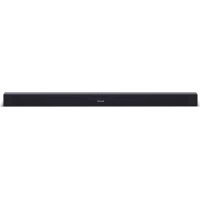
HTSB140 - Audio Dock SHARP - Free user manual and instructions
Find the device manual for free HTSB140 SHARP in PDF.




| Product type | Soundbar |
| Brand | Sharp |
| Model | HTSB140 |
| Power supply | AC 220-240V, 50Hz |
| Dimensions (approximate) | 1000 x 100 x 80 mm (L x L x H) |
| Weight (approximate) | 3 kg |
| Output power | 80 W RMS |
| Wireless connectivity | Bluetooth |
| Audio inputs | HDMI ARC, optical, AUX (3.5mm jack / RCA) |
| Functions | Equalizer (Movie, Music, News), remote control, wall mounting |
| Control | Infrared remote control (AAA battery included) |
| Standby power consumption | < 0.5W |
| Bluetooth range | Approximately 8 meters |
| Maintenance and cleaning | Unplug before cleaning, use a soft dry cloth |
| Safety | Do not expose to moisture, do not open, keep out of reach of children |
| Remote control batteries | 2 AAA batteries included |
| Included accessories | Remote control, power cords (EU and UK), wall mounts, screws, quick start guide |
| Repairability | No user-serviceable parts, contact customer service |
| TV compatibility | HDMI ARC, optical, AUX |
Frequently Asked Questions - HTSB140 SHARP
User questions about HTSB140 SHARP
0 question about this device. Answer the ones you know or ask your own.
Ask a new question about this device
Download the instructions for your Audio Dock in PDF format for free! Find your manual HTSB140 - SHARP and take your electronic device back in hand. On this page are published all the documents necessary for the use of your device. HTSB140 by SHARP.
USER MANUAL HTSB140 SHARP
m = 311
Пючememe BCUKU UNcmpykuuu 3a 6e3onacHocm npedu da 3anouheme da u3non38ame npodykma. ПьнUME uncmpykuuu moxeme da u3me2nme om hawama ye6 cmpahuca sharpconsumer.eu.
1)Пьрвntынк -пьрвонаалнанachtpoиka
1.ИЗползBAиTe rHe3ДaТа Ha 3aДнЯ NaHelenHa aydno CnCTeMaTa 3a CBbp3BaHeKbM BbHsHn yCtpoiCTBa n3ToUHnCiHa aydno N BnIeO CnHaN, Cha6DeHn CNoIxOJaIuTe n3XoJn (n3o6p.1).HaIdo6po KaueCTBO Ha Bb3npOn3BexJaHemOxKeTe Da nOlyuHTe npN n3ПОЛ3BaHEnHa zuΦpoBn rHe3da ONTNUHO nHDMI.
BHMMaHne!IpeNcBbP3BaHe n3KIOUyBaIe BCNUyCTpOYCTBa OT eNEKtpnueckaTa MpeKa.
- BkIoueTe ayDnO cnCTemaTBe neEKeTpueckaTa MpeKa.
- 3a da aKTHBnPaTe 6aTepeRyTa Ha DnCTaHcNHOHTo ynpaBneHne, e Heo6xOdmo Da cBaJIte npedna3HOTo POKpITNe.
4.CHaTnCKaHe Ha 6yToH Bbpxy DnCTaHcNHOHOTo ynpaBneHne MoKeTe Da BKJIIOYBATE n N3KJIIOYBATE aydno CnCTeMaTa. - HaTnCHHeTe HeKoJIKOkPaTHO 6yToH Bbpxy DnCTaHcUOnHOTo ynpaBHeHne nn 6yToHn AUX, BT (Bluetooth), OPTICAL, HDMI ARC, 3a da n36epete JeHaHnpeKM.
2)ДиctaHcnoHNo ynpaBneHne
- -peBKNIOUbaHe MeKdy peKIMN BKN PEXKIM HA ITOBOHOCCT.
- -360pHa pexm Bluetooth. HatncheTe n 3aDpbkTe TO3n 6yTOH 3a aKTHBnPaHe Ha yHKunraTa 3a cDBoRaHe,doKaTo ypeTc HAMnpa B pexm Bluetooth, kaTOn n 3a npekpaTBAHe Ha cDBoRaHeTo MeJy CbueCTByBaUn cDBOeHN yCTpoNCTBa c Bluetooth.
- -6op Ha yHKnra 3a Bb3npOn3-BeXdaHe.
4.CnHaHa3ByKa+/-yBEnuBaHa/
HaMaJIbAHe CnIaTa Ha 3ByKa.
- /I npemHaBaHe KbM npe- dHHa/CneBaa neceH B peKm Bluetooth.
- -b3npoN3BExJaHe/nay3a/Bb3- 06HOBAHe Ha Bb3npoN3BExJaHeTo B peXm Bluetooth.
- /E3 3ByK/ - n3KJIIOUBaHe nINn BKNIOUBAHe Ha 3ByKa.
- BASS + / - perynilpaHe Ha HnBaTa Ha HnCKnte YeCTOTn.
- TRE +/- - perylnipaHe Ha HnBaTa Ha BUCOKITE YeCTOTN.
- EQ-и36op Ha npedBapuTeHNo npo-rgpampaH 3ByKOB pexIM.
3)Прибори за упраBsнке
- 6yToH
Cnyxn 3a npeBknIOuBaHe MeJy peKIMN BKJI n PEXKIM HA FOTOBHOCT.
- 6ytoh
Cnyxn 3a n36op Ha fynkun 3a Bb3npoN3BexKaHe.
- 6ytoH
Cnykn 3a n36op Ha pexnM Bluetooth.
HaTncHeTe n 3aDpBxKTe TO3n 6yTOH
3a aKTbBnpaHe Ha yHKuYra 3a
cBBOBaHe, DOkato ypeBt Ce HAMpa
B pexnM Bluetooth, KaKTo n 3a
IpeKpaTBAHe Ha cBBOBaHeTo MeJdy
CbIeCTByBaU n CdBoeHn UcTpoNCTBa C
Bluetooth.
- +/- 6yToHn
CnykaT 3a yBelenuabaHe n HamaIraBaHe cnlaTa Ha 3ByKa.
- CBeToaIOaHm HAnkataOpn
-Червен: Адно система та симра в Ржим HA ГOTOBHOCT.
3eJen: Ayno cnTeMaTa ce HAMnpa BCNOMARATEJEH /AUX/ peKm.
- OpaNXeB: Aydno cnCTemata ce haMnpa B ONTNUEH peXm.
CnH: Ayno cnTeMaTa ce Hmnpa B peKIM Bluetooth.
Baan: Ayno cntemata ce Harnpa B pekmHDMIARC.
UnpaBHeHne Upe3 Bluetooth
CdBovBaHe c Bluetooth yctpoiCTBa
Pn nbpBOHaayHOTo CBbp3BaHe Ha Bluetooth yctpoiCTBO CTO3n PneBp,e Heo6xOIMO da rN cDBOITE.
1.Пи Включehа aydno cnCTema, haTnucheTe 6yToH Bluetooth Bbpxy dNCTaHcNoHHOTO ynpaBHeHne nIb Vbpxy OCHOBnma MoyI,3a Da N36epeTe peKIM Bluetooth.CnHnAT CBeTInHeH INHdkaTop ue npemrHe.
2. AkTINBupaTe yCTpoiCTBOTo c Bluetooth n 36epeTe peKIM TbpcHe. B cnncbKa Ha yCTpoiCTBOTo c Bluetooth ue Hamepnte "SHARP HT-SB140".
B cnyuau ye He moxeme da Hamepume ayduo cucmemama, Hamucheme u 3adpbkme 6ymoH Bbpx ducmahuohomo ynpaBHeue, 3a da r HanpaBume buduma. Ue np038yu znaCobO yka3aHue "Pairing" /CdboBaHe/u cunuIm cbemnueh uHDukamop ue 3anoHne da npem2ba yuecmeno.
3.Изберete"SHARPHT-SB140"Bcпсьka 3a cDBOBAHe.иpe npOЗByu rIacOBO yka3aHne "Paired"/CdBoeHn/,koeto O3HaUaBa,уаудno cncTeMaTa e ycpeшно CBbp3aHa.CHHaT cBeTINHeH INДИКaTOP ige 3aNoUHe da CBetN 6e3 npemrBaHe.
4. Beue moKeTe da Bb3npOn3BexKdATE My3nka OT cBbP3aHTo Bluetooth yCTpOuCTBO.
CESKY
Sharp Consumer Electronics Poland sp. zo.o. Ostaszewo 57B, 87-148 Lysomice, Poland
Made in China
SAU/QSG/0054
www.sharpcounter.eu
SHARP
SHARP
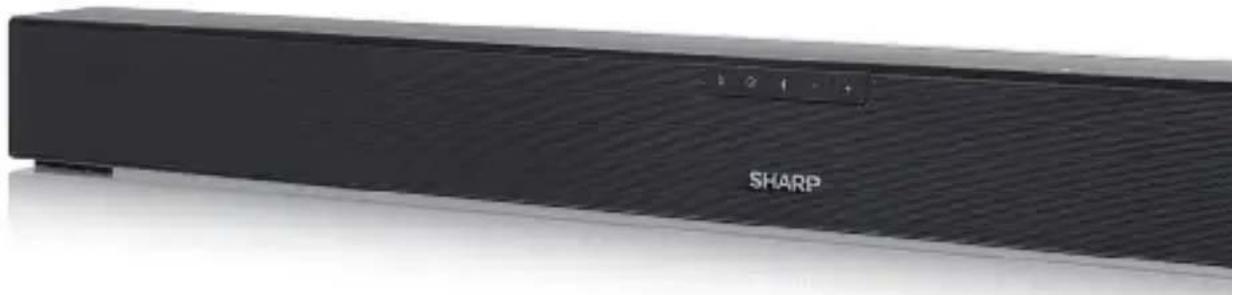
User manual
HT-SB140
2.0 Soundbar Home Theatre System
ENDE
ES
FR
NLRUITPL

Trademarks

The Bluetooth® word mark and logos are registered trademarks owned by Bluetooth SIG, Inc.

The terms HDMI, HDMI High-Definition Multimedia Interface, and the HDMI Logo are trademarks or registered trademarks of HDMI Licensing Administrator, Inc.

Please, read these safety instructions and respect the following warnings before the appliance is operated:

The lightning flash with arrowhead symbol, within an equilateral triangle, is intended to alert the user to the presence of uninsulated "dangerous voltage" within the product's enclosure that may be of sufficient magnitude as to constitute a risk of electric shock to persons.

The exclamation point within an equilateral triangle is intended to alert the user to the presence of important operating and maintenance (servicing) instructions in the literature accompanying the appliance.
In order to prevent fire always keep candles and other open flames away from this product.

Warning:
- Always follow basic safety precautions when using this appliance, especially when children are present.
Children should be supervised to ensure that they do not play with the appliance. - Do not damage the power cord, neither do not place any heavy objects on it, do not stretch it or bend it. Also do not attach extension cables. Damage to the power cord may occur fire or electric shock.
- If the supply cord is damaged, it must be replaced by the manufacturer, a service agent or similarly qualified persons in order to avoid a hazard.
- Ensure that the unit is plugged into an AC 220-240V 50Hz power outlet. Using higher voltage may cause the unit to malfunction or even fire catching.
- If the power plug does not fit into your outlet, do not force the plug into an electrical socket if it does not fit.
- Turn off the unit before unplugging it from power source to completely switch it off.
- Do not disconnect or connect the power cord with wet hands. It may cause an electric shock.
- Disconnect the power cord if it is not used for a long time.
-
Ensure that the mains plug is always easily accessible.
-
This product does not contain any parts that are serviceable by the user. In case of a fault, contact the manufacturer or authorised service department. Exposing the internal parts inside the device may endanger your life. The manufacturers guarantee does not extend to faults caused by repairs carried out by unauthorised third parties.
- Do not use this product immediately after unpacking. Wait until it warms up to room temperature before using it.
- Ensure this product is used in moderate climates only (not in tropical/subtropical climates).
- Place product on a flat, stable surface that is not subject to vibrations.
- Ensure the product and its parts is not overhanging the edge of the supporting furniture.
- To reduce the risk of fire, electric shock or damage to this product, do not expose it to direct sunlight, dust, rain and moisture. Never expose it to dripping or splashing and do not place objects filled with liquids on or near the product.
- Do not place objects filled with liquids, such as vases, on the apparatus.
- Do not install near any heat sources such as radiators, heat registers, stoves, or other apparatus (including amplifiers) that produce heat.
- Do not place the product where the humidity is high and ventilation is poor.
- Ensure a minimum distance of 5cm around the apparatus for sufficient ventilation. Do not block any ventilation openings of this product. Always ensure that the ventilation openings are not covered with items such as newspapers, table-cloths, curtains, etc.
- NEVER let anyone, especially children, push anything into holes, slots or any other openings in the unit's casing as this could result in a fatal electric shock.
- Storms are dangerous for all electric appliances. If the mains or aerial wiring is struck by lightning, the appliance might get damaged, even if it is turned off. You should disconnect all the cables and connectors of the appliance before a storm.
- Excessive sound pressure from earphones and headphones can cause hearing loss.
Maintenance
- Unplug the power cable from the power source before cleaning the appliance.
- Use a soft and clean rag to clean the outside of the unit. Never clean it with chemicals or detergent.
Batteries
- Observe the correct polarity when inserting the batteries.
- Do not expose batteries to high temperatures and do not place them on locations where the temperature might increase quickly, e.g. near the fire or on the direct sunshine.
- Do not expose batteries to excessive radiant heat, do not throw them into the fire, do not disassemble them and do not try to recharge un-rechargeable batteries. They could leak or explode.
- Never use different batteries together or mix new and old ones.
- When the Remote Control is not to be used for a long time (more than a month), remove the battery from the Remote Control to prevent it from leaking.
- If the batteries leak, wipe away the leakage inside the battery compartment and replace the batteries with new ones.
- Do not use any batteries other than those specied.
Do not ingest battery, chemical burn hazard
- If the battery is swallowed, it can cause severe internal burns in just 2 hours and lead to death. Keep new and used batteries away from children. If the battery compartment does not close securely, stop using the product and keep it away from children. If you think batteries might have been swallowed or placed inside any part of the body, seek immediate medical attention.
Disposal of this equipment and Batteries
- Do not dispose of this product or its batteries as unsorted municipal waste. Return it to a designated collection point for the recycling of WEEE in accordance with local law. By doing so, you will help to conserve resources and protect the environment.
- Most of the EU countries regulate the disposal of batteries by law. Contact your retailer or local authorities for more information.
- The shown above appears on electrical and electronical equipment and batteries (or the packaging) to remind users of this. If "Hg" or 'Pb' appears below the symbol, this means that the battery contains traces of mercury (Hg) or lead (Pb), respectively.
- Users are requested to use existing return facilities for used equipment and batteries.

CE and UKCA Statement:
- Hereby, Sharp Consumer Electronics Poland sp. z o.o. declares that this audio device is in compliance with the essential requirements and other relevant provisions of RED Directive 2014/53/EU and UK Radio Equipment Regulations 2017.
- The full text of the EU declaration of conformity is available by following the link www.sharpcomsumer.eu and then entering download section of your model and choosing "CE Statements".
Accessories
1x Remote control
- 1x User manual
1x UK power cord
1x EU power cord
- 2x Wall Bracket
- 1x Set of wall-mounting screws
1x Quick start guide
- 2 x AAA battery
Controls
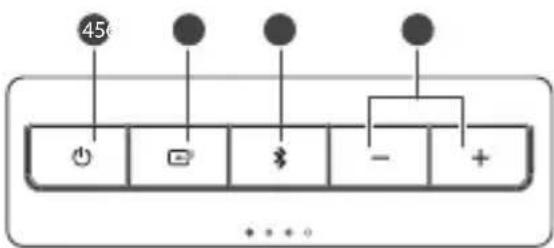
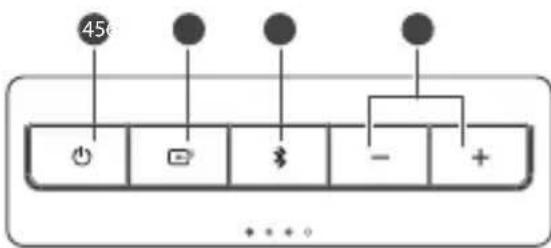
hold to activate the pairing function in Bluetooth mode or disconnect the existing paired Bluetooth device.
7. +/- buttons
Increase/decrease the volume level.
Inputs/Outputs

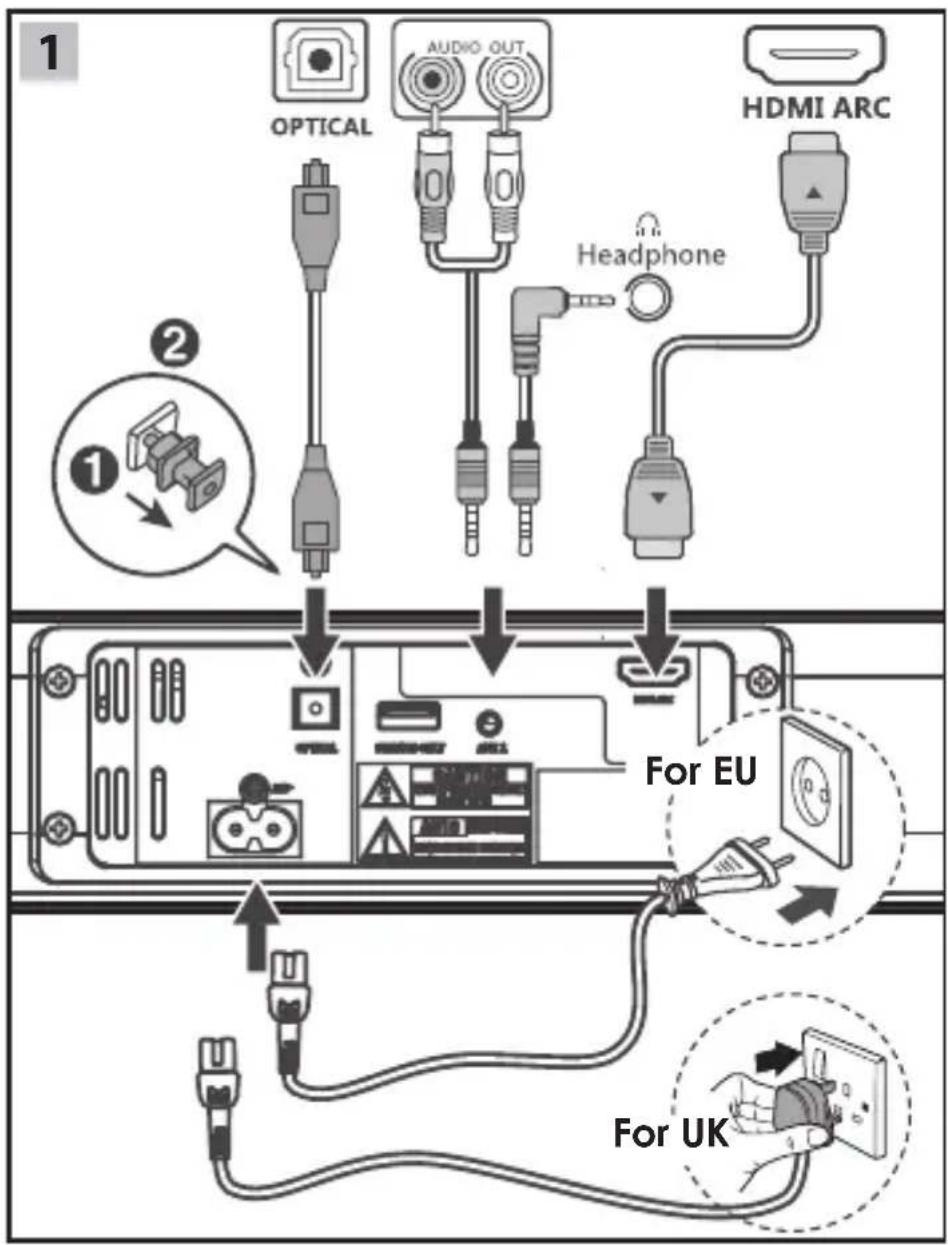
1. AC~ Socket
Connect power cord.
2. OPTICAL Socket
Opticial input jack.
3. SERVICE ONLY Socket
The USB socket is for service only. It is not designed to charge smartphones, tablets or similar devices.
4. AUX 1 Socket
Connect to an external audio device.
5. HDMI ARC Socket
Connect to a TV via HDMI cable.
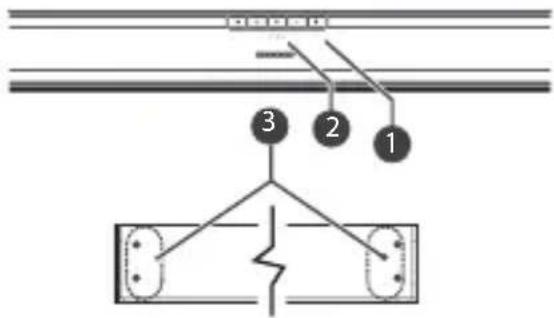
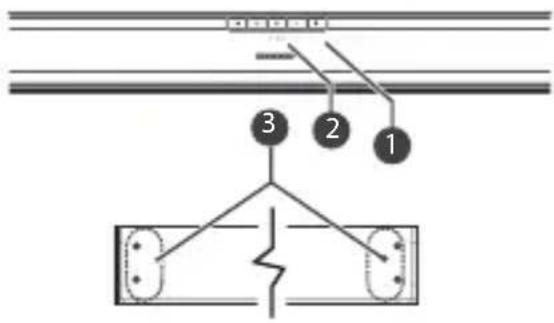
1. Remote Control Sensor
2. LED Indicators
- Red indicator: In STANDBY mode.
Green indicator: In AUX mode.
Orange indicator: In Optical mode. - Blue indicator: In Bluetooth mode.
White indicator: In HDMI ARC mode.
3. Wall bracket screws
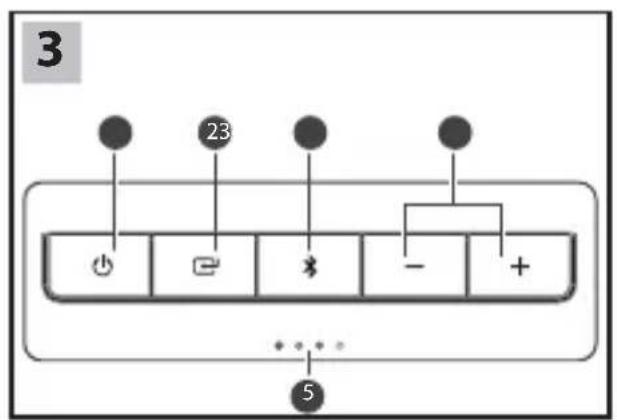
4. button
Switch the unit between ON and STANDBY mode.
5. button
Select the play function.
6. $ button
Select the Bluetooth mode. Press and
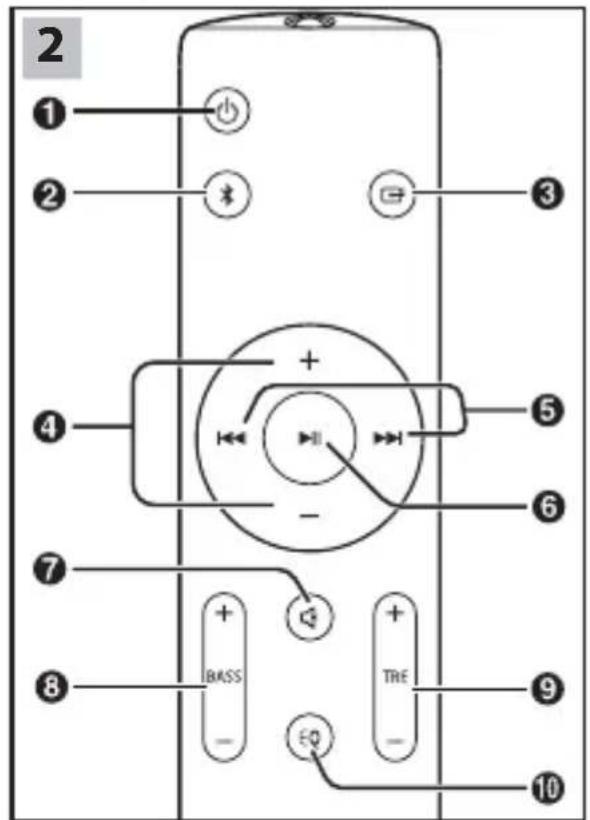
Remote control
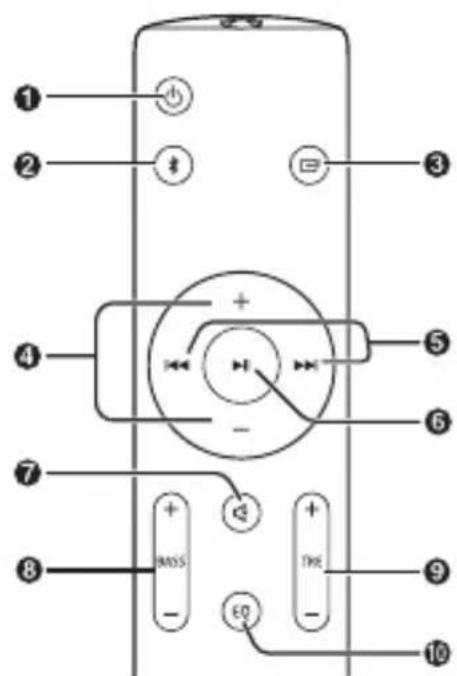
- Switch the unit between ON and STANDBY mode.
- Select the Bluetooth mode. Press and hold to activate the pairing function in Bluetooth mode or disconnect the existing paired Bluetooth device.
-
- Select the play function.
- VOL +/- Increase/decrease the volume level.
- /Skip to previous/next track in Bluetooth mode.
- Play/pause/resume playback in Bluetooth mode.
-
- (MUTE) Mute or resume the sound.
- BASS +/- - Adjust bass level.
- TRE +/-- Adjust treble level.
- EQ - Select a preset sound mode.
First time installation
Remote control preparation
The provided Remote Control allows the unit to be operated from a distance.
-
Even if the Remote Control is operated within the effective range 6m , remote control operation may be impossible if there are any obstacles between the unit and the remote control.
-
If the Remote Control is operated near other products which generate infrared rays, or if other remote control devices using infra-red rays are used near the unit, it may operate incorrectly. Conversely, the other products may operate incorrectly.
Remote control battery replacement
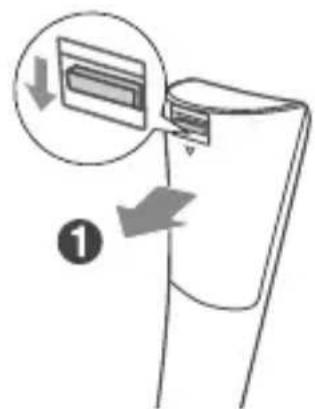


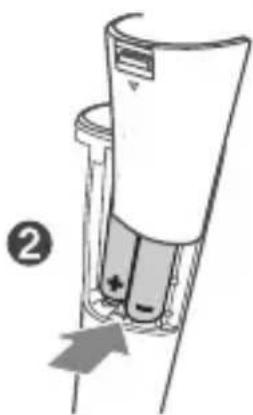
- Press and slide the back cover to open the battery compartment of the remote control.
- Insert two AAA size batteries (included). Make sure the (+) and (-) ends of the batteries match the (+) and (-) ends indicated in the battery compartment.
- Close the battery compartment cover.
Placement and Mounting
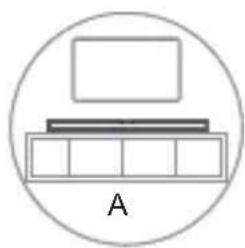
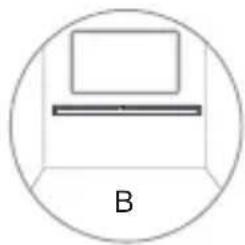
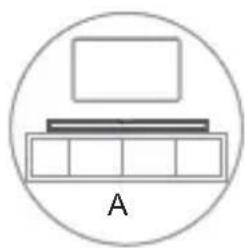
A: Normal Placement (place Soundbar on leveled surface in front of TV)
B: Wall Mounting
Wall Mounting
NOTE:
- Installation must be carried out by qualified personnel only. Incorrect assembly can result in severe personal injury and property damage (if you intend to install this product yourself, you must check for installations such as electrical wiring and plumbing that may be buried inside the wall). It is the installer's responsibility to verify that the wall will safely support the total load of the unit and wall brackets.
- Additional tools (not included) are required for the installation.
- Do not overtighten screws.
- Keep this instruction manual for future reference.
- Use an electronic stud fi nder to check the wall type before drilling and mounting.


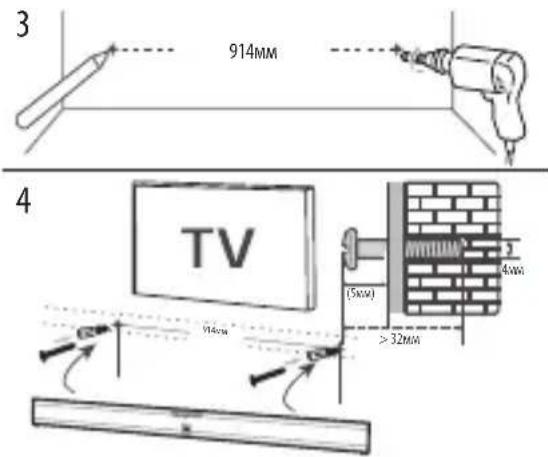
- Remove the screws from the main unit.
- Attach the wall brackets to the main unit with the screws removed from the main unit. If necessary, stick EVA sponge into the brackets to balance the soundbar.
-
Drill 2 parallel holes in the wall. The distance between the holes should be 914mm
-
Firmly fix one dowel into each hole in the wall and then insert screws into them.
- Leave a 5mm gap between the wall and the screw's head. Lift the unit with the attached wall brackets over the heads of the screws and slot into place.
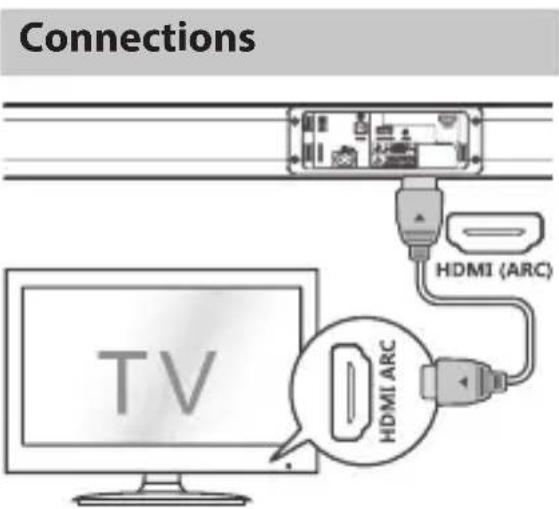
HDMI ARC input
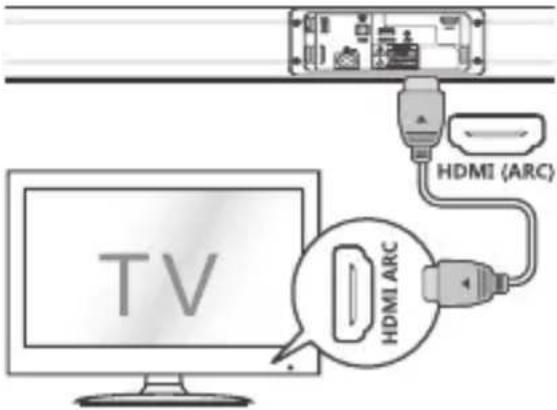
The ARC (Audio Return Channel) function allows you to send audio from your ARC-compliant TV to your sound bar through a single HDMI connection. To enjoy the ARC function, please ensure your TV is both HDMI-CEC and ARC compliant and set up accordingly. When correctly set up, you can use your TV remote control to adjust the volume output (VOL +/- and MUTE) of the sound bar.
- Connect the HDMI cable (not included) from unit's HDMI (ARC) socket to the HDMI (ARC) socket on your ARC compliant TV. Then press the remote control to select HDMI ARC.
TIPS:
- Your TV must support the HDMI-CEC and ARC function. HDMI-CEC and ARC must be set to On.
- The setting method of HDMI-CEC and ARC may differ depending on the TV. For details about ARC function, please refer to your TV owner's manual.
Only HDMI cables of version 1.4 or higher can support the ARC function.

OPTICAL input
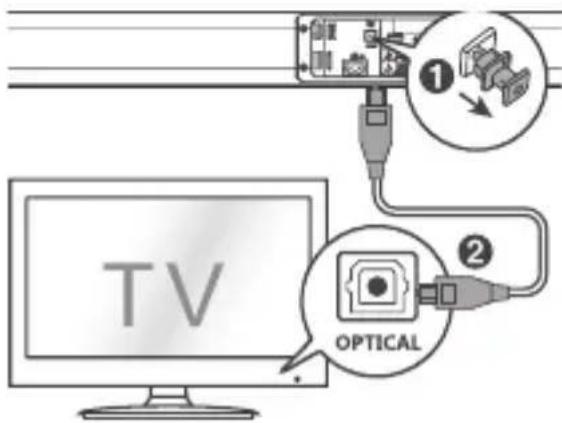
- Remove the protective cap of the OPTICAL socket, then connect an OPTICAL cable (not included) to the TV's OPTICAL OUT socket and the OPTICAL socket on the unit.
TIP:
While in HDMI ARC/OPTICAL mode, if there's no sound output from the unit
and the HDMI ARC/OPTICAL lights flashes quickly, you may need to activate PCM signal output on your source device (eg. TV, DVD or Blu-ray player).
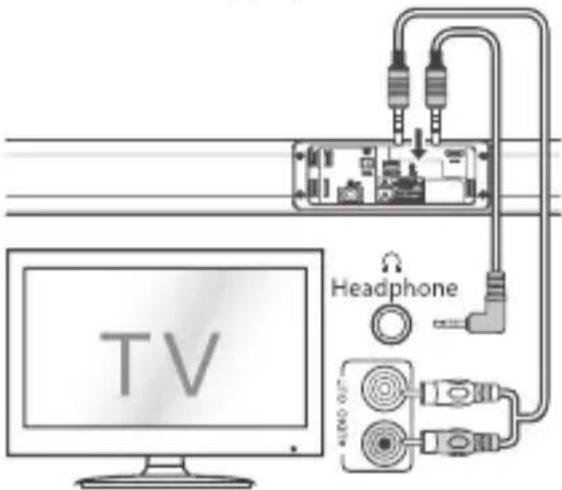
AUX
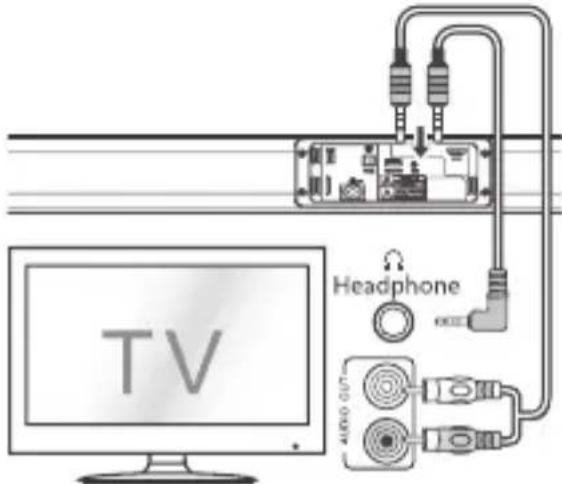
A. Use a RCA to 3.5mm audio cable (not included) to connect the TV's audio output sockets to the AUX 1 socket on the unit.
B. Use a 3.5mm to 3.5mm audio cable (not included) to connect the TV's or external audio device headphone socket to the AUX 1 socket on the unit.
TIP:
When you use the headphone output on the TV set, you will be able to adjust the volume level directly using the TV remote control.
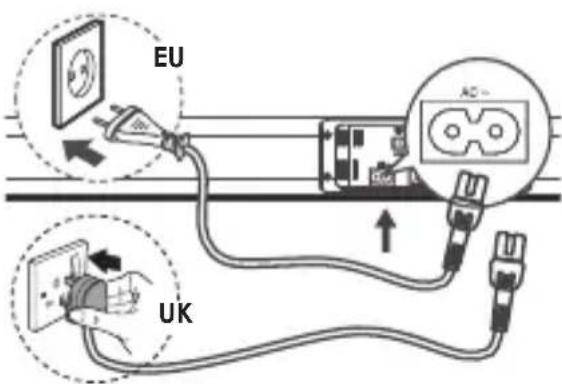
Connect to Power
-
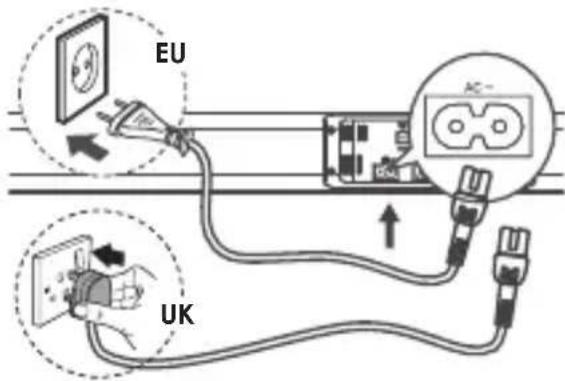
Before connecting the AC power cord, ensure you have completed all other connections.
-
Risk of product damage! Ensure that the power supply voltage corresponds to the voltage printed on the back or the underside of the unit.
- Connect the mains cable to the AC~Socket of the unit and then into a mains socket.
Basic Operation
Standby/ON
- When you first connect the unit to the main socket, the unit will be in STAND-BY mode. The POWER indicator will light up red.
- Press the button on the remote control to switch the main unit ON or OFF.
-
Disconnect the main plug from the main socket if you want to switch the unit off completely.
-
If a TV or an external device (Only for AUX socket) is connected, the unit will switch on automatically when the TV or the external device is switched on.
- When the unit has no input signal for over 15 minutes, it will automatically switch to Standby mode.
Select Modes
Press the button on the unit repeatedly or press the AUX, BT (Bluetooth), OPTICAL, HDMI ARC buttons on the remote control to select the desired mode.
- Red indicator: In STANDBY mode.
- Green indicator: In AUX mode.
Orange indicator: In Optical mode. - Blue indicator: In Bluetooth mode.
White indicator: In HDMI ARC mode.
Adjust the Volume
- Press the + / - buttons on the unit or press the VOL + / VOL- buttons on the remote control to adjust the volume.
- If you wish to turn the sound off, press the MUTE button on the remote control. Press the MUTE button again or
press the VOL+ / VOL- buttons on the unit or on the remote control to resume normal listening.
- While adjusting the volume, the status indicator flashes quickly.
- While the volume level reaches its maximum level, if you press the VOL+ button again, the status indicator flashes once. While the volume level reaches its minimum level, if you press the VOL- button again, the status indicator flashes once.
While playing, press the EQ button on the remote control to select between preset equalisers: Movie (recommended for viewing movies), Music (recommended for listening to music), NEWS (recommended for listening to NEWS).
MOVIE - LED flash orange
MUSIC - LED flash blue
NEWS-LED flash green
AUX/OPTICAL/HDMI ARC
- Ensure that the unit is connected to the TV or audio device.
- While in ON mode, press the button on the unit repeatedly or press the AUX, OPTICAL, HDMI ARC buttons on the remote control to select the desired mode.
- Operate your audio device directly for playback features.
- Press the VOL + / - button to adjust the volume to your desired level.
TIP:
While in HDMI ARC/OPTICAL mode, if there's no sound output from the unit and the HDMI ARC/OPTICAL lights flashes quickly, you may need to activate PCM signal output on your source device (eg. TV, DVD or Blu-ray player).
Bluetooth Operation
Pair Bluetooth-enabled Devices
The first time you connect your Bluetooth device to this player, you need to pair your device to this player.
NOTE:
- The operational range between this player and a Bluetooth device is approximately 8 meters (without any object between the Bluetooth device and the unit).
- Before you connect a Bluetooth device to this unit, ensure you know the device's capabilities.
- Compatibility with all Bluetooth devices is not guaranteed.
- Any obstacle between this unit and a Bluetooth device can reduce the operational range.
-
If the signal strength is weak, your Bluetooth receiver may disconnect, but it will re-enter pairing mode automatically.
-
While in ON mode, press the (Bluetooth) button on the remote control or on the unit to select Bluetooth mode. The Blue indicator will light flash.
- Activate your Bluetooth device and select the search mode. "SHARP HT-SB140" will appear on your Bluetooth device list.
- If you cannot find the unit, press and hold the button on the remote control to be searchable. After the "Pairing" voice prompt and the Blue indicator will flash rapidly.
- Select "SHARP HT-SB140" in the pairing list. After the "Paired" voice prompt, the system is successfully connected and the Blue indicator will light up solidly.
- Begin playing music from the connected Bluetooth device.
To disconnect the Bluetooth function, you can:
- Switch to another function on the unit.
- Disable the Bluetooth function on your device. The device is successfully disconnected from the unit after the "Disconnected" voice prompt.
- Press and hold the button on the remote control.
TIPS:
- Enter "0000" for the password if necessary.
- If no other Bluetooth device pairs with this player in 2 minutes, the player will reconnect to the previous connection.
- The player will also be disconnected when your device is moved beyond the operational range.
- If you want to reconnect your device to this player, place it within the operational range.
- If the device is moved beyond the operational range, when it is brought back, please check if the device is still connected to the player.
- If the connection is lost, follow the instructions above to pair your device to the player again.
Listen to Music from Bluetooth Device
- If the connected Bluetooth device supports Advanced Audio Distribution Profi le (A2DP), you can listen to the music stored on the device through the soundbar'.
-
If the device also supports Audio Video Remote Control Profi le (AVRCP), you can use the soundbar's remote control to play music stored on the device.
-
Pair your device with the player.
- Play music via your device (if it supports A2DP).
-
Use supplied remote control to control play (if it supports AVRCP).
-
To pause/resume play, press the button on the remote control.
- To skip to a track, press the / buttons on the remote control.
Troubleshooting
To keep the warranty valid, never try to repair the system yourself. If you encounter problems when using this unit, review the following before requesting service.
No power
Ensure that the AC cord is properly connected.
Ensure that there is power at the AC outlet.
Press standby button on the remote control or soundbar to turn the soundbar on.
No sound
Increase the volume. Press Volume Up on the remote control or on the right side of the soundbar.
Press MUTE on the remote control to ensure the soundbar is not muted.
Press source buttons to select a different input source.
When using either of the Digital input, if there is no audio:
- Try setting the TV output to PCM or
- Connect directly to your Blu-ray/other source, some TVs do not pass through digital audio.
Your TV may be set to variable audio output. Confirm that the audio output setting is set to FIXED or STANDARD, not VARIABLE. Consult your TV's user manual for more detailed information.
If using Bluetooth, ensure that the volume on your source device is turned up and that the device is not muted.
Remote control does not work
Before you press any playback control button, first select the correct source.
Reduce the distance between the remote control and the unit.
Insert the battery with its polarities (+ / - ) aligned as indicated.
Replace the battery.
Aim the remote control directly at the sensor on the front of the unit.
I hear buzzing or humming
Ensure all cables and wires are securely connected.
Connect a different source device (TV, Blu-ray player, etc) to see if the buzzing persists. If it does not, the problem may be with the original device.
Connect your device to a different input on the soundbar.
I can't find the Bluetooth name of this unit on my Bluetooth device
Ensure the Bluetooth function is activated on your Bluetooth device.
Re-pair the unit with your Bluetooth device.
This is a 15 mins power off function, one of the ERPII standard requirement for saving power
When the unit's external input signal level is too low, the unit will be turned off automatically in 15 minutes. Please increase the volume level of your external device.
AUX/OPTICAL/HDMI ARC
AUX/OPTICAL/HDMI ARC
AUX/OPTICAL/HDMI ARC
AUX/OPTICAL/HDMI ARC
Please, read these safety instructions and respect the following warnings before the appliance is operated:

AUX/OPTICAL/HDMI ARC
AUX/OPTICAL/HDMI ARC
He noDBepraTe 6aTapeKn BO3JeCTBnIO Upe3MepHoro lyuNcTOrTo Tenla, He 6pOcaIte nX B OOrHb, He pa36npaIte nX n He nbItaTecb NOBTOpHO 3apAINTb CeBUnne 6aTapeKn. Ohn MoryT npoTeYb nnn B3OpBaTbcra.
- HNKoRda He nCNoIb3yIte pa3HbIe 6aTapeKn IIN KOM6uHaCuIO CTapbIX N HOBbIX 6aTapeek.
- Ecnn nylbT dinCTaHcnoHnHO ynpabHeH He 6yJeT nCNoIb3ObaTbcra B TeueHne nnTeNbHOro nepnoa (CbbIe oHoro Meca), BO n36exKaHne npoteKaHn 6aTaapeek BblbTe nx n3 nybTa.
- Ecni 6aTapeiKn IpoteKIn, BbITpnte BHyTpeneHIOU qAcTb OTceKa dIy 6aTapeek n 3aMeHNTe IN HOBbIMN.
- Icnoj3yIe ToJIbKO yKa3aHHbIe 6aTapeiKn.
He donyckaite npornaTbIBaHn6aTapeek, cyueCTByet onachoctb xHMnueckoro oXora
1xNylbTnCTaHcHNOHHOroynpaBHeHn
1xPykoBOIDCTBO NOIb3OBaTeJRA
1xIHHyp nHTaHn (Bennko6puTaHn)
1xIHHyp nHTaHnA (EC)
2xKpoHwTeHdHaCTeHHOro MOHTaKa
1xHa6opKpenIeHnIJaHacteHHoro MOHTaKa
1x PykoBooCTBO no 6bictpomy 3anycky
2x BaTapeiKa AAA
3nemeHbI ynpabHeHHa
IoiKJIIOUeHHe K BHeUHEmy ayuOuyCTpoiCTBy.
5. THe3doHDMIARC
IopKluoyene K TeleBn3opy uepe3 Ka6eJbHDMI.
BxOaH B KOMnEeT nylbT Dy no3BOJAre TynpaBnTb yCTpoiCTBOM Ha paCCToHIN.
JaKe eCn nnybT Dy npImeHReTcHa 3o- 6 M, OH MoKet He paBToTb,ecn MeKdy Hm N yCTPOICTBOM IMeIOCTKaKNe-JIn6O IppeNtCTBn.
- PnybT Dy moKet pa60TaB He npabnIbHo, ecn OH npimHeHcTc prdOM C dpYrIMN n3eJIaMn, KOTOpbIe reHeppyoT HpapKpaChbIe LyuN, INe ECNI prdOM C yCTpoiCTBOM pa60aOT dpyrNe ycTPOiCTBa C NybTom DnCTaHcIOHOrO ynpabJeHn, nCNoJb3yUcIMm HpapKpaChbIe LyuN. B cBOIO OuepeDb dpyrNe ycTPOiCTBa TaKke Moryt pa60TaB He npabnIbHo.
3aMeHa 6atapeiKn nylbTa Dv


- Haxmnte Ha 3aHIOKpbIky n CdbnHbTe ee, yTo6bl OTkpblb OTcek dJaTaapeek nyIbTa Dy.
2.BCTaBbTe DBe 6aTapeKn AAA (BXoJr T B KOMJIeKT).Y6eHITcB B TOM, YTO 6o3HaueHn (+) n (-) Ha KOHuaX 6aTapeek CoBnaJaOT C 6o3HaueHnA M (+) n (-) Ha OTceKe dJa 6aTapeek. - 3akpoTe KpbIuKy OTeKa dJa6aTaapeek.
Pa3MeueHne n KpePnIeHne
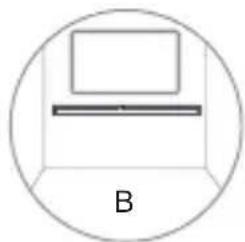
A:O6bIuHoe pa3MeueHne (yCTaHOBNTe 3ByKOByIO naHeJIb Ha POBHyIO NOBepXHOCTb nepeTeNeBn3OpOM) B:HacteHHbIMoHTax
HacteHHbIM MOHTaX
NPMMEYAHNE.
- Pa60tbl NO MONTaJy DoJIxH BbIIOJNHaTb TOLbKO KBaIINoIuPObAHbI NepcoHaI. HenpabINbHajc6Opka BJeueT 3a Co6oB npCK NoUyeHnA cepBe3HbIX TpaBM IINI NOBpeXdEHHaMMyUeCTBa (ecNI Bbl CObIpaETecb YCTaHaBnIBaTb DaHHoe N3deJIne camOCToTeNbHO, IpOBepbTe, He npoloxeHbl IN B CTHe KOMMHyNkauzni, HapnIMep EJIeKTPoPBOdKa IIN BODOpBODhbie Tpy6bl). IInO, IpON3BOJaUee yCTaHOBky, Hecet OTBETCTBeHHOCTb 3a IpOBepKy CNOcO6HOCTn CTHebl BbIDepKJBaTb O6UIn BEc YCTPOJCTBa N KPOHHTeHOB dI HACTEHHO MOHTaJa.
-Дя yctaHOBKN Tpe6yOTc DOONHHTeNbHbI INCTpyMeHTbl (He BXOJAT B KOMNJIeKT).
-He nepetraBnTe BnHTbl.
-CoxpaHnte daHHoe pyKOBOCTBO nI INcNoJIb3OBAHnB 6yduem.
-ПрждчemпсntуNTькCBepнию mONTajy,ОпрдениTe TIN CTehblnpi NOMOUI 3JIeKTPoHHORO DeTeKTOPa HeODHOPoDHOCTeI.

1.ИЗВЛЕКИТЕВИNTBIИЗОCHOВΗΟΥСТΡΟΥСΤΑ.
2.ПикpenTe KpoHHTeINДЯ HAcTeHHOROMONTaKa K OCHOBHomY yCTPOINCTBYпиПOMOuN I3BLeueHHbIX N3 HeRo BnHTOB.PnHEo6xOIMOCn BCTaBBTe BKPOHTeENbI NOPcTbI yNIOTHNTeJIb,HTo6bI c6aHaHCnPOBaTB 3ByKOByIO NaHeJb.
3. BbICBepnTe B CTHe 2 npaJIeIbHbIX OTBepCTn (4 MM-8 MM KaJdoe B 3aBNCIMOCTN OT TnPa CTHebl).PacCToRHeMexNy OTBepCTnMM DOJIxHO COCTaBJIaTb 914 MM.
-При Heo6xOaIMOCn HaedJHo 3aФNKcnpyIe NO OdHOMy IIO6eIIO B KaKdOMOTBepCTnn.
4.OCTaBbTe MeJxu CTeHOn I rOJOBKOI BnHTa 3a3Op B 5MM. POnHMITE yCTPOINCTBO C yCTaHOJIeHHbIM KPOHITeHOM DIA HACTeHHORo MOHTaJa HaI rOJOBKaMn BnHTOB N yCTaHOBJTe eRO Ha MeCTO.
IopKIOUeHnA
BxoHDMIARC
Функця ARC (Audio Return Channel, 6рathь aydnokhaan) no3boJareT nepedaBaTb aydnocnHan c TeNeBn3opa c noDepkKoI TexHoIorIN ARC Ha 3BykoByo naHelb nocpeDCTBOM oDHorO pa3beMa HDMI.ДЯ IncnoJIb3OBAHnA yHKZnn ARC yIOCTOBepbTeCb B TOM,чTO BaW TeNeBn3Op noDepkXnBaET texHOnOrIn HDMI-CEC n ARCи npOn3BeDInTe coOTBeTcTBYIOuIne HAcTpoKn.Пpr npaBnIbHOH hAcTpoIKe Bbl MOxKTe peylnpOBaTb rPOMKOCTb 3BykoBOI naHelen prn nomOuN pyNbTa DY (KHONK peylnpOBKn rPOMKOCTn OTKIOUeHn 3Byka).
-Подклочи Кабьн HDMI (He BXoДИВ KOMпгКТ) ot pa3bema HDMI (ARC)yctpoiCTBa K pa3bemy HDMI (ARC) TeleBn3Opa C noDpeKkoTexHOnOrn ARC.3aTeM Bbl6epnteФyHKuH HDMI ARC npnnomou KNOpKn Ha nylte DY.
COBET.
Bai TeIeBn3Op IOnJKeH NoIepKnBaTb yHKuHDMI-CEC nARC.Heo6xOIMOB KInouHTb yHKuHDMI-CEC nARC.
Cnocobh hactpoHDMI-CEC n ARcHa pa3bix TeJeBn3Opax MoryT pa3nuaTb-cra.Bolee noDpo6Hna HΦopMaun o yHKuIN ARC npBedeHa B pyKoOJCTBe IIO 3KcNlyaTaun TeJeBn3Opa.
Функию ARC noДерхиВаOTToьКо Ka6eHn HDMI Bepcn 1.4.nnn bIwe.
ONTNUYECKIN BXOD
- Chmnte c pa3bema OPTICAL 3aunTHbIn KOJIpaOK, 3aTeM NOKNIQUHTe ONTueCKn Ka6eIb (He BXOINT B KOMPJIeKT) K BbIXoHOMy pa3bemy OPTICAL TeJIeBn3opa n pa3bemy OPTICAL yCTpOJcTba.
COBET:
EcnB peximeHDMI ARC/OPTICAL yCTpoIcTBO He BbIBOaNT 3ByK, a INdIKaTOpbI HDMIARC/OPTICAL6bICTpo MiraIoT, BO3MOxHO,Bam HxKHOaKTINBupOBaTb BbIXoI cnHaHa NKM Ha nctouHnke (HanpImep, TeneBnOp,ponirpbIbATEb DVD nn Blu-ray).
AUX
A.ДЯ coeHHeHnayuINOBbIXOIOB TeIeBn3Opa c pa3bEmOM AUX 1 Ha yCTPOIcTBe nCNoJIb3yIte ayDIOKa6eJIb RCAHa3,5MM(HeBXoIITB KOMIIneKT).
B.ДЯ coeHHeHnayuINOBbIXOoB TeIeBn3opa nHn HayuHnKOB BHeuHero yCTPOINCTBa c pa3bEmOM AUX 1 Ha yCTPOINCTBe nCnObl3yInTe ayuNOKa6eNb 3,5 MM Ha 3,5 MM (He BXoINT B KOMnJIeKT).
COBET:
Pn nCIOJb3OBaHn BbIXOJa IJI HayuHnKOB Ha TeJeBn3OpE Bbl CMOKeTe peYInpoBaTb rPOMKOCTb HENOCpeDCTBeHNO pRn NOMOu nnjlbTa Dy TeJeBn3Opa.
IopKnIOUeHne nITaHnA
- Пекдуем покючать Унур пntанипегимТOKOM,ВылнHTe BCEпочи покючен.
Pnck nobpekdeHn n3dne!y6eNTecb B TOM,HTO HnprjKeHne NCTouHnKa NITaHn COOTBeTCTByET HnprjKeHIO, Yka3aHHOMy Ha 3TNKeTke Ha o6paTHo nn HIXHe CTOpOHe yCTpoiCTBa. - IopKnHouHTe Ka6eNb NiTaHnK pa3bemy nepemehoro ToKa (AC~) yctpoiCTBa, a 3aTEM K po3eTke.
Basic Operation
Pexm OxndaHna / pa60tbi
Iocne npBoro noKIOUeHnK cTeBOPO3ETKe yCTPOINCTBO HAXODITcB PexmoeOxuaHn. 3aropaetc KpaChbInnHdkaTOp nTaHn.
TO6bI BKNIOHTb NIN BBIKHOHTb OCHOBHOe yCTpOJCTBO, HAXMITE KHOJKyHa NyIbTe Dv.
- UTO6bI BbIKIOUHTb yCTPOINCTBO NONHOCTbIO, BbIHbTe CeTEByIO BUNKy I3 PO3ETKN. - Ecnu noDKIOUeH meNEBU3Op UNu BHeuHee ycmpoUcMBo (monko dpa pa3bema AUX), ycmpoUcMBo aBmomamueeCKU bKIOUumCnpu BkIOUeHu uMeNEBU3Op uNu BHeuHe2O ycmpoUcMBA.
B cnyuae OTCyTCTBnB BXoHOrO CnHana B TeueHne 60onee yem 15 MmHyT yCtpoiCTBO aBTOMaTnueckn nepexoNIT B peKIM OxndaHna.
Bb6oppeKIma
YTO6bI BbIbPaTb HxKbI pexIM, HeCKoJIbKO pa3 haxMITE KONky Ha yCTpOJCTBe nn KONky AUX,BT (Bluetooth), OPTICAL,HDMI ARC Ha nyIbTe DY.
KpaChbI INHdNkATOp:BpeXmE OxNdaHnA.
- 3eIeHbI INDnKaTOp: BpeKIMe AUX.
- OpaHKeBbI INdNkAToP: B ONTnueCKOM pexKIMe.
CnHnn nHnDnKaTOp:BpeKIme Bluetooth.
BebnInHdNkAToP:BpeKmE HDMlARC.
Perynnpobka rporkoctn
- YTo6bI OTpeRyIInpoBaTb rPOMKOCTb,HaKIMaIte KHONKn +/ - Ha yCTpOJCTBe IINKNHONKn VOL+/VOL- nnn nyIbTe DY.
- YTO6bI BbIKIOuHTb 3ByK, HaxMMTe KHOKNy MUTE Ha npJIte Dv. YTO6bI CHOBA BKIOuHTb 3ByK, eue pa3 HaxMMTe KHOKNy MUTE ININ KHOKN VOL+ /VOL- Ha yCTpoiCTBe ININ npJIte Dv.
-B npouecepepynnpOBKn rpoMkoCTn INdkaTOp COCTOHHN 6bICTp Mnaet.
-При NOВTOPHOM HAXKATN KHONKN VOL+ NOСLE DOCTNXKEHЯ MAKCIMaJIbHOrO yPOBHR pROMKOCTN INHДИКaTOp COCTOHRN MmraeTOIN pa3. При NOBTOPHom HaxKATN KHONKN VOL- NOCSI DOCTNXKEHЯ MmHNMaJIbHOrO yPOBHR pROMKOCTN INHДИKaTOp COCTOHRN MmraeTOIN pa3.
AUX/OPTICAL/HDMI ARC
- Y6eIITecb B TOM, yTO yCTPOIcTBO NOIKIIOyeHO K TeJIeBn3Opy IJIN ayIDNOyCTPOIcTBY.
- YTo6bI Bbl6paTb HxKHbIpeXIM, B npOuece pa60Tb yCTpoINCTBa HeCKoJIbKO pa3 HaKMITE KHOJky Ha yCTpoINCTBe nn KHOJky AUX, OPTICAL, HDMI ARC ha nyIbTe DY.
- YnpaBnIe fHKUyMn BocnpoN3BeDeHn HEnOcpeDCTBeHHo Ha aydnooyctpoiCTBe.
- HaxMMTe KhoNky VOL + / - ,yTo6bl yCTaHOBHTb HyKhbI yPoBeHrPOMKOCTn.
COBET:
EcnB pexnme HDMI ARC/OPTICAL yCTpoiCTBO He BbIBODHT 3ByK, a INHdNKaTOPbl HDMIARC/OPTICAL6bICTpo MuraIoT, BO3MOxHNO,Bam HuxKHOaKTINBIPOBaTb BbIXoD cnHaJa IKM Ha nctOchNke (HaNPmep, TeJeBn3Op,pOnIrpBbATEnb DVD nn Blu-ray).
IcnoB30BaHne Bluetooth
CopjxHne yctpoiCTB Bluetooth
Pn nepBOM noKIOUeHnn yCTpoiCTBa Bluetooth K daHHOMy npoIRpbIbATEIIO Heo6xOIMMO BblONHHTb erO cOprrKeHne C npoIRpbIbATEIeM.
ПРИМЕЧАН.
- Pa60uH dHaana3OH MeKdy DaHHbIM npOnrpbBaTelem u yCTpoiCTBOM Bluetooth coCTabIaReT np6bln3ntelbHO 8 MeTPOB (ecnn MeJy ycTPOiCTBOM Bluetooth n npOnrpbBaTelem OTCyTCTBYOT NOCTOPOHne npedMeTbl).
-ПрждчемпдкюаТь устpoиCTBOBluetoothКданHomу пponгьВаTeи,ИЗчHTe erO TextнчecКеХapakTepnCTKn.
-COBMeCTHMOCTb CO BCEMN yCTPOINCTBaMn Bluetooth He rapaHTnpyETc.
JIIO6bIe IpeTCTBmJ MExdy npOnrpbBaTeIem n yctpoiCTBOM Bluetooth cokpaaIoT pa6OuN dHaNa3OH.
- Ecnn cnHnI cnNkOM cna6, npHHMaIOoee yCTpoiCTBO Bluetooth moKetOTCOeINHTbCra, HO 3aTeM OHO CHOBA aBTO-MaTNUeCKN BOJDeT B pexIM cOpjXKeHn.
- B npoecce pa60tbI haxmnte KhoNky (Bluetooth)Ha npbTe DY nnn yctpoiCTBe, UTO6bl Bb6paTb peKIM Bluetooth.CnHn INHdkaTOP HaHT MraTb.
- BkIouTe yctpoiCTBO Bluetooth n Bbl6epnte pejkm noncka.B cnncke ycTpoiCTBa Bluetooth noaBntc npHKT «SHARP HT-SB140»
- Ecn y Bac He nonyueta Cn Hn uctpoiCTBO, HaxMnte N ydepXnBaIte KHOkny Ha npIbTe Dy, YTO6bl CdeNaTb yCTPOiCTBO DOCTynHbIM dnn NOcKa. Iocne roLOnOCOBOrO COo6uHnA《Pairing》(COnpJxKeHne)CNHn INDnKaTOP NaHET 6bICTPO MmraTb.
- BbI6epnte «SHARP HT-SB140» B cInncke coopjxehnra. Tolocoboe coo6uene «Paired» («Coppjxehne BblnoHeHO») 06O3Nauaet, yTO cnCTema ycneuho IodKlUoyeha. CnHni nHdNkAtOp rOpNT HepepbHBbIM CBETOM.
- Nauchnite BOCPON3BeHne My3bIKN C NOdkJIIOUeHHOrO yCTpOJCTBa Bluetooth.
OTKIOUHTb fYHKUIO Bluetooth moXHo cnEduoMMn cnoc6amn:
- IpekeKIOUHTecb Ha npyryo fynKcHIO yCTPOICTBa.
- OTKIIOUHTe cyHKUIO Bluetooth Ha yCTpoiCTBe. TOnocOBoe coo6uHHe «Disconnected» («OTKIOUeHO») roBOpIT o6 ycNEsHOM pa3beINHeHNy CTpoiCTB.
-HaxmTe uyepeKuBaIe KhoNky Ha npIbTe dy.
COBET.
-Прин Heo6xOДmOCTn BVeIte napOlb «0000».
Bcnyae oTCyTCTBnCOnpJxHnCdpyurn MyctpoiCTBOM Bluetooth B TeueHne 2 MNHyT
PpOINrpbIbATEnb BO306HOBNT PpeBdUyuee COeINHeHne.
- ПонгьВATEЛь ТАКKE OTCOEДИЕТСРпиперемшени устpoиCTBa 3a пededы pa6очero dɪnanaэоHA.
- UTO6bI BO3O6HOBnTb COeINHeHne MExNy yCTPOINCTBOM IN IPOINrPbIBaTeJIem, pa3MeCTInTe erO B pa6Ouem DnaIa3OHe.
- Пи перемшени устpoиCTba 3a
- педь pa6очero диаэzoHA поверп
- налче coedinненя с поигрьВател
- посLE BO3Bpaшени устpoиCTba erO
-образно.
Bcnyae pa3pbIbA coeHHeHnBblnoHNte NOBTOphoe cOnpJKeHne yCTpOcnCTBa C npOnrpbIbATEJeM B COOTBeTCTBmC nPnVe- DeHHbIMN BblSe HNCTpyKUyAMN.
Послушваиме My3biku c yстpoиста Bluetooth
- Ecnn nodknueHoe yctpoiCTBO Bluetooth noideprknaeT paunpeHHbI npoNlb paepedeHnaydno (A2DP), bI moKete cnyaTb cheE3 3ByKOByIO nHaHeJIb coXpaHENHyO Ha yCTPOICTBe My3bIKy.
-
Ecnn yctpoiCTBO TAKKe IOndepKnBaet npoNJIb DnCTaHcNIOHOrO ynpaBJIeHnaydno- n BnDeOyCTpoiCTBaMn (AVRCP), BblMOkeTe ynpaBJIaTb BOCpON3BeDEHnEM COxpaHeHHoHa yCTpoiCTBe My3bIKn pinnOMOuIN PylbTa DY 3ByKOBoI naHeII.
-
BbINOJIHnTe cOpJxKeHne yCTpOiCTBa C npOnrpbIbATEm.
- Bocnpo3B0dnte My3bky NocpeDCTBOM CBOero yctpoiCTBa (ecnIOHO npndepkmbaet A2DP).
-
YnpaBnIe BocpOu3BeDeHnEm npi nOMoU BxOJaSeTo B KOMPNeKT NylTa DY (ecn yctpoiCTBO NOdEprKnBaet AVRCP).
-
Yo6bIOCTaHOBnTb/BO306HOBnTb BocnpOn3BeJeHne,HaXMMTe KHOINKy Ha NyIbTe Dv.
- UTo6bI npOnyCTnTb DOpOxKy, HaxMnte KhoNkY /Ha nyIbTe dy.
He pa6oTaET npIbT dNCTaHcNoHHO ynpaBneHn
Ipejde yem HaxmMaTb IIO6yIO KHOJky
ynpaBleHnB OcnpOn3BeJeHnEm, Bbl6epnte
HaJIexkaU NCTOuHk.
Cokpatnte pacctoHne meKny npbTom ny u yuCTpOYCTBOM.
BCTaBbTe 6aTapeKy,co6nIOaYka3aHHyIO nOJIrpHOCTb (+ / - )
3aMeHnTe 6aTapeiKy.
HanpaBnIte npIbT Dy npraMo Ha daTnK, pacnoJoxeHHbI Ha nepeDHe nanei yctpoiCTBa.
A cnbluy kxyokKaHne mI ryeHne
Y6eINTeB V TOM, YTO6bI BCE Ka6eN IN npoBOda HaJExKHO NOIDcoEINHeHbl.
IopKnIOUHTe npyroINCTOuHnK (TeJeBn3Op, npOnrpbBaTeJb Blu-ray n.T.d.), uTo6bl npOBepNTb, coXpaHReTcJI nn KxKKaHne.
Ecni HeT, Bo3MOxHOb, npuHnO npo6IeMbI AByIaTeCnCXoJHoe yCTpoiCTBO.
IopKnIOuHTe yCTpOInCTBO K Dpyromy BXoNy Ha 3ByKOBoI naHeII.
Я не мory нату Bluetooth-имя дан Horo yctpoiCTBa Ha moem yctpoiCTBe Bluetooth
Y6eNTecb TOM, YTO Ha yCTpOiCTBe Bluetooth aKTHBnPOBaHa fYHKUa Bluetooth. BbIOHnTE cOpJXKeHne npOnrPbIbATEna C yCTpOiCTBOM Bluetooth eue pa3.
Функця OTКюченя чepe3 15 МнутВ COOTBeTCTBIM C OДнМ ИЗ Tpe6OBaHиСтандэр ERPII kacaTeNbHO ЗКOHOMNэHeprMn.
EcIn ypoBeHb BHeIHeRo CnHana CnIiKOM Hn3Kn,Yepe3 15 MInyT yCTpoNCTBO 6yDet aBTOMaTIueCKn BbIKIOUeHO. YBeINuTe ypoBeHr pOMKOCTn Ha BHeIHeM yCTpoNCTBe.
Technical specifi cation | Technische Angaben | Especifi cacion技术水平 | Spécifi cation technique | Specifi che techniche | Technische specifi caties | Dane techniczne | Technueckne speziuФикuatedn
| ENDEESFRIT | ||||
| Model | Modell | Modelo | Modèle | Modello |
| Sound Bar | Soundbar | Barra de sonido | Barre de son | Soundbar |
| Power Supply | Stromversorgung | Fuente de alimentación | Alimentation électrique | Alimentazione |
| Power Consumption | Stromverbrauch | Consumo de electricidad | Consummation électrique | Consumo energetico |
| Stand-by power consumption | Standby Stromver- brauch | Consumo de electricidad en española | Puisance consommée en mode veille | Consumo energetico in standby |
| Output Power | Ausgangsstrom | Potencia de salute | Puisance de sortie | Corrente in uscita |
| Frequency Response | Frequenzabhän- gigkeit | Respuesta de Frequencia | Réponse en fréquence | Risposta di frequenza |
| Bluetooth | Bluetooth | Bluetooth | Bluetooth | Bluetooth |
| Version | Version | Version | Version | Versione |
| Maximum power transmitted | Maximaler über-tragener Strom | Potencia maximala transmitida | Puisance maximale transmise | Potenza massima trasmessa |
| Frequency bands | Frequenzbänder | Bandas de Frequencia | Bande de fréquences | Bande di frequenza |
| Remote Control | Fernbedienung | Mando a distancia | Télécommande | Telecomando |
| Battery Type | Batterietyp | Tipo de batería | Type de pile | Tipo di batteria |

| Soundbar | Soundbar | Звуковая паель | |
| Stroomvoorziening | Zasilanie | эльсторитане | AC ~ 220-240V, 50Hz |
| Energieverbruik | Pobór mocy | энегаловская | 30 W |
| Energieverbruik stand-bymodus | Zužycie energia w trybie czuwania | энегаловская ике в рекиме ожданице | <0,5W |
| Uitgangsvermögen | Moc wyjsciowa | Вухозема мошносты | 2 x 25W RMS |
| Frequentierresponds | Zakres czestotliwość | Частонахарктористica | 60Hz - 20KHz |
| Bluetooth | Bluetooth | Bluetooth | |
| Versie | Wersja | Версаня | V 4.2 |
| Maximaal overgedragen vermogen | Maksymalny poziom przyzbekowyanej mocy | Масималъся мошносты передачи | <20 dbm |
| Frequentiebanden | Pasma czestotliwość | Частоные диапазоны | 2402 MHz ~ 2480 MHz |
| Afstandsbediening | Pilot zdalnégo sterOWANIA | Пульт дістанцюногу уразаления | |
| Batterijtype | Rodzaj baterii | Тир szатеши | 2 x R03/AAA |
CCCAEAC
Sharp Consumer Electronics Poland sp. zo.o. Ostaszewo 57B, 87-148 Lysomice, Poland
Made in China
SAU/MAN/0138
www.sharpcounter.eu
SHARP
- 1)Пьрвntынк -пьрвонаалнанachtpoиka
- 2)ДиctaHcnoHNo ynpaBneHne
- 3)Прибори за упраBsнке
- UnpaBHeHne Upe3 Bluetooth
- CdBovBaHe c Bluetooth yctpoiCTBa
- CESKY
- SHARP
- Trademarks
- Please, read these safety instructions and respect the following warnings before the appliance is operated:
- In order to prevent fire always keep candles and other open flames away from this product.
- Warning:
- Maintenance
- Batteries
- Do not ingest battery, chemical burn hazard
- Disposal of this equipment and Batteries
- CE and UKCA Statement:
- Accessories
- Controls
- +/- buttons
- Inputs/Outputs
- AC~ Socket
- OPTICAL Socket
- SERVICE ONLY Socket
- AUX 1 Socket
- HDMI ARC Socket
- Remote Control Sensor
- LED Indicators
- Wall bracket screws
- button
- button
- $ button
- Remote control
- First time installation
- Remote control preparation
- Remote control battery replacement
- Placement and Mounting
- Wall Mounting
- NOTE:
- HDMI ARC input
- TIPS:
- OPTICAL input
- TIP:
- AUX
- Connect to Power
- Basic Operation
- Standby/ON
- Select Modes
- Adjust the Volume
- AUX/OPTICAL/HDMI ARC
- Bluetooth Operation
- Pair Bluetooth-enabled Devices
- To disconnect the Bluetooth function, you can:
- Listen to Music from Bluetooth Device
- Troubleshooting
- No power
- No sound
- Remote control does not work
- I hear buzzing or humming
- I can't find the Bluetooth name of this unit on my Bluetooth device
- This is a 15 mins power off function, one of the ERPII standard requirement for saving power
- He donyckaite npornaTbIBaHn6aTapeek, cyueCTByet onachoctb xHMnueckoro oXora
- 3nemeHbI ynpabHeHHa
- THe3doHDMIARC
- 3aMeHa 6atapeiKn nylbTa Dv
- Pa3MeueHne n KpePnIeHne
- HacteHHbIM MOHTaX
- NPMMEYAHNE.
- IopKIOUeHnA
- BxoHDMIARC
- COBET.
- ONTNUYECKIN BXOD
- COBET:
- IopKnIOUeHne nITaHnA
- Pexm OxndaHna / pa60tbi
- Bb6oppeKIma
- Perynnpobka rporkoctn
- IcnoB30BaHne Bluetooth
- CopjxHne yctpoiCTB Bluetooth
- ПРИМЕЧАН.
- OTKIOUHTb fYHKUIO Bluetooth moXHo cnEduoMMn cnoc6amn:
- Послушваиме My3biku c yстpoиста Bluetooth
- He pa6oTaET npIbT dNCTaHcNoHHO ynpaBneHn
- A cnbluy kxyokKaHne mI ryeHne
- Я не мory нату Bluetooth-имя дан Horo yctpoiCTBa Ha moem yctpoiCTBe Bluetooth
- Функця OTКюченя чepe3 15 МнутВ COOTBeTCTBIM C OДнМ ИЗ Tpe6OBaHиСтандэр ERPII kacaTeNbHO ЗКOHOMNэHeprMn.
- Technical specifi cation | Technische Angaben | Especifi cacion技术水平 | Spécifi cation technique | Specifi che techniche | Technische specifi caties | Dane techniczne | Technueckne speziuФикuatedn
Brand : SHARP
Model : HTSB140
Category : Audio Dock