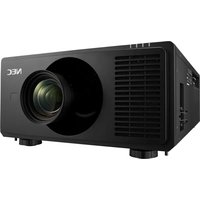
XG-C60X - Video projector SHARP - Free user manual and instructions
Find the device manual for free XG-C60X SHARP in PDF.


Pick your language and provide your email: we'll send you a specifically translated version.
| Product Type | Video Projector |
| Brand | Sharp |
| Model | XG-C60X |
| Display Technology | 3LCD |
| Native Resolution | XGA (1024 x 768) |
| Brightness | 6000 ANSI Lumens |
| Contrast Ratio | 2000:1 |
| Projection Aspect Ratio | 4:3 (native), 16:9 compatible |
| Lens | Zoom lens with manual focus |
| Keystone Correction | Vertical and horizontal |
| Input Terminals | RGB, component, S-Video, composite, audio |
| Output Terminals | Monitor output, audio output |
| Control Terminals | RS-232C serial port |
| Power Supply | AC 100-240V, 50/60Hz |
| Power Consumption | 480W (maximum) |
| Dimensions (W x D x H) | 400 x 320 x 150 mm |
| Weight | 8.5 kg |
| Lamp Life | 3000 hours (normal mode) |
| Noise Level | 32 dB (normal mode) |
| Cleaning Instructions | Clean the lens with a soft cloth; replace the air filter periodically. |
| Safety Warnings | Do not look directly into the lens; keep the projector away from water and heat sources. |
| Replacement Parts | Replacement lamp and air filter are available as spare parts. |
Frequently Asked Questions - XG-C60X SHARP
How do I connect my laptop to the Sharp XG-C60X projector?
Use a VGA or HDMI cable (depending on your laptop output) to connect to the RGB or HDMI input on the projector. Select the corresponding input source using the Input button on the projector or remote control.
How often should I replace the projector lamp?
The lamp has an estimated lifetime of 3000 hours in normal mode. When the lamp warning indicator lights up or the projected image becomes dim, replace the lamp with a genuine Sharp replacement.
Can I clean the air filter myself?
Yes. Turn off the projector and unplug it. Open the filter cover and vacuum the filter gently. Replace the filter if it is heavily soiled. Regular cleaning every 500 hours helps maintain airflow.
What is the ideal projection distance for a 100-inch screen?
With the supplied zoom lens, the Sharp XG-C60X can project a 100-inch image from approximately 3.0 to 4.0 meters. Check the lens zoom range in the manual for exact figures.
How do I adjust keystone correction?
Press the Keystone button on the remote or projector menu, then use the arrow keys to correct vertical and horizontal trapezoid distortion. The projector supports digital keystone correction up to ±30 degrees.
Is the projector suitable for ceiling mounting?
Yes, the XG-C60X is compatible with ceiling mounts. Ensure the mount is rated for at least 8.5 kg and follow the installation instructions to guarantee safe operation.
What should I do if the projector does not power on?
Check the power cable connection and the AC outlet. Verify that the power standby indicator lights up. If not, replace the fuse or contact a qualified technician. Do not open the projector yourself.
How can I reset the projector to factory defaults?
Go to the Setup menu, select Factory Reset and confirm. This restores all settings to their original values and clears any password protection.
Can I use the remote control to operate the projector?
Yes, the projector comes with a remote control that operates the projector and can be used to navigate menus, adjust volume, and switch inputs. Insert two AA batteries in the remote before use.
How do I choose the correct input source?
Press the Input button on the projector or remote repeatedly to cycle through available inputs (RGB, HDMI, S-Video, Composite). The selected input name is displayed on the screen.
User questions about XG-C60X SHARP
0 question about this device. Answer the ones you know or ask your own.
Ask a new question about this device
No questions yet. Be the first to ask one.
Download the instructions for your Video projector in PDF format for free! Find your manual XG-C60X - SHARP and take your electronic device back in hand. On this page are published all the documents necessary for the use of your device. XG-C60X by SHARP.
USER MANUAL XG-C60X SHARP


Manual assistant
Powered by Anthropic
Waiting for your message
Product information
Brand : SHARP
Model : XG-C60X
Category : Video projector