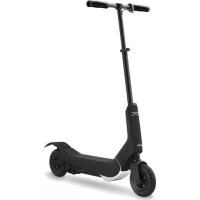
Doc Pro - Electric scooter NILOX - Free user manual and instructions
Find the device manual for free Doc Pro NILOX in PDF.



| Product type | Electric scooter |
| Brand | Nilox |
| Model | Doc Pro |
| Dimensions (folded) | 980 x 460 x 360 mm (without handlebar: 980 x 165 x 350 mm) |
| Dimensions (unfolded) | 1,008 x 460 x 1,150 mm |
| Total weight | 13.6 kg |
| Maximum supported weight | 100 kg |
| Battery | Li-ion 36 V DC, 4.4 Ah |
| Range | Approximately 40 min (up to 15 km depending on conditions) |
| Charging time | Approximately 2.4 hours |
| Motor | 300 W, chain drive |
| Tires | Front and rear 8", inflation to 2.5 atm |
| Maximum speed | Limited by selector, respect local laws |
| Brake | Rear brake by fender pedal |
| Recommended minimum age | 16 years (adult supervision mandatory for under 16) |
| Minimum user weight | 20 kg |
| Warranty | 2 years (consumer) / 1 year (professional), 1 year on battery |
| Maintenance | Clean with damp cloth, check tires and brakes regularly |
| Safety | Wear helmet, knee pads, elbow pads and wrist guards |
| Folding | Quick folding mechanism, horizontal storage |
Frequently Asked Questions - Doc Pro NILOX
User questions about Doc Pro NILOX
0 question about this device. Answer the ones you know or ask your own.
Ask a new question about this device
Download the instructions for your Electric scooter in PDF format for free! Find your manual Doc Pro - NILOX and take your electronic device back in hand. On this page are published all the documents necessary for the use of your device. Doc Pro by NILOX.
USER MANUAL Doc Pro NILOX
Thanks for choosing DOC PRO.
The complete DOC PRO manual can be downloaded from the Nilox website at www.nilox.com. Enter the DOC PRO 30NXMOPR00001 code in the search field at the top right, find the technical sheet and download the complete manual.
TECHNICAL SUPPORT
This product is warranted in accordance with current legislation; please contact your dealer if you require technical assistance and / or warranty service.
INSTRUCTIONS FOR THE ENVIRONMENT
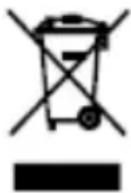
This product may contain substances that can be harmful to the environment and to the human health, if not disposed of properly. We therefore provide you the following information in order to prevent the release of such substances and to optimize use of natural resources. The electrical and electronic products should not be disposed of in the normal household waste, but should be properly collected in order to be correctly treated. The symbol of the crossed bin shown on the product and in this page reminds the need to properly dispose of the product at the end of its life. In this way you can avoid that a non
specific treatment of the substances contained in these products, or an improper use of parts of them can lead to harmful consequences for the environment and human health. Moreover, you can contribute to the recovery, recycling and reuse of many of the materials composing these products. This is why the manufacturers and distributors of Electrical and Electronic Equipment (EEE) organize proper collection and disposal of the equipment themselves. At the end of the product's lifespan, please contact your dealer for instructions regarding disposal. When purchasing this product your distributor will inform you of the possibility to replace your old device with a new one, on condition that the type of product and its functions are the same. If the dimensions are not over 25 cm , the EEE (Electrical and Electronic Equipment) can be returned without any equivalent product purchase obligation. Disposal of the product in any other way will be liable to the penalties foreseen by the laws in force in the country where the product is disposed of. Moreover, we suggest adoption of the following additional measures to protect the environment: recycling the inner and outer packaging and disposing of any used batteries correctly. With your help, we can reduce the amount of natural resources used in the manufacture of EEE (Electrical and Electronic Equipment), minimize use of landfills for product disposal and improve quality of life by preventing the release into the environment of potentially dangerous substances.
TALLING AND REPLACING BATTERIES

The product contains a battery that could be replaced during the lifetime of the product itself. Dispose of the battery contained in the product correctly at the end of their useful lifespan (thus when it can no longer be charged) by placing it in appropriate battery disposal container separate from generic unsorted waste. Collection and recycling of batteries helps protect the environment and
preserve natural resources, allowing recovery of valuable materials.
WARRANTY VALIDITY
One year if the product is purchased by a natural or legal person who uses it in business as an entrepreneur, sales representative, craftsman or professional or his/her intermediary.
- Two years if the product is purchased by a consumer or user (the natural person who does not use it in business as an entrepreneur, sales representative, craftsman or professional).
One year on the battery, regardless of the occupation of the product purchaser.
The warranty covers factory or material defects.
Product support and warranty: visit www.nilox.com to learn more.
WARRANTY RESTRICTIONS
The warranty is null and void in the following cases:
No proof of purchase (invoice or receipt).
- Tampering or alteration of hardware parts and the display.
- Other defects due to: inappropriate use, unauthorized hardware/software changes, operations or storage not in accordance with technical product specifications; incorrect maintenance; defects due to use of software other than that supplied and all elements (hardware and software) not designed to be used with the product; technical work performed by unauthorized personnel.
The above refers to consumer goods warranty principles pursuant to Directive 1999/44/EC.

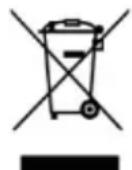
CE ( ) logo and/or WEEE () logo, in some devices, isn't fully compliant with minimum dimensions requirement to European Directive due to limited sticker area. We recommend you keep the original packaging.
SUMMARY
PREFACE. 4
PRECAUTIONS FOR USE 4
DOC PRO PARTS AND FRAME 5
ASSEMBLY AND USE. 6
Included in the pack. 6
Assembly and start-up 6
Opening. 6
Assemble the handlebar 6
Battery Charge 6
Inflate the wheels. 7
Use. 7
TURNSDOCPROON. 7
Do not stand on the board during this. 7
Enable or disable the speed switch. 7
Stand on the board 7
Start driving DOC PRO. 7
Slowing and braking. 7
Shutdown 8
Folding and storage 8
Battery charging. 8
Feasible distance 9
WARNING FOR USE AND SAFETY 9
USE AND TRAFFIC RULES. 10
DOC PRO MAINTENANCE AND MANAGEMENT 10
Battery management and charge 10
Cleaning 11
Maintenance and repairs. 11
Removing the front wheel 11
Battery 12
Transport. 12
Storage 12
TECHNICAL SPECIFICATIONS 13
SYMBOLS AND PICTOGRAMS ON THE PACKAGING. 14
Universal symbols. 14
Specific product symbols 14
PREFACE
Thank you for purchasing DOC PRO, a practical and compact transport vehicle for short trips or just to have fun around town.
DOC PRO is environmentally friendly, does not pollute or make noise.
You can meet your travel needs with a significant amount of fun for just a few cents a day.
DOC PRO will take you anywhere in the city with a single charge.
Easy to transport thanks to its fast folding mechanism.
You can always help DOC PRO uphill by pushing with your feet and using it as a traditional push scooter.
Make sure you use DOC PRO safely and always mind pedestrians.
Learn and observe applicable DOC PRO use regulations in effect where used.
TO GUARANTEE YOUR AND OTHERS' SAFETY, PLEASE READ THIS USER MANUAL CAREFULLY. RECKLESS VEHICLE USE CAN BE HAZARDOUS. LOSS OF VEHICLE CONTROL, A COLLISION OR FALL, COULD CAUSE INJURIES, EVEN SERIOUS, TO THE USER AND/OR THIRD PARTIES.
TO REDUCE THESE RISKS, PLEASE READ AND OBSERVE ALL THE INSTRUCTIONS AND WARNING FOUND IN THE USER MANUAL.
PRECAUTIONS FOR USE
- Users are held responsible for checking in advance what safety rules apply in the country where they intend to use the DOC PRO. DOC PRO use may be prohibited in public areas or in areas subject to traffic regulations.
- Avoid use on gravel, sand, grass, slippery or wet surfaces. DOC PRO was designed to be used on smooth and dry surfaces.
- Never drive near cliffs or precipices. DOC PRO was not designed to be driven in these contexts. The retailer, distributor, importer and manufacturer cannot be held liable for driver injuries or DOC PRO and/or third party damages cause by this type of conduct.
- Never drive DOC PRO with several people on the board, this could cause you to lose control of the vehicle.
- Never let unattended children near DOC PRO since this could be a hazard.
Familiarise yourself with DOC PRO use and make sure all stops are tight before use. - Do not store the batteries near heat sources, they could explode.
- Do not leave the charger in damp or wet places and do not use it if damaged. Routinely check the cable, plug and external casing. If damaged, it should not be used until repaired.
- Never use DOC PRO if not in perfect conditions.
- Never use DOC PRO if you are not in perfect psycho-physical conditions. People who suffer from physical or mental disabilities should not, or should be prevented from using DOC PRO.
We recommend you to push DOC PRO at start to reduce the load. This will lengthen the DOC PRO working life. - DOC PRO is not a toy.
DOC PRO uses electricity and requires a transformer. - Warning: electrical shock risks may arise using the transformer.
We highly discourage use by anyone who cannot comfortably stand on it. - Always learn and observe local laws and regulations applicable where the DOC PRO is used.
Always keep away from car and engine powered vehicle traffic and only use DOC PRO where permitted and cautiously. - Wet, slippery, cracked, irregular or rough surfaces can reduce traction and increase the risk of accidents.
-
Be careful of potential obstacles that could get caught in the wheels or force you to suddenly swerve or lose control.
-
Do not drive in the rain or when the outdoor temperature risks freezing surfaces.
- Never submerge DOC PRO in water since electrical and drive components could be damaged by water or generate hazardous conditions.
DOC PRO PARTS AND FRAME
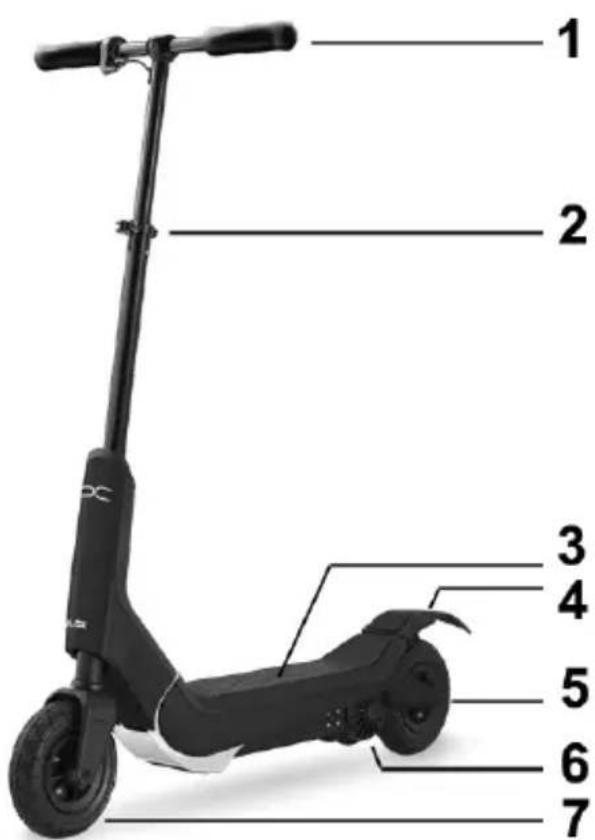
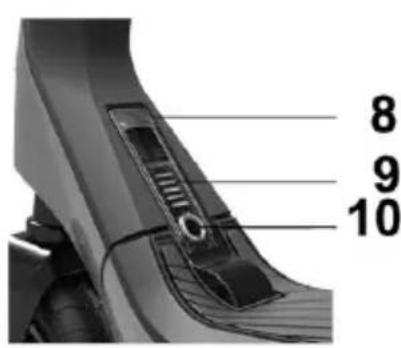
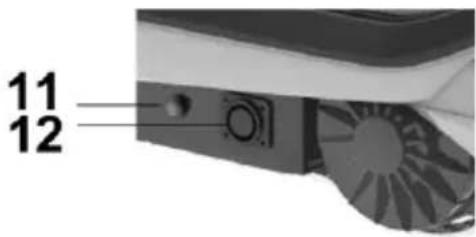
1) Handlebar
3) Board
5) 8" rear wheel
7) Front wheel
9) Battery indicator
11) Governor
2) Quick opening and height adjustment clamp
4) Mudguard with brake
5) Motor-300W
8) Lock/unlock lever
10) Ignition key
12) Power inlet
ASSEMBLY AND USE
Upon first use, perform the listed checks and follow the assembly instructions.
You will find DOC PRO pre-assembled in the package.
Simply follow a few instructions to run it.
INCLUDED IN THE PACK
DOC PRO User Manual
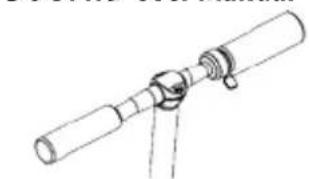
Handlebar
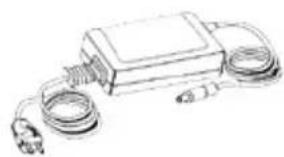
Power Supply
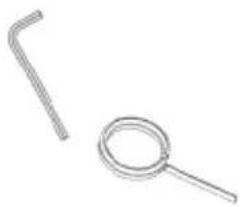
Instrument kit:
- 5 mm allen key
- Handlebar key
ASSEMBLY AND START-UP
Opening
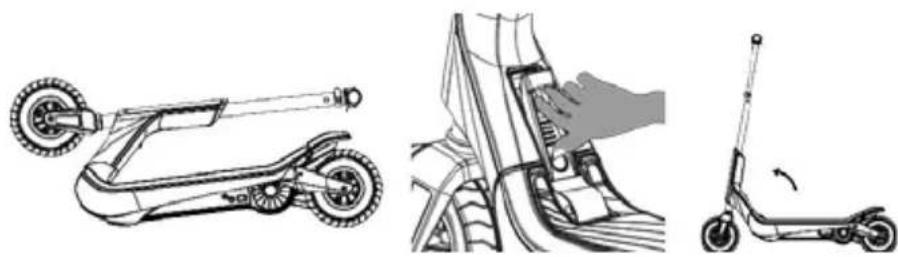
Remove the handlebar from the packaging. Make sure the switch is OFF. Pull the lever and raise the tube to the normal drive position until you hear a click.
Assemble the handlebar
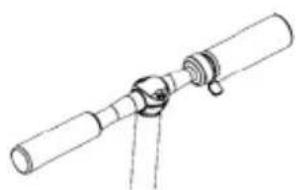
Place the handlebar on the steering column in a central position. Secure the steering column by tightening it with the supplied Allen key.
Battery Charge
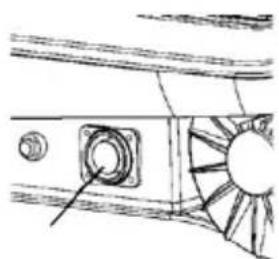
The electric push scooter battery may not be fully charged. Insert the five-pole charger in its housing and connect it to the power mains.
Inflate the wheels
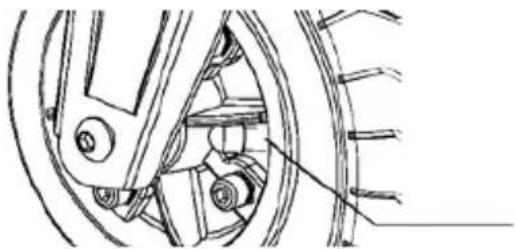
For safety reasons, the wheels are not inflated in the package. Please use the supplied instruments to inflate the wheels to about 2.5 atm before driving DOC PRO.
Once assembled, make sure that:
The handlebar and steering column are joined and no movement or noise is perceptible.
The ON/OFF switch works correctly.
The height adjustment lever is closed. If this is not the case, the handlebar rod could move, causing you to lose control of the vehicle.
The rear wheel break pedal can move freely without obstacles.
USE
TURN DOC PRO ON
Do not stand on the board during this operation.
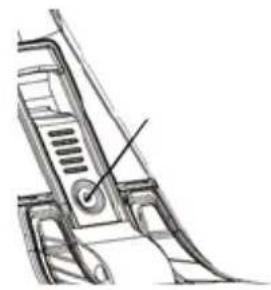
Enable or disable the speed switch
To enable: press the switch.
To disable: press the switch again.
IMPORTANT: CHECK LOCAL LAWS ON ANY SPEED LIMITS.
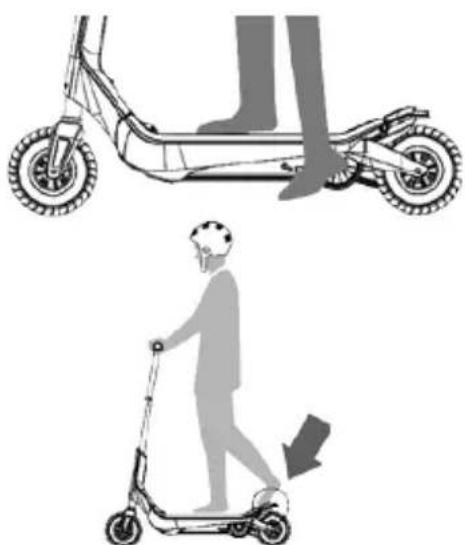
Stand on the board
Place one foot on the board, avoid starting the rear wheel brake during this operation.
Start driving DOC PRO
Start with one foot on the ground, push DOC PRO forward while simultaneously accelerating.
Slowing and braking
Release the accelerator to slow.
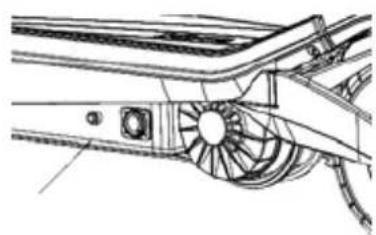
To immediately brake DOC PRO, place your foot on the rear wheel brake pedal.
Shutdown
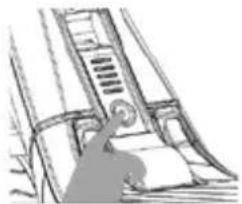
Press the start button to turn off DOC PRO.
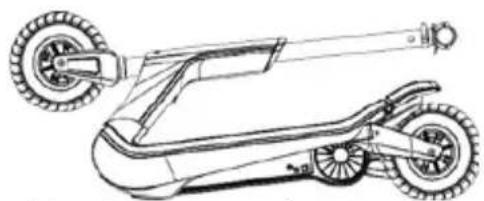
Folding and storage
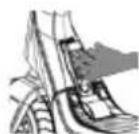
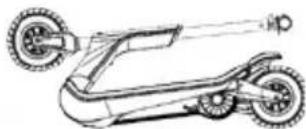
Pull the lock to fold DOC PRO.
We recommend you store it horizontally.
BATTERY CHARGING
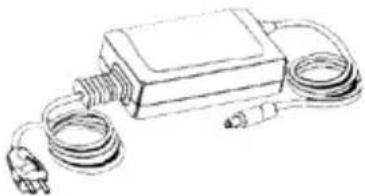
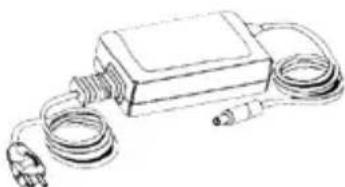
To charge the battery, only use the charger supplied with DOC PRO.
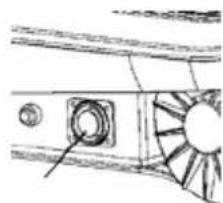
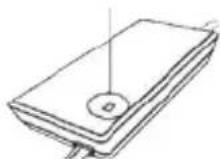
Open the power port cover and insert the plug.
Connect the charger to the electrical mains.
Stop charging when the LED turns green and close the power port.
- RED: Charging
GREEN: Charge cycle completed
FEASIBLE DISTANCE
The lighted marks near the start button indicated the DOC PRO battery charge level.
The remaining charge and residual feasible distance can be estimated according to the number of lit marks.
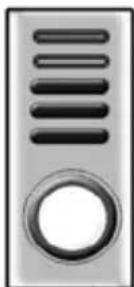
1~3 marks = 10 km max. residual
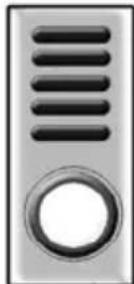
4~5 marks = 15 km max. residual
The above feasible distances are based on the following indications:
- Driver's weight: 80kg .
Driving on a flat surface. - Driving at maximum speed.
The maximum feasible distance depends on various factors, such as ground conditions, the driver's weight and weather conditions (low temperature could effect battery performance).
WARNING FOR USE AND SAFETY
Carefully heed the following warnings for use.
Use DOC PRO sensibly and responsibly.
DOC PRO is a hi-tech transport vehicle, but its incorrect and inappropriate use can cause injuries. In order to reduce any type of risk, we recommend you carefully heed the following warnings:
Always wear shoes, a helmet and appropriate safety equipment such as knee pads, elbow pads and wrist bands. Using a firmly buckled skate helmet that provides cranial protection is recommended.
Do not use without proper training; please read the manual before use. Otherwise, you could lose control of the vehicle and fall.
It's use is prohibited by minors under 16 years of age. Otherwise, adult supervision is required.
Use by expecting mothers or individuals with disabilities is discouraged.
- Do not use DOC PRO under the influence of alcohol, drugs or other substances that could alter the user's reflexes.
- Do not transport objects during use.
- Pay attention to surrounding objects when driving. Keeping a good view of the space used is essential to maintaining control.
- When driving, make sure that both feet are correctly placed on the board.
We recommend wearing comfortable clothes during use.
- DOC PRO was designed to transport a single individual. Use by several individuals simultaneously is prohibited.
We recommend you do not suddenly or abruptly accelerate or stop the vehicle; these behaviours could cause you to lose control.
Check DOC PRO before use.
Perform maintenance after use.
Make sure the brake works correctly and that wheels are duly inflated and with sufficient thread.
Do not use in dark or dimly lit areas.
Make sure driving speed always permits safe stopping at any time and in any situation.
We recommend you maintain a suitable safety distance from other vehicles when driving.
- Use with ice or snow, as well as on rocks, branches or other types of vegetation or with other objects on the ground that could jeopardise appropriate vehicle control is prohibited.
Use in flammable environments is strictly prohibited.
- Do not climb on or off at high speed, on unpaved roads or slopes.
- Do not perform tricks, jumps or other hazardous manoeuvres.
Do not rest any object on the board except your feet.
- Do not keep fingers near moving parts to avoid accidents.
Carefully reading this manual is essential for its correct use and to reduce personal injuries.
DOC PRO IS EQUIPPED WITH ELECTRONIC COMPONENTS UNDER ITS BOARD. PLEASE FOLLOW THE INSTRUCTIONS BELOW TO AVOID DAMAGING THEM:
- Do not place metal or sharp objects on the board.
- Do not use thinners or solvents to clean push scooter parts.
- Do not clean DOC PRO with a pressure cleaning or by submerging it in water; use a damp cloth to clean plastic parts.
- Do not puncture or remove any DOC PRO plastic part.
MAKE SURE THE BATTERY IS FULLY CHARGED BEFORE USE.
USE AND TRAFFIC RULES
IN SOME COUNTRIES DOC PRO MUST BE USED ON PRIVATE GROUNDS ONLY WHERE NORMAL ROAD SAFETY RULES DO NOT APPLY.
SPECIFICALLY, IN SOME COUNTRIES, STATES OR CITIES, ELECTRIC PUSH SCOOTERS CANNOT CIRCULATE ON ROADS AND SIDE WALKs.
USERS ARE RESPONSIBLE FOR CHECKING THE SAFETY REGULATIONS APPLICABLE IN THE COUNTRY WHERE THEY INTEND TO USE THE DOC PRO BEFORE USING IT.
DOC PRO MAINTENANCE AND MANAGEMENT
BATTERY MANAGEMENT AND CHARGE
Charge time: about 2.4 hours
Make sure DOC PRO is OFF when charging.
- Insert the power cord in the DOC PRO power port and insert the other end in an electrical socket.
Only use the certified DOC PRO charger.
- Do not deform, alter or remove the battery.
- Do not charge or leave the battery near heat sources.
- Avoid connecting the + and - poles with metallic objects.
- Store the battery separately to avoid it coming into contact with metallic materials.
- Avoid subjecting the battery to violent hits such as throws or falls.
Charge the battery at room temperature (5 - 26°C)
EN
- Do not charge the battery in very humid areas.
- Do not use the charger if the cables or connectors are damaged.
CLEANING
Always close the power port before cleaning.
Always disconnect DOC PRO from the charger before cleaning it with liquids.
- Do not use thinners or other solvents to clean since they could damage surfaces.
Use a damp cloth to clean plastic parts.
Do not clean DOC PRO with pressure jets or by submerging it in water.
MAINTENANCE AND REPAIRS
Frequently check the wheels and replace them when necessary.
If lock mechanisms loosen, tighten the screw using the supplied steel key, as illustrated.
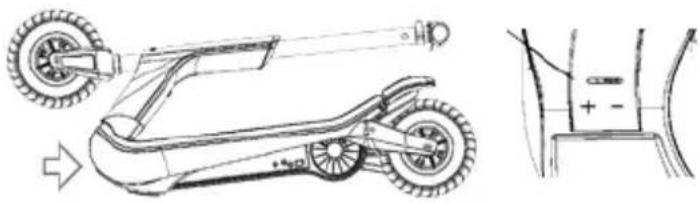
Insert the steel key in the hole in the slot.
Move the steel bar in the "+" direction to tighten the slot until the handlebar no longer wobbles.
To lengthen working life, avoid parking DOC PRO outdoors or in humid or wet areas.
- Frequently clean the rear mudguard brake. Check correct brake operations by testing it at low speed before use.
REMOVING THE FRONT WHEEL
Proceed as follows to change the front wheel:
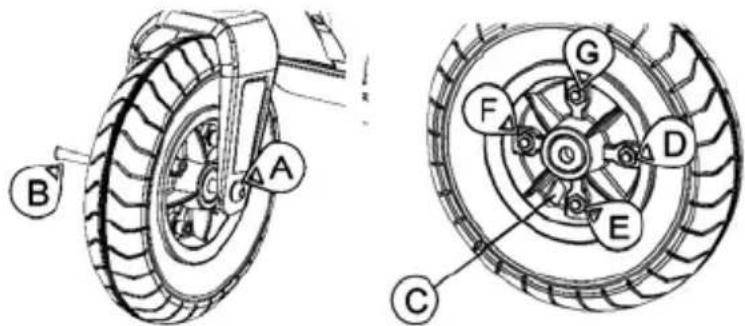
Remove screws (AB) using the 5mm Allen key, as shown in the fig.
Deflate the wheel to remove it (valve C). Loosen screws D, R, F, G and remove the wheel hub to remove the wheel.
BATTERY
- Turn off DOC PRO before charging it. Connect it to a power socket using the supplied cord and charger.
The charger LED indicates the battery/charge level. - When the battery is fully charged, the LED turns green.
- Charging for too long (>4 hours) could damage the battery, reducing its duration.
To lengthen battery life, store DOC PRO fully charged (4 battery level indicator LED on).
Store in a dark place at a temperature between 5 - 25°C
If not used for a longer period of time, charge the battery once a month.
Battery life depends on various factors such as weather, storage and use. - Do not use the battery in the following cases: Do not use the battery in the following cases. Liquid leaks.
- Do not touch any substance leaking from the battery.
- Do not allow children or animals to touch the battery.
DOC PRO cannot be used when charging. - Batteries contain hazardous substances. Do not open the battery and do not insert anything inside it.
Only use the supplied battery charger.
If over-charged, lithium batteries may explode. - Do not throw in fires.
In order to avoid fire risks or electrical shock, when charging, only place the device in a room with controlled temperature and humidity and without conductive agents of any kind.
- When charging, the device should be placed in a fully fireproof room (keep away from wood floors, furniture, paper, sofas, rugs, flammable liquids, etc.) with controlled temperature and humidity.
Charge the battery in a ventilated room to reduce overheating when charging.
- If the battery suffered shocks or if the battery or power cord are not perfectly intact, avoid charging and contact a service centre.
- The manufacturer and distributor cannot be held liable for damages to third party products due to improper battery and charger use.
TRANSPORT
If you intend to transport DOC PRO, including the battery, by plane or other transportation means managed by third parties, contact the local authorities and carrier in advance for information on transport restrictions or limits.
Lithium batteries are considered hazardous substances in many countries.
Before travelling, make sure access and transport are permitted.
International law prohibits shipping single lithium batteries by air.
If you ship your DOC PRO, the battery must be inside.
STORAGE
Store in a room with temperature between 5 - 25°C
If not continuously used, charge the DOC PRO battery once a month.
TECHNICAL SPECIFICATIONS
Total weight
13,6 kg
Maximum supported weight
100 kg
Feasible distance with full charge
Approximately 40 min
Power
Li-lon,36V DC,4.4Ah
Power Supply
100~240V AC, 50~60 Hz 2A
Dimensions
Folded: 980 × 460 × 360 mm
Folded: 980 × 165 × 350 mm (without handle)
Wheels
Open: 1008 × 460 × 1150 mm
Motor
Front 8" Rear 8"
Riding control
300W chain transmission
Throttle
SYMBOLS AND PICTOGRAMS ON THE PACKAGING
Some symbols (pictograms) are found on the DOC PRO packaging.
Some are universal and, where indicated, valid for all packages, others are specific to the product.
UNIVERSAL SYMBOLS

The product meets European safety directive requirements.
The product contains a battery. At the end of the battery working life in the product, it must be separately discarded from generic waste (see introduction).
The product contains electric and electronic equipment. At the end of the product working life, it cannot be discarded with normal urban waste and must be sent to separate collection (see introduction).
The product packaging is made of cardboard and should be discarded as such. PAP 21 indicated non corrugated cardboard.
The product packaging contains plastic and should be discarded as such. PS 6 indicates polystyrene packaging.
SPECIFIC PRODUCT SYMBOLS

Wear appropriate safety equipment such as knee pads, elbow pads and wrist bands. Use a well-buckled helmet that provides cranial protection.
It's use is prohibited by minors under 16 years of age. Otherwise, adult supervision is required.
Minimum weight for use 20kg maximum weight 100kg
MANUTENÇA E REPARACAO
SPécifications Techniques 14
SYMBLOGIE ET PICTOGRAMMES SUR L'EMBALLAGE. 15
Symboles universels 15
-Inbusschlüssel 5mm
-Schlüssel fur Lenkstange
Lenkstange
Ladegerät
Distributed by Nilox
Made in China
Produced and Imported by Hellatron S.p.A.
Legal: Via A. Mario, 65 - 20149 Milano - Italy
- TECHNICAL SUPPORT
- INSTRUCTIONS FOR THE ENVIRONMENT
- TALLING AND REPLACING BATTERIES
- WARRANTY VALIDITY
- WARRANTY RESTRICTIONS
- SUMMARY
- PREFACE
- PRECAUTIONS FOR USE
- DOC PRO PARTS AND FRAME
- ASSEMBLY AND USE
- INCLUDED IN THE PACK
- DOC PRO USER MANUAL
- HANDLEBAR
- ASSEMBLY AND START-UP
- OPENING
- ASSEMBLE THE HANDLEBAR
- BATTERY CHARGE
- INFLATE THE WHEELS
- TURN DOC PRO ON
- ENABLE OR DISABLE THE SPEED SWITCH
- STAND ON THE BOARD
- START DRIVING DOC PRO
- SLOWING AND BRAKING
- SHUTDOWN
- FOLDING AND STORAGE
- BATTERY CHARGING
- FEASIBLE DISTANCE
- WARNING FOR USE AND SAFETY
- DOC PRO IS EQUIPPED WITH ELECTRONIC COMPONENTS UNDER ITS BOARD. PLEASE FOLLOW THE INSTRUCTIONS BELOW TO AVOID DAMAGING THEM
- USE AND TRAFFIC RULES
- DOC PRO MAINTENANCE AND MANAGEMENT
- BATTERY MANAGEMENT AND CHARGE
- EN
- CLEANING
- MAINTENANCE AND REPAIRS
- REMOVING THE FRONT WHEEL
- BATTERY
- TRANSPORT
- STORAGE
- TECHNICAL SPECIFICATIONS
- SYMBOLS AND PICTOGRAMS ON THE PACKAGING
- UNIVERSAL SYMBOLS
- SPECIFIC PRODUCT SYMBOLS
- MANUTENÇA E REPARACAO
- LENKSTANGE
- LADEGERÄT
Brand : NILOX
Model : Doc Pro
Category : Electric scooter