Stelio 04.1221.0011 - Coffee machine WMF - Free user manual and instructions
Find the device manual for free Stelio 04.1221.0011 WMF in PDF.



| Brand | WMF |
| Model | Stelio 04.1221.0011 |
| Product type | Filter coffee machine |
| Dimensions (W x D x H) | 25 x 20 x 35 cm |
| Weight | Approximately 2 kg |
| Power supply | 220-240 V ~ 50/60 Hz, 1000 W |
| Protection class | I |
| Water tank capacity | 8 cups (125 ml/cup) |
| Housing material | Plastic |
| Carafe | Aroma-preserving glass |
| Filter | Paper filter size 1x4 |
| Water level indicator | Yes |
| Display | Digital display with time setting |
| Delayed programming | Yes, up to 24 hours in advance |
| Keep warm function | 40 minutes |
| Immediate start | Yes |
| Automatic shut-off | Yes, after keep warm |
| Anti-drip valve | Yes |
| Safety | Hot surfaces, overheating protection, automatic shut-off |
| Cleaning | Wipe exterior, filter and carafe washable with water |
| Descaling | Recommended regularly with suitable descaler (Cromargol®) |
| Included accessories | Carafe, paper filter (not included) |
| Usage instructions | Household use, children from 8 years under supervision |
| Repairability | Central after-sales service, cable replaced by qualified personnel |
Frequently Asked Questions - Stelio 04.1221.0011 WMF
User questions about Stelio 04.1221.0011 WMF
0 question about this device. Answer the ones you know or ask your own.
Ask a new question about this device
Download the instructions for your Coffee machine in PDF format for free! Find your manual Stelio 04.1221.0011 - WMF and take your electronic device back in hand. On this page are published all the documents necessary for the use of your device. Stelio 04.1221.0011 by WMF.
USER MANUAL Stelio 04.1221.0011 WMF
STELIO Aroma Digital
Kaffeemaschine Glas

natural_image
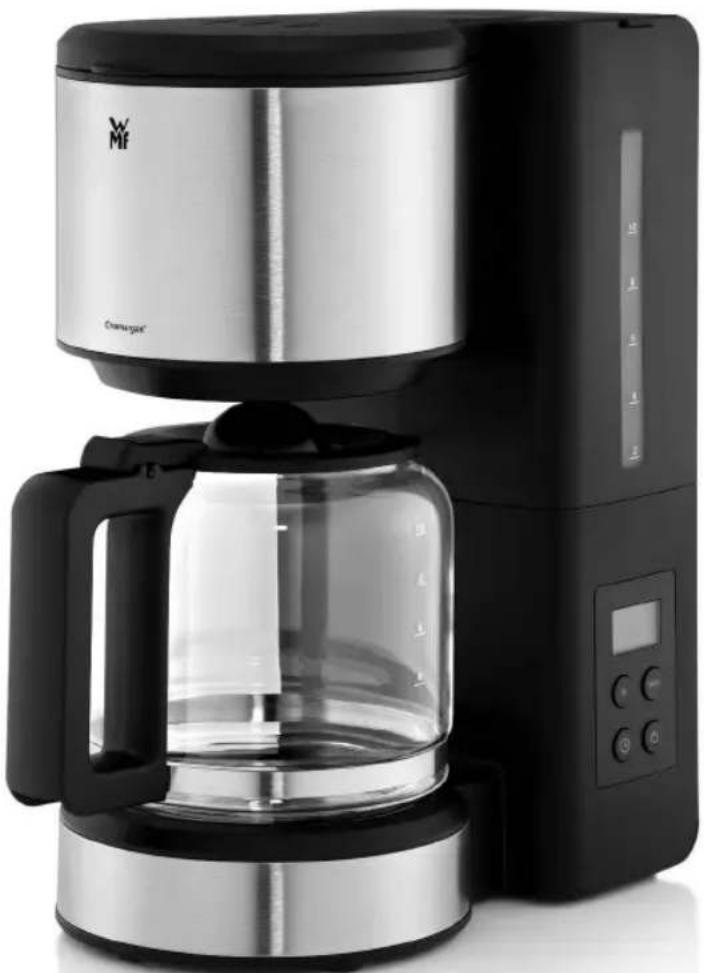
Exterior view of a modern kitchen coffee maker with clear glass and digital display (no visible text or symbols)Set-up of the coffee machine
1 Filter lid
2 Filter
3 Water tank lid
4 water tank
5 Water level indicator
6 Display
7 Aroma glass jug
Important safety information
- This appliance can be used by children aged 8 years and above if they have been given supervision or instruction concerning use of the appliance in a safe way and if they understand the hazards involved.
Cleaning and user maintenance shall not be carried out by children unless they are above 8 years old and are under supervision.
■ Children must not play with the appliance. - Keep the appliance and its cord out of reach of children aged less than 8 years.
■ Appliances can be used by persons with reduced physical, sensory or mental capabilities or lack of experience and knowledge if they have been given supervision or instruction concerning the safe use of the appliance and understand the hazards involved. - Do not immerse the appliance in water.
- If the supply cord is damaged, it must be replaced by the manufacturer, its service agent or a similarly qualified person in order to avoid hazards.
-
This appliance is designed for use in households and similar environments such as:
-
in staff kitchens in shops, offices and other commercial areas;
• on agricultural property; - by customers in hotels, motels and other residential facilities;
- in bed-and-breakfast establishments.
The appliance is not intended for purely commercial use.
- Caution! Risk of burning! The temperature of accessible surfaces can become very hot. The heating surfaces remain hot for some time after the appliance has been switched off.
Before use
Congratulations on the purchase of your coffee machine.
The coffee machine may only be used for its intended purpose according to this instruction manual. Therefore, carefully read the instruction manual before use as it provides instructions for using, cleaning and caring for the appliance. We accept no liability for any damages caused if this manual is not observed. Keep the operating manual in a safe place and pass it on to any subsequent user together with the appliance.
There is no guarantee for glass breakage.
Observe the safety information during use.
Technical data
Rated voltage: 220-240 V\~ 50/60 Hz
Power consumption: 1000 W
Protection class: I
Additional safety information
- Only connect the appliance to earthed wall sockets that have been installed pursuant to regulations. The supply cable and plug must be dry.
- Do not pull or clamp the connecting cable over sharp edges. Do not leave it dangling and protect it from heat and oil.
- Only use an extension cable that is in perfect condition.
- Never pull the mains plug out of the socket by the cable or with wet hands.
- Do not carry the appliance by the cable.
- Do not place the coffee machine on hot surfaces, such as hot plates or similar, or near open flames, as the casing could melt.
- Do not place the appliance on water-sensitive surfaces. Water spray can damage such surfaces.
- Do not switch on the device without water. Fill the fresh water tank with cold water no higher than the maximum possible number of cups.
- Do not put water into a device that is switched on or is still hot. Before filling with water, switch the coffee machine off and allow to cool for 5 minutes.
- Caution, the appliance gets hot. Risk of scalding from escaping steam. During the brewing cycle, never remove the filter or open the lid.
- If the device will not be used for a long time, pull out the mains plug.
- Stop using the appliance and/or pull out the mains plug immediately if:
- the appliance or power cord is damaged;
- you suspect that there is a defect after the appliance has fallen or suffered a similar incident.
In such cases, arrange for the appliance to be repaired. - Only operate the appliance under supervision.
■ Descale the appliance regularly. - The glass jug is not suitable for use in the microwave.
- We accept no liability for damages caused as a result of misuse, incorrect operation, improper repairs or non-observance of the descaling instructions.
Start-up
Prior to the first use and after the device has not been operated for an extended period of time, carry out a boiling process with fresh water without coffee grounds. To do so, fill the tank (4) to the 8-cup mark, as otherwise the jug (7) can overflow.
Setting the current time
After connecting the mains plug to a socket, Set and 12:00 appear in the display (6). Set the current time by pressing the buttons h and min. Confirm the time by pressing the button ⏻. The Set in the display (6) will blink until the time is confirmed.
Note: The time must be reset after a power failure or after the mains plug has been unplugged.
You can also reset the time by pressing the h and min buttons at the same time, the Set blinks in the display (6) and you can set the time by pressing the h and min buttons. Confirm the time by pressing the Ⓤ button.
Programming the switch-on time
The device's automatic switch-on starts the brewing process automatically at the desired time. The switch-on time can be programmed up to 24 hours in advance. It is displayed when you press the ⏻ button for about 3 seconds, the ⏻ appears in the display (6) and flashes Set . Set the time you want it to switch on by pressing the buttons h and min. Confirm the time by pressing the ⏻ button.
This activates the automatic switch-on time.
Note: Confirm the switch-on time within 5 seconds, or otherwise the settings will not be saved.
Note: The switch-on time must be reset after a power failure or after the mains plug has been unplugged.
Coffee preparation
Open the water tank (4). To do so, swing open the lid (3) upward. Only pour cold water into the tank (4). The water level indicator (5) is for the amount of fresh water that is needed to brew the desired number of cups per 125 ml of coffee.
Open the filter (2) by swinging open the filter lid (1) upward. Place the paper filter of the 1 x 4 size into the filter (2), but fold the stamped edge before doing so. The paper filter should not protrude over the edge of the filter, therefore you must push it down slightly with your hand.
Fill with the required amount of ground coffee. Depending on your personal taste, use approx. 5–7 g of medium-fine ground coffee per cup. If it is ground too finely, the filter (2) may overflow.
Then close the filter lid (1). It will audibly click into place.
Automatic switch-on
If the preparation should start automatically at the programmed switch-on time, press down on the Ⓤ button for about 3 seconds, ⏱ appears in the display (6) and flashes Set. You can check the programmed switch-on time and change it by pressing the h and min buttons. Confirm the time by pressing the ⏱ button.
You can deactivate the automatic switch-on at any time by pressing the ⏻ button.
Immediate start
Press the ⏻ button if you want your coffee to be prepared immediately. You can switch it off at any time by pressing the ⏻ button.
When the brewing cycle has finished the glass jug (7) may be removed. A drip-stop valve prevents coffee from dripping onto the warming plate.
Keep-warm function
In order to keep the finished brewed coffee at a serving temperature, your device is equipped with a keep-warm function. After the preparation is complete, the keep-warm function activates automatically and the symbol appears in the display. The keep-warm time is 40 minutes, and then the device switches itself off.
You can deactivate the keep-warm function at any time by pressing the ⏻ button.
Cleaning and maintenance
Cleaning
Unplug the mains plug and allow the appliance to cool down.
Do not immerse the appliance in water, but instead just use a damp cloth and a little washing-up liquid to clean its exterior.
Do not use harsh and abrasive cleaning agents.
The filter (2) and glass jug (7) are cleaned under running water.
Calcification
Scale deposits result in an extended brewing time and lower quality coffee. Limescale deposits also lead to energy losses and impair the service life of the appliance.
The appliance switches off prematurely if the layer of limescale is too thick. The limescale is then very difficult to remove. You should therefore descale regularly, at the latest however in the event of significantly longer brewing times or increased noise.
The following data are guide values that refer to a daily use in the household.
| Hardness range Hardness Descaling intervals | |
| 1 soft 0–7 dH Every 6 months | |
| 2 medium >7–14 dH Every 3 months | |
| 3 hard >14–21 dH Every 6 weeks | |
| 4 very hard >21 dH Monthly | |
1° dH corresponds to about 0.18 mmol/l Ca and Mg ions
You can inquire at your local water company or government to find out the hardness range in your neighbourhood.
Descaling agent
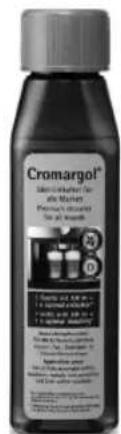
We recommend using Cromargol®. This product is highly effective, food safe and is neutral in taste and smell. Thanks to its special care formula with six high-quality and protective additives, Cromargol® is also very gentle on materials.
You can usually purchase Cromargol® from the store where you purchased your appliance or from your chosen dealer.
You can also use a commercially available descaling agent that is suitable for filter coffee machines.
Do not use vinegar or vinegar concentrate, as this can damage materials in the appliance.
When using descalers based on citric acids, precipitates could form during descaling that seal the limescale layer or clog the lines in the appliance. Descaling with citric acids also takes too long, and therefore complete descaling cannot be guaranteed.
⚠ Damage caused by the use of an unsuitable descaling agent or through non-compliance with the descaling instructions is not covered by our warranty claim.
⚠️ Handle the descaling agent carefully to ensure that no furniture or clothing is damaged.
Descaling
- Insert the paper filter and place the jug (7) in the machine. Any more substantial amounts of limescale residue collect on the filter paper and thus prevent the outlet valve from clogging.
- Fill the water tank (4) with one portion (100 ml) of Cromargol®, fill with tap water up to the 8 Cups marker and switch the device on.
- Measure out and use other descaling agents according to the manufacturer's instructions.
■ After the descaling solution has passed through, empty the jug (7), switch off the device and allow to cool for 5 minutes.
Important: Then to rinse, fill the tank (4) to the 8-cup mark with fresh tap water and allow this to run through the machine. Then rinse the filter (2) and jug (7) under running water.
Note: In the event of heavy calcification, repeat the descaling process.
For UK use only
- This product is supplied with a 13 A plug conforming to BS 1363 fitted to the mains lead. If the plug is unsuitable for your socket outlets or needs to be replaced, please note the following. If the plug is a non-rewireable one, cut it from the mains lead and immediately dispose of it. Never insert it into a socket outlet as there is a very great risk of an electric shock.
- The replacement of the plug at the mains lead has to be done according to the following instructions:
Warning - This appliance must be earthed
Important: The wires in this mains lead are coloured in accordance with the following code:
| green/yellow | Earth |
| blue | Neutral |
| brown | Live |
As the colours of the wires in the mains lead of this appliance may not correspond with the coloured markings identifying the terminals in your plug, proceed as follows:
- the wire which is coloured green and yellow must be connected to the terminal which is marked with the letter E or by the earth symbol ⏚, or coloured green or green and yellow,
- the wire which is coloured blue must be connected to the terminal which is marked the letter N or coloured black,
- the wire which is coloured brown must be connected to the terminal which is marked with the letter L or coloured red.
- If a 13 A (BS 1363) plug is used it must be fitted with a 13 A fuse conforming to BS 1362 and be ASTA approved. If any other type of plug is used, the appliance must be protected by a 10 A fuse either in the plug or adapter or at the distribution board.
If in doubt - consult a qualified electrician.
- Never use the plug without closing the fuse cover.

The appliance complies with European directives 2006/95/EC, 2004/108/EC and 2009/125/EC.
At the end of its life, this product must not be disposed of in normal household waste but must instead be delivered to a collection point for recycling electric and electronic appliances.
The materials are recyclable in accordance with their labelling. The reuse, recycling and other ways of using old appliances make an important contribution to protecting our environment.
Please ask your local administration for details of the appropriate disposal point.
Subject to alterations