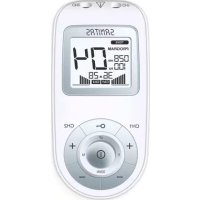
SEM 43 - Fitness Equipment SANITAS - Free user manual and instructions
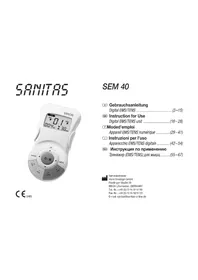
Find the device manual for free SEM 43 SANITAS in PDF.



| Product type | Digital EMS/TENS electrostimulation device |
| Brand | Sanitas |
| Model | SEM 43 |
| Dimensions (with belt clip) | 135 x 66 x 29 mm |
| Weight | 107 g (without batteries), 133 g (with batteries and clip) |
| Power supply | 3 AAA 1.5 V batteries (alkaline) |
| Stimulation channels | 2 independent channels |
| Number of electrodes included | 4 self-adhesive electrodes (45 x 45 mm) |
| Main functions | TENS (pain relief), EMS (muscle stimulation), Massage (10 programs) |
| Total number of programs | Over 50 preset programs |
| Customizable programs | TENS 8-10, EMS 28-30 (adjustable parameters) |
| Pulse frequency range | 1 - 150 Hz (TENS), 1 - 100 Hz (EMS) |
| Pulse duration | 50 - 450 μs |
| Adjustable pulse intensity | 0 - 50 (per channel) |
| Max. output voltage | 100 Vpp (at 500 Ω) |
| Max. output current | 200 mApp (at 500 Ω) |
| Adjustable treatment time | 5 - 100 minutes |
| Doctor's Function feature | Save a custom program by long pressing Ch2 |
| Safety | Automatic shutdown after 2 min of inactivity, key lock, moisture protection |
| Maintenance and cleaning | Device: soft slightly damp cloth; electrodes: lukewarm water or damp cloth, air dry |
| Spare parts and consumables | Electrodes 45x45 mm ref. 661.22 (8 pieces), electrodes 50x100 mm ref. 661.21 (4 pieces) |
| Operating conditions | 10 - 40 °C, relative humidity 30-85% |
| Storage conditions | -10 - 50 °C, relative humidity 10-95% |
| Standards | CE, EN60601-1, EN60601-1-2, EN60601-2-10, medical directive 93/42/EEC |
Frequently Asked Questions - SEM 43 SANITAS
User questions about SEM 43 SANITAS
0 question about this device. Answer the ones you know or ask your own.
Ask a new question about this device
Download the instructions for your Fitness Equipment in PDF format for free! Find your manual SEM 43 - SANITAS and take your electronic device back in hand. On this page are published all the documents necessary for the use of your device. SEM 43 by SANITAS.
USER MANUAL SEM 43 SANITAS
7.5 Doctor's Function
- Getting to know your machine 18
1.1 What is Digital EMS/TENS and what can it do? 18
1.2 Scope of supply 19
- Important Information 19
3.Current parameters 21
3.1 Pulse shape 21
3.2 Pulse frequency 21
3.3 Pulse width 21
3.4 Pulse intensity 21
3.5 Cycle-controlled pulse parameter variation 21
- Unit description 21
5.Start-up 22 - Programme overview 23
6.1 Basic information 23
6.2 Information on placing the electrodes 23
6.3 TENS program table 23
6.4 EMS program table 24
6.5 MASSAGE program table 25
7.Application 25
7.1 Advice on application 25
7.2 Procedure for programs TENS 1-7, EMS 1-27 and MASSAGE 1-10 (quick start) 25
7.3 Setting individual parameters 25
7.4 Changes to the settings 27
7.5 Doctor's Function 27
- Cleaning and storage 27
- Disposal 28
10.Problems and solutions 28
11. Technical details 29
12. Replacement parts and wearing parts 29
Please read these instructions for use carefully and keep them for later use, be sure to make them accessible to other users and observe the information they contain.
| WARNING Warning instruction indicating a risk of injury or damage to health | |
| IMPORTANT Safety note indicating possible damage to the unit/accessory | |
| Note Note on important information | |
| Observe the instructions for use | |
| Protect from moisture | |
| SN | Serial number |
| Application part, type BF | |
| Disposal in accordance with EC Directive - WEEE (Waste Electrical and Electronic Equipment) | |
| €0483 | The CE labelling certifies that the product complies with the essen-tial requirements of Directive 93/42/EEC on medical products. |
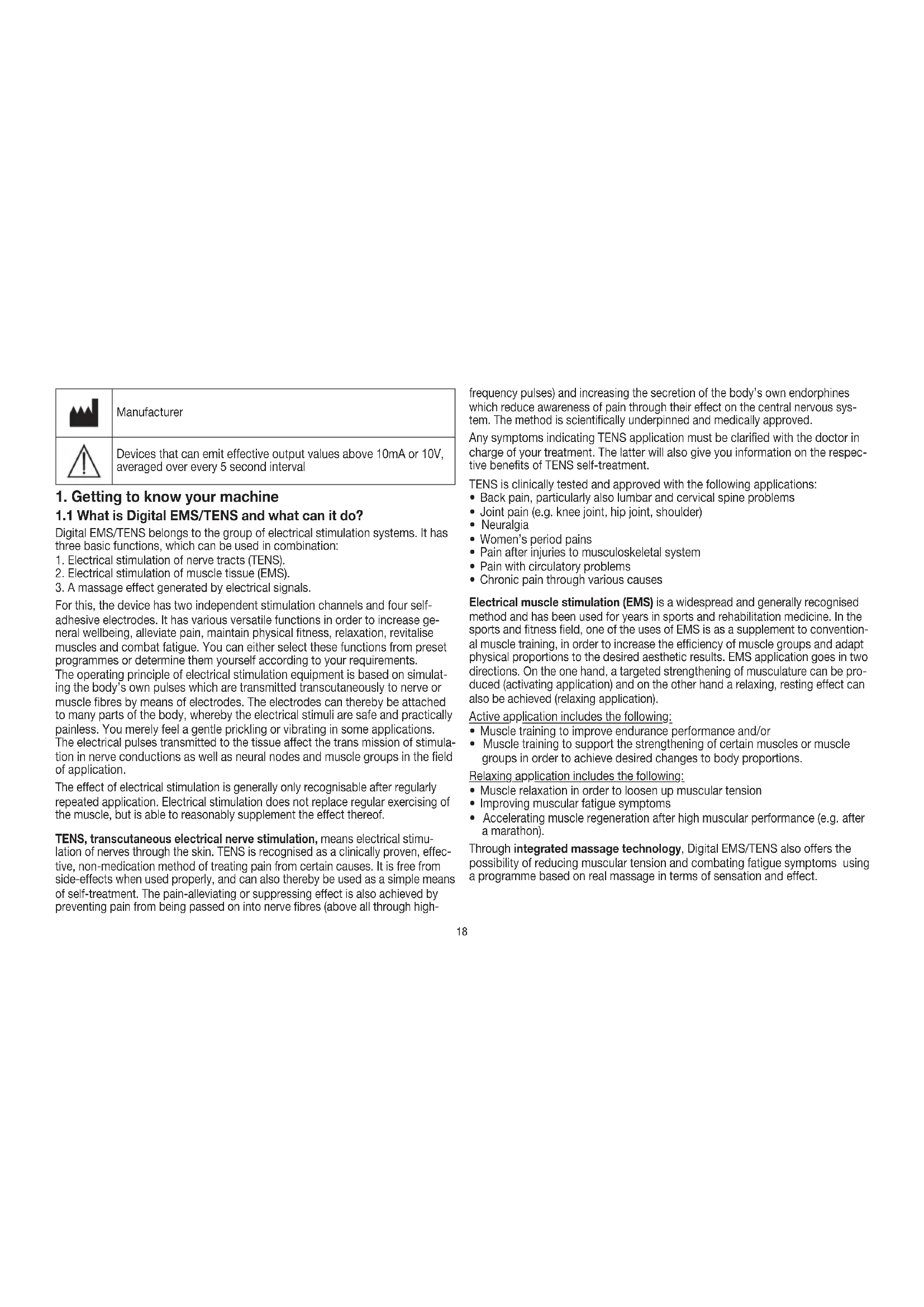
| Manufacturer |
| Devices that can emit effective output values above 10mA or 10V, averaged over every 5 second interval |
1. Getting to know your machine
1.1 What is Digital EMS/TENS and what can it do?
Digital EMS/TENS belongs to the group of electrical stimulation systems. It has three basic functions, which can be used in combination:
- Electrical stimulation of nerve tracts (TENS).
- Electrical stimulation of muscle tissue (EMS).
- A massage effect generated by electrical signals.
For this, the device has two independent stimulation channels and four self-adhesive electrodes. It has various versatile functions in order to increase general wellbeing, alleviate pain, maintain physical fitness, relaxation, revitalise muscles and combat fatigue. You can either select these functions from preset programmes or determine them yourself according to your requirements.
The operating principle of electrical stimulation equipment is based on simulating the body's own pulses which are transmitted transcutaneously to nerve or muscle fibres by means of electrodes. The electrodes can thereby be attached to many parts of the body, whereby the electrical stimuli are safe and practically painless. You merely feel a gentle prickling or vibrating in some applications. The electrical pulses transmitted to the tissue affect the trans mission of stimulation in nerve conductions as well as neural nodes and muscle groups in the field of application.
The effect of electrical stimulation is generally only recognisable after regularly repeated application. Electrical stimulation does not replace regular exercising of the muscle, but is able to reasonably supplement the effect thereof.
TENS, transcutaneous electrical nerve stimulation, means electrical stimulation of nerves through the skin. TENS is recognised as a clinically proven, effective, non-medication method of treating pain from certain causes. It is free from side-effects when used properly, and can also thereby be used as a simple means of self-treatment. The pain-alleviating or suppressing effect is also achieved by preventing pain from being passed on into nerve fibres (above all through high
frequency pulses) and increasing the secretion of the body's own endorphines which reduce awareness of pain through their effect on the central nervous system. The method is scientifically underpinned and medically approved.
Any symptoms indicating TENS application must be clarified with the doctor in charge of your treatment. The latter will also give you information on the respective benefits of TENS self-treatment.
TENS is clinically tested and approved with the following applications:
- Back pain, particularly also lumbar and cervical spine problems
Joint pain (e.g. knee joint, hip joint, shoulder)
Neuralgia
Women's period pains - Pain after injuries to musculoskeletal system
- Pain with circulatory problems
- Chronic pain through various causes
Electrical muscle stimulation (EMS) is a widespread and generally recognised method and has been used for years in sports and rehabilitation medicine. In the sports and fitness field, one of the uses of EMS is as a supplement to conventional muscle training, in order to increase the efficiency of muscle groups and adapt physical proportions to the desired aesthetic results. EMS application goes in two directions. On the one hand, a targeted strengthening of musculature can be produced (activating application) and on the other hand a relaxing, resting effect can also be achieved (relaxing application).
Active application includes the following:
- Muscle training to improve endurance performance and/or
- Muscle training to support the strengthening of certain muscles or muscle groups in order to achieve desired changes to body proportions.
Relaxing application includes the following:
- Muscle relaxation in order to loosen up muscular tension
- Improving muscular fatigue symptoms
- Accelerating muscle regeneration after high muscular performance (e.g. after a marathon).
Through integrated massage technology, Digital EMS/TENS also offers the possibility of reducing muscular tension and combating fatigue symptoms using a programme based on real massage in terms of sensation and effect.
Using the positioning suggestions and programme charts in this manual, you can determine the machine setting fast and easily for the respective application (depending on the region of the body affected) in order to ensure the desired effect.
Through the two separately adjustable channels, the Digital EMS/TENS has the advantage of adapting the intensity of the pulses independently of each other to two parts of the body to be treated, for example in order to cover both sides of the body or ensure even stimulation of larger areas of tissue. The individual intensity setting of each channel also allows you to treat two different parts of the body at the same time, whereby it is possible to save time compared with individual sequential treatment.
1.2 Scope of supply
- 1x Digital EMS/TENS machine (incl. belt clip)
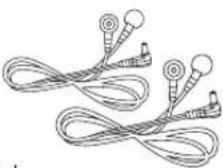
- 2x connecting cable
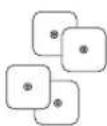
- 4x adhesive electrodes (45 x 45 mm)
- 3x AAA batteries
- these instructions for use
12. Important Information
Use of the machine does not replace medical consultation and treatment. In the event of any type of pain or illness, you must therefore always first ask your doctor.
WARNING!
In order to prevent any damage to health, we would urgently advise against using the Digital EMS/TENS in the following cases:
- With any implanted electrical devices (such as pacemakers)
If there are any metal implants - When using an insulin pump
In case of high fever (e.g. >39^ ) - In case of known or acute cardiac arrhythmias and other disorders in stimulus formation and conduction of the heart
- If suffering from attacks (e.g. epilepsy)
If pregnant
In case of cancer
After operations where increased muscle contractions might impair the healing process - Never use near the heart. Stimulation electrodes should never be placed anywhere on the front of the thorax (marked

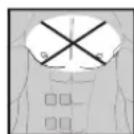
by ribs and breastbone), but above all not on the two large pectoral muscles. Here it can increase the risk of ventricular fibrillation and lead to cardiac arrest
- On the bony part of the cranium, near the mouth, throat or larynx
Near the throat / carotid artery
Near the genitals - On acutely or chronically diseased (injured or inflamed) skin (e.g. in the event of painful and painless inflammation, reddening, skin rashes (e.g. allergies), burns, bruises, swellings, open wounds and wounds in the process of healing, on operation scars in the process of healing)
- In environments with high humidity such as in the bathroom or when having a bath or shower
- Do not use after consuming alcohol
- When a high frequency surgical device is connected at the same time
Before using the machine, you should consult with the doctor in charge of your treatment in the event of the following:
- Acute diseases, especially if hypertension is suspected or actually exists, or blood-clotting disorders, tendency to thromboembolic diseases or in case of malignant new masses
All skin diseases - Chronic pain disorders which have not been clarified, regardless of the region of the body
Diabetes - All sensitivity disorders with reduced pain awareness (such as metabolic disturbances)
Medical treatments carried out simultaneously - Complaints arising as a result of the stimulation treatment
- Constant skin irritation as a result of prolonged stimulation at the same electrode point
IMPORTANT!
Use the Digital EMS/TENS solely:
- On humans
- For the purpose for which it was developed and in the manner specified in these instructions for use. Any improper use can be hazardous.
- For external application
-
With the original accessory parts which are supplied and can be re-ordered, otherwise the warranty becomes null and void.
-
This unit is not intended for use by children or persons with physical, sensory (e.g. insensitivity to pain) or mental impairments or those who do not know how to use it due to a lack of experience or knowledge, unless they are supervised by a person responsible for their safety or have received instructions from them on how to use the unit.
NOTES ON HANDLING BATTERIES
-
If your skin or eyes come into contact with battery fluid, flush out the affected areas with water and seek medical assistance.
-
Choking hazard! Small children may swallow and choke on batteries. Store the batteries out of the reach of small children.
- Observe the plus (+) and minus (-) polarity signs.
- If a battery has leaked, put on protective gloves and clean the battery compartment with a dry cloth.
- Protect the batteries from excessive heat.
Risk of explosion! Never throw batteries into a fire.
- Do not charge or short-circuit batteries.
- If the device is not to be used for a long period, take the batteries out of the battery compartment.
- Use identical or equivalent battery types only.
Always replace all batteries at the same time.
- Do not use rechargeable batteries.
- Do not disassemble, split or crush the batteries.
PRECAUTIONARY MEASURES:
- Always remove the electrodes from the skin with a moderate pull in order to avoid injury in the event of highly sensitive skin.
- Keep the machine away from heat sources and never use it near ( 1m ) short-wave or microwave equipment (e.g. mobile phones), as this may lead to unpleasant current spikes.
- Do not expose the machine to direct sunlight or high temperatures.
- Protect the machine from dust, dirt and humidity. Never submerge the device in water or other liquids.
- The machine is suitable for private use.
- For reasons of hygiene, the electrodes should only be used on one person.
-
If the machine is not functioning properly, or if you start feeling unwell or there is any pain, stop the application immediately.
-
To remove or move the electrodes, first switch off the machine or the appropriate channel in order to avoid unwanted irritation.
- Never modify any electrodes (e.g. by cutting). This leads to a higher current density and can be dangerous (max. recommended output value for electrodes: 9mA/cm^2 , an effective current density over 2mA/cm^2 requires greater attention).
- Do not use when asleep, when driving a vehicle or at the same time as operating machinery.
- Never use with any activities where an unforeseen reaction (e.g. increased muscle contraction despite low intensity) may be dangerous.
- Make sure that no metallic objects such as belt buckles or necklaces can come in contact with the electrodes during stimulation. If you wear any jewellery or piercings (e.g. belly piercing) near the application site, you must remove these before using the machine as burning may otherwise occur at some points.
- Keep the device away from children to prevent any hazards.
- Do not confuse the electrode cables and contacts with your headphones or other devices, and do not connect the electrodes to other devices.
- Do not use this machine at the same time as other equipment which sends electrical pulses to your body.
- Do not use it near any highly flammable substances, gases or explosives.
- Never use accumulators, always use the same types of battery.
- In the initial minutes, carry out the application sitting or lying down in order to avoid any unnecessary risk of injury in the rare event of a vagal reaction (feeling of weakness). If you start feeling weak, switch the machine off immediately and put your legs up (approx. 5-10 minutes).
- It is not advisable to apply any enriching creams or ointments to the skin beforehand, as this greatly increases electrode wear or else unpleasant current spikes may occur here.
Damage
- If the device is damaged, do not use it and contact your retailer or the specified Customer Services address.
- Check the device at regular intervals for signs of wear or damage. If you find any such signs or if the device was used improperly, you must bring it to the manufacturer or dealer before it is used again.
- Switch off the device immediately if it is defective or if it is not working properly.
- Do not, under any circumstances, attempt to open or repair the machine yourself! Only have repairs carried out by the customer service department or an
authorized dealer. If these instructions are not heeded, the warranty becomes null and void.
- The manufacturer assumes no liability for damage caused through improper or wrong use.
3. Current parameters
Electrical stimulation machines operate with the following current settings, which will alter the stimulation effect depending on the setting.
3.1 Pulse shape
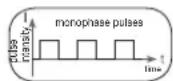
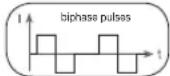
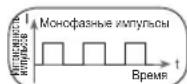
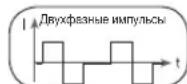
This describes the time function of the excitation current whereby monophase pulse trains are differentiated from biphas. With monophase pulse trains, the current flows in one direction. With biphas pulse, the excitation current alternates its direction.
In the Digital EMS/TENS unit, there are only biphase pulse trains, as they reduce the strain on the muscle, leading to less muscle fatigue as well as safer application.
3.2 Pulse frequency
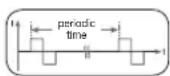
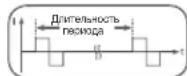
Frequency indicates the number of individual pulses per second, and is indicated in Hz (Hertz). It can be calculated by working out the inverse value of the periodic time. The respective frequency determines which types of muscle fibre
preferably react. Slow-response fibres tend to react to lower pulse frequencies up to 15Hz , while fast-response fibres only respond to frequencies over approx. 35Hz .
With pulses of approx. 45 - 70Hz there is permanent tension in the muscle combined with premature muscle fatigue. Higher pulse frequencies can therefore preferably be used for elasticity and maximum strength training.
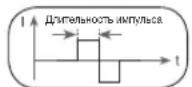
3.3 Pulse width
Pulse width is used to indicate the duration of an individual pulse in microseconds. Pulse width also determines the pene tration depth of the current whereby in general, the following applies: a greater muscle mass requires a greater pulse width.
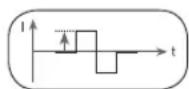
3.4 Pulse intensity
Setting the degree of intensity is individually dependent on the subjective feeling of each individual user and is determined by a number of parameters such as application site, skin circulation, skin thickness as well as quality of
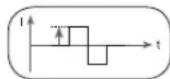
electrode contact. The actual setting should be effective but should never produce any unpleasant sensations such as pain at the site of application. While a slight tingling sensation indicates sufficient stimulation energy, any setting which leads to pain must be avoided.
With prolonged application, readjustment may be necessary due to time adjustment processes at the site of application.
3.5 Cycle-controlled pulse parameter variation
In many cases it is necessary to cover the entirety of tissue structures at the site of application by using several pulse parameters. With the Digital EMS/TENS unit, this is done by the existing programmes automatically making a cyclical pulse parameter change. This also prevents individual muscle groups at the site of application from getting tired.
With the Digital EMS/TENS unit there are useful presettings for current parameters. With this, you can change the impulse intensity at any time during use. For 6 programs you can also set various parameters for stimulation yourself.
4. Unit description
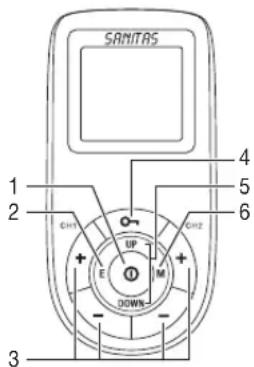
Buttons:
1 ON/OFF button ①
2 E button (Enter)
3 Intensity setting buttons (ch1 +/− left, ch2 +/− right)
4Keylock
5 Selection button UP and DOWN
6 M button (Menu)
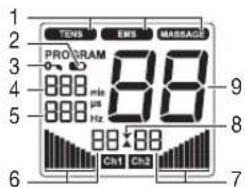
Display (full screen):
1 Menu TENS EMS MASSAGE
2 Low battery
3 Keylock
4 Timer function (remaining time display) or working time
5 Frequency display (Hz), pulse width (us) or pause time
6 Impulse intensity channel 1 (ch1
7 Impulse intensity channel 2 (Ch2
8 Operating status display
9 Program number
Accessories:
- 2x connection cable
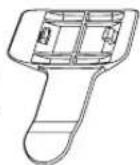
4x adhesive electrodes (45× 45mm) - 1x belt clip
Key functions
Every time a key is pressed,
this is acknowledged by a signal tone in order to ensure that any unintentional pressing of a key is detected. This signal tone cannot be switched off.
ON/OFF ①
(1) Press briefly to switch the device on.
(2) Press once to interrupt stimulation treatment.
(3) Hold ON/OFF key Down (approx. 2 seconds) to switch off the machine.
UP and DOWN
Choice of treatment program, treatment time, frequency, pulse width, working time and pause time.
M (Menu)
(1) Navigation between TENS EMS MASSAGE
(2) Return to program selection screen or menu selection.
E (Enter)
(1) Menu selection.
(2) To confirm a selection made with UP/DOWN, apart from channel intensity.
Intensity setting buttons (Ch1 +/- left, Ch2 +/- right)
Setting pulse intensity.
Keylock
Locks the buttons to avoid them being pressed unintentionally.
(1) To activate the keylock, hold down the button until the symbol is visible in the display (approx. 3 seconds).
(2) To deactivate the keylock, hold down the button until the sybil disappears from the display (approx. 3 seconds).
5.Start-up
- Remove the belt clip from the machine, if attached.
- Press the battery compartment cover on the rear of the device and slide it downwards.
- Insert three AAA 1.5 V alkaline batteries. Make absolutely sure that you insert the batteries with the correct polarity as marked.
- Replace the battery cover carefully (Fig. 1).
- Reattach the belt clip, if required.
- Attach the connecting cable to the electrodes (Fig. 2).
The electrodes have a clip fastener to ensure easy connection.
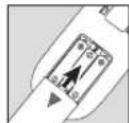
Fig. 1
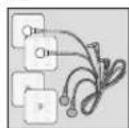
Fig. 2
- Guide the connection cable plugs into the socket on the top of the device (Fig. 3).
- Do not pull, twist or make any sharp kinks in the cables (Fig. 4).
Please note that when the battery is replaced or removed, all settings are restored to the factory default settings.
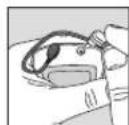
Fig. 3
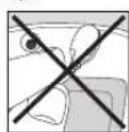
Fig. 4
6. Programme overview
6.1 Basic information
The Digital EMS/TENS unit has a total 50 programmes:
10 TENS programmes
30 EMS programmes
10 MASSAGE programmes
In all programs you can set the impulse intensity of both channels individually. You can also set various parameters in the TENS programs 8-10 and the EMS programs 28-30 to adjust the stimulating effect to the application area.
6.2 Information on placing the electrodes
For the desired success of any stimulation application, it is important that electrodes are placed sensibly.
We advise you to coordinate with your doctor regarding the best electrode positions for your intended field of application.
The electrode positions suggested inside the cover (Figs. 1-28) serve as a guide. The following applies when choosing electrode positions:
Electrode distance
The greater the electrode distance which is selected, the greater will be the volume of tissue that is stimulated. This applies to the area and the depth of the tissue volume. At the same time, however, the strength of tissue stimulation decreases as the electrode distance becomes greater, which means that, if a greater electrode distance is chosen, a greater volume is stimulated, but stimulation is weaker. To increase stimulation, pulse intensity must then be increased. The following guideline holds when selecting electrode distances:
- most reasonable distance: approx. 5 -15 cm,
below 5cm it is mainly surface structures which are strongly stimulated, - over 15cm , large-area and deep structures are stimulated very weakly.
Electrode relationship to muscle fibre orientation Choice of current flow direction must be adapted to the muscle fibre orientation according to the desired muscle layer. If surface muscles are to be reached, the electrodes must be placed parallel to the fibre orientation (A-B/C-D). If deep tissue layers are to be reached, the electrodes must be placed crosswise to the fibre orientation. The latter arrangement can, for example, be achieved via the cross electrode arrangement, e.g. A-D/B-C.
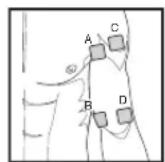
Note the colour-codes of the cables and the channels. The white cable belongs to channel CH1 and the grey cable to channel CH2.
In the treatment of pain (TENS) using the Digital EMS/TENS machine with its 2 separately controllable channels and in each case 2 adhesive electrodes, it is advisable to either position the electrodes of one channel so that the pain spot lies between the electrodes or else you position one electrode directly on the pain spot and the other at least 2 - 3cm away.
The electrodes of the second channel can be used to treat other pain spots simultaneously or else, however, together with the electrodes of the first channel, to surround the pain area (opposite). A cross arrangement is again advisable here.
Massage function tip: always use all 4 electrodes to ensure optimal treatment.
In order to extend the durability of the electrodes, use them on clean skin which is as free as possible from hair and grease. If necessary, clean the skin with water before application and remove the hair.
If an electrode should come loose during use, the impulse intensity of the corresponding channel is reduced to the lowest level. Apply the electrode again and reset the desired impulse intensity.
6.3 TENS program table
| Prog. No. | Reasonable areas of application Indications Phase Runningtime | ||
| (minutes) | |||
| 1 | Pain relief - acute pain | 1 | 30 |
| 2 | Pain relief - chronic pain (pulse width modulated) | 1 | 30 |
| 3 | Endorphin effect (burst) 1 30 | ||
| 4 | Sciatica 1 30 | ||
| 5 | Atrophy treatment 1 05 | ||
| 2 | 15 | ||
| 6 | Lumbago 1 20 | ||
| 2 | 20 | ||
| 7 | Periarthritis 1 15 | ||
| 2 | 10 | ||
The TENS 8 - 10 programme can be set individually, see 7.3.2 (p. 26).
Note: Electrode position is supposed to surround the painful area. With painful muscle groups, the electrodes are grouped round the muscle affected. In case of joint pain, the joint on the front/rear side of the joint and, if electrode distances permit, on the right and left sides of the joint, should be surrounded with electrodes.
Minimal electrode distance should not be less than 5cm and not exceed 15cm . See figure no. 25 and 28 for knee and ankle joint.
Burst programmes are suitable for all sites which should be treated with an alternating signal pattern (to ensure minimum habituation).
6.4 EMS program table
| Prog. No. | Reasonable areas of application Indications | Possible electrode position | Phase Running time (minutes) |
| 1 Capillarisation | 1-28 | 1 | |
| 2 Warming up | 1-28 | 1 | |
| 3 Cooling down after training/match | 1-28 | 1 | |
| 4 Maximum power of lower limbs | 22, 23, 24, 26, 27 | 1 | |
| 05 | |||
| 15 | |||
| 05 | |||
| 5 Resistance of lower limbs | 22, 23, 24, 26, 27 | 1 | |
| 05 | |||
| 2 | |||
| 05 | |||
| 6 Explosive power of lower limbs | 22, 23, 24, 26, 27 | 1 | |
| 05 | |||
| 12 | |||
| 05 | |||
| 7 Maximum power of torso and upper limbs | 1-20 | 1 | |
| 05 | |||
| 15 | |||
| 05 | |||
| 8 Resistance of torso and upper limbs | 1-20 | 1 | |
| 05 | |||
| 12 | |||
| 05 | |||
| 9 Explosive power of torso and upper limbs | 1-20 | 1 | |
| 05 | |||
| 12 | |||
| 05 | |||
| 10 Lipolysis of lower limbs | 22, 23, 24, 26, 27 | 1 | |
| Prog. No. | Reasonable areas of application Indications | Possible electrode position | Phase Running time (minutes) |
| 11 Toning of lower limbs | 22, 23, 24, 26, 27 | 120 | |
| 210 | |||
| 12 Strengthening of lower limbs | 22, 23, 24, 26, 27 | 120 | |
| 210 | |||
| 13 Shaping of lower limbs | 22, 23, 24, 26, 27 | 120 | |
| 210 | |||
| 14 Increasing size of lower limbs | 22, 23, 24, 26, 27 | 115 | |
| 15 Lipolysis of stomach muscles | 18, 19, 20 | 140 | |
| 16 Toning of stomach muscles | 18, 19, 20 | 120 | |
| 210 | |||
| 17 Strengthening of stomach muscles | 18, 19, 20 | 120 | |
| 210 | |||
| 18 Shaping of stomach muscles | 18, 19, 20 | 120 | |
| 220 | |||
| 19 Toning of upper limbs | 12-17 | 120 | |
| 210 | |||
| 20 Strengthening of upper limbs | 12-17 | 120 | |
| 210 | |||
| 21 Shaping of upper limbs | 12-17 | 120 | |
| 220 | |||
| 22 Increasing size of upper limbs | 12-17 | 15 | |
| 23 Toning of hips and thighs | 20, 23, 24 | 120 | |
| 210 | |||
| 24 Strengthening of hips and thighs | 20, 23, 24 | 120 | |
| 210 | |||
| 25 Toning of gluteal muscles | 22 | 120 | |
| 210 | |||
| 26 Strengthening of gluteal muscles | 22 | 120 | |
| 210 | |||
| 27 Shaping of gluteal muscles | 22 | 120 | |
| 210 | |||
The EMS 28 - 30 programme can be set individually, see 7.3.3 (p. 26).
6.5 MASSAGE program table
| Prog. No. | Reasonable areas of application Indications | Phase Runningtime (minutes) |
| 1 Muscle strain relief 1 20 | ||
| 2 Relaxing massage 1 25 | ||
| 3 Invigorating massage 1 20 | ||
| 4 Tapping massage 1 15 | ||
| 5 Tapping and jet massage 1 15 | ||
| 6 Vibrating massage 1 20 | ||
| 7 Warm up massage 1 1 20 | ||
| 8 Warm up massage 2 1 10 | ||
| 9 Pressure massage 1 20 | ||
| 10 Kneading and pressure massage 1 20 |
Electrodes must be placed so that they surround the muscle segments in question. For optimal effect, electrode distance must not be greater than approx. 15cm The electrodes should not be applied to the anterior wall of the thorax, i.e. never massage the left or right large pectoral muscle.
7. Application
7.1 Advice on application
- If the machine is not used within 2 minutes, it switches off automatically (automatic switch-off function). When the unit is switched on again, the LCD screen displays the menu selection and the most recently used menu flashes
- If an admissible key is pressed, there is one short beep. If an inadmissible key is pressed, there are two short beeps.
- You can pause the stimulation at any time by briefly pressing the ON/OFF button ①. To continue the stimulation, briefly press the ON/OFF button ① again and set the desired impulse intensity again.
7.2 Procedure for programs TENS 1-7, EMS 1-27 and MASSAGE 1-10 (quick start)
- Select a suitable program from the program tables (p. 23-27).
- Place the electrodes on the desired area for treatment (for positioning suggestions see electrode positions, p. 2) and connect them to the device.
Selecting a program
- Press the ON/OFF button ① to switch on the device.
- Using the M button, navigate through the menus
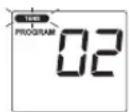
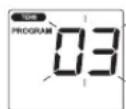
EMS MASSAGE(Fig.1,Example TENS display) and confirm your selection with the E button. - Using the UP/DOWN buttons, select the desired program and confirm your selection with the E button (Fig. 2, Example TENS program 03).
General information
If you wish to return to the previous selection menu, press the M button. By holding down the E button, you can skip individual setting steps and start directly with the stimulation treatment.
Setting the impulse intensity
At the start of stimulation treatment, the impulse intensity of Ch1 and Ch2 is set to 0 as default. No impulses are sent to the electrodes yet
- Using the INTENSITY SETTING buttons, select the desired impulse intensity. The impulse intensity display is adjusted accordingly (Fig. 3). The impulse intensity of Ch1 and Ch2 can be set individually.
- If the program is in a pause phase, the intensity cannot be increased.
If you wish to end the stimulation treatment early, press the ON/OFF button ①.
7.3 Setting individual parameters
7.3.1 Setting the treatment time
(TENS programs 8-10 and EMS programs 28-30 only)
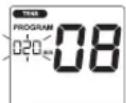
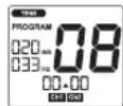
Using the UP/DOWN buttons, select the desired treatment time. You can set a treatment time from 5 minutes to 100 minutes (Fig. 4, Example treatment time of 20min .) Confirm your selection with the E button. The stimulation treatment begins and the operation status display starts to flash alternately (Fig. 5).
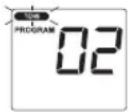
Fig. 1
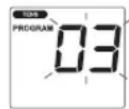
Fig.2
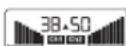
Fig. 3
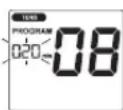
Fig.4
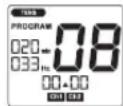
Fig.5
7.3.2 Setting individual TENS programs
Procedure for TENS 08 program
TENS 08 is a preset program that you can also personalise. In this program you can set the impulse frequency to between 1 and 150Hz and the impulse width to between 50 and 250~ s .
- Place the electrodes on the desired area for treatment (for positioning suggestions see electrode positions, p. 2) and connect them to the device. Select the TENS 08 program, as described in section 7.2 "Selecting a program" (p. 25).
- Using the UP/DOWN buttons, select the desired impulse frequency and confirm with the E button (Fig. 1, Example impulse frequency of 100Hz ).
- Using the UP/DOWN buttons, select the desired impulse width and confirm with the E button (Fig. 2, Example impulse width of 200 s ).
- Select the desired treatment time, as described in 7.3.1 "Setting the treatment time" (p. 25).
- Select the desired impulse intensity, as described in 7.2 "Setting the impulse intensity" (p. 25).
Procedure for the TENS 09 program
TENS 09 is a preset burst program that you can also personalise. In this program, you can set the impulse width to between 50 and 250~ s .
- Place the electrodes on the desired area for treatment (for positioning suggestions see electrode positions, p. 2) and connect them to the device. Select the TENS 09 program, as described in 7.2 "Selecting a program" (p.25).
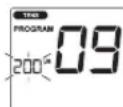
- Using the UP/DOWN buttons, select the desired impulse width and confirm with the E button (Fig. 1, Example impulse width of 200 s ).
- Select the desired treatment time, as described in 7.3.1 "Setting the treatment time" (p.25).
- Select the desired impulse intensity, as described in 7.2 "Setting the impulse intensity" (p.25).
Procedure for the TENS 10 program
TENS 10 is a preset program that you can also personalise. In this program, you can set the impulse frequency to between 1 and 150Hz . The impulse width changes automatically during the stimulation treatment.
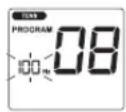
Fig. 1
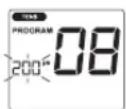
Fig. 2
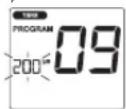
Fig.1
- Place the electrodes on the desired area for treatment (for positioning suggestions see electrode positions, p. 2) and connect them to the device. Select the TENS 10 program, as described in 7.2 "Selecting a program" (p. 25).
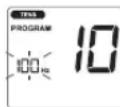
- Using the UP/DOWN buttons, select the desired impulse frequency and confirm with the E button (Fig. 1, Example impulse frequency of 100Hz ).
- Select the desired treatment time, as described in 7.3.1 "Setting the treatment time" (p. 25).
- Select the desired impulse intensity, as described in 7.2 "Setting the impulse intensity" (p. 25).
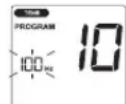
Fig. 1
7.3.3 Setting individual EMS programs
Procedure for the EMS 28 program
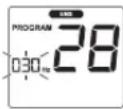
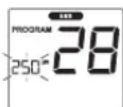
EMS 28 is a preset program that you can also personalise. In this program, you can set the impulse frequency to between 1 and 100Hz and the impulse width to between 50 and 320~ s .
- Place the electrodes on the desired area for treatment (for positioning suggestions see electrode positions, p. 2) and connect them to the device. Select the EMS 28 program, as described in 7.2 "Selecting a program" (p. 23).
- Using the UP/DOWN buttons, select the desired impulse frequency and confirm with the E button (Fig. 1, Example impulse frequency of 30Hz ).
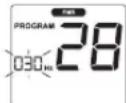
Fig. 1
- Using the UP/DOWN buttons, select the desired impulse width and confirm with the E button (Fig. 2, Example impulse width of 250~ s ).
- Select the desired treatment time, as described in 7.3.1 "Setting the treatment time" (p. 25).
- Select the desired impulse intensity, as described in 7.2 "Setting the impulse intensity" (p. 25).
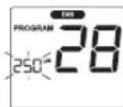
Fig. 2
Procedure for the EMS 29 program
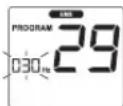
EMS 29 is a preset program that you can also personalise. In this program, you can set the impulse frequency to between 1 and 100Hz . The impulse width changes automatically during the stimulation treatment.
- Place the electrodes on the desired area for treatment (for positioning suggestions see electrode positions, p. 2) and connect them to the device. Select the EMS 29 program, as described in 7.2 "Selecting a program" (p. 25).
- Using the UP/DOWN buttons, select the desired impulse frequency and confirm with the E button (Fig. 1, Example impulse frequency of 30Hz ).
- Select the desired treatment time, as described in 7.3.1 "Setting the treatment time" (p. 25).
- Select the desired impulse intensity, as described in 7.2 "Setting the impulse intensity" (p. 25).
Procedure for the EMS 30 program
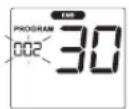
EMS 30 is a preset program that you can also personalise. In this program, you can set the impulse frequency to between 1 and 100Hz . You can also set the working time and pause time for this program to between 1 and 30 seconds each.
- Place the electrodes on the desired area for treatment (for positioning suggestions see electrode positions, p. 2) and connect them to the device. Select the EMS 30 program, as described in 7.2 "Selecting a program" (p. 23).
-
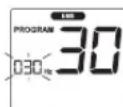
Using the UP/DOWN buttons, select the desired length of working time and confirm with the E button (Fig. 1, Example working time of 2 seconds).
-
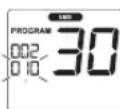
Using the UP/DOWN buttons, select the desired length of pause time and confirm with the E button (Fig. 2, Example pause time of 10 seconds).
- Using the UP/DOWN buttons, select the desired impulse frequency and confirm with the E button (Fig. 3, Example impulse frequency of 30Hz ).
- Select the desired treatment time, as described in 7.3.1 "Setting the treatment time" (p. 25).
- Select the desired impulse intensity, as described in 7.2 "Setting the impulse intensity" (p. 25).
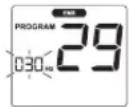
Fig. 1
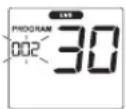
Fig.1
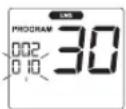
Fig.2
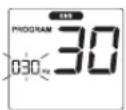
Fig. 3
7.4 Changes to the settings
Changing intensity (during application)
Ch1 ± und Ch2 ± Changing the intensity for each channel.
Interrupting stimulation
Press the ON/OFF button ①
Changing application (completely or single parameters)
ON/OFF button interrupt stimulation
- Setting the program, see 7.2; setting individual parameters, see 7.3.
7.5 Doctor's Function
Doctor's Function is a specific setting to allow you to call up your specific personal programme even more easily.
Your individual program settings are instantly recalled and activated when the device is switched on.
Settings for this individual programme may, for example, be on the advice of your doctor.
Setting the Doctor's Function
- Select your programme and appropriate settings as described under 7.2 or 7.3.
- At the start of the stimulation treatment, the impulse intensity of EH is set to 0 as default. No impulses are sent to the electrodes yet. Before setting the desired impulse intensity using the intensity setting buttons, press and hold the CH2 button for 5 seconds. Storage in the Doctor's Function is confirmed with a long acoustic signal.
Cancelling Doctor's Function
To clear the device again and to reallow access to other programs, press and hold the Ch2 button again for approx. 5 seconds. To do this, the impulse intensity of Ch2 mu s h2 set to 0. Deletion of the Doctor's Function is confirmed with a long acoustic signal.
8. Cleaning and storage
Adhesive electrodes
- To ensure that the adhesive electrodes remain adhesive for as long as possible, clean them carefully with a damp, lint-free cloth or clean the underside of the electrodes under lukewarm running water and pat dry with a lint-free cloth.
Before cleaning with water, remove the connection cables from the electrodes.
After use, stick the electrodes onto the backing film.
Cleaning the unit
- Remove the batteries from the device every time you clean.
- Clean the unit after use with a soft, slightly moistened cloth. In case of more extreme soiling you can also moisten the cloth with mild soapy water.
- Do not use any chemical cleaners or abrasive agents for cleaning.
Ensure that no water enters the device.
Storage
- Remove the batteries from the unit if you are not going to use it for a longer period. Leaking batteries can damage the unit.
- Do not make any sharp kinks in the connecting leads or electrodes.
- Detach the connecting cable from the electrodes.
After use, stick the electrodes onto the backing film. - Store the machine in a cool, well-ventilated place.
- Never place any heavy objects on the machine.
9. Disposal
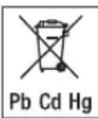
The empty, completely flat batteries must be disposed of through specially designated collection boxes, recycling points or electronics retailers. You are legally required to dispose of the batteries.
The codes below are printed on batteries containing harmful substances:
Pb = Battery contains lead,
Cd = Battery contains cadmium,
Hg = Battery contains mercury
For environmental reasons, do not dispose of the device in the household waste at the end of its useful life. Dispos of the unit at a suitable local collection or recycling point. Dispase of the device in accordance with EC Directive - WEEE (Waste Electrical and Electronic Equipment). If you have any
questions, please contact the local authorities responsible for waste disposal.

10. Problems and solutions
The machine does not switch on when the ON/OFF button is pressed.
What should I do?
(1) Make sure that the batteries have been inserted correctly and have contact.
(2) Change the batteries if necessary.
(3) Contact customer service.
The electrodes are detaching themselves from the body. What should I do?
(1) Clean the adhesive surface of the electrodes with a damp, lint-free cloth.
Then let them dry in the air and attach them again. Should the electrodes still not adhere firmly, they must be replaced.
(2) Before each application, clean the skin, avoiding using any skin cream or oils before treatment. Shaving can increase adhesion of the electrodes.
There is no noticeable stimulation. What should I do?
(1) Interrupt the programme by pressing the ON/OFF button. Make sure that the connecting leads are properly connected to the electrodes. Make sure that there is a firm contact between the electrodes and the treatment area.
(2) Make sure that the plug of the connecting lead is firmly connected to the machine.
(3) Press the ON/OFF key 1 start the programme again.
(4) Check that the electrodes are positioned properly and make sure that the adhesive electrodes are not overlapping.
(5) Increase pulse intensity in stages.
(6) The batteries are almost empty. Replace these.
What to do if the battery symbol is displayed.
Replace all batteries.
You are aware that the electrodes feel uncomfortable. What should I do?
(1) The electrodes are badly positioned. Check positioning and if necessary reposition the electrodes.
(2) The electrodes are worn. Due to the fact that current distribution can no longer be guaranteed evenly over the entire surface, these may lead to skin irritation. You must therefore replace these.
The skin in the treatment area becomes red. What should I do?
Stop treatment immediately and wait until the skin has returned to normal. If any redness beneath the electrode soon disappears, this is not dangerous and is due to the increased circulation which has been stimulated locally.
If, however, the skin irritation remains and there is possibly itching or inflammation, please consult your doctor before further use. It may possibly be caused by an allergy to the adhesive surface.
11. Technical details
Name and model: SEM 43
Initial curve shape: biphas square-wave pulse
Pulse duration: 50 - 450~ s
Pulse frequency: 1-150 Hz
Output voltage: max. 100 Vpp (at 500 Ohm)
Output current: max. 200 mApp (at 500 Ohm)
Power supply: 3x AAA batteries
Treatment time: adjustable from 5 to 100 minutes
Intensity:adjustable from 0 to 50
Operating conditions: 10^ - 40^ (50^ - 104^) with a relative humidity
of30-85%
Storage conditions: -10°C-50°C (14°F-122°F) with a relative humidity
of10-95%
Dimensions: 135 × 66 × 29 mm (incl. belt clip)
Weight: 107 g, (incl. belt clip, without batteries)
133 g, (incl. belt clip and batteries)
Note: If the machine is not used according to these specifications, perfect functioning is not guaranteed.
We reserve the right to make any technical alterations that are necessary in order to improve and develop the product further.
This unit is in line with European Standards EN60601-1, EN60601-1-2 and
EN60601-2-10 and is subject to particular precautions with regard to electromagnetic compatibility (EMC). Please note that portable and mobile HF communication systems may interfere with this unit. For more details, please contact customer service at the address indicated.
The machine meets the requirements of the European Medical Products
Directive 93/42/EC and the German Medical Products Act.
12. Replacement parts and wearing parts
Replacement parts and wearing parts are available from the corresponding listed service address under the stated material number.
| Designation | Item number and/or order number |
| 8x adhesive electrodes (45 x 45 mm) | Art. no. 661.22 |
| 4x adhesive electrodes (50 x 100 mm) | Art. no. 661.21 |
FRANÇAIS
Sommaire
1.Premieres experiences 31
REMARQUES RELATIVES AUX PILES
10 programmes TENS
30 programmes EMS
10 programmes MASSAGE
7.5 Doctor's Function
7.5 Doctor's Function
IeNCTBnE 3NEKTOPOCTMUYJLIM, KAK npabINo, CTaHOBTcOuYTMbIM TOnbKO NOCpe peryJrphoro npimeHHe. 3NEKTOPOCTMUYJLIM He 3aMeHReT
pernyapHy TpeHnpoBky MbIu, HO B 3HaHTeJIbHOI CTeNEH IOnONHReT ee DeICTBVE.
Iop TepMHOM TENS -peckoxho 3neKtpocmnyuue HEPBbix OKOHH -noHMAOT DeCTByOooee Upe3 K0xy 3neKtpueckoe BO36yXdHHe HEPBO. TENS DOUyEHN BKAeCTBE KINHuecckn DOKa3aHHORO, 3ΦΦEKTHBHO, HEMeIKAMeHTO3HOrO, pnp npabInbHOM pImMeHEHM He IMeIOero NOoHbX 3ΦΦeKTOB MeToA no LEHnHO 6OJe, Bb3bBaembIX ONpeJENHbIM NpMHNHAM, -Pn 3TOM B T.Y. IN dNPOCTOn CAMOTAPANII. BOnEyTONIOOe H6oNODABNIOOe DECTMBEO DocTnAeTC, KpOME BCER IOPOe, NYTEM NOaBHeNIA nePeDAu 60NI NO HEBAM (pnp 3TOM, npexkde BCero, 6NaIOrApA BICOKOvAcTbHM IMNylbcAM) IN POCTa BIDEnHRA yTOREHHORO 3HOpDPHa, KOtOpB iYMeHbuaET YCBTBNTelbHOCTB K 60JI 6bnarOapc CBOEmy DeCTBnHO Ha CEHTPaBHy HOEPBHyCnCTemy. Meto HauHYoNDTBepxJed N DoonyeH K MEINCHCKOMY pImMeHENIO. KaJdA Kaptna 3abObeBAHn, No3BONJoua nCnONb3OBaTb TENS, DOnjKa 6bMb6BroBopena CLeuAnim BpaHom. OH DaCT Bam TaKke yka3aHnNo camOTepanNN c npImeHHeM TENS.
TENS KInHHeCKn IcBtAn H DoNyueH dIa CneDyUx oBlaCTeN pIMHeHr:
60N B CnHHe,OCOeHHO XaIObblOBlaCTNPOrCHMHORO NWeHOROTDeNO3BOOHUHKa
- 601N B C cytTabax (Hapnpimep, KOleHHbIX, Ta3o6epeHHbIX, nneeebbix)
HeBpaTIM
- roJOBHbIe 60nI
60JINnPmMeHCTpyaLxyXeHUN
- 60nn nocne TpaBM ONOPHO-DBnraTeIbHoro annapaTa
- 60nl npn hapyuhenx KPOBOObaeHna
- xpoHnueckne 60JIN, BbI3bIaebMble pa3NJUHbIMN pInuHaAM.
3NeKtpocTmyIyma(EMS) RnIeTcM WpOKo pacnpoCTpaHHeIM nObueepn3HaHbIM MeTODM UyKe MHOrne rOdbI pImMeHReTCB CnpTbHn IpeabmHTaUMHOH MeDnUHe. B O6JIaTc cnpota HHTHECA EMS npImeHETc KAK DOONHHeK OObuHbIM MeTOAM TpeHPOBKn MblU, YTObI NObICITb FyHKMOHaNbHbIe CNOCOBHOCTMbU, NDOCTNb JxenaEMbIX npOnOpupTe Tena. EMS nCIOJIb3yETcB DByX HApBaJIeHNx. C OdHOB CTopoHbI, MOXHO Bb3bBaTb CEHeHAnpABJHHeOy KypENHeHne MyckyNaTybp (akTNbpyOooep npImeHHe), a C pyro - MoKet DoCTrA tBC
paccna6bnooee,BOcCTaHabnBaHOooee neiCTBne (paccna6bnooee npimeneHne).
KaTnBpyUoemy npImeHeHIO OTHOCrTa
- TpeHIpOBKaMbIuDINIOBbIeHnBBiHOcINBOCTN/IM
TpHnPOBkaMbIuIynoepKkynKppeNHeHnOpeJeHbIXMbIuI INrpynnMbIuI,YTObiIOCTNuHxKeNaembIXnMeHnBipONOpunxTea.
Kpacnaabnoemy npmeheno OTHOCRA:
- penakcaumMbIuZIy yCTpaHEnpacTKeHn 3aUeMJIeHn MbIuZ
- ynyuheHne npn CmTTomaxMbIueHou yCTaIOCTN
- yckopenhe perehepaunMbIuN nocne 60nbwoMbIeHNOHarpy3Kn (HaNPmep, nocne Mapafohckoro 6era).
Kpome toro, uipboopn np60ep EMS/TENS 6laorapb BcptoeHHOHTXHONMaccaxa daet BO3MOXHOCTb C NOMOUBIO np6JHXeHHO NOBOCPNRTIOI DeCTBIO K pealbHOMy Maccxpy npOrpaMMbl yMeHbTaTbPactxekHmN 3aUeMJIeHMyMbUuN bOpOTbcrC RBAHeHMMYyCTaIOCTN.
Ha OCHOBAHn peKOMeHdaun no No3uHOpBaHNu n Ta6nuc npoPamM, npBedeHHbX B daHOn HNCTpykUn, Bbl MoKeTe 6bICTpo n pOcTo ONpeDenTb NaCTPOky npBopAp dnn COOTBeCTByUoJero npmHeHn (B 3aBNCUMOCTn OT qactn Tena) n Dn COOTBeCTByUoJero DeIcTBn.
Blaorapn DBym pa3dienbno perynpemybim KaHanam, mfpoboi npbi6op EMS/ TENS oecneuBaet Bo3MOXHOCTb perynpOBKn INTEHCNBHOCTN mnylbcoB He3abcMNO dpyr ot dpyra Ha DBe qacttn TeNa, HApnPMeP, YTo6bl OXBaNTb TELO C 06nx CTOPOH nIN PABHOMEPHO CTMYIPOBAtb BOJbUme yAcTkn TkaHe. Kpome TORo, INDINUYaJIbHaer perynpOBKa INTEHCNBHOCTN KAJDO rKaHala daET Bam Bo3MOXHOCTb ONDOBpeMeHHORO pIMMeHHNr pPi6opa Bdyx pa3NJHbIX qacTEx TEna, BlaorapdAeMy DOCTfRAeTCKOHOMN BPeMeHN NO cpaBHeHIO C NocJeOBAteHBiM pIMMeHHEm.
1.2 KomnneKT NocTabKn
-1цфровь пибор EMS/TENS(BkIIOUa3aueKnyдя ремня)
-2coeHHTeNbHbIXKaBcIa
-4camokkneuixxcreJnKtpoja(45x45MM)
-36aTaapeKuTnA AAA
- daHHa HNCTpyKUH NO pIMMeHENIO
12.BaxHbIe yka3aHn
PpmeHne Pnp6opa He 3aMeHaeBpaue6hix KOHCyIbTaun NJeEHn.
PoTOMy npn IIO6bIX TINAX 6OJIe ININ 6OJIe3He Bcerda npedBapnteJbHO
npokOHcyIbTpyNTpeC b BpaQOM!
IPEDOCTEPEXEHNE!
Bo n36exkHHe Bpea 3doOpBbO HactoTeIbHO He peKOMeHpyeTcnpimEnrTa uΦpOBoi np6op EMS/TENS B cIeDyUoxn CnyaX:
- pπu IMπlaHTnIpOBaHHbIX 3πeKtpoPn6opax (HapnMpε, KapduocTmUyIaTOp cepua)
- PnHAnuMetaanuecknxIMnnaHTaTOB
- PnN NcNOJIb3OBAHm HHCyJINHOBbIX HAcOCOB
- npn BbICOKoT Tempeatype (HaNPmep, CbIe 39 ^ C
- pπu n3BecThbIX nπn OCTpbix HapyuweHnpx PtTMA cepua n dpyrnx HapyuweHnxx Bo36yKdHnna nPiPOBeDeHnna NmnybcOB B cepdue
- npn npnaqkax (HaNPmep, 3nnJenCm)
BOBpeMBepeMeHHOCTN - npn paKobbix 3a6oJIeBaHnIax
- NOCNE ONEPAUH, PNI KOTOPbIX YCINIEHHOE COKpaIeHHe Mblu MoKET MeMaTb PPOCECy Bb3DOpOBJIeHnA
3anpeaaetcnpimehene npnbopa B6n3n cepda. CTmynpuyuue 3neKtpoDb 3anpeaaetcra yctahabnBaBb B KaKx-Jn60 TOckax nepedHn actn npdyHO KnEKN (orpanHHeHnope6pamn npydHoi),BOCOeHHocTH Ha 060nx 60bnx npdbhMbluaX.3dec np6op Moket NOBbUaTb ONACHOBt MEPaHna XkEnyDQKOB cepda N Bb3BaTb OCTAHOBky cepda. - Na KocTReX Yepena, B ObnaCTn pTa, rIOTKn mnnrTopTaHn
B O bOaCTn WEN / COHHbIX apTepn
B OblaCTI NIOOBbIX OpraHOB - npO octpbix INI XPOHnuecknx 3a60leBaHaNX KOKN (NOBpeKJHeHHN IINI BOCnAJIeHN), (HApnIMep, pNp OoJIe3HeHNbIX INI Be36OJIe3HeHNbIX BOCnAJIeHNX, NOKpaCHeHNX, KOKHON CInI (HApnIMep, aJInePmN), OXORax, Ydapax, oTEkAX, HAOTKpbIbIX NIK 3aXKBaIOUx PAnhAX, HA WpAmax NocJe ONepaMn, HaxOJaUxNCB B nPoLCce 3aXKnBHeN)
-ПИ ВБСOKОВ BДАЖСОТNВОЗДУХA, HANPIMEP, B BAHHbIX KOMHATX IIN ПИпIMe BaHHbI WII NДУsha - nocne ynoTpe6nna anKorOra


- pπi OndHOBpeMeHHOM PoiKJIIOUeHn K BbICOKOaCTOTHOMy XmpyprueckOMy npnbopy.
Ppei npmeHnem np6opa npokohcylbTnpyTecb cJeauM BpaOM npi:
OCTpbIX 3a60neBaHnIX, B OOC6eHHoCTn PnI NOD3peHm IN HAMnApTePmaJIbHOI TnepToHm, HApUeHnIX CBeptbIBaHnIX KPOBn, CKIOHOCTN KTpOM60M60JIM, aTAKKe PnI 3IOKaHeCTBeHHbIX HOBOO6pa3OBaHnx
JIIO6bIX KOKHbIX 3a6OJIeBaHHJX
- HeBbIeHHbIX XPOHHeCKHX BOJIe3HeHHbIX COCTOHHX, He3aBNCIMO OT Yactn TeJa
- Dna6eTe
JIIObIbX HApUSeHnIXyBCTBtEnbHOCTN C NOHIXeHHO6OBeBOY YBCTBtENbHOCTbHO (HapIMep, npHapUSeHnIX OMeHa BeueCTB)
- ODHOBPeMeHHO IPOBOIMbIX MeINUHCKNX JueEHnX
BO3HnKaIOUXIPINCTMMyJIAUINKAIIO6aX
- HeNCHe3aOuix pa3dpaKehnIX KOKN B CBA3N C DInTeNbHOI CTMMyJIeN C paCNOIOXKeHnEM 3NEKTPOoB BOHOM I TOM KE MecTe.
BHIMAHVE!
PpmeHnTe cnpboB np6op EMS/TENS ncknOHTeNbHO:
-ДЯлodei
B UeJx, JnKOTopbIX OH 6bl pa3pa6oTaH, IN TOJIbKO CIOOCOBOM, ONIcAHHBIM B DaHHO IHCTpykUIM NO pPIMHeHIO (JIIOBOE PpIMHeHNE He No HA3HaueHIO MOKeT 6bl OaChbIM)
-ДянагухногпprimeHeHnA
C BXOJIUIMM B KOMIJIeKT NOCTABKIM I DOONJHITeJIbHO KYNJIeHHbIMN OPIINHAJIbHbIMN PIPINADJIeXHIOCTaMI, B IPOTUBHOM CJIyae TepreET CBOHO CNJY npEOCTaBIIeMaI rapaHTnI.
- DAnHbI npBOp He npEHa3HaueH nIy IcNol3oBaHnIeTbMn NIN B3pOcMbIMC OprAaHHeHHbIMn Fm3nHECKMM, CECOPbHMn (HanPIMep, HEBOCpPIMuNbOCTb K 60JI) NIM yMCTBeHbIMn CnOC6HOCTMa, A TAKKe C HeIOCTaTOHbIMOn bITOM N/INN HeOCTaTOHbIMn 3HAHnIMN, KpOME CUYaAR, KOrDa OHN 6yDyT HAXODINCBor NOJ PnMCOTPMOT OTBETCTBEHORO 3A INX 6E3OanACHOCTb NIIa NII NONYat OT Hero IHCTpyKUIM No ICNoJIb3oBaHnIO npBopA.
OBPALUEHNE C 3JIEMEHTAMN IITAHNIA
IpnnonadaHmXnKoCTn3akkymyTOpaHaKOxynnBΓna3aHeoXO DIMO nPOMbITcOTBETCTByUOuN yAcTOK 60JIbWM KOnHecTBOM BoDbI N 6bpATNTbcrK BpaCy.
Onachoctb nporlaTbBAHnMeknx qacte! MaJIeHbKHe DeTu MOrTy npornotb 6atapeKKn N NOaBntbCn UMN. IToTMy 6atapeKKn Heo6xOIMO xpaHTB HEOCTyHOM DnI DeTe MeCTe!
- 06paaaiTe BHHMaHHe Ha o6o3NaYeHne noJrPHOCTn: pHOC (+) mMHYc (-).
- Ecnn 6aTapeiKa noteKla, OunchnTe OTdJeHHe dIg 6bataeck cyxoi canfetKO, HadeB 3aunTHbIe nepuATKn.
3aunuaine 6atapeKOnOT ype3MepHoro BO3dienCTBnA Tennla.
OnachoctbB3pbBa!He6pocaiTe 6aataeienB oroHb.
- He 3apjxaiTe n He 3ambikaKe 6aTaapeiKn HakoPOTko.
- Ecn npin6op dntteBHOe Bpem He nCnOJb3yETc, n3BneKeTe n3 Hero 6atapeKn.
- IVcnoIb3yIte 6aTapeKn TOJbKO OJHO TmNa nnn paBHOeHHbIX TINOB.
3aMeHnTeBce6atapeKncpa3y.
- He nCnoIb3yIte nepe3apjaemblcakkymlTOpbl!
He pa36npaTe, He OTKpbBaTe n He pa36nBaTe 6aTapeKn.
MEPbI IPEIOCTOPOXHOCTN:
Bcerda akkypaTHO cHIMMaTe 3JIeKTPoDbI C KOxu, YTO6bI BpeKnx Cnyuayox OeyHb YyBCTBNTeBHOn KOxu IpeDToBpATnTb ee NOBpeXJDeHn.
He np6nKaiTe np6op K nCTOCHKAM TeIJa H He mCOnb3yIte erO B6n3m (~1M) KOPOTKO- MIKKPOBONHObix np6opOB (HAnpIMep,MO6nIbHbIX TeJeFOHOB),T.K.3TO MOKeT pNBOITb K CKaYkAm TOka.
He noDBepraIte npB6op BO3deIcTBIO npRbIX COJIHeHbIX Lyyei IIN BbICOKIX TEMpepatyp.
3auiuaiTe npnbopOT nbInn,przni n BnaHn HnB Koem cnyae He norpykaiTe npnbop B BOy Nn Dpyrme KIOKocTN.
- Pn60 npoxoIT nI npcoHbHO mO3OBaH.
-По ГИгЕНИСЕКМ ПИЧИНAM эЛжТрдами может ПОлььЗоватсЯ ТолькОдун.YeLOBEK.
Ecn np6op He yHKuONHpye TOnKbIM O6pa3OM, NOBnIOTc HEDOMORAHN IIN 60NI, HEaMeJNTeJIbHO npeBNTe erO cNoJIb3OBaHne.
-ДЯСЧТЯИЛСМСЕЦЕНЯЗLEКТPOДOBпpeДВAPNTeLBOOTKIOHITe
РПБОр ИИС COOTBETCTBYUOJIKAHAJI,ЧTOБI ПPEODTBPATNTb
HexelaTeMbHyO CTUMyIaIIO.
He BnDOn3MeHReIte 3JIeKTPOdbi (HaNPmep, 6Obpe3a Ix). 3To Beet K NOBbIeHHoN IIOOTHOCn TOKA NMOXET 6bITb ONaCHbIM (MaKC. peKOMeHnyEoMoe BbIXoHDoe 3NaueHne 1JIe 3JIeKTPoDbO: 9 Ma/cm2; 3ΦΦeKTHINBAI INIOTHOCb TOKA CbbIe 2 Ma/cm2 Tpe6yEt NOBbIeHHORBHNIMAHIA.
He npimehnepnpbop BO Bpemr CHa, BoKdHnABTOMObnu ININ pni OHOBpeMeHHOM ynpabneHN MaunHAMN o6OpydoBaHnEM.
He npimehnTe npin6op npin liobix paobotax, npin KOtOpbHexnpedcka3yemaepaeku (HapnPmep,yciHHeHOe cokpaee HecMOTPRA HA HN3KYIO INTEHCNBHOCTb) MOKET 6b1b ONACHOI.
Cneinte 3a Tem, YTO6bI BO BpEmr CTmmyJzMn MeTaNHeckne ObBeKtB, HAnPnMep, PnRkN pEmHn NIN LcENoCHn, He COnPNKACAInCb C 3NeKTPoDAMn. EcnB 3OHe pImHeHn IMeIOTCyKpaLHeHn INN PnPCnHr (HAnPnMep, B nPnke), To nepehncnoJb3oBaHmE npNoBbAohmnpnObopaNX Heo6xOdimo CHATb, T.K.B NPOTIBHOM CNYae MOXHO NOJYChTb TOeHbBy OXOFnI.
- Bo ɪnʒeːkʌhɪne Bɔːmɒkʰbɪx Ónachɔcteɪ xpaɪnɪte npɪbɒp B HeɪdʊctyɪnHOM ἀν ἀπει MecTe.
He npetyaTe KaBEn 3NeKTpoDB IO KOHTaTb C HauHnKaMm NIN DpyrMM pN6OpAMn IN He CoeHNHJe 3NeKTPODb C DpyrMM pN6OpAMM.
He nCnOJb3yIte 3OT np6Op oNHOBpeMeHHo C dpyrnnm np6OpamK, KOtOpblie nepedaiot Tety 3NeKTpuueckne IMmnylbcbI.
He nCnoJb3yIte npBop B6n3n JERKO BOCnnaMeHraOuxcR BeueCTB,ra3OB mIN B3pbIBaTbIX BeueCTB.
He nCnoB3yIte aKKymJrTOpb; Bcerda nCnoB3yIte 6aTapeKuOdnakOBOro Tnna.
IcnoJb3yIte np6opB nepBbIe MHyTbI B noLoXeHm IeKa nnCnJa, 106bI b peKHX CnyaHx Ba3OBarabHbOH peaknn (YbcCTBO cna6Otn) He NOBBeprTaC8n3nMnHEn ONaCHOCTN nOlyeHn TpaBM. PnIO naBHeHm YCbCTBa cnaOcTo HnE3aMeIITeNbHO OTKInOHTe np6op N oDnHMnTe HOrn (np6bn.Ha5-10MNHyT).
- Ппебарпельная образовка коши КхрнblimКремamIMma3mM He pekomehnyetcT, T. K. 3TO BeTeK T NOBbIeHHOMy 3HOCy 3JIeKTpOBoN MoKeT TAKKe ПпвODNTb K CkaHkAM TOKa.
IopBXeHne
- PnIO NOBpeKdEnHx np6Opa He nCIOJIb3yIe er O mbpATmTeCB TOpROByIO oprAn3aUIO, pOpaBwUIO np6Op, NIO BO yKa3aHHOMy aDpeCy cepBnCHOn Cnyk6bl.
- PnpOBepaTe npBOp ha OTCyTCTBne npn3HaKOB NOBpeJdeHnI INI IN3HOCA. PnO6hApUxKeHnIOo6bIx npn3HaKOB ININ B Cnyae HnPaBnIBHO rNCNtB0BaHnI np6Op apeD IOBTOpHbIM NcNtB3ObaHmEero Heo6XoDMo OTnpaBnTB n3rTOBnTEHn IIN B TOPROyIO oPraHn3aHIO.
- He3aMeIInTeIbHO BbIKIOUHTe npu6Op, ecn OH HeICnpaBeH nI IN IMeIoTc HEnoJaKn B pa6ote.
Hn B KOEM Cnyuae He NbTaIteCb camOCToTeJIbHO OTKpbITb HJIN OTpEmOHHTNPOBaTb PnIb6Op.PeOMHTHbIe pa60tBJdoJXHbI pyOn3BOHNTbC8 TOJIbKO cepBNCHO CnyKbOHN ABTOPI3OBaHHBM TTOPBOBM OPraHImaJIaMm. HecO6JIIOHeHne 3TNx Tpe6ObaHm BeET K notepe rapaHTNI.
ИЗТОВИТЕЛБ He HeCET OTBETCTBEHHOCTN 3a yUepe6,БИЗBAHHbI HeKBaIIuФицИрOBaHHbIM IIN HenPaBUNbHbIM IcNoIb3OBAHHeM npIbOpa
3. NapaMeTpbI Toka
3NeKtpoCTMmIyTOpbpa0TaOTcoCnElyOuIMNHAcTpoKaMnTOka, KOTOpBIE,B3aBNCMIOCTNOTpeYlnpOBKN,OTKa3bIBaIOTpa3nHoeJeICTBHe Ha 3ΦΦeKT CTMyJLau:
3.1Φopma mnynbcoB
OHaONICbIaBcFyHKUIO BpeMeHNI TOKa BO36yKJEnHNI. PnIMOT PAJIHNAHOt MOHOΦa3HBi N DBYXΦa3HBi MMyJIbChBI NK.PnMOHOΦa3HBi IMyJIbCAx TK TeHT B OJHOM HApPabJIeHN, PnDyXΦa3HBi-TOK BO36yKJENH MEHReT CBOE HApPabJIeHne.
B uippoBOM np6ope EMS/TENS npmeHIOCTC TOIbKO DByXp3HbIE mNpyNbChbIE TOKI, T. K. OHn pa3rpyKaOT Mblu,BeYt K MehSwemy YTOmJIeHIO MBUc N ObecneHBAOT Bolee HaJExHO Ebe3oNaCHO pnpmeHHe.
3.2 YactoTa MMnYbcoB
Yactota noka3bBaet uCNO eHNHHyBIX MMnIyBcOB BcekyHy, OHa N3MepaETcB Tc (repax).Ee Moxho paccHTaTb, B3Rb 6pTaHOe 3haueHne OT dNInTeNbHOCTN
nepnoa. COOTBETCTBYUOaJyactota onpeDenreT, KaKne TINbMbIeHbIX BOLOKOH pearnpuyOT. MeDneHNO pearnpuyOuue MbIeHbIE BOLOKHa pearnpuyETCKopee Ha Hn3KHe yactoTbI MMpyLcob Do 15 U, a 6bICTpo pearnpuyOuue BOLOKHa HauHHaOT pearnpOBaTb TOJbKO C yactoTbI 35 U.
PnIMnybcax CcaCTO45-70TnpOcXoNDIINTEbHOHAnpJxHeMeMbUCCBOcHTAHN C6bICTPOMBuHEHOYcTAIOCTbIO.Po3OMy BICOKAaACTOTAMMnYbCOB PpeMHyIeCTBO PpIMEHReTCdIa TpeHNPOBKn CKOPoCTHOmAKCImaJIbHO CNJIbl.
3.3IINTeJIbHOCTb MMnYlbca
Iod He IOHMAOT dnteBHOCT b eINHnHORo mNpybca B MmKpOcekyIaX. CpeJe npOero, dnteBHOCT b MMnybCa ONpeDeIer TnyBuHy npOHKnHOBeHnToKa, npChuB O obIeM cIyueae IeCTByet cIeNyUeep npABINO 60nee KpyhnaMbIeueHnMaCCa Tpe6yEt 60nbIeN DNT
3.4 HHTEHCNBHOCTb MMnYJbcOB
PerynopBka ypoBHa INTEHCNBHOCTn 3aBNCNT O
HINMBUYaBHorO cybEKTMBHO OoUyEHHN KaKDoR0
OTDeBHorO NOB3OBATEN I ONpeDEnrTc8 0oJbUM
HCNOM BENuHn, KAK, HApIMep, ObNactb PpIMeHENH,
KPOBOOpaJeHne B KOKe, ToIJIHa KOKn, a TAKKe KaYe
3JEKTPoAMn. Ha npAaTKHe HAcTPOKa DOJXHa 6bITb 3f
KOem Cnyae He DoJXHa Bb3BaTb HEnpYTHbIX OoUyEe
ObNactn pPmEhenHn. B To BpEm, KAK JERKn 3yD Yka3B
3HEPrIO CTmYNAUz, 3aPeUaTeCn PpIMeHTb HAcTPO
Bb3BaIO7 60Jb.
Pn60Jee nnTeBHom npMmehHm MOKeT nOTpe6oBaTcR peYnnpOBKa B C83N C BPemEHbIMn PPOeCCAMn aanTaUM K Obnactn pMmehHn.
3.5 LKlnHoe n3MeHeHne npaMeTPOB mNtYbcoB
Bo MHOrnX cIyAax Tpe6yeTcnyTem npImeHHeN HeckoBkx npaMeTPOB mNpybCoB OXBaNTb BCIO COBOKynHOCTb CTPkyTpTKaHN B oBlaactn npimHeHn. B uPpOBom np6ope EMS/TENS 3TO ocUyecTeBnEraTcB 5IarOapr TOM, yTO npednaembe nporgamMbI abOTOMaTHueCKn BblIOJIHOHT UKNIuCeKoe N3MeHHeN npaMeTPOB mNpybCoB. Te CMbIM TaKke npedotbpaaaetcYctanocb OTdEBhIx rpynn MbIuC bO6nTnpimHeHn. B uPpOBom np6ope EMS/TENS IMeHOTc paUNHOHbIbe npedBaPntbHbIe NaCTpOKn npaMeTPOB ToKa. PIn 3tOM Bbl MoKeTe B IIObOm MOMENT BO BpEM npimHeHn N3MeHHT b NTHeCNBHOCTb IMyNbCOB.C NOMOzbu
6 nporpaMM BbI nmeete Bo3MOXHOCTb CaMOCToTeNbHO yCTaHaBnBaTb pa3JIuHhIe npaMeTpbl CTmMyJLrU.
4. Onicanhe np6opa
KhoNk:
1.Khonka BKJ./BbIKJ. ①
2. Khonka E (Enter)
3.KHONKINHTEHCTHCMBHOCTN(Ch1-BJIeBO, Ch2-BPaBO)
4.БлOkupOBKa KHOJOK
5.KHONKa Bb6opa UP (BBePx) u DOWN (BHN3)
6. KhoIIka M (MeHIO)
O6paTnTE BHMMaHHe Ha pncyHKn 25 n 28, KOToPbIe KacaiOTcKoJIeHHOrO n roJeHOCTOnHOrO CYCTaBOB.
PpOpaMmBurst nOxOaT dN BcEx 3OH, KOTOpbIe DoJXHbCTMMyIpOBaTcBcC nepeMeHHbIM pncyHKOM CnHAnOB (dN KaK MOXHO MeHbIero npNBbIKAHNA).
6.4 NporpaMMbI EMS
| №.npo- rρamMbI | Рацнонавные oblaсти рименени,показаня | Возможhoe paclоложения олектpondов | Фаза Дпгпел- HOCTь (MH.) |
| 1 Kapilларзaceaю 1-281 20 | |||
| 2 Pazorрев 1-281 10 | |||
| 3 Вocstа hablenе посту trpeniroв- кИ/copeвноваян | 1-281 20 | ||
| 4 Мaksимальнай сида мышцнижнix KOнechностс. | 22, 23, 24, 26, 27 | 1 | 05 |
| 2 | 15 | ||
| 3 | 05 | ||
| 5 ВынOSTМбОТь МБИЦнижнix KOнechнostс. | 22, 23, 24, 26, 27 | 1 | 05 |
| 2 | 20 | ||
| 3 | 05 | ||
| 6 Взbethа сида мышцнижнix KOнechнostс. | 22, 23, 24, 26, 27 | 1 | 05 |
| 2 | 12 | ||
| 3 | 05 | ||
| 7 Мaksимальнай сида мышц тунови- 社а и ворхинix KOнechнostс. | 1-201 05 | ||
| 2 | 15 | ||
| 3 | 05 | ||
| 8 ВынOSTМбОТь МБИЦниождднижнix ворхинix KOнechнostс. | 1-201 05 | ||
| 2 | 12 | ||
| 3 | 05 |
- Ecnn npnbop He nCnNoB3yetyra 2 MNHyTb, OH aBTOMaTHueckn OTKInOuaeTcR (abTomatIKoN OTKINouHeHna KK-DCnIe
NORBIAETCRAIBHOEMHIO,NCIOIb3OBaBWeEeCRIOCLIEHMIOIMMeHOMIgAeT.
- Pn HaxkataM DOnyCTHMo KNOHKN 3ByHT KOPOTKm 3ByKOBOm CmHAn, npn HaxkataM HeONyCTHMo -Dba KOPOTKnx CmHana.
BblMOKTe npeBaTb CTMyJauNIO B JIO60 MOpENT KpaTKM HkaTne KHOKN BkI./BblKJI. Bay3a).IpyoJPOJKeHnCTMUYJauN eEe pa3 HAKMTe KHOKNy BKJI./BblKJI. MyCTAHOBITE XeJaEMy INHTehCNBHOCTb MMYJbCa 3aHOBO.
7.2 Nopraok deicTBn dI nporpaMM TENS 1-7, EMS 1-27 maccaxa 1-10 (6bictpbinnyck)
- Bb6epnte n3 tabnuc nporpamM (cTp. 65-66) noxodnyo dna Baunx ueen nporpamMy.
PacnoNoJXnTE 3neKtpoDbI B Tpe6yEmoO6nactn (npednoKeHn no pacnoNoXeHHIO CM. B pa3dene «PacnoNoXeHHe 3neKtpoOB» Ha cTp.2) n coeHNHTe IN C npnbopom.
Bb6op nporpaMbl
HaxmTe KhoNkBy BKJ./BbIKJ. 106bl BKNIOHTb np6op.
HakatneM KHONK M BbIIOJIHHe TaHbIRaUHO MeJy NIOMeHIO TENS EMS MASSAGE (PNC.1, npIMep INDINKAUI HA dncnnee TENS) nOHTBepdnte BaW bIbOp c NOMouBo KONKNE E.
- BbIbepNTe c nOmoUHO KHOIOK UP/DOWN Tpe6yEmyIO nporpaMMu IIOITBePdTe BbIbOp KHOIOK E (pnc. 2, npimep nporpaMa TENS 03).
O6zuaHnΦopMaun
Ecnn Bby XOTnTE BepHybCBy npeXHee MeHIO BbIbOpa, HaxMMTe PmC.2 KhoNkY M.C NOMOuBIO DnITeBHO R HaxaTNR KHOKN E MOxHO npOnyCTnB OTdEhBbIe 3TaIbHacTpOKn I cpa3y pNpCTynNTb K CTmMyJzMn
HactpoiKa HHTeHcNBHOCTN MmnyIbCOB
I Pn3ayncKe CTMyJauuINHTeHCNBHOCTb IMNylcob Ch1 n Ch2 no yMOnHaHIO yCTaHOBHeHa O. NmNylcbH a 3JeKToPObl He NOCbJaIOTCra.
Bb6epnte Heo6xOIMyIO INTEHCNBHOCt b IMnyIbCOB C NMOUbKOHNKINHTEHCNBHOCTM.NIMKALIMNHTEHCNBHOCTN IMNyIbCOOB COOTBEcTBcyUcMM O6pa3OM N3MeHReTcR (PNC.3). PnC.3 BblMOXETeYCTaHOIBMb INTEHCNBHOCTb IMnyIbCOB Ch1 n ch2 pa3dJIbHO DpyrOt dpyra
Pnc.1
Pnc.2

PNC.3
Da3nBbHO
paae
Ecn nporpamma haxoJITcB pexnme OxuHaH,TO INHTehCBHOCTb He MOXET 6bTb yBeInuHeHa.
- Ecln Bbl XOTME DocpoH0 3aBepWntb CTMMyLauHIO, HaxMMTe Ha KHOIky BKJ./BblKl. ①
7.3 HacTpoKa co6cTBeHHbIX npaMeTpOB
7.3.1 YcTaHOBbKa BpeMeHn IeueHHa
(TENS nporpambl 8-10 nporpaMMb EMS 28-30)
C nOMOJIbIO KHOJOK UP/DOWN BbIbEpIte Heo6xOIMoe BpeM IeHnra. Bbl MoKeTe yCTaHOBnTb BpeM IeHnra B npedax 5-100 mHyT (pnc.4, pnpMeP: BpeM IeHnra 20 mH.).
IIOITBepDte Bb6op c nOMOuBIO KONKNE CTmUyIaNn 3aNyckaetcra INHdkaTOp pa6oHero COCTOHNHaHnHaet MInrTaB (pnc.5).
Pnc.4
Pnc.5
7.3.2 Hacpoika nHnDnBnuyAubhBix nporpaMM TENS 7.3.2 HocpokdckTbni npncnoB3OBAHHnpoPambl TENS0
Iporpamma TENS 08 -3TO npeBapntelbHO hacTpoeHHaI nporpaMa, KOTOPyMOxHNO 3aAaTB INDINUYaIbHO. IaI 3ToI npOrpammbl Bb moKTe yCTaHOBt bactOty MMnYbCa OT 1 Do 150 Fu, a dNITeHbOcTb MMnylbCa OT 50 do 250 MkC.
PacnoIoxnTe 3JKeTPOBb IB Tpe6yeMoO 06NaCTN (npEINOxHnno pacnoIOXeHNIO CM.B pa3JeNE “PacnoIOXeHne 3JKeTPOOB” Ha cTp.2) n coeINHnTe INC npi6OpOM.Bb6epnte nporpaMMy TENS 08 B COOTBETCTBn C n.7.2 "Bb6op nporpaMMbl" (cTp.67).
BbIbepnte C nOMOuBIO KHOJOK UP/DOWN Tpe6yEmyK qactotuy mnyIbca u NoTBePnTe Baaw BbIbOp KHOJKO E (pnc.1, npMme: qactota mNpyIbca 100 t).
BbIbePnte C nOMOuK KOHONOK UP/DOWN Tpe6yeMyo DnITeNbHOCTb MMyJbCa N NOITBEpDHTe BaA BblOp KHOIKoE (pnc.2, pnpMep: dNITeNbHOCTb MMyJbCa 200 MkC).
- BbIbePnte Heo6xOumoe Bpemr IueHnB COOTBeTCTBn C n. 7.3.1 «YctaHOBaBpeMeHHneHn (CTP.68).
BbIbePHTe HeoXOIMMyIO INTEHCNBHOCTb IMNpyLbCOB B COOTBETCTBM C I.7.2 "HAcTPOIka INTEHCNBHOCTn NIMnyIbCOB" (Ctp. 67).
Popraok deiCTBn npn nCnoB3ObaHn nporpaMmbI TENS 09
Iporpamma TENS 09 -3TO npedapntenbHn HacTpoehna nporpamma Burst, KOTOPYIO MOXHO 3aTaB INMNBUYaJIbHO. IINr 3ToI nporpammBb MoKeTe yCTAHOBNT bINTEJBHOCTb IMNpybca O5 Do 250 MKC.
PacnoJoxnTe 3eKtpObI B Tpe6yEmo oBlaCTn (npEIOXeHnna paoJNOXeHNIO cm. B pa3dene "PacnoJoxhne 3eKtpOdo" Ha cTp.2) n coeHNHTe IH C npIbOpom. BbIePnte nporpAMMy TENS 09 B COOTBeTcTBnC n.7.2 "BbIop nporpAMbl" (ctp.67).
BbI6epNTe c nOMOJIbIO KHOJOK UP/DOWN Tpe6yEmyD INITeJIbHOCTb IMNtYJbCa N NOITBepINTe BaIbIbOp KHONKOE (pnc.1, npIMep: dInITeJIbHOCTb IMNytjBa 200 MKC).
- BbIbePnte Heo6xOdMIOE BpEMrJeEHnB COOTBeTCTBnC n. 7.3.1 «YctaHOBAK BpeMeHnJeEHnR» (CTP.68).
BbIbePHTe Heo6xOIMyIO HHTEHCNBHOCTb IMNpyIbCOB B COOTBEcTBM C n.7.2《HaCTpoiKa HHTEHCNBHOCTn IMNpyIbCOB》(Ctp.67).
Popraok DeiCTBn npn nCnoB3ObaHnn nporpaMMbI TENS 10
Iporpamma TENS 10 - 3to npedapntelbno Hacptpoehna nporpamma, KOTOPYMOXHO 3aTb INHINBHyAIBHO. Ira 3TOI nporpammBb MOxTe yCTaHOBTb cactOtu IMnTybca O 1do 150 T. dInTeMbHocTB IMnTybca BO Bpemr CTmUyJIuN N3MeHReTcA ABtOMaTHeckn.
PacnoJoxKe 3eKtpObI B Tpe6yeMoI oBlaCTn (npEIOXeHn I paocnoJoxeHn Cm. B pa3dene "PacnoJoxeHne 3eKtpoDob" Ha cTp. 2) n coeHNHTe IN C npi6opOM. BbIepNTe pporpAMMy TENS 10 B COOTBeTcTBnC n.7.2 «BbI6Op nporpAMbl» (ctp. 67).
BbI6epNTe C nOMOJIbIO KHOJOK UP/DOWN Tpe6yEmyIO qACTOTy NmNylbCa u NoTBePnTe BaU BblOp KHOJKO E (pnc. 1, npIMep: hactota NmNylbca 100 Tc).
- BbIbePnte Heo6xOdMoe BpeMaJeEHnB COOTBeTCTBnC n. 7.3.1 «YctaHOBA BpeMeHnJeEHn» (cTp. 68).
BbIbePHTHeoXMyIO HHTeHcNBHOCTb MMyJbCOB B PmC.1 COOTBeTCTBM C n.7.2 HaCTpoJa KHTeHcNBHOCTn MMyJbCOB" (CTp.67).
Pnc.1
PUC.1
7.3.3 HactpoKaIINHINBnDyAaJIbHbIX nporpamM EMS IopdoK DeIcTBn npn nCnoJb3ObaHHn pnorpaMMbl EMS 28
PpOgpaMMA EMS 28 - 3TO npEdbapntelbHO HAcTpoHnA npOrpamma, KOTOpYIO MOXHO 3aIaTB ININBUNyIaNbHO. IJIr 3ToI npOrpammbl Bb moxete yCTaHOBT bactoty IMNynbc aT 1 do 100 T, a dInTeIbHOCTb IMNynbc aT 50 do 320 MkC.
PacnoonoxnTe 3neKtpoDbI B Tpe6yEmoI oBlaCTn (npednoxhen no pacnoonoxKeHIO cm. B pa3deJe "PacnoonoxKeHne 3neKtpoOB" Ha cTp.2) n coeunHnte ux C npu6opom. Bb6epnte nporpaMMy EMS 28 B COOTBeTcTBnn C n.7.2 "Bb6op nporpaMMbI" (cTp.67).
BbIbepnte c nOMOuHIO KHOJOK UP/DOWN Tpe6yEmyo qactoTy NmnyIbca mnoTBePnte BaW bIbOp KHOJKO E (pnc.1, npMme: qactota NMnYIbca 30 t).
BbIbePnte C nOMOuKHOIOK UP/DOWN Tpe6yeMyo IINTEbHOCTb MMyJbCa N NOITBePdNtBE BaWbIbOp KHOIKoE (pnc.2, pnpMeP: dInTeJIbHOCTb MMyJbCa 250 MkC).
- BbIbePnte Heo6xOumOE Bpemr JueehnB COOTBeTCTBm C n. 7.3.1 «YctaHOBaBpeMeHn Jueehn» (Ctp. 68).
BbIbePHTe HeoXOIMMyIO INTEHCNBHOCTb IMNpyLbCOB B COOTBETCTBm C n.7.2 HAcTpoiKa INTEHCNBHOCTn NMIpyJbCOB》(Ctp.67).
PopdoK DeIcTBn npu nCnoJb3OBAHn nporpaMMbl EMS 29
PpOpaMMA EMS 29-3TO pEeBapntelHo HaCTPOeHnA npOrpMaMA, KOTOpYIO MoXHO 3aAdTb INDINUdAynBO. IaI 3ToI npOrpMMBo BbMOxTe yCTaHOBTb cactOTy IMNpybca OT 1 Do 100 T. dInTeJbHOCTb IMNpybCa BO BpEMr CTmMyJIuIM NImEHReTcABTomATnHeckn.
PacnonoJnTe 3eKtpOdbI B Tpe6yEmoI oBlaTn (npednoxHn np pacnonoXeHmO C.M. B pa3deJe *PacnonoXeHne 3eKtpODB"Ha cTp.2) n coeDInHe Ix C np6Opom. Bb6epuTe nporpaMMy EMS 29 B COOTBeTCTBmC n.7.2 *Bb6op nporpaMMbI" (cTp.67).
BbIbepnte C nOMOuHIO KHOJUP/DOWN Tpe6yEmyoAchaTOTy NmnyIbca HnOITBePHTe BaW BbIbOp KHOJIKO E (pnc.1, npIMep:HaCToTa NMnyIbca 30 tU).
- BbIbePnte Heo6xOumoe Bpemr IueHnB COOTBETCTBnC n. 7.3.1 «YctaHOBaBpeHn IueHn» (CTp. 68).
BbIbePnte Heo6xOIMMMyIO HTHECNBHOCb IMNpylbcoB B PnC.1 COOTBeTCTBm C n.7.2 "HaCtpoKa INHTECNBHOCTn IMNpylbCOB" (CTp. 67).
(ctp. 67).
Pnc.1
Pnc.2
Pnc.1
Iopraok deiCTBn npn nCnoJb3OBaHN nporpaMMbl EMS 30
PpOpaMMA EMS 30-3To npEbpAitbHo hAcTpoEHnA npoPamma, KOTOpYIO MOxHO 3a4aTb INDbNuaJIbHO. Iyra 3ToI npOrpAmMbI Bbl MoKete yCTaHOBt YactOTy HmNyIbCa O T 1 Do 100 T. Iyra 3ToI npOrpAMMe Bbl MoKete DOJIoHInTebHO yCTaHOBt BpeMa DeIcTBnI N OxUdHaNr O T 1 Do 30 cekHyD COOTBETCTBeHHO.
- PacnoIoxnTe 3neKTPoDbI B Tpe6yEmoM o6laCTn (npednoJoxHeHn no pacnoIoxKeHnO CM. B pa3dene "PacnoIoxKeHne 3neKTPoDbO" Ha cTp.2) n coeDInHte IVX C npu6opom. Bb6epen IporpamMy EMS 30 B COOTBeTcBmC n.7.2
(ctp.67).
Bb6epnte c nOMOJIbHO KHOIOK UP/DOWN tpe6yEmno npoONXnTeNbHOCTb BpemeHn DeIcTBnN IOITBePdNTe Baaw b6op KhoNkO E (pnc.1, npmep:Bpema DeIcTBnN 2cekyHdb).
BbI6epHTe c NOMOuHbKHOKOpK UP/DOWN Tpe6yEmy npoIOJIaNTeJIbHOCTb OxMuaHn I NOITBePHTeBaU BbI6op KHOKnOeE (pnc.2, pnpMeR: Bpemr OxMuaHn 10 cekyHd).
Bb6epnte C nOMOuBIO KHOJOK UP/DOWN Tpe6yEmyU qACTOTy NmIyIbca u NoTBePnTe BaIbOp KHOJIKO E (pnc.3, npIMep: qactota NMnyIbca 30 t). - Bb6epnte Heo6xOIMoe BpemJneHnB COOTBETCTBn C n. 7.3.1 "YctaHOBA BpeMeHNJeHn" (CTP. 68).
- BbIbePHTe Heo6xOIMyIO INTeHcNBHOCTb IMNpyIbCOB B COOTBeTCTBm C n. 7.2 "HaCtpoJka INTeHcNBHOCTn IMNpyIbCOB" (CTp. 67).
7.4ИЗменин HabTopeK
I3meHHe HHTeHCNBHOCTN (BO BpMa npMmeHnA)
Ch1+/-n Ch2+/-:N3MeHeHne INTeHcNBHOCTNaKaJDoTOKaHaJa
IpepbBaHne CTmMyJrau
HaxMMTe KONkY BKJI./BblKI. ①
N3MeHeHnpePnmeHeHn (noJHOCTbIO uIN OTdJIbHbIX npaMeTpOB)
BKJl./BblKJI. ①IpepbBaHne CTmMyJyAun
- Hactpoika nporpaMM OINcAna B n. 7.2, Hactpoika OTdJIbHbIX napametpoB -Bn.7.3.
Pnc.1
Pnc.2
Pnc.3
7.5 Doctor's Function (Функши дOKтopa)
Doctor's Function - 3to cneuaIbnaH aHctpoJa, c nmoouk oToopoB Bie ue npOe n ceJeHapBaIeHHeM MoKeTe BbI3BaTb abcoJIOTHO nepcoHaJIbHyIO npOrpamMy.
BaA uHnMbUdyaIbHaN hAcTpoKa nporpamM Bb3bIbaeTcN aKTHBnpyeTcN cpa3y JKe pnp BKIOUChENM.
HaCtpoKa 3ToI INDnBnUaNbHO npOrpaMMbI MoXe BblOnHrTbCra, Hapmep, no coBety BaWero Bpau.
Hactpoika Doctor's Function
BbIepeTe BaUy nporpaMMy u COOTBeTCTByIOuNE HAcTpOuKn, KaK OINcAHO n.7.2 u 7.3.
- Pn 3anycke CTMyIaIu INTeHCNBHOCTb IMNylcoB Ch1o Ch2 ymoHAnIO yctAHOBHeHa CC. NmIybcI Ha 3JeKtpoDb He NOcblAOTcR. Ipeed TEM KAc YcTAHOBt Tpe6yeMyIO INTEHCNBHOCTb IMNylcoB C nOMOsbIO KONOK peYrIMPOBaHn INTEHCNBHOCTn, ydepXnbaiTe KNOIky Ch2 - B TEueHne5 cekHy. CoxpaHeneB D Doctor's Function NOITBePjDaTc dInTeJIbHbIM 3ByKObIM CIRHaJOM.
YdaneHne Doctor's Function
Yro6bpa36loKIOPOBaT np6Op n CHOBA noynuHT bOCTyN KpyrMM nporpammam, ydepkmbaTe KHONky Ch2 -npimepno 5 ckyHn, mHTeHCNBHOCTb MMyIbcoB Ch1 Do Ch2 6bTb ycTaHOBHeHa Ha C. Ydaene Doctor's Function noTBePckJaETcA DInTeBbIM 3ByKObIM CnHaIOM.
8. yxod xpaheHne
Camokkienuiee3neKtpoDbI
-Дя obecneHЯ KAK MOKHO 6Oone DInTeBHO TcENHeH3JekTPOOB IN CJIeDyET AkkpaTHO OCHuATb BlnAkhOH, HeBOJOKHCTOIT PTrNKoIN INI pON3BOiNTb OCHtKY HIXKHeN NOBepxHOCTn 3NeKTPoOB CTpyEIN TcNIOB BOiD, 3aTeM OChEh AkkpaTHO NpOTepeT bX C NOMOUI HO HeBOJOKHCTOIT TpRINK DO CYXORO COCTOHN.
I Ipeed OCHCTKoi NOB OBOO OTCOeHNHTe COeHNHTeJIbHbIK Ka6eJIb OT 3JekTPOOB.
- Nocne INCnOJIb3OBAHnI CHOBa pRnKIneTe 3NeKTPoDbl K PIIeHKe.
OuHCTKa npH6opa
- Pered OuchKoB CERda n3BNeKaIe Te 6aTaapeKu n3 np6opa.
- Nocne nCnoNtB3OBAHnO OunCTHe Tnp6Op MrgKoI, CnerKa BnaXHoT TpIKnO. Pn 3HaHTeJIbHOM 3aRpa3HeHm TpIKNy MOxHO CMOHTb JeKIMMbIbHbIM pactBOPOM.
He nCnoJIb3yIe dIy OUHCTKx XIMNueCKne OUHCTHTeIN IIN MOUcne cpeDCTBa.
CneIe 3a TeM, YTO6bI B npu6Op He nonana B0da.
XpaHeHne
- ⅢBbKeKnte 6batapeKn, ecn Bbl dInTeIbHoe Bpemr He noIb3yeTeCb np6opom. BbTEKwI n3 6batapeek 3NeKTPoJNT MoKet NOBpeDHTb np6Op.
He crn6aIte coeHHTeJIbHbIe KaebI n 3neKtpoDbI. - OTcoeHnHTe CoeHnHTeNbHbIe KaBeJIOn OT 3neKTPoDoB.
- Tocne icnoIb3OBAHnA CHOBa pniKneIte 3JeKtpoI b KJIeHke.
XpaHnTe npBOp B npoxlaHOM, pOBeTpBaEMOM NOMEueHIM.
He CtaBte Ha npnbop TjXeJIbe npedMeTbI.
9. YTNJIN3aunr
BbIbpaIbIaIte IcNIOJIb3OBAHIIbe,IOJIHOCTbIO pa3pRJaXeHHIbe 6aTapeKIN B CNEUJIbHbIe KOHTeHHeBbI, cDaBaTIe BpyHKtI pIneMa CNEOTXoDOb IIM B MaRa3nHbI 3JIeKToPOO6OpyIDOBaHII. 3aKOH o6ra3bIbAet nIOJIb3OBATeJIe OBeCpeHITb yTINImaIzIO 6bATapeE.K.
3TN 3HAKN npEynpeKjaIO T O HAIINH N B 6aTapeKkax TOKCNHbIX BEUECTB:
Pb=CBNHHeU,
Cd = k mnm
Hg = pTytb.
B INTEpecax oxpaHbOkpykaOuei cpebl KaTeOpnueckn 3anPeuaeTcR Bb6paCbBaTb np6bp no 3aBepseHm Cpoka ero Cnyk6bl BMeCTe C bIbTObIMN OTXdAMn. YtInMaZaHn DOnKHa npoN3oDntScr Chepe3 COOTBeTCTByIOUne nyHKtb C6opba B BaWei cTpaNe. Pnp6bp CneJyET yTNImnPOBaTB corlacHO NipeKtNBc EC No OTXdAm 3JIeKTPnueckOrn 3JIeKTPoHnO O6OpydoBaHn - WEEE (Waste Electrical and Electronic Equipment). B CUYae BonPocOB o6paauTecb B MeCTHy KOmmHaNbHy Ocyk6y, OTBeTCTBeHHyO 3a YtINMaZaHIO OTXdOB.
10. PpO6JIeMbI INx peWeHne
Pnp60he BkIOuOaTeC npHn HxKATN KONKn BKJ./BblKJI. TTo denatb?
(1)Y6eIntecb,HTO 6aTapeKINpapBnHBOCTabHeHIMNEHOT KOHTAKT.
(2)Пи Нeoхдимости,Заменite 6атapestи.
(3) Cb8xntecb c cepBnchOn cnjxboi.
3NeKtpoDbI He qHKcnpyOTcHa TeHe. 4To deNaTb?
(1)KneKyIO NOBepxHOCTb 3JIeKTPOIOB OCHNTb BnAAKHO HEBOLOKHCTOITpRNIK. EcIN NocIe 3TOrO 3JIeKTPOIOB He IMEOT PLOTHORO KOHTAKTa,TO INXHEo6xoJIMO 3aMeHITb.
(2)Пелед кадыIM ИСПОЛБОВАМЕМ OЧИЗТБ KOKУ, He NOЛБ3OBATbCSB6aIb3amAMN I MaCJIAMM ДЯ УДА 3a KOKeJ. БPITBe MOKET yIyUWITbФИКСALIQU 3JIeKТРОДВ.
HnkaKoYyBCTBNTbHOcTmMyaUNHe npocxOaNT. YTo denatb?
(1)П repBaT bIINJIHHeHne npOrpAMMbI C NOMOUIB KHOKNI BKJI./BbIKI. ① ПрOBepuTb KOHTaKT CoeINHITeNbHbIX Ka6eJIe C 3JIeKTPoJaMn. Y6eJNTecb, TTO 3JIeKTPoDbI IMeOT IIOTHbI KOHTaKT C O6JIaCTbIO JIeHnR.
(2)Y6eHNTecb,HToIHTeKep CoeHHInTeJbHbIX KaBene IMeET XOpOuM KOHTaKT C np6opom.
(3) Haxmnte KhoNkIy BKJ./BblKJI. To6b3aHOBO 3aYucTnTb nporpamMy.
(4)Поверпгдяпсплжхшеэнкгрдьи сддTe 3a Tem,HTOБИЗнкгрдь He nepekpblanncb.
(5)NocteneHHO yBEnuHbAte HHTeHCNBHOCTb NmnyIbCOB.
(6) BaTapeiKn noTu pa3pJxKeHbI. 3aMeHInTe uX.
3aropencnHdkatop6atapenK.NTo denaTb?
3aMeHnTe Bce 6aTapeKn.
HenpntbIe ouyueHn BOKpy 3neKtpoOB. YTo dena?
(1)3JektpoDbI nIOxo paCNOLOXKeHb.IpOBepbTe paCNOLOXKeHne H, npn Heo6xOIMOCtN, 3aHOBO paCNOLOXKeTe 3JektpoDbI.
(2)3eKpOdbI N3HOWeHbI. OHn 60JIbIe He MOryT ObecneHTb CTmMyJLIO H3-3a HEBO3MOxHOCTn paBHOMepHOrO NOBepXHOCTHO pAcnpedeJeHn ToKa. 3ameHnTe IV.
B o6nactn npmeneHHKpacheet koxa. YTo denatb?
He3aMeIInTeBbHO npeBaT bNcOJIb3OBAHme NIOOxJaTb, NOKa He HOpMaIN3yETcra COCToAHne KOKn. BbICTPOUNCeAIOUeE NOKpaCHEnE KOKN IO 3JIeKTPoDm He OAnCHO MOKeT 6bITb OBJcHEHO NOKaJIbHO INHTehCnΦkaUme KpOBO6paUeHH.
Ecn nokpaehne KOxH He NCye3aET N BO3HnKaET BOCnAeHne Hn 3yD, nepe daIbHeuMM npImeHeHem npOKOHcyBtpyTcB C BpaOM.
Bo3MOxKHO, npuHa 3aKnUoaeTcB aAnpeprn K KneiKOIOBepxHOCTN.
11. TexHHueckne daHHbIe
HaMeHOBaHne mOeJIb: SEM 43
ΦopMa BbIXoHoi KpBoi: DByxΦa3HbIe pIpyOyrolbIe IMNpybcI

- Doctor's Function
- Getting to know your machine
- What is Digital EMS/TENS and what can it do?
- Scope of supply
- Important Information
- WARNING!
- IMPORTANT!
- NOTES ON HANDLING BATTERIES
- PRECAUTIONARY MEASURES:
- Damage
- Current parameters
- Pulse shape
- Pulse frequency
- Pulse width
- Pulse intensity
- Cycle-controlled pulse parameter variation
- Unit description
- Buttons:
- Display (full screen):
- Accessories:
- Key functions
- ON/OFF ①
- UP and DOWN
- M (Menu)
- E (Enter)
- Keylock
- 5.Start-up
- Programme overview
- Basic information
- Information on placing the electrodes
- Electrode distance
- Application
- Advice on application
- Procedure for programs TENS 1-7, EMS 1-27 and MASSAGE 1-10 (quick start)
- Selecting a program
- General information
- Setting the impulse intensity
- Setting individual parameters
- Setting the treatment time
- Setting individual TENS programs
- Procedure for TENS 08 program
- Procedure for the TENS 09 program
- Procedure for the TENS 10 program
- Setting individual EMS programs
- Procedure for the EMS 28 program
- Procedure for the EMS 29 program
- Procedure for the EMS 30 program
- Changes to the settings
- Changing intensity (during application)
- Changing application (completely or single parameters)
- Setting the Doctor's Function
- Cancelling Doctor's Function
- Cleaning and storage
- Adhesive electrodes
- Cleaning the unit
- Storage
- Disposal
- Problems and solutions
- There is no noticeable stimulation. What should I do?
- The skin in the treatment area becomes red. What should I do?
- Technical details
- Replacement parts and wearing parts
- FRANÇAIS
- Sommaire
- REMARQUES RELATIVES AUX PILES
- KomnneKT NocTabKn
- 12.BaxHbIe yka3aHn
- IPEDOCTEPEXEHNE!
- Ppei npmeHnem np6opa npokohcylbTnpyTecb cJeauM BpaOM npi:
- BHIMAHVE!
- PpmeHnTe cnpboB np6op EMS/TENS ncknOHTeNbHO:
- OBPALUEHNE C 3JIEMEHTAMN IITAHNIA
- MEPbI IPEIOCTOPOXHOCTN:
- IopBXeHne
- NapaMeTpbI Toka
- 3.1Φopma mnynbcoB
- YactoTa MMnYbcoB
- 3.3IINTeJIbHOCTb MMnYlbca
- HHTEHCNBHOCTb MMnYJbcOB
- LKlnHoe n3MeHeHne npaMeTPOB mNtYbcoB
- Onicanhe np6opa
- KhoNk:
- Nopraok deicTBn dI nporpaMM TENS 1-7, EMS 1-27 maccaxa 1-10 (6bictpbinnyck)
- Bb6op nporpaMbl
- O6zuaHnΦopMaun
- HactpoiKa HHTeHcNBHOCTN MmnyIbCOB
- HacTpoKa co6cTBeHHbIX npaMeTpOB
- YcTaHOBbKa BpeMeHn IeueHHa
- Hacpoika nHnDnBnuyAubhBix nporpaMM TENS 7.3.2 HocpokdckTbni npncnoB3OBAHHnpoPambl TENS0
- Popraok deiCTBn npn nCnoB3ObaHn nporpaMmbI TENS 09
- Popraok DeiCTBn npn nCnoB3ObaHnn nporpaMMbI TENS 10
- HactpoKaIINHINBnDyAaJIbHbIX nporpamM EMS IopdoK DeIcTBn npn nCnoJb3ObaHHn pnorpaMMbl EMS 28
- PopdoK DeIcTBn npu nCnoJb3OBAHn nporpaMMbl EMS 29
- Iopraok deiCTBn npn nCnoJb3OBaHN nporpaMMbl EMS 30
- 7.4ИЗменин HabTopeK
- I3meHHe HHTeHCNBHOCTN (BO BpMa npMmeHnA)
- Doctor's Function (Функши дOKтopa)
- Hactpoika Doctor's Function
- YdaneHne Doctor's Function
- yxod xpaheHne
- Camokkienuiee3neKtpoDbI
- OuHCTKa npH6opa
- XpaHeHne
- YTNJIN3aunr
- PpO6JIeMbI INx peWeHne
- 3NeKtpoDbI He qHKcnpyOTcHa TeHe. 4To deNaTb?
- HnkaKoYyBCTBNTbHOcTmMyaUNHe npocxOaNT. YTo denatb?
- 3aropencnHdkatop6atapenK.NTo denaTb?
- HenpntbIe ouyueHn BOKpy 3neKtpoOB. YTo dena?
- B o6nactn npmeneHHKpacheet koxa. YTo denatb?
- TexHHueckne daHHbIe
Brand : SANITAS
Model : SEM 43
Category : Fitness Equipment