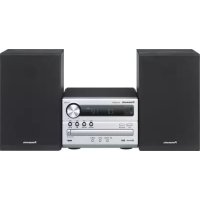
PANASONIC SCPM254 - Loudspeaker

SCPM254 - Loudspeaker PANASONIC - Free user manual and instructions

Find the device manual for free SCPM254 PANASONIC in PDF.

📄 60 pages English EN Download 💬 AI Question 10 questions ⚙️ Specs
Notice PANASONIC SCPM254 - page 58
View the manual : Français FR Deutsch DE English EN Italiano IT Nederlands NL
Pick your language and provide your email: we'll send you a specifically translated version.
Product Type Stereo system with CD player and DAB+/FM radio
Model SC-PM254 (main unit SA-PM254, speakers SB-PM02)
Main unit dimensions (W x H x D) 184 mm x 123 mm x 235 mm
Speaker dimensions (W x H x D) 139 mm x 224 mm x 136 mm (each)
Main unit weight 1.1 kg
Speaker weight 1.3 kg (each)
Power supply AC 220–240 V, 50 Hz
Power consumption 14 W (operation), 0.2 W (standby without Bluetooth), 0.3 W (standby with Bluetooth)
Output power (RMS) 10 W per channel (6 Ω, 1 kHz, 10% distortion), total 20 W
Playback media CD, CD-R/RW (CD-DA, MP3), USB (MP3, FAT12/16/32, up to 32 GB), Bluetooth
Bluetooth Version 2.1+EDR, Class 2, range 10 m, profiles A2DP/AVRCP, codec SBC
Radio FM (87.50–108.00 MHz, 30 presets), DAB+ (Band III, 20 presets)
Sound effects EQ presets (Heavy, Soft, Clear, Vocal, Flat), bass and treble adjustment, D.BASS, Surround
Clock and timer functions 24-hour clock, sleep timer, play timer, auto update via DAB+
Care and cleaning Wipe with a soft, dry cloth. Do not use alcohol, thinner or benzene.
Safety Double insulation (Class II), do not expose to rain or moisture. Use recommended accessories.
Spare parts and repairability Contains no user-serviceable parts. Contact qualified service personnel for any repairs.
Supplied accessories Power cord, DAB antenna, remote control (N2QAYB000984)
Operating temperature 0 to 40 °C
Operating humidity 35% to 80% RH (no condensation)

Frequently Asked Questions - SCPM254 PANASONIC

What types of discs can I play on the Panasonic SC-PM254?
You can play standard audio CDs as well as CD-R/RW discs recorded in CD-DA format or containing MP3 files. Make sure the disc is finalized and not scratched or warped.
How do I connect a Bluetooth device?
On the unit, press [ ] to select the Bluetooth source. If 'PAIRING' is not displayed, use [PLAY MENU] to select 'PAIRING' or hold down the [PAIRING] button on the unit. Then, on your device (smartphone, tablet), select 'SC-PM254' in the Bluetooth list. If a code is requested, enter '0000' or '1234'.
Why is there no sound or is the sound distorted?
First check the volume. Make sure the speakers are correctly connected (observe polarity). If the sound is distorted, reduce the volume or activate 'MONO' mode in FM. Keep mobile phones or Wi-Fi routers away that may cause interference.
How do I set the clock?
Press [SETUP] several times to select 'CLOCK'. Use the [▲,▼] buttons to set the time and press [OK] to confirm. The clock operates on a 24-hour cycle. You can also enable automatic update via DAB+ by selecting 'AUTO CLOCK ADJ' in the DAB menu.
What should I do if the remote control does not work?
Check that the battery is correctly installed (observe + and - polarities). If the problem persists, there may be a code conflict with another Panasonic device. Hold down [OK] and [9] for 4 seconds for code 'REMOTE 1' or [OK] and [USB/CD] for 'REMOTE 2'.
How do I clean the unit?
Use a soft, dry cloth to wipe the exterior. Never use alcohol, paint thinner, or benzene. If you use a cloth impregnated with a chemical, read the product instructions first.
Can I use a USB flash drive larger than 32 GB?
The unit supports USB devices up to 32 GB with FAT12/16/32 file system. Larger capacity drives may not be recognized or may operate slowly.
How do I perform a factory reset?
Unplug the power cord. Hold down the [ /1] button on the main unit while reconnecting the cord. Continue holding the button until '---------' appears, then release. All settings will return to default values.
What does the error 'F61' or 'F77' mean on the display?
These error codes indicate an internal problem. Unplug the power cord and consult your dealer or qualified service personnel. Do not attempt to repair the unit yourself.
How can I improve radio reception?
For FM, adjust the supplied antenna (wire) for better reception. For DAB+, use the supplied DAB antenna and avoid mounting it on metal objects. If reception remains poor, consider an outdoor antenna installed by a professional.

User questions about SCPM254 PANASONIC

0 question about this device. Answer the ones you know or ask your own.

Ask a new question about this device

The email remains private: it is only used to notify you if someone responds to your question.

No questions yet. Be the first to ask one.

Download the instructions for your Loudspeaker in PDF format for free! Find your manual SCPM254 - PANASONIC and take your electronic device back in hand. On this page are published all the documents necessary for the use of your device. SCPM254 by PANASONIC.

USER MANUAL SCPM254 PANASONIC

10 W pro Kanal (an 6 Ω), 1 kHz, 10 % THD

Kadoma, Osaka, Japan

Importer for Europe:

Panasonic Marketing Europe GmbH

Panasonic Testing Centre

Winsbergring 15, 22525 Hamburg, Germany

PANASONIC SCPM254 - 1

Manual assistant
Powered by Anthropic
Waiting for your message
Product information

Brand : PANASONIC

Model : SCPM254

Category : Loudspeaker