
SB-TP10EB - Loudspeaker PANASONIC - Free user manual and instructions
Find the device manual for free SB-TP10EB PANASONIC in PDF.


| Product Type | Home Theater Speaker System |
| Brand | Panasonic |
| Model | SB-TP10EB |
| Speaker Configuration | 5.1-channel: 4x satellite speakers (front/surround), 1x center, 1x active subwoofer |
| Satellite Speaker Type (Front/Surround) | SB-FS802: 1-way, 1-speaker bass-reflex, full-range 6.5 cm cone |
| Center Speaker Type | SB-PC802: 1-way, 1-speaker bass-reflex, full-range 6.5 cm cone |
| Subwoofer Type | SB-WA54: 1-way, 1-speaker bass-reflex, 17 cm woofer |
| Impedance (all speakers) | 6 Ω |
| Input Power (Satellite/Center) | 80 W (Music), 40 W (DIN) |
| Input Power (Subwoofer) | 200 W (Music), 100 W (DIN) |
| Frequency Range (Satellite/Center) | 110 Hz – 25 kHz (-16 dB); 130 Hz – 22 kHz (-10 dB) |
| Frequency Range (Subwoofer) | 32 Hz – 300 Hz (-16 dB); 38 Hz – 240 Hz (-10 dB) |
| Subwoofer Low-Pass Filter | Fixed at 200 Hz |
| Dimensions (Satellite FS802) | 110 x 226 x 132 mm (with stand) |
| Dimensions (Center PC802) | 180 x 139 x 132 mm (with stand) |
| Dimensions (Subwoofer WA54) | 162 x 457 x 420 mm |
| Weight (Satellite/Center each) | 0.93 kg |
| Weight (Subwoofer) | 10.6 kg |
| Power Supply | AC 230–240 V, 50 Hz (UK) |
| Power Consumption | 168 W |
| Protection Circuitry | Yes: automatically interrupts input on excessive signal; resets after a few minutes |
| Accessories Included | AC mains lead, 2x long speaker cables (10 m), 3x short speaker cables (4 m), monaural connection cable |
| Placement Recommendations | Front speakers beside TV; center above/below TV; surround at sides/rear ~1 m above ear level; subwoofer at least 5 cm from wall |
| Maintenance | Clean with soft dry cloth; do not use alcohol, thinner, benzine |
Frequently Asked Questions - SB-TP10EB PANASONIC
User questions about SB-TP10EB PANASONIC
0 question about this device. Answer the ones you know or ask your own.
Ask a new question about this device
Download the instructions for your Loudspeaker in PDF format for free! Find your manual SB-TP10EB - PANASONIC and take your electronic device back in hand. On this page are published all the documents necessary for the use of your device. SB-TP10EB by PANASONIC.
USER MANUAL SB-TP10EB PANASONIC
natural_image
Diagram of a multi-tiered electronic device setup with speakers and a central display unit (no text or symbols visible)SB-TP20 for the United Kingdom.
Actual speakers depend on the system.
Panasonic®
Speaker System
Operating Instructions
Model No.
SB-TP20
SB-TP10

GNEB GCS
Dear customer
Thank you for purchasing this product.
For optimum performance and safety, please read these instructions carefully.
For the United Kingdom
| Speaker system Speaker | |
| SB-TP20 Center SB-PC70 | Front, Surround SB-FS702 X 4 |
| 2 X 1 | |
| Active subwoofer SB-WA54 X 1 |
For Australia, New Zealand and others
| Speaker system Speaker | |
| SB-TP20 Center SB-PC702 | Front, Surround SB-FS702 X 4 |
| Active subwoofer SB-WA55 X 1 |
For the United Kingdom
| Speaker system Speaker | |
| SB-TP10 Center SB-PC80 | Front, Surround SB-FS802 X 4 |
| 2 X 1 | |
| Active subwoofer SB-WA54 X 1 |
Supplied accessories

Please check and identify the supplied accessories.
For the United Kingdom
Use numbers indicated in parentheses when asking for replacement parts.
SB-WA54 (For the United Kingdom)
SB-WA55 (For Australia, New Zealand and others)
□ AC mains lead .... 1 For the United Kingdom (RJA0038-1U)
For Australia and New Zealand
For others

natural_image
Three types of electrical plugs and cables, no text or symbols visibleNote
The included AC mains lead is for use with this unit only.
Do not use it with other equipment.
SB-FS702 / SB-PC702 / SB-FS802 / SB-PC802
□ Monaural connection cable ..... 1 For the United Kingdom (RJL1P015B50)
☐ Speaker cables (long: 10 m) ..... 2 For the United Kingdom (REE1203C)
☐ Speaker cables (short: 4 m) ..... 3 For the United Kingdom (REE1203A)


Note:
"EB" on the packaging indicates the United Kingdom.
Before connecting, operating or adjusting this product, please read these instructions completely.
Please keep this manual for future reference.
CAUTION!
- DO NOT INSTALL OR PLACE THIS UNIT IN A BOOKCASE, BUILT-IN CABINET OR IN ANOTHER CONFINED SPACE. ENSURE THE UNIT IS WELL VENTILATED. TO PREVENT RISK OF ELECTRIC SHOCK OR FIRE HAZARD DUE TO OVERHEATING, ENSURE THAT CURTAINS AND ANY OTHER MATERIALS DO NOT OBSTRUCT THE VENTILATION VENTS.
- DO NOT OBSTRUCT THE UNIT'S VENTILATION OPENINGS WITH NEWSPAPERS, TABLECLOTHS, CURTAINS, AND SIMILAR ITEMS.
• DO NOT PLACE SOURCES OF NAKED FLAMES, SUCH AS LIGHTED CANDLES, ON THE UNIT.
• DISPOSE OF BATTERIES IN AN ENVIRONMENTALLY FRIENDLY MANNER.
WARNING:
TO REDUCE THE RISK OF FIRE, ELECTRIC SHOCK OR PRODUCT DAMAGE, DO NOT EXPOSE THIS APPARATUS TO RAIN, MOISTURE, DRIPPING OR SPLASHING AND THAT NO OBJECTS FILLED WITH LIQUIDS, SUCH AS VASES, SHALL BE PLACED ON THE APPARATUS.
This product may receive radio interference caused by mobile telephones during use. If such interference is apparent, please increase separation between the product and the mobile telephone.
For the United Kingdom, Australia and New Zealand
THIS UNIT IS INTENDED FOR USE IN MODERATE CLIMATES.
For others
THIS UNIT IS INTENDED FOR USE IN TROPICAL CLIMATES.
For United Kingdom and Republic of Ireland

Panasonic
www.panasonic.co.uk (for UK customers only)
- Order accessory and consumable items for your product with ease and confidence by telephoning our Customer Care Centre Mon–Friday 9:00am–5:30pm. (Excluding public holidays.)
- Or go on line through our Internet Accessory ordering application.
- Most major credit and debit cards accepted.
- All enquiries transactions and distribution facilities are provided directly by Panasonic UK Ltd.
- It couldn't be simpler!
Customer Care Centre
For UK customers: 08705 357357
For Republic of Ireland customers: 01 289 8333
Technical Support
For UK customers: 0870 1 505610
This Technical Support Hot Line number is for Panasonic PC software related products only. For Republic of Ireland, please use the Customer Care Centre number listed above for all enquiries.
For all other product related enquiries, please use the Customer Care Centre numbers listed above.
Caution for AC mains lead
(For the United Kingdom)
("EB" area code model only)
For your safety, please read the following text carefully.
This appliance is supplied with a moulded three pin mains plug for your safety and convenience.
A 5-ampere fuse is fitted in this plug.
Should the fuse need to be replaced please ensure that the replacement fuse has a rating of 5-ampere and that it is approved by ASTA or BSI to BS1362.
Check for the ASTA mark 📄 or the BSI mark 🌐 on the body of the fuse.
If the plug contains a removable fuse cover you must ensure that it is refitted when the fuse is replaced.
If you lose the fuse cover the plug must not be used until a replacement cover is obtained.
A replacement fuse cover can be purchased from your local dealer.
CAUTION!
IF THE FITTED MOULDED PLUG IS UNSUITABLE FOR THE SOCKET OUTLET IN YOUR HOME THEN THE FUSE SHOULD BE REMOVED AND THE PLUG CUT OFF AND DISPOSED OF SAFELY.
THERE IS A DANGER OF SEVERE ELECTRICAL SHOCK IF THE CUT OFF PLUG IS INSERTED INTO ANY 13-AMPERE SOCKET.
If a new plug is to be fitted please observe the wiring code as stated below.
If in any doubt please consult a qualified electrician.
IMPORTANT
The wires in this mains lead are coloured in accordance with the following code:
Blue: Neutral, Brown: Live.
As these colours may not correspond with the coloured markings identifying the terminals in your plug, proceed as follows:
The wire which is coloured Blue must be connected to the terminal which is marked with the letter N or coloured Black or Blue.
The wire which is coloured Brown must be connected to the terminal which is marked with the letter L or coloured Brown or Red.
WARNING: DO NOT CONNECT EITHER WIRE TO THE EARTH TERMINAL WHICH IS MARKED WITH THE LETTER E, BY THE EARTH SYMBOL ⊥ OR COLOURED GREEN OR GREEN/YELLOW.
THIS PLUG IS NOT WATERPROOF—KEEP DRY.
Before use
Remove the connector cover.
How to replace the fuse
The location of the fuse differ according to the type of AC mains plug (figures A and B). Confirm the AC mains plug fitted and follow the instructions below.
Illustrations may differ from actual AC mains plug.
- Open the fuse cover with a screwdriver.

- Replace the fuse and close or attach the fuse cover.


Safety precautions
Placement
Set the unit up on an even surface away from direct sunlight, high temperatures, high humidity, and excessive vibration. These conditions can damage the cabinet and other components, thereby shortening the unit's service life.
Voltage
Do not use high voltage power sources. This can overload the unit and cause a fire.
Do not use a DC power source. Check the source carefully when setting the unit up on a ship or other place where DC is used.
AC mains lead protection
Ensure the AC mains lead is connected correctly and not damaged. Poor connection and lead damage can cause fire or electric shock. Do not pull, bend, or place heavy items on the lead.
Grasp the plug firmly when unplugging the lead. Pulling the AC mains lead can cause electric shock.
Do not handle the plug with wet hands. This can cause electric shock.
Foreign matter
Do not let metal objects fall inside the unit. This can cause electric shock or malfunction.
Do not let liquids get into the unit. This can cause electric shock or malfunction. If this occurs, immediately disconnect the unit from the power supply and contact your dealer.
Do not spray insecticides onto or into the unit. They contain flammable gases which can ignite if sprayed into the unit.
Service
Do not attempt to repair this unit by yourself. If sound is interrupted, indicators fail to light, smoke appears, or any other problem that is not covered in these operating instructions occurs, disconnect the AC mains lead and contact your dealer or an authorized service center. Electric shock or damage to the unit can occur if the unit is repaired, disassembled or reconstructed by unqualified persons.
Extend operating life by disconnecting the unit from the power source if it is not to be used for a long time.
Insertion of connector
Even when the connector is perfectly inserted, depending on the type of inlet used, the front part of the connector may jut out as shown in the drawing.
However there is no problem using the unit.



Speaker setup
SB-FS702 or SB-FS802
These speakers are the same. Use them as front or surround speakers.
SB-PC702 / SB-PC802
Use as the center speaker.
A Before attaching to a wall or speaker stand
SB-FS702 / SB-PC702 / SB-FS802 / SB-PC802
Unscrew the screw to remove the stand.
B Attaching to the wall
SB-FS702 / SB-PC702 / SB-FS802 / SB-PC802
① Screw (not included)
Screw the wood screw into a thick and hard part of the wall.
The surface you attach the speakers to must be able to support over 10 kg.
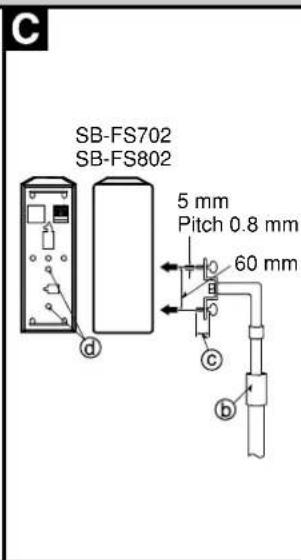
C Attaching to speaker stands
SB-FS702 / SB-FS802
⑥ Speaker stands (not included)
© Plate thickness + 7 to 10 mm
Ensure the following conditions are met when you purchase your speaker stands.
- Observe the diameter and length of the screws and the distance between screws as shown in the diagram.
Screw; diameter: 5 mm, pitch: 0.8 mm, length: thickness of stand plate plus between 7 and 10 mm.
Distance between the centers of the holes: 60 mm
• The stands must be able to support over 10 kg.
- The stands must be stable even if the speakers are in a high position.
CAUTION
Do not attach these speakers to walls or ceilings using methods other than those described here.
D Location
Front speakers (e) g
Put on either side of the television.
Center speaker (①)
Put above or below the center of the television, on a shelf or rack or attach to the wall. Placing it directly on the television can cause the picture to be distorted.
Surround speakers (h) i
Put to the side of or slightly behind the seating area, about one meter higher than ear level.
Subwoofer(①)
Place anywhere as long as it is a reasonable distance from the television. Place it at least 5 cm from the wall as it has a bass reflex port in the rear.
The front, center, and surround speakers should be placed at approximately the same distance from the listening position. The angles in the diagram are approximate.
How you set up your speakers can affect the bass and the sound field. Note the following points.
- Place on flat, level secure bases.
Use spacers or a similar item to stop them from rocking. - Placing speakers too close to floors, walls, and corners can result in excessive bass.
- Cover walls and windows with thick curtain.
- Do not place anything on top of the subwoofer.
Connections
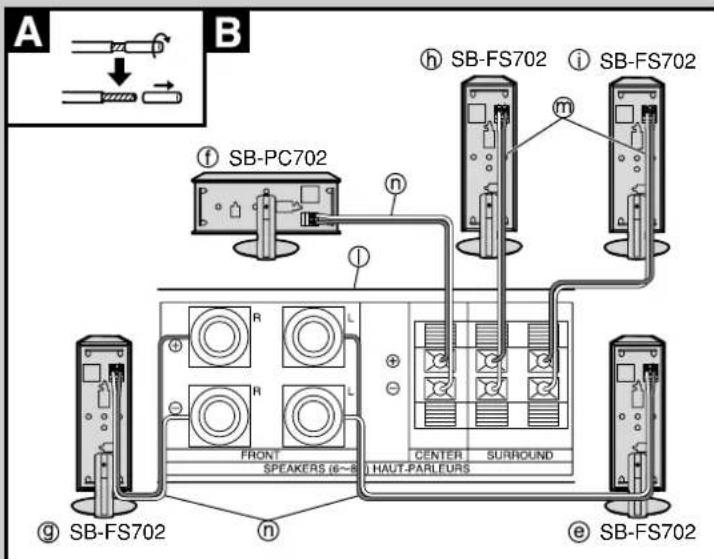
Connect to a receiver or amplifier (① with 6-Ω impedance for the front, center, and surround speakers, and a pin-type output terminal for an active subwoofer.
Before connection
Turn off the other equipment.
Do not connect the AC mains lead until all other cables and cords are connected.
A Twist off the vinyl tip.
B Front, center, and surround speakers
Connect the front (p) and center speakers () with the 4-meter cables (n) and the surround speakers (, n) with the 10-meter cables (m)
Be sure to connect only positive (copper) wires to positive (+) terminals and negative (silver) wires to negative (-) terminals.
CAUTION
Never short-circuit positive (+) and negative (-) speaker wires.
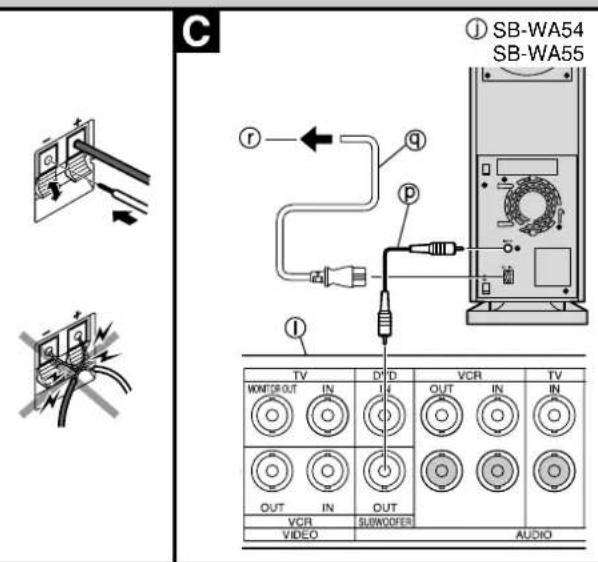
c Subwoofer
Connect with the included monaural connection cable (P) to the receiver or amplifier's subwoofer output terminal.
For the United Kingdom: BE SURE TO READ THE CAUTION FOR THE AC MAINS LEAD ON PAGE 2 BEFORE PROCEEDING TO STEP 2.
② Connect the AC mains lead (⑨ to the household mains socket (r)).
Subwoofer operation (SB-WA55 / SB-WA54)
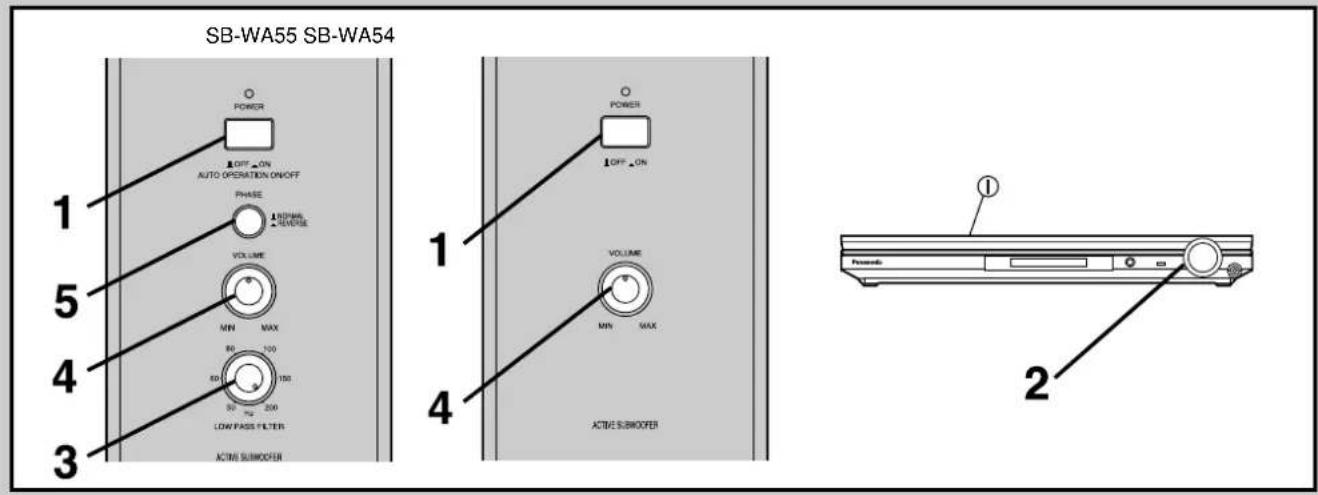
1 Set [POWER] to "ON".
The indicator turns green.
The unit switches to standby and the indicator turns red if it doesn't receive a signal for about 8 minutes. It switches back on when it receives a signal.
2 Output sound from the receiver or amplifier ( ) and adjust the volume to a suitable level.
See the operating instructions for the other equipment for details.
Do not adjust the bass as this can cause distortion.
Only for SB-WA55
3 Set [LOW PASS FILTER].
Set the low pass filter on your receiver or amplifier to 200 Hz if possible.
Refer to "Frequency response by LOW PASS FILTER setting". Set [LOW PASS FILTER] to 200 Hz for a full range. Reduce it if you feel the bass is too strong.
4 Adjust [VOLUME] to a suitable level.
Refer to "Frequency response by VOLUME setting".
Only for SB-WA55
5 Play something, then set [PHASE] to "■NORMAL" or "■REVERSE" so sound is normal.
The subwoofer and speakers cancel each other out (causing unusual, muffled sound) if phase is incorrect.
Frequency response by LOW PASS FILTER setting
![PANASONIC SB-TP10EB - Play something, then set [PHASE] to "■NORMAL" or "■REVERSE" so sound is normal. - 1](/content/2026/05/962191/images/60be5e3cfc71c6b579b67fa109072375360d31856ced4259aa681837c7163cbd.jpg)
line
| Frequency (Hz) | Approximate Value 9 | Approximate Value 150 | Approximate Value 100 | Approximate Value 80 | Approximate Value 60 | Approximate Value 50 | | -------------- | ------------------- | --------------------- | --------------------- | -------------------- | -------------------- | -------------------- | | 20 | | | | | | | | 50 | | | | | | | | 100 | | | | | | | | 200 | | | | | | | | 500 | | | | | | | | 1000 | | | | | | |Frequency response by VOLUME setting
![PANASONIC SB-TP10EB - Play something, then set [PHASE] to "■NORMAL" or "■REVERSE" so sound is normal. - 2](/content/2026/05/962191/images/c6257233fb1d181df1654b4d520b5450e50c184380ea6441da3bde04142128b3.jpg)
line
| Frequency (Hz) | Sound pressure level | | -------------- | -------------------- | | 20 | 0 | | 50 | ~10 dB | | 100 | ~10 dB | | 200 | ~10 dB | | 500 | ~10 dB | | 1000 | ~10 dB |When settings are complete
The only operation you should have to perform daily is press [POWER] to turn the unit ON/OFF.
If you reposition the system and the acoustics change, reset the unit as necessary.
Note
If the volume output is too loud, this unit's amplifier can be clipped, causing output to sound unusual. Reduce the volume of the receiver or amplifier or the volume of this unit if this occurs.
Protection circuitry (SB-WA55 / SB-WA54)
This circuitry to prevents damage caused by excessive input or abnormal signals. When excess input is detected, the sound is automatically interrupted.
If sound is interrupted...
- Reduce the volume level from the receiver or amplifier.
- Press [POWER] to turn the unit off.
- Check the sound source and connections for problems.
- Press [POWER] to turn the unit on.
After the protection circuitry is reset...
Take care not to increase the receiver's or amplifier's volume level too much.
Notes
Speaker impedance and allowed input
| SB-FS702 / SB-PC702 Impedance 6 Ω | ||
| Input power 100 W (DIN) | ||
| SB-FS802 / SB-PC802 | Impedance 6 Ω | |
| Input power 40 W (DIN) | ||
CAUTION
The only receivers or amplifiers you should connect to these speakers are those whose rated output does not exceed the above figures. Using a receiver or amplifier with higher ratings than listed above can cause abnormal sounds to occur because of excessive input, damage to the receiver or speakers, and fire. If equipment is damaged in any way or unexpected trouble occurs during playback, unplug the system from its outlet and call a serviceman for help.
Protection circuitry
SB-FS702 / SB-PC702 / SB-FS802 / SB-PC802
These units incorporate protection circuitry to protect them from damage caused by excessive input or abnormal signals; when excess input is detected, input is automatically interrupted.
If sound is interrupted...
-
Reduce the volume of the receiver (or amplifier).
-
Check the sound source and connections for any problems. If there is no problem, the protection circuitry will reset in a few minutes.
After the protection circuit is reset...
Take care not to increase the receiver's volume too high.
Excessive input
You can damage your speakers and shorten their useful life if you play sound at high levels over extended periods.
Reduce the volume in the following cases to avoid damage :
- When playing distorted sound.
- When the speakers are receiving howling from a microphone or record player, noise from FM broadcasts, or continuous signals from an oscillator, test disc, or electronic instrument.
- When adjusting the sound quality. - When turning the amplifier on or off.
Other notes
If irregular coloring occurs on your television :
These speakers are designed to be used close to a television, but the picture may be affected with some televisions and set-up combinations.
If this occurs, turn the television off for about 30 minutes.
The television's demagnetizing function should correct the problem. If it persists, move the speakers further away from the television.
You cannot remove the speaker net.
Keep magnetized items away.
Magnetized cards, bank cards, commuter passes, etc., can be damaged if allowed too near speaker magnets. Clocks may also be affected.
Avoid locations such as described below :
• In direct sunlight
• Near heating appliances or other sources of heat
• Where the humidity is high
Maintenance
Clean these units with a soft, clean, dry cloth.
Clean regularly to maintain the polished surface.
- Never use alcohol, paint thinner, or benzine to clean these units.
- Before using chemically treated cloth, read the instructions that came with the cloth carefully.
Specifications
■ SB-FS702 / SB-PC702
Type 2 way 2 speaker system Bass-reflex type
Speaker (s) Woofer: 6.5 cm cone type x 1
Fullrange: 6.5 cm cone type x 1
Impedance 6 Ω
Input power 200 W (Music), 100 W (DIN)
Sound pressure level 82 dB/W (1.0 m)
Crossover frequency 7 kHz
| Frequency range | 100 Hz – 25 kHz (at -16 dB) |
| 125 Hz – 22 kHz (at -10 dB) |
Dimensions (W x H x D)
| SB-FS702 | 135 x 295 x 145 mm (with the stand) |
| SB-PC702 | 250 x 140 x 145 mm (with the stand) |
| Mass | 1.55 kg |
■ SB-FS802 / SB-PC802
Type 1 way 1 speaker system Bass-reflex type
Speaker (s) Fullrange: 6.5 cm cone type x 1
Impedance 6 Ω
Input power 80 W (Music), 40 W (DIN)
Sound pressure level 79 dB/W (1.0 m)
| Frequency range | 110 Hz – 25 kHz (at -16 dB) |
| 130 Hz – 22 kHz (at -10 dB) |
Dimensions (W x H x D)
| SB-FS802 | 110 x 226 x 132 mm (with the stand) |
| SB-PC802 | 180 x 139 x 132 mm (with the stand) |
| Mass | 0.93 kg |
■ SB-WA55 / SB-WA54
SPEAKER SECTION
| Type | 1 way 1 speaker system Bass-reflex type |
| Speaker (s) | Woofer: 17 cm cone type x 1 |
| Impedance | 6 Ω |
| Input power | 200 W (Music), 100 W (DIN) |
| Sound pressure level | 80 dB/W (1.0 m) |
| Frequency range (with amp) | 32 – 300 Hz (at -16 dB) |
| 38 – 240 Hz (at -10 dB) |
AMPLIFIER SECTION
Output power 100 W (6 Ω) (THD 0.9%)
| Input sensitivity / Input Impedance | 300 mV/33 kΩ (RCA jack) | |
| Phase switching | SB-WA55 | NORMAL/REVERSE |
| Low pass filter | SB-WA55 | 50 – 200 Hz Variable |
| SB-WA54 | 200 Hz Fixed | |
GENERAL
Power supply
For the United Kingdom, Australia and New Zealand
| AC 230 – 240 V, 50 Hz | ||
| For others | AC 220 – 240 V, 50/60 Hz | |
| Power consumption | 168 W | |
| Dimensions (W x H x D) | ||
| SB-WA54 / SB-WA55 For Australia and New Zealand | ||
| 162 x 457 x 420 mm | ||
| SB-WA55 For others | 162 x 457 x 434 mm | |
| Mass | SB-WA55 | 10.8 kg |
| SB-WA54 | 10.6 kg | |
Note
Specifications are subject to change without notice.
Mass and dimensions are approximate.


- Panasonic®
- Speaker System
- GNEB GCS
- Dear customer
- Supplied accessories
- SB-WA54 (For the United Kingdom)
- Note
- SB-FS702 / SB-PC702 / SB-FS802 / SB-PC802
- Note:
- CAUTION!
- WARNING:
- For the United Kingdom, Australia and New Zealand
- For others
- For United Kingdom and Republic of Ireland
- Panasonic
- Caution for AC mains lead
- (For the United Kingdom)
- ("EB" area code model only)
- IMPORTANT
- WARNING: DO NOT CONNECT EITHER WIRE TO THE EARTH TERMINAL WHICH IS MARKED WITH THE LETTER E, BY THE EARTH SYMBOL ⊥ OR COLOURED GREEN OR GREEN/YELLOW.
- THIS PLUG IS NOT WATERPROOF—KEEP DRY.
- Before use
- How to replace the fuse
- Safety precautions
- Placement
- Voltage
- AC mains lead protection
- Foreign matter
- Service
- Insertion of connector
- Speaker setup
- SB-FS702 or SB-FS802
- SB-PC702 / SB-PC802
- A Before attaching to a wall or speaker stand
- B Attaching to the wall
- C Attaching to speaker stands
- SB-FS702 / SB-FS802
- CAUTION
- D Location
- Front speakers (e) g
- Center speaker (①)
- Surround speakers (h) i
- Subwoofer(①)
- Connections
- Before connection
- B Front, center, and surround speakers
- c Subwoofer
- Subwoofer operation (SB-WA55 / SB-WA54)
- Set [POWER] to "ON".
- Output sound from the receiver or amplifier ( ) and adjust the volume to a suitable level.
- Only for SB-WA55
- Set [LOW PASS FILTER].
- Adjust [VOLUME] to a suitable level.
- Play something, then set [PHASE] to "■NORMAL" or "■REVERSE" so sound is normal.
- When settings are complete
- Protection circuitry (SB-WA55 / SB-WA54)
- If sound is interrupted...
- After the protection circuitry is reset...
- Notes
- Protection circuitry
- After the protection circuit is reset...
- Excessive input
- Reduce the volume in the following cases to avoid damage :
- Other notes
- If irregular coloring occurs on your television :
- If this occurs, turn the television off for about 30 minutes.
- You cannot remove the speaker net.
- Keep magnetized items away.
- Avoid locations such as described below :
- Maintenance
- Clean these units with a soft, clean, dry cloth.
- Specifications
- ■ SB-FS702 / SB-PC702
- ■ SB-FS802 / SB-PC802
- ■ SB-WA55 / SB-WA54
- AMPLIFIER SECTION
- GENERAL
Brand : PANASONIC
Model : SB-TP10EB
Category : Loudspeaker