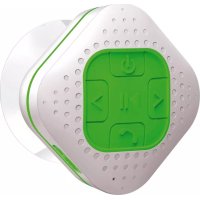
BT550 - Docking station Soundmaster - Free user manual and instructions
Find the device manual for free BT550 Soundmaster in PDF.



| Product Type | Bluetooth Docking Station |
| Power Supply | USB Port (5 V DC, 500 mA) |
| Battery | Lithium-ion 3.7 V, 550 mAh |
| Battery Life | 4 to 5 hours (depending on volume and music) |
| Output Power | 1.5 W RMS (max 2 W) at 4 ohms |
| Frequency Response | 100 Hz - 20,000 Hz |
| Bluetooth Range | 10 meters (open air) |
| Bluetooth Version | 2.1 + EDR |
| Bluetooth Profiles | A2DP (V1.2), AVRCP (V1.0), HFP/HSP (V1.5) |
| Splash Resistance | IPX4 (do not immerse) |
| Main Functions | Play/pause, track change, volume control, hands-free function, last number redial |
| Care and Cleaning | Wipe entire outer surface if wet; do not use liquids |
| Safety | Do not expose to water or excessive moisture; do not open; do not place open flames |
| Reset | Press and hold the ≤ and ≥ buttons simultaneously |
Frequently Asked Questions - BT550 Soundmaster
User questions about BT550 Soundmaster
0 question about this device. Answer the ones you know or ask your own.
Ask a new question about this device
Download the instructions for your Docking station in PDF format for free! Find your manual BT550 - Soundmaster and take your electronic device back in hand. On this page are published all the documents necessary for the use of your device. BT550 by Soundmaster.
USER MANUAL BT550 Soundmaster
Do not place naked flames, such as lighted candles on or near the product.
- Do not place objects filled with liquids, such as vases on or near the product.
- Do not use or store this product in a place where it is subject to direct sunlight, heat, excessive dust or vibration.
- Do not keep or store this product in wet conditions for long period.
- Do not clean this product with water or other liquids.
- Do not block or cover the slots and holes in the product.
- Do not push foreign objects into the slots or holes in the product.
- Do not attempt to open this product yourself. There are no user serviceable parts inside.
- Do not allow children access to plastic bags.
Safety Instructions
Before using this product, read and follow all warnings and instructions.
This product is not intended for use by young children. Young children should be properly supervised.
This product is intended for household use only and not for commercial or industrial use.
- Do not expose to dripping or splashing.
No naked flame sources, such as lighted candles, should be placed on the product.
- Ventilation should not be impeded by covering ventilation openings with items such as newspapers, table cloths, curtains and the like.
- Make sure the unit is adjusted to a stable position. Damage caused by using this product in an unstable position or by failure to follow any other warning or precaution contained within this user manual will not be covered by warranty.
We, suggests retaining the packaging in case for future transport of the product.
Warning

- Never remove the casing of this apparatus.
- Never place this apparatus on the other electrical equipment.
Notice
- If at any time in the future you should need to dispose of this product please note that: All batteries and accumulators need to be removed from this product (Removal of Waste Batteries and Accumulators).
Always bring your product to a professional to remove the built-in battery.
Caution for Splashproof
This unit has been constructed to resist mild steam and light splashes from the shower or bath only. It should never be operated under running water and under no circumstances it should never be fully immersed in water.
This unit has rubber seals to minimize the risk of moisture getting inside. However, do not immerse it in water since permanent damage to the electrical and mechanical parts will result.
ENVIRONMENTAL PROTECTION
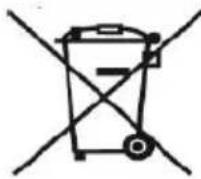
Do not dispose of this product with the normal household waste at the end of its life cycle. Return it to a collection point for the recycling of electrical and electronic devices. This is indicated by the symbol on the product, user manual or packaging.

The materials are reusable according to their markings. By reusing, recycling or other forms of utilization of old devices you make an important contribution to the protection of our environment.
Please contact your local authorities for details about collection points.
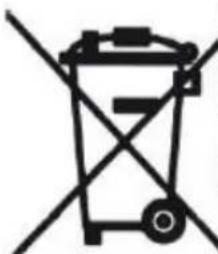
Used batteries are hazardous waste and NOT to be disposed of with the household waste! As a consumer you are legally obligated to return all batteries for environmentally responsible recycling - no matter whether or not the batteries contain harmful substances*).
Return batteries free of charge to public collection points in your community or to shops selling batteries of the respective kind.
Only return fully discharged batteries.
*) marked Cd = cadmium, Hg = mercury, Pb = lead
Outlook And Control
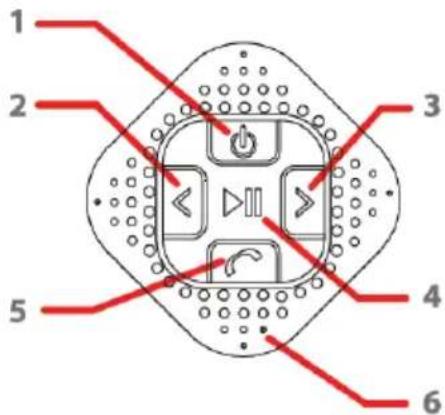
Top View
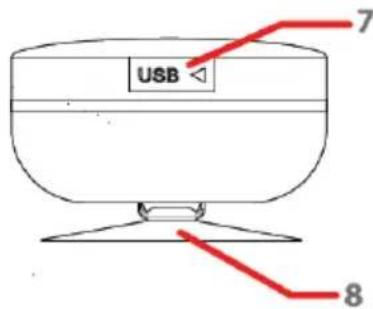
Side View
1
Button
5
C Button
2
<Button
6
MIC Hole
3
Button
7
Mini USB socket
4
▶ Button
8
Vacuum Cupule
Charging The Bluetooth Speaker
- Open the rubber seal cover (7).
- Connect the Bluetooth Speaker's Mini USB socket (7) with the Computer's USB port through USB cable.
- The Charging LED (2) will turn ON in red light; the rechargeable battery is in charging.
- The Charging LED (2) red light will turn OFF when the rechargeable battery is fully charged.
- Disconnect the USB cable, and close the Rubber Seal Cover when it is done.
Bluetooth Speaker Pairing / Reconnecting
- Press and hold the button (1) for 2 - 3 seconds, a tone sound then message "It is paring wait for device connecting" will announce from speaker and the Mode LED (2) will blinking in blue, the device is turned ON and goes into reconnect / searching mode for pair depend on status;
- The Mode LED (2) blinking in blue every 2 seconds once if it is in reconnect mode. Or, the Mode LED (2) fast blinking in blue half seconds once, in search mode if for first time pairing. If not, press and hold button for 2 - 3 seconds to switch into searching mode for new device's paring.
- Now, turn ON the Bluetooth function on your mobile phone, search for device
name "BT550" and select it to pair.
- If pairing is successful, a tone sound then message "Paired" will announce from speaker and the Mode LED (2) light will switch to slow blink in blue (every 4 seconds once).
- The Bluetooth Speaker will be reconnecting automatically if your mobile phone has been paired. (Depend on the of mobile phone's type and configuration, manual reconnection may require on some devices)
- Press and hold the button (1) for 2 - 3 seconds, a tone sound will announce and Bluetooth speaker turned to OFF when you not use it.
Note: During in searching / pairing mode, the Bluetooth Speaker will power OFF automatically in 8 minutes if no device is connected and idle.
Bluetooth Speaker Control Function
- In playing music, press button (3) to pause music, press it once again to play.
- Pressing or press and hold the ≥ button (7) to increases the volume level.
- Pressing or press and hold the ≤ button (4) to decreases the volume level.
- When maximum or minimum volume is reached, a tone sound will be heard.
- Press the button (7) to play next music file.
- Press the button (4) to play previous music file.
Hand Free Function
- When there is an incoming call;
- The ringing sound will up and the playing music will pause automatically.
- Press C button (5) to pick up the call if you want.
- Now you have hand free function with the Bluetooth speaker.
- Press C button (5) again to hand up the call when finished. And,
- The paused music will start to play automatically.
Tip: speak to the MIC hole (6) direct with distance in 30 cm to get the best speakerphone performance when necessary.
Redial For Last Call function
- To redial for last called number by the Bluetooth Speaker, even it is in music playing mode.
- Press twice the button (5) to enter into radial function, the playing will pause and switch to hand free function for radial.
- Press the C button (5) again to hang up the radial call.
Low Power Reminder And Auto Sleep
- The Bluetooth Speaker will send tone sound once in very few seconds, when you heard this tone sound, please connect the device to the USB power for charging if you still want to use the device.
- If not, the Bluetooth Speaker will power Off to sleep mode when the battery is keeping low energy level in minutes.
Reset The Bluetooth Speaker
- In some circumstances the device's function may hanging and need to reset. To reset the Bluetooth speaker;
- Press and hold the ≤ button (4) and ≥ button (7) at the same time. The device is reset and will turn Off and turn On automatically.
Important: Do not reset the device if it is proper working.
Splashproof Handling
- The Bluetooth Speaker can handle a brief jet of water on its surface (IPX4 water resistant). However, it should never be operated under running water and under no circumstance it should never be fully immersed in water. Before use the Shower Bluetooth speaker in bathroom, mare sure that the splashproof Rubber Seal Cover (12) it tighten closed at the right position.
- After used in bathroom, always wipe the outside of the cabinet thoroughly if it becomes wet with moisture or water splashes. This will help to prevent the internal parts of the unit from entry of water and possible moisture damage.
Trouble Shooting
| No power | ·Check battery is it charged with enough energy. ·Check whether the device is in power OFF mode. |
| No sound | ·Check whether volume level is in lower position on your speaker and mobile phone or PC/Mac. ·Make sure that your Bluetooth device is within the effective operation range. ·Check whether the Bluetooth device is paired. ·Check whether the Bluetooth device show connected. ·Check if you have selected the correct audio source. |
| Speaker no response | ·Reset the Bluetooth speaker. |
Specification
| Bluetooth | Specification | V2.1 + EDR |
| Supported Profile | A2DP (V1.2), AVRCP (V1.0), HFP/HSP (V1.5) | |
| Connection Distance | In 10 meters (open area) | |
| Built-In Battery | Lithium 3.7V, 550 mAh | |
| Playing Time: 4~5 Hours depend on music and volume level) | ||
| Power Input | PC's USB port Power or DC 5V, 500mA | |
| Audio | Output Power | RMS 1.5W at 4 Ohm Max. 2W |
| Frequency Responses | 100Hz to 20,000Hz | |
| Operating Temperature | 0 to 40°C | |
Hereby, Wörlein GmbH declares that this device is in compliance with the essential requirements and other relevant provisions of Directive 1999/5/EC.
A copy of the Declaration of Conformity may be obtained at the following location:
Importer
Specifications are subject to change without further notice.
Copyright by Wörlein GmbH, D 90556 Cadolzburg.

Important
A ne pas faire
A Wörlein GmbH declares that this is the most appropriate description of the requirements for the use of electronic devices.
*) markerade Cd = kadmium, Hg = kvicksilver, Pb = bly


- Safety Instructions
- Warning
- Notice
- Caution for Splashproof
- ENVIRONMENTAL PROTECTION
- Outlook And Control
- Charging The Bluetooth Speaker
- Bluetooth Speaker Pairing / Reconnecting
- Bluetooth Speaker Control Function
- Hand Free Function
- Redial For Last Call function
- Low Power Reminder And Auto Sleep
- Reset The Bluetooth Speaker
- Splashproof Handling
- Trouble Shooting
- Importer
- Important
- A ne pas faire
Brand : Soundmaster
Model : BT550
Category : Docking station