KSMSCA - Other kitchen appliances KITCHENAID - Free user manual and instructions
Find the device manual for free KSMSCA KITCHENAID in PDF.



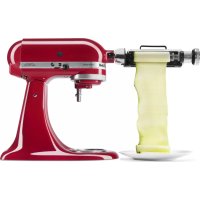
| Product Type | Leaf-type vegetable slicer attachment for stand mixer |
| Brand | KitchenAid |
| Model | KSMSCA |
| Dimensions (approx.) | 20 x 10 x 15 cm |
| Weight (approx.) | 0.5 kg |
| Power source | Mechanical (powered by stand mixer) |
| Main functions | Slice vegetables and fruits into leaves: zucchini, cucumbers, apples, potatoes, sweet potatoes |
| Provided blades | Fine blade (1.3 mm thickness) and thick blade (1.8 mm thickness) |
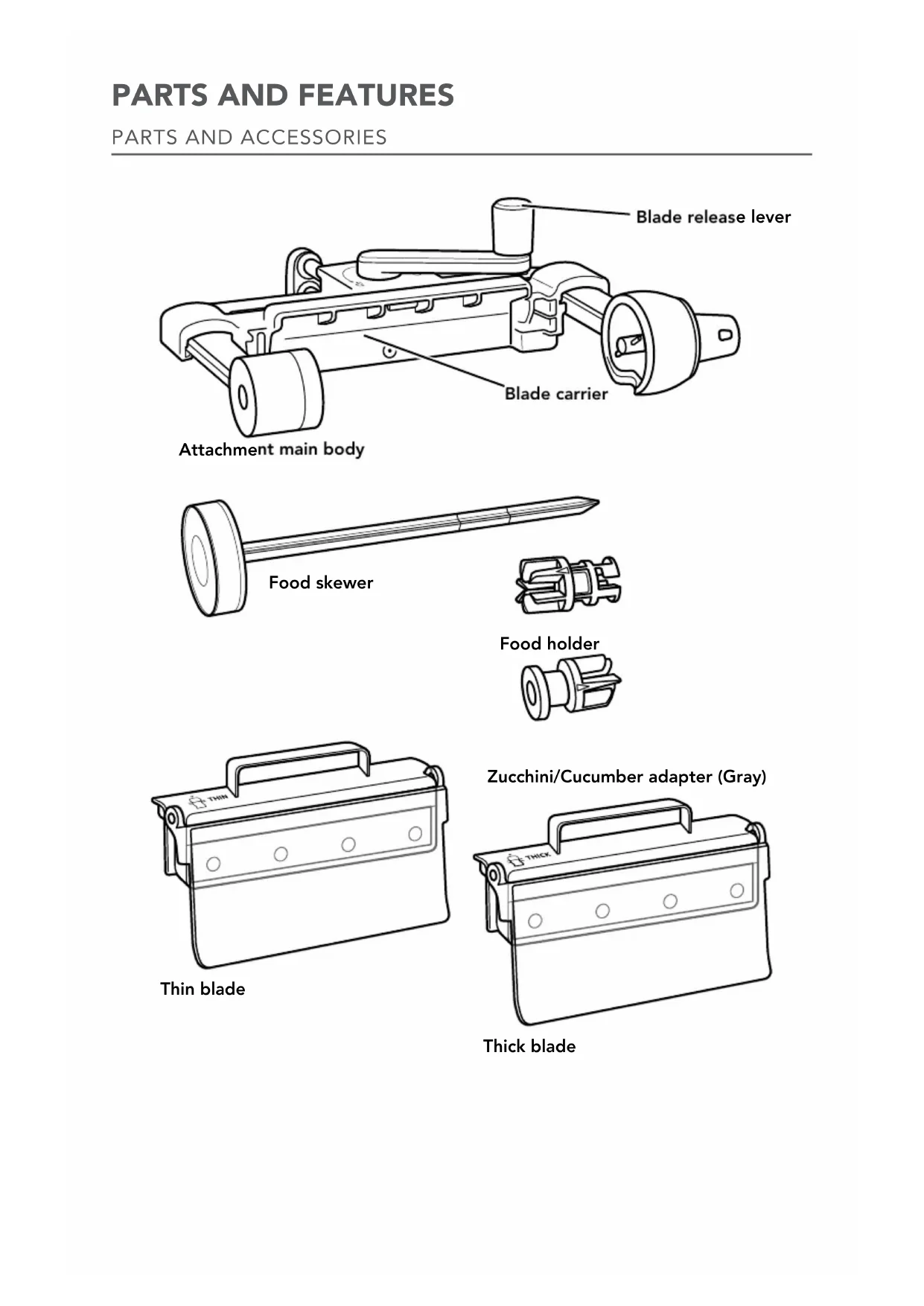
| Included accessories | Main body, food pusher, spindle, zucchini/cucumber adapter |
| Recommended speed | Slow speed to speed 2 of stand mixer |
| Maintenance - Main body | Hand wash with a soft damp cloth, do not immerse, do not wash in dishwasher |
| Maintenance - Blades and accessories | Dishwasher safe (top rack) |
| Safety | Sharp blades, keep hands and utensils away, use spindle and support, do not immerse |
| Use | Household use only |
| Warranty | 1 year, hassle-free replacement or repair |
| After-sales service | KitchenAid Customer eXperience Center (1-800-541-6390) |
| Country of origin | Not specified (manufactured for KitchenAid) |
| Repairability | Spare parts available, repair by authorized center |
| Provided documents | User manual in PDF format |
Frequently Asked Questions - KSMSCA KITCHENAID
User questions about KSMSCA KITCHENAID
0 question about this device. Answer the ones you know or ask your own.
Ask a new question about this device
Download the instructions for your Other kitchen appliances in PDF format for free! Find your manual KSMSCA - KITCHENAID and take your electronic device back in hand. On this page are published all the documents necessary for the use of your device. KSMSCA by KITCHENAID.
USER MANUAL KSMSCA KITCHENAID
Zucchini/Cucumber adapter (Gray)
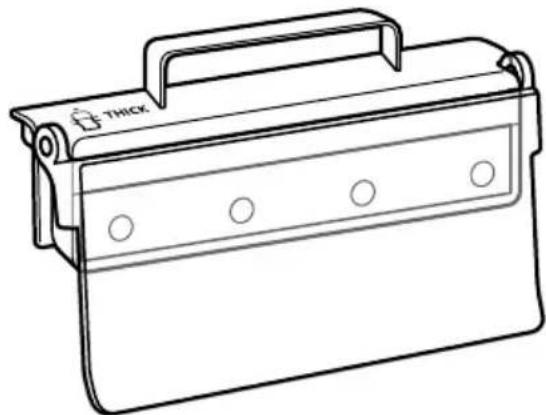
Thick blade
VEGETABLE SHEET CUTTER SAFETY
State of California Proposition 65Warnings:
WARNING: This product contains one or more chemicals known to the State of California to cause cancer.
WARNING: This product contains one or more chemicals known to the State of California to cause birth defects or other reproductive harm.
IMPORTANT SAFEGUARDS
When using electrical appliances, basic safety precautions should always be followed, including the following:
- Read all instructions.
- To protect against risk of electrical shock, do not put Stand Mixer in water or other liquid.
- Be sure to turn the Stand Mixer off (and detach the Vegetable Sheet Cutter attachment from Stand Mixer) after each use of the Vegetable Sheet Cutter attachment and before cleaning. Make sure the motor stops completely before disassembling.
- Keep hands, utensils, or other objects away from the Vegetable Sheet Cutter attachment, skewer, or moving parts while it is in operation to reduce the risk of severe injury to persons or damage to the Vegetable Sheet Cutter attachment.
- Never feed by hand. Always use the provided skewer, food holder, and zucchini/cucumber adapter.
- If food becomes lodged in any blade or the skewer, turn the motor off and disassemble the Vegetable Sheet Cutter attachment to remove the remaining food.
- Avoid contacting moving parts.
- The use of attachments not recommended or sold by KitchenAid may cause fire, electric shock, or injury.
- Do not use outdoors.
- Close supervision is necessary when any appliance is used by or near children.
- Do not use the appliance if the driver mechanism or rotating parts are damaged. Return appliance to the nearest Authorized Service Center for examination, repair, or electrical or mechanical adjustment.
- Do not let the Stand Mixer cord hang over the edge of table or counter.
- Blades are sharp. Handle carefully when inserting or removing blades.
- Do not remove food until Stand Mixer is off and skewer stops.
- To avoid damaging the gear assembly, do not immerse the Vegetable Sheet Cutter attachment main body in water or other liquids.
SAVE THESE INSTRUCTIONS This product is designed for household use only.
USING THE VEGETABLE SHEET CUTTER ATTACHMENT
VEGETABLE SHEET CUTTER ATTACHMENT BLADE CHART
Choose a blade based on your preference. Both blades work well for many types of recipes — e.g., baked entrees, wraps, sushi. Experiment with both blades to identify the thickness that you prefer.
| ICON | USE THESE PARTS | WITH THESE PARTS | SUGGESTED FOODS | SPEED |
| THIN | Thin blade* | Attachment main body, food holder, food skewer, and zucchini/cucumber adapter*** | ZUCCHINI POTATO APPLE SWEET POTATO CUCUMBER | Stir Speed to Speed 2 |
| THICK | Thick blade** |
Approximate sheet thickness will be 1.3 mm.
*Approximate sheet thickness will be 1.8 mm.
***Zucchini/cucumber adapter should only be used with soft foods.
FOR INSTRUCTIONAL VIDEOS, RECIPIES AND OTHER INFORMATION ON USING THE VEGETABLE SHEET CUTTER ATTACHMENT
Visit kitchenaid.com/quickstart for additional instructions with videos, inspiring recipes, and tips on how to use your Vegetable Sheet Cutter attachment.
USING THE VEGETABLE SHEET CUTTER ATTACHMENT
FRUIT & VEGETABLE PREP CHART
NOTE: For best results, food should be 1.5-3.5" (3.8-8.9 cm) in diameter.
| FOOD | TYPE RECOMMENDED | HOW TO PREP SKE | WER | USE ADAPTER |
| Zucchini Firm | and thick | Cut off ends (Max length 4.5"/11.4 cm) | Insert all the way in | Yes |
| Cucumber Firm | and thick | Cut off ends (Max length 4.5"/11.4 cm) | Insert all the way in | Yes |
| Apple Firm | and thick Leave ends on | Insert to first mark | No | |
| Potato Round | and symmetrical | Cut off ends to be square (Max length 5.5"/14 cm) | Insert to first mark | No |
| Sweet Potato | Round and symmetrical | Cut off ends to be square (Max length 5.5"/14 cm) | Insert to first mark | No |
NOTE: For hard or tougher foods, such as jicama or yucca root, remove the skin before processing.
ATTACHING THE VEGETABLE SHEET CUTTER ATTACHMENT TO THE STAND MIXER
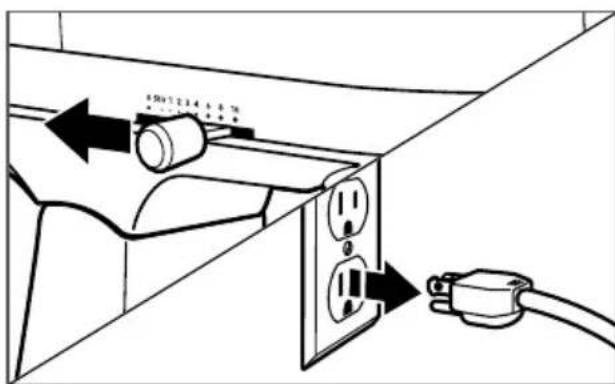
1 Turn the Stand Mixer off and unplug.
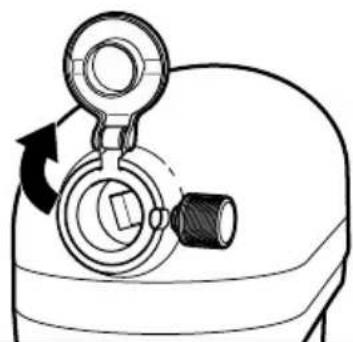
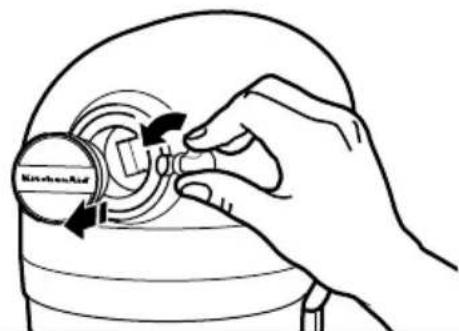
2
For Stand Mixers with a hinged power hub cover: Flip up to open.
For Stand Mixers with a removable power hub cover: Turn the attachment knob counterclockwise to remove power hub cover.
USING THE VEGETABLE SHEET CUTTER ATTACHMENT
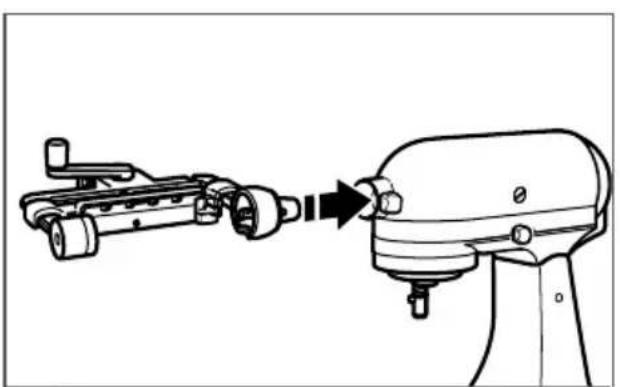
Insert the Vegetable Sheet Cutter attachment into the power hub, making certain that the power shaft fits into the square hub.
3 Rotate the Vegetable Sheet Cutter attachment back and forth if necessary. The pin on the shaft housing will slip fully into the notch on the hub rim when it is in the proper position.
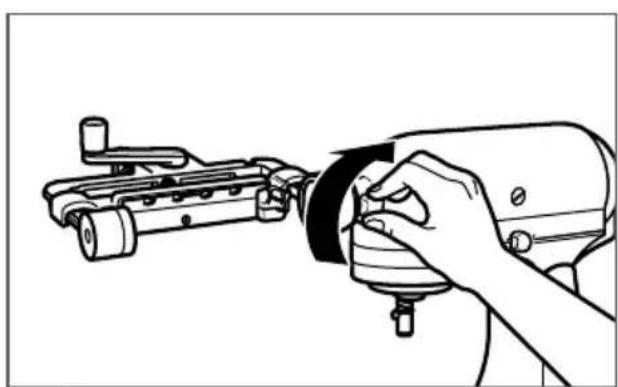
4 Tighten the attachment knob until the Vegetable Sheet Cutter attachment is completely secured to the Stand Mixer.
PREPARING TO PROCESS CUCUMBERS/ZUCCHINI
NOTE: Please refer to the "Fruit & Vegetable Prep" chart before processing.
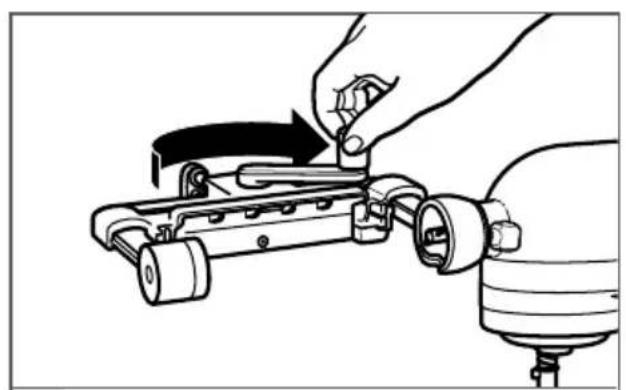
1 Rotate lever clockwise to the locked position.
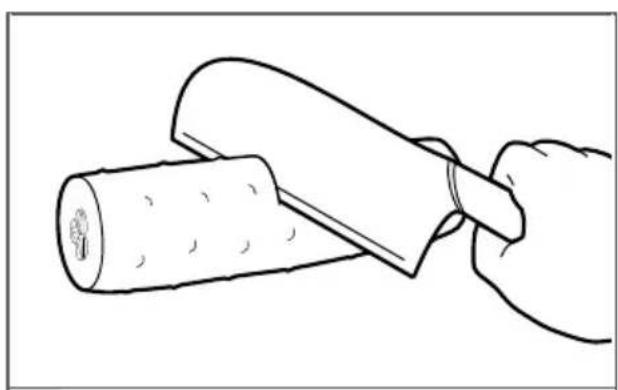
2 maximum length of 4.5" (11.4 cm).
TIP: The first mark on the food skewer is 4.5''(11.4cm) from the round skewer base.
USING THE VEGETABLE SHEET CUTTER ATTACHMENT
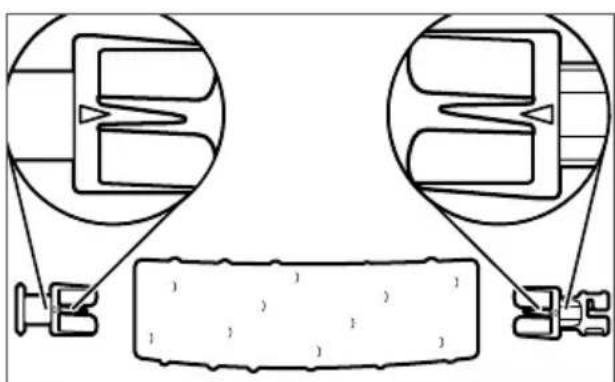
Insert the food holder into one end, then the zucchini/cucumber adapter into the other, using the markings to align both holder and adapter. Make sure the food holder and adapter are centered.
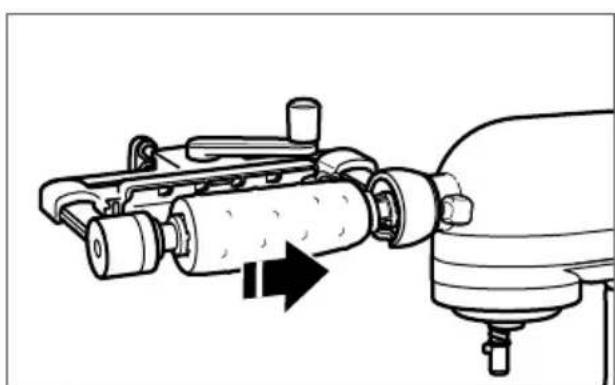
Place the food and food holder onto the main body and twist clockwise to lock into place.
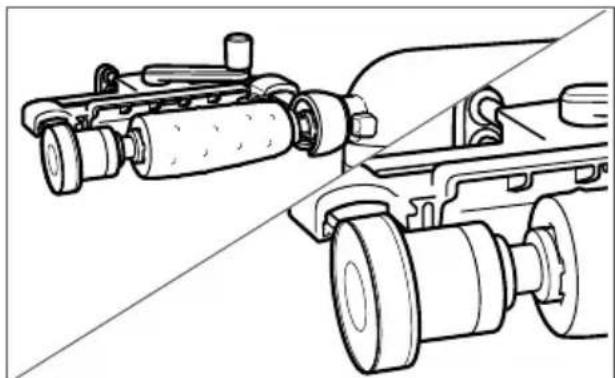
Insert the food skewer into the skewer support on the attachment, making sure it goes all the way through the vegetable. Make sure there is no gap between the skewer knob and the skewer support on the main body.
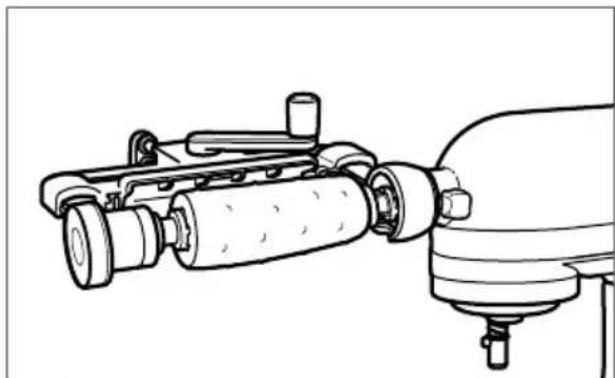
Once this is complete, begin on Step 1 of the "Processing Fruits & Vegetables" section.
USING THE VEGETABLE SHEET CUTTER ATTACHMENT
PREPARING TO PROCESS OTHER VEGETABLES/FRUITS
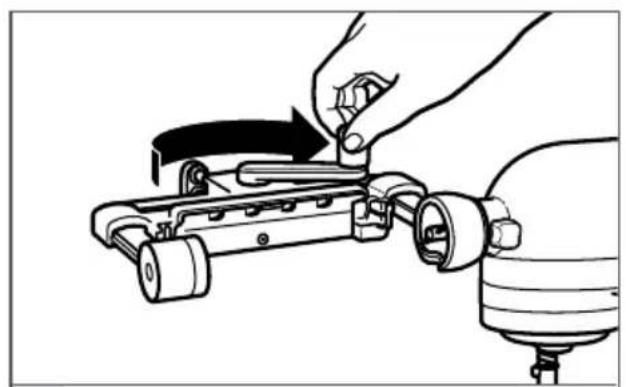
1 Rotate lever clockwise to the locked position.
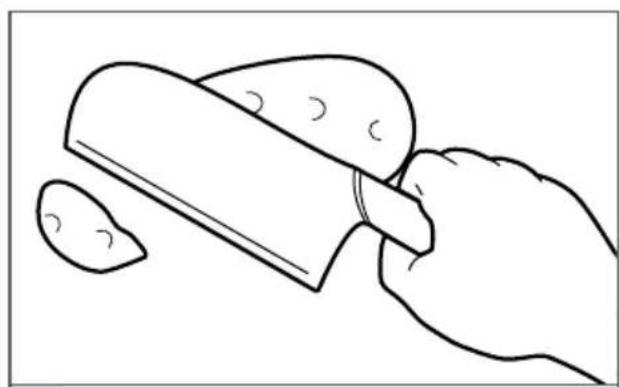
Cut the food to fit within the attachment main body. 2 Maximum food size is approximately 3.5'' (8.9 cm) diameter and 5.5" (14 cm) long.
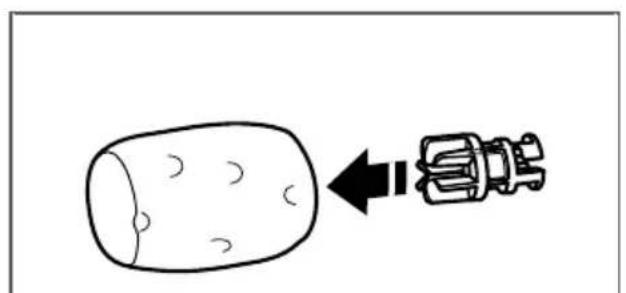
3 Insert the food holder all the way into the center of the food.
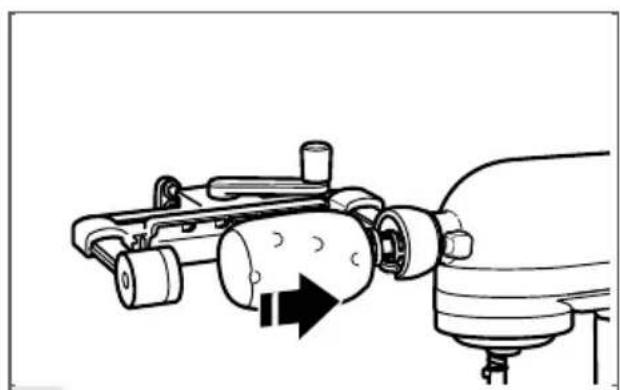
Place the food and food holder onto the main body and twist clockwise to lock into place.
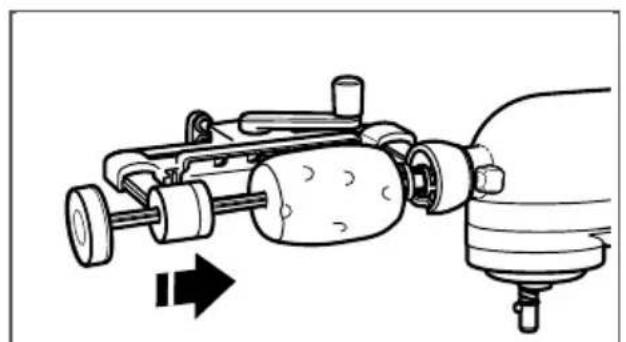
skewer support on the attachment main body, making sure that it is centered on the food.
NOTE: The food skewer may not need to be fully inserted. For hard foods, insert approximately 2''(5cm) or to the first mark on the food skewer.
USING THE VEGETABLE SHEET CUTTER ATTACHMENT
PROCESSING FRUITS & VEGETABLES
NOTE: When using the Vegetable Sheet Cutter attachment, do not wear ties, scarves, loose clothing, long necklaces, or anything that could become entangled in the attachment; gather long hair with a clasp.
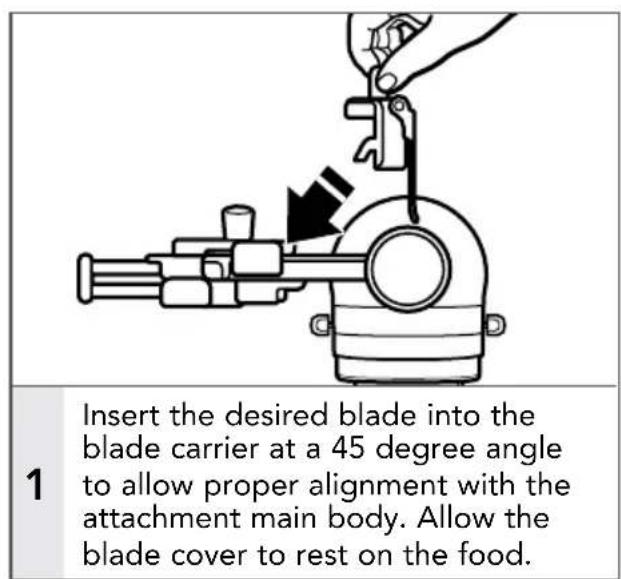
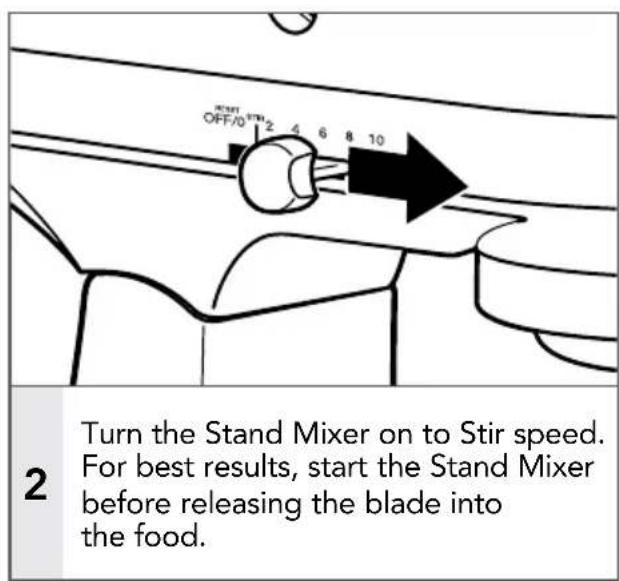
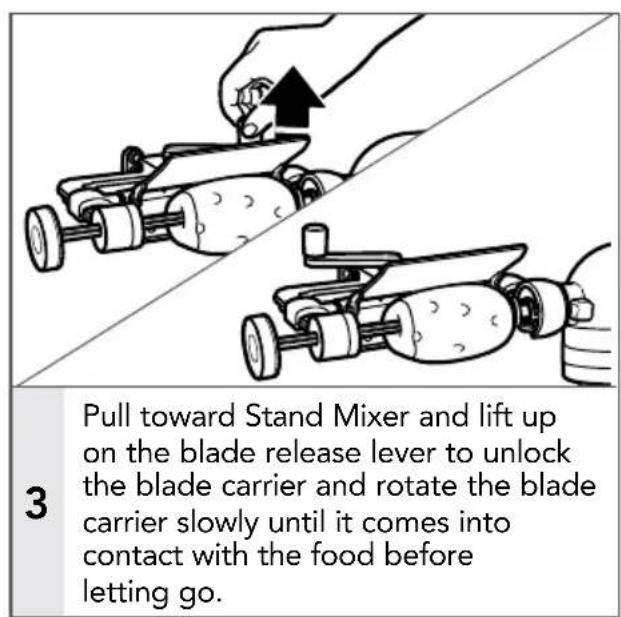
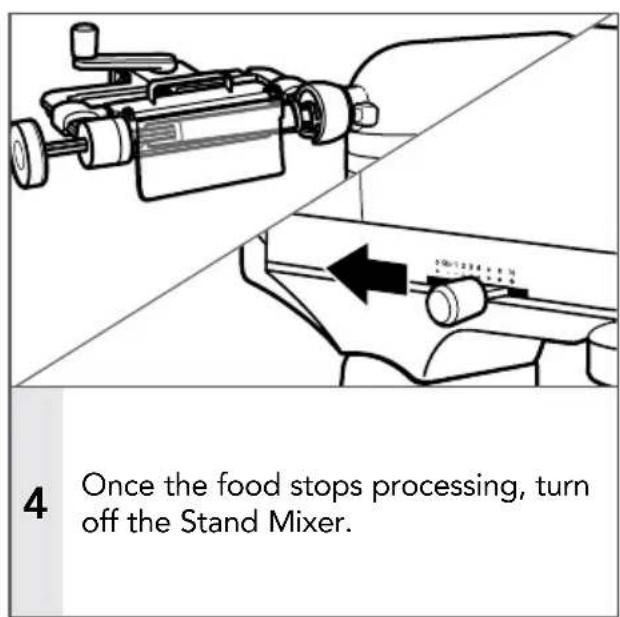
NOTE: As the attachment cuts the vegetable into sheets, it can either be one continuous sheet or several sheets. This is normal.
USING THE VEGETABLE SHEET CUTTER ATTACHMENT
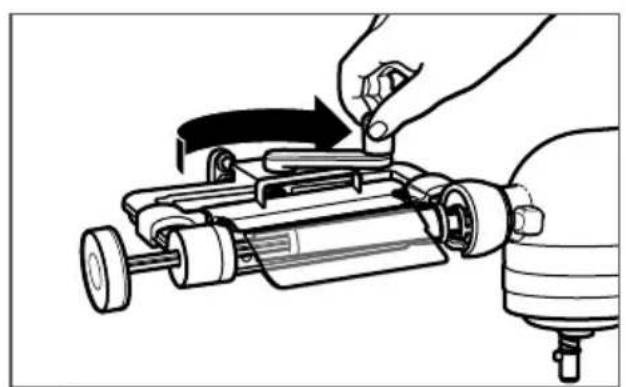
5 Rotate lever clockwise to the locked position.
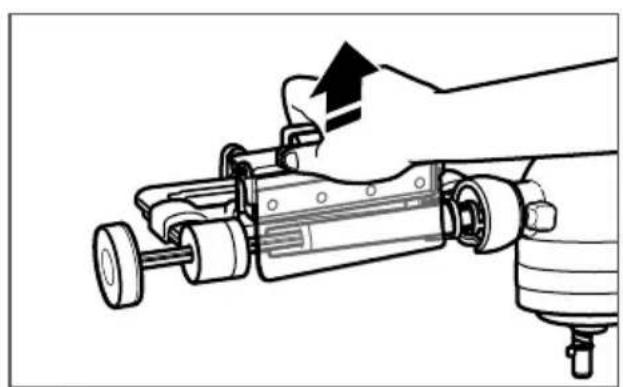
6 Remove the blade.
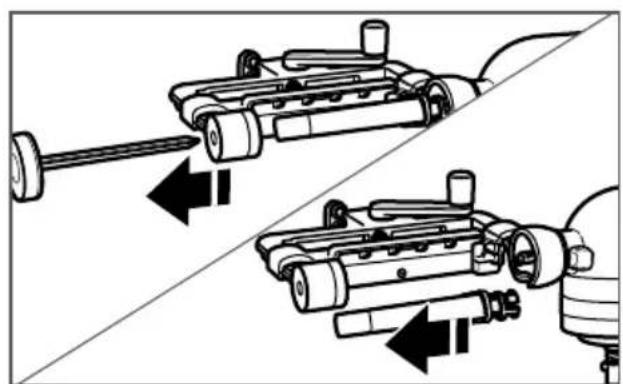
Remove the food skewer, then remove the food and adapter (if necessary). To prevent breakage, do not twist the skewer during food removal. If food is difficult to remove from food holder or skewer, slice into the core lengthwise to help remove it.
FOR INSTRUCTIONAL VIDEOS, RECIPIES AND OTHER INFORMATION ON USING THE VEGETABLE SHEET CUTTER ATTACHMENT
Visit kitchenaid.com/quickstart for additional instructions with videos, inspiring recipes, and tips on how to use your Vegetable Sheet Cutter attachment.
CARE AND CLEANING
CLEANING THE VEGETABLE SHEET CUTTER ATTACHMENT AND ACCESSORIES
IMPORTANT: To avoid damaging the finish, never wash or immerse the main body of the Vegetable Sheet Cutter attachment in water or place in the dishwasher. The removable blades and accessories are dishwasher safe.
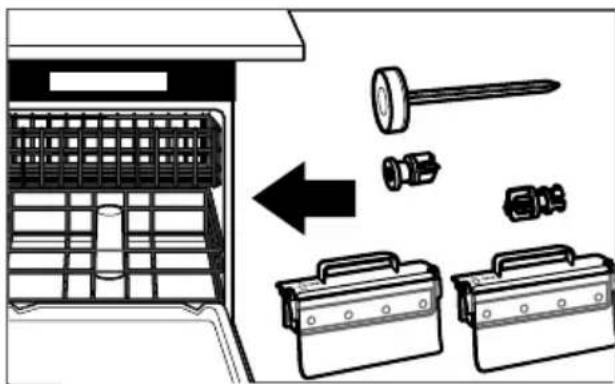
After using the Vegetable Sheet Cutter attachment, remove all blades and accessories. Wash the blades and accessory pieces in the dishwasher, top rack only.
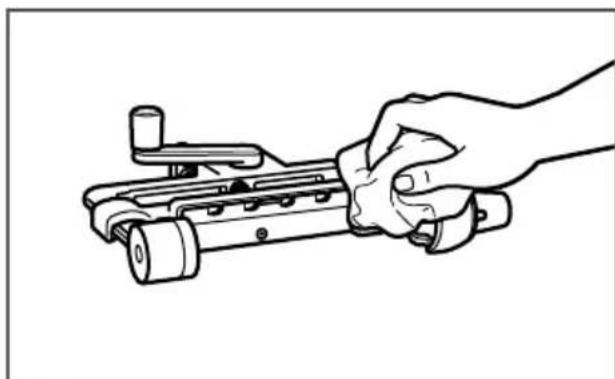
Clean the main body of the Vegetable Sheet Cutter attachment by hand only. Wash with a soft, damp cloth. Be sure to rinse the skewer support located in the main body. Dry thoroughly with a soft, dry cloth. Do not wash in the dishwasher. Do not immerse in water.
NOTE: For easier cleaning, rinse blades and other accessories immediately after each use. If food is stuck in the blades, use a knife to remove the pieces.
TROUBLESHOOTING
If your Stand Mixer should malfunction or fail to operate while using the Vegetable Sheet Cutter attachment, please check the following:
- Did you follow the preparation suggestions in the "Vegetable Sheet Cutter attachment blade chart"?
- Did you choose a blade recommended for the type of food you are processing?
Is the Stand Mixer plugged in? Refer to the "Instructions" manual that came with your Stand Mixer to find possible solutions.
Is the fuse in the circuit to the Stand Mixer in working order? Refer to the "Instructions" manual that came with your Stand Mixer to find possible solutions.
If the problem is not due to one of the above items, see the "Arranging for service" section in the Warranty.
Do not return the Vegetable Sheet Cutter attachment or the Stand Mixer to the retailer, as retailers do not provide service.
This warranty extends to the purchaser and any succeeding owner of the Vegetable Sheet Cutter attachment operated in the 50 United States, the District of Columbia, Puerto Rico, and Canada.
Length of Warranty: One Year Full Warranty from date of purchase.
KitchenAid Will Pay Hassle-Free Replacement of your Vegetable for Your Choice of: Sheet Cutter attachment. See the next page for details on how to arrange for service, or call the Customer eXperience Center toll-free at 1-800-541-6390.

parts and repair labor costs to
correct defects in materials and workmanship.
Service must be provided by an Authorized
KitchenAid Service Center.
KitchenAid Will A. Repairs when your Vegetable Sheet Cutter Not Pay for: attachment is used in other than normal single family home use.
B. Damage resulting from accident, alteration, misuse, or abuse.
C. Any shipping or handling costs to deliver your Vegetable Sheet Cutter attachment to an Authorized Service Center.
D. Replacement parts or repair labor costs for Vegetable Sheet Cutter attachments operated outside the 50 United States, District of Columbia, Puerto Rico, and Canada.
DISCLAIMER OF IMPLIED WARRANTY; LIMITATION OF REMEDIES
IMPLIED WARRANTY, INCLUDING TO THE EXTENT APPLICABLE WARRANTY OF MERCHANTABILITY OR FITNESS FOR A PARTICULAR PURPOSE, ARE EXCLUDING TO THE EXTENT LEGALLY PERMISSIBLE. ANY IMPLIED WARRANTY THAT MAY BE IMPOSED BY LAW ARE LIMITED TO ONE YEAR, OR THE SHORTEST PERIOD ALLOWED BY LAW. SOME STATES AND PROVINCES DO NOT ALLOW LIMITATIONS OR EXCLUSIONS ON HOW LONG AN IMPLIED WARRANTY OF MERCHANTABILITY OR FITNESS LASTS, SO THE ABOVE LIMITATIONS OR EXCLUSIONS MAY NOT APPLY TO YOU.
IF THIS PRODUCT FAILS TO WORK AS WARRANTYED, CUSTOMER'S SOLE AND EXCLUSIVE REMEDY SHALL BE REPAIR OR REPLACEMENT ACCORDING TO THE TERMS OF THIS LIMITED WARRANTY. KITCHENAID AND KITCHENAID CANADA DO NOT ASSUME ANY RESPONSIBILITY FOR INCIDENTAL OR CONSEQUENTIAL DAMAGES. This warranty gives you specific legal rights and you may also have other rights which vary from state to state or province to province.
We're so confident the quality of our products meets the exacting standards of KitchenAid that, if your Vegetable Sheet Cutter attachment should fail within the first year of ownership, KitchenAid will arrange to deliver an identical or comparable replacement to your door free of charge and arrange to have your original Vegetable Sheet Cutter attachment returned to us. Your replacement unit will also be covered by our one year limited warranty. If your Vegetable Sheet Cutter attachment should fail within the first year of ownership, simply call our toll-free
Customer eXperience Center at 1-800-541-6390 Monday through Friday. Please have your original sales receipt available when you call. Proof of purchase will be required to initiate the claim. Give the consultant your complete shipping address (no P.O. Box numbers, please).
When you receive your replacement Vegetable Sheet Cutter attachment, use the carton, packing materials, and prepaid shipping label to pack up your original Vegetable Sheet Cutter attachment and send it back to KitchenAid.
HASSLE-FREE REPLACEMENT WARRANTY - CANADA
We're so confident the quality of our products meets the exacting standards of KitchenAid that, if your Vegetable Sheet Cutter attachment should fail within the first year of ownership, KitchenAid will arrange to deliver an identical or comparable replacement to your door free of charge and arrange to have your original Vegetable Sheet Cutter attachment returned to us. Your replacement unit will also be covered by our one year limited warranty. If your Vegetable Sheet Cutter attachment should fail within the first year of ownership, simply call our
toll-free Customer eXperience Center at 1-800-807-6777 Monday through Friday. Please have your original sales receipt available when you call. Proof of purchase will be required to initiate the claim. Give the consultant your complete shipping address.
When you receive your replacement Vegetable Sheet Cutter attachment, use the carton, packing materials, and prepaid shipping label to pack up your original Vegetable Sheet Cutter attachment and send it back to KitchenAid.
ARRANGING FOR SERVICE AFTER THE WARRANTY EXISTS, OR ORDERING ACCESSORIES AND REPLACEMENT PARTS
In the United States and Puerto Rico:
For service information, or to order accessories or replacement parts, call toll-free at 1-800-541-6390 or write to:
Customer eXperience Center, KitchenAid Small Appliances, P.O. Box 218, St. Joseph, MI 49085-0218
Outside the United States and Puerto Rico:
Consult your local KitchenAid dealer or the store where you purchased the Vegetable Sheet Cutter attachment for information on how to obtain service.
For service information in Canada: Call toll-free 1-800-807-6777.
For service information in Mexico: Call toll-free 01-800-0022-767.
Customer eXperience Center, KitchenAid Small Appliances, P.O. Box 218, St. Joseph, MI 49085-0218
CÓM O B T E N E R S E R V I C I O T E C N I C O D E S P U E S DE QUE EXPI R L A GARANTÍA O CÓM O P E DIR ACCESORIOS Y PIEZAS DE REPUESTO
PRODUCT QUESTIONS OR RETURNS
QUESTIONS SUR LE PRODUIT OU LES RETOURS
PREGUNTAS SOBRE EL PRODUCTO O DEVOLUCIONES
USA: 1.800.541.6390 | KitchenAid.com
CANADA: 1.800.807.6777 | KitchenAid.ca
MEXICO: KitchenAid.com.mx
LATIN AMERICA: KitchenAid-Latam.com

KitchenAid®
©2017 KitchenAid. All rights reserved. KITCHENAID and the design of the stand mixer are trademarks in the U.S. and elsewhere. Used under license in Canada.



- VEGETABLE SHEET CUTTER SAFETY
- IMPORTANT SAFEGUARDS
- When using electrical appliances, basic safety precautions should always be followed, including the following:
- SAVE THESE INSTRUCTIONS This product is designed for household use only.
- USING THE VEGETABLE SHEET CUTTER ATTACHMENT
- FOR INSTRUCTIONAL VIDEOS, RECIPIES AND OTHER INFORMATION ON USING THE VEGETABLE SHEET CUTTER ATTACHMENT
- PREPARING TO PROCESS CUCUMBERS/ZUCCHINI
- CARE AND CLEANING
- TROUBLESHOOTING
- DISCLAIMER OF IMPLIED WARRANTY; LIMITATION OF REMEDIES
- HASSLE-FREE REPLACEMENT WARRANTY - CANADA
- ARRANGING FOR SERVICE AFTER THE WARRANTY EXISTS, OR ORDERING ACCESSORIES AND REPLACEMENT PARTS
- In the United States and Puerto Rico:
- Outside the United States and Puerto Rico:
- CÓM O B T E N E R S E R V I C I O T E C N I C O D E S P U E S DE QUE EXPI R L A GARANTÍA O CÓM O P E DIR ACCESORIOS Y PIEZAS DE REPUESTO
- KitchenAid®
Brand : KITCHENAID
Model : KSMSCA
Category : Other kitchen appliances