SBCRU545/05B - Remote control PHILIPS - Free user manual and instructions
Find the device manual for free SBCRU545/05B PHILIPS in PDF.


User questions about SBCRU545/05B PHILIPS
0 question about this device. Answer the ones you know or ask your own.
Ask a new question about this device
Download the instructions for your Remote control in PDF format for free! Find your manual SBCRU545/05B - PHILIPS and take your electronic device back in hand. On this page are published all the documents necessary for the use of your device. SBCRU545/05B by PHILIPS.
USER MANUAL SBCRU545/05B PHILIPS
Instructions for use English 4
- Introduction 4
- Installing the remote control 4-6
Inserting the batteries 4
Testing the remote control 4
Setting the remote control 5
Automatically setting the remote control 6
- Keys and functions 7
- Extra possibilities 8-9
Adjusting device selection (Mode selector) 8
Adding a remote control function 9
Restoring the original remote control settings 9
- Troubleshooting 10
6.Need help? 10
Code list of all brands / equipment 82-90
1. Introduction
Congratulations on your purchase of the Philips SBC RU545 universal remote control. After installing the remote control you can operate a maximum of 4 different appliances with it:
TV, DVD, video recorder and satellite or cable decoders.
You can find information about how to prepare this remote control for use in the chapter 'Installing the remote control'.
2. Installing the remote control
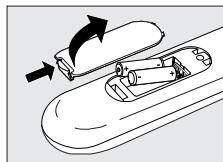
Inserting the batteries
1 Press the cover inwards and slide it in the direction of the arrow.
2 Place two R03,UM4 or AAA type batteries into the battery compartment, as shown.
3 Slide the cover back and click it firmly into place.
Testing the remote control
The remote control has been programmed to operate most Philips appliances. Because the RU545 may use different signals for each make and even for different models of the same make, it is advisable to test whether your appliance responds to the RU545.
The example below (TV) instructs you how to do this.
You can repeat the same steps for other appliances
(DVD, video recorder, etc.) which you want to operate using the RU545.
Example of TV:
1 Turn your TV on manually or use the original remote control.
Tune to channel 1.
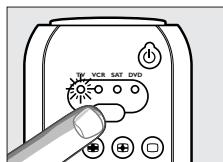
2 Use the RU545's mode selector to select TV. Press the key until the green light under TV in the selector window lights up.
If no green light appears, check whether the batteries are properly inserted (see 'Inserting the batteries').
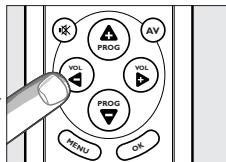
3 Check whether all the keys are working. For an overview of the keys and their functions see '3. Keys and functions'.
If the TV responds as it should to all of the key commands the RU545 is ready for use.
English
If the device does not respond at all or not to all of the key commands, follow the instructions under 'Setting the remote control'.
Setting the remote control
This is only necessary if your appliance does not respond to the RU545. If that is the case, the RU545 does not recognize the brand and/or model of your appliance and you need to program the remote control to do so. The example below (TV) instructs you how to do this. You can repeat the same steps for other appliances (DVD, video recorder, etc.) which you want to operate using the RU545.
Example of TV:
1 Turn on the TV manually or use the original remote control. Tune in to channel 1.
2 Look up the brand of your TV in the code list at the back of this manual. One or more four-figure codes are shown for each brand. Note the first code. Be careful! There are separate tables for TV, video, DVD, etc. Make sure you use the codes from the correct table.
3 Select TV with the mode selector. (See 'Testing the remote control').
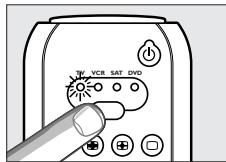
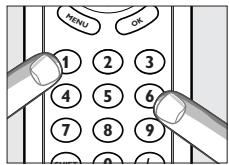
4 Keep keys '1' and '3' pressed simultaneously for five seconds until the green light under TV in the selector window flashes twice and then remains lit.
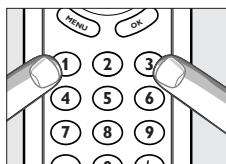
5 Then enter the code noted in step 2 using the digital keys.
- The green light in the selector window will now flash twice. If the light flashes once for an extended period, the code has not been entered properly or the wrong code has been entered. Start again from step 2.
6 Point the RU545 at the TV and check that it responds as it should.
- If the TV responds to all of the key commands, the RU545 is ready for use. Do not forget to note your code.
If the device does not respond at all, or not to all of the key commands, start again from step 2 and try the next code from the list.
Automatically setting the remote control
If you cannot find the right code for your brand device, the remote control can automatically search for the right code.
Example of TV:
1 Make sure the TV is switched on and select a channel using the original remote control or the keys on the TV (for example channel 1). The RU545 emits the 'switch off TV' signal for all models of TV that are stored in the memory.
- If the device is a DVD-player or video recorder, insert a disk or tape and start playback.
2 Then keep keys 1 and 3 on the RU545 pressed simultaneously for five seconds, until the green light under TV in the selector window flashes twice and then remains lit.
3 Press the Standby key of the RU545 briefly.
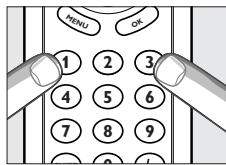
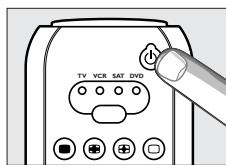
- The RU545 now starts emitting all known 'TV off' signals, one by one. Each time a code is sent, the green light under TV in the selector window lights up.
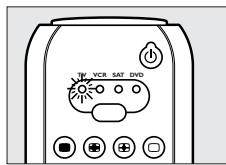
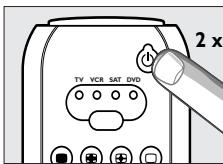
4 When your TV switches off (stand-by), you press the Standby key of the RU545 twice within 1 second, to confirm.
The RU545 has now found a code that works on your TV.
5 Check if you can operate all functions on your TV with the RU545.
If this is not the case, you can redo the automatic setting. The RU545 will then search for a code that perhaps works better.
After the RU545 has run through all the known codes, the search will stop automatically and the green light will stop flashing.
Automatic programming of a TV takes a maximum of 3 minutes.
3. Keys and functions
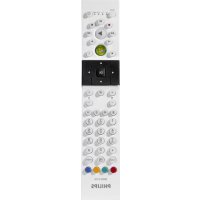
The illustration on page 3 gives an overview of all keys and their functions.
① Ⓞ Standby . . . . . . switches TV, VCR, SAT or DVD mode on or off.
② Mode selector . . . selects the device you want to operate: TV, VCR, SAT (satellite/cable) or DVD.
③ . mutes the sound of the TV.
④ -VOL ^+ .adjusts the TV volume.
(5) MENU . turns the menu on and off.
⑥ Digital keys.......direct choice of channels and other functions.
⑦ SHIFT . . . . . . . . . . . . . . . . . . . . . . . . . . . . . . . . . . . . . . . . . . . . . . . . . . . . . . . . . . . . . . for extra functions. When pressed at the same time as a second key, the second key will get another function. For example:
SHIFT + PROG+: 'menu up'
SHIFT + PROG::. 'menu down'
SHIFT + VOL+... 'menu right'
SHIFT + VOL: ... 'menu left'
Try out other combinations with the Shift-key on your appliance in order to find out which functions are available.
Only functions featured on the original remote control are available.
8 -red teletext key
- rewind (VCR/DVD)
⑨ -green teletext key
- stop (VCR/DVD)
10 . . . . . . . . . . . . . . . . . . . . . . . . . . . . . . . . . . . . . . . . . . . . . . . . . . . . . . . . . . . . . . . . . . . . . . . . . . . . . . . . . . . . . .
VCR: record
SAT:A/B
DVD: clear
11 - yellow teletext key
- pause (VCR/DVD)
12 blue teletext key
- wind (VCR/DVD)
13 - white teletext key
-index
- play (VCR/DVD)
14 --- selects between one- and two-figure channel.
numbers.
(15) OK. confirms your selection.
16 - PROG + . selects a previous or following channel.
⑰ AV . switches between external inputs of your equipment.
18 国国口 .TV: teletext keys
SAT: teletext, Info, Guide, Subtitle
DVD: audio menu, Angle, Subtitle
VCR: timer, Showview
If you use the () 'memory off' key to get to the next teletext page on your Philips TV, you can press the Subtitle key for this. See also 'Troubleshooting'.
If the device does not respond at all, or not to all of the key commands, follow the instructions under 'Setting the remote control'. It is possible that you must enter another code for the device.
4. Extra possibilities
Adjusting device selection (Modeselector)
The RU545 is default set for operating TV, VCR, Sat (satellite)/ CBL (cable) and DVD. You can select the device you wish to operate with the Mode selector. Each option allows operation of one device only. If desired, you can program the Mode selector to select a different kind of device.
For example, if you want to operate a second TV.
In the following example you will see how to configure the SAT mode for a second TV.
1 Switch on the second TV.
2 Press the Mode selector to select SAT.
3 Then keep 1 and 6 on the RU545 pressed simultaneously for five seconds, until the green light under SAT in the selector window lights up.
4 Press keys 9, 9 and 2, in that order.
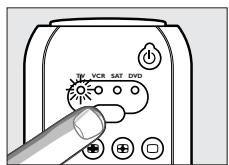
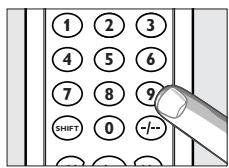
5 Press the Mode selector to select TV.
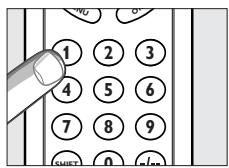
6 Press the 1 key.
The green light under SAT flashes twice. SAT will now allow you to operate your second TV.
7 Program the RU545 to operate the second TV. See 'Setting the remote control'.
Adding a function to the remote control
If you want to add a function to the RU545, you can contact the Philips service line for Universal Remote Control to ask for the 3-figure code for the extra function.
Using the Mode selector, select the device for which you want to add the function.
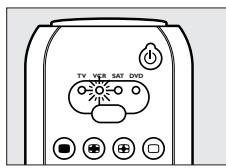
2 Then keep 1 and 6 on the RU545 pressed simultaneously for five seconds, until the green light lights up.
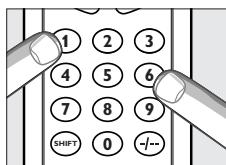
3 Press keys 9, 9 and 4, in that order.
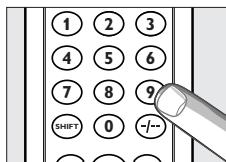
4 Enter the 3-figure code which you received from the service line within thirty seconds.
5 Press the key under which you want to store the new function.
The light flashes twice. The extra function has been successfully added to the RU545.
If you want to store the function under Shift in combination with another key, first press the Shift key and then press the required function key.
- For restoring the original function of the key, see 'Restoring the original functions of your remote control'.
Restoring the original functions of your remote control
1 Keep keys 1 and 6 on the RU545 pressed simultaneously for five seconds, until the green light lights up.
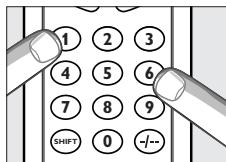
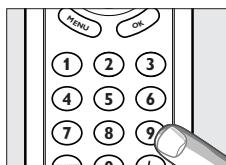
2 Press keys 9, 8 and 1, in that order.
The light flashes twice. All original functions have now been restored and any extra functions have been deleted.
5. Troubleshooting
Problem
Solution
- The device you want to operate does not respond and the green light does not flash when you press a key.
Replace the old batteries with two new 1.5 Volt, RO3, UM4 or AAA batteries. - The device you want to operate does not respond but the green light does flash when a key is pressed.
- Point the RU545 at the device and make sure that there are no obstructions between the RU545 and the device.
The RU545 does not respond properly to commands. - Maybe you are using the wrong code. Try programming the RU545 again using another code, which is mentioned under the brand of your device, or reset for automatic search to find the right code. If the device still does not respond, call our helpline.
- You cannot get the Teletext pages on your screen, while you are used to use the (◇) button for this.
- Follow the instructions under 'Installing the remote control' and at step 5
press keys 0, 0, 6 and 4.
Press the subtitle-ing-key to get Teletext pages on your screen.
The Teletext keys do not work.
Find out whether your TV is equipped with Teletext.
You cannot switch off Teletext.
Press the key for substiting to switch off Teletext.
You have difficulties operating all of the functions on your device. - Maybe the RU545 has to be adapted to the model of the device. Call our helpline for details.
- Your brand of device is not in the code list.
Try to set the RU545 automatically. See 'Automatically setting the remote control'. - None of the codes works during manual setting of the remote control.
If that is the case, follow the instructions under 'Automatically setting the remote control'.
6. Need help?
If you have any questions about the RU545, call our special helpline. You will find the telephone number after the code list at the back of this manual.
Read this manual carefully before you make a call. You can solve most of the problems yourself. If you cannot find any answers to your problems, write down the details of your device shown in the code list at the back of this manual. This will help our operators to assist you better and more quickly. Look up the numbers of the models in the instructions accompanying the device or on the back of your device. When you call our helpline, make sure the device is to hand so that our operators can help you determine whether your remote control is working properly.
The model number of your Philips universal remote control is SBC RU545/00U.
Date of purchase: ..../..../.... (day/month/year)
Sommaire
SAT: teletekst, Info, Gids, Subtitle
dv: audio menu, Angle, Subtitle
VCR: timer, Showview
VCR: timer, Showview
VCR:programador,Showview
SAT: teletexto, Info, Guide, Subtitle
DVD: menu de audio, Angle, Subtitle
VCR: timer, Showview
SHIFT + PROG+: 'meny opp'
SHIFT + PROG::. 'meny ned'
SHIFT + VOL+: ... 'meny hôyre'
SHIFT + VOL- ... 'meny venstre'
VCR: timer, Showview
Hvis du bruker knappen (♂) 'minne av' for Å gå til;neste Tekst-TV-side
på Philips-TVen, kan du trykke knappen Subtitle (teksting) til dette.
Se ogå 'Problemlösing'.
- Hvis encheten ikke reagerer i det—hele tatt, eller ikke reagerer på alle knappekommandoe, følger du anvisingene under 'Stille inn fjernkontrollen'.
Vaihda television kanavaksi 1.
Beko.0741,0513,0742,0397
Beon .0064
Binatone. 0244
Continental Edison. .0223, 0360, .0426, 0528, 0595
Crosley .0101,0103,0111 0114,0240,0374
Crown....0064, 0397, 0036, 0103, 0445
Crystal. .0458
Cybertron. 0245
Daewoo 0064,0661 0036,0401,0526
Dainichi. 0245
Dansai. 0064
Dayton. 0036
De Graaf. 0575, 0235
Decca. 0064,0099,0299
Digatron. 0064
Dixi. 0064, 0036
Dual. 0363,0379
Dual Tec. 0244
Dumont. 0114,0322,0374
Elbe. 0286
Elin. 0064, 0575
Elite. 0245, 0347
Elta. 0036
Emerson. 0388, 0114, 0240
Erres .0064
Expert. 0233
Ferguson 0064,0136,0265 0314,0362,0370
Fidelity. 0388, 0243
Finlandia 0235,0373,0386
Finlux. 0064,0099,0114,0131 0132,0206,0322,0373,0374
Firstline. 0695,0036,0243 0244,0274,0321,0348
Fisher.....0397, 0131, 0235, 0244, 0582
Flint .0482
Formenti. 0064, 0114, 0240, .0347, 0374, 0579
Frontech.0190,0274,0458,0475
Fujitsu. .0099, 0233
Funai. 0206, 0321
GBC. 0579
GEC. 0064,0099,0244
GPM. 0245
Geloso. 0036, 0240, 0374
Genexxa. 0245, 0190
GoldStar. 0064, 0136, 0244, 0317
Goodmans.0064,0661,0063,0099 0206,0244,0262,0344 0370,0398,0401,0526
Gorenje 0397
Graetz. 0388, 0190, 0374
Granada. 0064,0099,0235 0244,0366,0378,0386
Grandin. 0637, 0309
Grundig. 0583,0883,0222 0514,0264,0562,0581
HCM. 0036, 0309
Hanseatic. 0583,0883,0064, 0388,0347,0455
Havermy. 0120
Hifivox .0528,0595
Hinari.....0064,0245,0063,0036,0206
Hisawa. 0482,0309,0427
Hitachi. 0575,0063,0252 .0132,0136,0190,0223 .0244,0374,0376,0383
Huanyu .0243,0401
Hypson. 0064, 0309
ICE 0244,0398
ICeS. 0245
IR .0101
ITC .0579
ITS. 0398
ITT. 0575, 0388, 0190, 0374, 0378
Imperial. 0397,0101,0103 0111,0274,0445,0579
Indesit. 0264
Indiana . 0064
Ingelen 0190
Inno Hit 0099
Interfunk. 0064,0388,0190 0274,0528,0539,0595
Intervention. 0064, 0129, 0244
Isukai. 0245
JVC. 0633,0063,0680, .0121,0219,0398
Kaisui.....0245, 0036, 0243, 0244, 0309
Kapsch. 0190, 0233
Karcher. 0637
Kathrein. .0583,0883
Kendo. 0064, 0262, 0389
Kennedy . 0579
Kingsley. 0243
Kneissel. 0286, 0462
Korpel. 0064
Korting. 0114
Koyoda 0036
LG. 0064,0741
Leyco. 0064,0099,0321
Liesenk & Tter. 0064
Loewe. 0102,0114,0316, 0539,0397,0064,0319
Luma .0233,0332
Luxor.....0388,0264,0376,0383,0384
M Electronic. 0064, 0036, 0131, .0132, 0136, 0190, 0244, .0314, 0373, 0401, 0507
MTC. 0376,0539
Magnadyne.....0114, 0129, 0274, 0374
Magnafon .0103,0129,0240
Manesth. 0244, 0262, 0347
Marantz. 0583, 0883, 0064
Marelli. 0114
Mark. .0064
Matsui. .0064, 0514, 0063, 0036, .0038, 0099, 0204, 0235, .0244, 0262, 0299, 0321, 0398
Mediator .0064
Medion. .0695, 1064
Memorex 1064,0036
Memphis. 0364
Metz. 0114,0240,0266, .0302,0394,0562
Minerva.0514,0264,0562,0581
Mitsubishi. 0063, 0135, 0114
0264,0539,0562
Mivar. 0397,0243,0317 0318,0319,0636,0244
Motion. 0103
Multitech.0036,0103,0129,0243
Myryad. 0583,0883
NAD. 0388
NEC. 0197
NEI .0064,0364,0458
National. 0264
Neckermann.0583,0883,0064 0114,0240,0376,0581
Nesco .0206
Nikkai.....0064, 0245, 0099, 0243, 0364
Nobliko .0103,0129
Nogamatic. 0528, 0595
Nokia. 0575,0633,0388 0500,0507,0658
Nordmende.0136,0223,0240 0314.0370,0528.0595
Oceanic. 0388, 0190, 0374
Orion. 0064,0204,0262 0321,0347,0348
Osaki. 0245,0099,0244
Oso .0245
Osume. 0099
Otake. 0344
Otto Versand .0583,0883,0064 0063,0037,0240,0244 0347,0370,0374,0376 0539,0562,0579,0581
Palladium .0397,0445
Panama .0244
Panasonic 0677,0253,0153 0190,0240,0264 .0267,0301,0374,0394
Pathe Cinema. 0240, 0243, .0265, 0347, 0579
Pathe Marconi. 0223, 0360, .0528, 0595
Pausa. 0036
Perdio .0347
Philco .0101,0103,0111 0114,0240,0274,0579
Philex. 0378
Philips.0583,0883,0064,0114 0350,0359,0401,0581,0632
Phoenix. 0114
Phonola. 0064, 0114
Pioneer .0136,0190,0314
Profex. 0388,0036,0103
Proline 0348
Protech. 0064, 0695, 0036, 0129, 0244, 0274
0364,0445,0458,0579
A
Quelle. 0064,0388,0037 0038,0101,0111,0131 .0240,0322,0354,0355 .0539,0562,0579,0581
Questa. 0063
R-Line. 0064
RFT. 0114, 0455
Radiola. 0064, 0350
Radiomarelli. 0114
Rank Arena 0063
Rediffusion. 0388, 0378
Reoc. 0741
Revox. 0064
Rex. 0190,0233,0286,0332
Roadstar. 0245, 0036, 0445
Rowa .0725
SBR. 0064
SEG......0695,0063,0103,0244,0579
SEI .0037,0114,0129 0204,0240,0321,0374
Saba. 0102, 0114, 0136, 0190
0223,0240,0314,0362
0370,0374,0528,0595
Saccs .0265
Sagem. .0637
Saisho.....0036, 0038, 0204, 0262, 0458
Salora. 0575,0388,0190 0376,0383,0386
Sambers. 0103, 0129, 0240
Samsung. .0583, 0883, 0064, 0397, .0036, 0244, 0317, 0671
Sandra. .0243
Sanyo. 0063, 0038, 0099, .0131, 0235, 0240, 0366
Schaub Lorenz. 0388, 0374
Schneider. 0064, 0695, 1164, 0245, 0274, 0350, 0363, 0379, 0398
Seleco.....0190,0233,0286,0332,0389
Sharp. 0063, 0120
Shorai. 0321
Siarem.0114, 0129, 0240, 0374
Siemens. 0064, 0222, 0240, 0354, 0355, 0374, 0562, 0581
Silver 0063
Singer 0114
Sinudyne.0037,0114,0129,0204 0240,0262,0321,0374
Skantic. 0383, 0384
Solavox. 0190, 0378
Sonitron. 0235
Sonoko .0064,0036
Sonolor .0190,0235
Sontec. 0064
Sony. 1532,0063,0037 0038,0256,1678
Soundwave. 0064, 0445
Standard. 0245, 0036, 0244
Stern. 0190, 0233, 0286, 0332
Sunkai. 0321, 0348
Susumu. 0245
Sysline .0064
Tandberg. .0322
Tandy.....0245,0099,0120,0190,0244
Tashiko. 0063, 0244, 0386
Tatung. 0064, 0099, 0244
Teac. .0064, 0695, 1064, 0725, .0482, 0036, 0309, 0445
Tec. 0244, 0274, 0579
Technema .0347
Technics .0677
Technol Ace. 0206
Teleavia. 0360, 0370 0517, 0528, 0595
Telefunken.0652,0101,0111,0128 0136,0240,0289,0362,0370 .0498,0525,0528,0593,0595
Telemeister. 0347
Teletech. 0036
Teleton.0063,0233,0244,0376
Tensai. 0245, 0321, 0344, 0347
Texet. 0245, 0243
Thomson. .0652, 0136, 0223, 0264, .0314, 0360, 0370, 0376, .0426, 0517, 0528, 0595
Thorn. .0064,0388,0099,0101 0111,0131,0219,0370 0526,0539,0562,0580
Thorn-Ferguson 0370
Tomashi 0309
Toshiba. 0063, 0270, 0580
Towada 0579
Transonic .0725
Triumph. 0204, 0270
Uher. 0233, 0347
Ultra. 0219
Ultravox. 0129,0378
Universum. 0064, 0397, 0101, 0131, 0132, 0373, 0448, 0519, 0562, 0579
Vestel. 0064
Videosat .0274
Videotechnic. 0244
Vision 0347
Voxson. 0114, 0190
Waltham. 0244, 0383
Watson. 0064, 0347
Watt Radio. 0129, 0579
Wega. 0063, 0114
White Westinghouse. 0064, .0243,0347
Yoko. 0064,0244,0458
Zanussi .0233,0332
SETUP CODES FOR VCR
ASA. 0108, 0064
Aiwa. 0375,0027,0334,0379
Akai.0342,0133,0068,0080,0312
Akiba .0099
Alba.0305,0099,0379,0342,0047
0.0236, 0.0320, 0.0322, 0.0360, 0.0361
Ambassador. 0047
Amstrad. 0027, 0352, 0359
Anitech. 0099
Asuka .0064
Baird. 0027, 0131, 0068, 0134
Basic Line. 0305, 0099, 0047
Firstline. .0064,0099 0072,0070,0236
Fisher. 0131, 0073, 0074, 0081
Frontech. .0047
Fujitsu .0027
Funai .0027
GEC .0108
General. 0047
GoldHand. 0099
GoldStar 0064,0252
Goodmans. 0305, 0064, 0027
0099,0047,0089,0430
Graetz 0131,0068,0267
Granada.0108,0131,0073,0312
Grandin. 0064, 0027, 0099
Grundig. .0108,0099,0253,0222 0320,0374,0376,0430
HCM. 0099, 0320
Hanseatic 0064
Hinari. 0099,0379,0031, .0235,0267,0320
Hitachi. .0027,0069,0031,0068 0132,0193,0267,0312
Hypson 0099
ITT. 0411,0131,0133 0068,0073,0267
ITV. 0305, 0064, 0047
Imperial. 0027
Ingersol. .0031
Interfunk. 0108
JVC.0411,0094,0035,0068,0233
Kaisui. 0099
Kendo. 0133,0236
Kenwood 0068
Korpel. .0099
Lenco .0305
Leyco. .0099
Loewe. 0108,0064 0031,0189,0481
Logik 0031,0267
Luxor .0131,0075,0070 0133,0073,0089
M Electronic. 0027, 0065
Manesth .0099, 0072
Marantz.0108,0089,0173,0322
Matsui. .0375, 0379, 0031, 0063, .0115, 0235, 0236, 0322
Matsushita 1189
Medion. 0375
Memorex.0064,0027,0131,0073
Memphis. .0099
Metz. 0064,0189,0222 0254,0374,0481
Minerva. 0222
Mitsubishi 0108,0094,0070
Multitech. 0027, 0099
Murphy. .0027
Myryad .0108
NAD. 0131
NEC. 0131,0094,0065,0068
Neckermann. 0108
Nesco 0099
Nokia....0131, 0133, 0068, 0073, 0267
Nordmende. 0347, 0411, .0068, 0348, 0521
Oceanic. 0027, 0068
Okano. 0375, 0342
Optimus 1189
Orion. 0375, 0379, 0031
0063,0115,0235
0236,0322,0360,0361
Osaki. 0064, 0027, 0099
Otto Versand. .0108
Palladium. 0064, 0099, 0068
Panasonic. 0253, 0189
.0254, 0481, 1189
Pathe Cinema 0063
Pathe Marconi. 0068
Pentax .0069,0132
Perdio .0027
Philco. .0065
Philips.....0108, 0411, 0173, 0430, 0494
Phonola. 0108
Pioneer. .0108, 0094
Portland. 0047
Profex. 0349
Profitronic. 0267
Proline. 0027,0320
Pye .0108
Quartz. 0073
Quasar 1189
Quelle. 0108
RFT. 0430
Radiola. 0108
Reoc. 0375
Rex. 0411, 0068
Roadstar.0305,0064,0099,0267
SBR. 0108, 0173
SEG 0267,0349
SEI .0108,0031
Saba. 0347, 0411, 0068
0233,0348,0521
Saisho....0031, 0063, 0115, 0235, 0236
Salora. 0070, 0133, 0073
Samsung. 0459, 0267
Sansui 0094,0068
Sanyo. 0131,0073
Saville. 0379
Schaub Lorenz.0027,0131,0068
Schneider.0108, 0027, 0099
Seleco. 0068,0233
0253,0286,0389
Sentra. 0047
Sharp. 0075, 0089, 0321
.0120,0063,0184
Shintom. 0099, 0131
Shorai. 0031
Siemens. .0108, 0064, 0131
.0081,0173,0222
Silva .0064
Singer .0072
Sinudyne .0108, 0031
Solavox. 0047
Sonolor .0073,0089
Sontec. 0064
Sony. 0059, 0060, 0061, 1059
Sunkai. 0375
Sunstar .0027
Suntronic .0027
Tandy .0027,0131
Tashiko .0027
Tatung. 0108, 0027, 0068
Teac .0305,0027,0334,0430
Tec. 0047
Technics .0253,0189
Teleavia. 0068, 0520
Telefunken.....0652,0347,0411,0068
.0214,0348,0520,0521
Tenosal .0099
Tensai. 0027, 0349
Thomson. .0347, 0411, 0094
.0068,0348,0520,0521
Thorn. 0131, 0063, 0068
Toshiba. 0108, 0411,
.0072,0070,0068
Towada. .0349
Triumph .0235
Uher. 0267
Universum. 0108, 0064, 0027
.0133,0222,0267,0352
Videomagic. .0064
Villain. 0027
Yamishi 0099
Yokan 0099
Yoko 0047,0267
SETUP CODES FOR SAT
ABsat 0150,0859
AST 0348,0378
Akai. .0542
Alba. 0389, 0448, 0482, 0542
Aldes. 0315
Allantide. 0360
Amstrad .0874,0240,0279 0365,0372,0488,0528
Ankaro. 0244, 0247, 0315, .0396, 0546, 0740
Anttron. 0210,0448
Arcon. 0395
Armstrong 0270
Asat. .0400
Astra. 0135, 0400, 0545, 0566
Astro. 0200, 0385, 0528, 0547
AudioTon. 0391
Avalon. 0423
Axis. 0393,0396
BT. 0542, 0695, 0737
Barcom. 0244
Best. 0244, 0396
Blaupunkt 0200
Boca. 0270, 0540, 0856
Brain Wave. 0359
British Sky Broadcasting.0874,1202
CNT .0547
Cambridge. .0542
Canal Digital. 0880
CanalSatellite. 0880
Canal+ .0880
Channel Master. 0389
CityCom. 0142, 0421, 0845
Commlink .0315
Connexions. 0423, 0485
Conrad. 0142,0634
Contec. 0393
Crown .0270
Cyrus. 0227
D-box 1154,0750,0900
DDC. 0389
DNT. 0227,0423,0485
Daewoo. 0400
DirecTV. 0126
Diskpress. .0244
Distratel. 0111,0912
EIF .0444
Echostar. 0880, 0194, .0423, 0740, 0898
Elta. .0391
Emanon. 0448
Eurodec. .0551
Eurostar. 1052, 1053
Eutra. 0825
FTE. 0358, 0438, 0890
Ferguson. 0210, 0363
Fidelity. .0279
Finlux.0135,0424,0441,0482
Foxtel. .0906
Fracarro. 0898
Freecom. 0362, 0448, 0761
Fuba. 0199,0244,0396 0423,0441,0444,0448
G-Sat. 0210
Galaxis. 1138,0310,0315,0391 0393,0683,0840,0860,0890
Galaxisat. 0348
Gardiner. 0845
Gold Box 0880
GoldStar. 0362
Gooding. .0598
Grandin. .0872
Grothusen. 0362
Grundig. .0874,0200,0166,0167 0355,0598,0777,0832
Pace. .0874,0914,0747,1202 0210,0266,0268,0355,0363 0482,0524,0818,0822,0894
Palladium. 0598
Palsat. .0528
Panasat. 0906, 0642
Panasonic. .0874
Panda. .0482
Patriot. 0542
Philips. .0880,0227,0319,0126 0160,0161,0355,0482,0598 0737,0777,0832,0925,1145
Phoenix. 0393
Phonotrend. 0315, 0619, 0815
Pioneer. .0880
Pixx. .0579
Polytron. 0421
Preisner .0159,0289,0540
Promax. .0482
Prosat. 0315
Pyxis. .0858
Quadral. 0389, 0546, 0655
RFT. 0227, 0247, 0315
Radiola. 0227
Radix. 0423, 0909
SAT. 0348, 0378, 0488
SEG.0396,0448,0545,0566,0769
SKY. 0874, 0883, 0914, 1202
SM Electronic. .0740
STVI .0444
Saba.0363,0547,0737,0761,0912
Sabre. .0482
Sagem. 0847, 1141
Sakura. 0393
Salora. 0135, 0199
Samsung. .0314
SatPartner. 0359,0362,0448 0529,0547,0761
Satcom. 0240, 0373
Satec. 0210, 0355
Satmaster. .0373
Satstation. 1110
Schneider. 0832
Schwaiger. 1138, 0210, .0421, 0531, 0579
Seemann. .0423
Siemens. .0200
Skymaster 0315,0546, .0655,0740,0907
Smart. 0159
Sony. .0874
Strong....0906, 0159, 0152, 0899, 1132
Sunstar. 0540, 0821
Supernova. 0914
TPS .0847
Tantec. 0363, 0482
TechniSat. 0289, 0485, 0528
Techniland .0373
Teco .0400
Telefunken. 0448
Teleka 0270,0825
Telestar. 0141, 0528
Thomson. 0880, 0482, 1073
Tonna 0373,0695
Toshiba. .0164
Triad. 0348, 0360, 0362, 0378
Triasat. 0441, 0528
Triax. .0142
Twinner. .0163
Uniden. 0221, 0819, 0858
Unisat. 0393
Unitor .0244,0359
Universum. 0200, 0598
VTech 0378
Vector 0360,0545
Ventana .0227
Vortec. 0448
Wevasat. 0360
Winersat. .0359
Wisi. 0200,0348,0378 0399,0423,0482,0665
XSat. 0150, 0916
Xcom Multimedia. 0916
Yes. .0914
Zehnder. 0141,0348,0358 0547,0579,0845
Zenith .0883
Zwergnase. 0821
SETUP CODES FOR CABLE
Birmingham Cable Communications 030
British Telecom. 0030
Cable & Wireless 1095
Cabletime 0298
Decsat .0450
Filmnet .0470
France Telecom. 0478
HyperVision. 0646
Jerrold. 0303,0030
MNet. 0046,0470
NTL. 1095
Nokia. .0708
Noos 0844
Ono. 1095
PVP Stereo Visual Matrix 0030
Pace 1095, 1087
Philips. 0646, 1175
Sagem .0844
Scientific Atlanta. 0304, 0035
Supercable. .0303
Tele+1.0470
Telewest 1095
Torx. 0030
Tudi. .0313
United Cable. 0030
SETUP CODES FOR DVD
Afrey. .0725
Alba .0744
Bush .0717
Daewoo. .0797
Dansai. .0797
Decca .0797
Denon. .0517
DiViDo. .0732
GoldStar. .0768
Greenhill. .0744
Grundig. 0566, 0722, 0732
Harman/Kardon .0729
JMB. .0722
JVC .0650
Jaton. .0692
Kenwood. .0517, 0561
Kiss. 0692
LG .0768
Leccson .0723
Monyka .0692
Onkyo. .0639
Oritron. .0678
Panasonic 0517
Philco. .0717
Philips. .0566,0673
Pioneer. 0598
REC. .0716
Revoy. .0726
Roadstar. .0716
Rotel 0650
SM Electronic. .0717
Samsung. 0600
Sharp. .0657
Sony .0560
Tatung. .0797
Teac. 0598,0744
Technics 0517
Thomson. 0578, 0549
Tokai .0692
Toshiba 0530
Umax. 0717
Wesder .0726
Wharfedale. .0723
XBox .0549
Yamakawa. .0692
Note your codes!
TV
Equipment
Brand
Model number
Number of original remote
Code
VCR
Equipment
Brand
Model number
Number of original remote
Code
SAT
Equipment
Brand
Model number
Number of original remote
Code
DVD
Equipment
Brand
Model number
Number of original remote
Code
Helpline

Belgié/Belgique 027172458
Danmark 35258758
France 0387170087
Guarantee certificate
Certificat de garantie
Garantiebewijs
Zaručni list
Garantieschein Certificate de
garantía
Dealer's name, address and signature