
60.2016.05 - Alarm bell TFA - Free user manual and instructions
Find the device manual for free 60.2016.05 TFA in PDF.



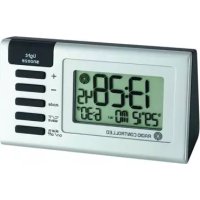
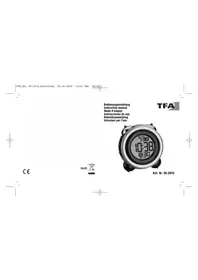
| Product type | Alarm clock (alarm ringer) with twin bells |
| Brand | TFA |
| Model | 60.2016.05 |
| Housing dimensions | 106 x 73 x 108 mm |
| Weight | 172 g (device only) |
| Power supply | 3 x 1.5 V AAA batteries (not included) |
| Number of alarms | 2 (Alarm 1 and Alarm 2) |
| Alarm programming | Options: Monday-Sunday, Monday-Friday, Saturday-Sunday |
| Snooze function | Yes, via SNOOZE/LIGHT button, 5-minute repeat |
| Display | Time, date (month/day), year, day of week (MO/TU/WE/TH/FR/SA/SU) |
| Time format | 12h or 24h (adjustable) |
| Backlight | Yes, activated by SNOOZE/LIGHT button for 8 seconds |
| Time and calendar setting | Via SET button, UP/DOWN to adjust year, month, day, hours, minutes |
| Switches | ON/OFF for each alarm (alarm 1 and alarm 2) |
| Housing material | Plastic with two metal bells |
| Cleaning and maintenance | Soft damp cloth; no solvents or abrasives; remove batteries when not in use; store in a dry place |
| Safety | Do not disassemble, repair, or modify; keep out of reach of children; batteries: do not throw into fire, short-circuit, disassemble, or recharge; replace promptly if leaking |
| Replacement batteries | 3 AAA 1.5V batteries (standard, commercially available) |
| Repairability | Not user-serviceable; contact seller if malfunction persists |
| General information | Compliant with EU WEEE standards; manufacturer: TFA Dostmann GmbH & Co.KG, Germany |
Frequently Asked Questions - 60.2016.05 TFA
User questions about 60.2016.05 TFA
0 question about this device. Answer the ones you know or ask your own.
Ask a new question about this device
Download the instructions for your Alarm bell in PDF format for free! Find your manual 60.2016.05 - TFA and take your electronic device back in hand. On this page are published all the documents necessary for the use of your device. 60.2016.05 by TFA.
USER MANUAL 60.2016.05 TFA
D:UP Taste
E: SET Taste
F:DOWN Taste
rechts (Fig. 3)
Thank you for choosing this instrument from TFA.
1. Before you use this product
- Please make sure you read the instruction manual carefully. This information will help you to familiarize yourself with your new device, to learn all of its functions and parts, to find out important details about its first use and how to operate it and to get advice in the event of a malfunction.
- Following and respecting the instructions in your manual will prevent damage to your instrument and loss of your statutory rights arising from defects due to incorrect use.
- We shall not be liable for any damage occurring as a result of non following of these instructions.
- Please take particular note of the safety advice!
- Please keep this instruction manual safe for future reference.
2. Delivery contents
Alarm clock Instruction manual
3. Range of application and all the benefits of your new instrument at a glance
Metal double bell alarm
- 2 different alarm times (weekday, weekend)
Alarm clock
- Snooze function
- Indication of day of the week and date
- Backlight
4. For your safety
- This product is exclusively intended for the range of application described above. The product should only be used as described within these instructions.
- Unauthorized repairs, alterations or changes to the product are not permitted.

Caution! Risk of injury!
- Keep this instrument and the batteries out of reach of children.
- Batteries must not be thrown into a fire, short-circuited, taken apart or recharged. Risk of explosion!
- Batteries contain harmful acids. Low batteries should be changed as soon as possible to prevent damage caused by leaking. Never use a combination of old and new batteries together, nor batteries of different types.
- Wear chemical-resistant protective gloves and safety glasses when handling leaking batteries.
Alarm clock


Important notes on product safety!
- Do not expose your device to extreme temperatures, vibrations or shocks.
- Protect it from moisture
5. Elements
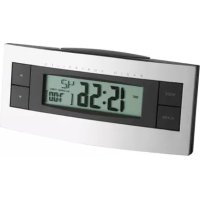
Display (Fig. 1)
A: Alarm 1 / date (month/day)
B: Time / year
C: Alarm 2 / day of the week
Buttons (Fig. 2)
left
D:UP button
E:SET button
F:DOWN button
right (Fig. 3)
G:ALARM1ON/OFF switch
H: ALARM 2 ON/OFF switch
top (Fig. 1)
I:SNOOZE/LIGHT button
Alarm clock
GB
Housing (Fig. 4)
J: Battery compartment
6. Getting started
- Open the battery compartment and insert three new AAA 1.5 V batteries. Ensure the battery polarity is correct.
The alarm starts to ring and the backlight will be activated briefly. - Close the battery compartment again.
7. Operation
The device will automatically quit the setting mode if no button is pressed for 20 seconds.
- Press and hold the UP or DOWN button in the setting mode for fast mode.
7.1 Clock and calendar setting
- Press and hold the SET button in normal mode.
The year indication will be flashing and you can adjust the year with the UP or DOWN button. - Press the SET button again and the setting sequence is shown as follows: Month and day, hours, minutes and 24 or 12 hours display (PM appears on the display after 12 h) and adjust with the UP or DOWN button.
Alarm clock
GB
- Confirm with the SET button.
The display shows the current time.
7.2 Backlight and date
- Press the SNOOZE/LIGHT button at the top and the backlight will be activated for 8 seconds.
- Press the SNOOZE/LIGHT button again
- The date (month, day), the year and the weekday (MO, TU, WE, TH, FR, SA or SU) appear briefly on the display.
7.3 Alarm time setting
Alarm 1:
- Press and hold the UP button.
M-F, S-S flashes. -
Press the UP or DOWN button to choose between the three set alarms below:
-
Monday until Sunday (M-F, S-S appear on the display)
-
Monday until Friday (M-F appear on the display)
Saturday and Sunday (S-S appear on the display). -
Confirm the setting with the SET button.
The hour display flashes. - Press the UP or DOWN button to adjust the alarm time (hours).
- Press the SET button.
- Set minutes in the same way.
Alarm clock

- Confirm with the SET button.
- Slide the ALARM 1 ON/OFF switch to ON
The alarm is activated. ON - the weekdays and the alarm time appear on the display. - Once the alarm rings, the alarm symbol flashes.
- Press any button to stop the alarm or press the top of the instrument (SNOOZE/LIGHT) to activate the snooze function. The backlight turns on for a few seconds.
The alarm will be interrupted for 5 minutes. - Slide the ALARM 1 ON/OFF switch to OFF to deactivate the alarm. OFF appears on the display.
Alarm 2:
- Press and hold the DOWN button.
M-F, S-S flashes. - Set Alarm 2 in the same way as Alarm 1.
8. Care and maintenance
- Clean the device with a soft damp cloth. Do not use solvents or scouring agents.
- Remove the batteries if the device will not be used for an extended period of time.
- Keep the device in a dry place.
Alarm clock

8.1 Battery replacement
- Change the batteries when the device functions become weak.
- Open the battery compartment and insert three new batteries AAA 1,5 V. Ensure the batteries' polarity are correct.
- Close the battery compartment again.
9. Troubleshooting
Problems Solution
| No display → Ensure the batteries' polarity are correct → Change the batteries |
Incorrect indication Restart the instrument according to
the manual
Change the batteries
If your device fails to work despite these measures contact the retailer where you purchased the product.
10. Waste disposal
This product has been manufactured using high-grade materials and components which can be recycled and reused.
Alarm clock

Never dispose of empty batteries and rechargeable batteries with ordinary household waste.
As a consumer, you are required by law to take them to your retail store or to an appropriate collection site depending on national or local regulations in order to protect the environment.
The symbols for the contained heavy metals are: Cd = cadmium, Hg = mercury, Pb = lead
This product is labelled in accordance with the EU Waste Electrical and Electronic Equipment Directive (WEEE).
Please do not dispose of this product in ordinary household waste. As a consumer, you are required to take end-of-life devices to a designated collection point for the disposal of electrical and electronic equipment, in order to ensure environmentally-compatible disposal.
Alarm clock

11. Specifications
Power consumption: Batteries 3 × AAA 1,5 V (not included)
Housing dimension: 106 × 73 × 108 ~mm
Weight: 172g device only
TFA Dostmann GmbH & Co.KG, Zum Ottersberg 12, D-97877 Wertheim. No part of this manual may be reproduced without written consent of TFA Dostmann. The technical data are correct at the time of going to print and may change without prior notice. The latest technical data and information about your product can be found by entering your product number on our homepage.
www.tfa-dostmann.de 04/16
23
Réveil

Nosyouremercionsd'avoirchoisiI'appareilde laSocieteTFA.
- rechts (Fig. 3)
- Before you use this product
- Delivery contents
- Range of application and all the benefits of your new instrument at a glance
- Alarm clock
- For your safety
- Caution! Risk of injury!
- Important notes on product safety!
- Elements
- Display (Fig. 1)
- Buttons (Fig. 2)
- Housing (Fig. 4)
- Getting started
- Operation
- Clock and calendar setting
- Backlight and date
- Alarm time setting
- Alarm 1:
- Alarm 2:
- Care and maintenance
- Battery replacement
- Troubleshooting
- Problems Solution
- Waste disposal
- Specifications
- Réveil
Brand : TFA
Model : 60.2016.05
Category : Alarm bell