SBCRU510-00U - Remote control PHILIPS - Free user manual and instructions
Find the device manual for free SBCRU510-00U PHILIPS in PDF.


User questions about SBCRU510-00U PHILIPS
0 question about this device. Answer the ones you know or ask your own.
Ask a new question about this device
Download the instructions for your Remote control in PDF format for free! Find your manual SBCRU510-00U - PHILIPS and take your electronic device back in hand. On this page are published all the documents necessary for the use of your device. SBCRU510-00U by PHILIPS.
USER MANUAL SBCRU510-00U PHILIPS
Instructions for use
English 4
Mode d'emploi
Français 11
Bedienungsanleitung
Deutsch 18
Gebruiksaanwijzing
Nederlands 25
Vejledning
Dansk 32
Bruksanvisning
Svenska 39
Bruksanvisning
Norsk 46
Käyttoohje
Suomi 53
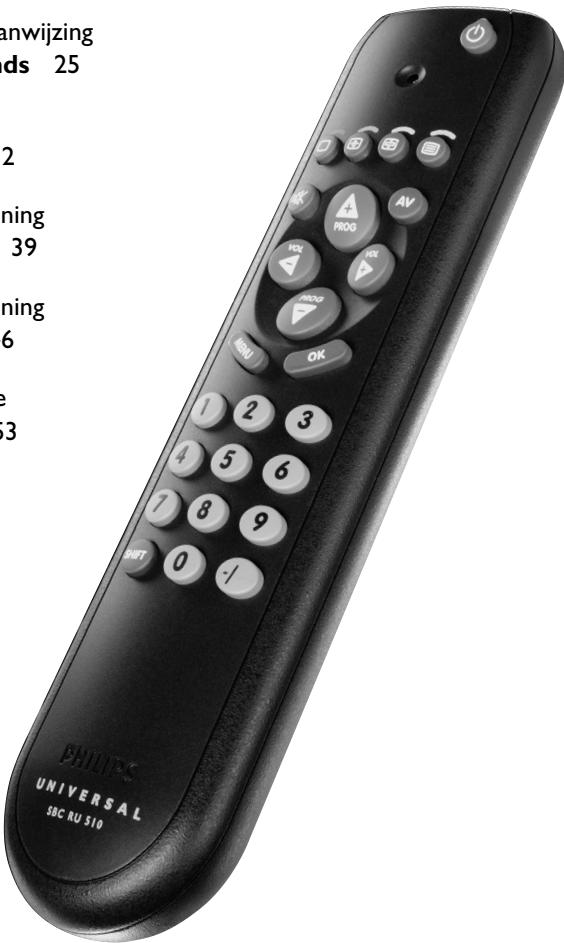

Instructions for use
uuiB
Contents
- Introduction 4
- Installing the remote control 5-7
Inserting the batteries 5
Testing the remote control 5
Setting the remote control 6
Automatically setting the remote control 7
- Keys and functions 8
- Extra possibilities 9
Adding a function to the remote control 9
Restoring the original functions of your remote control 9
- Troubleshooting 10
6.Need help? 10
Code list of all brands / equipment 60-66
1. Introduction
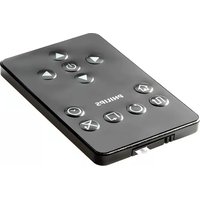
Congratulations on your purchase of the Philips SBC RU510 universal remote control. After installing the remote control it can operate the most-used functions of almost any brand of TV.
You can find information about how to prepare this remote control for use in the chapter 'Installing the remote control'.
2. Installing the remote control
Inserting the batteries
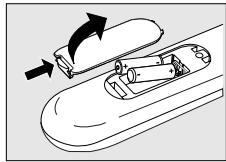
1 Press the cover inwards and slide it in the direction of the arrow.
2 Place two R03, UM4 or AAA type batteries into the battery compartment, as shown.
3 Slide the cover back and click it firmly into place.
Testing the remote control
The remote control has been programmed to operate the most-used functions of almost any brand of TV. Because the RU510 may use different signals for each make and even for different models of the same make, it is advisable to test whether your TV responds to the RU510.
The example below instructs you how to do this.
1 Turn your TV on manually or use the original remote control. Tune to channel 1.
2 Check whether all the keys are working For an overview of the keys and their functions see '3. Keys and functions'.
If the TV responds as it should to all of the key commands the RU510 is ready for use.
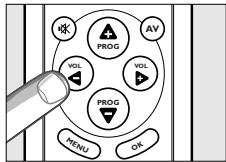
If the TV does not respond at all or not to all of the key commands, follow the instructions under 'Setting the remote control'.
Instructions for use
Setting the remote control
This is only necessary if your TV does not respond to the RU510. If that is the case, the RU510 does not recognize the brand and/or model of your TV and you need to program the remote control to do so. The example belowinstructs you how to do this.
1 Turn on the TV manually or use the original remote control. Tune in to channel 1.
2 Look up the brand of your TV in the code list at the back of this manual. One or more four-figure codes are shown for each brand. Note the first code.
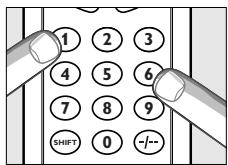
3 Keep keys '1' and '3' pressed simultaneously for three seconds until the green LED flashes twice and then remains lit
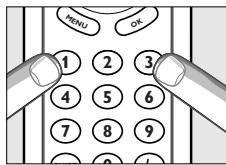
4 Then enter the code noted in step 2 using the digital keys.
- The green LED will now flash twice.
If the LED flashes once for an extended period, the code has not been entered properly or the wrong code has been entered.
Start again from step 2.
5 Point the RU510 at the TV and check that it responds as it should. - If the TV responds to all of the key commands, the RU510 is ready for use. Do not forget to note your code.
If the TV does not respond at all, or not to all of the key commands, start again from step 2 and try the next code from the list.
Automatically setting the remote control
If you cannot find the right code for your brand device, the remote control can automatically search for the right code.
1 Make sure the TV is switched on and select a channel using the original remote control or the keys on the TV (for example channel 1). The RU510 emits the 'switch off TV' signal for all models of TV that are stored in the memory.
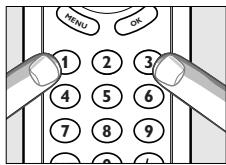
2 Then keep keys 1 and 3 on the RU510 pressed simultaneously for three seconds, until the green LED flashes twice and then remains lit.
3 Press the Standby key of the RU510 briefly
The RU510 now starts emitting all known TV off' signals, one by one. Each time a code is sent, the green LED lights up
4 When your TV switches off (stand-by), you press the Standby key of the RU510 twice within 1 second, to confirm.
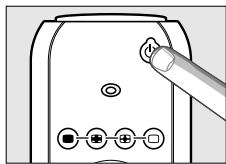
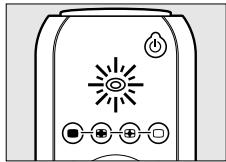
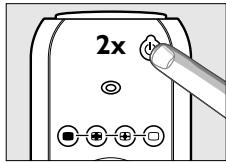
The RU510 has now found a code that works on your TV.
5 Check if you can operate all functions on your TV with the RU510.
If this is not the case, you can redo the automatic setting. The RU510 will then search for a code that perhaps works better.
After the RU510 has run through all the known codes, the search will stop automatically and the green LED will stop flashing.
Automatic programming of a TV takes a maximum of 5 minutes.
3. Keys and functions
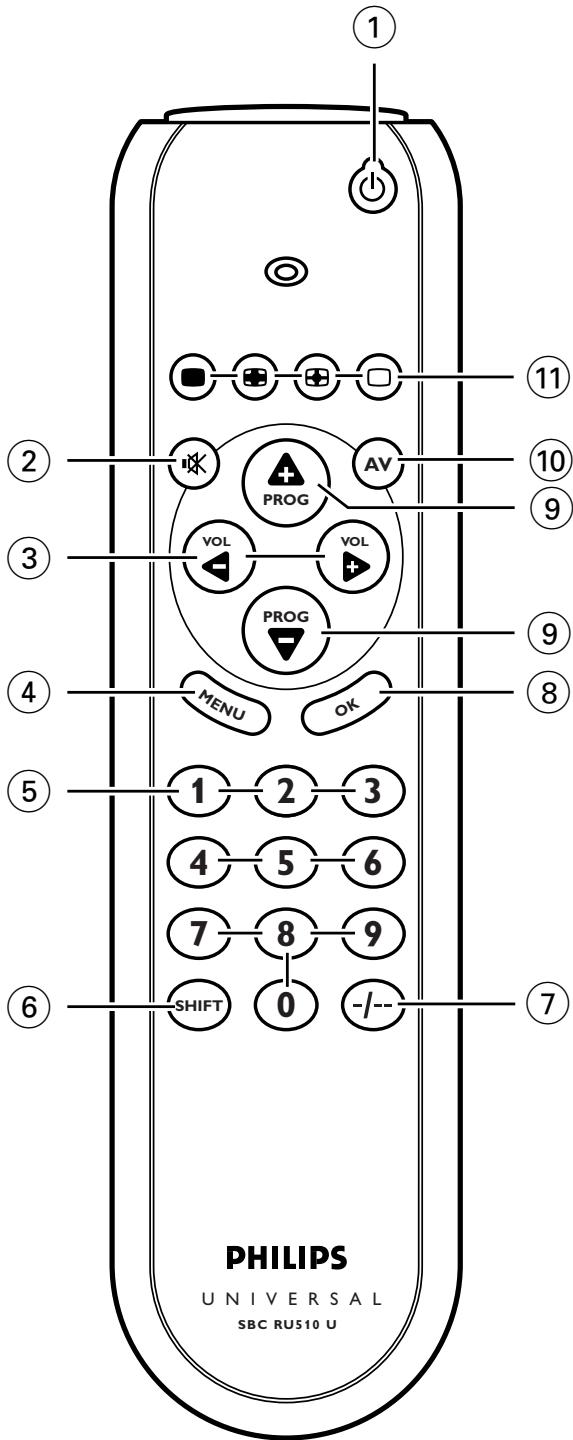
The illustration on page 3 gives an overview of all keys and their functions.
① Standby. switches the TV on or off.
(2) . mutes the sound of the TV.
③ -VOL ^+ .adjusts the TV volume.
(4) MENU . . . . . . . . . . . . . . . . . . . . . . . . . . . . . . . . . . . . . . . . . . . . . . . . . . . . . . . . . . . . . . . . . . . . . . . . . . . . . . . . . . . . . . . .
(5) A. 100
B. 100
C. 100
D. 100
⑤ Digital keys....... direct choice of channels and other functions.
⑥ SHIFT . . . . . . . . . . . . . . . . . . . . . . . . . . . . . . . . . . . . . . . . . . . . . . . . . . . . . . . . . . . . . . for extra functions. When pressed at the same time as a second key, the second key will get another function. For example:
SHIFT + PROG+: 'menu up'
SHIFT + PROG::. 'menu down'
SHIFT + VOL+... 'menu right'
SHIFT + VOL: ... 'menu left'
Try out other combinations with the Shift-key on your appliance in order to find out which functions are available.
Only functions featured on the original remote control are available.
⑦ --- selects between one- and two-figure channel numbers.
⑧ OK. confirms your selection.
9 - PROG + . selects a previous or following channel.
10 AV. switches between external inputs of your equipment.
11 国国口 . . . . . teletext keys
If you use the () 'memory off' key to get to the next teletext page on your Philips TV, you can press the OK key for this. See also 'Troubleshooting'.
If the device does not respond at all, or not to all of the key commands, follow the instructions under 'Setting the remote control'. It is possible that you must enter another code for the device.
4. Extra possibilities
Adding a function to the remote control
If you want to add a function to the RU510, you can contact the Philips service line for Universal Remote Control to ask for the 3-figure code for the extra function.
1 Keep 1 and 6 on the RU510 pressed simultaneously for three seconds, until the green LED flashes twice and then remains lit.
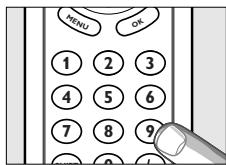
2 Press keys 9, 9 and 4, in that order
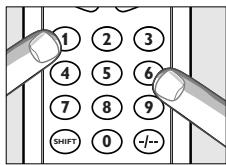
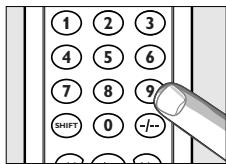
3 Enter the 3-figure code which you received from the service line within thirty seconds.
4 Press the key under which you want to store the new function.
The LED flashes twice.
The extra function has been successfully added to the RU510.
If you want to store the function under Shift in combination with another key, first press the Shift key and then press the required function key.
- For restoring the original function of the key, see 'Restoring the original functions of your remote control'.
Restoring the original functions of your remote control
1 Keep keys 1 and 6 on the RU510 pressed simultaneously for three seconds, until the green light flashes twice and then remains lit.
2 Press keys 9,8 and 1,in that order - The light flashes twice.
All original functions have now been restored and any extra functions have been deleted.
5. Troubleshooting
Problem
Solution
- The TV does not respond and the green LED does not flash when you press a key.
Replace the old batteries with two new 1.5 Volt, RO3, UM4 or AAA batteries. - The TV does not respond but the green LED does flash when a key is pressed.
- Point the RU510 at the device and make sure that there are no obstructions between the RU510 and the device.
The RU510 does not respond properly to commands. - Maybe you are using the wrong code. Try programming the RU510 again using another code, which is mentioned under the brand of your device, or reset for automatic search to find the right code. If the TV still does not respond, call our helpline.
- You cannot get the Teletext pages on your screen, while you are used to use the (◇) button for this.
- Follow the instructions under 'Setting the remote control' and at step 4 press keys 0, 0, 6 and 4. Press the OK key to get Teletext pages on your screen.
The Teletext keys do not work.
Find out whether your TV is equipped with Teletext.
You cannot switch off Teletext. - Press the key for subtitling (□) to switch off Teletext.
- You have difficulties operating all of the functions on your device.
- Maybe the RU510 has to be adapted to the model of the device. Call our helpline for details.
- Your brand of device is not in the code list.
Try to set the RU510 automatically. See 'Automatically setting the remote control'. - None of the codes works during manual setting of the remote control.
If that is the case, follow the instructions under 'Automatically setting the remote control'.
6. Need help?
If you have any questions about the RU510, call our special helpline. You will find the telephone number after the code list at the back of this manual.
Read this manual carefully before you make a call. You can solve most of the problems yourself. If you cannot find any answers to your problems, write down the details of your device shown in the code list at the back of this manual. This will help our operators to assist you better and more quickly. Look up the numbers of the models in the instructions accompanying the device or on the back of your device. When you call our helpline, make sure the device is to hand so that our operators can help you determine whether your remote control is working properly.
The model number of your Philips universal remote control is SBC RU510/00U.
Date of purchase:
/
(day/month/year)
Sommaire
ASA. .0114,0131,0322
Acura 0036
Admiral.....0190,0114,0240,0332
Adyson. .0243, 0244
Agef. 0114
Aiko .0244
Akai.0064,0583,0190,0235,0062 0099,0218,0378,0388,0398 0507,0543,0575,0579,0658
Akib. 0321
Akiba 0064, 0245, 0309, 0321, 0482
Akito. .0299
Akura0064, 0036, 0245, 0309, 0386
Alaron. 0206
Alba. .0064,0190,0036,0245 0243,0063,0262,0274 0398,0445,0458,0514
Allorgan .0244,0233,0321
Allstar. .0064
Ambassador .0204
Amplivision 0397, 0244, 0347, 0427
Amstrad. 0064, 0036, 0245, .0204, 0389, 0398, 0543
Anam National. .0677
Anitech....0064, 0036, 0103, 0309
Ansonic. 0064, 0036, 0397, .0129, 0319, 0455
Arc En Ciel 0223,0360,0426,0528
Arcam. .0243,0244
Aristona. 0064, 0583
Arthur Martin. 0264
Asberg. .0103, 0129
Asora. 0036
Asuka. 0245, 0244
Atlantic. 0233,0347
AudioTon. .0244, 0455, 0513
Audiosonic. 0064, 0136, 0036, 0397, 0245, 0244, .0364, 0455, 0513
Autovox. 0244, 0103, 0114, 0233, 0264, 0274, .0322, 0363, 0571
BPL. 0064, 0309
BSR. 0321,0579
BTC. 0245
Baird. 0244, 0235, 0099, .0100, 0370, 0584
Bang & Olufsen. 0114, 0302
Barco .0579
Basic Line. 0064,0036,0245 0244,0309,0401,0482
Baur. 0064, 0532, 0037, 0376, 0388, 0539, 0571, 0581
Bazin .0244
Beko. 0064, 0397, 0455, 0513
Beon .0064,0445
Best. 0397,0364,0448
Bestar .0064,0397,0401
Binatone. .0244
Clarivox .0064, 0129
Clatronic. 0064,0036,0397 0245,0244,0103 0129,0274,0347,0398
Condor .0064,0036,0397 0129,0274,0309,0347
Contec. 0036, 0243, 0063
Continental Edison.0136,0223 0264,0314,0360 0426,0514,0528
Cosmel. 0064, 0364
Crezar 0240
Crosley.0101,0103,0111,0114 0240,0274,0374,0579
Crown. 0064, 0036, 0397
0235,0103,0366 0386,0445,0448,0513
Crystal. 0458
Curtis Mathes. .0120
Cybertron .0245
Daewoo.0064,0036,0245 0244,0401,0526
Dainichi. 0245, 0243
Dansai....0064,0243,0063,0062
Dantax. .0513
Dayton. 0036
Daytron. .0401
De Graaf. .0235, 0575
Decca .0064,0244,0099 0102,0299,0543
Denver .0064
Desmet .0064,0036
Diamant .0064
Dixi .0064,0036
Dual. 0064,0244,0286 0363,0379,0571,0579
Dual Tec. 0244
Dumont. 0097,0114,0129 0240,0322,0374
Elbe. 0244,0265,0286, .0319,0462,0543
Elin .0064,0036,0131 0332,0376,0388,0575
Elite. .0245, 0347
Elman. .0129
Elta .0036,0458
Emco. .0274
Emerson. 0064, 0097, 0114, 0206, 0240, 0274, 0309, 0347, 0388, 0398
Emperor. 0309
Envision. .0057
Erres .0064
Euromann. 0064, 0448
Europa. 0064
Europhon...0244, 0129, 0240, 0543
Expert. .0233,0332
Exquisit. .0064
FNR. .0129
Fenner. .0036, 0401
Ferguson....0064,0136,0100,0256 0265,0314,0362,0370
Fidelity.0190,0243,0256,0378 0388,0398,0539,0571
Filsai .0244
Finlandia. 0190, 0235, 0099, .0373, 0386, 0575
Finlux.0064,0244,0097,0099 0114,0129,0131,0132,0206 0322,0373,0374,0543,0579
Firstline.....0064,0036,0243,0244
.0099,0265,0274,0321 0348,0401,0571,0579
Fisher. 0397, 0244, 0063, 0235, 0099, 0114, .0131, 0571, 0579, 0582
Flint...0064, 0245, 0099, 0482, 0637
Formenti. 0064, 0243, 0114, .0240, 0347, 0374, 0579
Fraba. 0064, 0397
Friac. 0036, 0397, 0129, 0526
Frontech. 0190, 0036, .0244, 0274, 0458
Fujitsu. 0244, 0099, 0129, 0233
Funai .0206,0321
GBC..0036, 0245, 0240, 0401, 0579
GEC. 0064, 0190, 0244, 0070, 0099, 0388, 0543, 0584
GPM. 0245
Galaxy .0064, 0129
Galaxis. 0064, 0397
Geloso. .0036,0240 0374,0401,0579
General Technic. 0036
Genexxa .0190,0036,0245
Germanvox .0240
Gibraltar 0057
GoldStar .0064,0136,0190 0243,0244,0057 0274,0317,0388,0458
Goldline .0364
Gooding. .0514
Goodmans.0064,0036,0245 0244,0063,0062 .0099,0206,0262,0344 .0362,0370,0398,0401 .0507,0514,0526,0543
Gorenje. 0397, 0448
Gradiente .0080, 0197
Graetz.0190,0374,0388,0584
Granada .0064,0253,0244 0135,0235,0099 0102,0366,0378 0383,0386,0500,0543
Grandin....0064,0190,0036,0309 0347,0401,0482,0637
Grundig. 0064,0583,0036, 0614,0097,0103, .0218,0264,0514,0581
Grunpy 0206
HCM. 0064,0036,0245 0244,0309,0445
HMV .0114
Halifax .0244
Hampton. 0243, 0244
Hanimex. 0321
Hanseatic.0064,0583,0036 0244,0309,0347 0388,0455,0458,0571
Hantarex. 0064, 0240, 0543
Hantor. 0064
Harley Davidson. 0070, 0206
Harwood. .0064, 0036, 0344
Havermy. 0120
Hema. .0036, 0244
Hemmermann .0571
Hifivox. .0223, 0426, 0528
Hikona. .0245
Hinari. 0064, 0036, 0245, .0063, 0206, 0262, 0514
Hisawa. .0245,0309 0427,0482,0637
Hit. 0114
Hitachi. .0064, 0136, 0190, 0244, .0063, 0070, 0071, 0099, .0132, 0223, 0240, 0252, .0374, 0376, 0383, 0500, 0519, .0526, 0543, 0575, 0579, 0584
Hornyphone. .0064
Huanyu. 0243,0401
Hyper 0036,0243,0244,0274
Hypersonic. 0388
Hypson.....0064,0309,0427,0482
ICE....0583,0245,0243,0244,0398
ICeS .0245, 0243
IR. .0064,0583,0532,0136 0253,0190,0397,0243,0244
0063, 0135, 0120, 0037, 0038
0062,0070,0097,0099,0100
0101,0103,0114,0128,0129
0131, 0132, 0218, 0223, 0233
0240, 0252, 0262, 0264, 0265
.0270,0274,0279,0314,0316
0317,0318,0319,0321,0322
0332,0344,0347,0350,0354
0370, 0376, 0378, 0383, 0384,
0386,0388,0401,0528,0539
0543,0579,0580,0581,0584
ITC. .0579
ITS. .0243,0398
ITT. 0190, 0235, 0206
0366,0373,0374,0376
0378,0388,0500,0507 0571,0575,0584,0637
ITV .0064
Iberia. .0064
Imperial.....0397,0101,0103,0111 0274,0279,0445,0579
Indesit. 0240, 0264
Indiana. 0064
Ingelen. 0190, 0584
Ingersol .0036
Inno Hit. 0036, 0244, .0099, 0317, 0543
Interbuy. .0064
Interfunk. 0064, 0190, 0114, 0274, 0302, 0354, 0388, 0528, 0539, 0584
Internal. 0064
Intervention 0064,0245,0244 0129,0274,0309 .0458,0482,0513,0514
Irradio.0245,0274,0317,0398
Isukai. 0064, 0245, 0309, 0482
JVC.0680,0245,0063,0080 0121,0398,0445,0633
KB Aristocrat 0190
KTV. .0244, 0057
Kaisui. 0064, 0036, 0245, 0243, 0244, 0309, 0482
Kamp .0243
Kapsch. 0190, 0131, .0233, 0388, 0584
Karcher.....0129,0309,0448,0637
Kasui. .0309
Kathrein .0583
Kendo. 0064,0129,0262 0274,0389,0455,0637
Kennedy.....0233, 0240, 0462, 0579
Kenwood .0057
Kingsley. 0243
Kneissel. 0064, 0265, 0286, 0319, 0401, 0462, 0637
Kolster. 0064
Konka. 0245, 0398
Korpel. .0064
Korting. .0114, 0347, 0448
Kosmos. 0064
Koyoda. 0036
Kraking. 0265
Kyoto. .0190
La Sat. 0513
Lenco. .0131
Leyco. .0064, 0099, 0321
Liesenk & Tter. 0064
Liesenkotter. 0064, 0354
Lifetec. .0064, 0245, 0401
Loewe. 0064,0102,0114 0316,0319,0539
Logik. 0038, 0256
Luma.0233,0286,0332,0389
Lumatron. .0244
Luxor. 0190,0235,0264, 0317,0376,0383, .0384,0388,0575
M Electronic .0064, 0136, 0190, .0036, 0243, 0244, 0131, .0132, 0274, 0314, 0373, .0401, 0507, 0519, 0539
MGA. 0057
MTC. .0397,0376,0539
MTEC 0299
Magnadyne .0114,0129,0274 0374,0543,0571,0579
Magnafon .0243,0100,0103 0129,0240,0543
Magnavox. 0063, 0206
Magnum. .0064
Manest 0064,0244,0062 0262,0321,0347
Marantz. .0064, 0583, 0057
Marelli. .0114
Mark. 0064
Matsui. .0064,0190,0036,0244 0063,0235,0038,0062 0099,0204,0218,0262 0299,0321,0362,0398 0482,0514,0543,0571
Matsushita .0677
McMichael. .0070
Mediator. 0064
Medion. .0064
Megas. .0637
Melvox. 0427
Memorex. 0036
Memphis .0364
Metz. 0064,0114,0240 0266,0302,0394,0581
Minerva....0097, 0264, 0514, 0581
Minoka. 0386
Mitsubishi 0064,0063,0135 0114,0256,0264,0539
Mivar. 0243,0317,0318 0319,0543,0636
Monaco .0036
Motion. 0103
Motorola. 0120
Multitech....0036,0243,0244,0102 0103,0129,0274,0513
Murphy. .0190, 0243, 0099
Myryad .0583
NEC. .0057,0197,0347
NEI. 0064, 0364, 0398, 0458
Naiko. 0633
Nakimura. 0064, 0401
Nakio. .0507
National. 0264, 0267
Neckermann.0064,0583,0532 0397,0114,0218 0240,0274,0347
0354, 0376, 0445, 0581
Nesco. 0206, 0274
Network. .0364
Neufunk. 0064, 0583
New Tech. 0244, 0370
Nicam. .0571
Nikkai. 0064, 0036, 0245
.0243,0244,0063 0062,0099,0364
Nobliko.....0243,0097,0103,0129
Nogamatic. 0223, 0360, 0528
Nokia. 0190,0235,0206, .0347,0366,0373,0374, .0376,0378,0386,0388, .0401,0500,0507,0575, .0584,0633,0637,0658
Nordmende.0136,0223,0240 0314,0370,0426,0528
Novatronic. 0064, 0132
Oceanic. 0190, 0235, .0374, 0388, 0575
Okano. 0064, 0036, 0397
Onwa. 0245,0129,0398
Optimus. 0677
Orion. 0064,0204,0206, .0262,0321,0344, .0347,0348,0543,0571
Online. 0064, 0245
Orsowe. 0543
Osaki. 0064, 0245, 0244, .0099, 0299, 0401
Osio. .0064
Oso. 0245
Osume.....0064, 0245, 0063, 0099
Otake. 0344
Otto Versand. .0064, 0583, 0532, .0136, 0253, 0244, 0063, .0120, 0037, 0218, 0240, .0262, 0274, 0321, 0347, .0370, 0374, 0376, 0388, .0539, 0571, 0579, 0581
Pael. 0243
Palladium. 0397, 0445
Panama. 0244, 0274
Panasonic. 0064, 0677, 0153, .0253, 0190, 0240, 0264, .0267, 0367, 0374, 0388, .0394, 0543, 0575, 0584
Panavision .0064
Pathe Cinema. .0190, 0243, .0240, 0265, 0347, 0579
Pathe Marconi .0223,0264 0360,0426,0528
Pausa. 0036
Perdio. .0064, 0190, 0347
Philco. 0064,0397,0101, .0103,0111,0114, .0240,0274,0445,0579
Philex. .0378
Philips .0064,0583,0070 0114,0256,0350,0359 0370,0401,0581,0632
Phoenix. 0243,0114, .0347,0513,0579
Phonola. 0064, 0243, 0114
Pilot. .0057
Pioneer. 0064,0136,0190 0314,0388,0455,0513
Plantron. .0036
Playsonic .0244
Portland .0401
Prandoni Prince...0240, 0388, 0543
Precision. 0244
Prinz. .0571
Profex. 0190,0036, .0103,0388,0458
Profi .0036
Profitronic .0064,0129
Proline. 0099, 0348
Prosonic. 0064
Protech .0064,0036,0244 0129,0274,0364 0445,0458,0579
Pye....0064, 0583, 0114, 0256, 0581
Quasar. 0274
Quelle. 0064,0532,0037 0038,0097,0101
.0111,0131,0240,0279
.0322,0354,0355,0388
.0539,0571,0579,0581
Questa. 0063
R-Line .0064
RBM. 0097
RFT. 0099, 0114, 0455
RTF. 0114
Radialva.....0064, 0245, 0364, 0458
RadioShack. 0064, 0057
Radiola .0064, 0244, 0350
Radiomarelli0064, 0114, 0274, 0543
Radiotone...0064, 0036, 0322, 0455
Rank Arena. 0063
Realistic. .0057
Recor. .0064
Rediffusion.0378, 0388, 0575
Redstar. .0064
Reflex. 0064
Revox. 0064
Rex.0190,0233,0286,0332
Roadstar.....0064, 0036, 0245, 0445
Robotron. 0114
SBR. 0064, 0070
SEG. .0064,0036,0244,0063 0103,0129,0389,0579
SEI .0037,0114,0129 0204,0233,0240,0321 0374,0543,0571,0579
SEI-Sinudyne. 0064, 0240
Saba. .0136, 0190, 0102, 0114, .0223, 0240, 0314, 0362, .0370, 0374, 0388, 0426, .0528, 0543, 0575, 0584
Saccs .0265
Sagem 0482,0637
Saisho .0036, 0244, 0038, 0204, .0262, 0458, 0543, 0571
Salora.0190,0317,0376,0383 0386,0388,0543,0575,0579
Sambers.....0103, 0129, 0240, 0543
Sampo. 0057
Samsung. 0064, 0583, 0036, .0397, 0243, 0244, 0614, .0235, 0099, 0317, 0671
Sandra. .0243, 0244
Sansui. .0064
Sanyo.0397,0243,0244,0063 0135,0235,0038,0099 .0131,0240,0366,0571,0582
Schaub Lorenz.....0374, 0388, 0584
Schneider...0064,0583,0245,0244 0274,0286,0350,0363 0379,0388,0398,0571
Scotland .0190
Sears .0206
Seleco. 0190,0233,0286, .0332,0374,0389
Sencora. .0036
Sentra. 0245, 0062
Serino. .0243,0482,0637
Sharp. .0063, 0120, 0321, 0543
Shintoshi. 0064
Shorai .0206,0321
Siarem .0114,0129,0240 0374,0543,0579
Siemens. 0064, 0218, 0240, 0354, 0355, 0374, 0581
Silva. 0243
Silver. .0063, 0206, 0388
Singer. 0114, 0129
Sinu .0129
Sinudyne.0037,0114,0129,0204 0233,0240,0262,0321 0374,0543,0571,0579
Skantic. 0383, 0384
Solavox. 0190, 0099, .0378, 0388, 0575
Sonitron.0397,0235,0366
Sonoko. .0064, 0036, 0309
Sonolor.0190,0235,0388
Sontec. 0064, 0036, 0397, 0321
Sony. 0532,0063,0037 0038,0129,0256
Sound & Vision. 0129, 0401
Soundesign .0206
Soundwave. 0064, 0347, 0445
Sangyong. 0036
Standard. 0064,0036,0245 0244,0347,0401
Starlite. .0579
Stenway. 0245, 0309
Stern.0190,0233,0286,0332
Strato. .0064
Stylandia. 0244
Sunkai.....0321,0348,0482,0637
Sunstar. .0064, 0036, 0398
Sunwood. 0064
SuperTech. 0064, 0036, 0243
Superla .0543
Supra. 0036
Susumu. .0245
Sysline. .0064
Sytong. 0243
TMK. 0204
TVTEXT 95. .0583
Tactus 0299
Tandberg. .0316, 0322, 0394
Tandy. 0190, 0245, .0244, 0120, 0099
Tashiko .0190,0243,0244 0063,0070,0386
Tatung. 0064, 0244, 0038, .0099, 0299, 0543
Teac. 0064
Tec. 0036, 0244, 0274, 0286, 0364, 0498, 0579
Technema. .0347
Technics. 0677
Technol Ace. 0206
Teleavia. 0223,0360,0370 0426,0517,0528
Telefunken .0064,0136,0100 0101,0111,0128,0223 0240,0279,0362,0370 0498,0513,0528,0593
Telegazi. 0064
Thomson .0064,0136,0223 0264,0314,0360 0362,0370,0376 .0426,0498,0517,0528
Thorn .0064,0532,0062 0099,0100,0101,0111 .0131,0256,0265,0299 .0362,0370,0386,0388 .0401,0526,0539,0580
Tokai. 0064, 0190, 0036, 0364
Tokyo 0062
Tomashi. 0309
Toshiba. 0535, 0136, 0063, .0062, 0097, 0129, .0270, 0517, 0580
Towada. .0579
Trans Continens. 0244
Trident. 0543
Tristar. 0245
Triumph. .0583,0204 0270,0373,0543
Tsoschi. 0309
Uher. 0064,0233,0347 0401,0445,0513
Ultravox.0064,0243,0114,0129 0240,0274,0378,0579
Unic Line .0064, 0500
United. 0064
Universum.0064, 0532, 0036, 0397, 0244, 0063, 0037, 0038, .0097, 0101, 0103, 0131,
.0132,0197,0204,0240
.0274,0279,0317,0321
.0322,0354,0364,0373,0388
.0389,0445,0448,0507,0519
.0528,0539,0571,0579,0581
Univox. .0064,0190 0114,0265,0364
Vestel. 0064, 0244, 0579
Vibrant 0299
Videologic. 0245, 0243
Videosat. 0274
Videotechnic. 0244, 0347
Videoton. 0383,0458
Vision. 0244, 0347
Vistar 0233
Voxson. .0190, 0114, 0445
A
Waltham. 0064, 0136, 0244, .0383, 0445, 0458, 0517
Wards. 0206
Watson .0064,0036 0245,0240,0347
Watt Radio. 0243, 0129, .0240, 0571, 0579
Wega. .0064,0063,0114
Wegavox .0036
Weltblick. 0347
White Westinghouse ....0064, 0243, .0347, 0364
Windstar. 0309
Xrypton. .0064
Yamishi. .0244, 0309, 0482
Yokan. .0064
Yoko. 0064,0036,0245,0244 0332,0366,0448,0458
Zanussi. .0244, 0233, 0332
Zenor. 0366
Notes
Notes

Guarantee certificate
Certificat de garantie
Garantiebewijs
Záručné list
Garantieschein Certificate de
garantía
Dealer's name, address and signature