
SBCLI800 - Bluetooth speaker PHILIPS - Free user manual and instructions
Find the device manual for free SBCLI800 PHILIPS in PDF.


| Product Type | Infrared Remote Control Extender |
| Brand | Philips |
| Model | SBC LI 800 |
| Components Supplied | Transmitter (LI 802), receiver (LI 805), IR extension cable, mains adapters |
| Power Supply | 230-240 V AC / 50 Hz |
| IR Carrier Frequency | 32 kHz – 40 kHz |
| Remote → Transmitter Maximum Distance | 7.5 metres |
| Transmitter → Receiver Maximum Distance | 30 metres |
| Number of Simultaneously Controllable Devices (with cable) | 3 (via the cable's 3 IR diodes) |
| Remote Control Compatibility | Almost all IR remote controls (exceptions: Bang & Olufsen, some Nokia, Sagem, Pace) |
| Visual Indicators | Green LED (power) and red LED (reception) on transmitter and receiver |
| Care and Cleaning | Unplug before cleaning; use a dry or slightly damp cloth, avoid excessive water |
| Safety | Do not use in wet environments; do not expose to heat; unplug when not in use |
| Reparability | Do not attempt to repair yourself as it will void the warranty; contact customer service |
| Dimensions (approx.) | Not specified in manual; typical compact size |
| Weight (approx.) | Not specified; lightweight (a few hundred grams) |
Frequently Asked Questions - SBCLI800 PHILIPS
User questions about SBCLI800 PHILIPS
0 question about this device. Answer the ones you know or ask your own.
Ask a new question about this device
Download the instructions for your Bluetooth speaker in PDF format for free! Find your manual SBCLI800 - PHILIPS and take your electronic device back in hand. On this page are published all the documents necessary for the use of your device. SBCLI800 by PHILIPS.
USER MANUAL SBCLI800 PHILIPS
wireless remote control link
SBC LI 800
Instructions for use

Helpline
European regulations
This product has been designed, tested and manufactured according to the European R&TTE directive 1999/5/EC. Following this Directive, this product can be brought into service in the following states:
SBC LI 800/00
R&TTE Directive 1999/5/EC
| BE √ | DK √ | GR √ | ES √ | FR √ |
| IRE ✗ | IT √ | LU √ | NL √ | AT √ |
| PT √ | FI √ | SE √ | UK ✗ | NO√ |
| DE √ | CH √ |
SBC LI 800/05
R&TTE Directive 1999/5/EC
| BE ✗ | DK ✗ | GR ✗ | ES ✗ | FR ✗ |
| IRE √ | IT ✗ | LU ✗ | NL ✗ | AT ✗ |
| PT ✗ | FI ✗ | SE ✗ | UK √ | NO ✗ |
| DE ✗ | CH ✗ |
CE0682①

4 ENGLISH
Remote control extender set
SBC LI 800
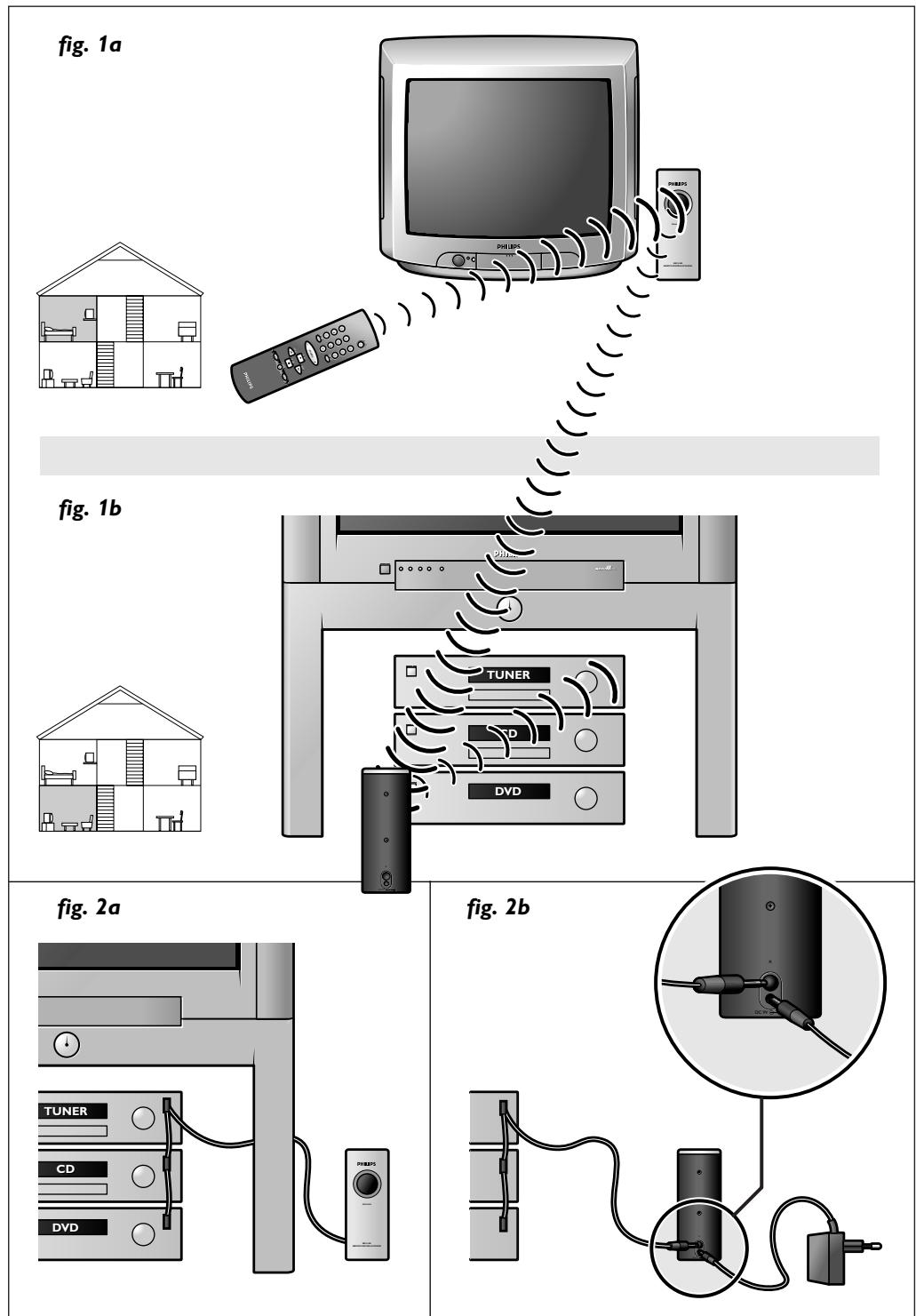
The Philips SBC LI 800 remote control extender set allows you to operate any IR driven equipment (e.g. Hi-Fi sets, VCRs, Sat-receivers, etc.) from anywhere in your house without actually seeing the equipment or aiming the remote control at it. The set consists of a transmitter, a receiver and an extension cord.
SBC LI 802 transmitter
When receiving a signal from the remote control, the transmitter converts the signal to a radio frequency (RF) signal that goes through walls and sends it to the receiver.
SBC LI 805 receiver
When receiving a signal from the transmitter, the receiver re-converts the signal to a standard IR signal and sends it to the equipment you wish to operate.
IR extension cord
The extension cord can be connected if the receiver is located in a cabinet or if you do not want to place the unit in front of your equipment. The cord has three IR lights that allow you to operate three devices simultaneously. The set can be extended with extra receivers (Philips LI 805), in case you wish to control equipment in different rooms.
To ensure you get the best performance from your remote control extender set, please read this manual carefully.
Important information
Read these instructions. All operating instructions and safety precautions should be read before using the remote control extender set.
Safety precautions
- Check if the voltage indicated on the type plate of the adapters corresponds to the local mains voltage before connecting to the mains power supply.
- The transmitter and receiver are powered once they are connected to a 230-240 VAC mains supply. Disconnect transmitter and receiver from the mains supply when not in use.
- Do not use the set in moist places or close to water.
- Do not expose the set to extreme heat or light.
- When cleaning the set, first disconnect from the mains supply. Rub it with a dry or slightly moist towel, never use excessive amounts of water on the set.
Contents
Help line 2
General 4
Important information 4
Installation 5
Operation 6
Troubleshooting 7
Installation
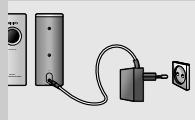
The transmitter (SBC LI 802) - fig. 1a
1 Place the transmitter in the room from which you want to control your equipment.
Position it in such a place that it can receive the signals from the remote control.
2 Connect the adapter supplied to the transmitter and connect the transmitter to the mains supply (230-240 VAC).
The green light will light up in the window on the front.
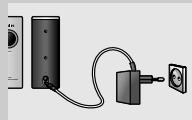
The receiver (SBC LI 805) - fig. 1b
1 Place the receiver in line of sight of the equipment you want to control. The receiver should be facing the equipment.
2 Connect the adapter supplied to the receiver and connect the receiver to the mains supply (230-240 VAC).
The green light will light up in the window on the front.
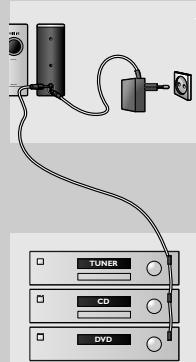
Extension cord - fig. 2
1 Connect the extension cord to the receiver and position the receiver beside or behind the equipment you want to control.
2 Remove the adhesive tape from the IR light(s) and affix the IR light(s) on the IR sensor(s) of the equipment you wish to control.
Notes:
– The adhesive tape will not damage your equipment. - For the location of the IR receiver(s) on your equipment, check the appropriate manuals. - If the location of the IR receiver(s) is not exactly known you can place the IR lights 5-10 cm away from the front of the equipment you wish to control.
Operation
Once the set is installed, you can operate your equipment from anywhere in the house as long as the distance between remote control and transmitter is not greater than 7.5 meters.
The distance between transmitter and receiver should not be greater than 30 meters.
- Point the remote control at the transmitter and press the required function button.
Transmitter and receiver will confirm reception by the flashing of the red light in the window on the front and your equipment will respond.
Note:
The set may not work properly or may not work at all with devices of the following brands:
- Bang & Olufsen;
- Nokia (some satellite receivers); – Sagem (some satellite receivers);
- Pace (some satellite receivers).
Troubleshooting
If a fault occurs, first check the points listed below. If you are unable to remedy a problem by following these hints, contact the helpline (see next paragraph) or consult your dealer.
Under no circumstances should you try to repair the set yourself as this will invalidate the guarantee.
The set should work with almost any remote control, except for some brands mentioned in the previous paragraph.
In case the set does not work, check the following points:
- Are both transmitter and receiver connected to the mains supply?
- Does the remote control have fresh batteries?
- Is the distance between remote control and transmitter greater than 7.5 meters?
- Are there any obstacles between remote control and transmitter?
- Is the receiver in line of sight and facing the equipment to operate? If this is not possible, connect the extension cord.
- When using the extension cord: check if IR lights are properly attached to the IR sensors of your equipment.
Technical specifications
Power supply: 230-240 VAC / 50 Hz
Transmission type: RF-transmission
IR carrier frequency: 32k-40kHz
Need Help?
In case you have any questions about the LI 800, please contact our help-line for assistance! You can find the number in the list on page 2.
Before you call, please read this manual carefully.
You will be able to solve most of your problems.
The model number of the remote control extender is SBC LI 800.
Date of purchase:
____ /____ /____
day/ month /year
8 FRENCH
Help line (Technical assistance) 2
General information 8
Important information 8
Installation 9
Operation 10
Troubleshooting 11
Installation
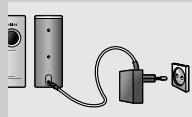
Notes:
Transmission type: RF transmission
Help line (Hotline) 2
General information 16
Notes:
Note:
Remarks:
This document is printed on chlorine-free paper. Data subject to change without notice. Printed in China.



- WIRELESS REMOTE CONTROL LINK
- HELPLINE
- EUROPEAN REGULATIONS
- 4 ENGLISH
- REMOTE CONTROL EXTENDER SET
- SBC LI 800
- SBC LI 802 TRANSMITTER
- SBC LI 805 RECEIVER
- IR EXTENSION CORD
- IMPORTANT INFORMATION
- SAFETY PRECAUTIONS
- CONTENTS
- INSTALLATION
- THE TRANSMITTER (SBC LI 802) - FIG. 1A
- THE RECEIVER (SBC LI 805) - FIG. 1B
- EXTENSION CORD - FIG. 2
- OPERATION
- POINT THE REMOTE CONTROL AT THE TRANSMITTER AND PRESS THE REQUIRED FUNCTION BUTTON
- TROUBLESHOOTING
- TECHNICAL SPECIFICATIONS
- NEED HELP
- 8 FRENCH
- NOTE
Brand : PHILIPS
Model : SBCLI800
Category : Bluetooth speaker