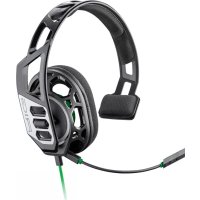
RIG 100HX - Headphones PLANTRONICS - Free user manual and instructions
Find the device manual for free RIG 100HX PLANTRONICS in PDF.



| Product Type | Gaming headset |
| Brand | Plantronics |
| Model | RIG 100HX |
| Compatibility | PS4, Xbox One |
| Size adjustment | 3 notches (small, medium, large) |
| Microphone | Swiveling, positionable on right or left |
| Volume control | Built-in slider |
| Secret mode | Switch with red indicator |
| Connection | Wired (3.5mm jack) |
| Power | None (passive) |
| Weight | Approximately 250 g |
| Materials | Plastic, memory foam |
| Color | Black with red accents |
| Maintenance | Clean with a dry, soft cloth |
| Box contents | Headset, quick start guide, safety guide |
Frequently Asked Questions - RIG 100HX PLANTRONICS
User questions about RIG 100HX PLANTRONICS
0 question about this device. Answer the ones you know or ask your own.
Ask a new question about this device
Download the instructions for your Headphones in PDF format for free! Find your manual RIG 100HX - PLANTRONICS and take your electronic device back in hand. On this page are published all the documents necessary for the use of your device. RIG 100HX by PLANTRONICS.
USER MANUAL RIG 100HX PLANTRONICS
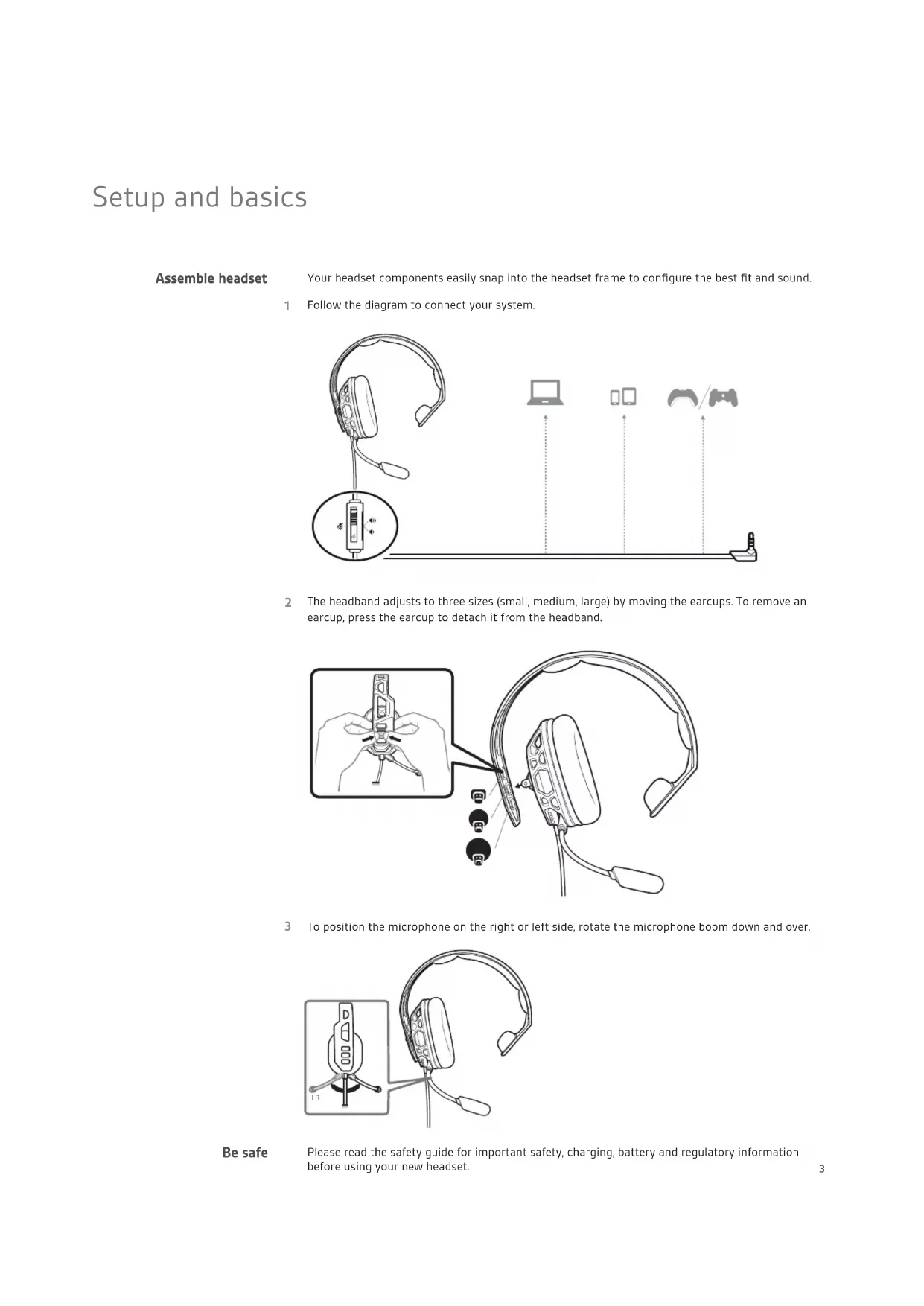
Your headset components easily snap into the headset frame to configure the best fit and sound.
1 Follow the diagram to connect your system.
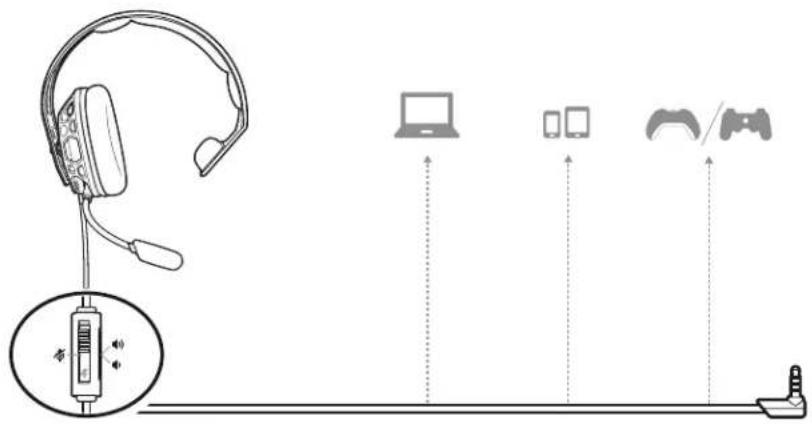
2 The headband adjusts to three sizes (small, medium, large) by moving the earcups. To remove an earcup, press the earcup to detach it from the headband.

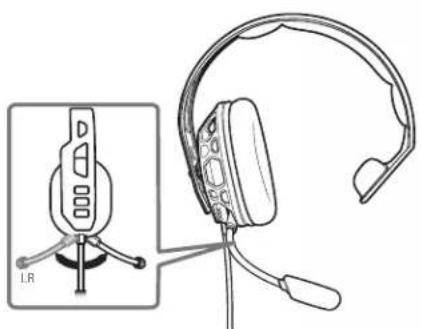
3 To position the microphone on the right or left side, rotate the microphone boom down and over.
Be safe
Please read the safety guide for important safety, charging, battery and regulatory information before using your new headset.
Setup PS4
1 To setup your headset for PS4, first go to Settings > Sound and Screen > Audio Output Settings > Output to Headphones > Select All Audio
2 Then go to Settings > Devices > Audio Devices > Headsets and Headphones > Volume Control (Headphones) >
Setup Xbox One
To setup your headset for Xbox One, go to Display and sound > Kinect and devices > Select device and adjust settings
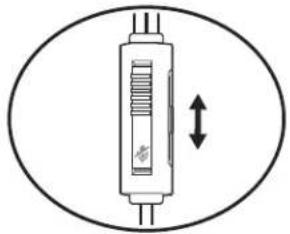
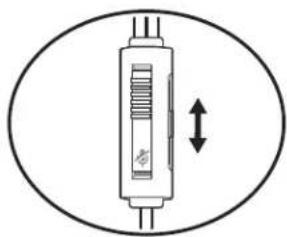
Volume
To adjust the volume, slide the volume control.
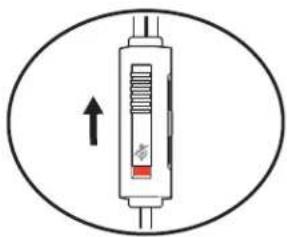
Mute
To mute your headset, slide the mute switch to reveal the red color.
Support
NEED MORE HELP?
www.naongaming.com

nacon
NACONG GAMING, Inc
10400 NE 4th Street, Suite 500,
Bellevue, WA 98004 USA
(+1) 800-617-0174
Headquarter
NACON
©2020 NACON. NACON and RIG are trademarks of NACON, registered in the US and other countries. "PlayStation" and "DUALSHOCK" are registered trademarks of Sony Interactive Entertainment Inc. All rights reserved. All other trademarks are the property of their respective owners.
Patents: US 8,504,115; 8,983,081; 9,008,319; D666,993; D667,388; D747,293; IN 245078; 245079; 268129; TW D154413; D154414; D171922. 211816-06 (06.20)
RIG
Gamme RIG 100
Guideutilisateur
FR
Sommaire
10400 NE 4th Street, Suite 500,
Bellevue, WA 98004 USA
(+1) 800-617-0174
Headquarter
NACON
10400 NE 4th Street, Suite 500,
Bellevue, WA 98004 USA
(+1) 800-617-0174
Headquarter
NACON
10400 NE 4th Street, Suite 500,
Bellevue, WA 98004 USA
(+1) 800-617-0174
Headquarter
NACON
10400 NE 4th Street, Suite 500,
Bellevue, WA 98004 USA
(+1) 800-617-0174
Headquarter
NACON
10400 NE 4th Street, Suite 500,
Bellevue, WA 98004 USA
(+1) 800-617-0174
Headquarter
NACON
10400 NE 4th Street, Suite 500,
Bellevue, WA 98004 USA
(+1) 800-617-0174
Headquarter
NACON
1 UTo6bHaCTpOHTb raphHtpy dIg NcONb3OBaHHc IrgPOB KOHcONbIO PS4, ChaJaBa bI6epnte Settings (HacTpoKn) >Sound and Screen (3ByK n 3KpaH) >Audio Output Settings (HaCtpoKn BbIBoDa ayDnO) >Output to Headphones (BbIBoDA Ha HayuHKn) >All Audio (Bce ayDnO).
2 3aTeM BbIepeTe Settings (HacToiKn) > Devices (YcToPiCTBa) > Audio Devices (AynoyctpoCTBa) > Headsets and Headphones (TapHHTypbI n HayuHKn) > Volume Control (Headphones) (Perynpobka rpmkocTn (HayuHKn)) >
HacrpoKa dna nCnOJb3OBAHnC Xbox One
Yto6bI hactpOuTb rapHnItpy dIy IcNcNoJIb3OBAHmI cIrpoBoi KOhCoIbIO Xbox One, nepeiDnte B pa3dien Display and sound (KpaH n 3Byk) > Kinect and devices (Kinect u yctpoiCTBa) > Select device and adjust settings (BbIbPaTb ycTpoiCTBO n HacTpoNTb npaMetpbI).
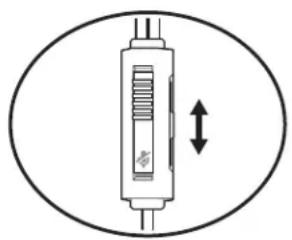
TpOMKocTb
YTo6bHaCTponTb rPOMKoCTb,CdBnHbTepeyIaTOp rPOMKOCTn.
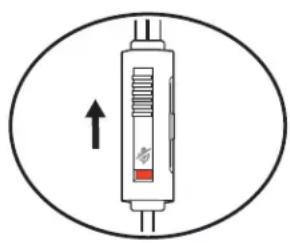
OTknIOueHne 3Byka
Длг OTКИLOЧЕпWAHa rapHNType CДВИНБТe BblKЛЮЧАТь 3ByKa TaKIM O6pa3OM,чTO6bl CTaI BIVdEN KpacHbI ΚBET.
TPE6YETCA NOMOUIb?
www.nacongaming.com

nacon
NACONG GAMING, Inc
10400 NE 4th Street, Suite 500,
Bellevue, WA 98004 USA
(+1) 800-617-0174
Headquarter
NACON
© 2020 NACON, Inc. NACON IN GIGA HOTCH TOBAPbHMN 3HaKaAMM KOMNaHMM NACON, 3apeHCTpPobBaHHBMN B CUSA IN dpyrnx CTpaHax.
PlayStation n DUALSHOCK ABNIOCTaPepnctpnpoHbIMTOBapHbIM 3HaKaAMKOMNaHm Sony Interactive Entertainment. Inc. Bce npaba
3aunuehblce octanbHbe TOBapHbte 3HaKn RnIOTc CO6CTBeHHOCTbIO COOTBeTCTBYoux KOMnaHn.
TaeHTb:US8,504,115;8,983,081;9,008,319;D666,993;D667,388;D747,293;IN245078;245079;268129;TWD154413;D154414;D171922.
211816-25 (06.20)
RIG
RIG 100 系列
用户指南
ZH-CN
内容
设置与基本用法 43
组装耳机
请注意安全
设置PS4
设置XboxOne
音量
静音
支持 45
设置与基本用法
10400 NE 4th Street, Suite 500,
Bellevue, WA 98004 USA
(+1) 800-617-0174
Headquarter
NACON
10400 NE 4th Street, Suite 500,
Bellevue, WA 98004 USA
(+1) 800-617-0174
Headquarter
NACON
龍樂樂樂樂樂樂樂樂樂樂樂樂樂樂樂樂樂樂樂樂樂樂樂樂樂樂樂樂樂樂樂樂樂樂樂樂樂樂樂樂樂樂樂樂樂樂樂樂樂樂樂樂樂樂樂樂樂
10400 NE 4th Street, Suite 500,
Bellevue, WA 98004 USA
(+1) 800-617-0174
Headquarter
NACON
司:US8,504,115,8,983,081,9,008,319,D666,993,D667,388,D747,293.IN245078,245079,268129,TWD154413,D154414D171922.
211816-18 (06.20)