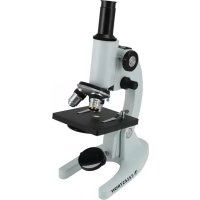
44102 - Microscope CELESTRON - Free user manual and instructions
Find the device manual for free 44102 CELESTRON in PDF.



| Product Type | Monocular Laboratory Microscope |
| Brand | Celestron |
| Model | 44102 |
| Stage Dimensions | 120 mm x 110 mm |
| Approximate Weight | 2 kg |
| Illumination Source | 50 mm plane and concave mirror (ambient light) |
| Magnification | 40x, 100x, 200x, 400x (depending on objective) |
| Eyepiece | Huygens 10x, field of view 12 mm |
| Objectives | Achromatic: 4x, 10x, 40x (triple revolving nosepiece with click stop) |
| Focusing | Coarse (rack and pinion) and fine, with safety stop |
| Arm | Tiltable from 0° to 60° |
| Condenser | N.A. 0.65 with disc diaphragm (5 aperture sizes) |
| Included Accessories | 10x eyepiece, 4x/10x/40x objectives, 5 prepared slides, dust cover |
| Power | None (mirror illumination) |
| Cleaning | Damp cloth for exterior; camel hair brush for optics; never paper |
| Safety | Never use direct sunlight; safety stop to prevent objective/slide contact |
| Warranty | 2 years (parts and labor) for the United States and Canada |
Frequently Asked Questions - 44102 CELESTRON
User questions about 44102 CELESTRON
0 question about this device. Answer the ones you know or ask your own.
Ask a new question about this device
Download the instructions for your Microscope in PDF format for free! Find your manual 44102 - CELESTRON and take your electronic device back in hand. On this page are published all the documents necessary for the use of your device. 44102 by CELESTRON.
USER MANUAL 44102 CELESTRON
Congratulations on your purchase of a Celestron microscope. Your microscope is a precision optical instrument, made of the highest quality materials to ensure durability and long life. It is designed to give you a lifetime of pleasure with a minimal amount of maintenance.
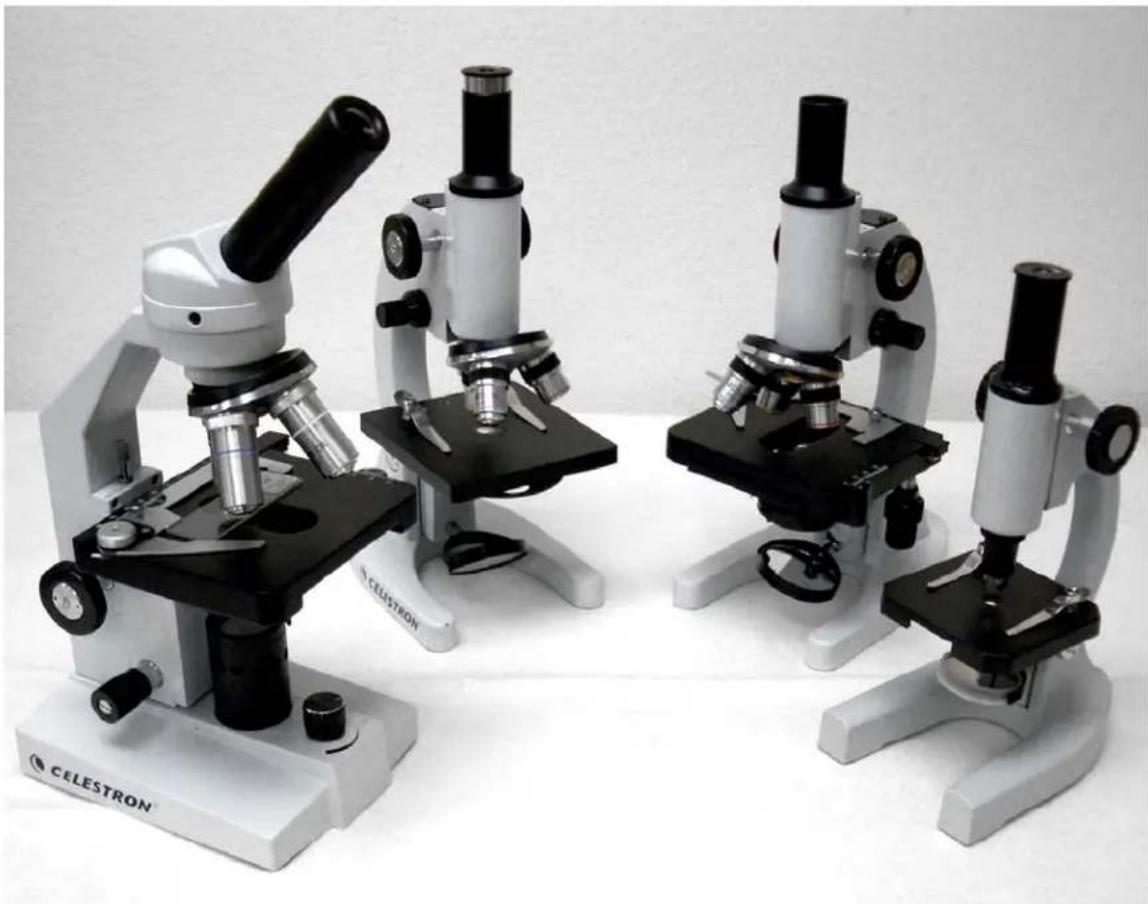
This instruction manual covers four microscope models. Please be sure to locate your specific model of microscope in order to ensure you read the correct information.
Before attempting to use your microscope, please read through the instructions to familiarize yourself with the functions and operations to maximize your enjoyment and usage. See the microscope diagrams to locate the parts discussed in this manual.
The microscopes described in this manual provide high powers from 40 up to 1000x . These microscopes types are ideally suited for examining specimen slides of yeasts and molds, cultures, plant and animal parts, fibers, bacteria, etc.
The final section provides simple care and maintenance tips for you to follow to ensure that your microscope provides you with years of quality performance, usage, and enjoyment.
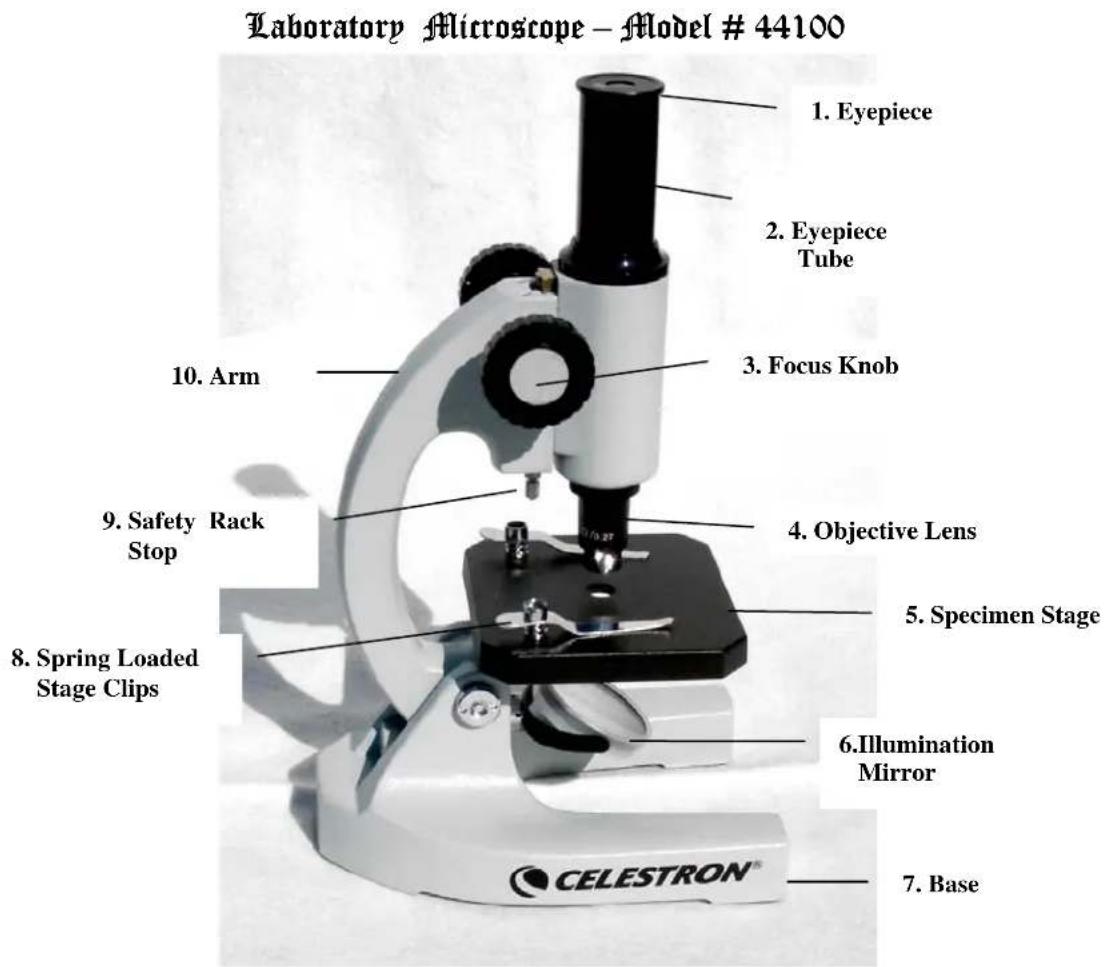
Figure 1
Standard Accessories Included with your Microscope
| • 10x Huygens Eyepiece | • 5 Prepared Slides |
| • 20x Objective Lens (200x with eyepiece) | • Dust Cover |
Specifications
| Model # 44100 | Specifications |
| Stage Plain Stage with spring loaded clips -- 88mm x 88mm | |
| Arm Angle choice from 0° to 45° | |
| Focuser Coarse; Rack and Pinion with Safety Stop | |
| Objective | Achromatic 20x |
| Illuminator 42mm Plano-Concave Mirror | |
| Eyepiece 10X -- 12mm Field of View | |
Setting Up Your Microscope
- Take the Styrofoam container out of the cardboard carton.
- Remove the tape from the Styrofoam container holding the two sections together.
- Carefully remove the microscope and other parts and set them on a table, desk, or other flat surface.
- Remove the plastic bag covering the microscope.
- Remove the protective paper from the stage (5).
- Remove the plastic cap from the eyepiece tube (2).
- Insert the 10x eyepiece in the eyepiece tube (2). Your microscope is now ready to use!
Microscope Operation
Using the Illuminator Mirror
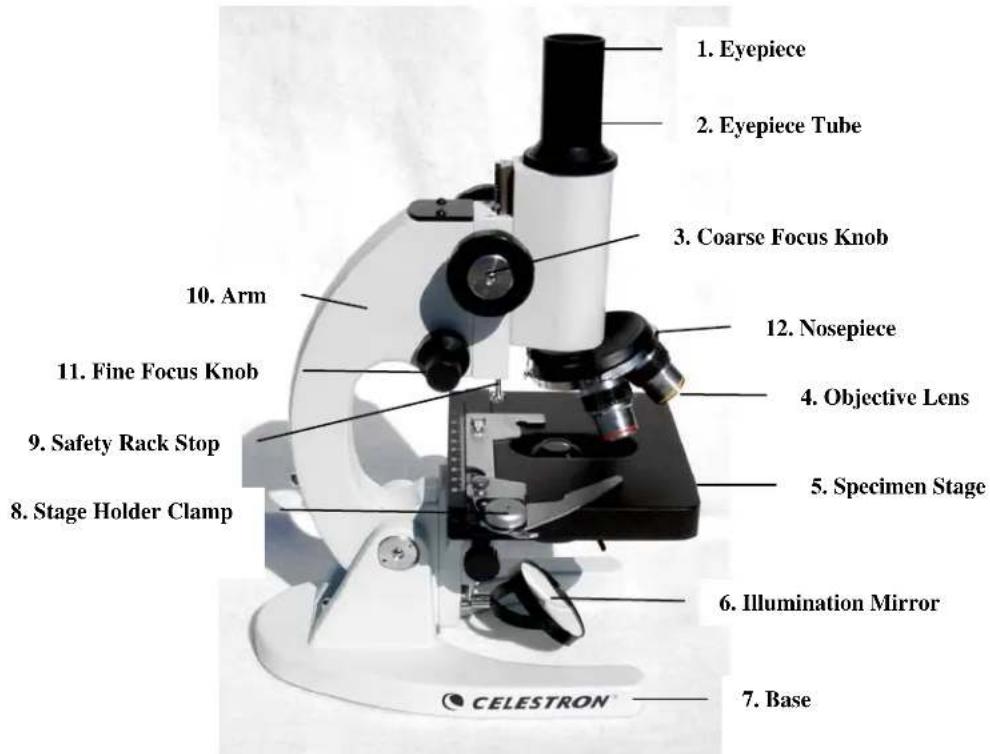
Your microscope has a built-in plano-concave illumination mirror which allows you to illuminate the specimen from the bottom by reflecting an external light source (indirect sunlight, room light, lamp, etc.) to the stage. The mirror has a flat side (you can easily see your reflection on the flat surface) and a concave side. The concave side will concentrate more light onto the specimen than the flat side. To illuminate a specimen:
If it is daylight, tilt the mirror (6) and reflect indirect sunlight through the bottom of the stage (5). Warning: Never use the mirror to focus direct sunlight through the microscope as this can be very harmful and may damage your eyes.
2. If viewing at night or indoors, away from sunlight, you can use a nearby desk lamp, table lamp, or other light source to reflect light onto a specimen.
To control the amount of light reflecting onto the specimen:
- Use the concave side of the mirror to focus more light on the slide. The concave side will concentrate more light onto your specimen but will focus a smaller beam of light, making it more sensitive to adjust.
2 If you are unable to adjust the mirror enough to properly illuminate the specimen, you can also tilt the arm (10) backwards to change the position of the mirror.
Adjusting the Arm Angle
The normal viewing position is at 0^ . However, you can view at any angle from 0^ to 45^ . To change the viewing angle:
- With one hand hold the base (7).
- Then, with your other hand, tilt the arm (10) by pulling it backward or forward to the desired viewing angle.
Viewing a Specimen
Carefully place a specimen slide under the spring loaded stage clips (8) and center the specimen directly over the hole in the center of the stage (5).
You are now ready to focus and view the specimen, but first you must take some precautions so as not to damage the specimen slide or objective lens. Your microscope is equipped with a safety rack stop (9) which allows you to regulate the range of travel on the focuser. This assures that the objective lens will not accidentally come into contact with the specimen slide, breaking the slide or scratching the objective lens. To adjust the travel on the focus mechanism:
- Raise the objective lens away from the specimen stage (5) by rotating the focus knob (3) backwards (clockwise).
- Unthread the safety rack stop screw (9) about 2/3 of the way.
- Lower the objective lens over the slide until the tip of the lens is slightly above the specimen slide. (Be careful not to touch the objective lens to the slide).
- Thread the safety screw (9) upward until it stops against the focus mechanism.
- Rotate the knurled locking nut upward to lock the safety screw in place.
- Now, turn the focus knob (3) until the specimen comes into sharp focus.
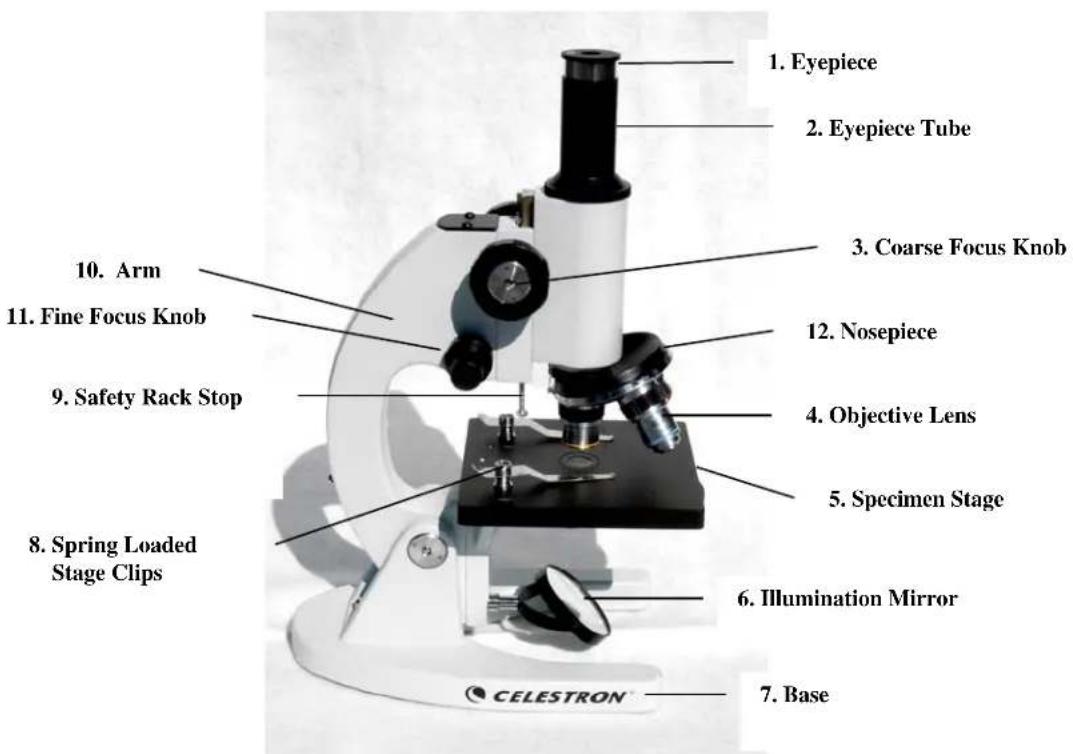
Laboratory Microscope - Model # 44102
Figure 2
Standard Accessories with your Microscope
| • 10x Huygens Eyepiece | • 40x Objective Lens |
| • 4x Objective Lens | • 5 Prepared Slides |
| • 10x Objective Lens | • Dust Cover |
Specifications
| Model # 44102 | Specifications |
| Stage Plain Stage with spring | loaded clips -- 120mm x 110mm |
| Arm Angle choice from 0° to 60° | |
| Focuser Coarse and Fine focus knobs; Rack and Pinion Safety Stop | |
| Objectives Achromatic -- 4x (40 power), 10x (100 power), 40x (400 power) | |
| Illuminator 50mm Plano-Concave Mirror | |
| Eyepiece 10x -- 12mm Field of View | |
| Nosepiece Triple with click stop | |
| Condenser | N.A. 0.65 |
| Diaphragm Disc Diaphragm with five aperture sizes | |
Setting Up Your Microscope
- Take the Styrofoam container out of the cardboard carton.
- Remove the tape from the Styrofoam container holding the two sections together.
- Carefully remove the microscope and other parts from the container and set them on a table, desk, or other flat surface.
- Remove the plastic bag covering the microscope.
- Remove the protective paper from the stage (5).
- Remove the plastic cap from the eyepiece tube (2).
- Insert the 10x eyepiece in the eyepiece tube (2).
- Remove the three objective lenses (4) from their containers. Unscrew the container lids from the threaded portion of the objective lenses.
- Thread the end of the 4mm objective lens into one of the holes on the nosepiece (12) until finger tight. It may be necessary to lower the stage (5) by turning the coarse focus knob (3).
- Now turn the nosepiece to the next opening and thread each of the remaining objective lenses into the remaining holes.
You are now ready to use your microscope!
Microscope Operation
Using the Illuminator Mirror
Your microscope has a built-in plano-concave illumination mirror which allows you to illuminate the specimen from the bottom by reflecting an external light source (indirect sunlight, room light, lamp, etc.) to the stage. The mirror has a flat side (you can easily see your reflection on the flat surface) and a concave side. The concave side will concentrate more light onto the specimen than the flat side. To illuminate a specimen:
- If it is daylight, tilt the mirror (6) and reflect indirect sunlight through the bottom of the stage (5). Warning: Never use the mirror to focus direct sunlight through the microscope as this can be very harmful and may damage your eyes.
- If viewing at night or indoors, away from sunlight, you can use a nearby desk lamp, table lamp, or other light source to reflect light onto a specimen.
To control the amount of light reflecting onto the specimen:
- Use the concave side of the mirror to focus more light on the slide. The concave side will concentrate more light onto your specimen but will focus a smaller beam of light, making it more sensitive to adjust.
2 If you are unable to adjust the mirror enough to properly illuminate the specimen, you can also tilt the arm (10) backward to change the position of the mirror. - The amount of light can also be controlled by rotating the five-aperture size disc diaphragm (see figure 2a) underneath the specimen stage (5).
Adjusting the Arm Angle
The normal viewing position is at 0^ . However, you can view at any angle from 0^ to 60^ . To change the viewing angle:
- With one hand hold the base (7).
- Then, with your other hand, tilt the arm (10) by pulling it backward or forward to the desired viewing angle.
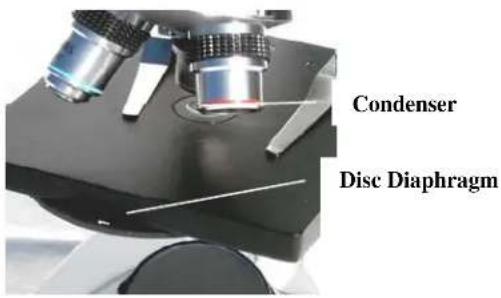
Figure 2a
Viewing a Specimen
Carefully place a specimen slide under the spring loaded stage clips (8) and center the specimen directly over the hole in the center of the stage (5).
You are now ready to focus and view the specimen, but first you must take some precautions so as not to damage the specimen slide or objective lens. Your microscope is equipped with a safety rack stop (9) which allows you to regulate the range of travel on the focier. This assures that the objective lens will not accidentally come into contact with the specimen slide, breaking the slide or scratching the objective lens. To adjust the travel on the focus mechanism:
- Raise the objective lens away from the specimen stage (5) by rotating the coarse focus knob (3) backwards (clockwise).
- Unthread the safety rack stop screw (9) about 2/3 of the way.
- Turn the nosepiece (12) until the 40x lens is over the specimen.
- Lower the objective lens over the slide until the tip of the lens is slightly above the specimen slide. (Be careful not to touch the objective lens to the slide).
- Thread the safety screw (9) upward until it stops against the focus mechanism.
- Rotate the knurled locking nut upward to lock the safety screw in place.
Focusing
Now that the specimen slide is placed directly under the objective lens, use the coarse focus knob (3) to focus on the specimen.
- Always start with the lowest power (4x objective lens) and switch to higher power by rotating the nosepiece (12) to the 10x and then 40x objective lenses. Be cautious not to let the objective lens touch the specimen slide when changing to higher power.
- Use the fine focus knob (11) to change the depth of field and obtain precise focus on the specimen you are observing.
- If you run out of downward travel before reaching sharp focus, you can unscrew the safety screw (9) to allow for more downward travel. Once again, be careful not to let the objective lens touch the specimen slide.
Advanced Microscope - Model # 44104
Figure 3
Standard Accessories with your Microscope
| • 10x Huygens Eyepiece | • Electric Illuminator |
| • 12.5 Huygens Eyepiece | • Blue Filter |
| • 4x Objective Lens | • 5 Prepared Slides |
| • 10x Objective Lens | • Dust Cover |
| • 40x Objective Lens |
Specifications
| Model # 44104 | Specifications |
| Stage Mechanical Stage 115mm x 125mm | |
| Arm Angle choice from 0° to 60° | |
| Focuser Coarse and Fine focus knobs; Rack & Pinion Safety Stop | |
| Objectives Achromatic -- 4x, 10x, 40x | |
| Illuminator 50mm Plano-Concave Mirror | |
| Eyepieces 10mm -- 12mm Field of View; 12.5mm -- 10mm Field of View | |
| Nosepiece Triple with click stop | |
| Condenser Abbe N.A. 1.25 | |
| Diaphragm | Iris |
Magnification Table
Use the following table to determine the magnification of the different eyepiece/objective lens combination of your microscope.
| Objective Lens 4x | 10x 40x | ||
| 10x Eyepiece | 40x | 100x 400x | |
| 12.5x Eyepiece | 50x | 125x 500x | |
Setting Up Your Microscope
- Take the Styrofoam container out of the cardboard carton.
- Remove the tape from the Styrofoam container holding the two sections together.
- Carefully remove the microscope and other parts from the container and set them on a table, desk, or other flat surface.
- Remove the plastic bag covering the microscope.
- Remove the protective paper from the stage (5).
- Remove the plastic cap from the eyepiece tube (2).
- Insert the 10x eyepiece in the eyepiece tube (2).
- Remove the three objective lenses (4) from their containers. Unscrew the container lids from the threaded portion of the objective lenses.
- Thread the end of the 4mm objective lens into one of the holes on the nosepiece (12) until finger tight. It may be necessary to lower the stage (5) by turning the coarse focus knob (3).
- Now turn the nosepiece to the next opening and thread each of the remaining objective lenses into the remaining holes. You are now ready to use your microscope!
Microscope Operation
Using the Illuminator Mirror
Your microscope has a built-in plano-concave illumination mirror which allows you to illuminate the specimen from the bottom by reflecting an external light source (indirect sunlight, room light, lamp, etc.) to the stage. The mirror has a flat side (you can easily see your reflection on the flat surface) and a concave side. The concave side will concentrate more light onto the specimen than the flat side. To illuminate a specimen:
- If it is daylight, tilt the mirror (6) and reflect indirect sunlight through the bottom of the stage (5). Warning: Never use the mirror to focus direct sunlight through the microscope as this can be very harmful and may damage your eyes.
- If viewing at night or indoors, away from sunlight, you can use a nearby desk lamp, table lamp, or other light source to reflect light onto a specimen.
To control the amount of light reflecting onto the specimen:
- Use the concave side of the mirror to focus more light on the slide. The concave side will concentrate more light onto your specimen but will focus a smaller beam of light, making it more sensitive to adjust.
2 If you are unable to adjust the mirror enough to properly illuminate the specimen, you can also tilt the arm (10) backward to change the position of the mirror - see the section under "Adjusting the Arm Angle". - You can also control light adjustment with the condenser and diaphragm -- see the section under "Adjusting the Lighting".
Adjusting the Arm Angle
The normal viewing position is at 0^ . However, you can view at any angle from 0^ to 60^ . To change the viewing angle:
-
With one hand hold the base (7).
-
Then, with your other hand, tilt the arm (10) by pulling it backward or forward to the desired viewing angle.
Using the Electric Illuminator
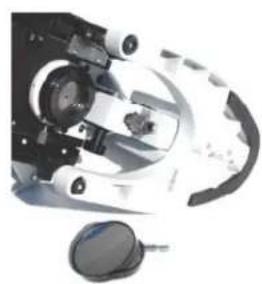
Figure 3a
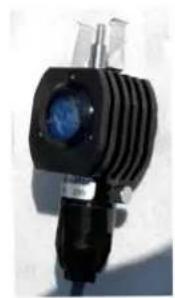
Figure 3b
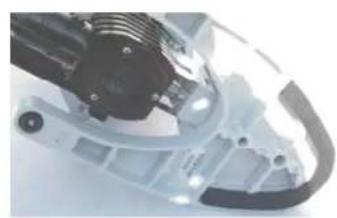
Figure 3c
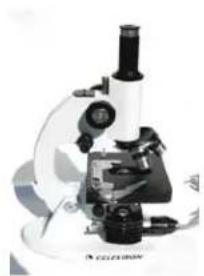
Figure 3d
For more direct and intensive light, you should use the supplied electric illuminator. To install the electric illuminator:
- Remove the mirror illuminator by pulling it outward from its sleeve. It will come out very easily with little pressure - see Figure 3a.
- You will install the electric illuminator in the sleeve you removed the mirror illuminator from - see Figure 3a.
- Be sure the glass part of the electric illuminator (see Figure 3b) is facing up towards the stage (5).
- Place the illuminator pin and clips over the sleeve and push until it is in all the way - see Figure 3c.
- Plug in the cord of the electric illuminator to the proper AC power source - see Figure 3d.
Changing Eyepieces
Your microscope is supplied with both 10x and 12.5x eyepieces. They are easily interchanged:
- Remove either eyepiece (1) from the eyepiece tube (2) by pulling it upward.
- Install the desired eyepiece (1) into the eyepiece tube (2) by pushing downward.
- The eyepieces are held in place by a friction fit.
Viewing a Specimen
Your instrument is provided with a mechanical stage with a stage holder clamp and directional knobs - see figure 3e.
- Use the clamp lever to open the clamping arm of the stage holder clamp.
- Place a specimen slide (3" size) inside the holder and gently close the clamping arm against the slide.
- Use the stage movement knobs (see Figure 3e) to position the specimen over the opening in the stage (5).
You are now ready to focus and view the specimen, but first you must take some precautions so as not to damage the specimen slide or objective lens. Your microscope is equipped with a safety rack stop (9) which allows you to regulate the range of travel on the focuser. This assures that the objective lens will not accidentally come into contact with the specimen slide, breaking the slide or scratching the objective lens. To adjust the travel on the focus mechanism:
- Raise the objective lens away from the specimen stage (5) by rotating the coarse focus knob (3) backwards (clockwise).
- Unthread the safety rack stop screw (9) about 2/3 of the way.
- Turn the nosepiece (12) until the 40x lens is over the specimen.
- Lower the objective lens over the slide until the tip of the lens is slightly above the specimen slide. (Be careful not to touch the objective lens to the slide).
- Thread the safety screw (9) upward until it stops against the focus mechanism.
- Rotate the knurled locking nut upward to lock the safety screw in place.
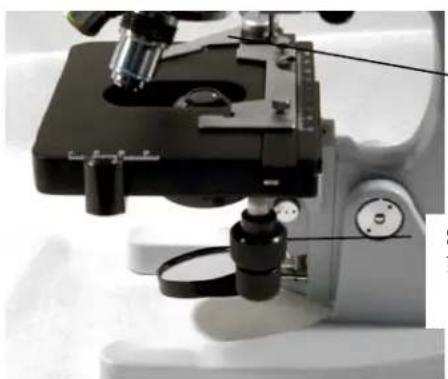
Figure 3c
Stage Holder Clamp
Note: The top stage movement knob moves in the X axis (forward and backward) whereas the bottom stage movement knob moves in the Y axis (side to side). A both axes allows the exact marking and replication of an object in the field of view that the user may want to come back to.
Stage Movement Knobs
Tip: To position the specimen directly under the objective lens, close the opening on the iris diaphragm (see Figure 3f) until it is almost completely closed. You should see a small beam of light projected onto the specimen slide. Now simply use the stage movement knobs to move the specimen directly inside the beam of light.
- Use the nosepiece (12) to rotate the objective lenses (4) until the 4x objective is directly over the specimen. Always start with the lowest power objective and work your way up to higher powers.
- Look through the eyepiece while turning the coarse focus knob (3) until the specimen comes into view. You may need to adjust the stage knobs (Figure 3e) slightly to center the specimen in the field of view. Warning: When focusing, be careful not to raise the specimen stage so high that the specimen slide touches the objective lens. Not only can you break your slide but you may scratch the objective lens.
- Finally, adjust the fine focus knob (11) until you reach the sharpest focus for your eye. Warning: Never rotate both of the fine focus knobs at the same time in opposite directions or the focusing mechanism may get damaged.
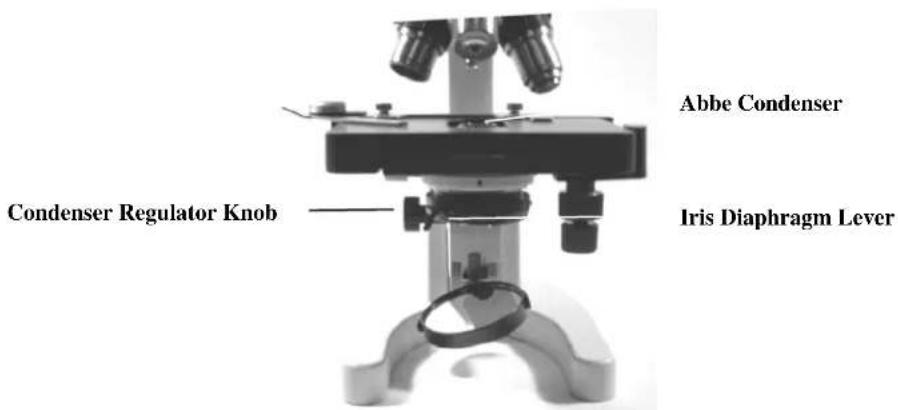
Figure 3f
Adjusting the Lighting
Specimens of different size, thickness, and color variations will require different levels of illumination. There are two ways to change the amount of illumination when viewing a specimen; adjusting the Abbe condenser and adjusting the iris diaphragm (see Figure 3f):
- When viewing with lower power (4x and 10x) objective lenses you will need to lower the condenser lens in order to spread the light over the larger field of view. To change the position of the condenser, simply rotate the condenser regulator knob clockwise until the beam of light spreads wide enough to illuminate the entire field of view when viewing.
- As you lower the condenser to spread out the light or change to a higher power objective lens, your image will appear dimmer. Open the aperture of the iris diaphragm to let in more light. Opening and closing the diaphragm will give a relief view of the specimen and allow you to change the depth of field of the specimen being viewed.
Using a Filter
To bring out different levels of detail, experiment with changing the color of the back lighting of the specimen. To change the lighting color, place the blue filter in the light path by placing it on the top of the electric illuminator. You may need to refocus by adjusting the fine focus knob (11) slightly for best viewing.
Replacing the Electric Illuminator Bulb
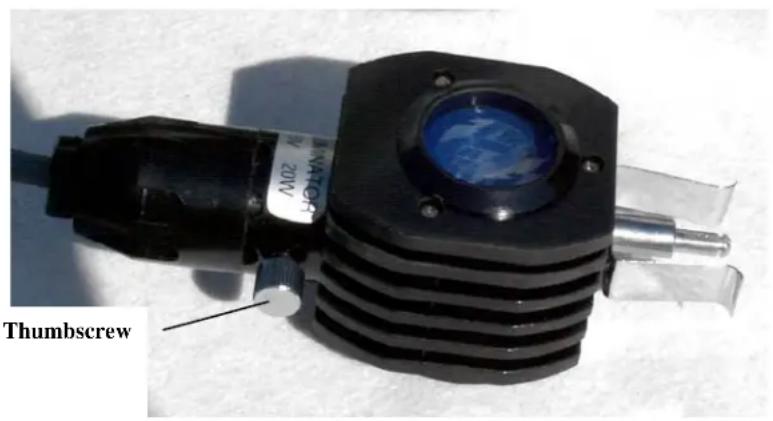
Figure 3g
To replace a burned out bulb, do the following:
- Take out the thumbscrew on the illuminator by turning it counter clockwise.
- Open the compartment and you will see the 20 watt tungsten bulb.
- Remove the bulb by pressing lightly down on the bulb and rotate it counter clockwise and it will come out.
- Take the new bulb and line up the pins of the bulb with the slots in the bulb socket and then push it down and rotate clockwise until it sets in place.
- Close the compartment, line up the threaded hole for the thumbscrew and tighten it by turning clockwise.
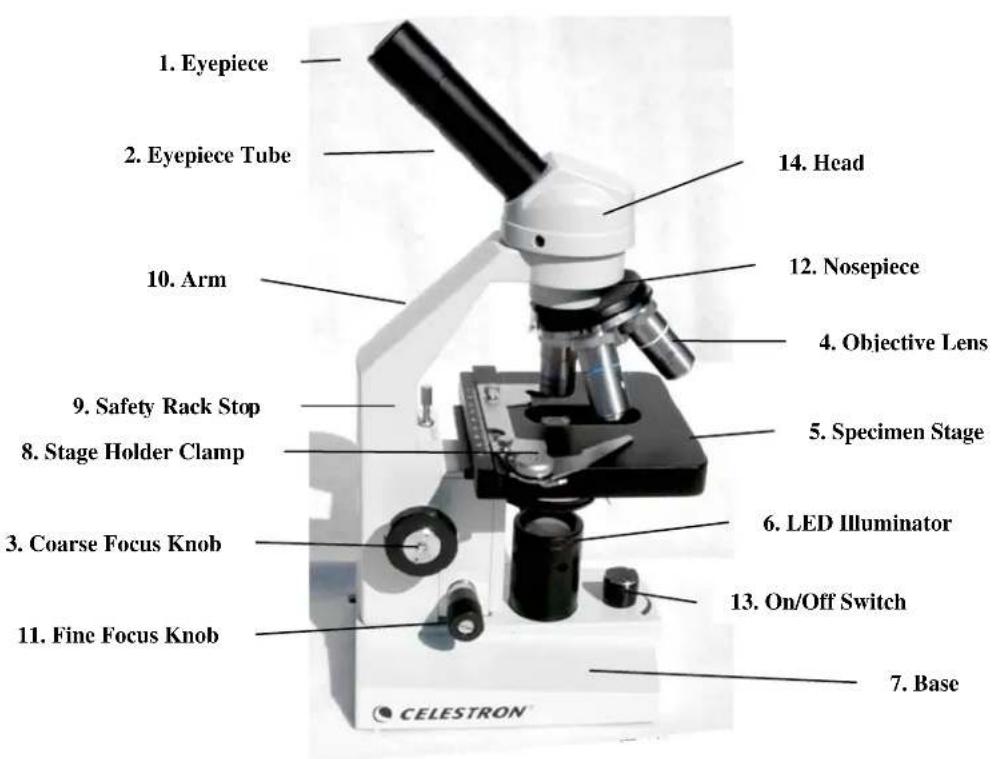
Advanced Microscope -- Model # 44106
Figure 4
Standard Accessories with your Microscope
| • 10x Eyepiece with pointer | • LED Illuminator |
| • 4x Objective Lens | • Green, Yellow, Blue Filters |
| • 10x Objective Lens | • Immersion Oil |
| • 40x Objective Lens | • 5 Prepared Slides |
| • 100x Objective Lens | • Dust Cover |
Specifications
| Model #44106 | Specifications |
| Stage Mechanical Stage 115mm x 125mm | |
| Head Monocular with 45° incline and 360° rotatable | |
| Focuser Coarse and Fine focus knobs; Rack & Pinion Safety Stop | |
| Objectives | Achromatic- 4x (4x) |
| 40x (400 power), 100x (1000 power) | |
| Illuminator 50mm Plano-Concave Mirror | |
| Eyepiece 10x Wide Field with Pointer - 18mm Field of View | |
| Nosepiece Quadruple with click stop | |
| Condenser | Abbe N.A. 1.25 |
| Diaphragm | Iris |
(40 power), 10x (100);
Setting Up Your Microscope
- Take the Styrofoam container out of the cardboard carton.
- Remove the tape from the Styrofoam container holding the two sections together.
- Carefully remove the microscope and other parts from the container and set them on a table, desk, or other flat surface.
- Remove the plastic bag covering the microscope.
- Remove the protective paper from the stage (5).
- Remove the four objective lenses (4) from their containers. Unscrew the container lids from the threaded portion of the objective lenses.
- Thread the end of the 4mm objective lens into one of the holes on the nosepiece (12) until finger tight. It may be necessary to lower the stage (5) by turning the coarse focus knob (3).
- Now turn the nosepiece to the next opening and thread each of the remaining objective lenses into the remaining holes.
You are now ready to use your microscope!
Microscope Operation
Using the Illuminator Mirror
Your microscope has a built-in plano-concave illumination mirror which allows you to illuminate the specimen from the bottom by reflecting an external light source (indirect sunlight, room light, lamp, etc.) to the stage. The mirror has a flat side (you can easily see your reflection on the flat surface) and a concave side. The concave side will concentrate more light onto the specimen than the flat side. To illuminate a specimen:
- If it is daylight, tilt the mirror (6) and reflect indirect sunlight through the bottom of the stage (5). Warning: Never use the mirror to focus direct sunlight through the microscope as this can be very harmful and may damage your eyes.
- If viewing at night or indoors, away from sunlight, you can use a nearby desk lamp, table lamp, or other light source to reflect light onto a specimen.
To control the amount of light reflecting onto the specimen:
- Use the concave side of the mirror to focus more light on the slide. The concave side will concentrate more light onto your specimen but will focus a smaller beam of light, making it more sensitive to adjust.
- You can also control light adjustment with the condenser and diaphragm -- see the section under "Adjusting the Lighting".
Rotating the Head
The head of your microscope can be rotated 360^ . Therefore, you can view from any position by just moving the head to the desired location.
Using the LED Illuminator
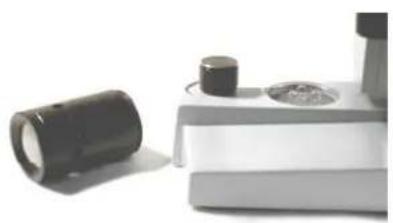
Figure 4a
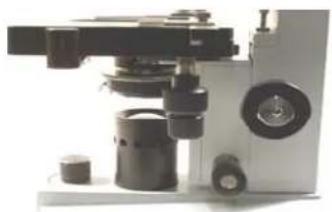
Figure 4b
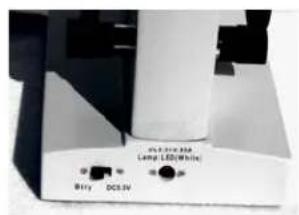
Figure 4c
For more direct and intensive light, you should use the supplied LED illuminator. The LED illuminator is powered by three AA batteries (user supplied).
- Remove the mirror illuminator by pulling it outward from its sleeve.
- The LED illuminator tube will thread counterclockwise on over the LED's in the base of the microscope - see Figure 4a. Turn the tube until finger tight - see Figure 4b.
- Install the batteries - see the next section below.
- After the batteries are installed, turn the power switch (13) to the "on" position.
- Make sure that on the back of the microscope base that the switch is in the "Btry" position - see Figure 4c.
Installing Batteries for the LED Illuminator
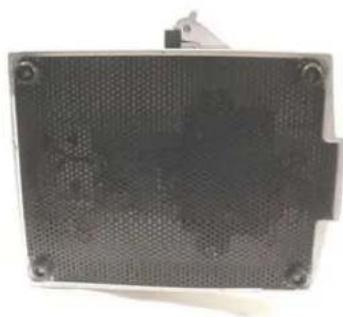
Figure 4d
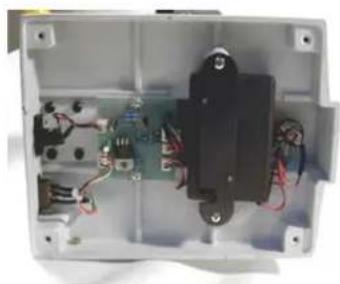
Figure 4e
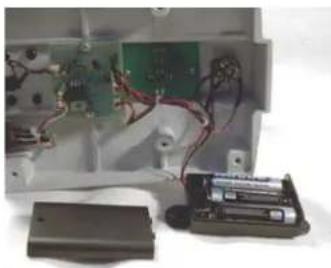
Figure 4f
To install the three AA batteries:
- Turn the microscope on its side.
- With a small Phillips head screwdriver, remove the four screws/rubber feet at the bottom of the base and the screen can then be removed - see Figure 4d.
- Remove the two shiny Phillips head screws holding a bracket which keeps the battery box in place - see Figure 4e.
- Slide open the battery box.
- Install three AA batteries following the "+" and "-" indicators - see Figure 4f.
- Close the battery box.
- Replace the bracket holding the battery box in place with the two shiny Phillips head screws.
- Replace the screen with the four Phillips head screws/rubber feet.
Viewing a Specimen
Your instrument is provided with a mechanical stage with a stage holder clamp and directional knobs -see figure 4g and 4h. A vernier scale on both axes allows the exact marking and replication of an object in the field of view that the user may want to come back to.
- Use the clamp lever to open the clamping arm of the stage holder clamp.
- Place a specimen slide (3" size) inside the holder and gently close the clamping arm against the slide.
- Use the stage movement knobs (see Figure 4h) to position the specimen over the opening in the stage (5).
You are now ready to focus and view the specimen, but first you must take some precautions so as not to damage the specimen slide or objective lens. Your microscope is equipped with a safety rack stop (9) which allows you to regulate the range of travel on the focuser. This assures that the objective lens will not accidentally come into contact with the specimen slide, breaking the slide or scratching the objective lens. To adjust the travel on the focus mechanism:
- Raise the objective lens away from the specimen stage (5) by rotating the coarse focus knob (3) backwards (clockwise).
- Unthread the safety rack stop screw (9) about 2/3 of the way.
- Turn the nosepiece (12) until the 40x lens is over the specimen.
- Lower the objective lens over the slide until the tip of the lens is slightly above the specimen slide. (Be careful not to touch the objective lens to the slide).
- Thread the safety screw (9) upward until it stops against the focus mechanism.
- Rotate the knurled locking nut upward to lock the safety screw in place.
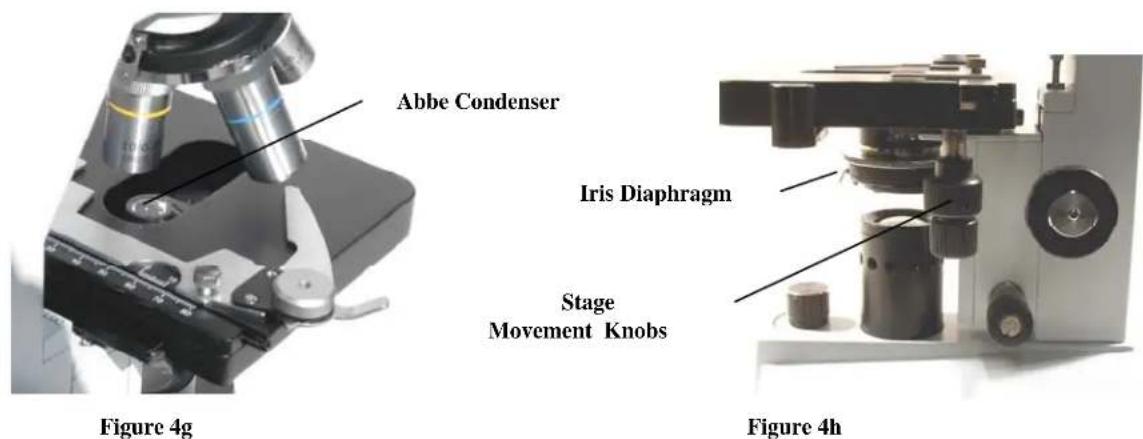
Tip: To position the specimen directly under the objective lens, close the opening on the iris diaphragm (see Figure 4h) until it is almost completely closed. You should see a small beam of light projected onto the specimen slide. Now simply use the stage movement knobs to move the specimen directly inside the beam of light.
- Use the nosepiece (12) to rotate the objective lenses (4) until the 4x objective is directly over the specimen. Always start with the lowest power objective and work your way up to higher powers.
- Look through the eyepiece while turning the coarse focus knob (3) until the specimen comes into view. You may need to adjust the stage knobs (Figure 4h) slightly to center the specimen in the field of view. Warning: When focusing, be careful not to raise the specimen stage so high that the specimen slide touches the objective lens. Not only can you break your slide but you may scratch the objective lens.
- Finally, adjust the fine focus knob (11) until you reach the sharpest focus for your eye. Warning: Never rotate both of the fine focus knobs at the same time in opposite directions or the focusing mechanism may get damaged.
Tip: When viewing a specimen with the 100x objective lens, you can improve the resolving power by placing a small drop of immersion oil between the specimen and objective lens. For specimen slides that you prepare yourself, always cover the specimen with a thin piece of glass and place the oil on the cover glass. Do not put the oil directly on the specimen sample.
Adjusting the Lighting
Specimens of different size, thickness, and color variations will require different levels of illumination. There are three ways to change the amount of illumination when viewing a specimen; adjusting the brightness control on the on/off knob (13), adjusting the Abbe condenser (Figure 4g) and adjusting the iris diaphragm (see Figure 4h):
-
When viewing a specimen that is not transparent or dark in color you may need to increase the amount of light to resolve certain features or details. This is best done by simply increasing the brightness of the LED illuminator by rotating the brightness control on the on/off switch (13) all the way to its highest setting.
-
When viewing with lower power (4x and 10x) objective lenses you will need to lower the condenser lens in order to spread the light over the larger field of view. To change the position of the condenser, simply rotate the silver center portion of the Iris diaphragm (4h) clockwise until the beam of light spreads wide enough to illuminate the entire field of view when viewing.
-
As you lower the condenser to spread out the light or change to a higher power objective lens, your image will appear dimmer. Instead of increasing the light intensity of the illuminator (which may "wash out" fine detail of the specimen you are viewing), open the aperture of the iris diaphragm to let in more light. Opening and closing the diaphragm will give a relief view of the specimen and allow you to change the depth of field of the specimen being viewed.
Using Filters
To bring out different levels of detail, experiment with changing the color of the back lighting of the specimen. To change the lighting color, place the blue filter, the green filter, or the yellow filter in the light path by placing one on top of the LED illuminator. You may need to refocus by adjusting the fine focus knob (11) slightly for best viewing. You should experiment with each of the colors to see the results.
Care and Maintenance
Your Celestron microscope is a precision optical instrument and should be treated with care at all times. Follow these care and maintenance suggestions and your microscope will need very little maintenance throughout its lifetime.
- When you are done using your microscope, remove any specimens left on the stage.
- Turn off any electric illuminator knobs or switches.
- Unplug any power cords being used.
Always place the dust cover over the microscope when not in use or when being stored. - Store the microscope in a dry and clean place.
- Be very careful if using your microscope in direct sun light to prevent damage to the microscope or your eyes.
- When moving your telescope, carry it by the "arm" with one hand and not by the focuser knobs, eyepiece housing, etc. Then, put your other hand under the base for support.
Clean the outside surfaces (metal and plastics) with a moist cloth. - Always unplug any cords before cleaning.
- Never clean optical surfaces with cloth or paper towels as they can scratch optical surfaces easily.
- Blow off dust with a camels hair brush or an air blower from optical surfaces.
To clean fingerprints off of optical surfaces, use a lens cleaning agent and lens tissue available at most photo outlets and when cleaning do not rub in circles as this may cause sleeks or scratches to occur. - Never disassemble or clean internal optical surfaces. This should be done by qualified technicians at the factory or other authorized repair facilities.
- When handling glass specimen slides, be care as the edges can be sharp.
Celestron Two Year Warranty
A. Celestron warrants this microscope to be free from defects in materials and workmanship for two years. Celestron will repair or replace such product or part thereof which, upon inspection by Celestron, is found to be defective in materials or workmanship. As a condition to the obligation of Celestron to repair or replace such product, the product must be returned to Celestron together with proof-of-purchase satisfactory to Celestron.
B. The Proper Return Authorization Number must be obtained from Celestron in advance of return. Call Celestron at (310) 328-9560 to receive the number to be displayed on the outside of your shipping container.
All returns must be accompanied by a written statement setting forth the name, address, and daytime telephone number of the owner, together with a brief description of any claimed defects. Parts or product for which replacement is made shall become the property of Celestron.
The customer shall be responsible for all costs of transportation and insurance, both to and from the factory of Celestron, and shall be required to prepay such costs.
Celestron shall use reasonable efforts to repair or replace any microscope covered by this warranty within thirty days of receipt. In the event repair or replacement shall require more than thirty days, Celestron shall notify the customer accordingly. Celestron reserves the right to replace any product which has been discontinued from its product line with a new product of comparable value and function.
This warranty shall be void and of no force of effect in the event a covered product has been modified in design or function, or subjected to abuse, misuse, mishandling or unauthorized repair. Further, product malfunction or deterioration due to normal wear is not covered by this warranty.
CELESTRON DISCLAIMS ANY WARRANTYIES, EXPRESS OR IMPLIED, WHETHER OF MERCHANTABILITY OF FITNESS FOR A PARTICULAR USE, EXCEPT AS EXPRESSLY SET FORTH HEREIN.
THE SOLE OBLIGATION OF CELESTRON UNDER THIS LIMITED WARRANTY SHALL BE TO REPAIR OR REPLACE THE COVERED PRODUCT, IN ACCORDANCE WITH THE TERMS SET FORTH HEREIN. CELESTRON EXPRESSLY DISCLAIMS ANY LOST PROFITS, GENERAL, SPECIAL, INDIRECT OR CONSEQUENTIAL DAMAGES WHICH MAY RESULT FROM BREACH OF ANY WARRANTY, OR ARISING OUT OF THE USE OR INABILITY TO USE ANY CELESTRON PRODUCT. ANY WARRANTYES WHICH ARE IMPLIED AND WHICH CANNOT BE DISCLAIMED SHALL BE LIMITED IN DURATION TO A TERM OF TWO YEARS FROM THE DATE OF ORIGINAL RETAIL PURCHASE.
Some states do not allow the exclusion or limitation of incidental or consequential damages or limitation on how long an implied warranty lasts, so the above limitations and exclusions may not apply to you.
This warranty gives you specific legal rights, and you may also have other rights which vary from state to state.
Celestron reserves the right to modify or discontinue, without prior notice to you, any model or style microscope.
If warranty problems arise, or if you need assistance in using your microscope contact:
Celestron
Technical Support Department
2835 Columbia Street
Torrance, CA 90503 U.S.A.
Fax. (310) 212-5835
Tel.
(310)
Monday-Friday 8AM-4PM PST
www.celestron.com
This warranty supersedes all other product warranties.
NOTE: This warranty is valid to U.S.A. and Canadian customers who have purchased this product from an Authorized Celestron Dealer in the U.S.A. or Canada. Warranty outside the U.S.A. and Canada is valid only to customers who purchased from a Celestron Distributor or Authorized Celestron Dealer in the specific country and please contact them for any warranty service.

CELESTRON
Technical Support Department
2835 Columbia Street
Replacing the Electric Illuminator Bulb
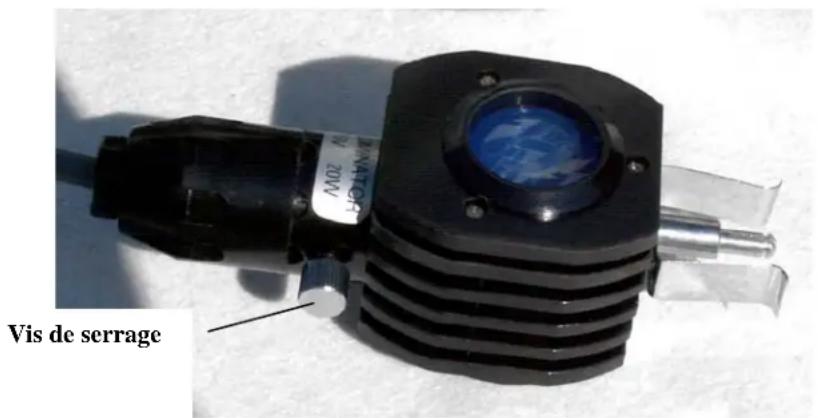
Figure 3g
Technical Support Department
2835 Columbia Street
Torrance, CA 90503 U.S.A.
Fax. (310) 212-5835
Technical Support Department
2835 Columbia Street
Torrance, CA 90503, USA
Tel.: +1 (310) 328-9560
Products or instructions may change
without notice or obligation.
Printed in China
$ 10.00 04-07