USER MANUAL A12 ROTEL
natural_image
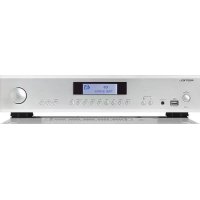
Front view of a ROTEL audio amplifier device with control knobs and a central display (no visible text or labels beyond branding)
ROTEL®
A12
Stereo Integrated Amplifier
Important Safety Instructions
Notice
The RS232 connection should be handled by authorized persons only.
WARNING: There are no user serviceable parts inside. Refer all servicing to qualified service personnel.
WARNING: To reduce the risk of fire or electric shock, do not expose the unit to moisture or water. Do not expose the unit to dripping or splashing. Do not place objects filled with liquids, such as vases, on the unit. Do not allow foreign objects to get into the enclosure. If the unit is exposed to moisture, or a foreign object gets into the enclosure, immediately disconnect the power cord from the wall. Take the unit to a qualified service person for inspection and necessary repairs.
Read these instructions.
Keep these instructions.
Heed all warnings.
Follow all instructions.
Do not use this apparatus near water.
Clean only with dry cloth.
Do not block any ventilation openings. Install in accordance with the manufacturer's instructions.
Do not install near any heat sources such as radiators, heat registers, stoves, or other apparatus (including amplifiers) that produce heat.
Do not defeat the safety purpose of the polarized or grounding-type plug. A polarized plug has two blades with one wider than the other. A grounding type plug has two blades and a third grounding prong. The wide blade or the third prong are provided for your safety. If the provided plug does not fit into your outlet, consult an electrician for replacement of the obsolete outlet.
Protect the power cord from being walked on or pinched particularly at plugs, convenience receptacles, and the point where they exit from the apparatus.
Only use attachments/accessories specified by the manufacturer.
Use only with the cart, stand, tripod, bracket, or table specified by the manufacturer, or sold with the apparatus. When a cart is used, use with caution when moving the cart/apparatus combination to avoid injury from tip-over.

Unplug this apparatus during lightning storms or when unused for long periods of time.
Refer all servicing to qualified service personnel. Servicing is required when the apparatus has been damaged in any way, such as power-supply cord or plug is damaged, liquid has been spilled or objects have fallen into the apparatus, the apparatus has been exposed to rain or moisture, does not operate normally, or has been dropped.
The apparatus should be used in non tropical climate.
The ventilation should not be impeded by covering the ventilation openings with items, such as newspapers, table-cloths, curtains, etc.
No naked flame sources, such as lighted candles, should be placed on the apparatus.
Touching uninsulated terminals or wiring may result in an unpleasant sensation.
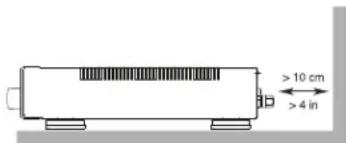
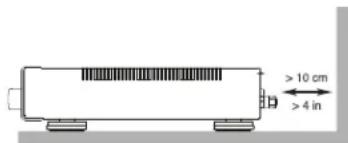
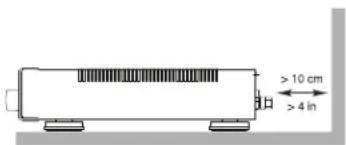
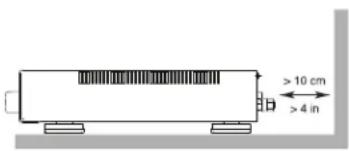
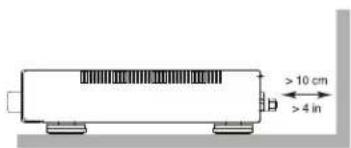
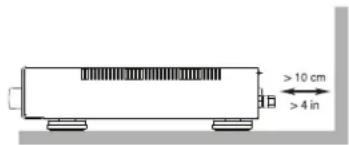
You must allow a minimum 10 cm or 4 inches of unobstructed clearance around the unit.
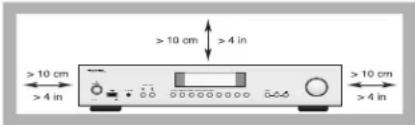
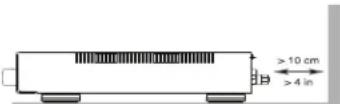
WARNING: The rear panel power cord connector is the mains power disconnect device. The device must be located in an open area that allows access to the cord connector.
The unit must be connected to a power supply only of the type and voltage specified on the rear panel. (USA: 120 V/60Hz, EC: 230V/50Hz)
Connect the component to the power outlet only with the supplied power supply cable or an exact equivalent. Do not modify the supplied cable. Do not use extension cords.
The mains plug is the disconnect of the unit. In order to completely disconnect the unit from the supply mains, remove the main plug from the unit and the AC power outlet. This is the only way to completely remove mains power from the unit.
Use Class 2 wiring for speaker connections to ensure proper installation and minimize the risk of electrical shock.
The batteries in the remote control should not be exposed to excessive temperature such as sunshine, fire or other heat sources. Batteries should be recycled or disposed as per state and local guidelines.
This device complies with Part 15 of the FCC Rules. Operation is subject to the following to conditions: (1) This device may not cause harmful interference, and (2) this device must accept any interference received, including interference that may cause undesired operation.
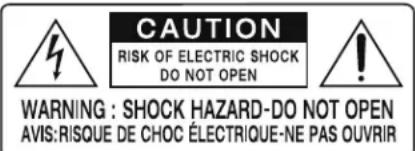
APPLICABLE FOR USA, CANADA OR WHERE APPROVED FOR THE USAGE
CAUTION: TO PREVENT ELECTRIC SHOCK, MATCH WIDE BLADE OF PLUG TO WIDE SLOT, INSERT FULLY.
ATTENTION: POUR EVITER LES CHOCS ELECTRIQUES, INTRODUIRE LA LAME LA PLUS LARGE DE LA FICHE DANS LA BORNE CORRESPONDANTE DE LA PRISE ET POUSSER JUSQU AU FOND.
This symbol is to alert the user to the presence of uninsulated dangerous voltages inside the product's enclosure that may constitute a risk of electric shock.
This symbol is to alert the user to important operating and maintenance (service) instructions in this manual and literature accompanying the product.
Rotel products are designed to comply with international directives on the Restriction of Hazardous Substances (RoHS) in electrical and electronic equipment and the disposal of Waste Electrical and Electronic Equipment (WEEE). The crossed wheelie bin symbol indicates compliance and that the products must be appropriately recycled or processed in accordance with these directives.

This symbol means that this unit is double insulated. An earth connection is not required.

Figure 1: Controls and Connections
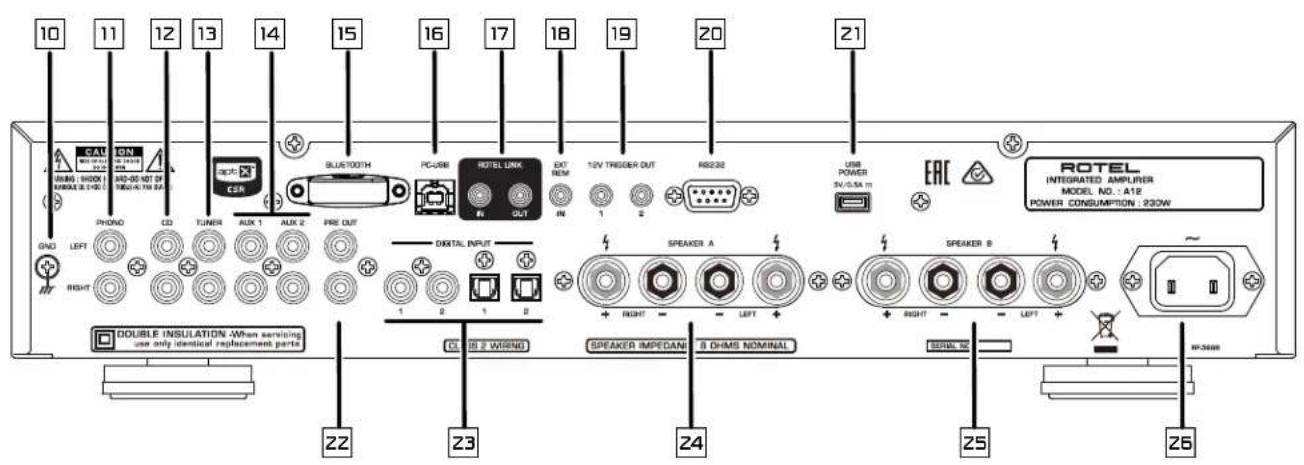
Figure 2: Remote Control RR-AX1400
Figure 3: Preamp Input and Speaker Output Connections
Branchements des entrées sources et sorties enceintes acoustiques
Anschlussdiagramm
Conexiones para Entrada de Señal y Salida a las Cajas Acústicas
Collegamenti ingressi e diffusori
De signaalingangen en de luidsprekeruitgangen
Signal- och högtalaranslutningar
Подсоединение источников сигнала и акустических систем
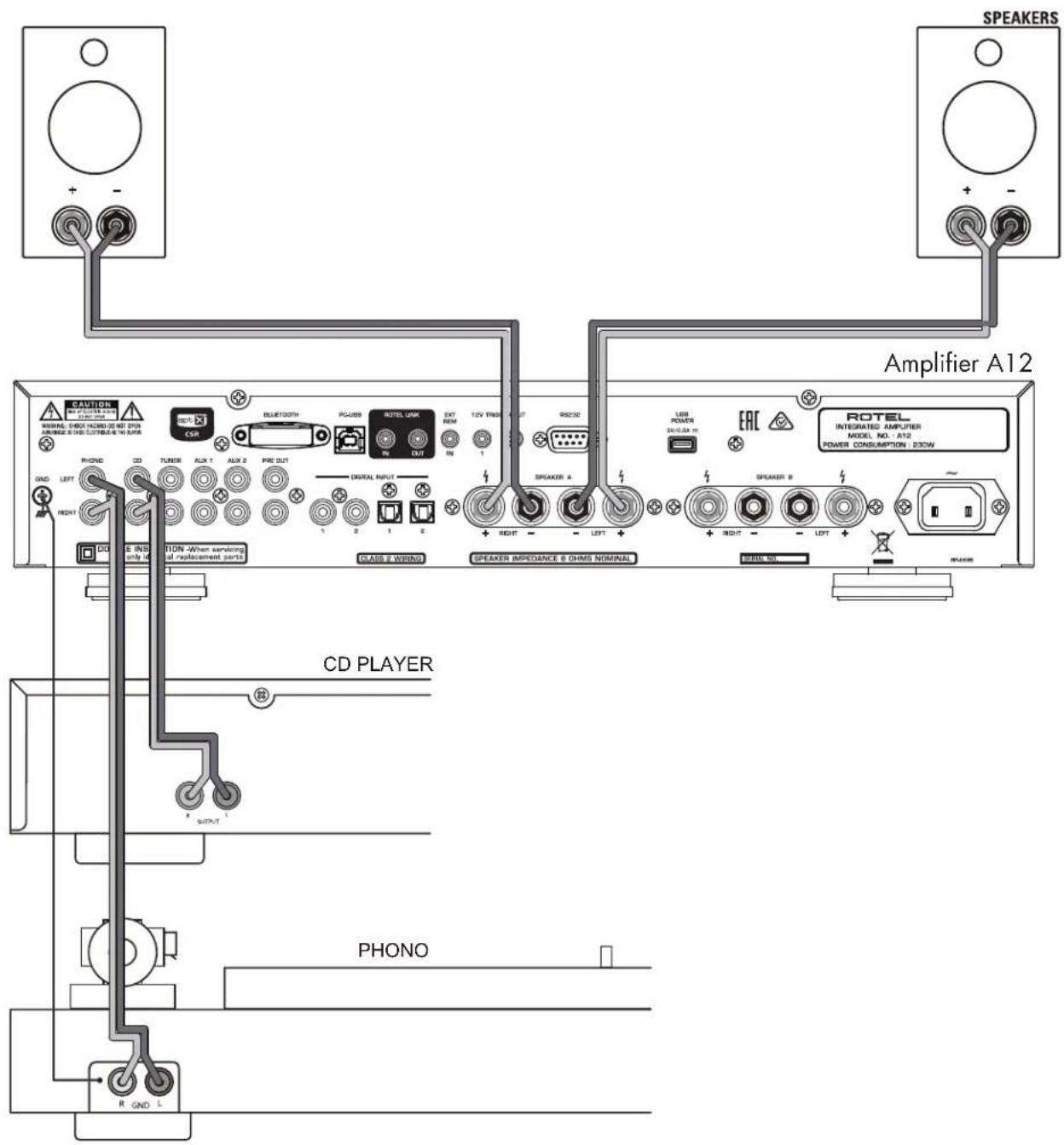
Figure 4: Digital Input Connections
Branchements Entrées numériques
Digitaleingänge-Anschlüsse
Conexiones Entradas Digitales
Digitale ingang verbinding
Collegamenti ingressi digitali
Anslutningar för digitala ingångar
Подсоединение Цифровые входы
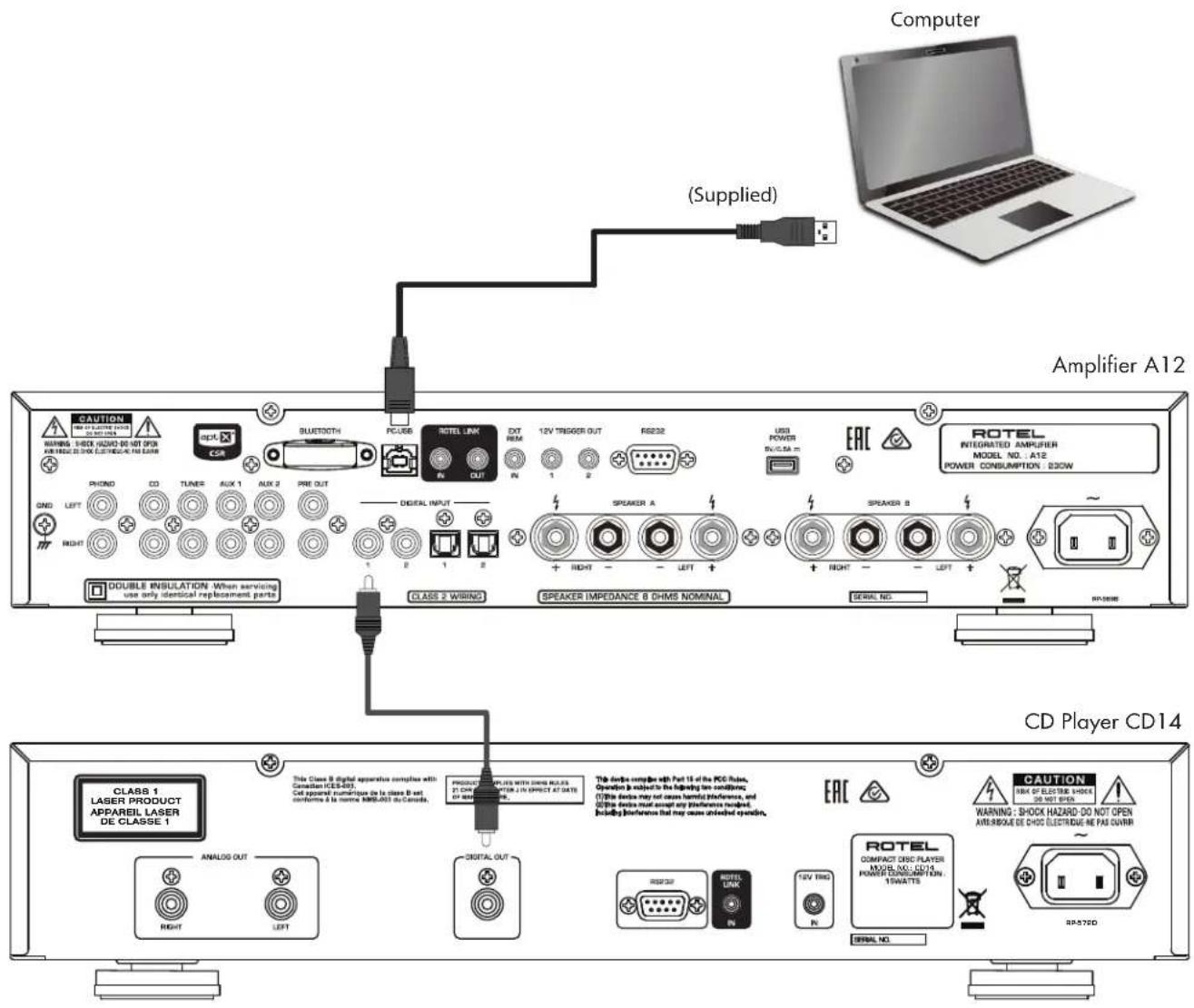
Figure 5: Rotel Link and 12V Trigger Connections
Branchements Rotel Link et trigger 12 V
Rotel Link- und 12V-Trigger-Anschlüsse
Conexiones Rotel Link y para Señal de Disparo de 12V
De Rotel Link en 12V trigger aansluitingen
Collegamenti Rotel Link e segnali Trigger 12 V
Rotel Link-anslutning och 12 V-anslutning för styrsignal
Подсоединение Rotel Link и 12-B триgгерного сигнала
Important! : The 12V trigger cables will override the Rotel Link commands. Do not connect the 12V trigger cable if Rotel Link is connected.
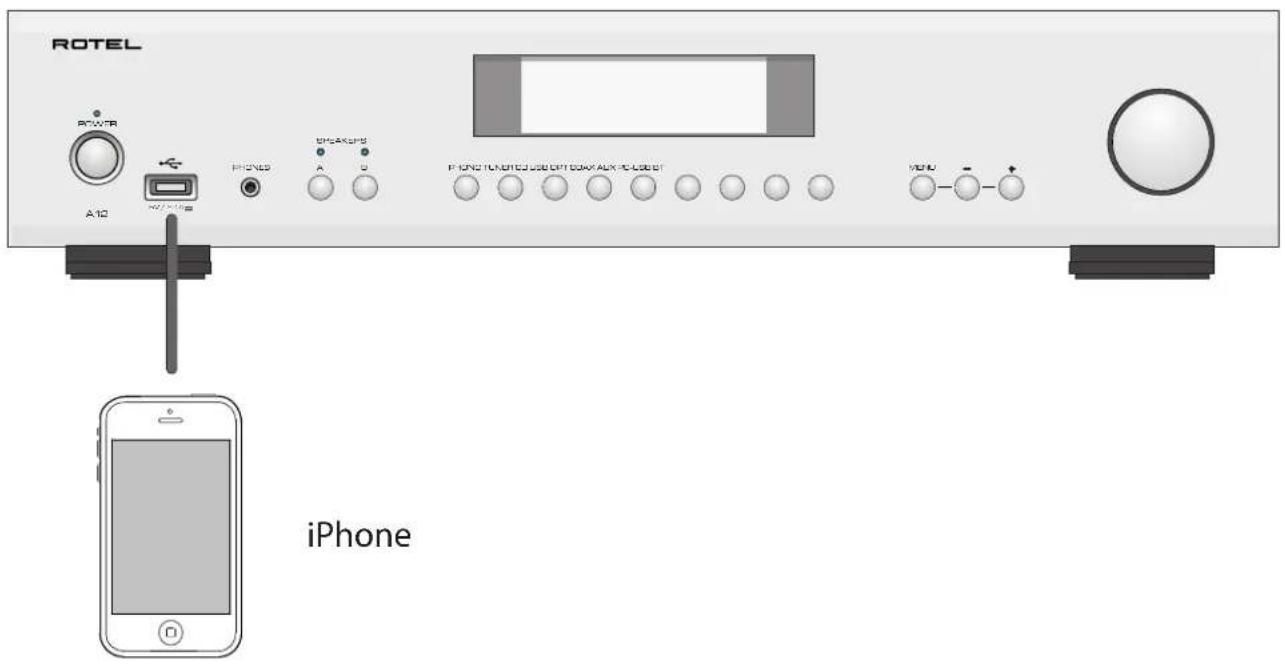
Figure 6: Front USB Input Entrée USB en face avant Frontseitiger USB-Eingang Entrada USB Frontal
USB-ingang op het voorpaneel
Ingresso USB frontale
USB-port på fronten
USB вход na передней paneli
Important Notes
When making connections be sure to:
√ Turn off all the components in the system before hooking up any components, including loudspeakers.
√ Turn off all components in the system before changing any of the connections to the system.
It is also recommended that you:
√ Turn the volume control of the amplifier all the way down before the amplifier is turned on or off.
Remarques importantes
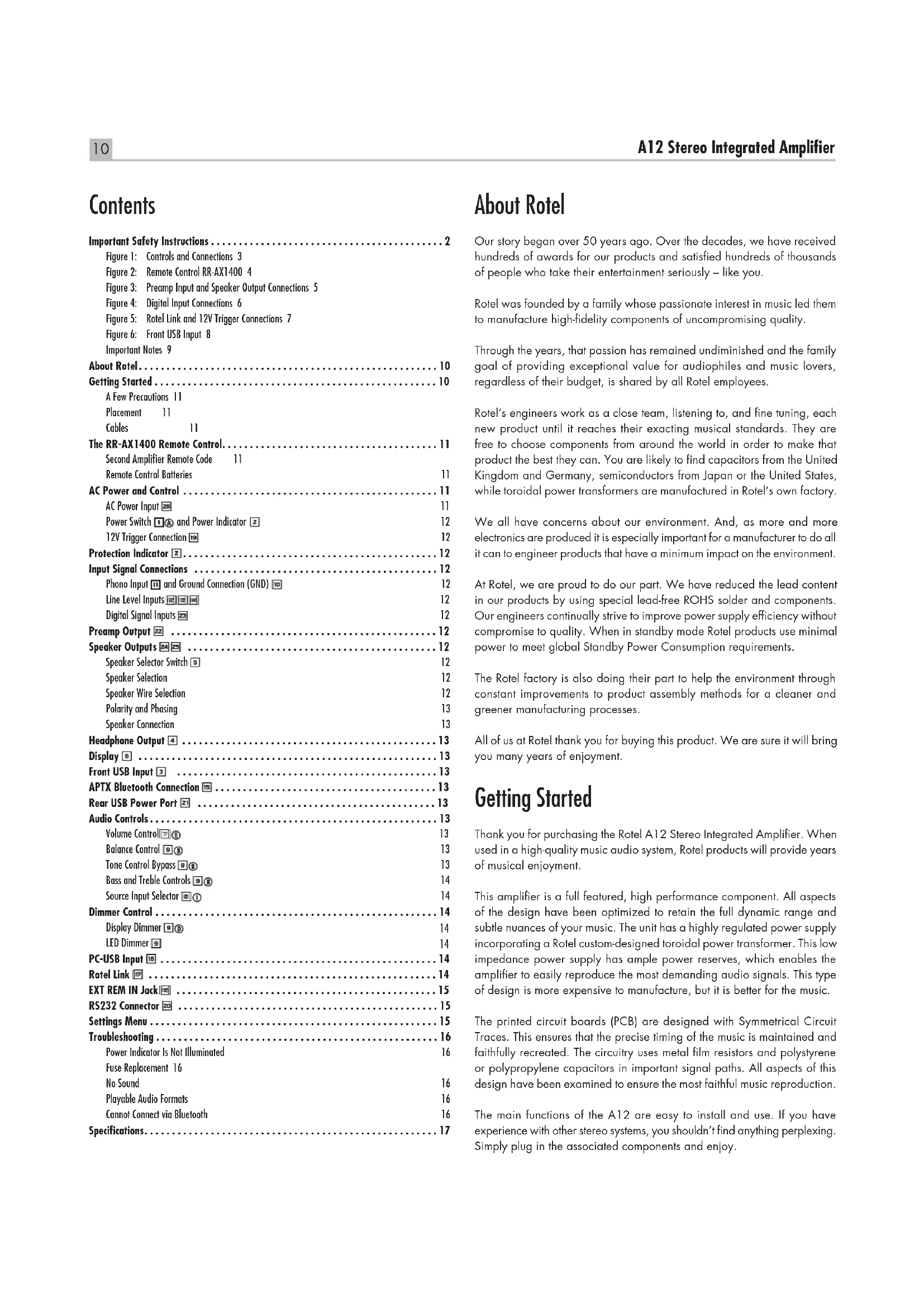
Important Safety Instructions 2
Figure 1: Controls and Connections 3
Figure 2: Remote Control RR-AX1400 4
Figure 3: Preamp Input and Speaker Output Connections 5
Figure 4: Digital Input Connections 6
Figure 5: Rotel Link and 12V Trigger Connections 7
Figure 6: Front USB Input 8
Important Notes 9
About Rotel....10
Getting Started....10
A Few Precautions 11
Placement 11
Cables 11
The RR-AX1400 Remote Control....11
Second Amplifier Remote Code 11
Remote Control Batteries 11
AC Power and Control 11
AC Power Input 26 11
Power Switch 1 and Power Indicator 2 12
12V Trigger Connection 19 12
Protection Indicator 12
Input Signal Connections 12
Phono Input ☐ and Ground Connection (GND) ☐
Line Level Inputs 12
Digital Signal Inputs 12
Preamp Output 22 12
Speaker Outputs 24 25 12
Speaker Selector Switch 12
Speaker Selection 12
Speaker Wire Selection 12
Polarity and Phasing 13
Speaker Connection 13
Headphone Output 4 13
Display 5 13
Front USB Input 3 13
APTX Bluetooth Connection 15 13
Rear USB Power Port 21 13
Audio Controls....13
Volume Control 13
Balance Control ☐ 13
Tone Control Bypass 13
Bass and Treble Controls 14
Source Input Selector 14
Dimmer Control 14
Display Dimmer 14
LED Dimmer 14
PC-USB Input 16 14
Rotel Link 14
EXT REM IN Jack 15
RS232 Connector 20 15
Settings Menu 15
Troubleshooting 16
Power Indicator Is Not Illuminated 16
Fuse Replacement 16
No Sound 16
playable Audio Formats 16
Cannot Connect via Bluetooth 16
Specifications....17
About Rotel
Our story began over 50 years ago. Over the decades, we have received hundreds of awards for our products and satisfied hundreds of thousands of people who take their entertainment seriously – like you.
Rotel was founded by a family whose passionate interest in music led them to manufacture high-fidelity components of uncompromising quality.
Through the years, that passion has remained undiminished and the family goal of providing exceptional value for audiophiles and music lovers, regardless of their budget, is shared by all Rotel employees.
Rotel's engineers work as a close team, listening to, and fine tuning, each new product until it reaches their exacting musical standards. They are free to choose components from around the world in order to make that product the best they can. You are likely to find capacitors from the United Kingdom and Germany, semiconductors from Japan or the United States, while toroidal power transformers are manufactured in Rotel's own factory.
We all have concerns about our environment. And, as more and more electronics are produced it is especially important for a manufacturer to do all it can to engineer products that have a minimum impact on the environment.
At Rotel, we are proud to do our part. We have reduced the lead content in our products by using special lead-free ROHS solder and components. Our engineers continually strive to improve power supply efficiency without compromise to quality. When in standby mode Rotel products use minimal power to meet global Standby Power Consumption requirements.
The Rotel factory is also doing their part to help the environment through constant improvements to product assembly methods for a cleaner and greener manufacturing processes.
All of us at Rotel thank you for buying this product. We are sure it will bring you many years of enjoyment.
Getting Started
Thank you for purchasing the Rotel A12 Stereo Integrated Amplifier. When used in a high-quality music audio system, Rotel products will provide years of musical enjoyment.
This amplifier is a full featured, high performance component. All aspects of the design have been optimized to retain the full dynamic range and subtle nuances of your music. The unit has a highly regulated power supply incorporating a Rotel custom-designed toroidal power transformer. This low impedance power supply has ample power reserves, which enables the amplifier to easily reproduce the most demanding audio signals. This type of design is more expensive to manufacture, but it is better for the music.
The printed circuit boards (PCB) are designed with Symmetrical Circuit Traces. This ensures that the precise timing of the music is maintained and faithfully recreated. The circuitry uses metal film resistors and polystyrene or polypropylene capacitors in important signal paths. All aspects of this design have been examined to ensure the most faithful music reproduction.
The main functions of the A12 are easy to install and use. If you have experience with other stereo systems, you shouldn't find anything perplexing. Simply plug in the associated components and enjoy.
A Few Precautions
WARNING: To avoid potential damage to your system, turn off ALL the components in the system when connecting or disconnecting the loudspeakers or any associated components. Do not turn the system components back on until you are sure all the connections are correct and secure. Pay particular attention to the speaker wires. There must be no loose strands that could contact the other speaker wires, or the chassis of the amplifier.
Please read this manual carefully. It provides information on how to incorporate the unit into your system as well as information that will help you get optimum sound performance. Please contact your authorized Rotel dealer for answers to any questions you might have. In addition, all of us at Rotel welcome your questions and comments.
Save the shipping carton and all enclosed packing material for future use. Shipping or moving the amplifier in anything other than the original packing material may result in severe damage to your amplifier.
If included in the box please complete the owner's registration card or register on line. Also be sure to keep the original sales receipt. It is your best record of the date of purchase, which you will need in the event warranty service is ever required.
Placement
Like all audio components that handle low level signals, this amplifier can be affected by its environment. Avoid placing the unit on top of other components. Also avoid routing audio signal cables near power cords. This will minimize the chance it will pick up hum or interference.
The unit generates heat as part of its normal operation. The heat sinks and ventilation openings in the amplifier are designed to dissipate this heat. The ventilation slots in the top cover must be open. There should be 10 cm (4 inches) of clearance around the chassis, and reasonable airflow through the installation location, to prevent the amplifier from overheating.
Remember the weight of the amplifier when you select an installation location. Make sure that the shelf or cabinet can support it. We recommend installing the unit in furniture designed to house audio components. Such furniture is designed to reduce or suppress vibration which can adversely affect sound quality. Ask your authorized Rotel dealer for advice about component furniture and proper installation of audio components.
Cables
Be sure to keep the power cords, digital signal cables and analog audio signal cables in your installation away from each other. This will minimize the chance of the analog audio signal cables picking up noise or interference from the power cords or digital cables. Using only high quality, shielded cables will also help to prevent noise or interference from degrading the sound quality of your system. If you have any questions see your authorized Rotel dealer for advice about the best cable to use with your system.
The RR-AX1400 Remote Control
Some functions can be done with either the front panel controls, or the supplied RR-AX1400 remote control. When these operations are described, the square call out numbers refer to the main unit, while the encircled letters refer to the remote control.
Second Amplifier Remote Code
The factory setting is remote code 1. If you find that the remote is conflicting with other Rotel amplifiers, you can change to remote code 2 with the following steps.
- From the remote control press Tuner① and 2 M at the same time for 5 seconds, to set the remote control to send Audio Code 2.
- Point the remote at the unit and press 2 ^M button for 14 seconds. The unit will show "Audio Code SET 1 -> 2".
- Repeat the above procedure and press "1" key instead of "2" to change the unit back to Code 1.
NOTE: The remote control can be used to operate the basic functions of Rotel tuners and CD players. Remote control keys labeled G H M N can be used to operate CD or Tuner functions in your system. For the remote to operate properly, make sure both the remote and the CD or Tuner are both in same remote code, either Code 1 or 2.
Remote Control Batteries
Two AAA size batteries (supplied) must be installed before the remote control can be used. To install the batteries, remove the cover on the back of the RR-AX1400. Install the batteries as shown in the illustration in the battery well. Test the control for proper operation, then replace the cover. When the batteries become weak the remote control won't operate the A12 consistently. Installing fresh batteries should eliminate the problem.
AC Power and Control
Your unit is configured at the factory for the proper AC line voltage in the country where you purchased it (either 120 volts AC or 230 volts AC with a line frequency of either 50 Hz or 60 Hz). The AC line configuration is noted on a decal on the back panel.
NOTE: Should you move your amplifier to another country, it is possible to reconfigure it for use on a different line voltage. Do not attempt to perform this conversion yourself. Opening the enclosure of the unit exposes you to dangerous voltages. Consult a qualified service person or the Rotel factory service department for information.
NOTE: Some products are intended for sale in more than one country and as such are supplied with more than one AC cord. Please only use the one appropriate for your country/region.
The unit does not draw high levels of current from the power outlet. However, it should be plugged directly into a polarized wall outlet using the supplied cable or other compatible cable as recommended by your authorized Rotel dealer. Do not use an extension cord. A heavy duty multi-tap power outlet strip may be used if it (and the wall outlet) can handle the current demanded by the amplifier and all the other components connected to it.
If you are going to be away from home for an extended period of time such as a month-long vacation, it is a sensible precaution to unplug your amplifier (as well as other audio and video components) while you are away.
Power Switch 1① and Power Indicator 2
Press the front panel Power Switch button 1 to turn the unit on. The Power Indicator light 2 is illuminated when the unit is on. Press Power Switch button again to turn the unit off.
When the power switch is in the ON position, the remote control ON and OFF buttons may be used to activate the A12. In Standby mode the power LED is red, but the display is turned OFF.
12V Trigger Connection 19
See Figure 5
Some audio components can be turned on automatically when they receive a 12V turn on signal. The two 12V Trigger Outputs of the A12 unit provide the required signal. Connect compatible components to the amplifier with a conventional 3.5mm mini plug cable. When the unit is in standby mode or turned off, the trigger signal is interrupted, and the components controlled by it are turned off.
NOTE: If you are using other units in the series with Rotel Link, please use the Rotel Link connection to turn the units on or off. Do not connect both the Rotel Link and 12V trigger cables. The 12V trigger's power on or off features will override the Rotel Link features.
Protection Indicator z
The amplifier has both thermal and over-current protection circuitry that protects the amplifier against damage in the event of extreme or faulty operating conditions. The protection circuits are independent of the audio signal and have no impact on sonic performance. Instead, the protection circuits monitor the temperature of the output devices and shut down the amplifier if temperatures exceed safe limits.
Most likely, you will never see this protection circuitry in action. However, should a faulty condition arise, the amplifier will stop playing and will display "AMP PROTECTION" on the front panel. The power indicator on the front panel will turn red.
If this happens, turn the amplifier off. Let it cool down for several minutes, and attempt to identify and correct the problem that caused the protection circuitry to engage. When you turn the amplifier back on, the protection circuit will automatically reset and the power indicator should turn blue.
In most cases, the protection circuitry activates because of a fault condition such as shorted speaker wires, or inadequate ventilation leading to an overheating condition. In very rare cases, highly reactive or extremely low impedance speaker loads could cause the protection circuit to engage.
If the protection circuitry triggers repeatedly and you are unable to isolate and correct the faulty condition, contact your authorized Rotel dealer for assistance in troubleshooting.
See Figure 3
NOTE: To prevent loud noises that neither you nor your speakers will appreciate, make sure the system is turned off when you make any signal connections.
Plug the cable from the turntable into the appropriate left and right phono inputs. If the turntable has a "ground" wire, connect it to the screw terminal to the left of the Phono inputs. It will help prevent hum and noise.
The CD, Tuner, and Aux inputs of the amplifier are "line level" inputs. These are for connecting components such as CD players or other audio playback devices with an analog audio output.
The Left and Right channels are labeled and should be connected to the corresponding channels of the source component. The Left connectors are white, the Right connectors are red. Use high quality RCA cables for connecting input source components to the unit. Ask your authorized Rotel dealer for advice about cables.
See Figure 4
There are two sets of digital inputs labeled 1 and 2 for COAXIAL and OPTICAL respectively. Connect the COAXIAL or OPTICAL outputs of your source component into these sockets. The digital signals will be decoded and played by the amplifier. The unit is capable of decoding PCM signals up to 24 bit, 192kHz.
Preamp Output 22
The amplifier has a set of preamp outputs labeled PRE OUT. The currently selected source input is available from this output. Typically the PRE OUT output is used to provide a signal to another integrated amplifier or power amplifier, which is used to drive remote speakers.
NOTE: Changes to the settings of the Volume, Balance or Tone controls affect the signal from the Preamp Output.
Speaker Outputs 24 25
See Figure 3
Speaker Selector Switch 5
The amplifier has two sets of speaker outputs, labeled "SPEAKER A" and "SPEAKER B". The speaker outputs are controlled by the A-B speaker selector buttons on the front panel or on the remote control.
Speaker Selection
If only one set of speakers will be used at any given time, the speakers may have an impedance as low as 4 ohms. If there are times when both the A and B speakers will be used, all the speakers should have an impedance of 8 ohms or more. Speaker impedance ratings are less than precise. In practice, very few loudspeakers will present any problems for the unit. See your authorized Rotel dealer if you have any questions.
Speaker Wire Selection
Use insulated two-conductor stranded wire to connect the unit to the speakers. The size and quality of the wire can have an audible effect on the performance of the system. Standard speaker wire will work, but can result in lower output or diminished bass response, particularly over longer distances. In general, heavier wire will improve the sound. For best performance, you may want to consider special high-quality speaker cables. Your authorized Rotel dealer can help in the selection of cables for your system.
Polarity and Phasing
The polarity - the positive/negative orientation of the connections - for every speaker and amplifier connection must be consistent so all the speakers will be in phase. If the polarity of one connection is reversed, bass output will be very weak and stereo imaging degraded. All wire is marked so you can identify the two conductors. There may be ribs or a stripe on the insulation of one conductor. The wire may have clear insulation with different color conductors (copper and silver). There may be polarity indications printed on the insulation. Identify the positive and negative conductors and be consistent with every speaker and amplifier connection.
Speaker Connection
Turn off all the components in the system before connecting the speakers. The amplifier has color-coded binding post type speaker connectors on the back panel. These connectors accept bare wire, connector lugs, or dual banana type connectors. (Except in European Community countries where their use is not permitted.)
Route the wire from the amplifier to the speakers. Give yourself enough slack so you can move the components to allow access to the speaker connectors. If you are using dual banana plugs, connect them to the wires and then plug into the backs of the binding posts. The thumbscrews of the binding posts should be screwed in all the way (clockwise).
If you are using terminal lugs, connect them to the wires. If you are attaching bare wires directly to the binding posts, separate the wire conductors and strip the insulation from the end of each conductor. Be careful not to cut into the wire strands. Unscrew (turn counterclockwise) the binding post thumbscrews. Place the connector lug or wire around the binding post shaft. Turn the thumbscrews clockwise to clamp the connector lug or wire firmly in place.
NOTE: Be sure there are no loose wire strands that could touch adjacent wires or connectors.
Headphone Output 4
The headphone output allows you to connect headphones for private listening. This output accepts a standard 3.5mm (1/8") mini stereo headphone connector. Plugging in a set of headphones does not cut off the signal to the speakers. Use the front panel ☐ or remote control ⏻ A-B speaker selector buttons to turn off the speakers.
NOTE: Because the sensitivity of speakers and headphones can vary widely, always reduce the volume level before connecting or disconnecting headphones.
Display 6
The front panel display shows the source selected, volume level and tone settings. The display provides access to the setup and configuration menu options of the amplifier.
The front USB input can be connected to an iPhone, iPad or iPod device providing music playback to the amplifier. To enable audio playback using one of these devices simply plug the device into the front USB and select USB as the desired source. The device will remain active allowing search and play functions.
APTX Bluetooth Connection 15
The Bluetooth Antenna ^15 on the unit's back panel is for wireless streaming via Bluetooth, from your device (i.e. mobile phones, tablets or computers). From your device, look for "Rotel Bluetooth" and connect to it. Connection is normally automatic, but if prompted for a password, please enter "0000" on your device. The unit supports both traditional Bluetooth and APTX Bluetooth audio streaming.
Rear USB Power Port 21
The rear USB port provides 5V/0.5A for charging or powering USB devices including streaming music players. This port does not allow playback of audio.
The port can be configured to remain powered even when the A12 is in standby mode through the front panel setup menu (See USB POWER option on page 15).
This configuration option allows the attached streaming source to remain powered for use with the Signal Sense function for automatic power on/off control of the amplifier.
NOTE: When configured to provide continuous power to the rear panel USB port the A12 will consume additional power even when in standby mode.
Audio Controls
Volume Control 7⑧
Turn the control clockwise to increase the volume, or counter clockwise to decrease the volume. From the remote control press the volume + or - button to turn the volume up or down. Press the MUTE Ⓕ button to completely mute the volume.
Balance Control 9⑧
The Balance Control adjusts the left-to-right balance of the sound output. The factory default is the center position or "0". To change the balance from the front panel, press the MENU button to toggle the front display to BALANCE SETTING mode. Then press the - or + buttons on the front panel to change the value to LEFT or RIGHT. The value can change from L15 to R15.
NOTE: This setting is saved permanently including after powering off the A12.
To make temporary changes not saved after power off, from the remote, press the BAL Ⓑ button to access the BALANCE SETTING menu, then press the up/down/left/right Ⓞ arrow buttons to adjust.
Tone Control Bypass ☐⑧
Bass and Treble Control (Tone Control) circuits are bypassed at factory default to ensure the purest possible sound. The front display will show TONE BYPASS. To turn on the tone control from the front panel, press the MENU button to toggle to the Bypass control then press the - or + buttons to turn bypass on or off.
NOTE: This setting is saved permanently including after powering off the A12.
To temporarily changes the Tone Control Bypass, press the BYPASS® button on the remote control to toggle the Bypass mode enabled and disabled.
Bass and Treble Controls 9⑧
Set the Bass or Treble controls from the front panel by pressing the MENU button to the Bass and Treble Setting menu in sequence. Then press the - or + buttons to adjust the value. The Bass and Treble values range from -10 to +10.
NOTE: These settings are saved permanently including after powering off the A12.
To temporarily change the Bass and Treble settings from the remote control, press the BASS or TREB Ⓑ button, then press the up/down/left/right Ⓒ arrow buttons on the remote to adjust the value.
NOTE: Bass and Treble changes are only available when Tone Bypass is disabled (see Tone Control Bypass section).
A properly setup high-performance audio system produces the most natural sound with little or no adjustment of the tone controls. Use these controls sparingly. Be particularly careful when turning the controls up. This increases the power output in the bass or treble range, increasing the load on the amplifier and speakers.
NOTE: Setting the Bass and Treble controls do not automatically turn on the tone control. To turn on tone control, refer to previous section Tone Control Bypass.
Press the corresponding input button on the front panel ☐ or remote control ① to select the desired listening source.
Push the front panel source buttons to toggle between Optical 1-2, Coaxial 1-2 and Aux 1-2 or use the dedicated source button on the remote control.
Dimmer Control
Display Dimmer 9⑭
To change the brightness of the front display, press the MENU button to toggle to the DIMMER Setting. Then press the - or + buttons on the front panel to change the display brightness.
NOTE: This setting is saved permanently including after powering off the A12.
To temporarily change the display brightness, press the DIM ^① button on the remote.
LED Dimmer 9
To change the brightness of the Power LED and the two Speaker Seletor LEDs on the front panel, press the MENU button to toggle to the LED DIMMER Setting. Then press the - or + buttons on the front panel to change the LEDs brightness.
NOTE: This setting is saved permanently including after powering off the A12.
Connect this input using the supplied USB cable to the PC-USB socket of your computer.
The A12 supports both USB Audio Class 1.0 and USB Audio Class 2.0 modes. Windows computers do not require installation of a driver for USB Audio Class 1.0 and support playback of audio up to 96kHz sampling rates. The Factory Default setting is USB Audio Class 1.0.
To take advantage of USB Audio Class 2.0 audio playback supporting up to 192kHz sampling rates you will need to install the Windows driver supplied on the CD included with the A12. You will also need to switch the A12 to USB Audio Class 2.0 playback mode with the following:
- Press MENU on the front panel until "PC-USB CLASS" appears on the display.
- Select "2.0" using the "+" button.
- Power cycle the A12 and reboot your PC after changing the USB Audio mode to ensure both units are properly configured.
Many audio playback applications do not support 192kHz sampling rate. Please confirm your audio player supports 192kHz audio and you have 192kHz audio files to properly playback this sample rate. Also, you may need to configure the audio driver in your PC to output 192kHz or your computer may "down sample" to a lower audio sample rate. For more information please refer to your audio player or operating system information.
NOTE: USB Audio Class 2.0 requires installation of the Windows PC driver on the CD ROM included with the A12.
NOTE: MAC computers do not require a driver to support PC-USB Audio Class 1.0 or 2.0.
NOTE: Upon successful installation of the driver, you may need to select the ROTEL audio driver from the audio/speaker setup of your computer.
Rotel Link 17
The ROTEL LINK OUT connection can be made with the stereo 3.5 mm cable (supplied) to Rotel products with ROTEL LINK IN connection including a CD player.
These allow the attached Rotel products to communicate with each other and be controlled via the Rotel App (available for download on the iTunes ^® store).
NOTE: Only the Rotel Link cables supplied with this product should be used. These 3.5 mm cables have WHITE connector ends and should not be confused with the 12 Volt Trigger cables that have BLACK connector ends.
EXT REM IN Jack 18
This 3.5mm mini-jack receives command codes from industry-standard infrared receivers via hard-wired connections. This feature could prove useful when the unit is installed in a cabinet and the front-panel sensor is blocked. Consult your authorized Rotel dealer for information on these external repeaters and the proper wiring of a jack to fit the mini-jack receptacle.
RS232 Connector 20
The A12 can be controlled via RS232 for integration with automation systems. The RS232 input accepts a standard straight DB-9 Male-to-Female cable.
For additional information on the connections, software, and operating codes for RS232 control of the A12, contact your authorized Rotel dealer.
You can access the SETUP menu from the front panel by pressing the MENU button or the K button on the remote. You can change the value of the selected option by pressing the - or + buttons on the front panel or the up/down/left/right arrow buttons on the remote. Step through the sub-menus by pressing the MENU button on the front panel or the K button on the remote.
- TONE BYPASS: TONE BYPASS on/off (For more information refer to Tone Control Bypass section).
NOTE: This setting is stored permanently even after the A12 is powered off.
- BASS: BASS level can be changed to desired settings. (For more information refer to Bass and Treble Control section.)
NOTE: This setting is stored permanently even after the A12 is powered off.
- TREBLE: TREBLE level can be changed to desired settings. (For more information refer to Bass and Treble Control section.)
NOTE: This setting is stored permanently even after the A12 is powered off.
- BALANCE: Change left/right balance. (For more information refer to Balance Control section.)
NOTE: This settings is stored permanently even after the A12 is powered off.
• DIMMER: Dims the front display.
NOTE: This setting is stored permanently even after the A12 is powered off.
- LED DIMMER: Dims the Power LED and the LEDs above the Speaker Selector buttons on the front panel.
NOTE: This setting is stored permanently even after the A12 is powered off.
- POWER ON MAX VOL: This sets the maximum volume level when the unit is turned on. "45" is the factory default.
NOTE: Power On Max Volume settings do not apply to sources configured with Fixed Gain.
- USB POWER: This option allows the rear panel USB connector to provide power, even when the A12 is in standby mode.
To enable the continuous power mode, select the ALWAYS option. To provide power only when the A12 is powered on, select the NORMAL option. The default for USB POWER is set to NORMAL.
NOTE: The front panel power button must be in the ON position to supply power to the rear panel USB connector.
NOTE: When the USB POWER is configured to ALWAYS the A12 will consume additional power in standby mode to supply USB power.
- OFF TIMER: The A12 can be configured to automatically power off if unused for a specified period. If no changes are made to the unit within the specified "Off Timer" period the unit will automatically go to STANDBY mode. The Auto Power Off timer will be restarted if changes are made to the volume, source or playback. The default for Off Timer is set to DISABLE.
Valid settings include: DISABLE, 1 HOUR, 2 HOURS, 5 HOURS, 12 HOURS.
NOTE: Some regions require the Off Timer default setting to be 20 minutes. This can be changed in the SETUP MENU to any of the available options. For questions about the Off Timer settings please contact your authorized Rotel dealer.
NOTE: Some products cannot detect ANALOG signal inputs and the unit may power off if there is no digital audio source detected or user action with the remote control or front panel. Analog input signal detection is not available in all models which may cause the unit to inadvertently power off. In this case the Off Timer should be set to DISABLED.
- SIGNAL SENSE: Check if an audio signal is present on the configured Signal Sense input. The A12 monitors the data stream to determine if there is audio. If there is no audio detected for 10 minutes, the A12 will enter Signal Sense Power Mode. When in Signal Sense Power Mode and the A12 detects audio on Signal Sense input, the unit will automatically power on. To disable this function, select the OFF option which is the factory default setting.
NOTE: Recent software versions allow the configured Signal Sense input to be active in Standby Mode regardless of source input active when the unit was powered off to standby. Previous version of software required the Signal Sense configured input to be the active source when the unit was powered off for Signal Sense to become active and monitor the configured input for audio. For more information and details on supported software versions and software update steps please contact your authorized Rotel dealer.
NOTE: When the SIGNAL SENSE function is activated the A12 will consume additional power in signal sense standby mode.
- FIXED GAIN: Configures a Fixed Volume level for a specified input. To enable this feature, select the desired fixed volume level for AUX1, AUX2,
USB, PC-USB, Optical 1, Optical 2, Coax 1, Coax 2, or Bluetooth. When enabled and the input with a Fixed Volume is selected, the Volume level will immediately be set to the specified level.
Valid settings include: VARIABLE, FIXED MIN, FIXED 01-95, FIXED MAX.
- AUX1 VOL: VARIABLE (disabled) is factory default.
- AUX2 VOL: VARIABLE (disabled) is factory default.
- USB VOL: VARIABLE (disabled) is factory default.
• PC-USB VOL: VARIABLE (disabled) is factory default.
- OPT1 VOL: VARIABLE (disabled) is factory default.
- OPT2 VOL: VARIABLE (disabled) is factory default.
• COAX1 VOL: VARIABLE (disabled) is factory default.
• COAX2 VOL: VARIABLE (disabled) is factory default.
- BTOOTH VOL: VARIABLE (disabled) is factory default.
NOTE: The Volume knob on the front panel and Volume +/- buttons on the IR remote are disabled when the volume is Fixed. To disable this feature set the Fixed Volume level to "Variable".
- PC-USB CLASS: Changes supported PC-USB Audio Class of the attached device.
NOTE: Some computers attached to the PC-USB do not support USB Audio Class 2.0 and do not support 24/192 audio playback. If needed the PC-USB can be configured for USB Audio Class 1.0. Please consult your computer operating system for details.
- S/W VERSION: This shows the current software version loaded into the amplifier.
• PC-USB VERSION: This shows current loaded software version for PC-USB processor.
- FACTORY DEFAULT: This sets the unit back to the original state as when it left the factory. Press the + button on the front panel or the ENT button on the remote control to enter factory reset setting. And then press the + button or ENT again to begin reset, or press the MENU button to cancel.
NOTE: All previously configured options will be erased and reset to the factory default settings.
Troubleshooting
Most difficulties in audio systems are the result of incorrect connections, or improper control settings. If you encounter problems, isolate the area of the difficulty, check the control settings, determine the cause of the fault and make the necessary changes. If you are unable to get sound from the unit, refer to the suggestions for the following conditions:
Power Indicator Is Not Illuminated
The Power Indicator and the basic items in the Display window should be illuminated whenever the unit is plugged into the wall power outlet and the Power button is pushed in. If it does not illuminated, test the power outlet with another electrical device, such as a lamp. Be sure the power outlet being used is not controlled by a switch that has been turned off.
Fuse Replacement
If another electrical device works when plugged into the power outlet, but the Power Indicator still will not illuminated when the unit is plugged into the wall outlet, it indicates that the internal power fuse may have blown. If you believe this has happened, contact your authorized Rotel dealer to get the fuse replaced.
No Sound
Check the signal source to see if it is functioning properly. Make sure the cables from the signal source to the amplifier inputs are connected properly. Be sure the Input Source is set to the proper input. Check the wiring between the amplifier and the speakers.
USB Apple (iPhone, iPod, iPad)
| Format Notes | |
| Any supported file loaded to Apple device. | Any supported file loaded to Apple device. Phone may resample depending on stored format. May exclude Apps designed to play formats not originally supported by the sending device. |
APTX Bluetooth
| Format Notes | |
| Any format supported by the sending device. | May exclude Apps designed to play formats not originally supported by the sending device. |
PC-USB
| Format Notes | |
| Format determined by the Media Player/Server software that you use. | Any supported format by the PC software PCM Audio:44.1k, 48k, 88.2k, 96k, 176.4k, 192k (16 bit and 24 bit) |
Coax/Optical
| Format Notes | |
| SPDIF LPCM | 44.1k, 48k, 88.2k, 96k, 176.4k, 192k16 bit, 24 bit |
Cannot Connect via Bluetooth
If you cannot pair your Bluetooth enabled device to the A12, delete the memory of the previous connection on your device. On your device this is often listed as "Forget this Device". Then try to make the connection again.
Specifications
Continuous Power Output 60 watts/ch
(20 - 20kHz, < 0.03%, 8 ohms)
Total Harmonic Distortion (20 Hz - 20k Hz, 8 ohms) < 0.03%
Intermodulation Distortion (60 Hz : 7k Hz, 4:1) < 0.03%
Frequency Response
Phono Input 20 Hz - 20k Hz, ± 0.5 dB
Line Level Inputs 10 Hz - 100k Hz, ± 0.5 dB
Damping Factor (20 - 20,000 Hz, 8 ohms) 220
Phono Input 3 mV / 47k Ohms
Line Level Inputs 200 mV / 24k Ohms
Phono Input 50 mV
Line Level Inputs 4 V
Preamp Output / Impedance 1 V / 470 Ohms
Tone Controls - Boss // Trebble ± 10 dB at 100 Hz / 10k Hz
Signal to Noise Ratio (A weighting)
Phono Input 90 dB
Line Level Inputs 100 dB
Digital Section
Frequency Response 10 Hz - 80k Hz (± 3.0dB, MAX)
Signal to Noise Ratio (A weighting) 103 dB
Input Sensitivity/Impedance 0 dBfs/75 ohms
Preamplifier Output Level 1.3 V (at - 20dB)
Digital Inputs SPDIF LPCM
(up to 192k Hz 24 bit)
PC-USB
USB Audio Class 1.0
(up to 96kHz 24bit)
USB Audio Class 2.0
(up to 192kHz 24bit)*
*Driver installation required
General
Power Requirements
| USA | 120V, 60 Hz |
| EC | 230V, 50 Hz |
| Standby Power Consumption | < 0.5W |
| Power Consumption | 230 Watts |
| BTU (4 ohms, 1/8th power) | 517 BTU/h |
| Dimensions (W, H, D) | 430 x 93 x 345 mm |
| 17" x 3 ^5/_8 " x 13 ^1/_2 " |
| Panel Height | 80 mm / 3 ^1/_8 ". |
| Weight (net) 8 kg, 17.6 lbs. | |
All specifications are accurate at the time of printing.
Rotel reserves the right to make improvements without notice.
Rotel and the Rotel HiFi logo are registered trademarks of The Rotel Co., Ltd. Tokyo, Japan.
"Made for iPod," and "Made for iPhone," means that an electronic accessory has been designed to connect specifically to iPod or iPhone, respectively, and has been certified by the developer to meet Apple performance standards. Apple is not responsible for the operation of this device or its compliance with safety and regulatory standards. Please note that the use of this accessory with iPod, or iPhone may affect wireless performance.
iPhone, iPod, iPod classic, iPod nano, and iPod touch are trademarks of Apple Inc., registered in the U.S. and other countries.
Made for

iPod

iPhone
(20 - 20k Hz, < 0.03%, 8 ohms)
Distorsion harmonique totale <0.03%,
(20Hz-20kHz, 8 ohms)
Distorsion d'intermodulation (60 Hz : 7 kHz, 4 : 1) < 0.03%

Höhe Frontpanel 80 mm
Nettogewicht 8 kg
C-USB
USB Audio Class 1.0
(hasta 24 bits/96k Hz)
USB Audio Class 2.0
(hasta 24 bits/192k Hz)*
7" × 3 5/8" × 13 1/2"
Controlli audio....64
Volume 7 E 64
Bilanciamento 64
Ingresso PC-USB USB Audio Class 1.0
(fino a 24 bit, 96k Hz)
USB Audio Class 2.0
(fino a 24 bit, 192k Hz)*
Frekvensrespons 10 Hz–80 kHz, ± 3,0 dB (MAX)
2-11-4, Nakane, Meguro-ku,
Tokyo, 152-0031
Japan
Rotel of America
Sumiko
6655 Wedgwood RD N, Suite 115
Maple Grove, MN 55311
USA
Phone: (510) 843-4500 (option 2)
E-mail: service@sumikoaudio.net
Rotel Canada
Kevro International
902 McKay Rd. Suite 4
Pickering, ON L1W 3X8
Canada
Tel: +1 905-428-2800
Rotel Europe
Dale Road
Worthing, West Sussex BN11 2BH
England
Phone: + 44 (0)1903 221 763
Fax: +44 (0)1903 221 525
Rotel Deutschland