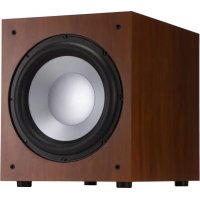
J 12 SUB - Subwoofer JAMO - Free user manual and instructions
Find the device manual for free J 12 SUB JAMO in PDF.




| Brand | Jamo |
| Model | J 12 SUB |
| Product Type | Active subwoofer |
| Speaker | 12 inches (30 cm) |
| Dimensions (approx.) | Approx. 45 x 45 x 50 cm |
| Weight (approx.) | Approx. 20 kg |
| Power Supply | Mains 230 V / 50 Hz |
| Finish | Resistant vinyl |
| Inputs | Line In (L/LFE and R) |
| Controls | Gain, Lowpass filter, Phase (0/180°) |
| Built-in Power | ON / AUTO / OFF switch, green LED indicator |
| Auto Standby | After 15-20 minutes without signal |
| Maintenance | Dust or dry cloth, avoid abrasive products |
| Safety Instructions | Unplug before any connection |
| General Information | Manual available in several languages on notice-facile.com |
Frequently Asked Questions - J 12 SUB JAMO
User questions about J 12 SUB JAMO
0 question about this device. Answer the ones you know or ask your own.
Ask a new question about this device
Download the instructions for your Subwoofer in PDF format for free! Find your manual J 12 SUB - JAMO and take your electronic device back in hand. On this page are published all the documents necessary for the use of your device. J 12 SUB by JAMO.
USER MANUAL J 12 SUB JAMO
We want your new speaker system to look as good as it did leaving the factory! Please check promptly for any transit damage. Carefully unpack your new speaker system and verify the components against the packing list. In extreme circumstances, items may have become damaged in transit. If any damage is discovered, notify the delivery service and dealer where the system was purchased. Make a request for inspection, and follow their instructions for evaluation. Be sure to keep the product's original shipping carton.
CARE AND CLEANING
Your subwoofer has a durable vinyl finish that should only require dry dusting or cleaning with a dry cloth. Avoid the use of abrasive or solvent-based cleaners and harsh detergents. The brush attachment of your vacuum should remove any dust from your subwoofer enclosure.
PLACEMENT
Jamo* powered subwoofer are designed to reproduce deep bass and deliver the impact that makes your movies and music come alive. For optimum performance, place your subwoofer in a corner of the room on the same wall as your front channel speakers. (refer to Figure 1). Please note that room placement can have a dramatic effect on the performance of your powered subwoofer. Corner placement, as suggested above, will increase the amount of bass output, while placing the subwoofer along the middle of a wall, or out in the room
will decrease the amount of bass output. Experiment with a number of different placement options and control settings to find the one that best suits your particular room and taste. When choosing your subwoofer's location, keep in mind that you will need to connect the subwoofer's built-in amplifier to an AC power outlet.
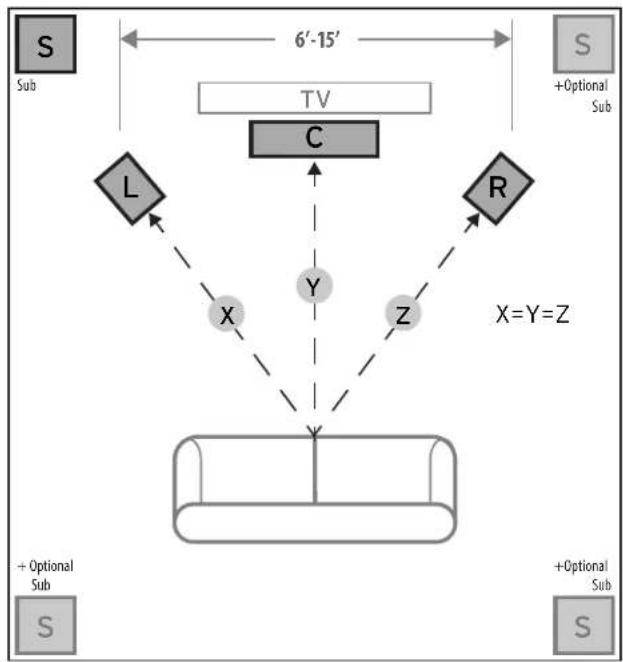
Figure 1
Speaker Placement in Listening Area
ENGLISH
CONNECTIONS AND CONTROLS
CAUTION: Ensure that the subwoofer is unplugged from the AC wall outlet before making any connections.
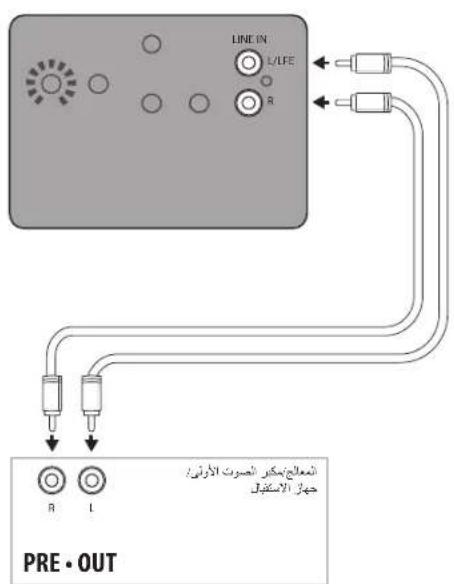
"LINE IN" Connection - Most of today's surround receivers (and pre-amplifiers) have a line level subwoofer output labeled Subwoofer Pre Out, Sub Out, SW Out, etc. If you have this output, connect one end of a subwoofer cable to it and connect the other end of the cable into the subwoofer line input labeled LEFT/LFE. This connection allows the subwoofer to operate with both music and surround sound movies (refer to your receiver manual). In absence of a subwoofer output on your receiver, as an alternative hookup, you can connect Left and Right channel Pre-Amp Outputs from your receiver (if provided) to the Left/LFE and Right input on the subwoofer.
Level - If your subwoofer is connected to a Subwoofer Output of a surround receiver, first set the subwoofer volume level control in the receiver to the "half way" or "0 dB" position. Then increase the volume (or gain) of the subwoofer up until the subwoofer's volume level matches the output of your main speakers. After this setup is completed, the volume control on your system's main amplifier or pre-amplifier will be the volume control for both your subwoofer and speakers together. If your subwoofer is connected to the L/R Pre-Amp Outputs of a receiver there will be no subwoofer volume in that receiver to set before setting the subwoofer's gain control.
"LOWPASS" Control - The crossover point chosen determines where low bass frequencies are "handed off" from the speakers to the subwoofer. If setting the crossover point in the receiver, turn the Lowpass Filter knob on the subwoofer to the farthest point right (160Hz). Set the crossover point based on the size of the main left/right speakers you are using in the system. As a general rule, for larger, floorstanding speakers, set the crossover point
between 50Hz - 90Hz . If using small bookshelf or "satellite" speakers for the mains, set the crossover point between 90Hz - 150Hz . The smaller the speaker, the higher the setting until the bass frequencies blend well between the speakers and your subwoofer once your system is completely hooked up. If your receiver does not have a crossover point setting, set the Lowpass Filter on the subwoofer instead within the same recommended settings (see receiver manual for additional speaker setup info).
"PHASE" 0/180 - This control is used to acoustically match the subwoofer's output to your main speakers. Select the position, either 0^ or 180^ , in which your subwoofer has more output at the listening position.
"POWER" AUTO/ON/OFF - When this switch is in the "ON/AUTO" position, the subwoofer will automatically turn "on" when it senses a signal. It will automatically go into "standby mode" after 15-20 minutes with no signal. When this switch is in the "OFF" position, the subwoofer will remain "off" until the switch is manually turned back to the "ON/AUTO" position.
Power LED indicator - Located on the front baffle, this LED indicates the operating status of the built-in amplifier. The LED will light green when the amplifier is on and receiving a signal. If the LED is dark and not lit, the amplifier is off. For more information on the controls mentioned in this manual and on bass management, see your dealer or visit www.jamo.com

Left and Right pre-outs on Processor/Pre-Amp/Receiver connected to Left and Right line inputs on subwoofer amplifier
OR
Figure 2
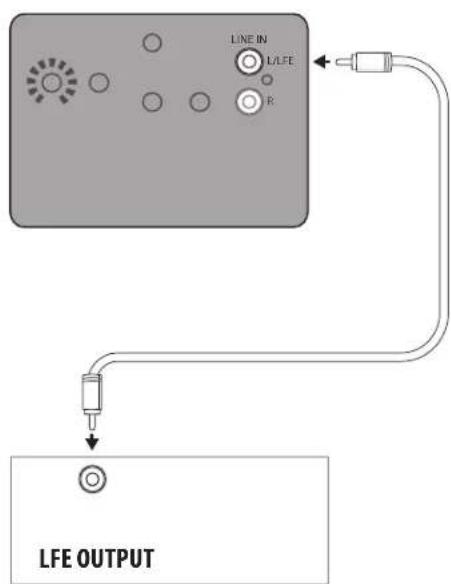
LFE Output on Processor/Pre-Amp/Receiver connected to LFE input on subwoofer amplifier
Line Level Connections
INSPECTION
a a a a a a a a a a a a a a a a a a a a a a a a a a a a a a a a a a a a
gall
a 1000000000000000000000000000000000000000000000000000000000
ON/AUTO/“gagall lal nLae -ggl/glgl ()"POWER" 3jgl gaiyolnlae "gglglgglgglgglgglgglgglgglgglgglgglgglgglgglgglgglgglgglgglgglgglgglgglgglgglgglgglgglgglgglgglgglgglgglgglgglgglgglgglgglgglgglgglgglgglgglgglgglgglgglggl
yall yll lal yall yll lal yall yll lal yall yll lal yall yll lal yall yll lal yall yll lal yall yll lal yall yll lal yall yll lal yall yll lal yall yll lal yall yll lal yall yll lal yall yll lal yall yll lal yall yll lal yall yll
J 1 1 1 1 1 1 1 1 1 1 1 1 1 1 1 1 1 1 1
9

LFE 1

Jamo®
jamo.com
V06-170926
©2014 Klipsch Group, Inc. All Rights Reserved
Jamo is a trademark of Klipsch Group, Inc., registered in the US and other countries.
Engineered by Klipsch Group, Inc., USA, Product of China
A Wholly-Owned Subsidiary of VOXX International Corporation
1-800-554-7724 ^+ 3502 Woodview Trace, Indianapolis, IN USA 46268-1104


C


Brand : JAMO
Model : J 12 SUB
Category : Subwoofer