Karaoke Revolution Glee: Volume 2 (Wii) - Game Konami - Free user manual and instructions
Find the device manual for free Karaoke Revolution Glee: Volume 2 (Wii) Konami in PDF.


User questions about Karaoke Revolution Glee: Volume 2 (Wii) Konami
0 question about this device. Answer the ones you know or ask your own.
Ask a new question about this device
Download the instructions for your Game in PDF format for free! Find your manual Karaoke Revolution Glee: Volume 2 (Wii) - Konami and take your electronic device back in hand. On this page are published all the documents necessary for the use of your device. Karaoke Revolution Glee: Volume 2 (Wii) by Konami.
USER MANUAL Karaoke Revolution Glee: Volume 2 (Wii) Konami
glee KARAOKE REVOLUTION

PLEASE CAREFULLY READ THE Wii™ OPERATIONS MANUAL COMPLETELY BEFORE USING YOUR Wii HARDWARE SYSTEM, GAME DISC OR ACCESSORY. THIS MANUAL CONTAINS IMPORTANT HEALTH AND SAFETY INFORMATION.
IMPORTANT SAFETY INFORMATION: READ THE FOLLOWING WARNINGS BEFORE YOU OR YOUR CHILD PLAY VIDEO GAMES.
WARNING - Seizures
- Some people (about 1 in 4000) may have seizures or blackouts triggered by light flashes or patterns, and this may occur while they are watching TV or playing video games, even if they have never had a seizure before.
- Anyone who has had a seizure, loss of awareness, or other symptom linked to an epileptic condition should consult a doctor before playing a video game.
- Parents should watch their children play video games. Stop playing and consult a doctor if you or your child has any of the following symptoms:
Convulsions Eye or muscle twitching Altered vision
Loss of awareness Involuntary movements Disorientation
• To reduce the likelihood of a seizure when playing video games:
- Sit or stand as far from the screen as possible.
- Play video games on the smallest available television screen.
- Do not play if you are tired or need sleep.
- Play in a well-lit room.
- Take a 10 to 15 minute break every hour.
WARNING - Repetitive Motion Injuries and Eyestrain
Playing video games can make your muscles, joints, skin or eyes hurt. Follow these instructions to avoid problems such as tendinitis, carpal tunnel syndrome, skin irritation or eyestrain:
- Avoid excessive play. Parents should monitor their children for appropriate play.
• Take a 10 to 15 minute break every hour, even if you don't think you need it. - If your hands, wrists, arms or eyes become tired or sore while playing, or if you feel symptoms such as tingling, numbness, burning or stiffness, stop and rest for several hours before playing again.
- If you continue to have any of the above symptoms or other discomfort during or after play, stop playing and see a doctor.
CAUTION - Motion Sickness
Playing video games can cause motion sickness in some players. If you or your child feel dizzy or nauseous when playing video games, stop playing and rest. Do not drive or engage in other demanding activity until you feel better.
IMPORTANT LEGAL INFORMATION signed for use with
any unauthorized device. Use of any such device will invalidate your Nintendo product warranty. Copying of any Nintendo game is illegal and is strictly prohibited by domestic and international intellectual property laws. "Back-up" or "archival" copies are not authorized and are not necessary to protect your software. Violators will be prosecuted.
REV-E

The Official Seal is your assurance that this product is licensed or manufactured by Nintendo. Always look for this seal when buying video game systems, accessories, games and related products.

Trademarks are property of their respective owners. Wii is a trademark of Nintendo. © 2006 Nintendo.
Licensed by Nintendo

CAUTION: WRIST STRAP USE
Please use the wrist strap to help prevent injury to other people or damage to surrounding objects or the Wii Remote in case you accidentally let go of the Wii Remote during game play.
Also remember the following:
- Make sure all players put on the wrist strap properly when it is their turn.
- Do not let go of the Wii Remote during game play.
• Dry your hands if they become moist. - Allow adequate room around you during game play and make sure that all areas you might move into are clear of other people and objects.
- Stay at least three feet from the television.
- Use the Wii Remote Jacket.
SYSTEM MENU UPDATE
Please note that when first loading the Game Disc into the Wii console, the Wii will check if you have the latest system menu, and if necessary a Wii system update screen will appear. Press OK to proceed.
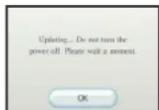
When the system menu is updated, unauthorized hardware and/or software modifications may be detected and unauthorized content may be removed causing the immediate or delayed inoperability of your console. Failure to accept the update may render this game, and future games, unplayable. Please note that Nintendo cannot guarantee that unauthorized software or accessories will continue to function with the Wii console after this or future updates of the Wii system menu.
TABLE OF CONTENTS / GETTING STARTED CONTROLS

TABLE OF CONTENTS
GETTING STARTED ....1
CONTROLS 2
MAIN MENU 3
HOW TO PLAY 4
PAUSE MENU 5
GAME MODES 5
OPTIONS 6
CUSTOMER SUPPORT & WARRANTY 8
FRANÇAIS 11
SPANISH 21

GETTING STARTED
Setting Up Your Wii™ Console
- Set up your Wii™ console according to the instructions in the Instruction Manual.
- Press the Power Button and the Power LED will light up.
- Place the Karaoke Revolution® Glee: Volume 2 Road to Regionals disc in the Disc slot with the label side facing up.
- Follow on-screen instructions and refer to this manual for more information about playing Karaoke Revolution® Glee: Volume 2 Road to Regionals.
To avoid damage to discs or the disc drive:
- Insert only Wii-compatible discs into the disc slot.
- Never use oddly shaped discs, such as star-shaped or heart-shaped discs.
• Do not apply labels, stickers, or other foreign objects to discs.
Saving Data
When save data is created, the data automatically saves to your Wii™ console.
CONTROLS


Menus
Highlight menu item ....+Control Pad♦/♦
Change highlighted item ....+Control Pad
Select menu item / Save settings ......®
Back to previous screen ....B

In-Game Controls
Pause game ①
USB Microphone (Required)
Karaoke Revolution Glee: Volume 2 Road to Regionals requires the use of at least one USB microphone in order to play the game. If you do not already have a USB microphone, there are several USB microphones available for purchase separately. The game supports USB microphones designed to work with the Nintendo Wii™, including the Karaoke Revolution® Microphone and the Logitech® USB microphone.
A USB microphone must be plugged in at all times while playing the game. Before booting up the game, make sure to plug in a USB microphone. The microphone connects to either of the USB connectors located on the back of the Nintendo Wii™. Karaoke Revolution Glee: Volume 2 Road to Regionals supports up to two USB microphones at a time.
For best results, it is important to keep the microphone positioned close to the front of your mouth while playing the game. We recommend that you access the Microphone Setup screen in Options to adjust the input level of the USB microphone.

MAIN MENU HOW TO PLAY

MAIN MENU
HOW TO PLAY


Scrapbook Mode
Create your very own Scrapbook based on themed Glee items. You unlock these items when you accomplish character goals during the game.

Quick Play Mode
Sing along to your favorite songs from Glee. Choose any song from the list and relive your favorite show memories from season 1.

Shooting Star Mode
Shoot for the stars in this interactive game for up to six players. Two players can sing on the mic, while 4 friends use their Wii Remotes to shoot stars! Gain bonus points as you hit those high notes!

High Scores
Check out your high scores for each song in the game. Scores are broken down by difficulty and gameplay mode.

Marathon Mix
Take on every song in the game in one massive playlist. If the full game catalog (up to 20 songs) is too much for you to tackle, you can edit the playlist by pressing ①.

Options
Adjust a variety of options including Game Settings and Audio Settings to create the perfect gameplay experience. You can also use this menu to view the Credits, or to enter secret codes to unlock songs and new stickers.

Help
Access the In-Game manual in case you or a friend needs a refresher course on how to play the game.
SCORE
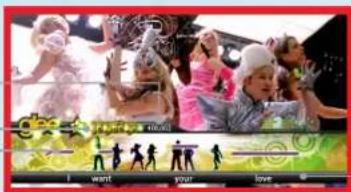
PHRASE METER
PHRASES
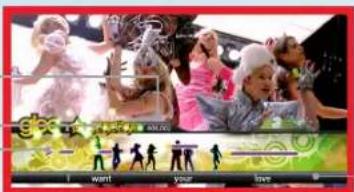
MUSIC STAFF

Game Screen
MUSIC STAFF
The Music Staff and Lyrics are displayed at the bottom of the screen. The colored bars that scroll above the staff are called Note Tubes, representing the pitch and spacing length of each note you have to sing. Each word within the song matches up with a corresponding Note Tube.
As the Lyrics move across the screen, sing the proper words and try to match the Note Tubes as they reach the Now Bar. The Pitch Arrow will appear while you are singing; this represents your current pitch. If the arrow flattens out and lines up with the Note Tube, this means that you are hitting the note correctly.
PHRASES
A Phrase is considered to be one line of Lyrics within the song. The end of each Phrase is designated by a white Phrase Marker. When the Phrase Marker reaches the Now Bar, you have completed that Phrase and a new Phrase will begin.
PHRASE METER
As you sing the correct notes in the Phrase, the Phrase Meter will fill up and change colors. At the end of the Phrase, the notes become gold and you receive comments on your performance. Keep good rhythm going to get a stream of positive comments.
SCORE
At the end of the song, the Results screen displays your Accuracy, Score, Longest Streak, Max Multiplier, Max Combo, Star Score, and number of Phrases and Gold Phrases. Being accurate and earning high scores unlocks special items in the game to add to your cast member's Scrapbook page.
PAUSE MENU / GAME MODES GAME MODES / OPTIONS

PAUSE MENU
Press ④at any time during gameplay to pause the game and access the following options.
RESUME
Press ① to get back to singing.
RESTART
Start over and try to sing your song again.
OPTIONS
Adjust the game options. These are the same as those found in the Options menu in the Main Menu.
EXIT
End the current game and return to the Main Menu.

GAME MODES

Scrapbook
CHOOSE CHARACTER
Choose your favorite character from the cast of Glee and sing to their songs. All the unlocked content you have earned is available here. These rewards are earned through stellar performances, so be sure you are reaching those high notes and performing perfect harmonies.

Quick Play
CHOOSE SONG
Choose from a list of 20 songs from Glee Season 1.
SELECT PLAY STYLE
Choose between Solo, Co-op, Versus, and Duet (when available) game modes.
CHOOSE DIFFICULTY
Select a difficulty setting between Easy, Medium, and Hard.
SING
Start the performance!
5

Shooting Star
CHOOSE SONG
Choose a song to perform.
SELECT PLAY STYLE
Choose between Solo, Co-op and Duet game modes.
CHOOSE DIFFICULTY
Select a difficulty setting between Easy, Medium, and Hard.
PLAY
Start the performance!
OPTIONS


Game Settings
Turn the Lyrics and Notes ON/OFF.

Audio Settings
Adjust volume for music, vocals, and overall sound.

Mic
Adjust volume for mic out and in.

Effects
Set the Reverb to Large Room, Long Room, Small Hall, Large Hall, Cavernous, Cathedral, Metal Pipe, Metal Tank, or none. You may also turn Echo effects on or off.

Unlockables
Use unlock codes to get rare and secret items.

Credits
View the credits for the game.
6
NOTES

NOTES
WARRANTY
Konami Digital Entertainment, Inc. warrants to the original purchaser of this Konami software product that the medium on which this computer program is recorded is free from defects in materials and workmanship for a period of ninety (90) days from the date of purchase. This Konami product is sold "as is," without express or implied warranty of any kind, and Konami is not liable for any losses or damages of any kind resulting from use of this program. Konami agrees for a period of ninety (90) days to either repair or replace, at its option, free of charge, any Konami product, postage paid, with proof of date of purchase, at its Factory Service Center. This warranty is not applicable to normal wear and tear. This warranty shall not be applicable and shall be void if the defect in the Konami software product has arisen through abuse, unreasonable use, mistreatment, or neglect.
THIS WARRANTY IS IN LIEU OF ALL OTHER WARRANTIES AND NO OTHER REPRESENTATIONS OR CLAIMS OF ANY NATURE SHALL BE BINDING ON OR OBLIGATE KONAMI. ANY IMPLIED WARRANTIES APPLICABLE TO THIS SOFTWARE PRODUCT, INCLUDING WARRANTIES OF MERCHANTABILITY AND FITNESS FOR A PARTICULAR PURPOSE, ARE LIMITED TO THE NINETY (90) DAY PERIOD DESCRIBED ABOVE. IN NO EVENT WILL KONAMI BE LIABLE FOR ANY SPECIAL INCIDENTAL OR CONSEQUENTIAL DAMAGES RESULTING FROM POSSESSION, USE OR MALFUNCTION OF THIS KONAMI PRODUCT.
Some states do not allow limitations as to how long an implied warranty lasts and/or exclusions or limitations of incidental or consequential damages so the above limitations and/or exclusions of liability may not apply to you. This warranty gives you specific rights, and you may also have other rights which vary from state to state.
If you experience technical problems with your game, please head to www.konami.com/support for assistance, here you will have access to many support materials, as well as our Knowledge Base which is available 24 hours a day, 7 days a week. All products must be deemed defective by a Konami Customer Service representative and an RMA number assigned prior to returning the product. All products received not matching this criteria will be returned if a Konami Customer Service Representative cannot reach you within three days upon receipt of the unauthorized return.
Konami Digital Entertainment, Inc.
Attention: Customer Service-RMA # XXXX
2381 Rosecrans Ave, Suite 200
Register now at www.konami.com to receive exclusive product news, special offers and more!
www.konami.com/krglee
VEUILLEZ LIRE LE MANUEL D'INSTRUCTION DE LA Wii™ EN ENTIER AVANT D'UTILISER LE SYSTÈME WII, UN DISQUE OU UN ACCESSOIRE. CE MANUEL CONTIENT DES INFORMATIONS IMPORTANTES POUR VOTRE SÉCURITÉ.
INFORMATIONS IMPORTANTES POUR VOTRE SÉCURITÉ : VEUILLEZ LIRE LES NOTES SUIVANTES AVANT DE JOUER OU DE FAIRE JOUER VOTRE ENFANT À DES JEUX VIDÉO.
MÈTRE DE PHRASES PHRASES
PERSONNEL MUSICAL

Game Screen
PERSONNEL MUSICAL
Attention: Customer Service-RMA # XXXX
2381 Rosecrans Ave, Suite 200
www.konami.com/krglee
PENTAGRAMA MUSICAL

Pantalla de Juego
PENTAGRAMA MUSICAL
Attention: Customer Service-RMA # XXXX
2381 Rosecrans Ave, Suite 200
www.konami.com/krglee
"magical"
-Newsday

3-Disc DVD Set Contains
The First 10 Season Two Episodes Including
The Rocky Horror Glee Show and Exclusive Bonus Song!

© 2011 Twentieth Century Fox Home Entertainment LLC. All Rights Reserved.
KONAMI
www.konami.com
Konami Digital Entertainment, Inc.
2381 Rosecrans Avenue, Suite 200, El Segundo, CA 90245
© 2011 Konami Digital Entertainment KONAMI is a registered trademark of KONAMI CORPORATION.
Wii and the Wii logo are trademarks of Nintendo. © 2008 Nintendo.