M.ZUIKO DIGITAL ED 12mm 1:2.0 - Lens OLYMPUS - Free user manual and instructions
Find the device manual for free M.ZUIKO DIGITAL ED 12mm 1:2.0 OLYMPUS in PDF.



| Product Type | Lens |
| Brand | Olympus |
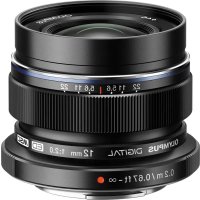
| Model | M.ZUIKO DIGITAL ED 12mm 1:2.0 |
| Mount | Micro Four Thirds |
| Focal length | 12 mm (35mm equivalent: 24 mm) |
| Maximum aperture | f/2.0 |
| Angle of view | 84° |
| Optical construction | 8 groups, 11 elements |
| Aperture range | f/2.0 to f/22 |
| Minimum focusing distance | 0.2 m |
| Focusing modes | AF/MF, Snapshot Focus |
| Dimensions (diameter x length) | 56 mm x 43 mm (retracted) |
| Filter diameter | 46 mm |
| Lens hood | LH-48 (optional) |
| Included accessories | Front cap, rear cap |
| Safety | Do not look at the sun through the lens; do not leave without cap; do not point at the sun |
| Maintenance | Clean with a soft, dry cloth. Avoid solvents. |
| Repairability | Contact an authorized Olympus service center |
| Compatibility | Micro Four Thirds cameras |
Frequently Asked Questions - M.ZUIKO DIGITAL ED 12mm 1:2.0 OLYMPUS
User questions about M.ZUIKO DIGITAL ED 12mm 1:2.0 OLYMPUS
0 question about this device. Answer the ones you know or ask your own.
Ask a new question about this device
Download the instructions for your Lens in PDF format for free! Find your manual M.ZUIKO DIGITAL ED 12mm 1:2.0 - OLYMPUS and take your electronic device back in hand. On this page are published all the documents necessary for the use of your device. M.ZUIKO DIGITAL ED 12mm 1:2.0 by OLYMPUS.
USER MANUAL M.ZUIKO DIGITAL ED 12mm 1:2.0 OLYMPUS
WD166501 Printed in China
OLYMPUS
ED12mm f2.0


04- 取级説明書
06- INSTRUCTIONS
09- INSTRUCTIONS
12- MODE D'EMPLOYO
15- HHTCPYKUM
17-NSNAVODKPOUZITI
19-DE: BEDIENUNGSANLEITUNG
21-17: BETJENINGSVEJLEDNING
23.国JUHISED
25.11 KAYTTTOOH JEEF
27.网CAVIF5
27-国
29-UPOT
31 - H HASZNALAT
33. ISTRUZIONI
35-INSTRUKCija
37-IN NORADJUMI
39-NAANWLJZINGEN
41-ININSTBUKSIONER
43-INSTRUKCJA
45-INSTRUCOES
47. EINSTRUMENTIUNI
49.SUBJSTV0ZAUIBOTREBU
51.ELMHCTRYKUM
53. FV BRUKSANVISING
55-NAVODILA
57. 深NAVODNAPOUITIE
50.网ANMATAP
39-11TALIMATEAN 31
61-ORIHCTPYKJH
64-
65-
67使用說明


取极说明者
()
C使用前以本说明书的内容为占<理的上
安全工用使用
使用国中电中电电电电电电电电电电电电电电电电电电电电电电电电电电电电电电电电电电电电电电电电电电电电电电电电电电电电电电电电电电电电电电电电电电电电电电电电电电电电电电电电电电电电电电电电电电电电电
各部的名称(限H)
①7日2016年
②FVTLT-取D付E
2023年1月14日星期一
102
⑤.万一力不
1F-下取付本
才一力大方法的切元(图2)
FJ-15S1R2XK70
C0G0A29
:不力
是招限距集自安口卡力一力斯L的恒
FJADFJFJFJFJFJFJFJFJFJFJFJFJFJFJFJFJFJFJFJFJFJFJFJFJFJFJFJFJFJFJFJFJFJFJFJFJFJFJFJFJFJF
·力尔一全收以上重托及,保及
在使用上土之有,面面如力
七、乙方承诺事项
FJFF
- 次士多夫一力卡3AF/MF切
以接之,青士丁力
()()
未打分
三
焦点距离:12mm
(35mmF4L公换算24mm)
最大口降比
同□210
收制:F20~22
份比起:0.2m~10(单组)
130/7=5(米×7)
The following importer description apolice to products imported
into the EU directly by OLYMPUS EUROPA SE & Co. KG only. OLYMPUS EUROPA SE 1 Co. KG
CLOP08EPOA
Werbel 2894-10, 2007 Hamburg, Germany
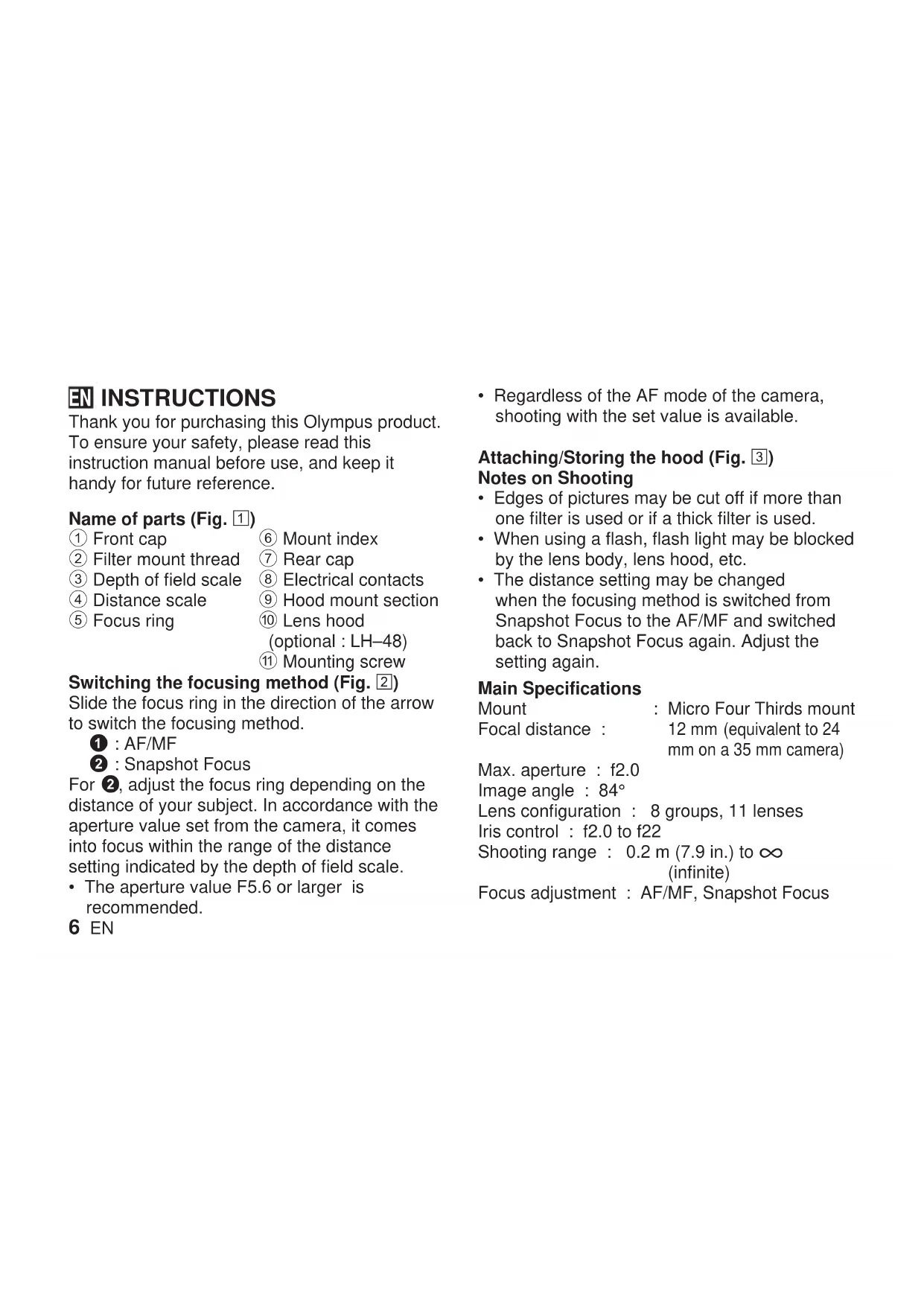
Thank you for purchasing this Olympus product. To ensure your safety, please read this instruction manual before use, and keep it handy for future reference.
Name of parts (Fig. 1)
① Frontcap
② Filter mount thread
③ Depth of field scale
④ Distance scale
⑤ Focus ring
⑥ Mount index
⑦ Rear cap
⑧ Electrical contacts
⑨ Hood mount section
Lens hood (optional:LH-48)
① Mounting screw
Switching the focusing method (Fig. 2)
Slide the focus ring in the direction of the arrow to switch the focusing method.
For 2, adjust the focus ring depending on the distance of your subject. In accordance with the aperture value set from the camera, it comes into focus within the range of the distance setting indicated by the depth of field scale.
The aperture value F5.6 or larger is recommended.
6 EN
- Regardless of the AF mode of the camera, shooting with the set value is available.
Attaching/Storing the hood (Fig. 3) Notes on Shooting
- Edges of pictures may be cut off if more than one filter is used or if a thick filter is used.
- When using a flash, flash light may be blocked by the lens body, lens hood, etc.
- The distance setting may be changed when the focusing method is switched from Snapshot Focus to the AF/MF and switched back to Snapshot Focus again. Adjust the setting again.
Main Specifications
Mount : Micro Four Thirds mount Focal distance : 12 mm (equivalent to 24 mm on a 35 mm camera)
Max.aperture : f2.0
Image angle : 84^
Lens configuration : 8 groups, 11 lenses
Iris control : f2.0 to f22
Shooting range : 0.2 m (7.9 in.) to (infinite)
Focus adjustment : AF/MF, Snapshot Focus
Weight : 130 g (4.6 oz.) (excluding hood and cap)
Dimensions : Max. dia. 056 (2.2 in.) × Overall length 43 mm (1.7 in.) (when retracted)
Lens hood mount : Covering typeFilter mount thread diameter :
- Specifications are subject to change without any notice or obligation on the part of the manufacturer.
Precautions: Be Sure to Read the Following

Warnings: Safety Precautions
- Do not view the sun through the lens. It may cause blindness or vision impairment.
- Do not leave the lens without the cap. If solar light is converged through the lens, a fire may result.
- Do not point the camera lens at the sun. Sunlight will converge in the lens and focus inside the camera, possibly causing a malfunction or fire.
Micro Four Thirds and the Micro Four Thirds logo are trademarks or registered trademarks of OLYMPUS CORPORATION.
For customers in North America, Central America, South America and the Caribbean FCC Notice
This device complies with part 15 of the FCC rules. Operation is subject to the following two conditions:
(1) This device may not cause harmful interference, and (2) this device must accept any interference received, including interference that may cause undesired operation.
Any unauthorized changes or modifications to this equipment would void the user's authority to operate.
This Class B digital apparatus complies with Canadian ICES-003. CAN ICES-3(B)/NMB-3(B)
Technical Support (U.S.A. / Canada)
24/7 online automated help :
http://www.olympusamerica.com/support Phone customer support :
Tel.1-800-260-1625 (Toll-free)
Our phone customer support is available from 9 am to 9 pm (Monday to Friday) ET
E-Mail: distec@olympus.com
For customers in Europe

The "CE" mark indicates that this product complies with the European requirements for safety, health, environment and customer protection. CE-mark products are for sale in Europe.
European Technical Customer Support
Please visit our homepage
http://www.olympus-europa.com
or call: Tel. 00800 - 67 10 83 00 (Toll-free)
+49 40 - 237 73 899 (Charged)
ES INSTRUCCIONES
KoHpIpyaunHa :8rpynn,11neuic o6eKTHBa
Micro Four Thirds n IoroTo Ha Micro Four Thirds ca 3ana3eHn Mapkn nn peIncTpnpaHn 3ana3eHn Mapkn Ha OLYMPUS CORPORATION.
3a KnneHTN B Ebpona

MapknpoBkata CE noka3Ba, ye To3n npOdyKT OTROBapra Ha eBponeNCKNTe N3NCKBAHNA 3a 6e30nacHOCT, 3dpaBeOna3BaHe, Ona3BaHe Ha OKoJHaTa CpeDa n 3aUHTa Ha notpe6bTeJIte. PpOdyKTtTe C mapKnpoBkA CE ca npEJa3HaueHn 3a npOdaKbBA EBpona.
- Ebponecka Texnuecka noDpBkka 3a KJIeHTN
IoceteHaataye6ctpahnca
http://www.olympus-europa.com
NIN N03BbHete Ha
TeJ.00800-67108300(6e3nlaTHO)
+49 40 - 237 73 899 (TaKcyBa ce)
CS NÁVOD K POUŽITÍ
Fokusing AF/MF, snapshot
Specifications principal
Montura : Montura Micro Four Thirds
KoHcHpyaun 8rpynn,11nH3 oBekTnBa
PerynpoBka : ot f 2,0do f22 dnaΦpaMbl
CbeMoHoe pacCToHHe : oT 0,2 M Do (6eckoHeuHocTB)
PerynipoBkaΦokyca:AF/MF,MrHOBeHHbIΦokyc
Bec
: 130 r (6e3 yyeTa
6NeHbI N KpbIuKn)
Pa3Mepbi
:MaKc.Диam.056
×O6uaydlnHa43MM (Bcnyae,KoIgdaJIINH3a OTBeDeHa Ha3aD)
KpenJIeHne 6IeHdbi : KpbIuKa oBeKTnBa
DnameTppe3b6oBOrO 46MM KpeIeHnIaNbTpa
- TexHnueckne xapaKTePncTnK MoYr 6bITb N3MeHeHb 6e3 NpeDbapntelbHoro yBeDOMJIeHnI KAKNX-JIN6O 6B3aTeNbCTB CO CTOPOHb I3ROTOBtEJI.
MepbI npedoctopoxhOcTH:
063aTeIbHo npOuTnTe cNeDuOoee

PpeynpeXdHn: Mepbl peoctopoxkno
He cmoTpne uepe3 obBeKtNB Ha coJIHcE. 3To moKet npBecTu K nOtepe 3peHnI nn NobpeXdHnIO rna3.
He octabnIte oBeKTHB 6e3 KpbIuKN. CfokycnpoBaHHbI OBeKTHBOM COHHeuHbI CBET MOKeT npNBecTN K NOxApY.
He HanpaBnIte oBeKtNB fOToaannapata Ha coJIHcE. CoJIneHbI CBET COpeDToOTcR B oBeKtNB e CfOkycnPyeTc BHyTpN KaMepbI,
TO MOKET npBecn K c6oM B pa6oTe FOToaannapata nn noxkapy.
Micro Four Thirds n IoroTn Micro Four Thirds yBnIOTc TOBaHbIMN 3HaKaMn Nn 3apeRnCTpnpoBaHHbIMN TOBapHbIMN 3HaKaMn OLYMPUS CORPORATION.
Ha3Bn DeTaJe (MaJ. 1)
①Переднкршka
② Pi3b kpinneHHa pInbtpa
③ Ⅲkaana rIIN6HHPi3KocTi
④ 乌kaJaBiDcTaHi
⑤ KINbueΦokycBaHHa
⑥MiTka KpinJIeHHa
⑦ 3aДнЯ Кршka
⑧EneKtpnHi KOHTaTKI
⑨ДиЯнka KpinneHn6JIeHn
10БндаOB'ekTnBa (OdaTKobe
06naHaHHa:LH-48)
⑪ KpinjIbHn IbnHT
NepemkaHH MeToDy fokycBaHH (Pnc.2) IJIpeMnKaHH MeToDy fokycBaHH NOBepHiTb KInbcfokycBaHH B HAprrkY CTpiIKN.
1 : AF/MF
2:MuTTeBnΦokyc
Y pexkmi 2 BCTaHOBITb KJIbue cΦOKcYBaHHB NOIOXeHHra,Ke BiINOBiJaC BiIDCTaHI Do O6'KTA. 3OHa pi3KoCTi (BiIObpaKaεTbcr BiINOBiDHOU shkaNo) Byde 3MIHOBaTnca 3aJeXHo BiD yCTaHOBNeHOI DiaparmN.
ДядiaфparMn peKOMeHnyetbCBAKOpNCTOByBaTn 3NaueHn8 6InbSe F5,6.
- He3aIeJxHb BiD pexMy AF 3aBxN MoKlnBa 3IOMka i3 yCTaHOBJHeHM 3HaueHHaM.
PnEHaHn/36epiraHn 6JeHn (Pnc. 3)
PpIMITKUODo 3HOMK
Kpa3o6paKeHHaMOxTyb 6yTu o6pi3aHi, RaKIO BnKOpNCTOBycTbcA DeKiNbKa fInbTpIb a60 TOBCTN fInbTp.
-Пд уас ВИКОРиСТангЯ спалaxy,OCВITлeнньд спалaxy може 6утN 3a6nOKOBaHo 06'EkTNBOM a6o iHшIM.
-Фokycha BiDcTaHb MOKe 3MiHHTnCЯ npi nepemkaHHi MeToy φOKycBaHHa 3i 3HaueHHaM MttcBn φOKyc y noLoXeHHa AF/MF, a notim ha3ad. BnKoHaIte HAcTpoIOBaHHa 3HOby.
3araJIbHI xapaKTepeNTIKN
KpinneHn : Micro
Φokycha BiDCTaHb 12MM (ekBIBaIeHT 24 MM Ha 35-minimetpoBi kamepi)
MaKc.iaaparma f2,0
Kyt 306paXeHHN 85°
KoHφirypaiz:8rpyn,11nH3 06'ekTINBa
KepyBaHH: BiD f2,0 do f22
iiaqparmoIO
Дiana3OH 3IOMKN : BiD 0,2 M do ∞ (HeckiHueHHicTb)
HacTpoIkaΦokyca : AF/MF, MntTcBnΦokyc
Bara 130r(6e36IeHnTa KpnsKn)
Micro Four Thirds i Iorotn Micro Four Thirds e ToproBIMM Mapkamn a6o 3apeectpoBaHIMN ToproBIMM Mapkamn OLYMPUS CORPORATION.
Для покунцьу CBponi

Позначka «CE»piДТВерджу,цо龟BNi6 BiIDNoBidaE CBPoneeСьКIM BmOram 万多бe3пк,oxopoHn 3ДОРВ',3axNCTy DOBkINЯ Ta npaB cNoxNBaHa.Вирби 3 ПОЗнЧЮ «CE»пиЗнayeni Дяnpodaxy Ha TepuToPi€CBpOnI.
Micro Four Thirds LALs Jn Micro Four Thirds OLYMPUS CORPORATION


560 53
43
(152 5y 5y 5y
43
46 46
y lae jn a 121:cbblj
clalb11:clj
d 1
du yds ydy.aaayl ldo n no saaayly 1y jy
y 1 y 1 y
dy wuyiy aai ciayi 1y. cbe yne aywyy d jy y
. qy b y dy jy iy dy ay
wuyiy aai gny y y I yI yI ayr cy y
y y y y y y y y y y y y
3
y
1 1
saaee
P
an + 1 = 2( an + 1) - 1an + 2 < 1an + 3 - 1a_n + 4
JSSJn JSSJill aegbI ygaiie aellal 1e! jssy
A. (1) a : a A a : a A a : a A a : a A a : a A a : a A.
(2)已知数列 an = 1( 3n - 1) ( 3n + 5) ,求此数列的前 n 项和 Sn
Micro Four Thirds
2012:
(pa351Jss2e 24
f2.0:
85^ :
11.48 8:
f22 f2.0:
(y)00 0.2
LaliljAF/MF:
130:
(1) a : l_1b = a. ( a : y = b( y)
auiuui 1
Sj
aaii aaiia
jgl
aee
aennnnnnae
jbi
S 与 B 全同
j
A
. Olympus
1 1
Laiiuee e aiee iieae
(1)
S_ ACD = 12 · AD × CD = 12 × AC × 5
Galolol ①
a ⑧
cIbail 1s j cjc ⑨
Aaess 1b6 ⑩
法法法法法法法法法法法法法法法法法法法法法法法法法法法法法法法法法法法法法法法法法法法法法法法法法法法法法法法法法法法法法法法法法法法法法法法法法法法法法法法法法法法法法法法法法法法法法法法法法法法法
aIall
(LH-48:la
8jll buaia ⑤
11
⑥
(2)
jss jill aegy jy gaii oai jy jill aq
AF/MF: 1
lailljssj: 2
gilll aell alalal g jll lalal 2
jbi jdi jdy jdi jdo ooiai
aill jlll all aall 1e! jbi jls jsl lalb | jssj
Jolll Jd
F5.6 1
Jy jyjyAF 0
iisoo ooll aol
KR 奎嘎释明
当社,就用在上面。
当社,就用在下面。
名部 电(
賊藻藻藻藻藻藻藻藻藻藻藻藻藻藻藻藻藻藻藻藻藻藻藻藻藻藻藻藻藻藻藻藻藻藻藻藻藻藻藻藻藻藻藻藻藻藻藻藻藻藻藻藻藻藻藻藻藻藻藻藻藻
経應用は凍用品表用の保収書
志摺か日和がはOLYMPUS A/S
上
Tel. 1544-5200
CHT 使用說明書
感謝您購買奥林巴斯產品。