LOG20 - Measuring equipment Dostmann Electronic - Free user manual and instructions
Find the device manual for free LOG20 Dostmann Electronic in PDF.



| Product Type | Temperature and Humidity Data Logger |
| Brand | Dostmann Electronic |
| Model | LOG20 |
| Internal Temperature Range | -30°C to +60°C |
| Relative Humidity Range | 0 to 100% RH |
| Memory | Approximately 20,000 data sets |
| Interface | USB |
| Operating Temperature | -30°C to +60°C (without display) |
| Storage Temperature | -30°C to +70°C |
| Dimensions | 92 × 55 × 21 mm |
| Weight | 95 g |
| Power Supply | 1 CR2032 3 V battery |
| Display | LCD with backlight (adjustable standby mode) |
| Main Functions | Temperature and humidity measurement, recording, alarms, Min/Max/Avg values, standby mode, circular memory |
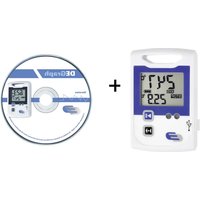
| Software Configuration | DE-LOG-Graph software (Windows) |
| Low Battery Indicator | Lowbat icon, display up to 3 segments |
| Care and Cleaning | Clean with a dry or damp cloth, no harsh detergents |
| Safety | Avoid shocks and crushing, do not force the USB plug |
| Spare Parts and Repairability | Replaceable battery (CR2032), rubber cap for USB interface |
| General Information | Compliant with EU WEEE directives, CE marking, EN 12830, EN 13485 (Log10) |
Frequently Asked Questions - LOG20 Dostmann Electronic
User questions about LOG20 Dostmann Electronic
0 question about this device. Answer the ones you know or ask your own.
Ask a new question about this device
Download the instructions for your Measuring equipment in PDF format for free! Find your manual LOG20 - Dostmann Electronic and take your electronic device back in hand. On this page are published all the documents necessary for the use of your device. LOG20 by Dostmann Electronic.
USER MANUAL LOG20 Dostmann Electronic
LOG10 / LOG20 - Data logger

1. Introduction
Dear customer,
thank you very much for purchasing one of our products. Before operating the data logger please read this manual carefully. You will get useful information for understanding all functions.
1.1 General advice
- For cleaning the instrument please do not use an abrasive cleaner only a dry or wet piece of soft cloth.
- Please store the measuring instrument in a dry and clean place.
void any force like shocks or pressure to the instrument. - Do not use force to connect the probe or the interface plugs in. The interface plug is different from the probe plug.
1.2 Before operation
- Before operating the instrument take the instrument out of the packaging. Check whether a full battery CR2032 (3 Volt) is already inserted.

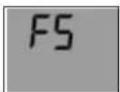
Display Display indication after key depression indication FS = Factory settings
- After inserting the battery the instrument displays for 10 seconds the actual measurements, afterwards the instrument displays for 30 seconds "FS", after this the instrument turn off. The same procedure appear after pressing any button.
LOG10 / LOG20 - Data logger
GB
1.3 Standard settings / Factory settings
- Note the following default settings of the data logger before first use. By using the DE-LOG-Graph software, the setting parameter can easily be changed:
1.Description:blank(max.16 characters)
2.LCD-Snooze mode:
3. LCD-Snoopze after Sec.: 30
-
Alarm settings for temperature: -30,0°C 60,0°C Alarm settings humidity: 0,0% 100,0% (Log20 only)
-
Alarm delay:
- Alarm cumulation: off
- Alarm reset:
- Temperature unit: ^ C
- Waiting for manual start:
- Single use only:
- Measuring interval: 15 Minutes
- Cycle memory: (if the memory is full the oldest measurement will be overwritten)
= Default
1.4. Marking (Log10 only)
- CE-conformity, EN 12830, EN 13485, Suitability for storage (S) and transportation (T) for food storage and distribution (C), Accuracy classification 1 (-30..+70°C), according to EN 13486 we recommend a recalibration once per year.
LOG10 / LOG20 - Data logger
GB
2. Operation
- For configuring the data logger, please install the Software DE-LOG-Graph on a PC.
2.1 USB-Port
- When the Software Installation has been completed please connect the PC with data logger via USB-cable. For detailed information please read the manual of the DE-LOG-Graph-Software.
2.2 Panel and display (Fig. 1)
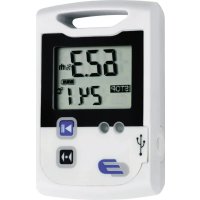
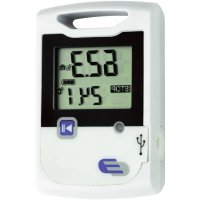
Log10/20 has a large display, one LED and one button.
A: LCD-display indicates temperature, humidity (Log20 only), Low bat-earning, Max-Min-Avg-measurements, status information
B:Start-Stop-button
C:LED:red
D:USB-port(with rubber cap)
2.3 Handling the Start-Stop-button
- Depending on the setup configuration, you can start or stop the data logger via the Start-Stop-button. You have to press and hold the button for 3 seconds. When it starts, the display indication will switch from STOP to LOG.
MAX-, MIN-, Average values:
At the bottom line of the display, you will see the Average (AVG)-, Minimum (MIN)- and Maximum (MAX) temperature of the recorded measurements. If the data logger is not started it will display --- instead of AVG, MIN or MAX temperature.
LOG10 / LOG20 - Data logger
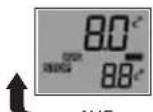
AVG:
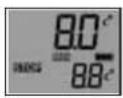
MIN:
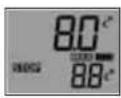
MAX:
Average Minimum Maximum Auto-switch
The display will switch automatically every 10 seconds.
GB
LOG10 / LOG20 - Data logger
GB
K: Lowbat
indicates the capacity of the battery.
Note: °C = Celsius, °F = Fahrenheit
Other display information
- In addition to the above mentioned information, the display also indicates several other information. This information will be displayed depending on the display settings (snooze function) and operation mode:

Display
switched off to the PC configured
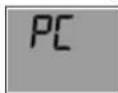
connected
figured
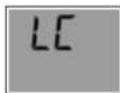
Logger
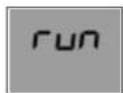
Logger
is recording (total empty)
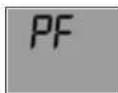
Battery
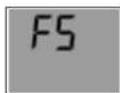
Factory
2.5 LED-Indication
- The LED will help you to understand all logger information, several status modes and alarm indications.
- LED red:
The red LED flashes when Hi- or Lo-Alarm has been achieved.
LOG10 / LOG20 - Data logger

2.6 USB-Port
- For readout or programming, the data logger must be connected via USB-cable with a PC.
- View from the front: On the left side there is the USB-port. The port is protected by a small white rubber cap. To operate the USB-port please remove the rubber cap.
- After the completed communication with the PC do not forget to plug the rubber cap back into the port. It prevents dirt and water from entering the data logger.
2.7 Rear side of the data logger / battery case
- On the rear side of the data logger you will find the battery case and a printed sticker.
2.8 Replacing battery
- To replace the battery please open the battery cover on the rear side. Therefore you have to turn the battery cover 90^ to the left. Remove the battery from the instrument and replace with a new battery.
- The "BAT" symbol indicates that the battery needs to be exchanged. The instrument allows app. 10 hours of further operation after displaying the "BAT" symbol. The battery symbol indicates according to the battery status between 1 to 3 segments.
- If the display indicates only "PF", the battery is completely exhausted. Please replace the battery immediately.
2.9 Waste disposal
This product has been manufactured using high-grade materials and components which can be recycled and reused.
LOG10 / LOG20 - Data logger


Never dispose of empty batteries and rechargeable batteries in household waste.
As a consumer, you are legally required to take them to your retail store or to appropriate collection sites depending on national or local regulations in order to protect the environment.
The symbols for the heavy metals contained are: Cd=cadmium, Hg=mercury, Pb=lead

This instrument is labelled in accordance with the EU Waste Electrical and Electronic Equipment Directive (WEEE).
Please do not dispose of this instrument in household waste. The user is obligated to take end-of-life devices to a designated collection point for the disposal of electrical and electronic equipment, in order to ensure environmentally-compatible disposal.
3.0 Specifications
Temperature logger Temperature-humidity Log10
| Internal temperature -30..+60°C -30..+60°C |
| Relative Humidity --- 0..100%RH |
| Memory appr. 20.000 Data sets |
| Interface USB |
| Working temperature (without display) -30..+60°C |
| Storage temperature -30..+70°C |
| Dimensions 92 x 55 x 21 mm |
| Weight 95 g |
| Power supply 1 x CR2032 3 V |

Cher cliente, Cher client,