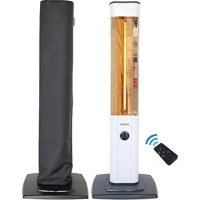
StandLine 25R - Heating VASNER - Free user manual and instructions
Find the device manual for free StandLine 25R VASNER in PDF.



| Brand | VASNER |
| Model | StandLine 25R |
| Product type | Carbon infrared heater |
| Dimensions (HxWxD) | 1100 × 400 × 332 mm |
| Weight | 3.3 kg |
| Power supply | 220-240 V AC, 50-60 Hz |
| Power consumption | 10.9 A (max) |
| Heating power | 750 / 1250 / 2000 / 2500 W (4 levels) |
| Recommended heating area | Up to 30 m² |
| Thermostat | Digital, adjustable from 10°C to 40°C |
| Timer | Digital, 1 to 9 hours |
| Remote control | Yes, range up to 10 m, CR2025 battery |
| Anti-tilt device | Yes |
| Protection class | I |
| Maintenance | Clean reflector and carbon tube with compressed air; soft cloth for exterior |
| Safety | Automatic shut-off in case of tipping or overheating; safety distance 1 m |
| Warranty | 2 years |
| Storage | Disconnect and cover with protective cover |
| Disposal | Compliant with WEEE, do not dispose of with household waste |
Frequently Asked Questions - StandLine 25R VASNER
User questions about StandLine 25R VASNER
0 question about this device. Answer the ones you know or ask your own.
Ask a new question about this device
Download the instructions for your Heating in PDF format for free! Find your manual StandLine 25R - VASNER and take your electronic device back in hand. On this page are published all the documents necessary for the use of your device. StandLine 25R by VASNER.
USER MANUAL StandLine 25R VASNER
thank you for the confidence you placed in VASNER products. Our goal is to ensure that you use this product, which has been manufactured in our modern facilities in precise working conditions, conforming to total quality idea and without harming nature.
We recommend that you read and carefully store the User Manual before you use your heater, so that it can preserve its features for a long time and serve you most efficiently.
VASNER - a piece of home.
www.vasner.com
"READ THE INSTRUCTIONS BEFORE DEPLOYING OR USING THIS DEVICE."
Content:
Page 16 Content
Page 17 Safety Information
Page 19 Safe distances: high temperature, fire protection
Page 20 Technical Features & Mounting
Page 22 Usage of StandLine 25R
Page 23 Usage with Remote Control, usage with function button
Page 24 Maintenance, Cleaning, Service and Disposal
Page 26 Faults & troubleshooting
Page 27 Technical information
Page 28 Service addresses
Page 28 Warranty
Page 71 CE-Declaration
Important Safety Information
This device is manufactured in compliance with safety regulations. Usage against the roles causes harm to person and device. Please read the User Manual carefully before operating the device. You will find important information inside the User Manual regarding mounting, safety, usage and maintenance.
Thus you will both protect yourself and prevent the device from coming to harm.
- If the power cord is damaged, it must be replaced by the manufacturer or its service agency or a personnel qualified in the same degree to prevent a dangerous situation.
- It must be checked whether there are breaks or deformations on the heating element present on the device. If glass panels are damaged, the heater must not be used. Authorized service must be called.
- It must be ensured that the main power is 220-240V AC, 50/60Hz and the power line is connected to the fuse. Mains safety must be checked. Fuse must be 16 Amperes.
- Your device must be used with grounded socket and grounded socket must be outside the heater area and the hot surface.
- Also, it must be checked whether the socket is loose or damaged. Because loose sockets damage the device and the power main.
- Your device must not be used connected to the same power cable or fuse with another device.
- Power cord must not be left on the hot body of the device or near it.
- If your device will not be used for a long period of time, if cleaning or maintenance will be conducted, the device must be unplugged. It must be ensured that the device has cooled down.
- The device is not intended for use by persons (including children) with reduced physical, sensory and mental capabilities or lack of experience and knowledge, unless they have been given supervision or instruction concerning the use of the appliance by a person responsible for their safety.
VASNER
- Definitely do not let your device come into contact with water.
- The electrical connection of the device must be separated from the mains during mounting and maintenance or repair works. Device must be unplugged to be separated from the mains.
- Ensure that the feed cable and the plug is clean and dust-free prior to use.
- Never unplug the feed cable from the plug by tugging on the cable. Ensure that you hold the plug correctly as you plug it into or take it out of the socket. Do not touch the feed cable.
- Do not touch the cable with wet hands.
- Do not make a joint to the feed cable. Otherwise, malfunction, electric shock or fire may occur.
- Do not pass the feed cable under heavy objects. Otherwise electric shock or fire risk may occur.
- Do not turn off your heater only by unplugging it or shutting down the fuse, always turn off by using the heater tube function button.
- Fire risk exists if the heater is covered by or positioned close to curtains or other combustible materials.
- The flame protector of this heater is for preventing direct access to the heater elements and must be in place while the heater is in use.
- Do not use your device outside its intended purpose. (Do not use it for drying clothes or keeping animals or plants warm.)
- Never try to clean the device with solvents or flammable liquids. (It may cause electric shock or fire!)
- Do not operate the device while sleeping or while away from where the device is located.
-
Refrain from using extending cord, it might cause fire due to overheating. If you have to use an extending cord, the cable cross section must be at least 2mm2 (14 AWG).
-
The device must be on a level and smooth surface during use.
- Do not operate your device on unstable or unsafe surfaces.
- Do not try to disassemble or repair the heater. Never shake the heater.
- A faint smoke and smell might form during the first use of your device. This is normal. Do not touch the device while running or right after operation.
Device must be unplugged before cleaning. Do not clean your device with vapor cleaners. - Children should be supervised to ensure that they do not play with the appliance. Flame protector does not provide a full protection for small children and handicapped people.
- Store your device in dry and enclosed locations.
Caution:
The manufacturer shall assume no liability for any consequential damages. Technical modifications and changes excepted.
Safe distances: high temperature, fire protection
Min. 1 meter distance must be between the device and curtains, wood, cardboard fabric, any materials, living things and other devices.
Fingers or other objects must not be protruded into the protective cage wire. The heater must not be located in front of a socket-outlet. Do not move the device while running. Always shut off the device before touching and wait for it to cool down.
This heater should not be equipped with a device for controlling the room temperature. Unless constant control is ensured, do not use the heater in small rooms used by people who cannot leave their rooms.
Do not cover the unit to prevent overheating. Do not block the air vents and the areas around the wires. Do not operate with flammable materials (gas, alcohol etc.) near the device and hold distance or do not place near motor devices that
VASNER
are not expected to run. Heater place solvent, thinner and similar flammable materials on or near the working surfaces of the heating devices or do not place near electrical house appliances.
Technical features
Model: VASNER StandLine 25R
Dimensions (HxWxD): 1100 × 400 × 332 mm
Voltage: 220-240V AC, 50-60 Hz
Drawing Current: 10.9 A
Carbon filament tube: Carbon Infrared Technology
Heat Level 1: 750 W
Heat Level 2: 1250 W
Heat Level 3: 2000 W
Heat Level 4: 2500 W
Thermostat: yes
Fall over Protection: yes
RemoteControl: yes
VASNER
Component parts
(1) Appliance body
(2) Power cable
(3) Pedestal base front plate
(4) Pedestal base rear plate
(5) Power cable fixture
(6) Screws for fixing power cable
(7) Screws for fixing the base plate
(8) Function Button / Display / ON / OFF
(9) Protective grid
(10) Carbon Infrared Heating Tube


Mounting the StandLine 25R
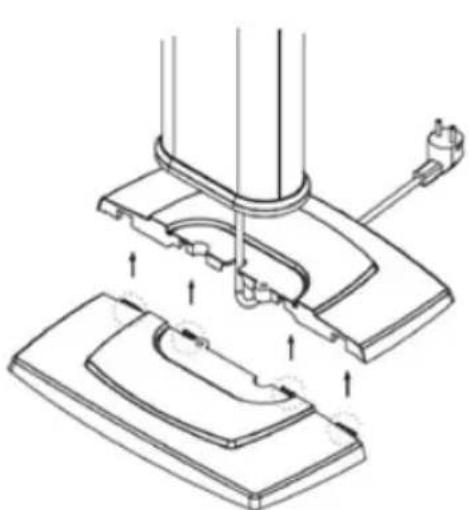
- First of all, please place the power cable between both plates of the base
- Then plug together the two base plates with an accurate fit. The cable leads now through the base plate through the center hole
- Now position the StandLine on the base plate and fix it from the bottom with the two ring washers and screws
- Lead the power cable between the slots and recesses and fix it with the cable fixture and the two small screws
- Please set a battery into the remote control. (not included)
The VASNER StandLine is now ready to use.
VASNER
Usage of StandLine
The VASNER StandLine has functions which can be controlled by the remot control or directly at the device. For using the remote control, please insert at first the battery of the type „CR2025" in the remote control. Then plug the power plug of the heater into the grounded outlet. A signal will chime.
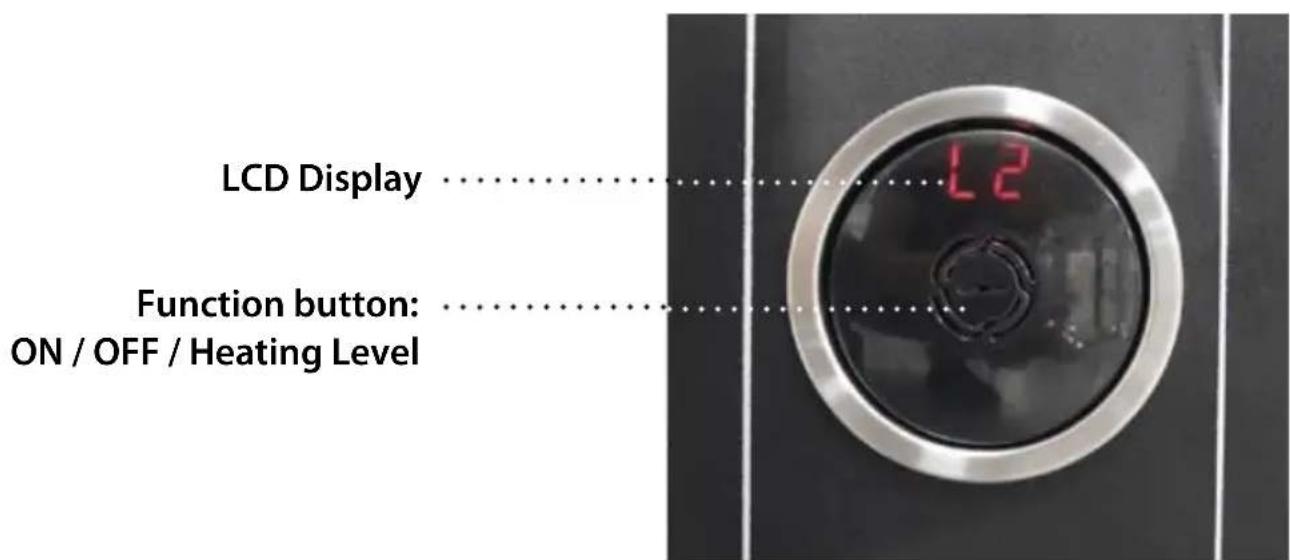
Push the function button in front to switch: ON / OFF / heating level.
Attention:
The device has a safety system. In case of overturning, the safety system will engage and cut off the power. In such a case the display shows "Er" which indicates an Error. In order to start the device again, you need to unplug the device and plug it in again.

Installing and Replacing Remote Control Batteries:
As it can be seen, the tabs are pushed in the direction shown by the arrow, it is simultaneously pulled in the direction shown by the arrow in the second figure and the battery is replaced. A new battery is installed using the same method. Only CR2025 batteries can be used.
The button is used for turning on and off the heater.
Heating level adjustment: shifts to power control mode. (+) and (-) buttons are used to make level adjustment between levels 0 and 4. The alarm gives a signal for 0.2 seconds in every step and L1, L2, L3, L4, L0

decrease the level, heat level, timing and thermostat values.

increase the level, heat level, timing and thermostat values.
Thermostat button: shifts to heat adjustment mode. (+) and (-) buttons

d to make heat adjustment between 10 and 40 degrees. The stat button must be pressed to save the adjusted heat. It is to press this button once for the user to see the adjusted heat. twice never switches off the heating completely!
Timer-button: It shifts to the timing mode by flashing on the screen and
0H, 1H, ...9H appears on the screen.
VASNER
Note:
The point on the right of the screen flashes when the timer of the product is ready.
1L, 2L, ...: shows the power level of the heater.
1H, 2H, 3H, ...9H: heater timer indicator (programming up to 9 hours is possible)
Er: error indicator (it indicates that the device is not balanced).
OH: Overheating (when the device detects heat from the environment other than its heat program, it rings an alarm for 1 minute as a warning and stops the heating function.)
Usage without function button:
Function button on the front housing:
- It controls the heat level adjustment and timer adjustment of the heater. The heat level is increased one level with each pressing.
- This button is pressed for 6 seconds to perform timer adjustment. The desired time zone is selected from the emerging screen menu.
1H, 2H, 3H, ...9H - Standby-Mode:
- "This symbol appears on the screen, when it is ready for operation."
Maintenance, Cleaning, Service, Disposal
Maintenance
It is very important to perform careful and regular maintenance of the device in accordance with the recommendations made in this manual so that it can run
efficiently for a long time. In case there is a problem with your heater, please contact your dealer.
- The cleanliness of the reflector (reflecting mirror) and tubes must be checked at least once a month by the user. The cleaning and maintenance instruction must be applied if dirty.
- According to the amount of dust in the place of use, the said checks should be performed more often.
- Power cable and plug must be checked while cleaning the device. If there is a deformation in the power cord or the plug, it must be taken to the authorized service.
- Reflector, wire and body deformation must be visually inspected while cleaning the device. If there is a deformation, authorized service must be called for things to do.
Cleaning
Attention! Regular and careful cleaning performed by the user will ensure that your device will run more efficiently and prolong its life.
- Your device must be turned off before starting to clean, its power cord must be unplugged from the socket for safety and you must wait until it cools down.
- If the reflector (reflecting mirror) and carbon filament tube is dirty, it must be cleaned from the outside with dry air without opening the protective cage wire of the device, if possible.
- The outer surface of the device must be cleaned with a soft cotton cloth or a soft brush.
- Never use corrosive or melting liquids to clean the heater. These materials may damage the plastic parts.
- Do not clean your device using vapor cleaners.
VASNER
If your heater should be stored for a longer time, you can use the special customized VASNER AirCape cover hoods to protect your device from dust. Please always cut your device from power!
Service and repair
If you notice any damage or a fault with your StandLine, it must be checked and repaired by a specialist. This may be a qualified electrician or your dealer. Damage or faults arising from unauthorised repairs, as well as modifications to the product, misuse, negligence, and improper or inadequate maintenance void the warranty. Dealers and the manufacturer shall not be liable.
Disposal
The VASNER StandLine must not be disposed of together with your normal household waste. Please take the product to your local recycling centre to dispose of it.
Faults & troubleshooting
| Problem Solution | |
| The heater doesn’t work Check w hether the plug is plugged into the socket correctly. | |
| Ensure the device is in balanced position. (Your device has balance safety.) | |
| Ensure that the running switch and the thermostat of the device are in correct, open position. | |
| Check whether there is a problem in the house’s electrical installation. | |
| If the problem persists, contact the authorized VASNER customer service. |
Technical information
Model: VASNER StandLine 25R
Carbon filament tube: Carbon-Infrared-Technology
Power: 750/1250/2000/2.500W
Voltage: 220-240V AC, 50-60 Hz, 10.9 A
Heating area: up to 30m2 , Indoor
Fall over protection: yes
Remote control: yes
Thermostat (digital): yes, regulating 10° - 40° room temperature; In this mode the device does not switch off completely.
Timer (digital): yes
Error indicator: yes
Dimensions (HxWxD): 1100 × 400 × 332 mm
Weight: 3,3 kg
Max. range of
remote control: up to 10 m
Battery: 1x Battery CR2025
VASNER
Warranty
Our products are subject to strict quality controls. However, if your infrared heater does not function correctly, we regret this very much and ask you to contact your dealer.
VASNER provides a 2-year warranty from the date of purchase if the installation and commissioning are completed in accordance with this user manual.
In the event of a fault or damage, which was caused by improper handling or installation, there shall be no claim for warranty services.
During the warranty period, defective heaters due to material or manufacturing faults will either be repaired or replaced, at our discretion. Replaced heaters or components then belong to VASNER. Warranty services do not lengthen the warranty period nor do they trigger a new warranty altogether.
Warranty claims must be made within the warranty period and as soon as a fault is detected.
Service addresses:
VASNER Germany / Europe / Head Office
Tel.: +49 (0)5246 - 93556 - 25
Fax: +49 (0)5246 - 93556 - 19
Mail: info@vasner.com
Web: www.vasner.com
VASNER is a brand of
MankeTech GmbH.
VASNER
Estimado cliente:
CE - Erklärung DECLARATION conformity with European Directives
Safety-EMC. Safety-EMC-2015318

- VASNER - a piece of home.
- Content:
- Important Safety Information
- VASNER
- Caution:
- Safe distances: high temperature, fire protection
- Technical features
- Component parts
- Mounting the StandLine 25R
- Usage of StandLine
- Attention:
- Installing and Replacing Remote Control Batteries:
- Note:
- Usage without function button:
- Maintenance, Cleaning, Service, Disposal
- Maintenance
- Cleaning
- Service and repair
- Disposal
- Faults & troubleshooting
- Technical information
- Warranty
- Service addresses:
- VASNER Germany / Europe / Head Office
- CE - Erklärung DECLARATION conformity with European Directives
Brand : VASNER
Model : StandLine 25R
Category : Heating