
Cooly - Fan VASNER - Free user manual and instructions
Find the device manual for free Cooly VASNER in PDF.


| Product Type | Pedestal fan with ultrasonic mist cooling |
| Brand | VASNER |
| Model | Cooly |
| Power Consumption | 75 W |
| Voltage | 220 V ~ 50 Hz |
| Fan Diameter | 42 cm |
| Dimensions (H x W x D) | 125 x 42 x 38 cm |
| Weight | 7.8 kg |
| Water Tank Capacity | 2.0 L |
| Water Consumption | 300 ml per hour |
| Mist Technology | Ultrasonic |
| Oscillation | Yes, automatic side-to-side |
| Remote Control | Yes, range up to 10 m, requires 2x AAA 1.5V batteries |
| Timer | 1-12 hours (auto on/off) |
| Wind Modes | Normal, Sleep, Natural (adjustable via remote) |
| Manual Tilt | Yes, via wing screw on fan head |
| Safety Features | Do not submerge in water; unplug before cleaning; do not insert objects into openings |
| Cleaning | Clean water tank weekly; use only mild cleaners; avoid abrasives |
| Disposal | Do not dispose with household waste; take to recycling center |
Frequently Asked Questions - Cooly VASNER
User questions about Cooly VASNER
0 question about this device. Answer the ones you know or ask your own.
Ask a new question about this device
Download the instructions for your Fan in PDF format for free! Find your manual Cooly - VASNER and take your electronic device back in hand. On this page are published all the documents necessary for the use of your device. Cooly by VASNER.
USER MANUAL Cooly VASNER
The extra quiet pedestal fan with latest ultrasonic mist cooling technology.
D
GB
VASNER
Lieber Kunde,
we are delighted that you have chosen a high-quality mist-cooling fan from VASNER. This high-quality product featuring the latest in ultrasonic mist technology offers additional cooling on hot days. Or alternatively, it can also provide additional air humidification when the room air is dry in winter.
Enjoy cooling moments on your balcony or terrace and in your conservatory or apartment with the VASNER Cooly. The Cooly is so quiet that it is perfectly suitable for use in a bedroom.
VASNER – a piece of home.
www.vasner.com
User manual contents:
Page 13 Safety information
Page 14 Components & assembly
Page 16 Commissioning
Page 18 Cleaning, maintenance, service and disposal
Page 19 Faults & troubleshooting
Page 20 Technical information
Page 21 Service address
Page 22 CE declaration
Cooly features
In addition to the modern white design, the Cooly also has a range of technical features that transform this pedestal fan into something truly versatile:
- Latest ultrasonic-mist evaporation
- Oscillates automatically
- Sleep timer
- Different wind modes
- Remote control
Safety information
Below, we have summarised the most important safety information to prevent any possible risks when handling electrical devices. Always observe the following safety information:
- Never touch the plug with wet hands and ensure that the socket is clean and free of dust. Never submerge the device in water or other liquids.
• Always hold the plug when plugging the fan in or unplugging it. Never pull on the cable. - When cleaning, repositioning, maintaining or installing the fan, turn off the fan completely and always unplug it from the socket.
• Never insert any objects or your fingers into one of the fan openings. - Look for any possible damage to the fan. This is particularly important if the fan has fallen down or has been damaged in any other way. If you notice any faults or damage to the housing, cables or plug, switch the fan off immediately and disconnect it from the power supply. There is a risk of injury and other damage.
- Do not open the fan without permission and do not carry out any repairs on the fan yourself.
Caution:
The manufacturer shall assume no liability for any consequential damages. Technical modifications and changes excepted.
VASNER
Components and assembly
Below you will find an overview of the individual components that make up the VASNER Cooly and how to assemble them correctly.
Cooly components:

- Guard bracket
- Mist attachment
- Front fan guard
- Blade bracket
- 3-blade propeller
- Guard bracket
- Rear fan guard
- Fan head/motor
- Mist hose
- Fixing screw
- Housing
- Pedestal base with additional metal weight
- 4 castors
- Floor bracket
- Water tank cover with illuminated water-level display and magnet closure
Assembly
- Remove the fan from its packaging and remove any packaging materials from the fan and accessories.
- Position the metal pipe of the fan head (8) in the round hole on the upper side of the housing (11). Ensure that the pipe is sitting correctly so that the small screw (10) can be screwed into the small hole in the housing, in which the metal pipe is fixed.
- Lay the pedestal (12) with the white side facing downwards, so that you are looking at the dark metal plate. Insert the 4 castors (13) in the four holes if you want to be able to wheel the upright fan.
- Remove the floor bracket (14) from the thread on the underside of the housing (11). Place the fan with the two pins and the thread on the white upper side of the pedestal (12) and insert it into the openings. Now secure the housing to the pedestal by tightening the floor bracket on the underneath metal bracket onto the white thread and fix the pedestal in place.
- Now correctly position the fan and you can start to assemble the fan head. First place the rear fan guard (7) with the hole on the head's drive shaft and secure it using the round guard bracket (6).
- Then take the propeller (5) and place it on the drive shaft. Now fix the propeller using the blade bracket (4).
- Then prepare the guard bracket (1) by loosely screwing it together using the connecting screw and a screwdriver to form a circle. (Only turn it 2-3 times)
- Now place the front fan guard (3) exactly on the edge of the rear fan guard (7) and place the guard bracket around the edge of both fan guards. When it has completely surrounded the fan guards, tighten the guard bracket screw using a screwdriver.
- Now insert the mist hose (9) on the mist attachment (2) of the front fan guard.
VASNER
Commissioning
The VASNER Cooly has many functions that can either be controlled directly on the fan or via the remote control. To use the remote control, first insert two AAA 1.5 V batteries in the remote control. Fill the fan's water tank so that the ultrasound mist function can be used, then plug the fan into the mains power.
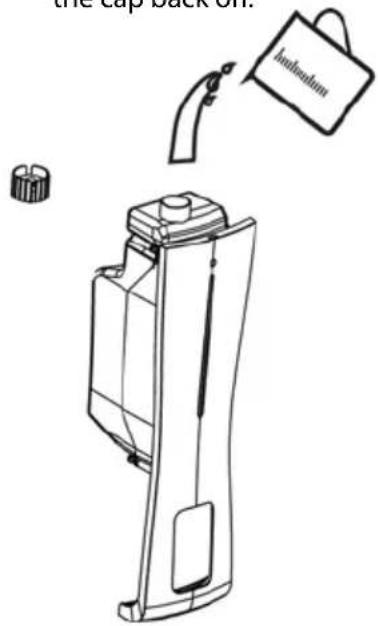
Filling the water tank:
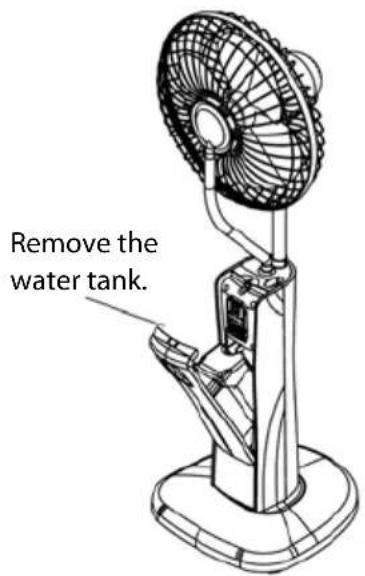
Unscrew the black cap on the underside.
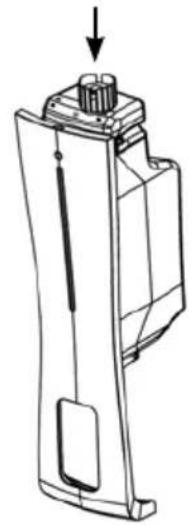
Fill with water and screw the cap back on.
1.2.3.
Display & operation

Operation using the touch display on the fan
1. Fan function:
• Use the "Fan" button to switch the fan ON
- Set the wind speeds (light, medium, strong) by pressing the fan button several times.
- Press the Power button to switch the fan off.
2. Oscillates automatically:
- First switch the fan on. Then press the "Oscillate" button. The Cooly head moves continuously from side to side. Pressing the button again, stops the oscillation of the Cooly Fan.
3. Manual tilt:
- Hold the fan head securely. Then undo the wing screw on the right-hand side of the fan head. You can now tilt the head upwards and downwards to adjust the angle. After adjusting the angle, tighten the wing screw again.
4. Cooling using ultrasonic mist
- Press the "Mist humidification" button to switch the ultrasonic mist on / off.
5. Automatic on/off timer
- If you press the "Timer" button when the fan is off, the display will then show the time remaining until the fan is due to switch on. You can select between 1 and 12 hours.
- If you press the "Timer" button when the fan is on, the display will then show the time remaining until the fan is due to switch off. You can select between 1 and 12 hours.
6. Different wind settings
- The wind speed can only be adjusted using the remote control.
- Press "Mode" to set the speed (normal, sleep, natural).
VASNER
7. Switching off
- The fan is switched off again by pressing the "Power" button.
Operation using the remote control
![graph LR A["Mist humidification ON/OFF"] --> B["MIST"] C["Timer ON/OFF, 1-12 hours*"] --> D["TIMER"] E["Fan ON & set wind settings"] --> F["SPEED / ON"] B --> G["MODE"] D --> H["OFF"] F --> I["SWING"] G --> J["Setting the wind modes"] H --> K["Fan and device OFF"] I --> L["Oscillation ON/OFF"] M["VA…](/content/2026/05/907887/images/9dbf87c9c7581ef470768af60fac3fb5a5f5699c2dc0ed48019942ec0d1a9e01.jpg)
* Automatic timer:
If you press the "Timer" button when the fan is off, the display will then show the time remaining until the fan is due to switch on. You can select between 1 and 12 hours.
If you press the "Timer" button when the fan is on, the display will then show the time remaining until the fan is due to switch off. You can select between 1 and 12 hours.
Cleaning, maintenance, service and disposal
Cleaning
• Always unplug the fan before cleaning it.
- Clean the water tank and the water unit once a week to prevent the formation of scale, algae or bacteria.
- If the fan will not be used for a longer period of time, empty the water tank and dry the water unit with a microfiber cloth.
- If the fan will be placed in storage for a longer period of time (over winter, etc.), always cover it with a VASNER cover or other suitable cover to prevent
dust from entering the device in key places.
- To avoid damaging the plastic and display, do not use any abrasive cleaning agents or chemicals.
Maintenance
In general, the VASNER Cooly does not require any maintenance. The fan must not be opened by unauthorised persons. If there seems to be a problem, contact your dealer.
Service and repair
If you notice any damage or a fault with your Cooly, it must be checked and repaired by a specialist. This may be a qualified electrician or your dealer. Damage or faults arising from unauthorised repairs, as well as modifications to the fan, misuse, negligence, and improper or inadequate maintenance void the warranty. Dealers and the manufacturer shall not be liable.
Disposal
The VASNER Cooly must not be disposed of together with your normal household waste. Please take the fan to your local recycling centre to dispose of it.
Faults & troubleshooting
| Fault Possible cause Solution | ||
| The Off button does not light up, the fan does not start, there is no mist | The fan is not plugged in. The fuse has tripped. | Plug the fan in. Reset the fuse. |
| There is no mist No water in the tank. | The valve in the tank opening is trapped. | Fill with water. Gently move the valve with your finger. |
| The mist smells funny The water tank is not clean. Clean the water unit & tank. Fill with clean water. | ||
| The tank display lights up, but there is no wind or mist | The water level is too high. Remove some water. | |
| Too little mist The valve may be dirty. Clean the water unit. | ||
VASNER
Technical information
Model: VASNER Cooly
Voltage: 220 V \~ 50 Hz
Power: 75 W
Watert Tank: 2,0 Litre capacity
Remote control: yes
Fan oscillation: yes
Water consumption: 300 ml per hour (mist production)
Mist production: by Ultrasonic technology
Fan diameter: 42 cm
Dimensions (HxWxD): 125 x 42 x 38 cm
Weight: 7,8 kg
Range remote control: up to 10 m
Batteries: 2x AAA 1,5V
Note:
Service address:
VASNER Germany / Head Office
Tel.: +49 (0)5246 - 93556 - 25
Fax: +49 (0)5246 - 93556 - 19
Mail: info@vasner.com
Web: www.vasner.com
VASNER is a brand of
MankeTech GmbH.
CE - Erklärung
DECLARATION
of conformity with European Directives
IEC 60335-2-80:2002 (Second edition) + A1:2004 +A2:2008 in conj.
With IEC 60335-1:2010 (Fifth Edition)
EN 60335-1:2012+A11:2014
EN 60335-2-80:2003+A1:2004+A2:2009
EN 60335-2-98:2003+A1:2005+A2:2008
EN 62233:2008
- Vasner
- Vasner – a piece of home
- User manual contents
- Cooly features
- Safety information
- Caution
- Components and assembly
- Cooly components
- Assembly
- Commissioning
- Operation using the touch display on the fan
- Fan function
- Oscillates automatically
- Manual tilt
- Cooling using ultrasonic mist
- Automatic on/off timer
- Different wind settings
- Switching off
- Cleaning, maintenance, service and disposal
- Cleaning
- Maintenance
- Service and repair
- Disposal
- Technical information
- Service address
- Ce - erklärung
- Declaration
- Of conformity with european directives
Brand : VASNER
Model : Cooly
Category : Fan