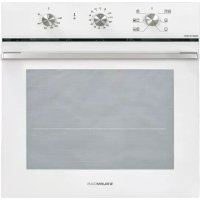
GFX62WHS3 - Oven Glem Gas - Free user manual and instructions
Find the device manual for free GFX62WHS3 Glem Gas in PDF.



| Product type | Built-in electric oven |
| Brand | Glem Gas |
| Model | GFX62WHS3 |
| Power supply | 230 V ~ 50 Hz |
| Maximum power | Approximately 2500 W |
| Maximum temperature | 250 °C |
| Cooking functions | Static, Convection, Grill, Fan Grill, Defrost, Rotisserie, Pizza, Steam (assisted steam) |
| Electronic programmer | Timer, cooking duration, end of cooking, delayed cooking, child lock |
| Mechanical timer | Available (60 min or 120 min depending on version) |
| Internal lighting | Bulb 15W/25W T300°C |
| Number of cooking levels | 5 guides (or 4 depending on version) |
| Included accessories | Grill, drip tray, rotisserie spit, Air Fryer basket (depending on model) |
| Cleaning | Steam cleaning (VAPOclean), cleaning of embossed bottom |
| Removable door | Yes, for easy cleaning |
| Safety | Child lock, automatic switch-off at end of cooking |
| Compliance | EC directives (low voltage, EMC, food contact materials, etc.) |
| Appliance dimensions (W x H x D) | 595 x 595 x 575 mm (standard estimation) |
| Net weight | Approximately 35 kg (estimation) |
Frequently Asked Questions - GFX62WHS3 Glem Gas
User questions about GFX62WHS3 Glem Gas
0 question about this device. Answer the ones you know or ask your own.
Ask a new question about this device
Download the instructions for your Oven in PDF format for free! Find your manual GFX62WHS3 - Glem Gas and take your electronic device back in hand. On this page are published all the documents necessary for the use of your device. GFX62WHS3 by Glem Gas.
USER MANUAL GFX62WHS3 Glem Gas
p.2 MANUALE USO E MANUTENZIONE
p.19 USE AND MAINTENANCE MANUAL
p.36 MODE D'EMPLOI ET D'ENTRETIEN
p.53 MANUAL DE USO E MANUTENÇÃO
p.70 MANUAL DE USO Y MANTENIMIEN
natural_image
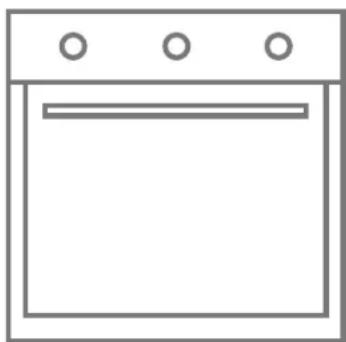
Simple line drawing of a cabinet or oven with three circular tops and a horizontal bar (no text or symbols)BUILT-IN Electric Oven
FORNO INCASSO ELETTRICO
INTRODUZIONE
Cara/Caro Cliente,
natural_image
Interior view of an oven with visible steam or heat exchanger and airflow arrows (no text or symbols)natural_image
Interior view of a double oven with a 3° angle indicator and internal structure (no text or symbols)natural_image
Close-up of a metal tool securing a piece of material into a container (no text or symbols visible)natural_image
Close-up of a mechanical component with arrows indicating direction (no visible text or symbols)natural_image
Close-up of a metallic tool interacting with a wire and glass surface (no visible text or symbols)natural_image
3D rendering of a white appliance with a black lid and open door (no text or symbols visible)natural_image
Technical line drawing of a mechanical device with internal components (no text or symbols)natural_image
Technical line drawing of an oven with internal grating and a side view showing internal structure (no text or symbols)TEGLIA FORNO:
natural_image
Gray square baking tray with side brackets (no text or symbols)AIRFRYER:
natural_image
Line drawing of a wire mesh basket with labeled air filter (no text or symbols on the basket itself)
natural_image
Illustration of a hand cleaning a window with a cloth, showing no text or symbols1)
natural_image
Technical line drawing of a mechanical component with no visible text or symbols2)
natural_image
Close-up of a car window with visible lane markings and a curved line (no text or symbols)natural_image
Line drawing of a hand inserting a component into a wall (no text or symbols)-
Thank you for having purchased our product.
IMPORTANT:
Keep these use instructions with the product. Should the product be sold or transferred to other persons, ensure it is accompanied by its instructions.
We ask that you carefully read these recommendations before installing and using the product. They have been drafted for your safety and those near you.
This manual gives indications to maintain the aesthetical and functional qualities of the oven unaltered.
This appliance is in conformity in force:
- 2014/35/EC Low Voltage (Directive)
- 2014/30/EC Electromagnetic Compatibility (Directive)
- 1935/2004/CE Materials intended to come into contact with food (Regulation)
- 2002/95/CE Restriction of the use of certain hazardous substances in electrical and electronic equipment (Directive)
- 2010/30/EC Energy labelling of household ovens (Directive)
- 65/2014 Energy labelling of household ovens (Regulation)
With the constant aim to improve our products, we reserve to amend their technical, functional or aesthetical features, parallel to the technical evolution.

IMPORTANT:
Before starting the oven, carefully read this installation and use manual in order to better know its functioning.
SUMMARY
20 Oven use and safety warnings
21 Installation
22 Description of the controls
26 Oven use
26 Available accessories
27 Cooking advice
31 Cleaning and maintenance
33 Extraordinary maintenance
34 Guide to cooking
87 Figures
INSTRUCTIONS FOR THE INSTALLER:
They indicate the operations for the QUALIFIED ENGINEER who will have to carry out the installation, commissioning and testing of the appliance.

INSTRUCTIONS FOR THE USER:
Indicate the ovens' use recommendations, the controls description and the correct cleaning and maintenance operations.

PRESENTATION
OVEN USE AND SAFETY WARNINGS
- Warning: this appliance and accessible parts may heat up during use. Be careful not to touch heating elements. The appliance should be kept out of the reach of children younger than 8 years unless supervised at all times.
- The appliance can only be used by children older than 8 years and by people with reduced phisical, sensory, mental capabilities or lack of experience or knowledge only if strictly supervised whilst using it or have been shown how to use it in a safe way and understand the hazards involved. Do not let the children play with the appliance. Children must not be allowed to clean the appliance unsupervised.
- Warning: the accessible parts may get hot when in use: keep the children well away from the appliance.
- Never use steam or high pressure equipment to clean the oven; this may cause problems to the electrical safety devices.
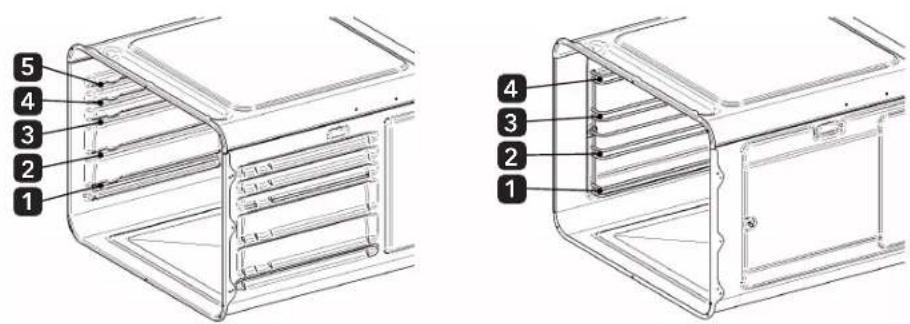
- Wire shelves and drip trays must be positioned inside the oven utilizing the special guides in a proper way (the oven is equipped with 5 guides to position the drip trays and the wire shelves at different levels or 4 levels on lateral side racks as described in detail on chapters 5 and 6).
- Disconnect the oven from the mains before every intervention which requests access to the live parts.
• Make sure that the appliance is switched off before replacing the oven light in order to avoid electrical socks. - Do not utilize abrasive sponges or sharp scrapers to clean the oven glass door as this may scratch the surface causing the glass to shatter. This appliance is exclusively intended for non-professional use. Do not use the appliance for commercial or industrial purposes or for any other purpose for which it was not conceived.
- This appliance has been conceived for domestic and private use. It is exclusively intended for cooking food products. Therefore, any liability for uses different to those indicated is declined. None of the components of this oven are made with asbestos. Do not amend and try to amend the technical features of this appliance, as this might present a danger for yourselves and for those near you.
- Before using the oven for the first time, heat it up empty for about 15 min. Ensure the room is ventilated. You may smell a particular odour or notice a small emission of smoke. THIS IS NORMAL.
- The appliance becomes hot during use. Do not touch the thermoelements inside the oven. Do not go near the hot upper elements with the hands when inserting or removing the pans or pan supports from the oven, use thermal kitchen gloves.
When cooking food, only use plates or pans resistant to high temperatures.
Never place aluminium foil directly on to the oven support surface, as the accumulated heat may cause the enamel to deteriorate.
Do not lay heavy objects on the oven door and ensure that children do not sit on it.
When cleaning the inside, ensure the oven is cold and, moreover, that it is switched off. - The alcohol vapours inside the hot cooking compartment may catch fire. Do not cook food containing large quantities of beverages with a high alcohol content. Only use small quantities of beverages with a high alcohol content. Open the door of the appliance carefully.
- Hot steam may escape when opening the appliance door. At certain temperatures, the steam is not visible. Do not stand too close to the appliance when opening it. Open the door of the appliance carefully. Keep children away.
RESPECTING THE ENVIRONMENT
The packaging materials of this appliance can be recycled. Participate in recycling by contributing to safeguard the environment.
Throw the different materials in the appropriate containers at your disposal in your town/city.
This appliance contains recyclable materials. They are marked with this logo indicating that the appliances used must not be disposed of with urban waste. They are therefore compliant with the European Directive 2002/96/EC on waste of electrical and electronic equipment.
Contact your town/city or your dealer to know the collection points nearest to you.
We thank you for your collaboration in safeguarding the environment.
INSTALLATION
Electrical connection
Ensure that the voltage corresponds to that indicated in the plaque located on the oven door frame.
The cables for the connection to the mains must be protected from direct contact with the oven's metal casing. The plaque must never be removed.
Attention: the ground connection must be compliant with law.
If using a fixed direct connection to the electrical network, it is necessary to provide a proper device which assures the disconnection from the mains with a distance of contact opening which allows complete disconnection in conditions of overvoltage category III, in accordance with the rules of installation. Avoid using reductions or adaptors as they may cause overheating or burning.
After installation, carry out a brief oven check, following the instructions reported further down.
In case the appliance does not function, disconnect it from the mains and contact the after-sales assistance centre nearest to you.
Do not attempt to repair the appliance.

ATTENTION!
The manufacturer declines every responsibility for damages suffered by persons and things, caused by the non compliance of the above prescriptions or deriving from the tampering of even a single part of the appliance and the use of non original spare parts.
Oven positioning
The oven is pre-arranged for built-in purposes.
The sizes must respect the quota indicated in figures 1 and 2.
The upper/rear part of the cabinet must have an opening of at least 80-90 mm deep, as indicated in figure 1.
Tighten the 4 screws by firstly inserting them inside the bush and then inside the frame (figures 1 Ref. A, B).
For installations underneath the "top" surface, ensure that the rear/lower part of the cabinet has an opening similar to that shown in figure 2. (reference C).
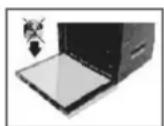
Do not use the door as a lever to insert the oven inside the cabinet.
Do not put pressure on the open door.
DESCRIPTION OF THE CONTROLS
Act on the control devices placed on the oven panel to select the various functions with the knob.
KEY:

OVEN LIGHT

UPPER AND LOWER HEATING ELEMENT

LOWER HEATING ELEMENT

GRILL HEATING ELEMENT

GRILL HEATING ELEMENT PLUS FAN

VENTILATED HEATING ELEMENT

DEFROSTING

LOWER HEATING ELEMENT PLUS FAN

UPPER HEATING ELEMENT PLUS GRILL

UPPER AND LOWER HEATING ELEMENT PLUS FAN

PRE-HEATING

ROASTING JACK

UPPER HEATING ELEMENT PLUS GRILL AND PLUS FAN

PIZZA FUNCTION

GRILL HEATING ELEMENT PLUS ROASTING JACK AND PLUS FAN

Can be activated with: heating element upper and lower, heating element upper and lower plus fan and pizza function.
*Only available in certain markets.
For the symbols of the cooking tips see the chapter with the guidelines on page 34.
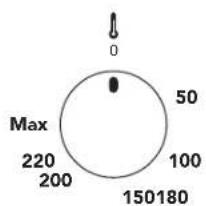
radar
| Value | |---| | 50 | | 100 | | 150 | | 180 | | Max |THERMOSTAT:
Cooking temperature is chosen turning the knob clockwise to the desired value, between 50° and MAX.
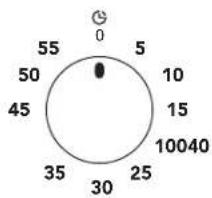
MECHANICAL MINUTE COUNTER:
The minute counter can be regulated for a maximum period of one hour. The regulation knob must be turned clockwise until the 60 minute position, and then placed at the desired time, rotating it anti-clockwise.
When the pre-set time is over, an acoustic signal goes off, which stops automatically.
The minute counter does not interrupt the oven functioning when the acoustic signals goes off.
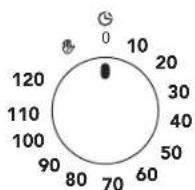
120 MINUTE MECHANICAL COOKING END TIMER:
Place the thermostat knob on the desired time, and then rotate the knob of the timer clockwise to the desired time (max 120 minutes).
When the timer returns to the starting "0" position, an acoustic signal will communicate that the oven has turned off automatically.
If cooking time is greater than 2 hours, or if you desire to use the oven manually, rotate the knob to the position 📋
THERMOSTAT SIGNALLER (ORANGE):

When the light turns on, it means that the oven is pre-heating.
When the light turns off while cooking it means that the oven has reached the pre-set temperature.
Regular intermittence indicates that the temperature inside the oven is maintained constantly at the set level.
TURN ON SIGNALLER (GREEN) (if provided):

This light switches on when the oven is operating and it remains on during the whole coking period.
The light switches off when the oven turns off.
Cooking with roasting-jack (if provided):
In electric ovens it is possible to use the roasting-jack coupled with the functioning of the grill or of the oven.
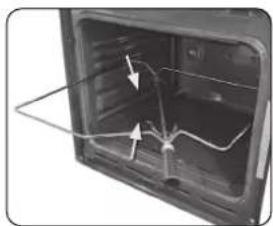
natural_image
Interior view of an oven with visible wiring and arrows indicating components (no text or symbols)Place the food to be cooked on the spit-pole, blocking it with the two forks, being careful not to strain the starter with too heavy loads, and then proceed as follows:

natural_image
Interior view of a refrigerator with a 3° angle indicator and a wavy line on the door (no text or symbols)1) Place the frame inside the third guide starting from the bottom.
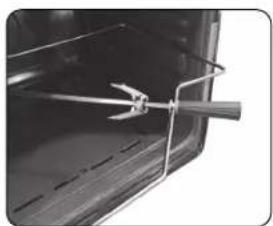
natural_image
Close-up of a metal clamp securing a small object inside a container (no text or symbols visible)2) Position the pulley on to the frame so that it remains driven.
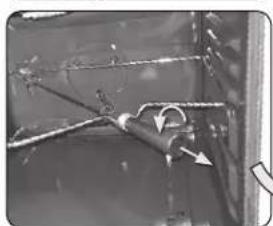
natural_image
Close-up of a mechanical component with visible structural lines and arrows indicating motion (no text or symbols)3) Remove the plastic handle by unscrewing it.
natural_image
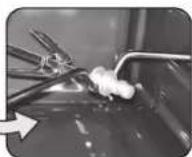
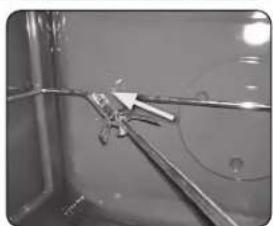
Close-up of a metallic mechanical component with wires and connectors (no visible text or symbols)4) Introduce the frame with the food on the spit-pole until the pole point is inside the hole located on the oven rear wall.
5) Once cooking is completed, tighten the plastic handle to the spit to be able to extract it.

Position a pan on the first guide from the bottom and pour some water to limit the formation of smoke.
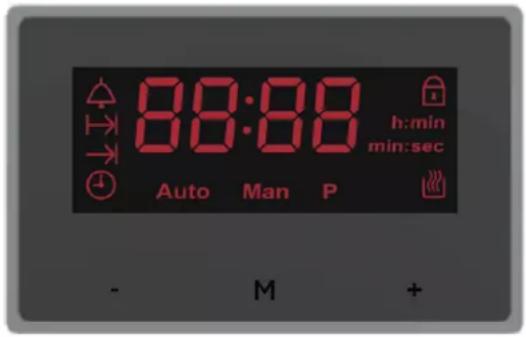
Electronic programmer

Minute Minder Icon

Cooking Duration Icon

End of Time Icon

Time and Day Icon
Auto
Automatic Cooking Icon
Man
Manual cooking Icon

Oven Actives as Auto Cooking

Keylock Icon

After plugging in or reconnecting to a power source after current decay, "12:0 0", and h:min icon flashes. Any button press enters the time of day setting menu. Adjust the correct time of day using buttons - e + .
FUNCTIONS LIST:

MENU BUTTON
The menu button cycles through the minute minder - cooking duration - end of time - time of day - buzzer tone adjustment menus.

MINUS BUTTON
Decrease the displayed value.

PLUS BUTTON
Increase the displayed value.
Setting the time of day (24 h clock):
Press and release button M funtil: and ⏻ icons start flashing. Set the current time using buttons - and +.
After 7 seconds icon disappears, icon stops flashing.

Time of day setting cancels automatic cooking settings.
Manual operation:
If the programmer is not in semi-automatic or full-automatic mode you can use oven functions manually, also Maon is on the display.
Setting the minute minder:
You can activate the minute minder at any time, regardless of the status of other programmer functions. The adjustable duration ranges from 1 minute to 99 minutes.
1) Press button M : l'icona 🔊 icon starts to flash, the display shows "0.00", h:min disappears and min:sec icon remains on the display.
2) Enter the required duration using buttons - and +. remains on the display.
Al termine dell'intervallo impostato, il dispositivo emetterà un allarme per circa 7 minuti, accompagnato dal lampeggiamento dell'icona △.
3) Press any button to turn the signal off, disappears, and the display shows the time of day.
Cooking timer:
If the oven is supposed to turn off after a specified duration, cooking timer can be set. It is named as semi-automatic operation.
1) Press and release button M until start to flash.
2) Set the cooking duration using buttons - and + within the range from 1 minute to 23 hours 59 minutes.
Auto and Lidon light on the display.
The set time is memorized after about 7 seconds; the current time of day is shown again on the display.
Auto and dons remain on the display. Select the required temperature and the oven function.
When cooking is completed, an audible signal will be heard for approximately 7 minutes, and the Man icon starts to flash, Auto icon disappears.
Return control and thermostat knobs to the OFF position.
Press button M to cancel buzzer signal and press once again to return to manual operation.
Cooking time with delay:
If the oven is supposed to turn off at specified time, after having worked for a specified duration, cooking time and the cooking end time can be set. In this case, you just give in the cooking duration and the time, when the food should be ready and the timer calculates when to start cooking. It is named as full-automatic operation.
1) Enter cooking duration as described above. (for example say it is 17:30 o'clock now and cooking duration is set as 1 hour).
2) Press and release button until the icon starts to flash.
3) Set the turn-off (cooking end) time using buttons - and + (for example 19:30).
The maximum cooking end time setting is limited to the current time plus 23 hours 59 minutes.
4) Turn the thermostat and function control knobs to the required settings. Icon disappears.
Oven will not be switched on until the calculated cooking start time (according to the example, it is 18:30), that is the difference between the cooking end time and the cooking duration.
When cooking is completed (according to the example at 19:30), an audible signal will be heard for approximately 7 minutes, and the Man icon will flash. Return control and thermostat knobs to the OFF position.
5) Press button No cancel the buzzer signal and press once again to return to manual operation.
Adjusting the buzzer tone:
1) Press button M until the "LX" (X=1, 2 or 3) flashes on the right two digits.
2) Set the tone using buttons - and/or + to set "L1", "L2" or "L3".

Default tone is L3.
Child lock activation / deactivation:
If not in any adjustment mode, press and hold button + about 5 seconds, to activate / deactivate the child lock, 📋 icon appears/disappears on the display accordingly.
When the child lock is activated after a cooking program was activated, the buttons get locked, and pressing the buttons will have no effect. This is to prevent your child interrupting or disturbing a cooking program which is in progress.
When the child lock is activated as no cooking program is in progress, again the buttons are locked but in addition, the oven gets inoperative (Oven cannot be used manual). This is to prevent your child to activate the oven accidentally.

ATTENTION!
In case of main power loss for a short time (about 1.5 minutes), timer maintains its status.
Child lock status and buzzer tone are memorized independent of the power los s duration.
OVEN USE
This oven combines the qualities of the traditional "static" natural convention ovens with those of the modern "ventilated" forced convention ovens. It is a very versatile appliance which, easily and safely, allows to choose amongst different cooking methods. By acting on the knobs on the panel, the selection of different programs and the desired temperature is obtained. To make the best use of your oven we ask that you carefully read the instruction book.
General warnings and recommendations
When using the oven for the first time, it is opportune to heat it at its maximum temperature (250°C) for as long as it is necessary to burn any residue manufacture oils, which might confer unpleasant odours to food.

When cooking, do not cover the bottom of the oven with aluminium foil or tinfoil and do not lean pots and pans to avoid damaging the enamel layer. Should you wish to use baking paper, position it so that it does not interfere with the hot air circulation inside the oven.
5 cm
natural_image
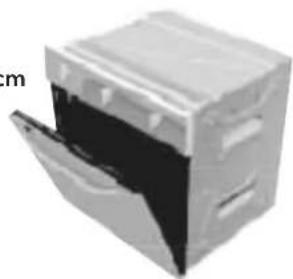
3D rendering of a white appliance with a black lid removed, labeled 'm' on the left (no other text or symbols)To avoid that any steam contained inside the oven is a nuisance, open the door in 2 phases: keep it half opened (5 cm opening) for 5 seconds, and then open it completely. Should it be necessary to intervene on the food, leave the door open as little as possible to avoid that the temperature inside the oven decreases to the point of jeopardising the cooking.
Cooling ventilation (if provided)
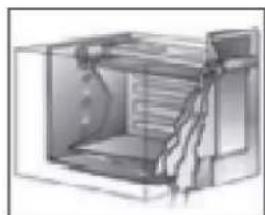
Some oven models are equipped with a cooling fan which starts to function when the oven is on and reaches a certain temperature. The functioning of the fan causes a normal air flow which exits above the oven facade and which may continue for a short time even after the oven has been switched off.
natural_image
Cross-sectional diagram of a mechanical device or enclosure with internal components (no text or symbols visible)Internal lighting lamp
The lamp inside the oven is switched on by rotating the functions knob on any of these.
AVAILABLE ACCESSORIES
The oven has 5 guides for the positioning of the pots and pans at different heights or 4 levels wire racks.
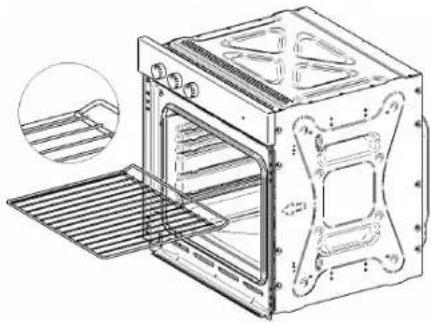
PAN SUPPORT:
Used as support for containers with food for cooking.
Caution: the pan support must be inserted in the direction indicated in the following image.
natural_image
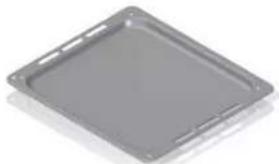
Technical line drawing of an oven with internal structure and a magnified inset showing internal components (no text or symbols)BAKING PAN::
Use for cooking food by covering the pan with parchment paper. It can also be used as a container for collecting grease that drips from dishes when cooking food with the pan support..
natural_image
Gray square plastic tray with side brackets (no text or symbols)AIR FRYER:
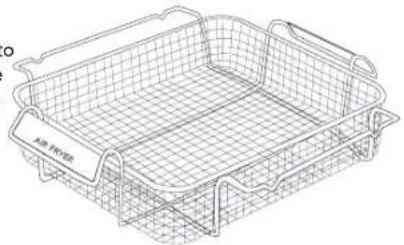
Standard on some models, it is a stainless steel basket for air frying. The basket uses the movement of hot air in the oven cavity to distribute the heat evenly around the food.
We recommend using the Air fryer with a ventilated function.
The Air Fryer basket perfectly cooks any frozen food such as chips or fish fillets. Cook according to the normal instructions on the package. Instead of turning the food during cooking, simply shake the basket halfway through the cycle. Use the middle shelf (3rd level from the bottom) and place the pan on the first shelf (1st level from the bottom) to collect cooking residues.
natural_image
Line drawing of a rectangular air filter basket with mesh grid lines (no text or symbols)
Do not use additional oil and/or grease when using this accessory.

Not all accessories are present on certain models and markets.
It is possible to request the original accessories, in the model provided, through the authorised after-sales assistance centres.
COOKING ADVICE
For the best results, it is recommended to preheat the oven at the desired temperature before introducing the food. When the orange light turns off, pre-heating is complete.
Pre-heating is not necessary for gres food.
In case of frozen meat, we recommend decreasing the coking temperature by approx 20°C, increasing the coking time by 10/15 minutes.
In the phases preceding cooking ensure that only the indispensable accessories are present inside the oven (it's normally sufficient to have the pan support on which, after pre-heating, the container or the pan with the food to be cooked will be placed).
In order to obtain excellent cooking results, it is indispensable for every type of dish, to choose the FUNCTION, the TEMPERATURE, the TIME and the insertion level of the guides inside the oven, depending on the type of model purchased and its available functions:
- Functions: The number of functions may vary depending on the model; by rotating the knob on the desired function, different cooking styles are obtained.
- Temperature: It is set by rotating the knob on the desired temperature.
- Cooking times: They usually depend on the type and quantity of dishes to be cooked, on the different food habits and the personal taste and experience.
- Insertion levels: 5 guides (1 lower, 3 central, 1 upper) in the ovens with moulded cavity and 4 levels (1 inferior, 2 central, 1 upper) in the ovens with side racks.
• The indications supplied on the recipes are generally sufficient to obtain satisfying cooking results.
- The central levels of insertion are usually suitable for most cooking as it is in this part of the oven that, prior to thermostat control, the perfect stabilisation of the set temperature happens.
- In electric ovens, the higher the insertion level of the pans or pan supports in the oven the nearer the heat source (higher burnishing of the upper part of the dishes and food grilling).
- The food portioning and the use of different material and thickness food containers (terracotta, glass, aluminium, steel) can determine cooking times different to those indicated in the recipe books.
- Forced ventilation cooking produces high humidity removal from food and is usually recommended for cakes with whisked mix, multiple cooking and very thick portions.
- In delicate cooking with leavening, avoid or reduce to a minimum, the opening of the oven door, in order not to alter the heating thermostat cycles.
- In cooking using the grill carried out on the pan support or using the roasting-jack, place a pan containing some decilitres of water on the step underneath, to limit grease sprays or excess smoke.
- In ovens equipped with the Steam function, cooking is carried out with the aid of steam: steam is introduced into the oven cavity during operation of the appliance, thus achieving a better cooking result. The dish:
»preserves a crispy crust »retains a glossy surface »inside is juicy and soft.
For a significant energy saving during long cooking times, use the residue heat by switching off the oven a few minutes before the average indication of the recipe, keeping the oven door closed.
The perfect insulation of the oven compartment will equally allow the dishes to reach the ideal cooking.
TEMPERATURES AND COKING TIMES INDICATIVE SHEET
| KIND OF FOOD TEMPERATURE (C°) GUIDE (*) COOKING TIME (minutes) PERSONAL SUGGESTION | ||||
| Desserts in molds with liquid pastry | ||||
| Savoury cakes and pastry 175 2 55-65 | ||||
| Sublime cake 175 3 60-70 | ||||
| Short crust pastry cakes in molds | ||||
| Cakes base 200 3 08-10 | ||||
| Ricotta cake base 200 3 25-35 | ||||
| Fruits cake base | 200 3 25-35 | |||
| Desserts in molds with risen dough | ||||
| Cakes base 200 3 30-45 | ||||
| Soft bread (1kg flour) | 200 3 25-35 | |||
| Cookies | ||||
| Short crust pastry 200 3 10-15 | ||||
| Pancakes dough | 200 2 35-45 | |||
| Biscuits pastry | 200 3 15-20 | |||
| Pasta and pizza | ||||
| Lasagna | 225 2 40-50 | |||
| Pizza | 240 3 10-20 | |||
| Meat (Cooking time per cm. of thickness) | ||||
| Long cook roast | 200 2 | 120-150 | ||
| Short cook roast | 200 2 60-90 | |||
| Meatballs | 200 2 30-40 | |||
| White meat | ||||
| Duck (1-1/2 kg) | 200 2 | 120-180 | ||
| Goose (3 kg) | 200 2 | 150-210 | ||
| Roast chicken | 200 2 60-90 | |||
| Turkey (5 kg) | 175 2 | 240-260 | ||
| Game | ||||
| Hare | 200 2 60-90 | |||
| Leg of roe deer | 200 2 | 90-150 | ||
| Leg of deer | 175 2 | 90-180 | ||
| Vegetables | ||||
| Roast potatoes | 220 2 30-40 | |||
| Pudding di verdure cotte 200 2 40-50 | ||||
| Fish | ||||
| Trout | 200 2 40-50 | |||
| Sea bream Pagellus | 200 2 40-50 | |||
| Grill | ||||
| Cutlet | 4 | 8-12 | ||
| Sausages | 4 10-12 | |||
| Spit-roasted chicken | - | 25-35 | ||
| Spit-roasted chicken (0,6 kg) | - | 50-60 | ||
| (*) The number stated in the column GUIDE is referred to the level starting from the bottom of the oven cavity.⚠ Do not position trays on the oven base and don't cover the same with aluminium foil as the accumulated heat may cause the enamel to deteriorate. | ||||
The above mentioned data are indicative because cooking mode and temperatures may change according to the quantity and the quality of the food.
The Grill
During the cooking on the wire chromed shelf or with the turnspit, place a tray including some decilitres of water on the level below in order to avoid fat splashes and excessive smoke.
For a significant energy efficiency during the long cooking it is advised to exploit the remaining heat by switching off the oven some minutes before the expected cooking time keeping the oven door closed.
Grilling tips:
| DISHES COOKING TIME (minutes) | ||
| Above Below | ||
| Thin meat 6 4 | ||
| Normale meat 8 5 | ||
| Fish (es. trout, salmon) 15 12 | ||
| Sausages 12 10 | ||
| Toast 5 2 | ||
Turn the food midway through cooking. Do not use any aluminium paper to wrap the dishes or to cover the containers because the reflected heat might set fire to the paper or damage the grill.

WARNING!
When the cookings are performed with the GRILL function, the oven door must be kept CLOSED and the temperature does not exceed 200^ C.

ATTENTION!
During cooking of particularly humid dishes (vegetables flan, meat or fish stews, fruit cakes) water steam generates inside the oven. Pay attention when opening the door.
To limit the steam leaking, use the precaution of opening the door in two phases: move the door by a few cm and, after a few seconds, open it completely.
It is appropriate to know that such water steam, in the minutes after cooking, during cooling of the oven, determines the formation of condense and, therefore, water drops falling on the internal glass of the door and enamelled walls. For good oven maintenance it is necessary to remove this slight presence of water using an absorbing cloth or an abrasive sponge at the end of every cooking process, having as characteristic a high presence of humidity.

The oven door must be kept close during the cooking process.
Energy saving
For a significant energy savings, relying on the following tips:
- Check that the oven door is closed correctly when it is in operation.
- Do not open the door too frequently during cooking.
- Keep the door seal clean and check that it is firmly fixed in place.
- Pre-heat the oven only if indicated in the cooking table or in the recipe.
- Take advantage of the thermal inertia, turning off the oven 10 minutes before the scheduled cooking time.
Function setting: Steam assisted cooking (STEAM)

WARNING!
Moisture that escapes can cause burns:
-
Do not open the oven door when the function is active.
• Always allow the appliance to cool down when the function is interrupted and open the oven door carefully. -
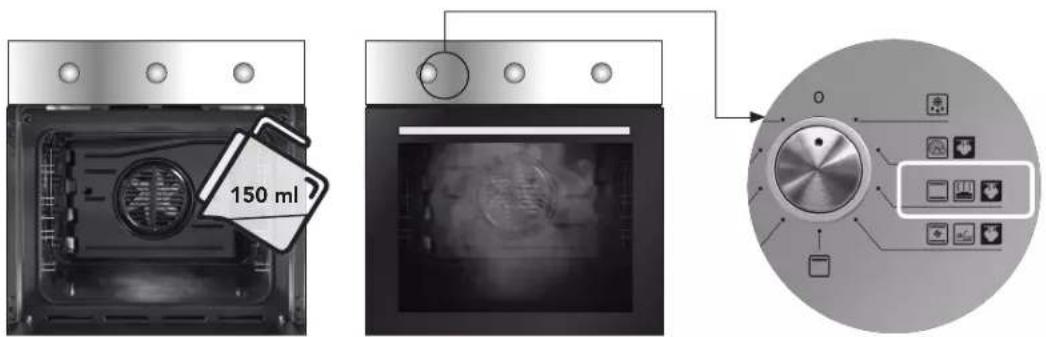
Fill the cavity embossing with water. The maximum capacity of the cavity embossing is 150 ml.

ATTENTION!
Only fill the cavity embossing with water when the oven is cold.
Do not fill the cavity embossing with water during cooking or when the oven is hot.
Food-compatible flavourings can also be used.
Similarly, vinegar or lemon emulsions help to sanitise the cooking cavity.
- Place the food in the oven and close the oven door.
- Select the desired function from Pizza, Static and Ventilated. Selecting the function activates the humidity generation system.
- Turn the temperature control knob to select the desired temperature
- To switch off the oven, turn the knobs to the "off", "0" (i.e. OFF) position, thus switching off both the oven and the humidity generator.

ATTENTION!
Make sure that the oven has cooled down before removing any residual water from the cavity embossing.

ATTENTION!
Always refer to the safety warnings.
The temperature and cooking times specified in the tables are guide values.
They can vary depending on the recipes and the quality and quantity of the ingredients used. Initially monitor the cooking results and find the best settings (power level, cooking time, etc.) for your pots, recipes and quantities when using the appliance.
In the steam-assisted functions, the cooking temperature setting can be reduced by about 15/20 °C compared to traditional cooking functions, thanks to the presence of moist air, which makes heat transmission more effective and reduces energy consumption.
CAKES / SWEETS / BREAD
Preheat the empty oven for 5 minutes. Use the dripping pan. Use the second level grid.
| TYPE OF FOOD | WATER in the cavity embossing (ml) | TEMPERATURE (°C) COOKING TIME (min) |
| Biscuits and Croissants 100 150 - 180 | 10 - 20 | |
| Focaccia 100 200 - 210 | 10 - 20 | |
| Pizza 100 230 | 10 - 20 | |
| Sandwiches 100 200 | 20 - 25 | |
| Bread 100 180 | 35 - 40 | |
| Plum cake 100 - 150 | 160 - 180 | 30 - 60 |
| Apple Pie | 100 - 150 | 160 - 180 |
FROZEN READY MEALS
Preheat the empty oven for 10 minutes. Use the second level grid.
| TYPE OF FOOD | WATER in the cavity embossing (ml) | TEMPERATURE (°C) COOKING TIME (min) |
| Pizza 100 200 - 210 10 - 20 | ||
| Focaccia 100 200 - 210 10 - 20 | ||
| Croissant | 100 170 - 180 15 - 25 | |
| Lasagna | 100 180 - 200 35 - 50 | |
| Cannelloni | 100 180 - 200 35 - 50 |
REGENERATION OF DISHES
Use the second level grid.
| TYPE OF FOOD | WATER in the cavity embossing (ml) | TEMPERATURE (°C) COOKING TIME (min) |
| Sandwiches 100 110 10 - 20 | ||
| Bread 100 110 15 - 25 | ||
| Focaccia 100 110 15 - 25 | ||
| Meat | 100 110 15 - 25 | |
| Pasta | 100 110 15 - 25 | |
| Pizza 100 110 15 - 25 | ||
| Rice | 100 110 15 - 25 | |
| Vegetables | 100 110 15 - 25 |
ROASTING
Use the second level grid.
| TYPE OF FOOD | WATER in the cavity embossing (ml) | TEMPERATURE (°C) COOKING TIME (min) |
| Roast beef 100 200 50 - 60 | ||
| Chicken 100 210 60 - 80 | ||
| Pork roast 100 180 65 - 80 |

Only available in certain markets.
CLEANING AND MAINTENANCE
Disconnect the oven from the mains before every intervention which requests access to the live parts.
Cleaning the stainless steel
For a good preservation of the stainless steel, it must be cleaned regularly at the end of every use, once it has cooled down.
Daily routine cleaning
To clean and preserve the stainless steel surfaces, always use only specific products without abrasives.
Use instructions: pour the product on to a damp cloth and wipe the internal surface of the oven, accurately rinse and dry with a soft cloth.
Food or residue stains
Never use metal sponges or sharp scrapers, the surfaces may be damaged.
Use normal products for steel, non abrasive, eventually using tools made of plastic or wood material.
Accurately rinse and dry with a soft cloth.
Avoid letting sugary food residue dry inside the oven (ex. jam, chocolate, etc.).
In time they may ruin the enamel coating the inside of the oven.

For a good preservation of the oven it must be cleaned regularly after it has cooled down.
For easier cleaning, extract all removable parts.
Cleaning the oven (without self-cleaning panels)
Clean the oven pan support and the side guides with hot water and non abrasive detergents, rinse and dry (fig. 20).
The door can be removed for easier cleaning (see point 8.2 dismantling of the door).
Glass door
To clean use kitchen absorbent paper, in case of persistent dirt, wash with a damp cloth and common detergent.
Do not use abrasive detergents or sharp metal scrapers to clean the glass door, since they may scratch the glass surface and cause it to break.
We recommend keeping the glass of the door as clean as possible.
Oven cavity cleaning with VAPOclean\* function (with steam)
This steam cleaning procedure uses moisture to facilitate the removal of grease and food residues from the oven.
Use instructions:
Step 1) Pour water into the cavity: 150 ml.
Step 2) Set the oven function to STATIC.
Step 3) Set the temperature to 90^ .
Step 4) Leave the oven running for 45 minutes.
Step 5) Turn the oven off.
Step 6) Wait until the oven is cold. Dry the cavity with a soft cloth.

WARNING! Always make sure the appliance is cold before touching it, as there is a risk of scalding.
Cleaning the embossed base of the oven cavity
Follow these instructions to remove limescale residues from the bottom of the oven. It is recommended to clean the bottom of the compartment after a few steaming cycles.
Step 1) Pour 100 ml of a mixture of water and white vinegar into the bottom of the compartment. NOTE: Type of vinegar: %5.
Step 2) Allow to rest for 30 minutes at room temperature.
Step 3) Wipe the oven clean using a soft cloth.
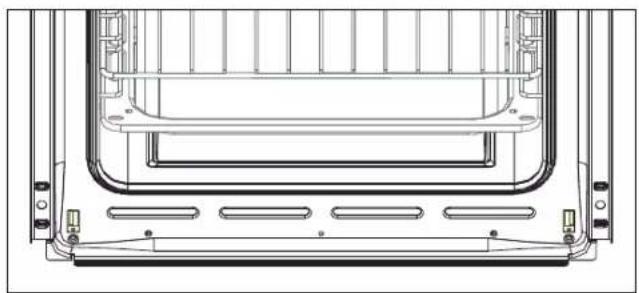
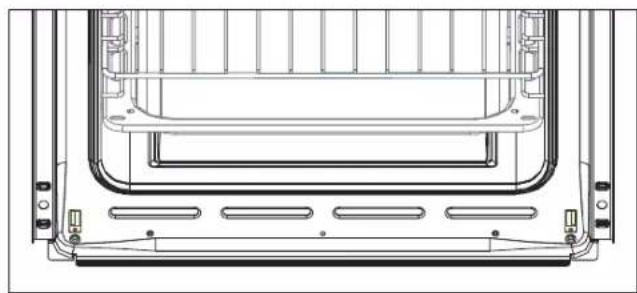
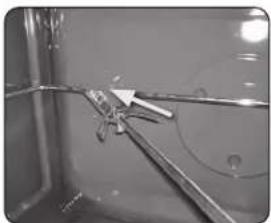
Drying the gutter
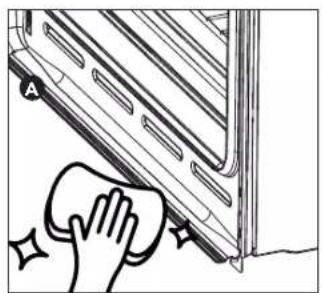
1) Let the oven cool down.
2) Unlock the oven door.
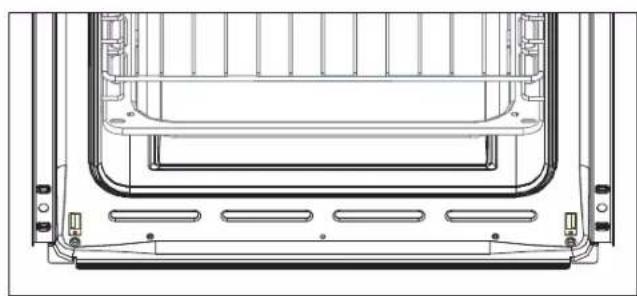
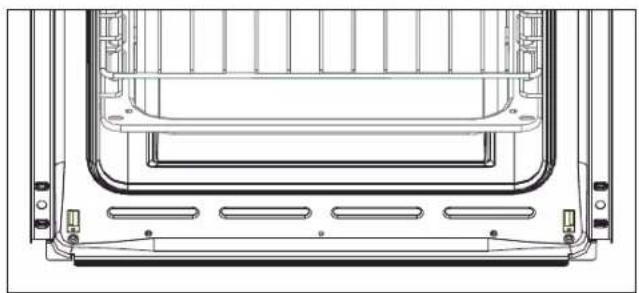
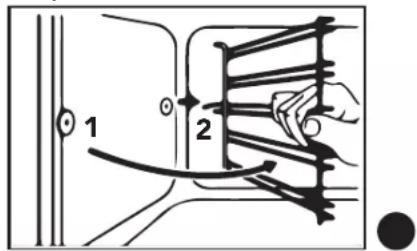
3) Wipe off any water deposited in the gutter with a dry sponge cloth. Clean carefully. See figure 1.
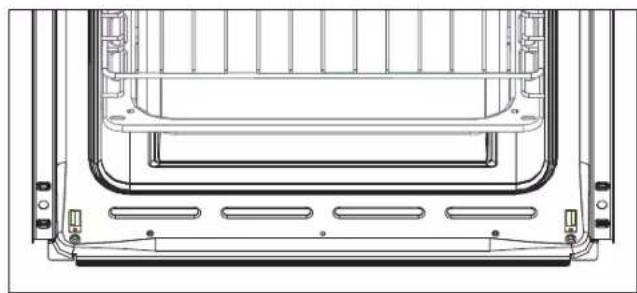
Drain A is located at the front below the oven cavity. See figure 2.
natural_image
Illustration of a hand cleaning a window with a sponge (no text or symbols)1)
natural_image
Technical line drawing of a mechanical component with no visible text or symbols2)
* Only available in certain markets.
The oven requires small maintenance interventions should, in time, those parts subject to wear, such as gaskets, lamp, etc, require replacing. Instructions for these types of interventions are supplied below.
Disconnect the oven from the mains before every intervention which requests access to the live parts.
Replacement of the internal lighting lamp
Remove protection cover "A" by unscrewing it anti-clockwise, replace lamp "B" with another of the same type.
Mount the protection once again and screw it clockwise until it is tight (fig. 21).
Only use oven lamps (T300°C) 15W or 25W depending on models.
Never touch the lamp with bare fingers, always use protective gloves.
Only use lamps obtained from authorised after-sales centres.
Dismantling of the door
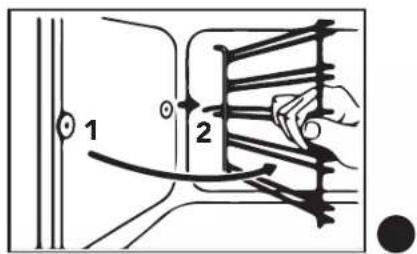
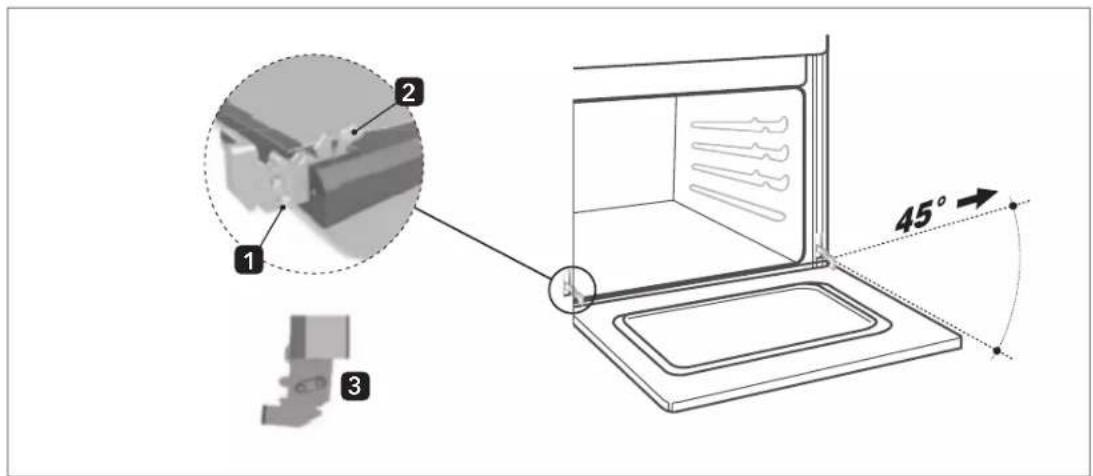
Lift levers "2" up to the ledge with hinges "1" and hold the door at the two sides with both hands near the same hinges.
Lift the door upwards forming an angle of approx. 45^ and carefully extract it.
For the mounting, place hinge "2" in the appropriate grooves, therefore leave the door to lean downwards, ensure it remains blocked in grooves "3", then release levers "1" (fig. 22).
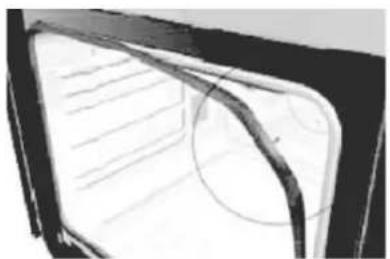
Dismantling of oven door gaskets
To better clean the oven, the door gasket can be removed.
With the door dismantled, lift the tongues located at the angles, as shown in the figure.
Once cleaning is completed, re-mount the gaskets keeping the longest side horizontal and place the tongues in the respective holes, starting from the upper ones.
natural_image
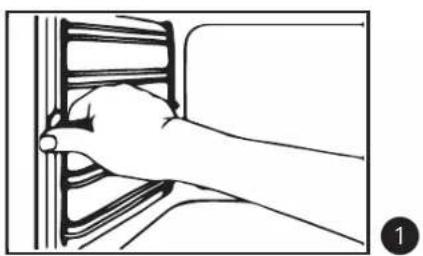
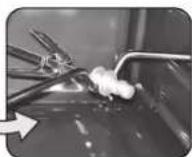
Close-up of a vehicle's front and rear door frame showing internal structural lines (no text or symbols)Disassembling the shelf supports
- First slide the extraction guide out of the side wall by pulling it forwards.
- Slide the rear extraction guide out of the side wall and remove it.
natural_image
Line drawing of a hand inserting a component into a vehicle (no text or symbols)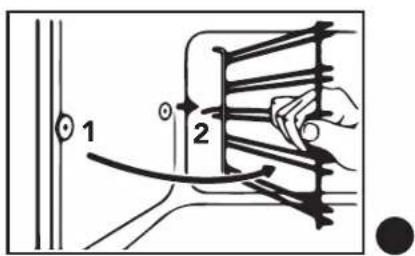
To reinstall the supports, follow the procedure indicated in reverse.
GUIDE TO COOKING
Types of cooking Specialist*
| Cooking suggestion | Food | Shelf position | Temperature °C | Cooking time (min) | Accessory | |
 GRATIN (1) GRATIN (1) | Scallops | [wwzx] | 180 - 190 10 - 15 | Pan depth 4 cm code 382S94 | ||
| Mussels 200 - 220 10 - 15 | ||||||
| Lobster 220 - 250 10 - 15 | ||||||
| Cauliflowers 200 - 220 8 - 10 | ||||||
| Broccoli 180 - 200 15 - 20 | Multilevel: 2 - 3 | |||||
| Artichokes 170 - 180 15 - 20 | ||||||
 PATISSERIE PATISSERIE | Shortcrust pastry |  | 180 - 190 30 - 35 | Air Fryer code 084F21 (4) | ||
| Mixed-dough cake | 190 - 200 30 - 35 | |||||
| Pie | 180 - 190 30 - 35 | |||||
| Plum cake | 180 - 190 30 - 35 | |||||
| Fruit cake | 165 - 180 35 - 45 | |||||
| Nut cake | 180 - 190 40 - 45 | |||||
| Strudel | 185 - 195 35 - 45 | |||||
| Sponge cake 185 | ||||||
| Cream Caramel | Multilevel: 1 - 3 | 130 | 30 - 35 | |||
| Chocolate cake | 180 | 35 - 40 | ||||
| Croissants | 180 - 190 25 - 30 | |||||
| Cookies | 165 | 20 | ||||
| Pastries 200 - 230 10 - 15 | ||||||
| Muffins | 185 - 200 25 - 35 | |||||
| Sweet rolls with jam (scones) | Multilevel: 1 - 2 | 180 - 190 | 20 | |||
 PIZZA AND BREAD PIZZA AND BREAD | Pizza | [KBHS] | 220 - 250 15 - 20 | Pizza plate code 5GPIZAir Fryer code 084F21 (4) | ||
| Focaccia | Multilevel: 1 - 2 | 200 - 220 20 - 30 | ||||
| Bread |  | 215 - 230 40 - 50 | ||||
| Multilevel: 2 - 3 | ||||||
 LASAGNE AND PUFF PASTRY LASAGNE AND PUFF PASTRY | Lasagne | Multilevel: 2 - 4 | 165 - 180 30 - 40 | Pan depth 6 cm code 382U32Air Fryer code 084F21 (4) | ||
| Strudel with ricotta and spinach | 170 - 180 30 - 40 | |||||
| Puff pastry dumplings with apple filling | 200 | 8 - 10 | ||||
| Baked pasta 180 - 190 35 - 45 | ||||||
| Vegetable flans |  | 170 - 180 30 - 40 | ||||
| Multilevel: 1 - 3 | ||||||
 BBQ (BARBECUE) (2) BBQ (BARBECUE) (2) | Toast | XDT7 | 200 - 220 | 3 - 4 | Trivet BBQ grill for support code 080G72 | |
| Hamburgers | 220 - 250 | 5 - 7 | ||||
| Fish skewers | 200 - 220 | 6 - 8 | ||||
| Shellfish 200 - 220 | ||||||
| Sausages | 220 - 250 7 - 10 | |||||
| Ribs | 220 - 250 7 - 10 | |||||
| Meat skewers | 200 - 220 8 - 10 | |||||
| Steaks | 200 - 220 8 - 12 | |||||
| Chicken 200 - 220 30 - 35 | ||||||
 LEAVENING (3) LEAVENING (3) | Fresh baking yeast | 22 - 25 g | 4321 | 0° - (light only) | 2 (1.5-3) hours | - |
| 18 - 20 g | 4 (2.5-5) hours | |||||
| 14 - 16 g | 6 (4.8) hours | |||||
| 10 - 12 g | 8 (5-10) hours | |||||
| 6 - 8 g | 10 (6-12) hours | |||||
| 1 - 4 g | 12 (8-15) hours | |||||
| Solid sourdough | 250 - 300 g | 4321 | 0° - (light only) | 5 (4-7) hours | - | |
| 200 - 220 g | 8 (7-10) hours | |||||
| 150 - 180 g | 11 (10-13) hours | |||||
| 100 - 120 g | 14 (13-16) hours | |||||
| 50 - 80 g | 17 (16-19) hours | |||||
| 10 - 30 g | 20 (19-24) hours | |||||
(1) Gratin is a culinary technique performed at high temperatures in which a dish is topped with a crispy and golden crust. It is therefore not recommended to use it for the entire cooking time to avoid burning or drying out the inside of the dish. The best solution is to cook the food and proceed without the gratin preparation, which only needs to be added in the final stage.
(2) 5-10 minutes pre-heating is enough for recipes that require it. The stated amount of time refers to only one side of the dish, it is therefore necessary to turn it. Use the BBQ grill accessory; alternatively, place a baking tray on the rack below with a cup of water in it (0.2 l) to limit grease drops and excessive smoke during cooking.
(3) Table of rising times for 1 kg of 00/0 flour mixed with baking yeast or sourdough. The inside of the oven cavity is ideal for leavening as it is temperature-controlled and draught-free. The ideal temperature for a proper leavening process is 28-30°C, which is why only oven light is needed.
(4) Do not use additional oil and/or grease when using this accessory. Recommended level for using the Air Fryer: 3rd.
* Only available in certain markets.
Assisted steam (Steam)*
| Cooking suggestion Food | Shelf position | Water in the cavity embossing (ml) | Temperature °C Cooking time (min) | Accessory | |
 STEAM (Set 1) with Pizza function STEAM (Set 1) with Pizza function | Steamed chicken wings | 80 20 - 25 | 100 220 20 - 25 | Air Fryer code 084F21(4) | |
Breaded cod fillets 100 180 20 20  | |||||
| Chicken nuggets 100 180 20 20 | |||||
| Pizza 100 180 10 - 20 | |||||
| Roasted meat 100 190 40 - 50 Multilevel: 2 - 3 | |||||
| Filled croissant 100 150 30 | |||||
| Focaccia 100 200 20 - 25 | |||||
 STEAM (Set 2) with Static function STEAM (Set 2) with Static function | Chicken | 50 -  Multilevel: 2 - 3 Multilevel: 2 - 3 | 100 200 50 - 60 | Air Fryer code 084F21(4) | |
| Roasted meat 100 200 | |||||
| Roast beef | 100 200 50 - 60 | ||||
| Steamed vegetables | 100 180 25 - 30 | ||||
| Croissant | 100 150 20 - 25 | ||||
| Pound Cake | 100 150 30 | ||||
| Puff pastry sweets | 100 150 30 - 35 | ||||
 STEAM (Set 3) with Ventilated function STEAM (Set 3) with Ventilated function | Steamed vegetables |  40 - 50 Multilevel: 2 - 3 40 - 50 Multilevel: 2 - 3 | 100 180 20 - 25 | Air Fryer code 084F21(4) | |
| Croissant | 100 150 20 | ||||
| Fresh potato wedges | 100 180 30 - 35 | ||||
| Potato skewers | 100 180 40 - 45 | ||||
| Roasted meat 100 200 | |||||
| Pound Cake | 100 150 30 | ||||
| Cod fillets | 100 170 | 20 - 25 |
(4) Do not use additional oil and/or grease when using this accessory. Recommended level for using the Air Fryer: 3rd.
General notes: the data provided here must be considered a guideline. Therefore, it can and must be changed based on your own tastes and habits. The time reported in the table does not include pre-heating the oven, which is always recommended. The time and temperature provided refer to an average amount of food: 1/1.5 kg for meat, pastry/pizza/bread dough 0.5/0.8 Kg. Multiple cooking on several levels must be carried out by placing the containers in the centre of each rack.
* Only available in certain markets.
Notes

FOUR ÉLECTRIQUE ENCASTRABLE
INTRODUCTION
Chère Cliente/ Cher Client,
This light switches on when the oven is operating and it remains on during the whole coking period.
The light switches off when the oven turns off.
natural_image
Interior view of an oven with visible air ducts and ventilation ducts (no text or symbols)natural_image
Interior view of a double oven with a 3° angle indicator and a wavy line marking the interior (no text or symbols on the oven itself)natural_image
Close-up of a metal tool securing a piece of material into a container (no text or symbols visible)natural_image
Close-up of a mechanical component with arrows indicating direction (no visible text or symbols)natural_image
Close-up of a metallic tool interacting with a glass surface, no visible text or symbolsnatural_image
3D rendering of a white appliance with a black lid, showing internal structure and mounting brackets (no text or symbols)natural_image
Cross-sectional diagram of a mechanical device with internal components (no text or symbols visible)ACCESSOIRES DISPONIBLES
natural_image
Technical line drawing of an oven with a rack and ventilation slots, showing internal structure (no text or symbols)LECHEFRITE:
natural_image
Gray square tray with side brackets and mounting holes (no text or symbols)AIRFRYER :
natural_image
Line drawing of a rectangular metal basket with grid pattern (no text or symbols)
natural_image
Illustration of a hand cleaning a wall with a cloth, no text or symbols present1)
natural_image
Technical line drawing of a mechanical component with no visible text or symbols2)
natural_image
Close-up of a vehicle's front window showing the roof and side panels (no text or symbols visible)natural_image
Line drawing of a hand inserting a component into a wall (no text or symbols)广力云智慧零售收银系统
natural_image
Interior view of an oven with visible wiring and arrows indicating components (no text or symbols)natural_image
Interior view of a refrigerator with a 3° angle indicator and a wavy line on the door (no text or symbols beyond the label)natural_image
Close-up of a metal tool securing a piece of material into a dark container (no text or symbols visible)natural_image
Close-up of a mechanical component with visible cracks and arrows indicating motion (no text or symbols)3) Retire a empunhadura plástica desparafusando-a.
natural_image
Close-up of a metal rod inserted into a container with wires, no visible text or symbolsnatural_image
3D rendering of a white appliance with a black lid removed, labeled 'm' on the left (no other text or symbols)natural_image
Cross-sectional diagram of a mechanical device or enclosure with internal components (no text or symbols visible)natural_image
Technical line drawing of an oven with internal structure and a magnified inset showing the exterior panel (no text or symbols)BAKING PAN::
natural_image
Gray square tray with rounded corners and small holes, no text or symbols visibleAIRFRYER:
natural_image
Line drawing of a rectangular metal basket with grid pattern (no text or symbols)
natural_image
Illustration of a hand cleaning a wall with a sponge (no text or symbols)1)
natural_image
Technical line drawing of a mechanical component with no visible text or symbols2)
natural_image
Close-up of a vehicle's front and rear door frame showing internal structural lines (no text or symbols)natural_image
Line drawing of a hand inserting a spring into a wall, no text or symbols present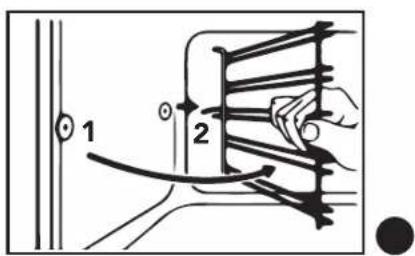
Vapor assistido (Steam)*
| Conselhos para a cozedura Alimento | Posição das prate-leiras | Água no relevo da cavidade (ml) | Temperatura °C | Tempo de cozedura (min) | Acessório | |
 STEAM (Set 1)com função Pizza STEAM (Set 1)com função Pizza | Asas de frango ao vapor |  Multinível: 2 - 350 30- 25 Multinível: 2 - 350 30- 25 | 100 220 20 - 25 | Air Fryercód. 084F21 ^16 | ||
| Filetes de bacalhau empa-nadas | 100 180 20 - 25 | |||||
| Nuggets de frango 100 180 20 | ||||||
| Pizza 100 180 10 | ||||||
| Assado 100 190 40 | ||||||
| Croissant recheado 100 150 30 | ||||||
| Focaccia 100 200 20 | ||||||
 STEAM (Set 2)com função Estática STEAM (Set 2)com função Estática | Frango | - 60  Multinível: 2 - 3 Multinível: 2 - 3 | 100 200 50 - 60 | Air Fryercód. 084F21 ^16 | ||
| Assado 100 200 50 | ||||||
| Roast beef | 100 200 50 - 60 | |||||
| Verduras ao vapor | 100 180 25 - 30 | |||||
| Croissant | 100 150 20 - 25 | |||||
| Torta Margherita | 100 150 30 | |||||
| Doces de massa folhada | 100 150 30 - 35 | |||||
 STEAM (Set 3)com função ventilada STEAM (Set 3)com função ventilada | Verduras ao vapor |  Multinível: 2 - 3 Multinível: 2 - 3 | 100 180 20 - 25 | Air Fryercód. 084F21 ^16 | ||
| Croissant | 100 150 20 | |||||
| Fatias de batata fresca | 100 180 30 - 35 | |||||
| Espetadas de batatas | 100 180 40 - 45 | |||||
| Assado 100 200 40 | ||||||
| Torta Margherita | 100 150 30 | |||||
| Filetes de bacalhau | 100 170 | 20 - 25 | ||||
natural_image
Interior view of an oven with visible air ducts and ventilation ducts (no text or symbols)natural_image
Interior view of a double oven with a 3° angle indicator and a zigzag line on the door (no text or symbols beyond the label)natural_image
Close-up of a mechanical component with a handle and wire, no visible text or symbolsnatural_image
Close-up of a mechanical component with visible wiring and arrows, no readable text or symbolsnatural_image
Close-up of a medical or laboratory procedure showing tubing and a tool interacting with a device (no visible text or symbols)natural_image
3D rendering of a white oven with black lid removed, no visible text or symbolsnatural_image
Cross-sectional diagram of a mechanical device with internal components (no text or symbols visible)natural_image
Technical line drawing of an oven with internal grating and a magnified inset showing the exterior structure (no text or symbols)BANDEJA DE COCCIÓN:
natural_image
Gray square tray with side brackets and a flat top, no text or symbols visibleAIRFRYER:
natural_image
Line drawing of a wire mesh basket with labeled air filter (no text or symbols on the basket itself)
natural_image
Illustration of a hand cleaning a wall with a cloth, no text or symbols present1)
natural_image
Technical line drawing of a mechanical assembly with no visible text or symbols2)
natural_image
Close-up of a car window with visible lane markings and a curved handle (no text or symbols)natural_image
Line drawing of a hand inserting a component into a panel (no text or symbols)The Ground Truth image displays a single, solid horizontal line. According to Rule 2 (UNDERSCORE & LINE RULES), this is a stylistic or background line, not a placeholder underscore. Therefore, the OCR result must ignore it and output nothing or only meaningful text. The provided OCR content is "____", which consists of four underscores. This is an incorrect interpretation of the line as a placeholder, violating the rule that stylistic lines must be ignored. The OCR has hallucinated placeholder underscores where none exist in the GT. Hence, the result is inconsistent with the Ground Truth.
natural_image
Technical line drawing of a microwave oven structure and its internal air duct system (no text or symbols)fig. 21
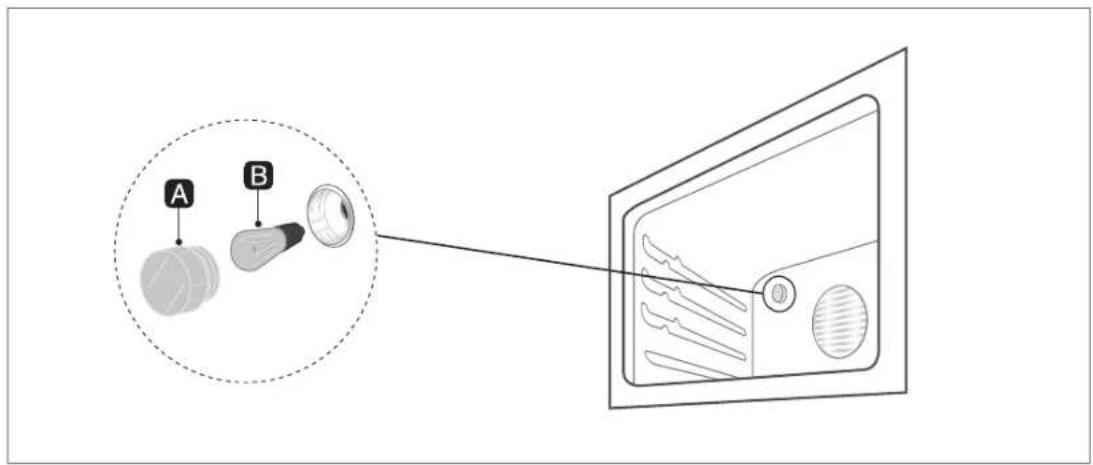
fig. 22
natural_image
Symbol of a trash bin with crossed x's and no accompanying text or labelsIT
The crossed-bin symbol on the product indicates that Waste deriving from Electrical and Electronic Equipment (WEEE) must not be thrown away with general waste (i.e. with the "mixed municipal waste"), but handled separately so as to be reused or be subjected to specific treatment to remove and safely dispose of any substances that are harmful to the environment and extract the raw materials that can be recycled. In every member state of the European Union, WEEE should therefore be delivered to specialised Collection Centres in accordance with the provisions of the laws and regulations in force. The WEEE can also be handed over to the retailer when a new appliance is purchased, who is obliged to accept this free of charge ("one to one" basis). The unlawful disposal of the product by the user will result in administrative sanctions.
FR
- FORNO INCASSO ELETTRICO
- INTRODUZIONE
- TEGLIA FORNO:
- AIRFRYER:
- IMPORTANT:
- SUMMARY
- INSTRUCTIONS FOR THE INSTALLER:
- INSTRUCTIONS FOR THE USER:
- PRESENTATION
- OVEN USE AND SAFETY WARNINGS
- RESPECTING THE ENVIRONMENT
- INSTALLATION
- Electrical connection
- ATTENTION!
- Oven positioning
- DESCRIPTION OF THE CONTROLS
- THERMOSTAT:
- MECHANICAL MINUTE COUNTER:
- MINUTE MECHANICAL COOKING END TIMER:
- THERMOSTAT SIGNALLER (ORANGE):
- TURN ON SIGNALLER (GREEN) (if provided):
- Cooking with roasting-jack (if provided):
- Electronic programmer
- Auto
- Man
- FUNCTIONS LIST:
- MENU BUTTON
- MINUS BUTTON
- PLUS BUTTON
- Setting the time of day (24 h clock):
- Manual operation:
- Setting the minute minder:
- Cooking timer:
- Cooking time with delay:
- Adjusting the buzzer tone:
- Child lock activation / deactivation:
- OVEN USE
- General warnings and recommendations
- Cooling ventilation (if provided)
- Internal lighting lamp
- AVAILABLE ACCESSORIES
- PAN SUPPORT:
- BAKING PAN::
- AIR FRYER:
- COOKING ADVICE
- The Grill
- WARNING!
- Energy saving
- Function setting: Steam assisted cooking (STEAM)
- CAKES / SWEETS / BREAD
- FROZEN READY MEALS
- REGENERATION OF DISHES
- CLEANING AND MAINTENANCE
- Cleaning the stainless steel
- Daily routine cleaning
- Food or residue stains
- Cleaning the oven (without self-cleaning panels)
- Glass door
- Oven cavity cleaning with VAPOclean\* function (with steam)
- Cleaning the embossed base of the oven cavity
- Drying the gutter
- Replacement of the internal lighting lamp
- Dismantling of the door
- Dismantling of oven door gaskets
- Disassembling the shelf supports
- Notes
- FOUR ÉLECTRIQUE ENCASTRABLE
- INTRODUCTION
- ACCESSOIRES DISPONIBLES
- LECHEFRITE:
- AIRFRYER :
- BANDEJA DE COCCIÓN:
- IT
- FR
Brand : Glem Gas
Model : GFX62WHS3
Category : Oven