RUF10 HS - Microphone Reloop - Free user manual and instructions
Find the device manual for free RUF10 HS Reloop in PDF.



| Brand | Reloop |
| Model | RUF10 HS |
| Product type | Wireless headset microphone with Bodypack transmitter |
| Operating frequency | 863-865 MHz (UHF) |
| Frequency stability | ±10 ppm |
| Receiver sensitivity | 13 dBµV |
| Adjacent channel rejection | 75 dB |
| Image rejection | 95 dB |
| Audio output | 200 mV |
| XLR output impedance | 200 ohms |
| 6.3 mm jack output impedance | 1 kohms |
| Signal-to-noise ratio | 100 dB |
| Harmonic distortion | < 0.1 % |
| Frequency response | 50 Hz - 15 kHz |
| Maximum range (free field) | 100 m |
| Receiver power supply | DC 12-18 V (power adapter included) |
| Transmitter power supply | 3 V (2 AA batteries, not included) |
| Transmit power | < 10 mW |
| Spurious emissions | < 65 dB |
| Receiver housing | Metal |
| Main functions | Automatic frequency search, IR synchronization, group and channel selection, volume adjustment, XLR and jack outputs |
| Maintenance | Use a slightly damp cloth, no solvents |
| Safety | Do not expose to liquids, excessive heat, or humidity. Disconnect before cleaning |
| Spare parts and repairability | No user-replaceable internal parts. Contact a qualified technician |
Frequently Asked Questions - RUF10 HS Reloop
User questions about RUF10 HS Reloop
0 question about this device. Answer the ones you know or ask your own.
Ask a new question about this device
Download the instructions for your Microphone in PDF format for free! Find your manual RUF10 HS - Reloop and take your electronic device back in hand. On this page are published all the documents necessary for the use of your device. RUF10 HS by Reloop.
USER MANUAL RUF10 HS Reloop
natural_image
Abstract geometric shape composed of overlapping gray rectangles with white inner lines (no text or symbols)RUF-10 HH / RUF-10 HS

text_image
eRELOOP®Bedienungsanleitung
ACHTUNG!
For your own safety, please read this operation manual carefully before initial operation! All persons involved in the installation, setting-up, operation, maintenance and service of this device must be appropriately qualified and observe this operation manual in detail. This product complies with the requirements of the applicable European and national regulations. Conformity has been proven. The respective statements and documents are deposited at the manufacturer.
Mode d'emploi
ATTENTION!
To prevent fire or avoid an electric shock do not expose the device to water or fluids! Never open the housing!
ATTENTION!
Keep information for further reference!
natural_image
Black wireless audio recording device with microphone and external antennas (no visible text or symbols)Reloop RUF-10 HS:
natural_image
Black audio recording device with earphones and external microphone (no visible text or symbols)text_image
POWER SW MW MIC ⑥7 8Adjacent Channel Rejection: 75 dB
Image Rejection: 95 dB
Audio Output: 200 mV
Output Impendance:....XLR 200 Ohm; 6,3 Klinke 1k-Ohm
Spurious Emission: ....<65 dB
Modulation: ......FM
Max. Modulation:....75K
Congratulations on purchasing your Reloop Reloop RUF-10 HH or RUF-10 HS. Thank you for placing your trust in our technology. Before operating this equipment we ask you to carefully study and observe all instructions.
Please remove the Reloop RUF-10 HH or RUF-10 HS from its packaging. Check before initial operation to make sure that the device has not been visibly damaged during transport. If you detect any damage to the power cable or the casing, do not operate the device. Contact your specialised dealer.
SAFETY INSTRUCTIONS
- For reasons of safety and approval (CE) the personal reconstruction and/or modification of these products is prohibited. Please observe that damage caused by modifications performed manually to this device is not covered by the implied warranty.
- These products leave our works in a perfect condition. Please observe all notes in these operating instructions to warrant this condition and the safe operation of the products!
- Any damage caused as a result of the non-compliance with these operating instructions leads to the expiration of any implied warranty claim. The manufacturer does not accept liability for any damage to property or for personal injury resulting from the improper handling of the products, or non-observance of the operating instructions.
- If used for any purpose other than described in these operating instructions, the products may suffer damage and the implied warranty expires. Also, any other use is linked with risks such as short circuits, fire, electrical shock, etc.
- The inside of the device does not contain any parts which require maintenance, with the exception of wear parts that can be exchanged from the outside. Qualified staff must carry out maintenance, otherwise the warranty does not apply!
- Ensure that the power supply is only activated following the complete installation of the device and wiring of all connections. Always plug in the mains plug last. Ensure that the mains switch is in the „O“ position when connecting the device to power.
- Only use cables that comply with regulations. Observe that all jacks and bushes are tightened and correctly hooked up. Refer to your dealer if you have any questions.
- Ensure that when setting up the product the mains cable is not pinched or damaged by sharp edges.
- Prevent the mains cable from coming into contact with other cables! Exercise great care when handling mains cables and connections. Never touch these parts with wet hands!
- Connect the power cable exclusively to appropriate outlets. The only supply point to be used is a supply outlet in accordance with specifications of the public supply network.
- Disconnect the device from the supply outlet when not in use and before cleaning! Be sure to hold the mains plug by the body. Never pull the mains cord!
- Position the device on a horizontal and stable low-flame base.
- Avoid any concussions or violent impact when installing or operating the device.
- When selecting the location of installation make sure that the device is not exposed to excessive heat, humidity, and dust. Be sure that no cables lie around openly. You will endanger your own safety and that of others!
- Do not rest any containers filled with liquid that could easily spill onto the device or in its immediate vicinity. If, however, fluids should access the inside of the device, immediately disconnect the mains plug. Have the device checked by a qualified service technician before re-use. Damage caused by fluids inside the device is excluded from warranty.
- Do not operate the device under extremely hot (in excess of 35^ C) or extremely cold (below 5^ C) conditions. Keep the device away from direct exposure to the sun and heat sources such as radiators, ovens, etc. (even during transport in a closed vehicle).
- The device must not be operated after being taken from a cold environment to a warm environment. The condensation caused hereby may destroy your device. Do not switch on or operate the device until it has reached ambient temperature!
- Controls and switches should never be treated with spray-on cleaning agents and lubricants. This device should only be cleaned with a damp cloth. Never use solvents or cleaning fluids with a petroleum base for cleaning.
- When relocating, the device should be transported in its original packaging.
- Devices supplied by voltage should not be left in the hands of children. Please exercise particular care when in the presence of children.
- At commercial facilities the regulations for the prevention of accidents as stipulated by the association of professional associations must be observed.
- At schools, training facilities, hobby and self-help workshops the operation of the device must be monitored with responsibility by trained staff.
- Keep this operation manual in a safe place for later reference in the event of questions or problems.
APPLICATION IN ACCORDANCE WITH REGULATIONS
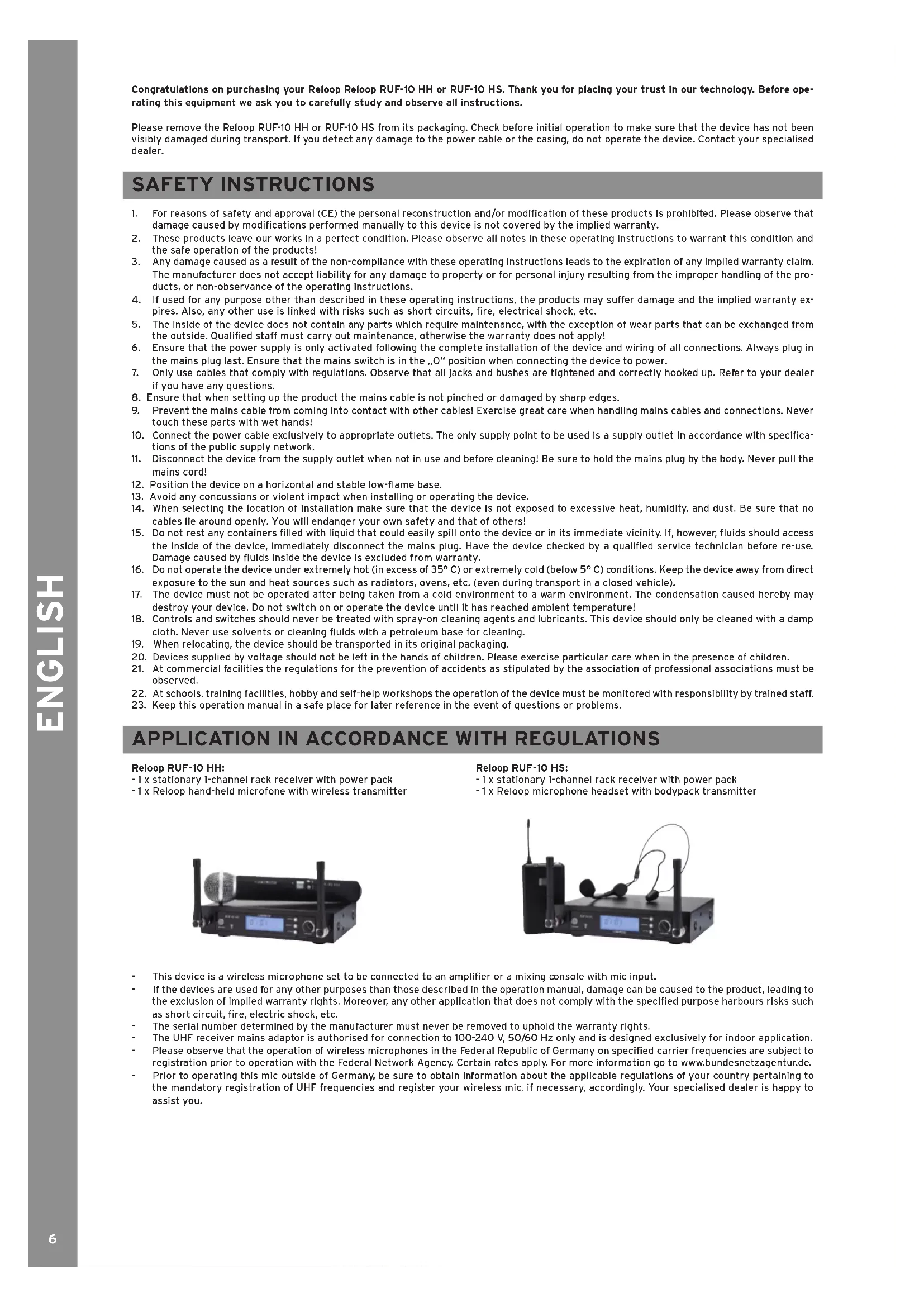
Reloop RUF-10 HH:
- 1 x stationary 1-channel rack receiver with power pack
- 1 x Reloop hand-held microfone with wireless transmitter
Reloop RUF-10 HS:
- 1 x stationary 1-channel rack receiver with power pack
-1 x Reloop microphone headset with bodypack transmitter
natural_image
Black and white photo of a wireless audio recording device with microphone, dials, and control panel (no visible text or symbols)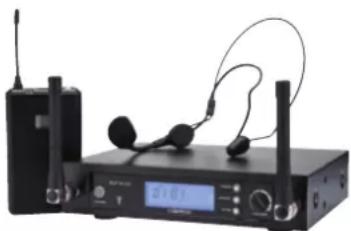
natural_image
Black electronic device with earphones and a digital display, no visible text or symbols- This device is a wireless microphone set to be connected to an amplifier or a mixing console with mic input.
- If the devices are used for any other purposes than those described in the operation manual, damage can be caused to the product, leading to the exclusion of implied warranty rights. Moreover, any other application that does not comply with the specified purpose harbours risks such as short circuit, fire, electric shock, etc.
- The serial number determined by the manufacturer must never be removed to uphold the warranty rights.
- The UHF receiver mains adaptor is authorised for connection to 100-240 V, 50/60 Hz only and is designed exclusively for indoor application.
- Please observe that the operation of wireless microphones in the Federal Republic of Germany on specified carrier frequencies are subject to registration prior to operation with the Federal Network Agency. Certain rates apply. For more information go to www.bundesnetzagentur.de.
- Prior to operating this mic outside of Germany, be sure to obtain information about the applicable regulations of your country pertaining to the mandatory registration of UHF frequencies and register your wireless mic, if necessary, accordingly. Your specialised dealer is happy to assist you.
OPERATING ENVIRONMENT
The products must be operated and stored in a dry environment only! Splash water, rain, humidity, fog may cause serious damage. The limit value for relative humidity is 50% at 45°C.
The products must be operated at a temperature range of between 5 °C and 35 °C only. Protect the products against direct exposure to sunlight or other heat, such as from radiators!
If the products are taken from a cold environment into a warm environment they must only be taken into operation once they have reached ambient temperature, since the condensation created by the difference in temperature may destroy the products!
Protect the products against dust!
OPERATION
Controls
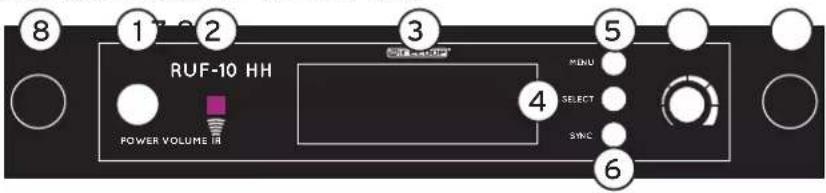
Front side UHF receiver RUF-10 HH, RUF-10 HS
text_image
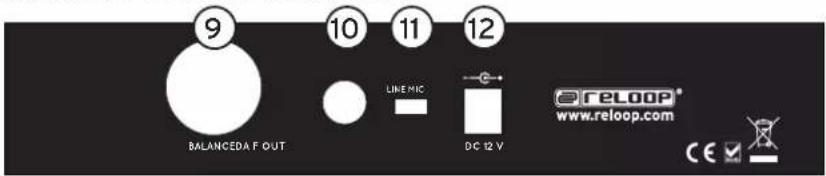
RUF-10 HH POWER VOLUME IR MINI SELECT SYNC 8 1 2 3 4 5 6Rear panel UHF receiver RUF-10 HH, RUF-10 HS
text_image
9 10 11 12 BALANCEDA F OUT LINE MIC DC 12 V reLOOP® www.reloop.com CE- ON/OFF Button
- IR Signal Display
- LCD (Group & Channel; RF & AF Display)
- Select Button: selects between the various display modes
- Menu Button: selects the menu layer
- Sync Button: connects receiver and transmitter
- Volume: adjusts volume level
- Aerial Terminal: connection for the included aerials
- Individually balanced XLR output
- 6.3mm Jack Connection
- Mic/Line Select Switch
- Connection for Power Supply
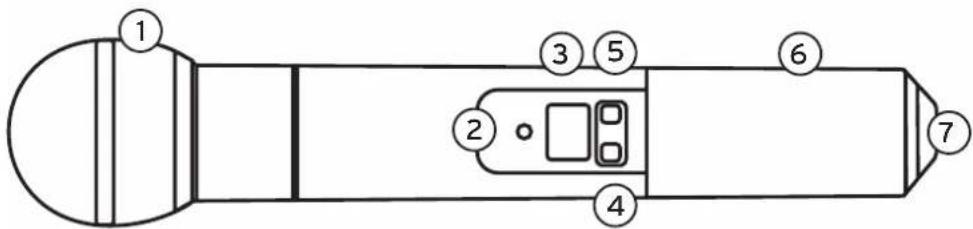
RUF-10 HH Handheld Microphone
text_image
1 2 3 4 5 6 7- Exchangeable Microphone Head
- Status LED: green: ready; orange: mute on; blinking: connection is being carried out
- LCD: Groups/Channel No.; Battery Display
- On/Off/Mute: press 2 seconds to turn on/off; press briefly for mute on/off
- Select: manual adjustment of radio channel
- Battery Protection: revolvable
- IR Port
text_image
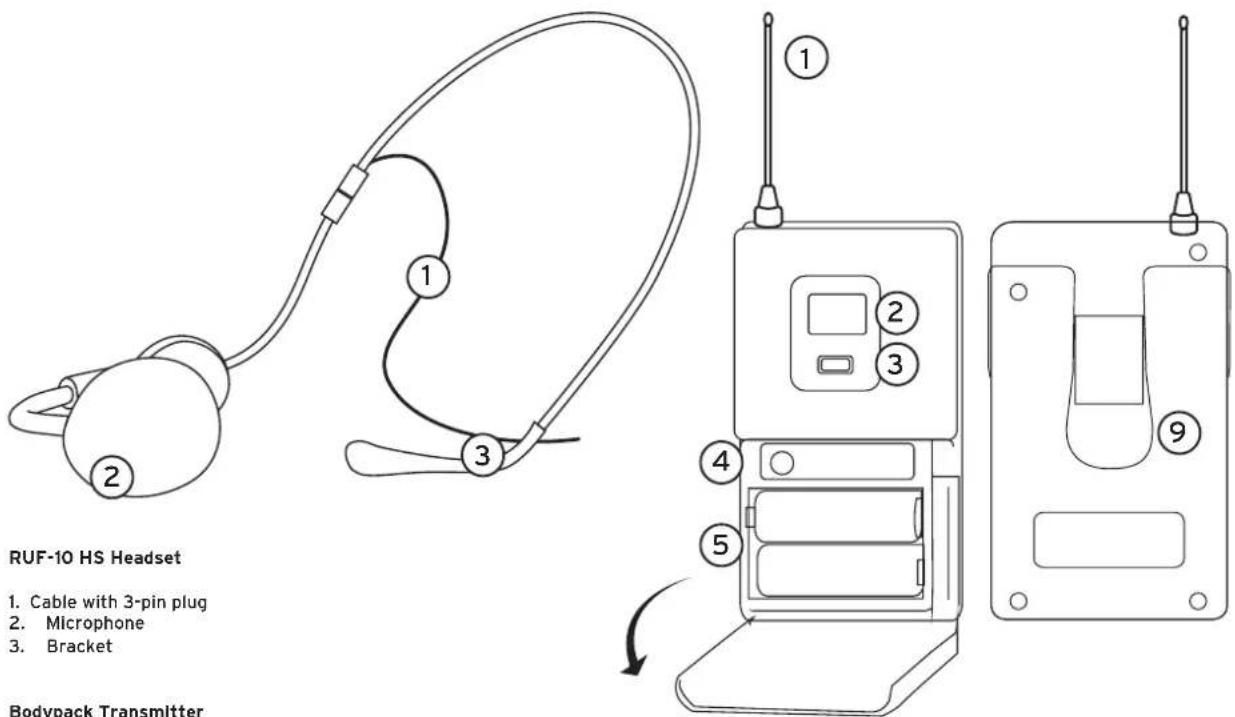
RUF-10 HS Headset 1. Cable with 3-pin plug 2. Microphone 3. Bracket Bodypack TransmitterRUF-10 HS Headset
- Cable with 3-pin plug
- Microphone
- Bracket
Bodypack Transmitter
- Antenna
- LCD: Groups/Channel No., Battery Display
- Select: manual adjustment of radio channel
- IR Port
- Battery Cover
- Status LED: green: ready; orange: mute on; blinking: connection is being carried out
- On/Off/Mute: press 2 seconds to turn on/off; Press briefly for mute on/off
- 3-pin Microphone Input
- Belt Clip
text_image
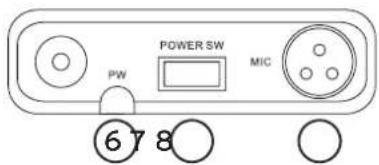
POWER SW MW MIC ⑥7 8Connect the included antennas by turning them towards the corresponding receiver connection -8-.
Connect the receiver to the mains cable.
Turn the device on via the power switch -1-.
Receiver's Automatic Frequency Search:
-
Turn on the receiver.
-
Press Menu -5- and then Select -4-.
The receiver will now automatically search for a free channel.
Automatic Transmitter Adjustment:
After the receiver has found a channel please turn on the transmitter.
Open the microphone's Battery Cover -6- (Bodypack -5-) and insert two AA-Mignon 1.5 volt batteries. Please make sure to observe the correct polarity. Keep the battery compartment open to ensure a free antenna.
- Turn on the microphone via the On/Off Switch -4- (Bodypack -7-). The Status LED -2- is illuminated green.
- Point the handheld mic's IR Port -7- (Bodypack -4-) to face the receiver IR -4-. Then press the Sync Button -6- at the receiver.
- The status LED will briefly blink orange; after the connection is complete it will turn to green.
Close the battery compartment.
Operating Several Systems:
Repeat these steps.
Make sure that only the IR port of the handheld mic or belt pack that needs to be set up is exposed.
When you start operating a second receiver, the first one has to remain turned on.
Manual Receiver Select Channel/Groups
General:
Manual groups (pre-programmed frequency sets) and channels respectively, can be of help when several microphones have to be adjusted or different systems are in use.
Manual Groups:
- Press Menu -5- three times. The display will show, Group Select'.
- Repeatedly press Select -4- until the desired group number is displayed.
- When the desired group is being displayed, either wait 5 seconds until the display goes out or press Sync -6-.
Manual Channels:
- Press Menu -5- twice. The display will show, Channel Select'.
- Repeatedly press Select -4- until the desired channel number is displayed.
- When the desired channel is being displayed, either wait 5 seconds until the display goes out or press Sync -6-.
Manual Transmitter Select Channels/Groups
- Press and hold Select -5- (Bodypack -3-). Group/Channel display will blink.
- To manually adjust the groups, release the Select Button while GROUP is being displayed. Use the Select Button to select the desired group.
- To manually adjust the channel, release the Select Button while CHANNEL is being displayed. Use the Select Button to select the desired channel.
MAINTENANCE
- Check the technical safety of the device regularly for damage to the mains line or the casing, as well as for wear of wear parts such as switches.
- If it is to be assumed that the safe operation is no longer feasible then the device must be disconnected and secured against accidental use.
- It must be assumed that a safe operation is no longer feasible if the device bears visible defects, if the device no longer functions, following longer storage under unfavourable conditions or after major transport stress.
TECHNICAL SPECIFICATIONS
Receiver:
- Frequency: 863-865 MHz
- Frequency Stability:......10 ppm
- Sensibility:....13 dBuV
- Adjacent Channel Rejection: ..75 dB
- Image Rejection:......95 dB
- Audio Output: 200 mv
- Output Impedance:....XLR 200 ohms; 6.3mm Jack 1k-ohms
- S/N Ratio: 100 dB
- Distortion: ....<0.1%
- Frequency Response:.....50 Hz- 15 kHz
- Range:....100 m (without any structural barriers)
- Power Supply: ......DC 12v - 18v
- Housing: Metal
Transmitter:
- Frequency: 863-865 MHz
- Frequency Stability:......10 ppm
- Transmitting Performance: <10 mw
- Spurious Emission:....<65 dB
- Modulation:.....fm
- Max. Modulation:....75k
- Power Supply: 3v (2 AA batteries)
Reloop Distribution
Global Distribution GmbH, Schuckertstrasse 28, 48153 Münster / Germany
Fax: +49.251.6099368, www.reloop.com
Subjects to alterations.
Illustrations similar to original product.
Misprints excepted.
natural_image
Black and white photo of a wireless audio recording device with microphone, dials, and control panel (no visible text or symbols)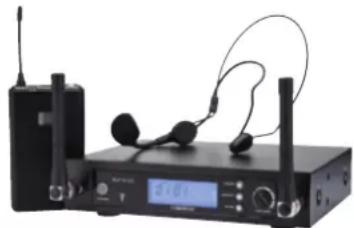
natural_image
Black electronic device with earphones and a digital display, no visible text or symbolstext_image
POWER SW MW MIC ⑥7 8MISE EN SERVICE RUF-10 HH HS
Modulation: ......FM
Modulation max:....75 K