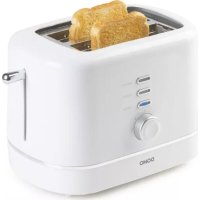
DO964T - Toaster DOMO - Free user manual and instructions
Find the device manual for free DO964T DOMO in PDF.



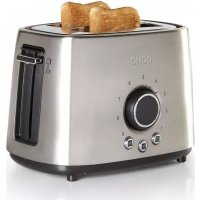
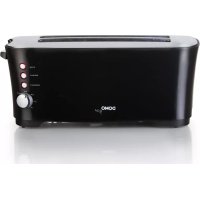
| Product type | Toaster |
| Brand | DOMO |
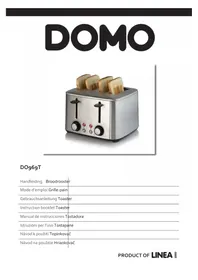
| Model | DO964T |
| Power supply | 230 V ~ 50 Hz (estimate for Europe) |
| Main functions | Toasting, reheating (REHEAT), defrosting (DEFROST), cancel (CANCEL) |
| Controls | Lever knob, browning control dial, on/off buttons, reheat, defrost |
| Capacity | 1 to 2 slices of bread |
| Self-centering bread guides | Yes, for even toasting |
| Automatic pop-up | Yes, at end of cycle |
| Safety | Auto shut-off, hot surface, do not immerse, do not use metal objects |
| Cleaning | Removable crumb tray, clean with damp cloth, do not immerse |
| Cord storage | Under toaster, storage compartment |
| Warranty | 2 years from date of purchase (accessories and consumable parts: 6 months) |
| Customer service | +3214217191, info@linea2000.be (Mon-Fri) |
| Intended use | Household and indoor use only |
| Materials | Not specified |
| Weight | Not specified |
| Included accessories | Not specified |
Frequently Asked Questions - DO964T DOMO
User questions about DO964T DOMO
0 question about this device. Answer the ones you know or ask your own.
Ask a new question about this device
Download the instructions for your Toaster in PDF format for free! Find your manual DO964T - DOMO and take your electronic device back in hand. On this page are published all the documents necessary for the use of your device. DO964T by DOMO.
USER MANUAL DO964T DOMO
Instruction booklet Toaster
△PRODUCTSPECIFIEKE WAARSCHUWINGEN
PROBLEM EN OPLOSSING
Chere cliente, cher client,
All of our products are always submitted to a strict quality control before they are sold to you.
Should you nevertheless experience problems with your device, we sincerely regret this.
In that case, we kindly request you to contact our customer service.
Our staff will gladly assist you.

+3214217191

info@linea2000.be
Monday-Thursday:8.30-12.oo and 13.00-17.00
Friday: 8.30 - 12.00 and 13.00 - 16.30
This appliance has a two year warranty period. During this period the manufacturer is responsible for any failures that are the direct result of construction failure. When these failures occur the appliance will be repaired or replaced if necessary. The warranty will not be valid when the damage to the appliance is caused by wrong use, not following the instructions or repairs executed by a third party. The guarantee is issued with the original till receipt. All parts, which are subject to wear, are excluded from the warranty. If your device breaks down within the 2-year warranty period, you can return the device together with your receipt to the shop where you purchased it.
The guarantee on accessories and components that are liable to wear-and-tear is only 6 months.
The guarantee and responsibility of the supplier and manufacturer lapse automatically in the following cases:
If the instructions in this manual have not been followed.
- In case of incorrect connection, e.g. electrical voltage that is too high.
In case of incorrect, rough or abnormal use.
In case of insufficient or incorrect maintenance.
In case of repairs or alterations to the device by the consumer or non-authorised third parties.
- If the customer used parts or accessories that are not recommended or provided by the supplier / manufacturer.
SAFETYINSTRUCTIONS
When using electrical appliances, basic safety precautions should always be taken, including the following:
- Read all instructions carefully. Keep this manual for future reference.
- Make sure all packaging materials and promotional stickers have been removed before using the appliance for the first time. Make sure children cannot play with the packaging materials.
-
This appliance is intended to be used in household and similar applications such as:
-
staff kitchen areas in shops, offices and other working environments;
farm houses;
- by clients in hotels, motels and other residential type environments;
- bed and breakfast type environments.
- Children should be supervised to ensure that they do not play with the appliance.
- This appliance can be used by children aged from 16 years and above and persons with reduced physical, sensory or mental capabilities or lack of experience and knowledge if they have been given supervision or instruction concerning use of the appliance in a safe way and understand the hazards involved.
Children shall not play with the appliance. - Cleaning and user maintenance shall not be made by children unless they are older than 16 or supervised.
- Keep the appliance and its cord out of reach of children younger than 16 years.
- All repairs should be carried out by the manufacturer or its aftersales service.
- Any injury or damage caused by failure to comply with these rules are at your own risk. Neither the manufacturer, importer, or the supplier may be held liable.
ELECTRICALWARNINGS
- In order to avoid a hazard this appliance must not be supplied through an external switching device, such as a timer or a separate remote control, or connected to a circuit that is regularly switched on and off by the utility.
- The appliance must be disconnected from its power source when not in use, during service and when replacing parts. Allow to cool before putting on or taking off parts, and before cleaning the appliance. To disconnect, turn controls to "OFF" or "o" position, then remove the plug from the wall. Never pull the cord or appliance to remove the plug from the socket.
- Before use, check carefully that the electric tension and frequency of the power net at your home match the indications on the rating label of the appliance.
- The appliance must be plugged into an appropriate outlet that is installed and grounded in accordance with local installation regulations.
-
Do not let the power supply cord hang over the edge of a counter, or touch hot surfaces.
-
Keep the power cord away from hot parts and don't cover the appliance.
- Unwrap the cord completely to prevent overheating of the cord. Do not allow the power cord supply to run underneath or around the unit.
- The appliance may not be used with an extension lead or a multiple socket.
- Do not operate this appliance with a damaged cord or plug or in the event the appliance malfunctions or has been damaged in any manner. Return the appliance to the DOMO Service Department or its service agent for examination, repair, or electrical or mechanical adjustment. Do not try to repair the appliance yourself.
INSTALLATION
- Do not place near flammable materials, gases or explosives.
- Do not use or store this appliance outdoors.
- Always use the appliance on a steady, dry and level surface.
- Never place this appliance near a gas stove or electrical stove or in a place where it may come into contact with a warm appliance.
USE
- Do not use this appliance for other than intended use.
- Only use the appliance for domestic use. The manufacturer cannot be held responsible for accidents that result from improper use of the appliance or not following the instructions described in this manual.
- Never leave the appliance unattended while it is functioning.
- Do not operate the appliance with wet hands.
- The use of accessories that are not recommended or sold by the manufacturer can cause fire, electrical shock or injuries.
Only use the utensils delivered with the appliance.
CLEANING AND MAINTENANCE
- To protect against electrical shock or burns, do not immerse unit, cord, or plug in water or other liquid.
- Failure to maintain this appliance in a clean condition could adversely affect the life of the appliance and possibly result in a hazardous situation.
PRODUCT-SPECIFICWARNINGS
- The bread may burn, therefore do not use the toaster near or below inflammable materials such as curtains.
- The surfaces of the appliance are likely to get hot during use. It is advised not to touch the surfaces of the appliance when it is in use to avoid burns.
- Do not move the appliance while in use or when still hot. Allow to cool before moving the appliance.
- Do not place near objects that may catch fire, such as curtains, towels, etc...
- Do not use the appliance if there is any water in it or the parts are still wet after cleaning.
- Caution: never use sharp or metal objects to remove the toast from the toaster.
- Make sure that the slices of bread are not too thick. Do not wrap them in aluminium foil! It could cause electrical shock or fire.
- Caution: be careful not to toast the bread for too long. It could cause fire.
SAVE THESE INSTRUCTIONS FOR FUTURE REFERENCE
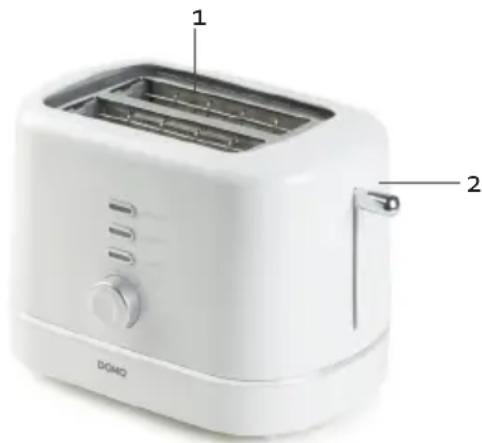
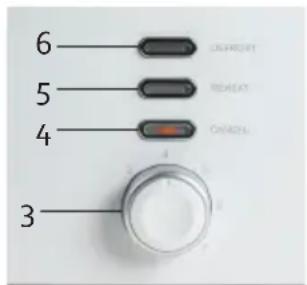
PARTS
- Slot
- Breadlift
- Browning control
- CANCEL
- REHEAT
- DEFROST
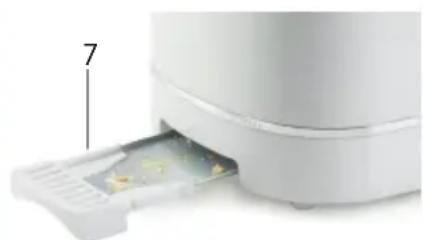
- Crumb tray
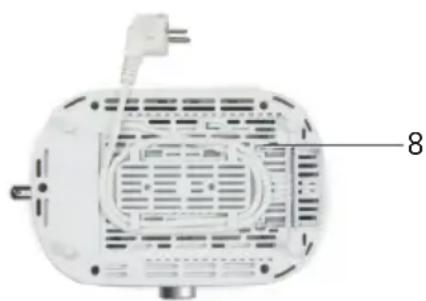
- Cord storage
BEFORE THE FIRST USE
-
Remove the packaging, wipe the outside thoroughly with a soft dry cloth.
-
Use the toaster for the first time without any bread in it. Press down the breadlift and put the browning control to the maximum position. This way you will burn existing dust that has fallen into the toaster during production or transport. During this first use small smoke and odeur development is possible. This is normal.
USE
- For toasting bread, plug in the toaster.
- Choose the desired browning degree en put the bread in the slot.
- Press down the breadlift until it clicks. The heating element is now activated. The bread will be centered automatically for even toasting.
- The toasted bread will pop up automatically when the toasting time has passed. The appliance will automatically switch off.
Caution: never use any sharp objects to remove the toast from the toaster.
- After use, unplug the appliance.
CANCEL BUTTON
The cancel button can be used to interrupt the toasting at any time.
REHEAT FUNCTION
If you want to reheat toasted bread, use the reheat function. Place the bread that you want to reheat in the slot. Press the bread lift down until it clicks and press the heating button. The button will light up. The bread will heat up briefly without browning. Once the bread is heated, the bread lift will pop up and the toasted bread can be removed from the slot. The light will turn off automatically.
DEFROST FUNCTION
If you want to toast frozen bread, first set the desired degree of browning. Press the bread lift down until it clicks and press the defrost button. The button will light up. A longer roasting time is taken into account. Once the bread is toasted, the bread lift will pop up and the toasted bread can be removed from the slot. The light will turn off automatically.
CLEANING AND MAINTENANCE
- Remove the plug from the outlet before cleaning the appliance. Allow the appliance to cool completely.
- Wipe the outside of the toaster with a damp cloth and dry thoroughly. Never use aggressive or abrasive cleaning agents.
- Do not use a fork or any sharp, metal objects to clean the inside of the toaster. This may damage the heating elements.
- Before cleaning the crumb tray, remove the plug from the socket and wait for the toaster to cool down. Slide the crumb tray out of the toaster. Throw the bread crumbs collected in the crumb tray into the bin. Clean the crumb tray with a damp cloth. Always dry the tray thoroughly before replacing it into the toaster.
Do not wrap the lead around the appliance. Rather, use the lead storage on the bottom of the toaster.
PROBLEM AND SOLUTION
| PROBLEM SOLUTION | |
| There's smoke coming out of the toaster during use. | Press the stop button (CANCEL) to end toasting. |
| My toast is ready but the toasting time has not yet expired. | Press the stop button (CANCEL) to end toasting. |
| The appliance emits a burnt smell during use. Clean | the appliance and the crumb tray as described in the 'Cleaning and maintenance' section. |
ENVIRONMENTAL GUIDELINES
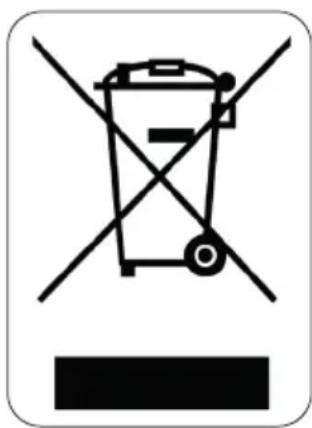
This symbol on the product or on its packaging indicates that this product may not be treated as household waste. Instead it must be brought to the applicable collection point for recycling of electrical and electronic equipment. By ensuring this product is disposed of correctly, you will help prevent potential negative consequences for the environment and human health, which could otherwise be caused by inappropriate waste handling of this product. For more detailed information about recycling of this product, please contact your local city office, your household waste disposal service or the shop where you purchased the product.
The packaging is recyclable. Please treat the packaging ecologically.
GARANTIA
- △PRODUCTSPECIFIEKE WAARSCHUWINGEN
- PROBLEM EN OPLOSSING
- SAFETYINSTRUCTIONS
- ELECTRICALWARNINGS
- INSTALLATION
- USE
- CLEANING AND MAINTENANCE
- PRODUCT-SPECIFICWARNINGS
- SAVE THESE INSTRUCTIONS FOR FUTURE REFERENCE
- PARTS
- BEFORE THE FIRST USE
- CANCEL BUTTON
- REHEAT FUNCTION
- DEFROST FUNCTION
- CLEANING AND MAINTENANCE
- PROBLEM AND SOLUTION
- ENVIRONMENTAL GUIDELINES
- GARANTIA
Brand : DOMO
Model : DO964T
Category : Toaster