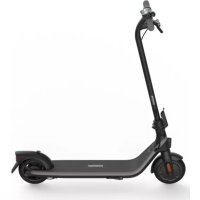
USER MANUAL Ninebot KickScooter E2 SEGWAY
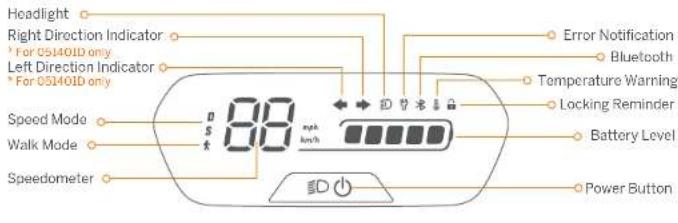
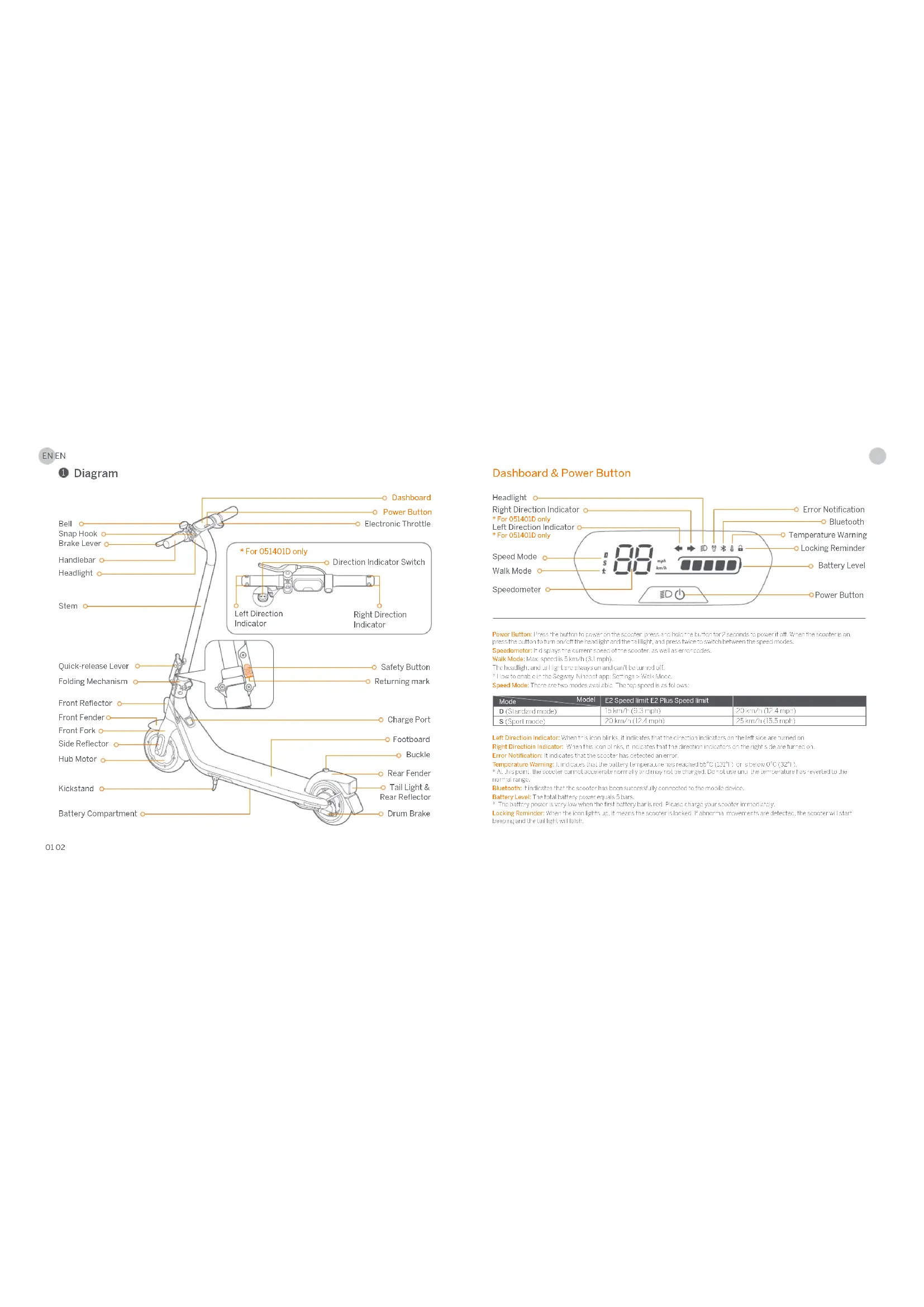
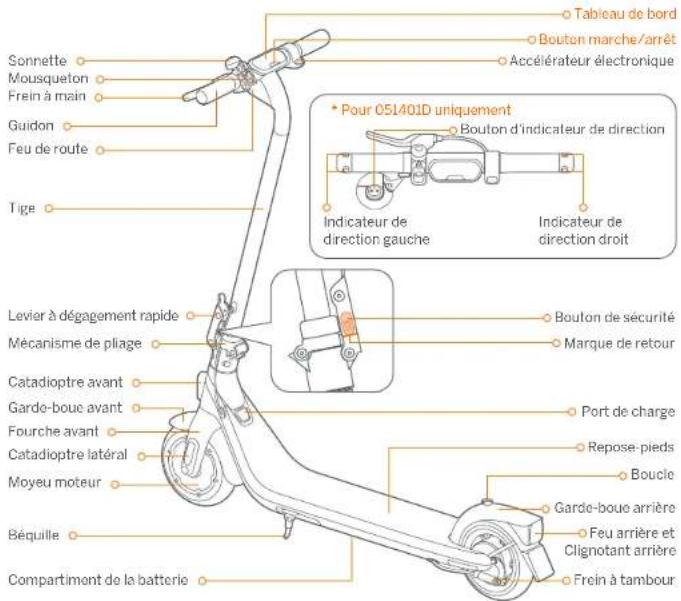
Power Button Press the button to power on the accelerometer and hold the button for 2 seconds to power it off. When the accelerometer is pressed, the button turns off the handlight and the flashlight, and press how to switch between the speed modes.
Sponderometer : Inquiring : The current EjectionWave Mode : Max : 60s : a km / ft ( 2 . 5 m )
The haeefieft and bail are aee ane enanen let rred
Hoo hnoeepn the Sanyay-Nneon 0eol n: Selins > Wk
Speed Mode. There are two modes available. The top speed is as follows:
| Model | E2 Speed limit | E2 Plus Speed limit |
| D (Standard mode) | 18 km/h (9.5 mph) | 20 km/h (12.4 mph) |
| S (Sport mode) | 20 km/h (12.4 mph) | 25 km/h (15.5 mph) |
Left Direction Indicator: When this con bines, it indicates that the direction indicators on the left side are turned on.
Right Direction Indicators: When his plan begins, it indicates that the directed and indicators on the right side are Lured by
Error Notification: Indicate that the user cannot enter a correct error
Temperatour Waring: 1. 5. 5. 5. 5. 5. 5. 5. 5. 5. 5. 5. 5. 5. 5. 5. 5. 5. 5. 5. 5. 5. 5. 5. 5. 5. 5. 5. 5. 5. 5. 5. 5. 5. 5
*At his point, the scooter cannot accelerate normally and may not be charged. Do not use until the temperature has reverted to the
1
bodt 1 t 1 1 1 1 1 1 1 1 1 1 1 1
Battery Level: The total battery power equals 1 bars.
The battery power is very low when the first battery bar is red. Please charge your scototimmediately.
Locking Reminders: When the beacon lights i.p., it means the scooter is locked. If abnormal movements are detected, the scooter will start, peeping and the tail light will fail.

② Specifications
| Item Parameter | |
| Product | Name | Ninebot KikkoScorer 12 |
| Model | 051401E | 051401D |
| Length × Width × Height | Approx. 1070 × 445 × 1740 mm(42.1 × 17.5 × 44.9 m) | Approx. 1070 × 473 × 140 mm(42.1 × 18.6 × 44.9 m) |
| Folded length × Width × Height | Approx. 1070 × 445 × 504 mm(42.1 × 17.5 × 19.8 m) | Approx. 1070 × 473 × 504 mm(42.1 × 18.6 × 19.8 m) |
| Approx. 142 kg (31.8 lbs) /var Weight |
| Rider | Max. Payload | 90 kg (198 lbs) |
| Recommended Age | 14-60 years old |
| Required Height | 120-50 cm (45-62 m) |
| Machine | Max Speed | Approx. 20 km/h (12 mph) |
| Theoretical Range | Approx. 25 km (15.5 miles) |
| Typical Range | Approx. 20 km (12.4 miles) |
| Max. Slap | Approx. 12% |
| Traversible Terrain | Mostly smooth roads or normal asphalt, tarmac roads |
| Operating Temperature | -10-40°C (24-124°F) |
| Storage Temperature | -10-50°C (44-122°F) |
| IP Rating | IPX4 |
| Duration of Charging | Approx. 7.5 h |
| Battery | Nomine Voltage | 21.5 V= |
| Max Charge Voltago | 25.2 V= |
| Charging Temperature | 0°C-44°C (32-111°F) |
| Nomine Energy | 220 W# |
| Nomine Capacity | 10.2 Ah |
| Battery Management System | Protection against overvoltage/undervoltage/short current/overcurrent/non-voltage temperature |
| Motor | Nomine Power 0.25 kW, 250 W | |
| Max. power 0.75 kW, 750 W | |
| Charger | Model | Nebus2020T100-10 Newb2020T100-PowerSupply |
| Output Power | 36.3 W |
| Input Voltago | 100-240 V*30-60 Hz |
| Max. Output Voltago | 25.2 V= |
| Rated Output | 24.2 V=1.5 A |
| Tire | Tires | A-Linon inner hollow shock-absorbing tires |
| Other | Director Indicators | N/A | Front and rear direction indicators |
03.04: The range of the target is limited to 100 m (high, low) and 75 m (low, high). The flow rate of the average of all five water bodies is limited to 20 m/s. The flow rate of the average of all five water bodies is limited to 100 m/s. The speed of the factor that affected range included peak, maximum of water and storage are 100 m/s.
| Item Parameter | |
| Product | Name | N. Nebot KiskScooter T2 Plus |
| Model | 05/402L | 05/402L |
| Length × Width × Height | Approx. 1070 × 445 × 1140 mm (42.1 × 17.8 × 44.9 in) |
| Traded Length × Width × Height | Approx. 1070 × 445 × 504 mm (42.1 × 17.8 × 19.8 in) |
| Net Weight | Approx. 14.4 kg (31.7 lbs) |
| Rider | Max. Payload | 50 kg (998 lbs) |
| Recommended Age | 14–60 years old |
| Required Height | 130-150 cm (43" - 67") |
| Machine | Max. Speed | Approx. 25 km/h (15.5 mph) |
| Theoretical Range | Approx. 25 km (15.5 miles) |
| Typical Range | Approx. 20 km (12.4 miles) |
| Max. Slope | Approx. 12% |
| Traversable Terrain | Mostly smooth roads or normal aspralt terrain roads |
| Operating Temperature | -10-40°C (14-104°F) |
| Storage Temperature | -10-50°C (14-222°F) |
| IP Rating | IPXM |
| Duration of Charging | Approx. 7.5 h |
| Battery | Nominal Voltage | 21.6 V = |
| Max. Charging Voltage | 25.2 V = |
| Charging Temperature | 0°C - 40°C (32-111°F) |
| Nominal Energy | 220 Wh |
| Nominal Capacity | 10.2 A |
| Battery Management System | Protection against overvoltage/underwaive/tight circuit/overcurrent/over temperature |
| Motor | Nominal Power 0.3 kW, 320 W | |
| Max power 0.60 kW, 500 W | |
| Charger | Model NEW25D20IDEN FL | NEW25D2015N US |
| Output Power | 36.8 W |
| Input Voltage | 120-240V=50-60 Hz |
| Max. Output Voltage | 25.2 V = |
| Rated Output | 24.2 V ≦ LEA |
| Tire | Tires | 8 Inch inner hollow shock absorber tires |
- Theoretical Range limit of crystallizing with a full kilnary, 185 bar (75 g/mol), 277 (28°C), 72% of steam speed in aqueous nitrogen environment.
- Theoretical Range limit of crystallizing with a full kilnary, 185 bar (75 g/mol), 277 (28°C), 72% of steam speed in aqueous nitrogen environment.
- Some of the factors that effect range limit, code, and number of steps are: amount of temperature, etc.
EN EN
Certifications
This product is certified to ANSI/CAN/UL-2272 by TUV Rheinland.
The battery complies with UN/DOT 38.3
The battery complies with ANSI/CAN/UL-227L.
European Union Compliance Statement
Important WEEE information

This symbol on the product or on its packaging indicates that used electrical and electronic products should not be mixed with unsorted municipal waste. For proper treatment, it is your responsibility to dispose of your waste properly.
Disposing of this product correctly will help save valuable resources and prevent any potential negative effects on human health and the environment, which could otherwise arise from inappropriate waste handling.
Penalties may be applicable for incorrect disposal of this waste, in accordance with your national legislation. Please contact your local authority for further details of your nearest designated collection point.

This symbol means that batteries and accumulators, at their end-of-life, should not be mixed with unsorted municipal waste. Your participation is an important part of the effort to minimize the impact of batteries and accumulators on the environment and on human health. For proper recycling you can return this product or the batteries or accumulators it contains to your supplier or to a designated collection point.
Disposing of this product correctly will help save valuable resources and prevent any potential negative effects on human health and the environment, which could otherwise arise from inappropriate waste handling.
Penalties may be applicable for incorrect disposal of this waste, in accordance with your national legislation. There are separate collection systems for used batteries and accumulators.
Please dispose of batteries and accumulators correctly at your local community waste collection/recycling center.
Radio Equipment Directive
Ninebot (Changzhou) Tech Co., Ltd. hereby declares that the product listed in this section comply with the essential requirements and other relevant provisions of the Radio Equipment Directive 2014/53/EU.
Restriction of the use of certain hazardous substances (RoHS) Directive
Ninebot (Changzhou) Tech Co., Ltd. hereby declares the whole product including parts (cables, cords, and so on)
0506
meets the requirements of RcH5 Directive 2011/65/EU and amendment Commission Delegated Directive (EU)
2015/863 on the restriction of the use of certain hazardous substances in electrical and electronic equipment
(RoHS Recast or ROHS 2.0) Machinery Directive
Ninebot (Changzhou) Tech Co., Ltd. hereby declares that the product listed in this section comply with the essential requirements and other relevant provisions of the Machinery Directive 2006/42/EC.
C
EU Authorised Representative:
Segway-Ninebot Europe
Dynamostraat 7,1014 BN Amsterdam, The Netherlands
Ninebot (Changzhou) Tech Co., Ltd. hereby declares that the product model: 051401E, 051401B, 051401D, 051402E,
01428 comply with the essential requirements and other relevant provisions of the Radiat Equipment Directive 2011/53/Fuel exhaust emissions 2026/10/150 (FCA, HAD) 2011/65/Fuel exhaust emissions
Commission Delegated Directive (FJ) 2015/863.
The declaration of conformity can be viewed at the following address:
https://eu-en.segway.com/instruction-manuals
UK Compliance Statement
Radio Equipment Regulations 2017
Ninebot (Changzhou) Tech Co., Ltd. hereby declares that the product listed in this section comply with the essential requirements and other relevant provisions of Radio Equipment Regulations 2017.
The Restriction of the Use of Certain Hazardous Substances in Electrical and Electronic Equipment Regulations 2012
Ninebot (Changzhou) Tech Co., Ltd. hereby declares the whole product including parts (cables, cords, and so on)
meets the requirements of The Restriction of the Use of Certain Hazardous Substances in Electrical and Electronic Equipment Regulations 2012.
Supply of Machinery (Safety) Regulations 2008
Ninebot (Changzhou) Tech Co., Ltd. hereby declares that the product listed in this section comply with the essential requirements and other relevant provisions of The Safety of Supply of Machinery (Safety) Regulations 2008.
UK CA
UK Authorised Representative:
UKCA Experts Ltd.
Dept 302,43 Owston Road Carcroft, Doncaster, DN6 8DA, United Kingdom
EN EN
Ninebot (Changzhou) Tech Co., Ltd. hereby declares that the product model: 051401B, 051402B comply with the essential requirements and other relevant provisions of the Radio Equipment Regulations 2017, Supply of Machinery (Safety) Regulations 2008 and the Restriction of the Use of Certain Hazardous Substances in Electrical and Electronic Equipment Regulations 2012.
The declaration of conformity can be viewed at the following address: www.segway.com
| Bluetooth | Frequency Band(s) | 2.4000-2.4835GHz |
| Max. RF Power | ≤1mW |
Trademark
Ninetobot is the trademark of Ninetobot (Beijing) Tech Co., Ltd; Segway and the Rider Design are the registered trademarks of Segway Inc., App Store and Apple Logo are trademarks of Apple Inc. Google Play and the Google Play logo are trademarks of Google LLC. The Bluetooth® word mark and logos are registered trademarks owned by Bluetooth S/G Inc. and any use of such marks by Segway-Ninetobot is under license. Other trademarks and trade names are those of their respective owners.
The KickScooter is covered by relevant patents. For patent information, go to http://www.segway.com
We have attempted to include descriptions and instructions for all the functions of the KickScooter at the time of printing. However, due to constant improvement of product features and changes of design, your KickScooter may differ slightly from the one shown in this document. Scan the QR code or visit the Apple App Store (iOS) or the Google Play Store (Android) to download and install the App.
Please note that there are multiple Segway and Ninebot models with different functions, and some of the functions mentioned herein may not be applicable to your unit. The manufacturer reserves the right to change the design and functionality of the KickScooter product and documentation without prior notice.
© 2023 Ninebot (Beijing) Tech Co. Ltd All rights reserved.
The Segway-Ninebot App can support KickSoofter with built-in Bluetooth
Common Failures
| Possible causes/ Error code Solution | |
| 10 | Bluetooth communication failure | Check the connection of the dashboard communication wire and the control cable or contact after-sales service or an authorized dealer. |
| 11 | Abnormal 1A phase current sampling of motor | Please contact after-sales service or an authorized dealer. |
| 12 | Abnormal 1B phase current sampling of motor |
| 13 | Abnormal 1C phase current sampling of motor |
| 14 | Abnormal throttle rail sampling | Check whether the throttle is pressed when powered on or contact, call to take service or an authorized dealer. |
| 15 | Abnormal brake signal sampling | Check whether the brake lever is squeezed when powered on, or contact after sales service or an authorized dealer. |
| 24 | Abnormal default voltage | Check whether the wire connected with the battery cable and the control cable is loose, or contact after sales service or an authorized dealer. |
| 26 | Abnormal data writing/reecing | Please contact after-sales service or an authorized dealer. |
| 31 | Incorrect FI ASH operation |
| 35 | Default S/N | Check whether the KickScooter's S/N is the default S/N. |
| 38 | Abnormal battery temperature | Check the working environment of battery, or contact after-sales service or an authorized dealer. |
| 40 | Abnormal controller temperature | Controller temperature is too high, please contact after-sales service or an authorized dealer. |
| 41 | Abnormal motor temperature | Please contact after-sales service or an authorized dealer. |
| 43 | Motor not calibrated |
| 45 | Abnormal bus-current sampling |
| 50 | Motor phase loss | Check whether the wire connected with the motor and the controller is loose, or contact after sales service or an authorized dealer. |
| 52 | Motor stalled | Check whether the KickScooter is overload or contact after-sales service or an authorized dealer. |

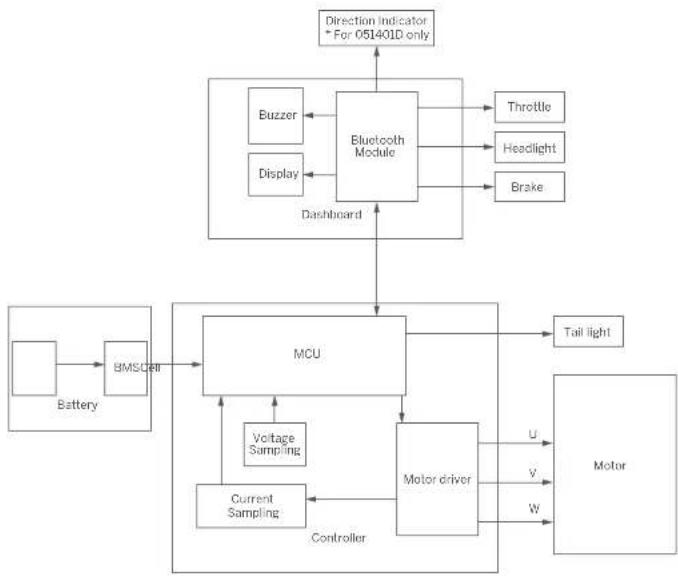
Wiring Diagram
Recommended Maintenance Schedule
To ensure safe riding, city to day care and regular maintenance are essential. You, the owner, have control and knowledge of how often you purchase your scooter, how hard you use it and where you use it. It is the owners responsibility to perform regular checks and bring your scooter to authorized service center for inspection and service. Please note to the manterance scholue below.
Note: This maintenance schedule changes a service fee.
| Item Component | | Vibration/No. | Every 3 months | Every 6 months or every 30 mins (40 km) | After 2 years or the total miles > 500 miles (2000 km) |
| Mainframe maintenance | Main frame nuts | Beac soft net bolt to wipe the mainframe clean | √ | √ | √ |
| Tire wear | Check if the tire is cracked, defrosted, or significantly worn. | | √ | √ |
| Screw in the steering loop | Inspect the screws on the steering wheel. The suggested torque is 5.5±0.3 N·m | √ | √ | √ |
| Inspect the screws on the steering wheel. The suggested torque is 2±0.1 N·m | | √ | √ |
| Inspect the screws on the steering lever. The suggested torque is 2-0.1 N·m | | | |
| Inspect the screws on the steering lap. The suggested torque is 2±0.3 N·m | | | |
| Function inspection | Hub motor | To accelerate and displace the wheel if the hub motor is actuated or has uncorrected gearshifts. | | √ | √ |
| Rear shash mini bilanerease | Check if the rear wheels are slatted or gelato shash, or the axis shafts are unbalanced. | | √ | √ |
| Unrbrn Brane | Check if the center of wheel is歪 or nutrally. The center of wheel shall not stuck or misplace abnormal sources.
Note: Slant nose does not affct with going srot. But it to the crum brake makes a loud noise when you apply brakes.
please contact customer service for support.
2) Squeeze the brake lever, the rim which stops moving. | | √ | √ |
| Item Corroborand Marksmence | Method | Every 3 months | Every 8 months every 20 miles (500 km) | After 2 years of the trip, mileage > 3007 miles (6000 km) |
| Function Inspection | Headlight Check The headlight and see if it is brightly visible. | | √ | √ |
| Direct on indicators "For-05/400D only" | Taggle the direction in the center of the vehicle to the left/right"Repeat the check, check the direction in the center of the left/right side flash normally | √ | √ |
| Dashboard Power On the scooter, the dashboard works properly. | | √ | √ |
| Tiltle | Press and hold the throttle, then release it checking for acceleration and steering. | √ | √ |
| Fuel collection | After connecting with the Spybot Nireobot app, update the firmware to the latest version.2) Check if the notification of the corresponding error code and possible causes will prompt when the scooter detects an error. | √ | √ |
| Changing | Change the scooter.1) Check if the current battery power displays on the dashboard.2) Check the LCD indicator on the battery changes Changing speed, fully charged green. | √ | √ |
| Buttons | Press or toggle the button if there is no touch failure. | √ | √ |
| Steering | Test with off turns and incline Lurns (the steering ergo is 60° No resistance or leg when turning). | √ | √ |
| Improper parts | Battery assembly | The battery must be replaced when it is charged and discharged for 500 miles or the total mileage is more than 6212 miles (30000km).Note: It is recommended to change once every 60 days for long-term storage. | | √ |
| Controller | It is recurred that original Spybot-Nireobot parts shall be used for repairs and top accounts. |
| Humicotor | |
| Item/Component | Main components/Methods | Frequency in months | Every 6 months or every 3-50 miles (400 km) | After 2 years of the total mileage > 300 miles (1000 km) |
| Functional parts | Rear wheel assembly | It is required that original Seabuy Nicrobot parts shall be used for repairs and replacements. | | |
| Tire fiche & tire layers |
| Front fork assembly |
| Folding mechanism |
| Front brake assembly |
| Endocant |

Diagramme
01
Kinshen (Changsha, China). This document may not include all the elements listed in this section (caches, samples, and other information). The use of this document may be subject to restriction of the utilisation of certain substances duringesinesluctures in these equipments etechniques.
© 2023 Ninebot (Beijing) Tech Co., Ltd. Tutti diritti risservati
https://en.segway.com/instu#on
03 1. Na( NH4Cl) = Na2CO3 , 10^2 - 5v1 , 10^2 - 5v2 ,and 10^2 - 5v3 are the same as those of NH_4Cl ,but the same is not possible because of the different solubilities of these compounds in water.
Segway-Ninebot Europe
Dynamostraat 7, 1014 B,N Amsterdam, Niederlandy.
Ninheb (Changzhou Tech Co., Ltd., ninejzym okwicca, 2e madele produktu: 051401E, 051401B, 051401D, 051402E, 051402B, 051402B, 051402C, 051402D, 051402E, 051402H, 051402I, 051402J, 051402K, 051402L, 051402M, 051402N, 051402O, 051402P, 051402Q, 051402R, 051402S, 051402T, 051402U, 051402W, 051402X, 051402Y, 051402Z, 051402WY, 051402WZ, 051402XW, 051402YWZ, 051402ZW, 051402ZX, 051402ZWZ, 051402ZWY, 051402ZXZ, 051402ZWZ, 051402ZWYZ, 051402ZWZ
[ \text{Dashboard} \& \text{aan}/\text{uit-knop} ]
![SEGWAY Ninebot KickScooter E2 - [ \text{Dashboard} \& \text{aan}/\text{uit-knop} ] - 1](/content/2026/03/443466/images/b0a5895b822a097a0f29104ec75c8c50c0a9508ab1a523ec1c79ca09cbd75a44.jpg)
Aen/Aen-Knep: Druk op de knep om en slechafter in die schaedel, houde de knep 2 Seconden ingeselt u an dore duke la schaedel. Wannr de soccer on te ingescheld, drekt u op de knep om ce lepank en het ochterlicht in / / ut te knep en drekt u twicee ser en te