MCSTW2018 - Other household appliances MIDEA - Free user manual and instructions
Find the device manual for free MCSTW2018 MIDEA in PDF.


| Technical Specifications | Model: MIDEA MCSTW2018 |
|---|---|
| Device Type | Household appliance |
| Capacity | Not specified |
| Energy Consumption | Not specified |
| Dimensions | Not specified |
| Weight | Not specified |
| Usage | Designed for domestic use |
| Maintenance | Regular cleaning recommended |
| Repair | After-sales service available |
| Safety | Complies with current safety standards |
| General Information | Check compatibility with your electrical installation |
Frequently Asked Questions - MCSTW2018 MIDEA
User questions about MCSTW2018 MIDEA
0 question about this device. Answer the ones you know or ask your own.
Ask a new question about this device
Download the instructions for your Other household appliances in PDF format for free! Find your manual MCSTW2018 - MIDEA and take your electronic device back in hand. On this page are published all the documents necessary for the use of your device. MCSTW2018 by MIDEA.
USER MANUAL MCSTW2018 MIDEA
Induction Cooker User's Manual
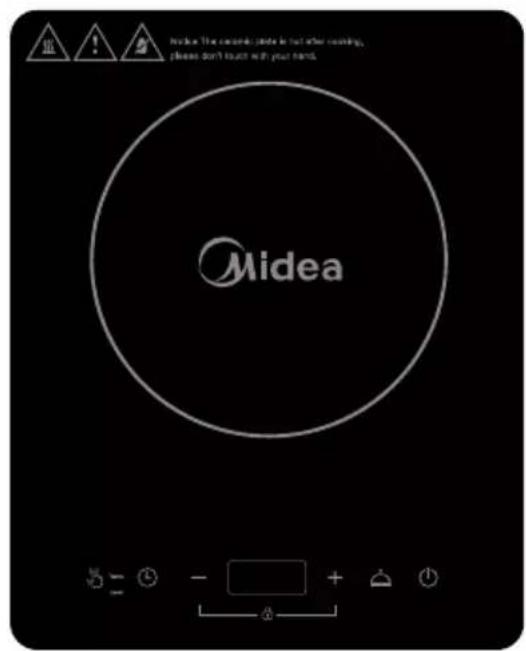
Model: MC-STW2018
Thank you for purchasing this induction cooker. Please thoroughly read through this instruction manual before use and store it carefully for future use.
The pictures are only for reference, please keep the real product as a standard.
CONTENTS
SAFETYINSTRUCTIONS 1
PRODUCT INTRODUCTION 5
OPERATION INSTRUCTIONS 8
COMPATIBLE COOKWARE 11
CLEANING AND MAINTENANCE 11
TROUBLESHOOTING 12
WARRANTY 14
SPECIAL DECLARATION 14
I.SAFETY INSTRUCTIONS
For safety reasons and to avoid damage to the appliance or injuries to people, please abide by all the safety instructions below.
Ignoring safety warnings may result in injuries.
This appliance does not take into consideration the following situations:
--- use by children or disabled people without supervision; -- children treating it as a toy.
Symbols:
MandatoryForbid warning
Attention
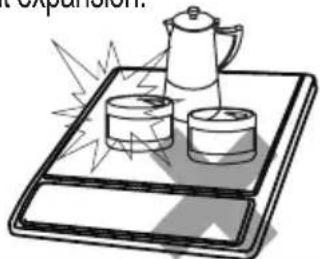
Never heat foods in sealed containers, such as compressed products, cans, or coffee pots, to avoid explosion caused by heat expansion.
Do not directly rinse this induction cooker under water. Do not spill water or soup into the internal parts of the induction cooker.

To avoid affecting product performance and to prevent injury, do not heat empty pots. When in use, do not leave the appliance without supervision for a long time. When leaving the appliance without supervision, make sure there is enough water in the pot.

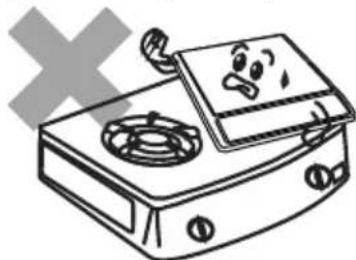
To avoid accidents, do not place the induction cooker, when in use, on a gas stove (the magnetic lines can heat the metal parts of the gas stove).
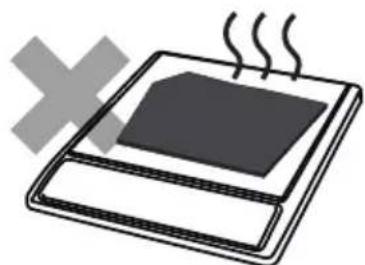
Do not heat iron items on the induction cooker heating plate to avoid danger caused by high temperatures.
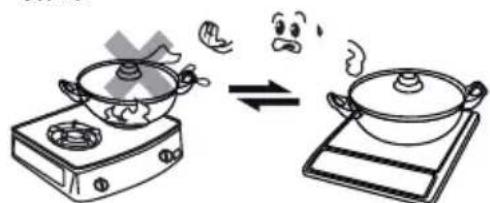
The utensils provided for the induction cooker can only be used for cooking with it. These cooking utensils cannot be used on both induction cooker and gas stove.
I.SAFETYINSTRUCTIONS
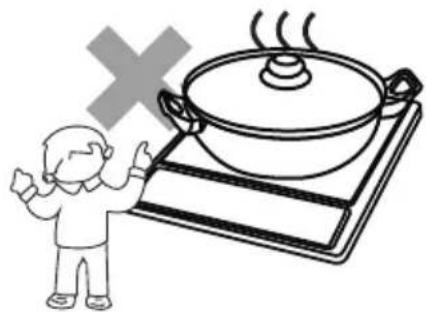
To avoid injuries such as scalding, do not let children operate the appliance alone.
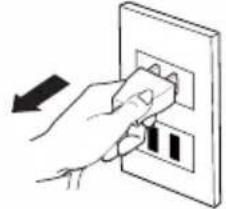
Unplug the power cord from the outlet after use to avoid fire and/or damaging the electronic components, caused by prolonged electrical connection.
To avoid danger, do not insert any foreign object, such as iron wire, nor block the air ventilation opening or air entry port.
People with heart pacemakers should consult a doctor. Only use the appliance after confirming that it does not affect the pacemaker.

To avoid danger, do not place paper, aluminium foil, cloth or other unsuitable articles onto the induction cooker heating plate for indirect heating.
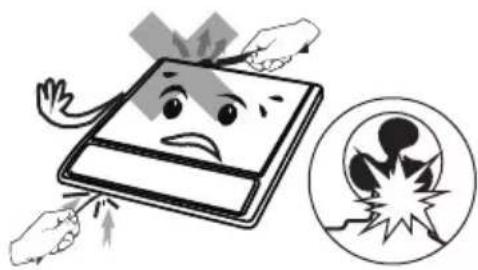
To avoid damage, avoid causing impacts on the heating plate. If the surface is cracked, switch off the appliance to avoid the possibility of electric shock.

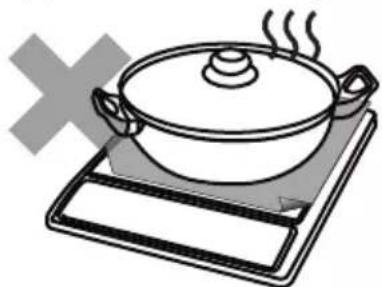
When using the induction cooker, do not put it on any metal platform (such as iron, stainless steel, aluminium), or place a non-metal pad less than 10cm thick on the heating plate.

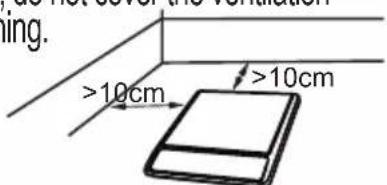
When using the induction cooker, place it horizontally and allow at least 10cm of free space between the sides and back of the induction cooker and the wall. Do not use the induction cooker in narrow spaces. To avoid hindering release of heat, do not cover the ventilation opening.
I.SAFETYINSTRUCTIONS
| If the supply cord is damaged, it must be replaced by the manufacturer, its service agentor similarly qualified persons in order to avoid a hazard. | ▲Please use a dedicated and high quality power outlet, with high power rating, equal to or above 10A. Do not use poor quality outlets. Do not share the power outlet with electrical appliances with high power ratings, such as air conditioners, electrical stoves etc to avoid fires caused by overburdening the outlet. |
| ▲Do not touch the cooker plate with sharp tools to avoid cracking or damaging the plate. If cracking is found on the cooker plate, turn off the appliance to avoid any electrical shock that might occur. | ▲When using the induction cooker or after use, please keep it clean. Protect the induction cooker from bugs, dust and humidity. Avoid letting cockroaches etc fall into the internal parts of the induction cooker and causing a short circuit of the electrical board. When not in use for a long period, please clean it and put it into a plastic bag to store it. |
| ▲The cooker cannot be overloaded. Overloading the plate may damage the plastic cover and cooker plate. | ▲Metal objects, such as knives, forks, spoons and lids, should not be put on the surface of the cooking area, since they can become heated. |
| ▲Do not use the induction cooker near a gas stove, kerosene stove, gas cooker or in any space with an open fire or an environment with high temperature. | ▲Do not use the induction cooker by putting it onto a carpet, tablecloth or thin paper to avoid blocking the air inlet opening or air outlet opening, which results in influencing heat emission. |
I.SAFETY INSTRUCTIONS
| Always clean the induction cooker to prevent mess from getting into the fan, which could influence the normal operation of the appliance. | When operating the appliance or after moving the pot, the cooking area will remain hot for a period of time. Do not touch it, be careful of scalding caused by the high temperature. |
| This appliance is intended to be used in household and similar applications such as: -Staff kitchen areas in shops, office and other working environments; -farm houses; -by clients in hotels, motels and other residential type environments; -bed and breakfast type environments. | This appliance can be used by children aged from 8 years and above and persons with reduced physical, sensory or mental capabilities or lack of experience and knowledge if they have been given supervision or instruction concerning use of the appliance in a safe way and understand the hazards involved. Children shall not play with the appliance. Cleaning and user maintenance shall not be made by children without supervision. |
| Mandatory | Mandatory |
| We suggest that you should periodically check that there are no object (glass, paper, etc) that could obstruct the inlet under your induction cooker. Warning | Never have the induction cooker to work without food inside, otherwise its operational performance may be affected and danger may happen. Warning |
| Keep electrical appliance out of reach from children or inform person. Do not let them use the appliances without supervision. Warning | Children should be supervised to ensure that they do not play with the appliance. Warning |
| The instructions shall state that appliances are not intended to be operated by means of an external timer or separate remote-control system. Warning | This appliance is for household use only. Do not use outdoors. Please turn off and unplug the appliance before cleaning, maintenance or relocation and whenever it is not in use. Warning |
II.PRODUCT INTRODUCTION
The induction cooker is able to meet various kinds of cooking demands by electromagnetic heating, high thermal efficiency, is safe and reliable, easy to clean.
Performance Parameters
| Model | Applied voltage/frequency | Rated power | Dimension (mm) | Weight (kg) |
| MC-STW2018 | 220-240V~ 50/60Hz | 2000W 350x280x65 | 2.5 | |
Product Fiche
| Symbol | Value | Unit | |
| Model | MC-STW2018 | ||
| Type of hob | Freestanding | ||
| Number of cooking zones and/or areas | 1 | ||
| Heating technology(induction cooking zones and cooking areas, radiant cooking zones, solid plates) | Induction cooking zone | ||
| For circular cooking zones or area: diameter of useful surface area per electric heated cooking zone,rounded to the nearest 5 mm | Ø | 19.5 | cm |
| Energy consumption per cooking zone or area calculated per kg | EC electric cooking | 194.5 | Wh/kg |
| Energy consumption for the hob calculated per kg | EC electric hob | 194.5 | Wh/kg |
It is recommended to select power setting level 2 to achieve maximum energy eciency.
The energy consumption of a domestic electric hob (EC electric hob) is measured in Wh per kg of water heated in a normalised measurement (Wh / kg) considering all cookware pieces under standardised test conditions and rounded to the first decimal place. Standard EN 60350-2:2013 was used as reference for the measurement and calculation.
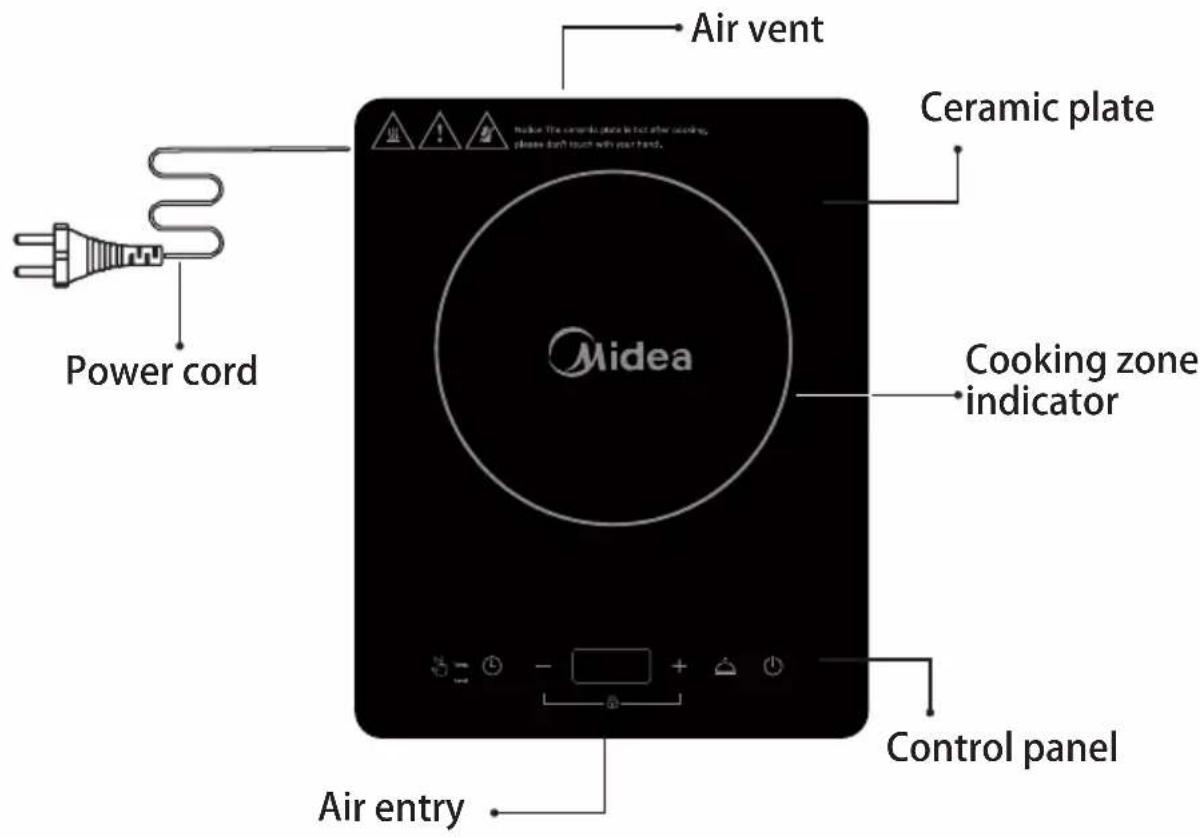
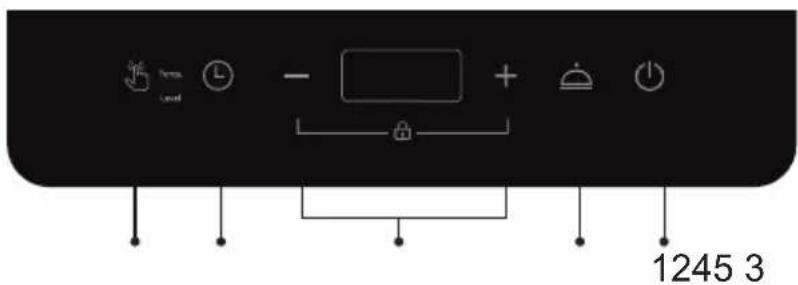
Control Panel
-
ON/STANDBY
-
Keep warm
-
Lock
-
Timer
-
Function
II.PRODUCT INTRODUCTION
Before using New Induction cooker
- Read this guide, taking special note of the "SafetyWarnings" section.
- Remove any protective film that may still be on your ceramic plate.
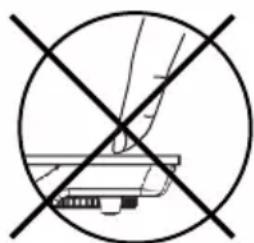
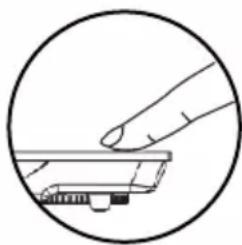
Using the Touch Controls
- The controls respond to touch, so you don't need to apply any pressure.
- Use the ball of your finger, not its tip.
- You will hear a beep each time a touch is registered.
- Make sure the controls are always clean, dry, and that there is no object (e.g. a utensil or a cloth) covering them. Even a thin film of water may make the controls difficult to operate.
III. OPERATION INSTRUCTIONS
Put the pot on the ceramic plate
- Make sure the air vents are not blocked and keep utensils away from the immediate surrounds of the ceramic plate.
- Make sure the cookware which has food or liquid is placed in the center of ceramic plate.
Plug in
- After the power supply is connected, a beep will be heard. The display shows "L", indicating that the induction cooker is in standby mode.
Turn on
- After pressing the "ON/STANDBY" button, the induction cooker is ready for heating. Press the "Function" button, the induction cooker enters heating mode.
- After pressing the "ON/STANDBY" button, if no function button is pressed for 10 seconds, the induction cooker will switch off automatically.
- After pressing the function button, if there is no proper pot on the ceramic plate, the induction cooker will not heat up and the alarm will sound to indicate that a pot is required. One minute later, it will switch off automatically.
Function
- After switching on the induction cooker, press "Function" button to enter the temperature or level mode.
- You can adjust the power level by pressing "+" or "-" button.
You can adjust the temperature by pressing "+" or "-" button.
III. OPERATION INSTRUCTIONS
Timer
- Press the "Timer" button to enter the timer mode. When the timer indicator lights up and the numbers blink on the display, press the "+" or "-" button to adjust the time duration. Adjustable timer from 1 minute to 3 hours.
- When the adjustment is finished, the number on the display will be shown after blinking for several seconds. The induction cooker starts counting down.
- When the counting down is over, the induction cooker automatically stops heating and switches off.
- The induction cooker will shut down when the default timer is reached unless the user sets the timer himself.
Keep Warm
- Press the "Keep warm" button to maintain warmth. Under this mode, the induction cooker heats the ingredients with gentle power to maintain a certain temperature inside the pot.
Note: Under this mode, the power cannot be adjusted.
III. OPERATION INSTRUCTIONS
How To Lock
- Press the "+" and "-" button to start lock function. Now only the "ON/STANDBY" button can be used to switch off the induction cooker, all the other operations are forbidden.
- Press the "+" and "-" button for 3 seconds to quit the lock function.
Switch Off
- When the operating time is over, the induction cooker switches off automatically.
- Press the "ON/STANDBY" button to turn off the appliance. Note: Do not touch the surface of the ceramic while "H" is displayed, it means the temperature high. While "L" is displayed, it means the temperature low.
IV.Compatible COOKWARE

Iron oil frying pan

Stainless steel por Iron pan Iron kettle



Enamel stainless steel kettle

Enamel cooking utensil

Iron plate
- Requirement for pot materials: containing magnetic inducting materials.
- Shape requirement: plat bottom, with the diameter more than 15cm and less than 20cm .
- After the first use, some white spots would appear at the bottom of the pot. This is normal.
- Please pour some vinegar into the pot, heat it at about 60 - 80^ C , then wipe the spots away with brush.
- Incompatible pots material: glass, ceramic, aluminium, copper and other non magnetic material.
- If the pot removed, the induction cooker will stop heating immediately. After the buzzer sounds for 1 minute, it will go into standby mode automatically.
V. CLEANING AND MAINTENANCE
- Before cleaning, please switch off the appliance first and then disconnect the power plug from the power outlet. Wait till the cooker plate of the induction cooker is not hot and start cleaning.
- After using the induction cooker for a long time, the opening of air inlet/air outlet will pile up with dust or other dirt, please wipe it with a soft dry cloth. Dust in the air inlet and outlet can be cleaned by using a soft brush or a mini vacuum cleaner.
Note: Please do not rinse it with water.
V. CLEANING AND MAINTENANCE
- For oil spots on the cooker plate, wipe the cooker plate by using a soft moist cloth with a little tooth paste or mild detergent. And then use a soft moist cloth to wipe it until no stain remains.
- When not using it for a long time, please disconnect the power plug from the power outlet and protect the induction cooker from any dust or bugs.
VI. TROUBLESHOOTING
| Abnormalities | Key checking points and trouble shooting | |
| After plugging in the power cord and pressing the “ ” key, the ON/STANDBY indicator and display do not light up. | • Is the power plug properly connected? • Is the switch, power outlet, fuse or power cord damaged? | |
| The “ ” indicator lights ON/STANDBY up and the display works normally, but heating does not start. | • Is the pot material proper? • Is the appliance in a “Preset” working status? • For other causes, please take the appliance to a repairing and maintenance site to be fixed. | |
| Heating suddenly stops during the process. | • Is the temperature of the oil too high when frying dishes? • Is the temperature of the surroundings very high? • Is the air inlet or air outlet of the induction cooker blocked? • Is the default heating time of the induction cooker over? • The self-safety protection of the induction cooker starts, wait for several minutes and connect power to use it. | |
| Code of failure | E3 E6 | • Wait a moment and press the “ON/STANDBY” button when the temperature of the hotplate becomes normal, the induction hotplate will operate as usual. |
| E7 E8 | • Turn off the hotplate, when the voltage becomes normal, and then turn on the hotplate, it will operate as usual. | |
| E1 E2 E4 E5 Eb | • Please contact the special maintenance department. | |
Emergency
During using, if there are some abnormal cases, please unplug immediately and disconnect power.
For any failure of the product, please contact the special maintenance department or the customer service center.
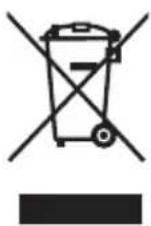
The appliance must not be disposed of with regular household waste. At the end of its service life, the appliance must be properly delivered to a collection point for the recycling of electrical and electronic equipment. By Collection and recycling of old appliances, you are making an important contribution to the conservation of our natural resources and provide for environmentally sound and healthy disposal.
VII.WARRANTY
If problems occur with the product, please contact our specific repair and maintenance site or service center.
One year warranty for the induction cooker.
The starting warranty date refers to the invoice opening date of the product.
Any problem caused by the following items is not included in the warranty:
- Damage caused by incorrect use, storing or maintenance by the customer.
- Disassembling or repairing the appliance by a repair agent that is not appointed by our company, resulting in damage to the appliance.
- The model number on the invoice is different from the one of the product to be repaired, or the model number on the invoice is modified.
- No valid invoice.
- Damage due to force majeure.
- Putting the induction cooker to commercial use.
- We are not responsible for accidents arising due to the use of our accessories not designed for utilisation with this product.
- Using the product in a non-household environment is not covered by the warranty scope.
-
Man-made issue or problems caused by incorrect use are not covered by the warranty scope.
-
For those products beyond the warranty, the customer service center of the company will still serve you warmly.
If there is technical amendment for the product, it will be edited into the updated version of the instruction manual. Please be aware that we will not inform customers of this separately. If the appearance or color of the product is modified, please refer to the real appliance as a standard..