
MIH743BE325GK - Cooker MIDEA - Free user manual and instructions
Find the device manual for free MIH743BE325GK MIDEA in PDF.
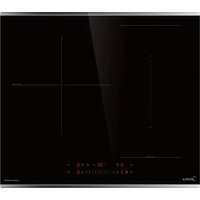


| Product type | Built-in induction hob |
| Brand | Midea |
| Model | MIH743BE325GK |
| Product dimensions (W x D x H) | 590 x 520 x 58 mm |
| Built-in dimensions (W x D) | 560 x 480-490 mm |
| Weight | Approximate, not specified |
| Power supply | 220-240 V~ 50/60 Hz |
| Installed electrical power | 7400 W |
| Number of cooking zones | 4 zones (1 bridge zone) |
| Zone diameters | Front left: 180 mm, Rear left: 180 mm, Right: 290 mm, Bridge zone: 390x180 mm |
| Max power per zone | Front left: 1800/2000 W, Rear left: 1800/2000 W, Right: 3000/3600 W, Bridge zone: 3000/3700 W |
| Main functions | Boost, Pause, Timer (countdown and stop), Child lock, Bridge zone, Wi-Fi connection, Hob-hood connection |
| Surface material | Glass ceramic |
| Cleaning and maintenance | Clean after each use with a damp cloth and non-abrasive cleaner. Use a scraper for stubborn residues. Avoid abrasive sponges. |
| Safety | Pan detection, automatic shut-off, residual heat indicator, child lock |
| Connectivity | Wi-Fi 2.4 GHz via Smart Home app, Bluetooth for pairing |
| Spare parts and repairability | Contact a qualified technician. Do not disassemble yourself. Parts: power board, display board, sensors, fan |
| General information | Compliant with CE, WEEE, RoHS standards. Warranty: refer to seller's terms. |
Frequently Asked Questions - MIH743BE325GK MIDEA
User questions about MIH743BE325GK MIDEA
0 question about this device. Answer the ones you know or ask your own.
Ask a new question about this device
Download the instructions for your Cooker in PDF format for free! Find your manual MIH743BE325GK - MIDEA and take your electronic device back in hand. On this page are published all the documents necessary for the use of your device. MIH743BE325GK by MIDEA.
USER MANUAL MIH743BE325GK MIDEA
1 Safety Instructions 6
1.1 Intended use ......6
1.1.1 Explanation of Symbols 6
2 Specifications 13
3 Cookware ....16
3.1 Choosing the cookware....16
3.2 Positioning the cookware .....16
3.3 Moving the cookware .....17
3.4 Cookware detection .....17
4 Product overview .....18
4.1 Control panel .....19
4.1.1 Using the touch controls .....19
4.2 Induction cooking 20
4.3 Cooking zones 20
4.4 Residual heat display....20
5 Before first use 21
5.1 Cleaning the appliance for the first time 21
6 How to use 22
6.1 Switch the appliance on....22
6.2 Switch the appliance off....22
6.3 Setting the power level.....22
6.4 Cooking table, cooking hints, power levels and their meaning .....22
6.5 Start cooking 23
6.6 Finish cooking 23
6.7 Cooking tips....24
7 Childproof lock....24
7.1 Activating the childproof lock .....24
7.2 Deactivating the childproof lock ...24
8 Pause mode.....25
8.1 Entering pause mode .....25
8.2 Exiting pause mode 25
9 Timer control.....25
9.1 Count down 25
9.1.1 Using the count down....25
9.1.2 Cancelling the count down 26
9.2 Switch off timer 26
9.2.1 Using the switch off timer .....26
9.2.2 Cancelling the switch off timer .....26
10 Boost function 27
10.1 Activating the boost function.....27
10.2 Cancelling the boost function .....27
11 Bridge area 27
11.1 Activating the bridge area .....27
11.1.1 Using bridge area as single big area ....27
11.1.2 Using bridge area as 2 independent areas .....28
12 Wi-Fi connection....28
12.1 Pairing the appliance with the app ....28
12.2 Reset the WI-FI connection .....29
13 Hood to hob function....29
13.1 Establishing the hood to hob connection....29
13.2 Reset the hood to hob connection .....29
14 Cookware test....30
14.1 Testing the cookware with a magnet.... 30
14.2 Testing the cookware without a magnet.... 30
15 Settings 31
15.1 Adjusting the settings....31
15.1.1 Reset to factory settings ....31
15.1.2 Adjusting the power management ....32
15.1.3 Testing the cookware quality .....32
15.1.4 Switch the buzzer on....33
15.1.5 Switch the buzzer off 33
15.2 Overview of the default working times....33
16 Cleaning and maintenance .....34
16.1 Cleaning agents.... 34
16.2 Cleaning the appliance 34
16.2.1 Cleaning everyday soiling 34
16.2.2 Cleaning boilovers 34
16.2.3 Cleaning the control panel......35
17 Troubleshooting 36
17.1 Failure display and inspection......39
17.2 Specific failure and solution .....41
18 Product installation ....43
18.1 Safe product installation .... 43
18.2 Before installing the appliance ..... 43
18.3 Safety distance .....44
18.4 Appliance dimensions .....44
18.5 Installation method ....44
18.5.1 Standard installation method ..... 44
18.5.2 Flush fit installation method ..... 45
18.6 Ventilation 45
18.6.1 Installation above a drawer 46
18.6.2 Installation above an oven 46
18.7 Attaching the sealing strip ..... 46
18.8 Locating the fixing brackets .....47
18.9 Inserting the fixing brackets .....47
18.10 Inserting the appliance .....47
18.11 Installing the thermal protection barrier ....47
18.12 Cautions 48
18.13 Connecting the appliance ..... 48
18.14 Connection type 49
18.14.1 220-240 V 1N\~32 A....49
18.14.2 220-240 V / 380-415 V 3N\~16 A . 49
18.14.32x 220-240 V 2L+2N\~16 A ..... 49
18.15 After installing the appliance ..... 50
19 Test dishes ....51
19.1 Melting chocolate, couverture .....51
19.2 Béchamel sauce ....51
19.3 Warm and keep warm of lentil stew....51
19.4 Rice porridge ....52
19.5 Cooking rice ....52
19.6 Frying pancakes, crêpes .....53
19.7 Frying pork loin ....53
19.8 Deep frying french fries....53
20 Trademarks, copyrights and legal statement ....54
21 Disposal and recycling 55
21.1 Important instructions for environment ....55
21.2 Compliance with RoHS Directive ...55
21.3 Package information....55
22 Data protection notice ....56
1 SAFETY INSTRUCTIONS
1.1 Intended use
The following safety guidelines are intended to prevent unforeseen risks or damage from unsafe or incorrect operation of the appliance. Please check the packaging and appliance on arrival to make sure everything is intact to ensure safe operation. If you find any damage, please contact the retailer or dealer. Please note modifications or alterations to the appliance are not allowed for your safety concern. Unintended use may cause hazards and loss of warranty claims.
1.1.1 Explanation of Symbols
| Symbol Meaning | |
| EN | WARNINGThe signal word indicates a hazard with a medium level of risk which, if not avoided, may result in death or serious injury. |
| CAUTIONThe signal word indicates a hazard with a low degree of risk which, if not avoided, may result in minor or moderate injury. | |
| ATTENTIONThe signal word indicates important information (e.g. damage to property), but not danger. | |
| This symbol indicates a single, unnumbered instruction step. | |
| This symbol indicates the result of one or more previous instruction steps. | |
| This symbol indicates a hint or a tip. | |
Read these operating instructions carefully and attentively before using or commissioning the unit and keep them in the immediate vicinity of the installation site or unit for later use!
SAFETY WARNINGS
Your safety is important to us. Please read this information before using your device.
Installation
Electrical Shock Hazard
- Disconnect the appliance from the mains electricity supply before carrying out any work or maintenance on it.
- Connection to a good wiring system is essential and mandatory.
• Alterations to the domestic wiring system must only be made by a qualified electrician. - Failure to follow this advice may result in electrical shock or death.
Cut Hazard
• Take care - panel edges are sharp.
- Failure to use caution could result in injury or cuts.
Important Safety Instructions
- Read these instructions carefully before installing or using this appliance.
- No combustible material or products should be placed on this appliance at any time.
- Make this information available to the person responsible for installing the appliance as it could reduce your installation costs.
- In order to avoid a hazard, this appliance must be installed according to these instructions for installation.
- This appliance is to be properly installed only by a suitably qualified person.
- This appliance should be connected to a circuit which incorporates an isolating switch providing full disconnection from the power supply.
Safety Instructions
- Failure to install the appliance correctly could invalidate any warranty or liability claims.
- This appliance is not intended for use by persons (including children) with reduced physical, sensory or mental capabilities, or lack of experience and knowledge, unless they have been given supervision or instruction concerning use of the appliance by a person responsible for their safety. Children should be supervised to ensure that they do not play with the appliance.
- If the supply cord is damaged, it must be replaced by the manufacturer, its service agent or similarly qualified persons in order to avoid a hazard.
- This appliance can be used by children aged from 8 years and above and persons with reduced physical, sensory or mental capabilities or lack of experience and knowledge if they have been given supervision or instruction concerning use of the appliance in a safe way and understand the hazards involved. Children shall not play with the appliance. Cleaning and user maintenance shall not be made by children without supervision.
- WARNING ÷ If the surface is cracked, switch off the appliance to avoid the possibility of electric shock, for appliance surfaces of glass-ceramic or similar material which protect live parts.
- Metallic objects such as knives, forks, spoons and lids should not be placed on the appliance surface since they can get hot.
- Do not use a steam cleaner to clean your appliance.
• After use, switch off the appliance element by its control and do not rely on the pan detector. - The appliance is not intended to be operated by means of an external timer or separate remote-control system.
Safety Instructions
- Danger of fire: do not store items on the cooking surfaces.
- CAUTION: The cooking process has to be supervised. A short term cooking process has to be supervised continuously.
- WARNING : Unattended cooking on a hob with fat or oil can be dangerous and may result in a fire.
- WARNING ÷ The appliance and its accessible parts be come hot during use. Care should be taken to avoid touching heating elements. Children less than 8 years of age shall be kept away unless continuously supervised.
- WARNING : Unattended cooking on a hob with fat or oil can be dangerous and may result in fire.
NEVER try to extinguish a fire with water, but switch off the appliance and then cover flame e.g. with a lid or a fire blanket.
CAUTION: The cooking process has to be supervised. A short term cooking process has to be supervised continuously.
Danger of fire: do not store items on the cooking surfaces.
- WARNING : Use only hob guards designed by the manufacturer of the cooking appliance or indicated by the manufacturer of the appliance in the instructions for use as suitable or hob guards incorporated in the appliance. The use of inappropriate guards can cause accidents.
Operation and maintenance
Electrical Shock Hazard
- Do not cook on a broken or cracked appliance. If the appliance surface should break or crack, switch the appliance off immediately at the mains power supply (wall switch) and contact a qualified technician.
Safety Instructions
- Switch the appliance off at the wall before cleaning or maintenance.
- Failure to follow this advice may result in electrical shock or death.
Health Hazard
- This appliance complies with electromagnetic safety standards.
- However, persons with cardiac pacemakers or other electrical implants (such as insulin pumps) must consult with their doctor or implant manufacturer before using this appliance to make sure that their implants will not be affected by the electromagnetic field.
- Failure to follow this advice may result in death.
Hot Surface Hazard
- During use, accessible parts of this appliance will become hot enough to cause burns.
- Do not let your body, clothing or any item other than suitable cookware contact the Induction glass until the surface is cool.
- Keep children away.
- Handles of saucepans may be hot to touch. Check saucepan handles do not overhang other cooking zones that are on. Keep handles out of reach of children.
- Failure to follow this advice could result in burns and scalds.
Cut Hazard
- The razor-sharp blade of a glass scraper is exposed when the safety cover is retracted. Use with extreme care and always store safely and out of reach of children.
- Failure to use caution could result in injury or cuts.
Important safety instructions
- Never leave the appliance unattended when in use. Boilover causes smoking and greasy spillovers that may ignite.
- Never use your appliance as a work or storage surface.
- Never leave any objects or utensils on the appliance.
- Do not place or leave any magnetisable objects (e.g. credit cards, memory cards) or electronic devices (e.g. computers, MP3 players) near the appliance, as they may be affected by its electromagnetic field.
- Never use your appliance for warming or heating the room.
- After use, always turn off the cooking zones and the appliance as described in this manual (i.e. by using the touch controls). Do not rely on the pan detection feature to turn off the cooking zones when you remove the pans.
- Do not allow children to play with the appliance or sit, stand, or climb on it.
- Do not store items of interest to children in cabinets above the appliance. Children climbing on the appliance could be seriously injured.
- Do not leave children alone or unattended in the area where the appliance is in use.
- Children or persons with a disability which limits their ability to use the appliance should have a responsible and competent person to instruct them in its use. The instructor should be satisfied that they can use the appliance without danger to themselves or their surroundings.
- Do not repair or replace any part of the appliance unless specifically recommended in the manual. All other servicing should be done by a qualified technician.
- Do not place or drop heavy objects on your appliance.
Safety Instructions
- Do not stand on your appliance.
- Do not use pans with jagged edges or drag pans across the Induction glass surface as this can scratch the glass.
- Do not use scourers or any other harsh abrasive cleaning agents to clean your appliance, as these can scratch the Induction glass.
-
This appliance is intended to be used in household and similar applications such as:
-
staff kitchen areas in shops, offices and other working environments;
- farm houses;
- by clients in hotels, motels and other residential type environments;
- bed and breakfast type environments.
- WARNING ÷ The appliance and its accessible parts be come hot during use.
- Care should be taken to avoid touching heating elements.
• Children less than 8 years of age shall be kept away unless continuously supervised. - Regarding information about installation please refer to chapter "Product installation". See chapter „Product installation" on page 43
2 SPECIFICATIONS
| Appliance | MIH743BE325GK |
| Cooking zones | 4 Zones |
| Supply voltage | 220-240 V~ 50 Hz or 60 Hz |
| Installed electric power | 7400 W |
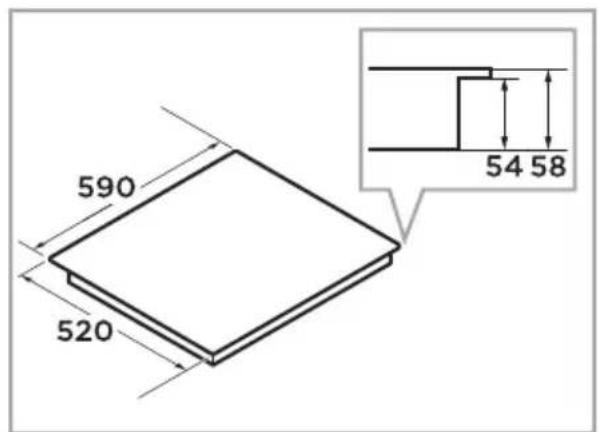
| Product size W × D × H | 590 X 520 X 58 mm |
| Building-in dimensions W × D | 560 X 480-490 mm |
Weight and Dimensions are approximate. Because we continually strive to improve our products we may change specifications and designs without prior notice.
| Symbol Value Unit | |||
| Model identification | - | MIH743BE325GK | - |
| Type of appliance - | Built-in induction hob | - | |
| Number of cooking zones and/or areas | - | 4 | - |
| Heating technology (induc-tion cooking zones and cook-ing areas, radiant cooking zones, solid plates) | - | Induction cooking - | |
| Diameter of useful surface for cooking zone | ∅ Left front: 10 mm8 | ||
| Diameter of useful surface for cooking zone | ∅ Left rear: | 180 | mm |
| Diameter of useful surface for cooking zone | ∅ Right: | 290 | mm |
| For non-circular cooking zones or areas: length and width of useful surface area per electric heated cooking zone or area, rounded to the nearest 5 mm | LxW | 390x180 | mm |
Specifications
| Symbol Value Unit | |||
| Energy consumption per cooking zone | EC1) | Left front: xWh/kg | |
| Energy consumption per cooking zone | EC1) | Left rear: xWh/kg | |
| Energy consumption per cooking zone | EC1) | Right: xWh/kg | |
| Energy consumption per cooking zone | EC1) | Bridge area: xxxx | Wh/kg |
| Energy consumption for the hob | EC2) | xxxx | Wh/kg |
| Max. power per cooking zone | EC1) | Left front: 1800/2000 | W |
| Max. power per cooking zone | EC1) | Left rear: 1800/2000 | W |
| Max. power per cooking zone | EC1) | Right: 3000/300 | W |
| Max. power per cooking zone | EC1) | Bridge area: 3000/300 | W |
| 1) electric cooking 2) electric hob | |||
If there is no any operation after switch on the appliance, the appliance will reach automatically the off mode after 1 minute and the power is 0.3 W in off mode.
Data determined according to standard EN 60350-2 and Commission Regulations (EU) No 66/2014.
Specifications
Declaration of conformity
Hereby, Midea Europe GmbH declares that this appliance is in compliance with the essential requirements and other relevant provisions of RED Directive 2014/53/EU.
Operation frequency band: 2402-2480 MHz
Maximum Power: 2500 mW
3 COOKWARE
The quality of the cookware has a significant impact on the efficiency and quality of the cooking process.
3.1 Choosing the cookware
ATTENTION
Improper cookware can damage the appliance or lead to malfunctions.
▶ Only use cookware with a base suitable for induction cooking.
Look for the induction symbol on the packaging or on the bottom of the cookware.
- Cookware made from the following materials is not suitable: pure stainless steel, aluminium or copper without a magnetic base, glass, wood, porcelain, ceramic, and earthenware.
- If the ferromagnetic part covers only partially the base of the cookware, only the ferromagnetic area will heat up. The rest of the base may not heat up a sufficient temperature for cooking.
If the ferromagnetic area is not homogeneous, but presents others material such as aluminium, this may affect the heating up and the cookware detection.
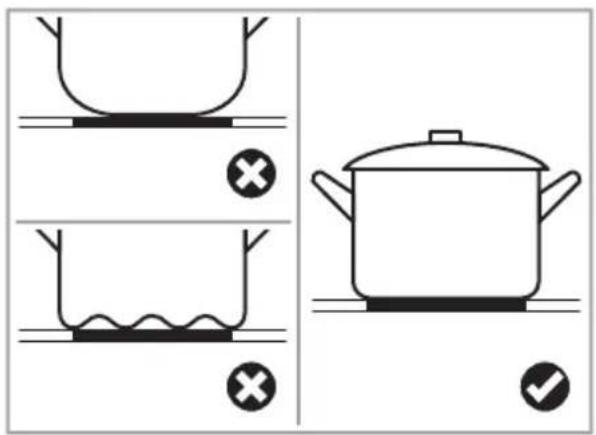
▶ Scratched cookware bottom and sharp edges of the cookware can scratch your glass surface.
Keep your appliance clean to avoid scratches.
- Cookware with an inhomogeneous base may not be detected.
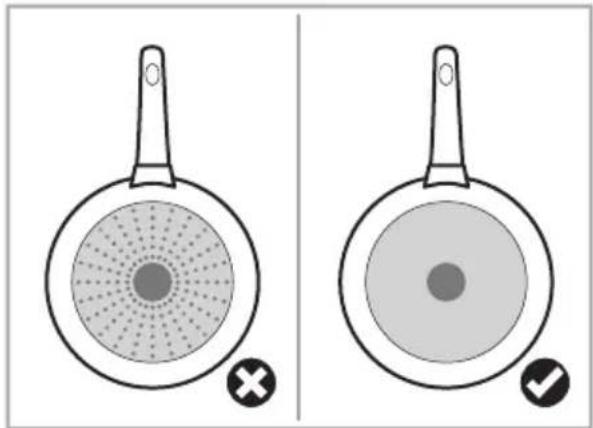
Do not use cookware with a curved base or jagged edges.
3.2 Positioning the cookware
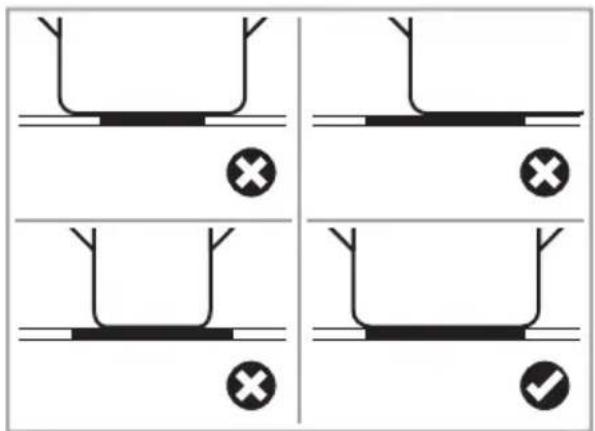
Always centre your cookware on the cooking zone.
Using slightly wider cookware can help maximize energy efficiency. If you use a smaller cookware efficiency could be less than expected.
-
Make sure that the base of your cookware is smooth, sits flat against the glass, and is the recommended size for the cooking zone. See chapter "Cooking zones" on page 20
-
Use cookware whose diameter is in the recommended range
Cookware
of the cooking zone selected. See chapter „Cooking zones“ on page 20
key) has been left on the appliance, the appliance automatically goes to standby mode within 1 minute. The fan will keep cooking down the appliance for a further 1 minute.
3.3 Moving the cookware
ATTENTION
Improper usage can damage the appliance or lead to malfunctions.
Always lift the cookware off the glass. Do not slide, or it may scratch the glass.
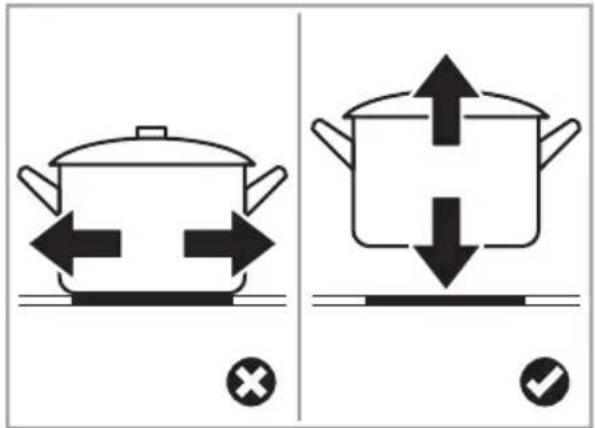
3.4 Cookware detection
You can check whether your cookware is induction-compatible by testing the cookware.
See chapter „Cookware test“ on page 30
When an unsuitable size or non-magnetic cookware (e.g. aluminium), or some other small item (e.g. knife, fork or
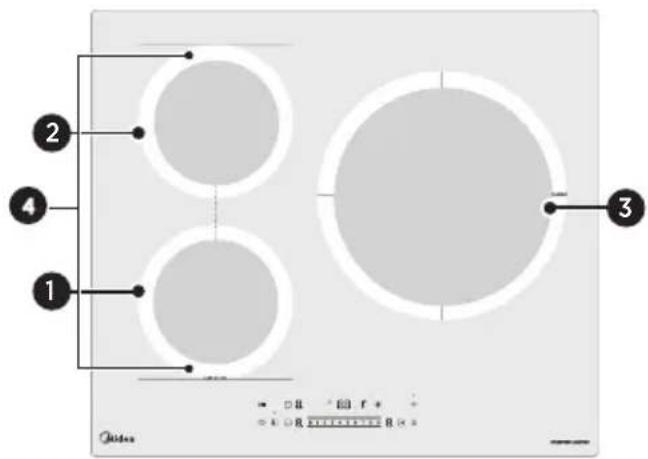
4 PRODUCT OVERVIEW
Overview of the appliance and its components:
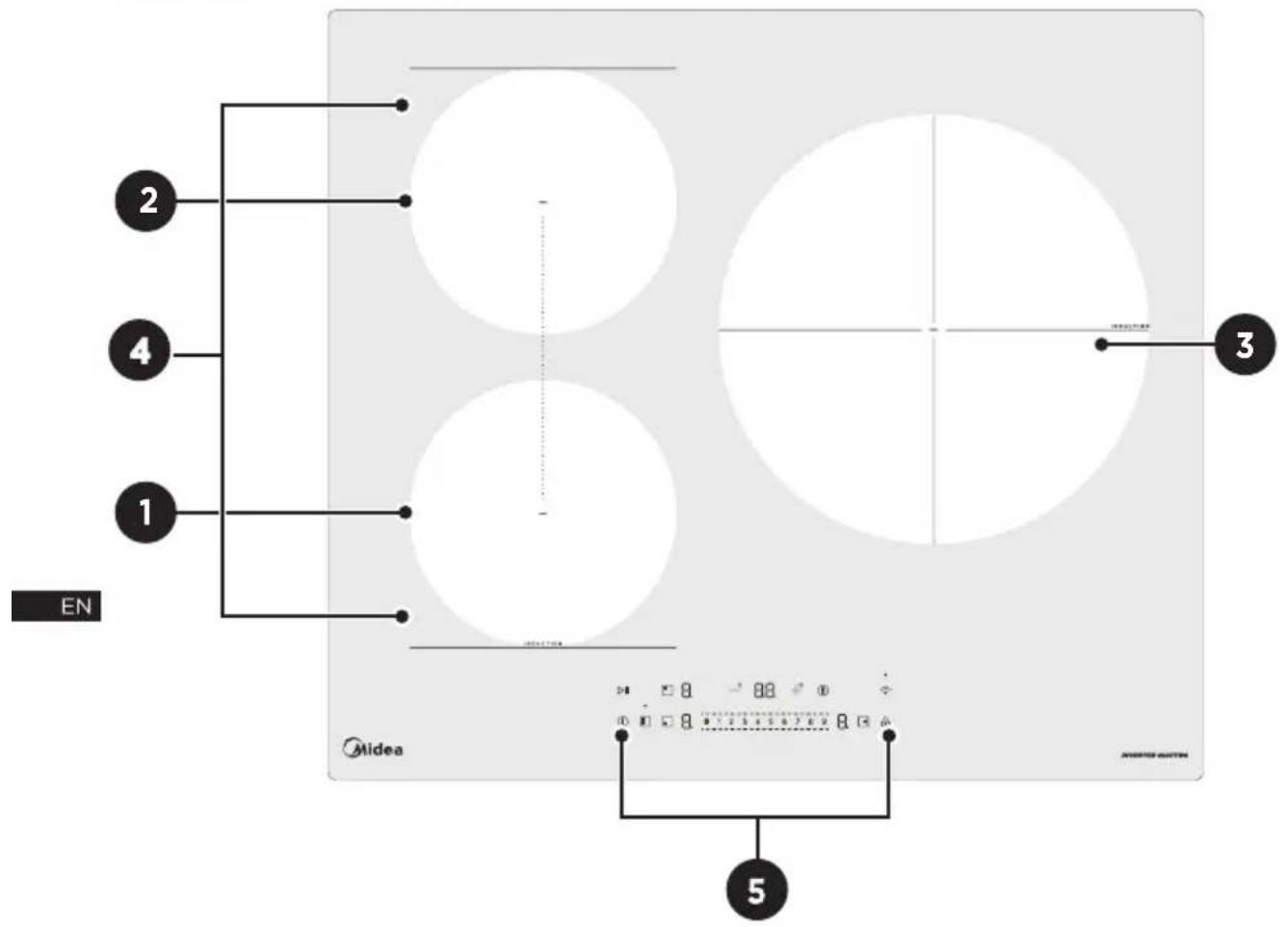
| Pos. Meaning Max. power in W ∅ mm | |||
| 1 | Left front cooking zone 10 | 1800/2000 | 8 |
| 2 | Left rear cooking zone | 1800/2000 | 180 |
| 3 | Right cooking zone / 00 | 3000 36 | 290 |
| 4 | Bridge area | 3000/3700 | Bridge area 390x180 |
| 5 | Control panel - - | ||
4.1 Control panel
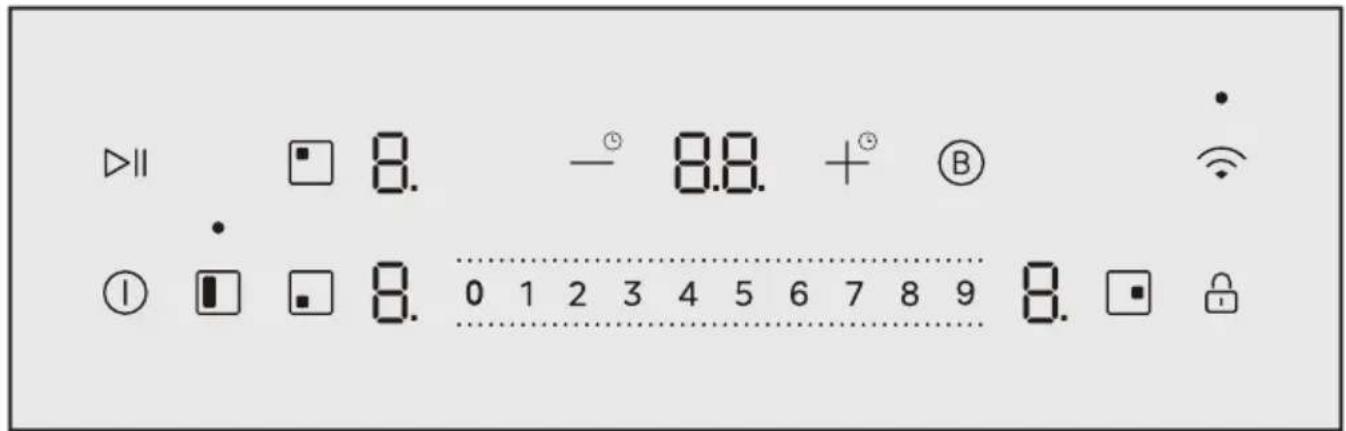
| Symbol Meaning | |
| 1 | On/Off control |
| >|| | Pause control |
| Select left rear cooking zone | |
| Select left front cooking zone | |
| Select right cooking zone | |
| Bridge area cooking zone | |
| -+ | Timer regulating controls |
| B | Boost control |
| Wi-Fi control | |
| 0 - 9 | Power regulating controls |
| Childproof lock | |
All the pictures in this manual are for explanation purpose only. Any discrepancy between the real object and the illustration in the drawing shall be subject to the real subject.
4.1.1 Using the touch controls
The controls respond to touch, so you don't need to apply any pressure.
Make sure the controls are always clean, dry, and that there is no object (e.g. a utensil or a cloth) covering them. Even a thin film of water may make the controls difficult to operate.
▶ Use the ball of your finger, not its tip.
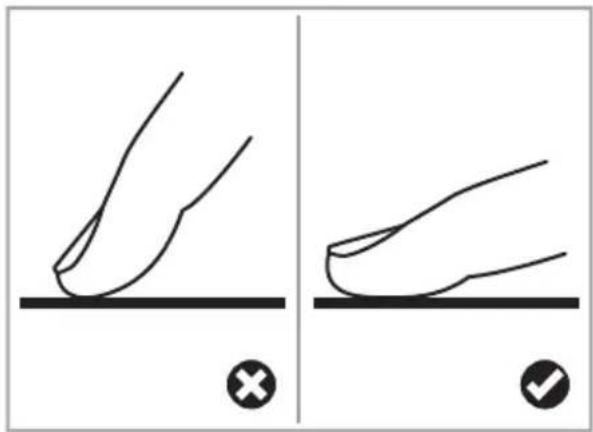
√ The appliance beeps each time a touch is registered.
4.2 Induction cooking
Induction cooking is a safe, advanced, efficient, and economical cooking technology. It works by electromagnetic vibrations generating heat directly in the cookware, rather than indirectly through heating the glass surface.
The glass becomes hot only because the cookware eventually warms it up.

| Pos. Meaning |
| 1 Induced currents |
| 2 Magnetic circuit |
| 3 Iron pot |
| 4 Ceramic glass plate |
| 5 Induction coil |
4.3 Cooking zones
The cooking zones are, up to a limit, automatically adapted to the diameter of the cookware.
To obtain the best efficiency of your appliance, the bottom of the cookware must have a minimum of diameter according to the corresponding cooking zone.
| Pos. Zone ∅ mm Base ∅ mm | ||
| 1 | 180 | 140-180 |
| 2 | 180 | 140-180 |
| 3 | 290 | 180-290 |
| 4 | Bridge area 390x180 | 250 |
4.4 Residual heat display
Each cooking zone has a residual heat display.
The indicator turns off once the surface cools to a touch-safe temperature.
Don't touch the cooking zone before the residual heat display turned off.
| Symbol Meaning | |
| H | The cooking zone is burning hot. |
| h | The cooking zone is hot. |
You can also use the residual heat as an energy saving function.
If you wish to use the residual heat, place additional cookware on the still-hot cooking zone.
5 BEFORE FIRST USE
Before using your appliance for the first time, read the user manual and in particular the safety instructions.
5.1 Cleaning the appliance for the first time
- Remove any protective films and stickers.
- Remove any packaging residue from the appliance surface.
- Wipe the surface with a damp cloth.
Further information on cleaning and maintenance: See chapter „Cleaning and maintenance“ on page 34
6 HOW TO USE
6.1 Switch the appliance on
To switch the appliance on, press [①].
√ The buzzer beeps once, all displays show [ - ] or [ -- ].
√ The appliance is in standby mode.
You can switch off the buzzer in the settings. See chapter „Settings“ on page 31
6.2 Switch the appliance off
To switch the appliance off, press [①].
6.3 Setting the power level
If you don't choose a power level setting within 1 minute, the appliance will automatically switch off. See chapter „Switch the appliance on“ on page 22
You can modify the power level setting at any time during cooking.
To select a power level setting, press the power regulation controls [0 - 9].
EN
6.4 Cooking table, cooking hints, power levels and their meaning
The table shows which power level is suitable for which food. Cooking times may vary depending on the type, weight, thickness and quality of the food.
Experiment with the appliance to find the settings that best suit you.
| Level Purpose & Dish Time | in min | Hints |
| 1 Melting: Chocolate, 15 - 30 Stir from time to time.butter, honey | ||
| 1 - 2 Keeping warm: Sauce hollandaise | 15 - 45 | Add 1-2 tbsp. of water.Use a lid. |
| 2 - 3 Frying delicate foods: Omelette, eggs, sauces Heating up: Sauces | 5 - 15- | Low levels on induction allows you a fine tuning of the ideal low temperature. Use a lid. |
| 3 - 4 Frying delicate foods: Fried eggs Simmering: Rice, pasta, potatoes | 5 - 1510 - 30 | First bring the water to boil with higher level, then adjust to this levels for simmering. |
How to use
| Level Purpose & Dish Time | in min | Hints | |
| 4 - 5 Steaming: Potatoes, vegetablesStewing: Stew dishes, soups | 20 - 6060 - 120 | Add a few tbsp. of water for steaming. Use a lid.Use a maximum of 3 l of liquid. For more select a higher level. | |
| 4 - 6 Pan frying: 5 - Pan frying around after 1 minute. | |||
| 5 - 7 Stewing: Amounts larger than 3 lGentle pan frying: Sausages, schnitzel, cor-don blue, meatballs | 60 - 1205 - 45 | Flip or stir regularly. | |
| 7 - 8 Pan frying: Meat,steaks, hashbrowns,pork loin | 5 - 10 | Flip regularly to get an even cooking result. | |
| 9 Boiling: Water, pastaStir frying: MeatDeep frying: French fries, fried fruits | 5 - 205 - 1015 - 60 | Let the cookware heat up dry, add oil only a few seconds before pan frying. | |
| B | Fast heating: Larger quantities of water | 5 Not suggested to use with empty cookware. | |
6.5 Start cooking
- To switch the appliance on, press [①].
- Make sure the bottom of the cookware and the surface of the cooking zone are clean and dry.
- Place a suitable cookware on the cooking zone that you wish to use. See chapter „Choosing the cookware“ on page 16
- Press the cooking zone selection control for the cooking zone you are using, e. g. [☐].
√The indicator next to the cooking zone selection control flashes, e. g. [9].
5. Set a power level setting. See chapter „Setting the power level“ on page 22
6.6 Finish cooking
Warning - Risk of burns
Residual heat can lead to burns.
▶ Wait until the cooking zones have cooled down.
Do not touch any parts of the appliance before allowing them to cool down.
- Press the cooking zone selection control for the cooking zone you wish to switch off, e.g. [☐].
- Reduce the power level setting to [0] or long press [0] to switch the cooking zone off.
The control panel shows [ ] - To switch the appliance off, press [①].
6.7 Cooking tips
⚠ Warning - Risk of fire
At extremely high temperatures oil and fat will ignite spontaneously.
Take care when frying as the oil and fat heat up very quickly, particularly if you're using the boost function.
When food comes to the boil, reduce the heat setting.
- Using a lid will reduce cooking times and save energy by retaining the heat.
- Minimize the amount of liquid or fat to reduce cooking times.
i Start cooking on a high setting and reduce the setting when the food has heated through.
7 CHILDPROOF LOCK
You can lock the controls to prevent unintentional use, e.g. children accidentally switching on the cooking zones.
When the controls are locked, all the controls except [①] are disabled.
-You can always turn the appliance off with [①] in an emergency, but you shall unlock the appliance first in the next operation.
7.1 Activating the childproof lock
To activate childproof lock, press [💡] for at least 3 seconds.
√ All the appliance indicators will show [L].
7.2 Deactivating the child-proof lock
To deactivate childproof lock, press and hold [💡] for at least 3 seconds.
8 PAUSE MODE
You can pause the heating instead of switching the appliance off.
When entering the pause mode, all the controls except [①] are disabled.
- You can always turn the appliance off with [①] in an emergency.
The appliance will shut down after 10 minutes if you don't exit the pause mode.
8.1 Entering pause mode
▶To enter the pause mode, press [▶II].
√ All the appliance indicators will show [ " ].
8.2 Exiting pause mode
▶To exit the pause mode, press [▶II].
9 TIMER CONTROL
Your appliance has a timer control, which you can use as a count down and a switch off timer.
9.1 Count down
You can use the timer control as a count down.
In this case, the timer will not turn any cooking zone off when the set time is up.
9.1.1 Using the count down
No cooking zone has been selected.
iThe appliance is turned on.
-
To activate a cooking zone, press the cooking zone selection control, e.g. [☐].
-
Press [ -3 ] or [ +5 ] when the cooking zone indicator is not flashing.
The control panel shows [10].
- To set the time, press [-°] or [+°] .
i Press [— ® ] or [+] once to decrease or increase the time by 1 minute.
i Passing and holding [— ® [+ ® ] will decrease or increase the time continuously until an integer is reached to pause for a moment.
√ When the time is set, time will begin to count down immediately.
√ The control panel shows the remaining time and the timer indicator flashes 5 times.
Timer control
√When the set time has elapsed, the control panel shows [ -- ] and the buzzer beeps for 30 seconds.
9.1.2 Cancelling the count down
To cancel the countdown, press [—] until the control panel shows [☐☐], or long press [—] and [ ] simultaneously.
√ The count down is cancelled and the control panel shows [ -- ].
9.2 Switch off timer
You can set the timer control to switch 1 or more cooking zones off after the set time is up.
The timer has a maximum of 99 min.
9.2.1 Using the switch off timer
- To activate a cooking zone, press the cooking zone selection control, e.g. [☐].
- Press [—] or [+] immediately.
The control panel shows [10]. - To set the time, press [-°] or [+°] .
i Press [—] or [+] once to decrease or increase the time by 1 minute.
i Pressing and holding [— [+] will decrease or increase the time continuously until an integer is reached to pause for a moment.
√ When the time is set, time will begin to count down immediately.
√ The control panel shows the remaining time and the timer indicator flashes 5 times.
[•] next to the power level indicator lights up in red.
√When the set time has elapsed the corresponding cooking zone switches off automatically.
i Other cooking zones will keep operating if they were switched on previously.
To set the switch off timer for more cooking zones, repeat the process by activating different cooking zones.
9.2.2 Cancelling the switch off timer
To cancel the switch off timer, press [—] until the control panel shows [00], or long press
[—] and [+]simultaneously.
√ The switch off timer is cancelled and the control panel shows [ -- ].
10 BOOST FUNCTION
The boost function heats up cookware faster than maximum power level.
The function can work in any cooking zone.
The cooking zone returns to its original setting after 5 minutes.
If the original heat setting equals [0], it will return to [9] after 5 minutes.
- To prevent overloading, the appliance automatically reduces the power of the previously set cooking zone(s), giving priority to the most recently selected boost function.
10.1 Activating the boost function
- Press the cooking zone selection control, e. g. [☐].
- Press the boost control [⑧].
√The cooking zone indicator shows [ ] and the power level reaches maximum.
10.2 Cancelling the boost function
- -Press the cooking zone selection control you wish to cancel the boost function, e.g. [☐].
- Set the power regulation controls [0 - 9] to the required level.
√ The cooking zone will revert to its original setting.
11 BRIDGE AREA
The bridge area can be used as a combined area or as two different areas, accordingly to the cooking needs anytime.
The bridge area is made of two independent inductors that can be controlled separately.
11.1 Activating the bridge area
- To activate the bridge area as a single big area, press [☐].
√ The control panel shows [ - ] and [ 9 ] and [ • ] stays on.
11.1.1 Using bridge area as single big area
Use one of the following 3 options to make the best possible use of the heating.
Place the cookware on the bridge area.
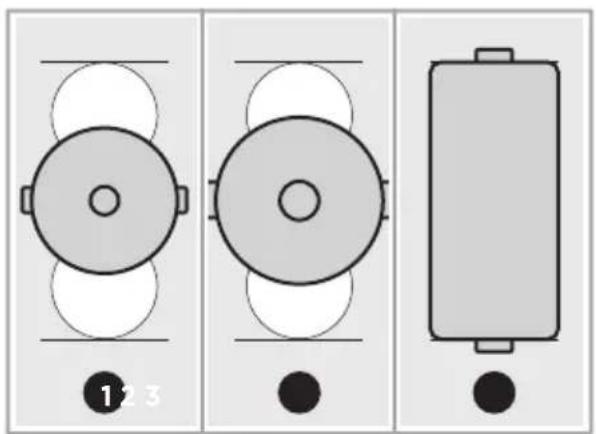
Pos. Base ∅ in mm
1250
2 280
11.1.2 Using bridge area as 2 independent areas
- Make sure the cookware diameter is bigger than 140 mm.
- Place the cookware on the bridge area.
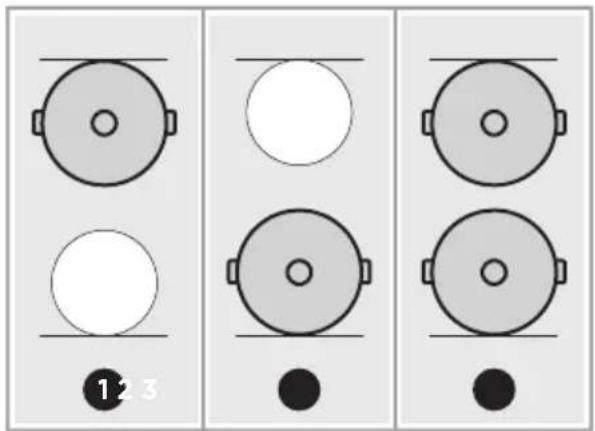
12 WI-FI CONNECTION
To use the Wi-Fi function you need to download the Smart Home app and install it to your portable device. Then enroll your appliance following the instructions directly from the app.
When networking the product, make sure that the mobile phone is as close as possible to the product. According to the app tips, if the product only supports 2.4 GHz Wifi communication, note that the 2.4 GHz network is selected for connection. The product supports Bluetooth function, which is only used for networking function.
The app uses Bluetooth function on your phone to link the device's SSID and configure network services.
As the product technology is updated, the content of SmartHome may change, and the actual display in Smart-Home App shall prevail.
You can search for the "SmartHome" app in the mobile app store to download and use it.
12.1 Pairing the appliance with the app
The appliance must be in standby mode. See chapter „Switch the appliance on“ on page 22
- During network setup, enable Bluetooth on your smartphone
to assist with the pairing process.
- Press [ ] until the buzzer sounds and the control panel shows [ AP ], then release.
√The pairing process starts and takes about 10 minutes.
√[•] blinks slowly when waiting for the pairing process.
√[•] blinks quickly during the pairing process.
√ When the pairing process was successful, [ • ] stays on.
When the pairing process failed, [•] stays off.
12.2 Reset the WI-FI connection
▶]Press [ 🔺 simultaneously, until the control panel shows [r5].
13 HOOD TO HOB FUNCTION
13.1 Establishing the hood to hob connection
The appliance must be in standby mode. See chapter „Switch the appliance on“ on page 22
▶ Press [ 🔺 ] and [ 🔒 ] simultaneously for at least 3 seconds.
√ The control panel shows [ bc ] for about 2 seconds and the hood to hob function starts to establish.
13.2 Reset the hood to hob connection
▶ Press [ 🔺 ] and [ 🔒 ] simultaneously, until the control panel shows [ r5 ].
14 COOKWARE TEST
Before testing, make sure that the size of the of the cookware base matches the size of the cooking zone used. See chapter „Choosing the cookware“ on page 16
14.1 Testing the cookware with a magnet
You can check whether your cookware is suitable by carrying out a magnet test.
Move a magnet towards the base of the cookware.
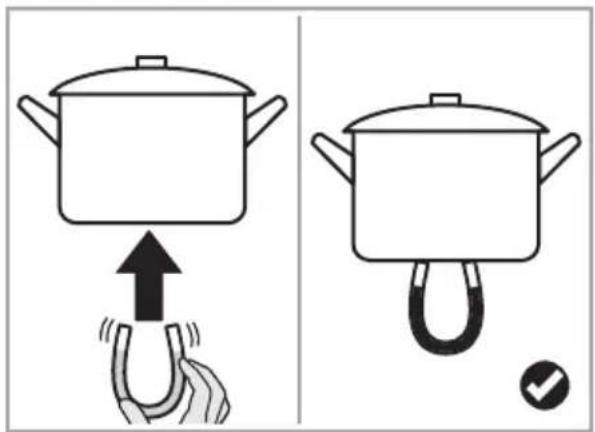
√ If the cookware is attracted, the cookware is suitable for induction.
14.2 Testing the cookware without a magnet
- -Put 250 ml water in the cook ware you want to check.
- Start cooking. See chapter "Start cooking" on page 23
- Check whether [ ] is flashing in the control panel.
If [ ≡ ] does not flash in the control panel and the water is heating, the cookware is suitable.
If [ ] is flashing, the cookware is not suitable and no heating takes place.
If you don't put a suitable cookware on the cooking zone within 1 minute, [ ] will automatically disappear.
Your cookware is not suitable due to the following reasons:
- You haven't placed a cookware on the correct cooking zone.
- The cookware you're using is not suitable for induction cooking. See chapter „Choosing the cookware“ on page 16
- The cookware is too small or not properly centred on the cooking zone. See chapter „Positioning the cookware“ on page 16
15 SETTINGS
You can adjust various settings according to your requirements.
15.1 Adjusting the settings
i The appliance must be switched off.
i Start your adjustments within 15 seconds, after you switched the appliance on. When the 15 seconds are up without user interaction, switch the appliance off and repeat the process.
i After 30 seconds without user interaction, the appliances exits the settings without saving.
To adjust any setting, the appliance has to be in settings mode.
- To enter the settings mode, press [①] once and then press [🔒] for at least 3 seconds.
All the indicators show [L].
- Press [®] for at least 3 seconds.
√ The control panel shows [c] in the lower left indicator and [L] disappears.
- Press [ Ⓑ ].
√[ c3 ] start to flash in the control panel.
√The appliance is in settings mode.
- Press [💡] repeatedly until the control panel shows the required setting.
i Available settings:
| Symbol Meaning | |
| c0 | Reset to factory settings |
| c3 | Power management settings |
| c4 | Quality testing of cookware |
| c5 | Buzzer settings |
- Press [ Ⓑ ] repeatedly until the control panel shows the required setting.
- To save the setting, press [ 🔊 ] for at least 3 seconds.
If you press [ ① ] after selecting the required setting, the appliance turns off without saving.
15.1.1 Reset to factory settings
The appliance is in settings mode. See chapter „Adjusting the settings“ on page 31.
- Press [💡] repeatedly until [⊂☐] flashes in the control panel.
- To reset the settings to factory settings, press [®] repeatedly, until the control panel shows [1].
If you don't want to reset the settings, press [®] repeatedly, until the control panel shows [☐]. - To save the setting, press [ 🔊 ] for at least 3 seconds.
√ The buzzer sounds and the appliance shuts down after the setup is complete.
15.1.2 Adjusting the power management
It is possible to set a maximum power absorption level for the appliance, choosing up to different power ranges.
This appliance is able to limit itself automatically in order to work at lower power, to avoid the risk of overloading.
It is not necessary to put any cookware on the cooking zones.
The appliance is in settings mode. See chapter „Adjusting the settings“ on page 31
- Press [💡] repeatedly, until [c3] flashes in the control panel.
√ The control panel shows the current power level, e. g. [74]. - To adjust the power level, press [⑧] repeatedly, until the control panel shows the required power level.
- To save the setting, press [ 🔊 ] for at least 3 seconds.
√ All the indicators show [-].
i Available settings:
| Symbol Max. power in kW | |
| 74 | 7.4 |
| 65 | 6.5 |
| Symbol Max. power in kW | |
| 55 | 5.5 |
| 45 | 4.5 |
| 34 | 3.4 |
| 25 | 2.5 |
15.1.3 Testing the cookware quality
The appliance is in settings mode. See chapter „Adjusting the settings“ on page 31
- Press [💡] repeatedly, until [⊂4] flashes in the control panel.
- To enter the test, press [⑧] repeatedly, until the control panel shows [ = ].
- Place the cookware on a cooking zone.
- Press the corresponding cooking zone selection control for at least 3 seconds, e. g. [☐].
√After 12 seconds, the control panel shows the quality level from 0 low to 10 high.
The higher the quality level, the better the quality of the cookware. - To exit the test, press [①] for 1 second.
i Available settings:
| Symbol Meaning | |
| Do not enter the cookware quality testing.Default setting: [ ] | |
| Enter the cookware quality testing. | |
15.1.4 Switch the buzzer on
The appliance is in settings mode. See chapter „Adjusting the settings“ on page 31
- Press [💡] repeatedly until [⊂5] flashes in the control panel.
- To switch the buzzer on, press [⑧] repeatedly, until the control panel shows [☐].
- To save the setting, press [💡] for at least 3 seconds.
√ All the indicators show [-].
15.1.5 Switch the buzzer off
The appliance is in settings mode. See chapter „Adjusting the settings“ on page 31
- Press [💡] repeatedly until [ ∈5 ] flashes in the control panel.
- To switch the buzzer off, press [⑧] repeatedly, until the control panel shows [1].
- To save the setting, press [💡] for at least 3 seconds.
√ All the indicators show [-].
15.2 Overview of the default working times
Auto shut down is a safety protection function for your appliance. It shuts down automatically if ever you forget to turn off your cooking. The default working times for various power levels are shown in the below table:
| Power level Time in h |
| 1 - 3 8 |
| 4 -6 4 |
| 7 - 9 2 |
When the cookware is removed, the appliance can stop heating immediately and the appliance automatically switches off after 2 minutes.
16 CLEANING AND MAINTENANCE
To keep your appliance working efficiently for a long time, it is important to clean and maintain it carefully.
16.1 Cleaning agents
ATTENTION
Unsuitable cleaning products may damage the surface of the appliance.
Do not use abrasive sponges.
Do not use harsh or abrasive cleaning agents.
Do not use cleaning agents containing alcohol.
Always read the label to check whether your cleaner or scouring pad is suitable.
16.2 Cleaning the appliance
Clean the appliance after each use to prevent cooking residues do not burn on.
Warning - Risk of burns
Residual heat can lead to burns.
▶ Wait before cleaning, until the cooking zones have cooled down.
Do not touch any parts of the appliance before allowing them to cool down.
Warning - Risk of cutting
The blade in the glass scraper is razor-sharp.
▶ Never remove the safety cover of the glass scraper.
- Use the glass scraper with extreme care.
▶ Always store safely and out of reach of children.
ATTENTION
Improper cleaning may damage the surface of the appliance.
▶ Never leave cleaning residue on the appliance, as the glass may become stained.
Remove boilovers, melts and hot sugary spills on the glass immediately.
16.2.1 Cleaning everyday soiling
How to clean everyday soiling on glass, e. g. fingerprints, marks, stains left by food or non-sugary spillovers on the glass.
- To switch the appliance off, press [①].
- Apply a cleaning agent while the glass is still warm but not hot.
- Rinse and wipe dry with a clean cloth or paper towel.
- To switch the appliance on, press [①].
16.2.2 Cleaning boilovers
i Remove boilovers, melts and hot sugary spills on the glass immediately with a fish slice, palette knife or glass scraper suitable for ceramic glass appliances.
- To switch the appliance off, press [①].
- Hold the blade or utensil at a 30° angle and scrape the soil-ing or spill to a cool area of the appliance.
Cleaning and maintenance
- Clean the soiling or spill up with a dish cloth or paper towel.
- Apply a cleaning agent while the glass is still warm but not hot.
- Rinse and wipe dry with a clean cloth or paper towel.
- To switch the appliance on, press [①].
16.2.3 Cleaning the control panel
How to clean spillovers on the control panel.
The appliance may beep and turn itself off and the touch controls may not function while there is liquid on them. Make sure you wipe the control panel dry before turning the appliance back on.
-
To switch the appliance off, press [①].
-
Soak up the spill.
-
Wipe the touch control area with a clean damp sponge or cloth.
-
Wipe the area completely dry with a paper towel.
-
To switch the appliance on, press [①].
17 TROUBLESHOOTING
Operation of your appliance can lead to errors and malfunctions. The following tables contain possible causes and notes for resolving an error message or malfunction. It is recommended to read the tables carefully below in order to save your time and money that may cost for calling to the service center.
| Problem Possible causes Solution | ||
| The appliance cannot be switched on. | The power supply is interrupted. | 1. Make sure that the appliance is connected to the power supply and switched on.2. Check whether there is a power cut in your home or neighbourhood.3. If you have checked everything and the problem persists, contact a qualified technician. |
| The touch controls are unresponsive. | The childproof lock is activated. | Deactivate the child proof lock. See chapter „Deactivating the child-proof lock“ on page 24 |
| The touch controls are difficult to operate. | There may be a slight film of water over the controls or you may be using the tip of your finger when touching the controls. | 1. Make sure the touch control area is dry.2. Use the tip of your finger when pressing the controls. See chapter „Using the touch controls“ on page 19 |
| The glass is being scratched. | The cookware is-rough-edged. | Use cookware with flat and smooth bases. See chapter „Choosing the cookware“ on page 16 |
| Unsuitable, abrasive scouring agents or cleaning products are used. | Use suitable cleaning agents only. See chapter „Cleaning and maintenance“ on page 34 | |
| Some pans make crackling or clicking noises. | This may be caused by the construction of your cookware (layers of different metals vibrating differently). | iThis is normal for cook-ware and does not indicate a fault. |
| The appliance makes a low humming noise when used on a high heat setting. | This is caused by the technology of induction cooking. | iThis is normal, but the noise should quieten down or disappear completely when you decrease the heat setting. |
| Fan noise coming from the appliance. | A cooling fan built into your appliance has come on to prevent the electronics from overheating. It may continue to run even after you've turned the appliance off. | iThis is normal and needs no action. Do not switch the power to the appli-ance off at the wall while the fan is running. |
| Pans do not become hot and [ ] appears in the control panel. | The appliance cannot detect the pan because it is not suitable for induction cooking. | ▶ Use cookware suitable for induction cooking.See chapter „Choosing the cookware“ on page 16 |
| The appliance cannot detect the pan because it is too small for the cooking zone or not properly centred on it. | ▶Centre the pan and make sure that its base matches the size of the cook-ing zone.See chapter „Positioning the cook-ware“ on page 16 | |
| The appliance or a cooking zone has turned itself off unexpectedly, a tone sounds and an error code is displayed (typically alternating with one or two digits in the cooking timer display). | This is a technical fault. | 1. -Note down the error letters and numbers.2. Switch the power to the appliance off at the wall, and contact a qualified technician. |
| The Wi-Fi connection cannot be established. | Wireless connection router SSID names are unsuitable. | i The product opens TCP 6444, UDP 6445 network ports, and a UDP random network port for device discovery and network configuration.If special character's punctuation marks or spaces are used, it might prevent the SSID name from showing up in the available networks to join in the app.Only use alphanumeric values for wireless connection router SSID names.If the SSID shows up then it is ok to use, otherwise log into the router and change the SSID name. |
| The router or wireless connection name and wireless connection password changed. | j-Repeat the above process to reconnect to the network. | |
| The network is unstable. | A large number of appliances are connected to the wireless connection router. | Reduce the number of appliances in the net-work.There is no way that Midea can advise a specific number limitation as this depends on router quality and many other factors. |
17.1 Failure display and inspection
The appliance is equipped with a self diagnostic function. With this test the technician is able to check the function of several components without disassembling or dismounting the appliance from the working surface.
| Failure code Problem Solution | ||
| E1 | Ceramic plate temperature sensor failure-open circuit | ▶Check the connection or replace the ceramic plate temperature sensor. |
| E2 | Ceramic plate temperature sensor failure-short circuit | |
| E7 | Ceramic plate temperature sensor failure | |
| C1 | High temperature of ceramic plate sensor | 1. Wait for the temperature of ceramic plate return to normal.2. Press restart unit. |
| E3 | Temperature sensor of the IGBT failure-open circuit | ▶Replace the power board. |
| E4 | Temperature sensor of the IGBT failure-short circuit | |
Troubleshooting
| Failure code Problem Solution | ||
| C2 | High temperature of IGBT | 1. Wait for the temperature of IGBT return to normal.2. Press restart unit.3. Check whether the fan runs smoothly.4. When the fan does not run smoothly, replace the fan. |
| EL | Supply voltage is below the rated voltage. | 1. Inspect whether the power supply is normal.2. When the power supply is normal, press [1] to restart the appliance. |
| EH | Supply voltage is above the rated voltage. | |
| EU | Communication error | 1. Reinsert the connection between the display board and the power board.2. Replace the power board or the display board. |
| EF | Overflow error | 1. Inspect whether water exists on the operation area.2. When water exists on the operation area clean and dry it. |
17.2 Specific failure and solution
| Failure Problem Solution | ||
| The LED does not come on when the appliance is plugged in. | No power is supplied. | ▶Check to see if plug is secured tightly in outlet and that outlet is working. |
| The accessorial power board and the display board connected failure. | ▶Check the connection. | |
| The accessorial power board is damaged. | ▶Replace the accessorial power board. | |
| The display board is damaged. | ▶Replace the display board. | |
| Some buttons can't work, or the LED display is not normal. | The display board is damaged. | ▶Replace the display board. |
| The cooking mode indicator comes on, but heating does not start. | High temperature of the appliance | i Ambient temperature may be too high. Air intake or air vent may be blocked. |
| There is something 1. wrong with the fan. | Inspect whether the fan runs smoothly.2. When the fan does not run smoothly, replace the fan. | |
| The power board is damaged. | ▶ Replace the power board. | |
Troubleshooting
| Failure Problem Solution | ||
| Heating stops suddenly during operation and [ ┌ ] flashes in the control panel. | Pan type is wrong. | Choose the proper cookware. See chapter „Choosing the cookware“ on page 16 |
| Pot diameter is too small. | ||
| Cooker has over-heated and unit is overheated. | Wait for temperature to return to normal.When the temperature is normal, press [ Ⓘ ] to restart unit. | |
| Pan detection circuit is damaged. | Replace the power board. | |
| Cooking zones of the same side (such as the first and the second zone) would dis-play [ ┌ ]. | The power board and the display board connected failure. | Check the connection. |
| The display board of communicate part is damaged. | Replace the display board. | |
| The main board is damaged. | Replace the power board. | |
| Fan motor sounds abnormal. | The fan motor is damaged. | Replace the fan. |
The above are the judgment and inspection of common failures. Do not disassemble the unit by yourself to avoid any dangers and damages to the appliance.
18 PRODUCT INSTALLATION
iRead this installation instructions carefully.
i Only a licensed expert may connect the appliance.
Improper installation, opening of the appliance, connection or assembly may lead to a loss of validity of the product warranty.
i Switch off the power supply before carrying out any work.
i After installation, ensure that the user does not have access to the electrical components and the power cord of the hob.
i Never use this appliance in boats or in vehicles.
18.1 Safe product installation
Follow these safety instructions when installing the appliance.
Warning - Danger: Magnetism Permanent magnets in the appliance may affect electrical implants, e.g. pacemakers or insulin pumps.
Make sure the implants will not be affected by the electromagnetic field.
Warning - Risk of injury
Parts may have sharp edges.
Always wear protective gloves.
18.2 Before installing the appliance
Ensure the following before in- stalling the appliance.
The work surface is square and level, and no structural
members interfere with space requirements.
The work surface is made of a heat-resistant and insulated work surface material.
If the appliance is installed above an oven, the oven has to have a built-in cooling fan.
The installation will comply with all clearance requirements and applicable standards and regulations.
A suitable isolating switch providing full disconnection from the mains power supply is incorporated in the permanent wiring, mounted and positioned to comply with the local wiring rules and regulations.
The isolating switch must be of an approved type and provide a 3 mm air gap contact separation in all poles (or in all active (phase) conductors if the local wiring rules allow for this variation of the requirements).
The isolating switch will be easily accessible to the customer with the appliance installed.
You consult local building authorities and by-laws if in doubt regarding installation.
You use heat-resistant and easy-to-clean finishes for the wall surfaces surrounding the appliance, e. g. ceramic tiles.
Do not use wood and similar fibrous or hygroscopic material as work surface material to avoid an electrical shock and larger deformation caused by
the heat radiation from the hotplate, unless it is impregnated.
i Observe the information on the distance between the extractor hob and the appliance in the installation instructions for the extractor hob.
- All measurements in the drawings are in mm.
18.3 Safety distance
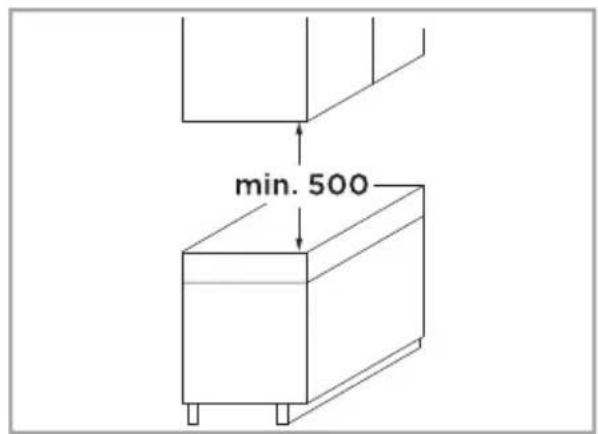
The safety distance between the appliance and the cupboard above the appliance should be at least 500 mm.
18.4 Appliance dimensions
The appliance has the following measurements.
18.5 Installation method
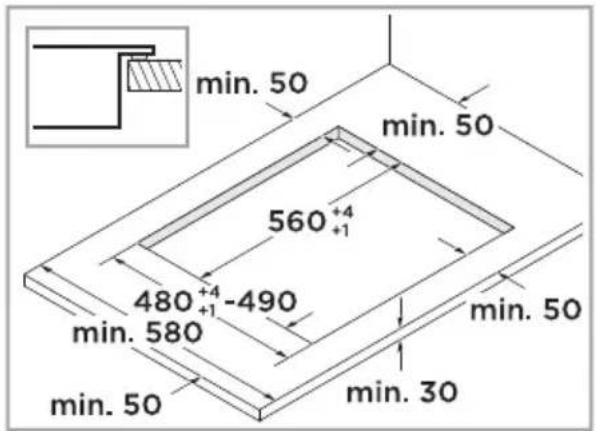
There are 2 installation methods. In the standard installation method, the appliance overlaps the work surface. In the flush fit installation, the appliance and work surface are on the same level.
For the purpose of installation and use, a minimum of 50 mm space shall be preserved around the hole.
18.5.1 Standard installation method
i Be sure the thickness of the work surface is at least 30 mm.
- Cut out the work surface according to the sizes shown in the drawing.
Product installation
18.5.2 Flush fit installation method
- Cut out the work surface according to the sizes shown in the drawing.
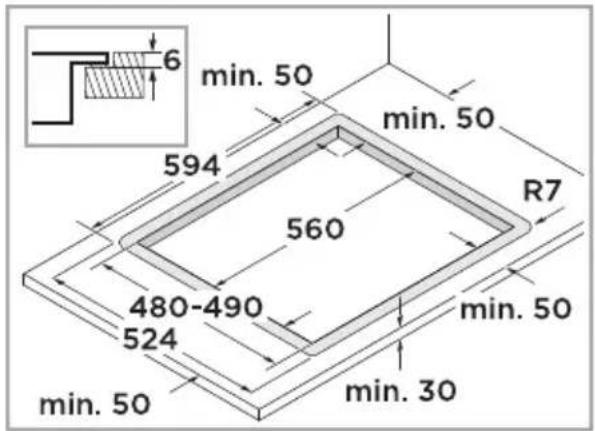
- Make sure that the cut surfaces of the worktops are properly sealed.
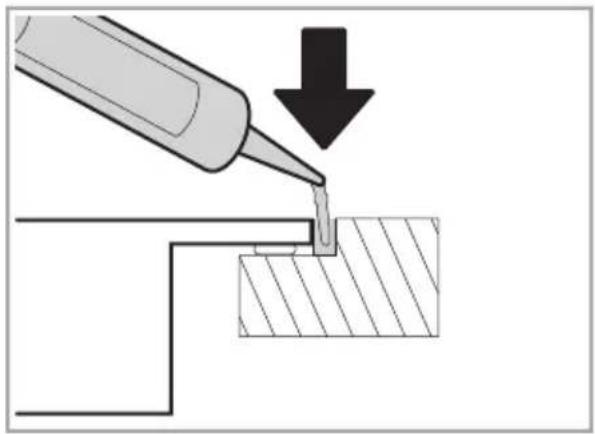
18.6 Ventilation
The ventilation in the lower section of the appliance requires a sufficient supply of fresh air. Therefore, if required, adjust the units for this purpose.
i Under any circumstances, make sure the appliance is well ventilated.
iEnsure the appliance is in good work state.
- Maintain a minimum clearance between the rear of the unit and the kitchen wall.
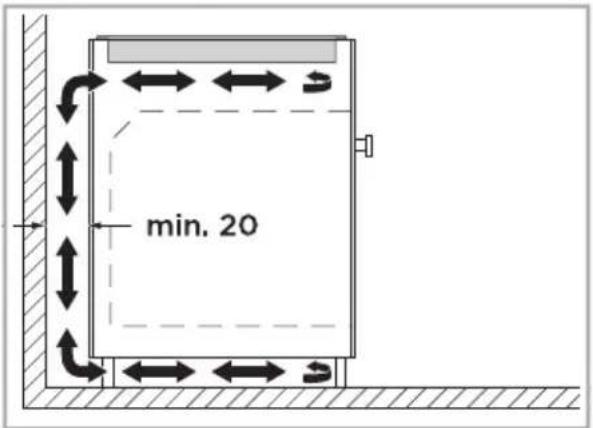
- Ensure that an opening at the top of the rear of the unit is unobstracted.
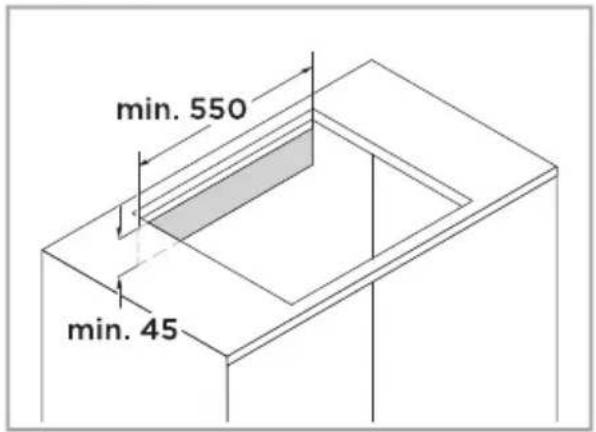
- If the clearance from the back wall of the unit is less than 20 mm, create an opening on the underside.
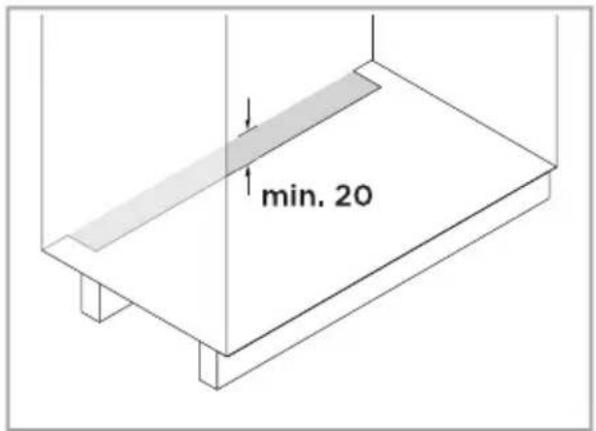
Do not hermetically seal the lower base.
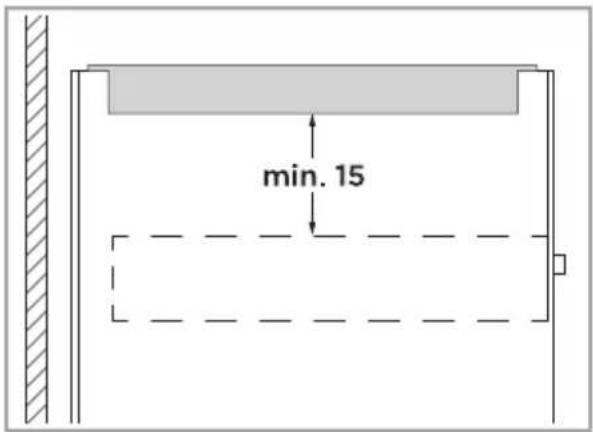
18.6.1 Installation above a drawer
In order to guarantee good ventilation, the clearance between the surface of the work surface and the upper area of the drawer must be 15 mm.
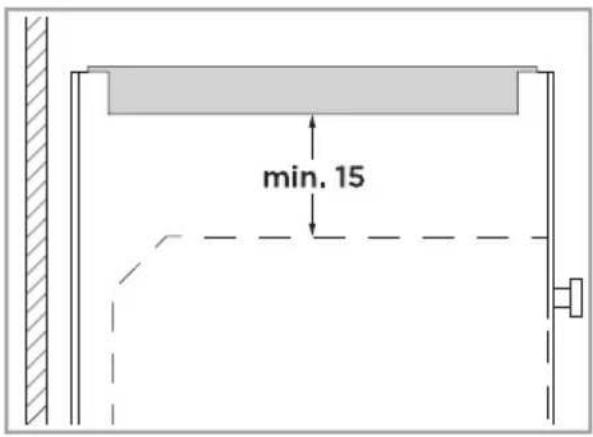
18.6.2 Installation above an oven
In order to guarantee good ventilation, the clearance between the surface of the work surface and the upper area of the oven must be 15 mm.
If the clearance between the hob and the oven needs to be increased, refer to the installation instructions for the oven.
18.7 Attaching the sealing strip
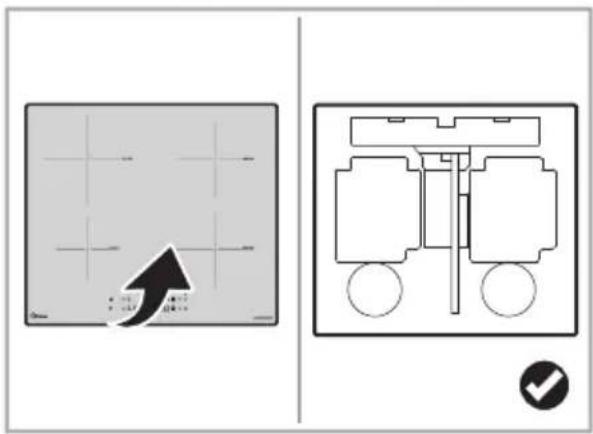
Before inserting the appliance into the worktop, it is necessary to attach the sealing strip onto the back of the glass plate.
i The unit should be placed on a stable, smooth surface, e. g. the packaging.
1. Turn the appliance on its back.
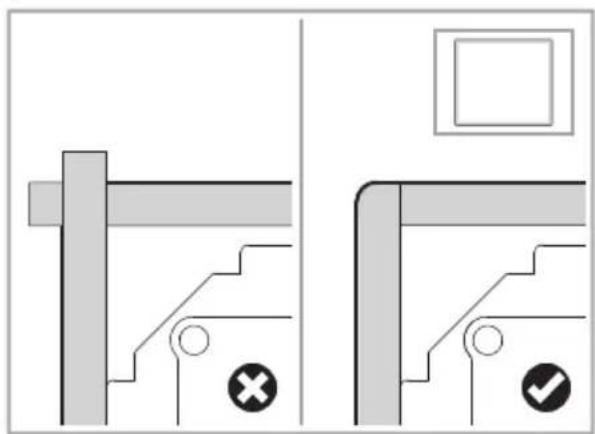
- Take out the sealing strip from the self-sealing bag and tear off the double-sided adhesive on the back of the sealing strip.
- Attach the sealing strip to the back off the appliance.
iThe sealing strip should not exceed the edge of the glass plate.
18.8 Locating the fixing brackets
The openings for the mounting brackets are located on the sides of the appliance.
Locate the openings for the fixing brackets.
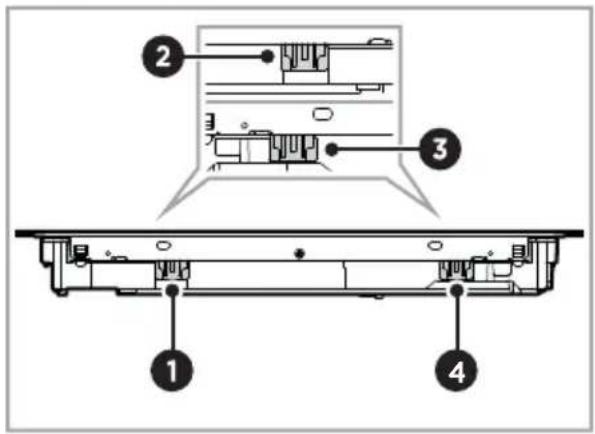
18.9 Inserting the fixing brackets
Fix the appliance on the worktop surface by inserting 4 brackets on the sides of the appliance.
i Under any circumstances, the brackets cannot touch with the inner surfaces of the worktop after installation.
Insert the the fixing brackets.
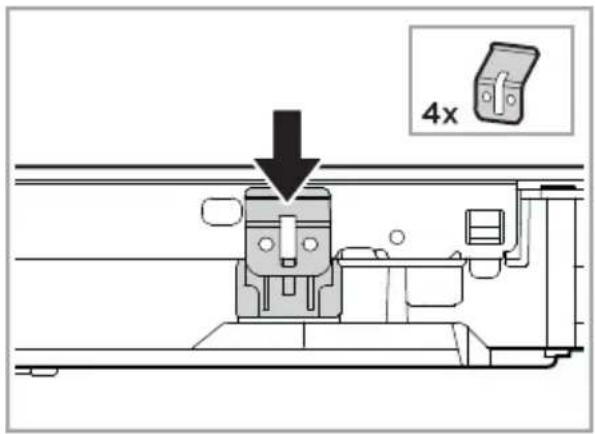
18.10 Inserting the appliance
There are ventilation holes around outside of the appli-
ance. Ensure these holes are not blocked by the worktop when you put the appliance into position.
The safety distance between the sides of the appliance and the inner surfaces of the work-top should be at least 3 mm.
- Insert the appliance.
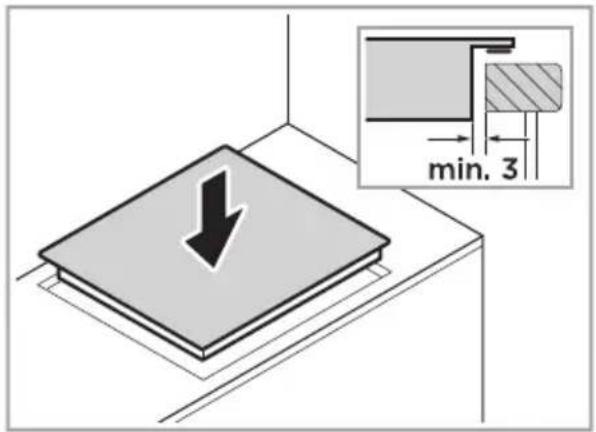
- Centre the appliance.
18.11 Installing the thermal protection barrier
If the appliance is installed above an oven, a drawer or a cupboard space, a thermal protection barrier is installed below the base of the appliance.
In order to avoid accidental touch with the overheating bottom of the appliance, or getting unexpected electric shock during working, it is necessary to put a wooden insert, fixed by screws, at a minimum distance of 15 mm from the bottom of the appliance.
Insert a wooden plate into the furniture and fix it with screws.
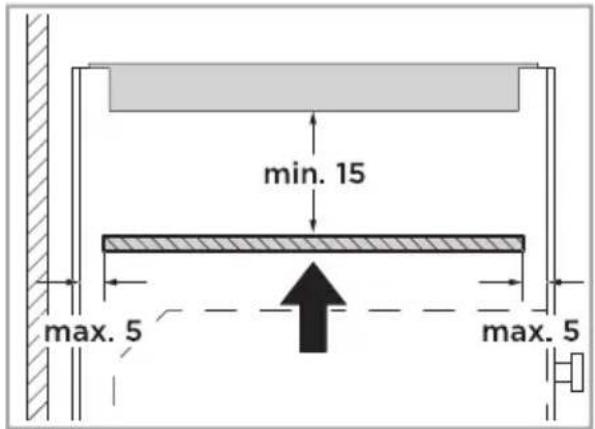
18.12 Cautions
The induction hotplate must be installed by qualified personnel or technicians. We have professionals at your service. Never conduct the operation by yourself.
- The appliance will not be in stalled directly above a dish-washer, fridge, freezer, washing machine or clothes dryer, as the humidity may damage the appliance electronics.
The induction hotplate shall be installed such that better heat radiation can be ensured to enhance its reliability.
i The wall and induced cooking zone above the table surface shall withstand heat.
To avoid any damage, the sandwich layer and adhesive must be resistant to heat.
i A steam cleaner is not to be used.
- The appliance can be connected only to a supply with the relevant system impedance no more than 0.288 Ω.
18.13 Connecting the appliance
This appliance may only be connected to the mains by a suitably qualified electrician.
i Make sure, the domestic installation is suitable for the power consumption of the appliance.
i-Make sure, the voltage corresponds to the value specified on the rating plate.
i Make sure, the cable sections of the power supply are suitable for the load specified on the rating plate.
Do not use adapters, reducers or branching devices to connect the appliance to the mains supply, as these can lead to overheating and a fire hazard.
The power supply cable must not touch any hot parts and must be laid in such a way that its temperature does not exceed 75 °C at any point.
If the cable is damaged or to be replaced, the operation must be carried out the by after-sale agent with dedicated tools to avoid any accidents.
- If the appliance is being connected directly to the mains an omnipolar circuit-breaker must be installed with a minimum opening of 3 mm between contacts.
The installer must ensure that the correct electrical connection has been made and that it is compliant with safety regulations.
i The cable must not be bent or compressed.
Product installation
The cable must be checked regularly and replaced by authorised technicians only.
The bottom surface and the power cord of the appliance are not accessible after installation.
Check with an electrician whether the domestic wiring system is suitable without alterations. Any alterations must only be made by a qualified electrician.
18.14 Connection type
The appliance corresponds to protection class 2.
18.14.1 220-240 V 1N\~32 A
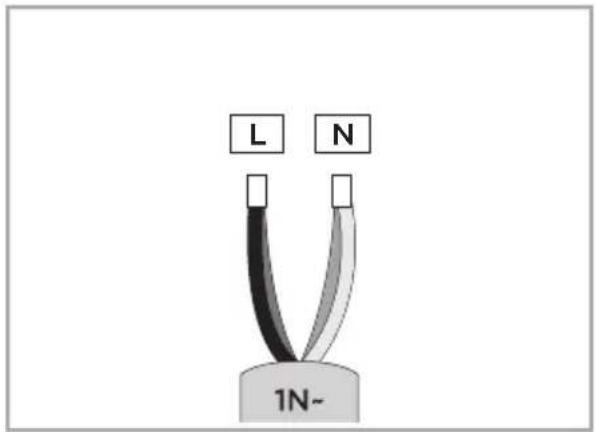
Pos. Colour
L Black + brown
N Blue + grey
18.14.2 220-240 V / 380-415 V
3N\~ 16 A
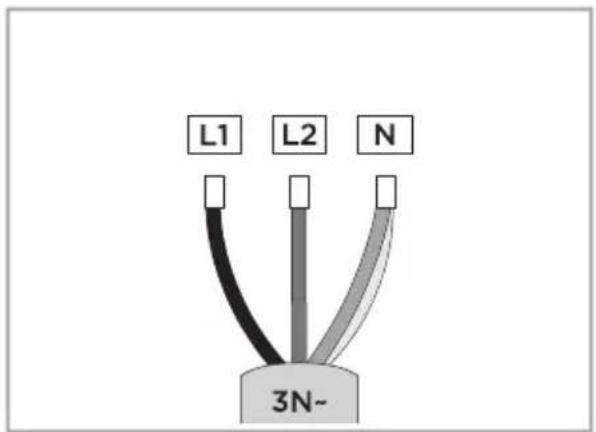
Pos. Colour
L1 Black
L2 Brown
N Blue + grey
18.14.3 2x 220-240 V 2L+2N\~16 A
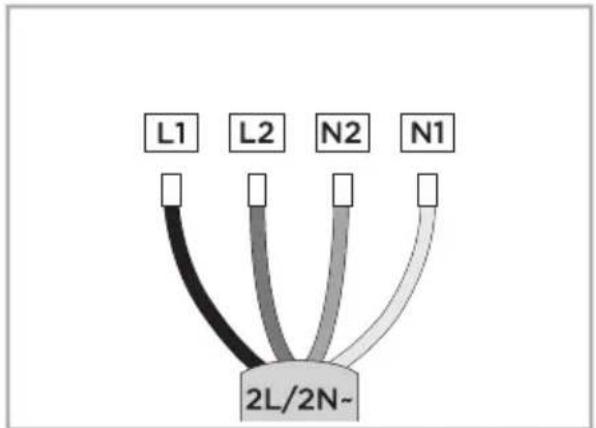
Pos. Colour
L1 Black
L2 Brown
N2 Blue
Pos. Colour
N1 Grey
18.15 After installing the appli- ance
Ensure the following after installing the appliance.
The power supply cable is not accessible through cupboard doors or drawers.
Make sure that there is an adequate flow of fresh air from outside the cabinetry to the base of the appliance.
i The isolating switch is easily accessible by the customer.
19 TEST DISHES
These setting recommendations are intended for testing institutes to facilitate the testing of our appliances.
19.1 Melting chocolate, couverture
| Cookware Ingredients Preparation | ||
| Pot ∅ 16 cm without lid | • 150 g dark choco- • late (55 % cacao) | Cooking: Power level 1 |
19.2 Béchamel sauce
Milk temperature: 7 °C
| Cookware Ingredients Preparation | ||
| Pot ∅ 16 cm without lid | 40 g butter40 g flour500 ml milk with 3.5 % fat content pinch of salt | Melt the butter, stir in the flour and salt, and heat up the mixture.Heat up duration: approx. 6 min. at power level 2Add the milk to the roux and bring to boil, stir-ring continuously.Heat up duration: approx. 6.5 min. at power level 7Once the béchamel sauce comes to boil, leave it on the cooking zone for a further 2 minutes.Simmering: Power level 2 |
19.3 Warm and keep warm of lentil stew
Recipe according to DIN 44550
Initial temperature: 20 °C
Heating up without stirring
| Cookware Ingredients Preparation | ||
| Pot ∅ 16 cm with lid | • Quantity: 450 g • | Heat up duration: approx. 1.5 min. at power level 9 • Simmering: Power level 1 |
| Pot ∅ 20 cm with lid | • Quantity: 800 g • | Heat up duration: approx. 2.5 min. at power level 9 • Simmering: Power level 1 |
19.4 Rice porridge
Milk temperature: 7 °C
| Cookware Ingredients Preparation | ||
| Pot ∅ 16 cm without lid | 190 g short-grain rice40 g sugar750 ml milk with 3.5 % fat content1 g salt | Add the ingredients to the milk and heat the mixture up while stirring continuously.Heat up duration: approx. 8 min. at power level 8Once the milk has reached approx. 95 °C, select the recommended power level and leave it to simmer on a low heat for approx. 50 min.Simmering: Power level 2 |
| Pot ∅ 20 cm without lid | 250 g short-grain rice120 g sugar1000 ml milk with 3.5 % fat content1.5 g salt | Heat up duration: approx. 8 min. at power level 8Simmering: Power level 2 |
19.5 Cooking rice
Recipe according to DIN 44550
Water temperature: 20 °C
| Cookware Ingredients Preparation | ||
| Pot ∅ 16 cm with lid | • 125 g long grain rice• 300 g water• 1 pinch of salt | • Heat up duration: approx. 2.5 min. at power level 9• Simmering: Power level 2 |
| Pot ∅ 20 cm with lid | • 250 g long grain rice• 600 g water• 1 pinch of salt | • Heat up duration: approx. 2.5 min. at power level 9• Simmering: Power level 2 |
19.6 Frying pancakes, crêpes
Recipe according to DIN EN 60350-2
Water temperature: 20 °C
| Cookware Ingredients Preparation | ||
| Pot ∅ 24 cm without lid | 55 g batter per crêpe | Heat up duration: approx. 1.5 min. at power level 9Simmering: Power level 7 |
19.7 Frying pork loin
Initial temperature of the loin: 7 °C
| Cookware Ingredients Preparation | ||
| Pan ∅ 24 cm without lid | • 3 pork loins, total weight approx.300 g, 1 cm thick• 15 g sunflower oil | • Heat up duration: approx.1.5 min. at power level 9• Simmering: Power level 7 |
19.8 Deep frying french fries
| Cookware Ingredients Preparation | ||
| Pot ∅ 20 cm without lid | • 200 g frozen french fries, 1 cm thick• 2 l sunflower oil | • Heat up duration: Power level 9 until the oil temperature reaches 180 °CSimmering: Power level 9 |
20 TRADEMARKS, COPYRIGHTS AND LEGAL STATEMENT
Midea logo, word marks, trade name, trade dress and all versions there of are valuable assets of Midea Group and/or its affiliates ("Midea"), to which Midea owns trademarks, copyrights and other intellectual property rights, and all goodwill derived from using any part of an Midea trademark. Use of Midea trademark for commercial purposes without the prior written consent of Midea may constitute trademark infringement or unfair competition in violation of relevant laws.
This manual is created by Midea and Midea reserves all copyrights thereof. No entity or individual may use, duplicate, modify, distribute in whole or in part this manual, or bundle or sell with other products without the prior written consent of Midea.
All the described functions and instructions were up to date at the time of printing this manual.
However, the actual product may vary due to improved functions and designs.
21 DISPOSAL AND RECYCLING
21.1 Important instructions for environment
Compliance with the WEEE Directive and Disposing of the Waster Product:
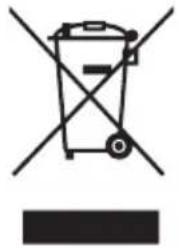
This product complies with EU WEEE Directive (2012/19/EU). This product bears a classification symbol for waster electrical and electronic equipment (WEEE).
This symbol indicates that this product shall not be disposed with other household wastes at the end of its service life. Used appliance must be returned to official collection point for recycling of electrical electronic appliances. To find these collection systems please contact to your local authorities or retailer where the product was purchased. Each household performs important role in recovering and recycling of old appliance. Appropriate disposal of used appliance helps prevent potential negative consequences for the environment and human health.
EN
21.2 Compliance with RoHS Directive
The product you have purchased complies with EU RoHS Directive (2011/65/EU). It does not contain harmful and prohibited materials specified in the Directive.
21.3 Package information
Packaging materials of the product are manufactured from recyclable materials in accordance with our National Environment Regulations. Do not dispose of the packaging materials together with the domestic or other wastes. Take them to the packaging material collection points designated by the local authorities.

22 DATA PROTECTION NOTICE
For the provision of the services agreed with the customer, we agree to comply without restriction with all stipulations of applicable data protection law, in line with agreed countries within which services to the customer will be delivered, as well as, where applicable, the EU General Data Protection Regulation (GDPR).
Generally, our data processing is to fulfil our obligation under contract with you and for product safety reasons, to safeguard your rights in connection with warranty and product registration questions.
In some cases, but only if appropriate data protection is ensured, personal data might be transferred to recipients located outside of the European Economic Area.
Further information are provided on request. You can contact our Data Protection Officer via MideaDPO@midea.com. To exercise your rights such as right to object your personal date being processed for direct marketing purposes, please contact us via MideaDPO@midea.com. To find further information, please follow the QR Code.
TABLA DE CONTENIDO
19.1 Derrite chocolate, chocolate cobertura 51
19.2 Salsa bechamel 15....
18.6 Ventilación
19.1 Derrite chocolate, chocolate cobertura
Initial temperature of the loin: 7 °C
Pos. Signification
Pos. Zone ∅ mm Base ∅ mm
1 180 140-180
2 180 140-180
3 290 180-290
4 Zone de pont 390x180 250
Pos. Base ∅ en mm
1250
2 280
Symbol Signification
18 INSTALLATION DE PRODUIT
18.6 Ventilation
18.9 Insertion des supports de fixation
Pos. Couleur
| L1 Noir | |
| L2 | Marron |
| N | Bleu + gris |
18.14.3 2x 220-240 V 2L+2N\~16 A
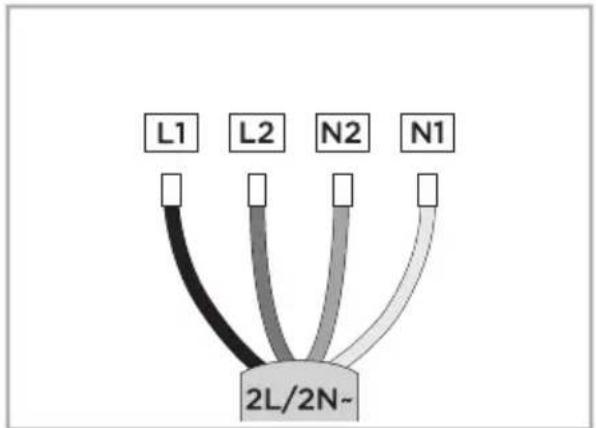
Pos. Couleur
| L1 Noir | |
| L2 | Marron |
| N2 | Bleu |
Pos. Couleur
N1 Gris
22 AVIS DE PROTECTION DES DONNÉES
Produktübersicht
Pos. Bedeutung
Pos. Boden-∅ in mm

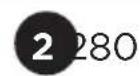
Pos. Boden-∅ in mm
3 390x180
18.6 Belüftung
22 DATENSCHUTZHINWEIS
Spain Frigicoll, S.A.
Calle Blasco de Garay, 4-6, Sant Just Desvern, Barcelona, Spain
Midea Electrics France
253 RUE SAINT-HONORE 75001 PARIS
www.midea.com

make yourself at home
- PRODUCT INSTALLATION
- TEST DISHES
- TRADEMARKS, COPYRIGHTS AND LEGAL STATEMENT
- DISPOSAL AND RECYCLING
- SAFETY INSTRUCTIONS
- INTENDED USE
- EXPLANATION OF SYMBOLS
- SAFETY WARNINGS
- INSTALLATION
- ELECTRICAL SHOCK HAZARD
- CUT HAZARD
- IMPORTANT SAFETY INSTRUCTIONS
- OPERATION AND MAINTENANCE
- HEALTH HAZARD
- HOT SURFACE HAZARD
- SPECIFICATIONS
- DECLARATION OF CONFORMITY
- COOKWARE
- CHOOSING THE COOKWARE
- ATTENTION
- POSITIONING THE COOKWARE
- MOVING THE COOKWARE
- COOKWARE DETECTION
- PRODUCT OVERVIEW
- CONTROL PANEL
- USING THE TOUCH CONTROLS
- INDUCTION COOKING
- COOKING ZONES
- RESIDUAL HEAT DISPLAY
- BEFORE FIRST USE
- CLEANING THE APPLIANCE FOR THE FIRST TIME
- HOW TO USE
- SWITCH THE APPLIANCE ON
- SWITCH THE APPLIANCE OFF
- SETTING THE POWER LEVEL
- COOKING TABLE, COOKING HINTS, POWER LEVELS AND THEIR MEANING
- START COOKING
- FINISH COOKING
- WARNING - RISK OF BURNS
- COOKING TIPS
- ⚠ WARNING - RISK OF FIRE
- CHILDPROOF LOCK
- ACTIVATING THE CHILDPROOF LOCK
- DEACTIVATING THE CHILD-PROOF LOCK
- PAUSE MODE
- ENTERING PAUSE MODE
- EXITING PAUSE MODE
- TIMER CONTROL
- COUNT DOWN
- USING THE COUNT DOWN
- CANCELLING THE COUNT DOWN
- SWITCH OFF TIMER
- USING THE SWITCH OFF TIMER
- CANCELLING THE SWITCH OFF TIMER
- BOOST FUNCTION
- ACTIVATING THE BOOST FUNCTION
- CANCELLING THE BOOST FUNCTION
- BRIDGE AREA
- ACTIVATING THE BRIDGE AREA
- USING BRIDGE AREA AS SINGLE BIG AREA
- USING BRIDGE AREA AS 2 INDEPENDENT AREAS
- WI-FI CONNECTION
- PAIRING THE APPLIANCE WITH THE APP
- RESET THE WI-FI CONNECTION
- HOOD TO HOB FUNCTION
- ESTABLISHING THE HOOD TO HOB CONNECTION
- RESET THE HOOD TO HOB CONNECTION
- COOKWARE TEST
- TESTING THE COOKWARE WITH A MAGNET
- TESTING THE COOKWARE WITHOUT A MAGNET
- SETTINGS
- ADJUSTING THE SETTINGS
- RESET TO FACTORY SETTINGS
- ADJUSTING THE POWER MANAGEMENT
- TESTING THE COOKWARE QUALITY
- SWITCH THE BUZZER ON
- SWITCH THE BUZZER OFF
- OVERVIEW OF THE DEFAULT WORKING TIMES
- CLEANING AND MAINTENANCE
- CLEANING AGENTS
- CLEANING THE APPLIANCE
- WARNING - RISK OF CUTTING
- CLEANING EVERYDAY SOILING
- CLEANING BOILOVERS
- CLEANING THE CONTROL PANEL
- TROUBLESHOOTING
- FAILURE DISPLAY AND INSPECTION
- SAFE PRODUCT INSTALLATION
- BEFORE INSTALLING THE APPLIANCE
- SAFETY DISTANCE
- APPLIANCE DIMENSIONS
- INSTALLATION METHOD
- STANDARD INSTALLATION METHOD
- FLUSH FIT INSTALLATION METHOD
- VENTILATION
- INSTALLATION ABOVE A DRAWER
- INSTALLATION ABOVE AN OVEN
- ATTACHING THE SEALING STRIP
- LOCATING THE FIXING BRACKETS
- INSERTING THE FIXING BRACKETS
- INSERTING THE APPLIANCE
- INSTALLING THE THERMAL PROTECTION BARRIER
- CAUTIONS
- CONNECTING THE APPLIANCE
- CONNECTION TYPE
- POS. COLOUR
- AFTER INSTALLING THE APPLI- ANCE
- MELTING CHOCOLATE, COUVERTURE
- BÉCHAMEL SAUCE
- WARM AND KEEP WARM OF LENTIL STEW
- RICE PORRIDGE
- COOKING RICE
- FRYING PANCAKES, CRÊPES
- FRYING PORK LOIN
- DEEP FRYING FRENCH FRIES
- IMPORTANT INSTRUCTIONS FOR ENVIRONMENT
- COMPLIANCE WITH ROHS DIRECTIVE
- PACKAGE INFORMATION
- DATA PROTECTION NOTICE
- TABLA DE CONTENIDO
- VENTILACIÓN
- POS. SIGNIFICATION
- POS. ZONE ∅ MM BASE ∅ MM
- INSTALLATION DE PRODUIT
- INSERTION DES SUPPORTS DE FIXATION
- POS. COULEUR
- AVIS DE PROTECTION DES DONNÉES
- PRODUKTÜBERSICHT
- POS. BEDEUTUNG
- POS. BODEN-∅ IN MM
- X
- BELÜFTUNG
- DATENSCHUTZHINWEIS
- SPAIN FRIGICOLL, S.A
- MIDEA ELECTRICS FRANCE
Brand : MIDEA
Model : MIH743BE325GK
Category : Cooker