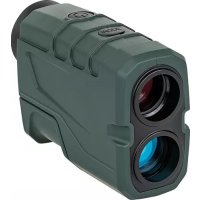
DJE800Li - Rangefinder Dörr - Free user manual and instructions
Find the device manual for free DJE800Li Dörr in PDF.


Frequently Asked Questions - DJE800Li Dörr
User questions about DJE800Li Dörr
0 question about this device. Answer the ones you know or ask your own.
Ask a new question about this device
Download the instructions for your Rangefinder in PDF format for free! Find your manual DJE800Li - Dörr and take your electronic device back in hand. On this page are published all the documents necessary for the use of your device. DJE800Li by Dörr.
USER MANUAL DJE800Li Dörr
THANK YOU for choosing this DORR quality product.
Please read the instruction manual and safety hints carefully before first use. Keep this instruction manual together with the device for future use. If other people use this device, make this instruction manual available. This instruction manual is part of the device and must be supplied with the device in case of sale.
DORR is not liable for damages caused by improper use or the failure to observe the instruction manual and safety hints.
01 SAFETY HINTS
-
CAUTION: Never look through the rangefinder directly into the sun - there is the risk of eye injury or blindness
-
Protect the device from rain, moisture, direct sunlight and extreme temperatures.
- Do not throw the device into water or fire - there is a risk of explosion due to the built-in rechargeable battery!
- Do not operate or touch the device with wet hands.
- Protect the device against impacts. Do not use the device if it has been dropped. In this case a qualified electrician should inspect the device before you use it again.
- Do not attempt to repair the device by yourself. When service or repair is required, contact qualified service personnel.
If device is not in use for a long period of time, we recommend to charge the built-in battery first. The storage of an empty battery will shorten its life. - People with physical or cognitive disabilities should use the device with supervision.
- People with cardiac pacemakers, defibrillators or any other electrical implants should maintain a minimum distance of 30~cm , as the device generates magnetic fields.
- Do not use the device nearby mobile phones and devices that generate strong electromagnetic fields (e.g. electric engines).
This device is not a toy. To prevent accidents and suffocation keep the device, the accessories and the packing materials away from children and pets. - Protect the device against dirt. Never use aggressive cleansing agents or benzine to clean the device. We recommend a soft, slightly damp microfiber cloth to clean the outer parts of the device. Disconnect the power connection to the PC before cleaning.
- Store the device in a dust-free, dry and cool place.
If the device is defective or without any further use, dispose of the device according to the Waste Electrical and Electronic Equipment Directive WEEE. For further information, please contact your local authorities.
02|ASER INFORMATION
The transmission power of the built-in laser is so small that the human eye cannot be injured when used properly. The built-in laser corresponds to laser class 1 according to EU standard EN 60825-1 (Safety of Laser Products).
03 | PRODUCT DESCRIPTION
Compact laser rangefinder with built-in, rechargeable lithium polymer battery for hunting, sport and hobby. Easy handling for fast and precise distance measurements up to 800m . The nonslip soft-touch surface offers protection against water splashes. Supplied with USB charging cable, wrist strap, cleaning cloth and bag.
04 | NOMENCLATURE
01 Eyepiece
02 Focussing ring
03 Green LED
04 Red LED
05 Micro USB socket
06 Eyelet for wrist strap
07 Start and measuring button
08 Mode button
09 Objective Lens/Laser sender
10 Lens/Laser receiver
11 1 / 4 tripod mount
12 USB charging cable
12a) Micro USB plug
12b) USB plug
LCD DISPLAY
13 Scan mode
14 Reticle
15 Measuring
16 Distance indication
17 Measuring unit (meters/yards)
18 Battery capacity indicator
05 | CHARGING THE BUILT-IN BATTERY
Before first use, please fully charge the built-in battery:
Insert the Micro USB plug (12a) into the Micro USB socket (05) on the rangefinder. Connect the USB plug (12b) with a USB port on your computer. While charging, both LEDs (03 and 04) light up. After approx. 3-4 hours the battery is fully charged and the red LED (04) will turn off.
The built-in Lithium Polymer battery cannot be replaced.
06 OPERATION
CAUTION: Never look through the rangefinder directly into the sun - there is the risk of eye injury or blindness!
06.1 SETTING UP THE MEASURING UNIT
The rangefinder indicates the distance in meters (16 = M) or in yards (16 = Y) . To set the desired measuring unit, press the start and measuring button (07) first to activate the LCD display. Then press the mode button (08) for about 2 seconds to switch between meters (16 = M) or yards (16 = Y) .
06.2 MEASURING
- Look through the eyepiece (01) and turn the focusing ring (02) until the object you are measuring is in sharp focus.
- Press the start and measuring button (07).
- Target the object by pointing the reticle (14) to the centre of the object. Press the start and measuring button (07) again.
- The distance indication (16) displays the measuring result.
If measuring failed the distance indication (16) shows 4 dashes ....
Possible cause of the problem: Check the minimum distance of 3m to the object and measure again.
REMARK
The quality of the measurement strongly depends on the structure of the object and weather and visibility conditions. The straighter the laser beam strikes an object, the greater the distance which can be measured.
06.3 BATTERY CAPACITY INDICATOR
When the battery capacity indicator (18) appears in the LCD display, please charge the rangefinder timely as described in chapter 05.
06.4 POWER OFF
If the rangefinder is not in use for 10 seconds, it will shut off automatically.
06.5 MOUNTING ON A TRIPOD
With the 1/4 tripod mount (11), the rangefinder can be mounted on a tripod (tripods by DORR optionally available).
06.6 WRIST STRAP
If desired, the supplied wrist strap can be attached to the eyelet (06).
07 | CLEANING AND STORAGE
Never use aggressive cleansing agents or benzine to clean the device. We recommend a soft, slightly damp microfiber cloth to clean the outer parts of the device. To remove dirt from the outer lenses use the supplied cleaning cloth or any soft and dry tissue. Disconnect the USB power connection from the PC before cleaning. Store the rangefinder in the supplied case and keep it in a dust-free, dry and cool place. This device is not a toy - keep it out of reach of children. Keep away from pets.
08 | TECHNICAL SPECIFICATIONS
| Measuring range approx. 3 - 800 m +/- 1 m | |
| Measuring duration approx. 0,3 seconds | |
| Magnification/Lens diameter 6x24 | |
| Field of view at 1000 m approx. 126 m | |
| Exit pupil approx. 3,8 mm | |
| Eye relief approx. 16 mm | |
| Lens coating Multi Coating | |
| Laser type Class 1, 905 nm | |
| Battery Lithium Polymer 3,7 V 650 mAh | |
| Operating time (with fully charged battery) | approx. 150 hours |
| Operating temperature -10 to +60°C | |
| Tripod mount | 1/4" |
| Dimensions | approx. 110 x 75 x 40 mm |
| Weight | approx. 186 g |
09 | SCOPE OF DELIVERY
10 | DISPOSAL, CE MARKING
10.1 DISPOSAL OF BATTERIES/ACCUMULATORS
Batteries are marked with the symbol of a crossed out bin. This symbol indicates that empty batteries or accumulators which can no longer be charged should not be disposed of with household waste. Waste batteries may contain harmful substances that can cause damage to health and to the environment. Please use the return and collection systems available in your country for the disposal of the waste batteries.
10.2 WEEE INFORMATION
The Waste Electrical and Electronic Equipment Directive (WEEE Directive) is the European community directive on waste electrical and electronic equipment, which became European law in February 2003. The main purpose of this directive is to prevent electronic waste. Recycling and other forms of waste recovery should be encouraged to reduce waste. The symbol (trash can) on the product and on the packing means that used electrical and electronic products should not be disposed of with general household waste. It is your responsibility to dispose of all your electronic or electrical waste at designated collection points. Disposing of this product correctly will help to save valuable resources and it is a significant contribution to protect our environment as well as human health. For more information about the correct disposal of electrical and electronic equipment, recycling and collection points please contact your local authorities, waste management companies, your retailer or the manufacturer of this device.
10.3 ROHS CONFORMITY
This product is compliant with the European directive 2011/65/EU of June 08, 2011 for the restriction of use of certain hazardous substances in electrical and electronic equipment (RoHS) and its amendments.
C E 10.4 CE MARKING
The CE marking complies with the European directives.

10 | GESTION, MARCA CE