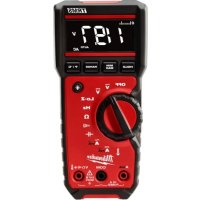
221720 - Multimeter MILWAUKEE - Free user manual and instructions
Find the device manual for free 221720 MILWAUKEE in PDF.


| Product Type | True RMS Digital Multimeter |
| Brand | Milwaukee |
| Model | 2217-20 |
| Power Supply | 2 AA batteries (ANSI 15A, IEC LR6) |
| Battery Life | Approximately 26 hours (all lights on) |
| Fuse | 600V AC/DC, 10A, fast-acting |
| Safety Category | CAT III 600V |
| Protection Rating | IP54 |
| Drop Resistance | 1 m |
| Operating Temperature | -10 °C to 50 °C |
| Maximum Altitude | 2000 m |
| Main Functions | AC/DC Voltage (600V), AC/DC Current (10A), Resistance (40 MΩ), Continuity (threshold 30 Ω), Capacitance (1000 μF), Frequency (50 kHz), Temperature (-40°C to 400°C), Lo-Z (low impedance) |
| Display | LCD with backlight, bar graph indicator |
| Special Functions | Hold, Min/Max, Range (auto/manual), SMART HOLD, sleep mode (20 min) |
| Maintenance and Cleaning | Clean with a damp cloth and mild soap. Do not immerse. Remove batteries before maintenance. |
| Spare Parts and Repairability | Fuse (10A), AA batteries, test leads, Type K thermocouple. Repairs by an authorized Milwaukee service center. |
| Warranty | 5 years (test and measurement tool) |
Frequently Asked Questions - 221720 MILWAUKEE
User questions about 221720 MILWAUKEE
0 question about this device. Answer the ones you know or ask your own.
Ask a new question about this device
Download the instructions for your Multimeter in PDF format for free! Find your manual 221720 - MILWAUKEE and take your electronic device back in hand. On this page are published all the documents necessary for the use of your device. 221720 by MILWAUKEE.
USER MANUAL 221720 MILWAUKEE
Cat. No./No de Cat. 2217-20
TRUE RMS MULTIMETER (DMM) MULTIMÉTRE D'EFFICACITÉ VÉRITABLE (DMM) MULTIMETRO CON RMS VERDADERO (DMM)
IMPORTANT SAFETY INSTRUCTIONS
AWARNING READ ALL SAFETYWARNINGS AND INSTRUCTIONS.
Failure to follow the warnings and instructions may result in electric shock, fire and/or serious injury, as well as instrument damage and/or damage to the equipment being tested.
Save these instructions - This operator's manual contains important safety and operating instructions for the MILWAUKEE True RMS Multimeters (DMM). Before using, read this operator's manual and all labels on the True RMS Multimeters.
ADANGER
Never make measurement on a circuit in which voltage over 600V rms exists. Use only leads rated 600V CAT III or better.
Do not apply more than the rated voltage, as marked on the DMM, between terminals or between any terminal and earth ground.
Do not attempt a current measurement when the open voltage is above the fuse protection rating. Suspected open circuit voltage can be checked with voltage function.
Do not use the DMM to measure voltages in circuits that could be damaged by the DMM's low input impedance in Lo-Z Function. Impedance is approximately 4K
Do not attempt to make measurement in the presence of flammable gases. Otherwise, the use of the instrument may cause sparking, which can lead to an explosion.
Never attempt to use the instrument if its surface or your hand is wet.
Do not exceed the maximum allowable input of any measuring range.
Only test on unenergized circuits unless absolutely necessary.
Check tool functionality on a known circuit first. Never assume tool is working. Assume circuits are live until they can be proven de-energized.
Never open the Battery cover during a measurement.
Do not ground yourself while measuring. Avoid body contact with earthed or grounded surfaces such as pipes, radiators, ranges and refrigerators.
This instrument is to be used only in its intended applications or conditions. Otherwise, the instrument's safety functions may not work, resulting in serious personal injury and instrument damage.
To reduce the risk of injury from shock and arc blasts, always wear personal protective equipment where live conductors are exposed.
WARNING
Never attempt to make measurement if any abnormal conditions, such as broken case and exposed metal parts are found on the instrument.
Comply with local and national safety requirements when working in hazardous locations.
Keep fingers behind the guards and away from test lead tips during measurements.
Do not rotate the Rotary Dial while the test leads are being connected.
Never attempt a voltage measurement with the test lead inserted into the A input terminal.
Verify proper operation on a known source before use or taking action as a result of the indication of the instrument.
Do not install substitute parts, replace fuse or make any modification to the instrument. For repair or re-calibration, return the tool to a factory Service/Sales Support Branch or authorized service station.
Do not try to replace the batteries if the surface of the instrument is wet.
Disconnect all the cords and cables from the object under test and power off the instrument before opening the Battery Cover for Battery replacement.
This tool is designed to be powered by 2-AA batteries properly inserted into the MILWAUKEE True RMS Multimeters. Do not attempt to use with any other voltage or power supply.
Install battery according to polarity (+ and -) diagrams.
Do not leave batteries within the reach of children.
Do not mix new and used batteries. Do not mix brands (or types within brands) of batteries. Properly dispose of used batteries.
Do not incinerate or dismantle batteries.
Under abusive conditions, liquid may be ejected from the battery, avoid contact. If contact accidentally occurs, flush with water. If liquid contacts eyes, additionally seek medical help.
Liquid ejected from the battery may cause irritation or burns.
CAUTION
Set the Rotary Dial to an appropriate position before starting measurement.
Disconnect test leads from test points before changing Rotary Dial functions.
Never connect to a source of voltage with the Dial function in OFF/Ω/mA/A-1-1
Firmly insert the test leads.
Do not expose the instrument to the direct sun, high temperature and humidity or dew fall.
Altitude 2000m or less. Appropriate operating temperature is within -10^ and 50^ .
Keep away from excess dust and water.
Be sure to power off the instrument after use. When the instrument will not be in use for a long period, place it in storage after removing the batteries.
Use a damp cloth or neutral detergent for cleaning the instrument. Do not use abrasives or solvents.
FUNCTIONS
| Dial Position Range | Voltage AC | 600.0mV/6.000V 60.00V/600.0V | 0.1mV/0.001V/ 0.01V/0.1V | ±(1.0% + 3 dgt) (45~500Hz) ±(2.0% + 3 dgt) (500~1000Hz) | |
| Low input impedance | 600.0V | 0.1V | ±(0.5% + 2 dgt) | ||
| Hz | Hertz | 99.99/999.9Hz 9.999/50.00kHz | 0.01Hz/0.1Hz/ 0.001kHz/0.01kHz | ±(0.1% + 2 dgt) | |
| Ω | Resistance | 600.0Ω 6.000/60.00/600.0kΩ 6.000/40.00MΩ | 0.1Ω 0.001/0.01/0.1kΩ | ±(1.0% + 5 dgt) | |
| .001/.01MΩ | ±(1.9% + 5 dgt) | ||||
| Continuity | Cont Buzzer 0-600.0Ω | Buzzer sounds at 30Ω or less | |||
| Capacitance | 100.0μF 1000μF | 0.1μF 1μF | ±(1.9% + 2 dgt) | ||
| A | Current AC | 0.40mA-60.00mA/600.0mA 6.000A/10.00A | 0.01mA/0.1mA 0.001A/0.01A | ±(1.5% + 3 dgt) (45~500Hz) | |
| A | Current DC | 0.40mA-60.00mA/600.0mA 6.000A/10.00A | 0.01mA/0.1mA 0.001A/0.01A | ±(1.0% + 3 dgt) | |
| Temperature† | -40.0℃ ~ 400.0℃ -40.0°F ~ 752.0°F | 0.1°C 0.2°F | ±(1.0% + 10 dgt) ±(1.0% + 18 dgt) | ||
Federal Communications Commission
Pursuant to part 15.21 of the FCC Rules, you are cautioned that changes or modifications not expressly approved by the party responsible for compliance could void your authority to operate the product. This equipment has been tested and found to comply with the limits for a Class B digital device, pursuant to Part 15 of the FCC Rules. These limits are designed to provide reasonable protection against harmful interference in a residential installation. This equipment generates, uses and can radiate radio frequency energy and, if not installed and used in accordance with the instructions, may cause harmful interference to radio communications. However, there is no guarantee that interference will not occur in a particular installation. If this equipment does cause harmful interference to radio or television reception, which can be determined by turning the equipment off and on, the user is encouraged to try to correct the interference by one or more of the following measures:
- Reorient or relocate the receiving antenna.
- Increase the separation between the equipment and receiver.
- Connect the equipment into an outlet on a circuit different from that to which the receiver is connected
- Consult the dealer or an experienced radio/TV technician for help.
This device complies with part 15 of the FCC Rules and ISED-Canada's license exempt RSS standards. Operation is subject to the following two conditions: 1) This device may not cause harmful interference, and 2) This device must accept any interference received, including interference that may cause undesired operation.
†Temperature Range, Resolution and Accuracy are for the DMM. Temperature Probe may have different specifications.
*These instruments are True-RMS sensing. All voltage and current readings are True-RMS values.
*Input impedance:
Voltage DC: 10MΩ;
Voltage AC: 10MΩ // less than 100pF;
Lo-z: 4kΩ approximately
- Overload protection:
Voltage DC, Voltage AC, Lo-Z Voltage and Hertz: AC/DC 720V for 10 second
Current DC & Current AC: AC/DC 20A for 10 sec.
Resistance, Continuity, Capacitance and Temperature: AC/DC 600V for 10 second
- Maximum measurement time: 1 minute at 10A, rest time 20 minutes minimum
- Minimum frequency measurement is 2Hz
- Signal voltage in frequency mode: 8V-600V(RMS)
- Minimum AC Current measurement is 0.40mA
- Minimum AC Voltage measurement is 4.0mV
- For AC Voltage, AC Current and Lo-z:
Additional Accuracy by Crest Factor (C.F.):
Add 6.0% for C.F. 1.0~2.0.
Add 7.0% for C.F. 2.0 - 2.5.
Add 9.0% for C.F. 2.5 3.0
Max. Crest Factor: 1.6 for 6600 5000 digits
2.0 for 5000 ~ 3000 digits
3.0 for 3000 0 digits
Measurement accuracy of square wave and truncated waveforms at 1kHz is unspecified.

Operator's Manual

ble insulation

of electric shock

n (Ground)

Danger, Warning, or Caution-Consult the operator's manual for additional safety information.
Battery compartment

Classification of transient overvoltages, based on nominal line voltage to earth.
Fuse


Do not dispose of this product as unsorted municipal waste.

Dean Confirmity Mark

UL Listing for Canada and U.S.
GENERAL SPECIFICATIONS
Cat. No. 2217-20
Accuracy is specified for 1 year after calibration, at operating temperatures of 64^ to 82^ (-18^ to 28^) with relative humidity at 45% to 85% , indoor use.
Maximum voltage between any terminal and earth ground. 600V Cat III
Temperature Operating. 14^ to 122^ (-10^ to 50^)
Current Measurements. 14^ to 104^
(-10^ to 40^)
Storage. -40°F to 140°F (-40°C to 60°C)
Temperature Coefficient. 0.1 x (specified accuracy)/°C (<18°C or >28°C)
Operating Altitude 6562 ft (2000 m) IP Rating
(International Dust & Water Protection)......IP54
Drop Rating 39.4 in (1 m)
Battery 2AA,ANSI 15A,IEC LR6
Battery Life.....Approx. 26 hours with all lights on
Fuse 600V AC/DC, 10A fast-acting
Safety Compliances .IEC/UL/CSA 61010-1, IEC 61010-2-033 (Meter),
IEC 61010-031+A1 (Probes), EN 61326-1,
FCC Part 15B, ICES-003B (EMC)
Certifications cULus, CE
Humidity...........Maximum relative humidity 80% for temperatures up to 88^ (31^) decreasing linearly to 50% relative humidity at 104^ (40^)
Pollution Degree 2
For Indoor Use
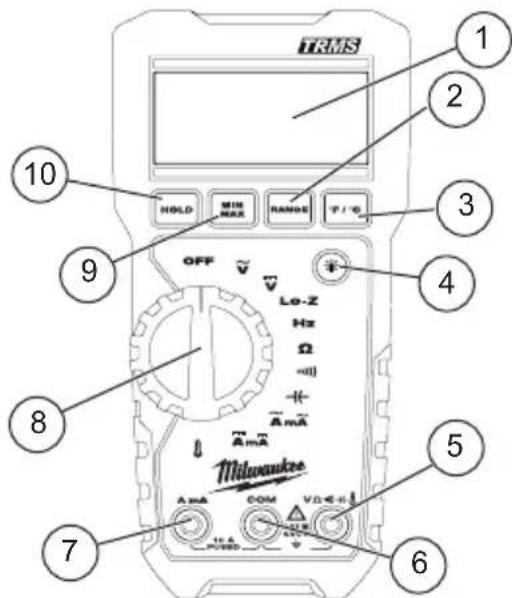
- Display
- Range button
- ^ F / ^ button
- Backlight button
-
VΩ terminal input
6.COM terminal input -
A mA terminal input
- Rotary dial
- Min/Max button
10.Hold button - Accessory bay (on back, not shown)
ASSEMBLY
AWARNING To avoid an electrical hazard, turn the rotary dial to OFF and disconnect the test leads before replacing batteries.
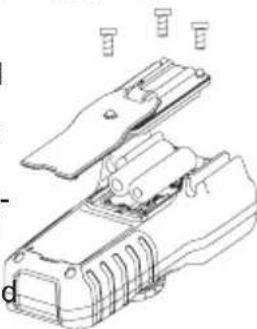
Loading/Changing the Batteries
Replace batteries when the low battery indicator is displayed.
- Turn rotary dial to OFF and disconnect the test leads.
- Unscrew and remove battery door.
- Insert two (2) AA batteries, according to the polarity marked in the battery compartment
- Close the battery door and tighten screw securely.
AWARNING Only use MILWAUKEE test leads with the MILWAUKEE DMM. Inspect test leads for continuity before each use. Do not use if the readings are high or noisy.
Before Use
Confirm the rotary dial is set to the correct position, the instrument is set to the correct measurement mode, and the data hold function is disabled. Otherwise, desired measurement cannot be made.

LCD Backlight
The LCD backlight will turn off after about 10 minutes of inactivity. Press the backlight button to turn the backlight on again.
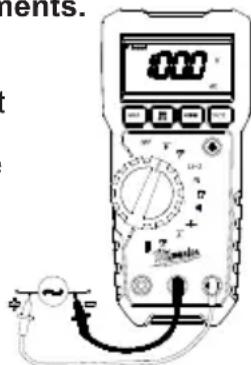
Making a Measurement AC Voltage
ADANGER To avoid electrical shock: Never make measurement on a circuit in which voltage over AC600V exists. Do not use with the Battery Cover removed. Keep fingers behind the guards and away from test lead tips during measurements.
- Set the dial to position.
- Connect the red test lead to the VΩ terminal and the black test lead to the COM terminal.
- Connect the test leads to the circuit under test. The reading is displayed.
CAUTION Readings may fluctuate or be influenced in noisy environment.

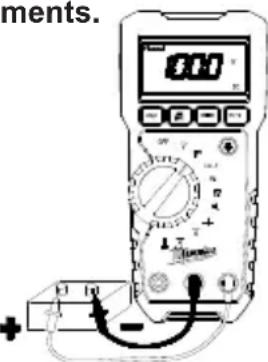
DC Voltage
ADANGER To avoid electrical shock: Never make measurement on a circuit in which voltage over DC600V exists. Do not use with the Battery Cover removed. Keep fingers behind the guards and away from test lead tips during measurements.
- Set the dial to v position.
- Connect the red test lead to the VΩ terminal and the black test lead to the COM terminal.
- Connect the red test lead to the positive (+) side and black test leads to the negative (-) side of the circuit under test. The reading is displayed. A reversed connection is indicated as a neg
Lo-Z Low Input Impedance
Automatic voltage detection (AC or DC).
- Set the Dial to Lo-Z position.
- Connect the red test lead to the VΩ terminal and the black test lead to the COM terminal.
- AC: Connect the test leads to the circuit under test. The reading is displayed.
DC: Connect the red test lead to the positive (+) side and black test leads to the negative (-) side of the circuit under test. The reading is displayed. A reversed connection is indicated as a nega
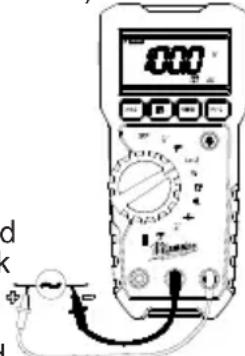
CAUTION Do not use the DMM to measure voltages in circuits that could be damaged by the DMM's low input impedance less than approximately 4k
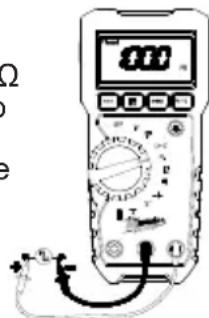
Hz Frequency
- Set the dial to Hz position.
- Connect the red test lead to the VΩ terminal and the black test lead to the COM terminal.
- Connect the test leads to the circuit under test. The reading is displayed.
Resistance/Continuity/Capacitance Measurements
DANGER To reduce the risk of electric shock for Resistance, Continuity, and Capacitance measurements, never use the DMM on an energized circuit. Make sure a capacitor is fully discharged before touching or attempting to make a measurement.
Do not use with the Battery Cover removed.
Resistance
- Set the dial to position.
- Connect the red test lead to the V terminal and the black test lead to the COM terminal.
Confirm "OL" is indicated on the display, and then short-circuit the tips of test leads to make the indication zero.
- Connect the test leads to the both ends of the resistor under test.
- The reading is displayed.
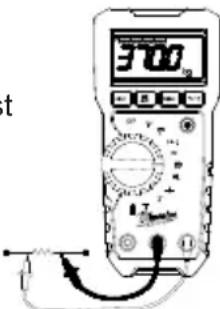
CAUTION After shorting the test leads, the displayed value may not be zero due to the resistance of test leads themselves.
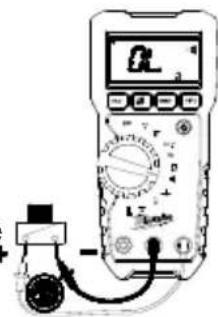
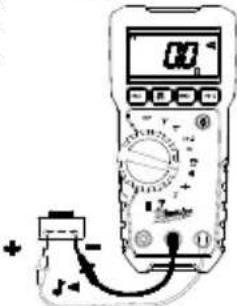
Continuity
- Set the dial to position.
- Connect the red test lead to the VΩ terminal and the black test lead to the COM terminal. Confirm "OL" is indicated on the display, and then short-circuit the tips of test leads to make the indication zero. A buzzer will sound.
- Connect the test leads to the both ends of the conductor under test. If the resistance under test is 30 or less, the buzzer will sound.

Capacitance
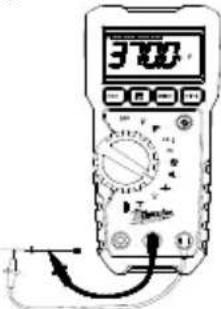
- Set the dial to position.
- Use the Range button to select either 100 F or 1000 F .
- Connect the red test lead to the VΩ terminal and the black test lead to the COM terminal.
- Discharge capacitor.
- Connect the test leads to the both ends of the capacitor under test.
- The reading is displayed.

AC Current
ADANGER To avoid electrical shock: Never make measurement on a circuit in which voltage over AC600V exists. Do not use with the Battery Cover removed. Keep fingers behind the guards and away from test lead tips during measurements.
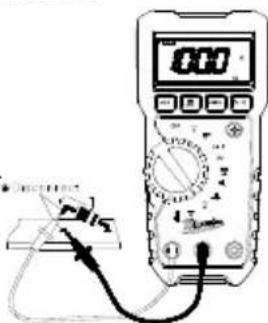
- Set the dial to Aposition.
- Connect the red test lead to the A terminal and the black test lead to the COM terminal.
- Turn circuit power off, disconnect the circuit, connect the test leads in series with the circuit under test, and then turn circuit power on. The reading is displayed.

DC Current
ADANGER To avoid electrical shock: Never make measurement on a circuit in which voltage over AC600V exists. Do not use with the Battery Cover removed. Keep fingers behind the guards and away from test lead tips during measurements.
- Set the Dial to Position.
- Connect the red test lead to the A terminal and the black test lead to the COM terminal.
- Turn circuit power off, disconnect the circuit, connect the test leads in series with the circuit under test, and then turn circuit power on. The reading is displayed.
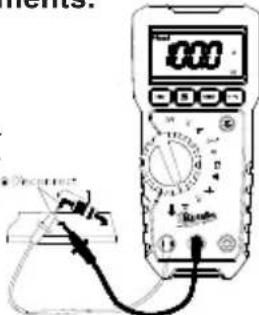

Temperature
- Set the dial to 1 position.
- Connect the K-type temperature probe to the input terminal. The positive (+) side of probe should be connected to VΩ.
- Contact the probe sensor to the object under test.
- The reading is displayed.
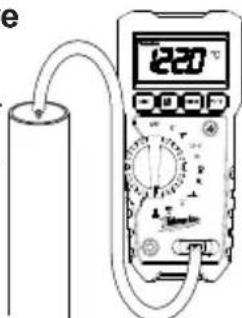
WARNING Never connect the Temperature Probe to an energized circuit.
CAUTION When the dial is set to OL should be displayed. If anything else is displayed, something may be wrong with the DMM. Stop using the DMM immediately.
Using Bar Graph Display
The bar graph is like the needle on an analog meter, it updates much faster than the digital display. The number of segments indicates the measured value and is relative to the full-scale value of the selected range.
HOLD Button
Data Hold Function - Freezes the value on the display. Press the HOLD button to freeze the reading. The reading will be held regardless of subsequent variation in input. HOLD is displayed with the reading. To exit Data Hold mode, press the HOLD button again or change the dial. SMART HOLD: The meter will beep continuously and the display will flash if the measured signal is 50 counts larger than the display reading. (However, it can not detect across the AC and DC Voltage/Current).
CAUTION The Data Hold readings of maximum / minimum are released when the DMM enters Sleep Mode.
MIN/MAX Button
The MIN MAX recording mode captures the minimum and maximum input values. When a new high or low is detected, the DMM beeps.
Put the DMM in the desired measurement function and range, then press MIN/MAX button to enter MIN MAX mode, and present readings and MAX MIN are displayed.
Press MIN/MAX to step through the minimum (MIN displayed), maximum (MAX displayed), and present readings (both MAX and MIN are displayed).
To pause MIN MAX recording without erasing stored values, press HOLD button the HOLD is displayed. To resume MIN MAX recording, press HOLD button again.
To exit and erase stored readings, press MAN/MAX button for two seconds or change the dial.
CAUTION
Pressing the MIN/MAX button without applying voltage disables the
Auto-ranging function and fixes the Range to 6mV . Connect the test leads to the circuit under test and press the MIN/MAX button after an appropriate range is selected by Auto-ranging function.
Range Button
The DMM has both Manual and Autorange modes. In the Autorange mode, the DMM selects the range with the best resolution, and in the Manual Range mode, you override Autorange and select the range yourself. When you turn the DMM on, it defaults to Autorange and AUTO is displayed. To enter the Manual Range mode, press RANGE button, AUTO disappears. In the Manual Range mode, press RANGE button to increment the range. After the highest range, the Meter wraps to the lowest range.
When in Manual mode and measuring current, if the value being measured is greater than 600mA and the user is set to a mA range, the tool will display an "OL" indicator and switch the user into the correct current range. To exit Manual Range, press RANGE button for two seconds or change the dial. The Meter returns to Autorange and AUTO is displayed.
^ F / ^
To switch between Fahrenheit or Celsius, press the ^ F / ^ button.
Sleep Mode
The DMM is automatically powered off in about 20 min after the last Rotary Dial or button operation. To reset, rotate the Rotary Dial to OFF. If the display is still blank when a new dial setting is selected, replace the batteries.
The DMM does use battery power in sleep mode. Be sure to switch the tool to OFF to conserve battery power.
Over-flow indication
Any time the input exceeds the measuring range "OL" or "-OL" is displayed.
Accessory Bay
To install an accessory, slide it into the accessory bay on the back of the DMM. Follow the instructions supplied with the accessory.
MAINTENANCE
WARNING
To reduce the risk of injury, always remove the batteries from the tool
before performing any maintenance. Never disassemble the tool. Contact a MILWAUKEE service facility for ALL repairs.
Maintaining Tool
Keep your tool in good repair by adopting a regular maintenance program. After one year, it is recommended to return the tool to a MILWAUKEE service facility for calibration.
If the tool does not start or operate at full power with fully charged batteries, clean the contacts on the battery door. If the tool still does not work properly, return the tool to a MILWAUKEE service facility for repair.
WARNING
To reduce the risk of personal injury and damage, never immerse liquid or allow a liquid to flow inside
Cleaning
Clean dust and debris from any vents. Keep tool clean, dry and free of oil or grease. Use only mild soap and a damp cloth to clean, since certain cleaning agents and solvents are harmful to plastics and other insulated parts. Some of these include gasoline, turpentine, lacquer thinner, paint thinner, chlorinated cleaning solvents, ammonia and household detergents containing ammonia. Never use flammable or combustible solvents around tools.
Repairs
For repairs, return the tool, battery pack and charger to the nearest authorized service center.
ACCESSIONS
WARNING
Use only recommended accessories. Others may be hazardous.
For a complete listing of accessories, go online to www.milwaukeetool.com or contact a distributor.
SERVICE - UNITED STATES
1-800-SAWDUST (1.800.729.3878)
Monday-Friday, 7:00 AM - 6:30 PM CST
or visit www.milwaukeetool.com
Contact Corporate After Sales Service Technical Support with technical, service/repair, or warranty questions.
Email: metproductsupport@milwaukeetool.com
Become a Heavy Duty Club Member at www.milwaukeetool.com to receive important notifications regarding your tool purchases.
SERVICE - CANADA
Milwaukee Tool (Canada) Ltd 1.877.948.2360
Monday-Friday, 7:00 AM - 4:30 PM CST or visit www.milwaukeetool.ca
LIMITED WARRANTY USA & CANADA
MILWAUKEE Test & Measurement Product (including bare tool, M12TM battery pack(s) and battery charger) is warranted to the original purchaser from an authorized MILWAUKEE distributor only to be free from defects in material and workmanship. Subject to certain exceptions, MILWAUKEE will repair or replace any part on this product which, after examination, is determined by MILWAUKEE to be defective in material or workmanship for a period of five (5) years* after the date of purchase. Return of the Test & Measurement tool to the nearest Milwaukee Electric Tool Corporation - factory Service Center, freight prepaid and insured is required. A copy of the proof of purchase should be included with the return product. This warranty does not apply to damage that MILWAUKEE determines to be from repairs made or attempted by anyone other than MILWAUKEE authorized personnel, misuse, alterations, abuse, normal wear and tear, lack of maintenance, or accidents.
- See separate & distinct CORDLESS BATTERY PACK LIMITED WARRANTY statement for the warranty period of the LITHIUM-ION battery pack that ships with Test & Measurement Product. *Alkaline battery that ships with Test & Measurement Product is separately warranted by the alkaline battery manufacturer.
*The warranty period for a Voltage Detector with Work Light - 2201- 20 Voltage Detector with LED - 2202-20 or M12TM 2-Beam Plumb Laser - 2230-20 is one (1) year from the date of purchase.
Warranty Registration is not necessary to obtain the applicable warranty on MILWAUKEE product. The manufacturing date of the product will be used to determine the warranty period if no proof of purchase is provided at the time warranty service is requested.
ACCEPTANCE OF THE EXCLUSIVE REPAIR AND REPLACEMENT REMEDIES DESCRIBED HEREIN IS A CONDITION OF THE CONTRACT FOR THE PURCHASE OF EVERY MILWAUKEE PRODUCT, IF YOU DO NOT AGREE TO THIS CONDITION, YOU SHOULD NOT PURCHASE THE PRODUCT. IN NO EVENT SHALL MILWAUKEE BE LIABLE FOR ANY INCIDENTAL, SPECIAL, CONSEQUENTIAL, OR PUNITIVE DAMAGES, OR FOR ANY COSTS, ATTORNEY FEES, EXPENSES, LOSSES OR DELAYS ALGEGED TO BE AS A CONSEQUENCE OF ANY DAMAGE TO, FAILURE OF, OR DEFECT IN ANY PRODUCT INCLUDING, BUT NOT LIMITED TO, ANY CLAIMS FOR LOSS OF PROFITS. SOME STATES DO NOT ALLOW THE EXCLUSION OR LIMITATION OF INCIDENTAL OR CONSEQUENTIAL DAMAGES, SO THE ABOVE LIMITATION OR EXCLUSION MAY NOT APPLY TO YOU. THIS WARRANTY IS EXCLUSIVE AND IN LIEU OF ALL OTHER EXPRESS WARRANTYES, WRITTEN OR ORAL. TO THE EXTENT PERMITTED BY LAW, MILWAUKEE DISCLAIMS ANY IMPLIED WARRANTYES, INCLUDING WITHOUT LIMITATION ANY IMPLIED WARRANTY OF MERCHANTABILITY OR FITNESS FOR A PARTICULAR USE OR PURPOSE; TO THE EXTENT SUCH WARRANTYER IS NOT PERMITTED BY LAW, SUCH IMPLIED WARRANTYES ARE LIMITED TO THE DURATION OF THE APPLICABLE EXPRESS WARRANTY AS DESCRIBED ABOVE. SOME STATES DO NOT ALLOW LIMITATIONS ON HOW LONG AN IMPLIED WARRANTY LASTS, SO THE ABOVE LIMITATION MAY NOT APPLY TO YOU, THIS WARRANTYY GIVES YOU SPECIFIC LEGAL RIGHTS, AND YOU MAY ALSO HAVE OTHER RIGHTS WHICH VARY FROM STATE TO STATE.
This warranty applies to product sold in the U.S.A. and Canada only.
RÉGLES IMPORTANTES DE SECURITE
A VERTISSEMENT LIRE TOUS LES AVERTISSEMENTS ET TOUTES LES INSTRUCTIONS.
Pour courant .-10°C to 40°C (14°F to 104°F)
Entreposage.....-40 ^ C a 60 ^ C (-40 F a 140 F)
Attestations cULus, CE
Compartment à accessoires
Milwaukee Tool (Canada) Ltd
1.877.948.2360
Monday-Friday, 7:00 AM - 4:30 PM CST
www.milwaukeetool.ca
GARANTIE LIMITEE-
AUX ETATS-UNIS ET AU CANADA
11560 Polanco V Section
Miguel Hidalgo, Distrito Federal, Mexico
01 (800) 030-7777 o (55) 4160-3540
Lunes a Viernes (9am a 6pm)
O contactanos en www.milwaukeeetool.com.mx
GARANTÍA LIMITADA - E.U.A. Y CANADA
13135 West Lisbon Road
Brookfield, WI 53005 USA
58142219d8 07903200301Q-02(A)
02/25
Printed in
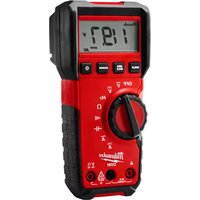
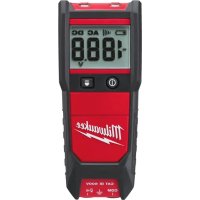
- TRUE RMS MULTIMETER (DMM) MULTIMÉTRE D'EFFICACITÉ VÉRITABLE (DMM) MULTIMETRO CON RMS VERDADERO (DMM)
- IMPORTANT SAFETY INSTRUCTIONS
- AWARNING READ ALL SAFETYWARNINGS AND INSTRUCTIONS.
- ADANGER
- WARNING
- CAUTION
- Federal Communications Commission
- GENERAL SPECIFICATIONS
- ASSEMBLY
- Loading/Changing the Batteries
- AWARNING Only use MILWAUKEE test leads with the MILWAUKEE DMM. Inspect test leads for continuity before each use. Do not use if the readings are high or noisy.
- Before Use
- LCD Backlight
- Making a Measurement AC Voltage
- ADANGER To avoid electrical shock: Never make measurement on a circuit in which voltage over AC600V exists. Do not use with the Battery Cover removed. Keep fingers behind the guards and away from test lead tips during measurements.
- CAUTION Readings may fluctuate or be influenced in noisy environment.
- DC Voltage
- ADANGER To avoid electrical shock: Never make measurement on a circuit in which voltage over DC600V exists. Do not use with the Battery Cover removed. Keep fingers behind the guards and away from test lead tips during measurements.
- Lo-Z Low Input Impedance
- CAUTION Do not use the DMM to measure voltages in circuits that could be damaged by the DMM's low input impedance less than approximately 4k
- Hz Frequency
- Resistance/Continuity/Capacitance Measurements
- DANGER To reduce the risk of electric shock for Resistance, Continuity, and Capacitance measurements, never use the DMM on an energized circuit. Make sure a capacitor is fully discharged before touching or attempting to make a measurement.
- Resistance
- CAUTION After shorting the test leads, the displayed value may not be zero due to the resistance of test leads themselves.
- Continuity
- Capacitance
- AC Current
- DC Current
- Temperature
- WARNING Never connect the Temperature Probe to an energized circuit.
- CAUTION When the dial is set to OL should be displayed. If anything else is displayed, something may be wrong with the DMM. Stop using the DMM immediately.
- Using Bar Graph Display
- HOLD Button
- MIN/MAX Button
- Range Button
- ° F / °C
- Sleep Mode
- Over-flow indication
- Accessory Bay
- MAINTENANCE
- Maintaining Tool
- Cleaning
- Repairs
- ACCESSIONS
- SERVICE - UNITED STATES
- 1-800-SAWDUST (1.800.729.3878)
- SERVICE - CANADA
- Milwaukee Tool (Canada) Ltd 1.877.948.2360
- LIMITED WARRANTY USA & CANADA
- RÉGLES IMPORTANTES DE SECURITE
- A VERTISSEMENT LIRE TOUS LES AVERTISSEMENTS ET TOUTES LES INSTRUCTIONS.
- Compartment à accessoires
- Milwaukee Tool (Canada) Ltd
- 1.877.948.2360
- GARANTIE LIMITEE-
- AUX ETATS-UNIS ET AU CANADA
- GARANTÍA LIMITADA - E.U.A. Y CANADA
Brand : MILWAUKEE
Model : 221720
Category : Multimeter