EasyManual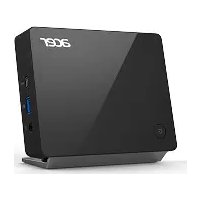
ProDock Wireless - Laptop ACER - Free user manual and instructions
Find the device manual for free ProDock Wireless ACER in PDF.


| Features | Details |
|---|---|
| Product type | Wireless docking station |
| Compatibility | ACER laptops and other compatible devices |
| Connectivity | Wi-Fi, Bluetooth |
| Available ports | USB, HDMI, Ethernet |
| Power supply | Requires mains power |
| Dimensions | Compact for desktop use |
| Weight | Lightweight for increased portability |
| Usage | Ideal for remote work and desktop setups |
| Maintenance | Regular cleaning recommended, driver updates |
| Security | Data encryption, password protection |
| General information | Check compatibility with your device before purchase |
Frequently Asked Questions - ProDock Wireless ACER
User questions about ProDock Wireless ACER
0 question about this device. Answer the ones you know or ask your own.
Ask a new question about this device
Download the instructions for your Laptop in PDF format for free! Find your manual ProDock Wireless - ACER and take your electronic device back in hand. On this page are published all the documents necessary for the use of your device. ProDock Wireless by ACER.
USER MANUAL ProDock Wireless ACER
Interferences radioelectriques. 22
Use on aircraft 22
The wireless adapter and your health..... 23
USA-FCC and FAA. 23
FCC radio frequency interference
requirements 24
RF exposure 26
Canada — Industry Canada (IC) 26
FCC and FAA regulations may prohibit airborne operation of radio-frequency wireless devices (wireless adapters) because their signals could interfere with critical aircraft instruments. Ask the cabin crew before turning on your device's wireless adapter whilst on board.
The wireless adapter and your health
The wireless adapter, like other radio devices, emits radio frequency electromagnetic energy. The level of energy emitted by the wireless adapter, however, is less than the electromagnetic energy emitted by other wireless devices such as mobile phones. The wireless adapter operates within the guidelines found in radio frequency safety standards and recommendations. These standards and recommendations reflect the consensus of the scientific community and result from deliberations of panels and committees of scientists who continually review and interpret the extensive research literature. In some situations or environments, the use of the wireless adapter may be restricted by the proprietor of the building or responsible representatives of the applicable organization. Examples of such situations may include:
- Using the wireless adapter on board airplanes, or
- Using the wireless adapter in any other environment where the risk of interference with other devices or services is perceived or identified as being harmful.
If you are uncertain of the policy that applies to the use of wireless adapters in a specific organization or environment (an airport, for example), you are encouraged to ask for authorization to use the adapter before you turn it on.
USA — FCC and FAA
The FCC with its action in ET Docket 96-8 has adopted a safety standard for human exposure to radio frequency (RF) electromagnetic energy emitted by FCC certified equipment. The wireless adapter meets the Human Exposure limits found in OET Bulletin 65, supplement C, 2001, and ANSI/IEEE C95.1, 1992. Proper operation of this radio according to the instructions found in this manual will result in exposure substantially below the FCC's recommended limits.
-
The following safety precautions should be observed: Do not touch or move antenna while the unit is transmitting or receiving.
-
Do not hold any component containing the radio such that the antenna is very close or touching any exposed parts of the body, especially the face or eyes, while transmitting.
- Do not operate the radio or attempt to transmit data unless the antenna is connected; this behavior may cause damage to the radio.
- The use of wireless adapters in hazardous locations is limited by the constraints posed by the safety directors of such environments.
- The use of wireless adapters on airplanes is governed by the Federal Aviation Administration (FAA).
- The use of wireless adapters in hospitals is restricted to the limits set forth by each hospital.
FCC radio frequency interference requirements

Remarque
Applies to device supporting IEEE 802.11a/ac wireless adapters.
This device is restricted to indoor use due to its operation in the 5.15 to 5.25 GHz and 5.470 to 5.725 GHz frequency ranges. FCC requires this product to be used indoors for the frequency ranges 5.15 to 5.25 GHz and 5.470 to 5.725 GHz to reduce the potential for harmful interference to co-channel mobile satellite systems. High power radars are allocated as primary users of the 5.25 to 5.35 GHz and 5.65 to 5.85 GHz bands. These radar stations can cause interference with and /or damage this device. No configuration controls are provided for this wireless adapter allowing any change in the frequency of operations outside the FCC grant of authorization for U.S operation according to Part 15.407 of the FCC rules.
USA — Federal Communications Commission (FCC)

Remarque
The radiated output power of the adapter is far below the FCC radio frequency exposure limits. Nevertheless, the adapter should be used in such a manner that the potential for human contact during normal operation is minimized. To avoid the possibility of exceeding the FCC radio frequency exposure limits, you should keep a distance of at least 20~cm between you (or any other person in the vicinity), or the minimum separation distance as specified by the FCC grant conditions, and the antenna that is built into the computer. Details of the authorized configurations can be found at www.fcc.gov/oet/ea/ by entering the FCC ID number on the device.
This device complies with Part 15 of the FCC Rules. Operation of the device is subject to the following two conditions:
- This device may not cause harmful interference.
- This device must accept any interference that may cause undesired operation.
15.21
You are cautioned that changes or modifications not expressly approved by the part responsible for compliance could void the user's authority to operate the equipment.
Interference statement
This wireless adapter has been tested and found to comply with the limits for a Class B digital device, pursuant to Part 15 of the FCC Rules. These limits are designed to provide reasonable protection against harmful interference in a residential installation. This wireless adapter generates, uses, and can radiate radio frequency energy. If the wireless adapter is not installed and used in accordance with the instructions, the wireless adapter may cause harmful interference to radio communications. There is no guarantee, however, that such interference will not occur in a particular installation. If this wireless adapter does cause harmful interference to radio or television reception (which can be determined by turning the equipment off and on), the user is encouraged to try to correct the interference by taking one or more of the following measures:
-
Reorient or relocate the receiving antenna of the equipment experiencing the interference.
-
Increase the distance between the wireless adapter and the equipment experiencing the interference.
- Connect the computer with the wireless adapter to an outlet on a circuit different from that to which the equipment experiencing the interference is connected.
- Consult the dealer or an experienced radio/TV technician for help.
RF exposure
FCC RF Radiation Exposure Statement:
- This Transmitter must not be co-located or operating in conjunction with any other antenna or transmitter.
- This equipment complies with FCC RF radiation exposure limits set forth for an uncontrolled environment. This equipment should be installed and operated with a minimum distance which states in DoC between the radiator and your body.
Canada — Industry Canada (IC)
This device complies with RSS247 of Industry Canada. Cet apparéil se conforme à RSS247 de Canada d'Industrie.
This device complies with Industry Canada licence-exempt RSS standard(s). Operation is subject to the following two conditions: (1) this device may not cause interference, and (2) this device must accept any interference, including interference that may cause undesired operation of the device.
CANICES-3(B)/NMB-3(B)
Under Industry Canada regulations, this radio transmitter may only operate using an antenna of a type and maximum (or lesser) gain approved for the transmitter by Industry Canada. To reduce potential radio interference to other users, the antenna type and its gain should be so chosen that the equivalent isotropically radiated power (e.i.r.p.) is not more than that necessary for successful communication.
Operation in the band 5150-5250 MHz is only for indoor use to reduce the potential for harmful interference to co-channel mobile satellite systems.
Users are advised that high-power radars are allocated as primary users (i.e. priority users) of the bands 5250-5350 MHz and 5650-5850 MHz and that these radars could cause interference and/or damage to LE-LAN devices.
IC RF Radiation Exposure Statement:
This equipment complies with IC radiation exposure limits set forth for an uncontrolled environment. This equipment should be installed and operated with minimum distance which states in DoC between the radiator & your body. This transmitter must not be co-located or operating in conjunction with any other antenna or transmitter.
List of applicable countries
This product must be used in strict accordance with the regulations and constraints in the country of use. For further information, contact the local office in the country of use. Please see https://europa.eu/european-union/about-eu/countries_en for the latest country list.
The use of this equipment is regulated by:
1.D.L.gs 1.8.2003, n. 259, article 104 (activity subject to general authorization) for outdoor use and article 105 (free use) for indoor use, in both cases for private use.
2.D.M. 28.5.03, for supply to public of LAN access to networks and telecom services.
Pakistan Telecommunication Authority (PTA) Approved.
Morocco
The operation of this product in the radio channel 2 (2417 MHz) is not authorized in the following cities: Agadir, Assa-Zag, Cabo Negro, Chaouen, Goulmima, Oujda, Tan Tan, Taourirt, Taroudant and Taza.
The operation of this product in the radio channels 4, 5, 6 and 7 (2425 - 2442 MHz) is not authorized in the following cities: Aéroport Mohamed V, Agadir, Aguelmous, Anza, Benslimane, Béni Hafida, Cabo Negro, Casablanca, Fès, Lakhab, Marrakech, Merchich, Mohammédia, Rabat, Salé, Tanger, Tan Tan, Taounate, Tit Mellil, Zag.
Japan
5 GHz 带は室内のは使用のと
Korea
当这用送能是的运用中,
Taiwan
第十二條