KM 27 - Desk Phone TIPTEL - Free user manual and instructions
Find the device manual for free KM 27 TIPTEL in PDF.


| Brand | Tiptel |
| Model | KM 27 |
| Product Type | Extension key module for desktop phone |
| Compatibility | Tiptel 3110, 3120, 3130 phones |
| Maximum number of modules | Up to 3 per phone |
| Power supply | Via the host phone (PoE or mains) |
| Phone connection | Phone's AUX port |
| Connection cable | Included, to connect between phone and module |
| Programmable keys | Yes, via the phone's web interface |
| Installation | Snap the connection tabs and plug in the AUX cable |
| Configuration | Via the phone's web interface (wiki.tiptel-info.de) |
| Safety instructions | Refer to the phone's manual |
| CE declaration | Included in the phone's manual |
| Recycling | Follow the phone's instructions |
| Maintenance | Clean with a soft, dry cloth |
| Package contents | KM 27 module and connection cable |
Frequently Asked Questions - KM 27 TIPTEL
User questions about KM 27 TIPTEL
0 question about this device. Answer the ones you know or ask your own.
Ask a new question about this device
Download the instructions for your Desk Phone in PDF format for free! Find your manual KM 27 - TIPTEL and take your electronic device back in hand. On this page are published all the documents necessary for the use of your device. KM 27 by TIPTEL.
USER MANUAL KM 27 TIPTEL
Unplug any power supply of the phone by disconnecting the LAN cable (power supply via PoE) or disconnecting the AC adapter.
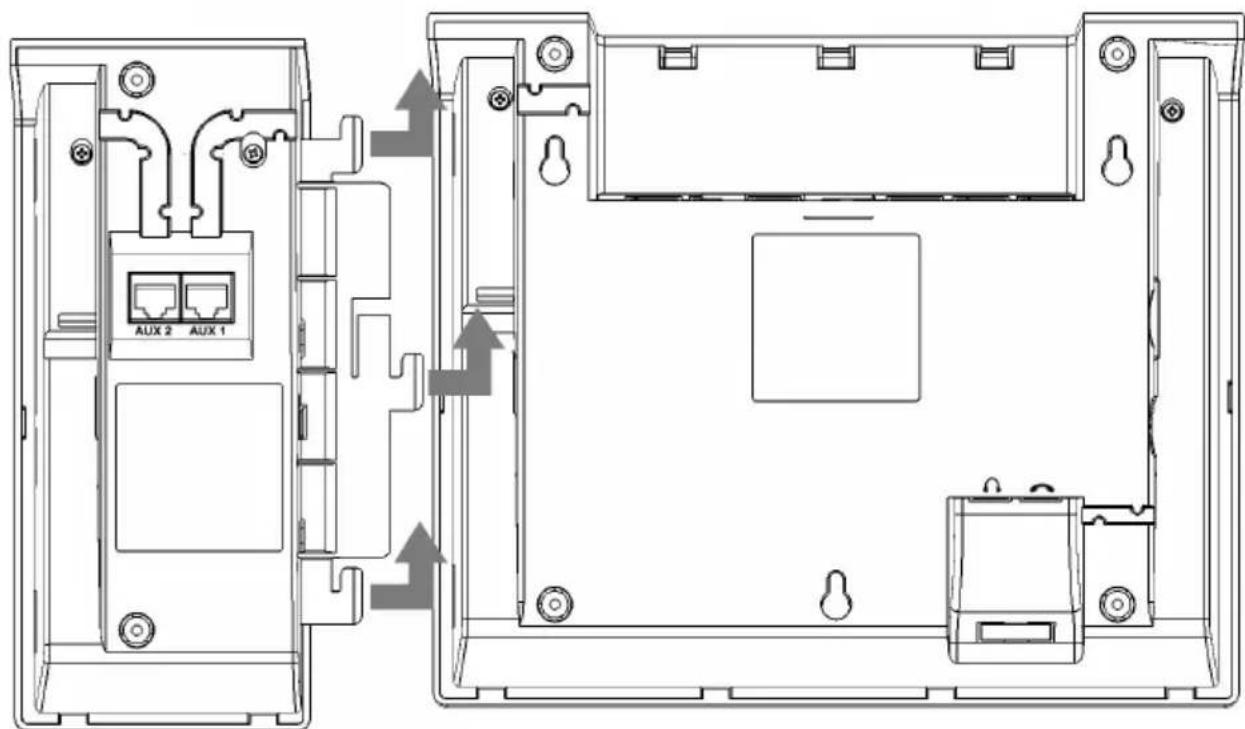
Position key module KM 27 and phone side by side. Then push the connecting link in the slots at the side of the phone and finally push the module toward the rear side of the phone in order to let it snap in.
Connecting the cable
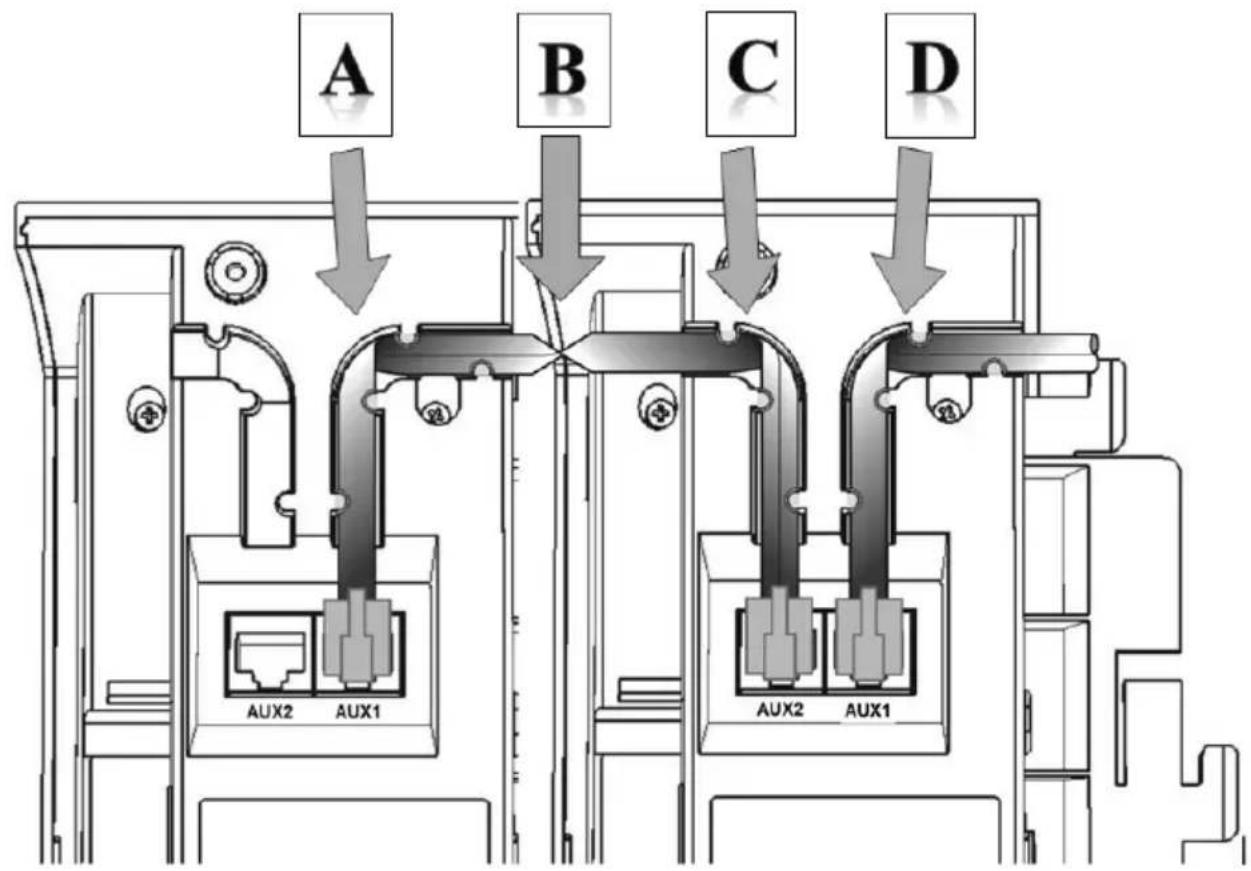
To connect the cable turn phone and module upside down. Then connect the cable to the AUX jack at the phone and place the cable in the cable channel pointing in the module's direction. Connection cable to be folded in turn [D] in a 90 degrees angle, to be placed underneath the hooks and then led to jack AUX1 for connecting it to that jack.
Connecting additional modules
tiptel 3110, tiptel 3120, and tiptel 3130 support up to three key modules KM 27 each.
For connecting another module push its connecting link into the corresponding slot of the first module and then push it toward the rear side of the module until it snaps in.
To connect the cable turn phone and modules upside down. Pick up the connection cable at its center while viewing at the pins of the right hand side connector. Install connection cable starting at [B] through the cable channel toward key module 1, in turn [C] fold it at a 90 degrees angle, underneath the hooks install it in direction of jack AUX2 and connect it to that jack. At [B] turn-over the cable by one half turn. Now the pins of the left hand side are facing toward you. Install connection cable starting at [B] through the cable channel toward key module 2, in turn [C] fold it at a 90 degrees angle, underneath the hooks install it in direction of jack AUX1 and connect it to that jack.
Configuring the function keys
Restore the phone's power supply.
In the phone's web interface, connected modules are displayed automatically and you can assign functions to the keys of the modules.
Details on the web configuration of the phone please find at http://wiki.tiptelinfo.de/en/.
Safety notes, warranty, CE declaration of conformity and disposal
The key module may only be connected to phones tiptel 3110, tiptel 3120, or tiptel 3130.
Please follow the safety instructions of the phone's quick reference guide, information on warranty, on the CE declaration of conformity and on disposal. All of these also apply to key module KM 27.