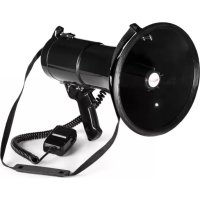
MEGA080 - Microphone Auna - Free user manual and instructions
Find the device manual for free MEGA080 Auna in PDF.


| Product type | Megaphone |
| Brand | Auna |
| Model | MEGA080 |
| Power supply | 8 C-type batteries |
| Power | 80 W |
| Effective range | 1000 m |
| Weight | 1650 g |
| Main functions | Voice amplification, built-in siren, volume control |
| Usage | Handheld or shoulder strap megaphone |
| Maintenance and cleaning | Wipe with a soft cloth; do not expose to rain or prolonged heat |
| Safety | Do not use near ears (risk of hearing damage); do not open the device; remove batteries if not used for a long time |
| Recycling | Dispose of at a collection point for electrical and electronic equipment; do not discard with household waste |
| Included accessories | Carrying strap, built-in microphone |
| Article numbers | 10031685, 10001580, 10002502 |
Frequently Asked Questions - MEGA080 Auna
User questions about MEGA080 Auna
0 question about this device. Answer the ones you know or ask your own.
Ask a new question about this device
Download the instructions for your Microphone in PDF format for free! Find your manual MEGA080 - Auna and take your electronic device back in hand. On this page are published all the documents necessary for the use of your device. MEGA080 by Auna.
USER MANUAL MEGA080 Auna
TECHNISCHE DATEN
Berlin Brands Group UK Ltd
PO Box 1145
Oxford, OX1 9UW
United Kingdom
SICHERHEITSHINWEISE
natural_image
Diagram showing two stages of a device with components and wiring, no text or symbols presentnatural_image
Symbol of a trash bin crossed with a diagonal line, representing no waste or discharge (no text or labels)Congratulations on purchasing this equipment. Please read this manual carefully and take care of the following hints to avoid damages. Any failure caused by ignoring the items and cautions mentioned in the instruction manual is not covered by our warranty and any liability. Scan the QR code to get access to the latest user manual and other information about the product:

TECHNICAL DATA
| Item number 10031685, 10001580, 10002502 | |
| Power supply 8 batteries size C | |
| Power 80 W | |
| Efficient Distance 1000 m | |
| Weight 1650 g | |
MANUFACTURER & IMPORTER (UK)
Manufacturer:
Chal-Tec GmbH, Wallstrasse 16, 10179 Berlin, Germany.
Importer for Great Britain:
Berlin Brands Group UK Ltd
PO Box 1145
Oxford, OX1 9UW
United Kingdom
SAFETY INSTRUCTIONS
- Do not place under the direct sunlight or the high temperature environment for a long period of time.
- Avoid exposure to rain, water or heavy humidity.
- When cleaning the megaphone body only use a neutral detergent. Never use thinner or benzene.
- Amplified sound or howling may cause damage to person's ears. Don't use the megaphone close to people's ears.
- If not in use for a long period of time, remove the batteries and store them separately to prevent leaking batteries and damaging the circuits inside the megaphone.
- Do not leave packaging materials in reach of children. Plastic bags may become a dangerous toy for children.
- Do not modify the device.
- Do not disassemble the unit or attempt to repair it yourself. The device does not contain parts serviceable by you.
- If you have any questions or problems regarding the device, please feel free to contact our customer service for advice.
- Repairing the unit should only be made by a technician or an authorized service center.
- Do not open the device under any circumstances.
- Incorrect installation and/or connection may lead to malfunction or complete damage.
INSERT THE BATTERIES
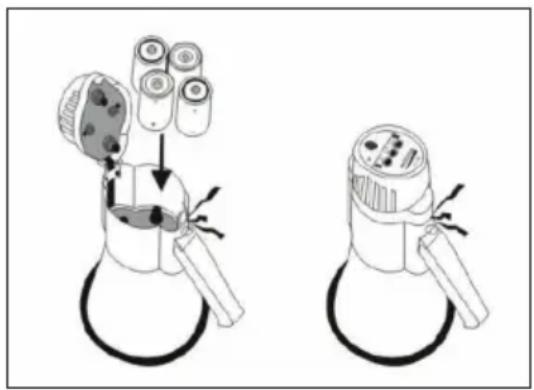
Open the top cover. Put 8 batteries type C into the cabinet according to correct polarity.
Replace the batteries at regular intervals when drained battery does not give sufficient power.
Turn off the power after use and take the batteries out when the megaphone is not in use for a long period of time.
natural_image
Diagram showing two stages of a device with components and wiring, no text or symbols presentPRODUCT OVERVIEW
  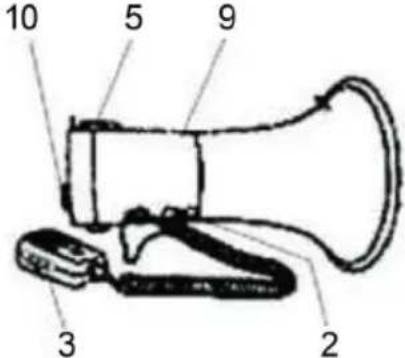 | |
| 1 Loudspeaker 7 Microphone | |
| 2 Signal switches (siren / loudspeaker - if function available on model) | 8 Volume control |
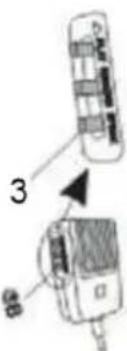
| 3 Talk button (when carrying the device on the shoulder strap) | 9 Battery compartment |
| 4 Handle 10 Microphone mounting | |
| 5 Battery compartment lock 11 Carrying strap | |
| 6 Battery compartment cover | |
OPERATION
When wearing the megaphone over your shoulder, press the Talk button on the left side of the microphone. Point the speaker opening at the target and speak into the microphone. Hold the microphone close to your lips and speak normally.
Turn the volume control on the right side of the microphone to adjust the desired volume. Note that the closer the source is to the microphone, the better the signal gain.
If the megaphone is equipped with a siren, switch the signal switch to the siren function to generate a siren signal. This signal ends when you switch back to the voice function.
If the megaphone is equipped with a whistle function, switch the signal switch to the whistle function to generate a whistle signal. This signal ends when you switch back to the voice function.
If the megaphone is turned on and the speaker signal is weak or weak, it may be due to dead batteries. Please change the batteries as described above.
HINTS ON DISPOSAL
natural_image
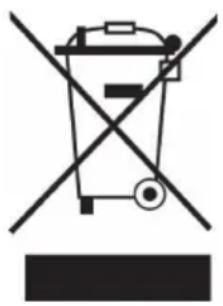
Symbol of a trash bin crossed with a diagonal line, no text or numbers presentIf there is a legal regulation for the disposal of electrical and electronic devices in your country, this symbol on the product or on the packaging indicates that this product must not be disposed of with household waste. Instead, it must be taken to a collection point for the recycling of electrical and electronic equipment. By disposing of it in accordance with the rules, you are protecting the environment and the health of your fellow human beings from negative consequences. For information about the recycling and disposal of this product, please contact your local authority or your household waste disposal service.
This product contains batteries. If there is a legal regulation for the disposal of batteries in your country, the batteries must not be disposed of with household waste. Find out about local regulations for disposing of batteries. By disposing of them in accordance with the rules, you are protecting the environment and the health of your fellow human beings from negative consequences.
Estimado cliente:
DATOS TÉCNICOS
Berlin Brands Group UK Ltd
PO Box 1145
Oxford, OX1 9UW
United Kingdom
VISTA GENERAL DEL APARATO
natural_image
Symbol of a trash bin crossed with a diagonal line, representing no waste or discharge (no text or labels)Cher client, chère cliente,
FFICHE TECHNIQUE
Berlin Brands Group UK Ltd
PO Box 1145
Oxford, OX1 9UW
United Kingdom
CONSIGNES DE SÉCURITÉ
natural_image
Diagram showing two stages of a device with components and wiring, no text or symbols presentAPERÇU DE L'APPAREIL
natural_image
Symbol of a trash bin crossed with a diagonal line, no text or numbers presentDATI TECNICI
PRODUTTORE E IMPORTATORE (UK)
Produttore:
Chal-Tec GmbH, Wallstraße 16, 10179 Berlino, Germania.
Berlin Brands Group UK Ltd
PO Box 1145
Oxford, OX1 9UW
United Kingdom
AVVERTENZE DI SICUREZZA
natural_image
Diagram showing two stages of a device with components and wiring, no text or symbols presentDESCRIZIONE DEL DISPOSITIVO
natural_image
Symbol of a trash bin crossed with a diagonal line, no text or numbers presentnatural_image
Abstract white logo design on dark background, resembling stylized letter 'S' or wave form (no text or symbols)

- SICHERHEITSHINWEISE
- MANUFACTURER & IMPORTER (UK)
- SAFETY INSTRUCTIONS
- INSERT THE BATTERIES
- PRODUCT OVERVIEW
- OPERATION
- HINTS ON DISPOSAL
- Estimado cliente:
- VISTA GENERAL DEL APARATO
- CONSIGNES DE SÉCURITÉ
- APERÇU DE L'APPAREIL
- PRODUTTORE E IMPORTATORE (UK)
- Produttore:
- AVVERTENZE DI SICUREZZA
- DESCRIZIONE DEL DISPOSITIVO
Brand : Auna
Model : MEGA080
Category : Microphone