
MIC-920B - Microphone Auna - Free user manual and instructions
Find the device manual for free MIC-920B Auna in PDF.


| Product Type | USB Condenser Microphone |
| Model | MIC-920B |
| Pickup Pattern | Cardioid |
| Capsule | 16mm Back Electret Diaphragm |
| Frequency Response | 20 Hz - 18 kHz |
| Sensitivity | -38 dB |
| Maximum SPL | -136 dB |
| Signal-to-Noise Ratio | 68 dB |
| Connector | USB Type-A (input), 3.5mm (headphone output) |
| Power | USB powered (5V) |
| Compatibility | Windows 10, macOS (plug-and-play) |
| Key Features | Plug-and-play, high sensitivity, low noise, wide frequency response, headphone monitoring |
| Ideal Usage | Vocals, guitar amplifiers, podcasting, multimedia |
| Placement Guide | Close to source for robust bass; 15-60 cm for natural sound; avoid reflective surfaces |
| Safety Precautions | Avoid heat, moisture, strong impact; do not disassemble; clean with dry cloth only |
| Disposal | Do not dispose with household waste; recycle at designated collection points |
| Manufacturer | Chal-Tec GmbH, Wallstrasse 16, 10179 Berlin, Germany |
Frequently Asked Questions - MIC-920B Auna
User questions about MIC-920B Auna
0 question about this device. Answer the ones you know or ask your own.
Ask a new question about this device
Download the instructions for your Microphone in PDF format for free! Find your manual MIC-920B - Auna and take your electronic device back in hand. On this page are published all the documents necessary for the use of your device. MIC-920B by Auna.
USER MANUAL MIC-920B Auna
TECHNISCHE DATEN
Typ: . . . . . . . . . . . . . . . . . . . . . . . . . . . . . . . . . . . . . . . . . . . . . . . USB-Kondensatormikrofon
Kapsel: .....16 mm Elektretmembrankapsel
Polarmuster: . . . . . . . . . . . . . . . . . . . . . . . . . . . . . . . . . . . . . . . . . . . . . . . . . . . . . . . . . . . . . . . . . Nierencharakteristik
Frequenzgang: .....20 kHz – 18 kHz
USB & 3.5mm-Anschlüsse


BENUTZUNG
Member of Berlin Brands Group
Handwerkerstr. 11
15366 Dahlwitz-Hoppegarten
Deutschland
natural_image
Symbol of a trash bin crossed with a diagonal line, representing no waste or discharge (no text or labels)Congratulations on purchasing this equipment. Please read this manual carefully and take care of the following hints on installation and use to avoid technical damages. Any failure caused by ignoring the mentioned items and cautions mentioned in the operation and installation instructions are not covered by our warranty and any liability.

TECHNICAL DATA
Typ: . . . . . . . . . . . . . . . . . . . . . . . . . . . . . . . . . . . . . . . . . . . . . . USB condenser microphone
Capsule: . . . . . . . . . . . . . . . . . . . . . . . . . . . . . . . . . . . . . . . . . . . . . . . . . . . . . . . . . . . . 16mm back eletret diaphragm
capsule
Polarmuster: . . . . . . . . . . . . Cardioid
Frequency response: .....20 kHz - 18 kHz
Sensitivity: .....-38 dB
Max SPL: .....-136 dB
S/N ratio: .....68 dB
Connector: .....USB connector
Power: . . . . . . . . . . . . . . . . . . . . . . . . . . . . . . . . . . . . . . . . . . . . . . . . . . . . . . . . . . . . . . . . USB power
General introduction
The MIC-920B USB condenser microphone has a Cardioid pick-up pattern, standard 3.5mm headphone output connector, standard and general-used USB input port. It can be used without installing any device software when operating in the WINDOWS and MAC systems. Moreover, ii can identify the recording equipments MAC automatically. It is a plug-and-play headphone monitoring USB condenser microphone, which opens up possibilities for anyone who records audio from podcasters, journalists, students and multimedia presentations. MIC-920B adopts 16mm back electret capsule, it ensures the microphone's vivid sound quality.
Features
- Plug-and-play;
• USB condenser microphone;
• 3.5mm headphone output connector;
• High sensitivity, low noise, wide frequency response.
SAFETY INSTRUCTIONS
- Do not store the microphone under direct sunlight, near heating devices or in a hot, humid or dusty place. Do not allow the microphone to get wet;
- Do not install near any heat sources such as radiators, heat registers, stoves, or other apparatus (including) amplifiers) that produce heat;
- Do not subject the microphone to strong impact;
- Do not disassemble, modify or attempt to repair the microphone;
- Clean only with dry cloth;
- When this product is used for a long time, the microphone may become discoloured due to ultraviolet light (especially direct sunlight) or wear.
CONNECTING TO A PC

USB & 3.5mm connectors
Preliminary Setup with Windows 10
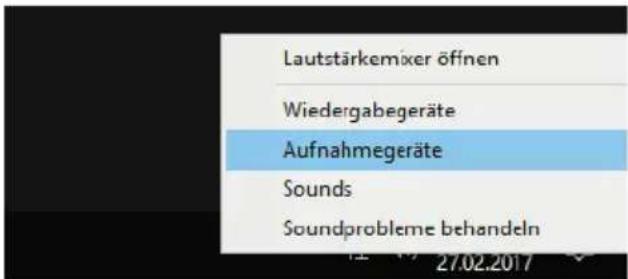
- Right click on the speaker symbol. A menu opens.
If there is no speaker symbol in the task bar, search for "Sound" in the system settings.
- Select the item "recording devices" from the menu. A window with the sound settings will pop up. The tab "Recording" is on front..

- Double click on "Microphone MIC-920B".
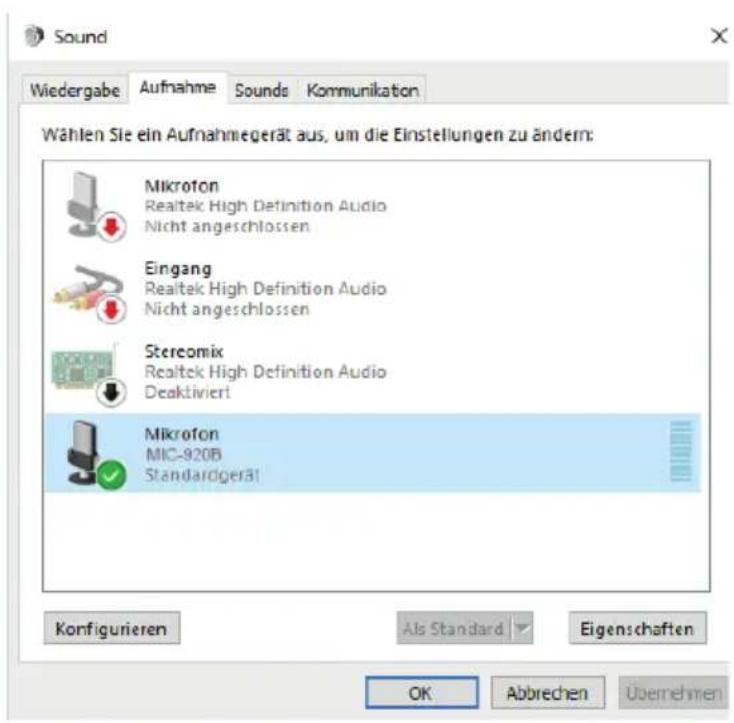
- Now you are in the settings for microphone.

- Change to the tab "Level" and set the microphone volume.
Preliminary setup with macOS
-
Plug the free end of the provided USB cable into the USB port on your computer. Your computer will automatically recognize the USB device and install a driver.
-
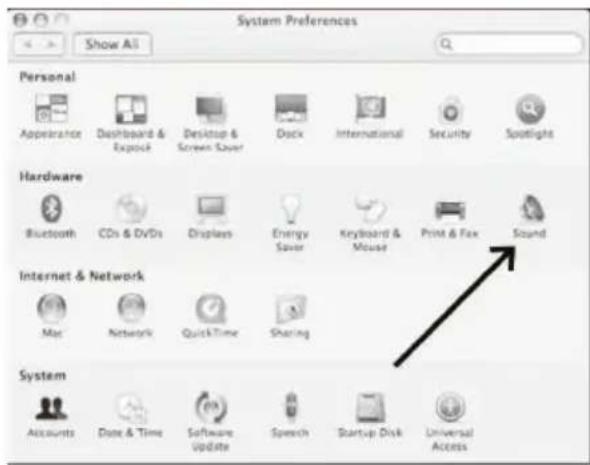
To select the MIC-920B - USB as your audio input, first, open your System Preferences.
-
Next, click Sound to display the Sound preference pane.
-
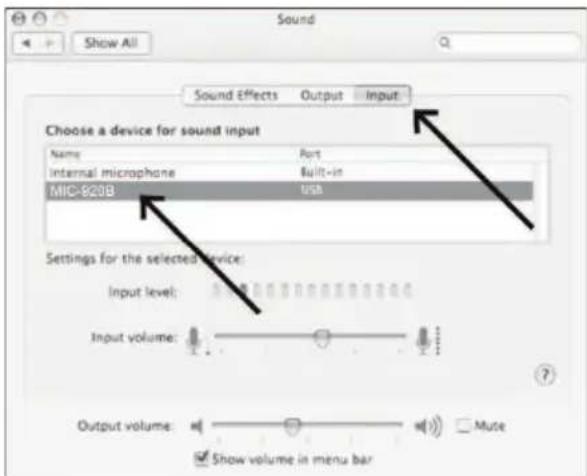
Click the Input tab and select the 920B - USB as the device for sound input.
Your preferences are now set to use the 920B -USB on your Mac with recording program of your choice.

USE
| Application | Suggested Microphone Placement | Tone Quality |
| Vocals | Lips less than 15 cm (6 in.) away or touching the windscreen, on axis to microphone. | Robust sound, emphasized bass, maximum isolation from other sources.. |
| 15 to 60 cm (6 in. to 2 ft.) away from mouth, just above nose height. | Natural sound, reduced bass. | |
| 20 to 60 cm (8 in. to 2 ft.) away from mouth, slightly off to one side. | Natural sound, reduced bass and minimal "s" sounds. | |
| 90 cm to 1.8 m (3 to 6 ft.) Away. Thinner, distant sound; noticeable levels of ambient noise.. | ||
| Guitar & Bass Amplifiers | 2.5 cm (1 in.) from speaker, axis with centre of speaker cone. | Sharp attack; emphasized bass. |
| 2.5 cm (1 in.) from speaker, at edge of speaker cone.. | Sharp attack; higher frequency sound. | |
| 15 to 30 cm (6 to 12 in.) away from speaker and on-axis with speaker cone. | Medium attack; full, balanced sound | |
| 60 to 90 cm (2 to 3 ft.) back from speaker, on-axis with speaker cone.. | Softer attack; reduced bass | |
General rules for use
- Aim the microphone toward the desired sound source (such as the talker, singer, or instrument) and away from unwanted sources.
- Place the microphone as close as practical to the desired sound source.
- Work close to the microphone for extra bass response.
- Use only one microphone to pick up a single sound source.
- Use the fewest number of microphones as practical.
- Keep the distance between microphones at least three times the distance from each microphone to its source.
- Place microphones as far as possible from reflective surfaces.
- Add a windscreen when using the microphone outdoors.
- Avoid excessive handling to minimize pickup of mechanical noise and vibration.
- Do not cover any part of the microphone grille with your hand, as this will adversely affect microphone performance.
Recording setting
„Audacity“ as an example
- Choice "edit"-specification setting.
- Pop up below screen, click the option as shows, you can choice stereo or mono.
- Click red icon, begin to recording.
- When starting recording, sound resource should aim to the side which printed "auna".
DISPOSAL CONSIDERATIONS

natural_image
Symbol of a trash bin crossed with a diagonal line, representing no waste or discharge (no text or labels)If there is a legal regulation for the disposal of electrical and electronic devices in your country, this symbol on the product or on the packaging indicates that this product must not be disposed of with household waste. Instead, it must be taken to a collection point for the recycling of electrical and electronic equipment. By disposing of it in accordance with the rules, you are protecting the environment and the health of your fellow human beings from negative consequences. For information about the recycling and disposal of this product, please contact your local authority or your household waste disposal service.
DECLARATION OF CONFORMITY

Manufacturer:
Chal-Tec GmbH, Wallstrasse 16, 10179 Berlin, Germany.
Importer for Great Britain:
Berlin Brands Group UK Ltd PO Box 1145 Oxford, OX1 9UW United Kingdom
Hereby, Chal-Tec GmbH declares that the radio equipment type MIC-920 is in compliance with Directive 2014/53/EU. The full text of the EU declaration of conformity is available at the following internet address: use.berlin/10031504
For Great Britain: Hereby, Chal-Tec GmbH declares that the radio equipment type MIC-920 is in compliance with the relevant statutory requirements. The full text of the declaration of conformity is available at the following internet address: use.berlin/10031504

bar
| Category | Value | |---|---| | Category 1 | 100 | | Category 2 | 100 | | Category 3 | 100 | | Category 4 | 100 | | Category 5 | 100 | | Category 6 | 100 | | Category 7 | 100 | | Category 8 | 100 | | Category 9 | 100 | | Category 10 | 100 | | Category 11 | 100 | | Category 12 | 100 | | Category 13 | 100 | | Category 14 | 100 | | Category 15 | 100 | | Category 16 | 100 | | Category 17 | 100 | | Category 18 | 100 | | Category 19 | 100 | | Category 20 | 100 | | Category 21 | 100 | | Category 22 | 100 | | Category 23 | 100 | | Category 24 | 100 | | Category 25 | 100 | | Category 26 | 100 | | Category 27 | 100 | | Category 28 | 100 | | Category 29 | 100 | | Category 30 | 100 | | Category 31 | 100 | | Category 32 | 100 | | Category 33 | 100 | | Category 34 | 100 | | Category 35 | 100 | | Category 36 | 100 | | Category 37 | 100 | | Category 38 | 100 | | Category 39 | 100 | | Category 40 | 100 | | Category 41 | 100 | | Category 42 | 100 | | Category 43 | 100 | | Category 44 | 100 | | Category 45 | 100 | | Category 46 | 100 | | Category 47 | 100 | | Category 48 | 100 | | Category 49 | 100 | | Category 50 | 100 | | Category 51 | 100 | | Category 52 | 100 | | Category 53 | 100 | | Category 54 | 100 | | Category 55 | 100 | | Category 56 | 100 | | Category 57 | 100 | | Category 58 | 100 | | Category 59 | 100 | | Category 60 | 100 | | Category 61 | 100 | | Category 62 | 100 | | Category 63 | 100 | | Category 64 | 100 | | Category 65 | 100 | | Category 66 | 100 | | Category 67 | 100 | | Category 68 | 100 | | Category 69 | 100 | | Category 70 | 100 | | Category 71 | 100 | | Category 72 | 100 | | Category 73 | 100 | | Category 74 | 100 | | Category 75 | 100 | | Category 76 | 100 | | Category 77 | 100 | | Category 78 | 100 | | Category 79 | 100 | | Category 80 | 100 | | Category 81 | 100 | | Category 82 | 100 | | Category 83 | 100 | | Category 84 | 100 | | Category 85 | 100 | | Category 86 | 100 | | Category 87 | 100 | | Category 88 | 100 | | Category 89 | 100 | | Category 90 | 100 | | Category 91 | 100 | | Category 92 | 100 | | Category 93 | 100 | | Category 94 | 100 | | Category 95 | 100 | | Category 96 | 100 | | Category 97 | 100 | | Category 98 | 100 | | Category 99 | 100 | | Total (Total) |
natural_image
Abstract white logo design on dark background, resembling stylized letter 'S' or wave form (no text or symbols)
- TECHNISCHE DATEN
- BENUTZUNG
- Member of Berlin Brands Group
- TECHNICAL DATA
- General introduction
- Features
- SAFETY INSTRUCTIONS
- CONNECTING TO A PC
- Preliminary Setup with Windows 10
- Preliminary setup with macOS
- General rules for use
- Recording setting
- „Audacity“ as an example
- DISPOSAL CONSIDERATIONS
- DECLARATION OF CONFORMITY
- Manufacturer:
- Importer for Great Britain:
Brand : Auna
Model : MIC-920B
Category : Microphone