UPFXC2466S - Fridge SIGNATURE - Free user manual and instructions
Find the device manual for free UPFXC2466S SIGNATURE in PDF.


| Product Type | French Door Refrigerator |
| Brand | Signature |
| Model | UPFXC2466S |
| Dimensions (H x W x D) | 1785 x 908 x 785 mm |
| Depth with Doors Open | 1085 mm |
| Net Weight | 149 kg |
| Power Supply | 115 VAC, 60 Hz, 15 A minimum |
| Required Water Pressure | 20 - 120 psi (138 - 827 kPa) |
| Compartments | Refrigerator, freezer, Durabase |
| Ice Maker | Automatic with water connection |
| Handles | Removable for installation |
| Adjustable Feet | Yes, two front feet |
| Defrost | Automatic |
| Minimum Rear Clearance | 5.08 cm (2 inches) |
| Minimum Front Clearance | 61 cm (24 inches) |
| Ambient Temperature Range | 13°C to 43°C |
| Cleaning | Soft cloth, no harsh detergents |
| Safety | Unplug before service, keep children away |
| Repairability | Contact Signature Kitchen Suite after-sales service |
| Reverse Osmosis Compatibility | Yes, minimum pressure 40-60 psi (2.76-4.14 bar) |
Frequently Asked Questions - UPFXC2466S SIGNATURE
User questions about UPFXC2466S SIGNATURE
0 question about this device. Answer the ones you know or ask your own.
Ask a new question about this device
Download the instructions for your Fridge in PDF format for free! Find your manual UPFXC2466S - SIGNATURE and take your electronic device back in hand. On this page are published all the documents necessary for the use of your device. UPFXC2466S by SIGNATURE.
USER MANUAL UPFXC2466S SIGNATURE
Please read this owner's manual thoroughly before operating and keep it handy for reference at all times.
UPFXC2466S
TABLE OF CONTENTS
3 IMPORTANT SAFETY INSTRUCTIONS
4 PRODUCT OVERVIEW
4 Refrigerator Exterior
5 Refrigerator Interior
6 INSTALLATION
6 Installation Overview
6 Product Specifications
7 Unpacking the Refrigerator
7 Choosing the Proper Location
8 Measuring Clearances
8 Removing/Assembling the Refrigerator Door Handles
9 Removing/Assembling the Freezer Printer Handle
9 Removing/Assembling the Doors and Drawers
10 Removing the Left Refrigerator Door
11 Removing the Right Refrigerator Door
12 Assembling the Right Refrigerator Door
13 Assembling the Left Refrigerator Door
14 Removing the Freezer Drawers
16 Assembling the Freezer Drawers
17 Connecting the Water Line
17 Before You Begin
17 Water Pressure
17 What You Will Need
18 Water Line Installation Instructions
20 Turning On the Power
21 Leveling and Door Alignment
21 Leveling
21 Door Alignment
IMPORTANT SAFETY INSTRUCTIONS
READ ALL INSTRUCTIONS BEFORE USING THE APPLIANCE.
To reduce the risk of fire, electric shock, or personal injury when using your product, basic safety precautions should be followed, including the following:

CAUTION
Installation
- The refrigerator must be properly installed in accordance with the Installer Instructions that were taped to the front of the refrigerator.
- Be careful when you unpack and install the refrigerator. Immediately dispose of plastic and other packing materials out of reach of children.
- The appliance must be positioned for easy access to a power source.
Use
- Close the door carefully when children are around.
- Keep fingers out of pinch point areas; clearances between the doors and cabinets are necessarily small. Be careful closing doors when children are nearby.
If you store food improperly, be aware that it may fall and cause injury. - Do not use aerosols near the refrigerator.
- Do not store articles on the top of the appliance.
Maintenance
- Do not use strong detergents like wax or thinners for cleaning. Clean with a soft cloth.
- Wipe foreign objects (such as dust and water) off the prongs of the power plug and contact areas regularly.
- Do not store, disassemble or repair the refrigerator by yourself.
- Remove any dust or foreign matter from the power plug pins.
- Do not use a wet or damp cloth when cleaning the plug.
- If the refrigerator is disconnected from the power supply, you should wait for at least five minutes before plugging it back in.
- If you notice a chemical or burning plastic smell or see smoke, unplug the refrigerator immediately and contact your Signature Kitchen Suite Service Center.
PRODUCT OVERVIEW
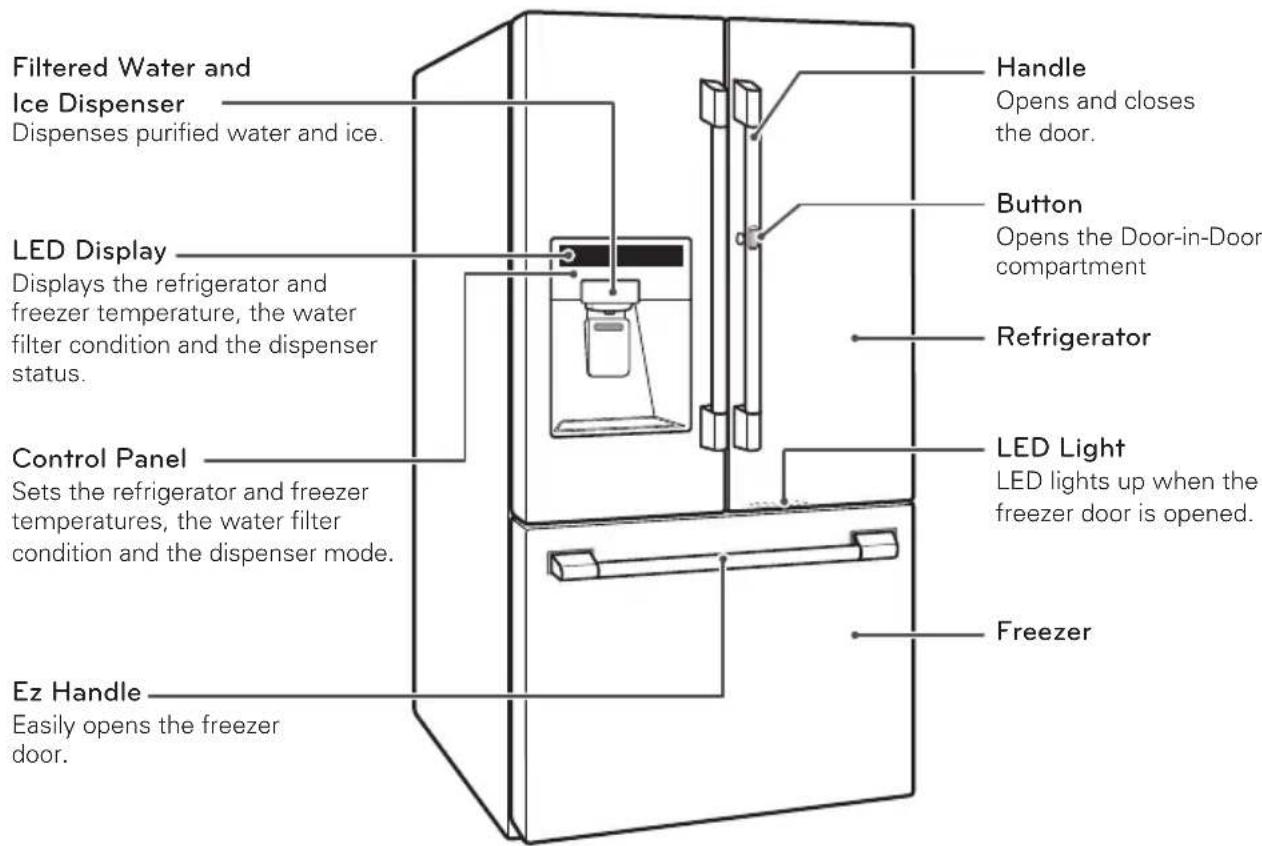
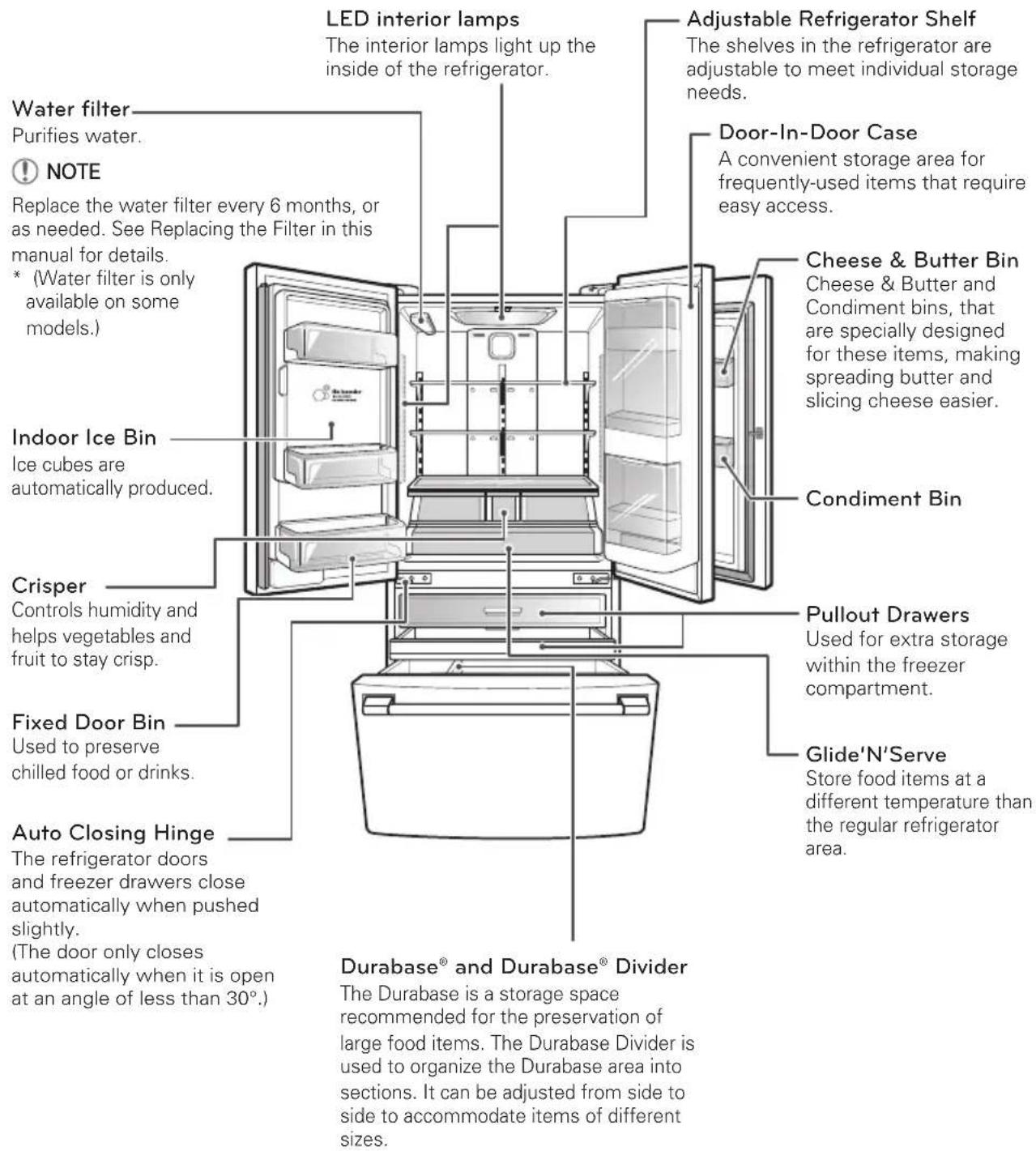
Use this page to become more familiar with the parts and features of your refrigerator.
*The appearance and specifications of the actual product may differ depending on the model.
Refrigerator Exterior
Refrigerator Interior
INSTALLATION
Installation Overview
Read the following installation instructions first after purchasing this product or transporting it to another location.
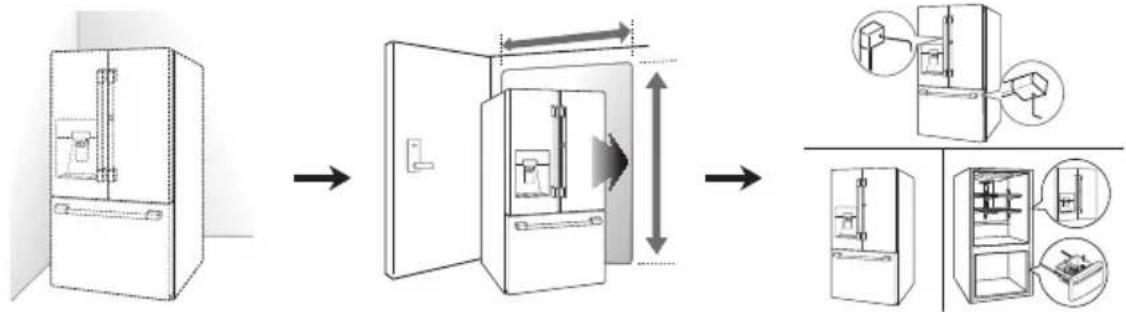
1 Unpacking your refrigerator
2 Choosing the proper location
3 Disassembling/Assembling
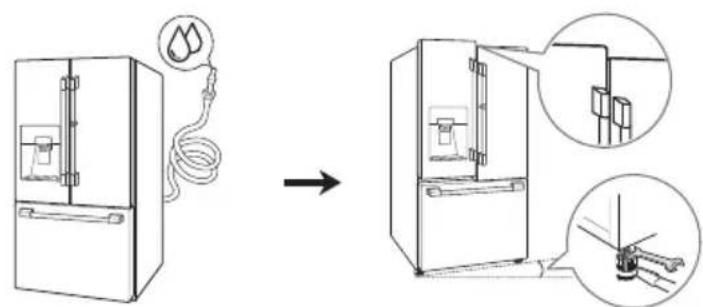
4 Connecting the water supply and water line
!NOTE
Connect to potable water supply only.
Product Specifications
The appearance and specifications listed in this manual may vary due to constant product improvements.
| Models UPFXC2466S | |
| Description French door refrigerator | |
| Electrical requirements 115 | VAC @ 60 Hz |
| Min. / Max. Water pressure | 20 – 120 psi (138 – 827 kPa) |
| Dimensions | 35 3/4" (W) X 30 7/8" (D) X 70 1/4" (H), 42 3/4" (D w/ door open) 908 mm (W) X 785 mm (D) X 1785 mm (H), 1085 mm (D w/ door open) |
| Net weight 328 lb. (149 kg) | |
Unpacking the Refrigerator

WARNING
- Use two or more people to move and install the refrigerator. Failure to do so can result in back or other injury.
- Your refrigerator is heavy. When moving the refrigerator for cleaning or service, be sure to protect the floor. Always pull the refrigerator straight out when moving it. Do not wiggle or walk the refrigerator when trying to move it, as floor damage could occur.
-
Keep flammable materials and vapors, such as gasoline, away from the refrigerator. Failure to do so can result in fire, explosion, or death.
-
Remove tape and any temporary labels from your refrigerator before using.
Do not remove any warning labels, the model and serial number label, or the Tech Sheet that is located under the front of the refrigerator. - To remove any remaining tape or glue, rub the area briskly with your thumb.
Tape or glue residue can also be easily removed by rubbing a small amount of liquid dish soap over the adhesive with your fingers. Wipe with warm water and dry.
- Do not use sharp instruments, rubbing alcohol, flammable fluids, or abrasive cleaners to remove tape or glue.
These products can damage the surface of your refrigerator.
- Reinstall or adjust shelves as needed.
Refrigerator shelves are installed in the shipping position. Reinstall shelves according to your individual storage needs.
Choosing the Proper Location
| Water Water supply | must be easily connected for the automatic icemaker. |
| Water pressure 20-120 psi on models without water filter. 40-120 psi on models with water filter. | |
| Electricity Use an individual, grounded outlet:115 Volts, 60 Hz, AC, 15 Amps minimum.WARNING:Do not overload house wiring and cause a fire hazard by plugging in multiple appliances in the same outlet with the refrigerator. To reduce the risk of electric shock, do not install the refrigerator in a wet or damp area. | |
| Floor Floor must be level and solidly constructed. Adjust the leveling legs to compensate for any unevenness in the floor. Do not install on carpeting, soft tile, a platform, or a weakly supported structure. | |
| Ambient temperature | Temperature must be between 55°F (13°C) and 110°F (43°C). If the ambient temperature is too low or high, performance may be affected. |
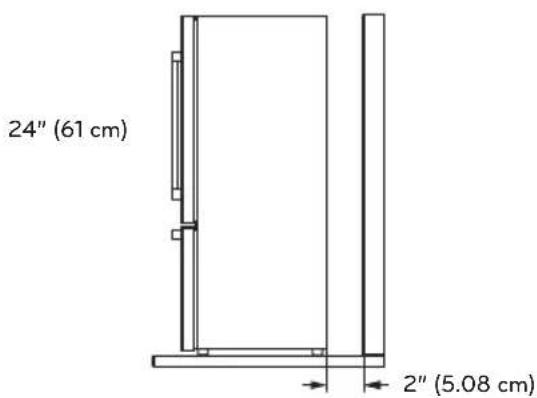
| Clearances Allow at least 24 in. (61 cm) in front to open the doors. Allow at least 2 in. (5.08 cm) between the back of the refrigerator and the wall. If the refrigerator is too close to adjacent items, freezing capability may decrease and electricity consumption may increase. | |
Measuring the Clearances
- Check the dimensions of the product and the installation path to ensure there is sufficient room to move the refrigerator through doors or narrow openings.
- If an opening is too narrow to fit the refrigerator through, remove the refrigerator doors. See Removing/Assembling the Doors and Drawers in this manual.
- The installation location chosen for the refrigerator should allow space behind the unit for connections and airflow and space in front to open the doors and drawers.
Removing/Assembling the Refrigerator Door Handles

NOTE
When it is necessary to move the refrigerator through a narrow opening, removing the doors is the recommended procedure. If it is necessary to remove the handles, follow the directions below.
Tools Needed
3/32 in. Allen wrench
1/4 in. Allen wrench
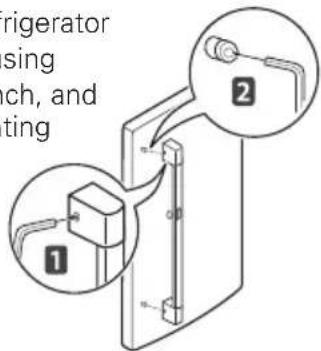
Removing the Handles
1 Loosen the set screws with a 3/32 in. Allen wrench and remove the handle.
2 Loosen the mounting fasteners that
connect to the refrigerator door and handle using a 1 / 4 in. Allen wrench, and remove the mounting fasteners.
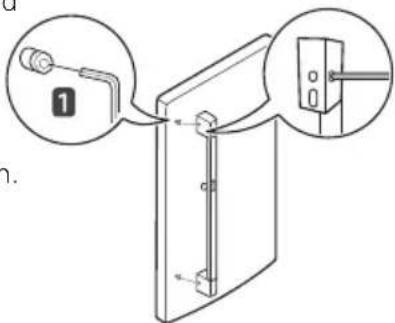
Assembling the Handles
1 Assemble the mounting fasteners at both ends of the handle using a 14 in. Allen wrench.
2 Place the handle on the door by fitting the handle footprints over the mounting fasteners and
tightening the set screws with a 332 in. Allen wrench.
Removing/Assembling the Freezer Printer Handle
Removing the Handles
1 Loosen the set screws located on the lower side of the handle with a 1/8 in. Allen wrench and remove the handle.
2 Loosen the mounting fasteners that
connect to the freezer drawer and handle using a 1 / 4 in. Allen wrench, and remove the mounting fasteners.
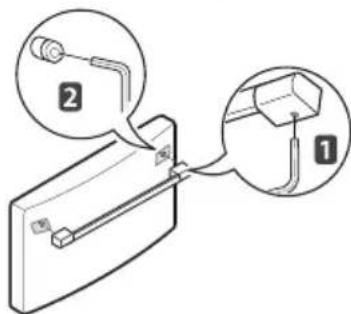
Assembling the Handles
1 Assemble the mounting fasteners at both ends of the handle using a 1/4 in. Allen wrench.
2 Place the handle on the door by fitting
the handle footprints over the mounting fasteners and tightening the set screws with a 1/8 in. Allen wrench.
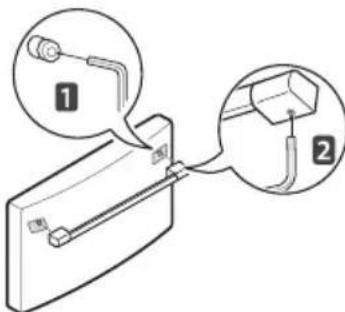

WARNING
When assembling or disassembling the handle:
- Grasp the handle tightly to avoid dropping it.
- Do not swing the handle into nearby people or animals.
- Make sure that the bracket hole of the handle fits properly into the stopper bolt of the door. Assemble the set screws to fix the handle into place.
- Make sure that there is not a gap between the door and handle after assembling the handle.
Removing/Assembling the Doors and Drawers
When it is necessary to move the refrigerator through a narrow opening, removing the doors is the recommended procedure.

WARNING
If your entrance door is too narrow for the refrigerator to pass through, remove the refrigerator doors and move the refrigerator sideways through the doorway.
- Use two or more people to remove and install the refrigerator doors. Failure to do so can result in back or other injury.
- Disconnect the electrical supply to the refrigerator before installing. Failure to do so could result in serious injury or death.
- Do not put hands, feet or other objects into the air vents or bottom of the refrigerator. You may be injured or receive an electrical shock.
- Be careful when handling the hinge and stopper, to avoid injury.
- Remove food and bins before detaching the doors and drawers.
Tools Needed
Flat-head screwdriver
10 mm or 13/32 in. socket wrench
Phillips screwdriver
Removing the Left Refrigerator Door
1 The water supply is connected to the upper right part of the rear surface of the refrigerator. Remove the ring in the joint area. Hold the water supply connection and gently push the Collet to detach the water supply line as shown in 1 and 2
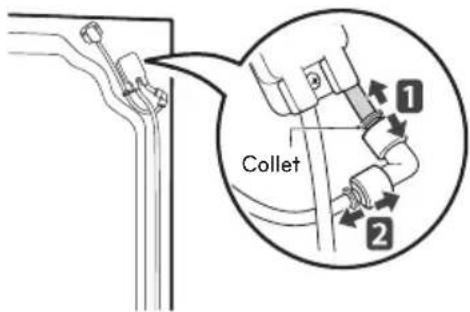

NOTE
Detachment of the water supply line is applicable only when detaching the left refrigerator door.
2 Remove the screw from the hinge cover at the top of the refrigerator. Lift the hook (not visible), located at the bottom of the front side of the cover with a flat-head screwdriver.
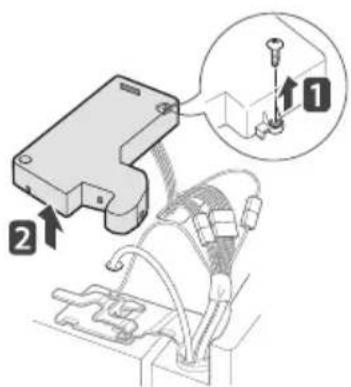
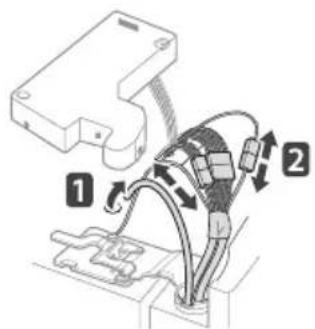
3 Remove the cover and pull out the tube 1 Disconnect all wire harnesses 2.
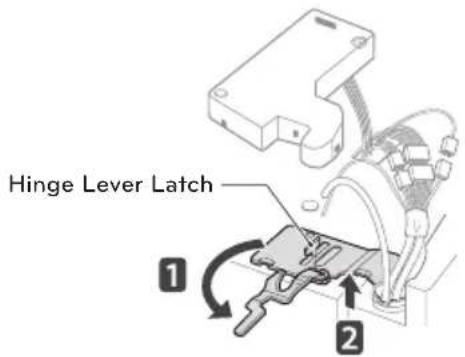
4 Rotate the hinge lever counterclockwise 1. Lift the top hinge 2 free of the hinge lever latch.

CAUTION
When lifting the hinge free of the latch, be careful that the door does not fall forward.
5 Lift the door from the middle hinge pin and remove the door.
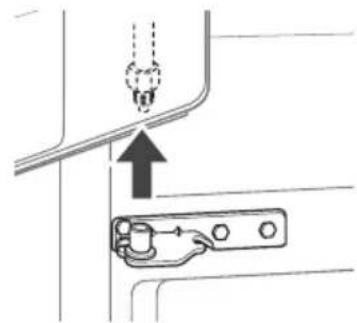

CAUTION
Place the door, inside facing up, on a non-scratching surface.
Removing the Right Refrigerator Door
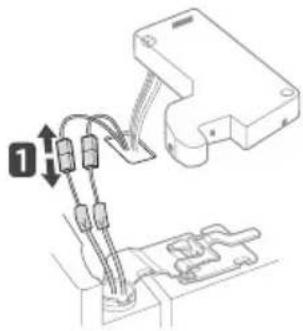
1 Remove the top hinge cover screw Lift the hook (not visible), located at the bottom of the front side of the cover 2, with a flat-head screwdriver.
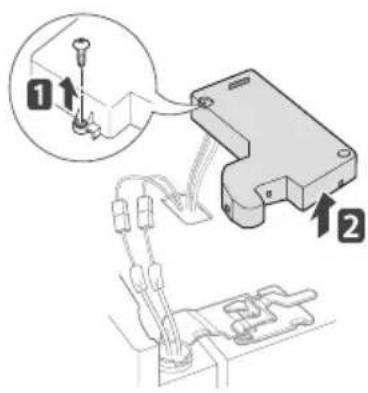
2 Detach the wire harness
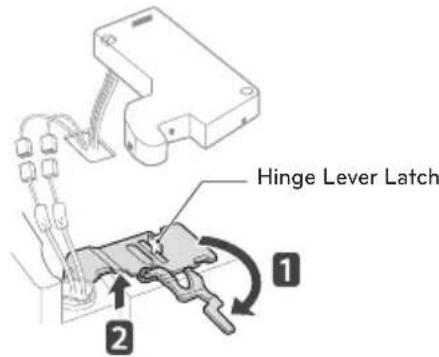
3 Rotate the hinge lever 1 clockwise. Lift the top hinge 2 free of the hinge lever latch.
CAUTION
When lifting the hinge free of the hinge lever latch, be careful that the door does not fall forward.
4 Lift the door from the middle hinge pin and remove the door.
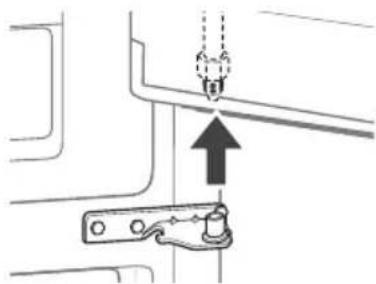
CAUTION
Place the door on the floor, inside facing up, on a non-scratching surface.
Assembling the Right Refrigerator Door
Install the right-side door first.
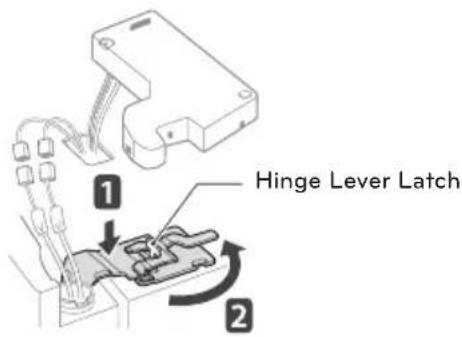
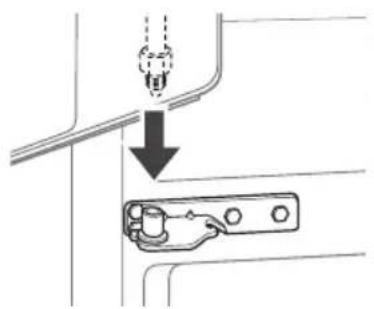
1 Make sure that the plastic sleeve is inserted in the bottom of the door. Lower the door onto the middle hinge pin as shown in the figure.
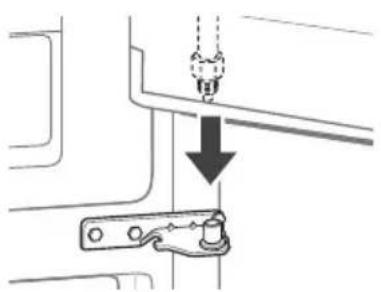
2 Fit the hinge over the hinge lever latch and slot it into place. Rotate the lever counterclockwise to secure the hinge.
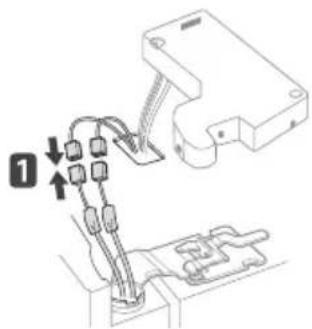
3 Connect the wire harness 1
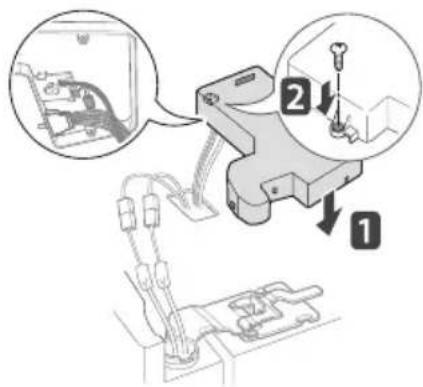
4 Make sure that the door-switch located inside the cover is tightly connected. Position the cover in its place. Insert and tighten the cover screw 2.
Assembling the Left Refrigerator Door
Install the left refrigerator door after the right door is installed.
1 Make sure that the plastic sleeve is inserted in the bottom of the door. Install the refrigerator door onto the middle hinge.
2 Fit the hinge over the hinge lever latch and slot it into place. Rotate the lever clockwise and fasten the hinge.
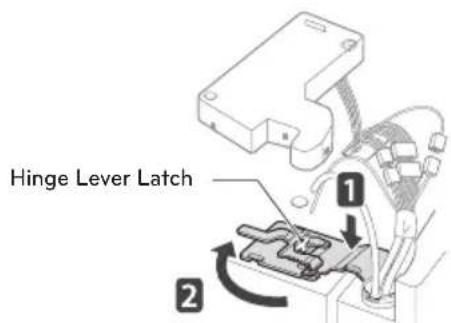
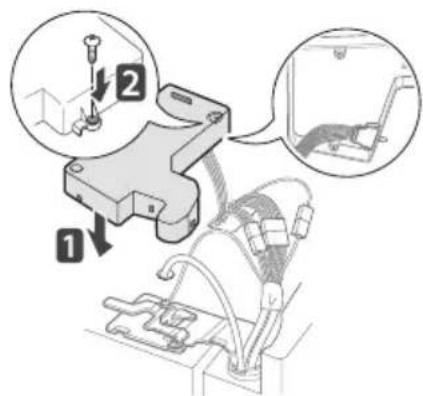
3 Connect all the wire harnesses.
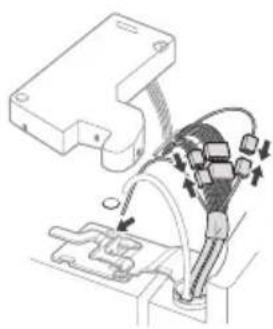
4 Push the water supply tube into the hole on the top case and pull it through the backplate.
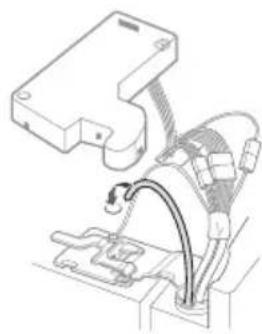
5 Hold the water supply connection and gently push in the collet to connect the water supply line as shown in 1 and 2 Insert the tube at least 5 / 8 inch (15 mm) into the connector. Assemble the clip to the joint part for fastening.
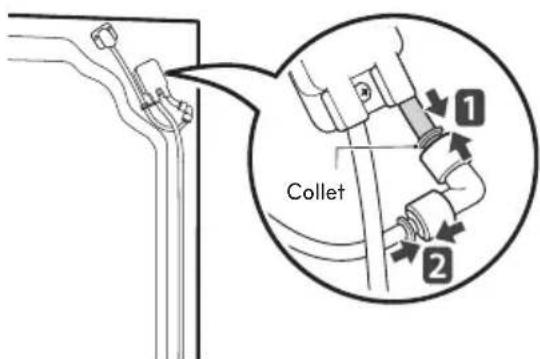
6 Make sure that the door-switch located inside the cover is tightly connected. Place the cover in its position and tighten the cover screw

NOTE
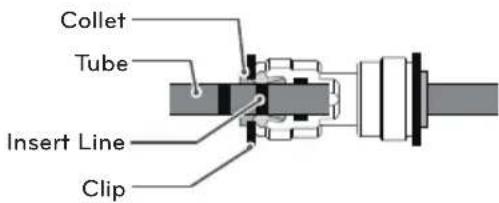
1) Gently press the collet and insert the tube until only one line shows on the tube.
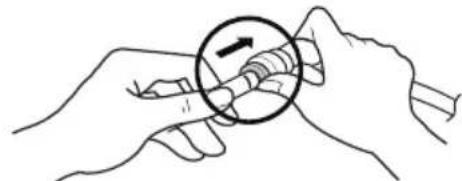
(Correct)

(Incorrect)
2) Pull the tube to make sure that the tube is tightly fastened and then insert the clip.
Removing the Freezer Drawers
In the following figures, the Pullout Drawers located above the freezer drawer are not shown for clarity.

CAUTION
- Use two or more people to remove and install the freezer drawer. Failure to do so can result in back injury or other injury.
- Do not hold the handle when removing or replacing the drawer. The handle may come off, resulting in personal injury.
- Be careful of sharp hinges on both sides of the drawer.
- When you lay the drawer down, be careful not to damage the floor.
- Do not sit or stand on the freezer drawer.
- To prevent accidents, keep children and pets away from the drawer. Do not leave the drawer open. If the Durabase® storage bin is removed from the freezer drawer, there is sufficient space for a small child or pet to crawl inside.
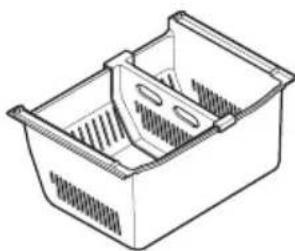
(Durabase@)
1 Open the drawer and pull out it.

2 Pull the drawer open to full extension.
3 Gently lift and pull out the ice bin.
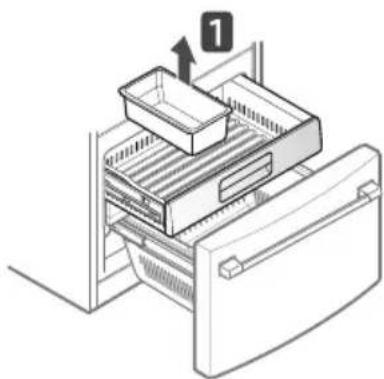
On the left rail, use a flat blade screwdriver to push in on the tab to release the drawer from the rail, as shown below. Once the left side is loose, push the tab on the right side with your finger to release the drawer. Lift the front of the drawer up, then pull it straight out.
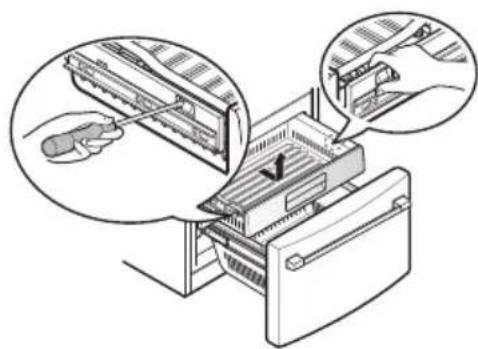
4 Remove the screws from the rails at both ends.
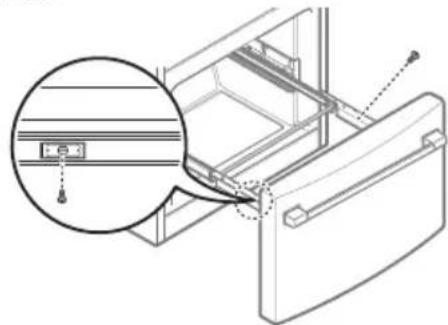
5 Grip both sides of the drawer and pull it up to remove it from the rails.

CAUTION
Do not hold the handle when removing or replacing the drawer. The handle may come off, causing personal injury.
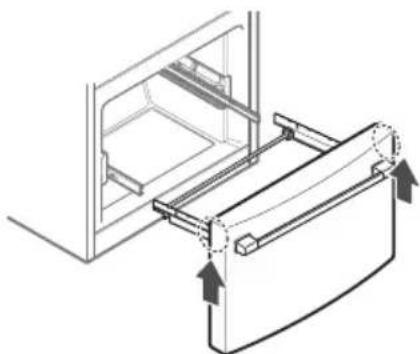
6 Hold both rails and push them in simultaneously.
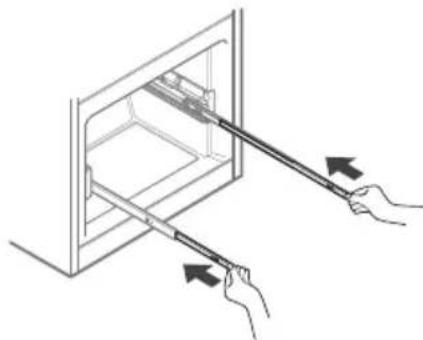
Assembling the Freezer Drawers
1 Pull out both rails simultaneously, until both rails are fully extended.
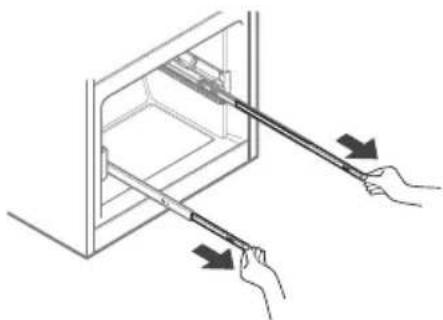
2 Grasp the drawer on each side and hook the drawer supports into the rail tabs located on both sides.
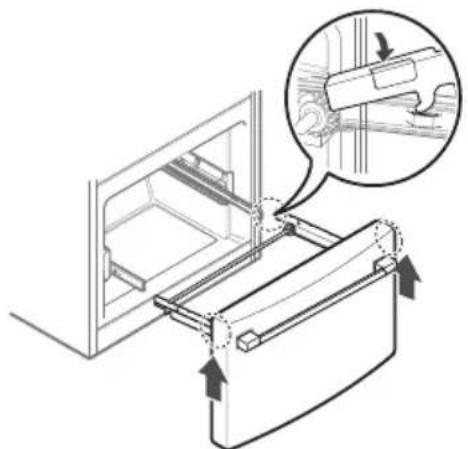

CAUTION
Do not hold the handle when removing or replacing the drawer. The handle may come off, causing personal injury.
3 Lower the door into its final position and tighten the screws located on both sides. Insert the Durabase basket in the rail assembly.

4 Insert the drawer into the frame, and push the drawer back into place until you hear a click.
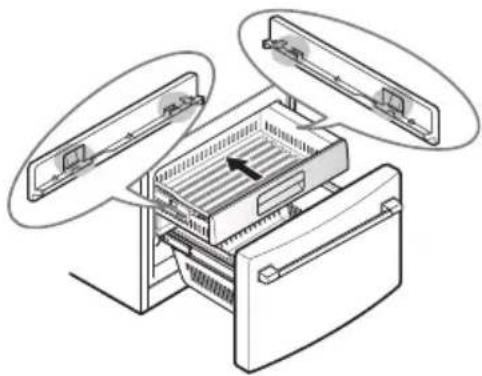
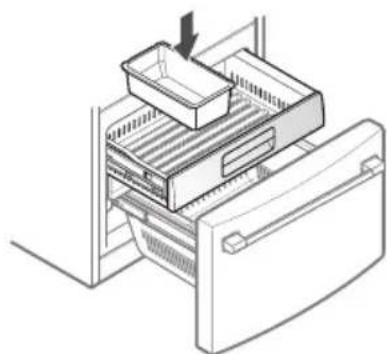
5 Place the ice bin back in the upper pullout drawer.
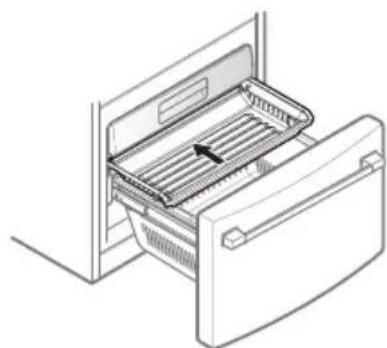
6 Insert the drawer in the rail assembly.
Connecting the Water Line
Before You Begin
This water line installation is not covered by the refrigerator warranty. Follow these instructions carefully to minimize the risk of expensive water damage.
Water hammer (water banging in the pipes) in house plumbing can cause damage to refrigerator parts and can lead to water leakage or flooding. Call a qualified plumber to correct water hammer before installing the water supply line to the refrigerator.

CAUTION
To prevent burns and product damage, only connect the refrigerator water line to a cold water supply.
If you use your refrigerator before connecting the water line, make sure the icemaker power button is turned off.

CAUTION
Do not install the icemaker tubing in areas where temperatures fall below freezing.
Water Pressure
The water pressure must be between 20 and 120 psi. If the refrigerator is installed in an area with low water pressure (below 20 psi), you can install a booster pump to compensate for the low pressure.
If a reverse osmosis water filtration system is connected to your cold water supply, this water line installation is not covered by the refrigerator warranty. Follow the instructions carefully to minimize the risk of expensive water damage.
If a reverse osmosis water filtration system is connected to your cold water supply, the water pressure to the reverse osmosis system needs to be a minimum of 40 to 60 psi (276-414 kPa or 2.8-4.2 kgf/cm², less than 2-3 sec. to fill a cup of 7 oz or 198 cc capacity).

CAUTION
Wear eye protection during installation to prevent injury.
If the water pressure from the reverse osmosis system is less than 20 psi or 138kPa or 1.4kgf/ cm^2 (takes more than 4 sec to fill a cup of 7 oz or 198 cc capacity):
- Check to see if the sediment filter in the reverse osmosis system is blocked. Replace the filter if necessary.
- Allow the storage tank on the reverse osmosis system to refill after heavy usage.
- If the issue concerning water pressure from reverse osmosis remains, call a licensed, qualified plumber.
- All installations must be in accordance with local plumbing code requirements.
What You Will Need
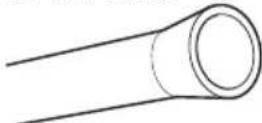
Copper Tubing, 1 / 4 in. outer diameter, to connect the refrigerator to the water supply. Be sure both ends of the tubing are cut square.
- To determine how much tubing you need: measure the distance from the water valve on the back of the refrigerator to the water supply pipe. Then, add 8 feet (2.4 m). Be sure there is sufficient extra tubing (about 8 feet [2.4 m] coiled into 3 turns of about 10 in. [25 cm] diameter) to allow the refrigerator to move out from the wall after installation.
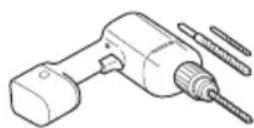
Power drill.
- 12 in. or adjustable wrench.
- Flat blade and Phillips head screwdrivers.
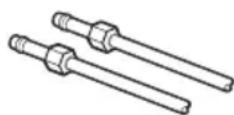
- Two 1/4 in. outer diameter compression nuts and 2 ferrules (sleeves) to connect the copper tubing to the shutoff valve and the refrigerator water valve.
If your existing copper water line has a flared fitting at the end, purchase an adapter (available at plumbing supply stores) to connect the water line to the refrigerator OR cut off the flared
fitting with a tube cutter and then use a compression fitting.
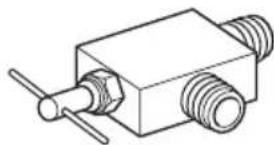
- Shuto valve to connect to the cold water line. The shutoff valve should have a water inlet with a minimum inside diameter of 5/32 in. at the point of connection to the COLD WATER LINE. Saddle-type shutoff valves are included in many water supply kits.
Before purchasing, make sure a saddle-type valve complies with your local plumbing codes.

NOTE
A self piercing saddle type water valve should not be used.
Water Line Installation Instructions

WARNING
When using any electrical device (such as a power drill) during installation, be sure the device is battery powered, double insulated or grounded in a manner that will prevent the hazard of electric shock.
Install the shutoff valve on the nearest frequently used drinking water line.
1 SHUT OFF THE MAIN WATER SUPPLY Turn on the nearest faucet to relieve the pressure on the line.
2 CHOOSE THE VALVE LOCATION
Choose a location for the valve that is easily accessible. It is best to connect into the side of a vertical water pipe. When it is necessary to connect into a horizontal water
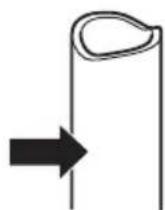
pipe, make the connection to the top or side, rather than at the bottom, to avoid drawing off any sediment from the water pipe.
3 DRILL THE HOLE FOR THE VALVE
Drill a 1 / 4 in. hole in the water pipe using a sharp bit. Remove any burrs resulting from drilling the hole in the pipe. Be careful not to allow water
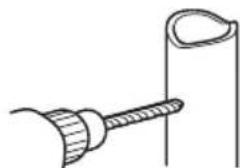
to drain into the drill. Failure to drill a 1/4 in. hole may result in reduced ice production or smaller cubes.

NOTE
The hookup line cannot be white, plastic tubing. Licensed plumbers must use only copper tubing (NDA tubing #49595 or #49599) or Cross Link Polyethylene (PEX) tubing.
4 FASTEN THE SHUTOFF VALVE
Fasten the shutoff valve to the cold water pipe with the pipe clamp.
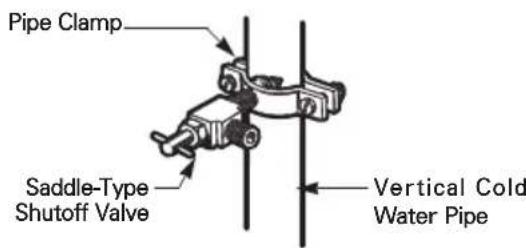

NOTE
Commonwealth of Massachusetts Plumbing Codes 248CMR shall be adhered to. Saddle valves are illegal and their use is not permitted in Massachusetts. Consult with your licensed plumber.
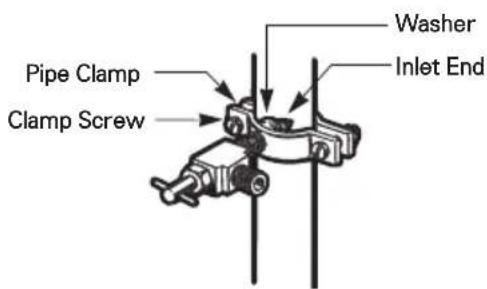
5 TIGHTEN THE PIPE CLAMP
Tighten the clamp screws until the sealing washer begins to swell.
NOTE: Do not overtighten the clamp or you may crush the tubing.
6 ROUTETHE TUBING
Route the tubing between the cold water line and the refrigerator.
Route the tubing through a hole drilled in the wall or floor (behind the refrigerator or adjacent base cabinet) as close to the wall as possible.

NOTE
Be sure there is sufficient extra tubing (about 8 feet coiled into 3 turns of about 10 in. diameter) to allow the refrigerator to move out from the wall after installation.
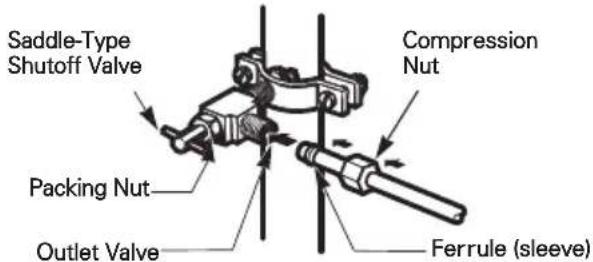
7 CONNECT THE TUBING TO THE VALVE
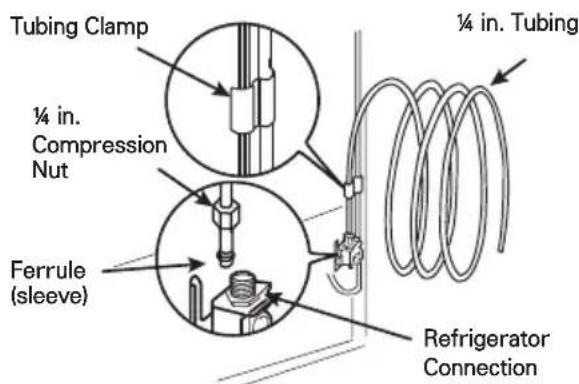
Place the compression nut and ferrule (sleeve) for copper tubing onto the end of the tubing and connect it to the shutoff valve. Make sure the tubing is fully inserted into the valve. Tighten the compression nut securely.
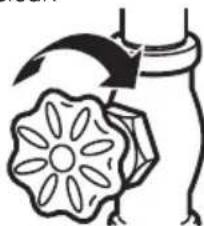
8 FLUSH OUT THE TUBING
Turn the main water supply on and flush out the tubing until the water is clear.
Shut the water off at the water valve after about one quart of water has been flushed through the tubing.
9 CONNECT THE TUBING TO THE REFRIGERATOR

WARNING
Before making the connection to the refrigerator, be sure that the refrigerator power cord is not plugged into the wall outlet.
a. Remove the plastic flexible cap from the water valve.
b. Place the compression nut and ferrule (sleeve) onto the end of the tubing as shown.
c. Insert the end of the copper tubing into the connection as far as possible. While holding the tubing, tighten the fitting.
10 TURN THE WATER ON AT THE SHUTOFF VALVE
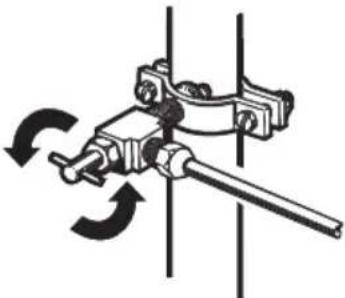
Tighten any connections that leak.

CAUTION
Check to see if leaks occur at the water line connections.
11 PLUG IN THE REFRIGERATOR
Arrange the coil of tubing so that it does not vibrate against the back of the refrigerator or against the wall. Push the refrigerator back to the wall.
12 START THE ICEMAKER
Turn the icemaker on at the control panel.
The icemaker will not begin to operate until it reaches its operating temperature of 15^(-9^) or below. It will then begin operation automatically if the icemaker has been turned on.
Turning On the Power
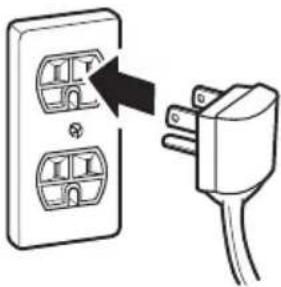
1 Plug in the refrigerator.

CAUTION
- Connect to a rated power outlet.
- Have a certified electrician check the wall outlet and wiring for proper grounding.
- Do not damage or cut off the ground terminal of the power plug.
Leveling and Door Alignment
Leveling
After installing, plug the refrigerator's power cord into a 3-prong grounded outlet and push the refrigerator into the final position.
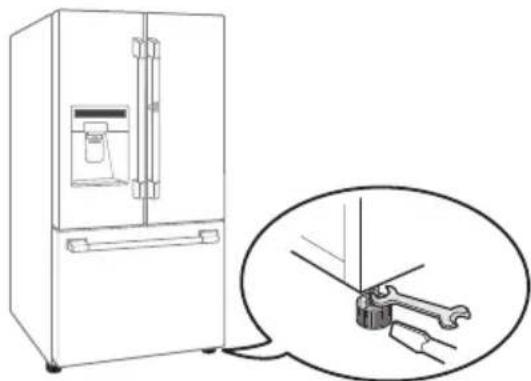
The refrigerator has two front leveling legs— one on the right and one on the left. Adjust the legs to alter the tilt from front-to-back or side-to-side. If the refrigerator seems unsteady, or the doors do not close easily, adjust the refrigerator's tilt using the instructions below:
1 Turn the leveling leg to the left to raise that side of the refrigerator or to the right to lower it. It may take several turns of the leveling leg to adjust the tilt of the refrigerator.

NOTE
A flare nut wrench works best, but an open-end wrench will suffice.
Do not over-tighten.
2 Open both doors again and check to make sure that they close easily. If the doors do not close easily, tilt the refrigerator slightly more to the rear by turning both leveling legs to the left. It may take several more turns, and be sure to turn both leveling legs the same amount.
Door Alignment
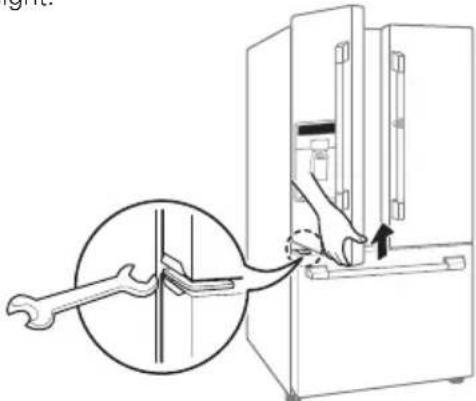
The left refrigerator door has an adjustable nut, located on the bottom hinge, to raise and lower the door for proper alignment.
If the space between the doors is uneven, follow the instructions below to align the doors evenly: Use the wrench (included with the owner's manual) to turn the nut in the door hinge. Turn the nut to the right to raise or to the left to lower the height.
The right refrigerator door does not have an adjustable nut.
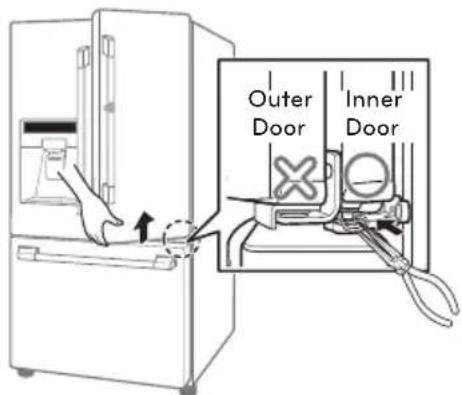
If the space between the doors is uneven, follow the instructions below to align the right door:
1 With one hand, lift up both the inner and outer door sections of the right door to raise them at the middle hinge. (Opening the door may make lifting it easier)
2 With the other hand, use pliers to insert the snap ring on the middle hinge of the inner door section as shown. Do not insert the ring on the hinge of the outer door section.
3 Insert additional snap rings until the right door is aligned. (Two snap rings are provided with the unit.)
SIGNATURE
KITCHENSUITE
SIGNATURE
KITCHENSuite
MANUEL DU PROPRIÉTAIRE
7 CONECTE LA TUBERIA A LA VALVULA.
- TABLE OF CONTENTS
- IMPORTANT SAFETY INSTRUCTIONS
- PRODUCT OVERVIEW
- INSTALLATION
- IMPORTANT SAFETY INSTRUCTIONS
- CAUTION
- Installation
- Use
- Maintenance
- PRODUCT OVERVIEW
- Refrigerator Exterior
- Refrigerator Interior
- Installation Overview
- !NOTE
- Product Specifications
- Unpacking the Refrigerator
- WARNING
- Choosing the Proper Location
- Measuring the Clearances
- Removing/Assembling the Refrigerator Door Handles
- NOTE
- Tools Needed
- Removing the Handles
- Assembling the Handles
- Removing/Assembling the Freezer Printer Handle
- Removing/Assembling the Doors and Drawers
- Removing the Left Refrigerator Door
- Removing the Right Refrigerator Door
- Assembling the Right Refrigerator Door
- Assembling the Left Refrigerator Door
- Removing the Freezer Drawers
- Assembling the Freezer Drawers
- Connecting the Water Line
- Before You Begin
- Water Pressure
- What You Will Need
- Water Line Installation Instructions
- FASTEN THE SHUTOFF VALVE
- TIGHTEN THE PIPE CLAMP
- ROUTETHE TUBING
- CONNECT THE TUBING TO THE VALVE
- FLUSH OUT THE TUBING
- CONNECT THE TUBING TO THE REFRIGERATOR
- Turning On the Power
- Leveling and Door Alignment
- Leveling
- Door Alignment
- SIGNATURE
- KITCHENSUITE
- MANUEL DU PROPRIÉTAIRE
- CONECTE LA TUBERIA A LA VALVULA.
Brand : SIGNATURE
Model : UPFXC2466S
Category : Fridge