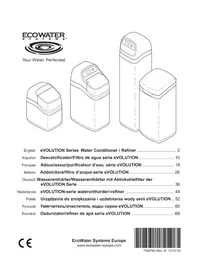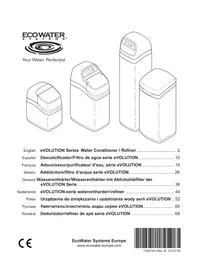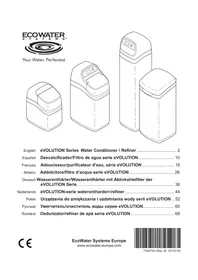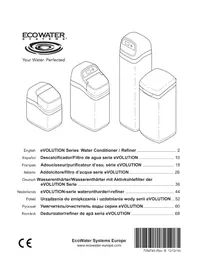
Comfort 400 - Water filter Ecowater - Free user manual and instructions
Find the device manual for free Comfort 400 Ecowater in PDF.


| Product type | On-demand water softener |
| Brand | Ecowater |
| Model | Comfort 400 |
| Power supply | 220-240 V, 50 Hz (28 V DC power supply) |
| Max. water pressure | 8.6 bar |
| Max. water temperature | 49°C |
| Min. flow rate | 11 L/min |
| Hardness setting | 0 to 99 gpg (default 25) |
| Hardness units | gpg, °f, °dH, ppm (convertible) |
| Regeneration | Automatic, immediate manual, scheduled at night |
| Regeneration cycle | Adjustable backwash and rinse (0-30 min) |
| 97% function | Regeneration at 97% capacity (ON/OFF) |
| Max. days between regenerations | Programmable up to 15 days |
| Display | LCD screen (time, hardness, etc.) |
| Clock | 12 or 24 hour format |
| Memory in case of power failure | Yes, retains settings except time |
| Disinfection | Recommended at installation (bleach) |
| Maintenance | Regular salt addition, annual inspection |
| Recommended salt | Cubes, pellets, solar salt (purity >99%) |
| Installation | By qualified professional, with bypass |
| Compliance | WEEE Directive 2002/96/EC |
Frequently Asked Questions - Comfort 400 Ecowater
User questions about Comfort 400 Ecowater
0 question about this device. Answer the ones you know or ask your own.
Ask a new question about this device
Download the instructions for your Water filter in PDF format for free! Find your manual Comfort 400 - Ecowater and take your electronic device back in hand. On this page are published all the documents necessary for the use of your device. Comfort 400 by Ecowater.
USER MANUAL Comfort 400 Ecowater
English Comfort Series Water Softener 2
Espanol Ablandador de agua série Comfort. 8
Installation Requirements 2
Safety Guides 2
Installation Illustrations 3
Water Softener Programming 4-6
Adding Salt 7
Sanitizing 7
Troubleshooting 7
INSTALLATION REQUIREMENTS
- Installation should only be performed by a trained professional.
Make sure that the main water supply is shut off before starting installation.
Always install either an EcoWater Systems bypass valve or a 3-valve bypass system. Bypass valves allow you to turn off water to the softener for repairs if needed, but still have water in house pipes. - A drain is needed for recharge discharge water. A floor drain is preferred, close to the EcoWater Systems water softener. A laundry tub, standpipe, etc., are other options.
A 220-240V, 50Hz grounded, continuously "live" electrical outlet is needed, in a dry location within 2 meters of the EcoWater Systems softener.
After completing installation of the system, perform a pressure test to detect any leaks.
After completing pressure test, perform a manual recharge.
SAFETYGUIDES
- Before beginning installation, read the manual and obtain tools and materials needed.
- The installation must conform to local plumbing and electrical codes.
- Use only lead-free solder and flux for all sweat solder connections.
- Handle the water softener with care. Do not turn upside down, drop, or set on sharp protrusions.
-
Do not locate the water softener:
-
where freezing temperatures may occur.
- in direct sunlight.
-
where it may be exposed to wet weather.
-
Do not attempt to treat water over 49^ .
- The softener requires a minimum water flow of 11 liters per minute at the inlet.
Maximum allowable inlet water pressure is 8.6 bar. If daytime pressure is over 5.5 bar, nighttime pressure may exceed the maximum. Use a pressure reducing valve if necessary. - This system works on 28 volt DC electrical power. Be sure to use the included power supply and plug it into a nominal 220-240V, 50 Hz household outlet that is in a dry location only, grounded and properly protected by an over current device such as a circuit breaker or fuse.
- This system is not intended to be used for treating water that is microbiologically unsafe or of unknown quality without adequate disinfection before or after the system.

European Directive 2002/96/EC requires all electrical and electronic equipment to be disposed of according to Waste Electrical and Electronic Equipment (WEEE) requirements. This directive or similar laws are in place nationally and can vary from region to region. Please refer to your state and local laws for proper disposal of the equipment.
EcoWater Systems Europe www.ecowater-europe.com
A detailed manual can be obtained from your local dealer or from the EcoWater website in your country.
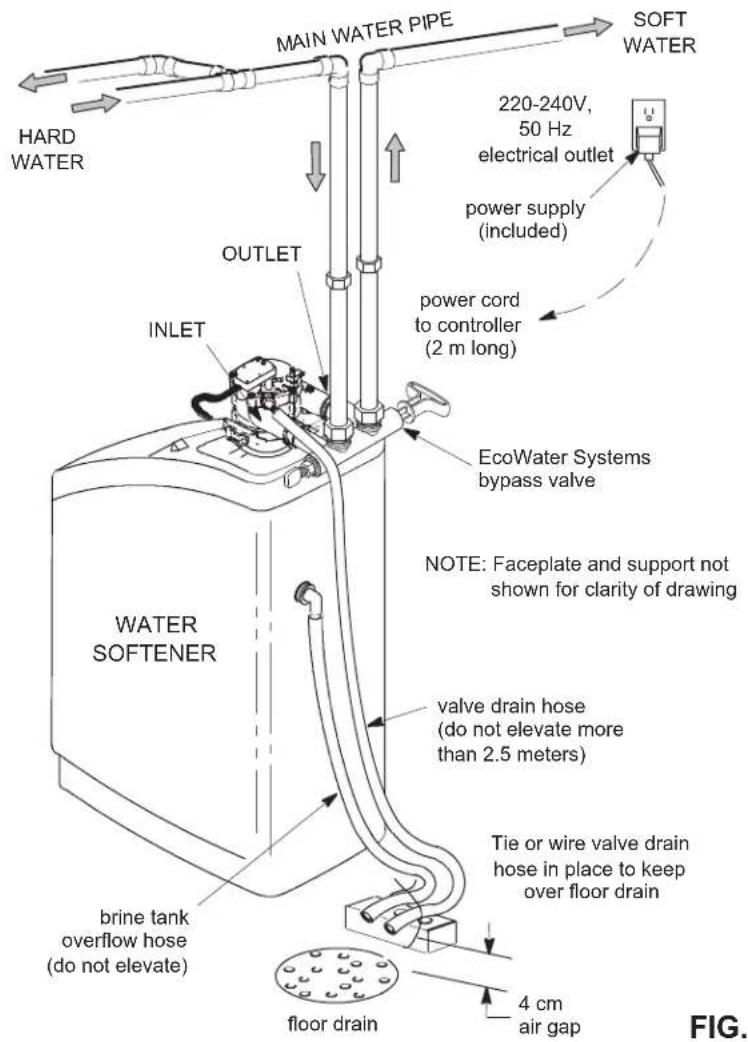
TYPICAL INSTALLATION
FIG.1
BYPASS OPTIONS
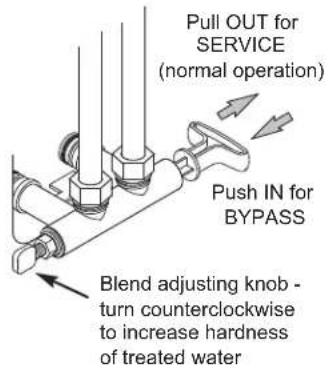
EcoWater Systems Bypass Valve
FIG. 2A
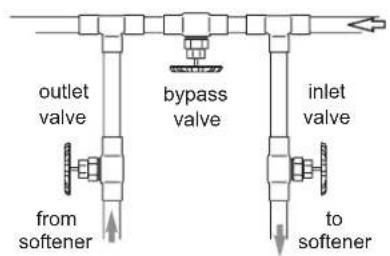
3-Valve Bypass
for SERVICE: open input and output valves close bypass valve
for BYPASS: close input and output valves - open bypass valve
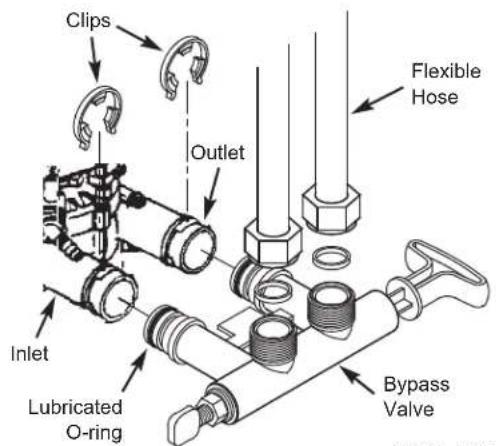
FIG. 2B
INSTALLATION USING THREADED BYPASS VALVE
FIG. 3A
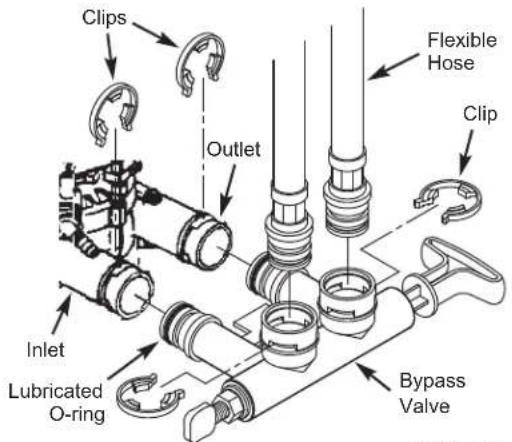
INSTALLATION USING CLIP STYLE BYPASS VALVE
FIG. 3B
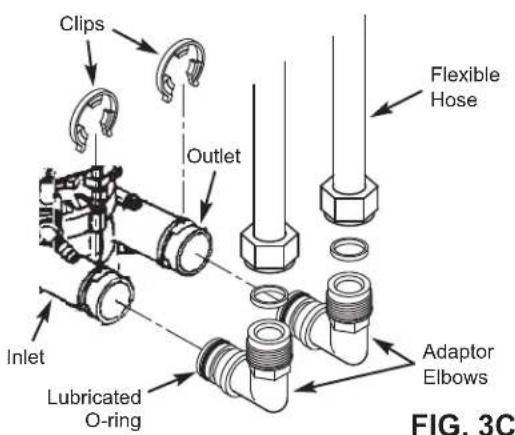
INSTALLATION USING ADAPTOR ELBOWS
CONTROLLER SETTINGS REQUIRED
upon installation, and after an extended power outage.
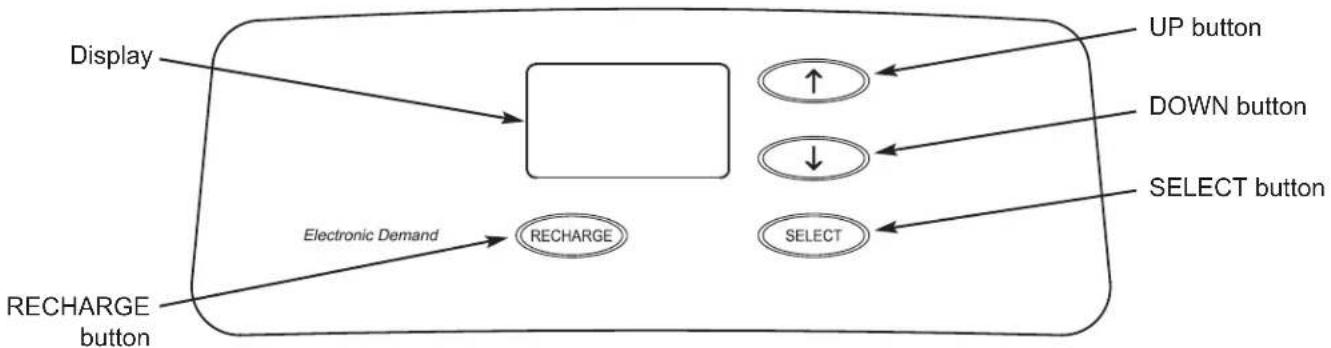
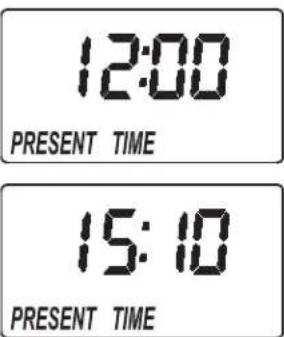
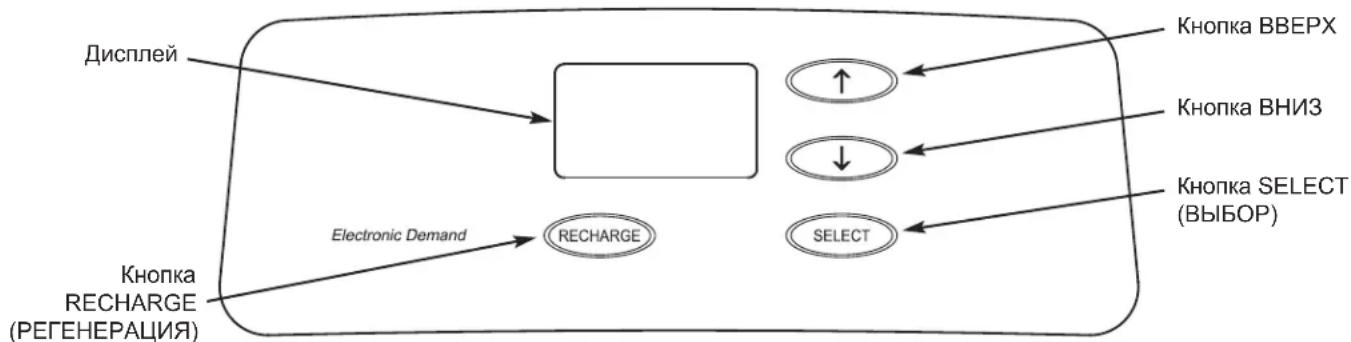
When the power supply is plugged into the electrical outlet, a model code and a version number are briefly shown in the display. Then the words "PRESENT TIME" appear and 12:00 begins to flash.
A. SET PRESENT TIME OF DAY
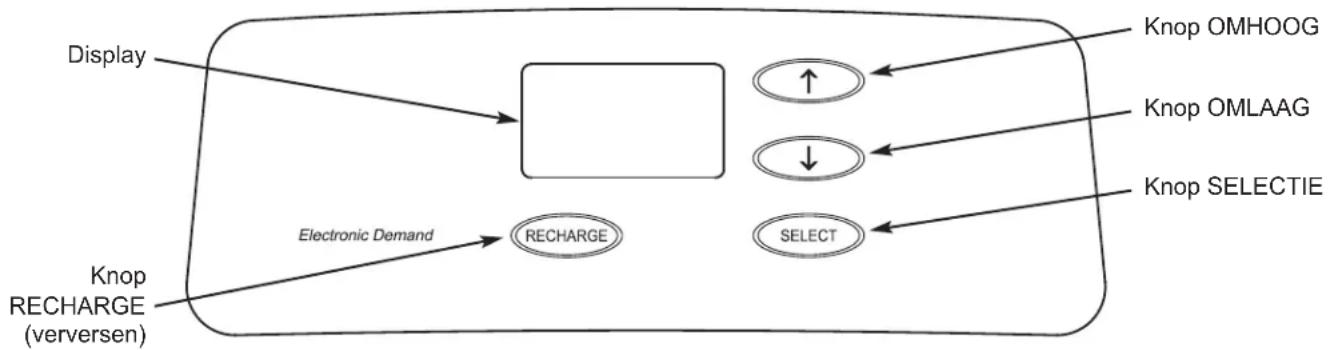
- If the words "PRESENT TIME" do not show in the display, press the SELECT button several times until they do.
- Press the UP or DOWN buttons to set the present time. Up moves the display ahead; down sets the time back.
NOTE: Press buttons and
quickly release to slowly advance the display.
Hold the buttons down for fast advance.
- When the correct time is displayed, press the SELECT button, and the display will change to show the "Hardness" screen.
B. SET WATER HARDNESS NUMBER
- If you completed the previous step, the word "HARDNESS" should show in the display. Otherwise, press the SELECT button several times until it does.
- Press the UP or DOWN buttons to set the value of your water's hardness in grains per gallon (gpg). The default is 25. See the following table for unit conversions.
| Hardness Unit Conversions | |
| French degrees (°f) | gpg = °f x 0.584 |
| °f = gpg x 1.712 | |
| German degrees (°dH) | gpg = °dH x 1.043 |
| °dH = gpg x 0.959 | |
| Parts per million (ppm) | gpg = ppm x 0.0584 |
| ppm = gpg x 17.12 | |
NOTE: If your water supply contains iron, compensate for it by adding to the water hardness number. For example, assume your water is 20 gpg hard and contains 2 ppm iron. Add 5 to the hardness number for each 1 ppm of iron. In this example, you would use 30 for your hardness number.
$$ \begin{array}{l l} & 2 0 \text {g p g h a r d n e s s} \ 2 \text {p p m i r o n x 5 = 1 0} & \underline {{+ 1 0}} \ (\text {t i m e s}) & 3 0 \text {H A R D N E S S N U M B B E R} \end{array} $$
- When finished setting your water's hardness number, press the SELECT button, and the display will change to show the "Recharge Time" screen.
C. SET RECHARGE START TIME
- If you completed the previous step, the words "RECHARGE TIME" should show in the display. Otherwise, press the SELECT button several times until they do.
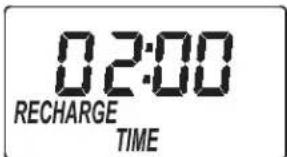
- The softener's default recharge start time is 02:00. In most households this is a good time for recharge to start (takes about 2 hours) because water is not being used. During recharge hard water is bypassed to house faucets. Use the ↑UP or ↓DOWN buttons to adjust the recharge start time in 1 hour increments.
- When the desired recharge time is displayed, press the SELECT button, and the display will change to show the normal run (time of day) screen.
NORMAL OPERATION
During normal operation, the present time of day shows in the display.
RECHARGE NOW
For times when you expect to use more water than usual, it may be desirable to perform a manually initiated recharge. To manually start a recharge cycle, press and
hold the RECHARGE button for a few seconds, until "RECHARGE NOW" flashes in the display.
The softener begins an immediate recharge. Once started, you cannot cancel this recharge. Avoid using hot water during this time, as the water heater will refill with hard water.
RECHARGE TONIGHT
To set a recharge cycle to begin at the next preset recharge start time, touch (press, but do not hold) the RECHARGE button. "RECHARGE TONIGHT" flashes in the display.
A recharge will begin at the next preset recharge start time (02:00 or as set). If you decide to cancel this recharge before it starts, touch the same button once more.
VACATION NOTE
EcoWater demand controlled water softeners recharge only while water is being used and softening capacity must be restored. For this reason, the unit will not recharge when you are away from home for extended periods. However, if you set the "Maximum Days Between Recharges" feature, the softener will recharge even when no water is used.
SET MAXIMUM DAYS BETWEEN RECHARGES
The default setting allows the timer to control recharge frequency based on water usage readings from the water meter. It provides the most economical operation.
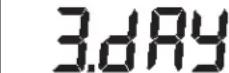
You can set a maximum time (in days) between recharges. For example, no more than 3 days will pass without a recharge occurring if you set "3 day" in the display. This feature can be set from 1 to 15 days.
1845
1845 RECHARGE NOW
18:45 RECHARGE TONIGHT
To change the number of days between recharges:
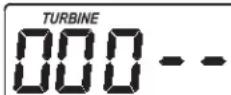
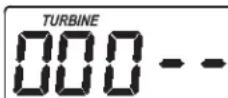
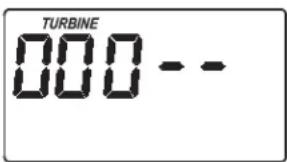
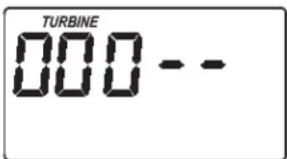
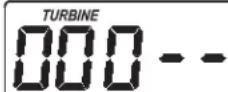
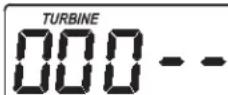
- Press and hold the SELECT button until "000 --" shows in the display.
- Press the SELECT button once again and the words "Auto RECHARGE" flash in the display.
- Press the UP or DOWN buttons to set the number of days between recharges.
- When the desired number of days are displayed, press the SELECT button several times to advance to screens and return to the display.
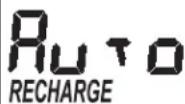
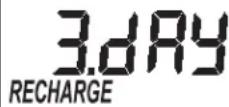
NOTE: The unit will recharge after the programmed number of days, even if no water is used during that period. To prevent recharges during vacation, set the maximum days to "Auto" before leaving. You will need to set the number of days again when you return.
SET 97% FEATURE
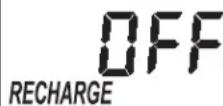
When this feature is set ON, the unit will automatically recharge when 97% of capacity has been used (at any time of day). The factory default setting is OFF.
- Press and hold the SELECT button until "000 - - " shows in the display.
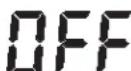
- Press the SELECT button twice and "97" will flash in the display, alternating with the current setting (either "ON" or "OFF").
3.Use the UP or DOWN buttons to toggle the setting between "ON" and "OFF". - When the desired setting ("ON" or "OFF") is flashing, press the SELECT button several times to advance through the remaining screens and return to the normal run (time of day) display.
RECHARGE

12 OR 24 HOUR CLOCK
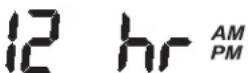
The timer has been factory preset to display a 24 hour clock. If you prefer, you may change this to display a 12 hour clock.
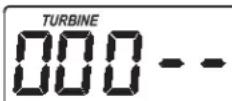
- Press and hold the SELECT button until "000 - - " shows in the display.
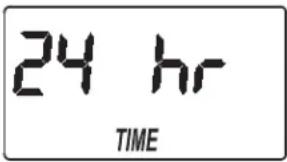
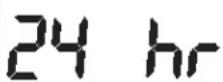
- Press the SELECT button three times and "24 hr" will flash in the display.
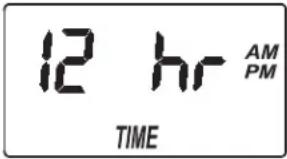
- Use the DOWN button to change to a 12 hour clock display.
- Press the SELECT button several times to advance through the remaining scre mal operation (time of day
- To change back to a 24 hour clock, follow Steps 1 through 4, above, except use the UP button in Step 3.
ADJUST BACKWASH TIME AND RINSE TIME
The timer can be changed to allow different backwash and fast rinse times, if so desired. Each of these can be adjusted from 0 to 30 minutes.
- Press and hold the SELECT button until "000 - - " shows in the display.
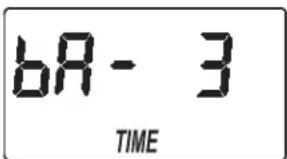
- Press the SELECT button four times and "bA-" will flash in the display.
- Use the UP or DOWN buttons to set the number of minutes desired for backwash.
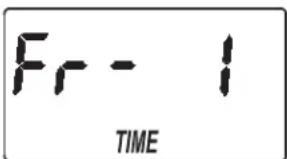
- Press the SELECT button again and "Fr-" will flash in the display.
- Use the UP or DOWN buttons to set the number of minutes desired for fast rinse.
- Press the SELECT button to return to the normal operation (time of day) display.
AUXILIARY OUTPUT
The electronic controller's auxiliary output can be used to operate a chlorine generator. It provides a 28V DC, up to 300mA , current from terminal J4 on the electronic control board. This current is on during the brine draw portion of the softener's recharge cycle.
POWER OUTAGE MEMORY
If electrical power to the softener's control is lost, internal memory will maintain most settings such as the hardness and recharge time. However, unless the power outage was very brief, the clock's present time will need to be reset. During a power outage, the display will be blank and the softener will not recharge. When electrical power is restored:
- Check the display.
2a. If the present time is displayed steadily (not flashing), the controller did not lose time and you do not need to reset the clock.
2b. If a time is flashing in the display, then the clock needs to be reset to the correct present time. See "Set Present Time of Day" on page 4. The flashing display is to remind you to reset the clock. If you do not reset the clock, then recharges will most likely occur at the wrong time of day.
NOTE: If the softener was recharging when power was lost, it will finish the cycle when power returns.
ADDING SALT
Brine (salt dissolved in water) is needed for every recharge. The water for making brine is metered into the salt storage area by the softener valve and timer. If the water softener uses all the salt before more is added, hard water will result. Lift the brine tank lid and check the salt level frequently.
If adding salt for the first time, make sure that there is about 10cm of water in the brine tank. Be sure that the brinewell cover is on when adding salt.
NOTE: In humid areas it is best to keep the salt level less than half full and add salt more often.
RECOMMENDED SALT: Cube, pellet, coarse solar, etc., water conditioner salt with less than 1% insoluble impurities. This type of salt is high purity evaporated crystals, sometimes formed into briquets. It has less than 1% insoluble (not dissolvable in water) impurities.
SALT NOT RECOMMENDED: Rock salt high in impurities, block, granulated, table, ice melting, or ice cream making salts, etc., are not recommended.
BREAKING A SALT BRIDGE
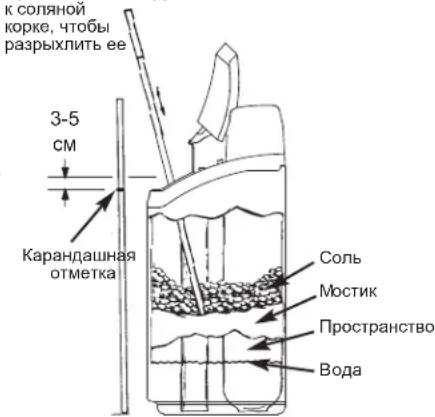
Sometimes a hard crust or salt "bridge" forms in the brine tank. This is usually caused by high humidity or the wrong kind of salt. When this happens, an empty space forms between the water and the salt. Then salt will not dissolve in the water, the resin bed will not be recharged, and hard water will result.
A bridge may be underneath loose salt. Use a broom handle or like tool to check, as shown in Figure 4. Carefully push it straight down into the salt. If a hard object is felt, it is most likely a salt bridge. Carefully push into the bridge in several places to break it. Do not try to break the salt bridge by pounding on the salt tank.
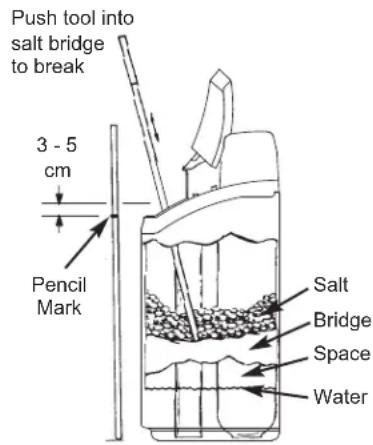
FIG. 4
SANITIZING INSTRUCTIONS
Care is taken at the factory to keep your EcoWater Systems softener sanitary. However, during shipping, storage, installing and operating, bacteria could get into the unit. For this reason, sanitizing is suggested* when installing:
- Remove the brinewell cover and pour about 40ml (2 to 3 tablespoons) of common household bleach into the conditioner/refiner brinewell. Clorox and other brand names of bleach are readily available. Replace the brinewell cover.
- Initiate a "Recharge now" (See Page 5). This recharge draws the bleach into and through the softener.
*Recommended by the Water Quality Association. On some water supplies, the EcoWater Systems unit may need periodic disinfecting.
NOTE: We recommend that you have the conditioner/refiner serviced annually.
TROUBLESHOOTING GUIDE
| PROBLEM CAUSE CORRECTION | ||
| No soft water | No salt in the storage tank. Add salt and then initiate a "Recharge now". | |
| Salt is "bridged." Break salt bridge (See above) and then initiate a "Recharge now". | ||
| Power supply unplugged, power cable leads disconnected from electronic control board, fuse blown, circuit breaker off. | Check for power loss due to any of these and correct. When power is restored, set the time if the display shows "Present Time" screen (See Page 4). | |
| Bypass valve(s) in bypass position. Place bypass valve(s) in service position. | ||
| Valve drain hose plugged or restricted. Drain hose must not have kinks, sharp bends, or be raised too high. | ||
| Water hard sometimes | Bypassed hard water being used during recharge, due to present time or recharge time settings being incorrect. | Check the present time displayed. If not correct, refer to "Set Present Time" on Page 4. Check the recharge start time, as described on Page 4. |
| Hardness number setting is too low. Referring to "Set Water Hardness" on Page 4, check the current hardness setting and increase if needed. Have hardness of water supply tested, if necessary. | ||
| Hot water being used when softener is recharging. | Avoid using hot water during recharges, because water heater refills with hard water. | |
| Error code displayed | Fault in wiring, position switch, valve, motor or electronic control board. | Contact your dealer for service. |
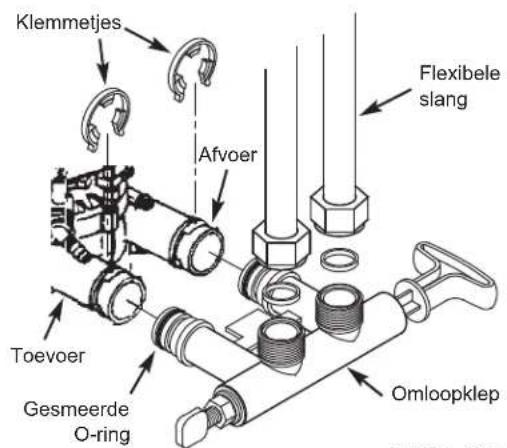
INSTALLATIE MET OMLOOPKLEPMET SCHROEFDRAAD
AFB. 3A
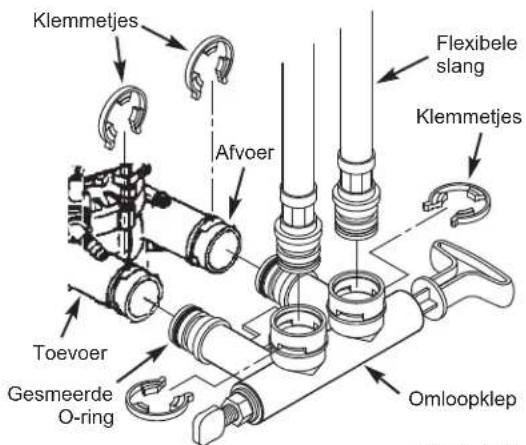
INSTALLATIE MET OMLOOPKLEPMET KLEM
AFB. 3B
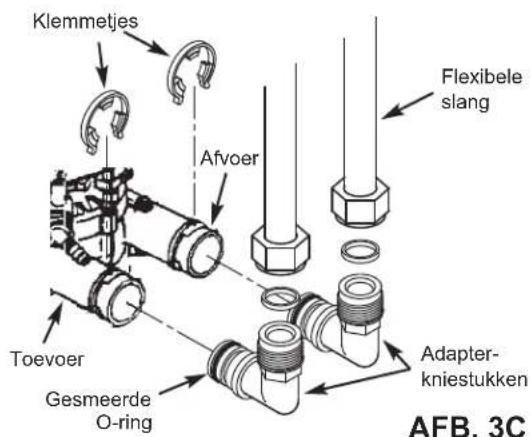
INSTALLATIE MET ADAPTERKNIESTUKKEN
VEREISTE CONTROLLER-INSTELLINGEN
na installment en na langdurige stroomuitval.
PRACA W NORMAL-NYCH WARUNKACH
UctpaHHeHHeHcnpaBHOCTeI 49
TPEBOAHN K YCTAHOBKE
YCTAHOBKa DOJXHbBINOHNHTBCr CNEUANCTOM, pOwEduM CneuaJIbHyIO NOIROTOBky.
-NepeHauanom yctaHOBNy6eNTecb,TO OCHOBHARIOdaVA BOblOTKIOUeHa.
-Ob3aTeNbHO yCTaHOBITE nepenyckHoI Knaan Hnn 3-KnanaHHy npenpyckHy CmCTemy npoNBOcTBA KOMnAHIN EcoWater Systems. IpeynyckHO Knaan Hn0BOnJET, npu Heo6xOIMOCTH, OTKIOUATb NODaHY BoBb BY UymrHTeNB DnB BIIIOJIHeHn peMOHTa, npu 3OM B BOOpnoBODhIx Tpy6ax BOda ocTaetca.
-Дя сиBa BOdBi Heo6xOДmO CnyckHoe OTBepCTne. Прдпчтельн OсуckHoe OTBepCTne B NOny, рядОм C ymaRHTeNem BOdBi EcoWater Systems.ТаКе моЖн OсNonb3ObaTb BOdo3a-BopHyTOpy6y,paKOBuHnДЯ CTnRPKn I T.D.
B cyxom MeCTe Ha pacctOraHn B npedeJax 2-x MetpoB OT yMAYHTeN ECoWATER Systems DoKHa 6bIb 3a3eMJIeHHa, HENpepbIBHO o6ec-NeuBaOuaJr NITAHne 3NEKtpnuecka po3eTka HOMINHOM 220-240 B,50 Tc.
- Nocne 3aBepseHn yCTaHOBKn CnCTeMbI BbINOJI Hnte npOBepKy nOД nABNeHnEM C cEJIbIO OHa-pyKeHn BO3MOxHBiX yTeueK.
- Nocne 3aBepseHnI npOBepKn daBJIeHn BbINOJI Hnte perehepauu BpyHyIO.
YKA3AHNIO B3OJACHOCTN
-Перд налOM устаньи npочпай Te pyковodctBo И NOДТОБТЕ Heo6xOДмье ИСHTpyMeNTbI И MaTePnAЛы.
YCTAHOBKa DOJIXHA BbINONHHTBCR B COOTBETCTBUN C HOPMaMn CNECapHO-BOIDonPOBOIDhIx N3JEKTPoTeXHNUeCKNX pa60T.
-ДяВCEX COeINHeHm C MЯrkO NnKO INCnObl3yInTe TOnbKO He COdepKaUH CBnHeu npINO n NaJIbHbI ΦnIOc.
- 06paaainTebc ymraHTeIem BODbI aKKypaTHo. He nepeBopaunBaITe erO, He poHnTE n He pa3MeuaTHe oCTpbix BbICTyax.
He pa3meuainTe ymraTneB BObl B MeCTax:
-Гд Bo3MOxHа Hn3KaTeMnepaTypa BO3dYxa.
B yCIOBnX npMOrO cOnHeuHOrO OcBeueHn.
B yCNoBnAx, rDe MoKet 6bItb Cbipo.
He nItaTecb 6pa6aTbIbAtb BDOy, TempePaTypa KOTOpn npebblwaer 49^
-ДяумгчтелТpe6yETcCKopoCTb NOTOKa He MeHee 11 NHTPOB B MHyTy Yepe3 BnyCKHoi KnaHaH.
- Makcimambhoe donyctmoe daBneHne BObI dIra BnyckHoro kna-nana coCTabJIeT 8,6 6ap. Ecn nDhem daBnEHe npeBbIaet 5,5 6ap, HocbIO OHO MOKeT npBbIaTaB donyctmbl MAcKcIMaNbHbI ypoBeH. Pn Heo6xoDMOCTn NcNoJb3yTe peDykuOHbI Kna-nah.
CnCTema pa6oTaET O3JKeTpUeCKO rNtAHnH HOMHaIOM 28 B NOCTOHHORO TOKa. O6R3aTeNbHO NcNOJIb3yTe BXODaMnB KOMNNKET 6NOK NITAHN; BCTaBBTe ERO B O6bHyTO pO3Eky HOMHaIOM 220-240 B,50 Tc, o6R3aTeNbHO pacNoONKeHHyBO cyxOM MecTe, 3a3eMHeHHyO, CdoNkHBm IpeDOxaHHTeNbHbIM YcTPOI CTBMOT CBepXToKOB, TaKIM KA KppeBbTAeNb INI INpeDOxaHInTeNbHApNpO6Ka.
CnCTema He npEHa3HauHe Na Opa6oTK N BoI, KOtopa Hbe30nacHa cornaHO MmKpObNOrOHeCKo OueHKe, NIO BOI, KaecTBO KOTopoH Hen3BecTHo, 6e3 COOTBeTCTByUeH De3uHpeK UIN Do nnn nocne Opa6oTK CnCTemoi.

DnpeKtNaBa Ebponeckoro Coio3a 2002/96/EC Tpe6yeT, YTObI NIOBOe 3NEKTPnueeckoe NN INI 3NEKTPoHHe OOBpydoBAHne yTNIN3NPOBAOncB B COOTBeTCTBmC C 06ra3aTeNbHbIM NIOLOXeHNMAO 6yTNIN3aUN 3NEKTPoHHO N 3NEKTPnueeckoR OOBpyobAHNA (WEEE). DaHHa I dupeKtNaB INI NIObHbe eN 3aKOHOdaTEbHbIE AKTbI DeNCTBYIOT Ha TeppnTOPIN BERO TOCyDapCTBa, pnpem Tpe6oBAHnMOrY OTNIuATcbE 3aBNCIMOcTn OT peNoHa. IInI npABMbHOyTNIN3aUN DAHHORO OOBpyobAHnPykoBDCTByNTecb 3aKOHOdaTEbHbIMN AKTaMM BaWero TocyDapCTBa IN PerNoHa.
EcoWater Systems Europe www.ecowater-europe.com
PpO6Hoe pyKOBOCTBO MOXHO NOJyHTb y MecTHbIX dNCTPNbIOTOPOB HnHa peHNOHbHOM caTe KOMNaHn EcoWater.
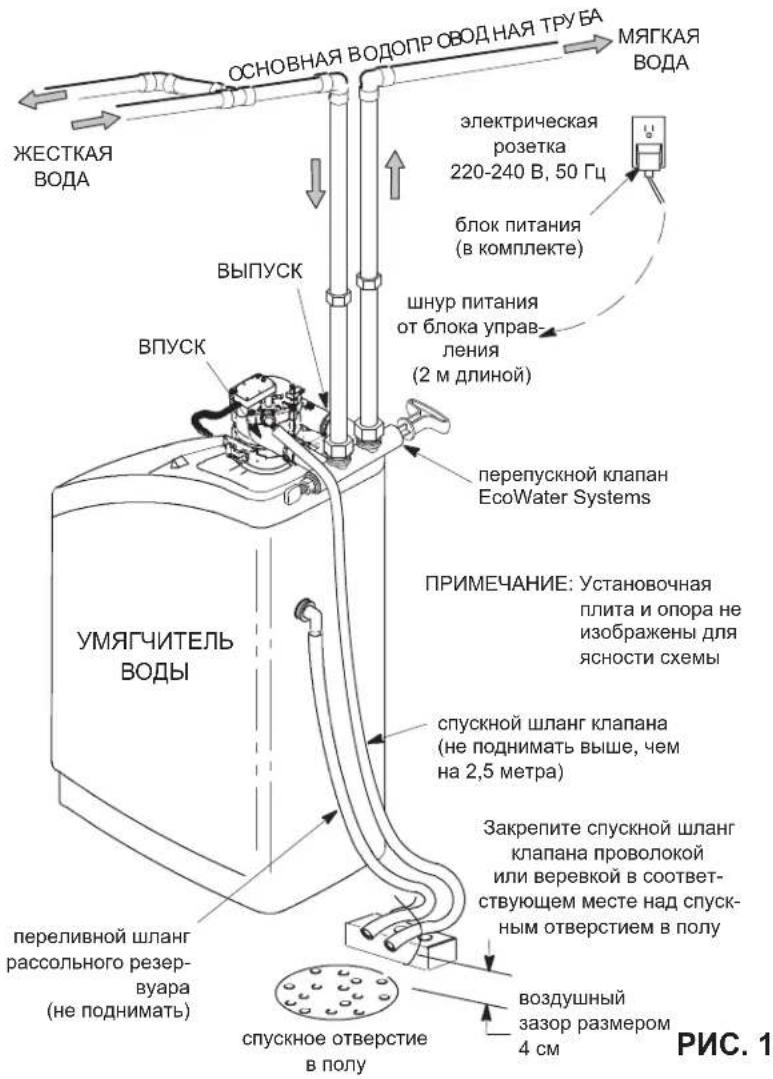
CTAHAPTHA YCTAHOBKA
ФУHKUINIPEPENYCKHOKJIANAH
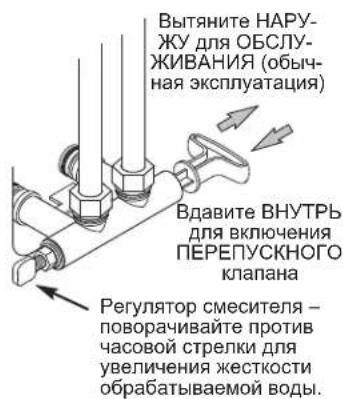
Nepenyckno knanae EcoWater Systems
PNC.2A
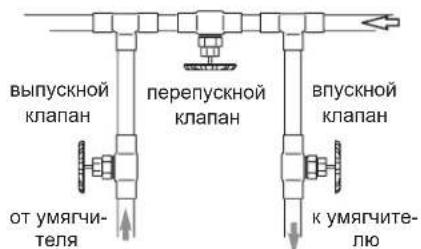
3-KnanaHHa nepenyckna cncTeMa
-ДЯ OБСЛУЖИBAH住房:
-OTKPOITe BNYCKHO IN BbIYCKHO KJanaHbI
-3akpoTe nepenyckHOKJanaH
-ДЯВКЛЮЧЕНИ ПЕРПУСКHOFO KЛANAHA:
-3aKpOte BnYCKHO N BbIyCKHO KnaNaHbI
-OTKpoTe NepenyckHOJ KnaH
PNC.2B
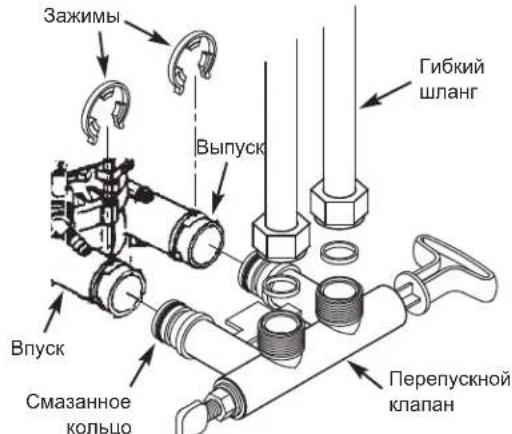
YCTAHOBKA C NCIONBJ3OBAHNEM
NEPENYCKHO KJIANAHA C
PE3bBOBbIM COEINHEHNEM
PNC.3A
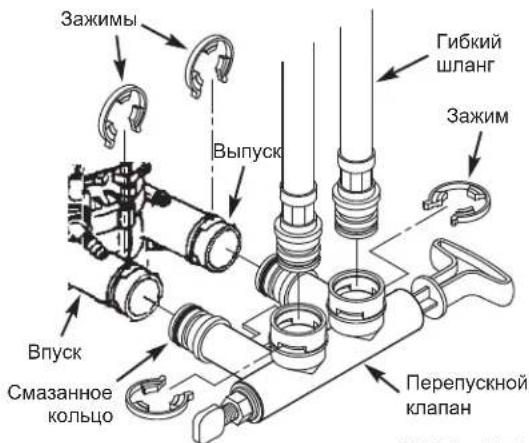
YCTAHOBKA C NCSIOJIb3OBAHHeM IEPENyCKHO KJIAPANAHC 3AXIMHBIM COEINHEHEm
PNC.3B
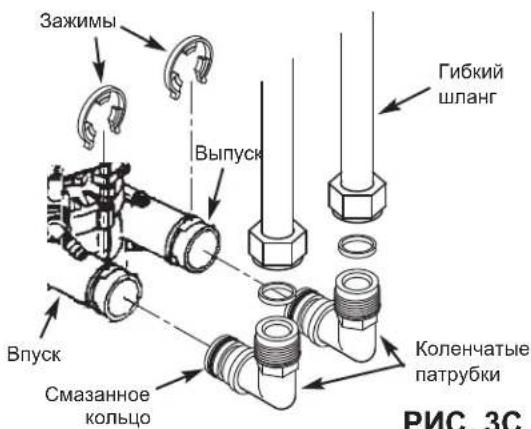
YCTAHOBKA C INCINb3OBAHHEM KOJEHcATbIX NATPY6KOB
HACTPOIKA BJOKA YNPABNEHNA TPEBYETC
npyyctaHOBKe nocne OTKIOUeHnna 3NeKTponNTAHnHa nnTebhBn CpOK.
Пи ВКИЧЕНМ 6ЛОКА ПИТАнь B 3ЛЕКТРУECHKO pO3eTку НдИСПЕЕ КраТКOBРЕМЕнHO OTOБРAXAJOТСК ДМоДЕЛ И HOMEPВERCN. 3aTeM NOЯВЛЯТСЯДПИСь «PRESENT TIME» («TEKUYUEE BPEMЯ») И начINAET MIRATь 12:00.
A. YCTAHOBKA TEKUYIEGO BPEMEHIN
- Ecni Haanncb «PRESENT TIME»(TEKUEE BPEMRA) He OTO6paKaetcna Hau nCnnee, HAKMTe KONKY SELECT (BbIOP) HeCKoNbko pa3, noka Haanncb He NoaBntcra.
- HaximmaTe KhoNkU BBEPX nIn BHn3, YTObI yCTaHOBt b Tekyuuee BpeM. KhoNka BBEPX OTCHTbIBaET BpeM Ha dncnnee Bnepe; KhoNka BH13 OTCHTbIBaET BpeM Ha3aJ.
12:00
PRESENT TIME
15:10
PRESENT TIME
ПРМЕЧАНЕ:ДЯMeДЛЕнHOrOимЕнHЯЗЧЕнHa INДИКaTOpe HaxIMaTe KHOKNI 6bICTpO OTNYCKaIte.ТTo6bl3HAчEHЯМeHЯJIINc6bICTppe,уDEpxINBaIte KHNKn HaxKaTbIMN.
3. Посné отобрахеньправиьно Временин НжмITE
Конь SELECT, И поацаня дисплег сmedуся
экpan «Hardness» («Жektкость»).
B. YCTAHOBKA 3HAUEHN J EECTKOCTN BOJbl
1.EcnBbIOnHeH npEbyDyU ⅢTan,Ha 3KpaHe 6yTeOTo6paKeHa HAdnncb «HARDNESS》(《KECTKOCTb》).BINOM Cnyae HaxMITE KhoNky SELECT (BbIOP) HeckoJIb-Ko pa3, Noka HaDnncb He NOBNTcA.
2. Haxmte KONKn 个BBEPX nHn ↓ BHN3, YTO6bI yCTaHOHTb 3HaueHHe JxecTKOcTn BOdb I rpaHax Ha raJIIOH (gpg). 3HaueHne no yMOJuaHncoctabnre 25.ДЯ npe-0bpazOBAHn eDINHc CM. CNeDyUOuYTO tabnUy.
2ppm xje3a x 5 = 10 +10
(ymHOxntb) 303HAUHNE XECTKOCTN
Bo Bpem oboHOn paOToHa
DnCnIe 6yTeT OToBpaKaTbcra
TeKyuEe Bpem DnH.
1845
HEMEDEHHA PEREHEPAUN
B cnyaax, korga oKnaaetcnaONb3OBaTb 6oNbwe B0dbIyemObbHNO,MOxET 6bITbXeNaTeBHO OCyueCTBNTbHNuINPOBaHHyOByHyUpeHeraHIO. YToBb BYpyHuO3aNyCTMbUckn peHepaunHahMNTe UydepkNBAHTe
18:45
RECHARGE NOW
HECKONbKO CekyHKnONky RECHARGE (PEFEHEPALUNA), noka ha dincnillee He hauhet mrgatb Haanncb «RECHARGE NOW»(«HEMEENEHHAPEHEPALUNA»).
YmRHTeHbHaHHe HEmEaHHyIO pereHepaHIO. Nocne 3anycka OTMeHNrB 3Ty pereHepaHIO HeBO3MOxHO.
N36eraIte NcNoJIb3OBAHnI rOpaeI B0dI B 3TO BPem, TAK
Kak HarpeBaTeHb BOdI bdyET HAnONHrTbcg KecTKo BOdoi.
PETEHEPAUHACTYNAIOUHOCBO
Ytob3aadaHauaoUckna
perehepaunB CneDyUouee
3apahee yctahOBHeHHoe
BpeMa perehepaun, HaxMMTe
(Ho He ydepKuBaTe) KONky
RECHARGE (PEHEPALUNA
Ha dncnnee Miraet Hadnncb
《RECHARGE TONIGHT》
(PEHEPALNHACTUYNAIC
18:45
RECHARGE TONIGHT
Perehepaunna HauHETcB CnEduoUee 3apaHee yCTaHOBneHoe Bpemr perehepaun (02:00 nnn kak 6ydt YcTAHOBneHo).Ecnn Huxho OTMeHNb 3Ty perehepaunIO oo ee HauJa, HaxMNTe Ty Xe KONky eue pa3.
ПРИМЕЧАНЕ O ПЮСТОЕ
EcoWater Tpe6yET perehepaunynpabnembix ymargntenel BOBt TOIbKO TOrda, KOrDa BOa nCOnNoB3yeTcN HUxHO BOC-CTAHOBNTB BIXoD yMrgHeHNOBd. IIO 3Toi npnHHe yctpoinCTBO He 6yDet perehepnpoBaTb, ecn Bbl OTCyTCTByeTe Doma dInTeBho Bpema. Ondako ecn yCTAHOBNTb napametp «Maximum Days Between Recharges» («MaKcImaJIbHoKe KOJIueCTBO DneH MEXdy perehepaunmN»), To ymargHTeB 6yDet ocUSeCTBnTb perehepauio, daJke ecn BOa He nCOnNoB3yeTcN
YCTAHOBKA MAKCIMMAJIbHORO KOJINUECTBA DHEM MEXKdy PEGHEPAUJAMN
Hactpoikn no ymonuahmno 03BONJrT TaMepy 3aDaBaTa bacToTy perehepaun B 3aBNCIMoCTn OT noka3aHn pacxo- da BObl CO cHTUka BObl. OHn oecneuHaOT Han6Oonee 3KOHOMuHyko pa6Oly.
Moxho yctaHOBtMaKcImaJIbHoe BpEmA (B DnHX) MExypeReHepaIIMn. HanpHMeP, eCNHa DNcNIIe ycTaHOBtB 3DnR, To INTEpBaJIb MeKdy BblIOJIHeHnEM peReHepaIIM 6yETdINITbc He 6Oone 3 DeH. 3OT napameTp MoXHO yCTaHOBtB npeJenax O1 Do 1DnHe.
IIN3MeHHeN KOnUYeCTBa DHeM MeKdY UKNaMn peReHe
paun:
- Haxmte uyepeKbauTe KhoNky SELECT (BbIOP), noka Ha dinCnnee He oTo-6pa3ntc 000 - -
- HaxMnte KhoNky SELECT (BbI6OP) eue pa3, ha dinCnnee HaHT MItaTb HaDnncb «Auto RECHARGE» («ABTomatueckar PEHEPALUNA»).
- HaxmMaTe KhoNkU BBEPX uuB BHn3, UTo6bI yCTaHOBntb KOINHe-CTBO DHeMxdy UKNaMn peReHepaun.
- Nocne OTo6paKeHnna
KEnaEMoro KOnuYeCTBa
DHei HAnKMITE KOnIky
SELECT HeckoBko pa3 nIy
NepeKKnOeHnMeMdy octBa
UeHnKaKpHaNy obuHno pa

RECHARGE
RECHARGE
YCTAHOBKA IAPAMETPA 97%
Ecnn 3TOT napametp BKNIOueH (ON),TO yCTPOIcTBO 6yIDeT BKNIOaTH ABTomATNueCKU OpeheepauNIO, KOrDa IcNOJIb- 30BaHO 97% EMKoCTn (B JIOBOe Bpemr cyTOK). 3aBoDcKa HAcTpoiKa nO yMOJNAHIO - BBKIOUeHo (OFF).
- Haxmte uyepeKbauTe KhoNky SELECT (BbIOP), noka Ha dncnnee He oTo-6paanTc 000 - -
- HaxMMTe KhoNky SELECT (BbI5OP) DBAckbl, Ha dnc- nnee hauchet MmraTb hAdnncb «97),YepeDyraC b TeKyuuehAcToPoiKoR(«ON» nn «OFF»).
- HaximMaTe KHOJNIMBBEPXnHnBHN3,TO6bI nepeKIOUaTbHacTpOky MeKdy ON
4.BoBpemMnraHnJKeJaEmoN HacToPmK(《ON》(《BKI》)nni《OFF》(《BbIKN))HaxMtTe KhoNky SELECT HeckOJIbKO pa3 nIpeKeKnIOeHnMeKdy OcTaBUnMncr 3kpaHaMn N Bo3BpaUeHnK 3kpaHy o6bHuO pa60tbl (Bpemd).

RECHARGE
RECHARGE
12-Ⅱ24-UCOBONΦOPMAT BPEMEHN
TaMep NMeet 3aBODckyo
yCTaHOBky OTo6paXeHnBa BpeMeHN B24-YacOBom fOpMaTe.
PnKeJAHn
ee MOKHO CMeHnTb Ha OTo6paXeHnBeBpeMeHN B12-YacOBom fOpMaTe.
- Haxmte udepkmbaTe KhoNky SELECT (BbIBOP), noka Ha dinCnlee He oTo-6pa3ntc 000 - -
- Haxmte KhONky SELECT (BbIOP) Tpu p3a,Ha dncnnee NaHET MrrTaHdnncb 24 hr).
3.ИсnotьутkeKhONkyBHN3,чTo6blcmeHHTbOTO6paXeHne BpeMeHnHa12-ycaOBoIΦopMaT. - Haxmte KhoNky SELECT HeCKoJIbKO pa3 dIy nepeKlnOueHn Mekdy OCTaBUnMnC 3KpaHaMn I BO3BpaUeHn K 3KpaHy obbyHou pa60TbI (BpeMa Dn).
- TTo6bI BepHytbcR K 24-ycaobomy fOpMaTy, BblOnHInTe Bblweynomayhtbe warrn1-4,3a NCKJIIOHeHEm NcONb3OBAHHK HONKn个BBEPX Ha ware 3.
HACTPOIKA BPEMEHN IPNOMbIBAHN O6PATHbIM NOTOKOM IN BPEMEHN IPOMbIBAHN
PnKeJAHnn TaMep MoXHO
HaCTpOnTb, YTO6bl ObecneYntb
pa3IuHbIe BpeMeHa npOMblBAHnO6paTHbIM NOTOKOM 6bICTPOrO npOMblAHHa.
KaKdoe n3 Hnx MOxHO yCTaHOBtB B ppeJenax ot O do 30 MNHT.
- Haxmte uydepkuaBte KhoNky SELECT (BbIOP), noka ha dinCnnee He oTo-6paanrca 000 - -
- HaxMMTe KhoNky SELECTBbIbOP) YeTbipe pa3a,Ha DCnCnlee HaCyHET MInrTaB HaDnncb «bA- »
3.ИспоььуITE KHONKU BBEPX nIN ↓ BHN3, yTObI yCTaHOBNTb KeNae-MOE KOJIIncHcTBO MNHyT dJn ПомыBaHЯ OБpaTHbIM NOTOKOM. - Haxmte KhoNky SELECT (BbIbOP) eue pa3; Ha din- nnee HauHET MuraTb HauNncb «Fr-»
5.ИспользуITEКоннг个BBEPXиH↓BHIN3,YTO6bI yCTaHOBHTJKeJaEMOEKONHecTBO MHNytДЯбICTPOrO IpOMbIBAHN. - Haxmte KhoNky SELECT nBaO3BpaUeHnK ekpany 0bchy npa60tby (BpeMnH).
TIME
TIME
DONOHHTENbHbI BbIXOJ
IOnOHInTeBHyBbXoD 3NEKtpoHHoro 6noka ynpabHeH NMOKeT NCIOJb3OBAtBCa DnpaBoTBr HeHepaTopa Xnopa. OH o6ecneuBaet nocToarHHOe HapprKeHne 28 B, TOK do 300 mA,OT KOHTaKaTJ4 Ha 3NEKtpoHHoPiTa Ye npabHeHra. 3TOT KkIIOUeH BO BpeM rCTaIMN BBBeDEHn paccOna UKNla pereHepauuymrHTeJIa.
PAMrTb Pn OTKJIIOUeHm 3JEKTPoIITAHN
Pn nCue3HOBENH 3NEKTPoNtAHn6Ioka ynpaBHeHnY mYrHTeTn60JIbWuHCTBO HaCTPOE, TaKne KaK JcEeKTOCTbN BpEmpeHEpaUN, 6yDyT COxPAHeBb BO BHyTpEHnHnAMrTN. Ondako cCN NOTKIOUeHne 3NEKTPoNtAHn He 6bIOnOueHb KpatKOBpEmeHHbIM, TkUcEE BpEmyacOB HxHNo 6yDet YcTAHOBNTB HOBb. Bo BpEmoTKnIOUeHn 3NEKTPoNtAHn DcCnNe 6yDet NcyTbIM uYMrHTeTb He 6yDet OCUyecTBnRtB pereHepauHIO. Pn BOCCTaHOBJeHn 3NEKTPoNtAHn:
1.Поверьт endnnne.
2a. Ecnn Tekyuee Bpemr OTo6paKaeTc HnpepbIBHO (He Mmraet), To B 6nKe ynpabJIeHn He npOn3oWeJ c60I BpemEH N uacbl NOBtOphO yCTaHaBbNBA Tb He HyxHo.
2b. Ecnn BpemHa DnCnnee MnaeT, To Ha yacax HnykHO yCTaHOBtB npabINbHoe TeKyUee Bpemr.CM. «YcTaHOBka TeKyuIero BpeMeHn» Ha Ctp. 46. MuraIOuN IcnneHn HApOMnHaet O HeoBXOIMOCn YCTaHOBtB qacbl. Ecnn Yacbl He YcTaHOBtB, To ZIKNbI pereHepaunm, CKopee BCero, 6yDyT BblONHraTbc B He npabINbHoe Bpemr cyTok.
ПРИМЕЧАНЕ:ЕСЛЗЛЕКТРОПТАнUEИСЧЕЗЮВВБЕМУВΙΝΟΝΗΥМΥΤΗΥΕΜΕΥΤΕΝΕΜΥΕPΑΣΝΥΤΟΥΗΥΕPΗΥΤΑΝΗΥ.
IOBABNEHNE COIN
Paccn (coIb, paTbOpEHnA B Boe) Heo6xOuIM nJa KaKdoi peHepaun.Boa dI npiroTOBHeHn paccona Do3npuyetc B MeTo dIpaHEHn CoN C NOMOUsb KNaHa YMaRHTen a TaHmepa.EcnB yMgarntene IcNoIb3ObaHa BCr coNb do ee doabHeHn.6ydt npov3BOInTcB JecTkA Boa.PeyIraHo eoHImaTe KpbIshky paccOnbHoro pe3epByapa n npobepaTe ypOBeh coN.
Ppi do6abJeHn coJI BnepBbIe y6eIITecb, YTO paCCoJIbHbI pe3epByap 3aONHeH BOIo npN6bnHTeNbHO Ha 10 cm. KpbIsha NcToHHka coJIbO8aTeNbHO DoJnxHa 6bItb Ha MeCTe npNdo6abJeHn coJI.
PIMMEAHHE: B MecTax o6pa3oBaHn8 CbipocT nUywe noIdepXnBaTb yPoBeHb COIN MeHbWe NIOOBnBk KOHTeHepa IdoabnTbe ee aae.
PEKOMEHnyEMAR COJIb:БpinkeTnpoBaHHa,TabJeTnpoBAAHn, KpyNHO3epHNCTaR CoNb N.T.D.,CoNb DnA BODaHbIX yMaYnHTeJc C codepKaHnEM HepactBOpMbIX npIMecen MeHee 1 % .DaHbI TIN cOnN -3TO BbICOKOuCtBe KpNCtAnbl Iocne IcnapEnH, HOrDa NoCTabNReMble B φopme 6pnKeToB. OHa copeXnT MeHee Yem 1 % HepactBOpMbIX (He pAcTBopPraUxxCBA BoDe) npIMecen.
HEPEKOMEHdyEMAR COIb:KaMeHHaR COJIc BByICOKIM coDEpKaHHeM npImeCeI,ZeJIbHaR,prAHyNIpOBaHHaR,NIUeBaB, TanaJrNN CoIN DnI pIrpoToBHeHn MOpOKeHOr - He PEKOMEHdyOTcI dNc IcONb3OBaHHaR.
YCTPAHEHNE COJAHOH KOPKIN
HOrdaBpaccnBHompe3epByapeo6pa3yeTcTBepdbIOcaOk HINCOJHARKOPKa).KaKnPpABINO,3To BbI3BaHO BbICOKO BnaxHoCTbIO INNNCNOJb3OBAHNEM HePpABInbHoro BIDA CONN. PnO6p3oBAHHoKOpKnMeKdyBOoNIOCONbHOPOBnEeTcN yctOe npocTaPcHCTBO.B TAKOMcnyaeCOnbHe 6yDetpactBoPbTBCBa BODE,CNOI NOHITHe 6yDet pereHepnpoBaTbcA,pnoN3BODImaBODa 6yDetXeCTKOJ.
Kopka MoXeT HaxOHTbCn PpOTOnKHHe NHTpyMeH T NO pBxIOI COJIbO. KCOJIHHO
I npOBepKn BOCNoB- 3yntecb pyKoN OT WBa6PbHnDpymN NOo6BhIM INHCTpymeTOM, KAKoNA3aHO Hn PNC.4.AkkypatHO npOTOnIKHnTeNHCTpymeHT Bn3 KOHTeHepa C coNbIO.EcnOuyuAeTc HnNue TBepDOObEka,BePOrTHee BCero,3TO-CONRAHApKOpKa.OctopoxHoHaDaBnTe Ha KOPKy BHeCKoNbKnx MeCTax,TO6bl pa3pbxINtB ee.He nbTaIteCb pa3pbxINtB COJHyO KOPKy ydaPamn No KOHTeHepy CcoJIbIO.
PNC.4
HNCHTPYKUNI NO OYNCTEK
Mepb no oecneueHIO uNCTOby ymaRHTeEcoWater Systems npeInpnHMAOTcno MeCTy n3rOBoHHe. Ondako BO Bpemra TpaHCnOpTupOBKn, xpaHeHry, yctaHOBKn uKcnPnyatauB 6bok Moryt nonactb 6akTepu. IOnToMy npu yctaHOBke peKomeHdyETcra* BblONHHT bOCHTKY:
- ChmmtKe KpbIky C nctOHTHnKa coNn H BJIeTe PnIMepHO 40 Ml (2-3 cTOnOBbIX JIOXKn) o6bUHorO 6bITOBoro OTBeINBaHOJero pactBopa B nCTOHTHnK CoNn yMgYHTen/ouNCHTeN. B npOdaKe ImeOTc r O6BeINBaHOJue pactBopbl Clorox n dpyrme HaMeHOBaHnA. 3akpoTne KpbIky nCTOHTHnKa coNn.
2.3anyctte «HemeHHypeheepaio(cm.ctp.47).PnBbnoHeHHpeheepaiooIpaTbop huyntnoCTyntb B CNTcEmy ymHTeJI.
*PekomeHdoBaHO Accouauee KauecTbeHno BoBb (Water Quality Association). B HeKoTOpbIX cnyaax, B 3aBnCmocTN OT noDaBaEMO BoBb, Heo6xOIMO BblOnlHt bepnoDnueckyo De3nHfekuio 6noka EcoWater Systems.
PIMMEUAHNE: Mby peKoMeHdyem BbINOJIrHbO6cnyKbBaHne yMraHTeJI/OuNCTIeJI exeroJHO.
PYKOBODCTBO NO YCTPAHEHIO HENCPABHOCTEIN
B. SETAREA CIFREI DE DURITATE A APEI
EcoWater Systems Italy www.ecowater-systems.it
EcoWater Systems Poland www.ecowater.pl
EcoWater Systems Romania www.ecowater.ro
EcoWater Systems UK www.ecowater.co.uk