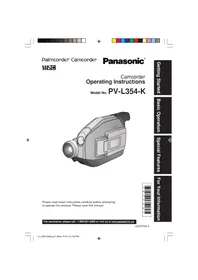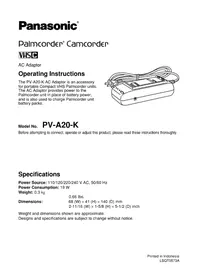
PVA20 - Camcorder PANASONIC - Free user manual and instructions
Find the device manual for free PVA20 PANASONIC in PDF.


| Technical Specifications | Details |
|---|---|
| Camcorder Type | Digital Camcorder |
| Video Resolution | Full HD (1920 x 1080) |
| Sensor | CMOS Sensor |
| Optical Zoom | 20x |
| Image Stabilization | Optical Stabilization |
| Screen | 3-inch LCD Screen |
| Recording Format | AVCHD, MP4 |
| Connectivity | HDMI, USB |
| Power Supply | Rechargeable Lithium-ion Battery |
| Weight | Approximately 300 g |
| Recommended Use | Family recordings, events, travel |
| Maintenance | Regularly clean the lens, check for firmware updates |
| Safety | Avoid exposure to water and extreme temperatures |
| General Information | Ideal for amateur and semi-professional users |
Frequently Asked Questions - PVA20 PANASONIC
User questions about PVA20 PANASONIC
0 question about this device. Answer the ones you know or ask your own.
Ask a new question about this device
Download the instructions for your Camcorder in PDF format for free! Find your manual PVA20 - PANASONIC and take your electronic device back in hand. On this page are published all the documents necessary for the use of your device. PVA20 by PANASONIC.
USER MANUAL PVA20 PANASONIC
Palmcorder Camcorder
VHSC
AC Adaptor
Operating Instructions
The PV-A20-K AC Adaptor is an accessory for portable Compact VHS Palmcorder units. The AC Adaptor provides power to the Palmcorder unit in place of battery power, and is also used to charge Palmcorder unit battery packs.
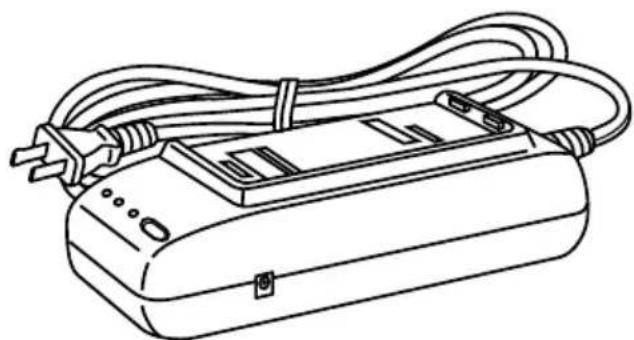
Model No. PV-A20-K
Before attempting to connect, operate or adjust this product, please read these instructions thoroughly.
Specifications
Power Source: 110/120/220/240 V AC, 50/60 Hz
Power Consumption: 19 W
Weight: 0.3kg
0.66 lbs.
Dimensions:
Weight and dimensions shown are approximate.
Designs and specifications are subject to change without notice.
Things You Should Know
Thank you for choosing Panasonic!
You have purchased one of the most sophisticated and reliable products on the market today. Used properly, we're sure it will bring you and your family years of enjoyment. Please take time to fill in the information to the right. The serial number of this product may be found on the surface of the unit. Be sure to retain this manual as your convenient AC Adaptor information source.
Date of Purchase
Dealer Purchased From
Dealer Address
Dealer Phone No.
Model No.
PV-A20-K
Serial No.
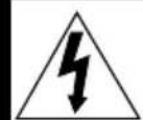
CAUTION
RISK OF ELECTRIC SHOCK DO NOT OPEN

CAUTION: TO REDUCE THE RISK OF ELECTRIC SHOCK, DO NOT REMOVE COVER (OR BACK) NO USER-SERVICEABLE PARTS INSIDE
REFER SERVICING TO QUALIFIED SERVICE PERSONNEL

This symbol warns the user that uninsulated voltage within the unit may have sufficient magnitude to cause electric shock. Therefore, it is dangerous to make any kind of contact with any inside part of this unit.

This symbol alerts the user that important literature concerning the operation and maintenance of this unit has been included. Therefore, it should be read carefully in order to avoid any problems.
The above markings are located on the appliance's bottom cover.
WARNING : TO PREVENT FIRE OR SHOCK HAZARD, DO NOT EXPOSE THIS EQUIPMENT TO RAIN OR MOISTURE.
WARNING : DANGER OF EXPLOSION IF BATTERY IS INCORRECTLY REPLACED. REPLACE ONLY WITH THE SAME OR EQUIVALENT TYPE.
CAUTION : TO PREVENT ELECTRIC SHOCK, MATCH WIDE BLADE OF PLUG TO WIDE SLOT, FULLY INSERT.
CAUTION : TO PREVENT FIRE OR SHOCK HAZARD AND ANNOYING INTERFERENCE, USE THE RECOMMENDED ACCESSORIES ONLY.
This unit is exclusively for use with the Panasonic Compact VHS Palmcorder models currently produced.
It cannot be used with other types of portable recorders.
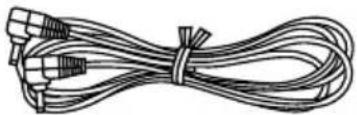
This accessory is provided in order to set up or use your AC Adaptor.
1 pc. DC Power Cable (LSJA0371)
Index of Controls
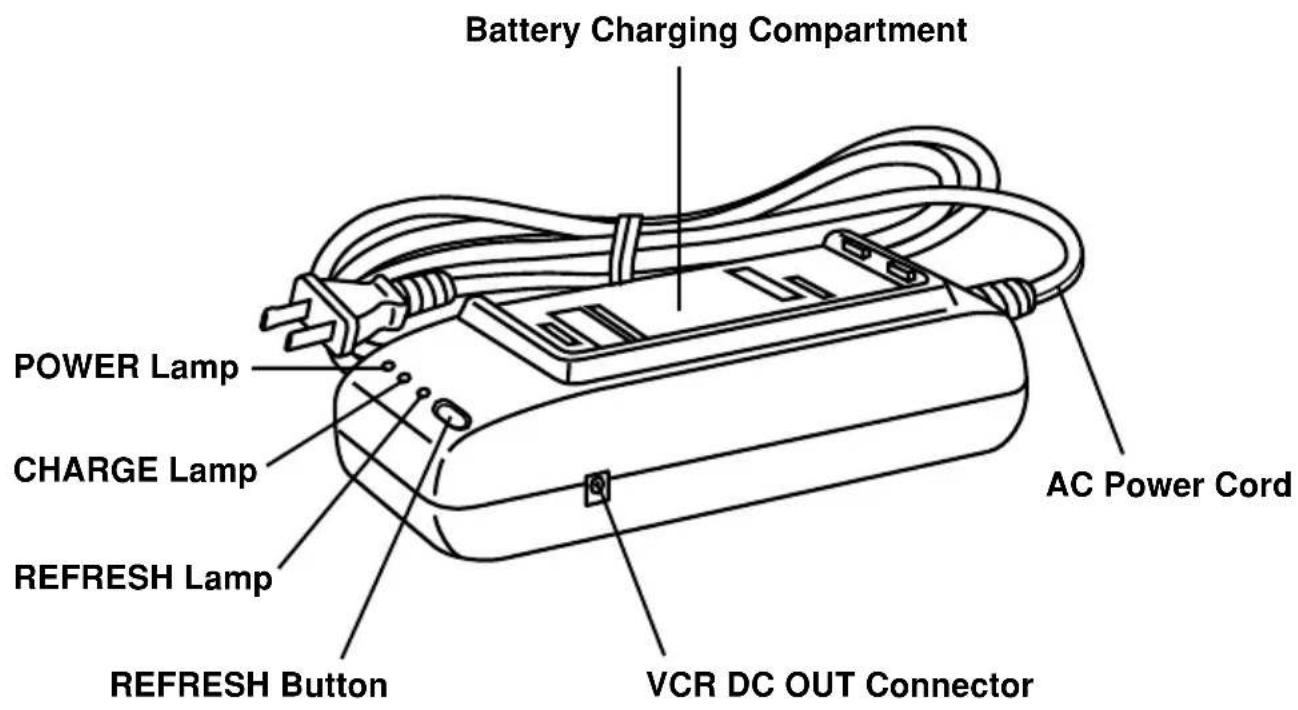
CAUTION:
This unit will operate on 110/120/220/240 V AC 50 / 60Hz . An AC plug adaptor may be required for voltages other than 120VAC . Please contact either a local or foreign electrical parts distributor for assistance in selecting an alternate AC plug. We recommend using the accessory power plug adaptor (VJSS0070) in an area which has special AC outlets.
Supplying Power
Charge the Battery Pack
Charge the Battery Pack fully before operation.
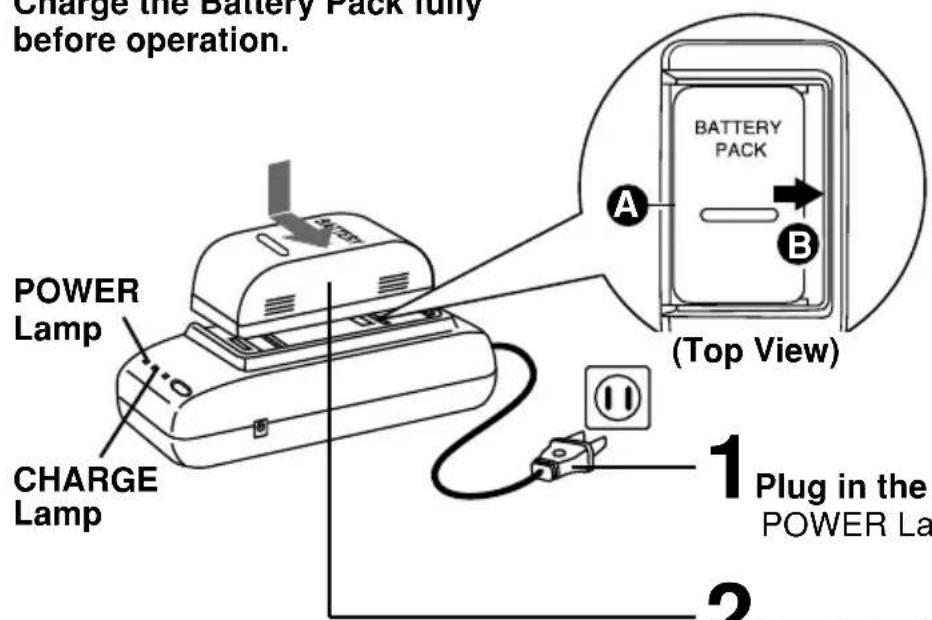
1 Plug in the AC Adaptor. POWER Lamp lights up.
2Insert the Battery.
Align left side of Battery with left edge of AC Adaptor.
Press Battery down and slide in direction of arrow.
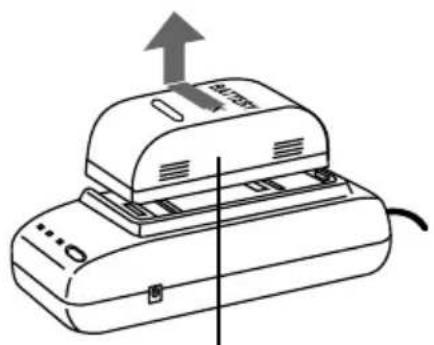
The CHARGE Lamp flashes, then stays lit when charging is complete.
APPROXIMATE CHARGING TIME: PV-BP18-K One and one half hours PV-BP15-K One hour HHR-V20 One and one half hours HHR-V40 Three and one half hours HHR-V60 Five hours
3 Remove the Battery.
Slide the Battery to the left and lift off.
- The useful operation time of the Battery will gradually decrease after repeated use and recharging. The Battery is no longer serviceable if the operation time is very short, even after a sufficient charge.
Note:
- While the DC Power Cable (supplied) is connected to the AC Adaptor, the Battery cannot be charged.
After charging the Battery Pack 5 times, use the BATTERY REFRESH feature as explained on page 5.
Supplying Power
Battery Refresh Feature
This feature completely discharges Battery before recharging begins.
To maintain your battery's operating capacity, use the refresh feature after every five charges.
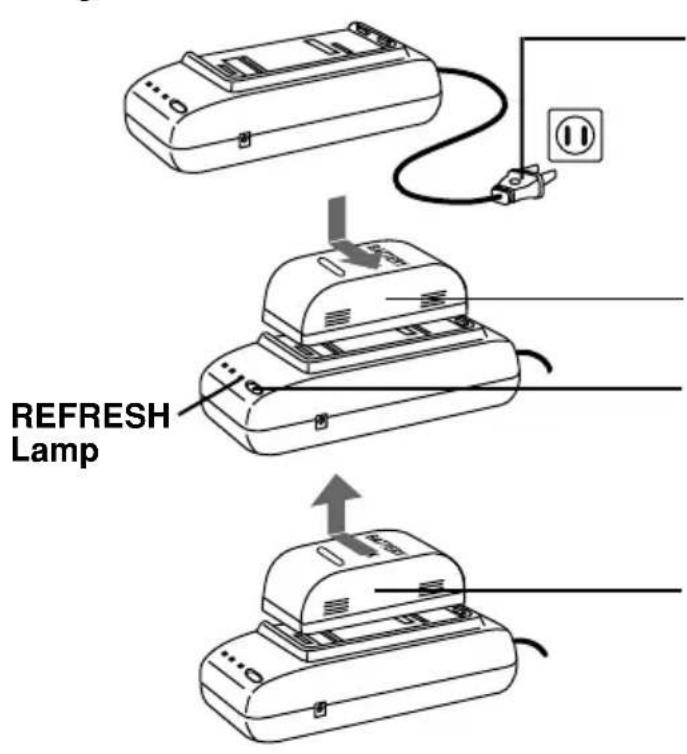
1 Plug in the AC Adaptor. POWER Lamp lights up.
Note:
- Please do not unplug the AC cord during refresh so as not to terminate the refresh function.
2 Place the Battery into the AC Adaptor.
3 Press the REFRESH button.
The REFRESH Lamp lights, then goes out when discharging is complete. Battery charging will then start automatically.
4 Remove the Battery.
- Should you accidentally press the REFRESH button, remove Battery and then re-insert it to begin charging.
APPROXIMATE REFRESH AND RECHARGE TIME:
PV-BP18-K Seven and one half hours PV-BP15-K Five hours
HHR-V20 Eight hours
HHR-V40 Sixteen hours
HHR-V60 Twenty-four hours
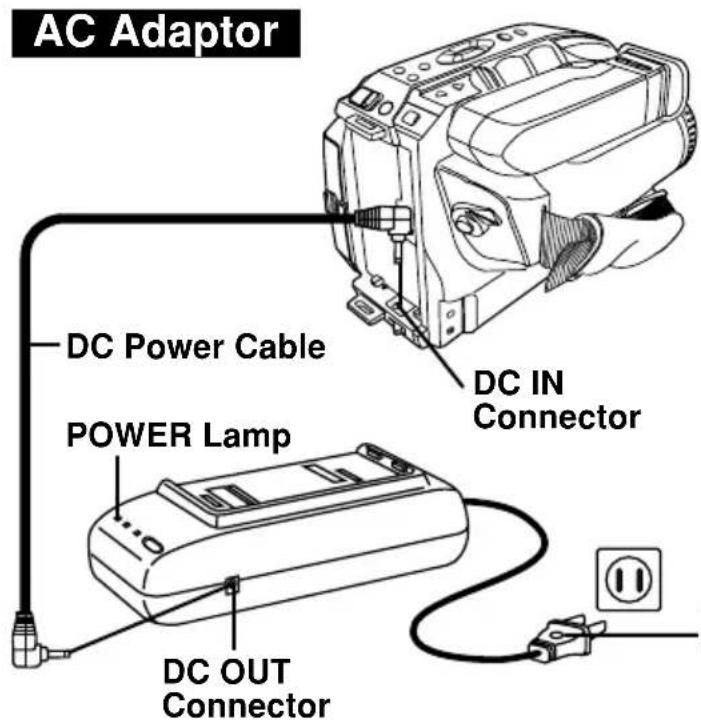
1 Connect the DC OUT on the AC Adaptor to the DC IN on the Palmcorder with the DC Power Cable (supplied).
2 Plug in the AC Adaptor.
The POWER Lamp will light up.
Note:
- While the DC Power Cable (supplied) is connected to the AC Adaptor, the Battery cannot be charged.
- While not in use, unplug the AC Adaptor from the AC outlet. (AC Adaptor consumes 1.2 W of electric power if it is plugged into an AC outlet even when not in use.)
Limited Warranty
Panasonic Canada Inc.
5770 Ambler Drive, Mississauga, Ontario L4W 2T3
PANASONIC PRODUCT - LIMITED WARRANTY
Panasonic Canada Inc. warrants this product to be free from defects in material and workmanship and agrees to remedy any such defect for a period as stated below from the date of original purchase.
Camcorder Product - One (1) year, parts and labour
LIMITATIONS AND EXCLUSIONS
This warranty does not apply to products purchased outside Canada or to any product which has been improperly installed, subjected to usage for which the product was not designed, misused or abused, damaged during shipping, or which has been altered or repaired in any way that affects the reliability or detracts from the performance, nor does it cover any product which is used commercially. Dry cell batteries are also excluded from coverage under this warranty.
This warranty is extended to the original end user purchaser only. A purchase receipt or other proof of date of original purchase is required before warranty service is performed.
THIS EXPRESS, LIMITED WARRANTY IS IN LIEU OF ALL OTHER WARRANTYES, EXPRESS OR IMPLIED, EXCLUDING ANY IMPLIED WARRANTYES OF MERCHANTABILITY OR FITNESS FOR A PARTICULAR PURPOSE.
IN NO EVENT WILL PANASONIC CANADA INC. BE LIABLE FOR ANY SPECIAL, INDIRECT OR CONSEQUENTIAL DAMAGES.
In certain instances, some jurisdictions do not allow the exclusion or limitation of incidental or consequential damages, or the exclusion of implied warranties, so the above limitations and exclusions may not be applicable.
WARRANTY SERVICE
For product operation and information assistance, please contact your Dealer or our Customer Care Centre at: Telephone #: (905) 624-5505 Fax #: (905) 238-2360 Web: www.panasonic.ca
For product repairs, please contact one of the following:
- Your Dealer who will inform you of an authorized Servicentre nearest you.
- Our Customer Care Centre at (905) 624-5505 or www.panasonic.ca
- A Panasonic Factory Servicentre listed below:
Richmond, British Columbia
Panasonic Canada Inc.
12111 Riverside Way
Richmond, BC V6W 1K8
Tel: (604) 278-4211
Fax: (604) 278-5627
Calgary, Alberta
Panasonic Canada Inc.
6835-8th St. N.E.
Calgary, AB T2E 7H7
Tel: (403) 295-3955
Fax: (403) 274-5493
Mississauga, Ontario
Panasonic Canada Inc.
5770 Ambler Dr.
Mississauga, ON L4W 2T3
Tel: (905) 624-8447
Fax: (905) 238-2418
Lachine. Quebec
Panasonic Canada Inc.
IF YOU SHIP THE PRODUCT TO A SERVICENTRE
Carefully pack and send prepaid, adequately insured and preferably in the original carton. Include details of the defect claimed, and proof of date of original purchase.
Important Safeguards
- Read Instructions - All the safety and operating instructions should be read before the unit is operated.
- Retain Instructions - The safety and operating instructions should be retained for future reference.
- HeedWarnings - All warnings on the unit and in the operating instructions should be adhered to.
- Follow Instructions - All operating and maintenance instructions should be followed.
- Cleaning - Unplug this video unit from the wall outlet before cleaning. Do not use liquid or aerosol cleaners. Use a dry cloth for cleaning.
- Attachments - Do not use attachments not recommended by the video product manufacturer as they may be hazardous.
- Water and Moisture - Do not use this video unit near water - for example near a bath tub, wash bowl, kitchen sink, or laundry tub, in a wet basement, or near a swimming pool, and the like.
- Accessories - Do not place this video unit on an unstable cart, stand, tripod, bracket, or table. The video unit may fall, causing serious injury to a child or adult, and serious damage to the unit. Use only with a cart, stand, tripod, bracket, or table recommended by the manufacturer, or sold with the video unit. Any mounting of the unit should follow the manufacturer's instructions and should use a mounting accessory recommended by the manufacturer. An appliance and cart
combination should be moved with care. Quick stops, excessive force, and uneven surfaces may cause the appliance and cart combination to overturn.

-
Ventilation - Slots and openings in the cabinet are provided for ventilation and to ensure reliable operation of the video unit and to protect it from overheating. These openings must not be blocked or covered. Never place the video unit on a bed, sofa, rug, or other similar surface, or near or over a radiator or heat register. This video unit should not be placed in a built-in installation such as a bookcase or rack unless proper ventilation is provided or the manufacturer's instructions have been adhered to.
-
Power Sources - This video unit should be operated only from the type of power source indicated on the marking label. If you are not sure of the type of power supply to your home, consult your appliance dealer or local power company. For video units intended to be operated from battery power, or other sources, refer to the operating instructions.
-
Grounding or Polarization - This video unit may be equipped with either a polarized 2-wire AC (Alternating Current) line plug (a plug having one blade wider than the other) or 3-wire grounding type plug, a plug having a third (grounding) pin.
The 2-wire polarized plug will fit into the power outlet only one way. This is a safety feature. If you are unable to insert the plug fully into the outlet, try reversing the plug. If the plug still fails to fit, contact your electrician to replace your obsolete outlet.
Do not defeat the safety purpose of the polarized plug.
The 3-wire grounding type plug will fit into a grounding type power outlet. This is a safety feature. If you are unable to insert the plug into the outlet, contact your electrician to replace your obsolete outlet. Do not defeat the safety purpose of the grounding type plug.
- Power-Cord Protection - Power-supply cords should be routed so that they are not likely to be walked on or pinched by items placed upon or against them. Paying particular attention to cords of plugs, convenience receptacles, and the point where they exit from the unit.
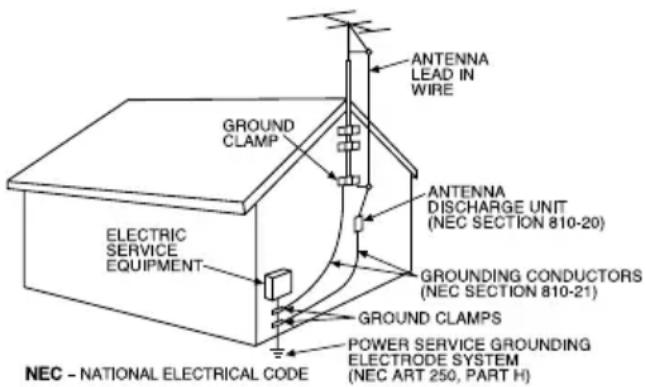
- Outdoor Antenna Grounding - If an outside antenna or cable system is connected to the video unit, be sure the antenna or cable system is grounded so as to provide some protection against voltage surges and built-up static charges. Part 1 of the Canadian Electrical Code, in USA Section 810 of the National Electrical Code, provides information with respect to proper grounding of the mast and supporting structure, grounding of the lead-in wire to an antenna discharge unit, size of grounding conductors, location of antenna discharge unit, connection to grounding electrodes, and requirements for the grounding electrode.
- Lightning - For added protection of this video unit receiver during a lightning storm, or when it is left unattended and unused for long periods of time, unplug it from the wall outlet and disconnect the antenna or cable system. This will prevent damage to the video unit due to lightning and power-line surges.
Important Safeguards
- Power Lines - An outside antenna system should not be located in the vicinity of overhead power lines or other electric light or power circuits, or where it can fall into such power lines or circuits. When installing an outside antenna system, extreme care should be taken to keep from touching such power lines or circuits as contact with them might be fatal.
- Overloading - Do not overload wall outlets and extension cords as this can result in a risk of fire or electric shock.
- Objects and Liquids - Never push objects of any kind into this video unit through openings as they may touch dangerous voltage points or short out parts that could result in a fire or electric shock. Never spill liquid of any kind onto the video unit.
- Servicing - Do not attempt to service this video unit yourself as opening or removing covers may expose you to dangerous voltage or other hazards. Refer all servicing to qualified service personnel.
- Damage Requiring Service - Unplug this video unit from the wall outlet and refer servicing to qualified service personnel under the following conditions:
a. When the power-supply cord or plug is damaged.
b. If any liquid has been spilled into, or objects have fallen onto, the video unit.
c. If the video unit has been exposed to rain or water.
d. If the video unit does not operate normally by following the operating instructions. Adjust only those controls that are covered by the operating instructions, as an improper adjustment of other controls may result in damage and will often require extensive work by a qualified technician to restore the video unit to its normal operation.
e. If the video unit has been dropped or the cabinet has been damaged.
f. When the video unit exhibits a distinct change in performance - this indicates a need for service.
- Replacement Parts - When replacement parts are required, be sure the service technician has used replacement parts specified by the manufacturer or have the same characteristics as the original part. Unauthorized substitutions may result in fire, electric shock or other hazards.
- Safety Check - Upon completion of any service or repairs to this video unit, ask the service technician to perform safety checks to determine that the video unit is in safe operating order.
Panasonic
Panasonic Canada Inc.
5770 Ambler Drive,
Mississauga, Ontario L4W 2T3
(905)624-5010
www.panasonic.ca
Montréal: 3075 Louis A. Amos, Lachine, Québec H8T 1C4 (514) 633-8684
Toronto: 5770 Ambler Drive, Mississauga, Ontario L4W 2T3 (905) 238-2181
Calgary: 6835 8th Street N.E., Calgary, Alberta T2E 7H7 (403) 295-3922
Vancouver: 12111 Riverside Way, Richmond, BC V6W 1K8 (604) 278-4211
Panasonic®
Caméscope Palmcorder MD
VHS
Adaptateur secteur
Alimentation: 110/120/220/240 V c.a., 50/60 Hz
Consommation: 19 W
Poids (approx.): 0,3 kg (0,66 lb)
Dimensions (approx.): 68 mm × 41 mm × 140 mm
(LxHxP) (211/16 po × 15/8 po × 51/2 po)
Panasonic Canada Inc.
5770 Ambler Drive, Mississauga, Ontario L4W 2T3
Certificat de garantie limite Panasonic
Panasonic Canada Inc.
12111 Riverside Way
Richmond, BC V6W 1K8
Tél.: (604) 278-4211
Telc.: (604) 278-5627
Calgary, Alberta
Panasonic Canada Inc.
6835-8th St. N.E.
Calgary, AB T2E 7H7
Panasonic Canada Inc.
5770 Ambler Dr.
Mississauga, ON L4W 2T3
Tél.: (905) 624-8447
Téléç.: (905) 238-2418
Lachine, Quebec
Panasonic Canada Inc.
Panasonic Canada Inc.
5770 Ambler Drive,
Mississauga, Ontario L4W 2T3
(905)624-5010
www.panasonic.ca
Montreal: 3075 Louis A. Amos, Lachine, Quebec H8T 1C4 (514) 633-8684
Toronto: 5770 Ambler Drive, Mississauga, Ontario L4W 2T3 (905) 238-2181
Calgary: 6835 8th Street N.E., Calgary, Alberta T2E 7H7 (403) 295-3922
Vancouver: 12111 Riverside Way Richmond, BC V6W 1K8 (604) 278-4211