
Ferrari F1 Wheel AddOn - Controller THRUSTMASTER - Free user manual and instructions
Find the device manual for free Ferrari F1 Wheel AddOn THRUSTMASTER in PDF.



| Product Type | Racing simulator add-on steering wheel |
| Brand | Thrustmaster |
| Model | Ferrari F1 Wheel AddOn |
| Base Compatibility | Thrustmaster TX, T300, T500 (firmware update required) |
| Wheel Diameter | 28 cm (approx. 11 inches) |
| Material | Plastic with rubber coating |
| Gear shift paddles | Sequential, fixed |
| Number of buttons | 15 buttons (including D-pad) |
| Attachment system | Thrustmaster Quick Release (manual tightening ring + locking screw) |
| Firmware update | Required for proper operation of controls |
| Power | Powered by base via connector |
| Weight | Approximately 1.2 kg |
| Dimensions (diameter x depth) | 28 cm x 10 cm |
| Package contents | Ferrari F1 AddOn wheel, manual |
| Warranty | 2 years in the European Union (according to local legislation) |
| Maintenance | Clean with a soft, dry cloth |
| Spare parts | Not provided, repair by technical support only |
| General information | Made in China, official Ferrari logo |
Frequently Asked Questions - Ferrari F1 Wheel AddOn THRUSTMASTER
User questions about Ferrari F1 Wheel AddOn THRUSTMASTER
0 question about this device. Answer the ones you know or ask your own.
Ask a new question about this device
Download the instructions for your Controller in PDF format for free! Find your manual Ferrari F1 Wheel AddOn - THRUSTMASTER and take your electronic device back in hand. On this page are published all the documents necessary for the use of your device. Ferrari F1 Wheel AddOn by THRUSTMASTER.
USER MANUAL Ferrari F1 Wheel AddOn THRUSTMASTER
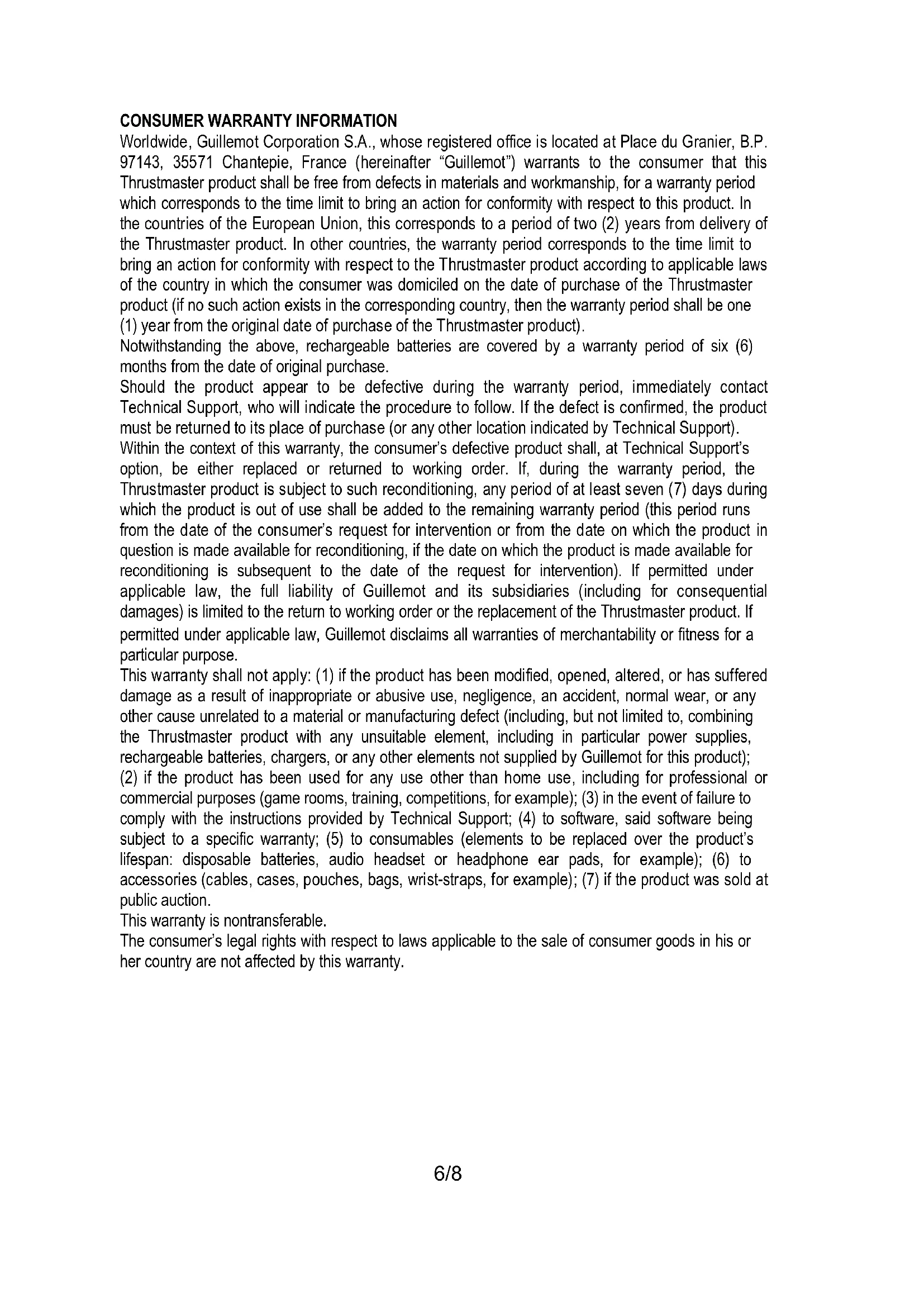
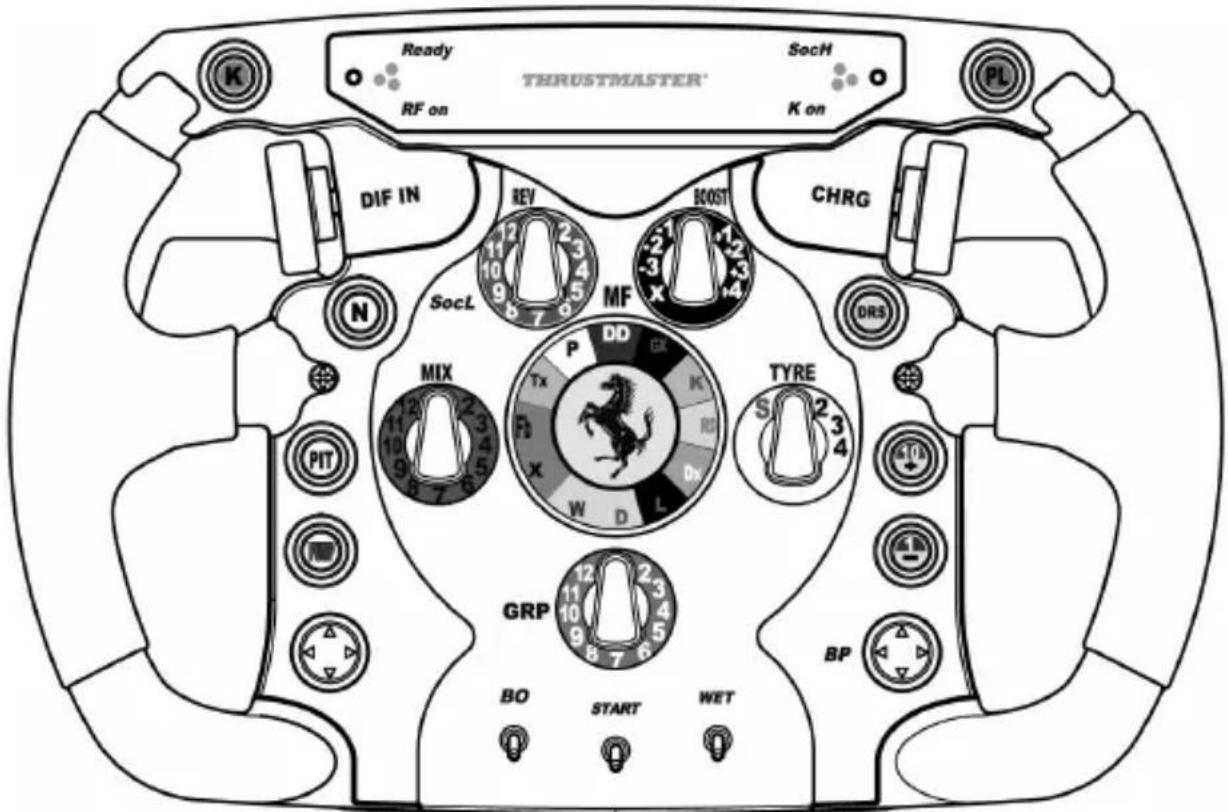
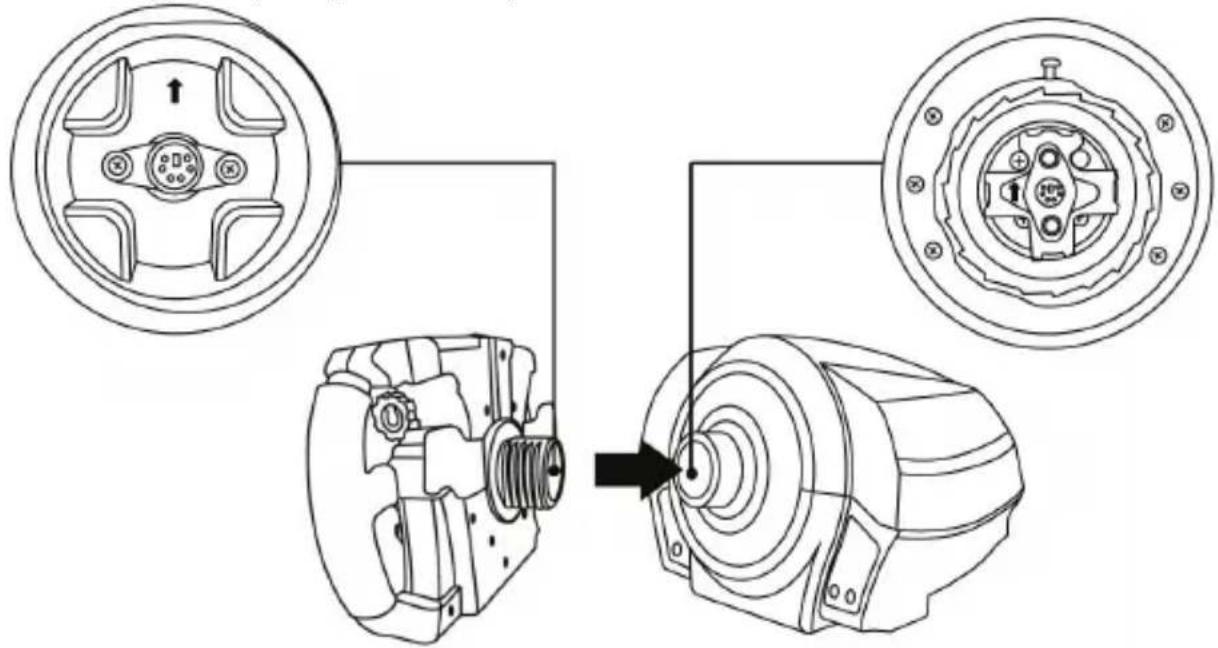
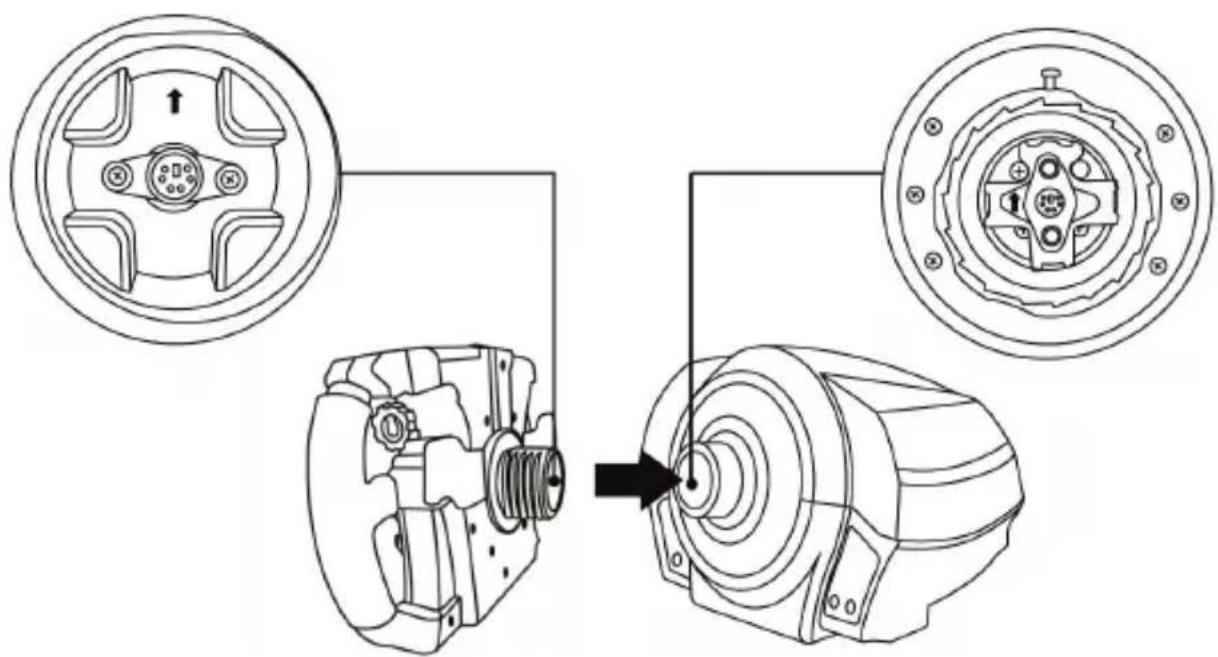
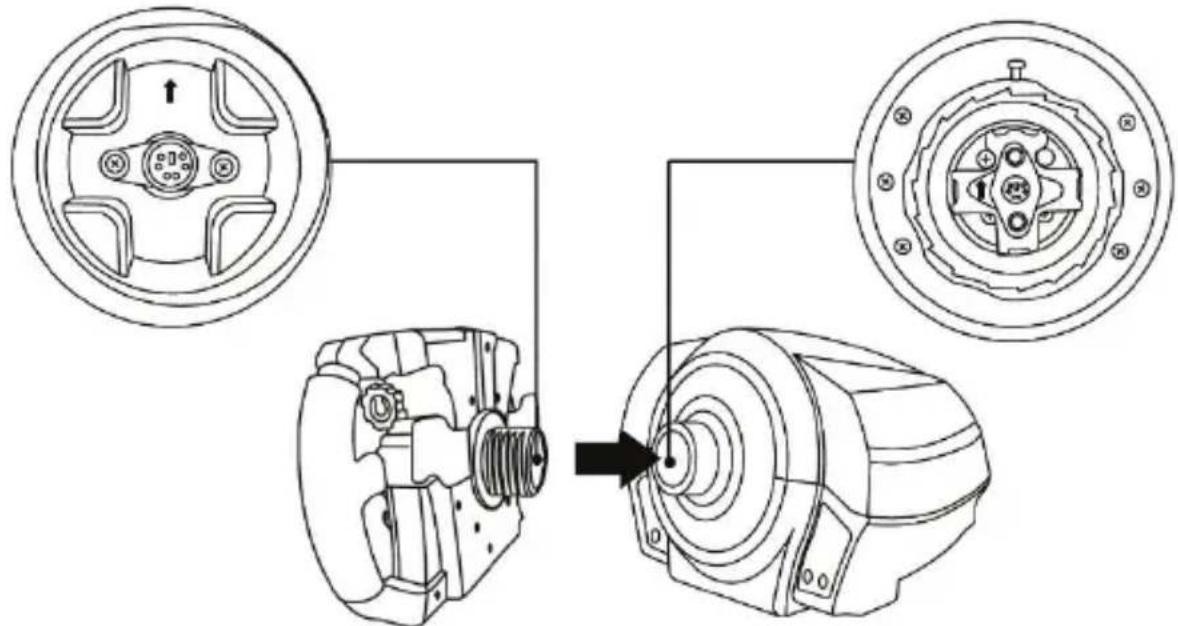
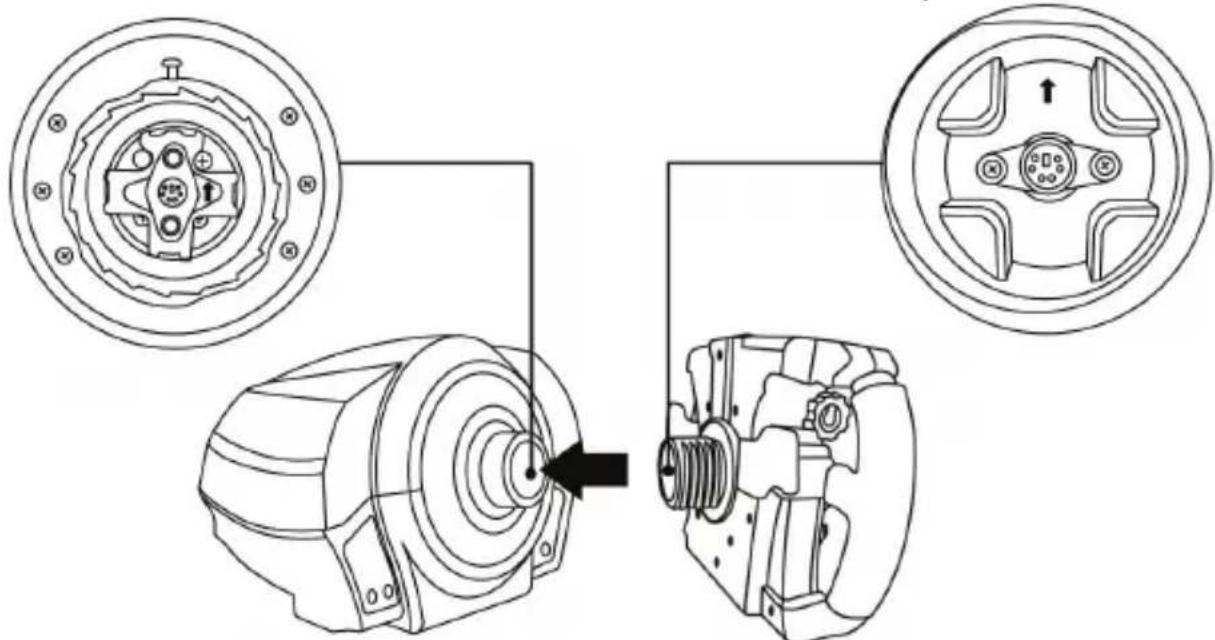
Align the connector positions using the arrows:
Base connector: Arrow pointing upwards
Racing wheel connector: Arrow pointing upwards
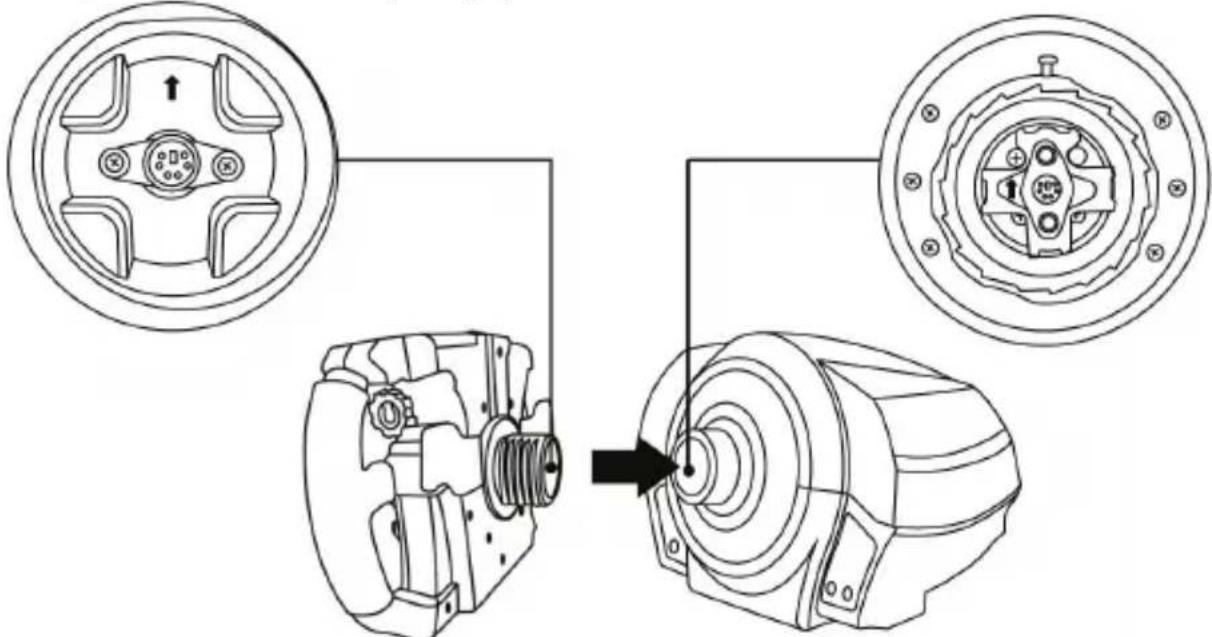
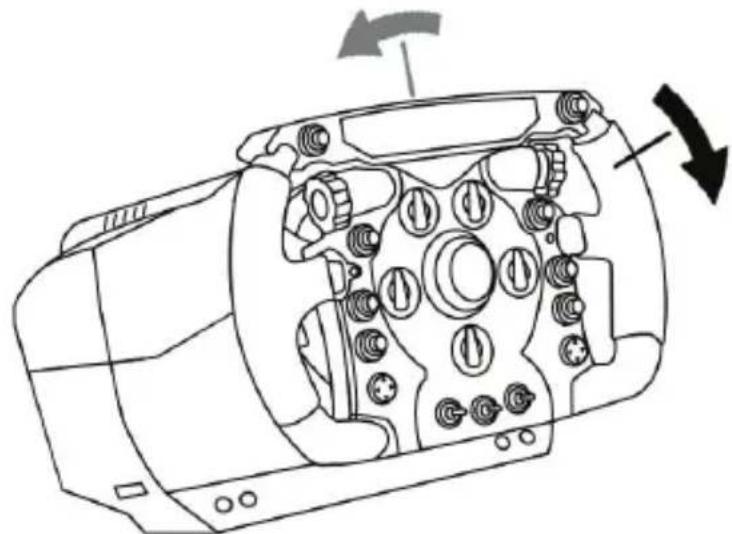
Once the connectors are correctly positioned, simply rotate the Thrustmaster Quick Release device's ring counterclockwise, while holding the racing wheel in position.
Then, tighten the ring as much as you can: to do so, hold the ring in position and rotate the racing wheel clockwise.
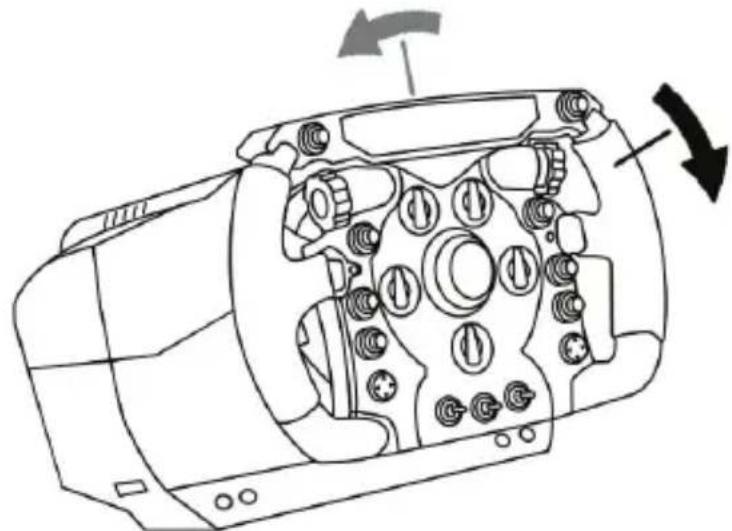
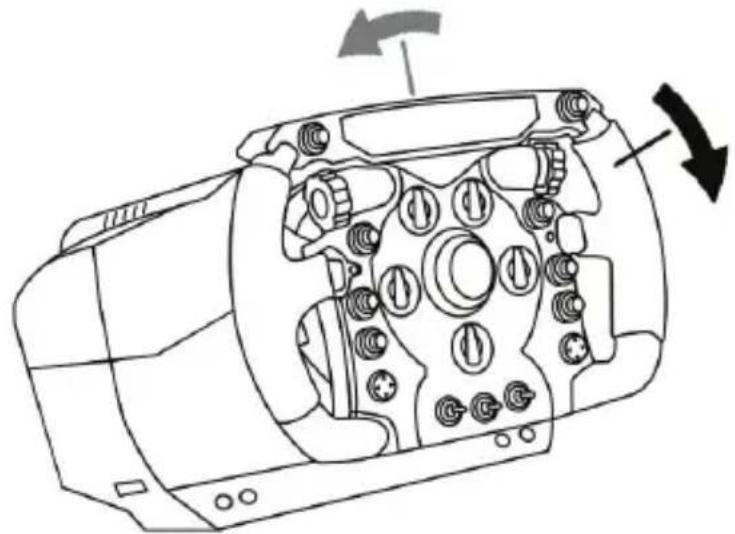
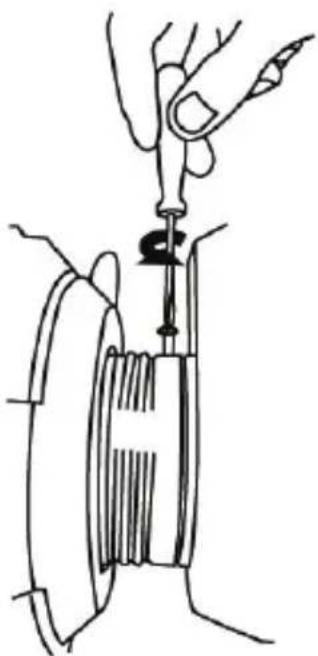
Once you have installed the wheel, rotate it 180^ (when facing the wheel, the Ferrari® logo should be upside down) to access the small attachment screw located on the ring of the Thrustmaster Quick Release device. Use a large Phillips screwdriver to tighten the small attachment screw (do not use excessive force), turning it clockwise.
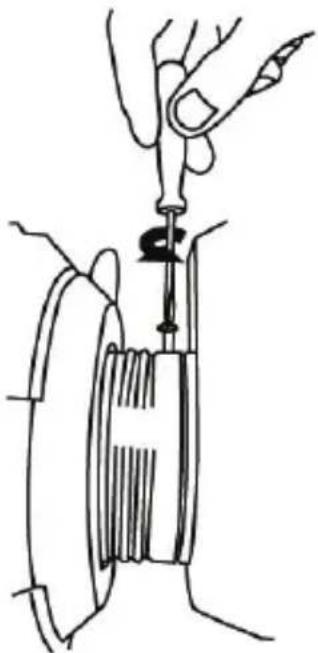

Do not use excessive force when tightening the small attachment screw (using a Phillips screwdriver)!
Stop turning the screw as soon as you feel some resistance.

IMPORTANT INFORMATION!

To ensure that your Ferrari F1 Wheel Add-On wheel functions correctly with your racing wheel's base (in particular with the TX, T300 and T500 bases), it is imperative that you update your base's firmware with the latest version available at https://support.thrustmaster.com (click on Racing Wheels / [your base's name] / Firmware, then follow the instructions and the download and installation procedure).
If you don't update the firmware, the D-pad, the buttons and the paddle shifters of your wheel will not function correctly.
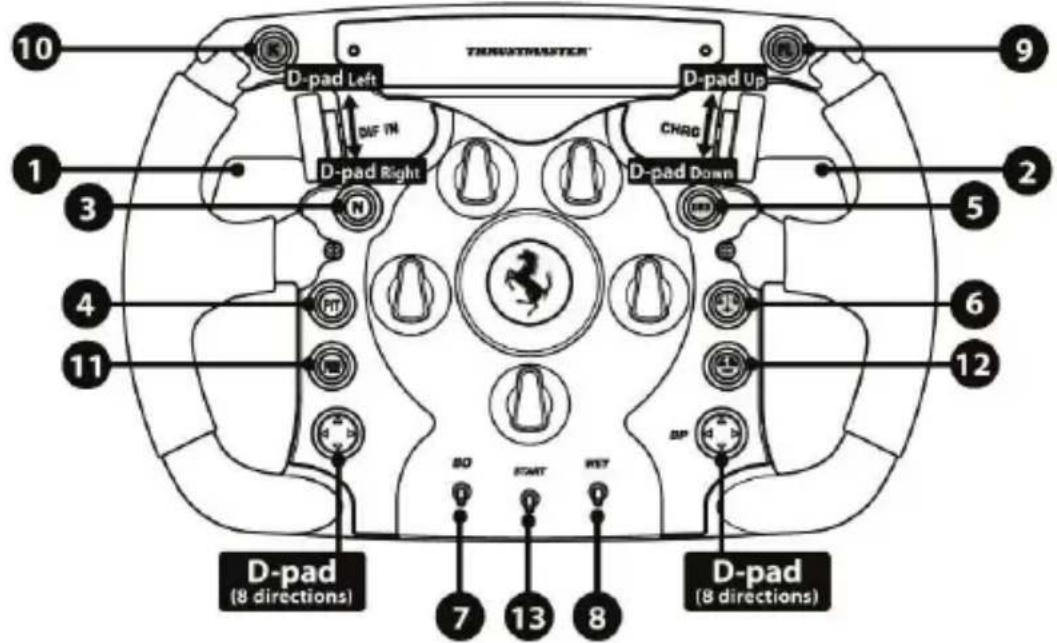
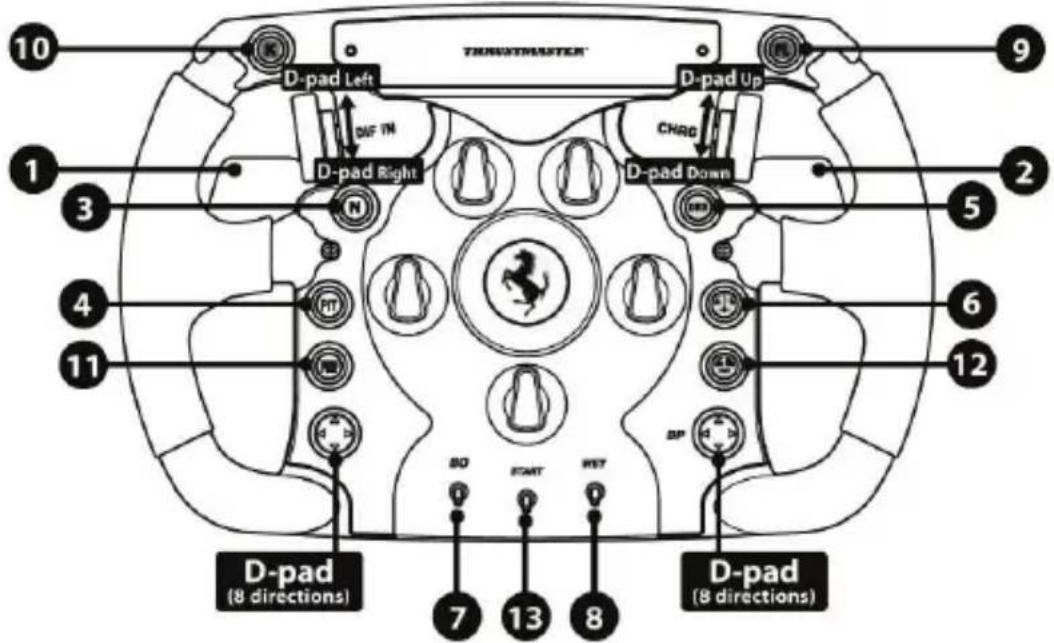
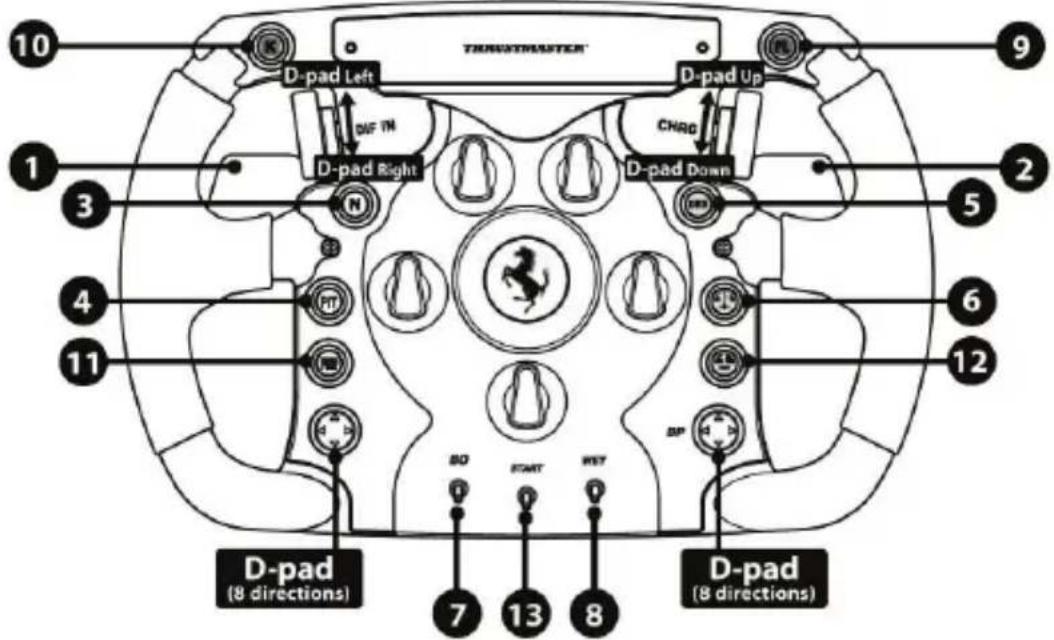
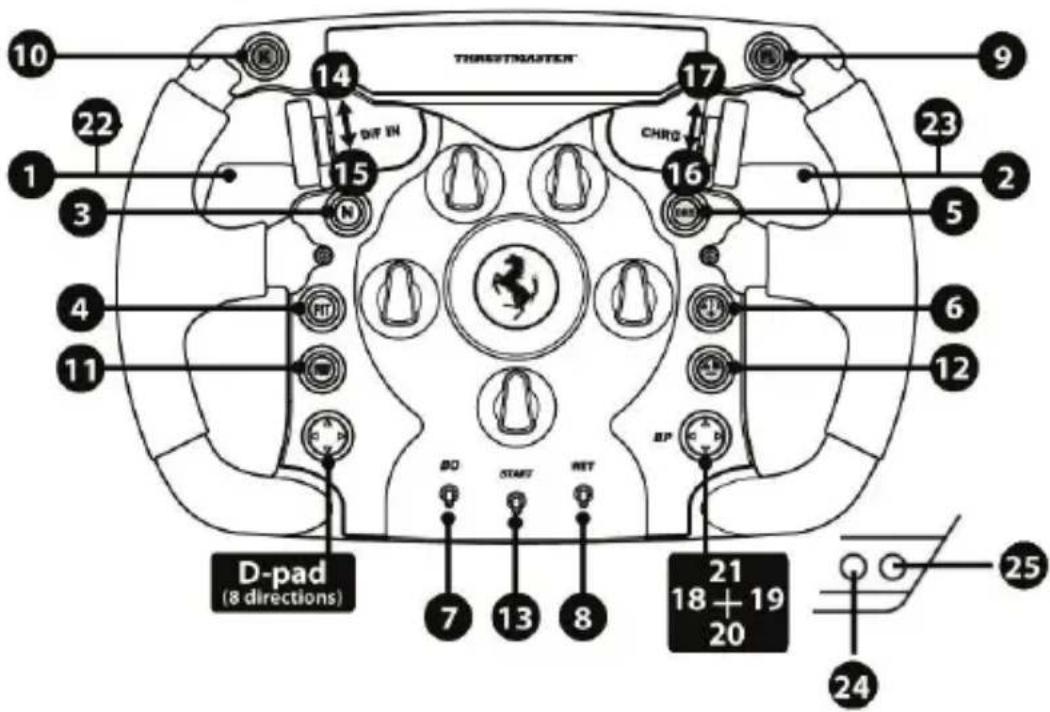
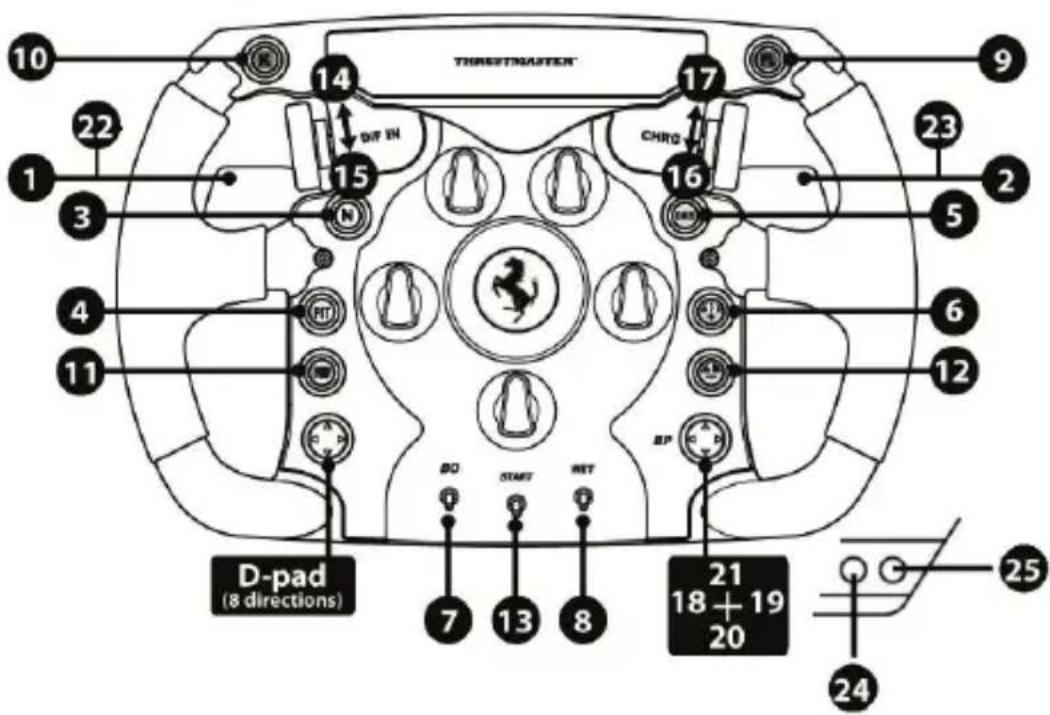
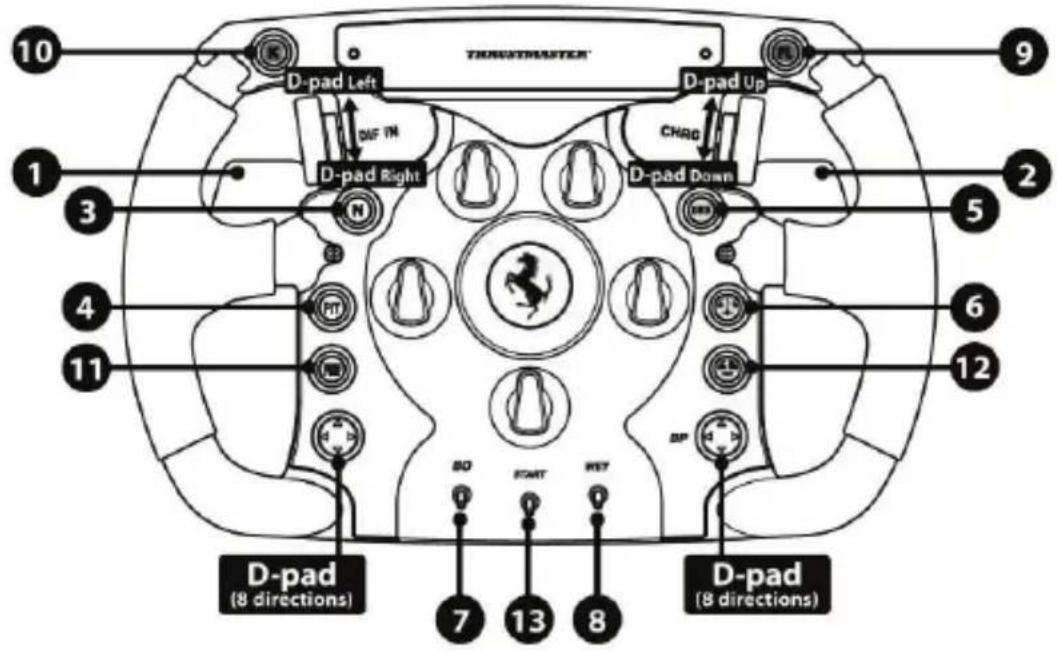
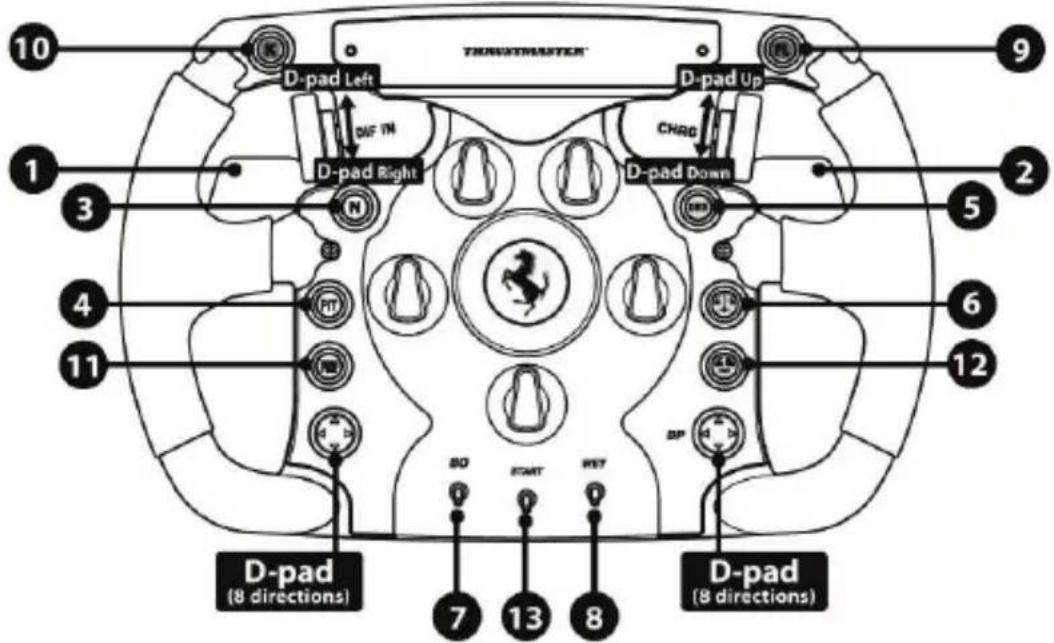
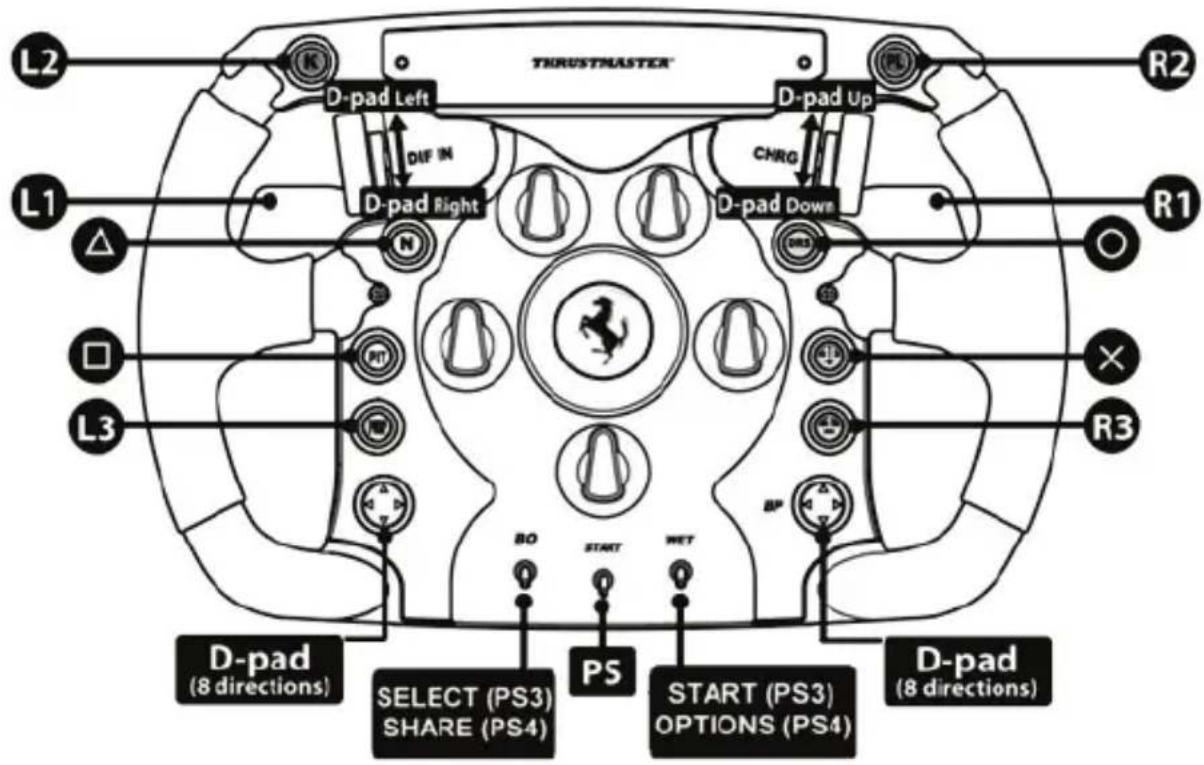
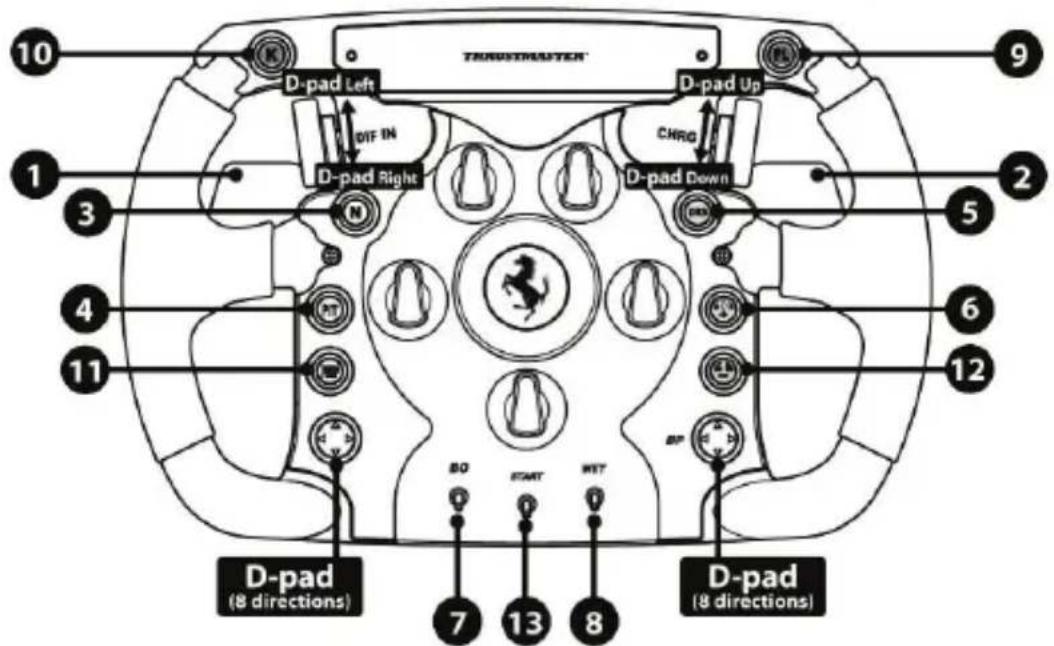
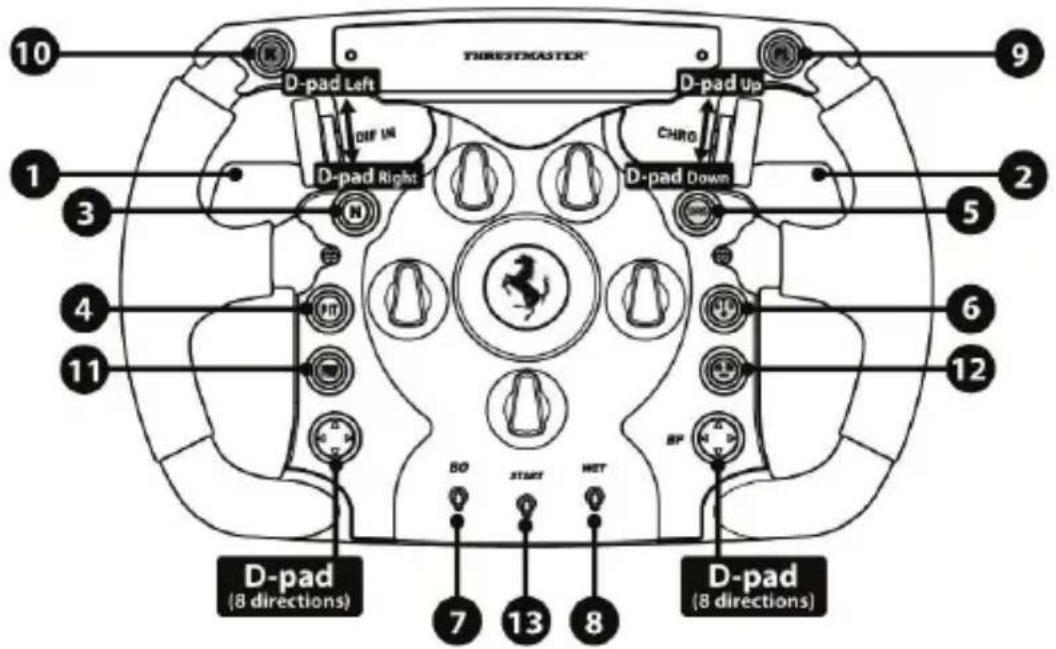
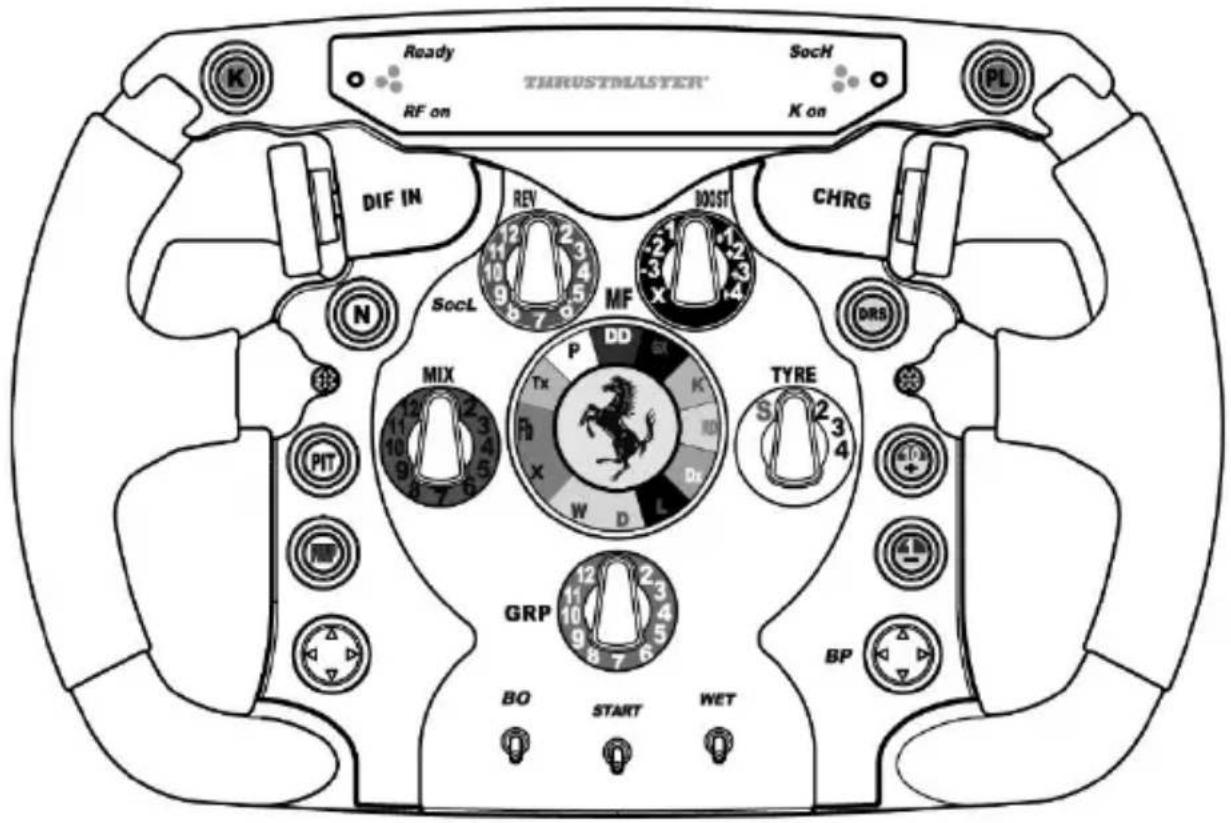
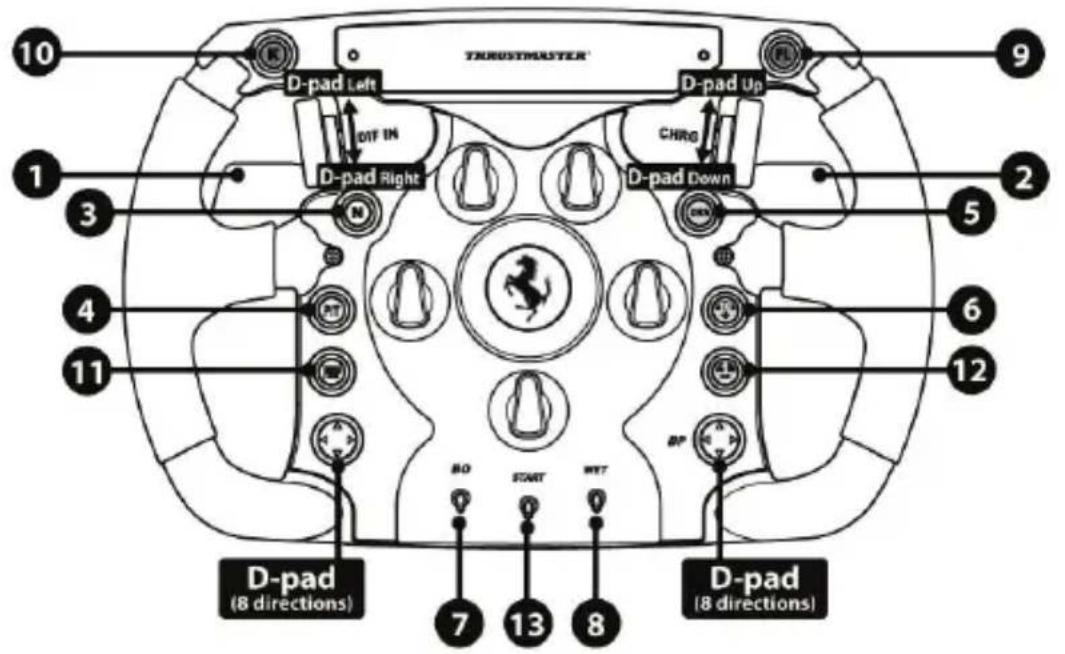
PC "NORMAL MODE" MAPPING
(17 programmable functions)
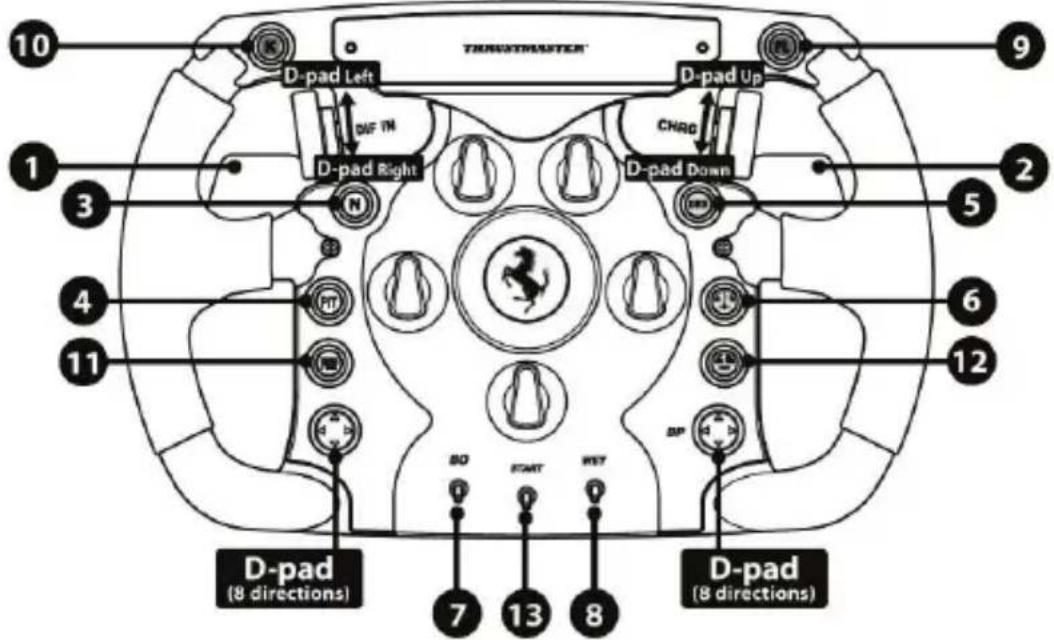
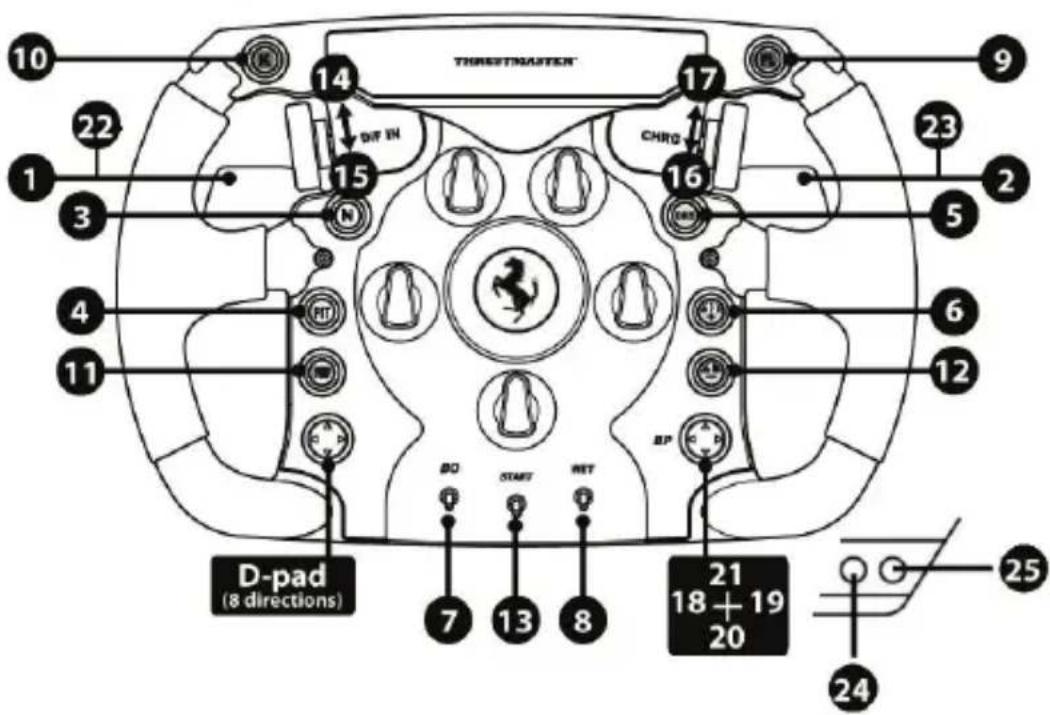
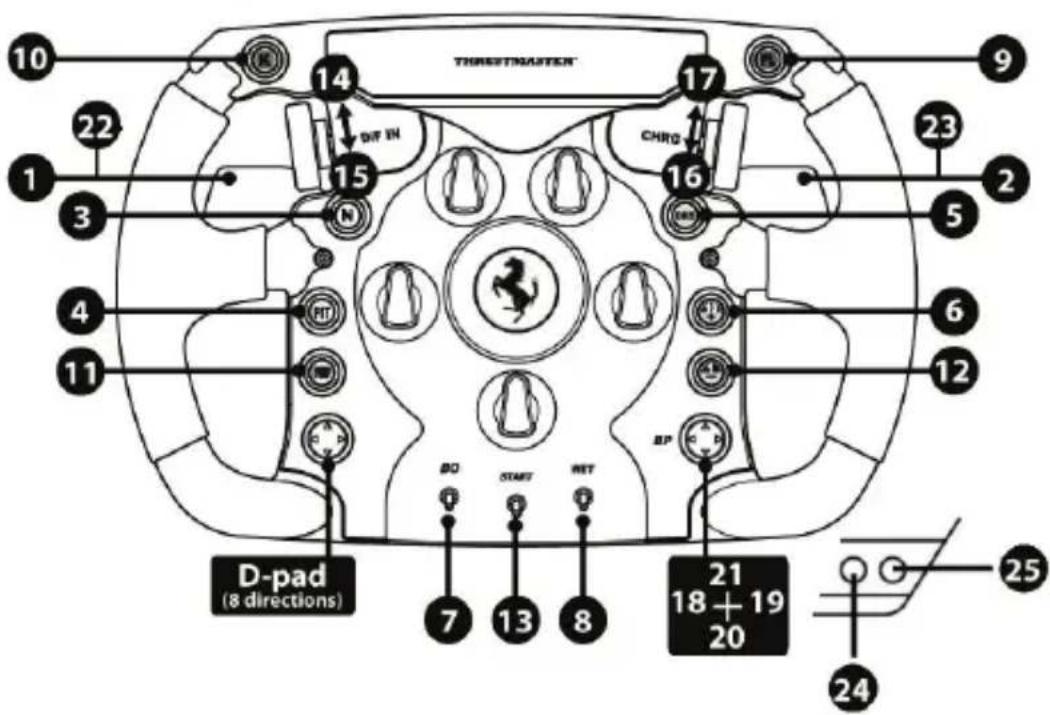
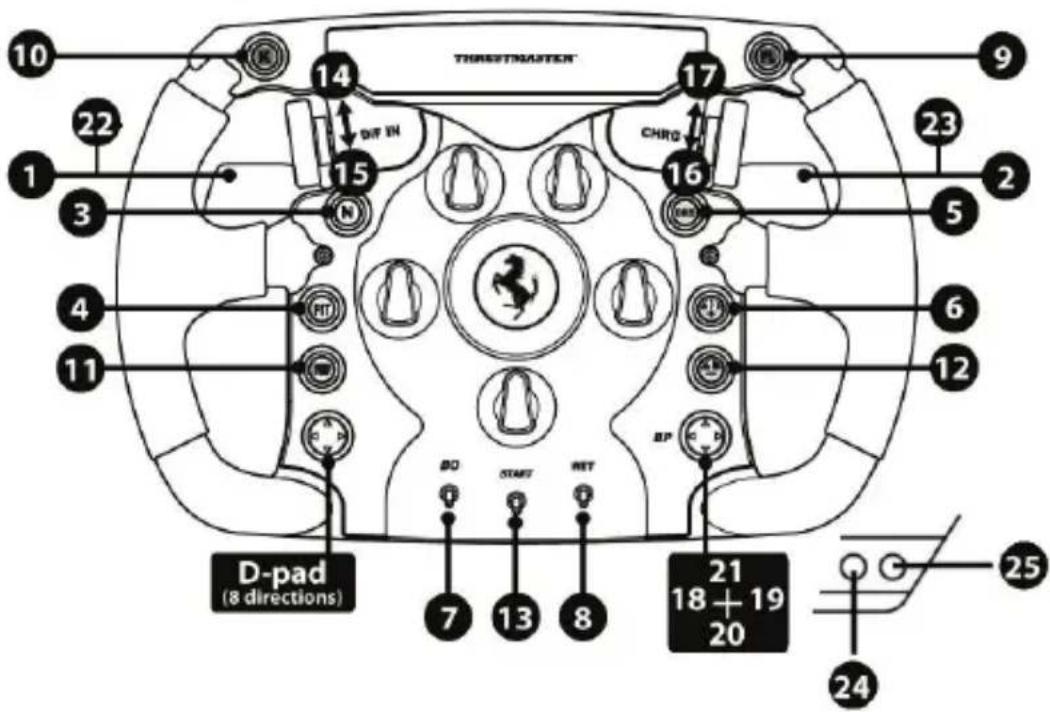
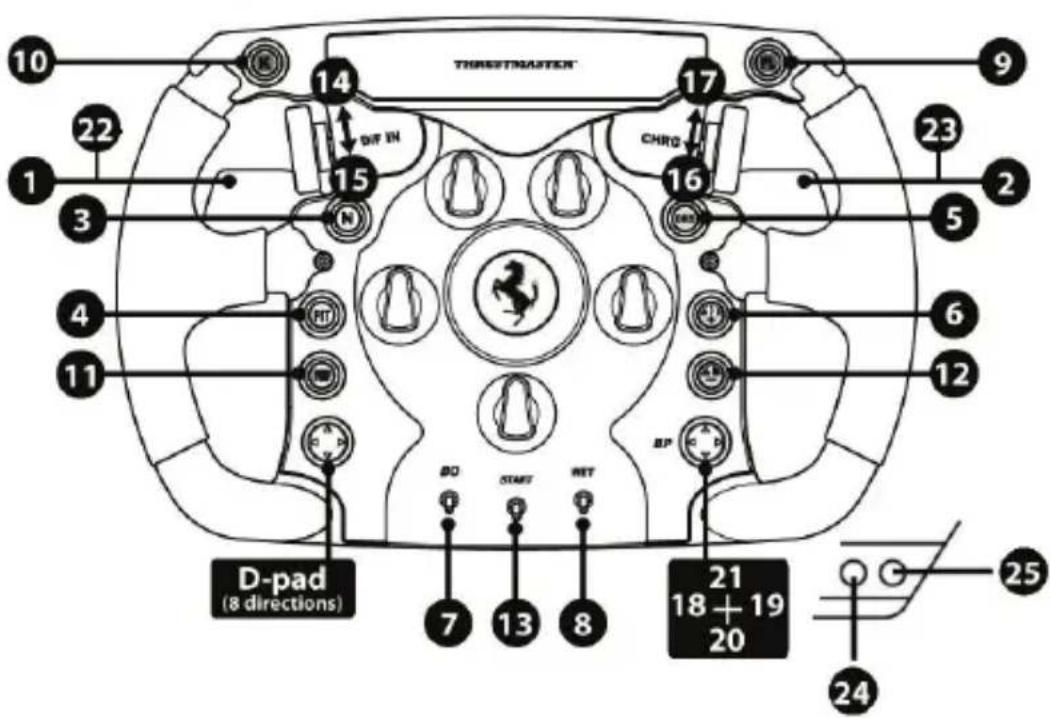
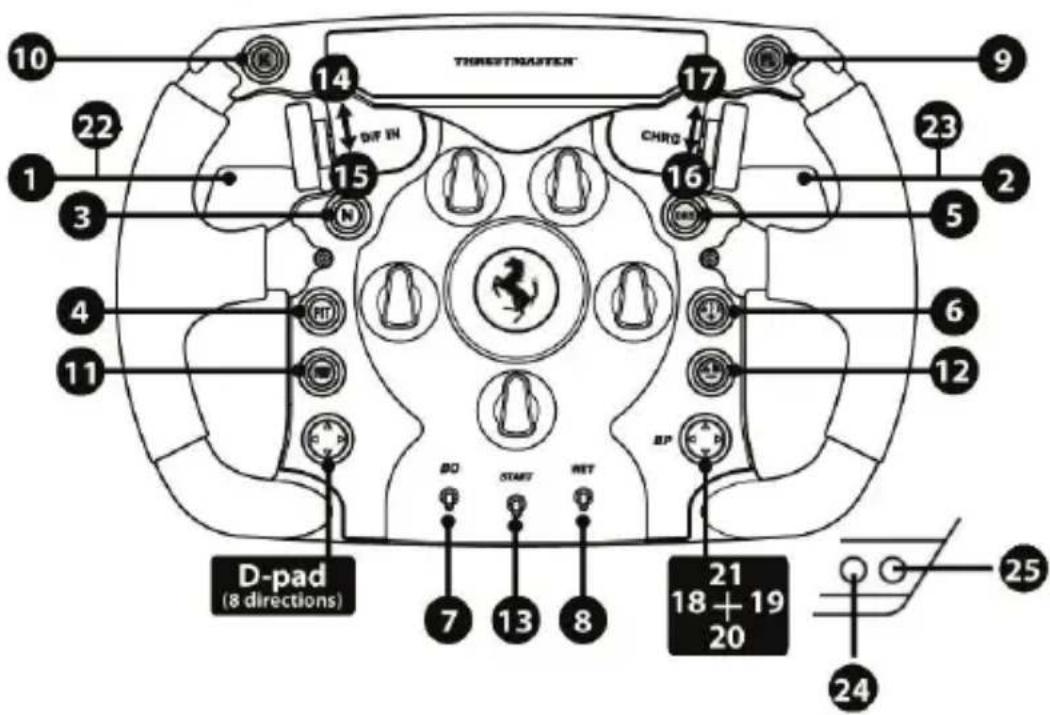
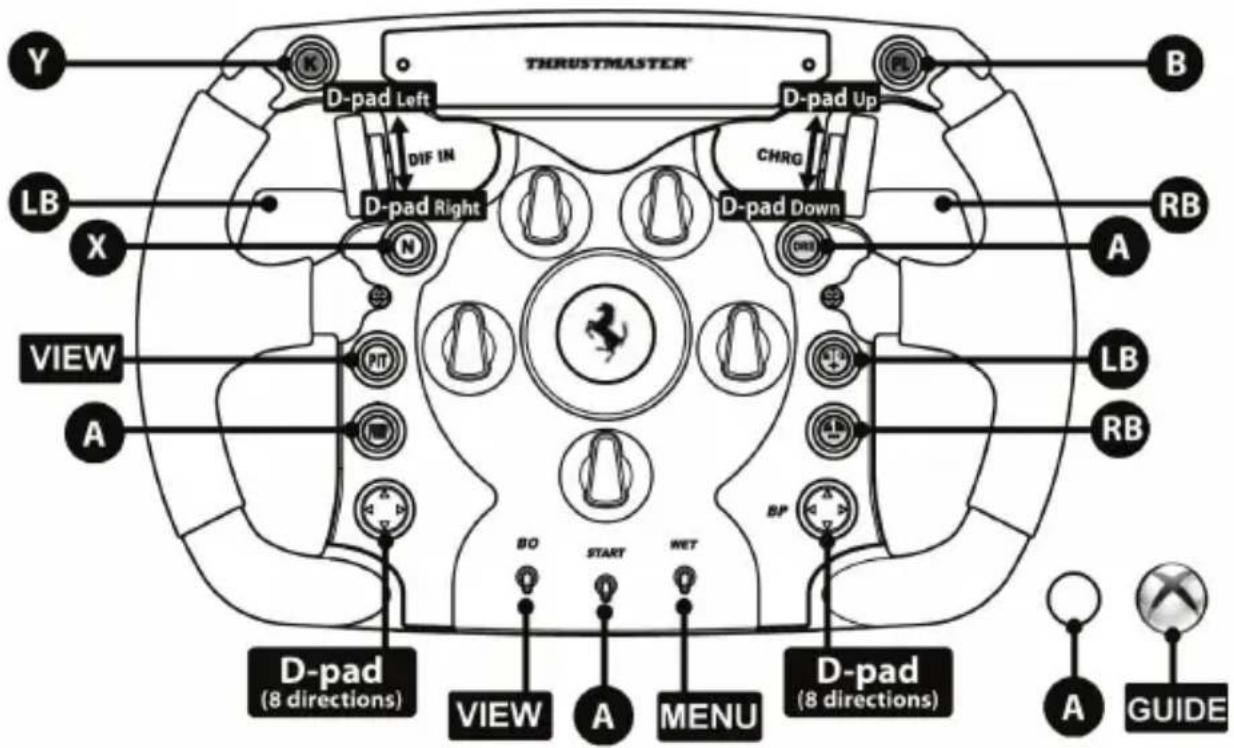
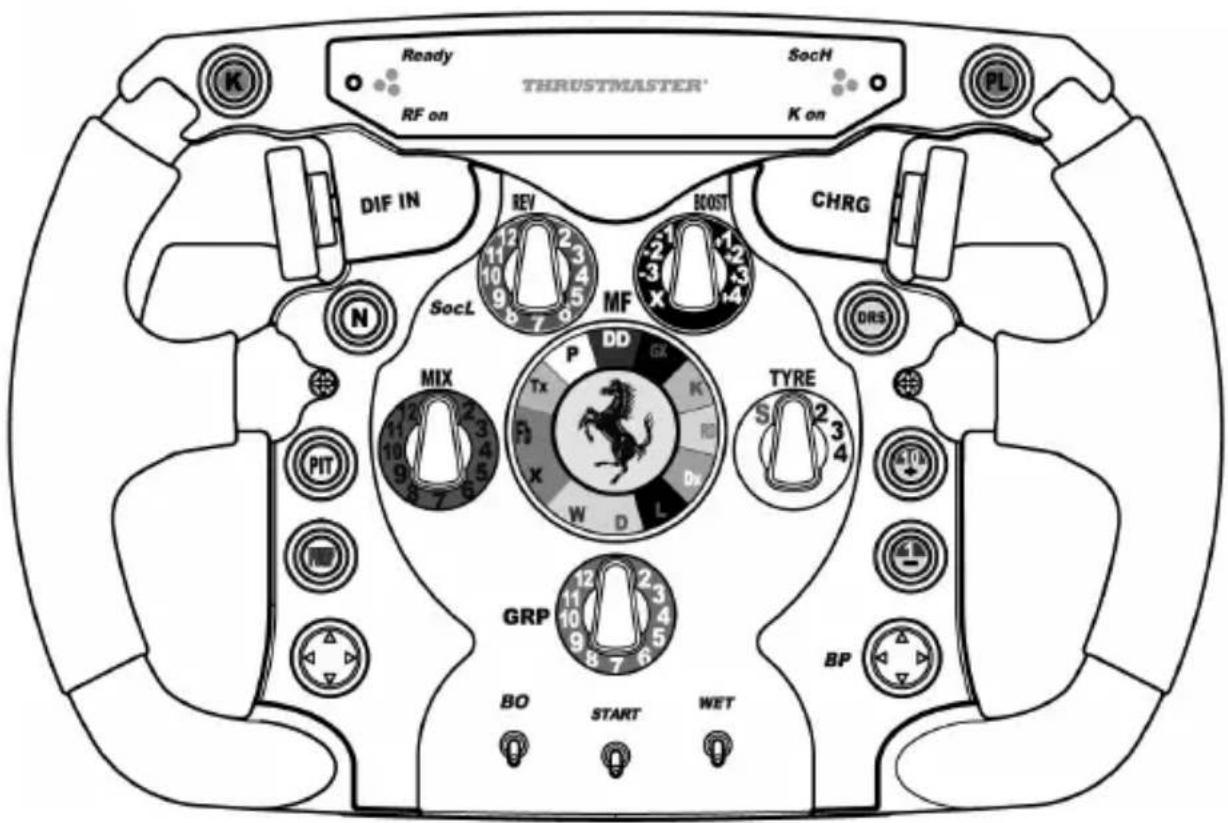
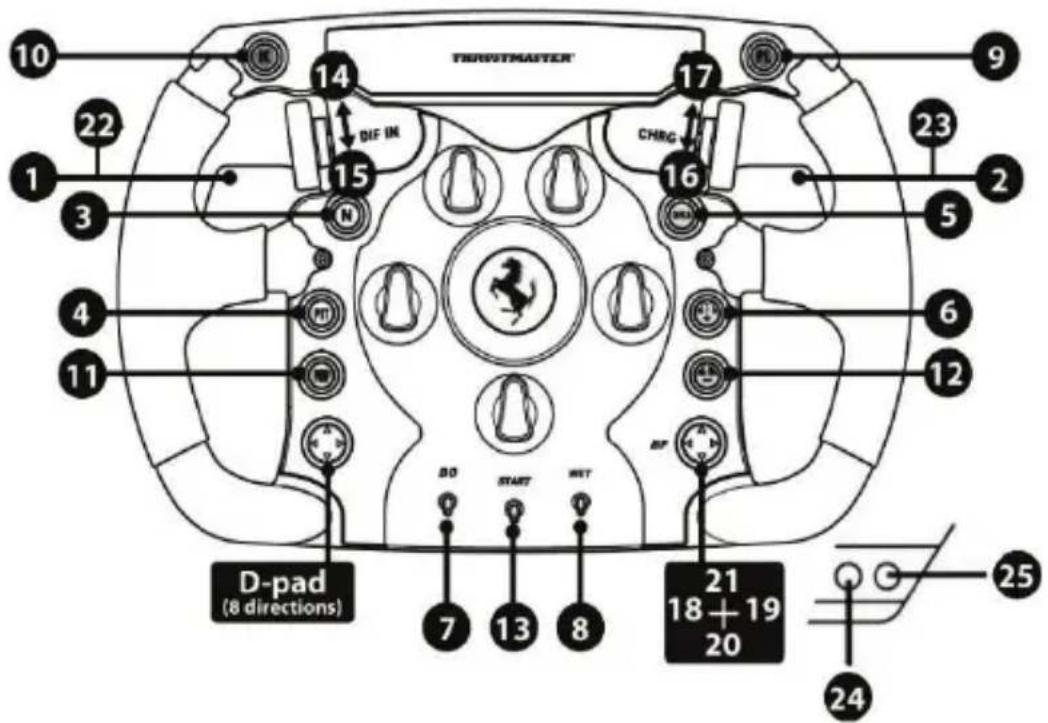
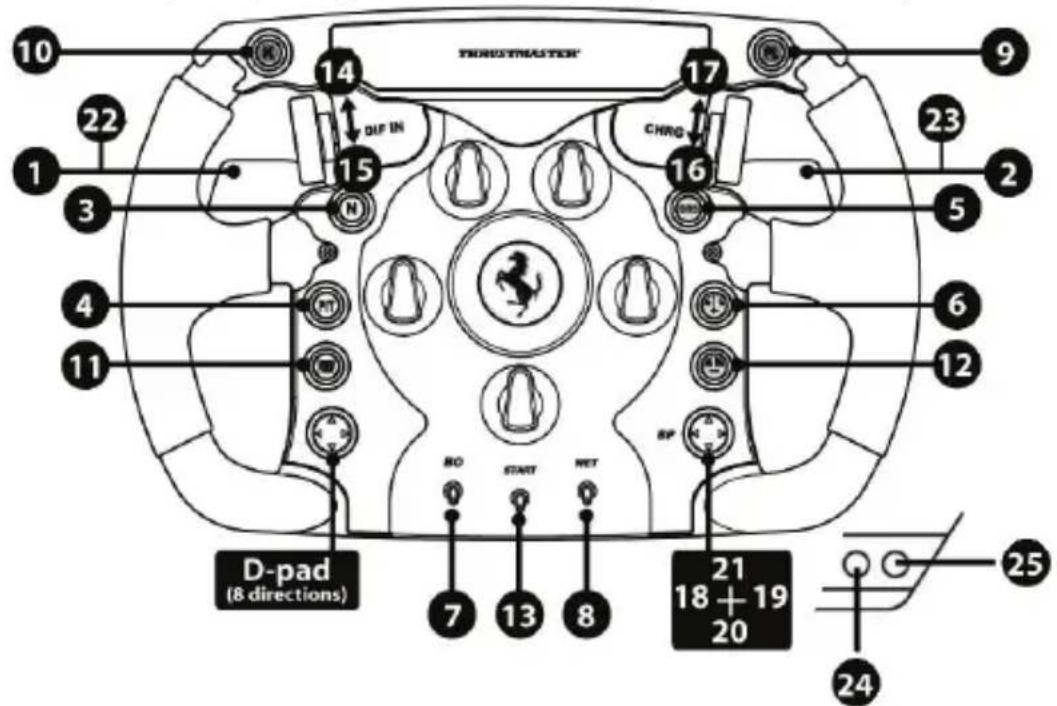
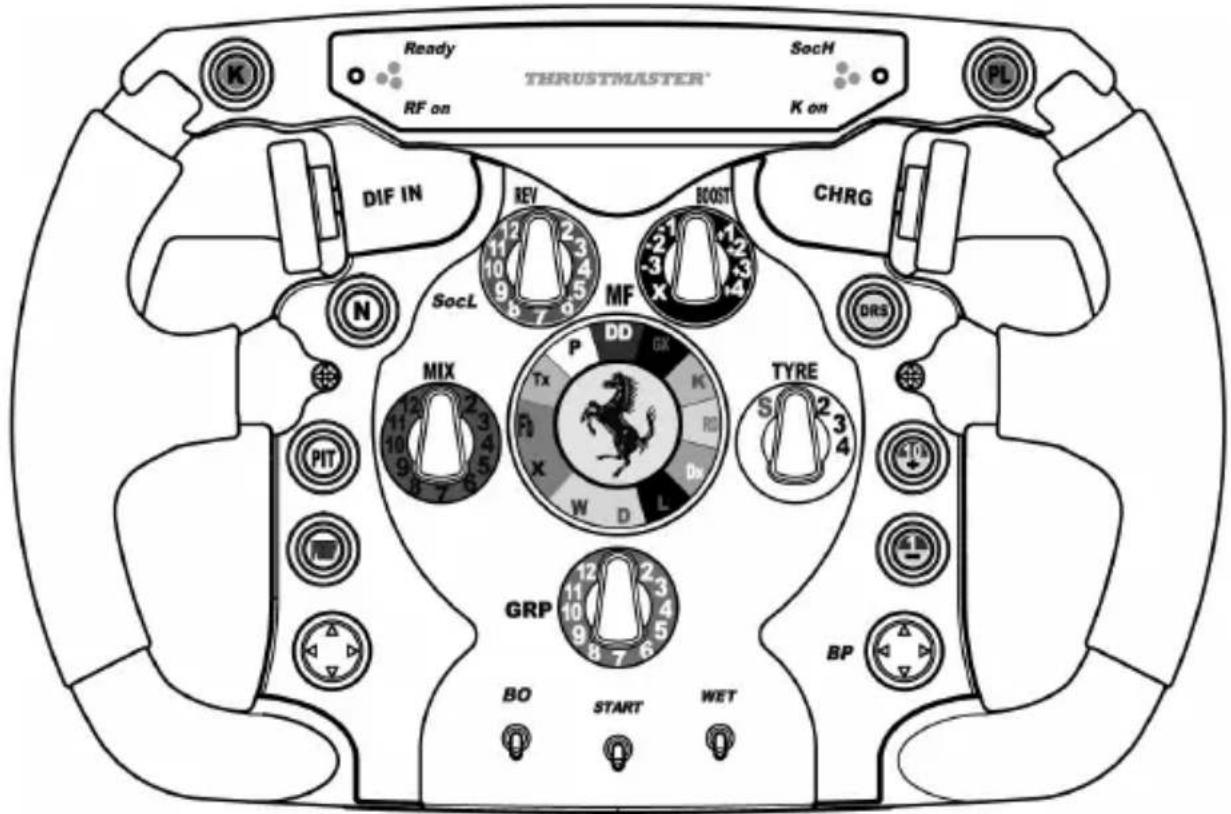
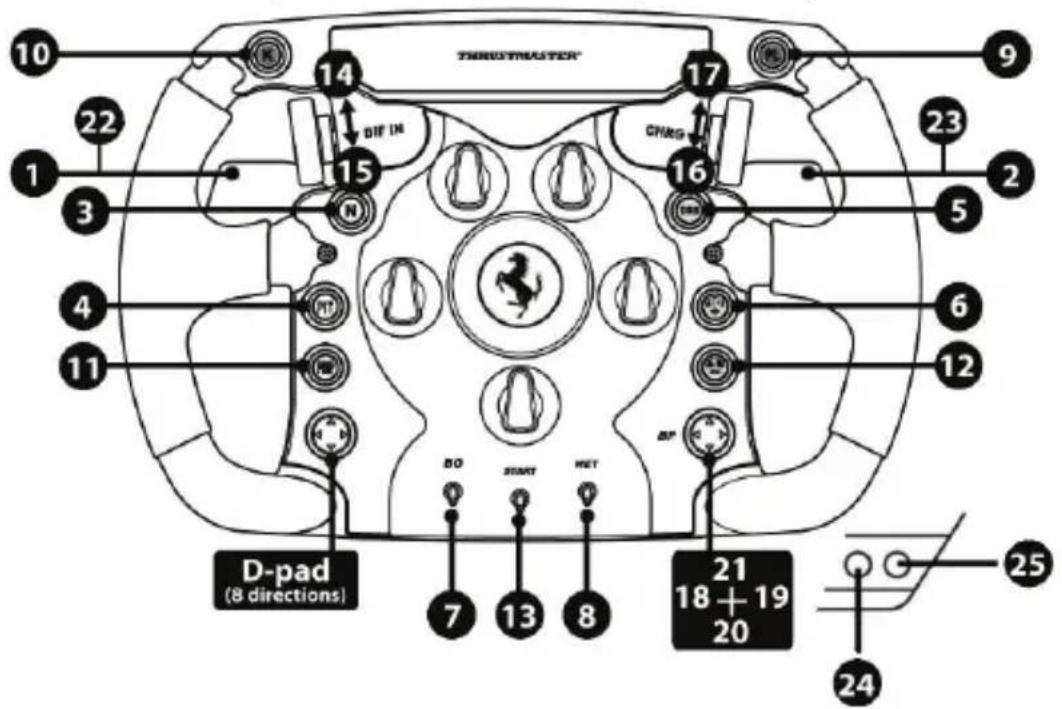
PC "ADVANCED MODE" MAPPING
(29 programmable functions)
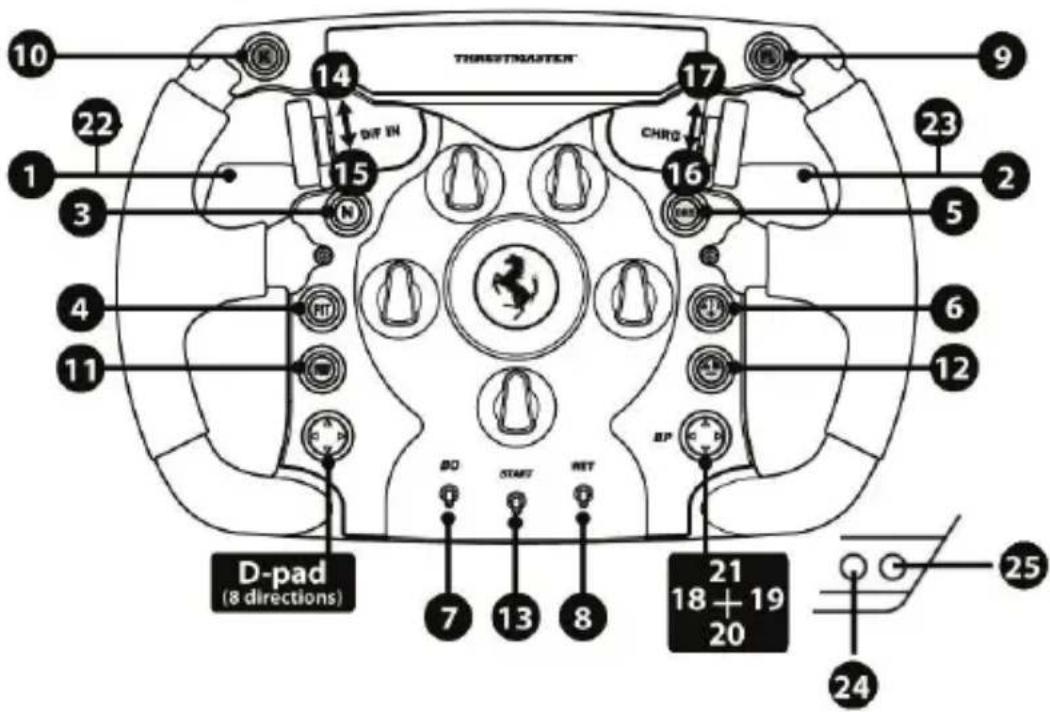
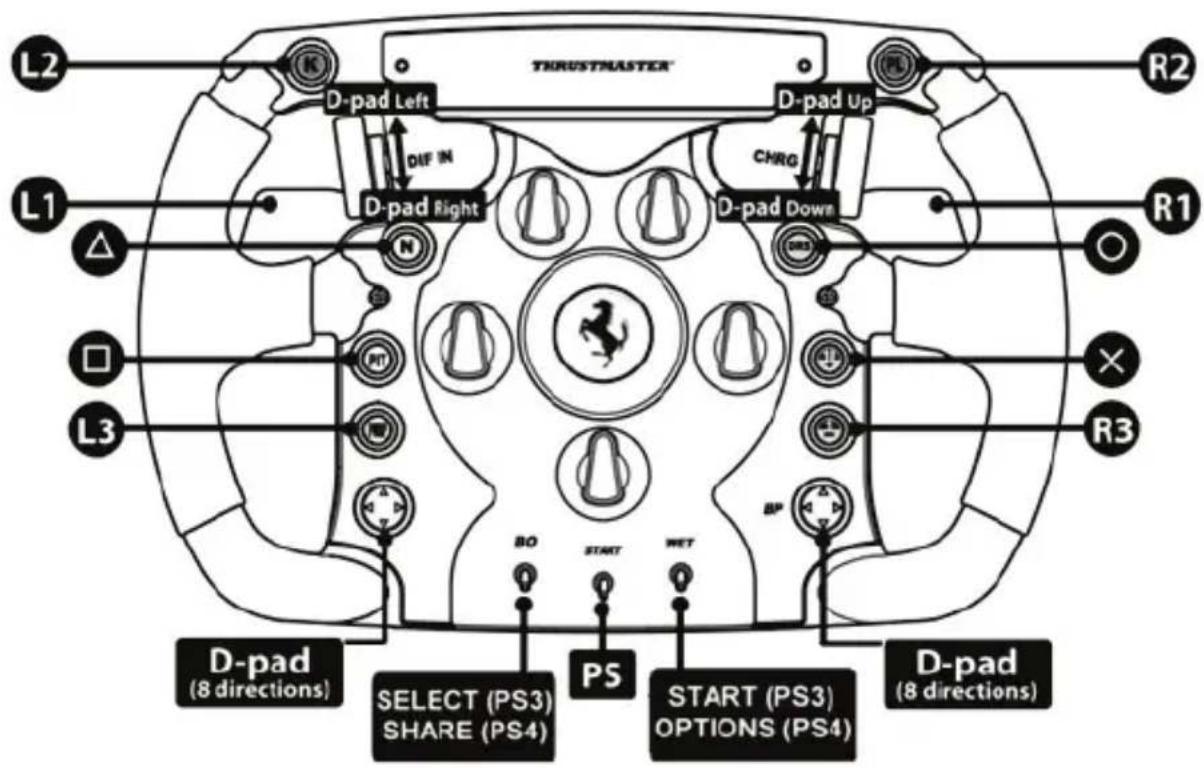
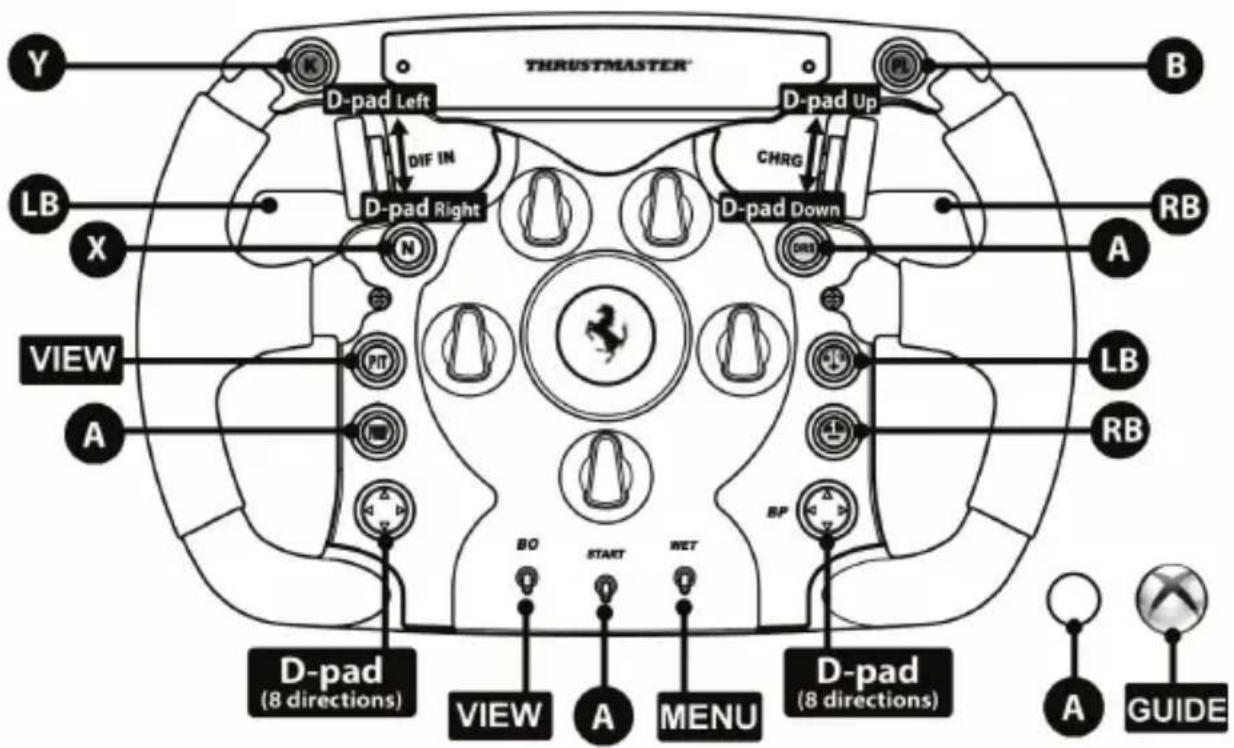
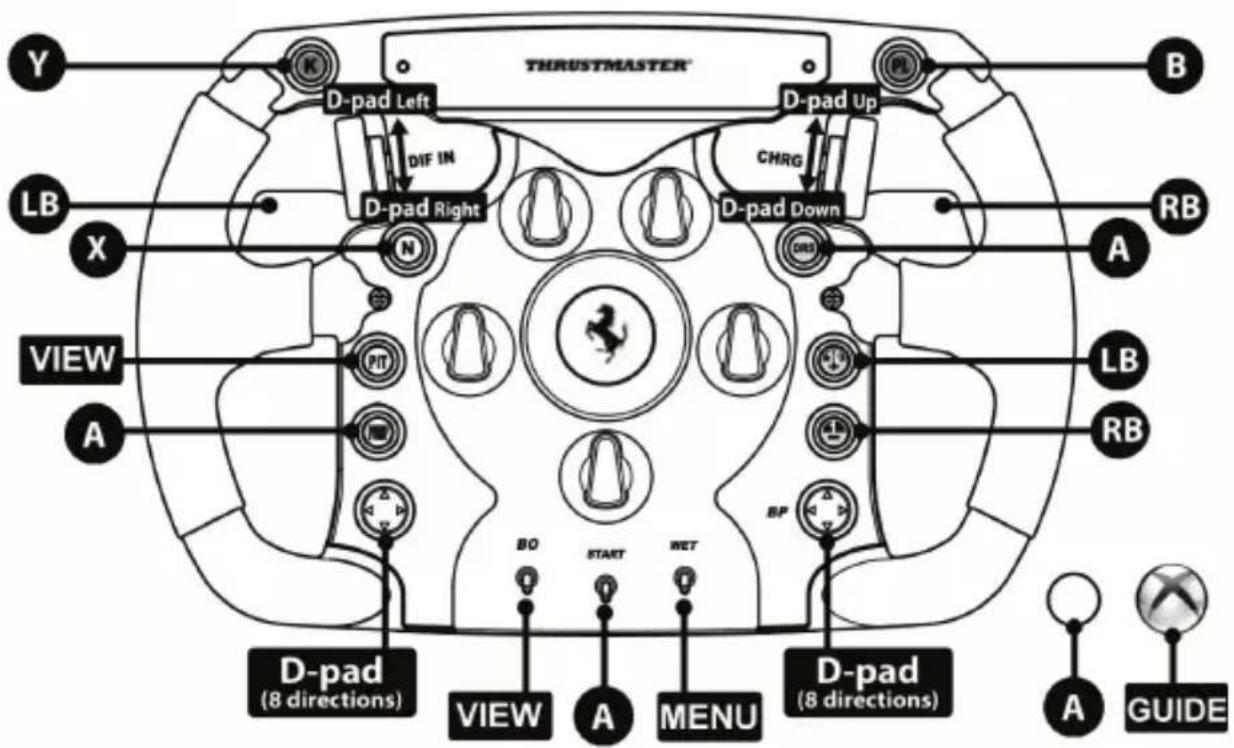
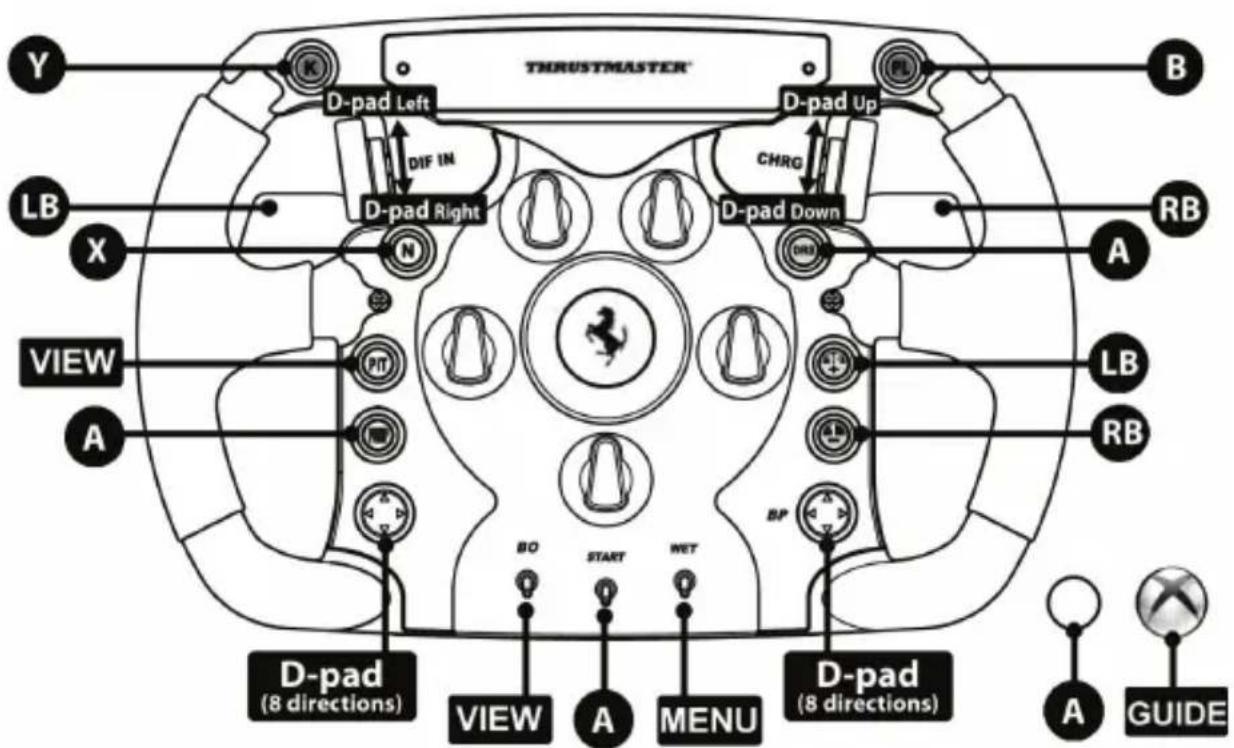
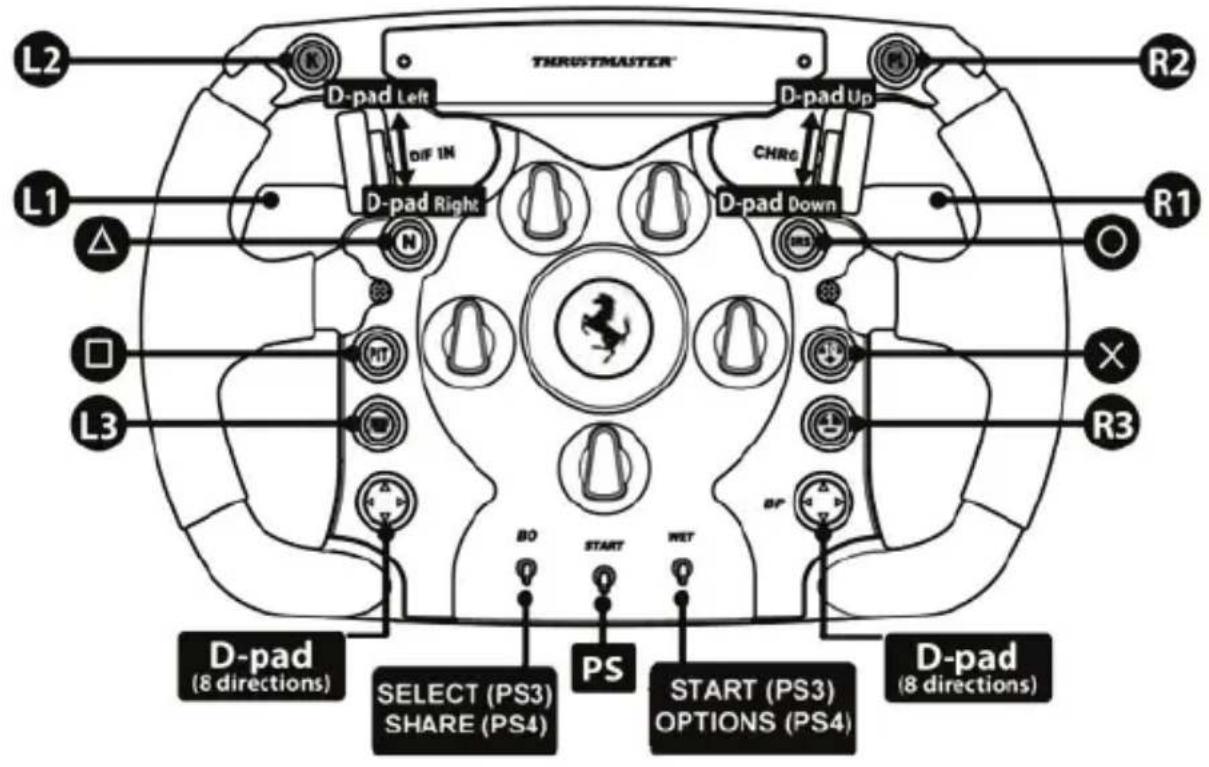
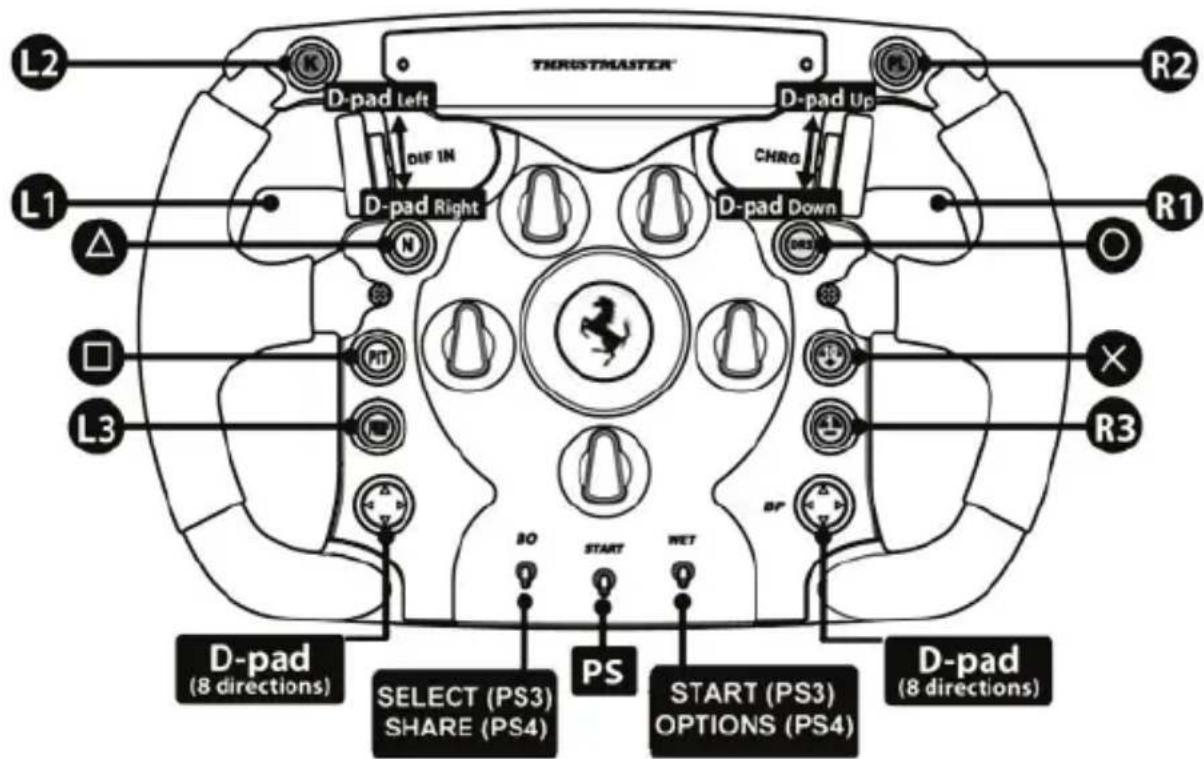
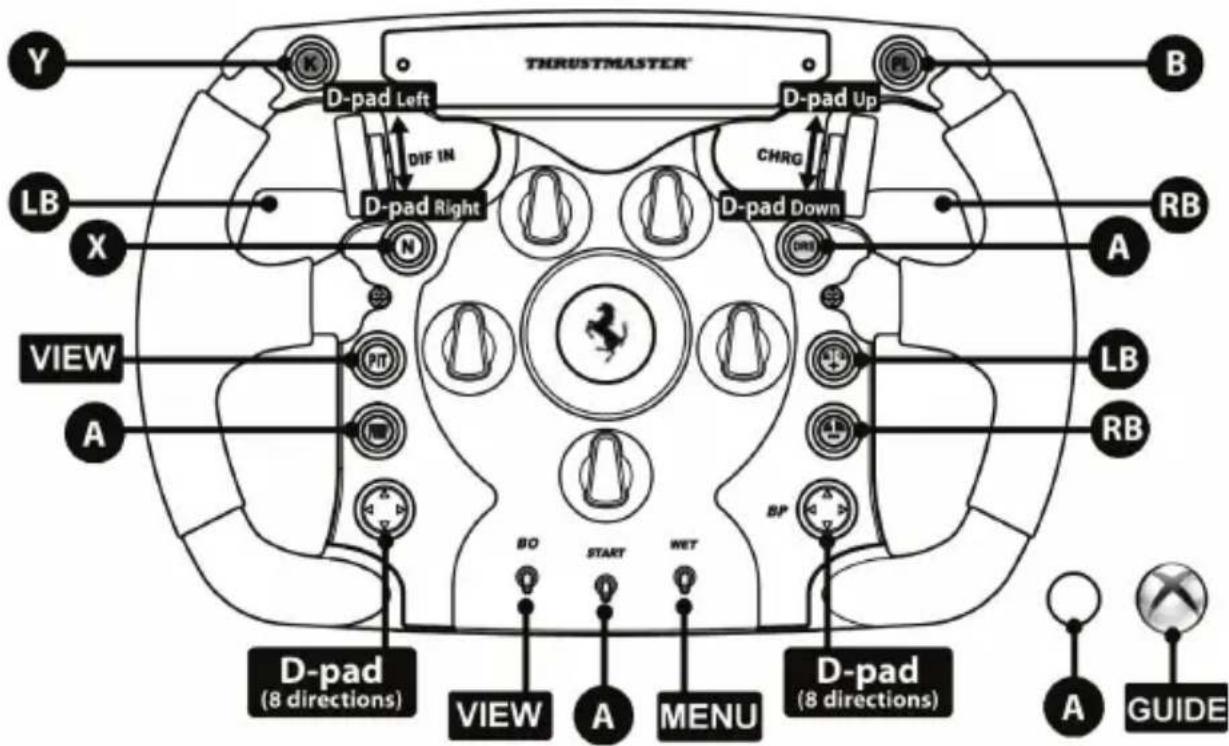
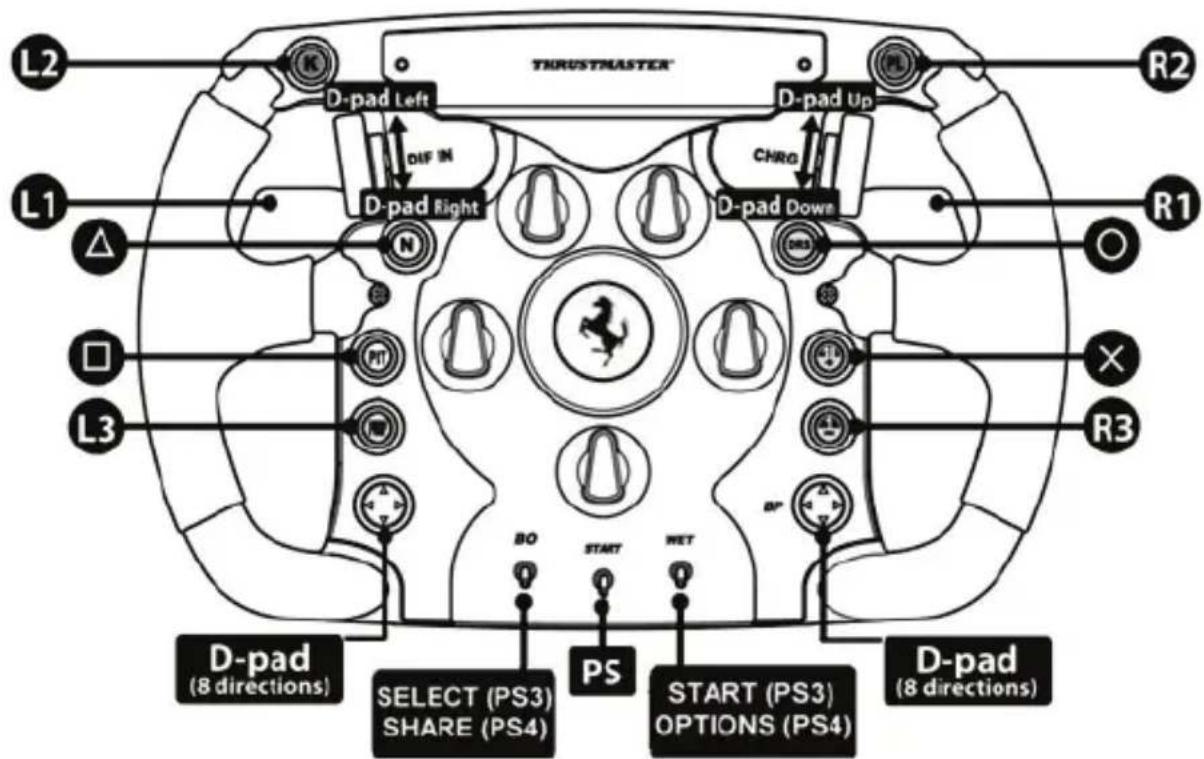
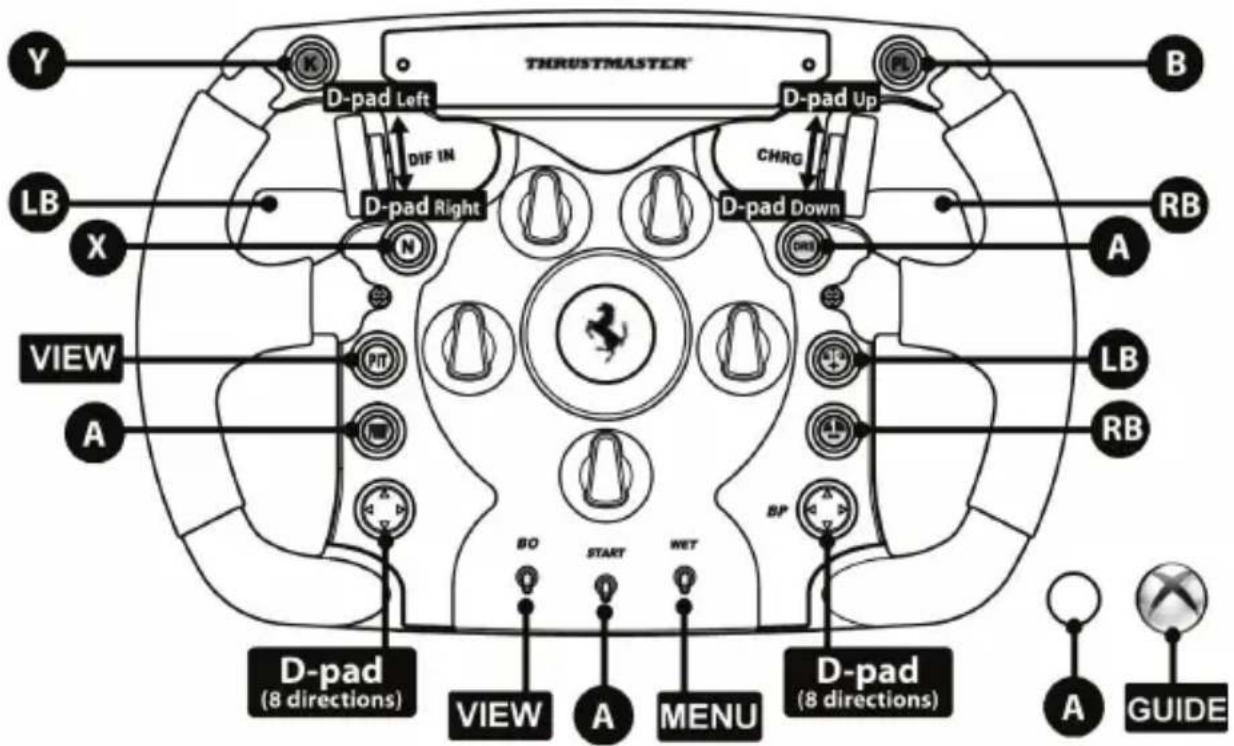
XBOX ONE® MAPPING
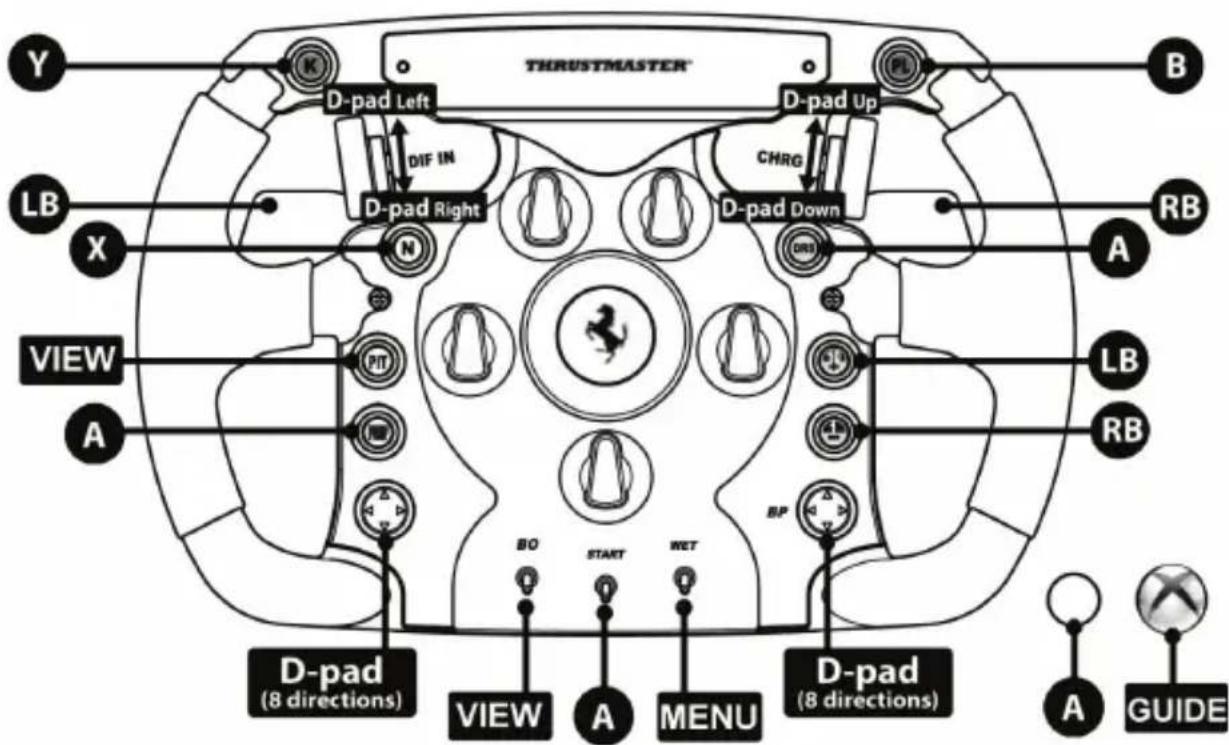
CONSUMER WARRANTY INFORMATION
Worldwide, Guillemot Corporation S.A., whose registered office is located at Place du Granier, B.P. 97143, 35571 Chantepie, France (hereinafter "Guillemot") warrants to the consumer that this Thrustmaster product shall be free from defects in materials and workmanship, for a warranty period which corresponds to the time limit to bring an action for conformity with respect to this product. In the countries of the European Union, this corresponds to a period of two (2) years from delivery of the Thrustmaster product. In other countries, the warranty period corresponds to the time limit to bring an action for conformity with respect to the Thrustmaster product according to applicable laws of the country in which the consumer was domiciled on the date of purchase of the Thrustmaster product (if no such action exists in the corresponding country, then the warranty period shall be one (1) year from the original date of purchase of the Thrustmaster product).
Notwithstanding the above, rechargeable batteries are covered by a warranty period of six (6) months from the date of original purchase.
Should the product appear to be defective during the warranty period, immediately contact Technical Support, who will indicate the procedure to follow. If the defect is confirmed, the product must be returned to its place of purchase (or any other location indicated by Technical Support).
Within the context of this warranty, the consumer's defective product shall, at Technical Support's option, be either replaced or returned to working order. If, during the warranty period, the Thrustmaster product is subject to such reconditioning, any period of at least seven (7) days during which the product is out of use shall be added to the remaining warranty period (this period runs from the date of the consumer's request for intervention or from the date on which the product in question is made available for reconditioning, if the date on which the product is made available for reconditioning is subsequent to the date of the request for intervention). If permitted under applicable law, the full liability of Guillemot and its subsidiaries (including for consequential damages) is limited to the return to working order or the replacement of the Thrustmaster product. If permitted under applicable law, Guillemot disclaims all warranties of merchantability or fitness for a particular purpose.
This warranty shall not apply: (1) if the product has been modified, opened, altered, or has suffered damage as a result of inappropriate or abusive use, negligence, an accident, normal wear, or any other cause unrelated to a material or manufacturing defect (including, but not limited to, combining the Thrustmaster product with any unsuitable element, including in particular power supplies, rechargeable batteries, chargers, or any other elements not supplied by Guillemot for this product); (2) if the product has been used for any use other than home use, including for professional or commercial purposes (game rooms, training, competitions, for example); (3) in the event of failure to comply with the instructions provided by Technical Support; (4) to software, said software being subject to a specific warranty; (5) to consumables (elements to be replaced over the product's lifespan: disposable batteries, audio headset or headphone ear pads, for example); (6) to accessories (cables, cases, pouches, bags, wrist-straps, for example); (7) if the product was sold at public auction.
This warranty is nontransferable.
The consumer's legal rights with respect to laws applicable to the sale of consumer goods in his or her country are not affected by this warranty.
Additional warranty provisions
During the warranty period, Guillemot shall not provide, in principle, any spare parts, as Technical Support is the only party authorized to open and/or recondition any Thrustmaster product (with the exception of any reconditioning procedures which Technical Support may request that the consumer carry out, by way of written instructions – for example, due to the simplicity and the lack of confidentiality of the reconditioning process – and by providing the consumer with the required spare part(s), where applicable).
Given its innovation cycles and in order to protect its know-how and trade secrets, Guillemot shall not provide, in principle, any reconditioning notification or spare parts for any Thrustmaster product whose warranty period has expired.
In the United States of America and in Canada, this warranty is limited to the product's internal mechanism and external housing. In no event shall Guillemot or its affiliates be held liable to any third party for any consequential or incidental damages resulting from the breach of any express or implied warranties. Some States/Provinces do not allow limitation on how long an implied warranty lasts or exclusion or limitation of liability for consequential or incidental damages, so the above limitations or exclusions may not apply to you. This warranty gives you specific legal rights, and you may also have other rights which vary from State to State or Province to Province.
Liability
If permitted under applicable law, Guillemot Corporation S.A. (hereinafter "Guillemot") and its subsidiaries disclaim all liability for any damages caused by one or more of the following: (1) the product has been modified, opened or altered; (2) failure to comply with assembly instructions; (3) inappropriate or abusive use, negligence, an accident (an impact, for example); (4) normal wear; (5) the use of the product for any use other than home use, including for professional or commercial purposes (game rooms, training, competitions, for example). If permitted under applicable law, Guillemot and its subsidiaries disclaim all liability for any damages unrelated to a material or manufacturing defect with respect to the product (including, but not limited to, any damages caused directly or indirectly by any software, or by combining the Thrustmaster product with any unsuitable element, including in particular power supplies, rechargeable batteries, chargers, or any other elements not supplied by Guillemot for this product).

FCC STATEMENT
- This device complies with Part 15 of the FCC Rules. Operation is subject to the following two conditions:
(1) This device may not cause harmful interference, and
(2) This device must accept any interference received, including interference that may cause undesired operation.
2. Changes or modifications not expressly approved by the party responsible for compliance could void the user's authority to operate the equipment.
COPYRIGHT
© 2021 Guillemot Corporation S.A. All rights reserved. Thrustmaster® is a registered trademark of Guillemot Corporation S.A. PlayStation® is a registered trademark of Sony Interactive Entertainment Inc. Windows® is a registered trademark of Microsoft Corporation in the United States and/or other countries. Ferrari® is a registered trademark of Ferrari S.p.A. All other trademarks and brand names are hereby acknowledged and are property of their respective owners. Illustrations not binding. Contents, designs and specifications are subject to change without notice and may vary from one country to another. Made in China.
ENVIRONMENTAL PROTECTION RECOMMENDATION

In the European Union: At the end of its working life, this product should not be disposed of with standard household waste, but rather dropped off at a collection point for the disposal of Waste Electrical and Electronic Equipment (WEEE) for recycling.
This is confirmed by the symbol found on the product, user manual or packaging. Depending on their characteristics, the materials may be recycled. Through recycling and other forms of processing Waste Electrical and Electronic Equipment, you can make a significant contribution towards helping to protect the environment.
Please contact your local authorities for information on the collection point nearest you.
For all other countries: Please adhere to local recycling laws for electrical and electronic equipment.
Retain this information. Colours and decorations may vary.
Plastic fasteners and adhesives should be removed from the product before it is used.
www.thrustmaster.com
*Applicable to EU, UK and Turkey only



Ferrari F1 Wheel Add-On
POUR PLAYSTATION®4 - XBOX ONE® - PC
PC "NORMAL MODE" MAPPING
(17 programmable functions)
PC "ADVANCED MODE" MAPPING
(29 programmable functions)
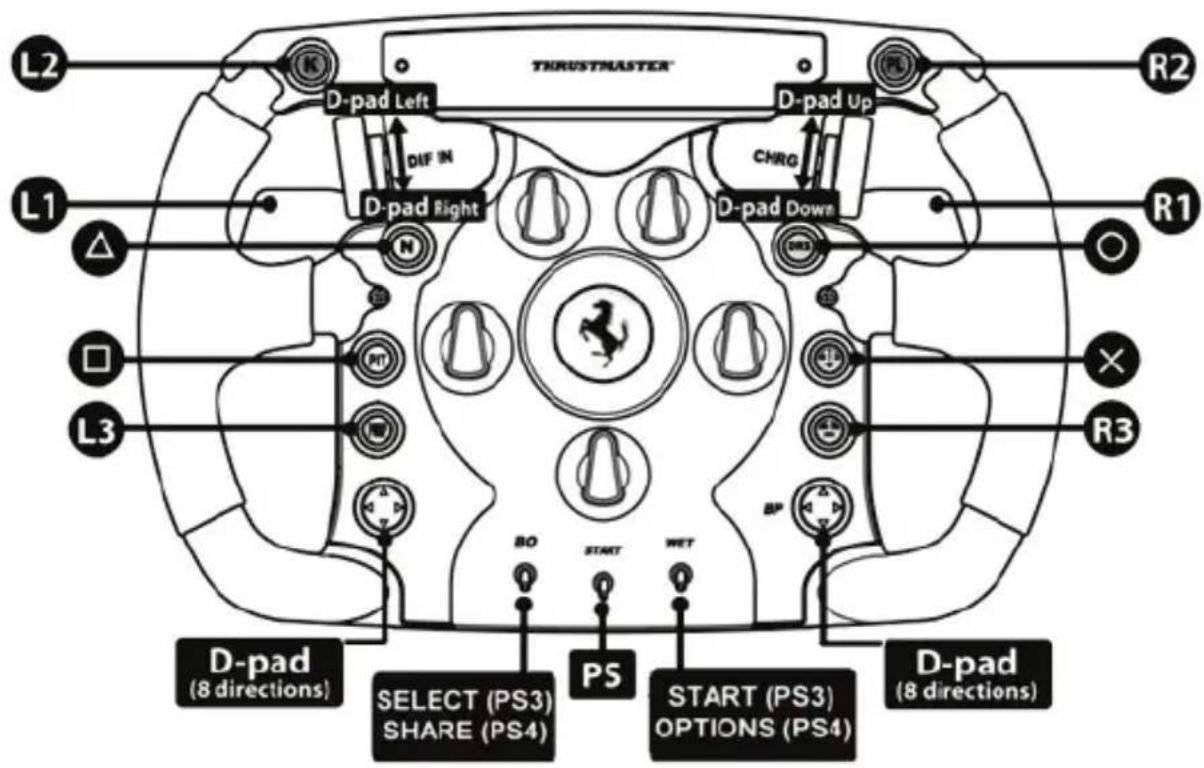
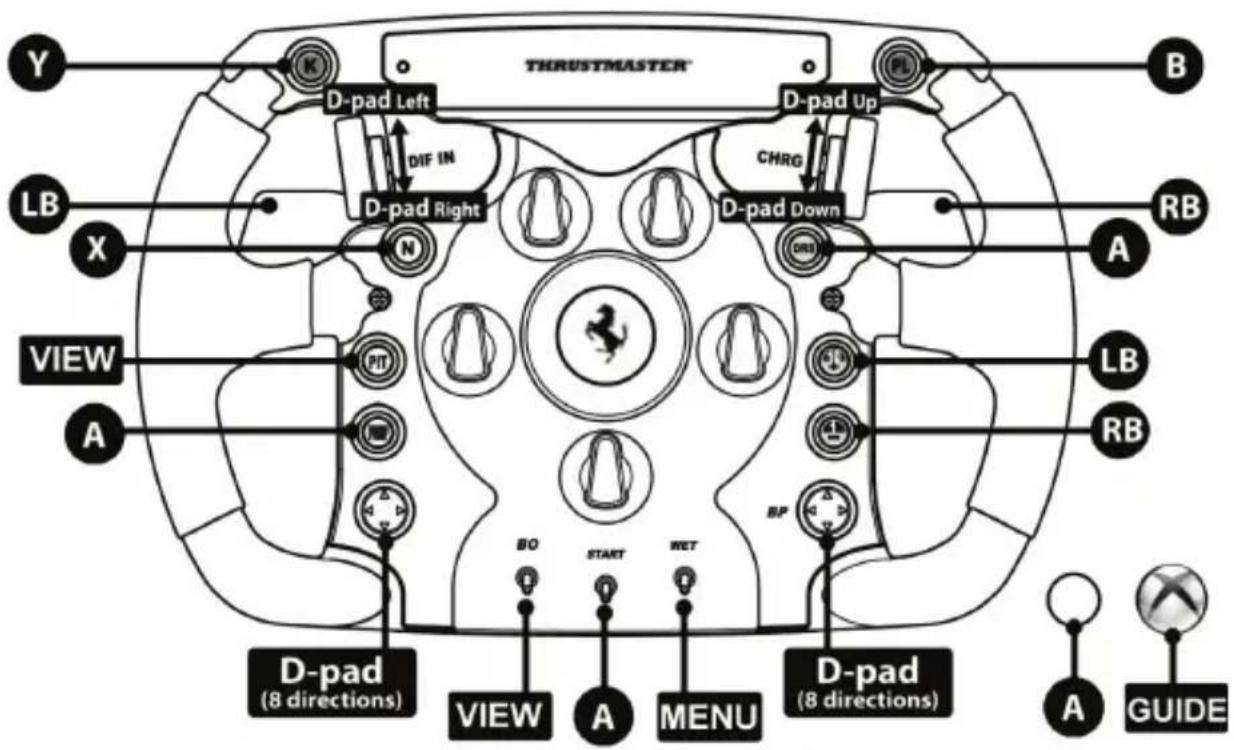
MAPPING XBOX ONE®
INFORMATIONS RELATIVES A LA GARANTIE AUX CONSOMMATEURS
www.thrustmaster.com
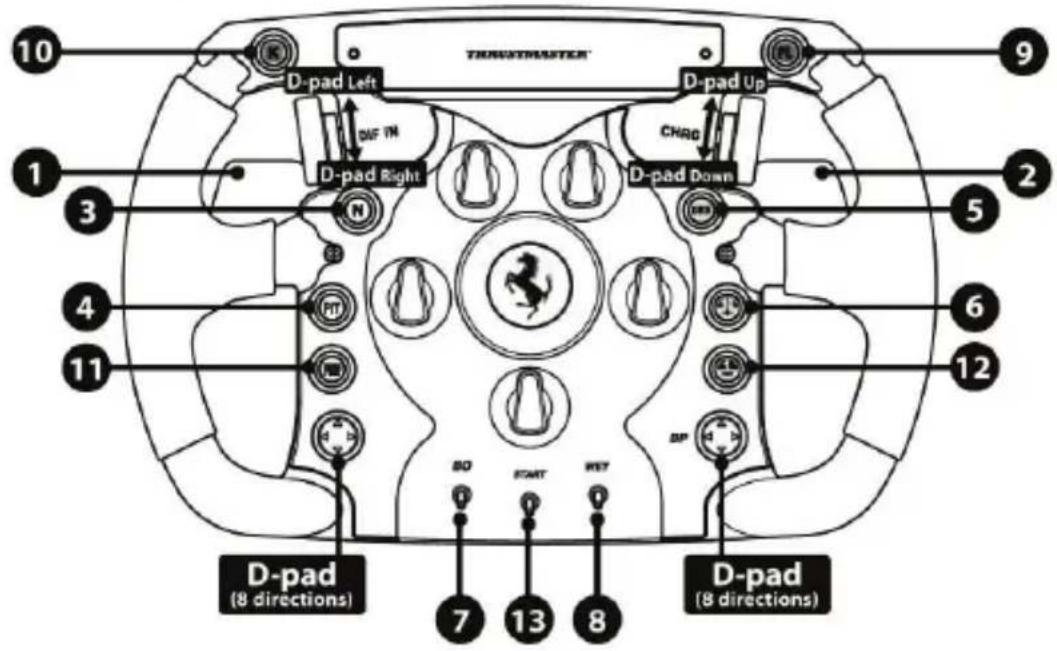
PC "NORMAL MODE" MAPPING (17 programmable functions)
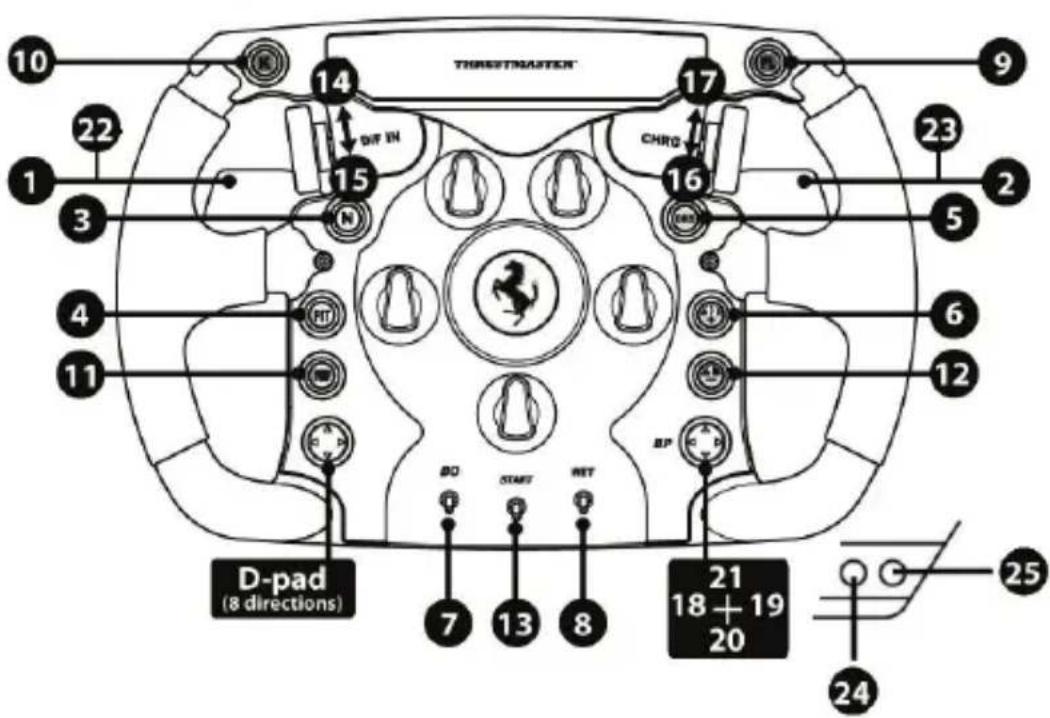
PC "ADVANCED MODE" MAPPING (29 programmable functions)
www.thrustmaster.com
PC "NORMAL MODE" MAPPING
(17 programmable functions)

PC "ADVANCED MODE" MAPPING
(29 programmable functions)
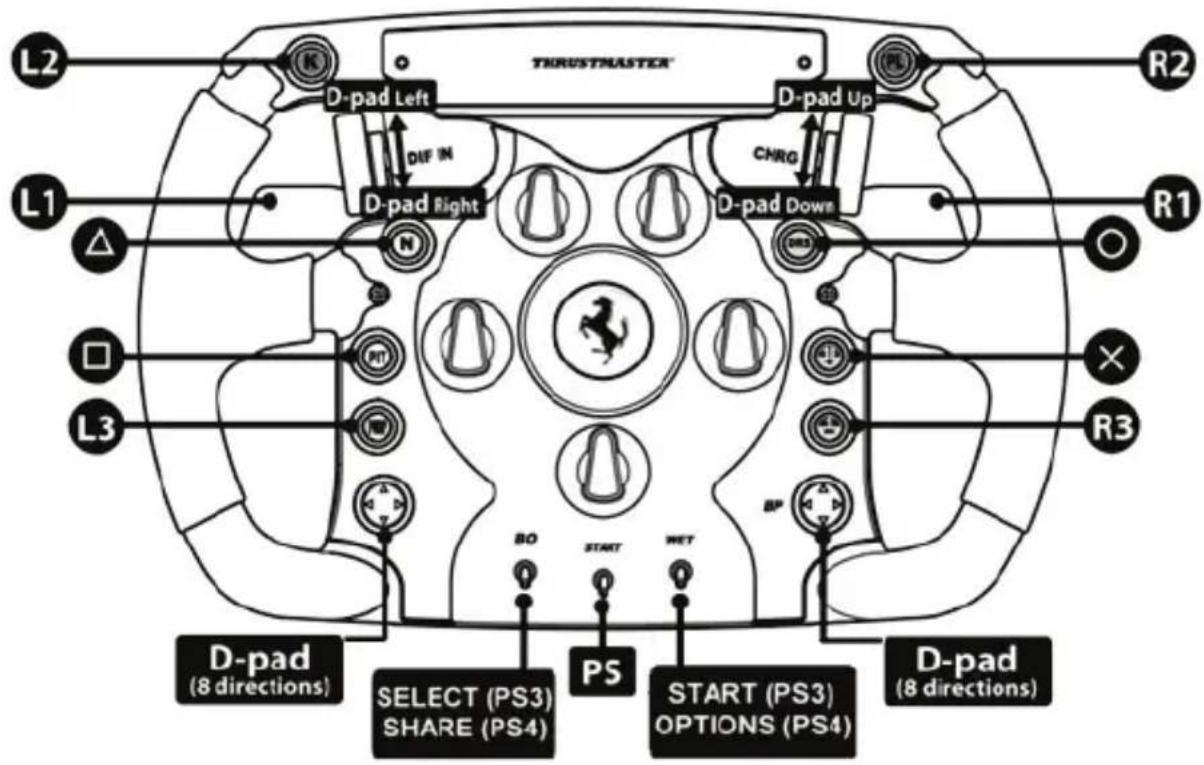
MAPPING VOOR PLAYSTATION®4
MAPPING VOOR XBOX ONE®
www.thrustmaster.com
PC "NORMAL MODE" MAPPING
(17 programmable functions)
PC "ADVANCED MODE" MAPPING
(29 programmable functions)
MAPPATURA SU PLAYSTATION®4
MAPPATURA SU XBOX ONE®
www.thrustmaster.com
PC "NORMAL MODE" MAPPING
(17 programmable functions)
PC "ADVANCED MODE" MAPPING
(29 programmable functions)
www.thrustmaster.com
PC "NORMAL MODE" MAPPING
(17 programmable functions)
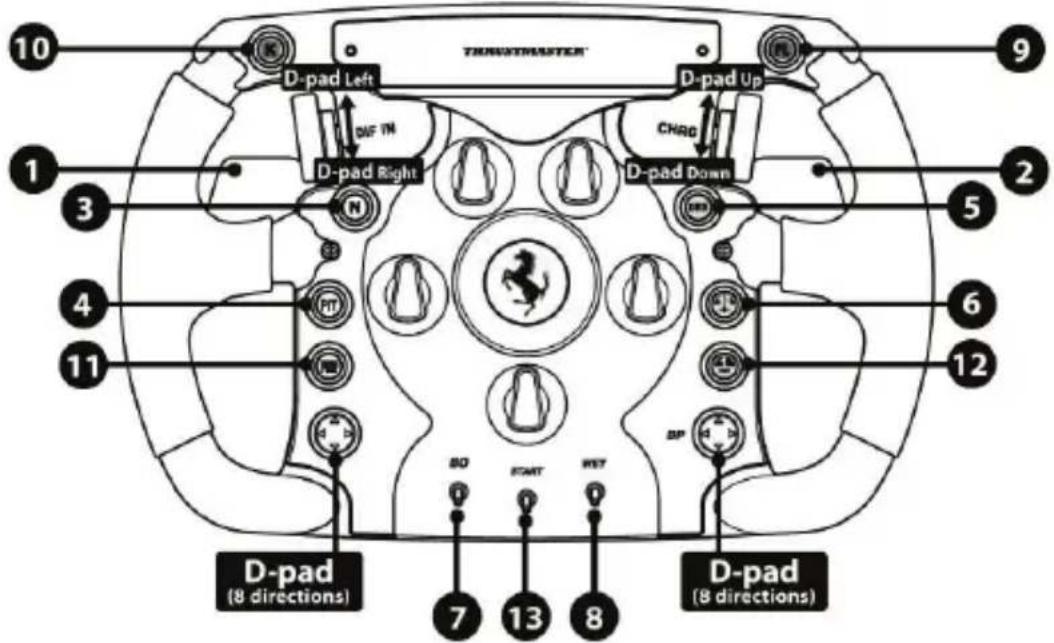
PC "ADVANCED MODE" MAPPING
(29 programmable functions)
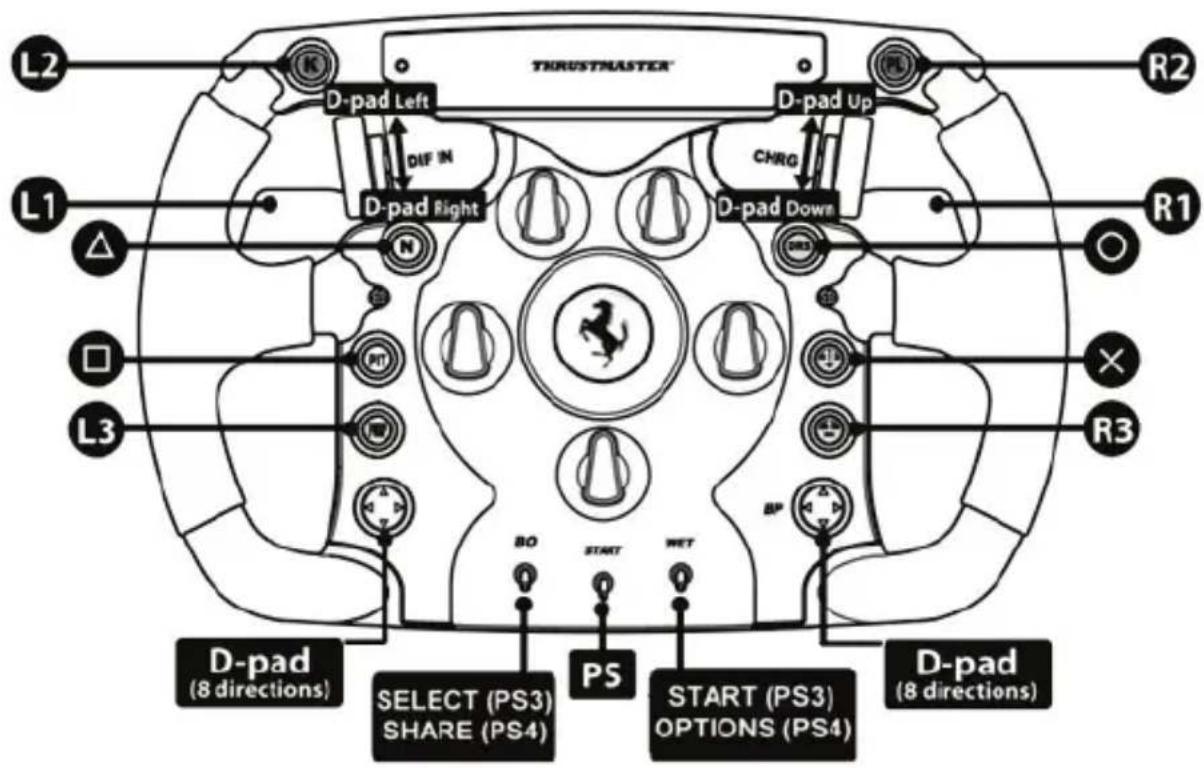
MAPEAR A PLAYSTATION®4
MAPEAR A XBOX ONE®
INFORMAÇÉS SOBRE A GARANTIA PARA O CONSUMIDOR
www.thrustmaster.com
PykoBoDCTBO NOIb3OBaTeJIa
YCTAHOBKA PYJIEBOFO KOLECA HA BA3Y
C nOMOJIbIO CTpeIOK COOTHECITE pa3beMbI.
Pa3bem Ha 6a3e: cTpeNka yKa3bIbaET BBepx.
Pa3bemHa pyne: cTpelenka yka3bIbaeT BBepx.
Iocne npabnHoro no3nnoHnpoBaHna pa3bemOB npocTo nobepHnte KOnbpo KpeJnxHO CnCTeMbThrustmaster Quick Release npotuB yacobO CTpeNk, ydepxNBaHa MeTe pylb.
3aTeM c MaKcMaJIbHbIM ycIINeM 3aTAHTE KOJIbO, yIepXINBa erO Ha MeCTe I NobOpauINBa pyIb (no YacOBoN CTpeNLKe).
YctahOBuB pyIb, nobepHnte ero Ha 180° (ecn CMOTpeTb Ha pyIb, norotun Ferrari® donKeH 6bITb IpeBepHyr «BBepx HorAmN»), uTo6bl nOlyuHTb DOCTyn K MaIOMy KpeHexHomy BnHTy Ha KOJIbCe CnCTeMbI Thrustmaster Quick Release. C nOmoIbIO 6oIbIoI OTBePTKn Phillips 3aTAnHte MaIbI KpeHexHbI BnHT (6e3 Upe3MepHoro ycINII) no YacBOB CTpeIke.

He npnilaraTe Upe3MepbIX ycHn npn 3aTyrBaHm Manoro KpenexHoro BNHTa
(c nOMOuBo OTBepTkn Phillips)!
Ppekpatnte 3aTnBahnne, KaK TOnbKO NOyBCTByeTe CONpOTNBnHeH

BAKHHA INHOPMALINIA!

PC "NORMAL MODE" MAPPING (17 programmable functions)
PC "ADVANCED MODE" MAPPING (29 programmable functions)
www.thrustmaster.com

Ferrari F1 Wheel Add-On
PRO PLAYSTATION®4 - XBOX ONE® - PC
Uživatský manuál
INSTALACE VOLANTU NA ZÁKLADNU
PC "NORMAL MODE" MAPPING
(17 programmable functions)
PC "ADVANCED MODE" MAPPING
(29 programmable functions)
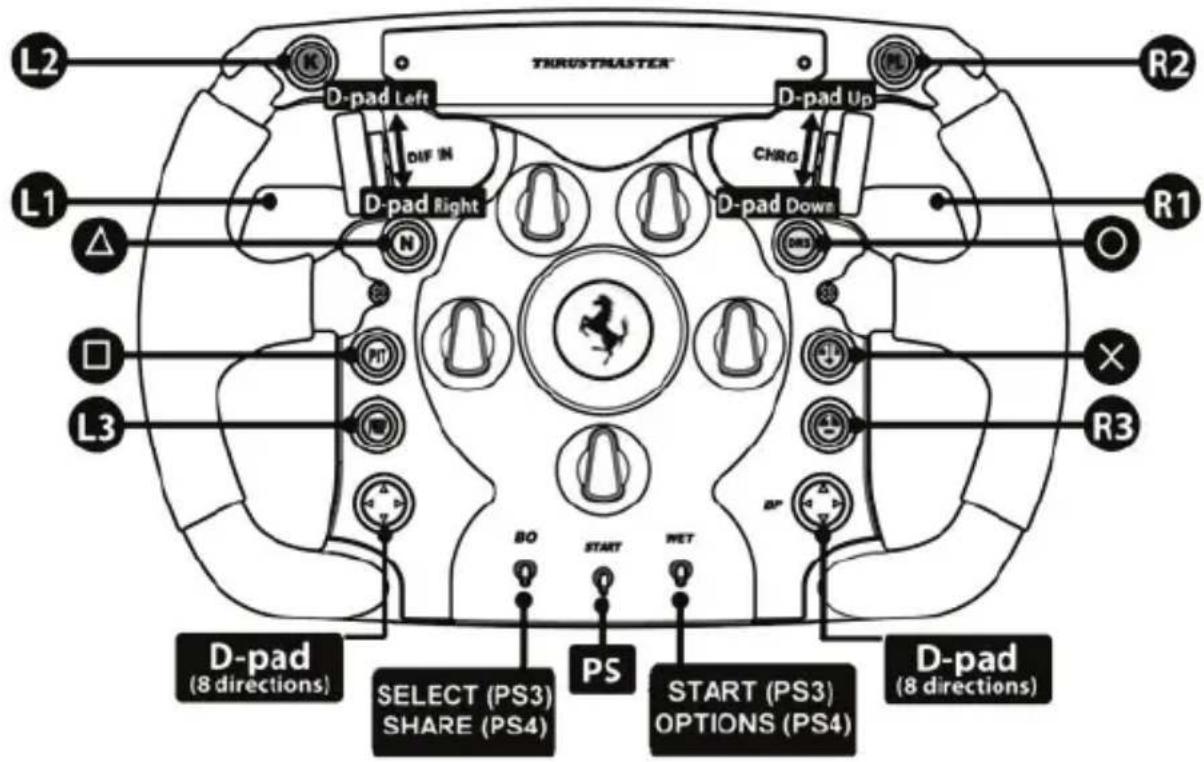
MAPOVÁNÍ NA PLAYSTATION®4
MAPOVÁNÍNA XBOX ONE®
SPOTČREBITELSKÉ INFORMACE O ZÁRUCE
www.thrustmaster.com

PC "NORMAL MODE" MAPPING (17 programmable functions)
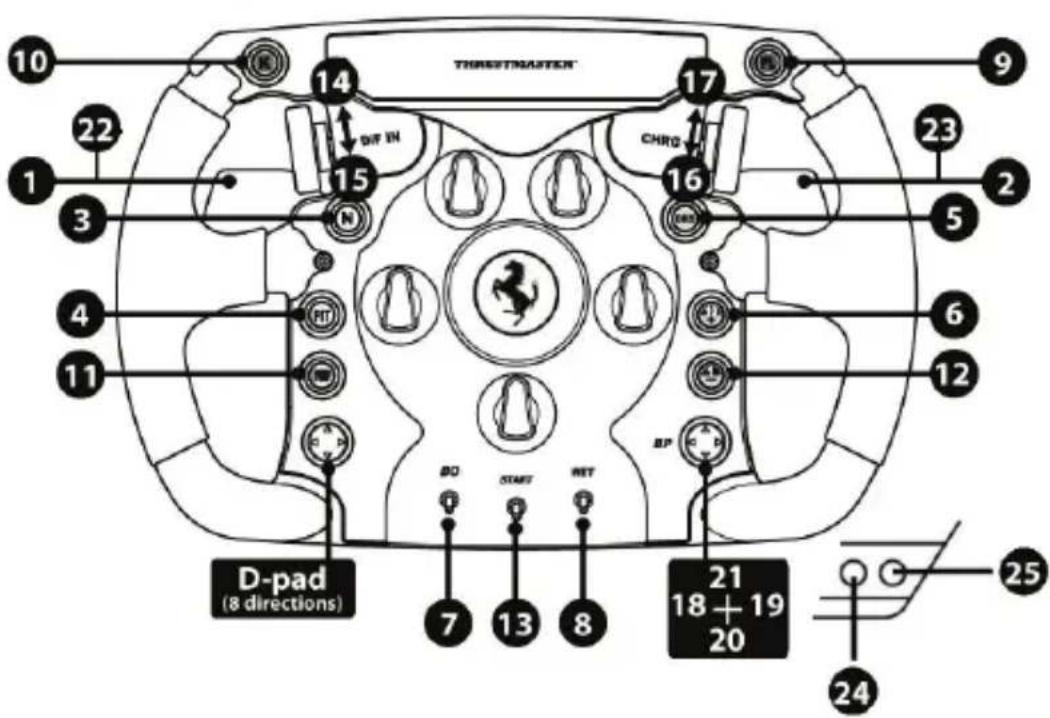
PC "ADVANCED MODE" MAPPING (29 programmable functions)
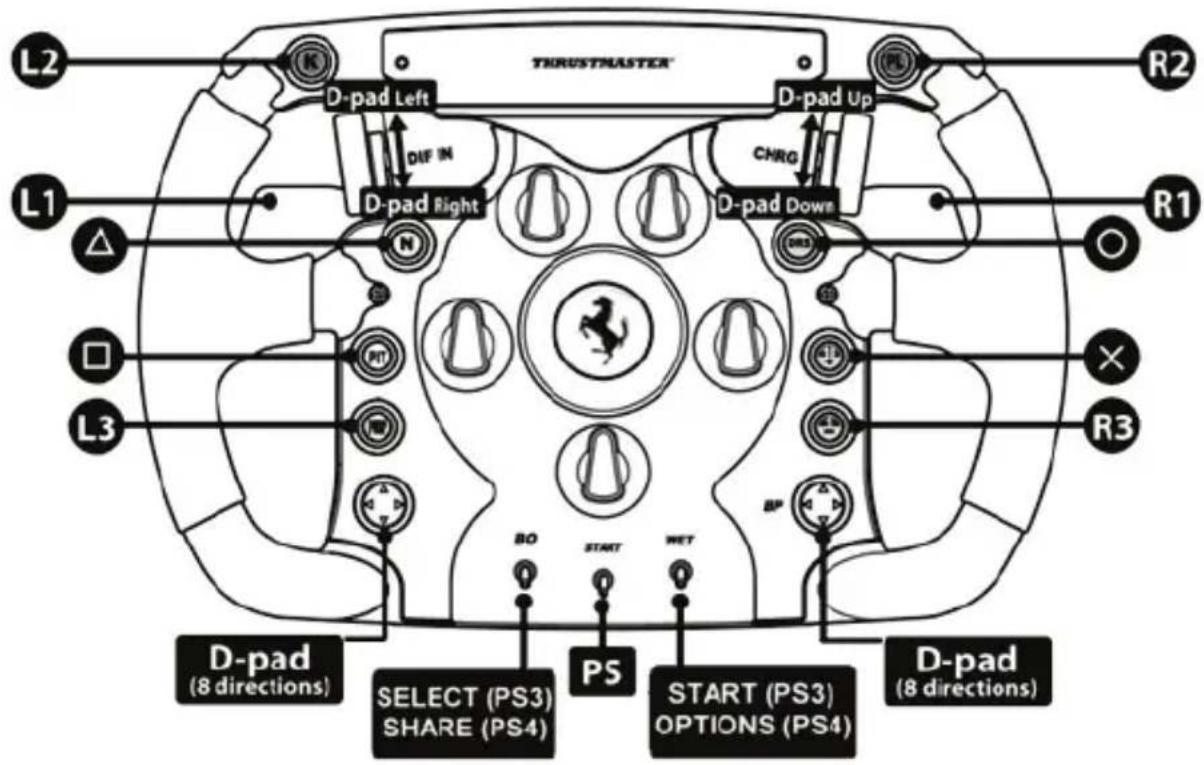
PLAYSTATION®4 DÜGME YERLEŞİMI
www.thrustmaster.com
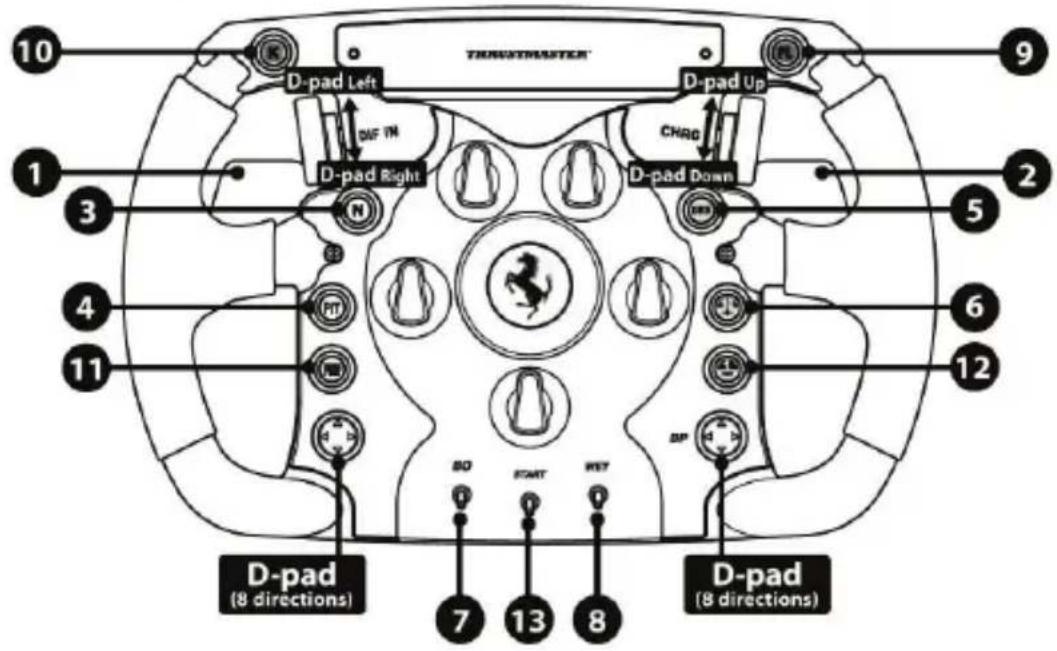
PC "NORMAL MODE" MAPPING (17 programmable functions)
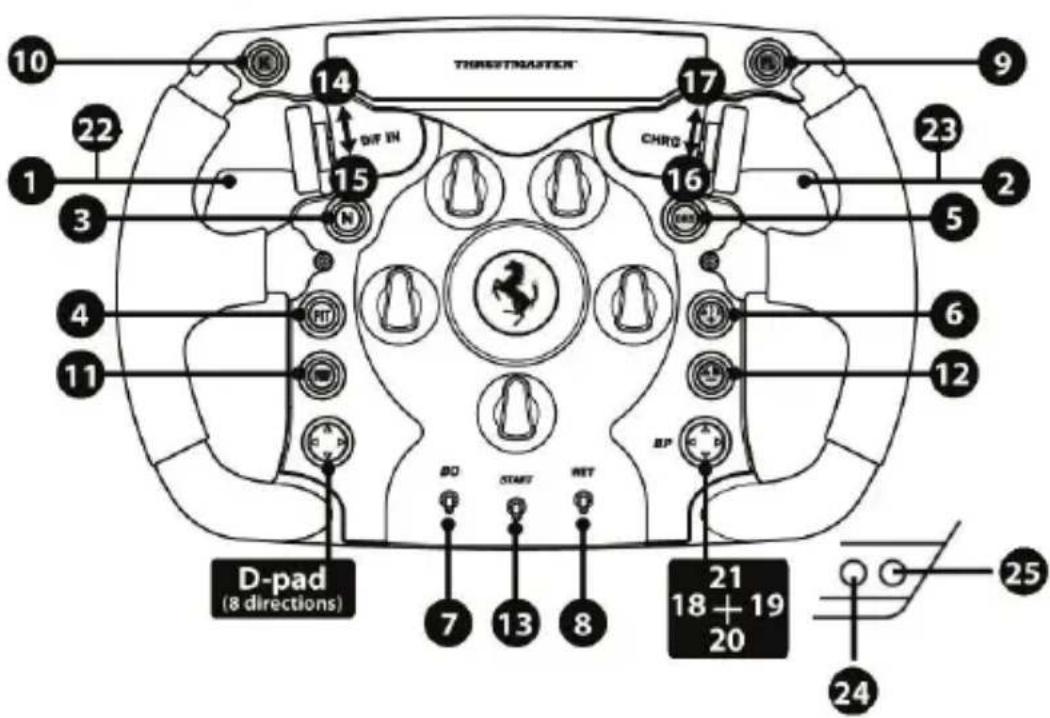
PC "ADVANCED MODE" MAPPING (29 programmable functions)
MAPOWANIE NA KONSOLACH PLAYSTATION®4
MAPOWANIE NA KONSOLI XBOX ONE®
INFORMACJE DOTYCZACE GWARANCJI DLA KCLIENTA
www.thrustmaster.com
www.thrustmaster.com
Made in China.

:外箱


Ferrari F1 Wheel Add-On
适用于 PLAYSTATION®4 - XBOX ONE® - PC
用户手册
将方向盘安装到底座上
按照箭头指示对准连接器位置:
底座连接器:箭头朝上
方向盘连接器:箭头朝上
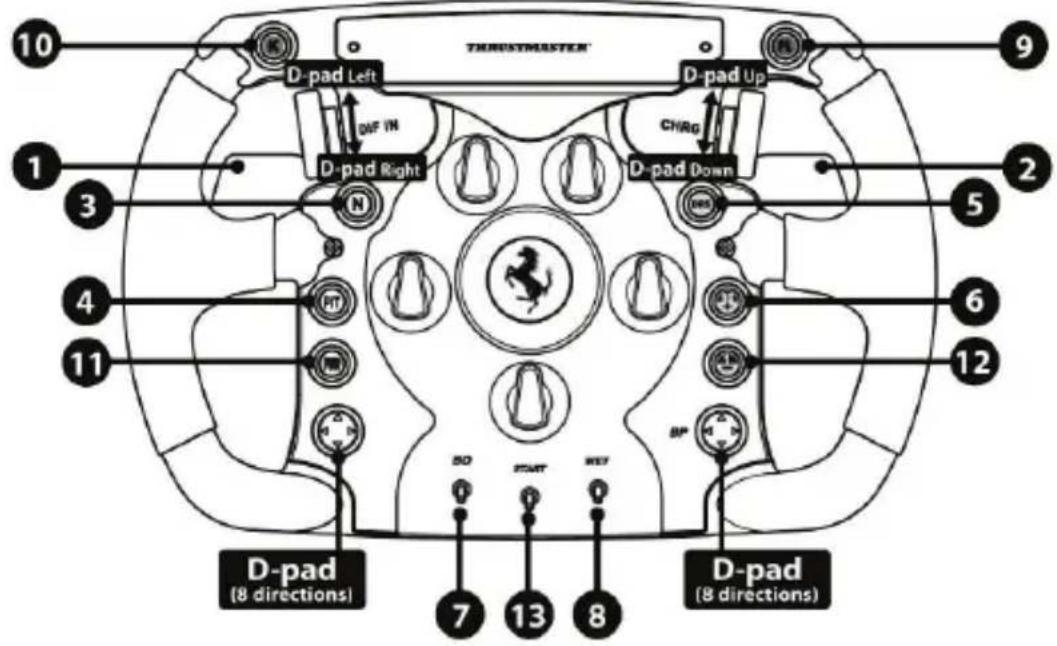
PC "NORMAL MODE" MAPPING
(17 programmable functions)
PC "ADVANCED MODE" MAPPING
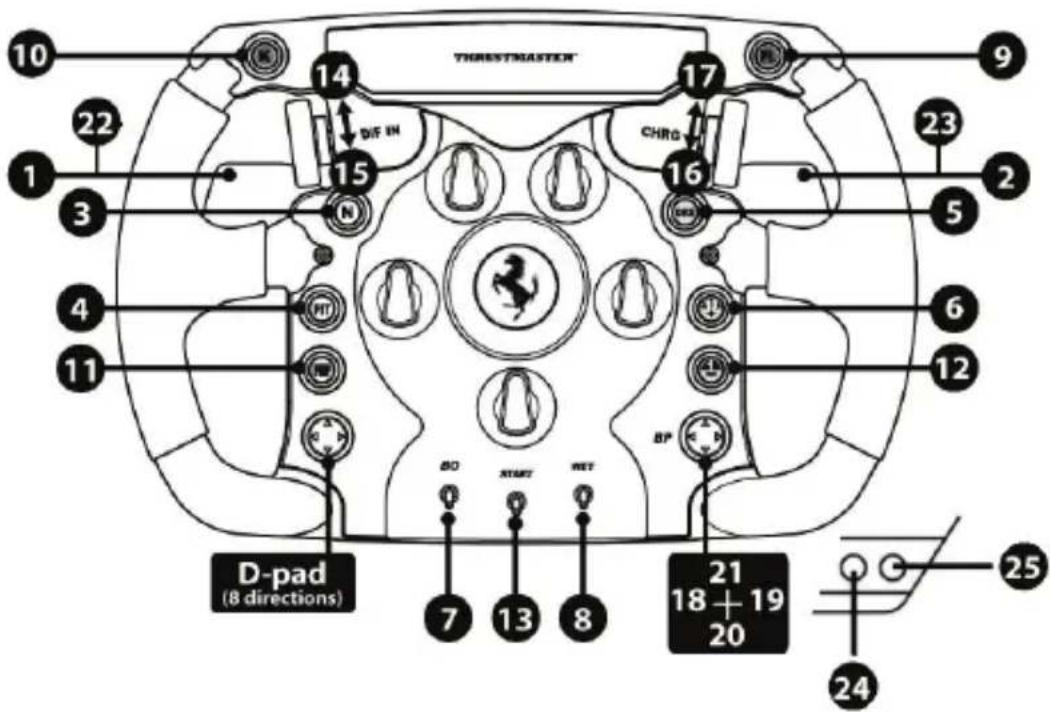
(29 programmable functions)
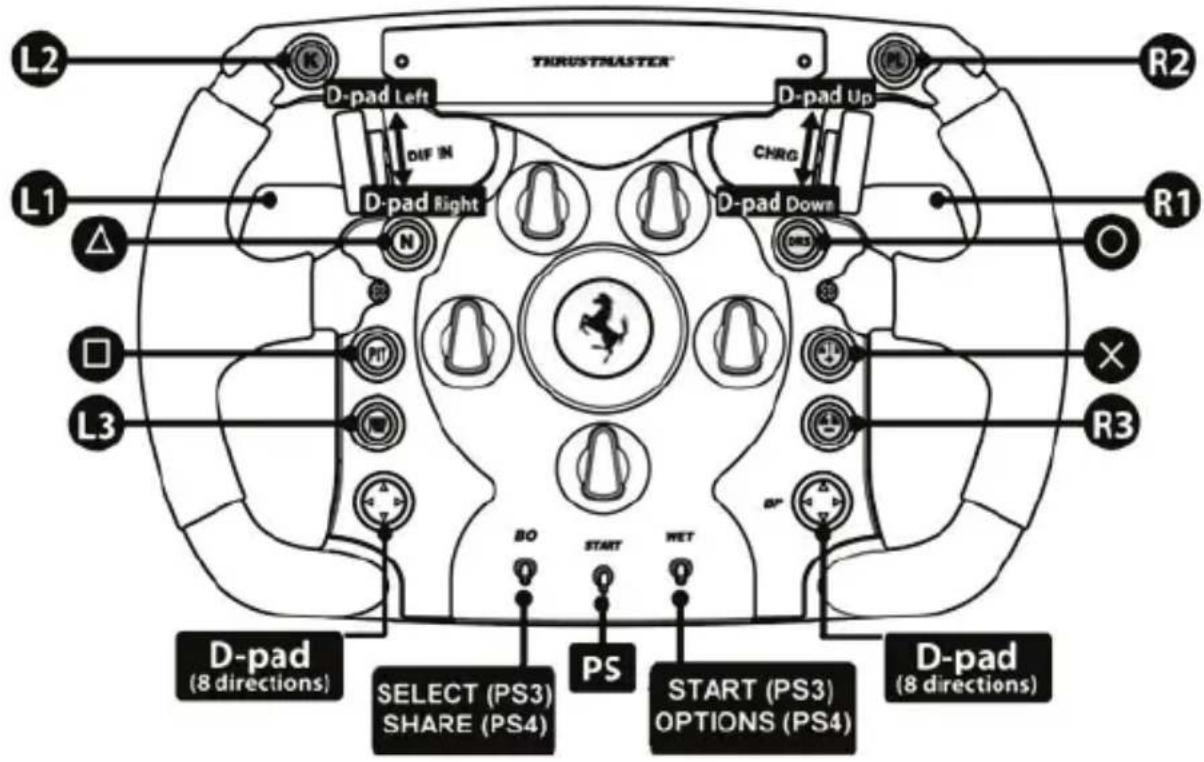
PLAYSTATION®4示意图
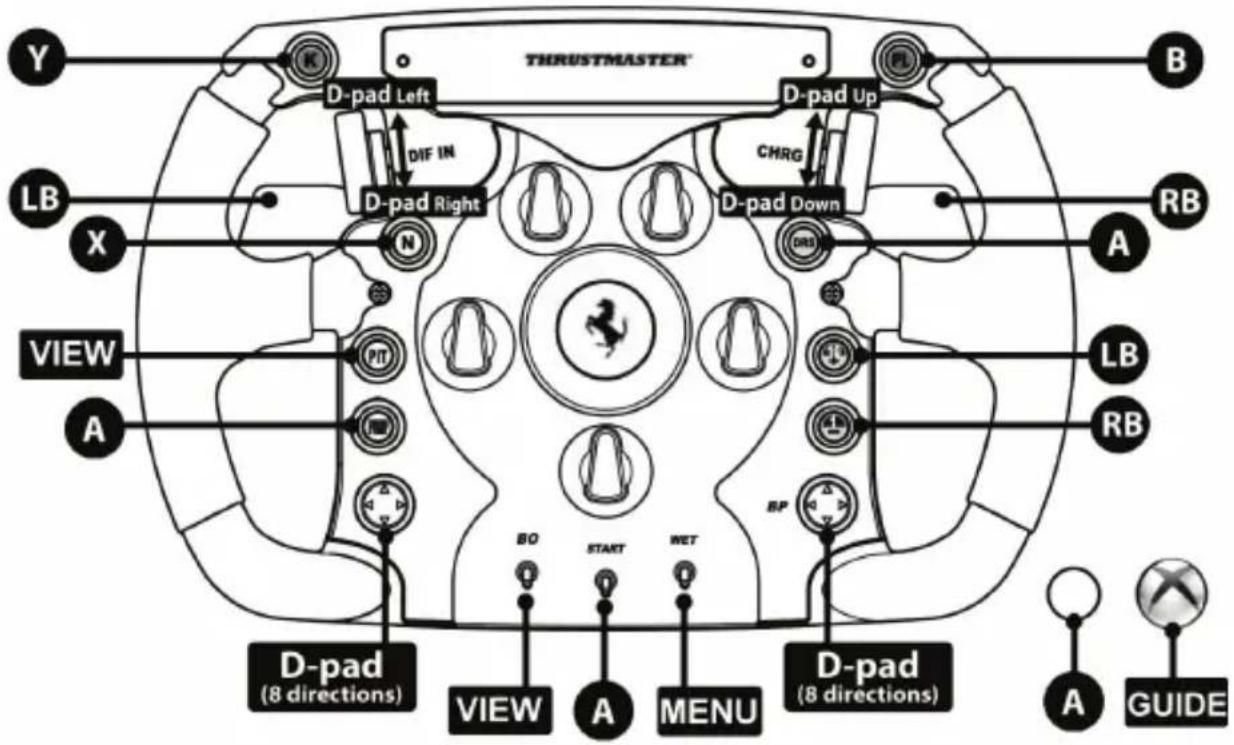
XBOX ONE®示意图
版权所有
ReIgHnHnHnHnHnHnHnHnHnHnHnHnHnHnHnHnHnHnHnHnHnHnHnHnHnHnHnHnHnHnHnHnHnHnHnHnHnHnHnHnHnHnHnHnHnHnHnHnHnHnH
海生五莲将用国
BbIeStKcNtEr:WicckougaiRiKnHs
ReiHnIe HnIeKHe: Wcku wai Kien
KunckTeIe 1000000000000000000000000000000000000000000000000000000000000000000000000000000000000000
PC "NORMAL MODE" MAPPING
(17 programmable functions)
PC "ADVANCED MODE" MAPPING
(29 programmable functions)
PLAYSTATION®4 用
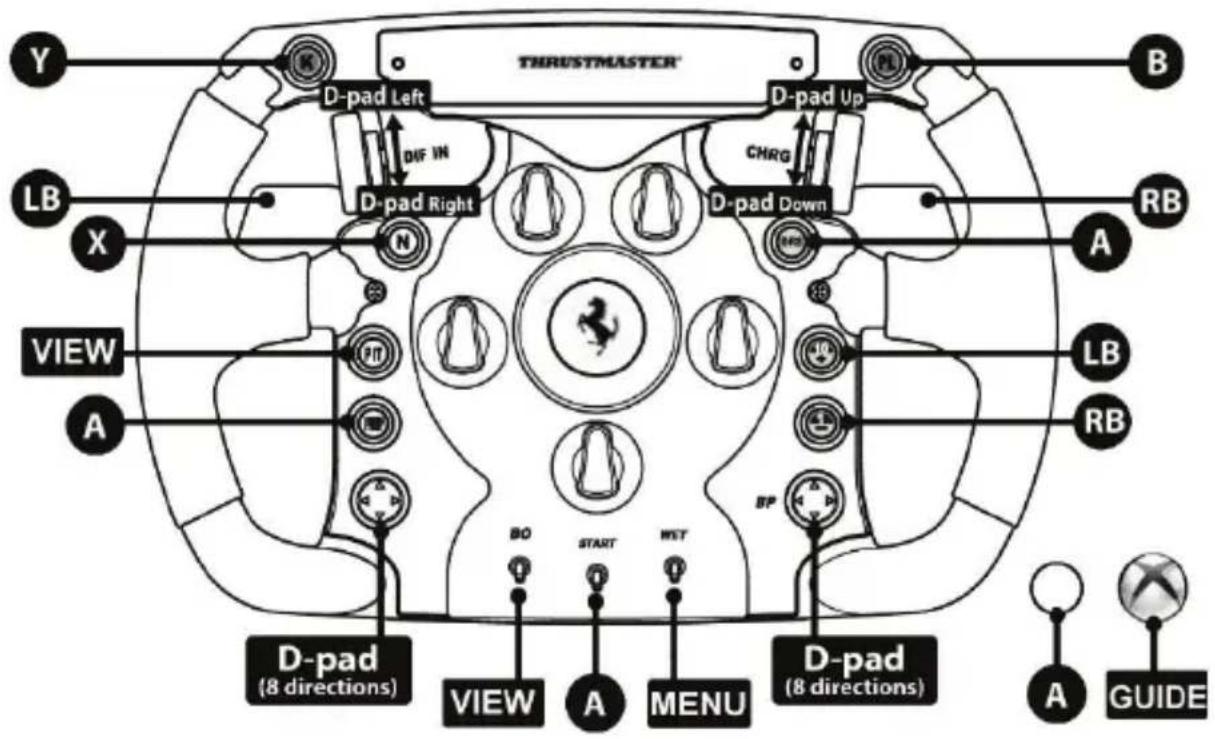
XBOX ONE®
COPYRIGHT
https://support.thrustmaster.com
y
PC "NORMAL MODE" MAPPING
(17 programmable functions)
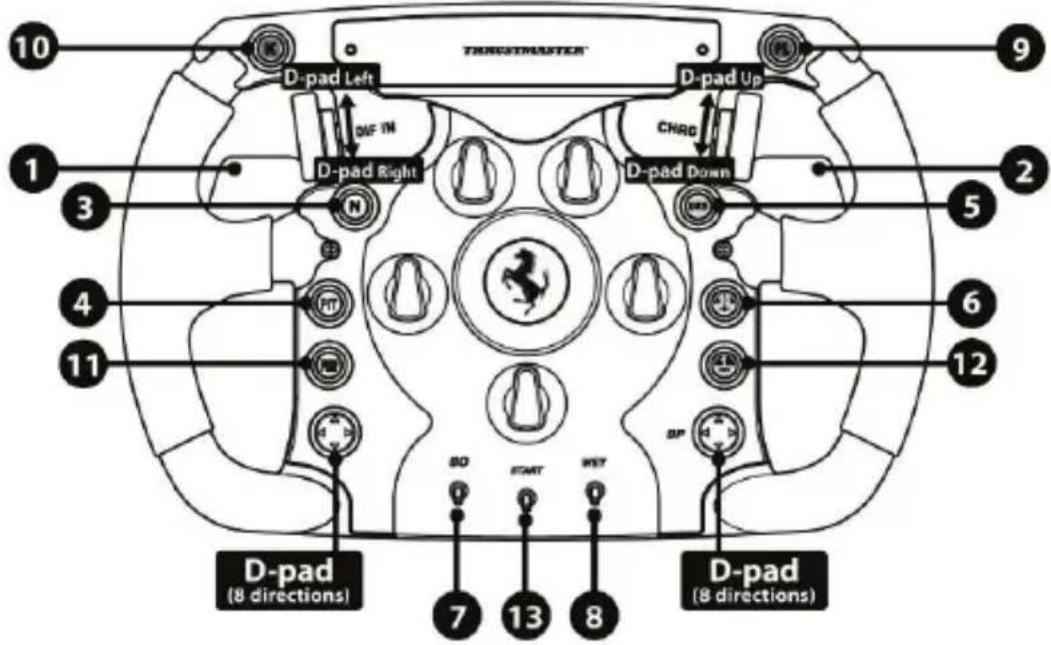
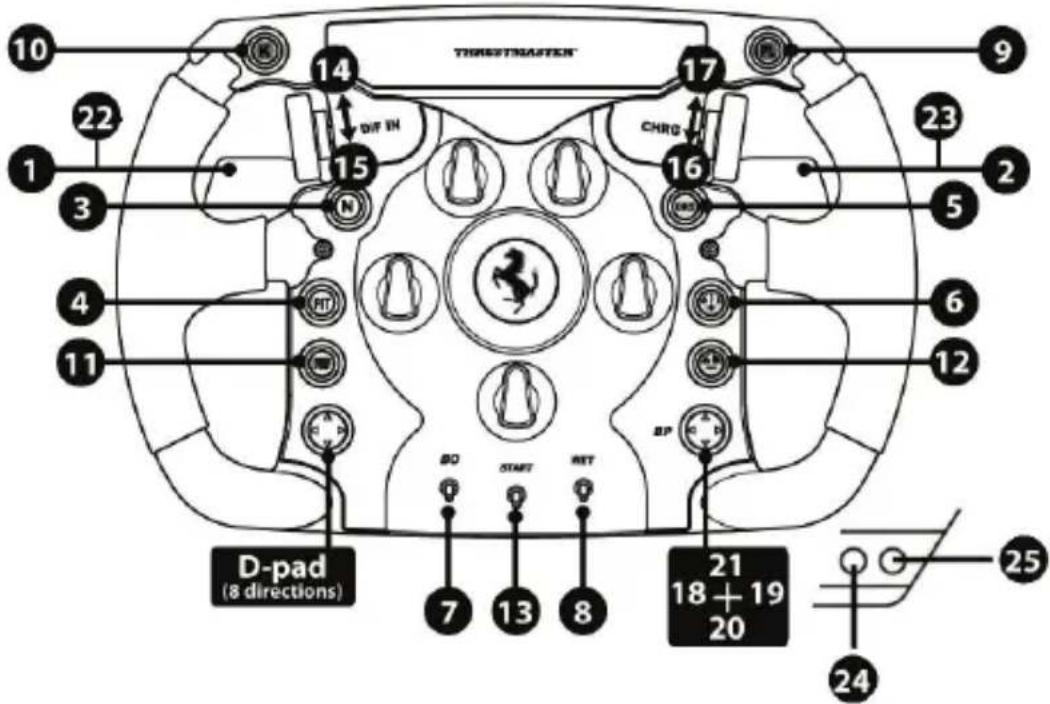
PC "ADVANCED MODE" MAPPING (29 programmable functions)
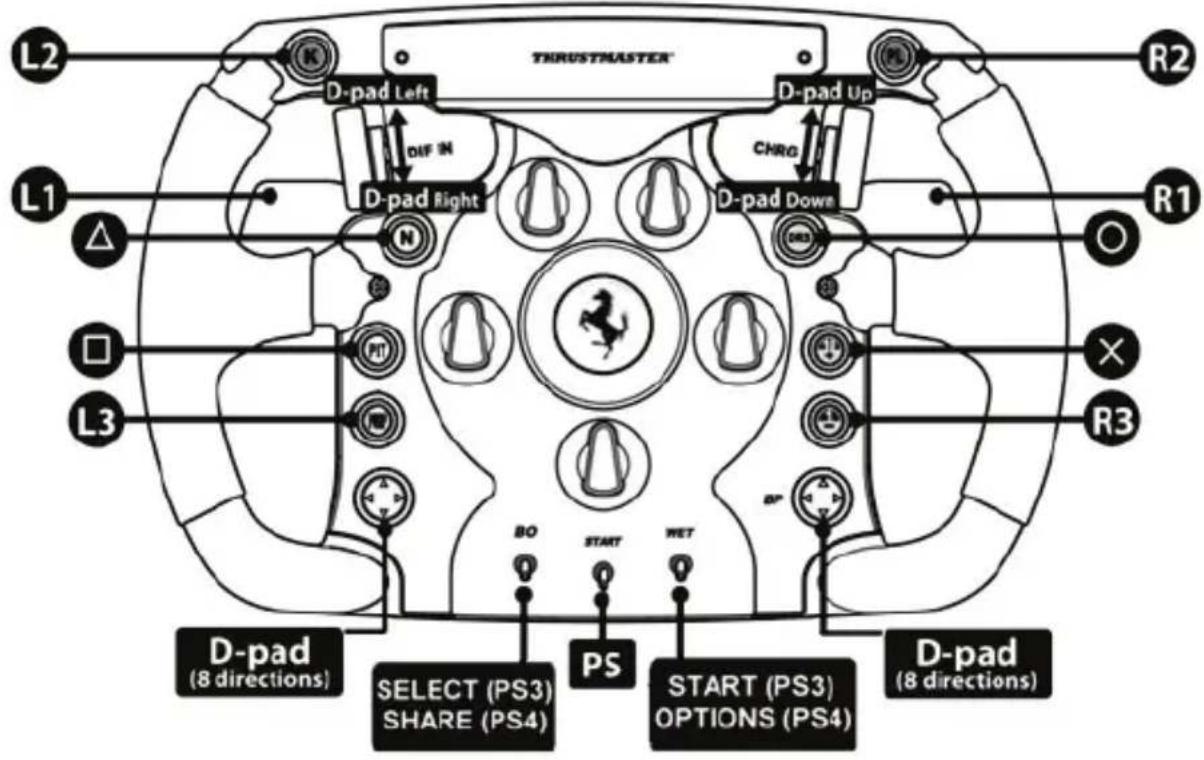
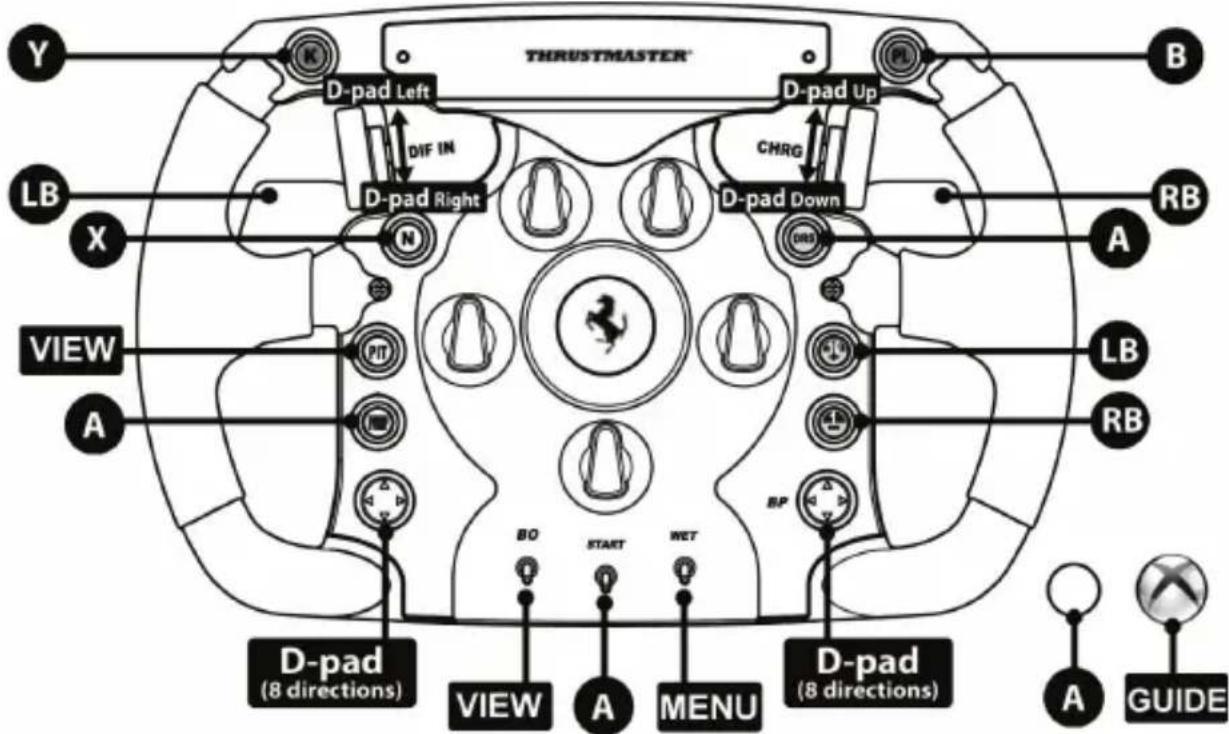
XBOX ON
("Guillemot" p 154, 2007) Guillemot Corporation S.A.
J. G. J. G. J. G. J. G. J. G. J. G. J. G. J. G. J. G. J. G. J. G. J. G. J. G. J. G. J. G. J. G. J. G. J. G. J. G. J. G. J. G. J. G. J. G. J. G. J. G. J. G.
s
Gullemot 10000000000000000000000000000000000000000000000000000000000000000000000000000000000
g
Gullemot (Guillemot) Guillemot Corporation S.A. 45
THRUSTMASTER
http://support.thrustmaster.com

J 1 J 1 J 1 J 1 J 1 J 1 J 1 J 1 J 1 J 1 J 1 J 1 J 1 J 1 J 1 J 1 J 1 J 1 J 1 J 1 J 1 J 1 J 1 J 1 J 1 J 1 J 1 J 1 J 1 J 1 J 1 J 1 J 1 J 1 J
www.thrustmaster.com
L 15

Ferrari F1 Wheel Add-On
PC-MAPPING I "NORMALT LAGE"
www.thrustmaster.com
https://support.thrustmaster.com

Ferrari F1 Wheel Add-On
www.thrustmaster.com
https://support.thrustmaster.com

Ferrari F1 Wheel Add-On
PRE PLAYSTATION®4 - XBOX ONE® - PC
Návod na použitie
INSTALÁCIA VOLANTU NA ZÁKLADÑU
MAPOVANIE NA PC "NORMÁLNY REŽIM"
(17 programovatelnych funkcií)
MAPOVANIE NA PC "POKROČILÍ REŽIM"
(29 programovatelnych funkcií)
MAPOVANIE NA XBOX ONE®
INFORMÁCIE O ZÁRUKE
www.thrustmaster.com
https://support.thrustmaster.com



Ferrari F1 Wheel Add-On
PLAYSTATION®4-hez - XBOX ONE®-hoz - PC-hez
Használati Utmutató
A KORMÁNY FELSZERÉSE AZ ALAPRA
www.thrustmaster.com
https://support.thrustmaster.com

Ferrari F1 Wheel Add-On
LAYSTATION®4-XBOXONE®-PC
unnuh
0'027 nn nnn
ynnn nn nnnnnnnnnnnnnnnnnnnnnnnnnnnnnnnnnnnnnnnnnnnnnnnnnnnnnnnnnnnnnnnnnnnnnnnnnnnnnnnnnnnnnnnnn
Thustmaster Quick Release-n nyu nx yio,nyo nn nynn n7 .ynnn nn nn nn nn
yannnnn nn nnnnnnnnnnnnnnnnnnnnnnnnnnnnnnnnnnnnnnnnnnnnnnnnnnnnnnnnnnnnnnnnnnnnnnnnnnnnnnnnnnnnnnnnnnnnnnnnnnnnnnnnnnnnnnnnnnnnnnnnnnnnn
(wnnnn nn nn nn nn nn
n7 n7 n7 n7 n7 n7 n7 n7 n7 n7 n7 n7 n7 n7 n7 n7 n7 n7 n7 n7 n7
"Jn"PC 17
"ntnn nn" PC 19 (nnon nna n 29)
XBOX ONE® 19m
PLACE DU GRANIER, B.P. - GUILLEMOT CORPORATION S.A "GUILLEMOT" 97143 35571, CHANTEPIE, FRANCE "THRUSTMASTER" (2) "THRUSTMASTER" (1) "THRUSTMASTER" (2) "THRUSTMASTER" (1) "THRUSTMASTER" (1)
nnn (6) n nn nn nn nn nn nn nn nn nn nn nn nn nn nn nn nn nn nn nn nn nn nn nn nn nn nn nn nn nn nn nn nn nn nn nn nn nn nn nn nn nn nn nn nn nn nn nn nn nn nn nn nn nn nn nn nn nn nn nn nn nn nn nn nn nn nn nn nn nn nn nn nn nn nn nn nn nn nn nn nn nn nn nn nn nn nn nn nn nn nn nn nn nn nn nn nn nn
X,nnn nn nnnn Tn 09,nnnn nnnn nn nnnn nnnn nnnn nnnn nnnn nnnn nnnn nnnn nnnn nnnn nnnn nnnn nnnn nnnn nnnn nnnn nnnn nnnn nnnn nnnn nnnn nnnn nnnn nnnn nnnn nnnn nnnn nnnn nnnn nn
n nn nnn nnn nnn nnn nnn nnn nnn nnn nnn nnn nnn nnn nnn nnn nnn nnn nnn nnn nnn nnn nnn nnn nnn nnn nnn nnn nnn nnn nnn nnn nnn nnn nnn nnn nnn nnn nnn nnn nnn nnn nnn nnn nnn nnn nnn nnn nnn nnn nnn nnn nenn nnn nnn nnn nnn nnn nnn nnn nnn nnn nnn nnn nnn nnn nnn nnn nnn nnn nnn nnn nnn nnn nnn nnn nnn nnn nnn nnn nnn nnn nann nn nn nn nn nn nn nn nn nn nn nn nn nn nn nn nn nn nn nn nn nn nn nn nn nn nn nn nn nn nn nn nn nn nn nn nn nn nn nn nn nn nn nn nn nn nn nn nn nn nn nn nn nn nn nn nn nn nn nn nn nn nn nn nn nn nn nn nn nn nn nn nn nn nn nn nn nn nn nn nn nn nn nn nn nn nn nn nn nn nn nn nn nn nn nn nn nn nn nn nn
n nn nnnn nn (1)inn nnnnnnnnnnnnnnnnnnnnnnnnnnnnnnnnnnnnnnnnnnnnnnnnnnnnnnnnnnnnnnnnnnnnnnnnnnnnnnnnnnnnnnnnnnnnnnnnnnnnnnnnnnnnnnnnnnnnnnnnnnnnnnnnnnnnnnnnnnnnnnnnnnnnnnnnnnnnnnnnnnnn nn nn nn nn nn nn nn nn nn nn nn nn nn nn nn nn nn nn nn nn nn nn nn nn nn nn nn nn nn nn nn nn nn nn nn nn nn nn nn nn nn nn nn nn nn nn nn nn nn nn nn nn nn nn nn nn nn nn nn nn nn nn nn nn nn nn nn nn nn nn nn nn nn nn nn nn nn nn nn nn nn nn nn nn nn nn nn nn nn nn nn nn nn nn nn nn nn nn nn nn nrn n n n n n n n n n n n n n n n n n n n n n n n n n n n n n n n n n n n n n n n n n n n n n n n n n n n n n n n n n n n n n n n n n n n n n n n
7)
y
n nn n nn nn nnn nn nn nn nn nn nn nn nn nn nn nn nn nn nn nn nn nn nn nn nn nn nn nn nn nn nn nn nn nn nn nn nn nn nn nn nn nn nn nn nn nn nn nn nn nn nn nn nn nn nn nn nn nn nn nn nn nn nn nn nn nn nn nn nn nn nn nn nn nn nn nn nn nn nn nn nn nn nn nn nn nn nn nn nn nn nn nn nn nn nn nn nn nn nn nn nn
nnnnn nnnn pynnnn nn nnnn GUILLEMOT,nnnnn nn nnnn nn nnnn nnnn nnnn nnnn nnnn nnnn nnnn nnnn nnnn nnnn nnnn nnnn nnnn nnnn nnnn nnnn nnnn nnnn nnnn nnnn nnnn nnnn nnnn nnnn nnnn nnnn nnnn nnnn nnnn nnnn nnnn nnnn nnnn nnnn nn
n nn nnnnnnnnnnnnnnnnnnnnnnnnnnnnnnnnnnnnnnnnnnnnnnnnnnnnnnnnnnnnnnnnnnnnnnnnnnnnnnnnnnnnnnnnnnnnnnnnnnnnnnnnnnnnnnnnnnnnnnnnnnnnnnnnnnnnnnnnnnnnnnnnnnnnn
GUILLEMOT. 777777777777777777777777777777777777777777777777777
Tinn Tinnn n nn nn nn nn nn nn nn nn nn nn nn nn nn nn nn nn nn nn nn nn nn nn nn nn nn nn nn nn nn nn nn nn nn nn nn nn nn nn nn nn nn nn nn nn nn nn nn nn nn nn nn nn nn nn nn nn nn nn nn nn nn nn nn nn nn nn nn nn nn nn nn nn nn nn nn nn nn nn nn nn nn nn nn nn nn nn nn nn nn nn nn nn nn nn nn nn nn nn nn
#
INVINn nnn nn yinn nn nn nn nn nn
.
Tn nn nnnn nn nnnn nn nnnn nn nnnn nn nnnn nn nnnn nn nnnn nn nnnn nn nnnn nn nnnn nn nnnn nn nnnn nn nnnn nn nnnn nn nnnn nn nnnn nn nnnn nn nnnn nn nnnn nn nnnn nn nnnn nn nnnn nn nnnn nn nnnn nn nnnn nn nannn nn nnnn nn nnnn nn nnnn nn nnnn nn nnnn nn nnnn nn

.
n nn nnnn nn nnnnnnnnnnnnnnnnnnnnnnnnnnnnnnnnnnnnnnnnnnnnnnnnnnnnnnnnnnnnnnnnnnnnnnnnnnnnnnnnnnnnnnnnnnnnnnn
1107Xn 77 on 7 n nn n nn n nn n nn nn
www.thrustmaster.com
Tn nnnn nn nnnnnnnnnn


THRUSTMASTER
nnu nn
https://support.thrustmaster.com




- IMPORTANT INFORMATION!
- PC "NORMAL MODE" MAPPING
- PC "ADVANCED MODE" MAPPING
- CONSUMER WARRANTY INFORMATION
- Additional warranty provisions
- Liability
- FCC STATEMENT
- COPYRIGHT
- ENVIRONMENTAL PROTECTION RECOMMENDATION
- Ferrari F1 Wheel Add-On
- INFORMATIONS RELATIVES A LA GARANTIE AUX CONSOMMATEURS
- INFORMAÇÉS SOBRE A GARANTIA PARA O CONSUMIDOR
- www.thrustmaster.com
- YCTAHOBKA PYJIEBOFO KOLECA HA BA3Y
- BAKHHA INHOPMALINIA!
- INSTALACE VOLANTU NA ZÁKLADNU
- SPOTČREBITELSKÉ INFORMACE O ZÁRUCE
- INFORMACJE DOTYCZACE GWARANCJI DLA KCLIENTA
- 将方向盘安装到底座上
- 版权所有
- ReIgHnHnHnHnHnHnHnHnHnHnHnHnHnHnHnHnHnHnHnHnHnHnHnHnHnHnHnHnHnHnHnHnHnHnHnHnHnHnHnHnHnHnHnHnHnHnHnHnHnHnH
- s
- g
- THRUSTMASTER
- PC-MAPPING I "NORMALT LAGE"
- INSTALÁCIA VOLANTU NA ZÁKLADÑU
- MAPOVANIE NA PC "NORMÁLNY REŽIM"
- MAPOVANIE NA PC "POKROČILÍ REŽIM"
- INFORMÁCIE O ZÁRUKE
- A KORMÁNY FELSZERÉSE AZ ALAPRA
- 0'027 nn nnn
- #
Brand : THRUSTMASTER
Model : Ferrari F1 Wheel AddOn
Category : Controller