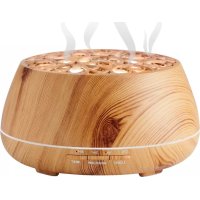
BTA01 - Aroma diffuser BIGBEN INTERACTIVE - Free user manual and instructions
Find the device manual for free BTA01 BIGBEN INTERACTIVE in PDF.

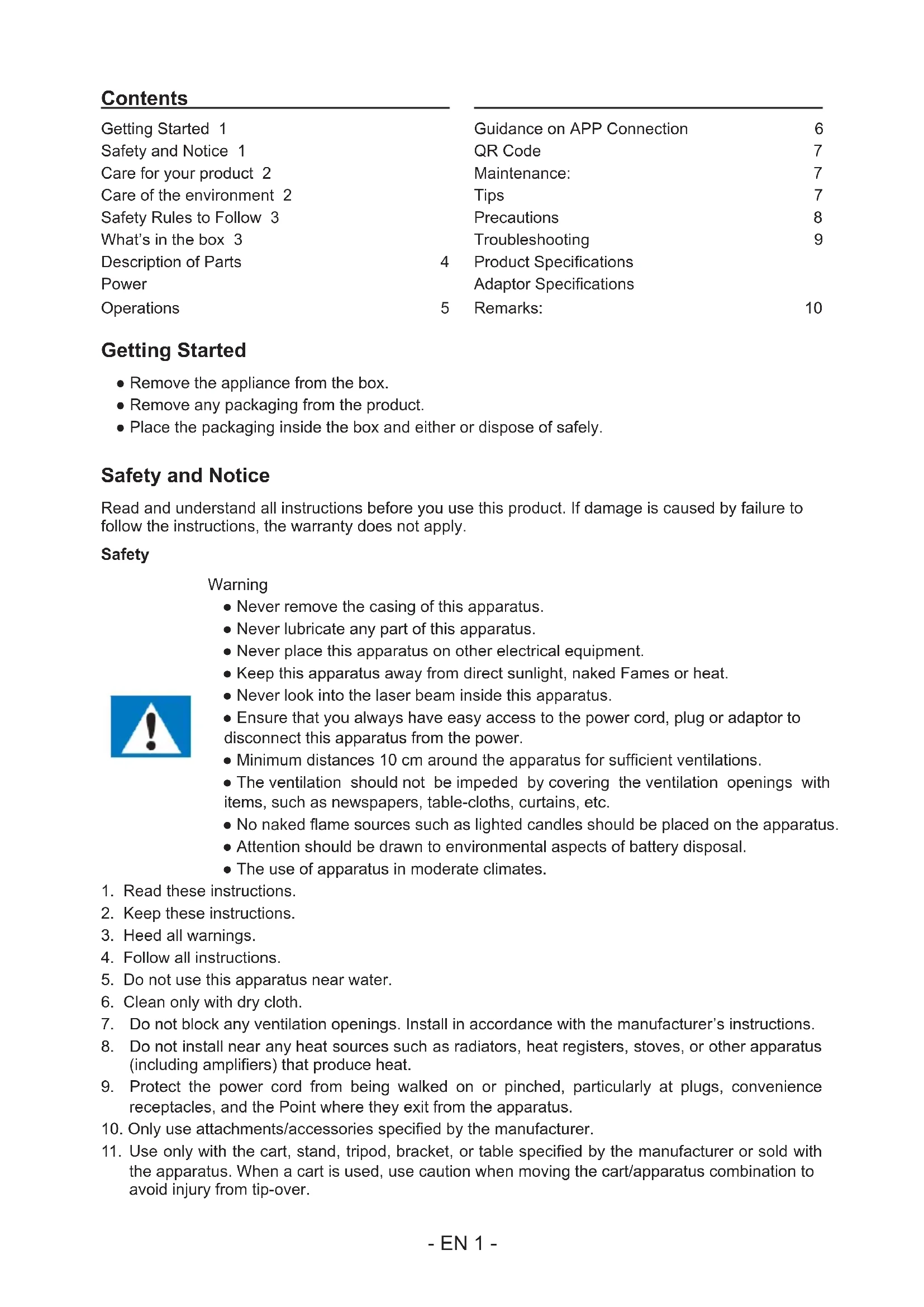


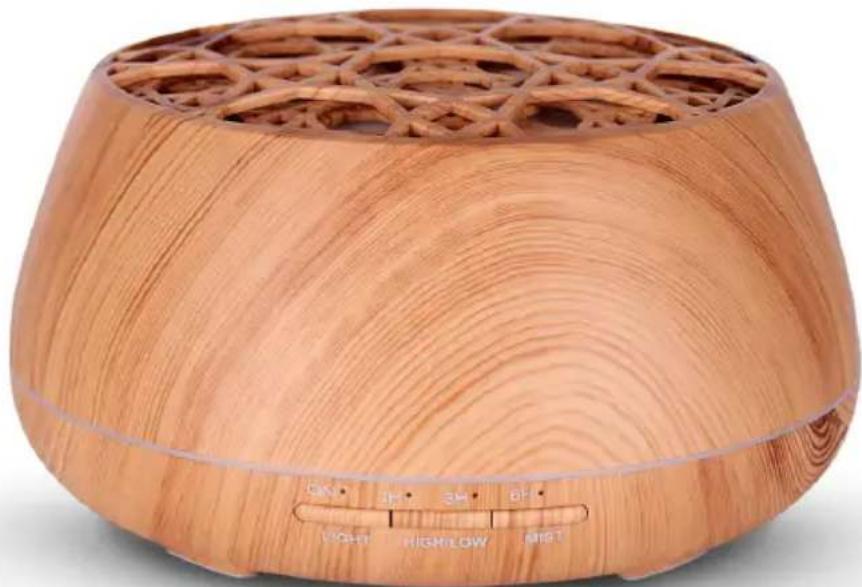
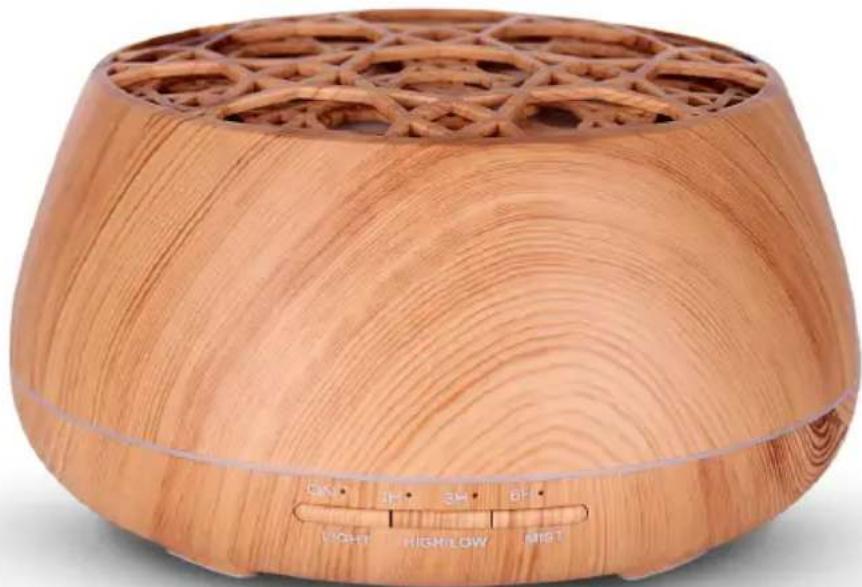
| Product type | Ultrasonic aroma diffuser with Bluetooth speaker |
| Brand | Bigben Interactive |
| Model | BTA01 |
| Dimensions (L x W x H) | 178 x 178 x 97 mm |
| Weight | Approximately 413 g |
| Water tank capacity | 400 ml |
| Power supply | AC adapter 100-240 V, output 24 V 500 mA |
| Power consumption | 7 W |
| Ultrasonic frequency | 2.4 MHz |
| Mist modes | High, low, intermittent (30 s on / 30 s off) |
| Timer | Continuous, 1 h, 3 h, 6 h, custom |
| LED lighting | 7 colors with automatic change or fixed on one color |
| Connectivity | Bluetooth (pairing name: Aromamusic), mobile app Aroma 31 |
| App compatibility | iOS 9.0+ / Android 4.3+ |
| Automatic shut-off | When water runs out or after 10 min of inactivity (standby) |
| Materials | PP (polypropylene) and ABS |
| Maintenance | Clean after 5 to 6 uses with a damp cloth and mild detergent |
| Package contents | Main unit, AC adapter, user manual, measuring cup |
| Safety | Do not use without water; do not expose to heat; follow essential oil usage precautions |
| Usage precautions | Read safety instructions before use; do not use for children under 8, pregnant or nursing women without medical advice |
Frequently Asked Questions - BTA01 BIGBEN INTERACTIVE
User questions about BTA01 BIGBEN INTERACTIVE
0 question about this device. Answer the ones you know or ask your own.
Ask a new question about this device
Download the instructions for your Aroma diffuser in PDF format for free! Find your manual BTA01 - BIGBEN INTERACTIVE and take your electronic device back in hand. On this page are published all the documents necessary for the use of your device. BTA01 by BIGBEN INTERACTIVE.
USER MANUAL BTA01 BIGBEN INTERACTIVE
MODE D'EMPLOI
LISEZ COMPLÈTEMENT CE MANUEL D'UTILISATION AVANT D'UTILISER CET APPAREIL ET CONSERVEZ CE LIVRET POUR VOUS Y RÉFÉRER ULTÉRIEUREMENT
Table des matières

Continuous / Intermittent mist

Colorful lights

Timer

Music
EN : https://www.bigben-interactive.co.uk/support/

Fabricant : Bigben Interactive FRANCE
- Rue de la Voyette, C.R.T. 2 Fretin.
CS 90414 - 59814 LESQUIN Cedex, France
BELGIQUE/NEDERLAND, customerservice@bigben-interactive.be
klantenservice@bigben-interactive.nl
ESPAÑA, sat@bigbeninteractive.es
ITALIA, support@bigbeninteractive.it
www.bigben.eu
bigben®
BTA01
BLUETOOTH AROMA DIFFUSER
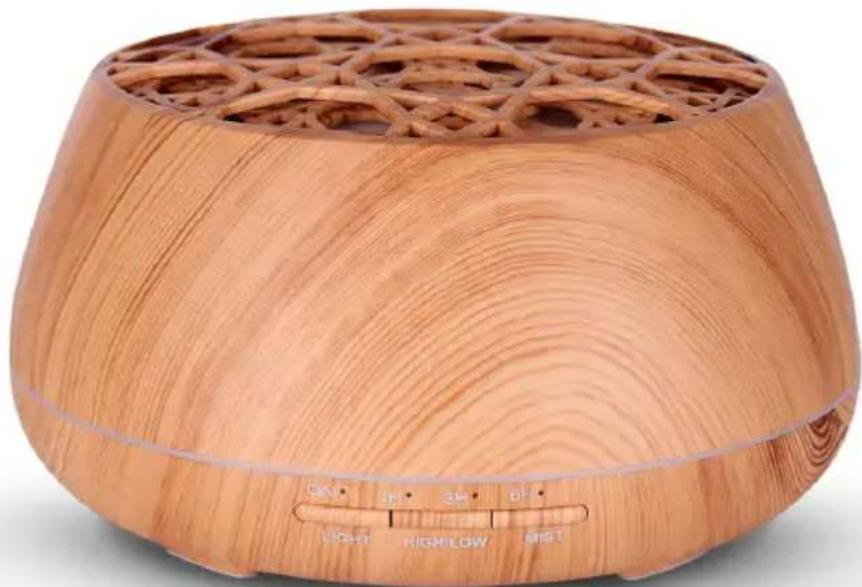
OPERATING INSTRUCTIONS
PLEASE READ THIS USER MANUAL CAREFULLY BEFORE
OPERATING THIS UNIT AND RETAIN FOR
FUTURE REFERENCE
Contents
| Getting Started 1 | Guidance on APP Connection | 6 | |
| Safety and Notice 1 | QR Code | 7 | |
| Care for your product 2 | Maintenance: | 7 | |
| Care of the environment 2 | Tips | 7 | |
| Safety Rules to Follow 3 | Precautions | 8 | |
| What's in the box 3 | Troubleshooting | 9 | |
| Description of Parts | 4 | Product Specifications | |
| Power | Adaptor Specifications | ||
| Operations | 5 | Remarks: | 10 |
Getting Started
- Remove the appliance from the box.
- Remove any packaging from the product.
- Place the packaging inside the box and either or dispose of safely.
Safety and Notice
Read and understand all instructions before you use this product. If damage is caused by failure to follow the instructions, the warranty does not apply.
Safety
Warning
- Never remove the casing of this apparatus.
- Never lubricate any part of this apparatus.
- Never place this apparatus on other electrical equipment.
- Keep this apparatus away from direct sunlight, naked Fames or heat.
- Never look into the laser beam inside this apparatus.
- Ensure that you always have easy access to the power cord, plug or adaptor to disconnect this apparatus from the power.
- Minimum distances 10 cm around the apparatus for sufficient ventilations.
- The ventilation should not be impeded by covering the ventilation openings with items, such as newspapers, table-cloths, curtains, etc.
- No naked flame sources such as lighted candles should be placed on the apparatus.
- Attention should be drawn to environmental aspects of battery disposal.
-
The use of apparatus in moderate climates.
-
Read these instructions.
- Keep these instructions.
- Heed all warnings.
- Follow all instructions.
- Do not use this apparatus near water.
- Clean only with dry cloth.
- Do not block any ventilation openings. Install in accordance with the manufacturer's instructions.
- Do not install near any heat sources such as radiators, heat registers, stoves, or other apparatus (including amplifiers) that produce heat.
- Protect the power cord from being walked on or pinched, particularly at plugs, convenience receptacles, and the Point where they exit from the apparatus.
- Only use attachments/accessories specified by the manufacturer.
- Use only with the cart, stand, tripod, bracket, or table specified by the manufacturer or sold with the apparatus. When a cart is used, use caution when moving the cart/apparatus combination to avoid injury from tip-over.

- Unplug this apparatus during lightning storms or when unused for long periods of time.
- Refer all servicing to qualified service personnel. Servicing is required when the apparatus has been damaged in anyway, such as power-supply cord or plug is damaged, liquid has been spilled or objects have fallen into the apparatus, apparatus has been exposed to rain or moisture, does not operate normally, or has been dropped.
- Apparatus shall not be exposed to dripping or splashing.
- Do not place any sources of danger on the apparatus (e.g. liquid filled objects, lighted candles).
- Where the MAINS plug (or AC/DC adaptor) or an appliance coupler is used as the disconnect device, the disconnect device shall remain readily operable.
- Make sure there is enough free space around the product for ventilation.
- Batteries (battery pack or batteries installed) shall not be exposed to excessive heat such as sunshine, fire or the like.
- The rating label is placed on the bottom side of apparatus.
Care for your product
- Always unplug the appliance when not in use and before cleaning.
- Do not play music at excessive volume levels as damage to hearing and or the equipment may occur.
- Do not use this unit in wet or damp conditions.
- Always disconnect the unit from the mains power supply before cleaning. Clean the appliance with a soft, damp, lint free cloth. Do not use abrasives or harsh cleaners.
Care of the environment

Your product is designed and manufactured with high quality materials and components, which can be recycled and reused.
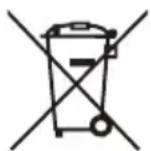
Your product contains batteries covered by the European Directive 2006/66/EC, which cannot be disposed with normal household waste. Please inform yourself about the local rules on separate collection of batteries because correct disposal helps to prevent negative consequences for the environmental and human health.
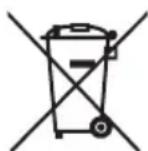
When this crossed-out wheeled bin symbol is attached to a product it means that the product is covered by the European Directive 2002/96/EC. Please inform yourself about the local separate collection system for electrical and electronic products. Please act according to your local rules and do not dispose of your old products with your normal household waste. Correct disposal of your old product helps to prevent potential negative consequences for the environment and human health.
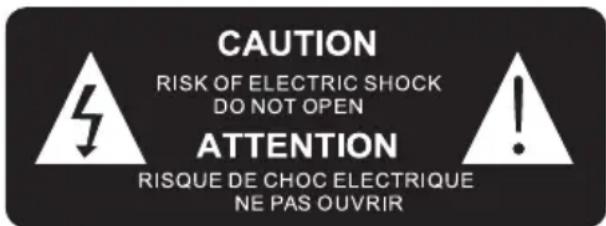
The lightning symbol inside an equilateral triangle warns the user of the presence inside the product of uninsulated hazardous electric voltages powerful enough to represent an electrocution risk.
CAUTION:
The use of essential oils can entail risks and requires prior advice from a specialist or medical professional prior to any use; some essential oils cannot be diffused; in addition, some essential oils, depending on their directions for use, are forbidden for use for pregnant women, infants and children.
Safety Rules to Follow
Observe the following instructions:
- If in doubt or in the case of prolonged use, ask your physician or chemist for advice.
- Never exceed the doses and do not change the method of use as outlined on each product's recipe sheet.
- Do not use essential oils with children under 8 years old or pregnant or breastfeeding women.
- Never replace one essential oil by another.
- Do not use essential oils without seeking medical advice if are following a treatment regimen. The active ingredients in essential oils can interact with some medications.
-
Do not use essential oils taken orally without medical advice (In the event of accidental ingestion, quickly contact a poison control centre and seek medical attention).
-
Only use 100% natural essential oils (never synthetic essential oils).
-
Do not improvise your own blends.
-
Keep your essential oils properly closed and out of children's reach. To ensure their safety, never remove the orifice reducer from the essential oil bottles.
-
Do not bring essential oils close to a flame or heat source.
-
Do not apply essential oils in the nose or auditory canal.
-
Generally speaking, do not use with elderly persons or individuals who suffer from epilepsy or convulsions.
-
Essential oils are insoluble in water. Dilute them in vegetable oil or use a dispersant to dilute them in water to prevent the risk of burns.
-
IN CASE OF CONTACT WITH EYES: essential oils must not be applied on the eyes, around the eyes or in the ears. Always thoroughly wash your hands after a massage using essential oils, to prevent situations where you would rub your eyes and irritate them due to having fingers covered with essential oils. In case of contact, rinse eyes under running water for 2 minutes, then apply a vegetable oil compress. Apply some saline solution or artificial tears, if necessary. Quickly seek medical attention.
-
DERMOCAUSTICITY: Some essential oils are more aggressive than others for the skin and mucous membranes. Generally speaking, essential oils must never be used in pure form on the skin, let alone the mucous membranes (It is essential to seek your physician's advice before undertaking any application of pure essential oils).
-
ALLERGIES: for those whose range of allergies is known, allergic reactions may (rarely) be triggered by some essential oils. Always conduct a preliminary test on a small section of skin (never using a pure essential oil). In the case of an allergy to a substance, never use essential oils belonging to the same family. If in doubt, consult your physician. If you are subject to respiratory or asthmatic allergies, avoid directly inhaling diffusions of essential oils.
-
PHOTOTOXICITY: some essential oils, such as those extracted from plants or citrus fruits (angelica, bergamot, celery, lemon, lime, khella, lovage, mandarin, orange, blood orange, grapefruit, verbena, etc.), owing to the presence of furocoumarins in their composition, are photosensitising agents. After applying these oils, stay out of the sun or UV rays for 6 hours.
What's in the box
Check and identify the contents of your package:
- Main unit
- AC adaptor
- User manual
• Water measuring cup
Description of Parts
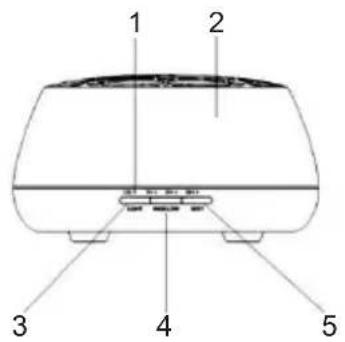
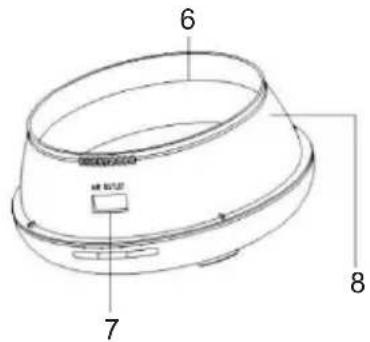
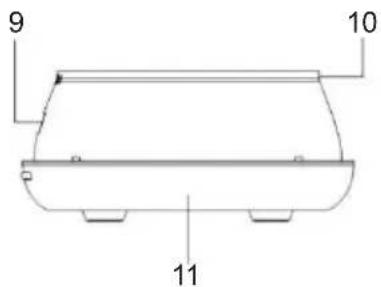
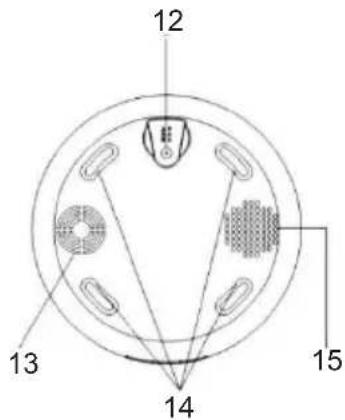
-
LED Indicator
-
Cover
-
Light
-
High/Low
-
Mist/ Select timer (long press to turn off)
-
Max line
-
Air outlet
-
Water tank
-
Air outlet
-
Drainage outlet
-
Base
-
DC socket
-
Air intake
-
Feet
-
Speaker
Power
CAUTION

- Risk of product damager! Make sure that the power voltage corresponds to the voltage printed on the back label.
- Risk of electric shock! When you unplug the AC power cord always pull the plug from the socket. Never pull the cord.
- Before connecting the AC power cord, ensure you have completed all other connections.
Place the unit in the desired position and unravel the mains cable. Insert the cable into the supply socket and switch on if applicable.
Auto standby
When playing media from a connected device, the Tower automatically switches to standby if:
- No button is pressed for 10 minutes,
- No audio from a connected device for 10 minutes.

Note the following information: Only use the power supplies listed below.
Operations
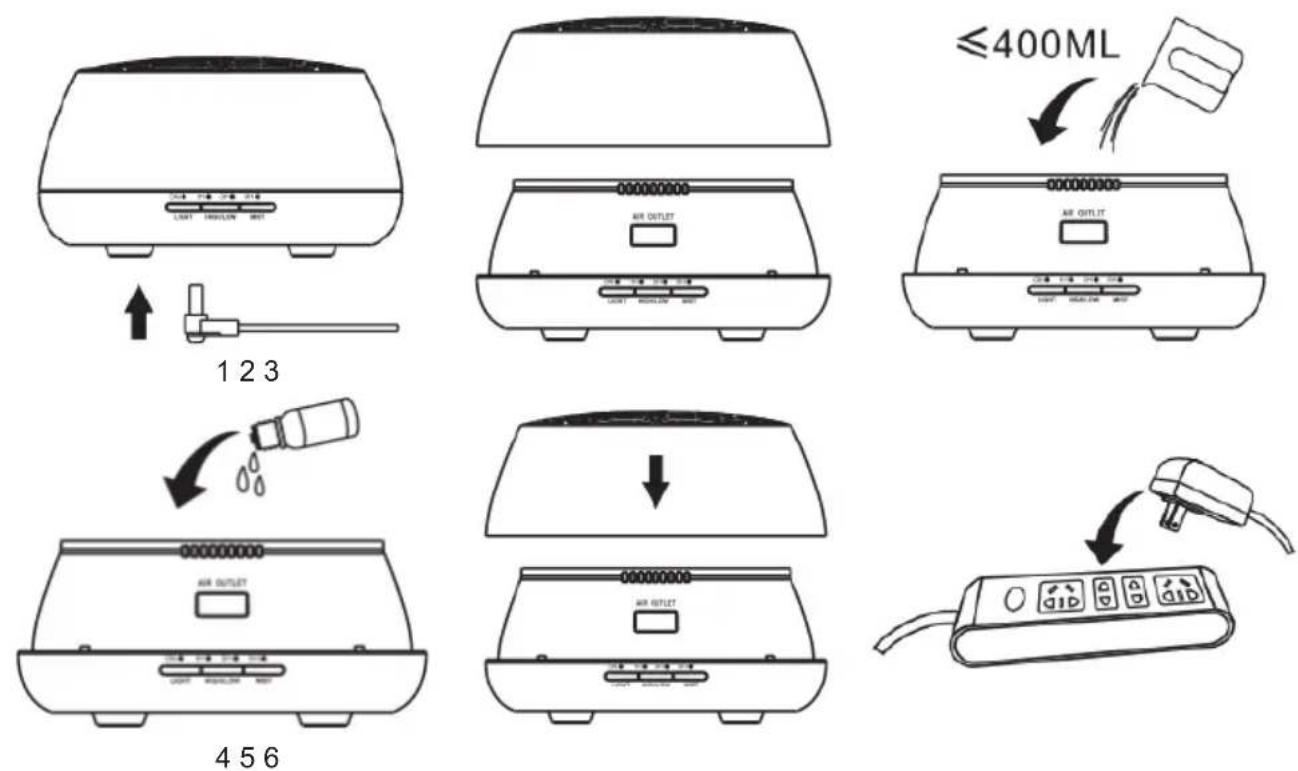
- Connect the DC port to the DC slot of the base.
- Take off the cover.
- Add water to the tank, without exceeding the max 400 ml mark.
- Add some essential oils into the water (2-3 drops per 100 ml).
- Re-install the cover.
- Connect the AC adaptor to the power socket.
1. MIST timer:
First, press MIST button; the apparatus enters high mist mode with "ON" continuous mist option.
Keep pressing to move to 1H/3H/6H/OFF.
A long press for 2 s will turn off the unit in any mode.
2. HIGH / LOW mist level:
PRESS "HIGH / LOW" button:
1 time "Dee" sound: High mist.
2 times "Dee" sound: Low mist.
3 times "Dee" sound: Intermittent mist (run for 30 s, pause for 30 s, repeat cycle).
3. LIGHT control:
First press the "LIGHT" button; the 7 LED colours will change automatically.
Second press: pause on current colour.
Third press: move to next colour and each colour may toggle between bright and dim mode. When power is connected, LIGHT can work on its own.
Guidance on APP Connection
- Please scan the QR Code provided in the manual, then install the APP as per instructions.
- Turn on Bluetooth and connect to device. Music may then be played.
Bluetooth music pairing name: Aromamusic
APP: Pairing name "Aroma 31"

ON/OFF

High/Low mist

Continuous / Intermittent mist

Colorful lights

Timer

Music
 | High/Low mist |
 | Continuous/Intermittent mist mode (Work for 30 s, pause for 30 s, repeat cycle) |
 | Colour set mode/ colour auto change mode |
 | Timer setting: 1H /3H/6H/Customize |
 | Music player |
Note: IOS system version must be 9.0 or above. Android system version must be 4.3 or above.
QR Code

This product is compatible with applications currently available on IOS and Android platforms.
Maintenance:
After 5-6 uses or 3-5 days of use, please clean the product as follows:
- Turn off the power and disconnect the DC adaptor.
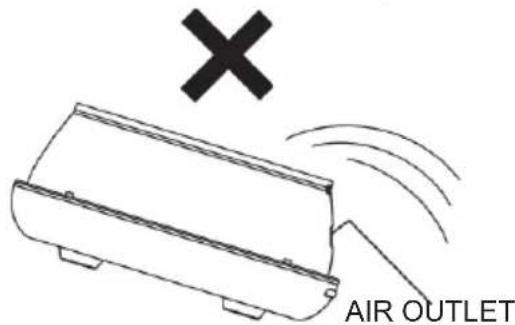
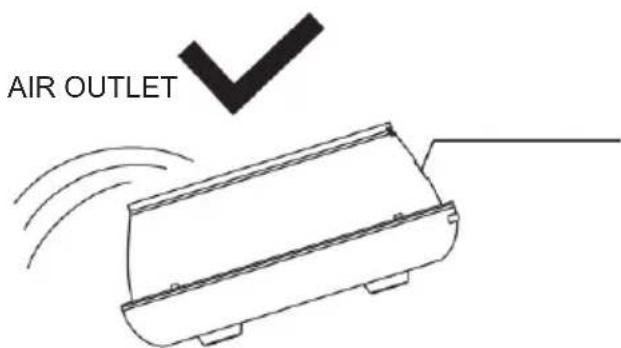
- Fully pour out any water remaining in the tank. Do not pour out water from the air outlet side. (Fig.1)
-
Put a small amount of detergent diluted in the water. Then, using a clean cloth, dip into the water and gently wipe up the unit. If there is any dirt on the inner side of tank, please clean it.
-
Never use a medical diluent or alcohol during maintenance. Doing so may cause product damage and erase various signs on the product.
Note: Please use neutral detergents.
Tips
- Please use another container to add water. Do not run a water tap directly into the tank.
- Pure essential oils or water-soluble oils are available for use. Please clean the unit as per the maintenance instructions before changing to a new type of essential oil.
- It is quite normal for different humidity environments and temperatures to affect the mist density.
- Do not allow the mist to directly spray into furniture, clothes or walls.
- The essential oils may cause dyeing. Please use a clean cloth to wipe up in the event of accidental spillage.
- To ensure sanitary use, please completely pour out the water and wipe the unit with a soft cloth after each use.
- If the unit will not be in use for an extended period, please completely pour out any water remaining in the tank and store the unit in a dry place.
- When unit connects to the power supply, the unit's default state is OFF.
- Whenever there is a shortage of water in the tank, even if the unit is connected to the power supply, it will shut down automatically, with all functions turned off.
Precautions
Please carefully read the following safety precautions prior to using this unit. The safety precautions listed below are intended to protect you and others from injury or to prevent damage to the product.
Warning: This product may cause serious personal injury.
- Please keep the unit away from children and babies; having the power cord mistakenly wind around a child's neck may lead to death by suffocation.
- Please use this unit's standard adaptor.
- Please do not attempt to dismantle, modify or heat the unit.
- Endeavour to prevent damage to the unit due to falls or heavy impacts.
- If the unit produces smoke or an improper odour, or is operating abnormally, please stop using it immediately.
- Do not touch any part of the unit with wet hands.
- Do not allow metal objects (e.g. pin, key) to come into contact with the terminals or plug. Do not cut, damage or modify the power cord nor put the weight on the power cord. Such improper use may result in electric shock or fire.
- Attention: May cause product damage.
- Do not allow liquids or foreign materials to enter the unit. Such improper use may cause irreparable damage to the unit.
- Please unplug the unit when not in use.
- Do not cover any part of the unit when it is in operation.
- Please place the unit in a safe place such that people will not trip over the power cord, as this could lead to personal injury or damage to the unit.
- Avoid using the unit in the following locations:
- Direct sunlight, high temperature areas or wet, dusty places.
- Keep away from electronic equipment: such as TVs and audio equipment. Keep away from strong vibrations.
Troubleshooting
| If the unit stops working, please refer to the sheet below. | |
| Units fails to turn on | Is there enough water in the tank?- If not, add water to the tank.Is the power cord connected properly?- If not, disconnect cords, check them and re-connect carefully.Does the water amount exceed the MAX line?- If so, reduce the water amount and ensure it is below the MAX line. |
| Turns off suddenly during operation | Does the water amount exceed the MAX line?- If so, reduce the water amount and ensure it is below MAX line. |
| No mist or abnormal mist | Not enough water or too much water?- Add water to the tank, but do not fill over the 400 ml MAX line.Is there dirt on the ultrasonic atomiser?- Please refer to maintenance instructions to clean the unit.Is there too much dirt on the air intake?- Please use the brush to clean the air intake. |
| Water leakage from product | Low temperature or high humidity?- Under these conditions, the mist may condense quickly into water droplets. Please wipe them up. |
Product Specifications
Unit size: 178*178*97mm
Unit weight: Approx. 413g
Power: Input/Output AC100-240V 50/60HZ / DC 24V 500MA
Adaptor cable length: Approx. 150cm
Electrical consumption: Approx. 7W
Timer: ON/1H/3H/6H/Customise
Mist mode: High mist mode/ Low mist mode/ Intermittent mist mode
Water capacity: 400ML
Material: PP / ABS
Ultrasonic vibration: 2.4MHz
Bluetooth music pairing name: Aromamusic
APP: Pairing name "Aroma 31"
Adaptor Specifications
Input: 100-240V-50/60Hz 0.35A
Output: 24.0V-0.5A
Cable length: Approx. 1.5cm
Remark: The maximum connection distance is around 10 meters. Please place your Bluetooth speaker as close as possible to this device to avoid connection getting disturbed.
Remarks:
- Don't discard the electrical and electronic appliances in the regular waste disposal.
a) Take them to a collection point.
b) Some components in these appliances may be hazardous to health and the environment.

- In order to save energy when the unit has no sound output for a while, the unit will be switched to stand-by automatically. It can be switched ON by using the POWER selector again.
- If there is an incoming call while BTA01 is connected to your cell phone for music playback, it will pause at once when you answer the call and resume after the call ended. (Sometimes it will pause after end the call, it depend on your cell phone.)
- The Bluetooth® word, mark and logo are registered trademarks owned by Bluetooth SIG, Inc. and any use of such marks by Bigben Interactive is under license. Other trademarks and trade names are those of their respective owners.
-
Hereby, Bigben Interactive SA, declares that the BTA01 device complies with the essential requirements of the directive 1995/5/EC of the European Parliament and of the Council of 9 March 1999 on radio equipment and telecommunications terminal equipment and the mutual recognition of their conformity.
-
The NFC™ Mark is a trademark of NFC Forum, Inc. in the United States and in other countries.
- You can find the information on the plate located at the back of the unit.
The undersigned, Bigben Interactive declares that the radio equipment of the BTA01 type complies with the 2014/53/EU directive.
To download the full statement, please visit our website:
EN: https://www.bigben-interactive.co.uk/support/
DE: https://www.bigben-interactive.de/support/
ES: https://www.bigbeninteractive.es/asistencia-tecnica/
IT: https://www.bigbeninteractive.it/supporto-tecnico/
OTHER LANGUAGES: https://www.bigbeninteractive.com/support/
and the section <
Manufactured by BIGBEN INTERACTIVE SA
396, Rue de la Voyette
CRT2 - FRETIN
CS 90414
59814 LESQUIN Cedex - France
www.bigben.eu
Made in China






REACH
2017年1月1日

Fabricant : Bigben Interactive FRANCE
- Rue de la Voyette, C.R.T. 2 Fretin,
CS 90414 - 59814 LESQUIN Cedex, France
Continuous / Intermittent mist

Colorful lights

Timer

Music
EN: https://www.bigben-interactive.co.uk/support/
DE: https://www.bigben-interactive.de/support/
ES: https://www.bigbeninteractive.es/asistencia-tecnica/
IT: https://www.bigbeninteractive.it/supporto-tecnico/
OTROS IDIOMAS: https://www.bigbeninteractive.com/support/ y el apartado <

Fabricant : Bigben Interactive FRANCE
- Rue de la Voyette, C.R.T. 2 Fretin.
CS 90414 - 59814 LESQUIN Cedex, France
BELGIQUE/NEDERLAND, customerservice@bigben-interactive.be
klantenservice@bigben-interactive.nl
ESPAÑA, sat@bigbeninteractive.es
ITALIA, support@bigbeninteractive.it
www.bigben.eu
bigben®
IT
BTA01
DIFFUSORE DI AROMI BLUETOOTH
ISTRUZIONI D'USO
PRIMA DI UTILIZZARE L'APPARECCHIO, LEGGERE PER INTERO IL PRESENTE MANUALE E CONSERVARLO PER CONSULTAZIONI FUTURE.
Indice

Continuous / Intermittent mist

Colorful lights

Timer

Music
EN: https://www.bigben-interactive.co.uk/support/
DE: https://www.bigben-interactive.de/support/
ES: https://www.bigbeninteractive.es/asistencia-tecnica/
IT: https://www.bigbeninteractive.it/supporto-tecnico/
[Unreadable due to extreme blurriness]

Fabricant : Bigben Interactive FRANCE
- Rue de la Voyette, C.R.T. 2 Fretin.
CS 90414 - 59814 LESQUIN Cedex, France
BELGIQUE/NEDERLAND, customerservice@bigben-interactive.be
klantenservice@bigben-interactive.nl
ESPAÑA, sat@bigbeninteractive.es
ITALIA, support@bigbeninteractive.it
www.bigben.eu
bigben®
BTA01
DIFUSOR DE AROMAS BLUETOOTH
Continuous / Intermittent mist

Colorful lights

Timer

Music
EN: https://www.bigben-interactive.co.uk/support/
DE: https://www.bigben-interactive.de/support/
ES: https://www.bigbeninteractive.es/asistencia-tecnica/
IT: https://www.bigbeninteractive.it/supporto-tecnico/
OUTRAS LÍNGUAS: https://www.bigbeninteractive.com/support/

Fabricant : Bigben Interactive FRANCE
- Rue de la Voyette, C.R.T. 2 Fretin,
CS 90414 - 59814 LESQUIN Cedex, France
BELGIQUE/NEDERLAND, customerservice@bigben-interactive.be
klantenservice@bigben-interactive.nl
ESPAÑA, sat@bigbeninteractive.es
ITALIA, support@bigbeninteractive.it
www.bigben.eu
bigben®
BTA01
BLUETOOTH-DUFTLAMPE
BEDIENUNGSANLEITUNG
Continuous / Intermittent mist

Colorful lights

Timer

Music
(EIN/1 STD./3 STD./6 STD/Anpassen)
Nebelmodus: Viel Nebel / Wenig Nebel / Intervall-Nebel
DE: https://www.bigben-interactive.co.uk/support/
DE: https://www.bigben-interactive.de/support/
ES: https://www.bigbeninteractive.es/asistencia-tecnica/
IT: https://www.bigbeninteractive.it/supporto-tecnico/
WEITERE SPRACHEN: https://www.bigbeninteractive.com/support/

Fabricant : Bigben Interactive FRANCE
- Rue de la Voyette, C.R.T. 2 Fretin.
CS 90414 - 59814 LESQUIN Cedex, France
BELGIQUE/NEDERLAND, customerservice@bigben-interactive.be
klantenservice@bigben-interactive.nl
ESPAÑA, sat@bigbeninteractive.es
ITALIA, support@bigbeninteractive.it
www.bigben.eu
bigben®
BTA01
BLUETOOTH-AROMAVERDAMPER
HANDLEIDING
GELIEVE DEZE GEBRUIKSAANWIJZING GOED DOOR TE NEMEN VOOR U HET TOESTEL IN GEBRUIK NEEMT EN BEWAAR HET ZODAT U HET LATER NOG KAN RAADPLEGEN.
Inhoud
Continuous / Intermittent mist

Colorful lights

Timer

Music
EN: https://www.bigben-interactive.co.uk/support/
DE: https://www.bigben-interactive.de/support/
ES: https://www.bigbeninteractive.es/asistencia-tecnica/
IT: https://www.bigbeninteractive.it/supporto-tecnico/
OVERIGE TALEN: https://www.bigbeninteractive.com/support/
en de sectie <
BELGIQUE/NEDERLAND, customerservice@bigben-interactive.be
klantenservice@bigben-interactive.nl
ESPAÑA, sat@bigbeninteractive.es
ITALIA, support@bigbeninteractive.it
www.bigben.eu


- MODE D'EMPLOI
- BIGBEN®
- BLUETOOTH AROMA DIFFUSER
- OPERATING INSTRUCTIONS
- CONTENTS
- GETTING STARTED
- SAFETY AND NOTICE
- SAFETY
- WARNING
- CARE FOR YOUR PRODUCT
- CARE OF THE ENVIRONMENT
- CAUTION
- SAFETY RULES TO FOLLOW
- OBSERVE THE FOLLOWING INSTRUCTIONS
- WHAT'S IN THE BOX
- DESCRIPTION OF PARTS
- POWER
- AUTO STANDBY
- OPERATIONS
- MIST TIMER
- HIGH / LOW MIST LEVEL
- LIGHT CONTROL
- GUIDANCE ON APP CONNECTION
- QR CODE
- MAINTENANCE
- TIPS
- PRECAUTIONS
- TROUBLESHOOTING
- PRODUCT SPECIFICATIONS
- ADAPTOR SPECIFICATIONS
- REMARKS
- ISTRUZIONI D'USO
- INDICE
- BEDIENUNGSANLEITUNG
- BLUETOOTH-AROMAVERDAMPER
- HANDLEIDING
- INHOUD
Brand : BIGBEN INTERACTIVE
Model : BTA01
Category : Aroma diffuser