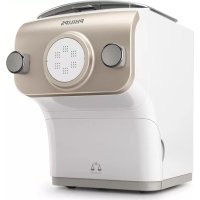
Avance Collection HR2380 - Pasta machine PHILIPS - Free user manual and instructions
Find the device manual for free Avance Collection HR2380 PHILIPS in PDF.


| Product type | Automatic pasta machine with kneading and extrusion |
| Brand | Philips |
| Model | Avance Collection HR2380 |
| Dimensions (L x D x H) | Approximately 35 x 25 x 30 cm |
| Weight | Approximately 5 kg |
| Power supply | 220-240 V, 50-60 Hz |
| Rated power | 200 W |
| Maximum flour capacity | 600 g per batch |
| Maximum dishwasher temperature | 60 °C |
| Number of pasta programs | 2 programs: regular pasta and flavored/egg pasta |
| Additional functions | Automatic flour weighing, extrusion only, skip weighing |
| Maximum continuous operating time | 45 minutes |
| Recommended pause duration | 15 minutes after 45 minutes of use |
| Included shape discs | Spaghetti, angel hair, fettuccine (depending on model) |
| Material of removable parts | Dishwasher-safe plastic |
| Safety devices | Safety switches on the lid and disc holder, overheat protection |
| Plug type | Polarized plug (one wider prong) |
| Included accessories | Water cup, cleaning brush, angel hair cleaning tool, dough cutter |
| Warranty | 2 years (subject to local conditions) |
Frequently Asked Questions - Avance Collection HR2380 PHILIPS
User questions about Avance Collection HR2380 PHILIPS
0 question about this device. Answer the ones you know or ask your own.
Ask a new question about this device
Download the instructions for your Pasta machine in PDF format for free! Find your manual Avance Collection HR2380 - PHILIPS and take your electronic device back in hand. On this page are published all the documents necessary for the use of your device. Avance Collection HR2380 by PHILIPS.
USER MANUAL Avance Collection HR2380 PHILIPS
Sociofisicnns are subrcsucts to change therlth. Lndus
Leas ciehribnss or Unlespnciabies hne mrechimse sere sere
2019 2019 HkHt Phty B.K.
Mg htna awareness.
Teat hrihns oress.
A
FRANCAIS 17
Garantie et service
Gargnue limues durn an
Philips prantain que ou procuurit socr aie ne de colluee la cullusio, la rilicou ducce ou cie cunacr, carc des conditions noludis du cullus, corneont en 1905, qu'au cunque anes, qu'au cunque anes, qu'au cunque anes, qu'au cunque anes, qu'au cunque anes, qu'au cunque anes, qu'au cunque anes, qu'au cunque anes, qu'au cunque anes, qu'au cunque anes, qu'au cunque anes, qu'au cunque anes.
I t a mea e a mea e a mea e a mea e a mea e a mea e a mea e a mea e a mea e a mea e a mea e a mea e a mea e a mea e a mea e a mea e a mea e a mea e a mea e a mea e a mea e a mea e a mea e a mea e a mea e a mea et a mea et a mea et a mea et a mea et a mea et a mea et a mea et a mea et a mea et a mea et a mea et a mea et a mea et a mea et a mea et a mea et a mea et a mea et a mea et a mea et a mea et a mea et a mea et a mea et a mea.
A. A. A. A. A. A. A. A. A. A. A. A. A. A. A. A. A. A. A. A. A. A. A. A. A. A. A. A. A. A. A. A. A. A. A. A. A. A. A. A. A. A. A. A. A. A. A. A. A. A. A.
A. B.A.A.A.A.A.A.A.A.A.A.A.A.A.A.A.A.A.A.A.A.A.A.A.A.A.A.A.A.A.A.A.A.A.A.A.A.A.A.A.A.A.A.A.A.A.A.A.A.A.A.A.A.A.A.A.A.A.A.A.A.A.A.A.A.A.A.A.A.A.A.A.A.A.A.A.A.A.A.A.A.A.A.A.A.A.A.A.A.A.A.A.A.A.A.A.A.A.A.A.AA
Estate-Unsatisfaction
(
Sa nd cccnnnne Ttnps
1
□适用√不适用
(一)委托人姓名或名称:
中
3.1.1.1.1.1
1
Faonoo
Socmy2.01800703745
Available Accessories 9
Shaping discs 9
Disassembling and cleaning before first use 9
Assembling 10
Using the Pasta maker 10
Start preparation 10
Starting the pasta making program 11
Important! 12
Cleaning 12
Storage 12
Disposal 13
Troubleshooting 13
Warranty and service 14
6 ENGLISH
IMPORTANT SAFEGUARDS
1 Read all instructions.
2 Before you connect the appliance to the power, make sure that the voltage indicated on the bottom of the appliance corresponds to the local power voltage.
3 To protect against risk of electrical shock, do not immerse main unit, cord or plug in water or other liquid. Remove shaping discs from Pasta Maker before cleaning.
4 Close supervision is necessary when any appliance is used by or near children. Keep the appliance and its power cord out of the reach of children.
5 This appliance is intended for household use only. Do not use this appliance for anything other than its intended use as described in this manual.
6 This appliance should not be used by children.
7 Children should be supervised by a responsible person to ensure they do not play with the appliance.
8 Before using the appliance for the first time, disassemble and wash the accessories thoroughly.
9 Do not leave the Pasta Maker unattended when in use.
10 Do not move the Pasta Maker while in operation.
11 Make sure the plug is firmly inserted into the power outlet.
12 Make sure your hands are dry before you insert the plug into the power outlet.
13 Do not operate any appliance with a damaged cord or plug or after the appliance malfunctions, or is dropped or damaged in any manner. For assistance in the U.S. or Canada only, call 1-866-309-8817.
14 Do not place any part of this appliance on, in or near a hot gas, electric, convection or microwave oven or on a hot gas or electric burner.
15 The use of accessory attachments not recommended or sold by the appliance manufacturer may cause fire, electric shock or injury.
16 Do not use outdoors.
17 Do not let cord hang over edge of table or counter, or touch hot surfaces including the stove.
18 Do not use this appliance on an unstable or uneven surface, near the edge of a bench top, counter or table during operation. Make sure that the surface is level, clean and free of water, flour and other substances.
19 Never connect this appliance to a timer switch or separate remote control system, to avoid a hazardous situation.
20 Make sure the appliance is unplugged when not in use, if left unattended, before assembling or disassembling, cleaning or storing. Always ensure the Pasta Maker is completely assembled before inserting plug into power outlet and operating. The Pasta Maker will not operate unless properly assembled.
21 Keep hands, hair, clothing, as well as spatulas and other utensils away from appliance during operation to reduce the risk of injury to persons, and/or damage to the Pasta Maker.
22 Do not place hands, fingers or utensils in the mixing chamber of the appliance unless the appliance is unplugged and the motor and mixing paddle have come to a complete stop.
23 Do not put your fingers or other objects into the Pasta Maker opening while it is in operation. Avoid contacting moving parts.
24 Do not attempt to defeat the cover interlock mechanism.
25 To prevent a short circuit or an electric shock, do not pour water or any liquid into the safety switch.
26 The shaping discs and all detachable parts of the appliance are dishwasher safe. When you clean them in a dishwasher, make sure to set the temperature below 60ircC (140°F).
27 Do not insert any objects into the device.
28 Do not pour any liquids into the safety switch hole.
29 To better protect the lifetime of the appliance, we recommend to stop the device for 15 minutes, if it was used for 45 minutes continuously
30 If you intend to use the appliance continuously, clean the shaping disc with the supplied cleaning tool each time after use. For cleaning ease, do not soak the shaping disc into the water directly.
31 Never pour water into the mixing chamber before you place the chamber lid onto the chamber.
32 Do not select the extrusion only program before the dough mixing is complete. Otherwise, this will damage the pasta maker.
33 Clean the appliance each time after use, or the appliance might not operate properly.
SAVE THESE INSTRUCTIONS
POLARIZED PLUG
This appliance has a polarized plug (one blade is wider than the other). To reduce the risk of electric shock, this plug will fit in a polarized outlet only one way. If the plug does not fit fully in the outlet, reverse the plug. If it still does not fit, contact a qualified electrician. Do not modify the plug in any way.
8 ENGLISH
Introduction
Congratulations on your purchase, and welcome to Philips!
To fully benefit from the support that Philips offers, register your product at www.philips.com/welcome.
Product overview (Fig. 1)
| ① | Mixing chamber lid | ⑨ | Pasta cutter |
| ② | Safety switch hole of the mixing chamber lid | ⑩ | Front panel knobs |
| ③ | Power cord | ⑪ | Front panel |
| ④ | Disc holder safety switch | ⑫ | Shaping disc |
| ⑤ | Main unit | ⑬ | Disc holder |
| ⑥ | Shaping disc storage | ⑭ | Disc holder safety switch lever |
| ⑦ | Water cup | ⑮ | Mixing paddle |
| ⑧ | Cleaning brush | ⑯ | Mixing chamber |
Control panel overview (Fig. 2)
| ① | On/off button | ④ | Extrusion only button |
| ② | Display | ⑤ | Program selection button |
| ③ | Start/pause button |
This appliance allows you to make the pasta you need in the way you want.
- Default pasta making function
1 Choose a program with the Program selection button, and then press the Start/pause button.
Applies when making pasta with the scaling function.
- Extrusion only function
1 Press the Extrusion only button, and then the Start/pause button.
Applies when there is leftover dough in the mixing chamber, and you want some extra extrusion.
- Skip-scaling function
1 Press and hold the Start/pause button for 5 seconds.
Applies when the device jumps into error mode or when you need to skip the scale function and start the mixing process directly.
Available Accessories
Shaping discs
| Spaghetti | Fettuccine | Penne | Lasagna | |
| HR2380 | ✓ | ✓ | ✓ | ✓ |
| HR2381 | ✓ | ✓ | ✓ | ✓ |
| HR2382 | ✓ | ✓ | ✓ | ✓ |
| HR2382/13 | ✓ | ✓ | ✓ | ✓ |
| Thick Spaghetti | Angel hair | Tagliatelle | Pappardelle | |
| HR2380 | X | X | X | X |
| HR2381 | ✓ | ✓ | X | X |
| HR2382 | ✓ | ✓ | ✓ | ✓ |
| HR2382/13 | X | ✓ | X | ✓ |
Note: Cleaning tool of the angel hair shaping disc is only supplied with the angel hair shaping disc.
Disassembling and cleaning before first use
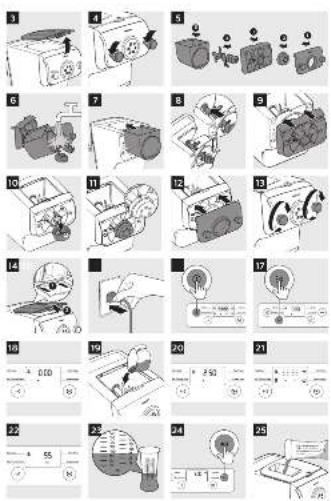
1 Remove the mixing chamber lid. (Fig. 3)
2 Loosen the front panel control knobs. (Fig. 4)
Note: The front panel is heavy. Take extra caution when removing it.
3 Disassemble the front panel, the shaping disc, the shaping disc holder, the mixing paddle, and the mixing chamber in order. (Fig. 5)
4 Clean all detachable parts, and wipe them dry. (Fig. 6)
Assembling
1 Push the mixing chamber into the appliance. (Fig. 7)
2 Point the mixing paddle to the hole in the main unit. Insert the mixing paddle all the way into the main unit. (Fig. 8)
3 Attach the disc holder onto the appliance. (Fig. 9)
4 Put the shaping disc onto the disc holder, and make sure it is firmly fixed on the disc holder. (Fig. 10)
Note: Make sure the inner cavity of the shaping disc and disc holder is properly fitted. (Fig. 11)
5 Attach the front panel to the main unit. (Fig. 12)
Note:
- Make sure the front panel is completely fastened before using the appliance.
The front panel is heavy. Take extra caution when assembling it.
6 Fasten the front panel control knobs. (Fig. 13)
Note: If the front panel or the shaping disc is not properly assembled, a safety switch will prevent the appliance from working.
7 Close the mixing chamber lid. (Fig. 14)
Note: If the mixing chamber lid is not properly installed, the safety switch will prevent the appliance from working.
Using the Pasta maker
Start preparation
1 Put the plug in the power socket. The pasta maker sound once, and all indicators flash once. (Fig. 15)
Note: Make sure that all the parts are well assembled before plugging in.
2 Press the On/off button to turn on the appliance. (Fig. 16)
3 Select the pasta type with the Program selection button. (Fig. 17)
| Program Tip Optional recipe | ||
| Plain pasta/noodle · Pasta with flour and water only | · Wheat noodle · Durum noodle | |
| Egg or flavoured pasta/noodle | · Pasta with flour and egg liquid · All kinds of flavored pasta | · Wheat pasta · Durum pasta · Carrot pasta/noodle · Tomato pasta/noodle · Soba · Beet pasta/noodle |
Note: For more recipes, refer to the recipe book.
4 Remove the mixing chamber lid. (Fig. 3)
5 Wait until 0:00 displays on the screen. (Fig. 18)
6 Pour the flour into the chamber. (Fig. 19)
Note
- The appliance automatically weighs and displays the amount of flour. The weight measurement will blink until you are in the right range. (Fig. 20)
- Do not put less than 200g or more than 600g of flour in the chamber.
- Some recipes (for example cookies, gluten free pasta) require you to skip the weighing part. In this case, press the Start/pause button for 5 seconds, and the appliance will start mixing and extruding directly.
7 Close the chamber lid. (Fig. 14)
Note
If you press a button without closing the lid, the chamber closing sign will appear. (Fig. 21)
- Insert the two hooks into the appliance first, and then push the lid against the main unit.
- The appliance will not start working if the chamber lid is not properly closed. During the pasta making process, if you open the chamber lid, the appliance will stop working. Assemble the lid and press the Start/pause button to start the operation again.
8 When the lid is closed, the needed amount of liquid is displayed. (Fig. 22)
9 Use the supplied water cup to measure the amount of liquid according to the indication on the display. (Fig. 23)
Note
- Make sure to measure the liquid volume at eye level on a flat surface.
- When making the egg mixture, crack the egg into the water cup. Add water up to the required amount, and then whisk the water and egg to combine.
- If preferred, 2 eggs can be used instead of 1, but make sure that the overall amount of liquid suggested is not exceeded.
- For a better accuracy please use a kitchen scale to measure the liquid.
Starting the pasta making program
1 Press the Start/pause button to start mixing, and the mixing time starts to count down. (Fig. 24)
2 After the mixing starts, slowly pour in the liquid along the entire length of the slot in the lid. (Fig. 25)
Note: During dough mixing, do not add other ingredients after you have poured in the liquid. Otherwise, it will affect the result of the pasta texture.
3 After the pasta maker finishes mixing, it will beep once and start extruding pasta after a few seconds. Use the pasta cutter to cut the pasta into the length you need. (Fig. 26)
Note: If the ratio of liquid and flour is not correct, the extrusion will not succeed. Please refer to the recipe book for more recipes.
4 After the pasta making is complete, if you notice some leftover dough inside the chamber, you can press the Extrusion only button first, and then press the Start/pause button for extra extrusion. (Fig. 27)
12 ENGLISH
Note: The cooking time of the pasta varies depending on personal preferences, pasta shapes, and number of servings.
Important!
The pasta recipes provided in the recipe book have been tested for success. If you experiment with or use other pasta recipes, the flour and water/egg ratios will need to be adjusted. The pasta maker will not operate successfully if you do not adjust the new recipe accordingly.
Note
To ensure the quality of the pasta, use gluten flour to make pasta. Follow the recommended proportion to add the ingredients.
- Seasonal changes and using ingredients from different regions may affect the flour/water ratio. You may adjust based on the recommended proportion.
- When making egg pasta or vegetable pasta, make sure you whisk the egg mixture or vegetable juice evenly with the water before pouring into the chamber through the slot in the lid. When adding ingredients, make sure the ingredient is in a liquid form.
See the recipe book provided for additional pasta recipe variations.
- When making gluten free pasta/noodles or cookies, do not follow the recommended liquid amount indicated by the appliance.
Cleaning
1 Disconnect the plug from the power outlet. (Fig. 28)
2 Remove the mixing chamber lid. (Fig. 3)
3 Loosen the front panel control knobs. (Fig. 4)
Note: The front panel is heavy. Take extra caution when removing it.
4 Disassemble the front panel, the shaping disc, the shaping disc holder, the mixing paddle, and the mixing chamber in order. (Fig. 5)
5 Use a dry cloth to clean flour residue on the main unit. (Fig. 29)
6 Clean the shaping disc with the supplied cleaning tool to remove the dough residues. After that, you can clean it with water. (Fig. 30)
Note: For the spaghetti, thick spaghetti, angel hair and fettuccine shaping discs, let the discs air-dry 2 to 4 hours. Then use the corresponding cleaning tool to poke out the dough in the holes.
7 Clean all detachable parts, and wipe them dry. (Fig. 6)
8 Use a dry cloth to clean the control panel, and the exterior of the pasta maker. (Fig. 31)
Storage
1 Unplug the appliance and let it cool down.
Note: Make sure all parts are clean and dry before storing.
2 You can store the shaping discs in the storage drawer. (Fig. 32)
Disposal
Your product is designed and manufactured with high quality materials and components, which can be recycled and reused. For recycling information, please contact your local waste management facilities or visit www.recycle.philips.com
Troubleshooting
This chapter summarizes the most common problems you could encounter with the appliance. If you are unable to solve the problem with the information below, visit www.philips.com/support or in the U.S. or Canada only, call 1-866-309-8817 for assistance.
| Problem Cause Solution | ||
| The indicators do not light up. | The power plug is not connected correctly. | Check whether the power plug is plugged correctly and the outlet is working properly. |
| After pressing the On/off button the appliance sounds but does not work. | The mixing chamber, the shaping disc, or the front panel is assembled incorrectly. | Make sure you follow the user manual to assemble all parts correctly. |
| The safety switch is triggered and the appliance suddenly stopped or suddenly restarts during the processing. | The front panel knob is loose. | Make sure the front panel is securely assembled. |
| Excessive ingredients in the pasta maker. | The maximum amount of flour used for each batch is 600g. If more than 600g is added, reduce the amount of flour before next batch. | |
| During processing, the appliance stops working when you open the lid. | For safety reasons, the appliance always stops working when the lid is opened during processing. | If you need to resume the previous operation, close the lid properly, and press the Start/pause button. |
| During processing, the appliance stops. There is no alarm sound or flashes. | The pasta maker has overheated due to long continuous working time. | Disconnect from the power source, and allow the pasta maker to cool down. To better protect the lifetime of the appliance, the continuous working time should be less than 45 minutes. You can restart using the appliance after 15 minutes of rest. |
| When weighing the flour, the weight shown on the screen changes all the time. | You are touching the appliance or the power cord. | When the appliance is weighing the flour, do not touch the appliance or the power cord. |
| Small amount of water is leaking out from the appliance. | Water is added before the program starts. | Follow the user manual instructions to add water right after the program starts. |
| Unable to make pasta successfully with the liquid calculation function. | The required liquid amount indicated on the display screen does not apply to some recipes (for example cookies, gluten free pasta). | These recipes require you to skip the liquid calculation part. In this case, press the Start/pause button for 5 seconds, and the appliance will start mixing and extruding directly. |
| E1 displays on the screen. | The shaping disc is not attached. | Attach the disc holder to the main unit, attach the shaping disc properly and fix the front panel properly to the device. |
| The lid is not in place or not properly attached. | Attach the lid properly. | |
| The appliance stops during processing, E2 displays on the screen, the indicators are flashing quickly, and the alarm sounds. | The mixing paddle may be blocked by some foreign objects. | Disconnect from the power source, clean the pasta maker, and follow the user manual again to restart the pasta making. |
| The dough may be too dry. | ||
| The wrong program is selected. | ||
| EEE displays on the screen. | The appliance malfunctions. | Contact the service center. |
Warranty and service
One Year Limited Warranty
Philips warrants that this product shall be free from defects in material, workmanship and assembly, under normal use, in accordance with the specifications and warnings, for a period of one year from the date of purchase. This warranty extends only to the original purchaser of the product, and is not transferable. To exercise your rights under this warranty, you must provide proof of purchase in the form of an original sales receipt that shows the product name and the date of purchase. For customer support or to obtain warranty service, please visit our website www.philips.com/support. THERE ARE NO OTHER EXPRESS OR IMPLIED WARRANTY. Philips' liability is limited to repair or, at its sole option, replacement of the product. Incidental, special and consequential damages are disclaimed where permitted by law. This warranty gives you specific legal rights. You may also have other rights that vary from state to state, province to province or country to country.
In U.S. only
Manufactured for:
Philips Personal Health
a division of Philips North America LLC
P.O.Box 10313
Stamford, CT 06904
United States of America
Canada only
Manufactured for:
Philips Electronics Ltd.
281 Hillmount Road
Markham, ON L6C 2S3
Manufactured for:
- Colombia: 01-800-700-7445
Costa Rica: 0800-507-7445 - Républca Dominicana: 1-800-751-2673
- Ecuador: 1-800-10-1045
- El Salvador: 800-6024
- Guatemala: 1-800-299-0007
Honduras:8002-791-9273
Mexico:018005046200 - Nicaragua: 1-800-507-0018
- Panama: 800-8300
PHILIPS and Philips Shield are Registered Trademarks of Koninklijke Philips N.V.
© 2018 Philips North America LLC. All Rights Reserved.

This symbol on the product's nameplate means it is listed by Underwriters Laboratories, Inc.
Contenido
PRECAUCIONES IMPORTANTES 17
ENCHUFE POLARIZADO 19
Introduccion 19
| Espaguetis | Fettuccine | Macarrones | Lasañá | |
| HR2380 | ✓ | ✓ | ✓ | ✓ |
| HR2381 | ✓ | ✓ | ✓ | ✓ |
| HR2382 | ✓ | ✓ | ✓ | ✓ |
| HR2382/13 | ✓ | ✓ | ✓ | ✓ |
| Espagueti grueso | Cabello de ángel | Tallarines | Pappardelle | |
| HR2380 | X | X | X | X |
| HR2381 | ✓ | ✓ | X | X |
| HR2382 | ✓ | ✓ | ✓ | ✓ |
| HR2382/13 | X | ✓ | X | ✓ |
Philips Personal Health
| Spaghetti | Fettucine | Penne | Lasagnes | |
| HR2380 | ✓ | ✓ | ✓ | ✓ |
| HR2381 | ✓ | ✓ | ✓ | ✓ |
| HR2382 | ✓ | ✓ | ✓ | ✓ |
| HR2382/13 | ✓ | ✓ | ✓ | ✓ |
| Spaghetti épais | Cheveux d'ange | Tagliatelle | Pappardelle | |
| HR2380 | X | X | X | X |
| HR2381 | ✓ | ✓ | X | X |
| HR2382 | ✓ | ✓ | ✓ | ✓ |
| HR2382/13 | X | ✓ | X | ✓ |


- Garantie et service
- Gargnue limues durn an
- ENGLISH
- IMPORTANT SAFEGUARDS
- SAVE THESE INSTRUCTIONS
- POLARIZED PLUG
- ENGLISH
- Introduction
- Product overview (Fig. 1)
- Control panel overview (Fig. 2)
- Available Accessories
- Disassembling and cleaning before first use
- Assembling
- Note:
- Using the Pasta maker
- Start preparation
- Note
- Starting the pasta making program
- ENGLISH
- Important!
- Cleaning
- Storage
- Disposal
- Troubleshooting
- Warranty and service
- One Year Limited Warranty
- Contenido
Brand : PHILIPS
Model : Avance Collection HR2380
Category : Pasta machine