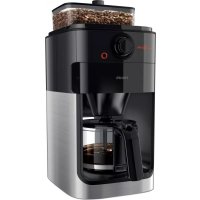
Grind & Brew HD7767 - Coffee maker PHILIPS - Free user manual and instructions
Find the device manual for free Grind & Brew HD7767 PHILIPS in PDF.


| Technical specifications | Coffee machine with built-in grinder, 1.2 liter capacity, 1000 W power, grind setting with 5 levels. |
|---|---|
| Usage | Automatic operation with timer, ability to prepare up to 10 cups, LCD screen for easy control. |
| Maintenance and repair | Removable water filter, dishwasher-safe parts, automatic grinder cleaning. |
| Safety | Automatic shut-off system, overheating protection. |
| General information | Weight of 2.5 kg, dimensions 25 x 20 x 30 cm, 2-year warranty. |
Frequently Asked Questions - Grind & Brew HD7767 PHILIPS
User questions about Grind & Brew HD7767 PHILIPS
0 question about this device. Answer the ones you know or ask your own.
Ask a new question about this device
Download the instructions for your Coffee maker in PDF format for free! Find your manual Grind & Brew HD7767 - PHILIPS and take your electronic device back in hand. On this page are published all the documents necessary for the use of your device. Grind & Brew HD7767 by PHILIPS.
USER MANUAL Grind & Brew HD7767 PHILIPS
Thank you for buying Philips. To register your new product, please go to www.philips.com/grindbrew. On this website, you can also find handy videos, delicious recipes, frequently asked questions and get support.
General description (Fig. 1)
1 Filter basket
2 Drip stop
3 Filter basket holder
4 Water level indicator
5 Water reservoir lid
6 Bean container lid
7 Coarseness knob
8 Coffee bean container
9 Grinding funnel lid
10 Lock of grinder funnel lid
11 Water filling hole
12 Display
13 Pre-ground coffee icon
14 Number of cups
15 Coffee cup icon
16 Strength select coffee bean icon
17 Strength select button
18Grindercleanbutton
19 Control knob
20 On/off button
21 Glass jug lid
22 Glass jug
23 Bean chute cleaning brush
Important
Danger
- Never immerse the appliance in water or any other liquid, nor rinse it under the tap.
Warning
- Check if the voltage indicated on the appliance corresponds to the local mains voltage before you connect the appliance.
- Do not use the appliance if the plug, the mains cord or the appliance itself is damaged.
-
If the mains cord is damaged, you must have it replaced by Philips, a service center authorized by Philips or similarly qualified persons in order to avoid a hazard.
-
Connect the appliance to an earthed wall socket
- This appliance can be used by children aged from 8 years and above and by persons with reduced physical, sensory or mental capabilities or lack of experience and knowledge if they have been given supervision or instruction concerning use of the appliance in a safe way and if they understand the hazards involved. Cleaning and user maintenance shall not be made by children unless they are older than 8 and supervised. Keep the appliance and its cord out of reach of children aged less than 8 years.
- Children shall not play with the appliance.
- Only use this appliance for its intended purpose to avoid potential hazard or injury.
- Do not let the mains cord hang over the edge of the table or worktop on which the appliance stands.
- Never pour water into the bean container, as this damages the coffeemaker.
- Do not touch the grinding burrs of the of the appliance, especially when the appliance is connected to a wall socket.
- Do not touch the hot surfaces of the appliance when it operates.
- Do not empty the water reservoir by tilting the appliance, as this can damage the appliance. To empty the appliance, follow the instructions for flushing the appliance (see 'Flushing the appliance').
- If a problem occurs that you cannot solve by means of this user manual, contact the Consumer Care Center in your country. If the problem cannot be solved, take the appliance to a service center authorized by Philips for examination or repair. Do not attempt to repair the appliance yourself, otherwise your warranty becomes invalid.
Caution
- Do not place the appliance on a hot surface and prevent them mains cord from coming into contact with hot surfaces.
8 English
- Do not place the coffeemaker in a cabinet when in use.
- Unplug the appliance if problems occur during grinding or brewing and before you clean it.
- Keep the plug and the wall socket dry.
- Do not lift and move the appliance while it is operating.
- The jug is hot during and after brewing. Always hold the jug by its handle.
- Never use the jug in a microwave oven.
- Wait until the appliance has cooled down before you store it. The hotplate and the coffee jug may be hot.
- After you have unpacked the appliance, make sure it is complete and undamaged. If in doubt, do not use the appliance but contact the Consumer Care Center in your country.
- This machine is intended for normal household use only. It is not intended for use in environments such as staff kitchens of shops, offices, farms or other work environments.
Electromagnetic fields (EMF)
This Philips appliance complies with all applicable standards and regulations regarding exposure to electromagnetic fields.
Before first use
Setting the automatic switch-off time
You can choose how long you want your coffee to stay hot after brewing by adjusting the time after which the appliance automatically switches off. The default automatic switch-off time is 30 minutes. The maximum automatic switch-off time is 120 minutes. To adjust the automatic switch-off time, follow the steps below.
1 Make sure that the appliance is switched off but the mains plug is in the wall socket.
2 Press the center of the control knob until the display starts flashing.
3 Turn the control knob to increase or decrease the time. 1 is 10 minutes, 2 is 20 minutes, 3 is 30 minutes and so on until 12 is 120 minutes.
4 Press the center of the control knob to confirm the automatic switch-off time.
Note: The appliance always saves the last setting.
Flushing the appliance
Always flush the coffeemaker once before first use by following the steps below.
Warning: Never pour water into the bean container, as this damages the coffeemaker.
1 Open the water reservoir lid. Fill the water reservoir with fresh cold water up to the 8-cup indication (Fig. 2).
Caution: Do not put coffee beans or pre-ground coffee in the water reservoir.
2 Close the water reservoir lid.
3 Put the jug in the appliance (Fig. 3).
4 Press the on/off button (Fig. 4). The display lights up and the appliance beeps.
5 Press the strength select button (Fig. 5).
6 Turn the control knob to choose the pre-ground coffee setting (Fig. 6). The pre-ground coffee icon starts flashing.
7 Press the center of the control knob twice to confirm (Fig. 7). The appliance starts the flushing process.
8 Let the appliance operate until the flushing process is finished. It is finished when the appliance stops beeping.
9 Empty the jug.
10 Press the on/off button to switch off the appliance.
Using the appliance
Filling the water reservoir
There are indications for 2 to 10 cups (275 ml to 1375 ml) on the water-level window. You can use these indications to determine how much water to put in the water reservoir. The reflection changes from light to dark for each cup of water added.
1 Open the water reservoir lid and fill the water reservoir with the required amount of cold water (Fig. 2).
Note: Do not fill the water reservoir beyond the 10-cup indication.
Note: Make sure that the amount of water you pour into the water reservoir is consistent with the number of cups you want to brew. The coffeemaker uses all the water in the water reservoir.
Using coffee beans
Warning: Always keep the water reservoir lid closed when you fill the coffee bean container with coffee beans. Otherwise coffee beans can fall into the water reservoir and block up the water inlet.
1 Open the coffee bean container lid (Fig. 8).
2 Fill the container with coffee beans. Make sure that there are enough coffee beans in the container for the amount of coffee you want to brew (Fig. 9).
Note: Always make sure that the bean container is at least half full.
Warning: To prevent the grinder from jamming, do not use unroasted or caramelized beans. Use coffee beans instead of espresso beans, as espresso beans may damage the grinder.
3 Open the filter basket holder (Fig. 10).
4 Place a paper filter (type 1x4 or no. 4) or the permanent filter in the filter basket (Fig. 11).
10 English
5 Close the filter basket holder.
6 Turn the coarseness knob to select the desired type of grind (from fine to coarse). There are nine grind settings (Fig. 12).
Tip: The coarseness knob allows you to choose between 9 different settings. The icons indicate 3 preselected optimal settings, but you can choose any setting in between. We advise you to experiment with the different grind settings to find out which setting you prefer.
7 Press the strength button (Fig. 5). The coffee bean icons start flashing.
8 Turn the control knob to select the desired coffee strength: 1 bean for mild coffee, 2 beans for medium-strong coffee or 3 beans for strong coffee.
9 Press the center of the control knob to confirm the strength (Fig. 13).
10 To select the number of cups, turn the control knob until the desired number of cups flashes on the display (Fig. 14).
Note: Please keep in mind that the coffeemaker uses all the water in the water reservoir. If you select a number of cups that is smaller than the amount of water, the coffee becomes weaker than you intended.
11 Press the center of the control knob to confirm the number of cups (Fig. 13).
12 Press the center of the control knob again. The appliance beeps and starts grinding the required amount of coffee beans. When the grinding process is finished, the appliance starts brewing coffee
13 Wait until the coffeemaker has stopped beeping before you remove the jug.
Note: After brewing, coffee drips from the filter basket for several seconds.
14 The appliance keeps your coffee hot until it switches off automatically. If you do not need your coffee to be kept hot, press the on/off button to switch off the appliance.
Using pre-ground coffee
If you want to use pre-ground coffee instead of coffee beans, follow the steps below.
1 Open the water reservoir lid and fill the water reservoir with the required amount of cold water (Fig. 2).
2 Open the filter basket holder (Fig. 10).
3 Place a paper filter (type 1x4 or no. 4) or the permanent filter in the filter basket.
4 Put pre-ground coffee in the paper filter or in the permanent filter.
5 Close the filter basket holder.
6 Put the jug in the appliance (Fig. 3).
7 Press the on/off button (Fig. 4). The display lights up.
8 Press the strength select button (Fig. 5).
9 Turn the control knob to choose the pre-ground coffee setting (Fig. 6). The pre-ground coffee icon lights up.
10 Press the center of the control knob to confirm (Fig. 13).
11 Then press the center of the control knob again to start the brewing process.
12 Wait until the coffeemaker has stopped beeping before you remove the jug.
Note: After brewing, coffee drips from the filter basket for several seconds.
13 The appliance keeps your coffee hot until it switches off automatically. If you do not need your coffee to be kept hot, press the on/off button to switch off the appliance.
Drip stop function
The drip stop function enables you to remove the jug from the coffeemaker before the brewing process is finished. When you remove the jug, the drip stop stops the flow of coffee into the jug.
Note: The brewing process does not stop when you remove the jug. If you do not put the jug back into the appliance within 20 seconds, the filter basket overflows.
Cleaning and maintenance
Cleaning after every use
Never immerse the appliance in water or any other liquid, nor rinse it under the tap.
1 Remove the mains plug from the wall socket.
2 Wipe the outside of the coffeemaker with a damp cloth.
3 Clean the filter basket and the permanent filter with hot water and some washing-up liquid or clean them in the dishwasher.
Cleaning the grinder funnel
Important: Clean the grinder funnel every 1 to 2 weeks to prevent clogging with ground coffee. This is easily and quickly done by following the steps below.
Note: Make sure the coffee bean container is empty before you start the cleaning procedure.
1 Press the on/off button to switch off the appliance (Fig. 15).
2 Open the filter basket holder (Fig. 10).
3 Place a paper filter (type 1x4 or no. 4) or the permanent filter in the filter basket (Fig. 11).
4 Close the filter basket holder.
5 Use the end of the bean chute cleaning brush to open the grinder funnel lid (Fig. 16).
6 Press and hold the grinder clean button for 4 seconds (Fig. 17). The grinder starts cleaning itself.
7 When the grinder has stopped cleaning, use the bean chute cleaning brush to brush ground coffee residues into the lower part of the funnel (Fig. 18). The ground coffee residues fall into the filter basket.
8 Close the lid of the grinder funnel.
9 Remove the paper filter or permanent filter with the ground coffee residues.
Descaling the coffeemaker
Descale the coffeemaker when you notice excessive steaming or when the brewing time increases. It is advisable to descale the coffeemaker every two months. Only use white vinegar to descale, as other products may cause damage to the coffeemaker. For more information on descaling, see www.philips.com/descale-coffeemaker.
Warning: Never use vinegar with an acetic acid content of 8 % or more, natural vinegar, powder descalers or tablet descalers to descale the appliance, as this may cause damage.
1 Open the water reservoir lid.
2 Fill the water reservoir up to 10 cup indication with white vinegar (4% acetic acid).
3 Place a paper filter (type 1x4 or no. 4) or the permanent filter in the filter basket and close the filter basket holder.
4 Put the empty jug in the appliance.
12 English
5 Put the mains plug in the wall socket.
6 Press the on/off button to switch on the appliance (Fig. 4). The display lights up.
7 Press the strength select button and turn the control knob to choose the pre-ground coffee setting (Fig. 6).
8 Press the center of the control knob twice to confirm and start the brewing process (Fig. 7).
9 Wait until half of the vinegar has flowed into the jug. Then press the on/off button to interrupt the brewing process. Let the vinegar act for at least 15 minutes.
10 Press the on/off button to switch the coffeemaker back on.
11 Press the center of the control knob twice to let the appliance complete the brewing process (Fig 7).
12 Empty the jug and remove the paper filter or the permanent filter with the scale residues.
13 Fill the water reservoir with fresh cold water and press the center of the control knob twice to start another brewing process (Fig. 7). Let the coffeemaker complete the entire brewing process and empty the jug.
Note: If necessary repeat step 14 until the water that comes out of the appliance no longer tastes or smells of vinegar.
14 Clean the filter basket and the jug with hot water and some washing-up liquid.
15 Press the on/off button on the front of the appliance to switch off the appliance (Fig. 15).
Warranty and support
If you need information or support, please visit www.philips.com/support or read the international warranty leaflet.
Ordering accessories
To buy accessories or spare parts, visit www.philips.com/parts-and-accessories or go to your Philips dealer. You can also contact the Philips Consumer Care Center in your country (see the international warranty leaflet for contact details).
Recycling
This symbol means that this product shall not be disposed of with normal household waste (2012/19/EU) (Fig. 19).
- Follow your country's rules for the separate collection of electrical and electronic products. Correct disposal helps prevent negative consequences for the environment and human health.
Troubleshooting
This chapter summarizes the most common problems you could encounter with the appliance. If you are unable to solve the problem with the information below, visit www.philips.com/support for a list of frequently asked questions or contact the Consumer Care Center in your country.
| Problem | Solution |
| The appliance does not work. | Put the mains plug in the wall socket and press the on/off button to switch on the appliance. |
| Make sure that the voltage indicated on the appliance corresponds to the local mains voltage. | |
| Fill the water reservoir with water. | |
| Close the lid of the grinder funnel. | |
| The grinder does not work or does not work properly. | Make sure that you did not select pre-ground coffee. If the symbol for pre-ground coffee is visible on the display, you selected pre-ground coffee. |
| Clean the grinder funnel by following the instructions (see 'Cleaning the grinder funnel'). | |
| When I use the grinder, the coffee is too weak. | Make sure that the number of cups you selected is consistent with the amount of water in the water reservoir. Please keep in mind that the coffeemaker uses up all the water in the water reservoir. |
| Use the strength select button to set the coffee strength to 'strong'. | |
| Use coffee beans of a stronger blend or flavor. | |
| When I use pre-ground coffee, the coffee is too weak. | Make sure that the amount of pre-ground coffee in the filter is consistent with the amount of water in the water reservoir. Please keep in mind that the appliance uses all the water in the water reservoir. |
| Use ground coffee of a stronger blend or flavor. | |
| To increase the coffee strength, increase the amount of pre-ground coffee or decrease the amount of water. | |
| The filter overflows when I remove the jug from the appliance while it is brewing coffee. | If you remove the jug for more than 20 seconds during the brewing process, the drip stop causes the filter basket to overflow. Also note that the coffee does not reach its full taste before the end of the brewing process. Therefore we advise you not to remove the jug and pour out the coffee before the end of the brewing process. |
| The appliance continues to drip long after the brewing process has ended. | The dripping is caused by condensation of steam. It is completely normal that the appliance drips for some time. |
| If the dripping does not stop, the drip stop may be clogged. To clean the drip stop, open the filter basket holder and take out the filter basket. Rinse the filter basket and the drip stop under the tap. | |
| The coffee is not hot enough. | The coffee in the jug cools down faster if you brew only a few cups. The coffee stays hot longer if you brew 10 cups, which is a full jug. |
| Descale the appliance (see 'Descaling the coffeemaker'). | |
| The appliance does not start cleaning the grinder funnel. | Make sure that the appliance is plugged in. |
| Open the lid of the grinder funnel before you press and hold the coffee strength button. | |
| Press and hold the coffee strength button for 4 seconds until the grinder starts cleaning itself. |
14 English
| The appliance works but makes a beeping sound. | Please check if the lid of the grinder funnel is closed properly. |
| The coffee beans seem to be used up quickly. | To brew a perfect cup of coffee, the appliance needs a certain amount of ground coffee. The amount of coffee beans the appliance uses to obtain the optimal amount of ground coffee per cup is normal. |