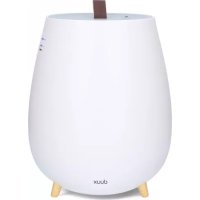
Tag - Humidifier DUUX - Free user manual and instructions
Find the device manual for free Tag DUUX in PDF.



| Product type | Ultrasonic humidifier |
| Model | Tag (DXHU02/03) |
| Brand | Duux |
| Weight | 1.5 kg |
| Power consumption | 14 – 20 W |
| Water tank capacity | 2.5 L |
| Effective area | 30 m² |
| Mist output | 250 ml/h |
| Maximum runtime | 10 hours |
| Power cord length | 1.5 m |
| Main materials | ABS, PP |
| Main functions | Ultrasonic humidification, mist intensity adjustment (MIN/MAX), ambient light, aromatherapy (essential oils), automatic shut-off when tank is empty |
| Care and cleaning | Daily cleaning: rinse the tank; weekly cleaning: clean the tank with a mild detergent, wipe the ultrasonic membrane; replace the anti-scale and antibacterial cartridge every 3 to 6 months |
| Safety | Automatic shut-off when tank is empty, water level indicator (blue when operating, red flashing when empty), do not use with wet hands |
| Spare parts and repairability | Anti-scale and antibacterial cartridge (ref. DXHUC01) available; spare parts available upon request from the dealer |
| General information | Manual available in PDF; compact design with leather handle for tank access; silent ultrasonic technology |
Frequently Asked Questions - Tag DUUX
User questions about Tag DUUX
0 question about this device. Answer the ones you know or ask your own.
Ask a new question about this device
Download the instructions for your Humidifier in PDF format for free! Find your manual Tag - DUUX and take your electronic device back in hand. On this page are published all the documents necessary for the use of your device. Tag by DUUX.
USER MANUAL Tag DUUX

natural_image
Abstract geometric logo with white triangular and dot elements on teal background (no text or symbols)Tag
ultrasonic humidifier
user manual | Bedienungsanleitung | gebruikershandleiding manuel d'utilisation | Instrukcja obsługi
duux®
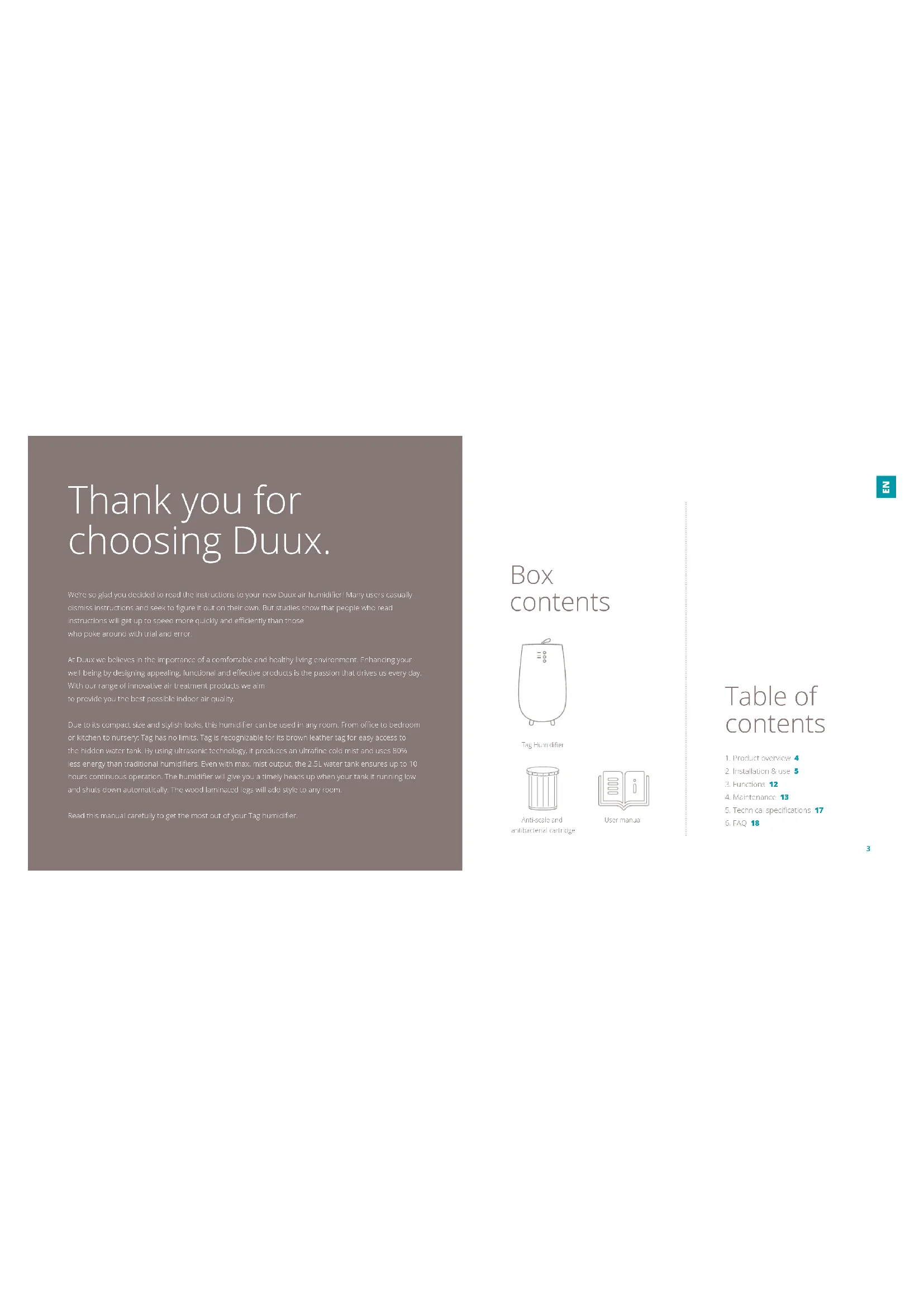
Thank you for choosing Duux.
Were so glad you, decided to read the instructions to your new Duux air humidifier! Many users casually dismiss instructions and seek to figure it out on their own. But studies show that people who read instructions will get up to speed more quickly and efficiently than those who poke around with trial and error.
As, Duxx we believe in the importance of a comfortable and healthy living environment. Enhancing your well-being by designing appealing, functional and effective products is the passion on that drives us every day. With our range of innovative air treatment products we aim to provide you the best possible indoor air quality.
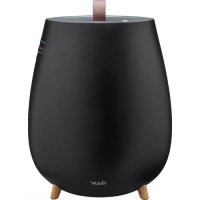
Due to its compact size and stylish looks, this humidifier can be used in any room. From office to bedroom or kitchen to nursery: Tag has no limits. Tag is recognizable for its brown leather tag for easy access to the hidden water tank. By using ultrasonic technology, it produces an ultrafine cold mist and uses 80% less energy than traditional humidifiers. Even with max mist output, the 2.5L water tank ensures up to 10 hours continuous operation. The humidifier will give you a timely heads up when your tank it running low and shuts down automatically. The wood laminated legs will add style to any room.
Read this manual carefully to get the most out of your Tag humidifier.
Box contents
Tag Humidifier

Anti-scale and antibacterial cartridge

User manual
Table of contents
- Product overview 4
- Installation & use 5
- Functions 12
- Maintenance 13
- Technical specifications 17
- FAQ 18
1. Product overview 2. Installation and use
Note: Please take notice of below instructions and the separately included morning sheet before using the product.
Installation
- Please do not set up in a place where humidly directly hits curtains, furniture, door plants or doors. I can cause stains and deformation.
- Please place on a horizontal and stable surface, otherwise the might be a risk of water spilling.
- Please do not set up in a place where only children are present such as children's rooms. It can lead to injury or breakdown if the device is knocked over or climbed on.
- Please do not place anywhere where items may fall from above. It can lead to ignition or a breakdown.
- Please do not set up near devices that are not compatible with water such as PCs or smartphones. It can cause ignition on a breakdown.
- Please do not use in any surrounding that could lead to the water in the water tray or in the device to freeze. However, if the water in the water tray or the day to be frozen please do not operate the device until the ice has mawed. I can cause ignition or a breakdown.
Placement
Please place away from walls, windows and furniture.
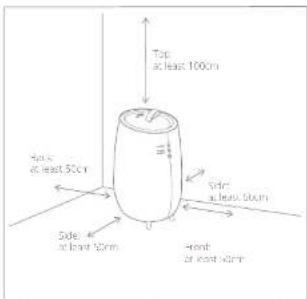
• Even when it is placed at a sufficient distance from walls or furniture, if it is used in the same place for a long period of time, it can become
dirty with scale. We recommend regular cleaning. Please consult chapter 4 for maintenance instructions.
- Please avoid places with direct sunlight. There is a risk that the device discolors.
- If there is interference with TV, radio or other electrical devices, please move the device.
- When moving the device please move in with the base of the device held securely.
- The device does not have an automatic humidity adjustment feature. Wet floors and condensation can form easily in rooms with lower temperatures or high levels of humidity. We recommend the use of an external hygrometer to monitor humidity.
- Adjust the level of humidity with the iris button, with adequate consideration of the space the device is located in, and by either raising the room temperature or turning off the device.
Filling the water tank
Note: Please check that the power is off before removing the water tank from the device.
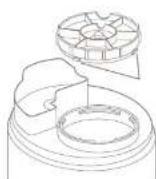
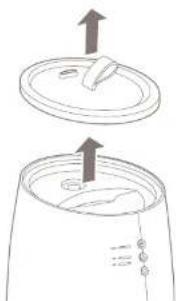
Remove the top surface cover. Hold and fill the label on the top cover when removing the top cover.
Take out the water tank
Caution: Do not be the device when raising the water tank. This may lead to spillage of water remaining in the device.
3 Turn the water tank top counter clockwise and remove from water tank.
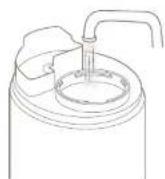
Pour water in the water tank
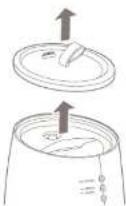
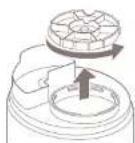
Note: we advise to use distilled or mineral water as water source. When using top water, there is a risk of bacteria growth and increased scale.
Caution: Do not use hot water. It may deform the shape of a water tank.
The paws of the water tank cap are attached to fit into the feed water inlet cuts. Herely turn it clockwise until it stops.
Caution: Please carefully check that the water tank cap has not been inserted diagonally.
Caution: Please check whether the rubber seal on the water lock cap are properly attached
Place back the water tank cap on the device after carefully checking whether the water tank is properly in place and attach the top surface cover.
Caution: Be sure to place back the top cover after refilling the tank. The mist will not be efficiently distributed without its top cover
Connecting the product
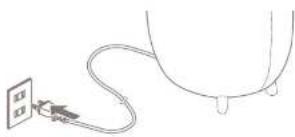
1 Put the power plug into a wall outlet. The power/mater supply indicator will light red when you connect the power plug into a wall outlet.
Caution:
- Do not plug in the device or pull plug out of the power supply with wet hands or use the product.
• Inoroughly dry your hands before you use the device, in particular after pouring water in the water tank. - Avoid connecting the device using other plugs, multi-outlet and extension cords.
• Do not use when the power cord is bundled together.
2 Push the power button. The power/water supply indicator will light blue and it will begin to humidify with MIN (minimum) mist output. The bottom light will lid up
Note: There is insufficient water in the tank if the light on the power/water supply indicator turns from blue tot red immediately after powering on in the device. Please remove the water tank and fill it with water (see chapter 2).
natural_image
Simple line drawing of a plug inserted into a socket connected to a bulb (no text or symbols)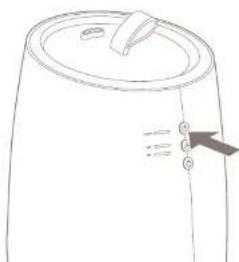
natural_image
Line drawing of a cylindrical container with a lid and side buttons (no text or symbols)Note: The power/water supply display will flash red when there is not enough water in the water tank while in use.
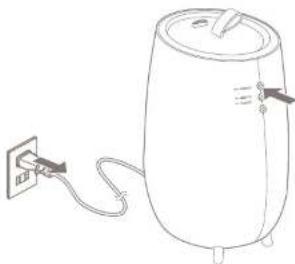
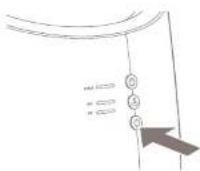
Push the power button to turn off the device and pull out the plug after use
Caution: When removing the power plug, be sure to hold it by the plug. Pulling the cord to remove the plug may cause the cable to break.
natural_image
Line drawing of a cylindrical water heater connected to a power outlet (no text or symbols)Adjusting the mist output Adjusting the bottom light
1 Push the @power button to turn the device on. The power/water supply indicator will light blue and it will begin to humidily with MIN (minimum) mist output. The bottom light will lid up.
Push the mist button to change the mist volume. The max volume switches from MAX (maximum) to MIN (minimum) and back, each time the mist switch button is pushed. The switched mist output display is lit. The mist output will always be on MIN (minimum) when the power is turned on, even if the mist output was on MAX (maximum) before powering off
Caution: Please take adequate core to prevent excessive humidity. Wet floors from condensation con form due to the room environment and conditions of use. Please carefully adjust or turn off the device.
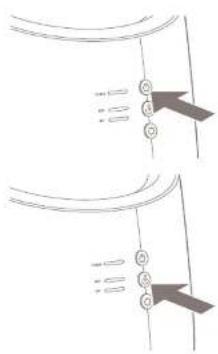
Push the Light Button. The light will automatically light up when the power is turned on. The light will light up again when the power is turned on again, even if it was previously switched off.
Using aromatherapy
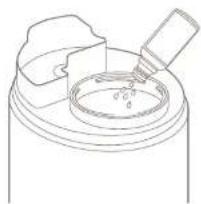
Remove water tank (see chapter 2 for detailed instructions) and remove the water tank cap from the water tank.
Pour your aromate oil into the water tank.
Caution: Never not put anything other than water or aromatic oils into the water tank.
Caution: Directly pulling aromatic oil into a water tank is a unique feature of the product. However, depending on the aromatic oil you use, using this feature may slam the water tank. Moreover, the perfume of the oils may remain in the water tank. Please take it into consideration before using aromotherapy.
Caution: Only use aromatic oils that are specially designed to be used in ultrasonic humidifiers.
3 Return the water tank to the device.
natural_image
Line drawing of a mechanical component with a cylindrical base and a bottle inserted (no text or symbols)3. Functions 4. Maintenance
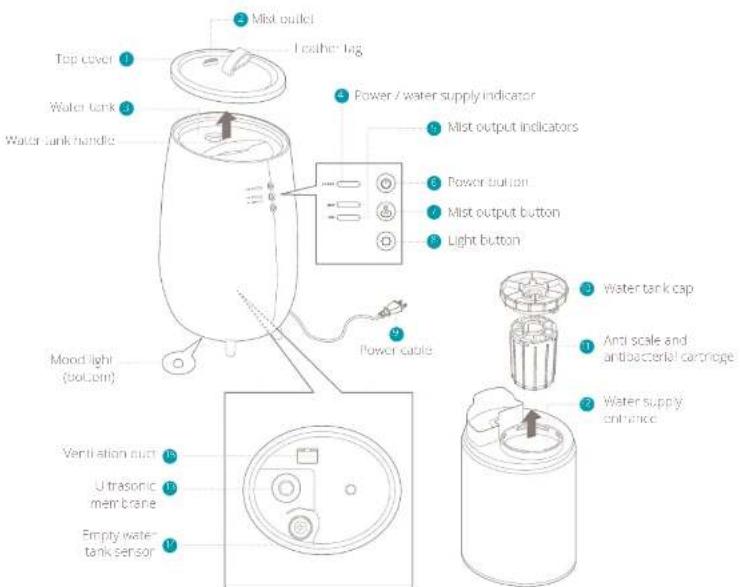
Note: see product overview (chapter 1) for reference
1 Topcover
The structure of the device allows the mist to be efficiently distributed. Always keep this cover in when using the device. Hold and lift the top of the top cover to remove the top cover.
Mist outlet
This is where the risk comes out. Blocking the output may cause breakdowns.
Water tank
Remove the tank from the device and fill with water.
1 Power/water supply indicator
Blue indication means that the device is powered on. When it blinks red, the water needs to be refilled.
Mist output indicators
The selected mist output is it. Mist volume MIN (minimum) is on as default setting
Power button
Turns on or turns off the power every time you press it.
Mist output button
You can switch between MAX (maximum) and MIN (minimum) level of mist output each time you press it.
Caution: Please be careful not to overhumidify. Depending on the room size, environment and use, it can lead to wet floors due to condensation.
Light button
You can switch the bottom light off and on each time you press this button.
5 Power cable
Directly connect the plug to a wall outlet
Water tank cap
Please remove the cup when pouring water into the water tank. After pouring close it slightly,
1 Anti-scale and antibacterial cartridge
This cartridge will reduce the hardness of the water and prevents white dust produced by ultrasonic mist. It also removes bacteria from the water for hygienic mist output.
2 Water supply entrance
Use this entrance to fill the tank with water.
3 Ultrasonic membrane
Mist is created due to ultrasonic sound waves. You can adjust the amount of mist with the mist button
Caution: Please regularly clean the device for long-lasting use. Depending on the hardness of the local tap water, we advise to use distilled water.
① Important: Be sure to remove the power plug from the outlet before carrying out maintenance.
① Important: Do not look or immerse the power plug or the device to water.
① Important: We recommend daily maintenance to prevent the growth of bacteria and scale inside the water tank.
Daily maintenance
- Switch the power button to OFF and remove the power plug:
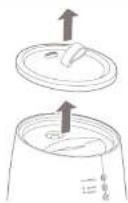
Remove the top cover and water tanks from the device.
3 Remove the water tank from the device and throw away the water remaining in the water tank.
Pour a small amount of water into the water tank, firmly close the water tank cap and shake to rinse.
natural_image
Diagram showing two views of a lid with an upward arrow indicating direction (no text or symbols)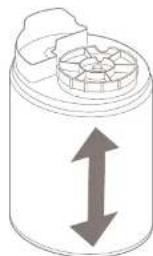
natural_image
Diagram of a cylindrical container with a lid and an upward arrow indicating vertical motion (no text or symbols)Weekly maintenance
A. Note: If using an consecutive day, please carry out maintenance by applying the following procedure once a week. If this type of maintenance is not conducted, scale may form on the inside and shorten the life of the course or course a breakdown. Moreover, if the device continues to be used with no maintenance, it may head to the growth of seasonal and seasonal colour.
- Switch the power button to OFF and remove the power plug
- Remove the top cover and water tank from the device
- Remove the remaining water in the water tank area at the bottom of the device.
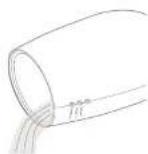
4 Add dishwashing detergent, to a sell sponge for dishes and wash the water surface and water tank. Pour the water on the right side of the Tag to prevent water from getting into the air tube.
5 Rinse the water tank well so that no washing up liquid remains and dry the water tank thoroughly
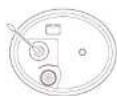
6 Gently clean the surface of the ultrasonic membrane with a soft, dry cloth.
After soaking a soft cloth in lukewarm water, wring and wipe off the dirt on the bottom and sides.
① Attention: Please do not use metal scourers, melamine sponges, polishing powers, or solvents like benzene, thinner, alcohol or other.
Watch this video on YouTube for retailers monthly maintenance instructions.

Maintenance before storing
Please conduct the following maintenance before storing the device:
Follow the same steps under Weedy
Dry each component before assembling it
3 Check that each component has fully dried, then assemble the device and store it.
Anti-scale and antibacterial cartridge
The filter cartridge (art. no. D8HJC01) needs to be replaced every 3 to 6 months depending on usage and water hardness.
Attention: When replacing the filter, please do not dispose of the cap of the water tank (component 10 in chapter 1).
Spare parts
Spare parts and accessories can be requested at the point of purchase or local distributor.
The instant, cold mist humidifier on legs.
5. Technical specifications
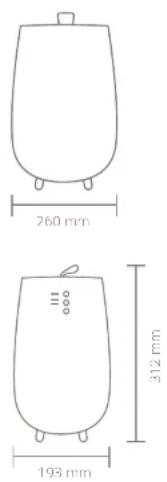
Weight: 1.5 kg
Power consumption: 14-20W
Water tank capacity: 2.5L
Effective area: 30m²
Mist output 250ml/h
Max. operation time: 10h
Power cord length: 1.5m
Main materials: ABS, PP
Model no.: DXHU02/03
The appearance and specification of the device may be changed without notice.
6. FAQ
Q. The power/water supply indicator does not light up and mist does not come out.
A. - Is the power plug inserted all the way to the back of the socket? is there a power cut?
Q. The power/water supply indicator is red and the power is off, even though the power button is pushed.
A. There is not enough water. Please fill the water tank with water.
Q. Strange noises accompany the use of the product.
A. A 'burbling' sound comes out of the main body. This sound is the sound of water being supplied from the water tank to the main body and does not mean the product is defective.
Q. A strange noise can be heard from the removed water tank.
A. When you remove an empty or nearly empty water tank from the main body, an abnormal sound from the water tank can be heard. This sound is related to pressure within the water tank and does not mean the product is defective.
Q. Mist can't be seen even when the power is connected.
A. - is the power/water supply display flashing red? There is insufficient water, if it is flashing red. Please fill the water tank with water. The most may not be visible depending on the balance between the room temperature and humidity.
Q. The mist volume is switched to MIN (minimum) even though it is not being used.
A. Was the power turned on again? The default mist volume will be MIN (minimum) if the power is turned on again, even if the mist volume was on MAX (maximum) prior to switching it on.
Q. The bottom light is on even though it is not being used.
A. Was the power turned on again? The light will be on if the power is turned on again, even if the bottom light is turned off.
Q. The floor is wet / There is a water leakage.
A. Is the floor wet clue to excessive humidity? - Wet floors from mist can occur due to the room environment and conditions of use. Please switch the mist volume to MIN (minimum), carefully adjust or turn off the device. - A unique feature of the ultrasonic humidifier is that, while it has a strong humidifying ability, the mist that forms is light, and therefore doesn't soak the surrounding area. We recommend the use of an external hygrometer to monitor humidity.
Q. How often should I replace the anti-scale and antibacterial cartridge?
A. Depending on usage and hardness of the water, we recommend to replace the cartridge every 3 to 6 months. We strongly advise to use the cartridge as it will extend the lifespan of your device.
Q. The water tank is full but the LED keeps flashing red.
A. Make sure the float (component 1 ^2 in chapter 1) is not fixed. Gentle nudge it lose with your finger to activate the empty water tank sensor.
Watch the instructions on YouTube here:

natural_image
Simple line drawing of a plug inserted into a socket connected to a cable (no text or symbols)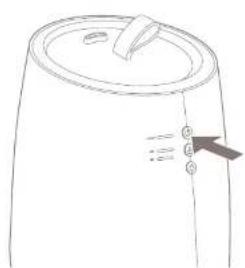
natural_image
Line drawing of a cylindrical container with a lid and side buttons (no text or symbols)natural_image
Line drawing of a cylindrical water heater with a power outlet and cable, no text or symbols presentnatural_image
Line drawing of a mechanical component with a circular base and handle (no text or symbols)natural_image
Diagram showing two steps of a lid or lid assembly with upward arrows indicating motion (no text or symbols)
natural_image
Simple line drawing of a cylindrical container with a lid and an upward arrow indicating vertical motion (no text or symbols)Watch this video on YouTube for detailed monthly maintenance instructions.

natural_image
Simple line drawing of a plug inserted into a cable, connected to a plug socket (no text or symbols)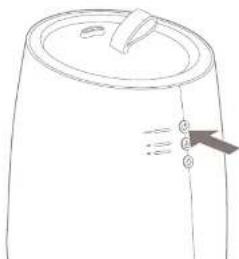
natural_image
Line drawing of a cylindrical container with a lid and side connectors (no text or symbols)natural_image
Line drawing of a cylindrical water heater with a power outlet and cable, no text or symbols presentnatural_image
Diagram showing two mechanical or electrical component configurations with arrows indicating connection points (no text or symbols present)natural_image
Line drawing of a mechanical component with a central circular feature and a handle (no text or symbols)natural_image
Diagram showing three steps of a container with arrows indicating upward and downward movement (no text or symbols)natural_image
Simple line drawing of a plug inserted into a socket connected to a cable (no text or symbols)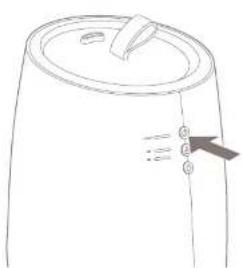
natural_image
Line drawing of a cylindrical container with a lid and side buttons (no text or symbols)natural_image
Line drawing of a cylindrical water tank connected to a power outlet (no text or symbols)natural_image
Pure technical diagram showing two views of a mechanical component with no text or symbolsnatural_image
Line drawing of a mechanical component with a circular base and handle, no text or symbols present3. Fonctions
natural_image
Diagram showing two steps of a lid with an arrow indicating upward motion (no text or symbols)natural_image
Diagram of a cylindrical container with a lid and an upward arrow indicating vertical motion (no text or symbols)changer sans notice.
6. FAQ
F. Strange noises accompany the use of the product.
A. A 'burbling' sound comes out of the main body. This sound is the sound of water being supplied from the water tank to the main body and does not mean the product is defective.
natural_image
Simple line drawing of a plug inserted into a socket connected to a cable (no text or symbols)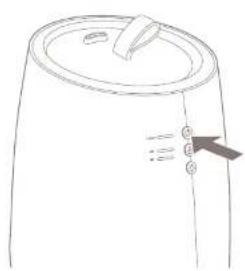
natural_image
Simple line drawing of a cylindrical container with a lid and side connectors (no text or symbols)natural_image
Line drawing of a cylindrical water heater with a power outlet connected to its side (no text or symbols)
natural_image
Line drawing of a mechanical component with a cylindrical base and a handle, no text or symbols presentThe European directive 2012/19/CE on Waste Electrical and Electronic Equipment (WEEE), requires that old household electrical appliances must not be disposed in the normal unsorted municipal waste stream. Old appliances must be collected separately in order to optimize the recovery and recycling of the materials they contain and reduce the impact on human health and the environment. The crossed out "whirlled bin" symbol on the product reminds you of your obligation, that when you dispose of the appliance it must be separately collected. Consumers should contact their local authority or retailer for information concerning the correct disposal of their old appliance.

END
Entsorgung
Designed in The Netherlands bij Duux BV. Made in P.R.C. Duux BV, P.O. Box 145, 5400 AC Uden Netherlands, www.duux.com
© 2021 Duux. All rights reserved.
DUUX® is a trademark of Duux BV,
registered in the EU and other countries.
The brand cited belongs exclusively to the respective owners.
Specifications are subject to modification without notice.
duux®
Version: GBDXHU0203_V3


- Tag
- Thank you for choosing Duux.
- Box contents
- Table of contents
- Product overview 2. Installation and use
- Installation
- Placement
- Filling the water tank
- Connecting the product
- Caution:
- Adjusting the mist output Adjusting the bottom light
- Using aromatherapy
- Functions 4. Maintenance
- Topcover
- Mist outlet
- Water tank
- Power/water supply indicator
- Mist output indicators
- Power button
- Mist output button
- Light button
- Power cable
- Water tank cap
- Anti-scale and antibacterial cartridge
- Water supply entrance
- Ultrasonic membrane
- Daily maintenance
- Weekly maintenance
- Maintenance before storing
- Anti-scale and antibacterial cartridge
- Spare parts
- The instant, cold mist humidifier on legs.
- Technical specifications
- FAQ
- Fonctions
- Strange noises accompany the use of the product.
- END
- Entsorgung
Brand : DUUX
Model : Tag
Category : Humidifier